What's inside
- Key Takeaways
- Quick Picks
- How We Chose These Picks
- What Is the Real Difference Between DOCSIS 3.0 and DOCSIS 3.1?
- Why Does the Rental Fee Maths Persuade Almost Everyone Eventually?
- Which Cable Modem Routers Deserve Your Activation Call?
- Combo or Separate Modem and Router — Which Architecture Suits Your Home?
- How Do the Six Picks Compare on Modem Standard and Tier Fit?
- How Do You Know Whether Your Cable Line Is Healthy?
- What Must You Verify With Your Cable Provider Before Buying?
- How Do You Activate a Retail Combo Without Losing Your Weekend?
- What Mistakes Do Cable Combo Buyers Keep Making?
- Final Recommendation
- Frequently Asked Questions
- Related Guides
As an Amazon Associate I earn from qualifying purchases. This post may contain affiliate links at no extra cost to you.
widgetverdict.com is reader-supported. When you buy through links on our site, we may earn an affiliate commission.
Where to buy: four picks below carry verified Amazon links; two more are covered in prose only — one because its current listing is a renewed unit we will not link, one because it sits outside our verified pool — and every pick comes with the same instruction: confirm it on your own provider’s approved list before ordering.
A cable modem-router is two appliances sharing one power supply: a DOCSIS modem that speaks to the cable network, and a Wi-Fi router that runs your home. The best ac cable modem routers earn their place by doing both jobs respectably while ending the monthly rental fee for the provider’s gateway — a fee that buys you nothing, forever, at the price of a good appliance every couple of years. The class is dominated by AC-era Wi-Fi, which suits the plans these combos typically serve, with one modern DOCSIS 3.1 and Wi-Fi 6 step-up at the head of this guide for households on gigabit cable tiers.
A note on the title’s honesty, since this guide practises it everywhere else: the head of the list has already stepped past AC into Wi-Fi 6, because the modem standard moved and the guide moved with it. The AC combos that fill the rest of the page are not leftovers but the correct tools for the tiers most cable households occupy — and the presence of one modern step-up, clearly labelled, is what keeps the AC recommendations honest rather than nostalgic.
Two pieces of literacy decide whether this purchase delights or educates.
The first is DOCSIS itself: version 3.0 hardware bonds channels in configurations like 24×8 or 32×8 and serves the classic cable tiers well, while 3.1 is the current standard that gigabit cable plans increasingly expect — some providers now require it for their fastest tiers. The second is compatibility, which is not a vibe but a list: every cable provider publishes approved retail modems, tier by tier, and a modem not on your provider’s list for your speed tier will simply not be activated. Read that list first; this guide is organised to make the reading easy.
Key Takeaways
- Check your provider’s approved modem list for your exact speed tier before buying anything — activation depends on it.
- DOCSIS 3.1 is the current standard and the safe buy for gigabit cable plans; 3.0 still serves classic tiers well.
- Channel counts like 24×8 describe DOCSIS 3.0 bonding capacity — more downstream channels, more headroom on busy networks.
- Owning replaces a perpetual rental fee with a one-off purchase; the maths usually settles within the first couple of years.
- If your provider’s phone service runs through its gateway, a retail combo may not replace it — check before cancelling anything.
Quick Picks
| Pick | Badge | Why it earns its place |
|---|---|---|
| Netgear Nighthawk CAX30 | DOCSIS 3.1 step-up | The modern answer: DOCSIS 3.1 with Wi-Fi 6 for gigabit cable tiers. |
| Motorola MG8702 | 3.1 with AC2600 Wi-Fi | DOCSIS 3.1 future-proofing paired with strong AC Wi-Fi and Motorola’s setup polish. |
| Motorola MG7700 | Classic-tier favourite | DOCSIS 3.0 24×8 with AC1900 Wi-Fi — the mainstream rental-killer for mid tiers. |
| ARRIS SURFboard SBG7600AC2 | 32×8 DOCSIS 3.0 pick | Maximum 3.0 channel bonding with AC2350 Wi-Fi for busy classic-tier homes. |
| Netgear Nighthawk C7000 | Prose-only — renewed listing | DOCSIS 3.0 AC1900 combo described without a link, because the listing we verified is a renewed unit. |
| Motorola MG7550 | Prose-only veteran | DOCSIS 3.0 16×4 AC1900 combo for the slowest classic tiers, covered in prose. |
How We Chose These Picks
Compatibility screening came first and eliminated more models than any performance test could. We favoured combos with broad approval across the major cable providers and clear documentation of which speed tiers each provider certifies them for, because a modem-router’s first job is to be activatable at your address, on your plan, on the day it arrives. Models with muddy or outdated approval stories were set aside regardless of their Wi-Fi numbers.
The DOCSIS sort came next. Gigabit-tier households were pointed at 3.1 hardware without apology — the standard their plans increasingly assume — while classic-tier households were matched to 3.0 models whose channel counts suit their speeds, because paying for 3.1 to serve a mid-tier plan buys insurance some households want and others simply do not need. Within each group we then judged the router half as a router: Wi-Fi competence for the home’s size, guest networking, parental controls, and a setup process that survives contact with a provider’s activation line.
We also read the fine print that decides ownership quality after activation: whether the router half supports a guest network worthy of the name, whether parental controls operate per device rather than per prayer, and whether the modem’s status pages are exposed to the owner or hidden behind the provider’s login. A combo is a five-year appliance, and the difference between a transparent one and a sealed one compounds across every support call of those five years.
Finally, the prose-only discipline of this guide applied in full.
One well-known pick appears without a link because the listing currently attached to it is a renewed unit, and our pool links only verified new listings; another veteran sits outside the verified pool entirely. Both are described on their merits so the comparison stays complete, and the absence of a link is stated in their headings rather than hidden — the same honesty this guide asks of modem specification sheets.
What Is the Real Difference Between DOCSIS 3.0 and DOCSIS 3.1?
A historical sentence helps the versions sit still: DOCSIS 3.0 has carried the world’s cable homes for well over a decade, which is why its hardware is cheap, its behaviour is mapped and its approval lists are long. DOCSIS 3.1 is not a rupture but the same system’s next fluency, deployed street by street as networks rebuild. A buyer in 3.0 territory is not behind the times; a buyer in a freshly rebuilt 3.1 neighbourhood who purchases 3.0 hardware is behind his own street, which is the only behind that matters.
Think of DOCSIS as the language the modem speaks to the cable network, and of the versions as dialects of increasing fluency.
DOCSIS 3.0 builds speed by bonding many modest channels together — the 24×8 notation means twenty-four downstream channels and eight upstream — and in its strongest 32×8 form it can carry the classic cable tiers, up to the border of gigabit service, with real competence. It is a mature, thoroughly understood technology, and on a mid-tier plan it is not a compromise at all.
DOCSIS 3.1 changed the modulation itself, packing more data into each channel and adding far more capacity in both directions, with design headroom for the multi-gigabit tiers cable networks are now selling. Providers have noticed: gigabit cable plans increasingly specify 3.1 hardware, and some networks have begun retiring 3.0 support at their fastest tiers altogether. The practical translation for a buyer is simple. If your plan is a classic mid tier and likely to stay there, a good 3.0 combo remains a rational, money-saving purchase. If your plan is gigabit, or your street’s tiers keep climbing, 3.1 is not a luxury — it is the standard your provider is migrating toward, and buying 3.0 today can mean buying twice.
There is a corollary for renters of the provider’s gateway who are reading this guide in the planning stage: the same version logic explains why a gateway swap sometimes feels like an upgrade and sometimes like a summons. When a provider migrates a neighbourhood to 3.1 expectations, the rented fleet is refreshed on their schedule; owners refresh on theirs. The household that buys 3.1 today is simply choosing to keep its own schedule permanently, which is the deeper purchase underneath the hardware.
One more distinction hides in the upstream numbers and matters to working households.
The second figure in a 3.0 channel count — the ×8 — describes upstream bonding, and home workers live upstream: video calls, cloud drives, camera uploads. All the picks here carry healthy upstream configurations for their class, but households whose income travels up the cable should weigh that second number with the same care as the first.
Why Does the Rental Fee Maths Persuade Almost Everyone Eventually?
Because it is the rare technology argument that can be settled with a calendar. A rented gateway costs its fee every month, in exchange for hardware that ages exactly as fast as hardware you own. Set the fee against the price of a combo from this guide and the two lines cross — typically inside the first couple of years — after which the owned modem is, in the plainest financial sense, paying the household a small monthly dividend for the remainder of its service. Households do not need to love networking to love that arithmetic; they need only to read one bill closely.
The counterarguments deserve their honest airing, because they are the reasons sensible people rent. A rented gateway is the provider’s problem: it is replaced when it fails, supported by the help desk without argument, and upgraded when the network migrates — the DOCSIS 3.1 transition being the live example, where renters were simply handed new boxes while some owners shopped twice. Ownership transfers all of that to you. The households that should own are the ones comfortable holding a spare, following an approval list, and treating a modem as an appliance rather than a service — which, this guide would argue, describes most households once the maths has been shown to them.
There is also a performance footnote that rarely survives marketing: the rented gateway is specified for the provider’s convenience, which means adequate radios, modest processors and firmware updated on the network’s schedule. The combos in this guide are specified to be sold against rivals, which is a different and usually higher bar. The rental fee, in other words, often rents you the weakest respectable hardware in the category while charging you, across a few years, the price of the strongest.
Which Cable Modem Routers Deserve Your Activation Call?

Netgear Nighthawk CAX30 — DOCSIS 3.1 step-up
The CAX30 is the pick that breaks this guide’s title gently, and it does so on purpose: it pairs a DOCSIS 3.1 modem with Wi-Fi 6 rather than AC Wi-Fi, making it the step-up for cable households whose plan has reached the gigabit tier. Where the AC combos below serve the classic tiers completely, the CAX30 serves the present and the announced future — 3.1 activation on the providers that require it for top tiers, and a wireless standard that matches the devices now arriving in homes. If your cable plan is fast and climbing, this is the combo that will not need replacing when the next tier letter arrives.
Netgear builds the ownership experience to its usual standard: app-guided setup that understands it will be interrupted by an activation call, readable device management, and the Nighthawk line’s gaming-adjacent polish for the households that want it. The modem half carries the channel capacity and the OFDM channels that 3.1 service uses, and the whole unit runs as one coherent appliance rather than a modem with a router glued on as an apology.
Its premium is the honest cost of the step-up, and households on classic tiers should let the picks below save them the money — a 3.1 modem on a mid-tier plan delivers exactly the mid-tier plan. The CAX30’s buyer is specific: gigabit cable today, or a provider visibly migrating its tiers, in a home that wants one box and a long service life. For that buyer it is not the expensive option; it is the only one that does not schedule a second purchase.
- DOCSIS 3.1 modem for current and gigabit cable tiers
- Wi-Fi 6 AX2700 dual-band wireless — the step beyond AC
- App-guided setup and activation flow
- Gigabit Ethernet ports for wired devices
- Single-box replacement for a rented gateway
Strengths
- Current-standard modem and wireless in one purchase
- Ready for providers that require 3.1 at top tiers
- Polished ownership experience from the Nighthawk line
Trade-offs
- Premium pricing wasted on classic mid-tier plans
- Wi-Fi 6 dual-band only — no 6GHz band
- Still requires your provider’s approval for your tier
Best for: gigabit cable households wanting one future-ready combo box. Not suited for: classic-tier plans well served by the DOCSIS 3.0 picks.
It is also the natural answer for the household that has already been burned once — the one that bought a 3.0 combo just as its provider moved the gigabit goalposts, and now owns a perfectly good modem for a plan it no longer has. That experience, common enough to have a folklore, is precisely the purchase pattern the CAX30 exists to prevent: buy the standard the network is moving toward, once, and let the tiers come to you.
Its day-to-day manners suit the role. The unit runs its modem and router halves as one thermal and administrative whole — one firmware, one reboot, one status page when the provider’s status line and your own observations disagree about whose fault an outage is. Anyone who has troubleshot a separate modem-and-router pair at midnight, each blinking innocently at the other, will recognise the single-box peace offering for what it is worth in a household that values its evenings.
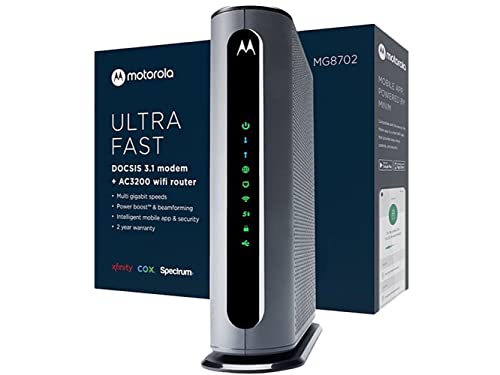
Motorola MG8702 — 3.1 with AC2600 Wi-Fi
The MG8702 makes a different and equally coherent argument for DOCSIS 3.1: pair the current modem standard with the strongest AC Wi-Fi in this guide, for households whose devices are Wi-Fi 5 through and through but whose cable plan deserves the modern modem. Its AC2600 wireless is the class’s generous end — more spatial capacity for a busy home’s worth of streams and calls — and Motorola’s Whole Home Wi-Fi thinking shows in a setup and management experience designed for owners rather than enthusiasts.
Motorola’s modem heritage is the quiet headline. This is a brand that built cable modems before it built combos, and the MG8702’s approval footprint across major providers is correspondingly broad, with the 3.1 modem carrying the OFDM capacity the gigabit tiers use. The app experience handles the household chores — guest access, parental controls, device visibility — in plain language, and the unit’s vertical design keeps its footprint modest on the shelf it will occupy for years.
Choose it over the CAX30 when your device fleet is AC-era and likely to stay that way while your plan is not; choose the CAX30 when the laptops and phones have already moved to Wi-Fi 6. Either way the modem half is settled for the network’s current migration, which is the expensive half to get wrong. The MG8702’s only real fence is that same premium logic: classic-tier households are paying for a standard their plan cannot use, and the MG7700 below exists for them.
- DOCSIS 3.1 modem with broad provider approval
- AC2600 dual-band Wi-Fi — strongest AC wireless here
- App-based setup with parental controls and guest access
- Gigabit Ethernet ports
- Vertical, shelf-friendly design
Strengths
- Modern modem standard without paying for unused Wi-Fi 6
- Strongest AC wireless in the guide for busy homes
- Motorola’s modem pedigree and approval breadth
Trade-offs
- Wi-Fi 5 radios cap the newest devices’ potential
- Premium over 3.0 models that classic tiers cannot repay
- No 6GHz or mesh-ecosystem story
Best for: AC-era households on fast or climbing cable plans wanting 3.1 security. Not suited for: Wi-Fi 6 device fleets or budget classic-tier buys.
There is a buying-psychology point in this model’s favour worth naming: it separates the two upgrade clocks. Modems age on the provider’s schedule, routers on the device industry’s, and they rarely chime together. The MG8702 lets a household set the modem clock to the network’s future while keeping the router clock where its devices actually are — a more honest allocation of money than either an all-old or all-new combo usually manages.
Practical ownership notes round it out: the MG8702’s status and signal pages are genuinely useful during the one support call every cable household eventually makes, because they speak the provider’s own language of levels and channels. A modem that can show its working to the person on the phone shortens that call measurably, and across a service life of years those shortened calls add up to a real, if unglamorous, ownership dividend.
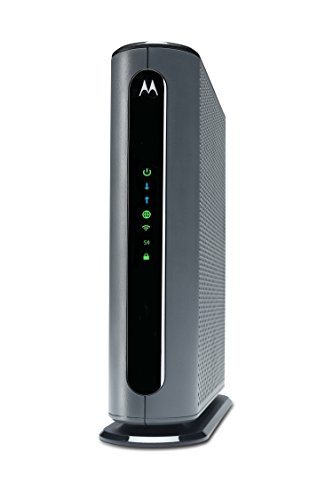
Motorola MG7700 — Classic-tier favourite
If the rental-fee rebellion has a headquarters, it is this model. The MG7700 pairs a DOCSIS 3.0 modem bonding 24 downstream and 8 upstream channels with AC1900 Wi-Fi, a combination aimed squarely at the classic cable tiers that most households actually subscribe to — and priced so that the rental comparison embarrasses the provider’s gateway within the first couple of years. For the mid-tier majority, this is the combo that made “buy your own modem-router” a mainstream sentence.
The ownership experience explains the installed base. Motorola’s setup is among the least dramatic in the category, the wireless covers the flat or modest house it is designed for, and the unit’s built-in power-boost amplifier thinking — getting more honest signal out of the radios it has — suits the real homes it lands in. Its approval history across the big providers is long, which matters at activation time more than any benchmark: the support agent on the phone has activated this model ten thousand times, and your call will be boring. Boring is the highest praise available in modem activation.
Its fences are generational and stated plainly. DOCSIS 3.0 will not serve a gigabit tier on providers that reserve those for 3.1, and its Wi-Fi is AC-era dual-band without a mesh story. Households expecting a tier upgrade should step to the 3.1 picks above rather than buy this twice. Households settled on a classic plan — and there are tens of millions — will find the MG7700 the most rational object in this guide: the right standard, the right Wi-Fi, the rental fee gone.
- DOCSIS 3.0 modem, 24×8 channel bonding
- AC1900 dual-band Wi-Fi
- Broad, long-standing provider approval
- Gigabit Ethernet ports for wired devices
- Compact single-box gateway replacement
Strengths
- The mainstream rental-fee answer for classic tiers
- Activation is famously uneventful on major providers
- Balanced specification with no wasted spending
Trade-offs
- DOCSIS 3.0 excludes it from gigabit-tier duty on many providers
- AC Wi-Fi only, sized for modest homes
- No mesh expansion ecosystem
Best for: classic mid-tier cable households ending the rental fee. Not suited for: gigabit plans or households expecting a tier jump.
A word about its second life, because combos have one too: when a household eventually upgrades to a 3.1 unit, the MG7700 retires gracefully to a relative’s classic-tier home, a rental property, or a small office whose plan it still fits exactly. The rental-fee maths then runs a second time in a second household — a compounding return that pure routers, chained to no provider list, rarely get to enjoy.
It also deserves its reputation among the technically cautious. Nothing in the MG7700 is experimental: the standard is mature, the Wi-Fi is the class’s centre, the failure modes are all documented and dull. For a buyer whose deepest networking desire is that the subject never come up again — at dinner, at work, at the provider’s support line — that dullness is not the absence of a feature. It is the feature, and this model has more of it than anything else on the page.
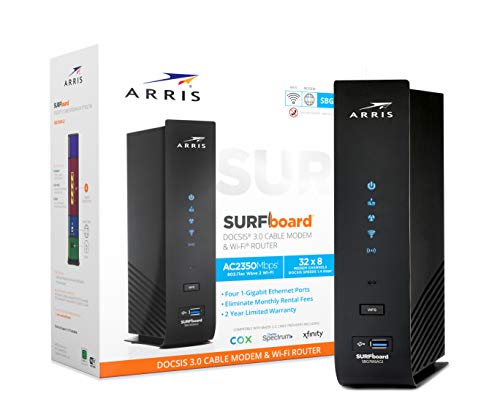
ARRIS SURFboard SBG7600AC2 — 32×8 DOCSIS 3.0 pick
ARRIS built much of the cable world’s modem installed base under the SURFboard name, and the SBG7600AC2 is its full-strength DOCSIS 3.0 combo: 32 downstream and 8 upstream channels — the maximum bonding the 3.0 standard offers — with AC2350 Wi-Fi on the router side. For a classic-tier household in a congested neighbourhood, those extra downstream channels are not decoration: channel bonding spreads your traffic across more of the network’s capacity, and on busy evening segments the 32-channel models hold their tier’s speed more stubbornly than their 24- and 16-channel relatives.
The ownership proposition is the industrial one. ARRIS firmware is functional rather than charming, the SURFboard management tools cover the household essentials, and the brand’s approval presence across providers is as deep as the category offers — this is the modem lineage many networks were literally built around. Households that value the provider’s own ecosystem familiarity will find activation calls with this badge on the box to be the shortest in the business.
Its trade-offs mirror the MG7700’s with one addition: size and styling from the era when a modem-router was expected to look like network equipment. The DOCSIS ceiling is the same 3.0 story — superb for classic tiers, excluded from gigabit duty where providers reserve it for 3.1 — and the Wi-Fi, while the stronger AC2350 specification, remains a single-box answer for modest floor plans. Buy it as the maximum expression of the 3.0 generation, for a busy classic-tier home, and it will not disappoint.
- DOCSIS 3.0 modem, 32×8 channel bonding — the 3.0 maximum
- AC2350 dual-band Wi-Fi
- Deep provider approval from the SURFboard lineage
- Gigabit Ethernet ports
- McAfee-powered security suite features on this line
Strengths
- Maximum 3.0 channel capacity for congested networks
- Stronger AC Wi-Fi than most classic-tier combos
- Activation familiarity across major providers
Trade-offs
- Still DOCSIS 3.0 — no gigabit-tier future on many networks
- Utilitarian design and interface
- Single-box coverage limits for larger homes
Best for: busy classic-tier homes on congested cable segments wanting maximum 3.0 headroom. Not suited for: gigabit plans or design-sensitive shelves.
The channel-count lesson this model teaches is worth carrying to any modem purchase: on a shared cable segment, capacity is communal, and the modem that can listen on more channels weathers the neighbourhood’s evening peak with more grace. It is the closest thing DOCSIS 3.0 has to a future-proofing argument, and within the classic tiers it is a genuinely good one — the SBG7600AC2 is the 3.0 pick for households that intend to stay on 3.0 for years and want it at its best.
Home workers on classic tiers should give its upstream its due: eight bonded upstream channels is the 3.0 standard’s full arrangement, and on a network whose segments groan at nine in the morning, that upstream depth is the difference between a video call that holds and one that negotiates. Product pages lead with downstream because households download more than they send, but the working day is an upstream activity, and this combo was specified by people who appear to know it.
Netgear Nighthawk C7000 — Prose-only, renewed listing
The C7000 is one of the best-known cable combos ever sold — a DOCSIS 3.0 modem with AC1900 Wi-Fi under the Nighthawk badge — and it is described here without a purchase link for a specific, declared reason: the listing currently attached to this model in our pool check is a renewed unit, and this guide links only verified new listings. The hardware’s merits are unaffected by that bookkeeping. On classic cable tiers it has served an enormous installed base, its approval history is long, and its router half carries the Nighthawk line’s familiar competence.
Why include it at all, linkless? Because buyers researching this category will meet it constantly — in provider lists, in forums, in the hands of relatives — and a guide that pretended it did not exist would fail them. Read it as the reference point of the DOCSIS 3.0 AC1900 class: the MG7700’s closest rival in spirit, differing in ecosystem flavour more than in capability. A household that finds a verified new unit through a reputable channel, on its provider’s list for its tier, buys a known quantity with a decade of documentation behind it.
The same fences as every 3.0 pick apply: no gigabit-tier future where providers reserve those plans for 3.1, AC-era wireless, single-box coverage. And the renewed-listing caution generalises beyond this model — combo modems are occasionally sold refurbished with another household’s activation history attached, which can complicate a provider’s registration. Buy combos new where you can, from channels you trust, and let this section stand as the reason this guide is fussy about it.
- DOCSIS 3.0 modem with AC1900 Wi-Fi
- Long provider-approval history on classic tiers
- Nighthawk-line router features and app
- Gigabit Ethernet ports
- No link in this guide — the available listing is renewed stock
Strengths
- The reference design of the 3.0 AC1900 class
- Enormous installed base and documentation
- Balanced modem and router halves
Trade-offs
- No link here — renewed listing excluded by policy
- DOCSIS 3.0 ceiling, as with its class
- Refurbished units elsewhere can complicate activation
Best for: classic-tier households who find a verified new unit on their provider’s list. Not suited for: gigabit tiers, or buyers wanting a link from this guide.
Its presence in this guide, linkless and labelled, is also a small demonstration of the guide’s whole method: a recommendation you cannot act on through us is still worth printing when the product shapes the market you are shopping in. The C7000 will be the comparison point in a hundred forum threads you read this week; better that you meet it here, with its context attached, than alone on a listing page at midnight.
A closing practical word for its hunters: because the model has been sold for years through many channels, verify the unit’s revision and completeness when buying — the correct power supply matters more than its dignity suggests, and a modem missing its original adapter is a modem negotiating from weakness. The same caution, in miniature, applies to every long-lived model in this guide, and it costs nothing but a minute’s reading of the listing you choose.
Motorola MG7550 — Prose-only veteran
The MG7550 closes the guide at the DOCSIS 3.0 ladder’s lower rungs: 16 downstream and 4 upstream channels with AC1900 Wi-Fi, a combination sized for the slowest classic cable tiers — the modest plans, the light households, the second homes and rental properties where the internet’s job is email, browsing and a television. It is covered in prose because it sits outside our verified pool, and it earns its paragraphs the way the C50 earned its place in our AC1200 guide: by being the right-sized, honest tool for a brief that flagship hardware would only over-serve.
Motorola’s virtues travel down the range intact: clear setup, a management experience a non-specialist can survive, and an approval history on the major providers that makes activation a formality on the tiers it fits. Its built-in power amplifier design was always aimed at real homes rather than laboratories, and for a small property on a slow tier the MG7550 delivers the entire plan with the rental fee abolished — which, at its level, is the whole assignment, completed.
Read its channel count as its fence, stated in numbers: 16×4 bonding belongs to the lower tiers, and a household whose plan climbs will outgrow it exactly as it outgrows the plan. That is not a flaw but a sizing, and the discipline of this guide is to honour sizings rather than apologise for them. For the property and the plan it matches, the MG7550 remains a perfectly rational purchase — the veteran at the ladder’s foot, still doing its one job properly.
- DOCSIS 3.0 modem, 16×4 channel bonding
- AC1900 dual-band Wi-Fi
- Sized for the slowest classic cable tiers
- Motorola setup and management experience
- Covered in prose only in this guide
Strengths
- Right-sized and priced for light classic tiers
- Simple ownership for non-technical households
- Abolishes the rental fee at the lowest commitment
Trade-offs
- 16×4 bonding caps it at the lower tiers
- No purchase link in this guide
- AC-era wireless and single-box coverage
Best for: light households, second homes and rentals on slow classic cable tiers. Not suited for: mid or fast tiers, or growing households.
There is a final, almost sentimental argument for machines at this rung: they are the ones that convert the sceptics. The relative who swore the provider’s box was fine discovers the rental line gone from the bill and the Wi-Fi unchanged, and becomes the family’s next advocate for owning the boring infrastructure. Technologies spread through exactly such conversions, and the MG7550 has been quietly performing them for years.
Property owners should note its rental arithmetic in their own ledger: a holiday let or a tenanted flat with an owned MG7550-class combo stops donating a gateway fee to the provider for a house the owner does not even live in, and the unit’s simplicity means a tenant’s reset button adventure is recoverable by phone. Small numbers, multiplied across properties and years, are how portfolios are actually built, and this veteran has been multiplying them unnoticed for a long time.
Combo or Separate Modem and Router — Which Architecture Suits Your Home?
This guide covers combos, but the honest guide admits the rival architecture exists and sometimes wins. A separate modem and router let each half be chosen, placed and replaced on its own logic: the modem lives where the coax enters, the router lives where the people are, and when Wi-Fi standards move you replace the router while the modem — chained to the provider’s slower clock — serves on. Households with large floor plans, where the cable entry point and the living space refuse to coincide, often find that geography alone settles the argument for separates.
The combo’s counterargument is the one this category was built on: one box, one power supply, one firmware, one throat to choke when the connection misbehaves, and a purchase price that undercuts the pair. For the flat, the modest house and the rental-weary household whose coax enters somewhere sensible, that simplicity is not a compromise but the entire point. The picks above were chosen as the combos that make the strongest case for their architecture — competent at both jobs, honest about their tiers, and priced so the rental comparison does their persuading.
Whichever architecture a household chooses, the disciplines of this guide travel with it: the approved list governs the modem half in both worlds, the DOCSIS version must match the tier’s present and near future, and the router half should be judged by coverage and competence rather than by the summed number on a carton. Architecture is a preference; those three checks are not.
How Do the Six Picks Compare on Modem Standard and Tier Fit?
| Pick | DOCSIS | Channels | Wi-Fi |
|---|---|---|---|
| CAX30 | 3.1 | OFDM 3.1 channels | Wi-Fi 6 AX2700 |
| MG8702 | 3.1 | OFDM 3.1 channels | AC2600 |
| MG7700 | 3.0 | 24×8 | AC1900 |
| SBG7600AC2 | 3.0 | 32×8 | AC2350 |
| C7000 | 3.0 | 24×8 | AC1900 |
| MG7550 | 3.0 | 16×4 | AC1900 |
Shop the table from the left: your provider’s list and your tier choose the DOCSIS column first, the channel column second, and only then does the Wi-Fi column get a vote. A combo bought in the reverse order is a common and expensive poem.
Notice the two rows with identical Wi-Fi figures and different channel counts — the MG7700 and the C7000 against the MG7550’s identical AC1900 label. That sameness is the table’s quiet argument: in this category the wireless number is the least informative figure on the sheet, repeated across models whose modem halves differ by a full tier of service. Anyone who shops these products by the AC number alone is reading the one column that cannot distinguish them.
How Do You Know Whether Your Cable Line Is Healthy?
Every combo in this guide keeps a status page that reports the conversation between the modem and the street: downstream power levels, signal-to-noise figures, and a log of events with names like ranging and reboots. You do not need to become fluent in this page, but a household that can open it owns a superpower during support calls, because the provider’s agent can see the same numbers and the conversation changes from folklore to arithmetic. A modem that reboots itself daily, or whose log fills with ranging errors, is describing a line problem — a splitter, a connector, water in a junction — far more often than a modem problem.
The practical habit is simple: after activation, once the connection has settled, take a screenshot of the status page on a good day. That picture becomes your baseline. When the connection later develops a limp, the comparison between the baseline and the new numbers tells you — before any phone call — whether the street changed or the box did, and it turns a vague complaint into a report an engineer can act on. Owners of separate modems have used this trick for decades; combo owners inherit it free and rarely learn it exists.
It is also the honest way to judge a new purchase. A combo that holds clean levels and an empty error log through the evening peak is performing its modem half perfectly, whatever the Wi-Fi is doing in the far bedroom — and separating those two judgements, modem from router, is the beginning of competence in this category. The households that master it stop replacing hardware on suspicion, which is where the real savings in this market have always hidden.
What Must You Verify With Your Cable Provider Before Buying?
One document governs everything: the provider’s approved retail modem list, for your address’s network and your exact speed tier. Providers maintain these lists because cable networks differ — a modem approved on one network may be unknown on another, and approval for a slow tier does not imply approval for a fast one. Find your candidate on that list, at your tier, in writing, before money moves. Every pick in this guide has broad approval, but “broad” is not “yours”, and activation day is the wrong time to learn the difference.
Ask three more questions while you are there. First, whether your account includes the provider’s telephone service through its gateway: voice customers often need the provider’s equipment for the phone line, or a specific approved arrangement, and discovering that after returning the gateway is a special misery. Second, whether your tier has a DOCSIS 3.1 requirement now or a dated migration plan, which decides the 3.0-versus-3.1 question with facts instead of vibes. Third, how activation works — most providers now activate a retail modem through an app or a web page with the unit’s MAC address, a ten-minute job when the model is on the list and an odyssey when it is not.
Finally, keep the rental gateway until the new combo has survived a full week. Returns departments and activation queues both move at their own pace, and the household that keeps its exit open negotiates both from a position of comfort.
One more verification is cheap and decisive: your home’s coax itself. Splitters installed for televisions that no longer exist, corroded outdoor connectors and amplifiers from a previous technology generation all tax a modem’s signal before the DOCSIS version gets a say, and a new combo installed on tired coax will be blamed for the wiring’s sins. If the old gateway’s signal levels were marginal, have the provider check the line while you still have their box — the visit is theirs to make, and the new modem inherits a clean line.
One more verification is cheap and decisive: your home’s coax itself. Splitters installed for televisions that no longer exist, corroded outdoor connectors and amplifiers from a previous technology generation all tax a modem’s signal before the DOCSIS version gets a say, and a new combo installed on tired coax will be blamed for the wiring’s sins. If the old gateway’s signal levels were marginal, have the provider check the line while you still have their box — the visit is theirs to make, and the new modem inherits a clean line.
How Do You Activate a Retail Combo Without Losing Your Weekend?
Prepare before you disconnect anything: photograph the old gateway’s label, note your account details, and have the new unit’s MAC address and serial number — printed on its base — written where you can read them aloud. Connect the coax firmly, power the combo, and give it several patient minutes to find the network and take its firmware; modem first boots are measured in geological time compared to routers, and interrupting one is the classic way to manufacture a fault.
Then follow your provider’s activation path — app, web portal, or the phone line — with the account holder’s details in hand. Once the internet light is honest, set up the Wi-Fi with your existing network name and password exactly, so the household’s devices rejoin without a tour of every settings menu in the home. Test wired first, then wireless, then make the call that matters: the one that ends the rental and schedules the old gateway’s return. Keep its receipt. Rental charges have outlived returned equipment often enough that the receipt is a genre of financial document unto itself.
Budget the whole job an unhurried morning rather than the optimistic half hour of the advertisements, most of which will be spent waiting — for the modem to range, for the activation system to notice, for the firmware the provider pushes on first contact to finish installing itself. None of that waiting is failure. The households that schedule it calmly, coffee in hand and old gateway still within reach, describe activation as a non-event; the ones who start it twenty minutes before a work call describe it as a story. The difference is never the modem.
What Mistakes Do Cable Combo Buyers Keep Making?
The champion error is buying before checking the approved list — falling for a specification, ordering with confidence, and meeting an activation refusal that no amount of router quality can argue with. Its close cousin is checking the list once, for the wrong tier: approval is granted per plan speed, and the household that verifies its model at a slower tier than its own has performed the ritual without receiving the blessing. Second is the DOCSIS mismatch in both directions: the gigabit household that buys a 3.0 combo its provider will not activate at that tier, and the classic-tier household talked into 3.1 premiums its plan can never repay. Third is forgetting the telephone service, and discovering the house phone died with the returned gateway.
Fourth, households judge a combo by its Wi-Fi alone and ignore the modem half entirely, when the modem half is the half chained to the provider’s list and the half that decides the unit’s service life. Fifth, they throw the rental gateway’s return receipt away. This guide has now warned about the receipt twice, which is the correct number of times.
Final Recommendation
Start at your provider’s list and your tier, and the choice mostly makes itself. Gigabit cable households should buy the CAX30 for the full modern package, or the MG8702 when the device fleet is AC-era and the modem is the half that needs to be current. Classic-tier households should take the MG7700 as the mainstream rental-killer, the SBG7600AC2 when the neighbourhood segment is busy and maximum 3.0 bonding earns its keep, and should read the prose-only C7000 and MG7550 as the class’s reference point and its light-tier veteran respectively. However the tiers shuffle in the coming years, the principle on this page will not change: a modem you own, approved for your plan, beats a modem you rent, approved for nothing but the bill — and the first month without that line item is the sweetest upgrade in home networking.
One last discipline survives whichever pick you take home: write the activation date, the model and its MAC address into the same household file that holds your other infrastructure notes, and photograph the status page once the line has settled. Years from now, when a tier changes or a support call begins, that small archive will be the difference between a ten-minute conversation and an archaeological dig — the same lesson every category in this batch keeps teaching, because it is true of all of them.
Frequently Asked Questions
Will any cable modem-router work with my provider?
No. Each provider approves specific models for specific speed tiers on its own network. Check the approved list for your tier before buying — it is the single most important step in this entire category. The same model can be approved at one tier and absent at a faster one on the same provider, so check the row for your plan rather than the model’s name alone, and repeat the check if you change tiers later.
Do I need DOCSIS 3.1?
If your plan is a gigabit tier, or your provider is migrating its fast tiers to 3.1, yes. For classic mid and slow tiers, a good DOCSIS 3.0 combo remains entirely sufficient and cheaper. The tie-breaker is your street’s trajectory: providers announce tier migrations in their marketing long before they enforce them in their lists, so a household watching its plan’s ceiling rise year over year should buy 3.1 at the next purchase even if today’s tier does not yet demand it.
What does 32×8 mean on a modem?
It is the DOCSIS 3.0 channel bonding count: 32 downstream channels and 8 upstream. On the 3.1 models the notation changes — capacity comes from wide OFDM channels rather than a count of narrow ones — which is why the comparison table in this guide lists the 3.1 picks by standard rather than by a channel figure.
If a salesperson quotes you a channel count for a 3.1 modem, they are translating for familiarity, not describing the machine; judge 3.1 models by their standard, their approval row and their router half, in that order, and the purchase will be the right one.
More downstream channels generally mean better headroom on busy network segments at classic tiers. The upstream figure deserves equal attention in a working household: it describes how many channels carry everything you send, and the ×8 models in this guide hold video calls and uploads together better at the morning peak than the ×4 veteran at the ladder’s foot.
Can I replace the provider gateway if I have their phone service?
Sometimes — but check first. Voice service often depends on the provider’s own equipment or a specific approved arrangement. Confirm before returning anything, or keep the gateway for voice and route data through your own unit where the provider allows. Households that no longer use the landline at all should also confirm it is actually removed from the account; a voice service nobody uses, silently keeping a rented gateway on the bill, is this category’s most quietly expensive sentence.
Is a separate modem and router better than a combo?
It is more flexible — each half upgrades on its own schedule — at the cost of two boxes, two power supplies and more setup. Combos win on simplicity and shelf space; separates win on upgrade paths. This guide covers combos; households that prefer separates should apply the same DOCSIS and approval rules to the modem half. Large homes in particular should price both architectures honestly, because a combo placed at a bad coax entry point can cost more in mesh nodes to compensate than the separates would have cost in the first place.
Why are two picks in this guide prose-only?
One model is currently offered only as a renewed unit, which our pool does not link, and the other sits outside our verified pool. Both are described honestly so the comparison stays complete, and the reason is stated in each pick’s heading. Readers who source either model elsewhere should apply the same discipline the pool applies: confirm the unit is new or properly refurbished by the manufacturer, and confirm its exact model — not its family name — against the provider list before paying.
Related Guides
Continue with our guides to the best ac 1200 routers, the best 1gbps fiber routers and the best routers for gigabit internet.
Related guide: Best Tenda Routers
Related guide: Best Belkin Routers