What's inside
- Key Takeaways
- Quick Picks
- How We Chose These Picks
- Comparison Table
- What Should You Look for in the Best Ad On Mic for Android Phones?
- How Do You Set Up a Wireless Mic With an Android Phone, Step by Step?
- How Do You Stop Wind, Echo and Clothing Noise From Ruining Recordings?
- Wired Lavalier or Wireless Kit: Which Add-On Style Suits Your Filming?
- How Do You Record Two People Well on a Phone?
- How Much Battery and Storage Does Wireless Filming Really Consume?
- Which Kit Fits Which Kind of Creator?
- How Do You Care for a Wireless Mic Kit So It Lasts for Years?
- What About Latency, Monitoring and Live Streaming on Android?
- Common Mistakes When Buying an Add-On Mic
- Final Recommendation
- Frequently Asked Questions
- Related Guides
As an Amazon Associate I earn from qualifying purchases. This post may contain affiliate links at no extra cost to you.
widgetverdict.com is reader-supported. When you buy through links on our site, we may earn an affiliate commission.
Search for the best ad on mic for android phones and you land in a thicket of near-identical wireless kits, all promising studio sound from a box the size of a matchbook. The phrase means an add-on microphone — a mic you attach to your phone because the built-in one, however good, sits wherever the camera points and hears the room as loudly as it hears you. Clip a wireless transmitter to a collar, plug a small receiver into your phone’s USB-C port, and voices move to the front of the recording while traffic, wind and kitchen echoes fall behind. Six kits below earned full detailed reviews, from DJI, RØDE, Hollyland and BOYA, every one verified with a listing and every one genuinely compatible with Android.
Where to buy: all six kits link to the exact configuration named in their reviews, checked against the site’s product data before writing. Configuration is the trap in this category — the same kit name can hide a Lightning receiver for older iPhones, a USB-C receiver for Android, or a camera receiver with a 3.5mm plug. Buy the version your phone needs, which for any modern Android handset means USB-C. Prices shift with creator-season sales, so check price on Amazon at the moment of ordering rather than trusting any figure quoted elsewhere.
One compatibility truth before the rankings: Android’s openness is a blessing and a small curse. Every kit here connects over USB-C and is recognised as an external microphone by the standard camera app on Pixel and Samsung phones, but some third-party camera apps ignore external mics entirely. The reviews note where a maker’s own app matters. If you film inside social apps, test your chosen kit in that app during the return window — a thirty-second clip will tell you more than any specification page. That single test prevents the most common disappointment in this entire category.
Key Takeaways
- DJI Mic 2 is the default recommendation: clean sound, internal backup recording, an easy touchscreen.
- RØDE Wireless PRO adds 32-bit float and timecode for creators who edit seriously.
- DJI Mic Mini shrinks the transmitter to a coin for discreet on-camera work.
- RØDE Wireless GO II remains the proven workhorse with onboard recording on both transmitters.
- Hollyland Lark M2 in its USB-C version is the simplest plug-and-play route into wireless audio.
- BOYA BY-V20 covers casual creators at the lowest cost in this guide, with pass-through phone charging included.
Quick Picks
| Pick | Badge | Why it earns its slot |
|---|---|---|
| DJI Mic 2 (2 TX + 1 RX + Charging Case) | Best overall | Polished sound, a receiver screen you can read at a glance, backup recording inside each transmitter. |
| RØDE Wireless PRO | Best for serious creators | 32-bit float recording and timecode make clipped audio nearly impossible. |
| DJI Mic Mini (2 TX + 1 RX + Charging Case) | Best compact kit | Transmitters the size of a coin that disappear on a collar or neckline. |
| RØDE Wireless GO II | Best proven workhorse | Dual transmitters with onboard recording and years of field reports behind it. |
| Hollyland Lark M2 (USB-C) | Best plug-and-play | A receiver that plugs straight into the phone — no cables, no pairing ritual. |
| BOYA BY-V20 | Best budget pick | Wireless freedom and noise reduction at the friendliest cost here. |
How We Chose These Picks
Testing priorities in this category start with the failure modes, because audio failures are unforgiving — a ruined take cannot be sharpened in editing the way a soft photo sometimes can. We weighted resistance to clipping first: what happens when your subject laughs, shouts or applauds mid-sentence. Internal backup recording came second, since a transmitter that records its own copy rescues sessions when a wireless link hiccups. Third came the unglamorous ergonomics of clips, magnets and cases, because a mic that is annoying to attach stays in the drawer.
Android fit was a hard filter. Every kit below connects to a USB-C Android phone and is recognised without adapters or dongle archaeology; kits whose Android support depends on a specific handset brand were excluded. Where a system also sells a Lightning variant — DJI’s range is the main example — the review names the variant to buy and the one to avoid, because ordering the iPhone version for a Galaxy is the single most common purchasing error in this category.
Before any link was placed, each kit’s configuration — transmitter count, receiver type, case inclusion — was matched against listing data from the site itself, verified on 2026-11-25. All six picks are the two-transmitter configurations where available, since interviewing, presenting in pairs and having a spare transmitter cover most real filming patterns better than single-mic kits.
We also spread the six across the price ladder deliberately. Wireless audio has a genuine budget tier now, and pretending otherwise would push casual creators toward spending flagship money for features — timecode, 32-bit float — their workflow will never touch. The BOYA and Hollyland picks exist so that a student filming coursework and a professional shooting client interviews can both leave this page with the right kit.
Durability reports from working creators influenced the final cut more than launch reviews did. A kit that survives a year of being thrown into gig bags earns its place over a marginally better-sounding rival with a fragile case hinge. Audio gear lives a physical life — clips fatigue, magnets wander, tiny receivers hide in sofa cushions — and the six survivors below all have owners who can testify to their second year, not just their launch week.

DJI Mic 2 (2 TX + 1 RX + Charging Case) — Best overall
DJI approached wireless audio the way it approached drones: remove every fiddly step between opening the case and getting the shot. Lift the Mic 2’s transmitters out of their charging case and they pair with the receiver automatically, already awake, already at sensible levels. The receiver’s small touchscreen shows both channels’ levels, battery and gain in a layout you can read at arm’s length in daylight, and a physical dial adjusts settings with gloves on — a detail wedding videographers mention with unusual gratitude. Sound quality is the headline beneath the convenience: clear, present voices with intelligent noise cancelling that tames air-conditioning and street wash without making speech sound underwater.
Each transmitter records internally as a backup, up to many hours of audio, which converts the two classic disasters of wireless filming — a dropout and a clipped shout — into minor editing chores. The transmitters clip or magnet onto clothing, and the magnets are strong enough to trust through a jumper. Battery life runs through a full shoot day, and the case refills both transmitters and the receiver like a power bank for the whole system.
The Android note matters here. This kit’s receiver connects over USB-C with the adapter fitted in the case, and DJI also sells configurations aimed at Lightning iPhones; the listing linked in this guide is the full 2 TX + 1 RX + charging case set that serves Android phones directly. In the DJI Mimo-adjacent workflow you gain little — the kit works with your phone’s standard camera app, which is exactly how an add-on mic should behave. Windmuffs are included for outdoor work, and they earn their place the first time a breeze crosses a rooftop interview.
Weaknesses are mostly about size and price positioning. The transmitters are larger than the Mic Mini’s coins, noticeable on light fabrics and small collars. The system also rewards owners who learn its menus; beginners can absolutely use it as a clip-and-go kit, but the gain staging and noise-cancelling levels repay ten minutes of reading. For most creators filming on Android, this is the kit to buy once and stop researching.
A word about the receiver’s versatility, because phone creators often grow into hybrid rigs. The same receiver that serves your Android handset also connects to cameras and computers, so the kit survives your next equipment chapter instead of being stranded by it. Buy once, cry once is a cliché because it keeps being true, and the Mic 2 is this category’s clearest example of the principle.
- Configuration: 2 transmitters, 1 receiver, charging case
- Connection: USB-C receiver for Android phones
- Backup: internal recording inside each transmitter
- Extras: touchscreen receiver, windmuffs included
- Battery: full-day system life with case top-ups
Strengths
- Fastest setup from case to recording
- Backup recording rescues bad takes
- Noise cancelling handles real rooms well
Trade-offs
- Transmitters bulkier than mini rivals
- Menu depth rewards a little learning
- Must choose the USB-C configuration carefully
Best for: creators who film weekly and want one kit that simply behaves.
Not suited for: buyers needing the most discreet possible transmitter.
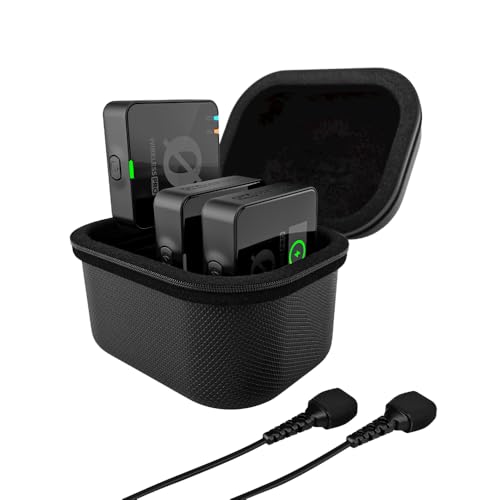
RØDE Wireless PRO — Best for serious creators
RØDE built the Wireless PRO for the creator who has already lost one important recording to clipped audio and refuses to lose another. Its signature technology is 32-bit float internal recording: each transmitter captures such a wide dynamic range that a whisper and a shout both survive, and levels can be rescued in editing software afterwards almost without penalty. Add timecode synchronisation, which lets multi-camera shoots align audio and video in post with a click, and you have the closest thing to a professional sound department that fits in a jacket pocket.
Day-to-day operation remains friendly despite the professional core. The kit pairs from its charging case, the receiver locks settings so a brushed button cannot ruin a take, and RØDE’s app exposes the deep controls for those who want them. Audio quality is superbly neutral — voices sound like themselves, which editors prefer to the pre-sweetened tone of some rivals. The transmitters also record internally for very long sessions, outlasting card space on most cameras.
Android pairing follows the family pattern: the receiver connects over USB-C to your phone and presents itself as the microphone to standard camera apps. Creators filming on a phone as their A-camera get the full benefit of the float recording regardless, because the safety copy lives inside the transmitters even if the phone’s own recording clips. That architecture — phone records the convenient copy, transmitters keep the perfect copy — is the professional way to work and the reason this kit headlines serious kits.
The costs are literal and cognitive. This is the premium option in the guide, and its feature depth is wasted on creators who post unedited clips; they are paying for insurance they will never claim. The transmitters are not the smallest either. But for interviewers, documentary makers, wedding filmmakers and anyone whose audio must survive an edit, the Wireless PRO is the end of the search.
Podcasters have adopted this kit for a reason beyond its specs: two hosts can record a full episode in a park, a car or a conference corridor with no mixer, no laptop and no power outlet, then sync the float recordings at home and mix them like studio tracks. The phone becomes a viewfinder and a backup while the transmitters do the serious work. That inversion — phone as accessory, mics as the studio — is where mobile audio has been heading for years.
- Configuration: 2 transmitters, 1 receiver, charging case
- Recording: 32-bit float internal, timecode support
- Link: receiver connects by USB-C to Android handsets
- Extras: locking receiver controls, RØDE app support
- Battery: long sessions with case recharges
Strengths
- 32-bit float makes clipping nearly impossible
- Timecode streamlines multi-camera edits
- Neutral, editor-friendly sound character
Trade-offs
- Premium pricing in this guide
- Features exceed casual workflows
- Transmitters are mid-sized, not mini
Best for: interviewers, filmmakers and podcasters who edit everything they shoot.
Not suited for: casual posters who never open an editor.

DJI Mic Mini (2 TX + 1 RX + Charging Case) — Best compact kit
Some filming fails because the microphone is too visible. A presenter in a smart blazer, a bride, a chef demonstrating in a white jacket — a chunky transmitter announces itself in every frame. The Mic Mini answers with transmitters the size and weight of a large coin, small enough to hide behind a lapel or clip to a neckline without dragging the fabric. Subjects forget they are wearing them, which improves performances in ways no specification measures: people speak naturally when the equipment disappears.
Miniaturisation cost surprisingly little. Sound quality sits close to the Mic 2’s standard, with two levels of noise cancelling for windy streets and echoing halls, and the system pairs automatically from its charging case in the DJI manner. Battery endurance across a shoot day is strong, helped by the case’s reserves. The receiver connects over USB-C for Android filming and keeps the physical dial control its bigger sibling uses.
What you surrender is the Mic 2’s onboard screen detail and internal backup recording — the Mini trusts the wireless link rather than keeping its own safety copy. For controlled environments, short takes and creators who check levels before rolling, that trade is rational and the size dividend is real. For one-chance recordings like ceremonies, the Mic 2 or the RØDE PRO above remain the wiser insurance policies.
The verified configuration is the full 2 TX + 1 RX + charging case set. Presenters who film alone might be tempted by cheaper single-transmitter bundles, but the second transmitter covers interviews, a co-host, or the day the first one’s battery meets its end mid-event. In this guide’s judgement the pair is the correct unit of purchase.
Teachers and clinicians keep choosing the Mini for a human reason: a coin-sized mic does not intimidate the person wearing it. Interviewees, patients recording testimonials and students presenting coursework all relax faster when the equipment reads as jewellery rather than broadcast gear. Audio quality begins with a comfortable subject, and this kit understands that better than any rival here.
- Configuration: 2 mini transmitters, 1 receiver, case
- Receiver: USB-C, plugs into Android phones
- Transmitter size: coin-scale, magnet or clip mount
- Noise control: two cancelling levels
- Battery: full-day system endurance
Strengths
- Transmitters nearly vanish on clothing
- Automatic pairing from the case
- Sound quality close to the Mic 2
Trade-offs
- No internal backup recording
- Receiver display is more basic
- Easy to misplace a coin-sized transmitter
Best for: presenters, weddings and on-camera work where discretion matters.
Not suited for: one-take events where a safety copy is essential.
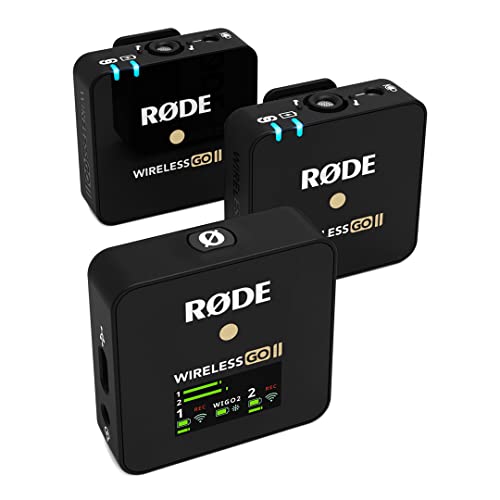
RØDE Wireless GO II — Best proven workhorse
Every category has the product that professionals bought before the category was fashionable, and in wireless phone audio that product is the Wireless GO II. Years of field reports — conferences, classrooms, weddings, war-zone journalism on phones — stand behind its compact black squares. Both transmitters record internally, a safety feature that was pioneering when this kit launched and remains the reason risk-averse shooters keep choosing it. If your filming involves people you cannot ask to repeat themselves, that track record is a feature no newer rival can copy.
Sound is clean and broadcast-leaning, with RØDE’s app unlocking finer gain control and the ability to merge or split the two channels. The receiver connects to Android phones over USB-C and behaves predictably with standard camera apps. Range in open space is generous; through bodies and walls it behaves like every 2.4GHz system, which is to say position the receiver sensibly and it will not trouble you. The transmitters’ built-in clips double as cold-shoe mounts, a small versatility camera users appreciate.
Age shows in the amenities rather than the audio. There is no charging case in the classic configuration, so cable management is your own problem, and the transmitters charge individually. The onboard displays are minimal compared with DJI’s touchscreen. Battery life per charge is a working day rather than a festival weekend. None of these flaws touches the sound or the safety recording, which is why the GO II remains the recommendation for buyers who distrust novelty on principle.
Buy it if your shoots are interviews, lessons, services and events where the content outranks the kit’s cosmetics. The verified listing is the dual-transmitter set; a single-transmitter version exists for solo creators, but the pair’s flexibility — two speakers, or one speaker plus a backup recorder — justifies itself the first time a battery dies at the wrong moment.
There is institutional trust to account for as well. Newsrooms, universities and houses of worship bought GO systems in quantity, which means tutorials, spare-part knowledge and troubleshooting wisdom exist for every conceivable failure. When a newer kit misbehaves you search and hope; when a GO II misbehaves you search and find a forum thread from three years ago describing your exact problem and its fix. That depth of shared experience is a genuine product feature.
- Configuration: 2 transmitters, 1 receiver
- Recording: onboard backup in both transmitters
- Hookup: USB-C receiver, Android-ready
- App: RØDE Central for gain and channel control
- Battery: working-day life per charge
Strengths
- Proven across years of professional use
- Dual internal recording for safety
- Flexible channel handling in the app
Trade-offs
- No charging case in the box
- Minimal displays on the units
- Charging each piece separately is fiddly
Best for: interviewers and event shooters who value a track record.
Not suited for: buyers wanting the newest case-based convenience.

Hollyland Lark M2 (USB-C) — Best plug-and-play
The Lark M2’s receiver is a small plug that lives in your phone’s USB-C port, and that single design decision removes most of the friction from casual wireless audio. No cable, no separate receiver to charge and mount, no pairing ceremony: plug it in, clip the button-sized transmitter to your shirt, and record. For teachers filming lessons, realtors walking properties and creators who shoot where they stand, this immediacy is worth more than professional features they would never open.
Sound quality punches above the kit’s simplicity. Hollyland’s noise cancelling cleans up street and room noise at a button press on the transmitter, voices come through with good presence, and the wireless range covers any room and most gardens. The transmitters are light enough for thin summer clothing, with a magnet option for fabrics that dislike clips. The charging case keeps the whole system topped up between shoots and gives the kit a tidy home in a bag.
Variant discipline matters with the Lark M2 more than any pick here: Hollyland sells Lightning and USB-C receiver versions under the same product name. The listing verified for this guide is explicitly the USB-C version for Android. If you shop elsewhere, read the variant selector twice — the wrong plug is the only real way to be disappointed by this kit on arrival day.
Limitations follow from the plug-in design. The receiver occupies the phone’s only USB-C port while filming, so charging and recording simultaneously requires a pass-through arrangement or a charged phone and discipline. There is no internal backup recording; the wireless link is the recording. For the short-form, repeatable content this kit targets, both limits are acceptable prices for its simplicity.
Real-estate agents have become this kit’s unofficial sales force, and their use case explains its design perfectly: walk into a property, plug in, clip on, narrate a tour in one take per room, leave. The audio sounds produced, the gear bag weighs nothing, and no client ever watches you troubleshoot a receiver menu in their hallway. Professions built on walking and talking should start their shopping here.
- Configuration: plug-in USB-C receiver, button transmitters
- Connection: direct USB-C, made for Android
- Noise control: one-press cancelling on transmitter
- Case: charging case included
- Range: room-and-garden scale wireless
Strengths
- Simplest setup in this entire guide
- Transmitters light enough for any fabric
- Noise cancelling works at a button press
Trade-offs
- Receiver occupies the phone’s USB-C port
- No internal safety recording
- Variant names invite ordering mistakes
Best for: teachers, realtors, vloggers and anyone filming short clips daily.
Not suited for: long events needing simultaneous charging.

BOYA BY-V20 — Best budget pick
Not every creator needs broadcast insurance; some need their voice to beat the phone’s built-in mic by a clear margin without spending like a production company. The BY-V20 is that product. A plug-in USB-C receiver, a small clip-on transmitter and effective noise reduction deliver the essential wireless upgrade — the microphone moves to the speaker’s chest, and room echo, wind and distance fall out of the recording. For coursework, community videos, property tours and family interviews, the improvement over a phone mic is not subtle; it is the difference between straining to listen and simply listening.
Operation is deliberately unthreatening. The parts pair automatically, the receiver draws power from the phone, and pass-through charging lets the phone sip power while you film — a thoughtful touch the Hollyland above omits. BOYA’s noise reduction handles the steady noises of real life, air-conditioning and traffic hum, respectably for the class. The transmitter’s battery covers a typical filming session, and the whole kit packs into a pocket.
Set expectations at the level the price sets. There is no internal backup recording, no app-based fine control worth mentioning, and the wireless range and build finish sit a tier below the DJI and RØDE kits. Loud environments will expose the noise reduction’s limits sooner. None of this matters for the kit’s actual job, which is to be the first wireless mic a creator buys and the one that teaches them why placement beats processing.
The BY-V20’s USB-C plug serves Android phones and the USB-C iPhones, which makes it a sensible shared purchase for households split across platforms. Buy it as a starting point with a clear conscience: if filming becomes a weekly habit, the upgrade path to the DJI Mic 2 will be obvious, and the BOYA will retire gracefully into the family drawer as the spare that saves school concerts.
One more honest use deserves naming: the interview across generations. Recording a grandparent’s stories is the filming most families eventually wish they had done, and it requires a mic that can be produced from a pocket, clipped on without fuss and forgotten by the wearer within a minute. The BY-V20 is exactly that instrument — inexpensive enough to buy for the purpose alone, simple enough that the technology never becomes the conversation.
- Configuration: plug-in USB-C receiver, clip transmitter
- Connection: USB-C for Android and USB-C iPhones
- Charging: pass-through phone charging supported
- Noise control: built-in reduction for steady noise
- Size: pocketable two-piece kit
Strengths
- Lowest cost of entry in this guide
- Automatic pairing, nothing to learn
- Pass-through charging while filming
Trade-offs
- No backup recording safety net
- Range and finish trail premium kits
- Noise reduction strains in loud venues
Best for: students, casual creators and first-time wireless buyers.
Not suited for: professional event work or very loud locations.
Comparison Table
| Kit | Connection | Standout strength | Watch out for |
|---|---|---|---|
| DJI Mic 2 | USB-C receiver | Setup speed plus backup recording | Larger transmitters |
| RØDE Wireless PRO | USB-C receiver | 32-bit float and timecode | Premium price |
| DJI Mic Mini | USB-C receiver | Coin-sized transmitters | No safety recording |
| RØDE Wireless GO II | USB-C receiver | Proven dual backup recording | No charging case |
| Hollyland Lark M2 | Plug-in USB-C | Zero-friction setup | Port occupied while filming |
| BOYA BY-V20 | Plug-in USB-C | Budget price, pass-through charging | Basic feature set |
What Should You Look for in the Best Ad On Mic for Android Phones?
Connector first, always. Android phones charge and listen through USB-C, so the receiver must terminate in USB-C or plug into it directly; anything Lightning belongs to older iPhones and will not fit your phone no matter how the listing phrases it. Check the variant selector on any listing as carefully as the product name. Second, decide whether your filming needs a safety recording. One-chance audio — vows, speeches, interviews with busy people — justifies the internal-recording kits; repeatable content like tutorials and reviews does not, and the simpler kits reward you with size and price.
Third, think about who wears the microphone. Two transmitters cover interviews, co-hosts and a spare; a single transmitter suits solo presenters but leaves no rescue when a battery fades. Fourth, consider where the receiver lives: cabled receivers on a phone rig behave well for tripod work, while plug-in receivers win for handheld and gimbal filming where a dangling cable is a small sabotage. Fifth, read the noise-cancelling claims sceptically. Every kit here reduces steady noise decently; none can remove a dog barking behind your subject, and placement — mic on the chest, away from wind — beats processing every time.
Finally, test inside the apps you actually publish from. The standard camera apps on Samsung and Pixel phones accept USB-C microphones gracefully. Some social and third-party camera apps record from the phone’s own mic regardless, and no kit can override an app that refuses external audio. Film a test sentence in each app during the return window; the results decide whether your workflow needs the maker’s app or a different recorder, and it is far better to learn that in week one than at an event.
Sixth, weigh the ecosystem you are buying into. DJI and RØDE both sell lavalier microphones that plug into their transmitters for fully hidden placement, spare transmitters for growing teams, and cases and mounts that fit their systems. A creator whose work expands will appreciate a brand whose accessories expand with it. The plug-in kits deliberately stay simple, which is a feature until the day you need a third voice — plan for the team you are likely to become, not only the one filming today.
How Do You Set Up a Wireless Mic With an Android Phone, Step by Step?
Charge everything first — transmitters, receiver and case — because new kits often arrive at partial charge and a firmware update may be waiting in the maker’s app. Fit the receiver to your phone’s USB-C port, open your camera app and confirm the audio source has switched; most apps show a small microphone indicator or a level meter that now responds to the transmitter rather than the phone. Clip the transmitter to your subject at chest height, roughly a hand’s width below the chin, with the mic opening facing upward and unobstructed by scarves or jewellery.
Record a thirty-second test at the distance and volume of the real shoot, then listen back on headphones — never judge levels from the phone’s speaker in a noisy room. Watch for two faults: distortion on loud syllables, which means gain is too high, and a hiss floor under quiet speech, which means gain is too low or noise cancelling is fighting the room. Adjust in small steps and re-test. Professionals perform this ritual before every shoot without embarrassment; it is the cheapest insurance in filmmaking.
Outdoors, fit the windmuff before you need it, because wind noise arrives faster than you can pause a ceremony. Keep the receiver’s antenna path clear of your body where the design allows, and stay within sensible range of your subject — wireless audio forgives distance in open fields and punishes it through crowds and walls. When the shoot ends, copy any internal backup recordings off the transmitters before the next session, and return everything to the charging case so the kit’s home is also its refuelling station.
Name your files while the shoot is fresh, even with nothing fancier than the date and the subject’s name. Backup audio that cannot be matched to its video becomes archaeology within a month. Editors who sync float recordings or safety copies work from filenames and timecode, and a thirty-second naming habit at wrap time saves an hour of waveform-matching later. This is the unglamorous tail of the setup process, and it is where organised creators quietly separate themselves from everyone else.
How Do You Stop Wind, Echo and Clothing Noise From Ruining Recordings?
Wind is beaten by fur and position, not software. The windmuffs included with the DJI kits exist because moving air across a mic capsule creates noise no algorithm fully removes; fit them outdoors even when the day feels calm, and turn your subject’s back to the breeze where the shot allows. Echo is beaten by distance and softness: move the mic closer to the mouth — chest placement already does this — and film away from bare walls, or hang a blanket behind the camera in a home studio to give reflections somewhere to die.
Clothing noise is the beginner’s tax. A transmitter clipped over a rustling synthetic jacket will record every movement, so clip to a stable layer, let the cable of any external lavalier hang with a small strain-relief loop, and ask subjects to avoid necklaces that strike the mic. A thirty-second test with the subject moving as they will move — gesturing, turning, walking — exposes all of this while it is still fixable.
Room tone deserves one sentence of respect: record ten seconds of silence in every location. Editors use that silence to patch edits invisibly, and it costs you nothing but a moment of stillness. Small disciplines like this separate audio that sounds produced from audio that sounds accidental, far more than the price difference between the kits in this guide.
One more placement secret from working videographers: when a subject wears a tie, a lanyard or a necklace, clip the transmitter to the clothing beneath and let the accessory hide it, rather than clipping to the accessory itself, which swings and strikes the mic. And for seated interviews, a transmitter on the waistband with the mic cable run under a shirt looks invisible on camera while sounding identical to a chest clip.
Wired Lavalier or Wireless Kit: Which Add-On Style Suits Your Filming?
Wireless dominates this guide because it dominates the market, but the wired lavalier deserves its paragraph before you spend. A wired lav plugs straight into USB-C, never needs charging, never drops a signal and costs very little; for a seated creator filming at a desk, it remains the rational choice. Its tyranny is the cable — three metres of leash that dictates where you stand, tangles in chair wheels and rules out walking shots entirely. The moment your filming involves movement, a second person or a room bigger than a desk, wireless stops being a luxury.
Wireless kits divide further by philosophy. Receiver systems — DJI and RØDE here — treat the phone as one destination among several and bring screens, controls and backup recording. Plug-in systems — Hollyland and BOYA — treat the phone as the whole studio and optimise for immediacy. Neither philosophy is wrong; they serve different creators. The mistake is buying a plug-in kit for unrepeatable event work, or a professional receiver system to film homework help at the kitchen table.
Budget honestly across the whole chain. A wireless kit may also want a small tripod, a phone cage for mounting the receiver, and headphones for monitoring tests. Those additions are cheap individually and transform results collectively, which is why this guide’s budget pick still leaves room in a sensible budget for the tripod. Audio gear rewards system thinking more than hero purchases.
How Do You Record Two People Well on a Phone?
Give each person their own transmitter whenever the conversation matters. Sharing one mic between two speakers guarantees the quieter voice loses, and passing a transmitter back and forth murders spontaneity. All six kits in this guide ship with two transmitters for exactly this reason. Set each channel’s gain for its own speaker — a soft-spoken guest and a booming host need different levels — and record the channels separately where the kit allows, so the edit can balance them afterwards.
Placement symmetry helps more than gear. Clip both mics at the same chest height so neither voice sounds closer, seat your subjects at similar distances from any echoing wall, and keep the phone’s camera close enough that the frame feels intimate; audio recorded at the chest will sound near even when the camera is across the room, which is the entire magic of wireless. If one subject wears rustling clothing, solve it in the placement test rather than in the edit.
Monitor with one earbud during the first minute if your setup allows, then trust your test and your levels. Fiddling visibly with audio gear makes interviewees self-conscious, and self-conscious guests give worse answers. The professional manner is calm: test, clip, ask the first question, and let the equipment disappear — the same trick the Mic Mini performs with its size, performed here with behaviour.
Podcast-style conversations add one more consideration: laughter. Two people laughing together will clip a recording set for speech levels, so either choose a kit with internal float or backup recording, or set gains a notch lower than your test suggests and accept a slightly quieter file that an editor can raise. Headroom is kindness to your future self; nobody ever regretted a take that was two decibels cautious.
How Much Battery and Storage Does Wireless Filming Really Consume?
Audio itself is cheap; video is the glutton. An hour of 4K phone footage consumes gigabytes of storage and a visible slice of battery, while the wireless kit’s own draw is modest — transmitters sip, receivers sip slightly more, and the charging cases in this guide exist to make the whole question boring across a shoot day. The practical risk is not the mic draining your phone; it is arriving at an event with a phone at forty percent and a kit at full charge, then watching the wrong battery become the schedule. Charge the phone first, the kit second, and carry the case as the reserve for both halves of the system.
Internal-recording kits add a storage habit of their own. Transmitter memory fills silently across sessions, and a full transmitter simply stops keeping its safety copy — the worst failure mode because nothing announces it. Build the offload into your wrap routine: after each shoot, move the backup files to the same folder as the video, glance at their durations to confirm they exist, and clear the transmitters. Thirty seconds of housekeeping preserves the entire point of owning a backup-recording kit.
Heat deserves a mention for summer event work. Phones filming 4K in sunlight throttle and occasionally stop recording to cool down, and a plug-in receiver adds a whisper of warmth at the port. Shade the phone between takes, drop to a lower resolution for long ceremonies, and prefer receiver kits on a small rig for marathon sessions so air can circulate around the handset.
Which Kit Fits Which Kind of Creator?
The weekly YouTuber filming at home should buy the DJI Mic 2 and be done: controlled rooms forgive its size, and the backup recording insures the occasional ambitious shoot. The journalist and the wedding filmmaker should buy the RØDE Wireless PRO, because their audio is unrepeatable and their editing is real. The presenter whose face is the brand — fitness instructors, beauty creators, chefs — should buy the Mic Mini and let the equipment vanish.
The teacher, the realtor and the community volunteer should buy the Lark M2, because their filming is frequent, short and allergic to setup rituals. The documentary hobbyist who distrusts new things should buy the GO II and its decade of forum wisdom. The student, the grandparent-interviewer and the first-time creator should buy the BOYA, learn the craft on it, and upgrade with knowledge rather than hope if the habit sticks.
Notice what this mapping never does: it never recommends by budget alone. A cheap kit matched to its workflow outperforms an expensive kit mismatched to it, in finished videos rather than in spec sheets. Choose by the filming you actually do, and every pick in this guide becomes the right one for somebody — which is the point of a guide with six picks instead of one winner.
How Do You Care for a Wireless Mic Kit So It Lasts for Years?
These kits die of neglect in predictable ways, all preventable. The charging case is the first line of defence: store the system in it, always, so transmitters return to a known place and a known charge state instead of migrating through coat pockets. Wipe the magnetic contacts and USB-C plugs with a dry cloth monthly; pocket lint in a port is the leading cause of the mysterious intermittent connection that owners blame on wireless interference. Keep a spare windmuff in the case, because the foam covers are the component most often lost to fields, beaches and church lawns.
Batteries inside transmitters follow the same chemistry as phone batteries and appreciate the same manners: avoid storing the kit fully drained for months, and top it up before long shoots rather than after. Firmware updates from DJI and RØDE occasionally improve noise cancelling and fix pairing quirks, so check the maker’s app a few times a year rather than treating the purchase as finished forever. Label your transmitters if you own two kits; cross-paired units cause a special confusion that always strikes five minutes before an event.
Treat the clips and magnets as consumables. A fatigued clip that lets a transmitter slide inside a shirt will eventually drop it somewhere unfindable, and replacements are cheap compared with the transmitter. Inspect them when you clean the contacts. Small rituals, monthly, are the entire secret — the professionals’ kits look identical to yours; they are simply maintained like tools rather than gadgets.
Register the kit with its maker and keep the invoice with your camera gear records. Warranty claims on audio equipment move faster with proof of purchase, and a registered kit is easier to reunite with its owner when a rental house or venue finds it left behind — which, given the size of modern transmitters, happens more often than anyone admits at conferences.
What About Latency, Monitoring and Live Streaming on Android?
Wireless kits introduce a small delay between voice and recording, invisible in edited video because the audio and picture travel together to the phone. Live streaming is where latency earns attention: a fraction of a second’s offset between your lips and the sound can distract viewers of a live sale or lesson. The kits here keep that delay low enough for ordinary streaming, and creators who broadcast seriously test their exact phone-and-app combination in a private stream before going public, because app processing adds more delay than the wireless link does.
Monitoring is the related discipline. Hearing yourself while recording helps catch rustle and distortion early, but Android’s monitoring options vary by app, and Bluetooth earbuds add their own delay that makes self-monitoring confusing. Many phone creators adopt the simpler professional habit: record a test, listen on wired or phone speakers, then trust the levels. Where an app offers live monitoring through the phone’s headphone output, use one earbud only, so the room still sounds natural in the other ear.
Streamers should also confirm which microphone their streaming app selects, because some default to the phone’s mic even with a receiver attached. A ten-second private test stream, watched back with the sound up, settles the question permanently for that app. File the result in your notes; app updates occasionally change the behaviour, and the test is cheap insurance before a scheduled broadcast.
Common Mistakes When Buying an Add-On Mic
Ordering the Lightning variant for an Android phone is the champion error of this category, committed weekly by buyers who read the product name and skip the variant selector. The fix is free: confirm USB-C in the listing title and again on the box before the return window closes. DJI and Hollyland both sell near-identical kits across the two plugs, which is precisely why the trap catches careful people.
Buying features instead of fit is the second mistake. Timecode and 32-bit float are magnificent for editors and meaningless for a teacher posting lessons unedited, who would be better served by the Lark M2’s simplicity and the change left over. Match the kit to the workflow you actually have this year, not the production company you might become.
Third, skipping the headphone test. Levels judged by eye on a meter can still hide distortion, rustle and interference that ears catch instantly. Every kit in this guide deserves a thirty-second spoken test played back on headphones before its first real assignment; the ritual feels pedantic exactly once, and then it saves a wedding.
Last, forgetting that the phone is part of the audio chain. A nearly full phone can stutter recordings, a aggressive battery-saver can suspend a recorder app, and a case that half-covers the USB-C port can loosen a plug-in receiver mid-take. Clear space, disable battery optimisation for your recording app, and test the receiver with your actual case fitted.
Final Recommendation
Buy the DJI Mic 2 if you want one answer: it sets up fastest, sounds clean in real rooms and keeps a safety copy of everything. Step up to the RØDE Wireless PRO when your recordings are unrepeatable and your editing is serious; step sideways to the Mic Mini when discretion is the brief. The GO II remains the professional’s conservative choice, the Lark M2 the casual creator’s delight, and the BOYA the honest budget door into wireless sound. Our own kit bag, packed for Android filming tomorrow, holds the Mic 2 — with the Lark M2 riding along for the shoots where plugging in and pressing record is the whole production plan. Whichever of these you choose as the best ad on mic for android phones for your work, fit the windmuff outdoors and test on headphones; those two habits will do more for your audio than any upgrade.
And keep perspective about what the purchase buys. Viewers forgive a soft image far sooner than harsh, distant audio; the human ear reads bad sound as low effort even when the picture is beautiful. That asymmetry is why a modest kit from this page transforms a channel more than a new phone would. Buy the microphone first, learn its manners on three small shoots, and let your audience hear the difference before they can name it.
Frequently Asked Questions
Will these mics work with my phone’s normal camera app?
On Samsung and Pixel phones, yes — the standard camera apps recognise USB-C receivers as the audio source automatically. Some third-party and social apps ignore external microphones and always use the phone’s own mic, so test your publishing app with a short clip before relying on it at an event.
What is the difference between the USB-C and Lightning versions?
Only the plug, but the plug is everything. Lightning receivers fit older iPhones; USB-C receivers fit Android phones and the newest iPhones. The transmitters and sound are otherwise the same within a product line, which is why checking the variant in the listing title matters so much in this category.
Do I need two transmitters or is one enough?
One serves a solo presenter filming repeatable content. Two cover interviews and co-hosts, and give you a charged spare when a battery fades mid-event. Most creators who begin with one transmitter buy the second within a season, which is why this guide standardises on two-transmitter kits.
What does internal backup recording actually save?
It saves the take when the wireless link drops, a phone glitches or a shout clips the phone’s recording. Kits with internal recording — the DJI Mic 2 and both RØDE sets here — keep a separate copy inside the transmitter that you can sync in editing. For unrepeatable moments, that copy is the difference between a story and an apology.
Can I charge my phone while using a plug-in receiver?
With the BOYA BY-V20, yes — it offers pass-through charging. The Hollyland Lark M2’s plug-in receiver occupies the port without pass-through, so arrive charged or keep sessions short. Receiver-based kits like the DJI and RØDE sets connect by short cable and leave charging arrangements more flexible on a rig.
How far can I stand from the phone with a wireless mic?
Manufacturers quote open-field ranges in the hundreds of metres, but real-world range shrinks with bodies, walls and crowd density. For reliable audio, treat a large room or a garden as the comfortable working envelope, keep the receiver’s path to the transmitter as clear as you can, and let internal-recording kits carry the risk when distance is unavoidable.
Can I use one of these kits with a laptop or camera later?
The receiver-based systems from DJI and RØDE can — their receivers connect to cameras over 3.5mm or USB and to computers as USB audio devices, so the kit grows with your setup. The plug-in phone kits from Hollyland and BOYA are phone specialists; treat them as dedicated phone tools and they will not disappoint.
Related Guides
Microphone owners usually shop next for the handset itself in our guide to the best android phones you can buy now, the wider ranking of android phones across every budget, and our roundup of add-ons that complete a phone filming kit.


