What's inside
- Key Takeaways
- Quick Picks
- How We Chose These Picks
- What Are the 3DS Storage Rules, Exactly?
- Does Card Speed Matter to a 3DS at All?
- Which SD Cards Earned a Detailed Look for the 3DS?
- What Else Lives on the Card Besides Games?
- How Big Is a 3DS Game Library, Really?
- How Do the Six 3DS Card Options Compare?
- How Do You Buy a Genuine Card for a Discontinued Console?
- Should You Go Beyond 32GB? An Honest Assessment
- How Do You Swap a 3DS Card Without Losing Your Library?
- What Mistakes Do 3DS Card Buyers Keep Making?
- Final Recommendation
- Frequently Asked Questions
- Related Guides
As an Amazon Associate I earn from qualifying purchases. This post may contain affiliate links at no extra cost to you.
widgetverdict.com is reader-supported. When you buy through links on our site, we may earn an affiliate commission.
Where to buy: four of the cards below carry verified Amazon links — two full-size SanDisk SDHC cards for the original models and two microSDHC options for the New 3DS family — while two further cards are covered in prose.
The Nintendo 3DS is a time capsule with a card slot. Its storage rules were written in the SDHC era and never revised: the console reads SD and SDHC cards formatted FAT32, Nintendo’s official support ceiling is 32GB, and everything about choosing the best 3ds sd cards follows from those two facts. Shoppers arriving from the modern SDXC world — where a 512GB card is a casual purchase — routinely buy exactly the wrong thing for this console: a huge card the system cannot read as it ships, or a bargain card whose capacity is fictional. The right purchase is almost embarrassingly modest, and this guide’s job is to make it confidently.
One wrinkle divides the family. The original 3DS, 3DS XL and 2DS take a full-size SD card in a side slot, and most shipped with a small card in place. The New 3DS, New 3DS XL and New 2DS XL moved to microSDHC, hidden under the back cover plate, which turns a card swap into a small screwdriver ceremony. Both halves of the family obey the same FAT32 and 32GB-official rules. Our six picks cover both slots with verified cards where our pool allows, and the how-to section covers the manual FAT32 formatting route for owners determined to go beyond the official ceiling — with the caveats stated as plainly as the instructions.
Key Takeaways
- The 3DS family officially supports SD and SDHC cards up to 32GB, formatted FAT32 — that ceiling shapes every pick here.
- Original 3DS, 3DS XL and 2DS models use full-size SD cards; New 3DS models use microSDHC under the back cover.
- Cards larger than 32GB are SDXC and ship formatted exFAT, which the 3DS cannot read until they are manually reformatted to FAT32.
- Speed class barely matters to this console; genuine capacity and reliability matter enormously.
- Counterfeit cards are rampant in the sizes 3DS owners buy — test any new card before moving your data onto it.
- Back up the card’s Nintendo 3DS folder before any swap; your games, saves and licences live there.
Quick Picks
| Card | Badge | What it is for |
|---|---|---|
| SanDisk 32GB Ultra SDHC (120MB/s) | Best for original 3DS, XL and 2DS | The full official capacity in a full-size card from the most available line in the class — the default upgrade for side-slot models. |
| SanDisk 32GB Ultra SDHC | Best spare and second-console card | The staple Ultra at the same official capacity, ideal as the household’s second card or the replacement for a lost original. |
| SanDisk 32GB Ultra microSDHC A1 | Best for New 3DS models | A verified 32GB microSDHC at the official ceiling for the cover-plate models, with an A1 rating the console ignores and phones appreciate. |
| SanDisk 32GB Ultra microSDHC with adapter | Most flexible across the whole family | One card that serves a New 3DS directly and an original model through its included full-size adapter. |
| SanDisk 16GB Ultra SDHC | Prose-only — the modest library option | Half the ceiling for players whose eShop library is small and who prefer to stay far inside the official envelope. |
| Kingston Canvas Select Plus 32GB SDHC | Prose-only — full-size alternative brand | Kingston’s everyday full-size SDHC at the official capacity, for buyers who want a second reputable badge in the slot. |
How We Chose These Picks
The filter for this guide was the console’s own specification, applied without nostalgia or wishful thinking. Every pick sits at or below the official 32GB SDHC ceiling and ships formatted FAT32, so each one works in a 3DS the day it arrives, with no computer-side ritual required. Every linked card was confirmed against our verified pool by full title, and the picks divide deliberately by slot: full-size cards for the original family, microSDHC for the New models, and one adapter-bundled card that straddles both for households running a mixed fleet of handhelds — a common situation in families where hand-me-down consoles accumulate.
Speed rankings, the usual engine of card guides, are deliberately muted here because the 3DS cannot spend speed. Its card interface predates the fast UHS modes modern cards advertise, game loading is bounded by the console’s own hardware, and no pick below will make a game load measurably faster than another. So we ranked on what the console can actually perceive: genuine capacity that survives a full write-and-verify test, a brand whose warranty and retail presence make a dud painless to replace, and availability — because a 3DS card is often bought in a hurry, the day a beloved console’s original card finally corrupts.
Two candidates were deliberately excluded, and the exclusions are part of the method. Cards above 32GB were left out despite their popularity in enthusiast forums, because a buying guide’s first duty is to the reader who follows it literally — and followed literally, an SDXC card fails at the console door until a computer ritual rescues it. No-name cards at any capacity were left out for the opposite reason: they might work, and a guide that recommends “might” with a family’s save files is not doing its job. The six that remain are the ones we can describe without a caveat in the first sentence.
Availability shaped the final list more than specification did. A discontinued console’s card must be buyable — today, from real shops, without archaeology — because the typical purchase is triggered by a failure, not a plan. Every pick here is a current, mainstream product for exactly that reason. The theoretically perfect card that ships from an unknown warehouse in three weeks is, for a child with a dead console, not a pick at all.
The same logic explains the guide’s brand conservatism. In a living product category, an adventurous pick costs a reader a return label; in a discontinued console’s twilight, the wrong card can cost a library that took a decade to accumulate and cannot be rebuilt at any price. Conservatism is not a lack of imagination here — it is the imagination applied to consequences, and it is why every name in the six is a name that will still be honouring warranties when the console turns twenty.
Readers who have absorbed all of this are ready for the guide’s shortest summary: identify the slot, buy the genuine 32GB card that fits it, copy the folder, test the spare, back up the folder to a computer, and then go back to playing games. Everything else in these pages exists to explain why that sentence is the whole wisdom of the category — and to make sure the one purchase a discontinued console still asks of its owner is made correctly, once, for good.
What Are the 3DS Storage Rules, Exactly?
Nintendo’s official position is simple: the 3DS family uses SD cards for the original models and microSDHC for the New models, supports the SDHC generation up to 32GB, and requires FAT32 formatting. The consoles shipped with small cards — 2GB in the original 3DS, 4GB in the XL and in New models — which the eShop era outgrew quickly; a few dozen downloaded games, their updates and save data, plus photographs from the console’s cameras, fill the bundled card and start the upgrade conversation this guide answers.
Everything on the card lives in a single folder named Nintendo 3DS, and the console binds its contents to that specific system. Copying the folder to a new card for the same console works beautifully — it is the intended upgrade path. Copying it to a different console does not transplant your library; the new system will ignore or overwrite it. That one fact prevents the commonest data-loss story in this category, which is a parent helpfully “moving” a child’s games to a sibling’s console via the card.
Nintendo’s official system-transfer process is the sanctioned exception: a transfer moves licences and data between consoles through Nintendo’s own procedure, with the card playing a supporting role. Owners upgrading from an original model to a New model should follow that documented route rather than improvising with folder copies, and should note that it changes the physical card format mid-journey — one more reason the adapter-bundled pick exists in this guide. Improvised shortcuts around a licence system tend to end with the library intact on neither console.
Beyond the official ceiling lies the enthusiast route: cards larger than 32GB are SDXC, ship formatted exFAT, and are invisible to the console until reformatted to FAT32 with a computer utility — Windows’ built-in formatter refuses FAT32 above 32GB, so a third-party tool is required. Done correctly, large cards do function in the 3DS, and the how-to section walks through it. But it is unsupported, it carries quirks around cluster size and load behaviour, and it is entirely unnecessary for all but the largest eShop libraries — which is why every pick in this guide stays at the ceiling Nintendo actually blesses.
The bundled-card history explains one more behaviour worth unlearning: owners often assume the card that came with the console is somehow matched to it, and hesitate to replace a 4GB original with a card eight times larger. There is no matching. The bundled card was a bill-of-materials decision made in a factory, and the console treats a genuine 32GB card with exactly the same indifference — it simply finds more room. Sentiment may keep the original card in a drawer as a keepsake; it should not keep it in the slot as a limitation.
Does Card Speed Matter to a 3DS at All?
Almost not at all, and a guide that pretends otherwise is inventing drama. The console’s card interface is of its era; it does not implement the high-speed UHS modes whose logos cover modern packaging, and its processor and memory bound loading long before a healthy card does. A Class 10 card — every pick here — already exceeds anything the console’s software asks of storage during play. Where a better card does show itself is outside the console: copying a full 32GB library to a computer for backup through a fast reader is quicker with a card that reads at 120MB/s than one that reads at half that, and your future self doing a midnight card migration will feel the difference even if the console never does.
The A1 marking on one pick deserves the same deflation. Application Performance Class measures random-access behaviour for running phone apps; the 3DS neither knows nor cares. We list the card because it is a verified, genuine 32GB microSDHC from the right line — the A1 badge is simply harmless extra that a phone or tablet will appreciate if the card is ever repurposed. Judge these picks on authenticity, capacity and brand support, and let the speed logos wash over you; at this console, they are decoration.
Reliability, by contrast, is not decoration. A 3DS card holds save files that cannot be re-downloaded — the games can, the hundred-hour save cannot — so the card’s trustworthiness is the whole purchase. That is why this guide sticks to the most mainstream lines from the biggest makers and treats too-cheap listings as the threat they are.
Reliability has a second face at this console’s age: the card will likely be asked to work for many more years in a device that is itself ageing, and the pair will grow old together. A mainstream card from a maker with a functioning warranty operation is the closest thing to a guarantee that the partnership holds. When a console is discontinued, its accessories ecosystem quietly becomes the product — and in that ecosystem, boring and genuine beats exciting and dubious every single time.
Which SD Cards Earned a Detailed Look for the 3DS?
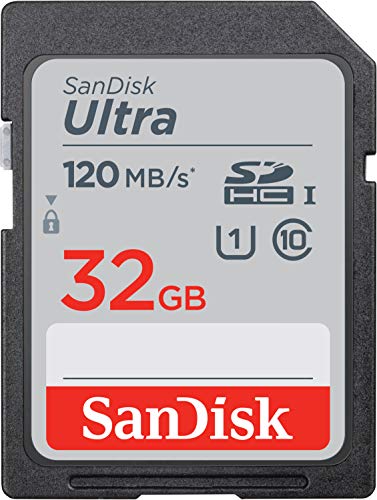
SanDisk 32GB Ultra SDHC (120MB/s) — Best for original 3DS, XL and 2DS
For the side-slot models, this is the upgrade the console has been waiting for since its bundled card filled up. Thirty-two gigabytes is the full official capacity, in the full-size shell those models take, from the Ultra line that dominates this class — and the card simply works the moment it slides in, formatted and classed exactly as the console expects. A complete eShop library of realistic size, years of save data and the console’s photographs sit inside that capacity with room to breathe, which is more than can be said for the 2GB and 4GB cards Nintendo bundled.
The 120MB/s read figure in its verified listing is wasted on the console and useful everywhere else: library backups to a computer, which this guide urges on you repeatedly, move at modern pace through a decent reader. In-console, expect identical behaviour to any healthy Class 10 card — that is praise, not faintness, because identical and healthy is the entire requirement. If your household runs one original-family console and you want the question closed, close it with this card.
There is a sentimental dimension to this purchase that spec sheets ignore: the 3DS is a discontinued console, and the card you buy now may be the last one it ever needs. Choosing the full official capacity from the most durable mainstream line is a way of settling the console’s affairs — library complete, saves housed, no further surgery contemplated. Owners preserving a childhood console for the next decade are not really buying storage; they are buying the absence of a future problem, and this card is that absence in its most reliable form.
It also pairs naturally with the household pattern this guide keeps returning to: this card in the console, its sibling as the tested spare, the original bundled card retired to a labelled envelope. That trio — working card, understudy, keepsake — closes the subject permanently for the price of a modest dinner, and leaves the console’s remaining years to be about its games rather than its storage. Few retro-computing problems resolve so completely for so little; take the win.
- Format: 32GB SDHC, full-size SD — fits original 3DS, 3DS XL, 2DS
- Verified listing figure: up to 120MB/s read
- Classes: Class 10, U1, UHS-I
- File system: FAT32 as the console requires
- Positioning: the default full-capacity upgrade
Strengths
- Full official capacity with zero formatting work required.
- Fast reads make whole-library computer backups painless.
- The most widely stocked genuine card in its class.
Trade-offs
- Full-size only — useless for New 3DS models without an adapter it lacks.
- Its speed headroom is invisible to the console itself.
- Counterfeits of this exact card are common; buy from real channels.
Best for: owners of original 3DS, 3DS XL and 2DS consoles replacing or upgrading the bundled card. Not suited for: New 3DS owners, who need the microSDHC picks below.

SanDisk 32GB Ultra SDHC — Best spare and second-console card
The 100MB/s generation of the same Ultra line earns its separate slot through the arithmetic of households: where there is one 3DS there is often a second, and where there is a working card there should be a spare. This is the card for the sibling’s console, the backup card kept in a drawer against the day the main one corrupts, and the emergency replacement bought in a hurry when a console starts reporting errors a week before a long car journey. Its verified listing adds water-resistant and impact-resistant build language, which suits a card destined for a child’s handheld and the journeys those take.
Functionally it is interchangeable with its faster sibling in every way the console can detect: same capacity, same class floor, same FAT32 world. The honest difference is transfer pace at a computer and the small price gap between the two generations on any given day. Buy whichever Ultra is sensibly priced when you need it — but if the faster one costs much the same, take the faster one for the main console and let this generation serve as the household’s ever-ready understudy.
The spare-card logic deserves one elaboration, because 3DS cards fail in a particular way: rarely in the middle of a game, often at the moment of being read after months in a drawer, or during the copy to a computer that was supposed to be the backup. A household spare that has been tested — inserted, booted, played from for an evening — is a known good; a spare still sealed in its packet is merely a hope. Buy this card, test it the week it arrives, and only then file it as the understudy. The ten minutes convert a hope into a plan.
- Format: 32GB SDHC, full-size SD — fits original 3DS, 3DS XL, 2DS
- Verified listing figure: up to 100MB/s read
- Classes: Class 10, UHS-I
- Build notes from listing: water-resistant, impact-resistant design
- Positioning: the spare, the second console, the emergency buy
Strengths
- Same official capacity and console behaviour as the faster Ultra.
- Build language suits cards living in children’s handhelds.
- Available virtually everywhere genuine cards are stocked.
Trade-offs
- Slower computer-side transfers than the 120MB/s generation.
- Full-size shell does not fit New 3DS models.
- The most imitated card in the class — seller choice matters.
Best for: second consoles, spares drawers and urgent replacements across the original family. Not suited for: New 3DS models or buyers who back up huge libraries weekly.

SanDisk 32GB Ultra microSDHC A1 — Best for New 3DS models
The New 3DS family moved the card inside: a microSDHC slot beneath the back cover, reached with a small screwdriver and a moment’s care. This verified 32GB Ultra microSDHC is the card for those models — the full official capacity in the correct physical format, from the same Ultra line as the full-size picks, carrying a 120MB/s read figure and an A1 rating in its listing. The A1 badge means nothing to the console, as this guide has already confessed, but it does no harm, and if the card is one day retired into a phone it will earn its keep there.
The swap itself is the only drama: power the console off, remove the cover plate, exchange cards, and — before any of that — copy the Nintendo 3DS folder from old card to new via a computer, because the folder is the library. Done in that order, a New 3DS wakes up with its entire digital life intact and eight times the bundled room to grow. Given how rarely the cover comes off, fitting the full official capacity in one visit is the right strategy; this card is that visit’s whole shopping list.
New-model owners should also know the cover-plate ritual’s one golden rule: the console must be fully powered off, not sleeping, before the card moves. The 3DS writes to its card at moments the user does not see, and a card pulled during a background write is how libraries corrupt without any villain. Do the swap on a table, keep the tiny screws in a dish, and let the console boot fully and sit at its home screen for a minute before pronouncing judgement — first boots with a fresh card include quiet housekeeping that should not be interrupted.
- Format: 32GB microSDHC — fits New 3DS, New 3DS XL, New 2DS XL
- Verified listing figure: up to 120MB/s read
- Classes: Class 10, UHS-I, A1
- File system: FAT32 as the console requires
- Positioning: the New-models upgrade card
Strengths
- Correct micro format at the full official capacity.
- Same trusted Ultra line as the full-size picks.
- A1 rating gives the card a useful second life in phones.
Trade-offs
- Swapping requires removing the console’s back cover.
- No adapter in the pick’s focus; check the pack if you need one.
- Speed markings remain invisible to the console itself.
Best for: New 3DS, New 3DS XL and New 2DS XL owners doing the one-time capacity upgrade. Not suited for: original-family models, whose full-size slot it cannot fill alone.

SanDisk 32GB Ultra microSDHC with adapter — Most flexible across the whole family
Households with both generations of the console face a small logistical puzzle: two slot formats, one library habit. This long-running SanDisk pack solves it with the oldest trick in the category — a 32GB Ultra microSDHC bundled with its full-size SD adapter. In the New 3DS the micro card works bare; in an original model it rides in the adapter and presents as a full-size card. One purchase covers the fleet, and a spare adapter in the drawer has rescued more card migrations than any other accessory in this guide’s world.
The caveats are the standard adapter caveats, stated once and fairly: an adapter adds a set of contacts, so for a card that will live permanently in one original-family console, a native full-size card like the first two picks is the marginally tidier choice. But as a migration tool, a shared spare, or the single card for a mixed household, the bundle’s flexibility is real value. Its verified listing is one of the longest-running in the microSD world, Class 10 and UHS-I, which at this console’s demands is specification enough with room to spare.
The bundle also earns its keep outside the consoles entirely: the adapter turns the card into the household’s universal donor for cameras, laptops and card readers during the migration itself, when files are moving between three devices and every slot shape appears at once. Migrations fail on logistics more often than on technology — a missing adapter at midnight has stalled more library moves than any file system ever written. A pick that eliminates the commonest logistical failure is doing real work, and that, more than nostalgia for a long-running listing, is why this bundle holds a slot.
- Format: 32GB microSDHC plus full-size SD adapter
- Verified listing: Class 10, UHS-I Ultra card with adapter
- Compatibility: New models bare; original models via adapter
- File system: FAT32 as the console requires
- Positioning: the mixed-fleet and migration card
Strengths
- One card serves both slot formats across the whole 3DS family.
- Ideal vehicle for copying a library between generations.
- A veteran listing with deep retail availability.
Trade-offs
- Adapter contacts are an extra failure point in a permanent install.
- An older-generation card; computer transfers are leisurely.
- Small parts and small cards are easy to lose mid-migration.
Best for: mixed-generation households and anyone mid-migration between consoles. Not suited for: a permanent single-console install, where a native card is tidier.
SanDisk 16GB Ultra SDHC — Prose-only: the modest library option
Not every 3DS carries a digital empire. A console used for a handful of cartridges, a small clutch of eShop downloads and the occasional photograph lives perfectly well at 16GB — half the official ceiling, quadruple the bundled card of the original model — and some owners prefer staying well inside the envelope Nintendo blessed rather than maxing it. SanDisk’s Ultra line at 16GB is the same card family as the linked picks, one shelf down, and for that modest workload it is not a compromise at all.
We list it in prose because our verified pool holds the line’s 32GB cards rather than this capacity, so it carries no link here. The guidance is simple: estimate your library honestly — downloaded 3DS games typically run from a few hundred megabytes to a few gigabytes — and if the total lounges comfortably under 16GB with room for the games you still mean to buy, this tier is the calm, sufficient choice. If there is any doubt, the price distance to 32GB is small enough that headroom is the better buy; storage regret only ever flows in one direction.
There is one more household this card suits precisely: the young child’s first console, where the library is a handful of games, the photographs are masterpieces of the family dog, and the card’s real specification is surviving being handled by small hands. A modest card in a hand-me-down 2DS, loaded by a parent and then forgotten, is storage as it should be at that age — invisible. Should the library later grow teeth, the migration path in this guide moves everything to a 32GB card in one sitting, and the 16GB card retires to a camera without a wasted step.
- Format: 16GB SDHC, full-size SD
- Speed figures: not quoted — outside our verified pool
- Classes: Ultra line everyday specification
- Positioning: sufficient capacity for small libraries
Strengths
- Ample for cartridge-first players with small download collections.
- Same Ultra lineage as the verified picks.
- Sits comfortably inside every official limit.
Trade-offs
- Half the ceiling; a growing eShop library can outgrow it.
- No verified listing in our pool, so no link in this guide.
- The saving over 32GB is usually small.
Best for: light digital libraries and cartridge-first players. Not suited for: download collectors, who should take the full 32GB and be done.
Kingston Canvas Select Plus 32GB SDHC — Prose-only: full-size alternative brand
Kingston’s Canvas Select Plus is the everyday line from the other great memory house, and its full-size SDHC card at 32GB gives original-family 3DS owners a genuine second badge to consider. Kingston’s flash pedigree is long, its retail presence is real, and at Class 10 everyday specification the card does precisely the job the console sets — no more, and honestly no less than the SanDisk picks it sits beside.
It appears in prose because our pool’s Kingston verification covers the brand’s microSD lines rather than this full-size card, so we attach no link and quote no figures. Choose it when it is the genuine card on the shelf at the right price, or when a household standardises on Kingston across its devices. Avoid it — as with every pick here — when the listing is implausibly cheap or the seller is a stranger, because the counterfeiters who fake SanDisk fake Kingston with the same enthusiasm.
Kingston’s presence in this guide also corrects a lazy assumption: that the 3DS card market is a one-brand story. It is not — the console’s requirements are so modest and so standardised that any major maker’s genuine SDHC card satisfies them completely, and the real competition is not between brands but between genuine and fake. A buyer who internalises that stops shopping for specifications entirely and starts shopping for provenance, which is the correct final form of wisdom in this category. Kingston, bought genuinely, is as correct an answer as SanDisk.
- Format: 32GB SDHC, full-size SD
- Speed figures: not quoted — outside our verified pool
- Classes: everyday Class 10 line positioning
- Positioning: the alternative-brand staple
Strengths
- A genuine second brand at the official capacity.
- Kingston’s retail and warranty presence is substantial.
- Specification matches what the console actually uses.
Trade-offs
- Unverified in our pool; no link provided here.
- No advantage over the linked Ultras beyond preference.
- Equally counterfeited; buy through real channels.
Best for: original-family owners who prefer Kingston or find it priced best locally. Not suited for: buyers who want the verified linked purchase without further checking.
What Else Lives on the Card Besides Games?
The card’s second life is photographic. Every 3DS carries cameras, and a generation of owners used them — the grainy, charming 3D photographs of birthdays and holidays exist nowhere else, stored on this card in Nintendo’s own formats. Those files are small but irreplaceable, and they share the card’s fate entirely: when the only copy of the library folder is lost, the photographs go with the games. It is one more reason the backup sermon runs through this guide like a refrain.
Themes, badges and system extras live there too, along with the unglamorous strata of a decade’s use: update data, downloadable content, StreetPass archives, the accumulated sediment of a console that was carried everywhere. None of it is large. All of it is the console’s memory in the literal sense, which reframes the card purchase one final time: you are not buying a peripheral for a toy, you are choosing the medium on which a small archive of someone’s years will be kept. Genuine media, verified copies, a tested spare — the archive deserves its three small ceremonies.
There is a practical corollary for families with several consoles: label each card with the console it belongs to. The Nintendo 3DS folders are system-bound, and a drawer of identical cards from three children’s machines is a mix-up waiting for a tired evening. A paint-pen initial on each card, matched to a name on each console, prevents the one swap that produces tears — a card inserted into the wrong machine and written over before anyone notices. Preservation is mostly labelling, in the end.
Practically, this also means the old card should never be wiped in the same sitting as the migration. Keep it intact for a week of ordinary play — a game launched, a photograph taken, a save written — and only then repurpose it. Archives are not made in a hurry, and the 3DS has waited this long; it can wait a week for certainty.
How Big Is a 3DS Game Library, Really?
Capacity anxiety dissolves under arithmetic. Downloaded 3DS games occupy from a few hundred megabytes for smaller eShop titles to a few gigabytes for the largest releases, with most of the catalogue living comfortably in between. A library of thirty downloaded games — a serious collection by any measure — typically lands in the teens of gigabytes once updates, downloadable content and save data join it. Add the console’s photographs, which are small files from modest cameras, and the realistic total for all but the most devoted collectors sits well inside the 32GB ceiling this guide recommends.
The exceptions prove the rule usefully. The truly enormous libraries — sixty, eighty, a hundred downloaded titles, accumulated across a decade of sales — are the ones that push owners toward the unsupported larger-card route, and they are rarer than forum traffic suggests. Most owners who believe they need more than 32GB have never totalled their library; the console’s data management screen reports the figure in blocks, and translating it surprises almost everyone with how much room remains. Check before you engineer: the supported card is the better card whenever it fits, and it fits far more often than expected.
There is also a curation argument for the ceiling. A 32GB card imposes a gentle discipline — finish games, delete the demos of 2016, keep the library a library rather than a warehouse — that many owners quietly prefer once the eShop’s closure made every download permanent. The card becomes the canon: everything on it is there because it earned its blocks. Storage limits are usually a frustration; on a beloved discontinued console, they can read as a frame.
How Do the Six 3DS Card Options Compare?
| Card | Link status | Slot format | Choose it when |
|---|---|---|---|
| SanDisk Ultra SDHC (120MB/s) | Linked | Full-size SD | One original-family console needs its full upgrade |
| SanDisk Ultra SDHC (100MB/s) | Linked | Full-size SD | You need the spare or the second console’s card |
| SanDisk Ultra microSDHC A1 | Linked | microSDHC | A New 3DS model gets its one-time upgrade |
| SanDisk Ultra microSDHC + adapter | Linked | Both, via adapter | The household runs both generations |
| SanDisk Ultra 16GB SDHC | Prose-only | Full-size SD | The library is small and staying small |
| Kingston Canvas Select Plus SDHC | Prose-only | Full-size SD | You prefer Kingston’s badge in the slot |
The pattern is slot first, capacity second, brand third — the reverse of normal card shopping, and a fair summary of buying for fixed legacy hardware. Establish which physical format your console takes, take the official 32GB ceiling unless your library is provably small, and only then let brand preference and the day’s pricing pick between near-identical genuine cards.
Notice, too, what the table assumes: that the reader has already identified their console generation correctly. It is the one fact worth double-checking before money moves, and the console states it plainly — a New model’s card hides under its back cover, an original model’s sits in a side slot behind a flap. Thirty seconds with the machine in hand prevents the only purchasing error in this category that no amount of brand quality can rescue: the right card in the wrong shape.
How Do You Buy a Genuine Card for a Discontinued Console?
The counterfeit problem in this category has a particular cruelty: the buyers are often parents and grandparents, purchasing for a child’s console, in a hurry, from the first listing that promises the right size. The fake that arrives reports 32GB, accepts the library copy, and begins quietly overwriting it — the games at the start of the card dissolving as new ones are added — until a favourite title simply refuses to launch and the save inside it is gone. No villain twirls a moustache; the loss is discovered backwards, one corrupted icon at a time.
The defences cost nothing but attention. Buy from the maker’s storefront, a major retailer or a games shop — anywhere with a supply chain and a returns desk. Test the card before the migration, not after: a write-and-verify utility run across the full capacity exposes a spoofed card in under an hour at this size, while it is still the seller’s problem. Treat packaging as testimony — blurred print, spelling errors and prices far below every legitimate channel are the fraud describing itself. And keep the receipt until the card has survived a month of ordinary play.
It is worth saying plainly why this sermon appears in a guide about a children’s console: the data at risk is the least replaceable in all of gaming. Downloaded titles can be fetched again; a save file representing a summer of a child’s life cannot be re-downloaded, re-bought or re-created. The genuine card is not the premium option in this category. It is the only option, and it costs little more than the counterfeit that eats the archive.
Should You Go Beyond 32GB? An Honest Assessment
Because the question will not go away, it deserves a straight answer rather than a dismissive one. The larger-card route — an SDXC card reformatted to FAT32 on a computer — genuinely works in the 3DS family, and thousands of owners run 64GB and 128GB cards without incident. The console reads the FAT32 file system it understands and remains politely unaware that the standard says the card should not exist. For the owner of a truly vast library, that is not a hack to be ashamed of; it is the community’s settled practice.
The costs are real, though, and they are the reason this guide’s picks stay at the ceiling. The reformatting requires a computer and a third-party utility, because Windows will not offer FAT32 at those sizes; cluster size choices affect how the console behaves, with larger clusters generally behaving better on big cards; very large libraries can make the home screen sluggish to populate; and the arrangement sits outside Nintendo’s support, so troubleshooting is a forum activity. None of these is a catastrophe. Together they are friction that the official capacity simply does not have.
So the assessment is a fork, honestly signposted. Library at or under the ceiling: buy the 32GB card and never think again — that is most owners, and all six picks serve them. Library demonstrably beyond it: take the larger-card route with eyes open, format carefully, back up religiously, and accept the quirks as the price of the archive. What no owner should do is drift into the larger route accidentally, by buying a big card on a shelf’s say-so and meeting the exFAT wall at home.
How Do You Swap a 3DS Card Without Losing Your Library?
The safe sequence never varies. First, on a computer, copy the entire Nintendo 3DS folder from the old card to a folder on the machine — this copy is both your migration source and, kept afterwards, your backup. Second, copy that folder onto the new card, which should be FAT32 formatted; cards at or under 32GB arrive that way. Third, insert the new card into the powered-off console, boot, and confirm your games, saves and home-screen layout are present before wiping or repurposing the old card. Keep the old card untouched for a week of play before declaring victory.
For a card larger than 32GB — the unsupported route — the extra step is formatting: use a reputable third-party formatting utility to write FAT32 with a 32KB or 64KB cluster size onto the SDXC card, since the console cannot read its factory exFAT format. Expect the occasional quirk, keep the backup religiously, and remember that themes and very large libraries can behave sluggishly. Our advice remains to stay at 32GB unless your library genuinely overflows it; the official ceiling is not a challenge, it is a specification.
Cluster size, mentioned in the assessment above, deserves its plain-English translation: it is the size of the chunks in which the file system parcels out the card. Larger chunks suit large files — games — and reduce the bookkeeping overhead the console must wade through, which is why big-card owners favour them. Smaller chunks waste less space on tiny files. For a game library, the larger setting is the community’s settled choice, and the difference is one of smoothness rather than survival.
A word on readers, since the swap runs through one: the card reader built into many laptops is entirely adequate for a 32GB migration, but the copy should be verified, not assumed. After copying, compare the folder’s size and file count between old card and new, and let the console itself be the final judge by booting and launching two or three games, including the one with the save file that matters most. Verification takes minutes; the alternative — discovering a bad copy after the old card has been wiped and reused — is the one irreversible outcome in this entire process, and it is wholly preventable.
What Mistakes Do 3DS Card Buyers Keep Making?
The headline mistake is buying a big modern SDXC card — 64GB, 128GB, more — and expecting the console to read it out of the packet. It cannot: exFAT is a foreign language to the 3DS, and the card appears as nothing at all until reformatted to FAT32 on a computer. The second mistake is the fake card, bought at a price that should have been the warning, which corrupts a library the first time real data crosses its true, tiny capacity. Saves are irreplaceable; the few saved coins are not a trade, they are a trap.
The third mistake is procedural: swapping cards without copying the Nintendo 3DS folder first, or copying it to a different console and expecting the library to follow. And the fourth is losing the tiny screws and cover plate of a New 3DS mid-swap — work over a tray, in good light, with the console powered off, and the ceremony stays boring, which is exactly what storage maintenance should be.
The fifth mistake is quieter: never backing up at all, on the theory that the card has always been fine. Cards do not schedule their failures around your backup habits, and a console whose entire digital life exists on one ageing piece of flash is an accident in the subjunctive mood. The backup is a folder copy that takes minutes with any pick in this guide. Do it when you finish reading this page, and the rest of the guide becomes optimisation rather than rescue.
Final Recommendation
Match the card to the console in front of you and the decision makes itself. Original-family owners should take the 120MB/s SanDisk Ultra at the full 32GB and keep its 100MB/s sibling as the household spare; New-model owners should fit the verified Ultra microSDHC once and close the cover on the subject for good. Mixed households get the adapter bundle. Everything else — bigger cards, faster logos, exotic brands — is noise around a console whose storage rules were settled long ago, and the wisest purchase is the genuine 32GB card that simply honours them.
One closing thought for the collectors: the 3DS has crossed from gadget to keepsake, and its storage deserves to be treated as preservation. A genuine card, a verified library copy on a computer, and a tested spare in a labelled case are the whole archive strategy — modest, complete and finished. Set it up once, and the console’s second decade will be about playing the games, which was always the point of the machine.
Frequently Asked Questions
What is the largest SD card a 3DS officially supports?
32GB, in the SDHC generation, formatted FAT32. That is Nintendo’s official ceiling for both the full-size slot of the original models and the microSDHC slot of the New models. Larger cards can be made to work by reformatting them to FAT32 on a computer, but that route is unsupported.
Can I use a 64GB or 128GB card in my 3DS?
Only after reformatting it to FAT32 with a third-party utility, because such cards ship as exFAT, which the console cannot read, and Windows’ built-in tool will not offer FAT32 at those sizes. It generally works, with occasional quirks; most owners are better served by the official 32GB ceiling.
Will a faster card make my 3DS games load quicker?
No meaningful difference exists between healthy Class 10 cards in this console; its interface and processor set the pace. Faster cards pay off at the computer, during backups and library copies — a real benefit, but an off-console one.
How do I move my games to a new card?
Copy the entire Nintendo 3DS folder from the old card to a computer, then onto the new FAT32 card, and boot the same console with the new card inserted. The library is bound to that console, so the folder only works in the system it came from.
Why does my 3DS say the card could not be recognised?
The usual causes are an exFAT-formatted SDXC card the console cannot read, a corrupted or counterfeit card, or dirty contacts. Try a known-genuine FAT32 card first to isolate the cause, and never keep reformatting a card holding your only copy of the library folder.
Are downloaded games and saves stored on the card?
Yes — eShop games, their save data, updates and extra data all live in the Nintendo 3DS folder on the card. That is why backing that folder up to a computer matters: games can be re-downloaded, but save files cannot be recovered any other way.
Is the SD card the same as the microSD card in New 3DS models?
They are different physical formats of the same technology family. Original models take the full-size card; New models take the smaller microSDHC card under the back cover. A microSD card can serve an original model through a full-size adapter, but a full-size card can never fit a New model.
My 3DS came with a 4GB card — is upgrading really this simple?
Yes: copy the Nintendo 3DS folder to a computer, copy it onto the new FAT32 card, insert and boot. The console finds its library exactly where it left it, with the extra room available immediately. It is the upgrade Nintendo designed the folder system to make painless.
Can I put a fresh card in and re-download everything instead?
You can re-download purchased games to a fresh card on the same console, but save data does not live in the shop — it lives in the folder on your old card. Copying the folder across remains the only route that preserves saves, which is why this guide treats the copy, not the download, as the migration.
Does the 2DS use the same cards as the 3DS?
The original 2DS shares the original family’s full-size SD slot and the same 32GB FAT32 rules, so the full-size picks here serve it directly. The New 2DS XL, despite the similar name, belongs to the New family and takes microSDHC under its cover — check which machine you hold before ordering.
Related Guides
For the rest of your handheld and console storage, see best micro SD cards for handheld gaming consoles, best SD cards for cameras and camcorders and best high capacity micro SD cards for phones.
Related guides
- Best Gaming Keyboard: Six Boards From Rapid-Trigger Esports Picks to Macro Flagships
- Best Time Machine Compatible Hard Drives: Mac-Ready and Reformatted Picks
- Best 3.0 Qualcomm Quick Chargers: QC 3.0 Adapters That Still Earn Their Outlet
- Best 3D Mechanical Engineering Laptops: Certified Workstations for CAD and Simulation



[…] needs rarely stop at one slot, so continue with best SD cards for cameras that shoot 4K, best micro SD cards for dashcams and security cameras and best high endurance memory cards for […]