What's inside
- Key Takeaways
- Quick Picks
- How We Chose These Picks
- Comparison Table
- Why Does Live Monitoring Change the Footage You Bring Home?
- Microphone In Is Only Half the Story — What About Preamps and Meters?
- How Do You Set Up an Interview Rig Around These Cameras?
- Which of These Cameras Handles Long Recording Sessions Best?
- How Does 1080p Delivery Change Which Camera You Should Buy?
- What Headphones and Microphones Should You Pair With These Cameras?
- How Do You Diagnose Audio Problems Your Headphones Reveal?
- What Settings Should You Lock In Before Any Serious Shoot?
- How Do Multi-Camera Shoots Use These Cameras Together?
- Why Do Some Excellent Cameras Fail This Guide’s Test?
- How Should You Maintain and Store an Audio-Capable Camera Kit?
- What Does a Sensible Upgrade Path Look Like From Here?
- How Do You Film Yourself Alone Without Losing Audio Control?
- Which Lens Choices Matter When Audio Led the Purchase?
- How Do You Verify Both Sockets on the Exact Unit You Are Buying?
- What Should a Beginner’s First Monitored Shoot Look Like?
- Common Mistakes
- Final Recommendation
- Frequently Asked Questions
- Related Guides
As an Amazon Associate I earn from qualifying purchases. This post may contain affiliate links at no extra cost to you.
widgetverdict.com is reader-supported. When you buy through links on our site, we may earn an affiliate commission.
Where to buy: every camera below links to its Amazon listing, so check price on Amazon once the audio question is settled. Shoppers hunting for the best 1080p capable cameras with headphone and microphone jack are really asking one precise question disguised as a product search: which cameras let me plug in a proper microphone and hear what that microphone hears, while I record? This guide treats that as a hard filter, not a preference. A camera qualifies only if it carries both a 3.5mm microphone input and a 3.5mm headphone output for live monitoring. Anything missing either socket was excluded, however lovely its picture.
The reason for the strictness is a scar most videographers carry. Audio recorded blind — microphone plugged in, nobody listening — fails silently: the cable half-seated, the wireless receiver on the wrong channel, the shirt rustling against the lavalier for forty minutes of interview. A headphone jack converts those disasters into ten-second fixes, because you hear the problem while it is still cheap. A microphone jack without monitoring is a promise; monitoring is the proof. That is why this guide refuses to blur the two sockets into one vague claim of good audio.
A word about how to use the rest of this page. Each pick is presented in the same order of evidence — sockets first, then the camera around them — because that is the order this particular purchase should be made in. Readers in a hurry can scan the comparison table, where the two socket columns do the qualifying at a glance, and then read only the finalists’ full sections. Readers choosing an ecosystem for the next decade should read all six, because the lens mounts and audio expansion paths described here will shape every later purchase, from the second microphone to the second body.
All six survivors record far beyond 1080p, which is normal at this level: 1080p is the delivery format for much of the world’s video teaching, streaming and family filming, while the cameras’ 4K sensors give cleaner downsampled HD, room to crop, and a future beyond today’s brief. The six divide by sensor size and temperament — cinema tool, hybrid all-rounder, full-frame flagships — and each pick’s audio credentials are stated socket by socket, so you can verify the criterion that brought you here before admiring anything else.
Key Takeaways
- The hard rule of this guide: both a 3.5mm microphone input and a 3.5mm headphone output, verified pick by pick — no exceptions.
- Monitoring is what the headphone jack buys you: hearing interference, rustle and silence while recording, not after.
- Every pick overshoots 1080p, so HD footage benefits from downsampling, cropping headroom and future-proofing.
- Socket quality is only the start; preamp quality, level meters and wind handling separate the six in daily use.
- Budget one good pair of closed headphones into the purchase, because the monitoring jack is useless without them.
- Verify both sockets on the exact variant you order — siblings and predecessors in the same model family do not always share them.
Quick Picks
| Pick | Badge | Why it earns a slot |
|---|---|---|
| Sony FX30 | Cinema-first audio tool | A cinema-line body with both sockets and a handle option carrying pro audio inputs. |
| Panasonic Lumix GH6 | Audio-feature depth | Four-channel audio thinking and both sockets in a Micro Four Thirds hybrid. |
| Panasonic Lumix S5 II | Full-frame all-rounder | Both sockets, full-frame picture and phase-detection focus for solo creators. |
| Panasonic Lumix S5 IIX | The recording upgrade | The S5 II foundation plus pro recording formats and streaming-friendly extras. |
| Sony ZV-E1 | Compact full-frame creator | Both sockets in the smallest full-frame body here, tuned for solo filming. |
| Sony A7R V | Stills giant, video capable | A resolution flagship that still carries both audio sockets for hybrid shooters. |
How We Chose These Picks
Two cameras that nearly entered this list deserve a footnote, because their near-miss teaches the criterion better than the survivors do. Several admired hybrid bodies from other makers carry a microphone input while omitting the headphone output, and at least one cinema-leaning compact omits both in favour of its internal array. Each is a fine camera for someone. None is a fine camera for the reader who typed this guide’s keyword into a search engine at midnight, worried about an interview next week — and serving that reader, rather than praising the famous, is the job.
The filter came first and it was mechanical: list cameras with a microphone input, strike every model lacking a headphone output, and only then begin judging. That order matters because the market is full of otherwise excellent cameras that dropped the headphone socket to save space or money, and each of them fails this guide’s reader on the one feature they came for. The survivors were then ranked on the audio experience around the sockets — metering, level control, preamp cleanliness — and on the ordinary camera virtues of focus, stabilisation and recording endurance.
Sensor variety survived the filter intact, which makes the guide more useful: APS-C cinema, Micro Four Thirds hybrid depth and three flavours of full frame let readers choose an ecosystem rather than merely a socket count. Every pick is a current, supported model with a verified listing in our pool. Where a camera offers an accessory route to even better audio — Sony’s handle units with XLR inputs on the FX30 most notably — that is reported as a bonus, never used to smuggle a socket-less camera past the filter.

Sony FX30 — Cinema-first audio tool
Sony built the FX30 as the junior member of its Cinema Line, and its audio design shows the lineage. The body carries the required pair — 3.5mm microphone input and 3.5mm headphone output — and then offers the upgrade path no other pick matches: Sony’s XLR handle unit, which mounts on top and adds professional XLR inputs with physical dials and clean preamps. A camera that starts compliant with this guide’s rule and can grow into a film-set audio tool occupies a category of one here.
The picture side is an APS-C sensor tuned entirely for video: dual native ISO behaviour for clean shadows, 10-bit recording, frame rates that serve slow motion, and a fanless-but-thermally-disciplined body that records long takes without drama. There is no viewfinder, a deliberate cinema choice that startles stills photographers and delights videographers who live on the rear screen and external monitors anyway. Autofocus inherits Sony’s subject recognition, which tracks a speaker’s eye through an interview with unnerving calm.
For the reader of this specific guide — interviews, teaching, documentary — the FX30 is arguably the most honest answer. Its audio is not an afterthought bolted onto a stills camera; it is part of the design brief, monitored properly, expandable professionally. Buyers who also need a serious stills camera should look at the hybrids below instead, because the FX30’s photography is competent rather than inspired. As a 1080p-and-beyond recording instrument with trustworthy ears, it leads.
- Audio: 3.5mm mic input + 3.5mm headphone output; optional XLR handle
- Sensor: APS-C, video-first design
- Recording: 10-bit, high frame rates, long-take friendly
- Role: cinema and interview specialist
Strengths
- Best audio expansion path in this guide.
- Video-focused body with dependable long recording.
- Excellent autofocus for solo filming.
Trade-offs
- No viewfinder; stills are secondary.
- XLR handle costs extra.
- APS-C gathers less light than the full-frame picks.
Best for: interviewers, documentary makers and course creators who record long and listen closely.
Not suited for: photographers who need a viewfinder and flagship stills.

Panasonic Lumix GH6 — Audio-feature depth
Panasonic’s GH series built its reputation on taking video more seriously than rivals at its size, and the GH6’s audio section may be its most characteristic feature. Both required sockets are present, and behind them sits unusually deep audio thinking for a hybrid camera: support for four-channel recording when paired with Panasonic’s XLR adapter, high-resolution audio capture, and metering that treats sound as a first-class citizen rather than a settings-menu exile.
The Micro Four Thirds sensor buys advantages this guide’s readers use daily. Lenses are smaller and cheaper across a huge catalogue, depth of field stays manageable for a solo presenter who must remain in focus while moving, and the body’s active cooling allows recording sessions that would thermally embarrass larger-sensor rivals. Its 10-bit internal recording and high frame rates serve 1080p delivery with enormous headroom, and downsampled HD from this sensor looks crisp without looking processed.
Autofocus is the honest caveat: the GH6 uses contrast-based focusing that predates Panasonic’s phase-detection era, and it can hesitate where the S5 II below simply locks. For interviews, locked-off teaching cameras and any shot where focus is set deliberately, that caveat barely matters; for run-and-gun filming of unpredictable subjects, it matters daily. Judge by your shooting style. The audio, in every style, is beyond reproach.
- Audio: 3.5mm mic input + 3.5mm headphone output; 4-channel via adapter
- Sensor: Micro Four Thirds
- Recording: 10-bit internal, active cooling for long takes
- Role: audio-depth hybrid for controlled shooting
Strengths
- Deepest audio feature set among the hybrids.
- Active cooling ends overheating anxiety.
- Vast, affordable lens catalogue.
Trade-offs
- Contrast-based autofocus trails phase-detection rivals.
- Smaller sensor gathers less light at night.
- XLR adapter is an extra purchase.
Best for: studio teachers, podcasters filming episodes and controlled-set creators.
Not suited for: fast, unpredictable event filming.

Panasonic Lumix S5 II — Full-frame all-rounder
The S5 II is where Panasonic’s two storylines — serious video features and modern autofocus — finally merge, and it carries both of this guide’s required sockets into full-frame territory. Microphone in, headphones out, level meters on screen: the solo creator can plant this camera on a tripod, plug in a lavalier receiver, monitor through headphones and record a course module with the audio confidence of a crewed shoot.
Full frame brings its familiar gifts: shallower depth of field for separating a speaker from a background, cleaner high-ISO performance for evening events, and a lens catalogue shared with Leica and Sigma through the L-Mount alliance. Phase-detection autofocus — the headline upgrade of this generation — tracks faces and eyes with the reliability Sony users long enjoyed, and the body’s fan supports long recording without the thermal cliff that haunts compact full-frame rivals.
Against its IIX sibling below, the S5 II simply omits some professional recording formats and streaming extras, at a friendlier price — check price on Amazon for the current gap. For 1080p delivery, which is this guide’s brief, those omissions rarely surface. Most solo creators should buy this one, bank the difference toward a better microphone, and end up with better sound than the sibling could give them — a trade this guide endorses enthusiastically.
- Audio: 3.5mm mic input + 3.5mm headphone output
- Sensor: full frame, L-Mount lenses
- Recording: 10-bit, fan-cooled, phase-detection autofocus
- Role: the mainstream full-frame recommendation
Strengths
- Full-frame quality with proper audio monitoring.
- Phase-detection focus suits solo creators.
- Fan cooling for long sessions.
Trade-offs
- Lacks the IIX’s pro recording formats.
- Larger and heavier than the ZV-E1.
- L-Mount lenses cost more than MFT equivalents.
Best for: solo creators wanting full-frame quality and trustworthy audio.
Not suited for: professionals needing the IIX’s recording formats.

Panasonic Lumix S5 IIX — The recording upgrade
Take everything the S5 II does, keep both audio sockets exactly where they belong, and add the recording plumbing professionals ask for: that is the S5 IIX. Its additions live in the file formats and data paths — recording to external SSD over USB, professional codec options including ProRes-class workflows, and streaming-friendly features — the unglamorous infrastructure that separates a camera that records from a camera that fits a production pipeline.
For this guide’s 1080p brief, the IIX’s value shows in workflow rather than pixels. Direct-to-SSD recording turns long teaching days and event coverage into a single drive you hand to an editor; high-bitrate formats preserve the image through colour grading; and timecode-friendly habits make multi-camera shoots with the FX30 or GH6 above genuinely practical. The audio monitoring that qualifies it here is identical in spirit to its sibling’s: plug in, listen, trust.
The blacked-out design signals the intent — this is the working version. Buyers should purchase it when a named feature on its list solves a named problem in their week; buyers shopping on vague ambition should save the difference. Professionals, though, will recognise the pattern: the IIX costs a little more than the S5 II and removes a dozen small frictions, and friction removal is what professional pricing has always been for.
- Audio: 3.5mm mic input + 3.5mm headphone output
- Sensor: full frame, L-Mount lenses
- Recording: SSD-over-USB, pro codecs, streaming features
- Role: production-workflow full-frame choice
Strengths
- Professional recording formats and SSD workflow.
- Full-frame quality with full monitoring.
- Built for multi-camera and edited pipelines.
Trade-offs
- Premium over the S5 II buys workflow, not pixels.
- Features exceed casual creators’ needs.
- Same size and weight as its sibling.
Best for: working videographers, course producers and multi-camera shooters.
Not suited for: hobbyists whose editing is a single app.
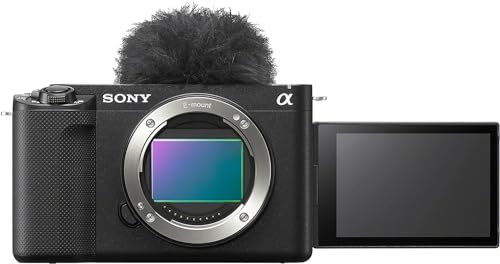
Sony ZV-E1 — Compact full-frame creator
The ZV-E1 compresses a full-frame sensor and both of this guide’s sockets into the smallest body on this page, and that combination is rarer than it should be. Compact cameras are exactly where makers delete the headphone jack to save millimetres; Sony kept it, because the ZV line is designed for creators who film themselves, and Sony understood that a solo creator monitoring audio through headphones is not an edge case but the main case.
Creator tuning runs deeper than the sockets. Autofocus recognises subjects with the intelligence borrowed from Sony’s flagship line, framing aids help a one-person crew compose, and the camera’s low-light performance from its video-oriented sensor is the strongest here for evening and indoor filming. Delivered at 1080p, its footage looks like it came from a much larger rig, which is precisely the deception its owners are buying.
Compromises arrive as heat and controls. Compact full-frame bodies shed heat reluctantly, so marathon 4K sessions in warm rooms are not its sport — though 1080p recording, this guide’s brief, is far gentler and suits it well. Physical dials are few, leaning on the touchscreen. Creators who film in bursts, vlog-style, with audio monitored and light trusted, will find this the most likeable camera here; studio marathoners should take the fan-cooled Panasonics.
- Audio: 3.5mm mic input + 3.5mm headphone output
- Sensor: full frame, video-oriented, compact body
- Recording: strong low-light video, creator-focused aids
- Role: solo creator’s compact full-frame
Strengths
- Smallest full-frame body with both sockets.
- Superb low-light video.
- Autofocus and aids tuned for solo filming.
Trade-offs
- Heat limits long high-resolution sessions.
- Few physical controls.
- No viewfinder for bright-day filming.
Best for: vloggers and solo creators filming in shorter sessions.
Not suited for: all-day studio recording in 4K.

Sony A7R V — Stills giant, video capable
The A7R V enters this guide through a door many stills flagships close: it keeps both audio sockets despite being, first and foremost, one of the great stills cameras of its generation. Its high-resolution sensor serves landscape, studio and commercial photography at the highest level, and its video mode — often treated as a footnote in reviews of this camera — is fully capable for 1080p delivery, with the monitoring this guide demands.
Why recommend a stills giant to an audio-led reader? Because hybrid professionals exist: the photographer who films interviews at the same event, the studio that shoots product stills all morning and a founder’s video after lunch. For them, one body that refuses to compromise either craft, and that monitors audio properly while doing the second, is worth more than a dedicated video body gathering dust between shoots. The A7R V’s autofocus intelligence, shared with Sony’s best, serves both crafts equally.
The honest costs are price and purpose. This is the most expensive camera here — check price on Amazon and wince responsibly — and its video ergonomics, while good, lack the cinema body’s single-mindedness of the FX30. Pure videographers should not buy resolution they will downsample away. Hybrid shooters who print large and film seriously will find it the only pick that never asks them to choose which professional they are today.
- Audio: 3.5mm mic input + 3.5mm headphone output
- Sensor: full-frame high-resolution, stills-first
- Recording: capable video suite with flagship autofocus
- Role: hybrid flagship for stills-led professionals
Strengths
- Elite stills quality with compliant video audio.
- Flagship autofocus across both crafts.
- One body for a hybrid professional practice.
Trade-offs
- Highest price in this guide.
- Video ergonomics trail the FX30.
- Resolution is wasted on pure 1080p video work.
Best for: photographers who also film seriously and monitor their audio.
Not suited for: video-only creators on a sane budget.
Comparison Table
| Pick | Mic in | Headphone out | Sensor |
|---|---|---|---|
| Sony FX30 | Yes, 3.5mm + XLR handle option | Yes, 3.5mm | APS-C |
| Panasonic Lumix GH6 | Yes, 3.5mm | Yes, 3.5mm | Micro Four Thirds |
| Panasonic Lumix S5 II | Yes, 3.5mm | Yes, 3.5mm | Full frame |
| Panasonic Lumix S5 IIX | Yes, 3.5mm | Yes, 3.5mm | Full frame |
| Sony ZV-E1 | Yes, 3.5mm | Yes, 3.5mm | Full frame |
| Sony A7R V | Yes, 3.5mm | Yes, 3.5mm | Full frame, high resolution |
Why Does Live Monitoring Change the Footage You Bring Home?
Every experienced videographer owns a story about the interview that recorded silence, the wedding vows eaten by a buzzing cable, the lavalier that spent the ceremony rubbing against a necklace. Those stories share a structure: the failure was audible from the first second and discoverable only in the edit, when repair costs the most. Headphones during recording collapse that structure. You hear the rustle, reseat the cable, swap the channel, and the disaster becomes a ten-second pause the subject forgets by the next question.
Monitoring also improves the good takes, not merely rescues the bad ones. Hearing your subject’s voice at true level lets you ride the gain sensibly, notice the refrigerator hum the room had hidden from your unaided ears, and catch the moment a speaker turns away from the microphone. Directors on film sets monitor for these reasons; the cameras in this guide extend the same professionalism to a crew of one, which is why the headphone socket — not the microphone socket — is the true dividing line of this category.
A practical discipline completes the picture: monitor with closed-back headphones, at a consistent volume, and check levels at the loudest expected moment rather than the average one. Peaks distort irreversibly while quiet passages can be lifted later, so the monitored ear should be guarding the top of the range. Build that habit and the cameras here will deliver audio that audiences describe, in the highest compliment available, by not mentioning it at all.
Microphone In Is Only Half the Story — What About Preamps and Meters?
Two cameras can share identical sockets and record noticeably different audio, because the circuitry behind the socket matters. Preamplifiers boost a microphone’s weak signal, and cheaper preamps add hiss that reveals itself in quiet rooms and whispered passages. The cinema and pro-leaning bodies here — the FX30 with its XLR handle path, the GH6 with its high-resolution audio support, the IIX — treat that circuitry as a feature. The hybrids record cleanly for dialogue at sensible levels, which covers most real work, provided the microphone is good and close.
Closeness deserves emphasis, because it beats circuitry. A modest microphone thirty centimetres from a speaker will out-record an expensive one across a room, every time, since room echo and noise shrink as the microphone approaches the source. Lavalier and shotgun microphones exist to enforce that closeness. Buyers agonising between two cameras in this guide while planning to use a camera-top microphone from three metres away are optimising the wrong end of the chain.
Meters are the third leg. On-screen level meters, ideally with peak markers and a limiter option, let you set gain once and trust it. All six picks provide usable metering; learn where yours lives in the menu before the first real shoot, set levels so enthusiastic peaks stay safely below distortion, and let the headphones confirm what the meters claim. Sound is a system — microphone, placement, preamp, meters, ears — and this guide’s cameras are the ones that let you operate every link of it.
How Do You Set Up an Interview Rig Around These Cameras?
Begin with the microphone decision, because it dictates the rest. A lavalier on the subject suits a seated interview and frees the camera to sit at a flattering distance; a shotgun on a stand just out of frame suits a subject who moves or objects to being wired. Either way the microphone lands close, the cable runs once and is checked, and the headphones go on before the first real question — not after the warm-up answer turns out to be the best one.
Camera settings for interviews reward restraint. Lock exposure and focus once the subject settles, because hunting autofocus and breathing exposure distract viewers from words. Record a minute of room tone — the silent room’s own sound — before the subject leaves; editors use it to patch edits invisibly, and it costs you sixty seconds. Note your audio levels in the shoot log if you run a series, so episode twelve matches episode one.
Redundancy is the professional’s final habit. Where the production justifies it, run a second recorder — even a phone in the subject’s pocket with a lavalier — as insurance. The cameras here are reliable, and reliability is not the point; the point is that an unrepeatable answer deserves two chances to survive. Monitoring keeps the main recording honest, and the backup forgives the unforeseeable.
Which of These Cameras Handles Long Recording Sessions Best?
Teaching days, conferences, ceremonies and theatre all ask the same question: will the camera still be recording at hour two? The fan-cooled bodies answer most confidently. The GH6 and both S5 II models carry active cooling designed for exactly this duty, and the FX30’s cinema body manages heat with the same intent. Set any of them to 1080p — this guide’s delivery format — and thermal limits recede further still, because HD recording asks far less of the sensor and processor than 4K does.
The ZV-E1 and A7R V ask for more management. Their compact and stills-first designs shed heat less eagerly, and while 1080p is kind to them, a warm room and a long ceremony deserve a test recording at home first, at your real settings, for your real duration. Power matters alongside heat: mains adapters or high-capacity USB power turn a battery juggle into a non-event, and every body here accepts a sensible continuous-power route.
Media planning finishes the session craft. Long sessions at high bitrates consume cards faster than intuition suggests, and the IIX’s SSD recording exists precisely for this arithmetic. Whatever the body, format cards in camera, carry a spare, and offload at the first break rather than the last. Sessions fail at the edges — heat, power, media — far more often than at the sensor, and edges are manageable.
How Does 1080p Delivery Change Which Camera You Should Buy?
Delivering in HD liberates the budget in useful ways. Resolution stops differentiating these cameras entirely, since all of them downsample from higher-resolution sensors into HD that looks cleaner than native HD ever did. The deciding factors become the things this guide keeps returning to: audio architecture, autofocus temperament, heat, lens costs and handling. A reader delivering to 1080p can choose the GH6’s economy and audio depth without surrendering a visible pixel to the full-frame picks.
Cropping headroom is HD delivery’s hidden luxury. A 4K frame reframed to 1080p lets you punch in for emphasis, stabilise a handheld shot, or rescue a composition — in the edit, calmly, rather than on the day. Solo creators filming themselves use this constantly: one locked camera becomes a wide shot and a close-up. If that workflow appeals, record your 1080p-bound productions in 4K where the camera allows, and let delivery stay HD.
What HD delivery does not excuse is weak audio or missed focus, because audiences forgive soft pictures far more readily than muffled words or a hunting lens. That asymmetry is the whole reason this guide exists in its strict form. Buy the camera whose sound you can monitor and whose focus you can trust, and let the resolution — abundantly sufficient everywhere here — look after itself.
What Headphones and Microphones Should You Pair With These Cameras?
Monitoring headphones should be closed-back, wired and honest: closed so the room does not leak in, wired so there is no Bluetooth delay or battery to die mid-ceremony, honest so you hear the recording rather than a flattered version of it. Studio classics from the major audio makers serve for years and cost less than one ruined shoot. Keep them in the camera bag permanently; headphones left at home are a monitoring jack wasted.
Microphone choice follows the work. A wireless lavalier system is the interview and presenter default, and its receiver plugs into the 3.5mm inputs all six cameras provide. A shotgun microphone suits documentary and events, a USB-adjacent dynamic microphone suits desk recording adapted through the camera’s input, and the FX30’s XLR handle opens the door to the full professional microphone catalogue. Buy the microphone before upgrading the camera, always: the order of audio quality is placement, microphone, then everything else.
Cables and small hardware complete the kit unglamorously: a spare 3.5mm cable, the right adapters for your wireless receiver, gaffer tape for strain relief, and windscreens for every microphone that will ever meet weather. Audio failures are disproportionately cable failures, and the monitored ear can only report them — the spares are what fix them.
How Do You Diagnose Audio Problems Your Headphones Reveal?
Monitoring earns its keep only if you can name what you hear, so learn the short field guide. A steady hum or buzz usually means a ground or interference problem: reroute cables away from power supplies, try a different outlet circuit, and check whether the noise follows a particular cable when swapped. A rustling or thumping tied to movement is mechanical — clothing on a lavalier, a hand on the camera, a cable swinging — and the cure is placement and strain relief, not settings.
Hiss that rises in quiet passages points at gain structure: the microphone is too far away, forcing the preamp to work hard and amplify its own noise floor. Move the microphone closer and turn the gain down; the voice stays the same loudness while the hiss retreats. Echo and hollowness mean the room is in the recording — soften it with distance discipline, furnishing, or a closer microphone — while dropouts on a wireless system ask for fresh batteries and a cleaner line of sight between transmitter and receiver.
Work the diagnosis in that order — swap, move, then adjust — and say what you changed out loud for the recording, so the edit can learn from the shoot. The cameras here give you honest monitoring; this small diagnostic grammar turns honesty into fixes, and fixes into the clean dialogue your audience will never consciously notice.
What Settings Should You Lock In Before Any Serious Shoot?
Audio settings reward being decided once, at home, rather than rediscovered under pressure. Set the recording level manually — automatic gain pumps and breathes audibly whenever a subject pauses — and aim for peaks comfortably below the top of the meter. Switch on the limiter if your camera offers one, as insurance rather than as a strategy. Choose the wind filter only when wind actually threatens, since it trims low voice warmth indoors.
Video settings deserve the same pre-commitment. Pick your frame rate for the delivery and the region’s lighting, set a shutter that follows it naturally, and decide whether focus is locked, tracked or manual for this kind of shoot. White balance locked to the room prevents the slow colour drift that makes edits visible. Every one of these decisions is a small gift to your future editing self, who will otherwise pay for each unlocked setting in correction time.
Save the result. Most of these bodies allow custom modes or settings banks; dedicate one to your interview setup, one to your event setup, and the camera stops being a menu you negotiate with and becomes an instrument you pick up. The professionals whose work this guide’s readers admire are not faster at menus — they have arranged to need menus less.
How Do Multi-Camera Shoots Use These Cameras Together?
Several picks here were practically designed to work as a set. A common production pattern pairs an FX30 on the wide shot with an S5 II or ZV-E1 on the close-up, or a GH6 locked on the speaker with a second body roaming. Audio discipline decides whether the edit sings: designate one camera as the audio master — the one wearing the best microphone and the monitoring headphones — and let the others record scratch audio for sync.
Sync itself is a solved problem when you help it. A hand clap in view of all cameras at the start, or timecode where the IIX and FX30 workflows allow, turns an evening of alignment into minutes. Keep frame rates identical across bodies, match white balance manually rather than trusting auto, and accept that colour matching in the edit will still take a pass; shooting the same scene with the same discipline shrinks that pass from an hour to a glance.
The monitoring rule scales with the crew. On a multi-camera shoot the audio master operator wears the headphones and owns the sound, exactly as the solo creator does alone. Adding cameras multiplies pictures; it should never dilute the one responsibility this guide is about.
Why Do Some Excellent Cameras Fail This Guide’s Test?
Readers will notice famous names missing here, and the absences are the filter working as designed. Compact vlogging cameras, action cameras and several beloved stills bodies omit the headphone socket — some omit the microphone socket too, expecting internal microphones or phone-based audio to suffice. For their intended uses that is a defensible trade. For a reader whose brief is monitored, microphone-fed 1080p recording, it is disqualifying, and this guide declines to blur the line out of politeness.
Workarounds exist and deserve their honest label. HDMI audio extraction, USB audio interfaces and separate recorders can bolt monitoring onto a socket-less camera, and professionals do it when a production demands a specific body. But a workaround is a cost — money, bulk, failure points — and a buyer choosing a camera today should buy the sockets built in, from the six above, rather than engineering around their absence from day one.
If your heart is set on a camera outside this list, let the list still serve you: price the workaround honestly, add the headphones and microphone, and compare the total against the S5 II or FX30 bought once and used simply. Arithmetic settles most romances, and where it does not, at least the romance proceeds with its eyes open.
How Should You Maintain and Store an Audio-Capable Camera Kit?
Audio gear ages through neglect in specific, preventable ways. Cables fail at their connectors after years of being yanked and coiled tightly; coil them loosely, pull them by the plug, and replace the first cable that crackles when flexed rather than nursing it into a ceremony. Microphone windscreens collect moisture and dust — wash or replace them, and let a rain-used kit dry fully before the bag closes, because mildew is an audio problem that becomes a smell problem that becomes a new-kit problem.
The cameras themselves ask for the usual respect plus one audio-specific habit: exercise the sockets. A 3.5mm jack that sits unused for a year in a dusty bag can oxidise into crackle; plugging and unplugging the headphones a few times, and keeping the ports capped or covered where covers exist, keeps the contacts honest. Firmware updates occasionally improve audio handling and metering, so the update habit pays twice on these bodies.
Store the kit as a kit: camera, headphones, microphone, spare cables and batteries in one bag that leaves the house whole. The monitored-audio workflow this guide teaches depends on every link being present, and a kit that lives together is a kit that works together. Check the bag the night before any unrepeatable shoot — that single habit prevents more disasters than any feature in any camera here.
What Does a Sensible Upgrade Path Look Like From Here?
Owners of these cameras usually upgrade in a predictable, satisfying order, and knowing it in advance protects the budget. Microphones first, because they move the sound most. A second camera angle second, because it transforms editing options for interviews and events. Lighting third — a modest panel changes faces more than any lens at this level. The camera body itself comes last, because the six here were chosen to remain adequate while everything around them improves.
Within audio, the FX30’s XLR handle and the GH6’s adapter path show what growth looks like without replacing the body: professional microphones, more channels, physical dials. The S5 IIX’s SSD and codec depth similarly grow the workflow around the same sensor. This is the quiet virtue of buying cameras with sockets and standards rather than sealed appliances — the kit compounds instead of expiring.
Resist only one upgrade: the sideways one, swapping a body for a sibling with the same sockets and a new badge. The differences that mattered — monitoring, focus, heat, lenses — were settled at purchase. Spend on the chain around the camera, and the camera you chose here will still be earning its place when the microphones around it have been upgraded twice.
How Do You Film Yourself Alone Without Losing Audio Control?
Solo filming is the scenario this category was born for, and it has a workflow worth rehearsing. Set the camera, frame yourself with the flip screen or a monitor, and place the microphone — a wireless lavalier earns its price here, because it frees you from the cable that would otherwise tether the performance. Do a ten-second test recording wearing the headphones, listening for room noise and rustle, before a single real sentence is attempted.
During the take, the headphones present a choice: wear them and look like a broadcaster, or trust the test and the meters. Many creators compromise with one earbud-style monitor tucked on the camera side, or periodic checks between segments. The professional answer is to structure the filming in segments short enough that a failure costs one segment, not the session — record, glance at the meters and the waveform habits of your camera, continue. Segment discipline is the solo operator’s redundancy.
Afterwards, review the audio of the first and last segments before striking the set. Microphone batteries fade, wireless interference arrives with the neighbours’ evening, and a set still standing is a reshoot that costs minutes instead of a rebuilt room. The cameras in this guide make all of this straightforward; the routine makes it reliable, and reliability is the difference between a channel that publishes and a folder of almosts.
Which Lens Choices Matter When Audio Led the Purchase?
It would be a shame to buy a camera for its ears and then handicap its eyes with the wrong glass, so a short lens doctrine belongs in this guide. For interviews and presenting, a moderate zoom that covers wide room shots through flattering portrait lengths is the workhorse; its job is to disappear, framing the speaker at a natural distance where the microphone plan also works. Prime lenses with wide apertures serve evening and aesthetic work, buying light and background separation at the cost of fixed framing.
Stabilisation is the lens feature video feels most. In-body stabilisation across these cameras pairs with lens stabilisation on some systems, and the combination decides whether handheld footage looks intentional or apologetic. Solo creators walking and talking — the ZV-E1’s home turf — should weight stabilisation behaviour as heavily as any specification in this article after the sockets themselves.
Budget sequencing applies here too. One good zoom that covers your working range will serve more productions than two exotic primes bought for imaginary ones, and the money saved funds the microphone this guide keeps insisting on. Lenses also outlive bodies, particularly within the L-Mount and E-Mount ecosystems represented here, so glass bought well is a decade’s companion rather than a season’s.
How Do You Verify Both Sockets on the Exact Unit You Are Buying?
Model families are mazes, and this category’s defining feature is exactly the kind that varies between siblings, regions and generations. The verification ritual is therefore part of the purchase. On the listing, find the specifications section and locate both lines — microphone input and headphone output, each stated separately — for the precise model name including its suffixes. A photograph of the camera’s side panels showing two 3.5mm ports corroborates the text. If either line is missing, treat the socket as missing, whatever a review of a different variant promised.
On arrival, test before the return window becomes a memory. Plug in a microphone, record a sentence, then plug in headphones and record another while listening: you should hear your voice live, with the room around it. Test the wireless receiver you actually own, at the distance you actually shoot, and flex each cable gently while monitoring to expose a faulty lead while exchanges are still free. Ten minutes of this converts a specification into a certainty.
Keep the evidence with the receipt: a note of the serial number, the listing’s specification page saved, and your test result dated. Should a socket fail in year two, that small file turns a warranty conversation from archaeology into administration. Cameras bought on a hard criterion deserve hard records, and the habit costs nothing but the decision to keep it.
What Should a Beginner’s First Monitored Shoot Look Like?
Keep the first production small enough to survive its own lessons: one subject, one room, one microphone, one camera from this list, and a script or interview outline short enough to finish before fatigue edits it for you. Set levels with the subject speaking at performance volume, not rehearsal politeness, because people project when the real take begins and the meter must already know that. Record two minutes, stop, and listen to all of it through the headphones before continuing — the cheapest film school in the world is your own first two minutes, honestly reviewed.
Then shoot the piece in segments, checking the meters between them and the audio at each natural break. Note what the room does across the session: traffic builds, refrigerators cycle, light changes. Those notes become your location instincts, and they transfer to every future shoot in a way no camera feature can. Finish by backing up the card before dinner, while the day’s relief makes diligence feel easy.
Judge the result by the standard audiences use: could you listen to the whole piece without once thinking about the sound? If yes, the workflow worked, and it will scale — longer sessions, more cameras, professional microphones — without changing its skeleton. If the audio nags at you, the headphones have already told you where, and the next shoot starts smarter. That loop, more than any single camera above, is the craft this guide is really recommending.
Common Mistakes
The founding mistake is buying a camera with a microphone input and no headphone output, then discovering the difference during the first important recording. This entire guide exists to prevent that purchase, so verify the pair of sockets on the exact model — not its sibling, not its predecessor — before money moves. The second mistake is monitoring through wireless earbuds, whose delay and compression hide exactly the faults monitoring exists to reveal.
Setting levels by hope is the third error: peaks must be tested at the loudest expected moment, with headroom left for laughter and emphasis. Fourth comes microphone placement by convenience — the camera-top microphone three metres from the subject — which no preamp can rescue. Fifth, buyers forget the long-session edges: untested heat, single batteries, one memory card, for the ceremony that cannot be repeated.
The final mistake is treating audio as the camera’s problem rather than the shooter’s craft. These six cameras provide every tool — sockets, meters, monitoring, expansion — but the tools pay out only to the operator who wears the headphones, places the microphone close and checks the levels before the subject’s best answer. Buy the tool, then be the craft.
Final Recommendation
For dedicated video work, the Sony FX30 is this guide’s centre of gravity: cinema design, both sockets, the XLR growth path and autofocus that lets a solo operator concentrate on listening. The Panasonic GH6 matches it on audio depth with greater lens economy, for controlled shooting. The S5 II is the full-frame all-rounder most creators should buy, the S5 IIX its production-pipeline sibling, the ZV-E1 the compact charmer for shorter sessions, and the A7R V the hybrid flagship for stills-led professionals.
Notice what the recommendation never hinged on: resolution. At 1080p delivery every camera here is abundant, and the differences that survive contact with real work are ears, focus, heat and handling. Choose on those, monitor everything, and your audience will reward you by never thinking about your audio at all.
Whichever body you choose, make the purchase complete in one order: the camera, the closed-back headphones, the first microphone, a spare cable and a second memory card. A camera that arrives without its monitoring chain invites a first shoot flown blind out of sheer impatience, and first shoots have a way of containing the interview, the ceremony or the answer that cannot be repeated. Completeness on day one is not extravagance; it is the entire philosophy of this category expressed as a shopping list.
One last encouragement for the reader upgrading from a socket-less camera: the first time your headphones catch a buzzing cable thirty seconds into an interview instead of thirty days later in the edit, this entire category will justify itself in a single saved take.
Frequently Asked Questions
Can I monitor audio through Bluetooth headphones instead?
Not reliably for this purpose. Bluetooth adds delay and its own compression, and camera support is inconsistent. A wired, closed-back pair plugged into the headphone socket is the professional standard these cameras were designed around.
Does every camera here really have both sockets?
Yes — that was the entry condition. Each pick carries a 3.5mm microphone input and a 3.5mm headphone output, stated in its section and in the comparison table. Models missing either socket were excluded regardless of picture quality.
Is a microphone input enough if I record audio separately?
Separate recording is a valid professional workflow, but it adds sync work and removes the camera’s own audio as a monitored reference. Most solo creators are better served by monitored in-camera audio, with a separate recorder as backup rather than as the plan.
Which pick is best for filming online courses?
The GH6 and S5 II suit course work especially well: fan cooling for long lessons, deep audio features, dependable focus. The FX30 joins them if you want the cinema body’s XLR upgrade path.
Why include the A7R V in a video-audio guide?
Because it is a flagship stills camera that kept both sockets, making it the one-body answer for hybrid professionals who photograph at the highest level and film interviews with monitored audio.
What microphone should I buy first?
A wireless lavalier system for interviews and presenting, or a shotgun for documentary work. Either will improve your audio more than any camera upgrade, provided it is placed close and monitored through headphones.
Can I use the headphone jack to feed a livestream or a speaker?
The headphone output is designed for monitoring, and while it can feed other equipment in a pinch, levels and impedance are matched to headphones rather than line inputs. For streaming, prefer the camera’s USB or HDMI audio paths where offered — the S5 IIX in particular is built with streaming workflows in mind — and keep the headphone socket doing the job this guide celebrates.
Do I need an XLR adapter to get professional results?
No. Professional results come from placement, levels and monitoring, all achievable through the 3.5mm inputs here with good microphones. XLR adapters such as Sony’s handle for the FX30 or Panasonic’s for the GH6 add balanced connections, phantom power and physical controls — worth buying when your microphone collection or your productions grow into them, not as a first purchase.
Related Guides
Continue with the 4/3 sensor cameras for compact systems, the five compact cameras ranked by image quality, and the 10x optical zoom cameras for reach.



[…] with the 1080p cameras with headphone and microphone jacks for monitored sound, the 4/3 sensor cameras for compact, travel-light systems, and the five compact cameras ranked […]