Our Top Picks



What's inside
- Legacy PCI Is Not PCI Express, and the Name Alone Proves Nothing
- Native Support Versus a Bridge Chip Is the Central Technical Choice
- Chipsets and Board Families That Keep the Slot Alive
- Start From the Card, Not From the Board
- Operating System and Driver Support Decide More Than Hardware Fit
- Physical Layout: Slot Position, Clearance, and Case Reality
- How Many Legacy Slots Do You Genuinely Need?
- Firmware Settings That Make Legacy Hardware Behave
- Performance Expectations for a Bridged Legacy Bus
- Use Cases, Taken One at a Time
- A Pre-Purchase Checklist You Can Actually Finish in an Evening
- Installation and Maintenance Habits for Long Service
- Common Mistakes and the Symptoms They Produce
- Choosing the Rest of the Platform Around the Legacy Slot
- Environmental and Electrical Realities Outside the Case
- Check prices on Amazon
- Frequently Asked Questions
As an Amazon Associate I earn from qualifying purchases. This post may contain affiliate links at no extra cost to you.
Keeping a trusted data-acquisition card in service often matters more than chasing the newest expansion standard for a workstation that already works. As an Amazon Associate we earn from qualifying purchases. This guide is for readers who need a modern motherboard that still offers a genuine conventional PCI slot, not a PCI Express slot with a similar name. The distinction sounds small on a specification sheet and becomes decisive the moment a card built for a parallel bus, a specific signalling voltage, or a driver written many years ago has to sit in a new machine and keep doing a job that newer hardware does not replace cleanly.
Legacy PCI Is Not PCI Express, and the Name Alone Proves Nothing
Conventional PCI is a parallel, shared bus that arrived in the early nineteen-nineties and became the default expansion method for sound cards, network adapters, serial and parallel controllers, data-acquisition boards, frame grabbers, and countless specialist interfaces. PCI Express, usually shortened to PCIe, is a completely different serial interconnect built around lanes and point-to-point links. The connectors do not mate, the signalling does not match, and a card designed for one standard cannot be persuaded into the other with a passive adapter or a trimmed bracket. Any listing that blurs the two terms should be read with suspicion until photographs and the manual confirm which connector is actually present.
A true legacy slot is long, usually white or pale on older designs and sometimes black on industrial boards, with a notch whose position signals the supported voltage. A PCIe x1 slot is short, a PCIe x16 slot is long in a different way, and neither accepts a conventional PCI edge connector. Product titles sometimes use PCI as shorthand for the whole expansion family, and marketplace descriptions copied from a chipset overview can mention PCI support that refers to internal logic rather than a physical slot. The reliable evidence is a board photograph showing the connector, a layout diagram in the manual naming it, and a block diagram explaining how that connector reaches the processor or chipset.
Why a discontinued bus still earns board space
The bus survives because the cards attached to it often outlast several generations of computers. A laboratory data-acquisition board may be tied to calibrated sensors, custom cabling, and validated software that would all need requalification if the interface changed. A broadcast or studio sound card may feed a mixing desk through connectors that current interfaces arrange differently. Telecom line cards, machine-vision grabbers, motion-control interfaces, and test fixtures can carry a replacement burden far beyond the price of the card itself, because the surrounding system was built, documented, and approved around them.
Industrial computing also moves on longer cycles than consumer desktops. A production line installed with a ten or fifteen year support expectation cannot redesign its control hardware every time a consumer chipset drops an older interface. Board makers serving that market therefore keep conventional PCI alive on selected models, pair it with long-availability processors, and publish change notices when components are revised. Those boards rarely chase gaming features, yet they offer exactly what a legacy installation needs: predictable expansion, documented behaviour, and a supply window measured in years rather than a single retail season.
Native Support Versus a Bridge Chip Is the Central Technical Choice
Modern processors and chipsets almost never provide conventional PCI directly. When a current motherboard includes a legacy slot, the signal almost always passes through a PCIe-to-PCI bridge device soldered on the board. That bridge translates transactions between the serial PCIe link on one side and the parallel PCI bus on the other. Well-known bridge families have come from suppliers such as ASMedia, ITE, and Pericom, and each implementation has its own quirks around bus mastering, interrupt handling, and compatibility with older cards that assume native behaviour.
A bridged slot works beautifully with a wide range of ordinary cards: network adapters, many sound cards, serial controllers, and numerous acquisition boards that follow the specification closely. Difficulties appear at the margins, with cards that rely on unusual timing, legacy interrupt routing, direct bus mastering behaviour the bridge restricts, or expansion ROM routines written for a native bus. A bridge also shares its upstream PCIe link, so throughput and latency characteristics differ from the original parallel bus even when the connector fits perfectly. None of this makes bridged boards a poor choice; it makes the bridge model and the card vendor’s compatibility notes essential reading.
How to identify the bridge before buying
Open the manual and look for a block diagram. It will usually show the PCI slot hanging from a named bridge chip connected to a chipset PCIe lane. The chip marking itself may be visible in high-resolution board photographs as a small square device near the slot. Once identified, search the card maker’s knowledge base for that bridge family, because acquisition and audio vendors often publish tested combinations. If the manual shows the slot but never names a bridge or a native path, treat that silence as a reason to contact board support rather than as a minor omission, since the answer determines whether demanding cards will enumerate at all.
Older platforms occupy the other end of the spectrum. Certain earlier chipsets retained native PCI, and refurbished or long-life boards built around them avoid translation entirely. The trade is age: slower storage interfaces, older memory standards, limited processor choice, and capacitors and fans that have already lived part of their service life. For a card known to misbehave behind bridges, that trade can still be rational. For a card that merely needs a slot and a stable driver, a current bridged board is usually the calmer long-term home because every other component remains contemporary and replaceable.
Chipsets and Board Families That Keep the Slot Alive
Most legacy-slot boards now come from the industrial and embedded side of the market rather than mainstream consumer ranges. Manufacturers in that space build ATX, micro-ATX, and Mini-ITX models around Intel Core processors from several generations, selecting chipsets such as the Q, H, and B series depending on management features and lane counts, and they route one or two PCI slots through a bridge. Longevity SKUs matter here: a board sold with a multi-year availability commitment gives a facility time to standardise spares, whereas a consumer model can vanish between a pilot build and a fleet rollout.
On the AMD side, legacy slots appear less frequently in current industrial catalogues, though boards built around Ryzen and earlier A-series or AM4 platforms exist and can suit a Linux-based acquisition system well. Whichever processor family you choose, verify the exact revision rather than the family name. Vendors sometimes issue a cost-reduced revision that drops the bridge or rearranges slots while keeping a near-identical model name, and the suffix letters at the end of a part number are where that change hides. Readers comparing mainstream generations as a fallback will find useful context in this overview of best 12th gen motherboards, provided they remember that consumer boards from that era almost never include the legacy connector itself.
Full-length industrial boards and backplane systems
Beyond conventional desktop form factors, the industrial world offers PICMG single-board computers that plug into passive backplanes carrying many PCI slots. That architecture suits a rack of acquisition or telecom cards: the processor board can be upgraded while the backplane and its slots stay in place. It is a different purchasing category from a desktop motherboard, with different power supplies and enclosures, yet for a system holding four or more legacy cards it can be the only tidy route. Desktop boards typically offer one or two legacy slots; expecting more from a standard ATX layout leads to disappointment and to brackets crowded against graphics cards.
Server and workstation boards occasionally surprise buyers in both directions. A board marketed for reliability may include a legacy slot for a management or telephony card, while another with abundant PCIe slots may offer none. Photographs settle the question faster than marketing categories. Also note the physical neighbours: a legacy slot placed directly beside a dual-width graphics slot may be mechanically present and practically unusable once a large cooler occupies the adjacent space, a detail that only a dimensioned layout drawing reveals reliably.
Start From the Card, Not From the Board
The correct selection process runs backwards compared with an ordinary build. Begin with the exact card that must survive: its full model and revision, its connector keying, its driver history, and the software that talks to it. Only then look for boards. A buyer who picks an attractive motherboard first and hopes the card will follow often discovers a voltage notch, a driver ceiling, or a bridge limitation after the rest of the machine has been assembled. Write the card details on a single page before shopping; every later check refers back to that page.
Voltage keying and the notch that can stop an installation
Conventional PCI cards are keyed for 5 volt signalling, 3.3 volt signalling, or both in a universal design. The notch position in the connector enforces that distinction mechanically. A 5 volt only card will not seat in a 3.3 volt only slot, and forcing it risks damage to both card and board. Many later cards are universal and seat in either environment, which is why two cards that look alike can behave differently at installation time. Check the card manual for its signalling requirement and the board manual for what its slot supplies, then confirm visually against the notch diagram rather than relying on a seller’s brief compatibility line.
Related traps include 64-bit PCI cards with an extended connector and PCI-X cards from the server world. Some long 64-bit cards fit a 32-bit slot with part of the edge hanging over the end, operating in a reduced mode if the card design permits it; others do not. PCI-X adds its own speed and voltage considerations. If your card came from a server or a workstation rather than a desktop, identify its exact bus variant before assuming that a desktop legacy slot is its natural home. The connector family resemblance conceals several distinct electrical arrangements.
Bus mastering, interrupts, and quiet assumptions
High-throughput acquisition and audio cards usually act as bus masters, initiating transfers rather than waiting to be polled. Most bridges support bus mastering, but limitations have been documented with specific combinations, particularly where a card expects particular grant and latency behaviour. Interrupt handling is the other quiet assumption. Legacy software may expect a card to appear on a traditional interrupt line, while a modern platform routes everything through advanced programmable interrupt controllers and message-signalled mechanisms at the PCIe level. Operating systems hide much of this, yet a driver written for an older environment can still stumble when the underlying routing differs from its expectations.
Practical evidence beats theory here. User communities around long-lived acquisition and audio hardware keep lists of motherboard and bridge combinations that work with particular cards, including BIOS settings that mattered. A card vendor’s support forum, a laboratory equipment mailing list, or a studio community dedicated to a discontinued sound card can save weeks. Record the bridge chip, board revision, BIOS version, and operating system from any successful report you rely on, because a success story missing those details may describe a materially different machine from the one you are about to build.
Operating System and Driver Support Decide More Than Hardware Fit
A card that seats perfectly is only half installed. The driver must exist for your operating system, in the right bit depth, with a signature the system will accept. Many legacy cards ended driver development at Windows 7 or at 32-bit editions of later releases. A 64-bit operating system cannot load a 32-bit kernel driver, and no compatibility setting changes that. If the card’s last driver targets a 32-bit system, the whole build may need to run that system, or run it inside a virtual machine with PCI passthrough on a platform that supports directing a device to a guest, which is its own specialist project.
Windows 10 and Windows 11 add driver signature enforcement and memory integrity features that can reject older packages even when the code itself would function. Some users disable particular protections for a dedicated offline instrument computer, a decision that should be made deliberately, documented, and weighed against the machine’s network exposure. An air-gapped controller for a single instrument carries a different risk profile from a general office desktop. Linux offers a contrasting path: the kernel still carries drivers for a surprising range of older PCI hardware, and long-term distributions maintain them for years, though a proprietary acquisition card with a binary-only driver may be tied to specific kernel versions that narrow your choices considerably.
Keeping an older operating system viable and safe
Sometimes the honest answer is that the new motherboard will host an older operating system because the application demands it. Plan that from the start. Storage controllers on current boards may lack drivers for very old releases, USB controllers can leave an installer without keyboard input, and network adapters may need a driver slipped in manually. Industrial board vendors sometimes publish driver sets for older systems precisely because their customers run validated software stacks. Check the board’s download page for your intended system before purchase, not after assembly, and archive every installer locally so a future rebuild does not depend on a vendor page that may be reorganised.
DOS and other real-mode environments appear in machine control and in test fixtures driven by software that talks directly to hardware. A modern UEFI-only board can be a poor host for such software. Boards offering a Compatibility Support Module, often labelled CSM or legacy boot, give older boot methods a path. If your workflow boots from legacy media or uses an expansion ROM on the card itself, confirm that the firmware can initialise that ROM and that secure boot settings can be arranged accordingly. These firmware details rarely appear in retail summaries, yet they decide whether a technically compatible card ever gets a chance to run.
Physical Layout: Slot Position, Clearance, and Case Reality
Expansion compatibility is partly carpentry. Measure the card’s length and height, then compare them with the board layout and the case interior. A full-length acquisition card can collide with drive cages, front-panel cabling, or a tall chipset heatsink. A legacy slot at the very bottom of an ATX board may sit close to power-supply shrouds in compact cases. Low-profile cards need the matching short bracket either supplied or available, and a card with a daughterboard on a ribbon cable needs somewhere sensible for that second bracket to live.
Cooling deserves equal attention. Many legacy cards were designed for the generous airflow of older, less densely packed cases, and some run warm by modern standards because their components date from a less efficiency-obsessed era. A sealed, silence-focused case can starve them. Position the card away from a hot graphics processor where the layout allows, keep an unobstructed path from intake fans, and check temperatures under a sustained workload rather than at idle. Readers building around tighter budgets sometimes weigh these industrial options against mainstream value boards such as those gathered under best 100 dollar motherboards; the comparison is useful for the rest of the build, but remember that none of those mainstream picks solve the legacy slot requirement itself.
Power delivery and ageing cards
The PCI slot supplies defined power rails, and a healthy modern power supply provides them without strain for ordinary cards. Problems arise with cards carrying large older components, external dongles drawing from the slot, or several legacy cards in one system. Add up the stated consumption where manuals provide it, leave headroom, and choose a supply with a reputation for stable voltages rather than chasing headline wattage. Ripple and tired capacitors in a bargain supply can manifest as intermittent acquisition errors that masquerade as driver faults, sending troubleshooting in entirely the wrong direction for days.
Inspect any second-hand card before installation. Look for bulging or leaking electrolytic capacitors, heat discolouration around regulators, damaged edge contacts, and a bracket bent enough to stress the connector. Clean contacts gently with appropriate materials, handle the card by its edges, and photograph its jumpers and DIP switches before changing anything. Those tiny switches may encode an address or mode that the controlling software expects; a well-meant tidy-up that resets them can silence a working instrument. Documentation for discontinued cards survives in archived manuals and enthusiast collections, and an hour spent locating it is rarely wasted.
How Many Legacy Slots Do You Genuinely Need?
One slot covers the most common situations: a single acquisition board, one cherished sound card, a telephony interface, or a specialist controller. Two slots appear in systems pairing acquisition with a separate timing or serial card, or combining audio with a legacy networking or storage controller for a period-correct environment. Beyond two, you are in backplane or older-platform territory, and it is better to acknowledge that early than to stack risers and adapters in a desktop case. Each additional legacy card multiplies interrupt, power, and driver interactions, so a requirement list written in plain language should drive the board choice rather than a hope that spare slots might someday be handy.
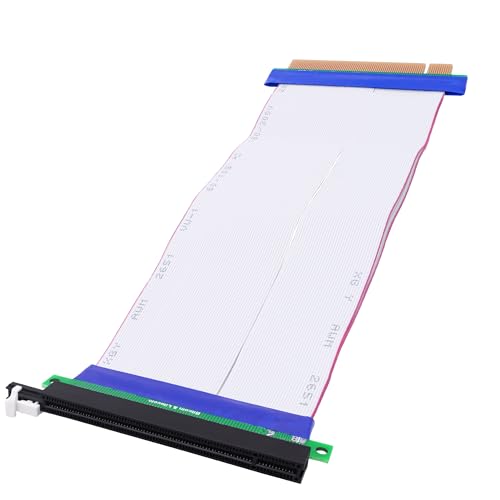
Riser cards and external bridge enclosures deserve a clear-eyed paragraph. A PCIe-to-PCI riser or an expansion chassis can add a legacy connector to a board that lacks one, and for some cards these products work well. They introduce the same bridge considerations as an on-board solution, plus cabling, enclosure power, and mechanical mounting questions. They shine when the host machine is fixed, such as a small system already deployed, and they are less attractive when you are free to choose a motherboard with the slot built in. An integrated slot keeps the card inside the main enclosure, on the main supply, under the main cooling plan, with fewer interconnects to loosen during transport.
Slot sharing and what disappears when a slot is filled
Board manuals contain a small table many buyers skip: the resource-sharing notes. A legacy slot behind a bridge consumes an upstream PCIe lane, and populating certain M.2 sockets or PCIe slots can disable others or reduce their width. On a board whose chipset lanes are already committed to storage and networking, adding the bridge path can interact with those choices. Read the sharing table alongside your storage plan. A build that needs two NVMe drives, a capture device, and the legacy card must confirm that all four can coexist at acceptable speeds before any part is ordered.
Graphics clearance interacts with sharing as well. Builders keeping an older high-performance card in service sometimes consult compatibility roundups like best 2080 ti compatible motherboards for spacing and power guidance; a dual or triple width cooler from that era can easily cover the very legacy slot the whole build exists to provide. Check the slot order from the processor outward, picture the installed cooler, and count which connectors remain genuinely reachable. A slot hidden beneath a graphics shroud is a specification, not a resource.
Firmware Settings That Make Legacy Hardware Behave
After assembly, firmware is where a legacy installation is won or quietly lost. Enter setup and work through a short deliberate list. Enable the Compatibility Support Module if older boot devices or card ROMs are involved. Review the option governing decoding above four gigabytes if large PCIe devices share the system, because certain older drivers dislike addresses assigned in high space. Look for settings that control PCIe link speed on the bridge’s upstream port; forcing an earlier generation link occasionally stabilises a marginal bridge connection, at a throughput cost that a conventional PCI bus would never notice anyway.
Interrupt and power settings form the second group. Where the firmware offers a choice, note the default before changing anything, and change one item at a time with a written record. Wake behaviour, power-on after mains return, and watchdog timers matter greatly in industrial settings: a controller that must restart unattended after an outage needs different settings from a studio machine that should stay off until a person arrives. Industrial boards often expose serial console redirection and remote management options that consumer boards hide, and those features can justify the board on their own for a machine installed in a rack or a plant room.
A calm first-boot procedure
Install the legacy card alone for the first boot, with no other expansion hardware competing for attention. Confirm that the system completes its self-check, enter firmware setup to see whether any device listing mentions the card or its bridge, then boot the operating system and check the device listing before installing drivers. On Windows that means Device Manager; on Linux, the PCI listing utilities show vendor and device identifiers even without a driver. If the card does not appear at this level, the problem is hardware, seating, power, or bridge related, and installing driver packages will not fix it. If it appears with correct identifiers, proceed to the driver and then to the application, testing each layer separately.
Keep a known-good baseline once the system works. Export or photograph firmware settings, save the exact driver package with a note of its source, and record the slot used. Legacy cards occasionally behave differently in different slots behind different bridges on the same board, so the working slot is information, not trivia. A baseline record turns a future failure from archaeology into comparison: what changed, the board, the firmware, the system update, or the card itself.
Performance Expectations for a Bridged Legacy Bus
Conventional PCI in its common 32-bit, 33 megahertz form offers a theoretical shared bandwidth of about one hundred thirty-three megabytes per second, and every device on that bus shares it. Real acquisition workloads usually sit far below that ceiling: multi-channel analogue sampling at moderate rates, digital I/O, serial expansion, and audio all fit comfortably. High-channel-count fast sampling, uncompressed video capture from older frame grabbers, and multi-port network loads can approach the limit, and a bridge does not raise it. If your card’s manual states a sustained transfer requirement, compare it honestly with the shared ceiling rather than with PCIe figures elsewhere in the system.
Latency is subtler. A bridge adds translation steps, and workloads built around tight polling loops or precise interrupt timing can feel the difference even when average throughput looks ample. Audio users describe this as crackling under load when buffer sizes are small; acquisition users see it as jitter in software-timed sampling. Raising buffer sizes, dedicating a processor core, or selecting a board whose bridge has a good record with the specific card are the usual remedies. Hardware-timed cards, which clock their sampling internally and deliver blocks of data, are largely indifferent to these delays, which is one reason they age more gracefully than designs that lean on the host for timing.
When the honest answer is a different interface
Sometimes investigation ends with a conclusion nobody wanted: the card’s function now exists in a mature PCIe or USB form, the old driver chain is fragile, and the surrounding software supports the newer device. Replacing the card then is not surrender; it is engineering judgement. The cases that justify a legacy-slot board are those where replacement cascades into recalibration, revalidation, unavailable software changes, or the loss of a connector or behaviour the new device does not reproduce. State the cascade in writing when deciding. If the cascade is small, take the modern interface and enjoy a simpler machine. If it reaches into certification, archives of existing data, or a production process, the legacy slot earns its place.
External factors can tip the balance. A facility holding spare legacy cards on a shelf has an asset a new interface would strand. A research group whose analysis pipeline expects a specific file format from a specific acquisition application may face months of rework. A broadcaster with wiring looms terminated for one card’s breakout cable faces studio downtime. These are operational facts, not nostalgia, and a buying guide that dismisses them misses why this board category continues to exist at all.
Use Cases, Taken One at a Time
Data acquisition and laboratory instruments
DAQ cards measure voltages, count pulses, read encoders, switch relays, and generate analogue outputs for benches and test rigs. Their value lies in channel count, isolation, sampling behaviour, and the software libraries behind them. A replacement card with similar headline specifications may present a different programming interface, forcing changes in experiment code that has been stable for years. When shopping for a board to host a DAQ card, prioritise bridge reputation with that card family, a stable firmware history, and an operating system plan that matches the acquisition software. Also consider electrical environment: a board installed beside switching power supplies and motor drives benefits from a metal enclosure, careful grounding, and the isolation features of the card itself, none of which a consumer showcase case guarantees.
Sound cards and studio equipment
Certain PCI sound cards remain in studios because of their converters, their low-latency drivers for particular applications, their breakout boxes, or a sound that engineers know. Others survive in community and hospital radio, in theatres driving show control, and in transfer suites digitising tape through a chain that was aligned around one interface. Audio is unforgiving of interrupt and power problems; a system can pass every benchmark and still produce clicks if a graphics driver and a bridged audio card interact badly. Builders for audio should favour boards with a documented calm record, keep the build lean, disable unused onboard devices that compete for attention, and leave buffer headroom rather than chasing the lowest possible latency figure.
Telecom, serial, and machine control
Telephony cards handling analogue or digital trunks, multi-port serial cards talking to instruments and point-of-sale hardware, and motion or I/O cards in small machines all share a pattern: the computer is one component in a wired system that would be expensive to re-cable. Multi-port serial in particular survives because industrial equipment with a serial console or protocol remains in service everywhere, from balances to building controllers. A legacy slot hosting such a card needs reliable wake and restart behaviour more than raw speed. For machine control, also weigh the consequences of an operating system update pausing a driver; dedicated controllers often run a fixed software image for years, changed only during planned maintenance windows.
Retro and archival systems with a serious purpose
Not every legacy build is industrial. Archivists recover data from media and peripherals that only older interfaces address, engineers maintain products whose development tools were written for earlier platforms, and researchers run period software to verify old results. A modern board with a legacy slot can serve these tasks while offering contemporary storage for the recovered data and a processor fast enough to emulate or analyse at speed. Builders coming from the processor side sometimes compare platform options through guides such as best 3900x motherboards when an older high-core-count workstation is the alternative host; either route can work, and the deciding factor is usually which one gives the specific card a documented, driver-complete home.
A Pre-Purchase Checklist You Can Actually Finish in an Evening
- Write down the card’s exact model, revision, bus variant, and signalling voltage, and photograph its connector notch.
- Confirm the board has a physical conventional PCI slot in photographs and in the manual layout, not merely PCI mentioned in a chipset list.
- Identify the bridge chip from the block diagram and search the card maker’s notes and user community for that pairing.
- Verify a driver exists for your operating system and bit depth, and download it before ordering anything.
- Check firmware needs: legacy boot support, option ROM handling, and any setting your card or software requires.
- Measure card length and height against the board drawing and the case, including graphics cooler overlap.
- Read the lane-sharing table so storage and other expansion plans survive the legacy slot being populated.
- Confirm the board’s availability window and spare strategy if more than one identical machine will be built.
- Plan power, airflow, and grounding for the installed environment rather than for a desk in a quiet office.
- Keep the return route in mind until the card enumerates and the application runs, because paper compatibility is not proof.
That list looks long, yet each item is a few minutes with a manual or a search box. The expensive failures in this niche are almost never exotic; they are a notch that does not fit, a driver that stops one Windows generation too early, a slot shadowed by a cooler, or a bridge that a particular card dislikes. An evening of checking removes those four, and what remains is ordinary system building with ordinary odds of success.
Installation and Maintenance Habits for Long Service
Assemble on a clear bench with the machine disconnected from mains power, and ground yourself before handling the card. Seat the card with even pressure, confirm the bracket sits flush, and secure it with a screw rather than relying on a tool-free clip that can creep. Route cables so none press against the card’s components or obstruct its airflow. On first power, follow the staged procedure described earlier: card alone, firmware check, system enumeration, driver, application. Resist the urge to install everything at once; when a problem appears in a fully loaded build, you will not know which addition caused it, and legacy troubleshooting time is better spent measuring instruments than swapping parts at random.
Over years of service, dust and contact oxidation are the common enemies. Schedule a shutdown inspection for machines in workshops or plant rooms, blow dust out gently, reseat the card if intermittent errors have appeared, and inspect capacitors on both card and board. Keep the archived driver set, firmware files, and a settings record with the machine’s documentation, ideally in two places. If the board offers a watchdog or power recovery features, revisit them after any firmware update, since updates can return options to defaults and silently change restart behaviour that a remote installation depends on.
Building a spare strategy
For a machine whose absence stops work, one spare board of the same model and revision, stored dry with its firmware version recorded, is worth more than a vague intention to buy something equivalent later. Legacy-slot models can be revised or discontinued with little fanfare. The same logic applies to the card itself and to any breakout cables, which are often harder to source than the electronics. A labelled box containing the spare board, the driver archive on durable media, and the settings record converts a future emergency into an afternoon of swapping and verifying.
Document the system as if a colleague will rebuild it without you. Include photographs of jumper positions, cable connections, and the installed slot order. Note the operating system image, licence particulars held by your organisation, and the application configuration files to back up. This documentation habit, unglamorous as it is, is what separates an installation that survives staff changes from one that becomes a mystery box nobody dares to touch.
Common Mistakes and the Symptoms They Produce
Buying by title alone produces the classic failure: a board arrives with only PCIe slots because the listing used PCI as a family label. The remedy is photographic and manual evidence, every time. A second mistake is assuming a universal card fits any slot without checking signalling; a card that will not seat is the connector doing its protective job, and the answer is a different slot environment or a different card, never force. A third is installing a modern 64-bit operating system before confirming driver bit depth, which leaves a perfectly enumerated card idle behind an error about an unsigned or incompatible driver package.
Intermittent faults have their own pattern book. Errors that appear only under load suggest power, heat, or shared-bandwidth pressure. Errors at boot that vanish on a warm restart suggest marginal contacts or ageing capacitors. A card recognised in one slot and not another points to bridge or lane-sharing differences worth recording rather than merely avoiding. Audio crackle that follows graphics activity suggests driver interaction and buffer settings. Acquisition dropouts at a fixed time of day suggest another machine on the same circuit, a scheduled system task, or a thermal cycle in the room. Methodical notes, one change at a time, beat folklore in every one of these cases.
Who should skip this entire category
Skip legacy-slot boards if your card’s function is available in a current interface, your software supports that replacement, and no calibration or cabling cascade follows. Skip them if you need several high-bandwidth legacy cards at once; a desktop board will not recreate a backplane system. Skip them if the only available driver path depends on disabling protections on a machine that must live on an open network. And skip them for a general family or office computer where no specific card justifies the constraints, because a mainstream board will be cheaper to replace, easier to cool, and simpler to upgrade in every ordinary respect.
Choosing the Rest of the Platform Around the Legacy Slot
A legacy-slot board still has to serve as a modern computer, and the supporting choices should reflect the machine’s actual workload rather than a desire to use every feature the board offers. Processor selection begins with longevity and driver support for the intended operating system. A mid-range processor from a line with a long availability window usually suits an acquisition or control machine better than a flagship part that runs hot and will be replaced by incompatible successors within a year. Integrated graphics simplify these builds considerably: they remove a wide card that could shadow the legacy slot, reduce power draw, and leave the remaining PCIe capacity free for storage or networking.
Memory sizing follows the application. Instrument software, older studio tools, and control programs rarely reward extravagant capacity, while analysis work performed on the same machine, such as processing large acquisition files or running virtual machines for period software, can justify considerably more. Prefer two matched modules over a single stick where the board supports dual-channel operation, because the small bandwidth gain costs nothing in complexity. More important than headline capacity is stability: choose modules from the board vendor’s qualified list when one is published, since industrial boards are validated against specific parts and an unlisted kit that works in a gaming board can behave differently under a firmware tuned for embedded service.
Storage planning interacts with both the operating system and the lane-sharing table discussed earlier. A single reliable solid-state drive suits most dedicated machines, with a second drive or a network target handling backup. If the workflow boots an older operating system, confirm that the storage controller mode and the drive interface are ones that system can address during installation, not merely after drivers load. Keep an image of the finished system on separate media. For a machine built around a discontinued card and a carefully assembled driver chain, a restorable image is the difference between a failed drive being an inconvenience and being a project that repeats the entire compatibility investigation.
Reliability features worth valuing in this niche
Industrial boards justify attention through details that rarely headline a consumer launch. A wide operating temperature range matters for enclosures in workshops and plant rooms. A hardware watchdog can restart a hung controller without a site visit. Power-loss recovery settings, serial console access, and a firmware that exposes rather than hides device information all reduce the cost of owning the machine over a decade. Conformal coating options, where offered, protect against humidity and conductive dust in harsh rooms. Even the humble detail of a printed pin header diagram on the board surface saves time during service in a cramped rack.
Long-term firmware behaviour deserves a question before purchase. Ask how the vendor announces revisions, whether earlier firmware versions remain downloadable, and whether a revision can change bridge or slot behaviour. A board that receives a quiet silicon change midway through its life can invalidate a pairing that was verified on an earlier unit, which is why institutional buyers record revision numbers and, where possible, order pilot and fleet units from the same production run. For a single home or studio build this sounds excessive until the day a replacement board arrives with a suffix letter that changes the one feature the build exists for.
Environmental and Electrical Realities Outside the Case
Legacy systems often live where the data is, not where computing is comfortable. A DAQ card may sit metres from motors, welders, pumps, or refrigeration compressors, all of which disturb mains power and radiate interference. Put the machine on a clean circuit where possible, use proper grounding rather than improvised adapters, and route signal cables away from power runs. The card’s isolation rating protects its inputs within stated limits; it does not excuse a chaotic installation. When unexplained measurement offsets appear, investigate grounding and cable routing before blaming the motherboard, because a bridged slot faithfully delivers whatever electrical environment the card experiences.
Temperature and vibration shape service life as much as electrical conditions. A board in a cabinet that bakes during summer afternoons will age its capacitors faster than the same board in a conditioned room, and a card seated in a slot inside a machine that is moved frequently should be checked for seating after transport. Some builders add a retaining support for a long heavy card, following the case or board maker’s guidance, so road vibration does not work the connector like a lever. These are small mechanical kindnesses that keep a carefully verified electronic pairing from failing for embarrassingly physical reasons.
Planning the eventual exit from the start
Every legacy installation ends eventually, either by planned migration or by a failure that forces the question. A good build keeps that day manageable. Maintain an export of the data the system produces in an open format where the application allows it, keep the card and board documentation together, and note which functions a future PCIe or network-based replacement would need to reproduce, including connector types and software interfaces. That short migration note, written while the system is understood, is far more valuable than a forensic reconstruction attempted years later under time pressure. It also clarifies the present purchase: if the note shows migration would actually be simple, the case for the legacy board weakens, and if it shows a web of dependencies, the board and a spare deserve their budget without apology.
A short note on documentation supplied with the board
Treat the manual as part of the product, not packaging. A board whose documentation includes a dimensioned layout, a block diagram naming the bridge, a lane-sharing table, jumper descriptions, and a revision history is signalling the maker’s attitude toward long service. A board documented only by a glossy quick-start leaflet and a driver disc leaves the buyer to discover essential behaviour by experiment. Download the full manual before ordering and read the pages covering the legacy slot, firmware defaults, and connector pinouts. If those pages answer the questions in the checklist above, the board is a serious candidate. If they dodge the slot entirely, that omission is itself the answer, whatever the retail title claims about expansion.
One final habit separates smooth legacy builds from frustrating ones: keep the original packaging and antistatic bag for the card whenever storage space allows. If the machine is ever upgraded, transported, or sent for repair, the card will travel more safely, its bracket screws and breakout accessories will stay together, and the next person handling it will inherit a complete, labelled kit instead of a bare board wrapped in whatever material happened to be nearby during a rushed afternoon cleanup in a busy workshop environment.
Check prices on Amazon
Live listings for the shortlist in this guide are pulled from Amazon below, so prices and availability are always current at the moment you look.




Frequently Asked Questions
Can a PCIe card work in a legacy PCI slot with an adapter?
No practical adapter turns a conventional PCI slot into a home for a PCIe card in normal desktop use. Reverse bridges exist in specialist contexts, but the mechanical, electrical, and driver realities make replacement or a different motherboard the sensible answer. Adapters in this field mostly run the other way, presenting a legacy connector from a PCIe host, and even those carry the bridge caveats described throughout this guide.
Is a bridged slot slower than the native slots on old boards?
Its ceiling is the same conventional PCI ceiling, because the legacy side still operates as that bus. The differences appear in latency and in edge-case behaviour with demanding cards, not in headline throughput for ordinary acquisition, audio, or serial work. For most single-card systems the practical experience is indistinguishable from a native slot, provided the bridge and card are a known good pairing.
How can I tell whether my card is 5 volt, 3.3 volt, or universal?
Read the card manual first, then compare the connector notch positions with a keying diagram. A universal card carries both notches. If documentation is lost, the card maker’s archived pages and community photo collections usually identify the variant by model and revision. Never use trial fitting with force as an identification method; the keying exists to prevent electrical damage.
Will Windows 11 run a card whose last driver was for Windows 7?
Sometimes, if a signed 64-bit driver exists and the device follows standards the newer system still supports. Often not, when the driver is 32-bit, unsigned in a way the system rejects, or tied to removed interfaces. The deciding evidence is the exact driver package and reports from users of the same card, not the hopeful wording of a marketplace listing. Plan the operating system around the driver, not the other way round.
Does Linux support these boards and cards well?
Linux retains in-kernel support for a wide range of conventional PCI hardware, and long-term releases are a popular home for acquisition and serial systems. Proprietary cards are the exception to investigate, since a vendor driver tied to particular kernel versions can restrict your distribution choice. Check both the board components, such as network and storage controllers, and the card itself against your intended release.
What should I buy first, the board or a spare card?
Secure the element that is hardest to replace in your system. If the card is discontinued and central, a verified spare card protects the installation most. If the card is common and the board is a short-run model, the spare board matters more. In institutional settings, document whichever choice you make so the reasoning survives budget cycles and staff changes.
Choosing a motherboard with a true legacy PCI slot is ultimately an exercise in respecting the whole chain: connector keying, bridge behaviour, firmware habits, driver history, physical clearance, and the wired system beyond the case. Work through that chain in order, keep written evidence for each link, and the resulting machine stops feeling like a compromise between eras. It becomes what it should have been from the start, a contemporary computer that still speaks fluently to the card your work depends on, ready to run quietly for the long stretch of service that justified building it in the first place.