What's inside
- Where to Buy Cases With the Fans Already Fitted
- Key Takeaways
- Quick Picks
- How Did We Judge Cases That Come With Fans?
- How Many Pre-Installed Fans Does a Build Actually Need?
- What Is the Difference Between PWM, ARGB, and Plain RGB Fans?
- Six Fan-Included Cases, Package by Package
- How Should You Set Fan Curves on a Case That Arrives Full of Fans?
- How Do You Keep a Many-Fan Case Quiet in a Shared Room?
- What Happens When One Fan in the Array Fails in Year Two?
- What Should You Check in the First Week With a Fan-Included Case?
- How Do Included Fans Change the True Cost of a Build?
- Fan Counts, Control Types, and Panels: The Six Compared
- How Do You Wire a Pre-Installed Fan Array Without Regret?
- What Mistakes Do Buyers of Fan-Included Cases Make?
- Final Recommendation
- Frequently Asked Questions
- Related Guides
As an Amazon Associate I earn from qualifying purchases. This post may contain affiliate links at no extra cost to you.
widgetverdict.com is reader-supported. When you buy through links on our site, we may earn an affiliate commission.
Where to Buy Cases With the Fans Already Fitted
The appeal of the best pc cases that come with fans is arithmetic: a case plus a separate fan order, a hub, and an evening of cable routing costs more — in money and patience — than a case that arrives with its cooling installed. Every enclosure in this guide links to a checked Amazon listing whose title states its fan package outright, from three pre-installed reverse fans in the Corsair to seven-fan arrays in the panoramic cases. The count, the fan type, and the lighting style are all printed before you pay.
One honest observation up front: MUSETEX holds three of the six places here, because that brand has built its whole catalog around shipping cases stuffed with pre-installed ARGB fans while bigger names ship two or three. That is the reality of this category rather than a preference of ours, and the guide says so plainly. Corsair represents the established-brand approach, while FOIFKIN and MOROVOL carry the budget end, where expectations should be set accordingly.
Key Takeaways
- Fan counts here run from three pre-installed units in the Corsair 3500X RS to seven in the MUSETEX Y6, MUSETEX K2, and FOIFKIN F600.
- PWM ARGB fans, fitted by MUSETEX and FOIFKIN here, can be speed-controlled and lighting-synced; plain RGB fans like the MOROVOL’s are simpler and less flexible.
- MUSETEX takes three of six places because its catalog genuinely dominates the many-fans-included niche; the guide labels that rather than hiding it.
- More fans is not automatically cooler: placement, intake path, and fan curves matter as much as the headline number.
- Reverse-blade fans, used by the Corsair 3500X RS, keep the pretty side of the fan facing the viewer on intake duty.
- A case with fans included still needs its fan headers and lighting connections checked against your motherboard before ordering.
Quick Picks
| Pick | Badge | Why it earns a place |
|---|---|---|
| MUSETEX Y6 PC Case, Pre-Installed 7 Infinity Mirror PWM ARGB Fans, ATX Mid Tower Computer Case, Gaming PC Case with Type-C, 270° Full View Tempered Glass, Black | Most complete fan package | Seven infinity-mirror PWM ARGB fans pre-installed inside a 270-degree full-view glass ATX tower with Type-C up front. |
| MUSETEX ATX PC Case 7 PWM ARGB Fans Pre-Installed, Type-C Mid Tower Computer Case with Full-View Dual Tempered Glass, Gaming PC Case, Black(K2) | Dual-glass seven-fan alternative | Another seven PWM ARGB fans, this time behind full-view dual tempered glass in MUSETEX’s K2 mid tower with Type-C. |
| MUSETEX ATX PC Case Pre-Install 6 PWM ARGB Fans, Polygonal Mesh Computer Gaming Case, Opening Tempered Glass Side Panel Mid-Tower Case, USB 3.0 x 2, Black, NN8 | Mesh pick of the fan-included field | Six PWM ARGB fans behind a polygonal mesh front, with an opening tempered glass side and twin USB 3.0 ports. |
| CORSAIR 3500X RS ARGB Panoramic Mid-Tower PC Case – Black | 3x Pre-Installed Reverse Fans, High Airflow, Spacious Interior, GPU Anti-Sag, Removable Panels, Cable Routing | Best established-brand pick | Three pre-installed reverse fans, a panoramic view, GPU anti-sag support, and Corsair’s cable routing discipline in a spacious mid-tower. |
| FOIFKIN F600 PC Case – Pre-Installed 7 PWM ARGB Fan, ATX Mid-Tower Gaming PC Case, 270° Panoramic Glass with Type-C, FOIFKIN (Black, F600) | Budget panoramic seven-fan pick | Seven PWM ARGB fans and 270-degree panoramic glass with Type-C, from a budget brand — ambition priced for first builds. |
| MOROVOL PC Case Pre-Install 4 RGB Fans, ATX Gaming Computer Case with Diamond-Shaped Mesh Front & Tempered Glass Side Panel, USB 3.0 Airflow Mid Tower case,621 | Budget mesh pick with four fans | Four pre-installed RGB fans behind a diamond-shaped mesh front with a tempered glass side — the simple, breathable budget option. |
How Did We Judge Cases That Come With Fans?
The first test was honesty of the package: the listing title had to state how many fans are pre-installed and of what kind. A case claiming ‘fans included’ in vague terms while the title stayed silent did not make this list, because the entire value of the category is knowing what arrives. Every pick below can be audited against its own title — seven PWM ARGB fans, six PWM ARGB fans, four RGB fans, three reverse fans — and we repeat those figures in each spec box.
The second test was whether the fans make sense for the case they ship in. Seven fans inside a panoramic glass enclosure serve a real purpose, because glass fronts starve intake and the extra units compensate along the side and bottom. Four fans in a mesh-front case can move comparable air with less hardware. We judged the package against the panels it has to feed rather than ranking by raw count, which is why the three-fan Corsair competes credibly against seven-fan rivals.
The third test was control. PWM fans respond to motherboard fan curves; ARGB fans join a synchronized lighting scheme; fixed RGB fans glow on their own terms. Builders deserve to know which of those worlds they are buying into, so each review names the control type from the title and explains what it means at the desk, not just in the box.
We also weighed who the package serves after the sale. A fitted array shifts the failure surface from the builder’s wiring to the maker’s, which means support and warranty channels matter in this category more than in a bare case. That consideration favors the established names for some buyers and merely informs the inspection ritual for the budget ones — either way, it is part of the product, and the reviews treat it as such.
How Many Pre-Installed Fans Does a Build Actually Need?
A mid-range gaming build is honestly served by three well-placed fans: two intake, one exhaust, arranged so air crosses the graphics card and leaves behind the processor. The Corsair 3500X RS ships exactly three and aims them thoughtfully. Where bigger counts earn their keep is in glass enclosures, long gaming sessions in warm rooms, and builds with hot flagship parts, where the extra fans let every unit spin slower for the same total airflow — and slower is quieter.
Placement outranks count in the physics. Seven fans fighting each other through a sealed front move less useful air than four fans with a clear path, which is why the mesh-front MUSETEX NN8 and MOROVOL deserve attention despite smaller or simpler packages. When you read a fan count in a title, ask where those fans sit and what they breathe through; the individual reviews below answer that for each case rather than leaving the number to impress you on its own.
There is also a wiring budget to respect. Each fan wants a header or a hub port for power and another connection for lighting, and a case with seven fans arrives with a cable bundle that must land somewhere. Most many-fan cases include a hub or a daisy-chain arrangement, but the motherboard still needs the right headers for control and sync. Count your board’s fan and ARGB headers before the case arrives, not during the build.
What Is the Difference Between PWM, ARGB, and Plain RGB Fans?
PWM describes how a fan’s speed is governed: a four-pin connection lets the motherboard vary speed precisely with temperature, so fans whisper at idle and climb only under load. Every MUSETEX and FOIFKIN pick here uses PWM fans, and that single word in a title is worth more for daily comfort than two extra fans without it. A case that idles silently and works audibly only during games is a case you stop noticing, which is the goal.
ARGB describes the lighting: addressable RGB lets each fan’s LEDs take individual instructions from the motherboard or a controller, producing synchronized waves and gradients across the whole build. Plain RGB, as fitted to the MOROVOL, lights each fan in a single color at a time — still attractive behind mesh, still cheerful, but not choreographed with the rest of the system. The titles here state which system each case uses, and the difference should feed the decision if lighting is half the point of the purchase.
Reverse-blade fans, the Corsair’s party trick, solve a cosmetic problem created by glass cases. A normal fan shows its frame and struts from the exhaust side; mounted as an intake against glass, that ugly side faces the room. Reverse fans flip the blade so the clean face shows while air still moves the right way. It is a small engineering courtesy that signals how thoroughly the panoramic category has reshaped fan design.
When the build outgrows included air fans and turns to radiators and reservoirs, Best PC Cases for Custom Water Cooling takes over the shortlist with enclosures chosen for loop hardware instead.
Flagship parts in a full-size frame are the subject of Best PC Cases for High-End Builds, where several picks also bundle generous fan packages of their own.
And for the opposite philosophy entirely — no panels, no glass, air everywhere — Best Open PC Cases and Test Benches strips the enclosure down to a frame and lets the room do the cooling.
Six Fan-Included Cases, Package by Package
Each review below audits the fan package its title promises — count, control type, and lighting — before it says a word about styling, because in this category the fans are the product.

MUSETEX Y6 PC Case, Pre-Installed 7 Infinity Mirror PWM ARGB Fans, ATX Mid Tower Computer Case, Gaming PC Case with Type-C, 270° Full View Tempered Glass, Black — Most complete fan package
The Y6 is the maximalist answer to this entire category: seven fans, already installed, each one an infinity-mirror PWM ARGB unit whose lighting rings reflect into a tunnel effect behind the 270-degree tempered glass. If the goal is a case that looks finished the moment the motherboard POSTs — no fan order, no hub hunt, no second weekend of cable work — the Y6’s proposition is difficult to argue with on its own terms.
Substance sits under the spectacle. PWM control means those seven fans can idle down together when the system is browsing or writing, and ARGB means they take lighting direction from the motherboard as one ensemble. In a full-view glass case, intake comes from the side and bottom rather than a breathable front, and seven fans distributed around the chamber genuinely help keep a gaming load fed with air that a three-fan package would struggle to supply through the same panels.
The costs of maximalism are cabling and commitment. Seven fans produce a wiring bundle that needs the included control arrangement and a tidy hour behind the motherboard tray, and the infinity-mirror look is a strong flavor: builds either lean into it as the room’s light show or find it relentless. There is no understated mode for a case whose fans are mirrors all the way down, short of turning the lighting off entirely.
Within the MUSETEX trio in this guide, the Y6 is the full-view flagship: choose it when the panoramic glass and the deepest fan bench matter most, choose its K2 sibling for dual glass at a similar count, and choose the NN8 when mesh airflow outranks the view.
A practical word on the Y6’s fan array: photograph the factory wiring before you change anything. Seven fans routed by the maker represent a solved puzzle, and your own additions — a rear exhaust repositioning, a hub swap — go better with a record of the original solution. Owners who treat the pre-installed array as a baseline to preserve, rather than a rough draft to redo, finish their builds faster and troubleshoot them more easily for the life of the case.
- Form factor: ATX mid tower, black
- Included fans: 7 infinity mirror PWM ARGB fans, pre-installed
- Panels: 270-degree full view tempered glass
- Front connectivity: Type-C listed in the title
- Control: PWM speed with ARGB lighting sync
Strengths
- Seven PWM ARGB fans fitted means zero extra cooling purchases
- Infinity mirror fans turn the glass view into the lighting feature
- Type-C front port matches current phones and peripherals
Trade-offs
- Seven fans bring a serious cable bundle to manage
- Glass intake paths depend entirely on side and bottom fans
- Mirror lighting aesthetic allows no subtle middle setting
Best for: showcase gaming builds that want the full lighting effect and a seven-fan package working from the first power-on
Not suited for: quiet-office builds that need a plain front and minimal lighting, which this panoramic design never attempts
Inspect the MUSETEX Y6 listing on Amazon to see the infinity mirror fan layout for yourself.

MUSETEX ATX PC Case 7 PWM ARGB Fans Pre-Installed, Type-C Mid Tower Computer Case with Full-View Dual Tempered Glass, Gaming PC Case, Black(K2) — Dual-glass seven-fan alternative
The K2 answers a question the Y6 raises: what if you want the same seven-fan depth without the infinity-mirror styling? Its seven pre-installed units are PWM ARGB fans in a more conventional dress, mounted behind full-view dual tempered glass — front and side panes that turn the build into a two-angle display. For builders whose lighting plan is a synchronized color scheme rather than a mirror effect, the K2 is the MUSETEX to shortlist.
Functionally the two seven-fan siblings share a philosophy: overwhelm the glass case’s intake problem with distributed fans, govern them all by PWM so the ensemble stays civilized at idle, and let ARGB keep the light show coherent. Type-C on the front panel keeps the case current for the peripherals a gaming desk accumulates. The K2’s dual glass also means both panes come off for building, and cable tidiness will be judged from two directions afterward.
Where the K2 asks for care is the same place every panoramic case does: ambient room air must reach the side and bottom intakes, so the case belongs on a desk in open air, not inside a media cabinet. Give it that courtesy and seven fans have an easy life. Starve it of air and no fan count printed on a box will rescue the temperatures inside.
Readers comparing the two MUSETEX seven-fan models should decide on the lighting flavor and glass arrangement alone, since the cooling bench is equivalent. Mirror tunnels versus clean dual panes is a taste question, and this guide refuses to dress taste up as engineering.
The K2 rewards a restrained interior palette. With dual glass exposing the build from two sides, a single lighting color across its seven ARGB fans reads as design, while competing colors read as noise at this fan density. Set the motherboard’s lighting software to one scheme, let the array hold it, and the case delivers the calm, expensive-looking glow that its product photographs promise and that rainbow cycling never quite achieves in a real room.
- Form factor: ATX mid tower, black, K2 model
- Included fans: 7 PWM ARGB fans pre-installed
- Panels: full-view dual tempered glass
- Front connectivity: Type-C listed in the title
- Control: PWM speed with addressable lighting
Strengths
- Seven-fan bench matches the flagship without mirror styling
- Dual tempered glass displays the build from front and side
- PWM control keeps a large fan array quiet at idle
Trade-offs
- Two glass panes mean two angles of visible cable work
- Intake depends on side and bottom paths, not the front
- Large fan bundle still needs hub and header planning
Best for: dual-glass showcase builds wanting seven controllable ARGB fans and a cleaner lighting style than mirror fans
Not suited for: cabinet installations where side and bottom intakes cannot breathe, whatever the fan count
Compare the MUSETEX K2 listing on Amazon against its Y6 sibling before choosing your glass style.

MUSETEX ATX PC Case Pre-Install 6 PWM ARGB Fans, Polygonal Mesh Computer Gaming Case, Opening Tempered Glass Side Panel Mid-Tower Case, USB 3.0 x 2, Black, NN8 — Mesh pick of the fan-included field
The NN8 is the MUSETEX for builders who read the airflow chapters first. Its front is polygonal mesh rather than glass, so the six pre-installed PWM ARGB fans breathe directly instead of scavenging air around panel edges. In thermal terms that front is worth more than a seventh fan behind glass, and the NN8 is accordingly the pick in this guide we would hand to someone whose priority list starts with temperatures and only later reaches lighting.
Six fans is also a saner wiring proposition than seven. The bundle behind the tray is smaller, the header arithmetic is easier, and PWM control still governs the whole array while ARGB keeps the glow synchronized through the mesh — a combination that looks particularly good at night, when the polygonal pattern breaks the light into geometry. The tempered glass side panel opens for access, which speeds up the small interventions: a reseated cable, a swapped drive, a dust check.
Two USB 3.0 ports on the front cover the desk basics, though the absence of Type-C in this title is worth noting for builders whose phones and drives have moved on. That omission, and the mesh front’s willingness to show dust against the light, are the NN8’s honest debits. Neither touches its core competence, which is moving air through a gaming build with hardware already fitted.
Set against its own brand’s glass twins, the NN8 trades spectacle for airflow and comes out ahead for hot rooms, dusty desks, and processors that run long all-core loads. It is the least theatrical case in the MUSETEX trio and, for many builders, the most sensible.
Mesh maintenance is the NN8’s recurring appointment: the polygonal front that breathes so freely also gathers the room’s dust on its lit surface. A soft brush across the mesh every few weeks keeps both the airflow and the light show honest, and takes less time than the glass polishing its siblings demand. Builders in carpeted or pet-shared rooms should treat that small ritual as part of the specification, priced into the purchase like any other.
- Form factor: ATX mid-tower, black, NN8 model
- Included fans: 6 PWM ARGB fans pre-installed
- Front panel: polygonal mesh; side panel tempered glass, opening
- Front connectivity: USB 3.0 x 2 per the title
- Control: PWM speed with ARGB lighting
Strengths
- Mesh front lets six fans breathe without restriction
- Opening glass side speeds up small maintenance jobs
- ARGB glow through patterned mesh looks distinctive at night
Trade-offs
- No USB Type-C appears in the title’s port list
- Mesh shows dust against the lighting over time
- One fewer fan than the seven-fan siblings here
Best for: airflow-priority gaming builds that still want a six-fan ARGB package fitted and wired at the factory
Not suited for: desk setups standardized on USB Type-C front access, which this title does not list
View the MUSETEX NN8 listing on Amazon if mesh airflow tops your fan-included shortlist.

CORSAIR 3500X RS ARGB Panoramic Mid-Tower PC Case – Black | 3x Pre-Installed Reverse Fans, High Airflow, Spacious Interior, GPU Anti-Sag, Removable Panels, Cable Routing — Best established-brand pick
The 3500X RS is the establishment’s answer to the fan-included upstarts, and its argument is quality of placement over quantity of units. Three fans come pre-installed, and they are reverse-blade models: mounted as intakes along the panoramic glass, they present their clean faces to the room while still pulling air inward. Corsair’s title also claims a high-airflow design and a spacious interior, and the case’s reputation for tidy cable routing is written into the listing itself.
Three fans sounds modest beside the sevens elsewhere in this guide, until placement enters the discussion. A panoramic case needs intake along its side, exhaust discipline at the rear and top, and nothing wasted spinning against a sealed panel. The 3500X’s arrangement respects that logic, and its spacious interior leaves room to add fans later if a hotter build demands them — an upgrade path the stuffed seven-fan cases, already full, do not offer in the same way.
Details like the GPU anti-sag support separate a mature design from a fan bundle in a box. Long modern graphics cards droop, and a case that plans for their weight protects both the card’s connector and the owner’s peace of mind. Removable panels all around make the build and its later cleanings easier, and Corsair’s documentation and support ecosystem stand behind the product in a way budget brands do not attempt.
The honest debit is expansion cost: builders who know they want six or seven fans on day one will buy them separately here, narrowing the value gap against the MUSETEX models. The 3500X is for the builder who trusts three correct fans today and options tomorrow, backed by a brand that answers its support mail.
Corsair’s ecosystem is the 3500X’s slow-burning advantage. The RS fans belong to a family the maker supports with controllers, replacements, and software that the rest of a Corsair-equipped desk may already run, so the case integrates into an existing setup instead of starting a second lighting regime. For a builder already invested in that ecosystem, three fitted reverse fans plus painless expansion can outweigh a rival’s seven fans in an unfamiliar control world.
- Form factor: panoramic mid-tower, black
- Included fans: 3x pre-installed reverse fans, RS ARGB series
- Interior: spacious layout with GPU anti-sag support
- Panels: removable panels for building and cleaning
- Cable work: dedicated routing design per the title
Strengths
- Reverse fans keep the clean fan face visible on intake duty
- GPU anti-sag support protects long, heavy graphics cards
- Spacious interior leaves real room to add cooling later
Trade-offs
- Three fans is the smallest package in this guide
- Reaching seven-fan depth costs a separate purchase
- Panoramic glass still constrains front intake by design
Best for: builders who trust an established brand, plan mid-range thermals now, and want headroom to expand cooling later
Not suited for: buyers determined to have six or seven fans fitted on delivery day without a second order
Read the CORSAIR 3500X RS ARGB listing on Amazon for its reverse-fan layout and interior dimensions.

FOIFKIN F600 PC Case – Pre-Installed 7 PWM ARGB Fan, ATX Mid-Tower Gaming PC Case, 270° Panoramic Glass with Type-C, FOIFKIN (Black, F600) — Budget panoramic seven-fan pick
FOIFKIN’s F600 reaches for the same specification as the MUSETEX flagships — seven pre-installed PWM ARGB fans, 270-degree panoramic glass, Type-C on the front — from a budget brand with a fraction of the name recognition. That reach is exactly why it belongs in this guide: the fan-included category exists because buyers want the finished look without flagship spending, and the F600 is the purest expression of that trade.
Expectations should be set the way the pool notes for this batch insist: FOIFKIN is a budget marque, and the money saved shows up in the places spec sheets do not photograph — panel tolerances, cable quality, manual clarity, and the finesse of the included fan controller arrangement. None of that prevents a good build. It means the builder should inspect everything on arrival, test each fan before the motherboard goes in, and keep the packaging until the system has run for a week.
The specification itself is genuinely competitive. PWM control across seven fans keeps idle noise manageable, ARGB keeps the panoramic view coherent, and a 270-degree glass wrap at this level would have been unthinkable a few product cycles ago. For a first gaming PC whose owner will learn building on forgiving hardware, the F600 offers the complete visual curriculum in one box.
Choose the F600 when the budget is firm and the panoramic seven-fan look is the priority, and choose a MUSETEX when a longer track record at the same specification is worth a premium. Both judgments are respectable; pretending the brands are interchangeable would not be.
Budget discipline continues after the F600 arrives: keep the box and packaging until every fan has run through a full evening of gaming loads, because a budget array’s weak unit, if one exists, announces itself early as a buzz or a dead lighting zone. Caught in the returns window, it is an inconvenience; caught in month three, it is a support negotiation. The case’s value story survives that small vigilance easily.
- Form factor: ATX mid-tower gaming case, black, F600 model
- Included fans: 7 PWM ARGB fans pre-installed
- Panels: 270-degree panoramic glass
- Front connectivity: Type-C listed in the title
- Brand class: budget marque; inspect fit and finish on arrival
Strengths
- Matches the seven-fan panoramic specification at budget level
- PWM and ARGB control included across the whole array
- Type-C front port keeps the spec current
Trade-offs
- Budget-brand finish and documentation trail the big names
- Seven budget fans deserve individual testing before assembly
- Support ecosystem is thinner than Corsair or MUSETEX
Best for: first panoramic gaming builds on a firm budget that want seven fitted fans and the full glass effect immediately
Not suited for: anyone who prizes panel tolerances and long support histories over the opening specification
Check the FOIFKIN F600 listing on Amazon and plan a fan-by-fan test when it arrives.
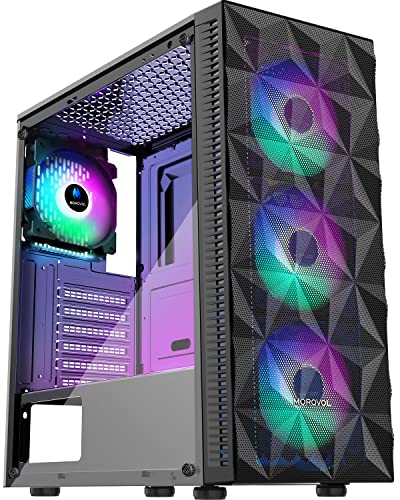
MOROVOL PC Case Pre-Install 4 RGB Fans, ATX Gaming Computer Case with Diamond-Shaped Mesh Front & Tempered Glass Side Panel, USB 3.0 Airflow Mid Tower case,621 — Budget mesh pick with four fans
The MOROVOL closes this guide at the sensible end of the market: four pre-installed RGB fans, a diamond-shaped mesh front that actually breathes, a tempered glass side panel, and USB 3.0. Nothing in that list reaches for a superlative, and that is the point. A first build, a child’s gaming PC, or a spare-room machine needs cooling that works and a price of admission that leaves money for the parts that render frames.
Mesh changes what four fans can accomplish. Where glass cases spend fans compensating for sealed fronts, the MOROVOL’s intake fans drink directly through the diamond mesh, so four units deliver honest airflow to a mid-range processor and graphics card. The glass side still gives the build a viewing window, and the RGB fans behind mesh produce a glow that reads as texture rather than a light panel — a look many builders prefer once the novelty of full glass fades.
The simplifications are stated in the title for anyone reading closely: these are RGB fans, not ARGB, so lighting runs as single colors rather than addressable choreography, and no PWM claim appears, so speed control expectations should stay modest. MOROVOL is a budget brand and the pool notes say expectations should match; panels, wiring, and instructions will be serviceable rather than luxurious.
Judged as a complete, cool-running starter case whose fans arrive fitted, the MOROVOL earns the final place in this guide without apology. It is the pick we would hand a new builder who asked for the least complicated route to a working, glowing, properly ventilated PC.
The MOROVOL’s simplicity extends to its audience in a way worth naming: this is the case to buy for someone else’s first build. Fitted fans remove the most error-prone hour of a beginner’s assembly, mesh removes the thermal anxiety, and the modest lighting removes the software lesson. A parent, a friend, or a school assembling PCs for others will find that the least complicated complete package in this guide is also the most generous gift.
- Form factor: ATX airflow mid tower, model 621
- Included fans: 4 RGB fans pre-installed
- Front panel: diamond-shaped mesh; tempered glass side panel
- Front connectivity: USB 3.0 per the title
- Lighting: RGB single-color style, not addressable
Strengths
- Mesh front makes four fans genuinely effective
- Fans fitted and wired keeps a first build simple
- Glass side plus mesh glow suits understated tastes
Trade-offs
- RGB lighting lacks ARGB per-fan addressability
- No PWM fan claim appears in the title
- Budget-brand finish and support are basic
Best for: starter and spare-room gaming builds that want fitted fans, real mesh airflow, and money left for components
Not suited for: lighting choreographers who need addressable ARGB synchronization across every fan
See the MOROVOL listing on Amazon if a mesh front and four fitted fans match your build plan.
How Should You Set Fan Curves on a Case That Arrives Full of Fans?
A pre-installed array rewards ten minutes of curve work more than any other upgrade. Start by identifying which temperature should drive which fans: intake fans near the graphics card respond best to GPU temperature where the motherboard allows it, while rear and top exhausts can follow the processor. Set a floor speed that is inaudible in your room, a midpoint that handles gaming loads, and a ceiling you reserve for genuinely hot moments rather than everyday play.
Then listen to the machine as a whole. Seven fans at a matched moderate speed are quieter than three fans straining, which is the hidden acoustic dividend of the big packages in this guide. If a resonance or hum appears at a particular speed, shift the curve to step over that band rather than living inside it. Fan control software remembers the profile; your ears will thank you every evening it does.
Recheck the curves after any hardware change and at the turn of the seasons. A room that is cool in January and warm in July changes the thermal baseline, and a new graphics card redraws the heat map entirely. The cases here give you the hardware headroom; the curves are where that headroom becomes comfort.
How Do You Keep a Many-Fan Case Quiet in a Shared Room?
The shared-room problem is not total noise but noise character: a steady low hum disappears into a household, while fans that hunt up and down in speed announce themselves forever. Set curves with wide, calm plateaus — one speed for idle and media, one for gaming — and avoid hair-trigger ramps tied to a spiky temperature sensor. The deep fan benches in this guide make that easy, because seven fans at a plateau speed move generous air without any single fan working audibly.
Placement finishes what curves start. A case on a desk at ear level projects its sound directly; the same case on a low stand or a shelf below ear height, with its exhaust aimed away from the seating, can measure identically and feel half as present. Rubber feet, a solid surface that does not drum, and a wall gap for exhaust are acoustic features no title lists and every shared room appreciates.
What Happens When One Fan in the Array Fails in Year Two?
Treat it as a maintenance event, not a crisis, because the array’s depth is its own redundancy: a seven-fan case running on six loses little cooling, which buys you the time to replace the unit properly. Match the failed fan’s size and connector, and match its lighting system if the array’s choreography matters to you; a same-size fan with the wrong lighting protocol will spin happily and glow out of step forever.
The replacement is also the moment the labeling habit from this guide’s wiring section pays off — the labeled lead identifies the dead fan’s position and hub port without excavating the bundle. Ten minutes with a screwdriver, a curve check afterward, and the array is whole again. This is the fan-included category’s long game: standard sizes, standard mounts, and a system designed to be serviced one fan at a time.
Keep the failed unit until the replacement proves itself, and note the date and position in the build log. A second failure in the same position is information — about airflow, about a hub port, about a cable under tension — and information is what separates maintenance from superstition.
What Should You Check in the First Week With a Fan-Included Case?
Run each fan through its range. A pre-installed array can hide a single lazy or noisy unit behind six healthy ones, so the first week’s homework is to listen at idle, at gaming load, and at full speed, noting any buzz, tick, or rattle that localizes to one position. Bearings declare their character early, and the returns window is the cheapest place to meet a bad one. The budget picks in this guide especially reward this small audit.
Check the lighting as a system, not as a first-boot impression. Sync the array to the motherboard if it is ARGB, run it through a few static colors, and confirm every fan reports the same hue — a fan wired out of sequence or glowing a shade apart is a cabling detail best corrected while the build is still on the bench and the panels are already off. Uniformity is the entire promise of an addressable array; verify the promise while verification is free.
Finally, record your temperatures with the factory arrangement before improving it. Builders love to reposition fans on instinct, but a baseline — processor and card readings in your most-played game, at your room’s normal temperature — turns later changes into experiments with results instead of rituals with opinions. The included array is the manufacturer’s hypothesis; your baseline is how you grade it.
How Do Included Fans Change the True Cost of a Build?
Price the alternative honestly and the category explains itself. A case without fans asks for a fan order — commonly three to seven units — plus possibly a hub, plus the evening of routing their cables, plus the risk that a chosen fan’s connector or lighting system mismatches the board. A fan-included case folds all of that into one purchase with the compatibility questions answered at the factory. The saving is partly money and partly the removal of an entire decision tree from the build.
The countervailing cost is choice. Included fans are the maker’s selection of size, bearing, lighting, and noise character, and a builder with strong preferences — a silence absolutist, a devotee of one lighting ecosystem — surrenders them at the door. That is why this guide separates its picks by control type and brand world: the right included package is the one whose factory choices happen to be the ones you would have made yourself.
Fan Counts, Control Types, and Panels: The Six Compared
Sort this table by the column your build cares about. Lighting choreographers should read the control column first; thermal worriers should read the panel column; everyone should notice that the biggest number in the count column does not automatically win either argument.
Brand weight is the invisible fourth column. Corsair’s three fans arrive with the deepest support organization behind them, MUSETEX’s arrays with a catalog built around this exact niche, and the budget pair with price as their loudest argument.
| Pick | Badge | Defining trait |
|---|---|---|
| MUSETEX Y6 | Most complete fan package | Seven infinity-mirror PWM ARGB fans behind 270-degree glass |
| MUSETEX ATX Case (K2) | Dual-glass seven-fan alternative | Seven PWM ARGB fans behind dual tempered glass panes |
| MUSETEX NN8 | Mesh pick of the fan-included field | Six PWM ARGB fans behind a genuinely breathable mesh front |
| CORSAIR 3500X RS ARGB | Best established-brand pick | Three reverse fans, anti-sag support, and room to grow |
| FOIFKIN F600 | Budget panoramic seven-fan pick | Seven PWM ARGB fans and panoramic glass at budget level |
| MOROVOL PC Case (621) | Budget mesh pick with four fans | Four RGB fans behind diamond mesh; the simple breathable option |
A quiet pattern in the table: every pick with seven fans pairs them with panoramic glass, and every mesh-front pick ships fewer. That is not coincidence but compensation — glass cases need the extra units to breathe through restricted paths, while mesh cases achieve their airflow with less hardware. The count column and the panel column are really one column read twice.
Brand distribution tells the same story from the commercial side. One specialist brand built its catalog on this exact promise and takes half the table; one incumbent answers with placement and polish; two budget names answer with price. The category is young enough that its map still shows who invented it.
How Do You Wire a Pre-Installed Fan Array Without Regret?
Before the motherboard goes in, trace every pre-installed fan’s cables to their ends and learn the case’s control arrangement: a hub on the back of the tray, a daisy chain, or individual leads. Photograph the layout, because the manual’s diagram and the reality in your unit deserve a comparison while returns are still painless. Test the array early by powering the fans from the supply or a first boot with the board outside its final cable dressing.
Connect power and lighting as separate decisions. PWM leads land on motherboard fan headers or the hub’s input; ARGB leads land on a 5V addressable header or the case’s controller, and the two connector families must never be forced onto each other’s pins. If the board lacks an ARGB header, the case controller’s presets become your lighting system, which is a fine outcome as long as it is chosen knowingly.
Dress the cables last and loosely enough to service. A fan that fails in year two should be replaceable without unpicking the entire bundle, so give each lead a labeled, reachable path. Close the case, set the curves described in the deep-dive section above, and the factory-fitted array becomes what it was sold as: cooling you do not have to think about again.
Work through the array one fan at a time during that first wiring pass, spinning each by hand and confirming its blades clear every nearby cable before its neighbor goes in. In a seven-fan case the bundle grows by accretion, and a lead trapped against a blade announces itself only at first power-on, when the whole array starts at once and the ticking could be coming from anywhere. Sequential assembly turns that mystery into a checklist you have already completed.
Keep the maker’s wiring diagram — or your photograph of it — with the build records after the panels close. Factory fan arrangements are a solved puzzle with a specific solution, and the day a hub is replaced or a fan is upgraded, that record is the difference between restoring the solution and re-deriving it from a tangle. Pre-installed convenience compounds when it is documented; it evaporates when it is not.
Label the hub or controller’s connections before the panels close, with a strip of tape naming each fan’s position. Six months later, when one fan’s lighting zone misbehaves, that label converts a full cable excavation into a single unplug-and-test. Pre-installed arrays concentrate their cabling in one place; a minute of labeling is what keeps that concentration an advantage instead of a knot.
What Mistakes Do Buyers of Fan-Included Cases Make?
Ranking cases by fan count alone. Placement and panel design decide how much of a fan’s effort becomes cooling. Four fans behind mesh can outwork seven fans suffocating behind glass in a hot room, which is why this guide reviews the package against the panels it feeds.
Plugging ARGB leads into RGB headers. Addressable 5V lighting and fixed 12V lighting use similar-looking connectors with different voltages, and forcing the match can end a fan’s lighting permanently. Read the motherboard manual’s header diagram before the first connection, not after the first smell.
Assuming included fans end the cooling budget forever. Fans are wear parts with bearings, and a seven-fan case multiplies the count of things that can eventually buzz or fail. The saving grace is that standard sizes make replacements easy — provided the cables were dressed for service, as the wiring section urges.
Ignoring header counts on the motherboard. A case can ship every fan pre-wired to a hub, or it can hand you seven individual leads. Boards with two fan headers cannot run seven loose fans without a hub, so the case’s control arrangement is a compatibility question, not a detail.
Sealing a panoramic case in a cabinet and blaming the fans. Glass cases breathe from the side and bottom. A closed cabinet starves exactly those paths, and no pre-installed array can cool a build with air it cannot reach.
Final Recommendation
Pick by the package that matches your priorities: the MUSETEX Y6 for the fullest fitted array behind panoramic glass, its K2 sibling for the same bench with cleaner styling, the NN8 when mesh airflow outranks the view, the Corsair 3500X when three correctly placed reverse fans and a serious brand matter more than a headline count, the FOIFKIN F600 for the panoramic specification on a budget, and the MOROVOL when simple mesh cooling should leave money for components.
There is a small moment that justifies this entire category, and every buyer of these six cases will meet it: the first evening, when the build is done, the panels are on, and the machine lights and breathes as one system — without a fan order pending, a hub in the mail, or a cable left for tomorrow. That completeness is what was actually purchased, and it is worth the homework this guide asked of you to protect it.
Whichever box lands on your desk, test every fan on arrival, wire power and lighting as the separate systems they are, and spend ten minutes on fan curves — a case that arrives with its fans fitted has done the hard part, and those three small acts finish the job it started.
Frequently Asked Questions
Are more pre-installed fans always better?
No. Beyond the point where intake and exhaust are balanced, extra fans add cabling, noise sources, and cost faster than they add cooling. Glass cases benefit from larger arrays because their intake paths are restricted; mesh cases reach the same temperatures with fewer units. Judge the package against the panels, as the reviews in this guide do, rather than by the number alone.
What does PWM actually change for the owner?
PWM fans take precise speed instructions from the motherboard, so the case can idle almost silently and spin up only under load. Without PWM, fans tend to run at fixed speeds chosen by voltage or a simple switch. In a many-fan case the difference is the difference between a machine you forget and a machine you hear, which is why the word PWM in a title deserves your attention.
Can I sync the case fans with my motherboard lighting?
If the fans are ARGB and your board has a 5V addressable header, yes — the MUSETEX and FOIFKIN packages here are built for that. Plain RGB fans like the MOROVOL’s light in single colors without per-fan choreography. Boards without lighting headers can still use a case’s built-in controller presets, so check which system a title describes before assuming synchronization.
What are reverse fans, and why does Corsair use them?
A reverse fan’s blades are flipped so the decorative face of the fan points toward the viewer when the fan works as an intake. In panoramic glass cases, ordinary intake fans would show their struts and labels to the room. The Corsair 3500X RS fits reverse fans so the view stays clean without giving up intake airflow along the glass.
Should I still budget for extra fans with these cases?
For the seven-fan packages, no — the array is the product. For the three-fan Corsair or four-fan MOROVOL, budget depends on the build: mid-range parts are covered, while a flagship processor and card in a warm room may justify one or two additions later. The spacious interiors here leave that door open, which is a feature in itself.
Do pre-installed fans arrive connected and ready?
They arrive mounted, with their cabling routed to a hub, a controller, or loose leads depending on the model. You still connect that system to your motherboard’s headers during the build, which is why tracing the arrangement before assembly, as the wiring section describes, saves the frustration this category promises to remove.
Can I replace one included fan later with a different brand?
Yes — case fans use standard sizes and mounts, so a failed or disliked unit can be swapped for any same-size replacement. The practical notes are lighting and control: a replacement with a different lighting system will not join the array’s choreography, and a non-PWM replacement will not follow the same curve. For a single quiet replacement, matching size and connector matters more than matching brand.
Do I need a fan hub with these cases?
It depends on how the maker wired the array, which is why the wiring section of this guide insists on tracing the factory arrangement first. Many-fan cases commonly gather their fans onto an included hub or controller needing one motherboard connection; others hand you individual leads. Count your board’s headers against what the case actually presents, and a hub becomes a planned accessory rather than a mid-build emergency.
Related Guides
Keep reading: Best PC Cases for Custom Water Cooling · Best PC Cases for High-End Builds · Best Open PC Cases and Test Benches