What's inside
- Where to Buy a Case Ready for a Custom Loop
- Key Takeaways
- Quick Picks
- How Did We Choose Cases for Custom Loops?
- How Much Radiator Does a Custom Loop Actually Need?
- What Makes the Dual-Chamber Layout So Good for Loops?
- Six Loop-Ready Cases, Radiator by Radiator
- How Do You Plan a Loop Layout Before Ordering a Single Fitting?
- How Much Should a Loop Case Cost Relative to the Loop?
- What Order Should Loop Parts Be Bought In?
- What Does a Loop Case Need Beyond Radiator Mounts?
- How Should a First-Time Loop Builder Choose Among These Six?
- Radiator Ceilings and Chamber Styles: The Six Compared
- How Do You Leak-Test a New Loop Before It Meets Power?
- Which Custom Loop Case Mistakes Cost Builders the Most?
- Final Recommendation
- Frequently Asked Questions
- Related Guides
As an Amazon Associate I earn from qualifying purchases. This post may contain affiliate links at no extra cost to you.
widgetverdict.com is reader-supported. When you buy through links on our site, we may earn an affiliate commission.
Where to Buy a Case Ready for a Custom Loop
Choosing among the best custom water cooling pc cases is really choosing the room your loop will live in: radiators need walls to mount on, a reservoir needs a stage, tubing needs routes that do not kink, and the whole assembly needs glass worthy of the effort if the loop is also the artwork. Every enclosure in this guide links to a checked Amazon listing whose title states its radiator support or chamber layout, because in this category a vague case description becomes an expensive pile of fittings that fit nowhere.
Honesty about the field comes first: Lian Li takes five of the six places, because its O11 family effectively defined the modern loop case and still sets the terms everyone else answers. That dominance is the catalog’s reality, not our favoritism, and the guide labels it openly. One further truth applies to all six: a case is only the stage. Radiators, pump, reservoir, blocks, tubing, and fittings are bought separately, and no pick here includes them.
Key Takeaways
- Lian Li’s O11 family holds five of six places because dual-chamber loop design is its home ground; the darkFlash DS900 is the lone outsider.
- Radiator ceilings here run from 360mm support in the V100 and darkFlash to the O11D EVO RGB’s 420mm and the O11 Vision’s room for up to three 360mm units.
- No case in this guide includes loop hardware: pump, reservoir, radiators, blocks, and fittings are always separate purchases.
- Back-connect motherboard support appears in the O11 Vision models, hiding cables where a showcase loop least wants to see them.
- Dual-chamber layouts move the power supply and drives behind the motherboard tray, leaving the visible chamber free for the loop’s choreography.
- Measure radiator thickness plus fan thickness against motherboard clearance before ordering any radiator, in every case here.
Quick Picks
How Did We Choose Cases for Custom Loops?
Radiator support stated in the title was the entry ticket. A custom loop case lives or dies by where its radiators can mount and how large they can be, so each pick below publishes at least one concrete figure — 360mm, 420mm, or a count of radiator positions — in its own listing title. Cases that asked us to imagine their loop potential from photographs alone did not survive the cut, however handsome their glass.
The second criterion was chamber thinking. A loop needs more than radiator mounts: it needs somewhere for a pump and reservoir to sit without stealing the show or the airflow, routes for tubing that avoid brutal bends, and a rear chamber where the power supply, cables, and drives can live out of sight. The dual-chamber pattern that the O11 line popularized answers all of that, which is the engineering reason — not fashion — behind its sweep of this list.
Finally, we kept one seat for a challenger. The darkFlash DS900 offers dual glass and stated 360mm water cooling support from outside the Lian Li ecosystem, at a different price class and with fans included. A guide that only crowned the incumbent would be a catalog, not a comparison, and loop builders deserve to see the value alternative judged by the same title-evidence standard.
We also required each pick to make sense as a long-term home, because a loop case is opened, drained, and rebuilt more often than any air-cooled enclosure. Panel systems that survive repeated removal, chambers that admit hands and funnels, and glass that can be cleaned without a ceremony all counted. A case that fights its owner’s second loop has failed at the category’s real job, however beautiful its first build photographed.
How Much Radiator Does a Custom Loop Actually Need?
A useful planning habit is to budget radiator length per component under load: a modern processor alone is comfortable on 240 to 280mm, a flagship graphics card wants 360mm of its own under sustained gaming, and a combined loop cooling both asks for the sum rather than the average. Read against that arithmetic, the cases here sort themselves — the V100 and DS900 with their 360mm support suit processor loops and modest combined loops, while the O11D EVO RGB’s 420mm support and the O11 Vision’s three 360mm positions serve builders cooling everything at once.
Thickness is the silent half of radiator planning. A thick radiator with fans needs a slab of clearance that must not collide with the motherboard, tall memory, or the top of a vertical graphics card. Titles state length support, not thickness mercy, so the builder’s job is to add radiator and fan dimensions together and compare the sum against the case’s documented clearances before any part is ordered. Every experienced loop builder has a story about skipping this sum; most tell it as a warning.
More radiator also buys quiet, which is the real luxury in this category. A loop spread across generous radiator area can run its fans slowly and still hold temperatures, turning a flagship build into a machine you can sit beside during a film. That is the honest reason to buy a case with radiator room beyond your first loop’s needs: the second loop, or the hotter graphics card next year, inherits the headroom.
What Makes the Dual-Chamber Layout So Good for Loops?
In a conventional tower, the power supply, its cable bundle, the drive cages, and the loop all negotiate for the same visible space, and the tubing usually loses. A dual-chamber case moves the supply and storage into a rear compartment behind the motherboard tray, leaving the front chamber as a clean stage. The pump and reservoir mount where the supply used to sit, the radiators take the top, side, and bottom, and the tubing runs become the composition instead of the compromise.
Back-connect motherboards extend the same idea to cabling. The O11 Vision models in this guide support boards whose connectors face rearward, so power and data leads vanish into the back chamber instead of crossing the glass view. For an air-cooled build that is a nicety; for a showcase loop, where every tube run is deliberate, stray cables are visual static, and removing them is half the aesthetic battle won before the first fitting is tightened.
The layout’s costs are width and weight. Dual-chamber cases are broader than conventional towers and heavier once glass and radiators multiply, so the desk and the floor deserve a measurement and a thought. Builders with a narrow desk bay should check the footprint of the bigger O11 models twice, because a loop case that must live on carpet has traded its stage for a dust farm.
Loop ambitions inside a flagship frame get their own treatment in Best PC Cases for High-End Builds, where E-ATX support and 420mm radiator claims overlap heavily with this guide’s territory.
At the opposite extreme of enclosure philosophy, Best Open PC Cases and Test Benches suits builders who swap loop parts so often that panels only slow them down.
And if the build shrinks back to a compact board with an all-in-one cooler instead of a full loop, Best mATX PC Cases includes a 33-liter case whose 360mm radiator support surprises everyone who reads its title.
Six Loop-Ready Cases, Radiator by Radiator
Every review below separates what the case provides from what the loop still needs to buy, because confusing the stage with the play is the most expensive misunderstanding in this category.

Lian Li O11 Vision Compact ATX PC Case, Back-Connect, Black (O11VPX) | Compact dual-chamber case with three-panel glass, back-connect support, hidden AIO tube routing and included 360mm top mesh. — Best compact loop showcase
The O11 Vision Compact distills the family’s formula into a smaller footprint without surrendering its point. Three panels of glass wrap the visible chamber, the dual-chamber layout keeps the supply and cables behind the tray, and back-connect motherboard support lets the newest boards hide their wiring entirely. For a builder whose desk cannot host the full-size Vision but whose standards will not settle for a conventional tower, this is the case that resolves the argument.
Lian Li’s attention to tubing shows in a detail the title bothers to name: hidden AIO tube routing. Even before a custom loop enters the picture, an all-in-one’s tubes can be routed out of sight, which signals how the designers think about the chamber — every line in view should be there on purpose. A custom loop built later inherits the same discipline, with clean runs from radiator to block to reservoir uncluttered by the case’s own plumbing compromises.
The included 360mm top mesh mentioned in the title hints at the ventilation strategy: the top position is meant to breathe, carrying a radiator up to that length class while the glass keeps the sides theatrical. Compactness does impose the usual arithmetic — radiator thickness plus fans must clear the board and memory — and the Vision Compact rewards builders who measure twice and order once, in the literal millimeter sense.
As the entry point to the O11 world in this guide, the Compact suits a processor loop with ambitions, or a combined loop built with slim radiators and realistic expectations. Builders planning multiple thick radiators should step up to its larger siblings below, which exist precisely for that escalation.
The Vision Compact’s staged-build story deserves emphasis: its hidden tube routing flatters an AIO today, and its chamber accepts a custom loop tomorrow without the build changing address. Many loop projects die between intention and budget; a case that looks complete at every stage keeps the project alive through the months when the radiator is bought, then the pump, then the fittings. Continuity is an underrated specification, and this compact dual-chamber is built around it.
- Form factor: ATX dual-chamber, compact, black, model O11VPX
- Motherboard support: back-connect boards supported
- Panels: three-panel glass wrap
- Routing: hidden AIO tube routing per the title
- Top: 360mm top mesh included, radiator length class 360mm
Strengths
- Three-panel glass gives the loop an uninterrupted stage
- Back-connect support removes cables from the visible chamber
- Compact footprint fits desks the full Vision cannot
Trade-offs
- Compact chamber tightens radiator-plus-fan thickness arithmetic
- Glass everywhere means fingerprints are a weekly chore
- Loop hardware remains an entirely separate purchase
Best for: desk-limited showcase builders planning a tidy custom loop or a hidden-tube AIO in a compact dual-chamber
Not suited for: multi-radiator builds stacking thick 360mm units, which need the larger O11 chambers below
Study the Lian Li O11 Vision Compact listing on Amazon for its chamber dimensions before planning radiator thickness.

LIAN LI O11D EVO RGB Black E-ATX Case, 420mm Radiator (O11DERGBW.US) | Pillarless glass view, dual RGB strips, flexible motherboard layout, 455.7mm GPU clearance, and 420mm radiator support. — Best maximum-radiator flagship
The O11D EVO RGB is where this category stops compromising. Its title leads with 420mm radiator support — a length class most cases cannot quote at any position — inside an E-ATX dual-chamber frame with a pillarless glass view and dual RGB strips framing the scene. A loop builder cooling a flagship processor and a flagship graphics card in one circuit is the exact reader this specification was written for, and the case makes no apology for its scale or its price class.
Graphics card clearance of 455.7mm, stated to the tenth of a millimeter in the title, tells its own story: water blocks shorten cards, but the air-cooled giants and the longest block-and-terminal combinations still need a chamber that does not flinch. The flexible motherboard layout adds another loop-friendly dimension, letting builders shift the board’s position to buy clearance where their particular radiator and reservoir arrangement needs it most. Adjustability is what separates a case that fits a loop from a case that fits your loop.
The dual RGB strips deserve a sentence of their own because they solve a showcase problem: a loop’s lighting usually comes from fans and blocks, leaving the case itself visually mute at the edges. Integrated strips give the chamber a frame of light that makes coolant color and tube runs read as a composition. It is decoration, honestly labeled, and in a build that will be photographed and stared at for years, decoration is a legitimate line item.
Everything about the EVO RGB assumes commitment — E-ATX boards, long radiators, a reservoir with presence. Builders speccing a modest processor-only loop will find the smaller picks below saner and cheaper to fill. This flagship earns its place at the head of the radiator table for the builds that genuinely need the room, and it should be bought by exactly those builders and no others.
One planning note specific to the EVO RGB: its flexible motherboard layout is a tool to deploy deliberately, not a novelty to leave in the default position. Sketch the loop with the board in each available position and note where the reservoir lands and which tube runs shorten. Ten minutes with the layout options can remove the single worst bend in a hard-tube build, which is the bend most likely to stress a fitting for the life of the loop.
- Form factor: E-ATX dual-chamber, black
- Radiator support: 420mm per the listing title
- Graphics card clearance: 455.7mm stated in the title
- View: pillarless glass with dual RGB strips
- Layout: flexible motherboard positioning
Strengths
- 420mm radiator support tops this guide’s table
- 455.7mm GPU clearance swallows the longest cards and blocks
- Flexible motherboard layout buys clearance where a loop needs it
Trade-offs
- Scale and price class punish modest loop plans
- E-ATX chamber demands serious desk or floor space
- Dual RGB strips add one more lighting system to synchronize
Best for: combined flagship loops cooling processor and graphics card together, with a 420mm-class radiator as the centerpiece
Not suited for: processor-only loops on mid-range boards, which would rattle around inside this chamber and budget
Open the Lian Li O11D EVO RGB listing on Amazon and map your radiator plan against its 420mm support.

LIAN LI O11 Dynamic EVO Gaming PC Case E-ATX Desktop Computer Case – Mid Tower Chassis with Flexible Mode and Configuration, Tempered Glass Panel, USB Type-C Port (Black- with Fans) — Most flexible configuration
The O11 Dynamic EVO is the adaptable ancestor of the line — an E-ATX mid tower whose title emphasizes flexible mode and configuration above any single figure. That flexibility is a loop virtue of a particular kind: the case can be arranged around the build rather than forcing the build into one sanctioned layout, which matters when reservoir placement, radiator order, and tubing runs are being composed by the builder rather than copied from a manual.
This listing’s variant includes fans, which deserves an honest footnote in a custom loop guide. Included case fans are genuinely useful for the chamber’s general airflow and for builders staging their project — air cooling first, loop parts as budget allows. Nobody should mistake them for loop hardware, and the radiator support for a given configuration should be confirmed from Lian Li’s documentation, since this title, unusually for the family, does not print a radiator figure.
That missing figure is worth pausing on, because this guide’s standard is title evidence. The Dynamic EVO’s loop credentials rest on its documented design and the family’s architecture rather than on a number in its listing, and we flag the difference rather than smoothing it over. Builders choosing this model should do what the verification-minded always do: pull the manufacturer’s specification for the exact configuration they intend, and plan radiator purchases against that document.
What the title does confirm is welcome: tempered glass for the view, USB Type-C for the desk, E-ATX capacity for serious boards, and the Dynamic line’s dual-chamber bones. As the flexible, stage-your-build option among the O11s, it suits the builder whose loop will evolve across years and configurations rather than arriving in a single order.
Because this Dynamic EVO listing’s title omits a radiator figure, the disciplined buyer treats its documentation check as part of the purchase: download Lian Li’s specification for the chassis, mark the radiator positions and thickness clearances for the configuration you intend, and keep that page with the build records. The case’s flexibility is genuine, but flexibility plus paperwork is a plan, while flexibility plus assumption is how radiators end up listed for resale, unused.
- Form factor: E-ATX mid tower chassis, black
- Configuration: flexible mode and configuration per the title
- Panels: tempered glass
- Front connectivity: USB Type-C port
- Variant note: this listing includes fans; radiator figures should be confirmed in Lian Li’s documentation, as the title does not state one
Strengths
- Flexible configuration adapts the chamber to evolving loop plans
- E-ATX capacity covers flagship and workstation boards
- Included fans let a build run on air while loop parts gather
Trade-offs
- No radiator size is stated in the listing title
- Flexibility means more decisions for first-time loop builders
- Fans included are case fans, not loop components
Best for: experienced builders whose loop will evolve through configurations, and who verify radiator plans against manufacturer documentation
Not suited for: first-time loop builders who want the radiator ceiling printed in the title before they commit
Check the Lian Li O11 Dynamic EVO listing on Amazon, then confirm radiator support in Lian Li’s own documentation.
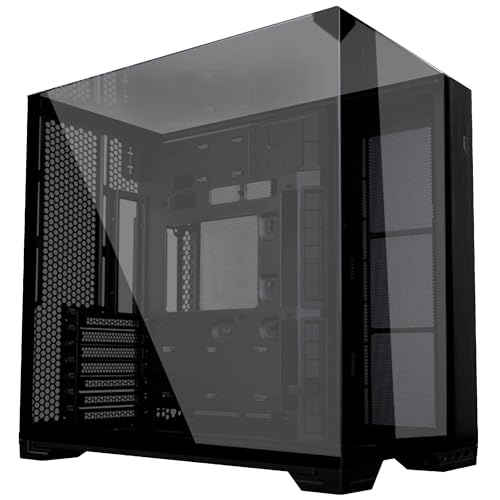
Lian Li O11 Vision Compact PC Case, E-ATX Midi-Tower with Glass, Black | Dual chamber, 3-sided panoramic view, up to 3x 360mm radiator, 408mm GPU, 167mm CPU cooler, USB-C, back-connect — Best panoramic loop stage
Do not let the word Compact in this listing’s name mislead you — the specification that follows it describes the most radiator-rich panoramic case in this guide. Up to three 360mm radiators can ring the dual chamber, beneath a three-sided panoramic glass view, with 408mm of graphics card clearance and support for back-connect boards. A loop with a radiator on every meaningful surface and glass on every visible one is the showcase ideal this category keeps chasing, and this Vision states it in numbers.
Three radiator positions change loop design from compromise to composition. Processor and graphics card can each claim a 360mm unit with a third in reserve, or a single circuit can spread its heat so widely that fan speeds stay in the whisper range under full gaming load. The 167mm CPU cooler figure in the title is a thoughtful inclusion for builders staging the build on air first: tall tower coolers fit while the loop parts accumulate, which is how most real projects actually proceed.
Back-connect support completes the visual argument. With board connectors facing the rear chamber, the panoramic view contains only what the builder placed there deliberately: blocks, tubes, reservoir, coolant color. In a three-sided glass case there is nowhere for a stray cable to hide, so designing the cables out of the room entirely is not a luxury feature — it is the difference between a composition and a cluttered shelf.
The Vision’s demands are space, budget, and filling: three radiator positions invite three radiators, and an under-filled panoramic chamber looks emptier than a modest case honestly filled. Buy it with a loop plan sized to its stage, and it is the most complete showcase here; buy it for a single slim radiator and the smaller Compact above serves better.
With three radiator positions available, the Vision invites a sequencing decision most cases never raise: which position gets filled first if the loop grows in stages? The practical answer is the position serving the hottest component — usually the graphics card’s radiator — with the remaining positions left as the build’s documented future. A panoramic chamber with an honest growth plan looks intentional at every stage, rather than unfinished in the months between orders.
- Form factor: E-ATX midi-tower dual chamber, black
- Radiator support: up to 3x 360mm per the listing title
- Graphics card clearance: 408mm; CPU cooler height 167mm
- View: 3-sided panoramic glass
- Features: USB-C and back-connect motherboard support
Strengths
- Three 360mm radiator positions top the panoramic class
- Back-connect support keeps the glass view cable-free
- 167mm air cooler clearance allows a staged build on air first
Trade-offs
- Panoramic glass exposes every unfinished corner of a build
- Three positions tempt three radiators’ worth of spending
- Large glass chamber is heavy before the loop adds its weight
Best for: showcase loops with two or three 360mm radiators and a back-connect board, built to be looked at from three sides
Not suited for: single-radiator starter loops, which would leave this panoramic chamber visibly under-filled
Review the Lian Li O11 Vision listing on Amazon and count its radiator positions against your loop diagram.

Lian Li V100-ATX Mid-Tower PC Case-Black-V100RX | Side I/O USB-C | Dust Filiter | Support 420mm GPUs & 360mm Radiator | Included GPU Bracket | LED & Display Platform (V100RX) — Best value loop starting point
The V100 brings the loop conversation back to a conventional mid-tower silhouette, and for many builders that is a relief. Its title promises support for 420mm graphics cards and a 360mm radiator — the single-radiator loop’s essential figure — in an ATX case with side-mounted USB-C connectivity and a dust filter. A processor loop, or a combined loop with realistic heat targets, fits this envelope without the width and ceremony of the dual-chamber flagships.
Two inclusions show Lian Li thinking about how builds actually live. The included GPU bracket answers the sag of long modern cards, a small mercy that saves a separate purchase and a propped-up improvisation. The LED and display platform is the loop builder’s detail: a stage inside the case for a sensor display or lighting element, the sort of finishing surface that turns temperature readouts and coolant monitoring into part of the presentation rather than a phone app.
Dust filtering, named plainly in the title (spelling and all), matters more to a loop than to an air build, because radiators clog from the inside of the fin stack outward and cleaning them is a partial teardown. A case that filters its intake stretches the interval between those teardowns measurably. Combined with the side I/O keeping the front clean, the V100 reads as the pragmatist’s Lian Li: the loop essentials, the ownership details, none of the panoramic overhead.
Its ceiling is equally clear. One 360mm radiator position class suits a processor loop or a modest combined loop; the flagship combined builds belong in the EVO RGB or the three-radiator Vision above. Within its class, though, the V100 is the easiest recommendation in this guide to defend to a first-time loop builder.
The V100’s display platform suggests a finishing ritual worth adopting even in other cases: decide what the loop’s instrument will be before the loop is filled. A small display showing coolant and component temperatures turns maintenance into a glance, and building its mount into the plan early avoids the taped-on afterthought that ruins a clean chamber. The V100 simply admits, in its title, that loop builders always end up wanting this surface.
- Form factor: ATX mid-tower, black, model V100RX
- Radiator support: 360mm per the listing title
- Graphics card support: 420mm GPUs, bracket included
- Front and side details: side I/O with USB-C, dust filter
- Feature: LED and display platform inside the chamber
Strengths
- 360mm radiator support covers the classic single-radiator loop
- Included GPU bracket answers long-card sag from day one
- Dust filter protects radiator fins between deep cleans
Trade-offs
- Single-radiator class caps combined flagship loop ambitions
- Conventional tower layout lacks dual-chamber cable hiding
- Display platform is an extra project, not a finished feature
Best for: first custom loops and processor loops wanting Lian Li design discipline in a standard mid-tower footprint
Not suited for: combined flagship loops needing a second or third radiator position
Look over the Lian Li V100 listing on Amazon if a single 360mm radiator anchors your loop plan.

darkFlash ATX Mid-Tower PC Case, Pre-Install 4 PWM ARGB Fans Computer Case, Full View Dual Tempered Glass Gaming PC Case, Type C Port, Supports up to 360mm Water Cooling Radiator, Black(DS900) — Best non-Lian-Li alternative
The DS900 exists in this guide to prove the category is not a single-brand monopoly, and it makes its case with a complete sentence of a title: full-view dual tempered glass, four pre-installed PWM ARGB fans, a Type-C port, and support for up to a 360mm water cooling radiator. That radiator figure, printed plainly, is the credential that earns a gaming case a seat at the loop table, and darkFlash states it without coyness.
The included fans give this pick a staged-build advantage the Lian Li flagships mostly skip. A builder can assemble the PC on air cooling with a working ARGB fan array, enjoy the dual-glass view immediately, and add the custom loop when the radiator, pump, and fittings budget matures. When the loop arrives, the 360mm position takes the radiator and the fans can stay on general chamber duty — a migration path that respects how project budgets actually flow.
Expectations belong at darkFlash’s level of the market: a value-oriented brand whose panels, hardware, and documentation will not match Lian Li’s finish for finish. Loop builders are also on their own for reservoir mounting choreography, since a general gaming chassis offers fewer dedicated pump mounts than a purpose-built dual-chamber. None of that disqualifies the DS900; it defines the trade — broader value and included fans against bespoke loop furniture.
For a first loop in a dual-glass case, or a builder whose loyalty is to a budget rather than a brand, the DS900 is the credible alternative this guide promised to include, judged by the same title-evidence standard as the five Lian Li cases it shares the page with.
The DS900’s four included fans have a second career waiting after the loop arrives: chamber airflow still matters when the main components are water-cooled, because memory, VRMs, and storage continue to live on air. A staged build that begins on the DS900’s fans does not discard them at the loop’s debut — it reassigns them. That continuity softens the budget brand’s main risk, since the parts you keep using longest are the ones already proven in your own build.
- Form factor: ATX mid-tower, black, model DS900
- Radiator support: up to 360mm water cooling radiator per the title
- Included fans: 4 PWM ARGB fans pre-installed
- Panels: full view dual tempered glass
- Front connectivity: Type C port
Strengths
- 360mm water cooling support stated plainly in the title
- Four PWM ARGB fans included enable a staged build on air
- Dual glass delivers the showcase view at a value level
Trade-offs
- Value-brand finish trails Lian Li’s flagships
- Fewer dedicated pump and reservoir mounting provisions
- Single 360mm class caps combined flagship loops
Best for: first-loop builders wanting dual glass, included fans, and a stated 360mm radiator position outside the Lian Li line
Not suited for: multi-radiator showcase loops needing the O11 family’s dedicated chamber furniture
Check the darkFlash DS900 listing on Amazon for its radiator support line and included fan package.
How Do You Plan a Loop Layout Before Ordering a Single Fitting?
Draw the circuit on paper first: pump to radiator to block to block to reservoir, in whatever order your case’s geometry makes graceful, remembering that within a single loop the water temperature equalizes enough that component order matters far less than tube routing elegance. Place the reservoir where it feeds the pump by gravity and where its fill port can actually be reached with a bottle, because a beautiful reservoir you cannot fill is a sculpture, not a component.
Then measure the physical chain for every radiator position you intend to use: radiator length against the mount, radiator plus fan thickness against the nearest obstruction, and the bend radius your tubing needs at each turn. Hard tubing punishes optimistic bends by kinking or stressing fittings; soft tubing forgives but sags without planning. The case reviews above give you the headline supports — your drawing turns them into a parts list that fits the first time.
Finally, plan the drain before the fill. A loop without a drain valve at its lowest point turns every maintenance session into a tilting, towel-lined ordeal, and loops do need maintenance: coolant ages, blocks want inspection, and upgrades arrive. Cases with spacious lower chambers, like the dual-chamber O11s, hide a drain elegantly; in a conventional tower like the V100, choose the lowest radiator port and build the valve into the design from the first sketch.
How Much Should a Loop Case Cost Relative to the Loop?
A useful sanity ratio circulates among experienced builders: the case should be a meaningful but minority share of the total loop project, because radiators, blocks, pump, and fittings dominate any honest budget. When the case threatens to consume the fitting budget, the build’s quality inverts — a palace with plastic plumbing. The V100 and DS900 exist in this guide partly to keep that ratio sane for first loops, while the flagships assume a project budget sized to their chambers.
The ratio cuts the other way for veterans: a builder on a second or third loop already owns the expensive internals, and for them the case is the upgrade — the stage the existing hardware moves into. In that light the EVO RGB and the Vision are not extravagances but the entire point of the purchase, and their radiator ceilings are bought with full knowledge of the loops that will fill them. Know which buyer you are before the ratio judges you.
Either way, resist funding the case by starving the unglamorous internals: the drain valve, the spare fittings, the quality coolant, the leak-testing patience. A loop’s reputation is made at its weakest fitting, and no chamber, however panoramic, has ever compensated for the fitting that was not bought.
What Order Should Loop Parts Be Bought In?
Case first, for the reasons this whole guide exists: its mounts and clearances define every later dimension. Radiators second, measured against the case in hand rather than the case in the cart, because the radiator-plus-fan sum is the build’s most punished figure. Blocks third, matched to the exact processor socket and the exact graphics card model — not its family, its model — since block compatibility is the least forgiving list in the hobby.
Pump and reservoir follow, placed against the case’s real interior with the radiators dry-fitted, and only then should tubing and fittings be counted, because the fitting census depends on the final geometry of everything before it. Coolant and the leak-test supplies close the list. Builders who buy in this order own a project; builders who buy in excitement own a parts shelf and a recurring delivery schedule.
What Does a Loop Case Need Beyond Radiator Mounts?
Reservoir and pump placement is the first unlisted requirement. A combination pump-reservoir unit wants a vertical surface or a bracket near the loop’s low point; a separate pump wants a shelf and vibration isolation. Dual-chamber cases hide both elegantly behind their layouts, while conventional towers ask the builder to claim space from the shroud or the floor. Before ordering any case here, place your chosen pump solution inside its photographs mentally and confirm it has a home that is not ‘somewhere near the bottom, probably’.
Fill and drain access is the second. A reservoir whose fill port sits under a radiator is a reservoir that will be filled with a syringe and resentment; a drain that is not the loop’s lowest point is a decoration. Case geometry decides both before a single fitting is bought, which is why experienced builders study chamber photographs for port access with the same care they give radiator tables. The specification that matters most in year two is rarely the one printed largest.
Cable and tube coexistence is the third. In a showcase chamber, tubing and cabling compete for the same visual field, and back-connect boards — supported by the Vision models here — remove the cables from that contest entirely. In cases without that support, disciplined routing behind the tray is the substitute. Either way, the loop’s beauty is decided as much by what the case helps you hide as by what it helps you show.
How Should a First-Time Loop Builder Choose Among These Six?
Start by shrinking the decision to the loop’s first version. A processor-only loop with a single 360mm radiator — the most common first loop — is served completely by the V100 or the DS900, at the lowest total project cost and with the gentlest learning curve. The flagship chambers earn their premiums only when the loop’s ambition is already plural: two components, multiple radiators, a reservoir with presence. Buying the flagship first and the ambition later is how chambers end up echoing.
Then weigh the staging path honestly. If the build will live on air or an AIO while loop parts accumulate, the Vision Compact’s hidden tube routing and the Dynamic EVO’s included fans keep the interim machine looking finished. A case that embarrasses its owner for six months mid-project is a case whose loop never gets finished; morale is a genuine engineering input in a hobby measured in evenings.
Radiator Ceilings and Chamber Styles: The Six Compared
The radiator column is the honest sorter here: 420mm and triple-360mm cases serve combined flagship loops, while the 360mm class serves processor loops and staged builds with equal legitimacy and smaller budgets.
Chamber style is the second sorter. Dual-chamber designs hide the loop’s plumbing infrastructure; the conventional towers here ask the builder to compose within a single room, which some loop artists honestly prefer.
| Pick | Badge | Defining trait |
|---|---|---|
| Lian Li O11 Vision Compact (Black) | Best compact loop showcase | Compact dual-chamber, back-connect, hidden tube routing |
| Lian Li O11D EVO RGB | Best maximum-radiator flagship | 420mm radiator support and 455.7mm card clearance; the ceiling here |
| Lian Li O11 Dynamic EVO | Most flexible configuration | Flexible-mode E-ATX chamber; documentation carries the radiator figures |
| Lian Li O11 Vision (E-ATX) | Best panoramic loop stage | Up to three 360mm radiators inside a three-sided glass stage |
| Lian Li V100 | Best value loop starting point | 360mm radiator, 420mm GPU room, bracket and display platform |
| darkFlash DS900 | Best non-Lian-Li alternative | 360mm loop support, dual glass, four fans fitted, value level |
Count the glass in this table and a truth about the category surfaces: the loop case is a display object that happens to hold radiators, and its makers know it. Every pick here stages the loop behind glass, because a custom loop’s labor is visual as much as thermal. The engineering question is never whether to show the loop, only how much radiator the stage can hold while showing it.
The second pattern is subtler: the two picks whose titles omit a clean radiator story — the Dynamic EVO’s flexibility pitch — are exactly the ones this guide flags for documentation homework. Evidence discipline does not punish a case for its marketing; it simply refuses to let marketing substitute for a number the purchase depends on.
How Do You Leak-Test a New Loop Before It Meets Power?
Assemble the loop completely with the power supply’s motherboard connectors unplugged from the board, then bridge the supply’s start signal with the tester or jumper your supply maker sanctions, so only the pump runs. Fill the reservoir slowly, let the pump pull coolant through, and top up in cycles as air migrates out of the radiators — tilting the case gently helps stubborn bubbles in top radiators find the reservoir.
Run the pump for a full day with paper towels or tissue at every fitting, because a loop that weeps will announce itself as a damp spot long before it becomes a drip. Inspect each compression fitting and rotary under good light, and check the reservoir and pump housing seams as carefully as the tube runs. Any fitting that shows moisture gets drained, reseated, and retested rather than tightened hopefully against pressure.
Only when a full day passes dry should the motherboard receive power. Boot into the BIOS first and watch temperatures settle, then load the system gradually while keeping a hand near the power switch for the first session. Leak testing feels like lost time exactly once — the first time it saves a graphics card, it becomes the part of the ritual builders refuse to skip.
Record the loop’s first temperatures with the same care as its leak test: coolant behavior at idle, processor and card readings under your real workload, and the pump and fan settings that produced them. Those numbers are the loop’s birth certificate, and every future maintenance judgment — is it running hotter, is the pump aging — will be measured against them.
Document the finished loop before the panels close: photograph every fitting, note the coolant and its mixing date, and record the pump speed and fan curves that produced your temperatures. A loop is a system you will maintain for years, and its second year will be serviced by a version of you who has forgotten this evening entirely. The photograph you take tonight is the manual that future builder will be grateful for.
Which Custom Loop Case Mistakes Cost Builders the Most?
Assuming the case includes loop hardware. It does not — not in this guide, not anywhere. The case provides mounts, chambers, and glass; radiators, pump, reservoir, blocks, tubing, fittings, and coolant are a separate and substantial order. Budgeting the case as the loop is the category’s most expensive misunderstanding.
Adding radiator and fan thickness wrong. Titles state radiator length support, not the combined slab of radiator plus fans clearing your memory and motherboard. Sum the real dimensions from the radiator maker’s drawings and compare them against the case’s documented clearances before ordering either part.
Filling every radiator position because it exists. A three-position case like the O11 Vision tempts three radiators, but each adds cost, restriction, and cleaning burden. Size the radiator area to the heat your components actually produce, with headroom, rather than to the case’s maximum furniture.
Skipping the drain valve to save one fitting. The saving evaporates at the first coolant change, which becomes a tilting, siphoning improvisation over towels. A drain at the loop’s lowest point is the cheapest quality-of-life fitting in the entire parts list.
Building the loop before leak-testing discipline sets in. Powering a full system over an untested loop gambles every component on every fitting at once. The pump-only test day described in the how-to section costs nothing but patience and insures the whole build.
Final Recommendation
Match the case to the loop you will actually build: the O11D EVO RGB for a combined flagship circuit around a 420mm radiator, the O11 Vision for a panoramic stage with up to three 360mm positions, the Vision Compact when the desk is smaller than the ambition, the Dynamic EVO for a configuration that will evolve, the V100 for a disciplined first loop in a standard tower, and the darkFlash DS900 when value and included fans matter alongside a stated 360mm position.
Draw the circuit, sum the thicknesses, plan the drain, and leak-test like a pessimist — do those four things and the case you chose stops being a purchase and becomes the room where your best build lives, one quiet degree at a time.
Frequently Asked Questions
Does any of these cases include the water cooling parts?
No. Every pick here is an enclosure only: it provides radiator mounts, chambers, and glass, while radiators, pump, reservoir, water blocks, tubing, fittings, and coolant are bought separately. One listing, the O11 Dynamic EVO variant, includes case fans, and the darkFlash includes four fans, but case fans are airflow hardware, not loop components. Budget the loop as its own project alongside the case.
Is 360mm of radiator enough for a processor and graphics card?
For mid-range parts under gaming loads, a well-arranged 360mm loop can hold both, with fans working honestly to do it. Flagship parts under sustained combined loads deserve more area, which is why this guide includes a 420mm option and a three-times-360mm option. The deciding inputs are your components’ heat and your tolerance for fan speed, not a universal rule.
Why do Lian Li cases dominate this category?
Because the O11 dual-chamber design solved the loop case’s core problems — radiator walls, a hidden supply and cable chamber, and a glass stage — earlier and more completely than rivals, and the family kept iterating. Five of six places here reflect that catalog reality, which the guide states openly, while the darkFlash DS900 holds the value alternative’s seat on stated 360mm support.
What is back-connect motherboard support, and do I need it?
Back-connect boards move their power and data connectors to the rear face, so cables plug in behind the motherboard tray and never cross the visible chamber. The O11 Vision models here support such boards. You do not need it for a working loop, but in a panoramic glass case it removes the last visual clutter, which is why showcase builders prize it.
Can I start with an AIO and convert to a custom loop later?
Yes, and several picks here encourage the path: the Vision Compact even names hidden AIO tube routing, and the V100’s air cooler clearance allows a staged build. The case is the long-lived part of the project, so buying loop-grade radiator support now and filling it later is a legitimate strategy — the DS900’s included fans exist for exactly that staging.
How thick a radiator can I fit?
Titles in this guide state radiator length, not thickness clearance, which depends on the mount position, fan thickness, and your motherboard and memory height. Add your chosen radiator’s thickness to its fans’ thickness and compare the sum with the case maker’s documented clearance for that position. That single sum prevents the most common loop-case disappointment in this entire category.
How often does a custom loop need maintenance?
Plan on inspecting the loop monthly at a glance — coolant level, fitting dryness, fan and pump behavior — and on a coolant change roughly yearly, with blocks opened for inspection when temperatures drift upward without explanation. The case influences that burden directly: dust filtration, like the V100’s, stretches the radiator cleaning interval, and a planned drain valve turns the annual change from an ordeal into an hour.
Is hard tubing or soft tubing better for a first loop?
Soft tubing forgives measurement errors, tolerates the small movements of a living build, and can be re-routed as the loop evolves, which makes it the kinder first medium. Hard tubing delivers the composed, architectural look the glass cases here are built to display, at the price of precise bends and fittings that punish improvisation. Many builders run soft tubing for the first loop and graduate with the second build, using the same case.
Related Guides
Keep reading: Best PC Cases for High-End Builds · Best Open PC Cases and Test Benches · Best mATX PC Cases
Related guide: Best RGB PC Cases
Related guide: Best PC Cases with Dual Glass Sides