What's inside
- Key Takeaways
- Quick Picks
- How We Chose These Picks
- Comparison Table
- What does all-around actually demand from a tank printer?
- How should you compare tank systems that use different names?
- Which extras are worth paying for in a home all-in-one?
- How do you set up a refillable printer so it stays trouble-free?
- What are the most common mistakes when buying a mega tank printer?
- How does a tank printer change the cost conversation at home?
- Final Recommendation
- Frequently Asked Questions
- Related Guides
As an Amazon Associate I earn from qualifying purchases. This post may contain affiliate links at no extra cost to you.
widgetverdict.com is reader-supported. When you buy through links on our site, we may earn an affiliate commission.
Start with a small act of honesty about the words in the search itself: MegaTank is Canon’s brand name, a trademark the company prints on its own refillable machines, yet shoppers now type it the way they type a generic noun, meaning any printer whose ink lives in a refillable tank instead of a sealed cartridge. This guide follows the shopper’s meaning rather than the trademark lawyer’s. The best all around mega tank printers, as the phrase is actually used, are refillable all-in-ones from Canon, Epson, HP and Brother alike, and they are judged here on how completely each one covers the ordinary week of a household or small office: school forms on Monday, a shipping label on Wednesday, a scanned signature on Friday, and a photograph somebody wants on paper before the weekend.
That breadth is precisely what separates an all-around machine from a specialist. A photo printer can be forgiven a clumsy scanner; a high-volume office unit can be forgiven a mediocre colour page. An all-rounder gets forgiven nothing, because the household buying it owns exactly one printer and expects that printer to be adequate at everything and embarrassing at nothing. The six machines below were therefore not ranked by any single headline number. They were ranked by the absence of a weak leg: printing, copying and scanning all present, wireless printing that a phone can reach without a networking degree, and a tank system that turns ink from a recurring emergency into a background utility you refill on a calm afternoon.
There is also a quiet economic story underneath the category. Cartridge printers trained a generation to dread the low-ink warning, because the warning arrived mid-document and the replacement cost felt like a second purchase of the machine. Tank printers invert that relationship. The hardware costs more on day one, the ink arrives in bottles you pour, and the per-page arithmetic stops dominating every decision about whether a draft deserves to be printed. Families notice the change in behaviour first: children print the colour version, nobody rations the good paper, and the printer goes back to being a tool rather than a meter running in the corner of the room.
Read the six picks with your own week in mind. If fax still matters to your household, only some of these machines offer it, and their listing titles say so plainly. If two-sided printing matters, look for duplex in the title rather than assuming it. If a touchscreen matters because the printer will live where a computer does not, that too is a title-level fact, stated for some picks and absent for others. The titles are the evidence base for everything claimed below, and where a title is silent, this guide treats the feature as unconfirmed rather than filling the gap with optimism.
Key Takeaways
- MegaTank is Canon’s brand name used generically in this keyword; the shortlist fairly spans Canon, Epson, HP and Brother refillable all-in-ones.
- Every pick prints, copies and scans; fax appears only where a listing title states it, on the Epson ET-4800 and the HP Smart Tank 7603.
- Duplex printing is title-confirmed on the Canon G3290, the Canon MAXIFY GX2020 and the Brother INKvestment Tank 780.
- The Canon G3290 is the only pick whose title names a colour touchscreen, a 2.7-inch LCD panel.
- Brother rates the INKvestment Tank 780’s in-box supply at up to three years of ink; that is the manufacturer’s own claim, not a measurement made here.
- The HP Smart Tank 7603 bundles three years of ink according to its title, the longest bundled-ink statement in this particular shortlist.
- Judge every extra in this guide against your own last twenty print jobs; fax, feeders and duplex printing each matter enormously to the household that uses them weekly and barely at all to the household that does not.
Quick Picks
| Pick | Badge | Why it earns its place |
|---|---|---|
| Canon MegaTank G3270 | The straightforward family default | Canon’s own MegaTank all-in-one with the full print, copy and scan trio in a compact desktop body. |
| Canon MegaTank G3290 | Touchscreen and duplex pick | Adds a 2.7-inch colour touchscreen, mobile printing and duplex printing to the MegaTank formula. |
| Canon MAXIFY GX2020 MegaTank | Business-leaning MegaTank | Canon’s MAXIFY line brings a work-first attitude to the MegaTank format, duplex included. |
| Epson EcoTank ET-4800 | Fax and Ethernet pick | The only pick here whose title adds fax, an automatic document feeder and wired Ethernet. |
| HP Smart Tank 7603 | Three years of ink bundled | HP’s Smart Tank entry bundles three years of ink by its title and still covers fax. |
| Brother INKvestment Tank 780 | Duplex with a long warranty | Brother’s INKvestment Tank design pairs duplex printing with up to three years of in-box ink, as Brother rates it. |
How We Chose These Picks
Choosing an all-rounder begins by refusing to choose a specialist in disguise. Any machine whose title offered printing without copying and scanning was set aside, because a household all-in-one that cannot copy a passport page or scan a signed form fails the basic job description. What remained was then sorted by the completeness of the title itself: machines that state wireless printing, duplex behaviour, display hardware and fax capability in their own listing language give a buyer something verifiable to hold onto, and they were favoured over machines that ask to be trusted on reputation alone.
A second filter concerned the tank system itself, since the tank is the entire premise of the search. Each pick had to describe a refillable or cartridge-free system in its own title: Canon’s refillable tank language, Epson’s cartridge-free Supertank wording, HP’s cartridge-free refillable phrasing, and Brother’s INKvestment Tank branding all qualify, while ordinary cartridge machines wearing tank-adjacent marketing were excluded. The point of the category is the bottle, the visible ink window and the end of the cartridge drawer, and every machine below honours that point in its own manufacturer’s vocabulary.
The final filter was temperament. An all-around printer gets used by everyone in the house, including the person who prints once a month and forgets every step between visits. Machines were therefore read for signs of everyday friendliness: a touchscreen where the title offers one, mobile printing where the title names it, a compact desktop footprint where the title claims one. None of those traits outranks the core trio of print, copy and scan, but between two machines that both cover the basics, the one that explains itself better at the control panel is the one a family will still like in year three.

Canon MegaTank G3270 — The straightforward family default
The G3270 is the machine this category’s name literally describes, since MegaTank is Canon’s own word, and it earns the opening slot by being the least complicated answer to the most common version of the question. Its title promises print, copy and scan in a wireless colour all-in-one with a refillable tank system, sized as a compact desktop design for home and office use. Nothing in that sentence reaches for a niche. It is a printer for the desk that already holds homework, invoices and a mug, and its ambitions begin and end with handling all three jobs without drama.
What the title does not promise is equally instructive. There is no duplex printing in the G3270’s listing language, no fax, and no touchscreen size to quote, so a buyer whose week includes long two-sided documents should read further down this list before settling. Treating that silence honestly matters more than pretending the base model does everything, because the G3270’s appeal is precisely that it does the common things and declines to charge its owner, in complexity, for the uncommon ones. Households whose copying means a school permission slip rather than a forty-page contract will never feel the missing features at all.
Living with a refillable tank changes small habits in ways a specification list cannot capture. The ink levels sit in plain view, so running dry stops being a surprise event and becomes a glance across the desk. Refilling becomes a scheduled errand, done with a bottle when a window looks low, instead of an emergency purchase made at whatever price the nearest shop demands. For a family machine, that calm is worth as much as any speed figure, because the printer’s worst historical sin was never slowness; it was ambushing its owner at the worst possible moment.
Place the G3270 where the whole household can reach it, connect it once to the wireless network, and its job description settles into the background of the home. Phones find it, laptops find it, and the copy function handles the steady drip of forms and documents that modern life generates. It is not the most capable machine in this guide and does not pretend to be. It is the one whose promises are smallest, clearest and most completely kept, which is a defensible definition of an all-around printer for a great many homes.
- Functions: print, copy and scan, as stated in the title
- Ink system: refillable tank system, Canon MegaTank line
- Colour: wireless colour all-in-one
- Form factor: compact desktop design for home and office
- Duplex and fax: neither is claimed in the listing title
Strengths
- The genuine article: Canon’s own MegaTank branding and tank hardware
- Full print, copy and scan coverage in a compact body
- Wireless colour printing suits shared household use
Trade-offs
- No duplex printing is claimed in the title
- No fax function is mentioned in the title
- No display size is stated for panel-guided tasks
Best for: a household wanting the canonical refillable all-in-one for everyday printing, copying and scanning on a shared desk.
Long two-sided documents expose the gap here: no duplex printing is claimed, so every double-sided report means flipping pages by hand at the tray.

Canon MegaTank G3290 — Touchscreen and duplex pick
The G3290 reads like Canon answering the obvious follow-up question: what does the household get if it steps one rung up the MegaTank ladder? The title answers with specifics. Alongside print, copy and scan sit mobile printing, a 2.7-inch LCD colour touchscreen, the refillable tank system, and duplex printing, all in a wireless all-in-one aimed at home and office use. Each of those additions maps to a real friction in family printing. The touchscreen gives the machine a face a guest can operate; duplex printing halves the paper handling on long documents; mobile printing acknowledges that half the household’s documents now begin life on a phone.
Of those additions, the touchscreen changes daily life the most, in a way that is easy to underrate from a specification table. Copying on a button-only machine is an act of faith: press, hope, inspect. A colour touchscreen turns copying into a short conversation, with choices shown in words and previews that catch the classic error of copying the blank side of a page. For households where the least technical member does the most copying, that panel is not a luxury. It is the difference between a machine everyone uses and a machine everyone routes around by asking somebody else.
Duplex printing deserves its own honest framing. It is two-sided printing, automated: the machine prints one side, retrieves the sheet, and prints the other, which suits reports, drafts and school projects where paper economy and a professional finish both matter. What duplex printing is not is two-sided copying; the title claims duplex printing and says nothing about an automatic document feeder or duplex scanning, so double-sided originals will still be flipped by hand at the glass. That distinction, kept clear, lets the G3290 be praised for exactly what it does rather than resented for something it never promised.
Taken together, the G3290 is the MegaTank for a household that has already decided it likes the tank idea and wants the ownership experience rounded out. The tank keeps ink calm, the panel keeps people calm, and duplex keeps paper use sane. Buyers who print mostly from a single computer and rarely copy may find the plainer G3270 sufficient, and that is a legitimate economy. Buyers outfitting a shared family hub, where the printer must explain itself to whoever walks up, will find the step up easy to justify every single week.
- Functions: print, copy and scan, per the title
- Display: 2.7-inch LCD colour touchscreen
- Duplex: duplex printing stated in the title
- Mobile: mobile printing named in the title
- Ink system: refillable tank system, wireless all-in-one
Strengths
- Colour touchscreen makes copying approachable for everyone
- Duplex printing stated plainly in the title
- Mobile printing covers phone-first households
Trade-offs
- Fax is not mentioned anywhere in the title
- No document feeder is claimed for multi-page copying
- A step up in complexity over the plainest MegaTank
Best for: a shared family hub where several people copy and print, and a touchscreen plus duplex printing will be used weekly.
Not suited for: fax traffic of any kind, because no fax function appears in this title while the ET-4800 below claims fax outright.

Canon MAXIFY GX2020 MegaTank — Business-leaning MegaTank
The MAXIFY badge is the tell. Canon reserves that name for its business-oriented machines, and the GX2020 carries the MegaTank refillable system into that more serious register: print, copy and scan with duplex printing, a compact desktop design, and wireless print, scan and copy for home and office. The phrasing of the title leans toward the working end of the home, the spare room that is now an office, the kitchen table that hosts a small business after the children are fed. Buyers whose printing skews toward documents rather than photographs will recognise their own priorities in that emphasis.
Duplex printing appears here as part of the machine’s core identity rather than a bonus, and in a document household it earns that status quickly. Invoices, contracts, manuscripts and course packs all read better and store smaller when they are printed on both sides, and automating the flip removes the small but real error rate of manual re-feeding, where one mis-ordered stack quietly ruins a long job. A business-leaning all-rounder is judged on exactly that kind of unglamorous reliability: not whether it can do the clever thing once, but whether the routine thing comes out right the fiftieth time.
The GX2020’s title stays silent on a few points worth naming. No touchscreen size is quoted, no fax is claimed, and no document feeder is mentioned, so its copying story is a flatbed story: excellent for single sheets, books and identity documents, slower for a sheaf of pages. A buyer whose scanning arrives in thick stacks should weigh that silence carefully and look at picks whose titles name an ADF. Honesty about the gap does not diminish the machine; it locates it. This is a printer-first all-in-one whose scanning and copying serve documents one at a time, handled well.
For the home office that prints every day and copies occasionally, that balance is often the right one, and the MAXIFY name signals Canon intends the machine to be worked rather than admired. The refillable tank suits a higher document cadence, because bottle ink tolerates volume without the per-page dread that cartridges teach. Set beside the two plainer MegaTanks above, the GX2020 is the choice of the buyer who thinks of the printer as equipment for earning a living, and who wants duplex printing and a compact footprint without leaving Canon’s tank ecosystem.
- Functions: print, copy and scan, per the title
- Line: Canon MAXIFY business family with MegaTank tanks
- Duplex: duplex printing stated in the title
- Design: compact desktop design, wireless colour
- Fax and feeder: neither is claimed in the title
Strengths
- Business-line build and positioning under the MAXIFY name
- Duplex printing included in the core offer
- Refillable tanks suit a daily document cadence
Trade-offs
- No fax is claimed in the listing title
- No automatic document feeder is mentioned
- No display size is stated in the title
Best for: a home office printing documents daily, where duplex output and a work-first design matter more than photo flair.
Stack scanning is the hard limit: with no automatic document feeder claimed, a thick bundle of originals goes onto the glass one sheet at a time.

Epson EcoTank ET-4800 — Fax and Ethernet pick
Epson’s entry widens the definition of all-around in directions the Canon machines above do not attempt. The ET-4800’s title lists cartridge-free print, scan, copy and fax, then adds three working details that change who should buy it: an ADF, Ethernet, and a stated speed of up to 10 pages per minute. Fax is the obvious headline, because it survives in more households and small offices than trend pieces admit: medical offices, legal forms, school districts and trades businesses still ask for it, and the family that needs fax twice a year needs it urgently both times. A machine that includes it ends the scramble for an online workaround at the worst moment.
The ADF, the automatic document feeder, is the quieter revolution in this title. Feeding a stack of pages for scanning or copying, rather than lifting a lid for every sheet, converts the all-in-one from a single-page appliance into a small document station. Ten pages of a signed agreement, a term’s worth of report cards, a bundle of receipts at tax time: these are feeder jobs, and households discover within a month whether their printer has one. The ET-4800’s title also names Ethernet, wired networking that sidesteps wireless congestion entirely, a genuinely useful option in a small office where the printer’s connection must simply never be the problem.
Balance requires naming what the title leaves out. No duplex printing is claimed for the ET-4800, so two-sided documents are a manual affair, and no display size is given. Its stated speed, up to 10 ppm in Epson’s own title language, positions it as a steady rather than rapid machine, suited to the mixed diet of a home or small office rather than a print queue. Buyers should also note the cartridge-free Supertank wording: Epson’s tanks are the original challenge to the cartridge model, and the refill ritual here is bottle-based, like its rivals, with the same visible-ink calm that defines the whole category.
Choose the ET-4800 when your definition of all-around includes the jobs the other picks decline: faxing, stack scanning and a wired connection that stays put. A small office with a router shelf and a document habit will feel the difference daily, and a household that handles paperwork for elderly relatives, schools or insurers will find the feeder quietly indispensable. It trades away automatic two-sided printing to get those things, which is a trade this guide states openly rather than smoothing over, because the right all-rounder is the one whose strengths match your actual paperwork.
- Functions: print, scan, copy and fax, per the title
- Feeder: ADF stated in the title
- Networking: wireless plus Ethernet, both named
- Speed: up to 10 ppm, as stated by Epson
- Ink system: cartridge-free Supertank refillable design
Strengths
- Fax included, which most rivals here omit
- Document feeder turns stacks into one job
- Ethernet offers a wired, stable connection
Trade-offs
- No duplex printing is claimed in the title
- Stated speed is a steady up to 10 ppm
- No display size is quoted in the title
Best for: a small office or paperwork-heavy home needing fax, stack scanning through a feeder, and a wired network option.
Two-sided output is simply absent from the offer: the title claims fax, feeder and Ethernet, yet names no duplex printing for long documents.

HP Smart Tank 7603 — Three years of ink bundled
HP arrives in this category with the boldest ink statement on the page: its title leads with three years of ink included, then describes an all-in-one with a cartridge-free refillable ink system covering print, scan, copy and fax. Read that ink claim the way this guide reads every duration claim, as the manufacturer’s own framing of the bundled supply rather than a promise about your household’s appetite; a family printing a small business’s worth of colour will move through any bundle faster than a family printing school forms. Even with that discipline applied, a generous in-box supply changes the first years of ownership, postponing the first refill purchase far beyond the honeymoon period.
The function list deserves attention because it matches the Epson above job for job: print, scan, copy and fax in a wireless machine HP positions for the home. That makes the Smart Tank 7603 the second fax-capable pick in this guide, and for some buyers the deciding comparison will be between this machine’s bundled-ink generosity and the Epson’s feeder and Ethernet. The title here names neither an ADF nor wired networking, so its scanning story reads as flatbed-based, one sheet at a time, while its ink story is the strongest in the shortlist. Different households will weigh those ledgers differently, and both weightings are rational.
HP’s language of low cost printing, printed right in the title, is the tank category’s founding argument stated by the manufacturer itself. The economics of bottled ink reward exactly the behaviour households actually have: bursts of heavy printing around school projects, holidays and tax season, separated by quiet weeks. Cartridges punished the bursts and expired during the quiet; tanks absorb both rhythms without comment. A buyer migrating from a cartridge HP to this Smart Tank will feel the difference most sharply at the second burst, when the ink windows still show plenty and nobody is doing arithmetic before pressing print.
As an all-rounder, the 7603 asks to be judged on completeness plus ink peace of mind. It covers the four classic functions, connects wirelessly, refills from bottles, and arrives with a supply its maker measures in years. Buyers who need a document feeder for stack work, or duplex printing for long two-sided documents, will find those claims absent from its title and should choose accordingly. Buyers whose deepest printer anxiety has always been the ink itself, and who still send the occasional fax, have found the machine in this guide that was plainly designed around their anxiety.
- Functions: print, scan, copy and fax, per the title
- Ink bundle: three years of ink included, per HP’s title
- Ink system: cartridge-free refillable ink system
- Positioning: low cost printing, wireless home all-in-one
- Feeder and duplex: neither is claimed in the title
Strengths
- Generous bundled ink, framed as three years by HP
- Fax included alongside print, scan and copy
- Cartridge-free refills end cartridge-era ink anxiety
Trade-offs
- No document feeder is named in the title
- No duplex printing is claimed in the title
- Ink-duration framing depends on household volume
Best for: a family that prints in bursts, faxes occasionally, and wants the longest bundled-ink runway in this shortlist.
Not suited for: daily stack scanning through a feeder, since the title names no automatic document feeder for multi-page originals.
Brother INKvestment Tank 780 — Duplex with a long warranty
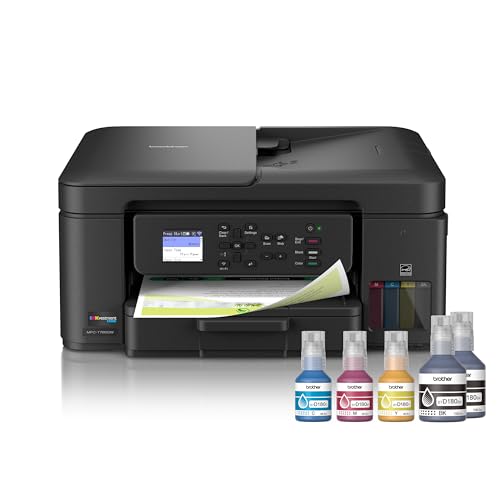
Brother’s naming requires a translation, and the translation matters. Its tank line is branded INKvestment Tank, a hybrid approach in which internal tanks are fed by cartridges, and the 780’s title presents a wireless colour inkjet all-in-one with duplex printing. The duration language needs the attribution this guide promised: Brother rates the in-box supply at up to three years of ink, and Brother backs the machine with a three-year limited warranty, both figures carrying the footnote markers visible in the title itself. Those are manufacturer claims, stated here as claims, and they still tell a buyer something real about how Brother expects the machine to be owned: for years, without ink shopping becoming a hobby.
The warranty deserves a moment of its own, because all-around printers live hard lives. They are the machines children print from, the machines that sit in spare rooms through summer heat, the machines asked to wake after a quiet month and produce a perfect form on the first attempt. A three-year limited warranty, as stated in the title, signals the maker’s confidence in that duty cycle and gives the household a remedy window that covers the period when manufacturing faults actually reveal themselves. Between two otherwise similar all-rounders, that horizon is a rational tiebreaker, and it is a fact from the title rather than a vibe.
Duplex printing, stated plainly in the title, puts the 780 in the smaller club within this guide whose members automate two-sided output. The title does not claim fax, and it does not name a document feeder, so its copying is best understood as flatbed work and its function set as the print, copy and scan trio implied by its all-in-one description. Buyers cross-shopping the Epson or HP above for fax should register the absence here and decide whether fax is a genuine need or a nostalgic one; many households discover, on honest inspection, that they have not sent a fax in years and no longer miss the capability.
What the 780 offers instead is a particular ownership temperament: Brother machines are bought by people who keep equipment a long time and resent drama, and the combination here, duplex printing, a long ink runway as the maker rates it, and a long warranty, is aimed squarely at that temperament. In a guide full of worthy all-rounders, this is the one for the buyer who reads the warranty line before the feature list, and who wants the tank printer decision to stay decided for as many years as the title’s own numbers keep mentioning.
- Design: Brother INKvestment Tank wireless colour inkjet all-in-one
- Duplex: duplex printing stated in the title
- Ink claim: up to 3 years of ink in-box, as rated by Brother
- Warranty: 3-year limited warranty, per the title
- Fax and feeder: neither is claimed in the title
Strengths
- Duplex printing included in the core offer
- Long warranty horizon stated in the title
- Maker rates in-box ink at up to three years
Trade-offs
- No fax is claimed in the listing title
- No document feeder is mentioned in the title
- Ink-duration figures are manufacturer ratings
Best for: a keeper household wanting duplex printing, a long warranty, and an ink supply its maker rates in years.
Fax-dependent paperwork rules this machine out: print, scan and copy are claimed with duplex, but no fax function appears anywhere in its title.
Comparison Table
| Pick | Print, copy, scan | Headline fact from its listing title |
|---|---|---|
| Canon MegaTank G3270 | Print, copy, scan | Refillable tank system; wireless colour; compact desktop design |
| Canon MegaTank G3290 | Print, copy, scan | 2.7″ LCD colour touchscreen; duplex printing; mobile printing |
| Canon MAXIFY GX2020 MegaTank | Print, copy, scan | MAXIFY business line; duplex printing; refillable tank system |
| Epson EcoTank ET-4800 | Print, scan, copy, fax | ADF and Ethernet stated; up to 10 ppm; cartridge-free Supertank |
| HP Smart Tank 7603 | Print, scan, copy and fax | Three years of ink included per title; cartridge-free refillable system |
| Brother INKvestment Tank 780 | Print, copy, scan (all-in-one) | Duplex printing; up to 3 years of ink in-box per Brother; 3-year limited warranty per title |
What does all-around actually demand from a tank printer?
An all-around printer is a compromise that must not feel like one. The household buying it cannot predict next month’s jobs: a boarding pass, a colour worksheet, a scanned signature, a copied insurance card, a photograph for a grandparent’s fridge. Each job is easy in isolation, and the machine’s real test is the transitions, the way it moves from a phone photo to a legal form without a settings expedition. That is why this guide weighted completeness of the basic trio, plus the honesty of each title about extras, more heavily than any single impressive number. A printer that prints beautifully but copies clumsily will be cursed monthly; a printer that does everything adequately will be forgotten, which for this appliance is the highest compliment available.
The tank system changes the all-around equation in one specific way: it removes ink from the list of things a job can fail for. Cartridge-era all-rounders were adequate at everything except being ready, because readiness depended on a consumable that depleted invisibly and cost dearly. Visible tanks and bottle refills make readiness inspectable at a glance, and that inspectability suits the shared household machine, where no single person owns the maintenance. Anyone can see the cyan window sitting low; anyone can be sent to pour a bottle. The all-around printer finally has an all-around maintenance model, legible to every member of the household rather than locked inside one person’s memory.
One more comparison habit is worth adopting before any of these machines is ordered: write down, in plain words, the five jobs your household prints most often, and keep that short list beside you while you read the titles above. Marketing language is designed to make every machine sound like the answer to every job, but a listing title is a finite list and your list is finite too, and the overlap between them is the most honest buying instrument available in this category. Where the overlap is complete, you have found your printer. Where a favourite job of yours appears in no title at all, you have learned something worth the five minutes the exercise cost, before money changes hands rather than after it.
There is a temptation, shopping this category, to buy for the most extreme job imaginable: the two-hundred-page manuscript, the photo exhibition, the home business at full stretch. Resist it in favour of buying for the median week, with one eye on the worst recurring job. If the worst recurring job is a monthly stack of forms, a feeder matters more than photo quality. If it is a long two-sided report, duplex matters more than fax. The six picks above were deliberately chosen to spread those strengths across the shortlist, so that the median week of six different households each finds a machine whose title already agrees with it.
How should you compare tank systems that use different names?
Canon says MegaTank and refillable tank system. Epson says EcoTank and cartridge-free Supertank. HP says Smart Tank and cartridge-free refillable. Brother says INKvestment Tank, and its design feeds internal tanks from cartridges rather than asking you to pour bottles. A buyer comparing across brands should translate all of that vocabulary into three plain questions. How does ink get into the machine? How can you see how much remains? And what does the title itself promise about the supply in the box? Those questions cut through branding, and the answers, drawn strictly from the titles in this guide, are the fairest comparison the category allows without inventing test data.
The pouring question is not trivial. Bottle-fed tanks ask for a steady hand once in a long while and reward it with the simplest possible supply chain: a bottle, a window, a glance. Brother’s cartridge-fed internal tanks ask for no pouring at all, trading that ritual for a different consumable format. Neither answer is wrong, and households divide honestly on it: some find pouring satisfying and cheap in spirit, others want the sealed, no-mess swap. What matters is choosing the ritual you will actually perform without resentment in year two, because a refill system you dread is a refill system you postpone, and postponement is how printers end up dry at the worst moment.
Visibility is the second question, and it is where tank machines collectively outclass the cartridge era. A visible supply turns ink management from a software warning, easy to dismiss and often wrong, into a physical fact anyone can verify. When comparing specific models, prefer the machine whose remaining ink you can judge from across the desk, and be sceptical of any design that hides its supply behind menus. The titles in this guide describe tank systems prominently, which reflects the category’s shared understanding: the tank is not a detail of these machines, it is the reason they exist.
Which extras are worth paying for in a home all-in-one?
Extras earn their keep only when they attach to a recurring job, so audit your own last twenty printing tasks before valuing any of them. Fax sounds archaic until a medical office requests it, at which point it becomes the only feature that matters that day; the Epson and HP picks carry it in their titles. A document feeder sounds like office excess until the first forty-page scan, after which flatbed scanning feels like a punishment; only the Epson’s title names one here. Duplex printing sounds minor until a household prints school reading packs weekly, when it halves both paper cost and shelf space; the G3290, GX2020 and Brother 780 state it outright.
The touchscreen question is subtler, because it concerns who uses the machine rather than what the machine does. A printer driven entirely from one person’s computer needs no panel at all. A printer standing in a hallway, serving a family, benefits from a panel that speaks in full sentences, and the G3290’s 2.7-inch colour touchscreen is the only display in this shortlist whose size its title actually states. Judge that feature by the least confident user in your home, not the most confident one, because the machine’s reputation in the household will be set by the person who finds it hardest.
Ethernet, named only in the Epson’s title, is the extra most buyers overlook and some buyers desperately need. Wireless printing is wonderful until the printer sits in a room where the signal is marginal, or in a small office where a dozen devices compete and the printer keeps falling off the network at inconvenient moments. A wired connection is boring in the best sense: it works on the day the router is replaced, the day the password changes, and the day the neighbours install a louder network. If your printer will live beside the router anyway, that boring reliability is worth more than several cleverer features combined.
How do you set up a refillable printer so it stays trouble-free?
Setup begins before the first print, with placement. Put the machine where you can see its ink windows without moving it, on a surface level enough that tanks read honestly, with the rear feed or paper path accessible rather than jammed against a wall. Connect it to the network the household actually uses, then print one ordinary page from every device that will ever ask: the family laptop, both parents’ phones, the child’s school tablet. That five-minute census, done on a calm day, prevents the classic first-crisis discovery that one device was never introduced to the printer at all.
Fill the tanks fully at setup even if your first jobs are small, and store the remaining bottles upright, sealed and near the machine rather than in a distant cupboard. The household rule worth announcing out loud is that whoever notices a low window says so the same day; tank printers reward that tiny honesty with the complete absence of ink emergencies. Keep the machine powered or on its normal standby rhythm rather than switching it off at the wall for long stretches, because printers use idle moments for small self-maintenance, and a machine left dark for a season is a machine whose first spring page may need coaxing.
Paper deserves one decision made once. Choose the household’s default everyday paper and load it consistently, keep a small stock of photo paper separately if photographs matter to you, and teach everyone which tray or feed holds which. Most paper jams and quality complaints in home printing trace back to mixed stacks and mystery paper rather than to the machine itself. An all-around printer asked to be adequate at everything will repay a household that is consistent about the few things the household controls: paper, placement, power and the low-window rule.
What are the most common mistakes when buying a mega tank printer?
Buying by the brand word alone is the first mistake, and this category invites it. A shopper who decides that only a machine literally named MegaTank will do has confused Canon’s trademark with the technology, and will walk past Epson, HP and Brother machines that may fit the household better. The second mistake is the mirror image: assuming every tank machine offers every feature, when the titles in this very guide show fax on two picks, a feeder on one, duplex on three and a stated touchscreen on one. The features are distributed, not universal, and the distribution is the entire reason for reading titles closely.
Overbuying for an imagined future ranks third. The home business that exists only as a New Year resolution does not need the most business-leaning machine today, and the household that prints photographs twice a year does not need to weight photo performance like a studio. The fourth mistake is underbuying on the panel and controls, forgetting that the machine must serve its least technical user. Fifth, and most quietly damaging, is ignoring where the printer will sit: a compact desktop design suits a desk that exists, while a machine bought for a desk that is still hypothetical tends to live on the floor, where tanks cannot be seen and paper paths collect dust.
The final mistake is treating the bundled ink as a finish line rather than a starting supply. Every duration claim in these titles, three years here and three years there, is a manufacturer’s framing based on usage the maker assumes. Your household’s real runway depends on your own pages, and the honest way to learn it is to note the date of your first refill rather than to argue with the box. Tank ownership is a long, calm relationship with a machine; the buyers who enjoy it most are the ones who chose for their actual week, read the title as the contract it is, and let the bottles do the rest.
How does a tank printer change the cost conversation at home?
Cartridge ownership taught households a strange accounting, in which the printer was cheap and every page felt expensive, so documents were rationed, drafts were read on screen with tired eyes, and colour was treated as a celebration rather than a tool. Tank ownership reverses the emotional arithmetic even before it reverses the financial kind. The machine costs more at the till, the bottles cost little on the rare occasions they are bought, and the marginal page approaches the price of the paper it lands on. Families respond by printing the things they always wanted to print: the colour map for the school project, the second copy for the other parent, the recipe in a type size a grandparent can actually read.
That behavioural change is the real return on the tank investment, and it is why judging these machines purely on a cost-per-page spreadsheet misses the point of owning one. The picks in this guide all deliver the same liberation in different wrappers, which is why their differences are about functions, panels, feeders and warranties rather than about ink economics. Once the ink question is settled by the tank itself, the buying question becomes refreshingly ordinary: which machine’s stated features match the jobs your household actually queues? It is a much better question than the cartridge era ever allowed anyone to ask.
There is one discipline the new freedom requires, and it is storage rather than spending. Bottles should live sealed, upright and out of direct sunlight, near enough to the printer that a refill is a two-minute errand rather than an expedition. A household that keeps its spare ink beside the machine will refill on a quiet afternoon when a window first looks low. A household that stores bottles in a distant garage will postpone, and postponement, repeated, is how the occasional avoidable dry tank happens even in the tank era. The technology removed the cost barrier; a small habit removes the last logistical one.
Final Recommendation
If one machine must be named for the broadest set of households, the Canon MegaTank G3290 takes the recommendation on completeness of the everyday experience: print, copy and scan, duplex printing stated, mobile printing named, and the only title-stated colour touchscreen in the shortlist to guide the people doing the copying. It concedes fax and a document feeder to the Epson ET-4800, which becomes the recommendation the moment your paperwork includes faxes or stacks to scan, with Ethernet as a bonus for a wired desk. The HP Smart Tank 7603 is the pick when ink peace of mind outranks everything and fax still matters, while the Brother INKvestment Tank 780 suits the long-keeper who values duplex printing and a three-year limited warranty as Brother states it.
The plainer G3270 remains the right answer for the household that wants the tank idea in its simplest, most compact form and knows it will neither fax nor print two-sided. The MAXIFY GX2020 serves the document-first home office that lives inside Canon’s ecosystem and prints on both sides as a matter of routine. None of the six is a consolation prize; each is the correct first choice for a recognisable household, and the work of this guide has been to make those households recognisable to the people living in them. Read your own last twenty print jobs, match them to the title that already agrees with them, and the refillable era of your home printing can begin with the calm it keeps promising everyone who switches.
Frequently Asked Questions
Is MegaTank the same thing as EcoTank or Smart Tank?
No, and the difference is branding rather than a different invention. MegaTank is Canon’s name, EcoTank is Epson’s, Smart Tank is HP’s, and Brother calls its line INKvestment Tank. All four describe printers that hold ink in a refillable or tank-based system instead of relying solely on small disposable cartridges, which is why shoppers use MegaTank as a generic phrase. Compare the actual function lists in each title rather than the badge, because the badges tell you the maker while the function lists tell you the machine.
Do all six of these printers fax?
They do not. Fax appears in the titles of the Epson EcoTank ET-4800 and the HP Smart Tank 7603, and nowhere else in this shortlist. If faxing matters to your household, choose between those two and let their other differences, the Epson’s feeder and Ethernet against the HP’s bundled-ink emphasis, settle the question. If faxing does not matter, the other four machines are not diminished by its absence, and several offer duplex printing or a touchscreen that the fax models do not claim.
Which picks print on both sides automatically?
Duplex printing is stated in the titles of the Canon MegaTank G3290, the Canon MAXIFY GX2020 and the Brother INKvestment Tank 780. Remember that duplex printing concerns printed output, not copying: none of those three titles claims two-sided copying through a feeder. The Epson ET-4800, which does have a feeder, makes no duplex printing claim in its title, so a buyer needing both automated two-sided printing and stack scanning should recognise that no single title here promises the pair.
How long will the ink in the box actually last?
Only the manufacturers’ own framings are available from the titles: HP presents the Smart Tank 7603 as including three years of ink, and Brother rates the INKvestment Tank 780’s in-box supply at up to three years. Treat both as the makers’ estimates under their assumed usage, not as guarantees about your household. A home printing daily colour documents will refill far sooner than a home printing weekly forms, and the honest measure of your runway is the date of your own first refill.
Can these printers work from phones as well as computers?
Wireless printing is common to the shortlist, and the Canon G3290’s title names mobile printing explicitly, while the Canon GX4020-class language of mobile access appears in other guides rather than here. In practice, a wireless all-in-one on the home network is reachable by phones through each maker’s printing app or the phone’s built-in print service. Set the printer up on the network your phones actually join, including the guest-network trap that catches many households, and test one page from each phone on setup day rather than during a deadline.
What should a first-time tank owner do differently?
Watch the windows. The entire ownership advantage of a tank printer is that its ink supply is visible, so build the household habit of glancing at the levels when passing and saying something the day one colour sits low. Keep the spare bottles near the machine, keep the machine on a level surface where the readings are honest, and avoid switching it off at the wall for long periods, since idle self-maintenance keeps the first page after a quiet spell clean. Beyond that, print freely; rationing pages is a cartridge habit the tank was built to retire.
Related Guides
Tank printing branches into brand-specific and size-specific questions from here: best brother tank printers for a deeper look at the INKvestment Tank line, best epson ecotank printers for the full EcoTank range ranked by job, and best large ink tank printers when household volume grows into small-office territory.



[…] completes this series of rooms, and its neighbours handle the floors beyond the office. The all-around mega tank printers for every home and office job guide equips the desk the projector presents to, the Brother tank printers with honestly attributed […]