What's inside
- Key Takeaways
- Quick Picks
- How We Chose These Picks
- Comparison Table
- How do you read an EcoTank range without drowning in model numbers?
- What does cartridge-free actually change about owning a printer?
- Which EcoTank fits a small office, and which fits a studio?
- How do you set up an EcoTank so the first year goes smoothly?
- What are the common mistakes when choosing inside one brand’s range?
- How does wide format change what a home printer is for?
- Final Recommendation
- Frequently Asked Questions
- Related Guides
As an Amazon Associate I earn from qualifying purchases. This post may contain affiliate links at no extra cost to you.
widgetverdict.com is reader-supported. When you buy through links on our site, we may earn an affiliate commission.
EcoTank is the name that started the refillable argument, Epson’s cartridge-free answer to a generation of printers that were cheap to buy and expensive to feed. Searching for the best epson ecotank printers today means confronting a range that has grown in every direction from that original idea: compact home machines, fax-equipped small-office all-in-ones with document feeders, wide-format models that print at 13 by 19 inches, and a six-colour photo flagship for creators. The six picks below were chosen to map that spread honestly, using only what each listing title actually states, because a range this broad punishes buyers who shop by badge and rewards buyers who shop by job.
The titles themselves teach the range’s grammar. Cartridge-free appears in every one, followed by the function list, print, scan, copy and sometimes fax, then the differentiators Epson chose to print: a speed in pages per minute on most models, an ADF here, Ethernet there, borderless photo printing on the home model, auto two-sided printing on the office-minded ones, a rear paper feed and a small colour display on the newest compact. Those printed details are the evidence for everything claimed in this guide. Where a title is silent, the feature is treated as unconfirmed, and the two near-sibling models in the middle of the range are separated only by facts their titles genuinely state, with the closeness of the pair admitted in plain words.
Speed figures deserve an early note, because Epson prints them and buyers compare them. The titles here state up to 10 pages per minute for the ET-4800 and ET-2900, up to 18 for the ET-4950, up to 17 for the wide-format ET-15000 and up to 16 for the photo ET-8550. Those are the manufacturers’ own headline figures, useful for ranking the range’s intentions, quick office machine here, steady home machine there, and not a promise about a household’s mixed diet of colour pages, photographs and first-page delays. Read them as Epson’s map of its own range rather than as a stopwatch result, and they become genuinely helpful instead of quietly misleading.
Finally, a word about what all-around means inside a single brand. Two of these machines print at 13 by 19 inches, which rearranges furniture as well as paper supplies. One adds a sixth ink colour for photographs. One carries fax and a feeder for an office that still lives on paper. The home models ask for the least money and the least desk. There is no single best EcoTank hiding in the list; there are six best EcoTanks, each best at a recognisable job, and the work of the next several thousand words is to make those jobs recognisable enough that you can see your own among them.
Keep one question in your pocket while you read: what does your household actually hand to its printer in a month? Count the faxes, the stacks, the photographs and the posters honestly, from memory of the last month rather than from hopes about the next one, and the range below will keep rearranging itself around your answer until one title is left standing in the light.
Key Takeaways
- Every pick is cartridge-free with refillable tanks; the differences are functions, speed as Epson states it, and paper size.
- The ET-4950 is the office sprinter of the home range: up to 18 ppm in its title, with ADF, fax and auto 2-sided printing.
- The ET-15000 and the EcoTank Photo ET-8550 both print at 13 x 19 inches; the ET-8550 adds 6-colour photo printing.
- The ET-2900 and ET-2985 are near-siblings separated mainly by title facts: an auto duplex claim, a rear feed and a 1.44-inch display on the ET-2985.
- Fax appears in the titles of the ET-4800, ET-4950 and ET-15000, and in no others in this shortlist.
- Ethernet is named for the ET-4800 and ET-15000, a wired option the other four titles do not claim.
- Stated speeds rank the range as Epson intends it: up to 18 ppm on the ET-4950, up to 17 on the ET-15000, up to 16 on the ET-8550 and up to 10 on the ET-4800 and ET-2900, with no figure printed for the ET-2985.
- A wide machine needs a measured desk and flat storage for 13 by 19 inch paper; the format is a furniture decision as well as a printing one, and both wide picks should be housed before they are ordered.
Quick Picks
| Pick | Badge | Why it earns its place |
|---|---|---|
| Epson EcoTank ET-4800 | Fax, feeder and Ethernet for small offices | The small-office all-rounder: fax, an ADF and Ethernet in one cartridge-free title. |
| Epson EcoTank ET-2900 | The everyday home EcoTank | Home-positioned and honest about it: cartridge-free print, scan and copy with borderless photo printing. |
| Epson EcoTank ET-4950 | The fast office-leaning EcoTank | Up to 18 ppm as Epson states it, with ADF, fax and auto 2-sided printing in one title. |
| Epson EcoTank ET-15000 | Wide format with fax and Ethernet | Prints at 13 x 19 inches and still carries fax and Ethernet: the wide all-rounder. |
| Epson EcoTank Photo ET-8550 | Six-colour wide-format photo flagship | Six-colour cartridge-free photo printing at 13 x 19 inches, for creators and home studios. |
| Epson EcoTank ET-2985 | Near-sibling with duplex and rear feed | Auto duplex printing, a rear paper feed and a 1.44-inch colour display distinguish it from its near-sibling. |
How We Chose These Picks
The first pass through Epson’s range applied the category’s founding test: the title had to describe a cartridge-free, refillable-tank machine, which all six here do in Epson’s own Supertank or Tank wording. Beyond that threshold, no model was admitted on reputation. Each had to bring a title-stated reason to exist beside its siblings, a feeder, a fax modem, a wider paper path, a sixth colour, a faster stated speed, a rear feed, because a single-brand guide that cannot explain why each model exists has failed before the first recommendation is written.
Near-siblings were handled with deliberate strictness. The ET-2900 and ET-2985 sit close enough in Epson’s line that lazy guides describe them interchangeably, so this guide separates them only where their titles separate them: the ET-2985’s title claims auto duplex printing, a rear paper feed and a 1.44-inch colour display, while the ET-2900’s title claims borderless photo printing and an everyday-home positioning. Where the titles converge, the guide says the machines converge, and names the pair for what it likely is, two retail-facing variants of one home EcoTank idea, differentiated by a short list of stated features rather than by a different soul.
The final pass matched the six against the jobs EcoTank buyers actually bring: the homework-and-forms household, the small office with a fax line and a feeder habit, the poster-printing teacher or club secretary, the photographer who wants big prints without a lab, and the home worker whose documents run long and two-sided. A model that served no distinct job was cut even if its numbers looked handsome, because range guides earn their keep by mapping machines to work, and Epson’s range is wide enough that every surviving pick below owns its job outright.
One more discipline governed the writing rather than the choosing: no specification appears in this guide unless a title above prints it. That restraint costs some colour, since printer marketing is full of tempting numbers, but it buys the only thing a range guide really sells, which is the ability to trust that a claimed feeder, port or colour system will be on the machine that arrives. Where a familiar feature is missing from a title, the guide notes the absence and moves on, trusting the reader to weigh a silence as carefully as a claim.

Epson EcoTank ET-4800 — Fax, feeder and Ethernet for small offices
The ET-4800 opens this guide because it embodies the EcoTank idea in its most businesslike home form. Its title lists cartridge-free print, scan, copy and fax, then adds an ADF and Ethernet and a stated speed of up to 10 pages per minute, aimed at home and small offices. Fax is the feature modern buyers underestimate until an insurer, a clinic or a school district asks for it, at which point owning it outright beats improvising a workaround under time pressure. The feeder is the feature buyers underestimate in the opposite direction, imagining they will never scan a stack, right up until the first twelve-page document arrives and the flatbed turns the job into a vigil.
Ethernet deserves its sentence. A wireless printer is a guest on a network, subject to signal, congestion and the router’s moods; a wired printer is a resident. In a small office, where the machine must be reachable by everyone every day, the cable ends an entire category of small failures, the morning the printer has vanished, the afternoon it prints for one desk and not another. Epson printed Ethernet in this title and in the wide-format ET-15000’s, and in no others here, so a buyer with a router shelf and a low tolerance for connection drama has exactly two doors to knock on in this range.
The compromises are printed just as plainly by their absence. No auto two-sided printing is claimed, so long documents are flipped by hand or printed single-sided, and the stated speed, up to 10 ppm in Epson’s own figure, is the steadiest in the guide rather than the swiftest. A buyer whose week is long two-sided reports should look hard at the ET-4950 below, whose title claims both the speed and the duplex behaviour this one omits. The ET-4800’s bargain is different: it trades output automation for intake automation, the feeder, plus the two connections, fax and Ethernet, that small offices actually lose sleep over.
For the home that doubles as an office, a landlord’s desk, a bookkeeper’s corner, a family handling estates and school districts and insurers, that bargain is frequently the right one. Cartridge-free printing keeps the per-page dread away, the feeder swallows the stacks, the fax line stays quietly available, and the cable keeps the whole arrangement reachable. It is not the fastest EcoTank here and does not claim to be. It is the one whose title reads most like the equipment list of a small office that intends to get its paperwork done without theatre.
- Functions: print, scan, copy and fax, per the title
- Feeder: ADF stated in the title
- Networking: wireless plus Ethernet
- Speed: up to 10 ppm, as stated by Epson
- Auto 2-sided printing: not claimed in this title
Strengths
- Fax included for offices that still need it
- Document feeder turns stacks into single jobs
- Ethernet gives a stable wired connection
Trade-offs
- No auto 2-sided printing is claimed
- Stated speed is a steady up to 10 ppm
- No display size is quoted in the title
Best for: a home-based small office that faxes, scans stacks, and wants the printer wired to the network for good.
Daily two-sided reports meet a one-sided printer: fax, feeder and Ethernet are claimed, but no auto 2-sided printing appears in the title.

Epson EcoTank ET-2900 — The everyday home EcoTank
The ET-2900 is the EcoTank for the household that prints life rather than paperwork. Epson’s title positions it for home and everyday use, with cartridge-free print, scan and copy, a stated speed of up to 10 pages per minute, and borderless photo printing, a combination that describes the actual output of most family homes: homework, forms, photographs for the fridge and the grandparents, the occasional boarding pass, the constant low-level drip of school administration. There is no fax in this title and no feeder, because the household it serves receives its documents one or two pages at a time and sends its photographs one happy print at a time.
Borderless photo printing is the detail to dwell on, because it marks the boundary between a document machine that can print a photo and a home machine that expects to. A borderless print fills the sheet edge to edge, which is how photographs are supposed to look when they go into a frame or onto a fridge door. Families who print photos at home, a minority but a devoted one, will use that capability monthly and remember it as the reason they bought the machine. Families who never print a photo should still note the claim’s presence, because it signals where Epson aimed this model: at the creative, domestic end of the range.
The stated speed matches its sibling office machines’ baselines rather than their peaks, up to 10 ppm in Epson’s figure, and that is fine for its job. Everyday home printing is bursty and brief; nobody’s homework queue is long enough for print speed to become the household bottleneck, and the wait that matters at home is the first page after a quiet week, not the fortieth page of a run. What matters instead is that the tanks keep the machine ready, that wireless printing reaches it from the phones where family documents now live, and that copying a form takes one lid lift rather than a project plan.
Buy the ET-2900 when your home’s printing is domestic in shape and you want the EcoTank economics without paying for office furniture you will never use. Its near-sibling, the ET-2985 below, adds title-stated auto duplex printing, a rear feed and a small colour display, and the honest comparison between them occupies that pick’s section. Against the rest of the range, the ET-2900’s case is simplicity with one flourish: the full cartridge-free trio for everyday jobs, plus photographs that come out looking like photographs. For a great many homes, that is not the compromise choice; it is the correct one.
- Functions: print, scan and copy, per the title
- Photo: borderless photo printing stated
- Speed: up to 10 ppm, as stated by Epson
- Positioning: home and everyday use, black finish
- Fax, feeder and Ethernet: none claimed in this title
Strengths
- Borderless photo printing for family photographs
- Cartridge-free trio sized for everyday home jobs
- Honest home positioning without office excess
Trade-offs
- No fax or document feeder is claimed
- No auto 2-sided printing is claimed
- Stated speed matches the range’s steady tier
Best for: a family printing homework, forms and borderless photographs, wanting EcoTank economics in a home-sized machine.
Not suited for: faxing contracts or feeder-scanning a stack, since the title claims neither a fax function nor a document feeder.
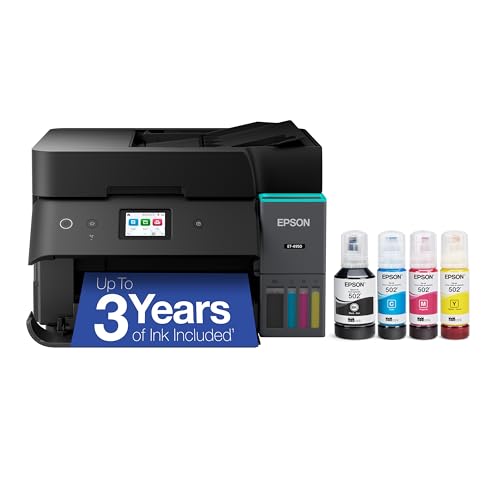
Epson EcoTank ET-4950 — The fast office-leaning EcoTank
If the ET-4800 is the range’s steady office citizen, the ET-4950 is its ambitious one. The title gathers nearly every office claim Epson prints in this class: cartridge-free print, scan, copy and fax, a stated speed of up to 18 pages per minute, an ADF, and auto 2-sided printing, aimed at home and small offices. That is the complete paperwork sentence. Documents arrive through the feeder, leave on both sides of the page, and the fax modem waits for the organisations that still demand it. A buyer comparing titles within this guide will notice that no other pick combines feeder, fax and automated duplex output; the 4950 is where those three threads cross.
The speed figure deserves its attributed reading. Up to 18 ppm is Epson’s own headline, the highest stated figure among the letter-size machines here, and it signals intent rather than guaranteeing a stopwatch result on your mixed colour documents. Intent matters in a range guide because it tells you where the engineering budget went: this is the machine Epson built for the desk that prints all day, the invoicing run, the course packs, the client files, where a queue forms and throughput stops being an abstraction. A household printing three pages a week will never feel the difference between this and its slower siblings, and should not pay for the feeling.
Auto 2-sided printing changes the texture of document work in ways speed cannot. Reports read as documents rather than as stacks, filing halves, paper consumption halves, and the small but real error rate of hand-flipping a long job disappears. Pair that with the feeder and the machine covers the two directions of office paperwork, intake and output, with automation on both sides. The title does not name Ethernet, so networking is wireless as stated, and a buyer who needs the cable should weigh the ET-4800’s wired claim against this model’s speed and duplex advantages, because the range, characteristically, refuses to put every virtue in one box.
Choose the ET-4950 when your home office behaves like an office: daily volume, two-sided output, stacks to scan, the occasional fax, and impatience with queues. It is the EcoTank in this guide that asks the fewest compromises of a paperwork professional, and its title reads like a checklist written by someone who has actually run a small office’s document day. Lighter households will find its virtues mostly theoretical, which is not a criticism of the machine but a compliment to the range: Epson built plainer answers for plainer weeks, and they are sitting above and below this one.
- Functions: print, scan, copy and fax, per the title
- Speed: up to 18 ppm, as stated by Epson
- Feeder: ADF stated in the title
- Duplex: auto 2-sided printing stated
- Ethernet: not claimed in this title
Strengths
- Fastest stated speed among the letter-size picks
- Feeder, fax and auto 2-sided in one title
- Complete paperwork coverage for small offices
Trade-offs
- No Ethernet is claimed in the title
- Office virtues are wasted on very light use
- No display size is quoted in the title
Best for: a working home office printing daily, two-sided, with stacks to scan and a fax line that still rings.
A few pages a week never touches what this machine is built for: its stated speed and feeder automation would sit idle in light home use.

Epson EcoTank ET-15000 — Wide format with fax and Ethernet
Wide format rearranges a buyer’s thinking, because a printer that handles 13 by 19 inch paper is not a bigger version of a home printer but a different instrument that happens to share a desk category. The ET-15000’s title claims cartridge-free print, scan, copy and fax at that size, with a stated speed of up to 17 pages per minute and Ethernet, aimed at home and small offices. Posters, signs, architectural sketches, classroom displays, club banners, spreadsheet pages that finally fit their columns: the jobs that justify wide format are jobs where the message is the size, and no amount of tiling letter pages together ever quite substitutes for one clean sheet.
Remarkably, the wide machine keeps the office furniture. Fax survives the enlargement, which matters to the small businesses, schools and trades offices that print big and still fax small. Ethernet survives too, giving this physically imposing machine the stable wired connection its shared-office role demands. Epson’s stated speed, up to 17 ppm, sits near the top of this guide’s figures, again as the maker’s own headline, and it signals that the wide format was not bought at the price of everyday pace. A buyer can therefore treat the ET-15000 as a genuine all-rounder that also prints huge, rather than as a poster machine that tolerates documents.
The honest costs of width are physical rather than functional. A 13 by 19 inch printer needs a surface that fits it, clearance for its paper path, and storage for paper stock that does not fit in a standard drawer. Households should measure the intended home before ordering, because a wide-format machine exiled to a floor or a wobbling table serves nobody well. The title also makes no photo-specific claims of the kind the ET-8550 below trades in, no six-colour language, so a buyer whose wide ambition is photographic should compare the two wide picks carefully: this one is the office-shaped wide machine, its sibling is the creator-shaped one.
Choose the ET-15000 when your small office or organisation prints big as part of its ordinary work, signs for the shop, displays for the classroom, plans for the site, and refuses to give up fax, feeder-free copying and scanning, or a wired connection to get the size. It is the wide pick for people whose wide jobs wear a tie. Photographers and artists should read on to the six-colour machine, while everyone else should recognise the ET-15000 as the rare wide-format printer whose title still remembers that most pages, even in a wide household, are ordinary ones.
- Functions: print, scan, copy and fax, per the title
- Paper: wide format, 13 x 19 in. stated
- Speed: up to 17 ppm, as stated by Epson
- Networking: wireless plus Ethernet
- Photo system: no 6-colour claim in this title
Strengths
- 13 x 19 output with full office functions
- Fax and Ethernet survive the wide format
- Strong stated speed for a wide machine
Trade-offs
- Footprint and paper storage grow with the format
- No six-colour photo claim in the title
- Wide paper stock is a separate supply to keep
Best for: a small office, school or club printing posters and plans at 13 x 19 while keeping fax and a wired link.
Gallery-grade colour is outside this wide machine’s brief: its 13 by 19 output carries no six-colour photo claim, unlike the ET-8550 below.

Epson EcoTank Photo ET-8550 — Six-colour wide-format photo flagship
The ET-8550 is the range’s love letter to photographers, and its title says so in the range’s most distinctive phrase: cartridge-free six-colour wide-format photo printing. Six colours matter because photographs live in the transitions, skin tones, skies at dusk, the green that is almost grey, where a four-colour system approximates and a six-colour system persuades. Add the 13 by 19 inch canvas and the machine addresses the creator’s oldest frustration with home printing, that the photograph in the computer was bigger, in every sense, than anything the printer could produce. Epson aims the title at creators and home studios, and for once the marketing phrase and the hardware description are the same sentence.
Scan and copy ride along, which keeps the studio machine useful on administrative days, and the stated speed, up to 16 pages per minute in Epson’s figure, is respectable for a photo-led design. But the honest centre of this pick is output quality at size, and buyers should weight it accordingly. There is no fax in this title and no Ethernet claim, because studios send files digitally and connect the printer to the one workstation that matters. Judging the 8550 by office criteria would be like judging a darkroom by its filing: the omissions are the design’s opinion about its job, printed plainly for anyone comparing titles.
The cartridge-free element transforms photo printing economics in a way photographers feel in their behaviour. Lab printing trains caution: test small, commit late, accept the turnaround. A six-colour tank machine trains iteration: print the proof at size, live with it on the wall for a day, adjust, print again, because the ink cost of curiosity has collapsed. Home studios buy this machine for exactly that loop, and the loop, more than any single specification, is what separates a photo printer from a printer that can print photos. The 13 by 19 sheet becomes a working surface rather than a final exam.
Choose the ET-8550 if photographs are the point of your printing and you want them large, six-colour and free of the cartridge meter. Its sibling wide machine, the ET-15000, serves offices that print big; this one serves people who print beautifully. Households whose wide ambitions are posters of text and charts will overbuy here, while photographers who settle for the office-shaped wide machine will feel the missing colours in every sky. The range, at its wide end, splits cleanly into those two desires, and the titles tell you which is which without any help from this guide’s adjectives.
- Functions: print, scan, copy, per the title
- Ink system: cartridge-free 6-colour tank printing
- Paper: wide format, 13 x 19 in. stated
- Speed: up to 16 ppm, as stated by Epson
- Audience: creators and home studios, per the title
Strengths
- Six-colour printing for photographic transitions
- Wide 13 x 19 canvas for serious prints
- Tank economics encourage proofing at full size
Trade-offs
- No fax is claimed in the title
- No Ethernet is claimed in the title
- Photo virtues are wasted on text-only households
Best for: a photographer or creator printing large, colour-critical work at home and proofing freely thanks to tank ink.
Not suited for: office paperwork built around fax, because the function list here stops at print, scan and copy.

Epson EcoTank ET-2985 — Near-sibling with duplex and rear feed
Meet the near-sibling, and meet it honestly. The ET-2985 and the ET-2900 above are close relations in Epson’s home line, close enough that this guide will not invent a chasm between them. What separates them, on the evidence of their titles, is a short and specific list. The ET-2985’s title claims cartridge-free refillable ink tanks, a 1.44-inch colour display, a rear paper feed, copy and scan within its all-in-one description, and auto duplex printing, in a black wireless colour Supertank. The ET-2900’s title claims borderless photo printing and an everyday-home positioning instead. That is the honest map of the difference: a bundle of document conveniences on one side, a photo flourish on the other, over a shared home EcoTank foundation.
Auto duplex printing is the heavyweight item in that bundle. A household that prints reading packs, drafts, manuals or double-sided homework will use it weekly, saving paper and shelf space and the small chaos of hand-flipped stacks. The rear paper feed is the quiet achiever: a straight path for thicker or special media, card for invitations, a sheet of labels, the occasional photo paper, fed singly without bending through the main tray’s route. Households discover the rear feed the first time a special sheet matters, and from then on it is the difference between a machine that tolerates special media and one that has a door built for it.
The 1.44-inch colour display is modest in plain terms; it is a small panel, not a tablet, and routine jobs should be planned around its size. But a stated colour display on a home machine still changes copying from button-code memorisation into reading, and its presence in the title, sized and specified, tells you Epson expects this model to be operated at the machine, by the family, rather than only from a computer. Buyers comparing the siblings should ask a single question: does your household print two-sided documents and odd media more often than it prints borderless photographs? If yes, the 2985’s bundle is your bundle. If no, the 2900’s flourish is yours, and neither answer shames the other machine.
What the ET-2985’s title does not state should also be registered: no speed figure is printed in it, no fax, no feeder, no Ethernet, and no borderless photo claim. This guide claims none of those for it. What remains is a home all-in-one whose stated virtues lean toward documents with manners, two-sided, occasionally special, directed from a small colour screen, all on the cartridge-free foundation the whole range shares. In a family of six strong machines, the ET-2985 is the one for the household whose everyday printing grew slightly more serious than the basic home model assumes, and whose photographs can live happily without the borderless flourish.
- Design: wireless all-in-one colour Supertank, black
- Ink: cartridge-free refillable ink tanks
- Display: 1.44-inch colour display, per the title
- Feed: rear paper feed stated; auto duplex printing stated
- Speed and fax: neither is claimed in this title
Strengths
- Auto duplex printing for document households
- Rear feed gives special media a straight path
- Colour display, sized honestly in the title
Trade-offs
- No speed figure is stated in the title
- No borderless photo claim, unlike its sibling
- No fax, feeder or Ethernet is claimed
Best for: a home whose printing leans two-sided and document-shaped, with occasional card or labels through a rear feed.
Borderless family photographs belong to its sibling instead: the ET-2900 claims borderless printing, while this title spends its claims on duplex and a rear feed.
Comparison Table
| Pick | Print, copy, scan | Headline fact from its listing title |
|---|---|---|
| Epson EcoTank ET-4800 | Print, scan, copy, fax | ADF and Ethernet stated; up to 10 ppm per Epson |
| Epson EcoTank ET-2900 | Print, scan, copy | Borderless photo printing; up to 10 ppm per Epson; home positioning |
| Epson EcoTank ET-4950 | Print, scan, copy, fax | Up to 18 ppm per Epson; ADF; auto 2-sided printing |
| Epson EcoTank ET-15000 | Print, scan, copy, fax | 13 x 19 in. wide format; Ethernet; up to 17 ppm per Epson |
| Epson EcoTank Photo ET-8550 | Print, scan, copy | 6-colour photo printing; 13 x 19 in.; up to 16 ppm per Epson |
| Epson EcoTank ET-2985 | Print, copy, scan (all-in-one) | Auto duplex printing; rear paper feed; 1.44″ colour display |
How do you read an EcoTank range without drowning in model numbers?
Epson’s numbering will not rescue you, because the numbers encode generations and channels as much as capability, and two models can sit a hundred digits apart while sharing a soul, as the ET-2900 and ET-2985 demonstrate. Read functions instead. Every title in this guide answers the same four questions in the same order: what does it do, print, scan, copy, fax; how fast does Epson say it goes; what paper does it take, letter or 13 by 19; and what one or two extras did Epson choose to print, a feeder, a port, a sixth colour, a rear feed. A buyer who extracts those four answers from each title owns a comparison table more truthful than any star chart, because it is built from the manufacturer’s own claims and silences.
The silences deserve equal billing in that method. A missing fax claim, a missing duplex claim, a missing speed figure: each is a datum, and in a range as carefully segmented as this one, each is probably deliberate. Epson knows which models carry feeders and says so where they do. Treating silence as unconfirmed rather than as an oversight protects a buyer from the most common range-shopping injury, discovering after delivery that a feature belonged to the model one shelf up. This guide has practised that discipline on every pick, and a buyer who practises it in the shop will never be surprised by a title they actually read.
There is a corollary about generations. Newer in this range does not automatically mean better for your job; it often means differently bundled, as the near-sibling pair shows. The right question is never which EcoTank is newest, but which EcoTank’s title agrees with your paperwork. Ranges exist to be read, not climbed, and Epson’s, for all its sprawl, is unusually legible once you stop climbing and start reading.
What does cartridge-free actually change about owning a printer?
The cartridge was never just a container; it was a business model that made the printer cheap and the page expensive, and it trained households to ration, to dread the warning, and to keep a spare set in a drawer like batteries against a blackout. Cartridge-free ownership inverts every term of that arrangement. The machine costs more honestly at the start, the ink arrives in bottles and lasts in quantities measured in thousands of pages rather than hundreds, and the per-page cost falls to the point where printing a draft stops requiring a small internal debate. The change families report first is behavioural: children print in colour, parents print the second copy, nobody proofreads a form on screen through squinted eyes to save a page.
Visibility is the mechanism underneath the calm. A tank shows its level the way a kettle shows its water, to anyone who glances, and that glance replaces the cartridge era’s software warnings, which arrived late, estimated poorly and were trained by experience to be distrusted. Refilling becomes a planned errand with a bottle rather than an emergency purchase, and the household’s ink knowledge stops living inside one person’s head. For a shared machine, that legibility is a feature as real as any in the titles above, even though no title prints it, because it is the property the whole category was invented to deliver.
One habit must change with the hardware. Tank machines reward being left on their normal power rhythm, using idle moments for the small self-maintenance that keeps the first page after a quiet month clean, and they punish being switched off at the wall and forgotten for a season. Households that print in bursts separated by holidays should print one ordinary page before the holiday rather than after it, and glance at the tanks as part of leaving the house tidy. The cartridge era’s habits were formed around scarcity; the tank era asks for habits formed around readiness, and the adjustment takes most families about a week.
Which EcoTank fits a small office, and which fits a studio?
The office question sorts itself by paperwork direction. Paper that arrives in stacks and leaves as faxes belongs to the ET-4800 and ET-4950, the two titles here claiming both an ADF and fax, with the 4950 adding auto two-sided printing and the range’s highest stated letter-size speed, up to 18 ppm in Epson’s figure, and the 4800 answering with Ethernet and a steadier brief. Paper that leaves as posters and plans belongs to the ET-15000, whose wide format keeps fax and Ethernet while enlarging the sheet to 13 by 19 inches. An office buyer should name the direction of their bulkiest paperwork first, because the range’s office virtues are distributed across those three machines rather than stacked on one.
The studio question is simpler because only one title speaks its language. The EcoTank Photo ET-8550’s six-colour, wide-format claim is aimed at creators and home studios in Epson’s own words, and no other pick here makes a colour-system claim at all. A studio buyer is therefore not choosing between six machines but confirming one, and spending their comparison energy on the honest trade the 8550 offers: photographic colour and size, in exchange for the fax, feeder and wired claims it does not make. Studios live by sending files, not faxes, and the trade usually settles itself the moment it is stated plainly.
Between office and studio sits the home, served by the ET-2900 and ET-2985, and the home question is about emphasis rather than capability. Both cover the cartridge-free trio every household needs. One adds borderless photographs, the other adds two-sided printing, a rear feed and a small colour display. That is a fair fight between two honest bundles, and it should be settled by the household’s own history: count last month’s photographs against last month’s two-sided documents, and the arithmetic will point at one sibling or the other with very little romance involved.
How do you set up an EcoTank so the first year goes smoothly?
Begin with the tanks themselves: fill them fully during setup, on a level surface, in unhurried light, because the first fill sets the household’s confidence in the ritual. Store the remaining bottles upright and near the machine. Then place the printer where its levels can be seen without moving it and where its paper path, front or rear, can be reached standing up. A wide-format model needs its measurements taken before it arrives, not after; a 13 by 19 inch machine on an inadequate surface will be resented for a furniture problem mislabelled as a printer problem.
Connect the machine to the network the household’s devices genuinely use, and print one unimportant page from each of them on setup day: both phones, the family laptop, the school tablet, the office desktop. The five-minute census prevents the classic deadline discovery that one device was never introduced. If your model has Ethernet and lives beside the router, use the cable and enjoy the silence of a connection that never becomes a topic. Teach the least confident user one copy and one scan at the panel, unaided on the second attempt, and the machine’s reputation in the house is set for years.
Agree the ink rule aloud: whoever notices a low tank says so that day, and a refill is a calm errand rather than a household event. Keep the machine on its normal power rhythm so its idle maintenance keeps first pages clean after quiet spells. Load the household’s everyday paper consistently, keep special media with the rear feed in mind if your model has one, and store wide paper flat if you bought wide. None of this is technical. All of it is the difference between a printer that is praised at the end of its first year and one that is merely owned.
What are the common mistakes when choosing inside one brand’s range?
The first mistake is ladder thinking: assuming the range is a staircase and the correct move is to climb as high as the budget stretches. Epson’s range is a map, not a staircase, and its virtues are distributed sideways, fax here, width there, a sixth colour somewhere else. Climbing past your job buys features your paperwork will never invoke while sometimes, as the flagship 980-style trap in other brands shows and as this range’s own splits confirm, walking straight past the one feature your paperwork needed. The second mistake is its twin: assuming a feature exists because a sibling has it. Feeders, duplex claims and Ethernet appear in specific titles in this guide, and only in those titles.
Third is misreading the maker’s numbers as measurements of your life. The stated speeds, up to 10, 16, 17 and 18 pages per minute across these titles, are Epson’s headlines for ranking its own range, and a household’s mixed colour reality will differ from every one of them. Used comparatively they inform; used as promises they disappoint. Fourth is ignoring the desk: wide-format machines and their paper need real estate, and a cramped installation poisons a fine printer’s reputation. Fifth is sibling blindness, treating near-identical models as identical and missing the short, stated list, a rear feed, a duplex claim, a borderless flourish, on which the right choice actually turns.
The final mistake is forgetting the household’s least technical member at the panel. A display’s presence, and its size where a title states one, decides whether copying is a reading task or a memorised ritual for the person who copies least often and worries most. Ranges are read on paper by one buyer and lived with by a whole household, and the EcoTank that fits both the paperwork and the people is the one still being praised when its first refill finally arrives.
How does wide format change what a home printer is for?
A letter-size printer serves documents; a wide-format printer serves display. The poster for the school fair, the sign for the shop window, the plan pinned above the workbench, the photograph given the size it was composed for: these are objects meant to be read at a distance or lived with on a wall, and they obey different rules from a form. The two wide machines in this guide split that display world by intent. The ET-15000 prints big in the service of information, charts that finally fit, plans that can be annotated, signs that read across a room, and keeps an office’s fax and Ethernet while doing it. The ET-8550 prints big in the service of beauty, with six colours for the transitions photographs live in.
Width also changes a household’s relationship with outside services. The trip to the print shop, with its file formats, its queue and its opening hours, was the tax on every large idea. Owning the wide machine removes the tax and, predictably, increases the number of large ideas: the club prints its own banners, the teacher prints her own classroom displays, the photographer proofs at the size the work demands. That expansion of ambition is the real product being sold at 13 by 19 inches, and buyers should purchase it knowingly, with the desk space and the paper storage the ambition requires, rather than discovering both after the box is opened.
For households whose largest idea is a spreadsheet, width is a cost without a benefit, and the letter-size machines above will serve them better in less space. That is not a failure of the wide format but a reminder that format is a job description. The range’s generosity is that it states the description in the title, 13 x 19 inches, in figures nobody can misread, and leaves the buyer one honest question: how often does your household think at that size? Answer with last year’s evidence rather than next year’s hopes, and the wide question answers itself.
Final Recommendation
For the broadest set of EcoTank buyers, the ET-4950 is this guide’s recommendation: it is the only title here uniting fax, a document feeder, auto two-sided printing and the range’s highest stated letter-size speed, which together describe the complete small-office paperwork day. The ET-4800 answers the same office with Ethernet and a steadier brief for buyers who value a wired connection over pace. At home, the choice narrows to the siblings: the ET-2900 for the photograph-printing family, the ET-2985 for the two-sided-document household, each winning on a short list of facts its own title states.
Wide ambitions split by intent, as they should: the ET-15000 for the office, school or club that prints information at 13 by 19 inches, and the EcoTank Photo ET-8550 for the creator who prints beauty at the same size with six colours. No pick in this guide is a leftover; each owns a job, and the titles prove the ownership. Read your own paperwork’s direction, stacks in, posters out, photographs up, and match it to the title that already agrees with it. That is the whole secret of shopping a range this size, and Epson, to its credit, printed everything you need to do it on the boxes themselves.
Frequently Asked Questions
What is the difference between the ET-2900 and the ET-2985?
On title evidence, a short list. The ET-2985 claims auto duplex printing, a rear paper feed and a 1.44-inch colour display; the ET-2900 claims borderless photo printing and an everyday-home positioning, with a stated speed of up to 10 ppm that the ET-2985’s title does not print. Beyond that list the two are near-siblings on the same cartridge-free home foundation, best understood as retail variants of one idea with different bundles. Choose by whether your household prints more two-sided documents or more photographs.
Which EcoTank printers here can fax?
Three titles claim fax: the ET-4800, the ET-4950 and the wide-format ET-15000. The home pair and the photo flagship do not claim it. If fax matters, your shortlist is those three, and their other stated differences, the 4950’s speed and auto two-sided printing, the 4800’s Ethernet, the 15000’s 13 by 19 inch paper, will settle the choice according to the rest of your paperwork.
Are the print speeds in these titles reliable?
They are Epson’s own stated figures, up to 10 ppm for the ET-4800 and ET-2900, up to 18 for the ET-4950, up to 17 for the ET-15000 and up to 16 for the ET-8550, and they are best used comparatively, as Epson’s map of where each machine sits in the range. A household’s real pace with mixed colour documents will differ from any headline figure. The ET-2985’s title states no speed at all, and this guide claims none for it.
What does six-colour printing on the ET-8550 actually improve?
Photographs, specifically the transitions photographs live in: skin tones, dusk skies, shadowed greens, gradients that a four-colour system must approximate. The EcoTank Photo ET-8550’s title claims cartridge-free six-colour wide-format photo printing at 13 by 19 inches for creators and home studios. Documents gain nothing from the extra colours, which is why the office-shaped wide machine, the ET-15000, makes no such claim and spends its title on fax and Ethernet instead.
Do any of these printers connect by Ethernet?
Two titles say so: the ET-4800 and the ET-15000. A wired connection suits a printer living beside a router, a small office with crowded wireless, or any household tired of network dropouts being blamed on the printer. The other four titles claim wireless only, so a buyer who needs the cable should treat those two models as the wired shortlist within the range.
Which EcoTank should a light home user buy?
One of the home pair, and the choice is the sibling question: the ET-2900 if your household prints borderless photographs and everyday pages, the ET-2985 if it prints two-sided documents and occasional special media through a rear feed. Both are cartridge-free, both cover print, scan and copy, and neither burdens a light user with fax modems or feeders that will sit idle. The office and wide machines earn their size and claims only when the paperwork does.
Related Guides
The refillable map widens beyond one brand from here: best large ink tank printers for the high-volume business end, best eco tank printers wide format for a dedicated look at 13×19 printing, and best home printers with large ink tanks two sided copy for the two-sided copying question in depth.


