What's inside
- Key Takeaways
- Quick Picks
- How We Chose These Picks
- Comparison Table
- What is the difference between two-sided printing and two-sided copying?
- How should you grade a printer title before you buy?
- Which households actually need two-sided copying?
- How do you copy double-sided originals well on any machine?
- What are the common mistakes when shopping for two-sided copy?
- How do large tanks change the copying household’s economics?
- Final Recommendation
- Frequently Asked Questions
- Related Guides
As an Amazon Associate I earn from qualifying purchases. This post may contain affiliate links at no extra cost to you.
widgetverdict.com is reader-supported. When you buy through links on our site, we may earn an affiliate commission.
This search contains a trap, and the trap is grammatical. Shoppers typing best home printers with large ink tanks two sided copy usually mean a machine that can copy a double-sided document, the school agreement printed on both sides, the stapled statement, the insurance form whose back page matters as much as its front. Printer titles, however, spend most of their two-sided language on printing: duplex printing, auto 2-sided output, the machine flipping its own fresh pages. Those are different capabilities living in different halves of the machine, one about paper the printer creates, the other about originals the household hands it, and confusing them is the most expensive reading error in this category. This guide grades all six picks on exactly which of the two their titles support, and where a title is silent on two-sided copying, it prints the silence rather than filling it with hope.
The grading, in advance, is sobering and useful. None of the six titles below uses the words two-sided copy outright. One, the Epson EcoTank ET-4950, pairs an ADF with an auto 2-sided claim, the strongest circumstantial case in the list, though even there the title does not spell out duplex scanning of originals in so many words. Three titles, for the Canon MegaTank G3290, the Canon MAXIFY GX2020 and the Brother INKvestment Tank 780, claim duplex printing and say nothing about copying originals two-sided. Two titles, for the HP Smart Tank 7603 and the Canon PIXMA G6020, are silent on two-sided behaviour altogether. A buyer who reads those verdicts before falling in love with any machine will shop this category the way it deserves to be shopped: eyes open, title in hand.
The large-tank half of the search, by contrast, is honoured by all six. Every pick holds its ink in a refillable or tank-based system, Canon MegaTank machines, an Epson EcoTank, an HP Smart Tank and a Brother INKvestment Tank, so the ink economics that motivate the search, bottles or tank refills instead of the cartridge treadmill, are present across the whole shortlist. That frees the comparison to concentrate on the contested ground: two-sided handling in its two distinct senses, plus the supporting facts each title offers, feeders, fax, touchscreens and bundled ink claims, each attributed to its maker where a claim needs an owner.
Read the pick sections as report cards with two columns. Column one is two-sided printing, output. Column two is two-sided copying, originals. A pick can pass the first column on its title’s word and leave the second column blank, and most do. The household whose copying life is single-sided originals, most households, most weeks, can ignore column two entirely and choose on the rest. The household whose originals arrive double-sided, from schools, clinics, councils and employers who print on both sides as policy, should read column two first and let it veto freely, because no amount of tank capacity compensates for flipping a forty-page original by hand at a flatbed, one lid lift at a time.
Key Takeaways
- Two-sided printing and two-sided copying are different capabilities; this guide grades each pick’s title on both, separately.
- No title here claims two-sided copying outright; the Epson ET-4950 makes the strongest case, pairing an ADF with an auto 2-sided claim.
- Duplex printing is title-confirmed on the Canon G3290, the Canon GX2020 and the Brother INKvestment Tank 780.
- The HP Smart Tank 7603 and Canon PIXMA G6020 titles are silent on two-sided behaviour; this guide records the silence, not an assumption.
- All six picks are large-tank machines, spanning Canon MegaTank, Epson EcoTank, HP Smart Tank and Brother INKvestment Tank systems.
- Fax appears only in the Epson ET-4950 and HP Smart Tank 7603 titles here, a reminder that every function in this category must be found in words rather than assumed from the class.
- A feeder appears in exactly one title in this shortlist, the ET-4950’s ADF, which is why stack copying and two-sided originals both point at the same machine.
- Brother rates the 780’s in-box ink at up to three years and HP frames the 7603’s bundle as three years of ink; both are manufacturer claims.
Quick Picks
| Pick | Badge | Why it earns its place |
|---|---|---|
| Canon MegaTank G3290 | Duplex printing, touchscreen — copy column blank | Grades: two-sided PRINTING confirmed by title; two-sided copying not claimed. Touchscreen leads the class. |
| Canon MAXIFY GX2020 MegaTank | Duplex printing in a business register | Grades: two-sided PRINTING confirmed; two-sided copying not claimed. MAXIFY polish for document homes. |
| Brother INKvestment Tank 780 | Duplex printing, long attributed horizons | Grades: two-sided PRINTING confirmed; two-sided copying not claimed. Brother rates its in-box ink at up to 3 years. |
| Epson EcoTank ET-4950 | Strongest two-sided case: ADF plus auto 2-sided | Grades: auto 2-sided stated WITH an ADF — the closest any title here comes to the two-sided copy brief. |
| HP Smart Tank 7603 | Title silent on two-sided — ink-rich all-rounder | Grades: two-sided printing NOT claimed; two-sided copying NOT claimed. Title leads with three years of ink, per HP. |
| Canon PIXMA G6020 MegaTank | Title silent on two-sided — the veteran MegaTank | Grades: two-sided printing NOT claimed; two-sided copying NOT claimed. A veteran MegaTank with Alexa in its title. |
How We Chose These Picks
Choosing for this guide meant building the grading instrument before touching the shortlist. Each title was read twice, once for output language, duplex printing, auto 2-sided printing, anything describing the machine turning its own pages, and once for originals language, feeder claims, copy and scan wording, anything describing the machine digesting a document that already exists on both sides. Only claims found in the title’s own words were entered in either column. That double reading is the entire method, and it is offered to the reader as a reusable tool, because the same two columns will grade any printer title this search, or any future search, puts in front of you.
The tank requirement was applied as a threshold rather than as a ranking: each pick had to describe a refillable or tank-based system in its own title, which all six do in their makers’ vocabularies, MegaTank refillable systems, EcoTank cartridge-free, Smart Tank cartridge-free refillable, INKvestment Tank. Beyond the threshold, tank differences were reported but not allowed to outvote the two-sided grading, since the search’s distinctive demand is the copying question. A magnificent tank attached to a title silent on your copying need is, for this search, a magnificent answer to a different question.
The final pass checked the six against the supporting cast a home copier actually uses: a feeder for stacks, a touchscreen for directing copy jobs, fax for the households that still send it, and the plain print, copy and scan trio every pick here carries as an all-in-one. Those facts are reported per pick from the titles, because a household that copies weekly lives at the panel and the feeder as much as at the print engine. The result is a shortlist graded honestly on its headline question and completely on everything around it, which is the most a title-based guide can promise and, done carefully, enough.

Canon MegaTank G3290 — Duplex printing, touchscreen — copy column blank
Report card first, in the form this guide promised. Two-sided printing: confirmed, the title claims duplex printing outright. Two-sided copying: not claimed, the title names no document feeder and no duplex copy or scan language, so double-sided originals will be copied at the flatbed, one side at a time, by hand. Everything else about the G3290 is genuinely strong for a copying household, which is what makes its blank second column worth stating carefully rather than gleefully: this is a good machine whose title simply does not make the specific promise this search is hunting, and a buyer whose originals are single-sided loses nothing at all by that silence.
The touchscreen is the reason copying households will keep circling back to this model. Canon prints a 2.7-inch LCD colour touchscreen in the title, the only display in this guide whose size is stated, and copying is the task where a panel earns its keep: choosing copies, darkness, scaling, and collating as readable options instead of as a memorised button liturgy. The person in the household who copies the school forms will operate this machine more confidently than any rival here, and confidence at the panel is a real feature, measurable in the questions that stop being shouted across the house.
Mobile printing also appears in this title, covering the phone-originated half of modern home printing, and the refillable MegaTank system covers the ink half with the usual visible calm. Print, copy and scan are all present, wirelessly, for home and office use. Stack those facts and the G3290 becomes the guide’s best answer for a specific and common household: one whose originals are single-sided, whose output benefits from duplex printing, and whose copying is done by several people of varying confidence. That household is most households, which is why this machine leads the list despite its blank column.
The household it does not serve is the one this search literally describes, where double-sided originals arrive weekly and must be copied whole. For them the honest advice is to read the ET-4950’s section next and to treat the G3290’s touchscreen as a temptation to be resisted unless the listing, beyond the title, confirms a duplex copying capability this guide cannot claim from the title’s words. Titles are contracts; this one’s fine print is unusually friendly, but the clause about two-sided copying is not in it, and no affection for the panel should be allowed to write the clause in.
- Functions: print, copy and scan, per the title
- Two-sided printing: duplex printing stated
- Two-sided copying: NOT claimed in the title; no feeder named
- Display: 2.7-inch LCD colour touchscreen
- Ink system: refillable MegaTank tank system
Strengths
- Duplex printing confirmed in the title
- Touchscreen makes everyday copying approachable
- Mobile printing covers phone-first households
Trade-offs
- Two-sided copying is not claimed in the title
- No document feeder for stack work
- No fax is mentioned in the title
Best for: a household copying single-sided originals, printing two-sided output, and valuing a proper touchscreen at the panel.
Weekly double-sided originals outrun this copier’s claims: duplex printing is confirmed for output, yet no two-sided copy claim appears in the title.

Canon MAXIFY GX2020 MegaTank — Duplex printing in a business register
The GX2020 receives the same two-column grade as its sibling above, delivered in a more businesslike accent. Two-sided printing: confirmed, the title states print, copy and scan with duplex printing. Two-sided copying: not claimed, no feeder is named and no duplex copy language appears, so originals are flatbed work, one side per lid lift. The MAXIFY name, Canon’s business line, frames the machine for the home that works: a compact desktop design, wireless print, scan and copy for home and office, and a refillable MegaTank system underneath. Buyers should let the grade and the framing work together: this is a document household’s printer whose two-sided strength lives entirely on the output side.
That output side is where many home offices genuinely live. The documents a working household produces, drafts, reports, applications, course materials, are printed far more often than double-sided originals are copied, and automating the flip on output removes the commonest two-sided chore from the week. Manual duplexing, reinserting a stack and praying about orientation, has ruined more home print jobs than any other single operation, and a title that removes it deserves its credit in column one without borrowing any credit in column two. This guide gives the GX2020 full column-one honours and an honest blank beside them.
The compact desktop claim matters to the home half of its home-and-office brief. A business-register machine that still fits a household desk, rather than demanding office furniture, suits the spare-room economy most working homes now run. Wireless print, scan and copy, as the title repeats in its own phrasing, covers the device spread of that economy, laptops, phones and the family computer, without a cable deciding where the printer must live. What the title does not offer is a stated display size or a feeder, so its copying story is single-sheet and panel-modest, appropriate for documents handled one at a time and handled well.
Choose the GX2020 when your household’s two-sided life is overwhelmingly output: long documents printed on both sides, copied and scanned one sheet at a time, inside Canon’s tank ecosystem with a business finish. Do not choose it as an answer to double-sided originals, because its title, like its sibling’s, leaves that column blank, and the household that needs the column filled should spend its attention on the one title below that pairs a feeder with two-sided language. The GX2020’s virtues are real, current and daily; they are simply located in the half of the machine this search’s second column does not measure.
- Functions: print, copy and scan, per the title
- Two-sided printing: duplex printing stated
- Two-sided copying: NOT claimed in the title; no feeder named
- Line: Canon MAXIFY business family, MegaTank system
- Design: compact desktop design, wireless colour
Strengths
- Duplex printing confirmed for document output
- Business-line MAXIFY positioning and finish
- Compact footprint suits a working home desk
Trade-offs
- Two-sided copying is not claimed in the title
- No document feeder is mentioned
- No display size is stated in the title
Best for: a working household printing long two-sided documents, copying single sheets, and liking Canon’s business register.
Not suited for: unattended copying of double-sided originals, which this title does not claim for its business-leaning MegaTank.
Brother INKvestment Tank 780 — Duplex printing, long attributed horizons
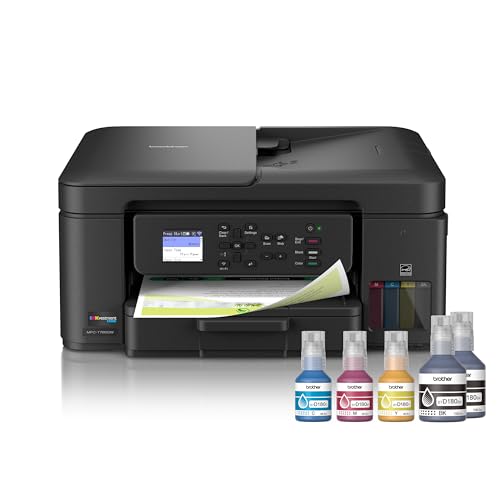
Brother’s entry is graded with the same ruler. Two-sided printing: confirmed, duplex printing is in the title’s first breath. Two-sided copying: not claimed, the title names no feeder and no two-sided copy or scan capability, so double-sided originals are manual flatbed work here too. What the 780 adds to the conversation is duration, attributed properly as this series always attributes it: Brother rates the in-box supply at up to three years of ink, and Brother states a three-year limited warranty, both figures carrying the footnote markers of manufacturer claims. Those horizons describe a machine bought to be kept, and a copying household that keeps its printer for years should weigh them heavily once the two-sided grade is understood.
The warranty deserves its weight in a copying household specifically, because copiers live mechanically interesting lives: lids cycle, hinges flex, the machine wakes cold for a single urgent page more often than any other appliance in the house. A three-year limited warranty, as Brother states it, covers the seasons in which such wear announces itself. Pair that with duplex output for the household’s own documents and the INKvestment Tank system, Brother’s cartridge-fed internal tanks, and the 780 presents the keeper’s version of this category: not the most two-sided machine here, but the one whose ownership promises are printed in years.
Its silences extend beyond the copying column. No fax is claimed, no Ethernet is named, no display size is quoted, and the all-in-one description carries the print, copy and scan trio without elaboration. A household choosing the 780 is choosing output duplexing plus endurance, and accepting flatbed copying as the price. For the many households whose originals are single-sided, that price is theoretical, paid in a currency they never spend. For the household drowning in double-sided school and clinic paperwork, the price is weekly and real, and no warranty horizon, however comforting, refunds it.
Choose the 780 when your copying is single-sided, your printing is two-sided, and your temperament is Brother’s own: buy once, keep long, read the warranty. It is the endurance pick of this guide, and its blank second column is the honest cost of that endurance, stated here as plainly as Brother states its years. Buyers for whom the second column is the whole search should keep reading to the Epson, whose title at least brings a feeder to the argument, and should treat the 780 as the machine they will recommend to their single-sided friends with a clear conscience.
- Design: INKvestment Tank wireless colour inkjet all-in-one, MFC-T780DW
- Two-sided printing: duplex printing stated
- Two-sided copying: NOT claimed in the title; no feeder named
- Ink claim: up to 3 years of ink in-box, as rated by Brother
- Warranty: 3-year limited warranty, per the title
Strengths
- Duplex printing confirmed in the title
- Long ink and warranty horizons, as Brother states them
- Tank system built for keeper households
Trade-offs
- Two-sided copying is not claimed in the title
- No document feeder is mentioned
- No fax is claimed in the title
Best for: a keeper household with single-sided copying, two-sided printing, and a preference for warranties measured in years.
Double-sided originals get no automation from this title either: its claims stop at duplex printing, leaving every two-sided copy to manual turning.
Epson EcoTank ET-4950 — Strongest two-sided case: ADF plus auto 2-sided
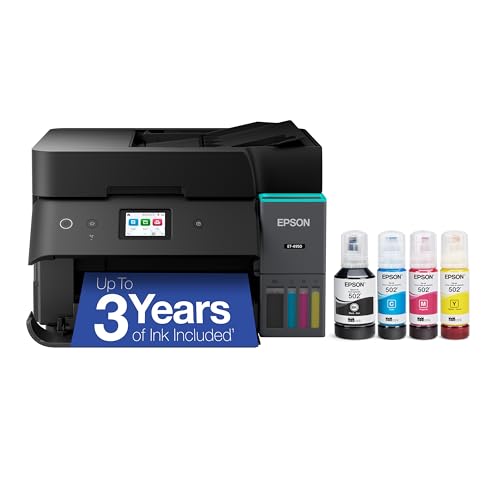
Here is the title this search has been looking for, or the nearest thing to it that this shortlist contains. The ET-4950’s title lists cartridge-free print, scan, copy and fax, a stated speed of up to 18 pages per minute in Epson’s figure, an ADF, and auto 2-sided. Read with the guide’s two-column discipline, the grade is: two-sided printing, supported by the auto 2-sided claim in an all-in-one that prints; two-sided copying, the strongest circumstantial case in the guide, because the machine pairs a document feeder with two-sided language, yet still not spelled out as duplex copying in so many words. This guide credits the pairing honestly and flags the remaining ambiguity honestly, which is more respect than most listings get and exactly what a buyer deserves before money moves.
Why the feeder changes the copying question deserves plain words. Two-sided copying without a feeder is a contradiction in practice: the original must be flipped by hand at the glass regardless of what the print engine can do, so the human becomes the duplex mechanism. A feeder at least makes automation possible, and a feeder beside an auto 2-sided claim is the only combination in these six titles that points toward originals being handled on both sides without attendance. A household whose double-sided paperwork is a weekly fact should therefore start its shopping here, then confirm the precise duplex-scan wording on the listing, because the title brings them to the threshold and the listing should walk them through it.
The supporting cast is the strongest in the guide. Fax is included, which none of the three picks above can claim, and the stated speed, up to 18 ppm as Epson prints it, is the highest figure among these home machines, signalling an office-leaning engine for the household whose paperwork runs long. Auto 2-sided output, feeder-fed scanning and copying, fax, cartridge-free tanks: the ET-4950’s title reads like the checklist this search was written from, item by item, which is either a coincidence of Epson’s segmentation or evidence that this exact household, paperwork-heavy, two-sided, still faxing occasionally, is a customer Epson knows by name.
Choose the ET-4950 if the two-sided copying question brought you here and your originals arrive double-sided with any regularity. It is the only pick whose title gives that household a feeder to stand on, and its remaining ambiguity is a listing-check away from resolution rather than a structural absence. Households with gentler paperwork may find its office lean more than they need, and the touchscreen Canon above will serve their single-sided copying with more grace. But for the search as literally written, large tanks plus two-sided ambition, this Epson is the guide’s headline answer, graded first in class on the strength of its own title.
- Functions: print, scan, copy and fax, per the title
- Two-sided: auto 2-sided stated, with an ADF
- Two-sided copying: strongest case here; confirm duplex-scan wording on listing
- Speed: up to 18 ppm, as stated by Epson
- Ink system: cartridge-free EcoTank Supertank
Strengths
- Only feeder-plus-two-sided title in the guide
- Fax included alongside the full trio
- Fastest stated speed among these home picks
Trade-offs
- Duplex copying is implied by pairing, not spelled out
- No display size is quoted in the title
- Office lean may exceed gentle households’ needs
Best for: the paperwork-heavy household whose double-sided originals arrive weekly and need a feeder-based answer.
Occasional single-sheet copying wastes this machine’s feeder hardware: a household copying rarely will feel the office lean more than the two-sided strength.

HP Smart Tank 7603 — Title silent on two-sided — ink-rich all-rounder
The HP’s report card must be written in the guide’s honest ink. Two-sided printing: not claimed, the title contains no duplex or two-sided language of any kind. Two-sided copying: not claimed, for the same reason, and no feeder is named either. That double silence does not make the Smart Tank 7603 a poor printer; it makes it a printer whose title answers a different search, the one about ink. HP leads with three years of ink included, its own framing of the bundled supply, then describes a cartridge-free refillable all-in-one with print, scan, copy and fax, positioned for low cost printing and the home. A buyer should meet the machine on those terms or not at all.
On those terms, there is plenty to respect. Fax is present, which puts the HP in this guide’s minority of two on that function, and the four-function completeness, print, scan, copy and fax, matches the Epson above job for job. The bundled-ink emphasis will speak to the household whose deepest printer trauma is consumable cost, and HP’s title phrase low cost printing states the tank proposition in the manufacturer’s own words. Wireless printing covers the device spread, and the home positioning is unambiguous. If two-sided behaviour of either kind is a minor or absent need in your house, this title’s silence costs you nothing and its ink story may be the best on the page.
But this search is not a minor-need search, and the guide’s duty is to the search as written. A household that arrives asking for two-sided copy and buys the 7603 on the strength of its ink bundle will discover the gap on the first double-sided original, and again on the first long document they wish had printed itself on both sides. Neither gap is a defect in the machine; both are absences in its title that this guide is obliged to print at the same size as its virtues. Buyers who need either two-sided column filled should treat the HP as a fine answer to a neighbouring question and keep their shortlist pointed at the titles that speak two-sided language.
Choose the 7603, therefore, with both eyes open: for a fax-capable home all-in-one whose maker frames its ink in years, whose copying is single-sided originals handled one at a time, and whose printing asks you to flip nothing because it promises nothing two-sided at all. There are many such households, and they will be happy. The household that typed this search with a stack of double-sided school forms beside the keyboard is not one of them, and this guide would rather lose the HP a sale than lose that household its Saturday afternoon to a flatbed.
- Functions: print, scan, copy and fax, per the title
- Two-sided printing: NOT claimed in the title
- Two-sided copying: NOT claimed in the title; no feeder named
- Ink bundle: 3 years of ink included, per HP’s title
- Ink system: cartridge-free refillable ink system
Strengths
- Fax included in a complete four-function set
- Bundled ink framed at three years by HP
- Cartridge-free refills for low cost printing
Trade-offs
- No two-sided claim of either kind in the title
- No document feeder is named
- Ink-duration framing depends on household volume
Best for: a fax-using family whose copying is single-sided and whose priority is a long bundled-ink runway.
Two-sided work of either kind falls outside this title entirely: neither duplex printing nor duplex copying is claimed in any of its words.

Canon PIXMA G6020 MegaTank — Title silent on two-sided — the veteran MegaTank
The veteran closes the list, and its report card is the briefest to write. Two-sided printing: not claimed, the G6020’s title contains no duplex language. Two-sided copying: not claimed, no feeder, no two-sided copy wording, nothing. What the title does claim is a Canon PIXMA all-in-one Supertank, parenthetically a MegaTank, offering printer, copier and scan functions wirelessly, with mobile printing and Alexa compatibility, in black. This is one of the machines that taught the market the tank idea, a PIXMA-generation MegaTank whose reputation was built on ink economics and everyday reliability rather than on two-sided anything, and its presence here tests whether a buyer will let reputation answer a question the title leaves blank.
It should not, and the guide says so with respect for the machine. The G6020’s virtues are the classic tank virtues, visible ink, bottle refills, the end of cartridge dread, applied to the print, copy and scan trio a household uses daily. Mobile printing and Alexa support, both named in the title, place it comfortably in the connected home, where a voice can start a print and a phone can send one. For single-sided copying households, which is most households on most days, nothing in its blank two-sided columns will ever be missed, and its veteran status means a deep bench of owner experience exists for anyone researching its manners.
The risk this pick guards against is assumption by familiarity. MegaTank as a word now spans generations of Canon machines with different feature sets, and a buyer who assumes the veteran carries the duplex habits of its younger siblings, the G3290 above claims duplex printing in so many words, will be disappointed by a silence that was printed on the box all along. The lesson generalises beyond this model: in the tank era, brand words describe ink systems, not feature sets, and feature sets live only in the individual title. Read the title you are buying, not the family you remember.
Choose the G6020 when your household’s copying is single-sided, your printing is content one side at a time, and you value a proven MegaTank with voice and mobile connections over any two-sided ambition. It is the guide’s reminder that a blank report card on one question is not a failing grade on the machine, provided the household’s real questions were the ones it answers. For the household that typed this exact search, though, the veteran must be passed over in favour of the titles that speak, however partially, in two-sided language, and its section stands as the guide’s closing exhibit in why titles, not reputations, get the final word.
- Functions: all-in-one printer, copier and scan, per the title
- Two-sided printing: NOT claimed in the title
- Two-sided copying: NOT claimed in the title; no feeder named
- Connectivity wording: mobile printing; works with Alexa
- Ink system: Canon PIXMA Supertank (MegaTank), black
Strengths
- Veteran MegaTank with proven tank economics
- Alexa and mobile printing named in the title
- Full print, copy and scan trio for daily use
Trade-offs
- No two-sided claim of either kind in the title
- No document feeder is mentioned
- No fax is claimed in the title
Best for: a connected household with single-sided habits that values a proven MegaTank and voice-friendly printing.
Not suited for: the two-sided copying search that frames this guide, because the veteran MegaTank’s title is silent on both printing and copying in duplex.
Comparison Table
| Pick | Print, copy, scan | Headline fact from its listing title |
|---|---|---|
| Canon MegaTank G3290 | Print, copy, scan | Duplex PRINTING stated; two-sided COPY not claimed; 2.7″ touchscreen |
| Canon MAXIFY GX2020 MegaTank | Print, copy, scan | Duplex PRINTING stated; two-sided COPY not claimed; MAXIFY line |
| Brother INKvestment Tank 780 | All-in-one, duplex printing | Duplex PRINTING stated; two-sided COPY not claimed; warranty stated |
| Epson EcoTank ET-4950 | Print, scan, copy, fax | ADF plus auto 2-sided per title; up to 18 ppm per Epson |
| HP Smart Tank 7603 | Print, scan, copy and fax | Two-sided: NOT claimed in title; 3 years of ink included per HP |
| Canon PIXMA G6020 MegaTank | Print, copy and scan (all-in-one) | Two-sided: NOT claimed in title; mobile printing; works with Alexa |
What is the difference between two-sided printing and two-sided copying?
Everything in this category turns on one mechanical distinction, so it deserves the clearest words in the guide. Two-sided printing concerns output: the printer takes a blank sheet, prints one side, pulls the sheet back, and prints the other, so a document you created emerges finished on both sides without your hands touching it. Two-sided copying concerns originals: a document that already exists on both sides must be captured on both sides, which requires the scanning half of the machine, ideally a feeder that flips or re-feeds the original, to see the back of every page. A printer can be excellent at the first and entirely manual at the second, and most home machines are exactly that, which is why titles that trumpet duplex can still leave a copying household stranded.
The vocabulary makes the confusion worse, because manufacturers use duplex, two-sided, double-sided and auto 2-sided across both meanings, sometimes within one product line. The only reliable reading method is the one this guide applied: ask of every two-sided phrase, two-sided what? If the sentence is about printing, it belongs to the output column. If a feeder and copy or scan language surround it, it may belong to the originals column. If the title offers a two-sided phrase with no feeder and no originals language, grade it as printing and let the listing, not your hope, argue otherwise.
There is a manual middle ground worth acknowledging, because it is how most households actually live. A flatbed machine can copy a double-sided original in two passes, side one for every page, then side two, with the human supplying the flipping and the ordering. For a two-page form, that is a shrug. For a thirty-page double-sided agreement, it is an afternoon with an error rate. The honest question for a buyer is therefore not whether two-sided copying is possible on a given machine, it almost always is, with patience, but whether the household’s volume of double-sided originals justifies buying the automation, and that is a counting question about your own paperwork, not a specification question about any printer.
How should you grade a printer title before you buy?
Take any title in this category and mark it with the two columns used throughout this guide. Column one, output: search the words for duplex printing, auto 2-sided printing, or an equivalent phrase attached to print. Column two, originals: search for a feeder, ADF, and for copy or scan language that is itself described as two-sided, duplex or automatic. A title can fill column one in a single phrase, as three titles here do. Column two is filled convincingly only when feeder hardware and two-sided originals language appear together, and in this entire shortlist no title fills it in so many words, with the ET-4950’s feeder-plus-auto-2-sided pairing standing closest to the line.
Then read the silences as entries rather than as gaps in your knowledge. A missing feeder in a title that lists every other feature is information: the manufacturer prints feeders proudly when they exist, as two titles in the wider series demonstrate. A missing two-sided phrase in a long title is likewise information. Buyers are trained to treat absence as a research task, something to resolve in the machine’s favour, but titles in this category are marketing documents written to include every sellable feature, and a feature that cannot be sold in the title probably cannot be used on the desk. Grade silence as unconfirmed, lean absent, and let the occasional pleasant surprise be a bonus rather than a plan.
Finally, carry the graded title into the listing with two specific questions if column two matters to you: does the feeder scan both sides in one pass, and does the copy function use that capability automatically? Those questions, asked of the listing or the manual rather than of a review’s adjectives, will settle what titles leave open. The method sounds austere, but it takes ninety seconds per machine, and it is the difference between a household that bought the capability it needed and a household that bought the vocabulary it recognised.
Which households actually need two-sided copying?
Fewer than the search volume suggests, and more than printer marketing admits. The genuine need announces itself in originals: documents that arrive already printed on both sides and must be reproduced or filed whole. Schools are the great generators, agreements, handbooks, consent packs, followed by clinics and insurers with their double-sided forms, employers with policy documents, councils and landlords with agreements that grew a back page years ago. A household handling those flows monthly, for school-age children, for elderly relatives’ paperwork, for a home business’s client files, has the need in its filing tray, visible to anyone who looks.
The need is equally defined by its absence. A household whose originals are letters, certificates, photographs, single-page forms and the occasional identity document will copy single-sided forever, and for that household column two is a distraction from the features that will actually shape its satisfaction: the panel, the feeder for stacks of single-sided pages, the ink system, the warranty. This guide has graded every pick on both columns precisely so that both households can shop from the same page, one reading the second column as a veto list, the other reading it as permission to ignore the whole question and buy the touchscreen.
There is a borderline case worth naming: the household that scans to file rather than copying to paper. For them the originals question reappears as duplex scanning, and the same grading applies with the words changed, feeder plus two-sided scan language. The ET-4950’s pairing speaks most directly to that household too, subject to the same listing confirmation. Households should name their verb before shopping, copy or scan, print or file, because the titles grade differently under each verb and the machine that wins one verb’s contest may be a bystander in another’s.
How do you copy double-sided originals well on any machine?
On a feeder machine whose title pairs an ADF with two-sided language, the craft is in the loading: fan the stack so pages do not stick, align it to the feeder’s guides without forcing, remove staples and smooth dog-ears, and run a two-page test original first to confirm the order and orientation the machine produces. Every feeder has a personality about which side it expects up, and learning yours on a harmless document is the whole secret. Once the test passes, the stack that would have consumed an afternoon at a flatbed becomes a supervised coffee break, which is the entire economic argument for the automation this search is hunting.
On a flatbed machine, and most of this guide’s picks are flatbed copiers by their titles, technique replaces automation. Copy all first sides in order, keeping the stack’s orientation ruthlessly consistent, then copy all second sides in the same order, and collate on a clear table rather than in your hands. Work in small batches, five originals at a time, because the error that ruins manual duplex copying is not mechanical but clerical: one page flipped early, one side skipped, discovered at page thirty. Small batches cap the cost of the inevitable mistake at five pages of rework, and a household that adopts the batch habit will find manual two-sided copying tedious but entirely survivable.
Whichever machine you own, keep a known two-page, double-sided test original in the drawer beside it, a document whose correct copy you can recognise at a glance. Use it after any settings expedition, any firmware surprise, any long quiet spell, because the time to discover that a mode has changed is before the school agreement is due, not during. Two-sided copying, automated or manual, rewards households that rehearse it once on a calm day, and punishes, with perfect fairness, households that meet it for the first time on a deadline.
What are the common mistakes when shopping for two-sided copy?
The first mistake is the one this guide was built around: reading duplex printing as duplex copying, and discovering the difference with a double-sided contract in hand. The second is assuming a feeder implies two-sided scanning, when a feeder may happily feed single-sided originals all day and still require hand-flipping for their backs; feeder and duplex are separate claims and must both be found, in words, before either is believed. The third is brand-word shopping, assuming a MegaTank, EcoTank or INKvestment badge carries a feature set with it, when the G6020 and G3290 in this very guide share a badge family and differ on the duplex question outright.
Fourth is buying the automation for a paperwork flow that does not exist, the feeder-and-duplex flagship purchased for a household whose originals are birthday cards and certificates. Fifth is the mirror waste: hand-flipping double-sided originals for years on a flatbed because the household never counted its originals and learned, too late, that they numbered in the hundreds. Both wastes are counting failures, and both are cured by the same fortnight of attention to what actually crosses the desk. Sixth is ignoring the panel, forgetting that copying is the most panel-driven task a printer performs and that the household’s least confident member will judge the machine there.
The final mistake is treating a title’s silence as a puzzle to be solved optimistically, scouring forums for the owner who swears the feature exists undocumented. Sometimes it does. More often the silence was the answer, printed plainly by a manufacturer who lists every sellable feature as a matter of professional pride. Shop the titles as contracts, confirm the one or two open clauses on the listing, and the two-sided question, which confuses more buyers than any other in this category, becomes what it should have been from the start: two columns, honestly filled, and a household that knows which column its life is lived in.
How do large tanks change the copying household’s economics?
Copying is the forgotten half of ink consumption. Households budget ink for the documents they print and then discover that copying, forms for school, documents for applications, the paperwork of care and administration, drinks from the same supply in a steady, unglamorous stream. Cartridge economics made that stream a source of low-level resentment: every copied page felt metered. A large tank unmeters it. The copied form costs its paper and a whisper, the second copy for the other parent’s file is made without a decision, and the household’s paperwork stops carrying a per-page emotional tax that nobody ever voted for.
The tank also changes copying behaviour at the panel. Households with cheap ink proof their copies, checking the first page before running the set, because a wasted proof costs nothing and a wasted set, discovered at page twenty, costs the afternoon. They copy the document at the size it will be read rather than shrinking it to save supply. They keep the machine ready, tanks visibly full, for the copying emergencies that define the function’s real value: the form needed by morning, the document a relative must sign today. Readiness, more than price, is what a tank buys a copying household, and readiness is a property of the whole system, ink you can see, paper loaded, a panel the family can drive.
None of this rescues a machine whose title fails the household’s two-sided grade, and the guide’s priorities should be kept in order: grade first, economics second. But once the grade is satisfied, or once the household honestly concludes its originals are single-sided and the grade does not bind it, the tank becomes the deciding comfort, the reason the chosen machine will still be liked in its third year. Ink is the cost a household pays weekly; features are the costs it pays occasionally. The wise purchase satisfies the occasional costs without ignoring the weekly one, and that balance, grade plus tank, is the whole argument of this guide in one sentence.
Final Recommendation
For the household that typed this search and meant it, double-sided originals arriving regularly, the Epson EcoTank ET-4950 is the recommendation: it is the only title here pairing a document feeder with an auto 2-sided claim, backed by fax and the strongest stated speed in the group, and its one open clause, the precise duplex-copy wording, can be confirmed on its listing before purchase. No other pick should be bought for that job on title evidence, and this guide has printed each one’s blank column at full size so that none is bought for it by accident. That is the headline verdict, and it is deliberately narrow, because the search was narrow.
For the larger household hiding inside this search, single-sided originals, two-sided printing, everyday copying by several hands, the Canon MegaTank G3290 takes the recommendation on its duplex printing claim and its title-stated colour touchscreen, with the GX2020 as its business-register alternative and the Brother 780 as the keeper’s choice where warranty years matter. The HP 7603 and Canon G6020 close the list as honest ink-first machines whose titles make no two-sided promises, suitable only for households that have counted their originals and found both columns unnecessary. Count first, grade second, and the printer that survives your own paperwork will not surprise you with the one capability this entire guide exists to keep visible.
Frequently Asked Questions
Can a printer with duplex printing copy a double-sided document automatically?
Not by that claim alone. Duplex printing describes the machine flipping its own output pages. Copying a double-sided original automatically requires the scanning side to capture both sides, typically through a duplex-capable document feeder, and the title must support that with feeder and two-sided copy or scan language. In this shortlist no title spells that out completely; the Epson ET-4950, pairing an ADF with an auto 2-sided claim, comes closest, and its listing should be checked for the exact duplex-scan wording.
Which pick in this guide is best for two-sided copying?
The Epson EcoTank ET-4950, on title evidence: it is the only pick whose title combines a document feeder with an auto 2-sided claim, alongside print, scan, copy and fax. The other five titles either claim duplex printing only, the Canon G3290, Canon GX2020 and Brother 780, or claim no two-sided behaviour at all, the HP 7603 and Canon G6020. Confirm the 4950’s duplex copy and scan wording on its listing, since its title implies the capability by pairing rather than naming it outright.
What if a title says nothing about two-sided features?
Treat the capability as unconfirmed and, for buying purposes, absent. Manufacturers print sellable features in their titles, so silence in a detailed title is meaningful. The HP Smart Tank 7603 and Canon PIXMA G6020 in this guide are both silent on two-sided printing and copying, and both are graded that way here. If a silent machine otherwise tempts you, check its listing for an explicit duplex claim before assuming one; do not let a brand name or a sibling model’s features answer for it.
Is a document feeder the same as duplex copying?
No. A feeder moves a stack of originals through the scanner one page after another, which automates single-sided copying of many pages. Duplex copying additionally captures the back of each original, which needs a feeder that flips or re-feeds pages, or a second scanning pass built into the mechanism. A title claiming an ADF alone, without two-sided originals language, promises stack handling, not two-sided capture, and the two claims should always be graded separately.
How can I copy double-sided originals on a flatbed printer?
In two disciplined passes. Copy every first side in order, keeping the stack’s orientation identical throughout, then copy every second side in the same order, working in small batches of about five originals so a mistake costs minutes rather than the whole job. Collate on a clear table, and keep a known two-page double-sided test original near the machine to verify settings before an important job. It is tedious but entirely workable for occasional documents; weekly volume is what justifies buying feeder automation.
Do all six printers here really have large ink tanks?
Yes, in their makers’ own vocabularies, which is the standard this guide applies. The Canon picks describe refillable MegaTank or Supertank systems, the Epson describes a cartridge-free EcoTank, the HP describes a cartridge-free refillable Smart Tank system, and the Brother describes its INKvestment Tank design, in which internal tanks are fed by cartridges. The tank half of this search is satisfied across the list; it is the two-sided half where the titles divide, which is why the grading concentrates there.
Related Guides
The map closes its printer loop here: best canon dslr cameras for Canon imaging beyond the desk, best digital dslr cameras for the cross-brand viewfinder conversation, and best canon point and shoot cameras for the pocketable end of Canon cameras.



[…] is one axis of the tank map: best home printers with large ink tanks two sided copy returns to letter size with the two-sided copying question, best canon dslr cameras follows the […]