What's inside
- Key Takeaways
- Quick Picks
- How We Chose These Picks
- Side-by-Side Comparison
- What Does a $200 Ceiling Actually Buy — and What Does It Leave Out?
- Which Matters More at This Price: Storage or Screen?
- How Do You Tell a Genuine Budget Bargain From a False One?
- How Should You Set Up a Budget Tablet So It Stays Fast?
- What Should Parents and Students Each Prioritise in This Tier?
- How Long Can a Sub-$200 Tablet Reasonably Last?
- Can a Tablet in This Tier Handle Games and Video Editing?
- What About Cases, Pens and the Accessories Budget?
- How Do You Check a Listing Before You Commit?
- Should You Wait for a Sale, or Buy the Tablet You Need Now?
- What Goes Wrong When People Shop at the Bottom of the Market
- Final Recommendation
- Frequently Asked Questions
- Related Guides
As an Amazon Associate I earn from qualifying purchases. This post may contain affiliate links at no extra cost to you.
widgetverdict.com is reader-supported. When you buy through links on our site, we may earn an affiliate commission.
All six picks below are sold through Amazon, and each linked name takes you to its listing, where you can check the price and confirm the exact variant before ordering — an essential step in this tier, as you will see. The market for the best android tablets under 200 dollars is where tablet buying gets honest. Nobody shopping under a $200 ceiling expects flagship polish; they expect a screen that does not embarrass itself, a battery that survives the day, and a tablet that still feels willing two years later. The best android tablets under 200 dollars are the ones that spend their limited budgets on those fundamentals instead of on spec-sheet fireworks, and this guide’s six picks — two versions of Lenovo’s Tab M11, two TCL Tab 10 models, Samsung’s compact Tab A9 and Lenovo’s small Tab One — each make a different, defensible trade within the same ceiling.
A word about the ceiling itself before the picks. Prices in this tier move — with sales, with variants, with storage options — so this guide treats “under $200” as the shopping frame it is, not as a price tag pinned to any individual machine. We do not print per-product prices; check the listing at the moment you buy, and check which variant of the model you are actually looking at, because this tier loves a cheaper configuration hiding behind the same product name. What we can rank durably is the hardware logic: which of these tablets gives a budget buyer the most screen, storage, battery and included accessories for the class, and which compromises are worth accepting at this level and which are not.
Key Takeaways
- The Lenovo Tab M11 appears twice because its two variants are genuinely different purchases: the 64GB version bundles a pen, the 128GB version bundles a folio case — choose by accessory and storage, not by name.
- TCL’s Tab 10 Gen 2 is the screen pick of the tier, with a 10.4-inch 2K panel and 128GB of storage; the newer Tab 10 Gen 4 answers with Android 15, a metal body and dual speakers.
- Samsung’s Galaxy Tab A9 and Lenovo’s Tab One cover the small end at 8.7 inches, for buyers who would rather have portable and light than large.
- Every pick here carries at least 64GB of storage and 4GB of memory — the floor below which budget tablets stop being bargains and start being chores.
- The $200 figure is a budget frame for the category, not a price assigned to any pick; verify the live price and the exact variant on the listing before ordering.
- Included accessories change the real value: a bundled pen, folio case or cover can be worth more than a small specification difference.
Quick Picks
| Pick | Badge | Why it earns a place |
|---|---|---|
| Lenovo Tab M11 (64GB, with Pen) | Budget note-taker | An 11-inch 1920×1200 tablet with a pen in the bundle and a stated 10-hour battery. |
| Lenovo Tab M11 (128GB, with Folio Case) | Storage-first twin | The same M11 with double the storage and a folio case instead of the pen. |
| TCL TAB 10 Gen 4 | Newest software in tier | Android 15, a 10.1-inch FHD metal body, 128GB and dual speakers. |
| TCL TAB 10 Gen 2 | Sharpest budget screen | A 10.4-inch 2K screen with 128GB of storage and a 6000mAh battery. |
| Samsung Galaxy Tab A9 8.7 | Brand-name compact | Samsung’s 8.7-inch tablet with 64GB for buyers who trust the badge and want small. |
| Lenovo Tab One | Light and case-included | An 8.7-inch lightweight tablet with folio case and up to 12.5 hours of YouTube streaming per its listing. |
How We Chose These Picks
Budget tiers punish two kinds of mistake: paying for decoration and starving the fundamentals. So the first filter was a floor — 4GB of memory and 64GB of storage as the minimum a tablet can carry into 2026 without making its owner manage it like a kettle about to boil. Every pick here meets that floor; the four full-size models exceed it with 128GB. The second filter was screen honesty: at this money, a stated resolution in the listing matters, and the picks divide cleanly between the TCL Gen 2’s 2K panel, the 1920×1200 and FHD screens of the M11 pair and the Gen 4, and the HD panels of the two small tablets, whose buyers are trading sharpness for size on purpose.
Battery claims were read literally. The M11 variants state 10 hours; the Tab One states up to 12.5 hours of YouTube streaming; the TCL models state 6000mAh capacities, which we report as capacities; the Samsung states nothing, and we say so. Included accessories were scored as real money, because at this tier a bundled pen or folio case is not a garnish — it is a purchase the buyer does not have to make next week. That scoring is exactly why the M11 appears twice: Lenovo sells the same tablet in two bundles that suit different people, and a guide that listed only one would hide a real decision.
Finally, we favoured names with support behind them. A budget tablet from a major maker — Lenovo, TCL, Samsung — carries update policies, accessory availability and warranty handling that no-name listings rarely match, and at this price the difference between a bargain and a regret is usually what happens in month thirteen. The $200 ceiling was applied as a frame for the class: these are the models that compete under it, with live prices left where they belong, on the listings.

Lenovo Tab M11 (64GB, with Pen) — The Budget Tablet That Writes
Start with the screen, because it is this variant’s foundation: an 11-inch display at 1920×1200, powered by a MediaTek Helio G88 octa-core processor, with an ambient light sensor that adjusts brightness to the room and a battery the listing states at 10 hours. On those fundamentals alone the M11 would be a credible budget pick. What lifts this 64GB version above its class is the last line of its listing: it comes with a pen. A bundled stylus at this tier transforms the tablet’s job description — notes in class, sketches, marked-up documents, signatures — work that finger-only budget tablets pretend at and proper note-taking tablets charge far more for.
The trade is printed in the same listing: storage is 64GB rather than the 128GB of its twin. For the note-taker, that trade is usually right. Notes, documents, books and apps are light cargo; it is downloaded video and big games that eat storage, and a student whose tablet is a working tool rather than a media vault will feel the pen’s value daily and the storage limit rarely. The ambient light sensor deserves its small praise too — in a tier where brightness sliders are a way of life, a tablet that adapts to the lecture hall and the evening desk without being asked feels quietly premium.
Who should hesitate? Anyone whose tablet doubles as the family film library, and anyone who knows a pen will live in a drawer — for both, the folio-case twin below is the same money spent on the right accessory. But for students, field workers, and anyone whose handwriting is their filing system, this is the most capable budget pick in the guide: a sharp screen, a stated battery figure, a real pen, and a processor honestly matched to the work. Check which bundle the listing is showing before you order, because the M11’s two variants are easy to confuse at a glance — that confusion is the only trap this pick sets.
Handwriting deserves one more sentence of honesty about expectations. A bundled pen in this tier is a note-taking and annotation tool — responsive, practical, transformative for lectures — and it is not the pressure-layered instrument of a digital artist’s tablet costing several times more. Students sketching diagrams and marking texts are perfectly served; art students building a portfolio should save for a different guide entirely. Knowing which side of that line you stand on is the difference between delight and disappointment at the same purchase.
One more consideration for students specifically: a pen bundle at this level changes how long the tablet stays useful. A first-year student who annotates readings and drafts diagrams on the same device they watch lectures on has built a workflow, and workflows outlast novelty. The M11 with pen is the pick most likely in this guide to still be earning its keep in a final-year bag, provided its owner treats the pen as the tool it is and keeps it clipped, charged habits aside, where it can be found.
- Panel: 11-inch, 1920×1200
- Processor fitted: MediaTek Helio G88 octa-core
- RAM and storage: 4GB, 64GB
- Stated battery life: 10 hours
- Brightness: ambient light sensor on board
- Bundled: pen; finish Luna Grey
Strengths
- A pen in the bundle at budget money — genuine note-taking ability.
- Sharp 1920×1200 screen with ambient light adaptation.
- Stated 10-hour battery rather than a vague promise.
Trade-offs
- 64GB is the storage you accept for the pen; media hoarders will feel it.
- No folio case in this bundle, so protection is a separate thought.
- The pen suits notes and sketches, not pressure-sensitive art careers.
Best for: students and note-takers after handwriting, annotation and a sharp screen inside a strict budget.
Not suited for: buyers who will never lift the pen — take the folio-case twin instead — or who store large video libraries offline.
Lenovo Tab M11 (128GB, with Folio Case) — The Same Tablet, Tuned for Media and Reading
Everything said about the M11’s screen applies here unchanged — 11 inches at 1920×1200, the Helio G88, the ambient light sensor, the stated 10-hour battery — because this is the same tablet wearing a different bundle. The differences are two, and both are printed in the listing: storage doubles to 128GB, and the included accessory is a folio case rather than a pen. Those two changes quietly retarget the machine. Where the pen variant is a student’s tool, this one is a household’s media and reading tablet: the folio props it for films and recipes, protects it in bags and on shelves, and the storage swallows downloaded series, comics and photo libraries without the weekly tidy-up.
The folio case deserves more respect than accessory bundles usually get. A tablet’s most common injuries are not dramatic drops but slow abrasion — screens against keys, corners against table edges — and a folio present from the first day prevents the device from looking elderly within a year. As a stand, it also fixes the ergonomics of a full-size tablet: propped at a reading angle, the M11 becomes a small television for the kitchen and a book that holds itself open. Buyers comparing the twins should think of it as choosing which second product they would otherwise buy within the month — a pen, or a case — because most owners end up wanting one of them.
As the family’s shared tablet, this variant’s 128GB is the safer long-term bet: multiple users’ apps, a season of downloads for a holiday, a growing photo stream. Its weakness mirrors its twin’s: no pen, so handwriting reverts to fingers and add-on styluses, and students should choose accordingly. Between the two M11s there is no wrong answer, only a wrong match — and the fact that both sit in this guide, clearly labelled, is deliberate. In a tier full of confusing variants, this is the one confusion worth understanding rather than avoiding.
There is a holiday arithmetic to this variant as well: 128GB is roughly a whole trip’s worth of downloaded films, children’s programmes and offline maps for a family, arriving without the pre-holiday purge that 64GB owners perform in the departure lounge. Trips are where tablets earn their reputations, and a shared family tablet that swallows the journey’s entertainment whole — then props itself on its folio to show it — justifies its bundle choice in a single week every summer.
Longevity thinking favours this twin slightly for general buyers. Storage pressure is the most common reason budget tablets get replaced early, and 128GB postpones that day by years for ordinary use. A household that cannot decide between the variants, and does not specifically need handwriting, should take the storage and the case: pens can be added later in basic form, but internal storage cannot be added at all.
- Screen: 11-inch at 1920×1200
- Chip: MediaTek Helio G88, octa-core
- RAM and storage: 4GB, 128GB
- Stated battery: 10 hours
- Brightness help: ambient light sensor fitted
- Bundled: folio case; finish Luna Grey
Strengths
- 128GB removes storage anxiety for media and family sharing.
- Folio case included — protection and a stand from day one.
- Same sharp screen and stated battery as the pen variant.
Trade-offs
- No pen in this bundle; handwriting is finger-grade.
- Buyers who need both pen and case must add one separately.
- Same processor class as its twin — no performance gain for the storage.
Best for: a household sharing one tablet for films, reading and photographs, with storage and a case already sorted.
Not suited for: students after real note-taking — that is the pen variant’s job — or anyone shopping stylus-first.

TCL TAB 10 Gen 4 — Android 15 Without the Premium Bill
The Gen 4’s headline is a version number: Android 15, the newest software anywhere in this guide, in a tablet competing under a $200 frame. Software vintage is the budget tier’s hidden tax — a cheap tablet on old Android ages in dog years as apps move on — and this pick refuses to pay it. Around that headline sits a sensible specification: a 10.1-inch FHD display, 4GB of memory with 128GB of storage, an octa-core processor, a 6000mAh battery stated as capacity, dual speakers, Wi-Fi, and a metal body that makes the whole thing feel a class above its price band when you pick it up.
Dual speakers are worth pausing on, because budget tablets so often treat sound as an afterthought and video is half of what a budget tablet does. Two speakers place dialogue and music more convincingly, and for the family calls and streamed programmes that fill these tablets’ days, the difference between one small driver and two is the difference between leaning in and relaxing. The metal body cuts the same way: it is not a performance feature, but it changes daily confidence — the tablet feels like equipment, survives bag life with more dignity, and does not creak when a child carries it by one corner.
TCL positions this model for students, young adults and families, and that breadth is accurate: nothing here is specialised, and everything a general user does is covered competently. Against its own sibling, the Gen 2 below, the Gen 4 trades screen resolution for software youth, speakers and the metal shell. Buyers planning to keep a tablet four or five years should weight the software; buyers who read small text for hours should weight the screen. Both instincts are respectable, and the existence of the choice inside one brand’s range is a budget-tier luxury.
Households buying two tablets — one for a parent, one for a teenager, a common pattern at this money — should notice how well this model standardises the fleet: same charger habits, same interface logic as its sibling, and a specification nobody in the family will feel cheated by. Uniformity is an underrated budget virtue, because every shared accessory and every piece of learned know-how does double duty.
Practical advice for this pick: because the body is metal, add a case anyway — metal dents and slides where plastic grips and bounces — and the total still sits inside the budget frame with room to spare. Set up the tablet’s updates to install automatically from the first day, since its long software runway is only valuable if the updates actually land. Treated that way, the Gen 4 is the budget pick most likely to feel current at the end of its life rather than merely at the start.
- Panel: 10.1-inch FHD
- RAM and storage: 4GB, 128GB
- Chip: octa-core, as listed
- Cell: 6000mAh, as listed
- Android version: 15
- Construction and audio: metal body, dual speakers, Wi-Fi
Strengths
- Android 15 gives the longest app-compatibility runway in this guide.
- Dual speakers serve video and calls better than budget norms.
- Metal body and 128GB storage feel a class above the tier.
Trade-offs
- FHD screen concedes the sharpness crown to the Gen 2’s 2K panel.
- Metal shell wants a case for drops and grip.
- No bundled pen or case in the listing.
Best for: a buyer who keeps devices for years and wants the newest Android, decent speakers and generous storage inside the budget.
Not suited for: fine-print readers — the 2K Gen 2 is their pick — or note-takers dependent on the M11’s pen bundle.

TCL TAB 10 Gen 2 — The 2K Screen the Tier Shouldn’t Have
Every budget guide has one pick that seems to have wandered in from a higher tier, and here it is a screen: 10.4 inches at 2K resolution, in a tablet with 128GB of storage, a 6000mAh battery, Android 13, a slim body, and a listing that notes it is a US version from 2023, in Space Gray. Resolution is the quality budget buyers are usually told to surrender first, and the Gen 2 refuses the surrender. Text renders with an edge quality that makes newspapers, books and web pages visibly kinder; photographs hold detail that FHD panels smear; and the whole tablet feels like the answer to a question the tier rarely asks — what if the screen were the priority?
The supporting cast is honest rather than dazzling. Storage at 128GB matches the best in this guide. The battery figure is a capacity — 6000mAh — and we report it as such rather than translating it into invented hours. Android 13 is a generation behind its Gen 4 sibling, the standing trade of this pair: the Gen 2 spent its budget on the panel, the Gen 4 on the software. Memory is not stated in the listing title, a small silence we note rather than fill. None of that dims the central fact for readers and browsers: the thing you look at all day is the best in its class here.
Who should take the Gen 2 over the Gen 4? The reader, the news devotee, the photo viewer, the student whose material is text and diagrams rather than video. Who should not? The buyer keeping a tablet half a decade, for whom Android 15’s runway matters more, and the heavy video caller who will hear the Gen 4’s dual speakers daily. It is a genuinely civilised choice to have at this money, and it exists because TCL split its budget two ways across two models instead of averaging it into one forgettable one.
There is a viewing-distance secret that flatters this pick further: at the distance a tablet is actually held, a 2K panel at 10.4 inches crosses the threshold where individual pixels vanish for most eyes, so text and images take on a printed smoothness the FHD models approach but do not quite reach. Readers upgrading from an old HD tablet will feel the jump in the first evening; it is the rare budget improvement that never stops being noticeable, because it is the surface of everything.
A note on the 2023 vintage: a slightly older model in a budget guide is not an apology. Its specification has been stable, its behaviour is well understood, and its screen remains unmatched at the level. Buyers should simply confirm the listing’s details at purchase — check price on Amazon and the exact configuration — as they should with every pick here, and then enjoy the rare budget experience of a screen that feels like a treat rather than a compromise.
- Screen: 10.4-inch, 2K Full HD
- Storage fitted: 128GB
- Cell: 6000mAh, as listed
- Android version: 13
- Shell: slim, Space Gray; US version from 2023
- RAM: the title does not give a figure
Strengths
- 2K screen is the sharpest panel among these six picks.
- 128GB storage matches the tier’s best.
- Slim, grown-up design that does not look like a budget apology.
Trade-offs
- Android 13 trails the Gen 4’s Android 15 for long-term app support.
- The listing title gives no memory figure.
- No bundled case, pen or speaker claims in the listing.
Best for: readers and browsers after the finest text and images the budget tier offers, replacing devices on a normal cycle.
Not suited for: a five-year keeper who should prioritise the Gen 4’s newer Android, or a buyer expecting accessories in the box.
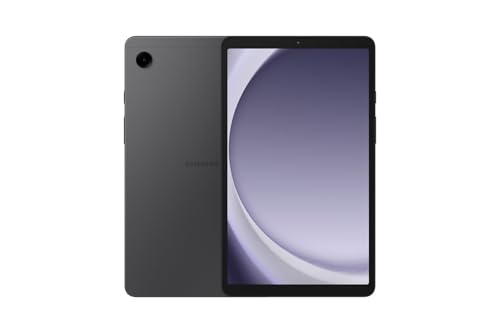
Samsung Galaxy Tab A9 8.7 — The Small Samsung for Brand-Loyal Budgets
Samsung’s presence in this tier is a compact one: an 8.7-inch (22.1 cm) tablet with 64GB of storage, 4GB of memory and Wi-Fi 5 (802.11ac), finished in Graphite. Nothing in that listing chases a headline, and that is the point of the pick. A large share of budget buyers are not comparing specifications at all — they are buying the badge they trust, in the size they can hold, and the Tab A9 is Samsung’s answer to exactly that shopper. Its interface matches the phones half the family already carries, its accounts and photo services behave identically, and help from relatives arrives in a familiar dialect.
Size is the decision to make with open eyes. At 8.7 inches this is a personal screen: superb for books, messages, browsing and video for one, limiting for two viewers or split-screen work. The 64GB of storage is the tier’s floor and suits streaming households; downloaders of series and games will manage it actively. The listing states no battery figure and includes no case, and this guide invents neither — expect class-typical endurance, and budget a folio case into the purchase, because at this size the case is what turns the tablet into a book-shaped daily companion.
Against the Lenovo Tab One — the other 8.7-inch pick here — the A9’s argument is purely ecosystem: Samsung continuity versus Lenovo’s included folio case and stated streaming figure. Neither is objectively better; they are answers for different households. A Samsung-phone family will extract real value from the familiarity every single day, in a way no accessory can match. A household without that allegiance should probably take the case and the stated endurance.
There is also a resale-and-handover angle that budget buyers rarely consider: a Samsung tablet holds its usefulness in a family longer because everyone already knows how to operate it. When the A9 is outgrown it becomes a child’s first real tablet, a kitchen screen, a spare for guests — each handover frictionless because the interface needs no introduction. No-name tablets die at their first owner; this one is likely to serve three.
As a first tablet for a child moving up from a kids’ model, or a second tablet for an adult who reads and browses more than they watch, the A9’s modesty is a virtue: it is cheap to replace, easy to carry, and impossible to misunderstand. Buyers who want the budget tier’s best screen or biggest storage should look at the TCL and Lenovo full-size picks; buyers who want Samsung, small, should stop here and be content.
- Size: 8.7 inches (22.1 cm)
- Storage fitted: 64GB
- Memory fitted: 4GB
- Wi-Fi: version 5 (802.11ac)
- Colourway: Graphite
- Extras in the box: no case named; no battery figure printed
Strengths
- Samsung familiarity and ecosystem continuity at budget level.
- Compact, one-handed size that gets carried and used.
- An honest, uncomplicated specification from a major maker.
Trade-offs
- Small screen limits sharing and split-screen work.
- 64GB is the tier’s floor for storage.
- No case included and no battery figure stated.
Best for: Samsung households after a small, trusted, carry-everywhere tablet for reading, browsing and personal video.
Not suited for: shoppers determined to get the tier’s best screen or storage, or a family after one shared full-size display.

Lenovo Tab One — The Lightweight Budget Pick With the Case On
The Tab One closes the guide at the size where budget tablets are most forgivable: 8.7 inches, described in its listing as lightweight, with an HD display, 4GB of memory, 64GB of storage and a MediaTek Helio G85 processor. Its one stated endurance figure — up to 12.5 hours of YouTube streaming — is the longest explicit claim in this guide, and it is aimed at the truth about small tablets: they are video and reading companions, carried everywhere, and their owners measure battery in days of casual use rather than hours of labour.
The included folio case is this pick’s quiet headline. At budget level, the case is often the purchase that never happens, and the tablet pays for the omission in scratches and corner dents within months. Here it arrives in the box, wrapping the Tab One like a book cover and folding into a stand for kitchen-counter viewing. Combined with the light weight, the package feels complete in a way the spec sheet alone does not convey: open box, charge, read, watch, carry. For gifts — a grandparent, a young student, a commuter — completeness is a genuine feature.
The honest compromises are the HD screen’s softer text and the 64GB ceiling, shared with the Tab A9. Readers of novels at generous font sizes will never notice the first; hoarders of downloaded video will notice the second within a season. Against the Samsung, the Tab One trades brand ecosystem for the case and the stated streaming figure. Against the full-size picks, it trades page size for portability. Every pick in a budget guide is a trade wearing a price frame; this one’s terms are simply the clearest printed.
Gift-givers in particular should study this pick’s completeness. A present that requires the recipient to immediately buy a case, learn an unfamiliar ecosystem and manage tight storage is a project disguised as a present; the Tab One asks for none of that. Add a note saying the streaming figure in its listing runs past twelve hours and the case is already on, and you have given something that works from the first afternoon — which, at this end of the market, is the most generous specification of all.
Think of the Tab One as the budget tablet for people whose tablet life happens in motion — trains, waiting rooms, gardens, bedsides. It will not anchor a desk, host a family’s photo archive or impress a specifications enthusiast. It will be charged, carried, opened and enjoyed daily, which at this money is the whole game. Buyers who recognise their own habits in that sentence can stop comparing and order with a clear conscience.
- Panel size: 8.7-inch HD
- Memory: 4GB RAM; storage: 64GB
- Processor named: MediaTek Helio G85
- Listing’s endurance claim: up to 12.5 hours of YouTube streaming
- Bundled: folio case
- Build brief: lightweight, per listing
Strengths
- Folio case included — the budget pick that arrives complete.
- The longest stated streaming endurance in this guide.
- Lightweight and genuinely portable at 8.7 inches.
Trade-offs
- HD text is softer than the full-size picks’ panels.
- 64GB storage assumes streaming more than downloading.
- Small screen is a personal, not shared, display.
Best for: commuters, travellers and gift-buyers after a light, complete, case-included tablet for video and reading on the move.
Not suited for: desk-bound users who should take a 10-inch screen, or archivists for whom 128GB from the start is mandatory.
Side-by-Side Comparison
| Pick | Screen | Memory / storage | Battery as listed | In the box / defining trait |
|---|---|---|---|---|
| Lenovo Tab M11 (64GB) | 11-inch 1920×1200 | 4GB / 64GB | 10 hours stated | Pen included |
| Lenovo Tab M11 (128GB) | 11-inch 1920×1200 | 4GB / 128GB | 10 hours stated | Folio case included |
| TCL TAB 10 Gen 4 | 10.1-inch FHD | 4GB / 128GB | 6000mAh capacity | Android 15; metal body; dual speakers |
| TCL TAB 10 Gen 2 | 10.4-inch 2K | Not stated / 128GB | 6000mAh capacity | Sharpest screen in the tier |
| Samsung Galaxy Tab A9 | 8.7-inch | 4GB / 64GB | Not stated in listing title | Compact Samsung; Wi-Fi 5 |
| Lenovo Tab One | 8.7-inch HD | 4GB / 64GB | Up to 12.5 hours of YouTube streaming stated | Folio case included; lightweight |
What Does a $200 Ceiling Actually Buy — and What Does It Leave Out?
Under the ceiling, you get the complete tablet experience in its honest form: screens from HD to 2K depending on where the maker spent, storage from 64GB to 128GB, processors that handle browsing, video, reading and light games without complaint, and battery life measured in full days of mixed use. What the ceiling leaves out lives at the extremes: flagship processors for heavy gaming and video editing, premium pen ecosystems with pressure-sensitive art tools, cellular connectivity, and the thinnest, brightest flagship panels. For the workloads most households actually run — streaming, reading, browsing, calls, homework, casual games — the gap between this tier and the expensive one is far narrower than the price gap suggests.
The smarter question is where your own workload touches those extremes. A student editing video or a gamer chasing high frame rates will feel this tier’s ceiling within a month and should save longer. A family equipping a child, a parent, a kitchen or a commute will feel it almost never. Budgets fail in both directions: overspending on power never used is as real a waste as underspending into misery, and the $200 frame exists because it is roughly where the misery ends for ordinary use.
Which Matters More at This Price: Storage or Screen?
Storage, for most people, and the reasoning is asymmetry. A screen’s quality is fixed at purchase and judged in the first week; storage pressure arrives in month eight, when the tablet that felt spacious refuses a download on a train. Buyers who stream everything and keep photos in the cloud can safely choose the 64GB picks and spend their attention on screens. Buyers who download — for children, for travel, for patchy Wi-Fi — should treat 128GB as the real floor and pick between the M11 folio variant, the two TCL models on that basis alone.
The exception is the dedicated reader. Text weighs nothing, and a reading-first buyer on 64GB owns a library for life; for them the TCL Gen 2’s 2K screen is worth more than any storage figure in this guide. Know which buyer you are before the comparison tables start arguing with each other — the tier’s best value is the pick whose strength matches your heaviest habit, not the pick with the most strengths.
How Do You Tell a Genuine Budget Bargain From a False One?
Read the variant, not the headline. This tier’s favourite trick is a product page whose title advertises the family while the selected variant quietly halves the storage or drops the accessory; the M11’s two bundles are the friendly version of this, printed honestly, while no-name listings play it as a trap. Check four fields on any listing before ordering: the storage figure, the memory figure, what is included in the box, and the Android version. If any of the four is missing from the listing entirely, treat that silence as the answer.
Brand and support form the second test. The six picks here come from Lenovo, TCL and Samsung — makers with update policies, spare accessories and warranty processes that exist in the real world. A mysterious listing offering impossible specifications at half the frame price is not a bargain; it is a lottery ticket with a screen. At this money, boring and backed beats miraculous and orphaned, every single time.
How Should You Set Up a Budget Tablet So It Stays Fast?
Budget hardware rewards tidy habits. Install the apps you use and resist the rest; every background service is a small tax on 4GB of memory. Keep a fifth of the storage empty — tablets slow down as they fill, and the difference between a willing device and a sullen one is often just headroom. Let updates install promptly, since performance fixes in this tier are real. Use the ambient light sensor, where fitted, instead of pinning brightness at maximum, and restart the tablet every week or two; it takes a minute and clears the accumulated clutter of casual use.
Then arrange the home screen like you mean it: the five apps of daily life in front, everything else in the drawer. A budget tablet organised this way feels startlingly close to an expensive one for ordinary tasks, because ordinary tasks were never the expensive part. The owners who complain about slow budget tablets are usually running a home screen like a junk drawer on hardware with no spare capacity to forgive it.
What Should Parents and Students Each Prioritise in This Tier?
Parents buying for children should start from durability and control rather than specification: a case included or bought alongside, storage enough for downloaded content on journeys, and the parental-control setup done before handover. In this guide that points to the folio-bundled picks — the M11 128GB or the Tab One for smaller hands — with the pen variant waiting when homework starts to involve diagrams and drafts. A budget tablet for a child is also a lesson in stewardship; a device at this price can be a first thing a child owns outright and is responsible for keeping charged, cased and tidy.
Students should start from the pen and the screen. Note-taking is the student superpower in this tier, and only the M11 64GB bundles the tool for it; lecture capture, reading and essay research then divide between the M11’s sharp panel and the TCL Gen 2’s sharper one. Storage matters less than students fear — documents are light — unless coursework involves video, in which case the 128GB models earn their place. Both audiences should ignore gaming benchmarks entirely; nothing in a lecture hall or a family kitchen is decided by them.
How Long Can a Sub-$200 Tablet Reasonably Last?
Two to four years of ordinary service is a fair expectation, and the picks divide by what will end their run. For the TCL Gen 2 and the M11 pair, software age is the horizon — Android 13-era and the M11’s generation will eventually meet apps that want newer. The Gen 4’s Android 15 pushes that horizon furthest, which is its core long-term argument. For the 64GB models, storage pressure may arrive before software does. Batteries in this tier generally fade gradually rather than failing, and a tablet demoted to kitchen or bedside duty can serve years beyond its prime.
Buyers can stretch any of these runs with the habits from the setup section — storage headroom, prompt updates, a case from day one — and by choosing the pick whose strength matches their heaviest use, since a well-matched tablet is replaced for desire, not necessity. Judge the purchase as cost per year of service rather than cost at the till, and the frame’s logic becomes obvious: a tablet that serves three years inside this budget has outperformed a flagship replaced in two.
Can a Tablet in This Tier Handle Games and Video Editing?
Lightly, and honesty here saves returns. Casual games — puzzles, card games, the undemanding titles children and grandparents actually play — run happily on every pick in this guide, and streamed video is effortless for all of them. The tier’s limits appear with heavy 3D games at high settings and with real video-editing timelines, where flagship processors earn their money and these octa-core budget chips simply take longer or decline the settings. A family buying for a keen teenage gamer should not dress the purchase up as a gaming machine; a family buying for everyone else should not let gaming benchmarks veto an otherwise perfect pick.
A middle path is worth knowing: cloud gaming and streaming services shift the heavy work to a server, and on a good connection even the modest picks here become competent gaming screens, with the TCL Gen 2’s 2K panel suddenly the most interesting display in the guide. Households with fast Wi-Fi can therefore buy for screen and storage and let the network carry the graphics. Households without it should judge the silicon, not the stream.
What About Cases, Pens and the Accessories Budget?
At this price, accessories are not an afterthought; they are a significant fraction of the total cost of ownership, and the bundles in this guide exist to shrink it. Two of the six picks include a folio case and one includes a pen, which means three sets of buyers never open the accessories catalogue at all. Everyone else should price the case into the same order — a tablet’s most dangerous week is its first, before habits form — and treat a screen protector as near-mandatory for devices children will carry.
Beyond protection, spend reluctantly. A stand is worthwhile for the full-size picks used at tables; a basic capacitive stylus can give the folio M11 or the TCL models simple handwriting without the pen bundle’s integration; spare chargers and long cables solve the household’s real frictions. What this tier does not reward is premium accessorising — a costly keyboard case on a budget tablet produces an expensive compromise that satisfies neither purpose. Keep the accessories as honest as the tablet and the whole package stays inside the frame.
How Do You Check a Listing Before You Commit?
Thirty seconds of reading saves the tier’s commonest heartbreak. Confirm the storage figure in the selected variant, not in the page’s headline. Confirm what is in the box — pen, case, or neither — because the M11’s two bundles prove how easily the same name covers different purchases. Confirm the Android version, the screen resolution and the exact model suffix, since budget families reuse names across years. Then read the condition wording: every pick in this guide is a new tablet, and a suspiciously cheap version of the same name is often a renewed unit wearing the listing’s traffic — renewed can be a fine deliberate choice, but it should never be an accidental one.
Finally, glance at who is selling and who stands behind the warranty. The makers behind these six picks run real support operations; a listing fulfilled through proper channels keeps that support intact. Budget buying is a discipline of small verifications, and the buyers who perform them almost never meet the horror stories the tier is famous for.
Should You Wait for a Sale, or Buy the Tablet You Need Now?
This tier is promotion-prone: the same models cycle through discounts across the year, and a buyer with flexibility can often catch a 128GB pick at a 64GB mood. But the honest arithmetic cuts both ways. A tablet needed for a school term, a job or a grandparent’s weekly calls earns value every week it is in service, and a season spent waiting for a modest saving is a season of phone-sized screens and borrowed devices. The middle course is to set the frame, choose the pick, and buy when the listing shows a price you are content with — then stop watching the price afterwards, a discipline that protects both wallets and tempers.
One timing note is safe to generalise: new model announcements in this tier tend to discount the outgoing generation, which is how a screen like the TCL Gen 2’s becomes a budget proposition at all. Buyers who do not need the newest anything can deliberately shop a model year behind, provided the Android version still has runway — the single figure that separates a clever previous-generation bargain from a false one.
What Goes Wrong When People Shop at the Bottom of the Market
The signature mistake is chasing the largest numbers on the listing — the biggest screen, the longest feature list — from a maker with no support behind it, and discovering in month two that a bargain without updates or warranty is just an expense. A second is variant confusion: ordering the M11 and receiving the bundle you did not intend, or buying any model in its hidden 32GB form because the headline price belonged to that variant. A third is forgetting the case in the budget, so the tablet’s first drop arrives before its protection does.
Two more errors are quieter. Buyers compare this tier against flagships they have handled and judge every pick a disappointment, when the correct comparison is against the phone-sized screen the tablet replaces. And buyers hand a budget tablet to a heavy gamer or video editor in the family, whose workload was never in this tier’s brief, then blame the tablet for a mismatch the shopping created. Match the workload honestly and this tier almost never disappoints.
Final Recommendation
Let the bundle decide first. Note-takers and students: the Lenovo Tab M11 64GB with its pen. Households and media watchers: the same M11 in its 128GB folio-case form. Readers who prize text above all: the TCL Tab 10 Gen 2 and its 2K screen. Keepers of devices who want the longest software life: the TCL Tab 10 Gen 4 on Android 15. And for small, light, carried-everywhere use, the Samsung Tab A9 if your world is Samsung, the Lenovo Tab One if you want the case included and the longest stated streaming figure. Confirm the variant and check price on Amazon at the moment of ordering — in this tier, that thirty-second check is the difference between the tablet you researched and the one that arrives.
Frequently Asked Questions
Are these tablets guaranteed to be under $200?
No guide can guarantee a live price, and this one does not print per-product prices for exactly that reason. These six models are the ones competing under the $200 frame; prices move with sales and variants, so treat the ceiling as your shopping budget, verify the figure on the listing when you buy, and make sure the variant selected is the one whose specification you read about.
What is the difference between the two Lenovo Tab M11 versions?
The tablet is the same — 11-inch 1920×1200 screen, Helio G88, ambient light sensor, stated 10-hour battery. The 64GB version bundles a pen; the 128GB version doubles the storage and bundles a folio case instead. Choose the pen for note-taking, the storage and case for media and family sharing.
Is 64GB enough storage in a budget tablet?
For streaming households and readers, yes — books and apps are light, and cloud photo services carry the rest. For downloaders — children’s video libraries, travel media, big games — 64GB becomes a management task within a year, and the 128GB picks in this guide are the safer purchase.
Which of these is best for a student?
The M11 64GB, because its bundled pen turns it into a genuine note-taking tool for lectures and study, on a sharp screen with a stated battery figure. Students whose work is mostly reading and research might prefer the TCL Gen 2’s 2K panel; students who keep devices longest should weigh the Gen 4’s Android 15.
Do budget tablets get software updates?
The major makers here — Lenovo, TCL, Samsung — provide updates for their budget lines, though for shorter periods than their flagships receive. Starting version matters as a result: the Gen 4’s Android 15 begins life ahead of the Gen 2’s Android 13. Enable automatic updates at setup so whatever support exists actually reaches the tablet.
Can these tablets replace a laptop for school or work?
For consumption and light production — reading, notes, email, documents, video lessons — yes, especially the pen-bundled M11. For sustained writing, complex spreadsheets or specialised software, a tablet in this tier is a companion rather than a replacement, and pairing it with a simple Bluetooth keyboard extends its reach considerably. Students whose course is reading-and-notes based manage happily; students who must run desktop software should treat any of these as the second device, not the only one.
Should I buy a no-name tablet with bigger specifications instead?
We would not. Impossible specifications at implausible prices usually conceal weak screens, absent updates and warranty processes that evaporate on contact. The six picks here publish honest figures from makers who will still exist next year — at this money, that backing is worth more than any headline number.
Related Guides
Buyers whose budget stretches to larger screens should compare these picks with the best tablets at ten inches and over, where several of the same families appear in grander form. Students tempted by the M11’s bundled pen can explore the idea properly in the guide to tablets that come with a stylus, and anyone speccing a first tablet for a parent will find the priorities rearranged helpfully in the roundup of tablets chosen for senior users.


