What's inside
- Key Takeaways
- Quick Picks
- How We Chose These Picks
- Side-by-Side Comparison
- What Is the Real Difference Between a Bundled Pen and a Generic Stylus?
- How Do You Turn a Pen Tablet Into a Daily Note-Taking Habit?
- Which Pen Tablet Suits Drawing, and Which Suits Handwriting?
- What Should You Check About a Pen Before You Buy the Tablet?
- How Do Pen Tablets Handle PDFs, Forms and Signatures?
- How Does It Feel to Take Notes All Day — Lecture Hall Versus Boardroom?
- What About Left-Handed Writers, Children and Accessibility?
- How Long Do Pens, Nibs and Batteries Actually Last?
- Should You Choose Your Notes App Before or After the Tablet?
- What Goes Wrong When People Buy a Tablet for Its Pen
- Final Recommendation
- Frequently Asked Questions
- Related Guides
As an Amazon Associate I earn from qualifying purchases. This post may contain affiliate links at no extra cost to you.
widgetverdict.com is reader-supported. When you buy through links on our site, we may earn an affiliate commission.
Where to buy: every tablet below is sold through Amazon, and each linked name takes you to its listing, where you can check price on Amazon and confirm exactly what the box contains. A stylus changes what a tablet is for. Without one, a tablet is a window; with one, it becomes a notebook, a sketchbook, a markup tool and a signature pad — and shoppers searching for the best android tablets with stylus support are really asking which pen-and-screen pairing will survive contact with their handwriting. The best android tablets with stylus pens are the ones where the pen is part of the product rather than an afterthought, and this guide’s six picks were chosen on exactly that basis: three Samsungs built around the S Pen, a Lenovo whose listing names its Tab Pen, and two TCL NXTPAPER models whose paper-like screens were designed for a pen’s tip from the start.
One rule governs everything below, and it is worth stating before the picks: this guide calls a pen “included” only where the tablet’s own listing says so. Samsung’s listings name the S Pen for note-taking on all three of its models here; Lenovo’s names the Tab Pen; TCL’s TAB A1 names the T-Pen 2 and a case as included, and the NXTPAPER 14 names a 4096-level stylus and case. Where a listing is silent, we would say so rather than guess — pen-in-the-box is a factual claim, and readers spending money on the strength of it deserve it verified, not vibes. A second note for Samsung shoppers: the Galaxy Tab S6 Lite appears here in its 2024 version, the current model — an earlier listing of the same name circulates as a renewed unit, and the linked pick is deliberately the 2024 one.
Key Takeaways
- Every pick in this guide has its pen named in its own listing — S Pen on the three Samsungs, Tab Pen on the Lenovo M11, T-Pen 2 on the TCL TAB A1, and a 4096-level stylus on the TCL NXTPAPER 14.
- Samsung’s S Pen range spans three budgets of ambition: the Tab S6 Lite (2024) for students, the Tab S10 Lite for the mainstream, and the Tab S10 FE for the most hardware around the same pen idea.
- The Tab S6 Lite linked here is the 2024 model; the older same-name listing is a renewed unit and is not the pick.
- TCL’s two NXTPAPER models pair their pens with paper-like screens — the combination that feels most like writing on an actual notebook page.
- Lenovo’s Tab M11 with Tab Pen is the straightforward value route: an 11-inch WUXGA anti-fingerprint screen and the pen named in the listing.
- A bundled pen only pays if it is used in the first week — set up a notes app, a signing habit and a sketchbook before the novelty fades.
Quick Picks
| Pick | Badge | Why it earns a place |
|---|---|---|
| Samsung Galaxy Tab S6 Lite (2024) | The student classic | A 10.4-inch tablet with S Pen for note-taking, expandable storage and long battery life, in Chiffon Pink. |
| Samsung Galaxy Tab S10 Lite | The mainstream S Pen | A 10.9-inch LCD, Exynos 1380, S Pen, Circle to Search and AI tools, with storage expandable to 2TB per the listing. |
| Samsung Galaxy Tab S10 FE | The rugged step-up | Exynos 1580, IP68 water resistance, a 90Hz refresh and the S Pen, in a large-display body. |
| Lenovo Tab M11 with Tab Pen | Value with a pen | An 11-inch WUXGA IPS anti-fingerprint touchscreen, 128GB and the Tab Pen named in the listing. |
| TCL TAB A1 NXTPAPER | Paper-like writing | An 11-inch 2.1K paper-like screen with the T-Pen 2 and case included, plus quad speakers. |
| TCL NXTPAPER 14 | The artist’s page | A 14.3-inch 2.4K paper-like display with a 4096-level stylus and case, and 256GB of storage. |
How We Chose These Picks
The pen came first — literally. Candidates qualified only if their own listings named a pen as part of the product: an S Pen for note-taking on the Samsungs, a Tab Pen on the Lenovo, a T-Pen 2 included on the TCL TAB A1, a 4096-level stylus on the NXTPAPER 14. Tablets that merely tolerate a generic capacitive stylus — which is to say, every touchscreen ever made — were excluded, because a finger substitute is not a stylus product and guides that blur that line waste their readers’ money. Screen character came second: the two NXTPAPER models bring paper-like surfaces that give a pen friction and calm, the Lenovo brings an anti-fingerprint IPS panel that suits a screen constantly touched by a nib, and the Samsungs bring the most mature pen ecosystem in Android.
Range was the third criterion. Note-taking lives at many budgets and ambitions, so the guide spans a student-priced S Pen tablet, two progressively stronger Samsung siblings, a value Lenovo, and two TCLs that trade ecosystem polish for the best writing surfaces in the class. Specifications are quoted only from the listings: processors where named (Exynos 1380 and 1580 on the newer Samsungs), refresh rate where named (90Hz on the S10 FE), durability where named (IP68 on the S10 FE), storage expansion where named (2TB on the S10 Lite, expandable on the S6 Lite). Where a listing omits a figure — several omit battery numbers entirely — the guide leaves the gap visible.
The S6 Lite required a specific act of care. Samsung has sold that name across years, and an older listing circulates as a renewed unit; the pick linked here is the 2024 model, a US version and Amazon exclusive in Chiffon Pink, with the S Pen at its heart. Readers comparing prices across listings should check which S6 Lite they are looking at with the same care — the name is the same, the product’s age and condition are not.

Samsung Galaxy Tab S6 Lite (2024) — The Student Classic, Current Version
The S6 Lite has been the default answer to “a tablet with a pen for studying” for years, and the 2024 model linked here carries the idea forward: a 10.4-inch tablet with the S Pen for note-taking named in its listing, expandable storage, long battery life described in the listing’s own words, and a positioning — “student tablet”, “gaming ready” — that tells you exactly who Samsung built it for. It is a US version, an Amazon exclusive, and it arrives in Chiffon Pink, a colour that will delight its intended owners and send minimalists to the other listings. None of that is decoration: this is the pick whose entire identity is a pen and a lecture hall.
Why does the S Pen matter so much at this level? Because Samsung’s pen implementation is the most practised in Android: the pen needs no separate charging ritual to be ready for class, the note-taking software is mature, and the muscle memory a student builds — pen to screen, notes appearing, diagrams sketched mid-thought — transfers across every Samsung pen device they will ever own. The 10.4-inch size suits the student bag and the one-handed hold between classes, and expandable storage means a semester’s PDFs, recordings and photographs never trigger a clear-out before an exam.
The honest boundaries: the listing states 64GB of internal storage, so the expansion slot is not a luxury but part of the plan; the battery is described as long without a figure, so we claim the class rather than a number; and the pen, while excellent for notes, annotation and sketching, belongs to the note-taking tier of stylus work rather than the pressure-layered world of professional illustration — a distinction its price position makes fair. Students should also verify they are looking at the 2024 listing, as this guide did, since the older same-name unit circulates renewed.
A word about the colour, because it will come up at the till: Chiffon Pink is a statement, and students divide into those who will love carrying it and those who will hide it in a case forever. The case, honestly, is the answer for both camps — the delighted get a pen loop and protection, the shy get a disguise — and since a case belongs in the basket for any student tablet, the colour should be the last reason to reject the strongest student pick in this guide. Judge the pen, the size and the ecosystem; the pink is between you and your taste.
For the right owner, though, this remains the easiest recommendation in the guide to make with a straight face: a current-model Samsung, a real pen ecosystem, a size built for bags and hands, and a price position — check price on Amazon — that leaves room in a student budget for the case and the textbooks. Generations of students have taken their degrees’ worth of notes on this line; the 2024 version simply continues the roll.
- Display: 10.4 inches
- Storage: 64GB, expandable
- Pen: S Pen for note-taking, per listing
- Battery wording in listing: long life, with no figure printed
- Version: 2024 model, US version, Amazon exclusive
- Colour: Chiffon Pink; positioning: student tablet, gaming ready
Strengths
- The most practised pen ecosystem in Android at a student position.
- Expandable storage keeps semesters of material on board.
- Current 2024 model — not the renewed older listing of the same name.
Trade-offs
- 64GB internal storage makes the expansion slot essential, not optional.
- Pen serves notes and sketches, not professional art workflows.
- Chiffon Pink is the listed colour; tastes will vary.
Best for: students after lecture notes, annotation and sketching on a current Samsung with the S Pen, at a size and price a student bag approves of.
Not suited for: a buyer dependent on large internal storage without expansion, or an artist after a professional pressure-sensitive drawing tablet.
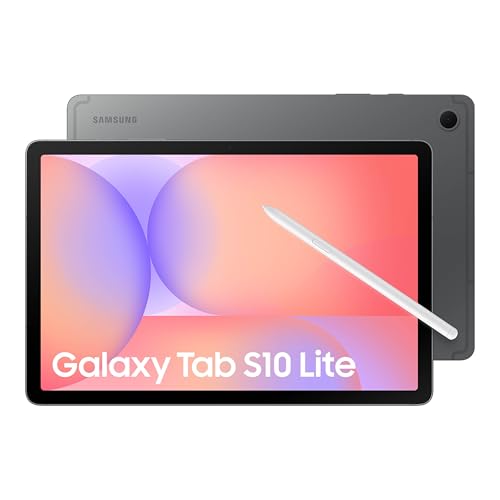
Samsung Galaxy Tab S10 Lite — The Mainstream S Pen, Modernised
The S10 Lite is what the S Pen idea looks like in Samsung’s current mainstream: a 10.9-inch LCD in gray, 6GB of memory, 128GB of storage expandable — the listing says — to 2TB, an Exynos 1380 processor, long battery life, the S Pen for note-taking, and two pieces of modern garnish, Circle to Search and AI tools. Read as a whole, the listing describes a tablet designed to be a household’s or a professional’s daily page: big enough for documents and split views, pen-ready for the meeting and the margin, and capacious enough, once expanded, to hold a working life’s archive.
Circle to Search deserves a word for pen users specifically, because it changes how a stylus gets used outside the notebook: circle a product, a plant, a line of text on screen and search for it, turning the pen into a research tool as well as a writing one. Combined with the AI tools the listing names, the S10 Lite’s pen is positioned as an instrument for finding and summarising as much as for handwriting. Owners who live in documents — reviewing, querying, annotating — will feel that breadth daily; pure diarists may never open those features and will still have bought a fine notebook.
Against its siblings, the Lite is the balanced Samsung of this trio: a larger screen and stronger processor than the S6 Lite, a more modest brief than the S10 FE below, which adds a faster chip, a 90Hz screen and IP68 sealing. The 2TB expansion ceiling in the listing is the quiet headline for archivists — a tablet whose storage can grow by card to sizes that end the storage conversation permanently. Battery life is described as long without a figure, a silence this guide reports rather than fills.
Teachers and tutors have adopted this class of tablet for a reason worth recording: a pen turns a shared screen into a whiteboard that fits in a bag. Work through the problem on the tablet, hand it over for the student’s attempt, annotate the attempt in another colour, save the whole exchange. The S10 Lite’s screen size suits that table-for-two geometry, and its search features let a tutor pull a reference into the lesson without breaking its flow. Education is full of expensive technology that changed nothing; the pen tablet is the cheap kind that changed the lesson itself.
Who should pass it by? Buyers who need the FE’s water resistance for field or kitchen work, and buyers for whom the pen is the whole purchase and the budget is tight — the S6 Lite serves them for less commitment. For the broad middle — students beyond their first year, professionals who annotate, families who want one pen tablet to share — the S10 Lite is the current Samsung answer, and its listing’s combination of pen, processor and expansion is difficult to argue with.
- Display: 10.9-inch LCD
- Memory and storage: 6GB RAM, 128GB, expandable to 2TB per listing
- Processor: Exynos 1380
- Pen: S Pen for note-taking, per listing
- Features in listing: Circle to Search, AI tools
- Battery: described as long life; no figure stated in listing title; colour Gray
Strengths
- Modern S Pen package with search and AI features around the pen.
- Expansion to 2TB ends storage planning for archivists.
- Exynos 1380 gives the mainstream pick real headroom.
Trade-offs
- No durability rating is claimed in the listing, unlike the FE.
- Battery figure is qualitative only.
- More tablet than a pure note-taker needs to spend on.
Best for: students, professionals and families after the current mainstream S Pen tablet — notes, documents, research — with storage that can grow for years.
Not suited for: a buyer dependent on IP68 sealing, or strict minimalists for whom the S6 Lite’s simpler brief is the right size.

Samsung Galaxy Tab S10 FE — The S Pen That Can Get Wet
The S10 FE takes the S Pen into rougher country. Its listing specifies 128GB of storage in a US-version silver body, a large display, long battery life, an Exynos 1580 processor — the strongest chip named among the Samsungs here — IP68 water resistance, a 90Hz refresh rate, and the S Pen for note-taking. Assemble those claims and a distinct character appears: this is the pen tablet for people whose notes happen away from desks. Site visits in the rain. Kitchens, workshops, boats, labs. Field research, coaching in drizzle, sketching by a pool with intent rather than anxiety.
IP68 is the headline because it changes behaviour, not just specifications. A tablet that shrugs off water gets carried into the places where its owner actually works and lives, instead of being left in the safe room; the pen comes with it, and notes get taken at the moment they matter rather than reconstructed at a desk later. The 90Hz refresh serves the pen directly — a faster-refreshing screen keeps the digital ink closer to the nib, narrowing the gap between intention and line that handwriting purists notice first. The Exynos 1580 gives the whole arrangement speed in reserve, so the tablet’s working life should stay fluent as apps grow heavier.
The listing’s silences deserve their sentence: no exact diagonal is printed for the “large display”, and no battery figure accompanies the “long battery life” wording, so this guide repeats the wording and invents nothing. Buyers for whom a precise screen measurement matters should confirm it on the listing page. What is printed is more than enough to place the FE: it is the premium of the three Samsungs here, the one whose extras — sealing, refresh, processor — each answer a real working condition rather than a brochure.
There is a subtler dividend to the sealing that desk users should not dismiss: a tablet that tolerates water tolerates cleaning. Screens accumulate the evidence of their lives — fingerprints, kitchen film, workshop dust — and an IP68 body can be wiped down properly without the anxiety that attends a damp cloth near ports and seams. For a shared family tablet or a professional tool passed between hands, that washable quality is a weekly virtue disguised as a specification.
Choose it if your note-taking has weather. Choose the S10 Lite if it does not, and the S6 Lite if the budget is the weather. But do not underestimate how liberating a sealed tablet is for a pen user: the notebook that can go anywhere gets filled; the notebook that must be protected gets left behind, and its pages stay blank in the places life actually happens.
- Display: large display (diagonal not stated in listing title), 90Hz refresh
- Storage: 128GB
- Processor: Exynos 1580
- Durability: IP68 water-resistant, per listing
- Pen: S Pen for note-taking, per listing
- Version: US version, Silver; battery described as long life
Strengths
- IP68 sealing lets the pen work in kitchens, sites and weather.
- 90Hz screen keeps digital ink close to the nib.
- Exynos 1580 is the strongest Samsung processor in this guide.
Trade-offs
- No exact screen diagonal or battery figure in the listing title.
- Desk-bound users pay for sealing they will never test.
- The premium of the Samsung trio in this guide.
Best for: field workers, kitchen and workshop note-takers, coaches and researchers — anyone whose handwriting happens where water and weather do.
Not suited for: purely desk-based users, who can take the S10 Lite’s balance and keep the difference.

Lenovo Tab M11 with Tab Pen — The Straightforward Value Route
Lenovo’s entry makes its case in one honest listing: an 11.0-inch WUXGA (1920×1200) IPS touchscreen with an anti-fingerprint finish, 4GB of memory, 128GB of eMMC storage, Android 13 — and the Tab Pen, named right there in the title. No ecosystem mythology, no garnish; a sharp, sensibly sized screen, storage that matches the full-size mainstream, and a pen included in the proposition. For buyers who find Samsung’s world more than they need, this is the pen tablet as a simple tool, and there is real dignity in that.
The anti-fingerprint detail is worth more than its two words suggest. A pen tablet’s screen is a working surface, handled and written on for hours; a finish that resists smearing keeps handwriting legible against its background and reduces the cloth-wiping rhythm that interrupts thought. WUXGA resolution at 11 inches draws fine lines and small annotations cleanly, and the IPS panel holds its contrast at the angles a propped tablet is actually viewed from — across a desk, over a shoulder, beside a laptop.
Expectations should be set by its class. Android 13 is a generation behind the newest picks, the 4GB of memory suits notes, documents and media rather than heavy multitasking, and eMMC storage is the steady rather than speedy kind. None of that touches the core job: open the notebook, write, close it, find the notes later, searchable and safe. Students on a budget, professionals who annotate PDFs, families who want one shared pen tablet without entering anyone’s ecosystem — the M11 with Tab Pen serves all of them without ceremony, and check price on Amazon typically shows it doing so at the gentlest point in this guide.
Parents buying a first pen tablet for a young writer might land here for sound reasons: the size suits school bags, the storage is generous for the class, and the anti-fingerprint screen forgives the handling that children’s devices receive. Set up the parental controls before the pen’s first outing, agree the charging station, and the M11 becomes a handwriting machine that grows with its owner from first essays to exam revision — the value route paying its dividend in years rather than months.
One practical counsel: because this is the value route, protect the value — a case, and a home for the pen, from the first week. A lost pen converts this pick back into an ordinary tablet, and the whole purchase was the pen. Owners who clip it, dock it or case it keep the product they bought; the guide cannot put it plainer than that.
- Display: 11.0-inch WUXGA (1920×1200) IPS, anti-fingerprint, touchscreen
- Memory and storage: 4GB, 128GB eMMC
- Pen: Tab Pen named in listing
- Runs: Android 13
- Battery figure: not stated in listing title
- Positioning: the value route to a bundled pen
Strengths
- Pen included at the guide’s gentlest commitment level.
- Anti-fingerprint WUXGA screen suits a written-on surface.
- 128GB storage matches pricier picks.
Trade-offs
- Android 13 and 4GB memory cap its heavy-multitasking ambitions.
- Pen ecosystem is simpler than Samsung’s mature S Pen world.
- The listing prints no battery figure.
Best for: budget-conscious students and annotators after a proper bundled pen and a sharp 11-inch page without joining an ecosystem.
Not suited for: power multitaskers, or a buyer chasing the newest Android and the deepest pen software library.

TCL TAB A1 NXTPAPER — Writing on Something That Feels Like Paper
The Samsungs and the Lenovo in this guide all write on glass. The TAB A1 NXTPAPER writes on a surface engineered to feel like the material notebooks are made of: an 11-inch 2.1K paper-like display at 90Hz, part of TCL’s NXTPAPER line, with the T-Pen 2 and a case included in the listing, an octa-core processor, AI tools, an 8000mAh battery stated as capacity, quad speakers, and a sleek metal unibody carrying 6GB of memory and 128GB of storage. The pen-plus-paperlike combination is the argument: friction under the nib, no glare from the window, a page that stays calm under a lamp — the sensory experience of handwriting, restored to a digital device.
That surface changes who the tablet is for. Glass rewards speed; paper-like rewards thought. Journal-keepers, margin-note readers, sketchers of diagrams and writers of longhand drafts consistently describe matte surfaces as the difference between using a pen daily and abandoning it by February, because the hand believes what the surface tells it. The 90Hz refresh keeps the ink tracking the pen smoothly despite the matte finish, and the included case — a detail too many pen tablets leave to chance — means the writing kit is complete at the moment the box opens.
The rest of the machine refuses to be a one-trick notebook. Quad speakers make it a fine media and audiobook device between writing sessions, the metal unibody feels like a quality object in the hand, and the AI tools in the listing will summarise and assist the documents the pen annotates. Against the Samsungs, it trades ecosystem depth for surface quality; against its giant sibling below, it trades page scale for a size that travels in ordinary bags and rests in two hands. For most handwriting-first buyers, that is the right side of both trades.
Writers who keep a commonplace book — the centuries-old habit of copying out passages, ideas and sketches into one personal volume — find this tablet almost eerily suited to the practice. The paper-like page invites the copying hand, the pen makes it pleasurable, and the digital archive makes a decade of commonplace entries searchable in a way no shelf of notebooks can match. It is a small, old-fashioned use case, and it may be the most durable one in this entire guide: fashions in apps change, but a book of one’s own gathered thoughts only grows more valuable.
Honesty’s footnote: paper-like is a surface technology on a backlit LCD, not e-ink, so the battery is measured in days of mixed use — the 8000mAh cell is generously sized for the class — rather than an e-reader’s weeks. Writers who want the feel of paper with the full Android world underneath, in the size hands prefer, have exactly one mainstream answer at present, and it is this one.
- Panel: 11-inch 2.1K paper-like display, 90Hz
- RAM and storage: 6GB, 128GB
- Cell: 8000mAh, as listed
- Pen kit: T-Pen 2, plus case, included
- Audio: quad speakers
- Shell: sleek metal unibody; octa-core chip and AI tools named in listing
Strengths
- Paper-like surface gives handwriting friction and glare-free calm.
- T-Pen 2 and case included — the writing kit is complete in the box.
- Quad speakers and a metal body make it a full tablet, not a one-trick notebook.
Trade-offs
- Pen ecosystem is younger than Samsung’s S Pen world.
- Matte surface slightly softens video’s glossy sparkle.
- Battery is a capacity figure; endurance follows the class, not a printed claim.
Best for: handwriting-first users — journalers, annotators, students — after a digital page that feels like paper, with the pen included.
Not suited for: buyers invested in Samsung’s pen software ecosystem, or video-first users who prefer a glossy panel.

TCL NXTPAPER 14 — The Big Page for Artists and Annotators
The NXTPAPER 14 scales the paper idea to the size of an artist’s pad: a 14.3-inch 2.4K paper-like display running NXTPAPER 3.0, 8GB of memory with 256GB of storage, a 4096-level stylus and case included, AI tools, and a 10000mAh battery. The stylus figure is the one to dwell on — 4096 levels of pressure sensitivity, printed in the listing, is the language of drawing tools rather than note-taking accessories. Pressure is what lets a line swell and fade like a real pen’s, what separates sketching from tracing, and its presence here, on a matte surface at broadsheet scale, makes this the only pick in the guide that speaks to illustrators in their own vocabulary.
TCL’s listing names the tribes itself: drawing, note-taking, musicians, students and creators. Each maps to the canvas. A musician’s score at full size, annotated in rehearsal. A designer’s page of thumbnails with room to breathe. A student’s textbook spread, marked up in a hand-sized scrawl. A contract or manuscript reviewed at the scale it will be printed. The 256GB of storage holds the libraries those lives accumulate — scores, portfolios, document archives — and the included case acknowledges that a 14.3-inch page needs protection engineered for it, not improvised.
The costs are the familiar ones of scale, stated plainly: this is a desk, lap and stand device that travels deliberately, and its talents are wasted on owners whose pen use is a weekly signature. The matte surface that writers love slightly mutes video compared with glossy rivals. And the battery is a capacity, not a promise — a big cell for a big screen, reported as such. None of that argues against the pick; it argues for matching it to the right desk. In this guide’s company, the NXTPAPER 14 is the specialist’s instrument, and specialists know who they are.
Architects, engineers and site professionals should register a specific use: a drawing or plan shown at 14.3 inches, marked up in the hand with a pressure-capable pen, photographed context beside it, is the site meeting’s new centre of gravity. The paper-like surface keeps the plan legible under site lighting that turns glossy screens into mirrors, and the included case survives the journey that a presentation laptop resents. It is not a CAD workstation and does not pretend to be; it is the page the whole table can gather around, and on site that is the page that matters.
If your notebook pages are always too small — if your diagrams sprawl, your scores shrink, your annotations colonise every margin and demand more — this is the tablet that ends the complaint. Pair it with a stand at your working place, keep the stylus with its case, and the largest, calmest page in Android pen computing is yours.
- Screen: 14.3-inch 2.4K paper-like display, NXTPAPER 3.0
- Memory: 8GB RAM; storage: 256GB
- Cell capacity: 10000mAh, as listed
- Pen kit: 4096-level stylus, plus case, included
- Also named in listing: AI tools
- Built for: drawing, note-taking, musicians, students and creators
Strengths
- 4096-level pressure stylus speaks the language of real drawing.
- Print-scale paper-like page transforms scores, art and documents.
- 256GB storage and a case included complete the specialist kit.
Trade-offs
- A station-sized device; portability is deliberate, never casual.
- Matte surface trades away some video gloss.
- Occasional signers will never use the canvas they paid for.
Best for: artists, musicians, annotators and document professionals whose work is page-shaped and committed to pressure-sensitive drawing at full scale.
Not suited for: travellers after a bag-friendly notebook, or buyers whose pen use begins and ends with signing forms.
Side-by-Side Comparison
| Pick | Screen | Pen as listed | Memory / storage | Defining trait |
|---|---|---|---|---|
| Samsung Galaxy Tab S6 Lite (2024) | 10.4-inch | S Pen for note-taking | Not stated / 64GB, expandable | Student classic, current 2024 model |
| Samsung Galaxy Tab S10 Lite | 10.9-inch LCD | S Pen for note-taking | 6GB / 128GB, expandable to 2TB | Exynos 1380; Circle to Search |
| Samsung Galaxy Tab S10 FE | Large display, 90Hz | S Pen for note-taking | Not stated / 128GB | IP68 sealing; Exynos 1580 |
| Lenovo Tab M11 with Tab Pen | 11.0-inch WUXGA IPS, anti-fingerprint | Tab Pen | 4GB / 128GB eMMC | Value route; Android 13 |
| TCL TAB A1 NXTPAPER | 11-inch 2.1K paper-like, 90Hz | T-Pen 2 included, with case | 6GB / 128GB | Paper-like writing; quad speakers |
| TCL NXTPAPER 14 | 14.3-inch 2.4K paper-like | 4096-level stylus included, with case | 8GB / 256GB | Artist-scale page; 10000mAh |
What Is the Real Difference Between a Bundled Pen and a Generic Stylus?
Everything that matters. A generic stylus is a finger substitute — a soft tip the screen reads as a touch — and it can tap, scroll and sign after a fashion, but it cannot vary a line’s weight with pressure, cannot rest your palm on the screen while you write, and cannot offer the button shortcuts and hover behaviours of a true pen system. The pens named in this guide’s listings are the real kind: instruments the tablet was designed around, with the software expecting them. Handwriting produced with palm rejection and a fine, tracked nib looks like handwriting; handwriting produced with a rubber tip while your wrist hovers looks like a hostage note.
This is why the guide’s entry rule was a pen named in the listing. “Stylus compatible” on a product page can mean nothing more than that the screen responds to touch, which is true of every tablet and useful to none. When you shop beyond this guide, apply the same test: is a specific pen named, described and shown as part of the product? If the listing will not commit, neither should your money.
How Do You Turn a Pen Tablet Into a Daily Note-Taking Habit?
The first week decides it, and the method is substitution, not addition. Put the tablet where the paper notebook used to live — the desk’s right side, the bag’s front pocket — and let it inherit the notebook’s jobs one by one: the meeting notes, the shopping list, the lecture, the diary page. Set up exactly one notes app and use it for everything, because a library scattered across four apps is a library abandoned. Practise the three gestures of your working life until they are reflexes: new note, annotate this PDF, sign this document.
Then protect the pen physically. Pens die by separation — left in other rooms, other bags, other lives — so give yours a single home: clipped to the case, docked at the desk, always the same place. The owners whose stylus tablets transformed their work share no talent; they share a pen that was always where their hand expected it, and a notebook habit that never had to compete with a paper rival sitting closer.
Which Pen Tablet Suits Drawing, and Which Suits Handwriting?
Handwriting is forgiving: it needs a tracked nib, palm rejection and legible ink, and every pick in this guide delivers it. Students and professionals whose pen work is words and diagrams can choose freely by size, ecosystem and budget — the S6 Lite’s student brief, the M11’s value, the A1’s paper feel are all legitimate answers. Drawing is stricter. It asks for pressure gradation — the NXTPAPER 14’s stated 4096 levels are the only explicit pressure figure in this guide — for a surface with some tooth, and for a canvas big enough that a sketch can breathe. Illustrators should start at that pick and treat the rest of the guide as context.
Between the poles sit the annotators and the musicians, and both should weight surface and size over raw pen specifications. A proofreader marking a manuscript cares about the page’s calm and scale; a musician cares that the score is full-size and the page-turn is instant. The guide’s two NXTPAPER models exist for these readers of pages, and their pens are best understood as part of a paper system rather than as specifications competing with Samsung’s.
What Should You Check About a Pen Before You Buy the Tablet?
Four questions, all answerable from listings and a few minutes of reading. Is the pen actually included, in those words, or merely supported? Does the pen need charging, and if so, how — a pen that must be remembered is a pen that will be flat in a lecture one day. Is palm rejection part of the system, without which natural handwriting is impossible? And are replacement nibs and pens available and reasonably priced, because pens are lost and nibs wear, and a stylus ecosystem with no spares is a countdown.
Apply the four questions to this guide and the picks hold up — that is why they are the picks. Apply them to the wider market and you will discard half the “stylus tablets” on sale within minutes, which is the correct outcome. A pen is a decade-long relationship with an ecosystem of nibs, apps and habits; the tablet is almost the accessory.
How Do Pen Tablets Handle PDFs, Forms and Signatures?
This is the pen’s least glamorous and most valuable territory. A PDF on a pen tablet stops being a document you squint at and becomes a document you work on: underline the clause, circle the figure, write the query in the margin in your own hand, sign the final page, export the annotated file. For professionals who review — teachers, editors, surveyors, managers — that loop is the entire purchase justification, and every pick here performs it, with the larger screens (the Samsungs’ big displays, the 11-inch pair, the giant NXTPAPER) making full-page documents progressively more comfortable.
Forms deserve a practical tip: keep a folder of your completed, signed documents synced to a second location from the first week. A pen tablet accumulates a person’s administrative life — contracts, applications, consent forms — and that archive deserves the same backup discipline as photographs. The pen makes paper obsolete; it does not make prudence obsolete.
How Does It Feel to Take Notes All Day — Lecture Hall Versus Boardroom?
The lecture hall tests endurance and speed. A student’s pen must keep up with a speaker who does not pause, on a battery that must survive a day of classes, in a bag that gets thrown around between them. That is the S6 Lite’s home turf and the M11’s: modest size, notes that sync, handwriting that keeps flowing when the third hour arrives. The skill that matters most in that room is not penmanship but structure — headings, margins for later questions, diagrams sketched at the speed of speech — and every pick here supports it, because the software of note-taking rewards the organised more than the artistic.
The boardroom tests discretion and retrieval. Notes must look professional when shared, signatures must land on contracts without ceremony, and last month’s meeting must be findable in seconds. The S10 Lite and S10 FE answer with stronger processors, search-oriented features and — in the FE’s case — a build that survives the commute and the site visit between meetings. The professional’s pen is a filing system disguised as handwriting; choose the tablet whose ecosystem you trust to keep the archive, because you will be searching it in a year, in a hurry, in front of people.
What About Left-Handed Writers, Children and Accessibility?
Pen tablets are quietly among the most accessible computers made, and three groups benefit in particular. Left-handed writers gain what paper never gave them: a page that does not smudge, a hand that does not drag through wet ink, and — in most note apps — the freedom to position toolbars away from their writing hand. Anyone whose handwriting outruns their typing, including many people who find keyboards painful or slow, gets a machine that meets them at their natural speed. And writers with shaky hands often find that a good pen system’s line smoothing turns a tremor from an embarrassment into a non-event.
Children deserve their own sentence: a pen tablet is a safer creative instrument than a box of paints and a kinder handwriting tutor than a worksheet, because mistakes erase without trace and practice feels like play. The student picks here — the S6 Lite above all — serve young writers well, provided the usual parental setup comes first. Accessibility is rarely the headline of a stylus guide, but for the people it touches, it is the whole review.
How Long Do Pens, Nibs and Batteries Actually Last?
A pen is a consumable wearing a product’s clothes, and planning for its maintenance separates satisfied owners from surprised ones. Nibs wear with use — fastest on matte, paper-like surfaces, whose friction is precisely their virtue — and replacements are cheap where the ecosystem is healthy; Samsung’s and TCL’s pens both live inside product families with spares available, which is one more argument for buying a named pen system rather than an orphan. The pen body itself should last the tablet’s life if it is housed with the case rather than loose in bags, and pens that need charging ask only for a rhythm, not vigilance: charge with the tablet, at the same station, and the question answers itself.
The tablet’s battery follows the class pattern — days of mixed use, charged on a routine — and none of the listings here prints a figure we can quote, a silence this guide has respected throughout. What can be said from the category: note-taking is light work, and a pen tablet used mostly for writing will outlast a video tablet of the same size between charges by a comfortable margin. Buy the spare nibs with the tablet, house the pen with the case, and the writing kit will outlast the novelty by years.
Should You Choose Your Notes App Before or After the Tablet?
After the pen, before the accessories — because the app is where your handwriting will live, and its habits will outlast the hardware. The questions that matter are archival, not cosmetic. Does the app sync your notes to somewhere you control? Can it search your handwriting, turning a year of lectures into a database? Can you export a notebook as a standard file when you eventually change devices? Samsung’s ecosystem answers these questions inside its own mature note software, which is part of what its buyers are paying for; the Lenovo and TCL picks lean on the open Android market of note apps, where excellent answers exist but must be chosen deliberately.
Whichever route you take, perform one experiment in the first week: write a page, close the app, and find that page again from a cold start, timed. If retrieval feels instant and obvious, your system will scale to thousands of pages. If it already feels like filing, change the app now, while migration costs nothing. Pen tablets fail as archives far more often than they fail as notebooks, and the failure is always discovered a year too late.
What Goes Wrong When People Buy a Tablet for Its Pen
The commonest mistake is buying “stylus support” that turns out to be a generic capacitive tip, because the listing never actually promised a pen — the failure this guide’s entry rule was built to prevent. A second is version confusion, and Samsung’s S6 Lite is the standing example: the same name spans years, an older listing circulates renewed, and only the 2024 model is the current pick — check the year and the condition wording as carefully as the price. A third is buying the pen and never building the habit, so a fine instrument fossilises in a drawer while paper wins by proximity.
Two quieter errors complete the set. Artists buy note-tier pens and blame the tablet when lines refuse to swell and fade — pressure figures exist to be read before purchase, and only one pick here prints one. And owners lose the pen in month one, discover replacement cost and compatibility questions the hard way, and quietly revert to fingers. Clip the pen to the case on day one; losing it costs more than the habit does.
Final Recommendation
Match the pen to the writing. Students should start with the Galaxy Tab S6 Lite (2024) — the current model, the mature S Pen ecosystem, the right size for a bag. The mainstream should take the Tab S10 Lite, with its modern processor, Circle to Search and vast expansion; the field worker should step up to the S10 FE for its IP68 sealing and 90Hz ink. Budget annotators will be well served by Lenovo’s Tab M11 with Tab Pen. And writers who want the page itself to feel like paper should choose between TCL’s TAB A1 NXTPAPER for travel-ready size and the NXTPAPER 14 for full-scale drawing and scores. In every case, verify on the listing that the pen is named as part of the product — check price on Amazon while you are there — and set up your notebook in the first week, while the habit is still yours to choose.
Frequently Asked Questions
Are the pens really included with these tablets?
That is the entry rule of this guide: each pick’s own listing names its pen — S Pen for note-taking on the three Samsungs, Tab Pen on the Lenovo M11, T-Pen 2 and case included on the TCL TAB A1, and a 4096-level stylus and case on the NXTPAPER 14. Pen claims in this guide are never assumed; confirm the wording on the listing when you order, as variants can differ.
Why is the Tab S6 Lite specified as the 2024 model?
Because Samsung has reused the S6 Lite name across years, and an older listing circulates as a renewed unit. The linked pick is the 2024 model — US version, Amazon exclusive — which is the current product. When comparing prices, check the year and condition on any S6 Lite listing before assuming you are looking at the same tablet.
Which pick is best for drawing?
The TCL NXTPAPER 14. It is the only pick whose listing states a pressure figure — a 4096-level stylus — and it pairs that pen with a 14.3-inch paper-like surface at print scale. The S Pen models draw very capably for notes and sketches, but illustrators who need pressure-graded lines should start with the NXTPAPER.
Do these pens need charging?
Practices differ by system, and the listings here do not all say, so check the pen’s details on the product page for the model you choose. Note-taking pens in Samsung’s S Pen tradition are famously low-maintenance, while powered pens from other systems may need periodic charging — one more reason to give the pen a fixed home beside its charger or case.
Can I write with my palm resting on the screen?
On a true pen system, yes — palm rejection is part of what separates the pens in this guide from generic styluses. It is the feature that makes natural handwriting possible, since nobody writes with a hovering wrist. If you test a pen tablet anywhere and your palm leaves marks, you are holding a finger substitute, not a pen system.
Can a pen tablet replace my paper notebook entirely?
For most note-takers, yes — and the picks here are the proof at six different sizes and budgets. What paper still does better is being left anywhere, costing nothing and never needing charge; what the tablet adds is search, backup, infinite pages and a pen that never runs dry mid-sentence. Writers who make the switch successfully do it completely, retiring the paper notebook in the same week, because a half-switch leaves both systems incomplete and the archive split between two worlds.
Is a paper-like screen better for handwriting?
For most writers, yes. The NXTPAPER models’ matte surfaces give the nib friction and the eye a glare-free page, which together reproduce the feel of pen on paper more closely than glass can. Writers who journal, annotate and draft in longhand tend to prefer it strongly; users whose pen work is quick signatures and taps will notice little difference.
Related Guides
Several of these tablets earn second appearances elsewhere on the site: the big TCL and Samsung models are weighed as screens first in the roundup of tablets at ten inches and over, and readers deciding between a desktop display and a giant pen tablet may enjoy the provocation of the 27-inch QHD monitor guide. For a different angle on large, pen-friendly canvases at a desk, the 34-inch ultrawide monitor roundup shows what the same money buys when the screen stays home.


