What's inside
- Key Takeaways
- Quick Picks
- How Did We Choose the Best Wireless Gaming Mouse with Wireless Charging?
- Dock, Mat or Puck: Which Charging Architecture Fits Your Desk?
- What Should You Check About Charging Speed and Battery Habits?
- How Can You Tell Whether a Listing’s Charging Claim Is Real?
- Which Play Styles Gain the Most From Never Plugging In?
- What If Your Mouse Lives Between Two Desks?
- What Does Wireless Charging Do to Battery Health Over Years?
- How Do the Charging Systems Compare?
- Does Charging Change How the Mouse Performs?
- How Do You Set Up a Charging Mouse So It Stays Effortless?
- What Mistakes Do Buyers Make With Charging Mice?
- Final Recommendation
- Frequently Asked Questions
- Related Guides
As an Amazon Associate I earn from qualifying purchases. This post may contain affiliate links at no extra cost to you.
widgetverdict.com is reader-supported. When you buy through links on our site, we may earn an affiliate commission.
Where to buy: a word of definition before any links, because this category’s listings play fast and loose with the phrase “wireless charging”: below you will find mice that charge on a dock in the box, mice that charge continuously on a powered mat sold separately, and — clearly flagged as an accessory rather than a mouse — the standalone docks and puck kits that add charging to hardware you already own. Each linked listing was verified for the exact model and charging arrangement described, so the dock in the photograph is the dock in the box.
The appeal of the best wireless gaming mouse with wireless charging is not really about charging. It is about deleting a ritual. Every wireless mouse owner knows the small choreography of the cable: the mid-session battery warning, the scramble, the evening spent tethered to a desk’s edge while the mouse pretends to be wired. A charging dock or mat dissolves that choreography into a gesture — set the mouse down where it already lives, and it feeds. Done well, battery anxiety stops being a feature of wireless play at all; done badly, you have bought a mouse plus a proprietary stand that charges slowly and fits nothing else you own.
This guide separates the three honest architectures. Dock-in-the-box mice park on a cradle between sessions and suit players with a defined home for their mouse. Mat systems charge while you play and suit players who never want to think about power again, at the price of committing to the mat. And the accessory route — docks and receiver pucks sold separately — suits players who already own a compatible mouse and want the ritual gone without replacing good hardware. Five linked mice cover the first two architectures; the sixth entry is prose-only, because it is not a mouse, and it is labelled that way everywhere it appears.
Key Takeaways
- Wireless charging for mice means three different systems — bundled docks, powered mats and add-on pucks — and they are not interchangeable.
- Dock mice charge between sessions; mat systems charge during play. Choose by habit, not by specification.
- The two Logitech picks share one mat ecosystem, so the mat is a platform decision, not an accessory purchase.
- Dock-in-the-box models from value brands have closed most of the gap: sensors, tri-mode links and light shells now arrive with the cradle included.
- The sixth entry is an accessory ecosystem, not a mouse — it upgrades compatible hardware you already own.
- Every linked pick still works over a cable, so the charging system is a convenience layer over sound hardware — never a single point of failure.
- Charging speed is the quiet specification: a dock that needs all night is fine for overnight parkers and useless for lunch-break toppers.
Quick Picks
| Pick | Badge | Why it earns its place |
|---|---|---|
| ATTACK SHARK X11 Wireless Gaming Mouse | Best dock-in-the-box value | A light tri-mode mouse whose RGB charging dock is part of the product, not an upsell. |
| SOLAKAKA SM822 Wireless Gaming Mouse with Charging Dock | Lightest dock package | A 62-gram mouse with its own dock and a modern sensor, built for players who park neatly. |
| Blaze Pro Wireless Gaming Mouse | Most informative dock | A charging dock with an LCD display that turns battery guesswork into a glance. |
| Logitech G903 Lightspeed Wireless Gaming Mouse | Best mat-charging all-rounder | Charges while you play on the powered mat, with a marathon battery when it leaves the desk. |
| Logitech G703 LIGHTSPEED Wireless Gaming Mouse | Best mat-charging ergonomic | The palm-friendly shape on the same mat system, for players who rest a full hand. |
| Standalone Charging Docks and Qi Puck Kits (accessory) | Prose-only: upgrade path, not a mouse | Add-on docks and receiver pucks that bring wireless charging to compatible mice you already own. |
How Did We Choose the Best Wireless Gaming Mouse with Wireless Charging?
We began by policing the definition, because the phrase attracts listings the way a porch light attracts moths. A pick had to charge without plugging a cable into the mouse itself — on a dock, on a mat, or through a receiver puck system — and that charging path had to be a designed feature of the product, not a hopeful compatibility claim. Mice that merely offer USB-C charging were excluded no matter how good they are; a cable with a nicer connector is still a cable, and readers searching this topic are trying to escape exactly that.
Geography played a part as well. Charging hardware lives on desks in full view, so we considered whether each system earns its visual footprint — a dock that displays the mouse like an object, a mat that replaces a surface you needed anyway, a puck dock small enough to disappear. A charging system you are slightly embarrassed by is a charging system you will unplug within the year, and the guide’s job includes protecting you from your own future tidying.
Within the definition, we ranked by the quality of the whole loop: how the mouse behaves at low battery, how forgiving the dock’s alignment is when you set the mouse down half-asleep, whether the charging state is visible at a glance, and whether the mouse remains fully itself — same sensor behaviour, same link — while charging or fresh off the cradle. We also weighed ecosystem honesty. A proprietary dock that fits one mouse is a fair trade when it is in the box; a mat that costs extra is a platform commitment, and the guide treats it as one, telling you which other hardware shares it before asking you to admire it.
We also lived with the question readers actually ask friends: does the mouse ever fail to charge? Alignment forgiveness — whether a casually placed mouse seats and feeds — separated the field more than any laboratory figure, because a dock that demands precision placement at midnight has simply replaced one ritual with a fussier one. The picks here seat generously, indicate their state visibly, and forgive the half-asleep placement that is the system’s entire reason to exist.
Finally, the mouse underneath the charging story still had to be a mouse worth owning: current sensors, gaming-grade 2.4 GHz links, switches and shapes we would recommend in a guide that never mentioned charging. A mediocre mouse with a delightful dock is a delightful dock with a chore attached, and none of those made this list.
Dock, Mat or Puck: Which Charging Architecture Fits Your Desk?
Think of the three architectures as three answers to a single question — when should a mouse be allowed to be hungry? The dock answers “only while you are not playing, and only in one appointed place.” The mat answers “never.” The puck answers “whenever you say so, with hardware you already chose.” None of the answers is wrong; each is wrong for somebody, and the sections that follow exist to find out whether that somebody is you before the purchase rather than after it.
The dock is the architecture of ritual, in the good sense. Your mouse has a home; when you finish, it goes home; when you sit down, it is full. Dock systems reward tidy players and punish nomadic ones — a mouse that ends the night on the sofa arm, in a laptop bag or on the wrong desk gains nothing from a cradle it never visits. The value-brand picks here include the dock in the box, which makes the whole loop a single purchase with no ecosystem homework, and their docks double as display stands and receiver homes.
The mat is the architecture of invisibility. Logitech’s POWERPLAY concept — a powered surface that keeps compatible mice topped up continuously while they move across it — removes not just the charging ritual but the concept of battery level from play entirely. Its costs are commitment and footprint: the mat is your mouse surface now, it occupies a defined rectangle of desk, and it serves one brand’s compatible mice. Players who live on one desk and play daily feel the benefit most; players with small desks or several machines feel the constraint first.
Cost accounting differs by architecture in a way worth doing before the purchase rather than after. The dock mice concentrate everything in one transaction: mouse, cradle, ecosystem, done. The mat spreads its cost across a platform whose value grows with each compatible device added and shrinks to an expensive mousepad if none ever is. The puck kit’s cost is the strangest — small in money, large in prerequisites, since it spends the mouse you already bought as part of its price. Total the whole loop, including the hardware you already own, and the three architectures often finish closer together than their stickers suggest.
The puck and add-on dock route is the architecture of the installed base. Systems like Razer’s dock-and-puck approach put the charging coil in a replaceable receiver puck inside the mouse, so the mouse gains wireless charging by swapping a component rather than being replaced. It is the most surgical option — keep the shape you love, add the ritual-free life — and the most fragmented, because compatibility is a model-by-model question that no general promise covers. That is why it appears here as a prose-only entry with homework attached rather than as a linked pick pretending to be universal.
What Should You Check About Charging Speed and Battery Habits?
Wireless charging trades speed for grace, and your habits decide whether the trade is free. It also trades universality for certainty: the same proprietary tightness that makes a phone pad useless here is what makes a dock seat its mouse perfectly every time, with the coils aligned by magnets rather than by your eyesight at midnight. Judge the trade as a whole rather than mourning the half of it that costs you.
Wireless charging trades speed for grace, and your habits decide whether the trade is free. A dock that restores a day’s play in the time you spend making coffee suits almost everyone; a system that needs a full overnight park suits only players whose mouse reliably sleeps in its cradle. Before choosing, run an honest audit of your own week: how many hours a day does the mouse actually rest, and where? The answers select the architecture more reliably than any specification — heavy daily players with scattered habits belong on the mat, which never asks the mouse to rest at all, while defined-session players can let a dock do its slow, silent work.
One more variable belongs in the audit: who else uses the desk. A dock that a partner’s hand knocks askew nightly, or a mat under a shared family computer, lives a harder life than the same hardware on a solo battlestation, and the forgiving alignment of the bundled docks here was weighted accordingly. Charging systems are domestic objects as much as gaming ones; buy the one your household’s traffic can respect.
Battery size interacts with charging in ways listings rarely explain. A mouse with a huge internal battery and a slow dock is a mouse you charge rarely and long; a light mouse with a small cell and a quick dock is a mouse you charge often and briefly. Neither is better — they are different rhythms, and the one that matches your desk’s rhythm will feel effortless while the other feels like a chore wearing a clever disguise. The LCD-equipped Blaze Pro earns a mention here precisely because it makes the rhythm visible: a number you can glance at beats a warning you meet mid-game.

ATTACK SHARK X11 Wireless Gaming Mouse — Best dock-in-the-box value
The X11’s proposition is disarmingly complete: a lightweight tri-mode gaming mouse and the RGB charging dock it lives on, in one box, at a value-brand commitment. The mouse itself runs a PAW3311 optical sensor rated to 22,000 DPI — a modern, well-behaved chip — with five programmable buttons and the three connection modes that define current budget flagships: 2.4 GHz for play, Bluetooth for the second machine, wired for charging emergencies and zero-compromise sessions. The dock takes the mouse’s parking spot on the desk, feeds it between sessions, and glows about it in a way that either delights you or gets switched off in the software on day one.
What makes the package cohere is that the dock is designed as furniture rather than packaging. The mouse seats with a magnetic certainty that survives one-handed, half-distracted placement, the receiver has a home in the base, and the whole arrangement means the mouse is always in the same place, at full charge, when a session starts — a small domestic miracle that cable-charged owners will recognise as the actual product being sold. Grip tape is included for players who want more purchase on the shell. For a first wireless-charging setup, this is the lowest-friction way in: one purchase, one ecosystem of exactly two objects, no homework.
Two ownership notes from the value-dock world are worth passing on. First, seat the mouse on the dock the same way each time during the first week — the magnetic alignment is forgiving, but the habit of a clean seat is what makes month six as thoughtless as day one. Second, keep the wired mode in your mental model as a feature rather than a failure state: a long tournament day or a forgotten week off the dock ends with a cable and zero drama, which is precisely the resilience a charging system should have.
- Sensor: PixArt PAW3311, up to 22,000 DPI
- Connection: 2.4 GHz wireless, Bluetooth, wired USB-C
- Charging: bundled RGB magnetic charging dock
- Buttons: 5 programmable
- Extras: grip tape included, receiver storage in dock
Strengths
- Complete dock ecosystem in a single box and purchase
- Modern sensor and tri-mode links match far pricier mice
- Dock doubles as receiver home and display stand
Trade-offs
- Five buttons only; bind-heavy players will feel the limit
- Dock lighting is a taste some desks will decline
- Value-brand software is functional rather than refined
Best for: players buying their first charging-dock setup who want the whole loop in one box. Not suited for: MMO-style bind collectors or software perfectionists.

SOLAKAKA SM822 Wireless Gaming Mouse with Charging Dock — Lightest dock package
The SM822 takes the dock concept and applies the lightweight era’s priorities to it. The mouse weighs about 62 grams — properly light, in the range competitive players shop — runs the same PAW3311 sensor family as its dock rival with headroom to 24,000 DPI, and connects three ways, while its charging dock waits on the desk to receive it. That combination matters because dock mice historically skewed heavy and ergonomic; a light, fast mouse that also parks and charges is a newer and more interesting animal, aimed at the player who plays shooters all evening and tidies the mouse onto its cradle without thinking.
In daily rhythm, the SM822’s small battery-and-quick-park loop suits defined sessions: play, park, wake to full. The shell is a clean symmetrical form that claw and fingertip players will read instantly, the clicks are tuned for rapid work, and the dock’s footprint is modest enough for desks where a charging mat would be an imposition. SOLAKAKA’s software covers the essentials of remapping and lighting. Set against the X11, the choice is temperament: the SM822 is the lighter, quieter package for players who want the dock habit without the light show, and it makes that case convincingly.
The SM822 also illustrates where the value brands have quietly caught up. A few product cycles ago, a 62-gram tri-mode mouse with a modern sensor was a flagship announcement; here it arrives with its own charging furniture at a fraction of the ceremony. Players whose loyalty is to outcomes rather than badges will find very little in the flagship dock offerings that this package does not answer — the remaining gaps are software depth and long-term support infrastructure, not the daily experience of playing and parking.
- Sensor: PixArt PAW3311, up to 24,000 DPI
- Connection: tri-mode — 2.4 GHz, Bluetooth, wired
- Weight: about 62 g
- Charging: bundled charging dock
- Shape: symmetrical, claw and fingertip friendly
Strengths
- Genuinely light mouse in a dock package — a rare pairing
- Modern sensor with tri-mode flexibility
- Compact dock suits smaller desks
Trade-offs
- Small cell means the parking habit is mandatory, not optional
- Symmetrical shell offers palm players little furniture
- Brand ecosystem and software are young
Best for: competitive-leaning players who want a light mouse and a charging cradle in one tidy system. Not suited for: players who routinely leave their mouse wherever it lands.

Blaze Pro Wireless Gaming Mouse — Most informative dock
The Blaze Pro’s dock does something the other cradles here do not: it tells you the truth, on a small LCD display, about the mouse’s battery and charging state. That sounds like a gimmick until you have lived with battery guesswork — the LED that might mean low, the software gauge you must open to check, the warning that arrives during a boss pull. A number on the dock, readable from the chair, converts charging from a background anxiety into background information, and for players who run their desk like a cockpit, that display is the feature they will mention first.
There is a subtler benefit to the instrumentation: it teaches the household the system’s rhythm. A partner who borrows the desk can see the mouse is charging rather than dead; a player packing for a trip can see at a glance whether the mouse is ready to travel. Information that lives on the hardware, rather than inside an application someone must remember to open, is information that actually gets used — a design lesson more expensive products than this one routinely fail to learn.
Around the display sits a competent modern mouse: a high-precision optical sensor, tri-mode connectivity across wired and wireless play, RGB lighting, and a shell shaped for comfortable long sessions rather than esports minimalism. The dock charges while displaying, the mouse plays wired if a session outruns the battery entirely, and the whole package is aimed at the player who wants the dock life with instrumentation. It is the enthusiast’s version of the value dock concept — the same architecture as the X11 and SM822, finished with the one upgrade that changes how the system feels day to day.
- Sensor: high-precision optical
- Connection: tri-mode wireless and wired
- Charging: dock with LCD battery and status display
- Lighting: RGB on mouse and dock
- Shape: comfort-oriented gaming shell
Strengths
- LCD dock ends battery guesswork at a glance
- Tri-mode links cover desk, laptop and wired fallback
- Comfort shell suits long mixed work-and-play days
Trade-offs
- Display and lighting draw the eye; minimalists may pass
- Heavier, comfort-first design is not an esports tool
- Newer brand, thinner long-term track record
Best for: desk-cockpit players who want charging status visible without opening software. Not suited for: minimalists or competitive players counting grams.

Logitech G903 Lightspeed Wireless Gaming Mouse — Flagship pick for powered-mat charging
The G903’s charging story is the mat, and the mat changes the subject entirely: on a POWERPLAY surface, this mouse does not have a battery level in any sense that matters, because it sips power continuously while you play, arriving at every session exactly as charged as it was at the last one. Off the mat, it is a flagship with a battery well past a hundred hours, modular side buttons on both flanks, a dual-mode scroll wheel and the HERO sensor — which makes it the rare charging pick that is also a travel-capable mouse rather than a desk prisoner.
Judged purely as the vehicle for mat charging, it may be the best-suited mouse Logitech makes: the larger symmetrical shell gives the hand a settled home for the long sessions mat users play, the optional weight lets you set the balance, and the button modularity means the same mouse configures for either hand or for button-heavy genres. The honest costs are the ecosystem’s: the mat is a separate purchase, it defines your mouse surface, and it serves Logitech’s compatible line only. Players who accept those terms get the most complete version of the wireless-charging idea that exists — power as a property of the desk, not a state of the mouse.
One practical consequence deserves emphasis for competitive players: weight consistency. A cable-charged mouse is at its lightest on a full battery and stays there, but a mat-charged mouse is also freed from the charging cable’s occasional mid-session appearances — the matches where a low battery forces a tether and the mouse suddenly gains a tail. On the mat, the mouse you practise with is the mouse you compete with, every gram and every glide of it, indefinitely. Players who have lost a round to an emergency cable will not need that sentence explained twice.
- Sensor: Logitech HERO optical
- Connection: LIGHTSPEED 2.4 GHz wireless
- Charging: POWERPLAY mat compatible (mat sold separately)
- Battery: rechargeable, well over 100 hours off-mat
- Buttons: modular, both flanks
Strengths
- Continuous charging during play on the mat — battery anxiety deleted
- Flagship battery and features when away from the desk
- Modular buttons serve either hand and many genres
Trade-offs
- Mat is an extra purchase and a platform commitment
- Heaviest mouse in this guide
- Mat fixes your playing surface to its rectangle
Best for: single-desk players who want charging to become a property of the desk itself. Not suited for: travellers, small desks, or anyone outside Logitech’s ecosystem plans.
Logitech G703 LIGHTSPEED Wireless Gaming Mouse — Ergonomic pick for the mat ecosystem
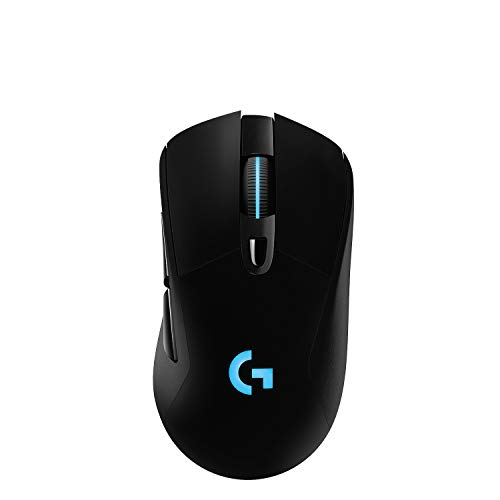
Where the G903 brings the mat system to a symmetrical flagship, the G703 brings it to the hand that rests. Its sculpted right-handed shell — high rear hump, gentle slope, room for the whole palm — is the shape long-session players choose when comfort outranks configuration, and it is POWERPLAY compatible, so on the mat it shares the G903’s central magic: power as a background condition of the desk, not a meter the player manages. For the large population of players who found symmetrical flagships underfilled, this is the mat-charging pick that fits the hand they actually have.
Away from the mat it remains a complete mouse: HERO 25K sensor, LIGHTSPEED link, an optional ten-gram weight for balance, and a metal scroll wheel with clean detents. The ergonomic honesty cuts both ways — it is right-handed only, and fingertip players will find its furnished shell more presence than they want — but within its intent it is flawless, and its pairing with the mat produces the most set-and-forget setup in this guide for palm players: buy once, place once, and let years of sessions pass without a single charging thought crossing your mind.
The G703 also earns its place as the household answer to a two-player desk: paired with a G903 on the same mat, two different hands — one resting, one configuring — share one powered surface and one charging habit. Platform purchases look expensive until a second device joins them; at that point the mat stops being an accessory for a mouse and becomes infrastructure for a desk, which is the comparison its price should be judged against.
- Sensor: HERO 25K optical
- Connection: LIGHTSPEED 2.4 GHz wireless
- Charging: POWERPLAY mat compatible (mat sold separately)
- Weight: about 95 g plus optional 10 g
- Shape: right-handed ergonomic, medium-large
Strengths
- Mat charging married to the most comfortable shell here
- Optional tail weight tunes balance to your lift style
- Shares the mat platform with the G903 for household desks
Trade-offs
- Right-handed only, with no symmetrical fallback
- Mat cost and commitment apply, as with the G903
- Wheel lacks the tilt and free-spin of its G502 cousin
Best for: palm-grip players who want the mat ecosystem in a shape built for resting hands. Not suited for: left-handed players or fingertip grips.
Standalone Charging Docks and Qi Puck Kits — Prose-only: an accessory route, not a mouse
The sixth slot in this guide belongs to a category rather than a product, and it is deliberately not linked as a pick: standalone charging docks and receiver-puck kits — Razer’s Mouse Dock Pro and the Qi-style puck systems sold for compatible mice — are accessories that add wireless charging to a mouse you already own. The mechanism is elegant: the mouse’s wireless receiver puck is replaced by a charging puck containing the coil, and the mouse then feeds from the matching dock between sessions, gaining the whole dock ritual without surrendering a shape your hand already loves.
Why prose-only? Because compatibility is the entire story, and it is ruthlessly specific. A dock-and-puck kit works with a short list of named models from its own maker; fitted to anything else, it is an expensive paperweight with good lighting. Treating it as a universal pick would mislead exactly the readers this guide exists to serve. Treat it instead as homework with a high payoff: if you already own a compatible mouse — check the maker’s compatibility list against your exact model, not its family name — this route delivers dock life at accessory cost, and it is the only entry here that improves hardware already on your desk rather than asking you to replace it.
Installation is a five-minute ceremony: swap the puck, seat the mouse on the dock once to confirm the charge light’s behaviour, and set the dock where the mouse’s day ends. Keep the original puck — it is the travel configuration, lighter and with nothing to prove — and keep the compatibility list’s screenshot with your records, because the day a second mouse enters the household is the day someone will ask whether the kit fits it too, and the answer is a fact, not an opinion.
- Type: accessory ecosystem — charging docks and receiver pucks (not a mouse)
- Compatibility: model-specific; verify your exact mouse before buying
- Mechanism: charging coil lives in a replacement receiver puck
- Benefit: adds dock charging to a mouse you already own
- Status in this guide: prose-only, no product link
Strengths
- Keeps a beloved mouse and adds the dock ritual to it
- Accessory cost instead of full mouse replacement
- Dock doubles as receiver home and desk display
Trade-offs
- Useless outside its named compatibility list
- Requires owning the right mouse already
- Puck and dock are a matched pair; neither works alone
Best for: owners of a compatible mouse who want dock charging without changing mice. Not suited for: anyone shopping for a mouse itself — choose one of the five linked picks above.
How Can You Tell Whether a Listing’s Charging Claim Is Real?
This category’s listings reward a sceptical reader, so here is the audit we applied, in the order we applied it. First, find the charging hardware in the box contents — a real dock system names the dock, a real mat-compatible mouse names the system it joins, and a listing that shows a glowing mouse on a pad in lifestyle photographs while listing only a cable in the box is selling a photograph. Second, separate the words “wireless mouse” from “wireless charging” with a ruler: the first phrase describes the connection, the second the power, and listings blur them deliberately because the blur converts.
Third, check the compatibility direction. A mouse that works with a charging system says so in its specifications, in those words, naming the system; a mouse described as “charging dock ready” or “wireless charging design” without a named system is describing a hope. Fourth, for puck kits, match model numbers rather than model families — the difference between two generations of the same named mouse is exactly where incompatible pucks live. The five linked picks in this guide passed all four checks; apply the same four to anything else this topic’s search results show you, and the category becomes much smaller and much more honest.
Which Play Styles Gain the Most From Never Plugging In?
The daily, long-session player gains most, and it is not close. Battery events scale with hours played: the player who games every evening meets the low-battery warning weekly, and for them the dock or mat deletes a recurring interruption from their hobby’s calendar entirely. MMO and strategy players, whose sessions run long and whose mice rest in one place between them, are the dock’s natural constituency — the mouse parks where the session ended, and the next session starts at full, forever. Competitive shooter players gain differently: not frequency but timing, because their battery emergencies historically arrive during the matches that matter, and the mat in particular makes the emergency structurally impossible.
The players who gain least are the ones this guide should talk out of the premium end: travellers, whose mice live in bags where docks cannot follow; multi-desk players, whose mouse sleeps in a different place each night; and the once-a-week player, whose battery events are so rare that a cable handles them without ceremony. For those readers, the honest advice inside a charging guide is that the entry-level dock packages — where the cradle is simply in the box — are the sensible ceiling, and the mat platform is a beautiful answer to a problem they do not have.
What If Your Mouse Lives Between Two Desks?
Split setups are where charging architecture gets decided by geography. A mouse that works at the office by day and games at home by night can only be docked in one of those lives, so choose the dock for the desk where the mouse sleeps, and let the other desk be a cable’s job — every pick here plays wired happily, and a spare cable at the second desk costs less than a second dock. The mat, by contrast, does not travel at all, which makes it the single-desk player’s platform in the purest sense; a two-desk player who buys it has bought a wonderful system for one of their lives and a heavy battery mouse for the other.
The puck-kit route has a quiet advantage here that deserves naming: docks are small, and a second dock at the second desk — with the puck already in the mouse — turns both desks into home. It is the only architecture in this guide that scales across locations without replacing hardware, and for the player whose life is genuinely split, that scalability can outweigh the flagship ecosystems’ polish. Geography, like grip, is a specification; read yours before you read the comparison table.
What Does Wireless Charging Do to Battery Health Over Years?
Less than folklore suggests, provided the system is designed for the duty — and these are. The pattern that ages lithium cells fastest is deep discharge followed by long storage at empty, and a charging mouse’s whole existence argues against that pattern: dock and mat mice live near full, cycle shallowly, and rarely sit depleted. The mat’s continuous top-up keeps its mice in the shallowest cycling regime of all. If anything, the charging-mouse lifestyle is gentler on a battery than the cable ritual it replaces, where owners routinely run a mouse to zero and then fast-charge it in a panic before a session.
The habits that still matter are thermal and temporal. A dock in direct sun on a windowsill desk cooks its mouse slowly; a battery stored empty for a season while you play on a second setup ages faster than one in daily service. Keep the cradle in the shade of ordinary room life, and if a charging mouse will sit unused for months, leave it parked on its dock or at a partial charge rather than drained. Do those small things and the battery will be outlasted by the switches, the feet and probably the desk.
How Do the Charging Systems Compare?
| Pick | Charging system | In the box? | Standout trait |
|---|---|---|---|
| ATTACK SHARK X11 | Magnetic dock | Yes | Complete value loop, RGB dock |
| SOLAKAKA SM822 | Charging dock | Yes | 62 g mouse, compact cradle |
| Blaze Pro | Dock with LCD | Yes | Battery status at a glance |
| G903 Lightspeed | Powered mat | Mat separate | Charges during play |
| G703 LIGHTSPEED | Powered mat | Mat separate | Ergonomic shell on the mat |
| Docks and puck kits | Add-on dock | Accessory only | Upgrades a mouse you own |
Read the first column as a personality test while you are here. The three dock mice ask for a parking habit and repay it with simplicity; the two mat mice ask for a platform and repay it with invisibility; the accessory asks for a specific past purchase and repays it with thrift. Players who misread their own personality in this table are the ones whose charging systems end up as desk ornaments, and the honest self-knowledge the earlier sections asked for is what prevents it.
The table’s middle column is the budget column in disguise. The three dock mice bundle their charging hardware, making their true cost the sticker; the Logitech pair asks for a platform purchase on top, which only amortises if the mat serves you for years or serves two mice in one household. Neither structure is a trick — they are different answers to whether charging should be a product or a platform — but a buyer who compares sticker prices alone will misjudge both.
Does Charging Change How the Mouse Performs?
No — and the clarity matters, because a fog of mythology surrounds the question. A mouse on its dock is asleep as a gaming device; a mouse on the powered mat plays with exactly the sensor behaviour, link quality and click response it has anywhere else, because the mat feeds the same battery the mouse always runs from. There is no charging-mode performance tier, no penalty for a mouse that topped up an hour ago, and no advantage to a “fresh” charge beyond the obvious one of not running empty. The performance conversation for every pick in this guide is the ordinary one — sensor, shape, switches, link — and it is conducted in their individual sections without a single asterisk for the charging hardware.
The one genuine interaction between charging and play is weight discipline on the mat, already mentioned and worth restating as the section closes: mat players never suffer the emergency-cable match, the session where a dying battery adds a tether and changes the mouse’s balance mid-competition. Consistency is a performance feature, and it is the only one charging legitimately sells.
How Do You Set Up a Charging Mouse So It Stays Effortless?
Placement is the whole game. A dock belongs where the mouse’s day ends — which is where your hand naturally parks it, not where the desk looks tidiest in a photograph. Spend the first week noticing where the mouse actually stops when you stand up, then put the cradle there, even if it is three inches left of beautiful. For mat users, the equivalent discipline is alignment: centre the mat under your natural play area, because a mat half-used is a battery half-charged, and route its cable so the surface lies perfectly flat.
For dock owners, one more placement subtlety: give the cradle a cable path that does not cross your play area, and if the dock includes the receiver, resist the temptation to relocate the receiver elsewhere for tidiness — the dock’s base is engineered as its home, close to the mouse by design, and the link will be at its cleanest with the two living together as shipped.
Then set the software to support the habit rather than report on its failures. Turn on the low-battery indicator you will actually see, set lighting to dim or sleep when the mouse is parked — a dock glowing at full brightness all night is a nightlight you did not order — and for puck-kit owners, keep the original receiver puck in the dock’s box or a labelled drawer, because the day you travel with the mouse is the day you will want it. Effortless systems are not bought; they are arranged, once, with attention.
What Mistakes Do Buyers Make With Charging Mice?
Assuming all wireless charging is one standard is the founding error. A Qi phone pad will not charge these mice; a dock from one system will not feed another’s mouse; the mat serves its own brand’s list. Players buy a beautiful third-party pad, discover the mouse ignores it, and conclude the mouse is broken — the mouse is fine, the assumption was the defect. Read the architecture column of our comparison table as a compatibility contract, because that is what it is.
A third mistake is treating the dock as decoration during the buying decision and as furniture only afterwards. The cradle will occupy prime desk real estate for years; its footprint, its glow and its cable all become part of the room. Players with small or shared desks should measure the dock’s home before ordering, the way they would for a monitor stand — the Blaze Pro’s informative display and the X11’s light show are features at a gaming desk and intrusions at a minimalist one, and neither fact appears in a specification table.
The second mistake is buying the charging story and neglecting the mouse. A dock cannot rescue a shape your hand dislikes, and a mat cannot make a heavy mouse light; players seduced by the ritual sometimes keep a mouse they would have returned in a cable-charged world, because the setup feels too clever to abandon. Judge the mouse first, as a mouse, with the charging system as the tiebreaker it deserves to be. Finally, mind the firmware habit: charging systems add a second device to update, and a dock or puck running forgotten firmware is the source of the mysterious charging quirks that forums blame on batteries.
Final Recommendation
One sentence of expectation-setting before the verdict, because this category attracts magical thinking: no charging system in this guide makes a mouse faster, lighter in the hand, or better aimed. What it removes is friction — the warnings, the cables, the small nightly negotiation with a battery — and friction removal, compounded over years of evenings, is worth more than most features that arrive with bigger numbers on the box.
Choose by architecture and the rest resolves itself. If you want the complete ritual in one purchase, the ATTACK SHARK X11 is the value answer and the SM822 its lighter, quieter sibling; if you want the ritual instrumented, the Blaze Pro’s display dock is the one you will still be mentioning in a year. If you are ready to make power a property of the desk, the mat system is the destination — the G703 on it for hands that rest, the G903 for hands that configure — and if you already own a compatible mouse you love, the prose-only accessory route is the smartest money in this entire guide, because it buys the ritual without touching the hardware your hand calls home. What none of these six asks is that you ever again watch a battery warning land in the middle of a fight — and that small, permanent absence is the real product. Buy the architecture your desk can keep, keep a cable in a drawer for the one week a year it earns its place, and let power become the least interesting thing about your setup — which is exactly what it always should have been.
Frequently Asked Questions
Can I charge these mice on a normal phone charging pad?
No — and this answer surprises more buyers than any other in the category, so it is worth stating flatly. Mouse charging systems are proprietary loops — a matched dock, mat or puck — and a phone’s Qi pad will not feed them. This is the category’s least convenient truth, and it is why the guide names each pick’s architecture explicitly rather than letting the phrase wireless charging blur them together.
Does the powered mat charge while I am actually playing?
Yes — that is its defining trick, and living with it recalibrates what players expect from wireless hardware generally. Owners describe the first month as a small disbelief: the battery indicator becomes furniture, checked out of curiosity rather than need. The mat keeps a compatible mouse topped up continuously across the play surface, The mat keeps a compatible mouse topped up continuously across the play surface, so the battery hovers near full indefinitely. Step off the mat and the same mouse becomes an ordinary long-life wireless mouse until it returns.
Are dock mice slower to charge than plugging in a cable?
Generally yes, somewhat — wireless transfer trades speed for the absence of a ritual, and the exchange is deliberate. In practice the gap narrows with habit: a mouse parked nightly spends its charging hours competing with nobody, and wakes full on a schedule a cable user only matches by remembering. The exchange is deliberate. A cable is a firehose you visit occasionally; a dock is a tap that is always there. For overnight parkers the difference is invisible; For overnight parkers the difference is invisible; for players who top up in short breaks, the LCD dock’s visibility helps you plan, and every pick here still accepts a cable in a genuine emergency.
What happens if I lose or break the dock?
The mouse remains a mouse, and the dock is replaceable through the maker’s channels while the model is current — one more reason the established ecosystems earn their keep in this category, since a dock is a part you may genuinely need in year three. Every linked pick here can charge or play over its cable, and the Logitech pair run for weeks on their internal batteries while a replacement mat is sourced. The dock is a convenience layer over sound hardware, which is exactly how it should be — never buy a mouse whose only charging path is a single fragile accessory.
Is the puck-kit route worth it for a mouse I already own?
If your exact model is on the kit’s compatibility list, it is often the best value in this guide — the only route that improves a mouse you already own rather than competing with it: dock life for accessory money, with your familiar shape untouched. If your model is not listed, the kit is worth nothing to you at any price — compatibility here is binary, and near-enough model names are how expensive paperweights happen.
A last thought on where this category is heading, because it informs how confidently to commit. The dock has won the value war — it now arrives in boxes at prices where it was recently a flagship upsell — and the mat remains the connoisseur’s platform, stable and excellent within its walls. The puck idea, the most elegant of the three, waits on the industry to treat compatibility as a feature rather than a moat. Buy for the architecture that fits your desk today, from the systems above that have already proven themselves, and the future of the category becomes something to watch with interest rather than anxiety.
Related Guides
Best Gaming Mouse That Doesn’t Look Like a Gaming Mouse
Best Gaming Mouse for 100 Dollars
Best Gaming Mouse for 40 Dollars