What's inside
- Key Takeaways
- Quick Picks
- How Did We Choose the Best Gaming Mouse That Doesn’t Look Like a Gaming Mouse?
- What Actually Makes a Mouse Look Like a Gaming Mouse?
- How Much Performance Do You Give Up for a Plain Shell?
- How Does the Stealth Calculation Change in a Shared Home?
- Which of the Six Fits Your Grip — Quietly?
- How Do the Six Compare on Stealth and Substance?
- How Do You Make the Whole Desk Match the Mouse?
- Does Stealth Matter for Streamers and Creators Too?
- What Should You Check on a Video Call Before Trusting a Mouse?
- How Long Does a Discreet Mouse Stay Discreet?
- What Mistakes Do Stealth Buyers Make?
- Final Recommendation
- Frequently Asked Questions
- Related Guides
As an Amazon Associate I earn from qualifying purchases. This post may contain affiliate links at no extra cost to you.
widgetverdict.com is reader-supported. When you buy through links on our site, we may earn an affiliate commission.
Where to buy: every mouse below is a full-performance gaming mouse wearing civilian clothes, and each link leads to a verified listing for the exact model named — check the photographs against the descriptions as you go, because the entire point of this shortlist is what the shells do not show: no light shows, no insectoid armour, nothing that announces itself across a meeting room. If a listing’s gallery shows a rainbow, you are looking at the wrong variant.
The request behind the best gaming mouse that doesn’t look like a gaming mouse is usually a working life. The home office became the battlestation, the battlestation appears on video calls, and a mouse that pulses like a nightclub sign reads differently at 9 a.m. in front of colleagues than it did at midnight in front of a raid group. Some buyers simply outgrow the aesthetic; others share a desk with a household that never signed up for the light show. Either way, the underlying demand is serious hardware with its manners on — flagship sensors, proper switches and gaming-grade links, presented in shells that could sit in a boardroom without a single question asked.
The good news is that stealth is currently fashionable at the top of the market. The professional esports scene spent years stripping mice down to matte shells and single status lights, and that discipline produced exactly the products this guide collects: mice whose performance is loud and whose appearance is not. We judged them on both axes without mercy — a mouse that looks plain but plays ordinary failed the brief, and so did a flagship that merely lets you switch its carnival off while keeping the sculpted armour. What follows are the six that pass as office equipment while playing as tournament hardware.
Key Takeaways
- Stealth and performance are not a trade: the pro-scene’s matte, minimal shells carry the best sensors in this guide.
- Lighting you can switch off is the minimum; the best picks here barely have lighting to begin with.
- Shape gives mice away as much as glow — angular armour and thumb wings read “gaming” across a room, smooth silhouettes do not.
- Four picks are wireless, which removes the last visual clue, the cable, from shared and photographed desks.
- One pick is a true left-handed model with an unusually clean design; it is flagged as such rather than passed off as universal.
- All six store profiles on board, so your settings travel to the office machine without gaming software appearing on it.
- Discretion ages well: matte, unadorned shells cannot look dated, because they never chased a year’s styling in the first place.
Quick Picks
| Pick | Badge | Why it earns its place |
|---|---|---|
| Logitech G PRO 2 LIGHTSPEED Ambidextrous Wireless Gaming Mouse | Most invisible flagship | A matte black pro shell with no light show at all — the mouse in the room nobody notices. |
| Razer Viper V3 HyperSpeed | Stealthiest competitive pick | All business: a plain symmetrical shell, one status light and marathon battery life. |
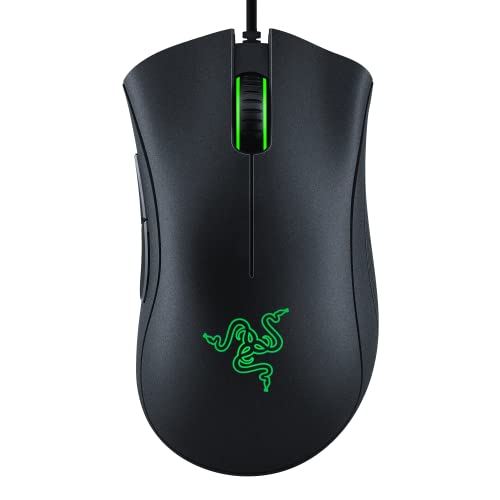
| Razer DeathAdder Essential | Quietest ergonomic shape | The classic silhouette in its plainest form, with a single soft glow you can kill entirely. |
| Corsair M75 Wireless RGB Lightweight FPS Gaming Mouse | Most discreet wireless all-rounder | A clean symmetrical design whose modest lighting disappears at the press of a setting. |
| Pulsar Gaming Gears X3 LHD CrazyLight Wireless Mouse | Cleanest design — left-handed edition | A minimalist featherweight shell; note it is the true left-handed model, flagged honestly. |
| Razer Basilisk V3 X HyperSpeed | Stealthiest full-featured ergonomic | Thumb-rest comfort and a deep button set under a restrained, single-zone exterior. |
How Did We Choose the Best Gaming Mouse That Doesn’t Look Like a Gaming Mouse?
We applied a two-room test. Room one is a video call with your manager, a client and a hiring panel: the mouse sits beside your keyboard in frame, and the question is whether anyone’s eye catches on it. Sculpted wings, glowing logos, colour-split shells and cable clutter all fail that room in small ways. Room two is your game at midnight: the question is whether the same mouse tracks, clicks and lasts like the serious hardware it claims to be. Every pick had to pass both rooms without changing anything but, at most, a lighting setting — a mouse that needs a costume change between work and play has understood neither.
Within that test we scored the specifics of discretion. Matte finishes beat gloss, because gloss reads as gadget under office lighting. Single, small, defeatable lights beat light zones. Branding was judged by size and contrast — a tonal logo is office furniture, a glowing emblem is a billboard. And we favoured wireless models where the performance allowed it, because the absence of a cable is the loudest quiet signal a desk can send: nothing about a clean, wireless, matte mouse suggests the word gaming to anyone who has not read this guide.
We also weighted a quality that only appears in person: finish. Stealth is a finish-dependent illusion — a matte coating that shines at the edges after a month, a logo that turns out to be a sticker, seams that catch the light — any of these quietly breaks the spell, and photographs in listings cannot be trusted to reveal them. The picks here come from product lines whose finishes have years of ownership evidence behind them, which is a conservative bias we are happy to defend in a guide whose promise is that nothing about the mouse will draw a second look, in month one or month thirty.
Performance vetting ran in parallel and was deliberately unsentimental. Each pick’s sensor, switches and link were checked against the current competitive standard, and two otherwise discreet mice were cut for carrying last-generation internals. The premise of this guide is that you should never have to choose between looking professional and playing properly, so any mouse asking for that choice was disqualified on principle.
What Actually Makes a Mouse Look Like a Gaming Mouse?
Four tells, in the order a room notices them — and a useful way to think about them is that each operates at a different distance. Lighting betrays you across a hall. Silhouette betrays you across a room. Colour and branding betray you across a desk. Context betrays you in a photograph, later, at leisure. A mouse does not need to defeat all four distances for every reader; it needs to defeat the distances your life actually contains, which is why this guide grades stealth in levels rather than declaring a single invisibility standard.
Four tells, in the order a room notices them. Lighting is the first and loudest: animated RGB visible across a space announces gaming before any other detail registers, which is why the picks here either lack it or confine it to a single zone you can extinguish. Silhouette is the second: aggressive angles, cut-out armour, wings and spoilers read as gaming even in total darkness, while the smooth, continuous curves of the pro shells read as nothing in particular — the highest compliment stealth hardware can earn.
Colour and branding form the third tell. Two-tone shells, contrast panels and large illuminated logos are the uniform of the gaming aisle; matte black or grey with a small tonal mark is the uniform of everything else. The fourth tell is context rather than the mouse itself: the cable snaking across the desk, the glowing mousepad, the headset stand with its own light show. A discreet mouse on a loud desk is a whisper at a rock concert, and the setup section later in this guide deals with the whole picture rather than pretending one purchase solves it.
Sound deserves a footnote among the tells, because a desk is heard as well as seen on calls. Aggressive, hollow clicks and a rattling wheel announce a gaming mouse to a microphone even when the camera sees nothing — one more reason the switches in these picks matter beyond the game: a firm, damped click reads as professional audio, and the pro shells here were engineered for exactly that solidity because their designers’ customers also live on calls.
It is worth saying what does not give a mouse away. Size does not — office mice and gaming mice overlap completely. Buttons do not, provided they sit in the shell’s lines rather than erupting from them. Even a scroll wheel with a metal finish passes unnoticed. The audience for your desk is not studying it; they register glow, angles and colour in a half-second glance, and a mouse that is quiet on those three channels is, for all practical purposes, invisible.
How Much Performance Do You Give Up for a Plain Shell?
None that this guide will let you pay. The esports professionalisation of mouse design means the plainest shells in the industry are currently its best-performing ones: the G PRO 2 and the Viper V3 HyperSpeed are quite literally the shapes competitive players standardised on, chosen for hands rather than for shelves. Their sensors sit at the top of the current generation, their links are the tournament standard, and their switches are the ones the loud mice advertise. Choosing stealth from this list is not a compromise with a consolation story; it is choosing the professional end of the catalogue and letting the gaming aisle keep its theatre.
There is a historical irony underneath the answer. A decade ago, gaming performance wore its costume because the costume was the marketing — the performance itself was ordinary, so the shell had to shout. As sensors and switches became genuinely excellent, the shouting became unnecessary, and the professional scene — which buys on results alone — quietly standardised on plain shells. The stealth buyer today is not sneaking into the catalogue through a side door; they are shopping at its most serious end, where the products are too good to need decoration.
The honest exceptions are features rather than performance. Deep button sets live in more sculpted shells — the Basilisk V3 X is here precisely because it smuggles a thumb rest and a full control set under a restrained exterior, and even it reads calmer than its wired sibling. Exotic materials and honeycomb exoskeletons, whatever their merits, announce themselves. And if your heart is set on a specific ergonomic masterpiece with wings and spoilers, no guide can make it invisible; the stealth life requires letting the silhouette be simple, and in exchange it gives you back every other specification that matters.

Logitech G PRO 2 LIGHTSPEED Ambidextrous Wireless Gaming Mouse — Most invisible flagship
Put the G PRO 2 on a desk and the strongest impression it makes is of nothing at all: a matte black symmetrical shell, a small tonal logo, no light show competing for the eye, no angles for the eye to catch. That anonymity is engineered, not accidental — this is the shell shape professional players converged on, refined until nothing decorative remained, and its plainness in an office is the same plainness that makes it neutral in the hand. Under the civilian exterior sits the full flagship stack: Logitech’s HERO sensor, the LIGHTSPEED link trusted on stages, USB-C charging, and magnetic side buttons you can fit, blank or remove to keep the silhouette exactly as clean as your workplace demands.
For the dual-life desk — work machine by day, game machine by night, same mouse throughout — it is the most complete answer in this guide. Onboard profiles mean your game settings live in the mouse, not in software your work laptop must host; the wireless link means no cable crosses the video-call frame; the shape means a colleague borrowing your desk will use it without a flicker of curiosity. If the brief is one mouse that a hiring panel would never look at twice and a ranked lobby would never question, this is the pick the rest of the list is measured against.
There is a final, underrated pleasure in its plainness: it ages invisibly. A mouse with no lighting zones and no fashion-driven sculpting cannot look dated, because it never looked like a particular year to begin with. Owners of its predecessors report the same shell serving across entire job changes and PC generations, still passing every room it enters — the closest thing gaming hardware has to a classic, and the safest long-term purchase in this guide for exactly that reason.
- Sensor: Logitech HERO optical
- Connection: LIGHTSPEED 2.4 GHz wireless, USB-C charging
- Design: matte symmetrical pro shell, tonal branding
- Buttons: magnetic modular side buttons, removable
- Lighting: effectively none — a status indicator only
Strengths
- Genuinely invisible in meetings while remaining a flagship
- Removable buttons let you choose your own silhouette
- Onboard profiles keep gaming software off the work machine
Trade-offs
- Premium price for a mouse whose party trick is plainness
- Symmetrical shell offers palm players little furnishing
- No visible flair at all — some buyers will miss it at midnight
Best for: professionals running one desk for work and ranked play who want zero visual evidence of the second life. Not suited for: players who enjoy their setup’s theatre, or full-palm comfort seekers.

Razer Viper V3 HyperSpeed — Stealthiest competitive pick
Razer’s reputation is built on glow, which makes the Viper V3 HyperSpeed its most interesting act of restraint: a matte black symmetrical shell with the branding reduced to near-silence and a single status light where a light strip would usually live. It looks like the mouse a systems administrator would issue, and it plays like the mouse a professional would demand — Focus Pro 30K optical sensor, second-generation mechanical switches with a shallow, certain click, and a HyperSpeed wireless link that has carried tournament matches. At 82 grams it sits in the competitive weight class without a single hole drilled in its shell to prove it.
The stealth extends to its habits. Power comes from a single AA cell with up to roughly 280 hours of play in it, so there is no charging cable coiled on the desk and no dock announcing the mouse’s double life — the desk stays as plain as the mouse. The shape is a low, safe symmetrical form for claw and fingertip grips, the sides carry a subtle texture instead of graphics, and nothing about its presence in a photograph would tell a viewer it has ever seen the inside of a ranked match. For the competitive player whose workplace is also their arena, it is the most complete disguise in this guide.
Notice, too, what the disguise costs Razer and therefore proves: nothing in the sensor, the switches or the link was traded away to achieve it. The plainness is a styling decision laid over undiminished hardware, which is why this mouse converts players who assumed stealth meant settling. Keep a spare AA in the desk drawer and the entire power system of this tournament mouse occupies less space than a pen.
- Sensor: Razer Focus Pro 30K optical
- Connection: HyperSpeed 2.4 GHz wireless
- Weight: about 82 g, no shell cut-outs
- Battery: single AA, up to roughly 280 hours
- Design: matte black, minimal branding, one status light
Strengths
- Tournament internals in an administrator-issue exterior
- AA battery deletes charging cables and docks from the desk
- Light without resorting to a pierced, attention-seeking shell
Trade-offs
- No wired play mode; the AA swap is the whole power plan
- Low shell underfills palm grips
- Razer loyalists expecting Chroma will find none here
Best for: competitive claw and fingertip players whose arena is also their office. Not suited for: palm players or anyone who wants a rechargeable, dockable setup.

Razer DeathAdder Essential — Quietest ergonomic shape
The DeathAdder silhouette is so established that it has crossed from gaming icon to generic shape — walk through any office and its cousins are everywhere — and the Essential is that silhouette in its most restrained uniform: matte black, smooth continuous curves, a single-zone green glow that can be dimmed to nothing, and no sculpted armour anywhere. Of the ergonomic picks here it is the one a non-gamer is least likely to identify, because the shape’s fame works in its favour; it reads as “a mouse,” full stop, in a way newer and stranger designs cannot manage.
Underneath the camouflage is honest gaming hardware: a 6,400 DPI optical sensor that tracks cleanly at real-world sensitivities, mechanical switches with a firm click, five programmable buttons and the rubberised side grips that made the shape a long-session favourite. It is wired, which is its one visual concession — a plain black cable is hardly a confession, and on a desk that already hosts a keyboard cable it disappears entirely. For the buyer whose priority is an ergonomic shape that will never start a conversation, the Essential is the quiet default, and its modest positioning among gaming mice makes the disguise the cheapest in this guide to buy into.
Its familiarity cuts one more way: replacement and recognition. If the mouse is ever borrowed, lost or needs a twin for a second desk, the shape is understood by every hand that has used a computer this decade — no learning curve for guests, no exotic parts, no explanation. In a guide about not being noticed, there is something fitting about the pick whose greatest stealth asset is that the world has already seen a million of them.
- Sensor: optical, up to 6,400 DPI
- Connection: wired USB
- Buttons: 5 programmable
- Lighting: single-zone, fully defeatable
- Shape: right-handed ergonomic, medium-large
Strengths
- A famous shape that now reads as generic office equipment
- Ergonomic comfort for long workdays and long sessions alike
- The most affordable disguise in this guide
Trade-offs
- Wired — the cable is plain, but it is present
- Sensor ceiling is the most modest among these picks
- The single glow is green or nothing; no colour diplomacy
Best for: ergonomic-shape loyalists who want their mouse to pass as standard office issue. Not suited for: wireless devotees or players needing more than five buttons.

Corsair M75 Wireless RGB Lightweight FPS Gaming Mouse — Most discreet wireless all-rounder
The M75 Wireless carries RGB in its name and discretion in its behaviour: the lighting is confined and modest, and with it dimmed or off — a permanent setting, stored on the mouse — what remains is a clean, light, symmetrical shell in dark tones that could sit in a product photograph for office equipment without raising an eyebrow. The shape is an FPS form, gently sided for grip reference rather than sculpted for display, and the swappable side buttons let you keep the silhouette minimal: fit only the buttons you use, on the side you use them, and leave the other flank smooth.
Performance is Corsair’s competitive standard: a 26,000 DPI optical sensor, the low-latency Slipstream wireless link with a wired fallback, and iCUE profiles that live on the device once set. In the two-room test it passes the office on looks and the game on merit, and it adds a flexibility the Logitech flagship matches but the Razer picks do not — the ability to reconfigure its own outline as your mix of work and play changes. For a player whose setup already speaks iCUE, it is also the stealth pick that keeps the software story to one quiet application.
A small configuration tip specific to this mouse: because its buttons swap, stealth can be tuned per context — full button set fitted for the evening’s game, blanks fitted for the week of client workshops, with the swap taking seconds and the profiles following automatically. No other pick here changes its own outline to match the calendar, and for players whose work intensity arrives in seasons, that physical adaptability is worth more than a specification.
- Sensor: optical, up to 26,000 DPI
- Connection: Slipstream wireless, wired fallback
- Buttons: swappable side-button modules
- Lighting: modest zones, fully defeatable and stored
- Design: light symmetrical FPS shell, dark finish
Strengths
- Configurable silhouette — remove what you do not use
- Flagship wireless performance under a calm exterior
- Lighting off is a stored state, not a daily chore
Trade-offs
- The name promises RGB; the product is best with it off
- Symmetrical comfort ceiling for full-palm players
- Small button modules need a safe storage spot
Best for: mixed work-and-play desks in Corsair’s ecosystem that want discretion with configuration options. Not suited for: palm players wanting a furnished ergonomic grip.

Pulsar Gaming Gears X3 LHD CrazyLight Wireless Mouse — Cleanest design, in a left-handed edition
An honesty note before the praise, because this guide’s credibility is its whole value: this pick is Pulsar’s X3 in its LHD — left-handed — edition, a true mirrored mouse for left-handed players. It belongs in a stealth guide because its design language is the purest minimalism here: a smooth, unadorned mini shell in black, no lighting theatrics, no graphics, nothing but form. For a left-handed player who wants a gaming mouse that looks like a design object rather than a toy, it is effectively the only product on earth that answers — and right-handed readers should treat this entry as a window into Pulsar’s design approach and choose from the other five.
The specifications refuse to trade on the minimalism: about 43 grams with dot skates fitted, Pulsar’s XS-1 flagship sensor up to 32,000 DPI, optical switches rated for very long service, and a wireless link built for competitive play. In a left hand on a work desk it is doubly invisible — plain in itself, and so unusual in its handedness that observers rarely even parse it as a gaming device. We include it labelled, limited and admired: the cleanest-looking serious mouse in this batch of guides happens to be the left-handed one, and pretending it were a universal pick would be exactly the kind of blur this guide exists to refuse.
For left-handed readers weighing it against the ambidextrous flagships elsewhere in this guide, the stealth calculus has a wrinkle: a symmetrical mouse asks a left hand to accept a shape made for no one, while this shell was made for them specifically — and it still looks quieter than the symmetrical flagships do. Fit and discretion, which right-handed players must sometimes trade against each other, arrive in this one product as the same decision.
- Sensor: Pulsar XS-1 flagship, up to 32,000 DPI
- Connection: wireless 2.4 GHz gaming link
- Weight: about 43 g
- Design: true left-handed mini shell, unadorned matte finish
- Lighting: none to speak of
Strengths
- The most minimal design language of any pick here
- Flagship internals at a featherweight
- For left-handed players, stealth and fit in one product
Trade-offs
- Left-handed only — right-handed readers, this one is not for you
- Mini shell underfills large hands of either orientation
- Niche availability, as with all mirrored models
Best for: left-handed players who want a gaming mouse indistinguishable from premium office hardware. Not suited for: right-handed players, for whom the other five picks exist.

Razer Basilisk V3 X HyperSpeed — Stealthiest full-featured ergonomic
The Basilisk V3 X is the guide’s answer to a fair objection: that stealth mice are all stripped esports shells, and players who want an ergonomic shape with a thumb rest and a real button set must accept the full gaming costume. The V3 X keeps the Basilisk family’s substance — the sculpted right-handed shape, the thumb rest, nine programmable buttons including the sensitivity clutch, mechanical second-generation switches and a 5G optical sensor at 18,000 DPI — and turns the presentation down to a single, defeatable zone of light on a matte black body. No underglow strip, no light show; in a meeting it is a large, comfortable mouse, and nothing more needs to be said about it.
Its power story supports the disguise: HyperSpeed wireless for play, Bluetooth for the work laptop, and battery life from a single AA cell that stretches across months, so no dock or cable colonises the desk. The shape will suit palm and relaxed-claw players who found the symmetrical picks underfilled, and the clutch — a thumb paddle that drops sensitivity while held — earns its keep in precision work as readily as in shooters, slowing a spreadsheet selection or a photo edit with the same gesture. It is the most mouse in this guide, wearing the second-quietest suit.
One more audience will appreciate it: the player whose gaming happens in a family living space, where a full light show competes with a film on the television and a partner’s patience. The V3 X at rest is a dark, silent object; in play its single zone can be set to the dimmest ember or nothing. Hardware that respects the room it sits in gets to stay in the room — a domestic specification no benchmark measures and many households enforce.
- Sensor: Razer 5G optical, 18,000 DPI
- Connection: HyperSpeed wireless and Bluetooth
- Buttons: 9 programmable, sensitivity clutch
- Battery: single AA, months of use
- Design: ergonomic with thumb rest, single lighting zone
Strengths
- Full ergonomic feature set under a restrained exterior
- Dual wireless modes serve work laptop and gaming rig alike
- AA economy keeps cables and docks off the desk entirely
Trade-offs
- Largest silhouette here; small desks and hands take note
- Single-zone light is still present until you switch it off
- Right-handed only, and proud of its size
Best for: palm and relaxed-claw players who refuse to trade features for discretion. Not suited for: small hands, fingertip grips, or anyone wanting the absolute minimum footprint.
How Does the Stealth Calculation Change in a Shared Home?
At work, stealth is about professional signalling; at home, it is about taste and peace. A shared living-room desk or a partner’s home office imposes an aesthetic negotiation that pure gaming rooms never face, and the mice that survive those negotiations are the ones in this guide — hardware a non-gaming household member would choose on looks alone, which then happens to carry a tournament sensor. The Basilisk V3 X and DeathAdder Essential win the living-room argument most often, because their ergonomic shapes read as comfort purchases, a category every household already understands.
There is also the guest test. A mouse that a visiting parent, a child doing homework or a friend borrowing the PC can simply use — no lighting ritual, no bewildering button field, no software demanding attention — is a mouse that integrates into a household instead of colonising one corner of it. Every pick here passes that test with its work profile loaded, which is why the profile habit matters: stealth is not just how the mouse looks, but how it behaves in hands that never asked about it.
Which of the Six Fits Your Grip — Quietly?
Stealth narrows the catalogue; grip should finish the job. Palm players have exactly two furnished options here and both are excellent in opposite dialects: the DeathAdder Essential, whose classic shape disappears partly because the world has seen it forever, and the Basilisk V3 X, whose thumb rest and button depth serve the feature-hungry at the cost of a larger silhouette. Choose between them by buttons and budget rather than by looks — side by side in a meeting, neither will be identified as the gaming one by anyone who does not already know.
Claw and fingertip players hold the stronger hand, as they do throughout modern mouse design: the G PRO 2, the Viper V3 HyperSpeed and the M75 Wireless are all symmetrical, all matte, all effectively invisible, and the choice among them is a pure hardware conversation — ecosystem, battery philosophy, button modularity — uncomplicated by any aesthetic sacrifice. Left-handed fingertip and claw players join the same conversation through the modular flagships; left-handed palm players get the Pulsar, which happens to be the stealthiest object in the guide. It is a rare shortlist where every grip’s answer is also a presentable one, and that completeness is why the stealth brief, once a compromise, now reads as a preference.
How Do the Six Compare on Stealth and Substance?
| Pick | Stealth level | Connection | Standout trait |
|---|---|---|---|
| G PRO 2 LIGHTSPEED | Total — no light show | Wireless | Flagship anonymity |
| Viper V3 HyperSpeed | Total — one status light | Wireless | AA-powered, 82 g |
| DeathAdder Essential | High — famous plain shape | Wired | Ergonomic camouflage |
| Corsair M75 Wireless | High — lighting stored off | Wireless | Swappable-button silhouette |
| Pulsar X3 LHD | Total — design-object minimal | Wireless | Left-handed, 43 g |
| Basilisk V3 X HyperSpeed | Moderate-high — one zone | Wireless | Full features, calm suit |
The stealth column deserves one clarification: these grades describe the mouse as shipped and configured as this guide directs, not as a laboratory property. The M75 Wireless with its lighting at full celebration would grade lower; the Basilisk with its zone extinguished grades a step higher than the table’s caution suggests. Stealth, unlike a sensor, is partly a behaviour — the hardware here simply makes the behaviour easy, permanent and stored, which is the most a product can honestly offer.
Two axes decide your shortlist. If your workplace scrutiny is real — clients, cameras, shared photographs of your desk — stay in the table’s total-stealth rows and choose by grip. If your need is softer — a household aesthetic, a personal preference for calm — the whole table is open, and the Basilisk V3 X’s feature depth becomes a legitimate reason to accept a slightly larger silhouette. Either way, no row of this table asks you to apologise for the mouse’s performance at midnight.
How Do You Make the Whole Desk Match the Mouse?
A discreet mouse is the beginning, not the achievement. Audit the desk in the order a camera sees it: lighting first, because a glowing keyboard or a light-strip mousepad will out-shout any mouse — set peripherals to a static, dim, single colour or off during work hours, ideally on a profile the mouse’s own software can switch with one action. Cables second: route them once, behind the monitor and down, because a tidy cable field reads as professional regardless of what the cables connect. Colour third: a desk whose large objects share a palette — black, grey, wood — absorbs a gaming mouse entirely, while a rainbow of mismatched gear draws the eye to every item in it.
Consider the chair-side view as well as the camera’s. The person most likely to see your desk unfiltered is not a client on a call — it is you, every morning, and a desk that looks calm is a desk that starts the day calmly. Players who make the switch to a quiet setup routinely report the surprise benefit that the room feels less like a cockpit and more like a study, while the games, somehow, lose none of their voltage when the lights go out. Atmosphere, it turns out, was never stored in the peripherals.
Then use profiles as the desk’s day and night modes. Every ecosystem here can bind lighting and behaviour to a profile stored on the mouse; build a work profile that is dark, quiet and mapped for productivity, and a play profile that restores your game binds, and let the switch between them be a single deliberate action at the boundary of the day. The ritual is satisfying in itself — the desk visibly settling into evening mode — and it guarantees the mouse that appears on tomorrow’s call is the discreet one, not whichever personality you left it in at midnight.
Does Stealth Matter for Streamers and Creators Too?
Increasingly, yes — from the opposite direction. A creator whose channel is calm, professional or educational discovers that a light-show desk fights their own framing: the audience’s eye goes to the pulsing object in the corner of the shot, and the mouse becomes an uninvited character in every video. The total-stealth picks here are the ones that appear in serious desk-tour and productivity content precisely because they photograph like furniture and let the subject of the video be the subject. Even gaming creators use them for the second desk — the editing station, the work machine — where the performance is wanted and the branding is not.
The same logic reaches the second-hand market, where discreet hardware quietly wins again. A plain flagship mouse photographs honestly, appeals to the widest pool of buyers, and carries no styling that dates its listing; players who rotate gear find their stealth picks the easiest to sell and the easiest to buy used, because a matte shell shows its wear truthfully and a loud one hides behind its own lighting in the photographs.
There is a practical dividend as well: a mouse that looks like nothing is a mouse that can be lent, filmed, carried into a client’s office or photographed for a listing without a moment’s stage management. Portability of reputation is a strange specification to write into a mouse guide, but for the growing class of players whose desks are also their storefronts, it is a real one — and it costs nothing in performance, as every pick in this guide demonstrates.
What Should You Check on a Video Call Before Trusting a Mouse?
Run the actual test rather than imagining it. Join a call with your own preview open — every major platform lets you see yourself as others will — and look at the desk area of the frame with a stranger’s eyes for ten seconds. What registers is contrast and motion: a light that cycles, a gloss that catches the window, a colour that matches nothing else in the shot. Mice pass or fail that test as part of a composition, which is why matte finishes and dark, still surfaces dominate this guide’s picks; they give the camera nothing to report.
Then check the second frame nobody thinks about: the photograph. Desks get photographed for listings, for social posts, for the background of other people’s pictures, and a still image is less forgiving than video — no motion blur to hide behind, every logo legible. The picks here were partly chosen for how they behave in that frozen scrutiny, and the two total-stealth flagships are effectively unidentifiable in a photograph at conversational distance, which is the standard a professional desk should quietly meet.
How Long Does a Discreet Mouse Stay Discreet?
Longer than a loud one stays fashionable — that is the arithmetic of plain design. Lighting trends cycle yearly and sculpted armour dates like car styling, while a matte black shell with clean lines is simply a mouse, in any year, in any room. There is a maintenance dimension too: matte finishes hide the micro-scratches and palm-shine that accumulate on gloss, and shells without cut-outs collect nothing and need no excavation with a toothpick. The stealth choice is therefore also the low-maintenance choice, and owners discover the two virtues are the same virtue seen from different ends of the ownership timeline.
Software support is the other half of staying power. A discreet mouse depends on its stored settings more than a loud one does — its darkness is a configuration, not a construction — so the maturity of Logitech’s, Razer’s and Corsair’s ecosystems is part of what you are buying here: profiles that persist, utilities that still download in five years, firmware that does not reset your manners. Pulsar’s younger ecosystem is the one calculated risk in the list, accepted because the mouse itself needs the least configuration of any pick to stay exactly as discreet as the day it arrived.
What Mistakes Do Stealth Buyers Make?
Buying a gaming mouse and a separate office mouse is the expensive mistake this guide exists to prevent: two devices, two sets of settings in your hands’ memory, and a swapping ritual that guarantees the wrong mouse is on the desk at the wrong moment. The dual-life picks here exist because one excellent mouse, configured twice, beats two adequate mice configured once. A related error is overcorrecting into office hardware — buying a genuinely plain mouse that is plain all the way through, with an office sensor and office switches, and discovering at midnight that the disguise was the product.
Judging stealth from listing photographs alone is another recurring error, because product photography is lit to flatter drama: a matte mouse under studio lights can look glossier than it is, and a genuinely loud mouse can be photographed in its one dark moment. Weight the textual evidence — lighting zones, finishes, dimensions — over the gallery’s mood, and where a maker offers the same mouse in a plain colourway and a loud one, understand that the listing photographs may be showing you the other one’s personality.
The subtler mistake is forgetting the stored-state question. A mouse whose lights return after every reboot, whose software must run to keep it dark, will eventually appear on a call in full costume; the picks here hold their manners in onboard memory, and any stealth candidate you consider elsewhere should be interrogated on exactly that point. Finally, do not confuse stealth with shame: the goal is a desk that serves both halves of your life gracefully, and a mouse that needs no explanation is a tool of professionalism, not a secret.
Final Recommendation
A word about who should not follow this guide, offered in the same spirit as its other honesty notes. If your setup’s appearance is part of your pleasure — if the lit desk is the hobby’s visible joy and your household shares the taste — then stealth is a solution shopping for a problem, and the loud flagship with the same internals will make you happier every single day. Discretion is a preference with excellent hardware behind it, not a moral upgrade, and this guide’s six are for the readers whose preference genuinely runs quiet.
For the purest version of the brief, take the G PRO 2 LIGHTSPEED: it is the flagship nobody notices, configurable down to blanked buttons, and equally at home in a board pack and a bracket final. Competitive players who prefer Razer’s feel and the AA economy should take the Viper V3 HyperSpeed and enjoy the most complete disguise in gaming. Ergonomic loyalists split by features — the DeathAdder Essential for the classic quiet shape at a gentle commitment, the Basilisk V3 X when the full button set and thumb rest are non-negotiable — while Corsair households get their answer in the M75 Wireless. And left-handed readers have, in the Pulsar X3 LHD, the rare pleasure of a pick that is both the stealthiest design here and the only one built for their hand. The gaming look was always optional; these six are what the hardware looks like with the costume off and the performance left on. Set the work profile before the first morning call, keep a spare cell in the drawer if your pick drinks from one, and let the desk’s two lives share one excellent mouse in peace — that arrangement, once settled, tends to outlast several generations of louder hardware.
Frequently Asked Questions
Can I really turn the lighting off permanently on the lit picks?
Yes — with one operational detail worth knowing: make the change while the mouse is connected to the machine running its software, then confirm the setting has been written to the device by connecting the mouse to a second machine or a plain port and watching it stay dark. On the DeathAdder Essential, M75 Wireless and Basilisk V3 X, lighting is controlled in software and the off state is stored — set it once and the mouse stays dark through reboots and across machines. The G PRO 2 and Viper V3 barely have lighting to begin with, which is the more elegant solution to the same problem.
Will colleagues actually not recognise these as gaming mice?
Recognition works on glow, angles and colour, and these shells are quiet on all three. In practice the giveaway, when there is one, is behaviour rather than appearance — a player who keeps glancing at a dark corner of the desk where a battery light blinks, or whose “office mouse” has a sniper button. Keep the status lights dim in your work profile and even the behaviour goes quiet. The DeathAdder’s shape is the most famous here, and even it reads as a generic ergonomic mouse to non-gamers — which, in 2026, is most of any meeting. What gives players away is almost always the rest of the desk, not the mouse.
Is a wired pick a problem for the stealth brief?
Only aesthetically at the margins — and for some desks, not at all. A wired mouse also draws no attention to its power, because it has no power story: nothing blinks, nothing docks, nothing pairs. On a desk where everything else already runs on cables, the wired pick is not the exception but the norm, and norms are invisible by definition. A wired mouse also never needs charging, never pairs, and never asks a work laptop’s permissions for anything, which makes the DeathAdder Essential the stealth pick with the fewest moving parts in its entire ownership story. The cable is plain, but it is present. The DeathAdder Essential’s plain black cable disappears on any desk that already hosts a keyboard lead, and its shape camouflage is the strongest of the ergonomic picks. If your desk is fully wireless elsewhere, the cable becomes the one visible thread — in that specific setup, choose from the five wireless picks.
Why is a left-handed mouse in a stealth guide?
Because its design earned the place and its limitation is stated rather than hidden — the same standard this guide applies to its own recommendations, since a stealth guide that smuggled a mismatched pick past its readers would be committing the exact sin it documents. The Pulsar’s presence here is disclosed in its heading, its badge and its first paragraph: the Pulsar X3 LHD is the cleanest-looking serious mouse in this batch, and left-handed readers deserve to find it here. Right-handed readers lose nothing — five of the six picks are theirs — and the entry demonstrates the guide’s rule that labels say what products are.
Do these mice work for ordinary office tasks as well as games?
They are arguably better at them than office mice. Precise sensors make large and multi-monitor setups effortless, side buttons become browser and document navigation that office workers envy once shown, the AA-powered picks remove the charging interruptions that plague office wireless mice at the worst moments, onboard profiles carry your shortcuts between machines, and the ergonomic picks support a hand through a full workday. The only office feature absent is the free-spinning document wheel of productivity flagships — the Basilisk V3 X’s clutch and the others’ clean detents cover most of that ground.
A closing thought for the reader still hesitating between one dual-life mouse and two single-life ones. Hands learn one mouse deeply — its weight, its click points, the exact reach of its side buttons — and that fluency is a performance asset in games and a comfort asset at work, compounding every day the same shell is under your fingers. Splitting the week between two mice taxes that fluency for a purely visual gain that this guide’s six picks make unnecessary. Choose the one whose shape fits, set its two profiles, and let the desk be one desk again.
Related Guides
Best Gaming Mouse for 100 Dollars
Best Gaming Mouse for 40 Dollars
Best Gaming Mouse for MMO RPGs