What's inside
- Key Takeaways
- Quick Picks
- How Did We Choose Picks From a Generation That Has Already Ended?
- Why Does the RTX 3060 Still Play Modern Games Well at 1080p?
- What Should You Check Before Paying for Any Remaining RTX 3060 Stock?
- Which RTX 3060 Laptops Are Still Worth Your Attention?
- How Should You Set Up an RTX 3060 Laptop for the Best 1080p Experience?
- How Long Will an RTX 3060 Laptop Stay Relevant From Here?
- What Accessories Make Sense for a Previous-Generation Gaming Laptop?
- Should You Buy Extended Protection on Leftover or Used Stock?
- How Do You Spot a Mislabelled RTX 3060 Listing Before It Spots You?
- How Do the Six Picks Compare Side by Side?
- What Mistakes Do Buyers Make When Chasing Discontinued RTX 3060 Stock?
- Final Recommendation
- Frequently Asked Questions
- Related Guides
As an Amazon Associate I earn from qualifying purchases. This post may contain affiliate links at no extra cost to you.
widgetverdict.com is reader-supported. When you buy through links on our site, we may earn an affiliate commission.
Start with the uncomfortable truth, because it shapes everything below: laptop production built around the GeForce RTX 3060 has ended, and the shelf of genuinely new machines carrying that chip is nearly bare. When we checked the listings available for this guide, only three clean, current listings for RTX 3060 laptops could be verified at all. Rather than pad the shortlist with refurbished stock, mystery configurations or dead links, this roundup of the best gaming laptops with RTX 3060 keeps those three as linked picks and fills the remaining three places with prose-only entries covering familiar RTX 3060 models that many shoppers still search for by name. Those prose entries explain what each machine was, why people liked it, and why no clean new listing could be confirmed for it, so nobody should treat them as buyable recommendations with a checkout button attached.
Where to buy: the three linked machines below are sold through Amazon listings whose titles were verified against the graphics card, processor, memory and storage described in this guide. Stock on a discontinued generation behaves differently from a current range, so a configuration that exists this week may vanish without a successor. If a linked listing shows a different GPU, a smaller SSD or a changed memory figure when you open it, trust the listing in front of you over any roundup, including this one, and walk away if the swap matters to you. The prose-only models should be hunted only on the used market, with the caution that any second-hand gaming laptop deserves a battery health check, a fan noise test and a clear returns route before money changes hands.
A discontinued chip can still be a sensible chip. The RTX 3060 laptop GPU was the workhorse of its generation for a reason: it handles 1080p play in modern titles with sensible settings, it supports DLSS upscaling, and it sips less power than the flagship cards above it, which keeps chassis designs slimmer and fans quieter. What it cannot do is pretend to be current. Ray tracing at high settings will humble it, 1440p native play asks for compromises, and every year of driver and game development widens the gap a little. Buy one of the remaining machines with eyes open and a sharp price in mind, and it remains a perfectly enjoyable 1080p companion. Pay current-generation money for it, and the arithmetic collapses.
Key Takeaways
- Only three linked picks appear here because only three clean new RTX 3060 laptop listings could be verified; the other three entries are prose-only history, not shopping links.
- The Acer Nitro 5 configuration is the strongest of the verified trio, pairing a twelve-core-class Intel i7-12700H with 16GB of memory.
- The ASUS TUF Dash 15 is the traveller of the group, adding DDR5 memory and Thunderbolt 4 in a slimmer shell.
- The MSI GF65 Thin is the lightest verified option, though its 8GB of memory is the compromise you accept for that portability.
- Judge every RTX 3060 asking price against newer RTX 4050 and 4060 machines before paying; the older chip only wins when the discount is real.
- On the used market, battery wear and fan condition matter more than the badge on the lid.
Quick Picks
| Pick | Badge | Why it earns its place |
|---|---|---|
| Acer Nitro 5 AN515-58-725A | Strongest verified configuration | A Core i7-12700H and 16GB of memory give the shared RTX 3060 its best supporting cast here. |
| ASUS TUF Dash 15 (2022) | Slimmest verified all-rounder | DDR5 memory, a Core i7-12650H and Thunderbolt 4 in a chassis designed to be carried. |
| MSI GF65 Thin 10UE | Lightest verified option | A thin 15.6-inch design with a 144Hz screen for players who genuinely travel with their laptop. |
| Lenovo Legion 5 (RTX 3060) | Used-market favourite, covered without a link | The best-regarded RTX 3060 chassis of its era, now found only on the used market. |
| ASUS ROG Strix G15 (RTX 3060) | Renewed and used stock only, covered without a link | A flamboyant era favourite with strong cooling, surviving now as used and renewed stock. |
| HP Victus 15 (RTX 3060) | Second-hand staple, covered without a link | The budget doorway into RTX 3060 gaming in its day, now a used-market staple. |
How Did We Choose Picks From a Generation That Has Already Ended?
Verification came first and eliminated most of the field. Each candidate listing had to name the RTX 3060 in its own title, state a coherent processor, memory and storage configuration, and read as new stock rather than a renewal programme or a third-party configuration with unclear warranty cover. Listings that buried the GPU variant, mixed specifications between headline and detail, or described a machine that no longer matched its own title were dropped, which is how a long initial list shrank to three. That small number is the honest answer for this keyword in late 2026, and publishing six linked picks anyway would have meant linking machines we could not stand behind.
Within the verified trio, ranking followed the balance of the whole configuration rather than the GPU alone, because every machine here shares the same graphics chip and the differences live elsewhere. Processor generation decides how well the 3060 gets fed in strategy games and simulation titles, memory capacity decides whether background applications can stay open during play, and the display decides whether the frames the GPU produces actually look smooth. A 144Hz panel appears across the trio, which is good news, so the separation comes from CPUs, memory type and chassis intent: one desktop-replacement Nitro, one slim TUF Dash, one thin-and-light GF65.
Prose-only entries were chosen by recognition and by how often readers still ask about them. The Lenovo Legion 5, ASUS ROG Strix G15 and HP Victus 15 all sold in large numbers with RTX 3060 options, and their names dominate second-hand listings and forum advice. Covering them honestly, without links, helps a shopper who finds one used understand what they are looking at, which generation of supporting hardware surrounds the GPU, and which checks matter before buying hardware with no new-stock warranty behind it.
Why Does the RTX 3060 Still Play Modern Games Well at 1080p?
The RTX 3060 laptop GPU sits on Nvidia’s Ampere architecture, and its enduring strength is balance rather than brilliance in any single test. At 1920 by 1080, the resolution every verified pick in this guide uses, the chip has enough shader throughput to hold high settings in most current releases, especially when DLSS quality mode lends a hand by rendering internally at a lower resolution and reconstructing a sharp image. Esports titles are effortless territory: fast-paced shooters and arena games run far beyond the refresh rate of the 144Hz panels fitted here, so the screen, not the silicon, becomes the ceiling. Heavier open-world games ask for judgement, mixing high textures with medium shadows and reflections rather than pushing every slider to its stop.
Power limits explain why two laptops with the same GPU badge can perform differently. Laptop versions of the RTX 3060 shipped in several wattage configurations, and a higher-wattage implementation in a thick, well-cooled chassis sustains clocks that a slim machine throttles away from after ten minutes of play. That is why this guide pays attention to chassis design alongside the spec sheet. The Nitro 5’s bulk is not laziness; it is cooling headroom. The GF65 Thin trades some of that headroom for a bag-friendly profile. Neither answer is wrong, but they suit different owners, and benchmark charts that ignore which variant produced the score mislead more than they inform.
Six gigabytes of video memory is the specification that dates fastest. At 1080p it remains workable, yet texture-heavy recent releases can press against that ceiling, forcing texture quality down a notch to avoid stutter when moving between areas. Owners who mod games or keep texture packs installed will feel the limit sooner. The practical response is simple: treat texture settings as the first dial to turn, keep DLSS enabled where offered, and accept that a 2021-era mid-range GPU asks for small courtesies in 2026 releases. In exchange, the card’s maturity brings stable drivers and a huge library of per-game tuning advice written by owners of exactly this hardware.
What Should You Check Before Paying for Any Remaining RTX 3060 Stock?
Confirm the exact configuration on the listing itself, field by field, because leftover stock attracts sloppy labelling. The graphics line should say RTX 3060 without abbreviation games, the processor should be named in full, and memory and storage figures in the title should match the detail section. Photograph or screenshot the configuration at purchase; if a different specification arrives, that record settles the returns conversation quickly. Check who fulfils the order and what warranty applies, since a manufacturer warranty and a seller’s short returns window are very different kinds of protection on a machine you expect to keep for years.
Compare the asking figure against current RTX 4050 and RTX 4060 laptops on the same day, not from memory of last season’s sales. The newer chips bring frame generation support and better efficiency, so the RTX 3060 machine needs a clear price advantage to justify itself. As a working rule, a modest saving is not enough; the discount should be large enough that you would still choose the older machine after pricing in its shorter remaining support horizon and lower resale value. If the numbers sit close together, buy the newer hardware and let someone else clear the old stock.
For the prose-only models and any used purchase, add physical checks. Run the machine on battery briefly to confirm it neither shuts down under light load nor drains at an alarming rate, listen to both fans at full speed for grinding or rattling, inspect the hinge for play, and type on every row of the keyboard. Ask whether the SSD has been replaced and whether the original charger is included, because a missing or underpowered adapter quietly caps performance. A seller who welcomes those checks is signalling a healthy machine; a seller who refuses them is giving you information too.
Which RTX 3060 Laptops Are Still Worth Your Attention?
The three linked machines below are ranked by overall configuration strength, and each analysis names the compromise baked into that particular design. After them come the three prose-only entries, clearly labelled, covering the RTX 3060 models readers most often encounter on the used market. Read the linked trio as shopping advice and the prose trio as orientation for second-hand hunting, and the guide will serve you honestly.
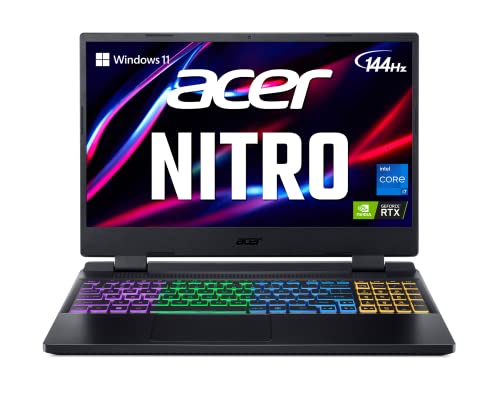
Acer Nitro 5 AN515-58-725A — Strongest verified configuration
Of the three machines you can still buy new with confidence, the Nitro 5 in this AN515-58-725A configuration is the one where the RTX 3060 gets the most help. The Core i7-12700H is a genuinely muscular hybrid processor with performance and efficiency cores, and in CPU-heavy games — grand strategy, city builders, simulation titles with crowds and physics — it keeps the graphics card fed in a way the older ten-series chip in the MSI below cannot match. Sixteen gigabytes of memory means a browser, voice chat and a game launcher can coexist with the game itself, which sounds mundane until you have watched an 8GB machine stutter alt-tabbing back into a match.
Acer’s Nitro line has always spent its budget on internals over elegance, and that priority shows in the cooling. The chassis is thick, the vents are generous, and sustained sessions hold clocks better than slim rivals manage. The 144Hz IPS panel with a fast quoted response suits competitive play, colours are honest rather than spectacular, and the whole package feels built for a desk that it leaves only occasionally. As a statement of intent for leftover stock, this is the configuration to measure the others against: modern CPU, adequate memory, no obvious bottleneck strangling the GPU.
Ownership of the Nitro also brings the era’s best upgrade story among the verified trio. The chassis opens with ordinary screws, storage expansion is straightforward, and the large cooling system means the machine tolerates long sessions without the thermal anxiety that follows slim designs around. For a buyer planning to keep leftover stock for three or four years, that serviceability is a genuine asset: a fan cleaning, a storage addition and fresh thermal paste in year three can make this Nitro feel younger than a sealed rival bought the same week. It is the least elegant machine here and, in the ways that decide longevity, possibly the wisest.
- Display: 15.6-inch FHD IPS, 144Hz, 3ms response as listed
- Processor: Intel Core i7-12700H
- Graphics: NVIDIA GeForce RTX 3060 laptop GPU
- Memory: 16GB DDR4
- Storage: 512GB SSD class as listed
Strengths
- Core i7-12700H is the strongest processor among the verified picks
- 16GB of memory avoids the multitasking squeeze of leaner configs
- Cooling headroom suits long sessions at sustained clocks
Trade-offs
- Bulky chassis and charger make a heavy daily carry
- DDR4 memory rather than the newer DDR5 standard
- Design language is loud, with aggressive vents and trim
Best for: players whose laptop lives mostly on one desk and who play CPU-demanding strategy or simulation games alongside shooters
Not suited for: frequent flyers counting every gram in a carry-on, since the Nitro’s size and power brick argue against daily travel
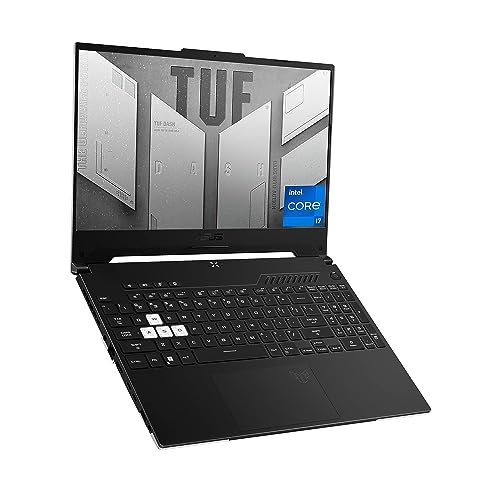
ASUS TUF Dash 15 (2022) — Slimmest verified all-rounder
The TUF Dash 15 was ASUS answering a specific complaint: gaming laptops were fast but embarrassing to open in a meeting and miserable to carry across a campus. This 2022 configuration keeps the RTX 3060 but surrounds it with a Core i7-12650H, 16GB of DDR5 memory — the only DDR5 in the verified trio — and Thunderbolt 4, which opens the door to fast docks and storage. The result is a machine that reads as a restrained grey notebook until the fans spin up, and that dual identity is precisely its appeal for students and hybrid workers who game in the evening.
Performance in games lands close to the Nitro in GPU-bound titles, since the graphics chip is shared, while the Dash’s slimmer cooling gives away a little in marathon sessions and CPU-heavy scenarios where the 12700H’s extra cores stretch ahead. In return you get a laptop that slips into a normal backpack without announcing itself. Battery behaviour away from games is respectable for the class when the screen brightness stays sensible, and the keyboard and trackpad feel tuned for typing as much as for play, which matters if this is your only computer rather than a dedicated games box.
The Dash has one more party trick worth knowing about: its mux-style graphics switching and display behaviour make it unusually comfortable docked to an external monitor, where many owners of slim gaming laptops eventually live. Run the internal panel for travel, plug into a larger screen at home through that Thunderbolt connection, and the machine covers both lives without a desktop anywhere in the flat. Battery care follows the same dual pattern — keep it plugged and cool at the desk, let it roam for classes and meetings, and the pack ages at the pace of a normal ultrabook rather than a permanently heat-soaked games box.
- Display: 15.6-inch FHD, 144Hz as listed
- Processor: Intel Core i7-12650H
- Graphics: GeForce RTX 3060
- Memory: 16GB DDR5
- Storage: 512GB SSD
- Connectivity: Thunderbolt 4 as listed
Strengths
- DDR5 memory and Thunderbolt 4 future-proof the platform around the GPU
- Slim, understated chassis suits offices, lectures and libraries
- Balanced spec sheet with no single glaring bottleneck
Trade-offs
- Slimmer cooling concedes a little sustained performance to the Nitro
- 512GB fills quickly once several large games are installed
- Webcam and speakers are serviceable rather than impressive
Best for: students and commuters who need one machine to look professional at noon and play properly at night
Not suited for: buyers chasing the absolute highest frame rates from this GPU, who should accept the Nitro’s bulk instead

MSI GF65 Thin 10UE — Lightest verified option
The GF65 Thin exists for the player whose laptop genuinely moves — between flats, to a friend’s place for co-op nights, in and out of a bag several times a week. MSI trimmed the chassis until a 15.6-inch gaming machine stopped feeling like a punishment to carry, and the 144Hz IPS-level display means the portability does not cost you the smooth screen that makes a gaming laptop feel like one. For esports titles and slightly older AAA games at 1080p, the RTX 3060 inside still delivers exactly the experience this design promises.
Read the compromises clearly, though. The Core i5-10500H is a generation behind the processors in the other two verified picks, with fewer cores for heavy multitasking or streaming, and the listed 8GB of memory is the tightest figure in this guide. Modern games plus a voice app plus a browser can crowd 8GB, so treat a memory upgrade as part of the real purchase plan if your budget allows, and check the listing’s upgrade terms. Judged as a light machine bought at a leftover-stock price, the GF65 makes sense. Judged against the Nitro at the same money, it does not.
Think of the GF65’s real rival and it is not the other two verified picks at all — it is the train journey, the overnight bag, the friend’s sofa. Every design decision MSI made serves that comparison, from the trimmed bezels to the modest adapter. Owners who understand the bargain report a machine that simply gets taken places its heavier rivals would be left behind, and a gaming laptop that travels is worth more than a faster one that stays home. Just walk in knowing the memory figure is a starting point, and price the eventual upgrade into the deal before you celebrate the discount.
- Display: 15.6-inch 144Hz IPS-level screen as listed
- Processor: Intel 10th Gen Core i5-10500H
- Graphics: NVIDIA GeForce RTX 3060
- Memory: 8GB as listed
- Storage: 512GB SSD
- Colour: Black as listed
Strengths
- Noticeably lighter and thinner than typical 15.6-inch gaming designs
- 144Hz screen keeps fast games feeling fluid
- Simple, all-black styling avoids gamer theatrics
Trade-offs
- 8GB of memory is the minimum viable figure for modern play
- Older six-core processor trails the newer Intel chips here
- Thin chassis gives fans more work during long sessions
Best for: mobile players who split time between locations and mostly enjoy esports and last-generation AAA titles
Not suited for: anyone planning to stream or edit video on the same machine, where the older processor and lean memory will pinch quickly
Lenovo Legion 5 (RTX 3060) — Used-market favourite, covered without a link
Ask owners of RTX 3060 laptops which machine they would buy again and the Legion 5 comes up constantly, because Lenovo paired the GPU with strong cooling, a high-wattage implementation and a keyboard people genuinely enjoyed typing on. It was the thinking person’s pick of its generation, less flashy than an ROG, better built than budget rivals, and it holds up well in memory — which is exactly why used examples are plentiful and why readers asked us to cover it. We could not, however, verify a clean new listing for it: remaining offers were renewed units, unclear configurations or marketplace stock with no dependable warranty story.
So this entry carries no link, deliberately. If you find a Legion 5 used, you are shopping for a specific physical machine, not a model name, and condition decides everything. Prefer listings that show the exact processor and screen fitted, ask about battery health and any hinge or fan work, and value the higher-wattage GPU configuration that made the Legion’s reputation. Priced fairly against the verified new trio above, a clean Legion 5 can be a shrewd buy. Priced like nostalgia, it cannot.
A used Legion 5 hunt rewards patience in one specific way: this model sold with several screen options, and the higher-refresh, brighter panels transform the machine compared with the base display. Two listings with identical headlines can hide very different screens, so ask for the panel details or a photo of the display settings page before travelling to view one. The same applies to storage, which previous owners often upgraded — sometimes a bonus, sometimes a mystery drive of unknown health. The Legion’s reputation was earned by its best configurations; make sure the unit in front of you is actually one of them.
- Status: prose-only entry — Lenovo stock from this era now circulates second-hand only
- Typical era configuration: Ryzen 7 5800H (some units carry the Ryzen 5 5600H) with the full-power 130W RTX 3060
- Display: 15.6-inch 1080p, most commonly the 165Hz panel
- Note: specifications differ between individual used machines
Strengths
- Reputation for strong cooling and a high-performing GPU implementation
- Excellent keyboard by gaming-laptop standards
- Understated design ages gracefully
Trade-offs
- No verified new listing — used-market risks apply in full
- Battery wear on era machines is common and replacements add cost
- Specifications vary widely between individual units
Best for: confident second-hand shoppers who can inspect a specific unit and value build quality over warranty paperwork
Not suited for: first-time buyers who need a returns safety net, who should stay with the verified new listings above
ASUS ROG Strix G15 (RTX 3060) — Renewed and used stock only, covered without a link
Where the Legion 5 whispered, the Strix G15 announced itself: light bars, coloured WASD keys on some versions, and a design that treated a gaming laptop as a piece of stage equipment. Underneath the theatre sat serious cooling and, in Ryzen configurations, a processor that handled games and streaming duties together better than most rivals of the day. Plenty of Strix G15 machines are still running happily on desks today, which keeps search interest high and keeps this model on our prose-only list rather than in the linked picks.
The reason it is prose-only mirrors the Legion’s: we found no new listing whose title, configuration and stock status all held together under checking. What circulates now is renewed and used inventory, where one Strix can be a pampered desktop queen and the next can have lived in a smoky bedroom with fans full of dust. If you shop for one, the RGB is the least important thing to test; run a game for twenty minutes, watch temperatures and listen to the fans, and check every key on that elaborate keyboard individually.
The Strix G15’s used-market trap is cosmetic confidence: the RGB still glows, the lid still looks dramatic, and a seller can photograph it into seeming mint while the fans are choked and the battery is tired. Insist on hearing it run a game, not just seeing it glow on a desk. Check the light bar and keyboard zones all respond, because repairs to decorative lighting are disproportionately expensive relative to the machine’s value, and check the power adapter is the correct high-wattage unit — Strix machines bundled with a smaller adapter from another ASUS model will throttle in ways that look like a dying GPU.
- Status: covered without a link — remaining Strix offers were renewed or unclear
- Typical era configuration: Ryzen 9 5900HX or Ryzen 7 5800H with RTX 3060
- Display: 15.6-inch panels in 1080p 300Hz or 1440p 165Hz, depending on the year’s trim
- Note: RGB-heavy design with per-key lighting on many units
Strengths
- Strong cooling sustained performance in its era
- Ryzen versions juggled gaming and streaming capably
- Distinctive design that many owners still love
Trade-offs
- No verified new listing — condition varies enormously between units
- Loud styling will not suit every workplace or household
- Heavier than the slim picks in this guide
Best for: used-market hunters who enjoy bold design and can test a machine under load before committing
Not suited for: shoppers wanting a quiet, discreet laptop for shared spaces, quite apart from the warranty gap
HP Victus 15 (RTX 3060) — Second-hand staple, covered without a link
The Victus 15 was HP’s answer for buyers who wanted the RTX 3060 badge without ROG or Legion money, and it sold in enormous numbers through big retailers, which is why so many now circulate second-hand. The formula was sensible: a plain plastic shell, a decent screen on better configurations, and the same graphics chip as pricier machines, accepting dimmer displays and humbler speakers as the price of admission. For a teenager’s first gaming laptop or a spare machine for a spare room, that formula still computes — provided the individual unit has been treated kindly.
No clean new listing survived our checks, so the Victus joins this guide as prose-only guidance rather than a linked recommendation. Used Victus machines reward careful screening: the plastic hinge area deserves a close look, screen brightness varies between configurations so confirm which panel a unit carries, and the modest cooling means a dust-clean and fresh thermal paste can transform a throttling example. Buy the condition, not the badge, and insist on seeing the machine run a game rather than a desktop screenshot.
With the Victus, the smart money inspects the screen hinge and the corners of the lid, where a plastic chassis records its history honestly. A Victus that has lived on one desk can be indistinguishable from a two-year-old new machine in performance terms, while a daily-carried one may creak and flex in ways that predict a short remaining life. Ask which life it lived. Also confirm the exact refresh rate of the fitted panel, because the Victus range mixed modest and fast screens under similar names, and the fast one is worth meaningfully more to a player than the slow one.
- Status: guidance only — Victus RTX 3060 units today are a used-market purchase
- Typical era configuration: Intel Core i5-12450H or Ryzen 5 5600H with RTX 3060
- Display: 15.6-inch 1080p at 144Hz on most configurations
- Note: plastic chassis kept original prices low
Strengths
- Huge original sales mean plentiful used supply and parts knowledge
- Same RTX 3060 graphics as far pricier era rivals
- Plain styling blends into school and office settings
Trade-offs
- No verified new listing — warranty protection is absent or thin
- Plastic build and hinges need careful inspection
- Entry configurations paired the GPU with dim, slow screens
Best for: budget-minded used buyers furnishing a first setup or a secondary room
Not suited for: anyone expecting new-machine reliability for coursework or work deadlines
How Should You Set Up an RTX 3060 Laptop for the Best 1080p Experience?
Begin with the display pipeline. Set the panel to its full 144Hz refresh in Windows display settings — a surprising number of owners game at 60Hz for months because the default never changed — and enable the GPU’s control panel to prefer the discrete graphics card for your games rather than leaving selection to chance. In each game, start from high presets, switch DLSS to quality where offered, and treat shadows, reflections and volumetric effects as the adjustable budget that buys back frame rate. Texture quality can usually stay high at 1080p until a specific title protests, at which point it becomes the next dial to lower.
Heat management decides whether those settings survive a two-hour session. Play on a hard surface, raise the rear of the machine slightly or use a basic stand so the intakes breathe, and pick the performance fan profile in the manufacturer’s control software for demanding games rather than the quiet profile. Keep the charger connected during play; every machine in this class reduces performance sharply on battery, and gaming on battery also wears the cells faster. A monthly blast of compressed air through the vents, machine off and fans held still, prevents the slow thermal creep that owners often misdiagnose as a dying GPU.
Finally, protect the storage budget. A 512GB SSD disappears quickly under modern install sizes, so keep the two or three games in active rotation on the internal drive, move finished titles to external storage rather than deleting and redownloading them, and leave a healthy slice of the drive empty — SSDs slow down as they approach completely full. Turn on cloud saves where your platforms offer them. On a discontinued machine that you may one day replace without warning, saves backed up off the device are the difference between an inconvenience and a lost hundred hours.
How Long Will an RTX 3060 Laptop Stay Relevant From Here?
Relevance depends on what you play, and the honest answer splits by genre. Esports and competitive titles evolve slowly by design — their developers protect enormous installed bases of modest hardware — so an RTX 3060 will serve those games for years yet. The back catalogue is effectively permanent: two decades of PC gaming, including most of the titles people actually replay, runs beautifully on this chip. It is the annual flagship release, marketed on spectacle, where the 3060’s remaining lifespan is measured in a shrinking number of settings compromises rather than in outright refusal.
Support timelines matter alongside raw power. Nvidia maintains driver support for the Ampere generation actively, and the architecture’s maturity means game developers test against it heavily — an underappreciated advantage of owning the card everyone else owned. When support eventually winds down, it will do so gradually, announced in driver notes long before it bites. A buyer today is not purchasing a cliff edge; they are purchasing a gentle slope, and the price of leftover stock should be judged against that slope rather than against a fiction of sudden obsolescence.
Plan the exit as part of the entrance. An RTX 3060 laptop bought cheaply in 2026 and sold or handed down in 2028 has delivered its value even if a 2029 flagship defeats it. These machines make excellent second computers, family gaming laptops and emulation or media boxes in their second lives, which softens the depreciation story considerably. The purchase only turns sour when the entry price pretends the machine is current — which is why this guide returns, again and again, to comparing the day’s asking price with the newer generation before any money moves.
What Accessories Make Sense for a Previous-Generation Gaming Laptop?
Start with the unglamorous performance pair: a simple stand that lifts the rear intakes clear of the desk, and a mouse you actually like. The stand costs little and returns real sustained performance on every machine in this guide, because Ampere-era cooling was designed around airflow that a flat desk quietly strangles. The mouse matters because all three verified picks have trackpads tuned for travel rather than for ranked play, and no accessory changes your scores more honestly than the one your hand spends the match on.
Storage is the second sensible spend, timed to a sale rather than to impulse. Modern game installs make the 512GB drives across this guide feel smaller every year, and an external SSD for the finished-but-not-deleted library, or an internal addition where the chassis allows, postpones the delete-and-redownload cycle that eats evenings. Keep the internal drive for the games in active rotation and the operating system, and the machine will feel faster for longer than its specifications suggest.
Skip the accessories that promise transformation. Cooling pads with theatrical fans add noise more reliably than they subtract degrees beyond what a stand already achieves, and novelty peripherals age faster than the laptop does. The previous-generation purchase is, at heart, an exercise in value discipline; its accessory budget should follow the same rule, buying airflow, storage and a good mouse, and letting the rest of the catalogue sell its glow to someone else.
Should You Buy Extended Protection on Leftover or Used Stock?
On the verified new trio, the calculus is ordinary: the manufacturer’s warranty already covers the early failure window when defects reveal themselves, and paid extensions make sense mainly for accident-prone environments — shared houses, young children, laptops that travel weekly in soft bags. Read what the extension actually covers, because screen and battery terms vary widely and those are precisely the components a gaming laptop stresses. A plan that excludes the battery is insuring the parts least likely to fail.
On the prose-only used models, protection usually cannot be bought at any sensible price, which is why the inspection rituals in their analyses carry so much weight. Your protection is the testing itself, the seller’s returns window, and the price leaving room for one repair. A used machine bought with a repair’s worth of discount still in your pocket is self-insured in the only way that matters; a used machine bought at the top of its range has no margin for the fan or battery it may need within the year.
Either way, register the product, keep the receipt somewhere that is not the laptop, and photograph serial numbers on day one. Warranty claims and insurance conversations alike are won with paperwork gathered before anything went wrong. It takes four minutes, it is the least exciting advice in this guide, and across a large enough readership it will save more money than every other paragraph here combined.
How Do You Spot a Mislabelled RTX 3060 Listing Before It Spots You?
Mislabelled listings follow patterns once you have seen them twice. The first is the wandering specification: a headline naming one processor while the detail table names another, or a memory figure that changes between the title, the bullet points and the configuration selector. Honest listings are boringly consistent, because they were generated from a single product record. The second pattern is the borrowed photograph — images of a visibly different model, identifiable by port layout or keyboard, standing in for the machine actually on sale. The third is the too-complete range: a seller offering every configuration of a discontinued line, in every colour, all in stock, when the manufacturer itself could not supply that breadth today. Any one pattern deserves a question to the seller; two together deserve a different seller.
Ask the question that separates records from stories: request the full model number and serial-prefix information, then check that string against the manufacturer’s support page, which will state the original factory configuration for that exact unit family. It takes five minutes and it converts a listing from a claim into a document. Sellers of genuine stock answer such questions quickly, because the answer costs them nothing. Sellers trading on vagueness delay, deflect or answer a question you did not ask — and that behaviour, more than any specification, is the data point to act on. Walk away from fog, however attractive the price inside it appears.
Keep your own paper trail as carefully as you check theirs. Save the listing page, the configuration summary and the order confirmation as they appeared on the day you paid, because the returns conversation about a wrong specification is won by whoever can show what was promised. On marketplace purchases, keep the seller’s messages inside the platform rather than moving to private channels, so the record stays attached to the transaction. This sounds like legal advice dressed as shopping advice, and in a sense it is: discontinued stock is where the industry’s labelling discipline goes to relax, and the buyer who documents is the buyer who does not pay for the relaxation.
Price itself is a labelling signal worth reading. A supposedly new RTX 3060 machine priced dramatically below every other verified listing is not a miracle; it is a question — renewed stock described loosely, a lower GPU variant wearing a bigger badge, a regional model with a different keyboard and warranty, or a configuration whose memory and storage have been quietly trimmed. Sometimes the answer is innocent and the bargain is real. But the question must be asked and answered in writing before the discount is celebrated, because in this corner of the market the cheapest listing and the most expensive mistake are very often the same machine viewed a week apart.
Finally, use the community’s memory. This generation sold in the millions, and owner forums have documented every variant, every wattage difference and every retailer quirk of these exact models for years. A ten-minute search of the precise model number will surface teardowns, upgrade guides and warnings that no listing will volunteer. Previous-generation buying rewards this archaeology more than any other kind of laptop shopping, because the machines are known quantities in a way new releases never are. The information exists. The only buyers who shop without it are the ones who chose speed over certainty on a purchase designed to last years.
How Do the Six Picks Compare Side by Side?
| Pick | Screen | Graphics | Strongest suit |
|---|---|---|---|
| Acer Nitro 5 AN515-58-725A | 15.6″ FHD 144Hz | RTX 3060 | Strongest CPU and cooling |
| ASUS TUF Dash 15 (2022) | 15.6″ FHD 144Hz | RTX 3060 | Slim chassis, DDR5, Thunderbolt 4 |
| MSI GF65 Thin 10UE | 15.6″ 144Hz | RTX 3060 | Lightest carry of the verified trio |
| Lenovo Legion 5 (prose-only) | Varies by used unit | RTX 3060 | Era-best build and keyboard |
| ASUS ROG Strix G15 (prose-only) | Varies by used unit | RTX 3060 | Bold design, strong era cooling |
| HP Victus 15 (prose-only) | Varies by used unit | RTX 3060 | Plentiful, affordable used supply |
Read the table with the linked and prose-only divide in mind: the first three rows describe machines you can order new from a verified listing, while the last three describe model families whose specifications genuinely vary unit by unit on the used market. Any comparison that printed one tidy spec line for a used Legion 5 would be inventing precision, because a five-year-old model name covers several processors, screens and GPU wattages. That honesty is less convenient than a uniform table, but it reflects the actual shopping decision in front of you.
The verified trio separates cleanly by lifestyle rather than by raw gaming score. The Nitro prioritises sustained performance, the Dash prioritises portability with modern platform features, and the GF65 prioritises the lightest possible carry at the cost of memory and processor generation. Since the graphics chip is identical, choosing between them is really choosing which compromise you will notice least across three years of ownership — weight on your back, or a few frames in a CPU-heavy title, or an eventual memory upgrade bill.
What Mistakes Do Buyers Make When Chasing Discontinued RTX 3060 Stock?
Paying a current-generation price for a previous-generation chip is the defining error of this category. Leftover stock sometimes carries launch-era pricing long after newer machines have undercut it, counting on the shopper recognising the RTX 3060 name and not checking what an RTX 4060 laptop costs this week. Always run that comparison on the day you buy. The older machine is a bargain at a genuine discount and a trap at price parity, and no loyalty to a familiar badge changes that arithmetic.
Treating renewed and refurbished listings as equivalent to new stock is the second trap. A renewed machine may be perfectly good, but it is not the same purchase: warranty length, battery condition and return terms all differ, and listings do not always make the distinction prominent. This guide linked only listings that verified as clean new stock, and excluded renewed units even when the model name matched. Mirror that discipline in your own shopping, and read the condition line before the headline.
Assuming every RTX 3060 performs identically ignores the wattage question entirely. Slim designs and low-power implementations of this GPU can trail a full-power version by a margin you will feel in demanding games, which is why chassis and cooling receive so much attention in the analyses above. When a listing or seller cannot tell you anything about the machine’s cooling or configuration beyond the badge, that silence is itself a reason to slow down.
Finally, buyers of era machines often skip the dull checks: battery health, fan noise under load, hinge play, charger originality. On new verified stock those checks matter less because warranty stands behind you. On the prose-only models they are the whole purchase. Twenty minutes of testing protects you better than any amount of reading about a model’s reputation from 2021.
Final Recommendation
Match the machine to your living pattern first and your game library second. Desk-bound players should take the Nitro 5’s stronger processor and cooling, because sustained performance is what a fixed setup rewards every single day. Students and commuters should take the TUF Dash 15, whose DDR5 platform, Thunderbolt 4 and restrained chassis make it the easiest of the trio to live with as an only computer. Genuinely mobile players who accept a memory upgrade as a future errand can take the GF65 Thin and enjoy carrying a gaming laptop that does not punish the carrying.
The prose-only trio deserves respect rather than links. A well-kept Legion 5, Strix G15 or Victus 15 bought used at a fair figure can deliver the same 1080p evenings as the new trio, but only a buyer willing to inspect, test and accept thinner warranty protection should go that route. Everyone else is better served by the verified listings, limited as they are.
If the remaining RTX 3060 stock sells through before you decide, treat that as the market closing this chapter rather than as a reason to overpay a reseller — the honest successor purchase is a discounted RTX 4060 machine, and the discipline you practised here, verifying listings and pricing against the newer generation, will serve you just as well there.
Frequently Asked Questions
Is the RTX 3060 still good enough for new games?
At 1080p, yes, with sensible expectations. Current releases run well on high settings in most cases, especially with DLSS quality mode enabled, while the most demanding titles ask for medium shadows and reflections. The chip struggles when pushed to native 1440p or heavy ray tracing, so match it to the 1080p panels it was designed for and it remains an enjoyable gaming GPU.
Why does this guide have only three linked laptops?
Because production of RTX 3060 laptops has ended and only three listings passed verification as clean new stock with coherent, matching specifications. Rather than link renewed units or listings whose details contradicted themselves, we covered three additional familiar models as prose-only entries with no links, so readers get orientation on the used market without a false impression that those machines were verified as new.
Should I buy an RTX 3060 laptop or a newer RTX 4050 model?
Compare the actual prices on the day you shop. The RTX 4050 brings newer features including frame generation and better efficiency, and it often sells close to leftover 3060 pricing. Choose the 3060 only when its discount is substantial enough to compensate for the older platform, shorter support horizon and lower resale value; at similar money, the newer machine is the rational purchase.
How much memory does an RTX 3060 laptop need?
Sixteen gigabytes is the comfortable figure for gaming alongside voice chat, browsers and launchers, and two of the verified picks here include it. An 8GB configuration like the GF65 Thin’s listed spec still plays games, but multitasking crowds it quickly, so budget for an upgrade if you choose that route and confirm the machine allows one.
What should I test when buying a used RTX 3060 laptop?
Run a demanding game for at least twenty minutes and watch for overheating, throttling or fan grinding. Check battery behaviour under light use, test every keyboard row, inspect the hinges for looseness, confirm the original charger is included, and verify the exact processor, screen and GPU fitted, since model names from this era cover several configurations.
Will an RTX 3060 laptop handle esports titles at 144Hz?
Comfortably. Popular competitive games are the least demanding end of modern gaming, and this GPU typically produces frame rates well beyond a 144Hz panel’s refresh rate at 1080p with competitive settings. That headroom is one reason leftover 3060 machines remain attractive for players whose library centres on shooters, MOBAs and sports titles.
Related Guides
Readers who worked through this shortlist usually continue with Best White Gaming Laptops , Best Gaming Laptops With Battery Life and Best Gaming Touchscreen Laptops , since those guides approach many of the same machines from a neighbouring angle.


[…] broadcast desk connects to three more guides in this set: Best Gaming Laptops With RTX 3060 covers the older cards many streamers still run, Best White Gaming Laptops covers the clean-desk […]