What's inside
- Key Takeaways
- Quick Picks
- How Did We Decide Which White Laptops Could Be Linked and Which Could Not?
- Why Do So Few Gaming Laptop Listings Actually State the Colour?
- How Do You Keep a White Gaming Laptop Looking White?
- Which White Gaming Laptops Can You Actually Verify, and Which Need a Closer Look?
- What Else Should You Weigh Besides Colour When Shortlisting a Light-Finished Machine?
- How Do the Different White Finishes Actually Differ in Person?
- What Does a White Setup Cost Beyond the Laptop Itself?
- When Is Silver or Grey the Smarter Light Choice?
- How Do You Photograph and Prove a Colour Variant if the Wrong One Arrives?
- One Last Check Before You Order a Light-Finished Machine
- How Do the Six Picks Compare Side by Side?
- What Mistakes Do Shoppers Make When Buying a White Gaming Laptop?
- Final Recommendation
- Frequently Asked Questions
- Related Guides
As an Amazon Associate I earn from qualifying purchases. This post may contain affiliate links at no extra cost to you.
widgetverdict.com is reader-supported. When you buy through links on our site, we may earn an affiliate commission.
White gaming laptops occupy a strange corner of the market: plenty of manufacturers will sell you a white finish, but remarkably few say so in the listing itself. That distinction drives this entire guide to the best white gaming laptops. When we verified the available listings, exactly two machines stated their light finish plainly in the listing title — the ASUS ROG Zephyrus G14 in Platinum White and the Razer Blade 14 in Mercury. Those two are the linked picks here. The remaining four places are prose-only entries covering white versions of well-known gaming lines whose listings do not state the colour, and we will not link a machine as ‘white’ when the listing a buyer lands on might describe a black unit instead.
Where to buy: use the two linked listings below when colour certainty matters, because the finish is part of the verified title text. For the prose-only models, the shopping method is different — open the manufacturer’s configuration page or the retail listing, find the colour selector, and confirm the exact variant name and finish in writing before paying. Screenshots help if a different colour arrives. White finishes also attract a small premium in some ranges and sell through in waves, so a white variant can be in stock while its black twin is discounted, or the reverse, within the same week.
Why chase white at all? Partly taste: a pale chassis suits bright desks, Scandinavian rooms and setups built around light peripherals, and it hides dust and micro-scratches better than glossy black. Partly practicality: white keycaps with backlighting read clearly in daylight, and pale palm rests show less of the shine that dark plastic develops. The costs are real too — yellowing on older plastics, visible grime around ports, and a smaller second-hand pool. This guide weighs those trade-offs model by model instead of treating colour as a coat of paint over an ordinary shortlist.
Key Takeaways
- Only two linked picks appear because only two listings verified the light finish in their own titles: Zephyrus G14 Platinum White and Razer Blade 14 Mercury.
- The other four entries are prose-only because their white variants exist but their listings do not state colour — always confirm the variant yourself before buying those.
- The Zephyrus G14 pairs its Platinum White shell with a 3K OLED 120Hz display and an RTX 5080, making it the performance flagship here.
- The Razer Blade 14 in Mercury offers the most restrained, aluminium take on a white gaming laptop.
- White finishes show port grime and can yellow with age; a microfibre routine matters more than with black machines.
- Never trust a thumbnail photo for colour — variant names in the listing text are the only reliable evidence.
Quick Picks
| Pick | Badge | Why it earns its place |
|---|---|---|
| ASUS ROG Zephyrus G14 (Platinum White) | Verified Platinum White flagship | The listing names Platinum White outright, and backs it with a 3K OLED screen and RTX 5080 power. |
| Razer Blade 14 (2025) — Mercury | Verified Mercury aluminium | Razers Mercury finish is stated in the listing, on an aluminium 14-inch chassis with a 3K OLED screen. |
| Lenovo Legion Slim 5 (Glacier White variant) | Glacier White exists — colour unconfirmed by listings | A white Legion variant exists, but listings lead with specs — confirm Glacier White at configuration. |
| ASUS ROG Zephyrus G16 (Moonlight White variant) | Moonlight White exists — confirm it yourself | The bigger Zephyrus has worn Moonlight White, but listings omit the finish — verify the variant yourself. |
| Razer Blade 16 (Mercury variant) | Mercury exists — buy via the configurator | A Mercury Blade 16 exists in Razers range, but the listings checked do not name the finish. |
| ASUS TUF Gaming A15 (white variant) | Light TUF exists — match the exact SKU | White TUF models have been the affordable entry to this niche, but colour is never in the listing title. |
How Did We Decide Which White Laptops Could Be Linked and Which Could Not?
The rule was strict and simple: a laptop earned a link in this guide only if its verified listing title named the light finish itself. Platinum White and Mercury both appear in the title text of their respective listings, so a reader clicking through can check the colour claim against the same words we checked. That standard excluded several machines we know are sold in white, because their listings lead with processor and graphics specifications and leave colour to a selector buried in the page, or to photographs that may show a different variant entirely. Linking those would have risked sending a reader to a black laptop under a white headline.
Performance still mattered after the colour gate. A white gaming laptop has to be a gaming laptop first, so integrated-graphics ultrabooks in pale finishes were excluded, and every entry here — linked or prose-only — centres on a discrete GPU configuration capable of modern 1080p or 1440p play. Within that frame we spread the six entries across sizes and budgets: two premium 14-inch linked machines, then prose-only coverage of larger Legion and Zephyrus variants, a bigger Blade, and a white TUF model that served as the affordable doorway into this niche.
Prose-only entries were written as buying guidance rather than recommendations of a specific listing. Each one explains how that model’s white variant is usually named, where colour confirmation typically lives in the buying process, and what ownership of that finish involves. If you fall for one of those machines, the work of verifying colour shifts to you at the configuration page — a small errand, but an essential one, because returns for ‘wrong colour’ are an avoidable misery when the variant was selectable all along.
Why Do So Few Gaming Laptop Listings Actually State the Colour?
Retail listings are written to rank for specification searches, and colour rarely makes the title because manufacturers assume shoppers filter for it later in the configuration process. A listing title has limited characters, and every one spent on ‘white’ is one not spent on the processor, graphics card or display figures that drive clicks. The result is a market where colour information lives in variant selectors, photo galleries and SKU codes rather than in the headline a buyer actually reads — convenient for sellers, treacherous for anyone building a colour-coordinated setup from search results alone.
Variant naming adds a second layer of confusion. Razer calls its light finish Mercury, ASUS uses Platinum White on the Zephyrus line and Moonlight White elsewhere, Lenovo has used Glacier White, and other brands reach for ‘lunar’, ‘ceramic’ or ‘pearl’. None of these are the same shade, and none guarantee the keyboard deck, bezels and underside share the lid’s finish. Some ‘white’ laptops are two-tone, with a pale lid over a black deck. Reading the full variant description — and ideally seeing the specific configuration’s gallery rather than the range’s hero images — is the only way to know which surfaces you are actually getting.
The practical habit this guide recommends is unglamorous: decide your model, open its official configuration page, select the light variant explicitly, and save a screenshot or order confirmation showing the finish name. If a marketplace listing cannot state the colour in text anywhere, treat that as a question to ask the seller before purchase, not a detail to discover at unboxing. Colour is the one specification you will see every minute you own the machine, so it deserves the same verification rigour as the GPU.
How Do You Keep a White Gaming Laptop Looking White?
Heat, skin oils and ultraviolet light are the three enemies. Oils from palms transfer to the deck during long sessions and, on pale plastic, gradually tint the most-touched areas; a weekly wipe with a slightly damp microfibre cloth keeps that film from setting. Keep the machine out of prolonged direct sun when it sits idle on a desk, because UV exposure is what yellows older white plastics unevenly, leaving the lid a different shade from the base. Aluminium finishes like the Blade’s Mercury resist yellowing far better than plastic, which is one quiet argument for the premium end of this niche.
Ports and vents collect visible grime on a light chassis. Dust that would be invisible inside a black vent grille reads as grey smudging on white, so the compressed-air routine recommended for any gaming laptop matters doubly here, and a soft brush around USB and HDMI openings keeps the edges clean. Avoid coloured cleaning sprays and abrasive pads; mild water on cloth is enough for modern coatings, and harsh chemicals can cloud the finish you paid extra to enjoy. A light-coloured sleeve for transport prevents dye transfer from dark bags and denim, a surprisingly common cause of mysterious blue-grey marks on pale lids.
Set expectations honestly: a white laptop used daily will not look showroom-fresh in year three, and that is fine. The owners who stay happy with the choice are the ones who wanted a bright desk presence, not a museum piece, and who spend two minutes a week on upkeep. If the thought of visible wear genuinely bothers you, a silver aluminium machine is the safer aesthetic — it reads as light and bright while hiding its age far more gracefully than any white plastic can.
Which White Gaming Laptops Can You Actually Verify, and Which Need a Closer Look?
Two linked flagships come first, each with its finish named in the verified listing title. Four prose-only entries follow, covering the white variants readers ask about most; each explains exactly what to confirm at the configuration page because we could not confirm the colour from a listing title ourselves.
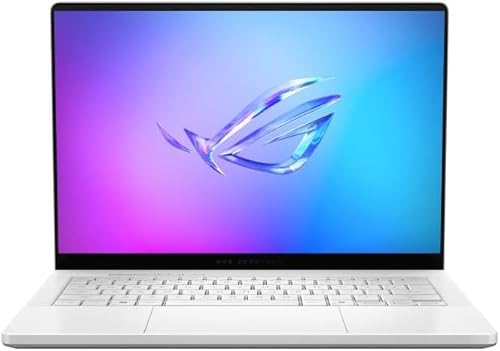
ASUS ROG Zephyrus G14 (Platinum White) — Verified Platinum White flagship
The Zephyrus G14 in Platinum White is the rare case where this guide’s strict rule and a shopper’s dream machine coincide. The listing title states the finish in plain words, so the colour claim is checkable in seconds, and the specification behind that pale lid is flagship-grade: a Ryzen AI 9 HX 370, an RTX 5080, 32GB of memory and a 2TB SSD, wrapped around a 14-inch 3K OLED panel refreshing at 120Hz. That combination makes this the most capable compact gaming laptop in this roundup by a wide margin, able to drive its own high-resolution screen in demanding games rather than treating the display as a pretty liability.
The Platinum White finish suits the G14’s design language particularly well. The Zephyrus line has always been the ROG family’s minimalist — clean lid, slash lighting accent, none of the bulkier Strix theatre — and in white it reads closer to a premium creator ultrabook than a gaming rig, which is exactly what many buyers of this guide want for a machine that also attends meetings. OLED care applies: vary your content, let static taskbars hide, and enjoy the contrast that makes night scenes in games look genuinely black rather than grey. Heat is managed impressively for the size, though the base gets warm under sustained load, as every powerful 14-inch machine does.
One more Zephyrus detail deserves airtime: the slash lighting on the lid is subtler in Platinum White than on the dark model, reading as a design accent rather than a light show, and it can be dimmed or disabled entirely for boardrooms. Combined with the OLED’s inky blacks against the pale shell, the machine has a contrast of its own that photographs well and lives even better. Owners building a full white setup should note the included peripherals and charger may not match the finish — a small aesthetic tax this category levies almost everywhere, and worth checking before the desk photos are planned.
- Display: 14-inch 3K OLED, 120Hz as listed
- Processor: AMD Ryzen AI 9 HX 370 as listed
- Graphics: RTX 5080 as listed
- Memory: 32GB RAM as listed
- Storage: 2TB SSD as listed
- Finish: Platinum White, named in the listing title
Strengths
- Finish verified in the listing title — no colour guesswork
- RTX 5080 and 32GB memory give it flagship headroom
- 3K OLED 120Hz screen is the finest display in this guide
Trade-offs
- Premium pricing reflects both the finish and the specification
- OLED panels reward basic burn-in awareness
- Compact chassis runs warm during marathon sessions
Best for: players wanting one compact machine that anchors a bright setup and still tops performance charts
Not suited for: shoppers on a mid-range budget, for whom the prose-only TUF variant below is the realistic white route
Razer Blade 14 (2025) — Mercury — Verified Mercury aluminium
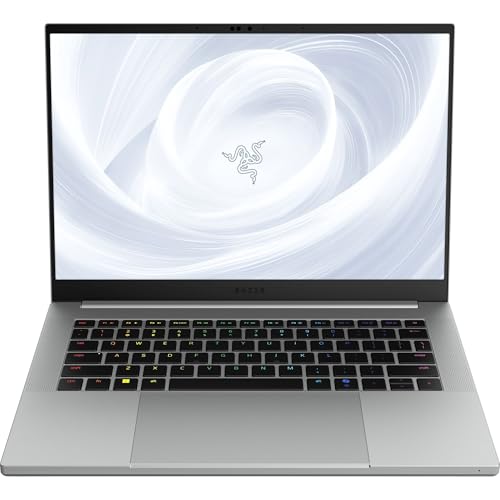
Razer’s Mercury finish has a cult following for a reason: it takes the Blade’s machined aluminium unibody — already the most MacBook-like object in gaming — and renders it in a soft silver-white that shrugs off fingerprints, resists the yellowing that ages white plastics, and looks at home in any room in the house. Crucially for this guide, the verified listing names Mercury in its title, so the finish is a stated fact of the product rather than a hopeful reading of a photo. Underneath sits a 2025 specification with a Ryzen AI 9 365, RTX 5070 graphics, 32GB of DDR5 memory and a 3K OLED display at 120Hz.
Compared with the Zephyrus above, the Blade trades a step of GPU tier for what many owners consider the better-built object: tighter tolerances, a superb glass trackpad, and a keyboard deck that feels milled from a single billet. The Chroma per-key lighting against the pale deck is a distinctive look — colours read softer and more pastel than on black keyboards, which owners tend to either love or immediately set to plain white. As a streaming or creator machine it doubles gracefully, and its resale values historically hold up well, helped by that aluminium shell ageing more gracefully than plastic rivals.
The Blade’s keyboard deserves a paragraph of its own in a colour guide, because the pale deck changes how Chroma behaves visually. Saturated colours glow harder against black; against Mercury they blend into softer, almost pastel tones that many owners find more elegant and less arcade. If your taste runs to a single calm colour — ice blue and warm white both flatter this finish — the Blade executes it better than any rival here. The glass trackpad, edged in the same aluminium, completes an object that feels designed as one piece rather than assembled from a parts bin, and that cohesion is what Razer charges for.
- Display: 3K 120Hz OLED as listed
- Processor: AMD Ryzen AI 9 365 as listed
- Graphics: RTX 5070 as listed
- Memory: 32GB DDR5 RAM as listed
- Storage: 1TB as listed
- Finish: Mercury, named in the listing title
- Extras: Chroma RGB keyboard as listed
Strengths
- Mercury finish confirmed in the listing title
- Aluminium unibody hides wear and fingerprints superbly
- Excellent trackpad and build precision for daily work
Trade-offs
- RTX 5070 sits a tier below the Zephyrus configuration here
- Razer pricing is premium even before the finish
- Pale deck shows port grime that needs occasional attention
Best for: design-conscious players who will also work on the machine daily and value build feel as much as frame rates
Not suited for: pure performance-per-pound hunters, who get more GPU from the Zephyrus at this end of the market
Lenovo Legion Slim 5 (Glacier White variant) — Glacier White exists — colour unconfirmed by listings
Lenovo has offered Legion models in a Glacier White finish that pairs the line’s excellent keyboards and cooling with a bright, almost ceramic-looking shell, and for many shoppers it is the white gaming laptop they picture first. The problem is purely evidentiary: the listings we checked for Legion configurations describe processors, graphics and screens in detail while saying nothing about colour in the title, and the variant selector is where the finish is decided. Linking such a listing under a white headline could land a reader on a dark unit, so the Legion appears here as prose-only guidance instead.
If this is your target, buy it through a configuration page where Glacier White is an explicit selectable option, and keep the order confirmation that names it. Check which surfaces are white on the specific model year — Lenovo has varied the treatment between lid-only and full-deck finishes across generations — and confirm the keyboard backlight colour, since white decks with white backlighting can wash out in bright rooms. The underlying Legion virtues remain: strong sustained performance, sensible port layouts with rear connections that keep a white desk tidy, and pricing that usually undercuts Razer for similar silicon.
Legion shoppers should also ask which keyboard backlight the white variant carries in their region, because Lenovo has shipped both white-backlit and RGB decks under similar names, and the difference matters at night on a pale keyboard. White backlighting on white keycaps is the one combination in this guide we would actively avoid for evening work; RGB or a darker legend solves it. A quick question at configuration time prevents a nightly annoyance that no amount of Legion cooling excellence can offset, and it is exactly the kind of variant detail that listing titles never tell you.
- Status: prose-only entry — Legion listings lead with specifications, not colour
- Variant to confirm: Glacier White, via the colour selector on the configuration page
- Class: 14.5 to 16-inch Legion gaming configurations (varies)
- Note: the same listing may default to a dark variant
Strengths
- Legion cooling and keyboards are among the best in class
- White variant undercuts premium rivals on price
- Rear ports keep a light-coloured desk setup cable-tidy
Trade-offs
- Colour cannot be verified from listing titles — self-check required
- Finish treatment varies between model years
- White variant stock comes and goes without warning
Best for: methodical shoppers happy to configure carefully in exchange for Legion performance at a fair price
Not suited for: anyone who wants colour certainty from a single click, who should stay with the two linked picks
ASUS ROG Zephyrus G16 (Moonlight White variant) — Moonlight White exists — confirm it yourself
Think of the Zephyrus G16 as the G14’s larger sibling for players who found 14 inches cramped: a 16-inch high-refresh screen, more cooling volume, and the same restrained ROG design language, offered in a Moonlight White finish that gives bright setups a bigger canvas. It is a genuinely desirable object, and precisely because it is desirable we were careful with it — the listings available to us describe the G16’s specifications thoroughly but do not state Moonlight White in their titles, so it cannot be a linked pick in a guide whose promise is verified colour.
The buying path is nevertheless straightforward. On ASUS’s own configuration pages the finish is a named variant; select it deliberately, confirm the full configuration summary repeats it, and be wary of marketplace listings that illustrate a white unit while shipping whatever variant the SKU actually encodes. Owners of white G16s praise the same things G14 owners do — a calm, premium presence and a screen-forward design — while noting the larger deck shows palm-area wear sooner simply because there is more of it, making the weekly microfibre habit genuinely worthwhile at this size.
The G16’s white treatment rewards a desk with natural light, where the larger lid becomes almost architectural — several owners describe it as the piece that made their setup feel finished. The counterpoint is fingerprints during transport: a 16-inch pale lid collects handling marks across a bigger canvas, so the sleeve advice elsewhere in this guide applies with double force. If your G16 will live at home moving between two rooms, none of this matters. If it will commute in a backpack daily, the verified G14 above was designed for your life in a way its bigger sibling was not.
- Status: covered without a link — G16 listings describe hardware and omit the finish
- Variant to confirm: Moonlight White, on the official configuration page
- Class: 16-inch thin gaming laptop with high-refresh display (varies by config)
- Note: smaller G14 sibling above is the verified linked alternative
Strengths
- Bigger screen suits strategy, editing and split-screen work
- Same refined design language as the verified G14
- Strong performance in a still-portable 16-inch shell
Trade-offs
- Finish unverifiable from listing titles — configuration check essential
- Larger white surfaces demand more upkeep
- White variant may carry a premium over the dark version
Best for: players wanting a larger bright centrepiece who are comfortable verifying the variant at checkout
Not suited for: impulse buyers following a single marketplace link, where colour ambiguity is a real risk
Razer Blade 16 (Mercury variant) — Mercury exists — buy via the configurator
The Blade 16 in Mercury is the maximal version of Razer’s light-finish idea: the big aluminium flagship, with its larger high-refresh display options and top-tier graphics configurations, rendered in the same soft silver-white as the 14-inch model linked above. It anchors a bright battlestation like nothing else in this guide. It is prose-only for the now-familiar reason — the Blade 16 listings we could check did not state Mercury in the title text, and a finish this central to the purchase cannot rest on a gallery photograph that might depict a different variant or a press render.
Razer sells this machine most reliably through its own store, where Mercury is an explicit configuration choice with the finish named at checkout; that is the route to take, with the confirmation saved. Expect the aluminium to age better than any white plastic in this guide, expect the larger chassis to run its powerful components with less fan drama than the 14-inch, and expect to pay flagship money for the privilege. If colour certainty with a link matters more than screen size, the verified Blade 14 above delivers the same Mercury experience in a smaller, checkable package.
Blade 16 hunters should know the Mercury variant’s stock pattern: it tends to appear at range launches and sell through faster than the black equivalent, then vanish from Razer’s store until the next refresh. That rhythm argues for buying when your exact configuration is available rather than waiting for a discount that may coincide with the colour disappearing entirely. It also supports the model’s resale story — a clean Mercury Blade 16 is a scarce object in the second-hand market, and scarcity, in this one corner of laptop economics, genuinely holds value.
- Status: guidance only — Blade 16 colour lives in the configurator, not listing headlines
- Variant to confirm: Mercury, via Razers own store configuration
- Class: 16-inch flagship gaming laptop (configuration varies)
- Note: the linked Blade 14 above is the verified Mercury option
Strengths
- Flagship screen and graphics options in the light finish
- Aluminium Mercury shell ages gracefully
- Quieter cooling than the compact Blade under load
Trade-offs
- No listing title verification — buy via the configurator
- Highest prices in this guide at top configurations
- Size and weight suit a desk more than a daily commute
Best for: battlestation builders who want the largest Mercury canvas and will order through Razers configurator
Not suited for: commuters, and anyone uneasy about verifying colour themselves
ASUS TUF Gaming A15 (white variant) — Light TUF exists — match the exact SKU
Every niche needs its affordable door, and for white gaming laptops that door has usually been a TUF: ASUS’s value line has appeared in light grey-white finishes in several model years, delivering a proper discrete GPU and high-refresh screen without the Zephyrus or Blade price tag. For a first gaming laptop in a bright bedroom setup, that combination is exactly right. What the TUF has never done is announce its finish in listing titles, which — under this guide’s verification rule — places it firmly in prose-only territory despite its popularity.
Shop for it accordingly. Identify the exact model year and SKU whose finish you have confirmed from the manufacturer’s specification page, then match that SKU character-for-character when ordering, because TUF ranges reuse near-identical names across colours and configurations. Accept the class compromises with open eyes: a plastic shell that will show its age sooner than aluminium, a screen a step below the OLED flagships, and speakers that get the job done. In exchange you keep most of your budget for games, a monitor later, or the simple pleasure of not overspending on a first machine.
The TUF’s white variants have a hidden virtue: because the finish was never the headline, these machines often escape the colour premium entirely and discount like ordinary TUFs during sales. A patient shopper who has identified the exact light-finish SKU can sometimes land the niche’s best bargain simply by watching that SKU rather than searching for the colour by name. Set a price alert, verify the SKU one final time at checkout, and the least glamorous pick in this guide becomes the one your wallet will nominate as its favourite.
- Status: prose-only — TUF colour must be matched by exact SKU before ordering
- Variant to confirm: white or light-grey finish name on the specific model year
- Class: 15.6-inch budget gaming laptop (configuration varies)
- Note: many TUF listings show the dark variant by default
Strengths
- Most affordable route into a light-finished gaming laptop
- Capable GPU and high-refresh screen for the class
- Huge owner community and easy parts knowledge
Trade-offs
- Colour confirmation rests entirely on SKU checking
- Plastic finish shows wear and yellowing sooner
- Display and speakers trail the premium picks clearly
Best for: first-time gaming laptop buyers building a bright setup on a controlled budget
Not suited for: buyers wanting a finish that still looks pristine after years of daily use
What Else Should You Weigh Besides Colour When Shortlisting a Light-Finished Machine?
Start with the screen, because a white bezel frames it constantly and makes a dim or washed-out panel more noticeable, not less. The two linked picks set a high bar with OLED panels; if you shop the prose-only models, prioritise brightness and colour coverage figures in the specification, and be wary of entry configurations whose pale chassis hides a dull display. A bright, accurate screen completes the airy aesthetic that motivates this entire purchase; a mediocre one leaves you with a laptop that is merely pale.
Keyboard contrast deserves a thought that black-laptop buyers never need. Pale keycaps with white backlighting can be hard to read in sunlit rooms, so check whether a model offers adjustable backlight colours or a darker legend print. The Blade’s Chroma system solves this elegantly by letting you set any key colour against the Mercury deck. Similarly, glance at the trackpad: a white glass pad shows oils as smudges but wipes clean in seconds, while textured plastic pads hold grime in their grain.
Finally, think about the rest of the desk. A white laptop beside a black monitor, black peripherals and a dark desk mat looks like an accident; the same laptop with a light keyboard, a pale mouse and a considered mat looks like a design decision. You do not need to replace everything at once, but knowing the direction of travel helps you choose between the cooler Platinum White of the Zephyrus and the warmer silver tone of Mercury, since peripherals you add later will need to live with that shade for years.
How Do the Different White Finishes Actually Differ in Person?
Stand the finishes in this guide side by side in your mind and they separate into families. Platinum White and Moonlight White are true whites with a faint warmth, chosen by ASUS to flatter the Zephyrus line’s minimalist panels. Mercury is not really a white at all up close — it is anodised silver with a bright, cool cast that only reads as white beside darker machines. Glacier White sits between, a pale neutral over plastic rather than metal. None is objectively best, but they are not interchangeable, and a setup built by mixing them at random can look like a drawer of mismatched cutlery.
Texture matters as much as tone. Anodised aluminium feels cool and wipes clean with a fingertip’s pressure; coated plastics feel warmer and hold micro-texture that can trap grime in its grain over years. Under the same desk lamp, the aluminium Blade throws a soft metallic reflection while the plastic Legion diffuses it. If you can, see your chosen finish in a shop under ordinary light rather than trusting studio photography, which is lit to make every white look like fresh snow and hides the warmth differences entirely.
Keyboards are where finishes meet function. Pale keycaps need either dark legends or coloured backlighting to stay legible across lighting conditions, and models differ more here than anywhere else. Before buying any white machine, find one photograph of its keyboard in a normally lit room — not a render — and judge whether you could read it at a glance. It is a thirty-second check on the surface you will look at most, and this guide’s linked pair both pass it handsomely, which is part of why they are the linked pair.
What Does a White Setup Cost Beyond the Laptop Itself?
Budget honestly for the gravitational pull of a theme. A white laptop on an otherwise black desk creates a visual itch that most owners eventually scratch: a pale keyboard or mouse first, then a desk mat, then monitor bezels start looking wrong. None of these purchases is necessary, and this guide’s advice is to enjoy the laptop for a month before redecorating around it — many owners discover the single bright object on a dark desk looks intentional, even striking, and the itch fades once the machine stops being new.
If you do build outward, sequence by contact hours. The mouse and keyboard are touched all day and seen constantly, so they justify theme money before a monitor frame you barely notice. Cable colour is the cheapest transformation in the entire setup world: pale braided cables and a light power strip turn a rat’s nest into a design feature for the price of a pizza. Save the expensive swap — the monitor — for when it needs replacing on its own merits, and let its bezel be the last black holdout rather than the first casualty.
Protect the investment you have made with the two-minute kit: a light-coloured microfibre cloth kept in the desk drawer, a sleeve that will not transfer dye, and a household rule that the laptop lid is not a coaster. White ownership fails through a hundred tiny neglects rather than one disaster, and the owners whose machines still glow in year three are simply the ones who made the cloth as reachable as the charger.
When Is Silver or Grey the Smarter Light Choice?
There is no shame in concluding, mid-shortlist, that true white is more commitment than you want. Silver aluminium — Mercury included, in spirit — delivers most of the bright-desk effect with a fraction of the upkeep, hides the wear of daily carrying, and matches the enormous ecosystem of silver peripherals and monitors already in the world. Several readers of this guide will be happiest treating it as a map of the light end of the market and choosing its most forgiving resident rather than its palest.
The deciding question is how you feel about patina. Some owners love objects that record their use; others want their desk to look like the day it was assembled, indefinitely. White plastic serves the first temperament for a while and then betrays it unevenly, yellowing in patches. Aluminium serves the second temperament almost perfectly. Knowing which person you are is worth more than any single specification in this roundup, and it is knowable in advance if you glance at the oldest object you own and ask whether its wear pleases or irritates you.
Whichever shade you choose, buy it deliberately and in writing — variant named, confirmation saved, photographs distrusted. That habit, more than the colour itself, is what this guide exists to teach, because the returns data of the entire industry says the wrong-colour laptop is among the most preventable disappointments in consumer technology. Get the words right and the colour will take care of itself.
How Do You Photograph and Prove a Colour Variant if the Wrong One Arrives?
It should never come to this if the confirmation habits elsewhere in this guide are followed, but disputes happen, and the buyer who prepared wins them quickly. Photograph the unboxing before the seals are fully broken, showing the box label with its variant code beside the machine as it emerges. Photograph the specification sticker on the base, which carries the exact SKU, and keep the order confirmation that names the finish in the same folder. Together those three images close almost any wrong-colour conversation in a single message, because they connect what was promised, what was labelled and what was actually inside the box without relying on anyone’s memory of a product page that may since have changed.
Raise the issue immediately and politely, in writing, through the channel you bought from. State the finish named in your confirmation, the finish that arrived, and the resolution you want — replacement with the correct variant, not a debate about whether the two shades are similar. Sellers handle colour errors routinely and most would rather correct a picking mistake than argue photography with a customer holding documentation. What they cannot do is help a buyer who noticed in week one, mentioned it in week six, and used the machine daily in between, because at that point the object is no longer the object that was shipped.
Do not be talked into keeping the wrong colour for a token discount unless the discount genuinely re-prices your feelings. You will look at this lid and deck for years, through thousands of hours of work and play, and a small refund spends itself in a month while the wrong shade remains. The exception is the genuinely indifferent buyer who discovers, to their own surprise, that the dark variant suits the room after all — in which case take the discount with a clear conscience. Everyone else should treat colour as what this guide has insisted it is: a specification, as factual as the graphics card, and as entitled to be correct as any other line on the invoice.
If you buy through a configurator, one more proof exists that marketplace buyers never get: the configuration summary screen itself. Save it as a PDF before paying, because it binds the finish, the components and the price into a single manufacturer-issued document. When we verified the two linked picks for this guide, their listing titles served that binding role, which is why they earned links and the others did not. The lesson generalises beyond this niche — in any category where a variant decides satisfaction, the document trail is the product’s second specification sheet, and keeping it is a thirty-second habit with a four-year echo.
And if the correct variant simply cannot be supplied — sold out between order and dispatch, a quiet substitution you are only now discovering — take the full refund rather than the partial remedy, and begin again with the verified pair at the top of this guide. A white gaming laptop bought in frustration as a black one is a daily reminder of a compromise you never chose. The market for the right machine renews itself in waves; your patience only has to outlast one stock cycle, and the desk you are building deserves the object you actually pictured on it.
One Last Check Before You Order a Light-Finished Machine
Run this sixty-second routine on whichever pick has won you, linked or prose-only, and then stop researching. Open the listing or configuration page fresh, read the finish name aloud from the text — not the photograph — and confirm the processor, graphics, memory and storage lines match the analysis you just read, because colour variants sometimes pair the right shade with the wrong specification. Screenshot the summary. Check the returns window in days, not in vibes. Then buy it, close the dozen tabs this decision opened, and go and enjoy the anticipation that is half the pleasure of a beautiful machine. The shoppers who suffer in this category are not the ones who chose the second-best finish; they are the ones who never quite chose, and let a stock wave, a price rise or a sold-out variant choose for them while the perfect configuration sat available. Sixty seconds of verification, one decision, and the white laptop stops being a research project and becomes the bright centre of a desk that finally looks like the picture you started with.
How Do the Six Picks Compare Side by Side?
| Pick | Screen | Graphics | Strongest suit |
|---|---|---|---|
| ASUS ROG Zephyrus G14 (Platinum White) | 14″ 3K OLED 120Hz | RTX 5080 | Verified white flagship performance |
| Razer Blade 14 (Mercury) | 3K OLED 120Hz | RTX 5070 | Verified Mercury aluminium build |
| Lenovo Legion Slim 5 (prose-only) | Varies by configuration | Varies | Value and cooling — verify colour |
| ASUS ROG Zephyrus G16 (prose-only) | 16″ high-refresh, varies | Varies | Bigger bright canvas — verify colour |
| Razer Blade 16 (prose-only) | 16″ class, varies | Varies | Flagship Mercury — verify colour |
| ASUS TUF A15 white variant (prose-only) | 15.6″ class, varies | Varies | Budget entry — verify colour by SKU |
The table’s most important column is the one implied by the badges: verified versus verify-it-yourself. The first two rows can be ordered with colour certainty from the listing text alone. The remaining four rows describe real, purchasable white variants, but the act of confirmation moves from our checking to your configuration page, and the specifications vary too much between configurations to print as single tidy lines without inventing precision.
Performance ordering among the linked pair is straightforward — the Zephyrus configuration carries the stronger graphics tier and double the storage — while the Blade counters with build feel and the more forgiving finish material. Among the prose-only four, the Legion and TUF compete on value at different heights, the G16 on screen size within the Zephyrus idea, and the Blade 16 on sheer flagship scale. None of the six is a wrong answer; they are answers to different budgets and different tolerances for verification effort.
What Mistakes Do Shoppers Make When Buying a White Gaming Laptop?
Trusting photographs is the category’s original sin. Marketplace galleries routinely show a range’s hero variant, which may be white, while the SKU on sale is the black configuration — or the reverse. This guide’s insistence on colour stated in listing text exists precisely because photos failed that test repeatedly during verification. Whatever you buy, make the finish appear in words somewhere in your order record.
Assuming ‘white’ means the whole machine is the second error. Many light variants are lid-only or lid-and-deck treatments over black bases, keyboards and bezels. That two-tone look pleases some buyers and disappoints others who imagined a uniformly pale object. The variant description and per-configuration gallery for your exact model year will tell you which surfaces are finished; check before the box arrives, not after.
Overlooking upkeep is the third. A white gaming laptop is not fragile, but it is honest about dirt in a way black machines are not, and buyers who never wipe a deck or clean a vent will watch a bright purchase turn grubby and blame the finish. Two minutes weekly is the entire maintenance contract. If that sounds like a burden rather than a ritual, silver aluminium — represented here by Mercury — is the forgiving middle path.
Finally, do not let colour rescue a weak specification. A pale chassis around an underpowered GPU or a poor screen is still an underpowered laptop, and you will stare at its compromises far longer than you admire its lid. The order of operations in this guide — gaming capability first, colour verification second — is deliberate, and it is the order your own shortlist should follow.
Final Recommendation
If you want certainty and flagship performance in one decision, the Zephyrus G14 in Platinum White is the complete answer: the finish is stated in its listing, the OLED screen flatters the bright aesthetic, and the RTX 5080 configuration will not need replacing soon. If build feel and a finish that ages like aluminium rather than plastic matter more, the Blade 14 in Mercury is the connoisseur’s version of the same idea, verified the same way.
The prose-only four reward a careful shopper. Configure a Glacier White Legion or a Moonlight White G16 deliberately, order a Mercury Blade 16 through Razer’s own store, or chase a white TUF by exact SKU, and you can land any of them happily — provided the colour is confirmed in text before money moves. That single habit separates a satisfying bright setup from a returns-label afternoon.
Choose the Zephyrus G14 if you can stretch to it, because a white gaming laptop should begin with the words Platinum White printed in its own listing and end with you forgetting, mid-game, that colour was ever the hard part.
Frequently Asked Questions
Which white gaming laptops in this guide are verified as actually white?
Two: the ASUS ROG Zephyrus G14, whose listing title names its Platinum White finish, and the Razer Blade 14, whose listing title names its Mercury finish. The other four entries cover white variants that genuinely exist in those ranges, but their listings do not state colour in the title, so we present them as prose-only guidance and ask you to confirm the variant at the configuration page before buying.
Is Mercury actually white?
Mercury is Razer’s name for its light silver-white aluminium finish. In person it reads as a bright, cool silver rather than a paper white, and many buyers prefer exactly that: it delivers the light, airy look of this category while hiding fingerprints and wear better than a true white coating. If you want an unmistakably white machine, the Zephyrus in Platinum White is the purer interpretation.
Do white gaming laptops yellow over time?
White plastics can yellow gradually with heat and ultraviolet exposure, especially on older or cheaper shells, while aluminium finishes like Mercury are essentially immune. Keeping a plastic white laptop out of prolonged direct sunlight, wiping palm areas weekly, and storing it in a light-coloured sleeve all slow the process considerably. Expect graceful ageing rather than permanent showroom brightness.
Why are white gaming laptops harder to find than black ones?
Gaming lines sell predominantly in dark finishes, so white variants are produced in smaller runs, appear in fewer configurations, and sell through in waves. Listings also rarely state colour in their titles, which makes existing stock harder to discover. The combination of small production and poor labelling is why a verified shortlist for this niche is short — and why confirming the variant in writing matters so much.
Does a white finish cost more?
Sometimes. Limited-run colours occasionally carry a premium or miss the discounts applied to the high-volume black variant, and within the same range the white configuration may only be offered with higher memory or storage tiers. Compare the exact specification, not just the model name, when judging whether a white premium is fair; paying a little more for the finish you will look at daily is reasonable, paying for unwanted spec upgrades is not.
How can I confirm a laptops colour before ordering online?
Use the manufacturer’s configuration page for that model and select the finish explicitly, then check that the order summary names it — Platinum White, Mercury, Glacier White or the relevant variant name. Save that confirmation. On marketplaces, ask the seller to state the colour and variant code in a message before purchase, and avoid listings where the finish appears only in photographs.
Related Guides
Colour is only one way to slice this shelf. Best Gaming Laptops With Battery Life ranks many of the same machines by endurance instead, the Best Gaming Touchscreen Laptops guide sorts them by display and hinge, and Best College and Gaming Laptops weighs price and portability for a student’s bag.