What's inside
- Key Takeaways
- Quick Picks
- How We Chose These Picks
- Which of These Laptops Actually Handles a 4K Monitor Well?
- How Do You Set Up a Laptop for 4K Gaming on a TV?
- What Should You Check Before Paying for Resolution You May Not Need?
- How Does Panel Technology Change the 4K-Capable Experience?
- What Happens to Heat, Noise, and Battery Life When a Laptop Pushes 4K?
- Which Games Justify 4K Output, and Which Waste It?
- How Should You Divide a Budget Between the Laptop and the 4K Screen?
- How Long Will a 4K-Capable Laptop Stay Relevant?
- Legion, Strix, Blade, or Stealth: How Do the Shortlisted Machines Compare Head to Head?
- What Does a Finished 4K Laptop Desk Setup Look Like?
- Does HDR Change the Answer for Movies and Streaming?
- Should You Consider a Previous-Generation Machine Instead?
- What Happens to These Machines in Their Second Life?
- Common Mistakes
- Final Recommendation
- Frequently Asked Questions
- Related Guides
As an Amazon Associate I earn from qualifying purchases. This post may contain affiliate links at no extra cost to you.
widgetverdict.com is reader-supported. When you buy through links on our site, we may earn an affiliate commission.
Shoppers hunting for the best 4k capable gaming laptops usually expect a shelf full of machines with 3840×2160 screens, and the honest starting point for this guide is that such a shelf barely exists. Laptop makers largely walked away from native 4K panels in gaming machines, because a 16-inch screen at that density demands enormous GPU power to feed, drains batteries quickly, and shows most buyers almost no visible sharpness gain over the 2560×1600 and 2880×1800 panels that replaced it. So this guide uses a stricter, more useful definition. A laptop earns the 4K-capable label here when it can do two jobs convincingly: drive a 4K television or monitor at smooth frame rates through its video outputs, and give you a high-resolution internal display that keeps text, maps, and fine game detail crisp when the external screen stays home.
Ordering any of these machines happens through the Amazon listings attached to five of the six picks, where checking the live price and the exact configuration matters more than usual, because a single model name can hide two different GPUs, two screens, or a memory size that changes the whole character of the laptop. Read the listing’s configuration line carefully before paying, especially the graphics chip and panel description. The sixth pick carries no link at all. It is a genuine native-4K machine included so you can see what the real thing looks like and costs in effort, and we could not match it to a verified listing in our pool, so it is discussed in prose only.
One more expectation worth setting before the shortlist: none of these laptops plays demanding games at native 4K on its own screen, because none of them has a native 4K screen. What they do instead is arguably smarter. Their internal panels sit in the resolution band where modern mobile GPUs can actually sustain high frame rates, and their HDMI and USB-C video outputs hand full 4K signals to the big screen in your living room or on your desk. If your real goal is a laptop that docks into a 4K setup at night and travels as a sharp, fast gaming machine by day, that combination is exactly what you should buy.
Key Takeaways
- Native 4K gaming laptops have nearly vanished from current lineups; high-refresh 2560×1600, 2560×1440, and 2880×1800 panels took their place for sound engineering reasons.
- Judged by external output, the RTX 5070 and RTX 5080 machines in this list drive a 4K monitor or TV with upscaling help, while the RTX 5060 models suit 4K play in lighter titles and older games.
- Panel quality separates these six more than raw GPU tier does: the two OLED picks deliver contrast that no mini-LED or IPS option here can imitate.
- Port selection decides whether 4K output is effortless or annoying — look for HDMI 2.1 or a USB-C port carrying DisplayPort alt mode before assuming a dock will work.
- The single native-4K pick is prose-only, included as a reality check on what true UHD panels cost in weight, battery life, and GPU headroom.
Quick Picks
| Pick | Badge | Why it earns a place |
|---|---|---|
| Lenovo Legion 5 16 (RTX 5060) | Balanced dock-and-go choice | A 2560×1600 screen, sensible cooling, and clean 4K output for an external display. |
| ASUS ROG Strix G16 (RTX 5070) | Strongest 4K output under the flagship tier | The RTX 5070 gives external 4K gaming real headroom, backed by a QHD+ high-refresh panel. |
| Razer Blade 14 (RTX 5070) | Sharpest screen in the smallest body | Its 3K OLED panel is the closest thing here to 4K clarity, in a genuinely portable chassis. |
| MSI Stealth A18 AI+ (RTX 5080) | Desktop-replacement power | An 18-inch QHD+ display and the strongest GPU in this guide make it the 4K dock centrepiece. |
| Lenovo Legion 5a (RTX 5060, OLED) | OLED value in a 15.3-inch frame | OLED contrast and a high-resolution panel at the friendliest configuration in Lenovo’s line. |
| Gigabyte Aero 16 OLED (native 4K) | The genuine UHD article | A true 3840×2160 OLED panel, discussed honestly with its compromises, and covered in prose rather than linked. |
How We Chose These Picks
Selection started with a definition argument inside our own shortlist meetings. Several current laptops advertise 4K prominently while shipping 1440p-class panels and relying on output specs to justify the claim, so we wrote the criteria down before naming any machine. First, the internal display had to reach at least 2560×1440, because anything below that band looks visibly soft once you have worked on a 4K desktop monitor. Second, the graphics hardware had to plausibly run games at 4K on an external screen, using native rendering in lighter titles or modern upscaling in heavier ones. Third, the port layout had to deliver that signal without dongle archaeology: HDMI 2.1, or USB-C with DisplayPort alt mode, as a minimum.
Portability then split the field into honest sub-groups rather than one ranking pretending to fit everybody. A 14-inch machine and an 18-inch desktop replacement can both be 4K-capable, yet they answer different lives, so the picks below are ordered by how completely they fulfil the definition across different sizes, not by a single benchmark ladder. We also weighed colour quality heavily, because a laptop bought partly for its screen usually ends up editing photos, grading footage, or streaming films on the same panel. OLED and well-calibrated high-resolution IPS panels scored accordingly.
Listings were checked against our verified pool, and that check produced the one prose-only entry. The Gigabyte Aero 16 OLED represents a real, currently recognisable native-4K design, but no pool listing matched it confidently, so it appears without a purchase link and without an invented identifier. Everything else in this guide links to a listing confirmed in the site’s own catalogue pull of 2026-11-25. Finally, we dropped two machines with 4K badges whose internal panels were ordinary 1080p; calling those 4K-capable stretches the term past usefulness, and this guide exists partly to push back on that habit.

Lenovo Legion 5 16 (RTX 5060) — Balanced dock-and-go choice
Lenovo’s Legion 5 in this 16-inch configuration treats the 4K question pragmatically. Its 2560×1600 panel gives you the vertical room that writers, strategy players, and spreadsheet-heavy students notice immediately, while the RTX 5060 handles the machine’s second job — feeding a 4K television — with a clear-eyed division of labour. Esports titles, older favourites, and well-optimised releases run at 4K natively without drama. Newer blockbusters reach the same screen through DLSS upscaling, which on a TV viewed from sofa distance looks convincingly close to native rendering.
Thermals are the quiet strength here. Legion’s cooling keeps the GPU fed during long sessions instead of letting clock speeds sag twenty minutes into a boss fight, and the fan behaviour stays civilised enough for shared rooms. The chassis feels assembled by people who expect it to be opened: memory and storage upgrades are realistic owner jobs, which matters because a 4K-output laptop tends to accumulate a large game library quickly. Keyboard travel suits long typing stretches, and the port spread along the back edge keeps dock cables out of the mouse zone.
Compromises are honest ones. The RTX 5060 sets a ceiling: anyone dreaming of maximum settings at 4K in the newest releases should step up to the Strix below. Battery life under gaming load is measured in a couple of hours, as with every machine in this guide. And the 16-inch panel, while sharp, cannot match OLED contrast for film nights. Judged as a single laptop that works at a desk, docks to a 4K screen, and still travels in a normal backpack, it is the most even-handed answer in the list.
- Display: 16-inch, 2560×1600, high refresh
- Graphics: NVIDIA GeForce RTX 5060 laptop GPU
- Video output: HDMI plus USB-C with display support — confirm port spec on the listing
- Memory and storage: vary by configuration; check the exact listing
- Role: internal high-resolution gaming plus external 4K play with upscaling in demanding titles
Strengths
- Sustained performance holds up over long sessions instead of peaking early.
- The 1600-pixel vertical resolution genuinely helps reading, maps, and timelines.
- Upgrade-friendly internals extend the machine’s useful life.
Trade-offs
- RTX 5060 power means heavy new releases reach 4K through upscaling, not native rendering.
- IPS contrast trails the OLED picks for films and dark game scenes.
- Like every gaming laptop here, it is a plugged-in device for serious play.
Best for: a student or hybrid worker who docks to a 4K TV on weekends and needs one machine to do everything respectably.
Not suited for: players determined to run the newest releases at native 4K with settings pushed high.
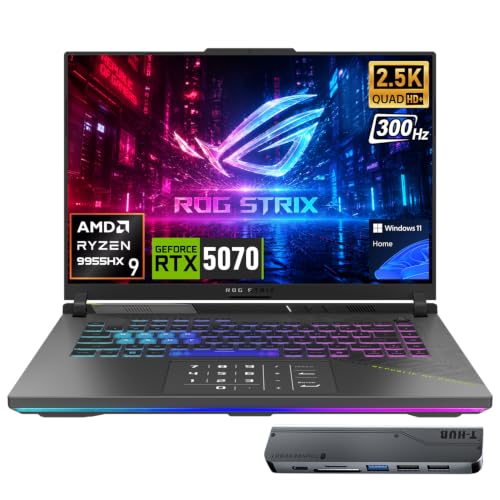
ASUS ROG Strix G16 (RTX 5070) — Strongest 4K output under the flagship tier
Stepping up to the RTX 5070 changes the external-display conversation. Where the Legion leans on upscaling as its main 4K tool, the Strix G16 in this configuration can render a meaningful slice of the current catalogue at native 4K and reserve upscaling for the greediest titles. That headroom also buys longevity: a GPU that handles today’s 4K with room to spare will still be serving the same television in three years, when system requirements have crept upward again.
On its own screen, the QHD+ panel pairs resolution with high refresh in the balance competitive players ask for. ASUS tunes these Strix machines with an enthusiast’s tolerance for fan noise — under full load the cooling announces itself — yet the payoff is consistent frame delivery rather than the stutter that thermal throttling introduces. The keyboard deck, per-key lighting, and generous port selection all lean unapologetically toward gaming rather than boardroom camouflage.
That focus carries costs beyond acoustics. The Strix is the kind of laptop that fills a backpack’s laptop sleeve completely and makes its weight known on a long walk across campus. Its styling, all angles and illumination, will not pass unnoticed in a conservative office. Battery endurance away from the wall is modest even for light work compared with the Razer below. None of that dents its central claim, though: below the outright flagship tier, this is the most convincing 4K-output gaming laptop in the guide.
- Display: 16-inch QHD+ class panel, high refresh
- Graphics: NVIDIA GeForce RTX 5070 laptop GPU
- Video output: HDMI 2.1-class output plus USB-C display support — verify on the listing
- Memory and storage: configuration-dependent; confirm before ordering
- Role: external 4K gaming with native rendering in many titles, upscaling in the heaviest
Strengths
- RTX 5070 headroom makes 4K output a primary feature rather than a party trick.
- Cooling prioritises sustained frame rates during long sessions.
- Port selection suits a permanent desk dock with a 4K monitor.
Trade-offs
- Fan noise under full load is plainly audible across a room.
- Size and styling argue against discreet professional use.
- Unplugged endurance is short, even by gaming-laptop standards.
Best for: a desk-based player whose main screen is a 4K monitor and who wants native rendering wherever the catalogue allows it.
Not suited for: commuters who carry their laptop daily and value quiet, subtle hardware.

Razer Blade 14 (RTX 5070) — Sharpest screen in the smallest body
Among these six machines, the Blade 14 makes the strongest case that internal resolution still matters. Its 3K OLED display packs more pixels into fourteen inches than the 16-inch panels here spread across their larger canvases, so text edges, minimaps, and distant detail carry a fineness you can see without leaning in. OLED’s per-pixel lighting deepens the effect: night scenes in games hold genuine black instead of the grey wash that backlit panels produce, and colour saturation makes stylised titles look printed rather than projected.
Razer’s aluminium unibody remains the class benchmark for feel, and this generation pairs that shell with an RTX 5070 — serious hardware for a machine that slides into bags designed for ultrabooks. Driving an external 4K display is well within its brief, and because the internal panel already sits near 3K, switching between desk and travel resolutions feels less like a downgrade than with 1080p laptops. Creative work benefits too; editors grading footage on the OLED will find its contrast forgiving of nothing, which is precisely what colour-critical work demands.
Small bodies impose physics. Sustained loads run the Blade warmer and louder than the larger Strix, and its upgrade path is narrower — expect storage expansion rather than the open-ended tinkering the Legion allows. OLED also asks for modest care habits, like letting taskbars hide and varying static content, to keep the panel even over years. Price positioning in Razer’s line is premium, so check the listing configuration carefully against the Legion 5a below, which offers OLED at a friendlier tier. For travellers, though, nothing else in this guide combines this screen, this GPU, and this footprint.
- Display: 14-inch 3K OLED, high refresh
- Graphics: NVIDIA GeForce RTX 5070 laptop GPU
- Video output: HDMI plus USB-C display support — confirm exact ports on the listing
- Memory and storage: configuration-dependent; soldered-memory configurations exist in this class
- Role: travel-first gaming with near-4K internal sharpness and full 4K external output
Strengths
- The 3K OLED is the most visually striking panel in this guide.
- RTX 5070 performance in a genuinely portable aluminium chassis.
- Suits creators who grade colour on the same machine they game on.
Trade-offs
- Compact cooling works harder and sounds it under sustained load.
- Upgrade room is limited compared with the larger Legion and Strix.
- OLED ownership rewards small habits that protect the panel from static-image wear.
Best for: a frequent traveller who refuses to choose between a beautiful internal screen and real gaming power.
Not suited for: tinkerers planning memory upgrades over the machine’s lifetime.

MSI Stealth A18 AI+ (RTX 5080) — Desktop-replacement power
Eighteen inches of laptop rewrites what the machine is for. The Stealth A18 stops pretending to be a travel companion and instead becomes the centre of a fixed setup: a vast QHD+ display for daily work, an RTX 5080 for the 4K monitor or television beside it, and enough internal volume for cooling that does not need to scream to keep pace. Of everything in this guide, this MSI feeds an external 4K screen most convincingly, holding native rendering in titles that push the RTX 5070 machines toward upscaling.
MSI’s Stealth line wraps that power in a comparatively restrained shell, so the A18 can sit in a studio or office without shouting about its purpose. The big chassis buys a full-size keyboard feel, a wide port layout that welcomes docks, capture gear, and external drives simultaneously, and the kind of sustained performance that suits long rendering or streaming sessions as much as gaming. If your laptop lives on one desk and a desktop tower is impractical — rented rooms, shared spaces, a household that rearranges furniture often — this is the form factor that replaces the tower.
Portability is nominal. You can move the A18 between rooms and houses; you will not enjoy carrying it through airports weekly, and its power supply adds meaningful bag weight of its own. The large panel, while sharp, is not OLED, so film contrast sits behind the Razer and the Legion 5a. Buyers should also confirm the exact display and memory configuration on the listing, because big MSI lines span wide specification ranges under similar names. As a 4K command centre, though, it stands alone in this list.
- Display: 18-inch QHD+ class panel, high refresh
- Graphics: NVIDIA GeForce RTX 5080 laptop GPU
- Video output: HDMI plus USB-C display support for 4K external screens — verify on the listing
- Memory and storage: vary widely by configuration; read the listing line by line
- Role: fixed-desk 4K gaming and creation hub
Strengths
- The RTX 5080 gives external 4K the most native-rendering headroom here.
- Large chassis sustains performance through marathon sessions.
- Screen size makes the internal display a genuine primary monitor.
Trade-offs
- Effectively a movable desktop, not a travel laptop.
- Panel contrast cannot match the OLED picks.
- Configuration spread under the model name demands careful listing checks.
Best for: a player setting up a permanent 4K desk station who cannot or will not house a tower PC.
Not suited for: anyone whose laptop genuinely needs to fly in a carry-on every week.

Lenovo Legion 5a (RTX 5060, OLED) — OLED value in a 15.3-inch frame
Lenovo’s Legion 5a takes the OLED panel that usually signals a premium tier and pairs it with the RTX 5060, producing the most visually rewarding mid-tier machine in this guide. The 15.3-inch OLED renders dark scenes with the depth the IPS Legion 5 cannot reach, and its high resolution keeps the Windows desktop crisp at the scaling levels people actually use. For players whose catalogue leans toward atmospheric single-player titles, indie games with bold art direction, and film-watching between sessions, panel quality like this changes nightly enjoyment more than a GPU tier would.
The 4K-output story mirrors its Legion sibling: light and older games render natively on an external 4K screen, heavier releases use upscaling, and the experience from a normal viewing distance holds together well. AMD-platform Legion 5a configurations bring their own efficiency character, often stretching light-use battery time a little further than Intel counterparts, though gaming unplugged remains a short-lived experiment on any of these machines. Build quality follows the Legion pattern — sturdy, understated, serviceable.
Choosing the 5a over the Blade 14 is a trade of portability and GPU tier for size and value. You get a bigger, heavier machine with an RTX 5060 ceiling, and the same OLED care habits apply: vary static content, let the taskbar hide, and avoid leaving a paused bright HUD on screen for hours. Buyers set on native 4K in the newest releases should look at the Strix or the Stealth instead. Buyers who look at their laptop’s own screen ninety percent of the time may find this the smartest money in the guide.
- Display: 15.3-inch OLED, high resolution, high refresh
- Graphics: NVIDIA GeForce RTX 5060 laptop GPU
- Video output: HDMI plus USB-C display support — confirm on the listing
- Memory and storage: configuration-dependent
- Role: screen-first gaming with external 4K handled through a mix of native play and upscaling
Strengths
- OLED contrast at a mid-tier GPU configuration is a rare combination.
- Legion build and serviceability carry over from the 16-inch model.
- Internal panel quality suits films and story-driven games beautifully.
Trade-offs
- RTX 5060 limits native 4K in demanding new releases.
- OLED asks for the usual static-image care.
- Heavier than the Blade 14 for a similar travel role.
Best for: a player who mostly games on the laptop’s own screen and wants that screen to be the star of the setup.
Not suited for: buyers whose priority is native 4K output to a television above all else.
Gigabyte Aero 16 OLED (native 4K) — The genuine UHD article
One true native-4K machine belongs in this guide, partly as an option and partly as an explanation. The Aero 16 OLED carries a 3840×2160 OLED panel — the real UHD specification that the other five approximate through output — and Gigabyte aimed it at creators who grade 4K footage on the machine that edited it. Pixel for pixel, nothing else here matches it: a 4K timeline previews at full resolution, photographs reveal their finest detail without zooming, and the desktop never needs scaling compromises explained away.
Living with that panel teaches the trade-offs that pushed the wider industry toward 1600p and 1800p. Gaming at native 4K on a laptop GPU consumes power at a rate that shortens sessions and heats the chassis, so most owners end up rendering games lower and upscaling anyway — arriving back at the compromise the other picks start from. Battery life suffers under the panel’s demands, and the creator-first design historically traded some gaming polish, like the highest refresh rates, for colour accuracy. We could not match this model to a verified listing in our pool, so it appears without a purchase link; treat it as the reference point that defines the category rather than a click-and-buy recommendation.
Who should still chase a machine like this? Editors delivering 4K masters, photographers whose clients inspect work at full resolution, and buyers who simply value the sharpest possible internal display over frame-rate headroom. For pure gaming, the five linked picks deliver a better-balanced version of the 4K idea. That is not a dismissal of the Aero — it is the honest shape of the market in 2026, and any guide pretending otherwise is selling you a spec sheet instead of a laptop.
- Display: 16-inch 3840×2160 OLED (native 4K)
- Graphics: varies by generation and configuration — verify with the manufacturer
- Video output: full 4K external support typical of the line
- Memory and storage: configuration-dependent
- Role: creator-first native 4K reference point; discussed in prose because no verified pool listing matched it
Strengths
- A genuine UHD panel previews 4K work at full resolution.
- OLED contrast and colour suit grading and photo editing.
- Defines what the rest of the category is approximating.
Trade-offs
- Native 4K gaming strains laptop GPUs and batteries alike.
- Creator tuning prioritises accuracy over the highest refresh rates.
- Finding one means your own legwork through creator-focused retailers.
Best for: a video editor or photographer who must judge 4K material on the laptop screen itself.
Not suited for: gamers expecting native-4K play to be this panel’s everyday mode.
Which of These Laptops Actually Handles a 4K Monitor Well?
The dividing line runs through the graphics tier. RTX 5080 and RTX 5070 machines treat a 4K external display as a primary gaming destination: many current titles render natively at that resolution, and upscaling covers the rest without visible strain. RTX 5060 machines treat the same display as a part-time destination — excellent for esports, older games, indies, and streamed content, with upscaling carrying the newest blockbusters. Neither answer is a failure. The mistake is buying the cheaper tier while privately expecting the expensive tier’s behaviour, then blaming the laptop.
Connection details matter as much as GPU tier. A 4K screen at high refresh needs HDMI 2.1 or DisplayPort over USB-C; older HDMI revisions cap refresh rates at levels that waste a fast panel. When you dock, connect the display to the port wired to the dedicated GPU where the design offers one, because routing through integrated graphics can cost performance and features like variable refresh. Check the listing and the manufacturer’s port diagram for your exact configuration rather than assuming the whole model line behaves identically.
How Do You Set Up a Laptop for 4K Gaming on a TV?
Start with the cable, because it silently decides your ceiling. Use a certified high-speed HDMI cable for HDMI 2.1 connections, and keep the run reasonably short; bargain cables from a drawer are the most common cause of a 4K TV refusing high-refresh modes. In Windows display settings, confirm the TV is actually running at its native 3840×2160 and the highest refresh it supports, since systems often default to safer values. Enable the TV’s game mode to cut input lag, and on the laptop, set the external screen as the only active display while gaming, so the GPU is not splitting attention across two panels.
Then tune per game rather than globally. Set the in-game resolution to 4K, enable DLSS or the available upscaling in its quality mode first, and only drop to balanced modes if frame rates still disappoint. Cap frame rates a few frames below the TV’s maximum refresh for steadier pacing. Finally, keep the laptop on mains power with its performance profile active; every machine in this guide reserves its real 4K ability for plugged-in operation.
What Should You Check Before Paying for Resolution You May Not Need?
Viewing distance decides how much resolution your eyes can even use. At a typical laptop distance, the step from 2560×1600 to native 4K on a 16-inch screen is subtle for games, though text work reveals it more clearly. On a 55-inch television across a room, 4K upscaled from a lower render resolution is similarly hard to fault. Spend first on the GPU tier and panel quality you will perceive nightly, and let resolution be the supporting specification rather than the headline that chooses the machine for you.
Also price the whole station, not the laptop alone. A 4K-capable purchase usually drags a monitor or TV, a capable cable, perhaps a dock, and a larger desk footprint behind it. The Legion 5 16 plus a good 4K monitor can outperform the Stealth A18 alone as a complete setup for the same household budget, depending on what you already own. Inventory your existing screens before ordering anything.
How Does Panel Technology Change the 4K-Capable Experience?
Resolution numbers hide the technology underneath them, and the technology decides how games actually look once the pixels are counted. OLED panels — fitted to the Blade 14 and the Legion 5a here — light each pixel individually, so a cave in an adventure game can hold true black beside a torch flame without the halo glow that backlit screens smear around bright objects. Response times on OLED are effectively instant by LCD standards, which keeps fast camera pans clean. The costs are brightness ceilings below the best mini-LED designs and the static-image care discussed in the pick reviews above.
IPS panels in the Legion 5 16, the Strix, and the Stealth take the opposite bargain. Peak brightness runs higher, which matters in sunlit rooms and for HDR highlights, and there is no burn-in anxiety attached to leaving a strategy game’s interface on screen all evening. Their weakness shows in dark scenes, where the backlight lifts blacks into grey and contrast flattens. Neither technology is the correct one in the abstract. Players who game in dim rooms and prize atmosphere should weight OLED heavily; players in bright shared spaces, or who leave static dashboards open for hours, will be happier with IPS.
Refresh rate interacts with resolution in ways spec sheets flatten. A 240Hz 1440p-class panel and a 165Hz 1600p panel can both be called high-refresh high-resolution, yet they serve different games: the first flatters competitive shooters where the GPU can actually produce those frame counts, the second suits cinematic titles where frames arrive at half that pace and extra pixels per frame matter more. Match the panel to your catalogue rather than chasing the largest number in either column. Every pick in this guide pairs its resolution with a refresh rate its GPU can plausibly feed, which is a quieter kind of honesty than headline specs usually offer.
Colour coverage deserves a mention for the growing group who edit on their gaming laptop. Panels covering the full sRGB range are the baseline here, and the OLED picks extend well beyond it, which shows in saturated game art and in photo work alike. If colour-critical delivery is part of your plan, calibrate whichever machine you buy and confirm its coverage figures on the manufacturer’s specification page for the exact configuration, since panel options within one model name can differ.
What Happens to Heat, Noise, and Battery Life When a Laptop Pushes 4K?
Driving four times the pixels of 1080p asks the GPU to work proportionally harder, and the waste heat has to leave through the same slim chassis whether the screen is internal or across the room. Expect fan speeds — and therefore noise — to climb when you game at 4K compared with the same title on the laptop’s own panel. The larger machines here, the Stealth A18 especially, absorb that load with the least acoustic drama thanks to their bigger cooling volume. Compact designs like the Blade 14 remain impressive for their size, but a headset becomes part of the 4K ritual.
Placement helps more than settings menus admit. Raising the rear of the laptop on a stand opens the intake path that most gaming designs draw from underneath, and keeping the exhaust side clear of walls and monitor stands prevents hot air from recycling straight back in. During summer, a room’s ambient temperature can cost more performance than any software toggle returns. These are unglamorous details, yet they decide whether a 4K session in hour two looks like the session in minute ten.
Battery expectations should be set in minutes, not hours, for 4K gaming. The combination of a fully loaded GPU, a bright high-resolution panel, and high-refresh output drains even large laptop batteries quickly, and every manufacturer quietly assumes mains power for this workload. Where battery does matter is the rest of life: for writing, browsing, and video playback, the efficient platforms in this list stretch considerably further, with the AMD-based Legion 5a typically the least thirsty of the six. Buy the machine for its plugged-in peaks and treat unplugged gaming as a bonus round.
Power supplies deserve one practical note. High-output gaming laptops ship with large adapters, and a lower-wattage travel charger borrowed from an ultrabook may sustain light work while slowly losing charge under gaming load. If you plan to dock at two locations, a second full-power adapter at the desk saves daily cable wrestling and guarantees the 4K setup always runs at full strength.
Which Games Justify 4K Output, and Which Waste It?
Slow, detailed games repay resolution most generously. Flight simulators, grand strategy titles with dense map interfaces, city builders, and racing games viewed from cockpit cameras all fill a 4K screen with information your eyes genuinely use: distant instruments stay legible, map labels stop shimmering, and cockpit textures hold up at arm’s length. Story-driven adventures with cinematic grading also shine, particularly on the OLED picks or a good 4K television, where the extra resolution supports the art direction instead of fighting it.
Fast competitive titles sit at the other pole. In a shooter where professionals still choose 1080p or 1440p for frame rate, pushing 4K output trades away the responsiveness that decides matches, and the visual gain shrinks because your attention lives on the crosshair, not the scenery. For those games, run the external display at a lower resolution with high refresh, or play on the internal panel — every pick here supports that flexibility, and choosing per game is the mark of a well-set-up system rather than a compromise.
Older catalogues split the difference beautifully. Games from five or ten years ago often render native 4K easily on an RTX 5060, and their simpler textures benefit from the clean scaling and sharpness of a modern panel. Revisiting a favourite RPG at 4K on the television is one of the quiet pleasures this category of laptop unlocks, and it costs none of the thermal drama of a 2026 blockbuster. When you judge these machines, judge them across your whole library, not only its newest shelf.
Streaming and recording add a final wrinkle. Capturing 4K footage while playing at 4K doubles the GPU’s burden unless the encoder hardware shoulders the stream, which the RTX cards here handle well through their dedicated encoding blocks. Creators planning to broadcast from a single laptop should favour the RTX 5070 and 5080 picks, where the headroom keeps both the game and the capture smooth.
How Should You Divide a Budget Between the Laptop and the 4K Screen?
Households starting from nothing face a sequencing question: flagship laptop first, or balanced laptop plus a good display? Our consistent answer is the balanced route. A mid-tier machine like the Legion 5 16, paired with a competent 4K monitor, produces a better daily setup than a flagship laptop squinting at an ageing 1080p panel, because the display is the surface you actually look at for every task, including the work hours between gaming sessions. Screens also outlive laptops; a good 4K monitor bought today will serve the next two machines you own.
The exception is the traveller’s budget. If the laptop’s own panel is your only screen for months at a time, display quality money belongs inside the machine, which is the Blade 14 and Legion 5a argument in one sentence. In that life, an external monitor is dead weight in storage, and the internal OLED earns its premium every single day. Be honest about which life is yours before allocating anything.
Do not forget the supporting cast in the budget. A sturdy stand, the certified cable discussed earlier, a mouse and keyboard you enjoy at the desk, and perhaps a second power adapter together cost less than one GPU tier step, yet they shape the docked experience daily. Shoppers who reserve a modest slice for these pieces end up with a station that feels finished rather than improvised.
How Long Will a 4K-Capable Laptop Stay Relevant?
Relevance erodes at the GPU first. Today’s RTX 5060 machines will still drive 4K screens in five years, but the share of new releases needing upscaling — and more aggressive upscaling — will grow each year. The RTX 5070 and especially the RTX 5080 picks simply push that reckoning further out. Memory capacity interacts with this: configurations with more system RAM and storage age more gracefully, because games and creative applications both keep inflating their appetites, and a machine that cannot be upgraded, like some slim designs, must be bought with its future already inside it.
Panel relevance decays more slowly. A sharp, bright, colour-rich screen bought today will still look good beside whatever replaces the laptop, and OLED’s contrast advantage is not about to be made obsolete by a spec change. Battery health is the quiet third clock: after years of plugged-in 4K sessions, expect the pack to hold less, which matters only if your usage drifts toward travel later. None of this argues for overspending. It argues for buying the tier that matches the years you realistically keep a machine — roughly three for heavy upgraders, five or more for buy-it-and-keep-it owners, who should weight the Strix and Stealth end of this list accordingly.
Warranty and support complete the longevity picture. Gaming laptops live hard lives at high temperatures, and the difference between a painless fan replacement and a month without a machine is the support channel behind the brand in your country. Check the listing’s warranty terms and the manufacturer’s service presence where you live; that homework is worth more than a final half-step of benchmark advantage between two close picks.
Legion, Strix, Blade, or Stealth: How Do the Shortlisted Machines Compare Head to Head?
Buyers cross-shopping the two Legions face the guide’s most common fork. The 16-inch Legion 5 gives you the larger IPS screen, the stronger cooling manners, and the more upgrade-friendly interior; the 15.3-inch Legion 5a answers with OLED contrast that transforms darker games and films. Same GPU tier, same external 4K behaviour, genuinely different nightly experiences. If your desk already holds a good monitor, take the 16 and let the external screen provide the visual drama. If the laptop panel is your primary window, the 5a’s display is the one you will appreciate in month six.
Strix against Stealth is a contest of degrees rather than kind. Both exist to feed external 4K screens with authority. The Strix keeps a foothold in portability — it is a big laptop, but a laptop — while the Stealth A18 trades that foothold for the strongest GPU here and a screen large enough to anchor a desk by itself. Students and anyone who relocates each term should stop at the Strix. Buyers furnishing a permanent corner should let the Stealth’s size work for them instead of apologising for it.
The Blade 14 stands apart from both comparisons because its question is different: not how much power fits your desk, but how much power follows you out the door. Against the Legion 5a, it wins on GPU tier, build feel, and weight, and loses on screen size and price tier. Against everything else here, it is the only machine that disappears into a work bag. Travellers comparing it with ultrabooks rather than gaming laptops will find its 3K OLED and RTX 5070 almost unfair; desk-bound buyers will find its virtues irrelevant to their lives.
Underneath all four comparisons sits one shared truth worth stating plainly. Every linked pick in this guide handles the 4K-capable brief competently; the differences are about fit, not adequacy. The wrong choice is rarely a bad laptop — it is a good laptop bought for somebody else’s routine. Picture your actual week, the screens you already own, and the bag you actually carry, and the shortlist usually resolves itself.
What Does a Finished 4K Laptop Desk Setup Look Like?
Picture the station these machines are bought for. The laptop sits on a low stand to the side, lid open so its panel serves as a second screen for chat, guides, or monitoring tools, while the 4K display takes centre position at eye level. A single USB-C or dock connection carries the display signal and peripherals where the port layout allows it, with the power adapter permanently routed behind the desk. The mouse and keyboard you already love stay put; only the laptop arrives and departs.
Small refinements separate a finished setup from a merely working one. Set the external display as the main screen in Windows so games launch there by default. Store per-game resolution profiles rather than renegotiating settings each session. Keep a microfibre cloth in the drawer, because high-resolution panels show every smudge at dark scenes. And label the good HDMI cable — in every household, an unlabelled good cable eventually migrates to a relative’s television.
None of this requires the flagship pick. The Legion 5 16 drives exactly this station happily, which is why this guide resists ranking purely by GPU. The setup is the product; the laptop is its engine, and engines should be sized to the roads they will actually travel.
Does HDR Change the Answer for Movies and Streaming?
For many owners, the 4K screen’s second job is film night, and there the hierarchy shuffles a little. OLED panels — the Blade 14’s, the Legion 5a’s, or a 4K OLED television fed by any pick here — render HDR highlights against genuine black, which is the effect HDR was designed around. Bright IPS panels push peak brightness harder and can look more striking in a lit room. Either way, a 4K-capable laptop is a superb streaming source: it handles the services’ apps and browsers without the codec gaps that strand some smart-TV platforms, and it carries your library of local files without negotiation.
Set expectations for HDR on Windows honestly. Support has matured, yet enabling HDR still changes desktop colour behaviour, and many owners keep it on for games and films while switching it off for ordinary work. That toggle habit is normal, not a defect in any of these machines, and it takes seconds once you know where the display settings keep the switch for each of your regular viewing and working routines. Also remember that the streaming services gate their 4K HDR tiers behind specific plans and browser or app choices, so a new laptop cannot fix a subscription that tops out at 1080p.
Audio completes the picture. Laptop speakers in this class have improved markedly, and the larger chassis here sound respectable for casual viewing, but a 4K film setup deserves the headphone jack or the television’s sound path rather than the machine’s speakers across the room. Every pick provides the outputs; the rest is furniture and taste.
Should You Consider a Previous-Generation Machine Instead?
Last year’s RTX 40-series laptops still circulate at tempting discounts, and for the 4K-output job they remain capable: their HDMI and upscaling support covers the same televisions, and their high-resolution panels have not aged a day. The honest cautions are battery wear on ex-display or refurbished units, warranty length, and configuration drift — a discounted model with a 1080p panel is not the same machine as the one reviewed at launch. If a previous-generation offer matches the panel and GPU criteria used throughout this guide, it can be the shrewdest purchase in the category. If it quietly fails the panel test, the discount is buying the wrong laptop more cheaply.
What Happens to These Machines in Their Second Life?
High-resolution gaming laptops retire gracefully. When a machine in this class stops being your primary gaming device, its sharp panel and strong video output make it a natural media hub under a television, a household’s photo-editing station, or a student’s first serious computer. That second-life value is a genuine argument for buying panel quality and build quality now: the GPU dates fastest, while the screen, keyboard, and chassis are what a machine’s later years are made of. Keep the original power adapter with it, since these models rarely perform fully on substitutes, and the whole household inherits a better spare computer.
Common Mistakes
The most frequent error is reading “4K” in a product title and assuming the internal panel is 4K. As this guide’s shortlist shows, the term usually describes output capability, and the honest listings state panel resolution separately — read that line, not the headline. A related mistake is judging a laptop’s 4K gaming by its behaviour unplugged; battery profiles throttle GPUs so aggressively that the test tells you nothing about docked performance.
Cable and port assumptions cause the next wave of disappointment. Plugging a 4K high-refresh monitor into a limited port, or through an elderly dock, caps the display long before the GPU becomes the problem. Buyers also overlook scaling: a very high-resolution small panel with poorly chosen Windows scaling can make older applications blurry or tiny, which is a settings afternoon, not a defect. Finally, avoid paying flagship prices for resolution while accepting a dim, washed-out panel — brightness and contrast shape what you see far more than the last increment of pixel count.
Final Recommendation
Match the machine to where your eyes actually spend their time. If a 4K television or monitor is your main gaming screen, the Strix G16 is the sweet spot of output power and price tier, with the Stealth A18 waiting for those who want the strongest docked setup and rarely travel. If the laptop’s own display is your main screen, the Legion 5a’s OLED delivers the richest nightly experience, while the Blade 14 serves travellers who want near-4K sharpness in a bag-friendly body. The Legion 5 16 remains the even-handed default when one laptop must cover work, travel, and weekend 4K play without specialising in any of them. A native-4K panel like the Aero’s is a creator’s tool first and a gaming feature second — buy it for the work, not the badge.
Frequently Asked Questions
Can these laptops play games at native 4K?
On an external 4K display, the RTX 5080 and RTX 5070 picks render many current games natively, while the RTX 5060 picks lean on upscaling for demanding titles and reserve native rendering for lighter ones. On their internal panels, none of the linked picks renders at 4K, because none has a 4K internal panel — that is the honest shape of this category.
Is a native 4K laptop screen worth it for gaming?
For gaming alone, rarely. The GPU cost of feeding 8.3 million pixels at laptop scale buys frame rates you will feel more than sharpness you can see at normal distances. Creators who preview 4K work get real value from a native panel; players are usually better served by a 1600p or 1800p screen with a stronger GPU behind it.
What cable do I need for 4K gaming from a laptop?
Use a certified ultra-high-speed HDMI cable for HDMI 2.1 connections, or a USB-C cable rated for DisplayPort alt mode when connecting through USB-C. Unrated drawer cables are the leading cause of missing refresh-rate options and intermittent black screens at 4K.
Does DLSS upscaling look bad on a 4K TV?
In its quality modes, modern upscaling at 4K output is difficult to distinguish from native rendering at television viewing distances, particularly in motion. It is the enabling technology behind this entire category, and the RTX picks here all support it.
Will a 4K-capable laptop work with a 1440p monitor instead?
Yes, and many owners prefer it. A 1440p high-refresh monitor lets these GPUs run natively at high frame rates with no upscaling involved, which is arguably the most comfortable gaming configuration any of these machines can drive. It also future-proofs the desk in a useful direction: when you eventually replace the laptop, the 1440p screen remains an excellent primary display, and a 4K panel can join it later as prices drift down. Nothing about choosing 1440p today closes the 4K door tomorrow, because every pick in this guide already speaks both languages fluently through its outputs.
Related Guides
For smaller screens and lighter bags, see our guide to the best 14-inch gaming laptops. Players building a fixed desk setup may prefer the best 17-inch gaming laptops roundup, and budget-focused shoppers should read the best affordable gaming laptops guide before stretching for resolution.