What's inside
- Key Takeaways
- Quick Picks
- How Did We Choose Gaming Laptops That Respect a Battery?
- Why Does Gaming on Battery Feel So Different From Gaming Plugged In?
- Which Settings Actually Extend a Gaming Laptops Runtime?
- Which Gaming Laptops Last Longest Away From the Wall?
- How Can You Tell a Gaming Laptops Real Endurance Before You Buy?
- How Do You Read a Battery Claim Without Being Fooled by It?
- What Role Does the Charger Play in a Long-Lived Setup?
- How Does Battery Health Change Across Years of Ownership?
- Which of These Machines Suits Which Kind of Unplugged Day?
- What Does a Realistic Unplugged Gaming Session Look Like on These Machines?
- A Note on Chargers Left in Bags and Batteries Left at Full
- How Do the Six Picks Compare Side by Side?
- What Battery Mistakes Do Gaming Laptop Buyers Keep Making?
- Final Recommendation
- Frequently Asked Questions
- Related Guides
As an Amazon Associate I earn from qualifying purchases. This post may contain affiliate links at no extra cost to you.
widgetverdict.com is reader-supported. When you buy through links on our site, we may earn an affiliate commission.
Every gaming laptop is two machines sharing one chassis: a plugged-in performer and a battery-powered compromise. This guide to the best gaming laptops with battery life judges the second machine as seriously as the first, because the buyers who search this keyword are the ones whose laptop must survive a lecture hall, a train carriage or a working day in a café before it earns its evening gaming session. A quick honesty note before the picks: we describe battery behaviour qualitatively, or cite endurance claims exactly as the manufacturer’s listing phrases them, because real runtime swings wildly with brightness, workload and settings, and any roundup printing a single confident hour figure for every machine is inventing precision it does not have.
Where to buy: the six machines below are linked to listings whose titles were verified for processor, graphics, memory and display, so the configuration you read about is the configuration on sale. Battery capacity is the specification sellers most often leave vague, so if endurance is your deciding factor, open the manufacturer’s specification page for the exact configuration and note the watt-hour figure before ordering — that number, more than any marketing line, predicts how the machine behaves away from a socket.
The pattern underneath the shortlist is consistent. Machines that last are the ones whose designers treated efficiency as a feature: modern processors with capable integrated graphics for light work, displays that can drop their refresh rate, and enough battery capacity to matter. Machines that disappoint pair thirsty high-refresh panels with small batteries and never let the discrete GPU sleep. The six picks below were chosen because their platforms, screens and stated design intent point the right way, and each analysis explains the specific habits that will get the most unplugged hours out of that particular model.
Key Takeaways
- Gaming on battery always cuts performance sharply — this guide judges endurance for study, work, browsing and video first, gaming second.
- The Lenovo Legion entry is the only pick whose listing explicitly claims long battery life, and its efficient Ryzen platform backs the claim up.
- The Zephyrus G14’s compact OLED machine pairs a modern Ryzen AI processor with strong integrated graphics for light tasks.
- Dropping screen refresh rate and brightness is the single biggest runtime lever on every pick here.
- The two Acer Nitro V models show how far value gaming platforms have come on efficiency, though their gaming-first tuning still shows.
- The Alienware 16 Aurora brings a larger chassis, which generally means room for a larger battery and steadier unplugged manners.
Quick Picks
| Pick | Badge | Why it earns its place |
|---|---|---|
| Lenovo Legion 15.3-inch Gaming Laptop (Ryzen 7 250, RTX 5060) | Listing-stated long battery life | Its verified title claims long battery life outright, on an efficient Ryzen platform with 32GB of memory. |
| ASUS ROG Zephyrus G14 (Platinum White) | Compact endurance flagship | A modern Ryzen AI platform and OLED efficiency in a 14-inch machine built to travel. |
| ASUS TUF Dash 15 (2022) | Slim Intels balanced traveller | A carried-everywhere design whose integrated graphics and DDR5 platform stretch unplugged hours. |
| Alienware 16 Aurora | Big-chassis steady endurance | A 16-inch chassis with room for a substantial battery, Wi-Fi 7 and a calmer design than Alienwares flagships. |
| Acer Nitro V 16S AI | Value 16-inch with modern platform | A Ryzen 7 260 and RTX 5060 platform with 32GB of memory, in Acers value line at 16 inches. |
| Acer Nitro V (Core i5, RTX 4050) | Affordable efficiency starter | A modest RTX 4050 platform that sips power in light use and keeps the entry price of this guide low. |
How Did We Choose Gaming Laptops That Respect a Battery?
Platform efficiency was the first filter. Modern AMD Ryzen and recent Intel mobile processors can idle and handle light work at very low power while handing games to the discrete GPU, and that switching behaviour — not the GPU badge — decides whether a gaming laptop lasts a working day. Every pick here uses a recent platform with competent integrated graphics, and models built around older, thirstier processor generations were left out even when their gaming performance was respectable, because this keyword’s promise is endurance.
Display choices came second. A high-refresh screen is a joy plugged in and a tax unplugged, so we favoured machines whose panels can step down to a lower refresh rate for desktop work, and we note that habit in each analysis. OLED panels, like the Zephyrus G14’s, draw power in proportion to what they show, rewarding dark themes and moderate brightness. Large 16-inch machines earned their place through the battery capacity their chassis can hold rather than through any efficiency magic.
Finally, we were honest about the limits of listing information. Only one pick’s verified title mentions battery life at all, so the rest of the endurance reasoning rests on platform reputation, battery-class norms for each chassis size and the efficiency features each design is known for — stated as qualitative judgement throughout, never as fabricated hour counts. Where a manufacturer’s own claim exists, we attribute it to the listing rather than presenting it as our measurement.
Why Does Gaming on Battery Feel So Different From Gaming Plugged In?
A gaming laptop’s discrete GPU and processor together can draw several times the power that a battery can comfortably deliver, so the moment you unplug, firmware steps in and caps clocks to protect runtime and cell health. Frame rates fall, sometimes dramatically, and demanding games that felt effortless at a desk become choppy. This is not a defect in any of the machines here; it is physics shared by the entire category. The honest way to enjoy unplugged gaming is to choose lighter titles — indie games, older releases, esports at reduced settings — and save the flagship experiences for a socket.
The battery itself also ages faster under repeated heavy discharge. Gaming on battery regularly, draining from full to empty at high power, is one of the quickest ways to wear a pack down over a couple of years. Owners who must do it should expect gradual capacity loss and treat the battery as a consumable. For everyone else, the healthiest pattern is the one this guide is built around: light work unplugged, heavy play plugged in, and the machine’s endurance judged by how gracefully it handles the first of those.
Charging behaviour matters more than shoppers expect. Fast charging support turns a twenty-minute café stop into useful extra hours, and USB-C charging on lighter loads lets some machines here sip from a compact adapter instead of their gaming brick — though never expect a small USB-C adapter to sustain full gaming performance. Check each model’s charging options before assuming, because carrying the big brick everywhere quietly undermines the portability that good battery life was supposed to buy.
Which Settings Actually Extend a Gaming Laptops Runtime?
Refresh rate is the biggest single lever. Dropping a 165Hz or 180Hz panel to 60Hz for desktop work removes a constant power cost that buys you nothing while writing essays or reading. Brightness is second: the step from full brightness to a comfortable indoor level around half can add a startling amount of runtime, because the display is usually the largest single consumer during light work. Third comes GPU selection — forcing the integrated graphics for browsers, office apps and video, and reserving the discrete card for games, prevents the power-hungry chip waking for tasks it adds nothing to.
Radios and peripherals nibble at the margins. Turning off keyboard backlighting during the day, disconnecting USB devices you are not using, and closing the game launchers and updaters that idle in the background all contribute small savings that add up across a day. Windows battery saver modes and the manufacturer’s own quiet or eco profile exist precisely to bundle these choices; learn where your model’s eco profile lives before you need it in a departure lounge, not while the battery icon is already red.
Game settings deserve the same discipline on the occasions you do play unplugged. Capping frame rate at or below the panel’s stepped-down refresh, lowering resolution scaling, and choosing a game’s medium preset can transform a session from a brief sprint into something sustainable. The goal is not misery — it is matching the workload to the power budget so the machine lasts until you are back within reach of its charger.
Which Gaming Laptops Last Longest Away From the Wall?
Ranked by how convincingly each machine serves an unplugged day, the six below range from a compact OLED traveller to larger designs whose battery capacity carries them. Every analysis names the habit that unlocks that particular model’s best endurance, because with gaming laptops the owner’s settings matter almost as much as the hardware.

Lenovo Legion 15.3-inch Gaming Laptop (Ryzen 7 250, RTX 5060) — Listing-stated long battery life
This Legion earns the top spot on evidence no other pick can match: its own verified listing title includes the words long battery life, a claim manufacturers rarely print on gaming machines because it invites scrutiny. The platform underneath supports the claim. AMD’s Ryzen 7 250 is an efficiency-minded modern processor whose integrated graphics handle lectures, documents and streaming video without waking the RTX 5060, and Lenovo’s power tuning in this class has a good reputation among owners who actually use their machines away from desks. The 32GB of DDR5 memory helps indirectly too, since a machine that is not swapping to storage is a machine finishing tasks and returning to idle sooner.
The 15.3-inch WQXGA panel at 165Hz is the counterweight: it is sharp and fluid, and it will drink power if you leave it at full refresh and brightness all day. Step it down for desktop work and the Legion becomes a genuinely all-day proposition for study and office tasks, with the RTX 5060 waiting in reserve for the evening. The 5 MP camera with an e-shutter is a thoughtful touch for students and remote workers whose unplugged hours include video calls, and the whole package feels designed by people who understood this guide’s exact brief.
Legion ownership adds one more endurance tool worth learning in week one: Lenovo’s software lets you cap charging for desk-heavy periods, which keeps the pack in its happiest charge range when the machine lives plugged in, then release the cap before a travel day. Used that way, the battery that delivers the listing’s long-life claim in month one is still delivering most of it in year three. Few owners bother, which is why two identical Legions can age so differently — the hardware is the same, but one owner treated the battery as a managed asset and the other treated it as an appliance.
- Display: 15.3-inch WQXGA, 165Hz as listed
- Processor: AMD Ryzen 7 250 as listed
- Graphics: RTX 5060 as listed
- Memory: 32GB DDR5 as listed
- Storage: 1TB class as listed
- Battery: listing describes long battery life
- Camera: 5 MP with e-shutter as listed
Strengths
- Only pick whose listing explicitly claims long battery life
- Efficient Ryzen platform with capable integrated graphics
- 32GB of memory keeps multitasking smooth and swift
Trade-offs
- 165Hz WQXGA screen needs stepping down to save power
- Mid-size chassis is portable rather than truly light
- Gaming unplugged still drains it quickly, as with all rivals
Best for: students and hybrid workers who need one machine to last a campus day and game at night
Not suited for: players who expect full gaming performance away from a socket, a hope no battery in this class can fulfil

ASUS ROG Zephyrus G14 (Platinum White) — Compact endurance flagship
Judged purely as a gaming machine the Zephyrus G14 is this guide’s flagship, with an RTX 5080 that dwarfs the other picks; judged on battery life, its case rests on the platform around that GPU. The Ryzen AI 9 HX 370 is one of the most efficient high-end mobile processors available, with integrated graphics strong enough for everyday work, video and even light creative tasks, so the thirsty discrete card can stay asleep through an entire working day. In a 14-inch chassis that you will actually carry to the places where battery life matters, that combination is the whole argument.
The OLED screen cuts both ways and rewards an informed owner. Dark themes, moderate brightness and the panel’s 120Hz stepped down for desktop work keep its draw low, while a white browser window at full brightness on a sunny train will spend the battery noticeably faster. None of this is hidden behaviour; it is the known physics of OLED, and owners who adapt get a compact machine that travels like an ultrabook and games like a flagship. If your unplugged hours are mostly writing, reading and calls, few gaming laptops anywhere serve them in a smaller or more pleasant package.
The G14’s endurance story has a creative-professional chapter too: photo and video work on integrated graphics, with the OLED as the reference display, is a workload this machine handles unplugged with real grace. A photographer culling a shoot in a café or a student editing a short film in the library is using exactly the silicon AMD designed this platform around. Just keep the discrete GPU’s wake-ups deliberate — some creative applications trigger it by default for trivial tasks — because a sleeping RTX 5080 is the entire foundation of this machine’s unplugged manners.
- Display: 14-inch 3K OLED, 120Hz as listed
- Processor: AMD Ryzen AI 9 HX 370 as listed
- Graphics: RTX 5080 as listed
- Memory: 32GB RAM as listed
- Storage: 2TB SSD as listed
- Finish: Platinum White as listed
Strengths
- Highly efficient Ryzen AI platform for light workloads
- Compact 14-inch size means it is actually carried
- OLED rewards dark themes with lower power draw
Trade-offs
- RTX 5080 is wasted on battery — it sleeps through unplugged days
- OLED brightness habits require a little learning
- Premium price for a machine bought partly for endurance
Best for: frequent travellers who want flagship gaming at the destination and ultrabook manners en route
Not suited for: buyers who mostly game in one place, where a larger, cheaper machine serves better
ASUS TUF Dash 15 (2022) — Slim Intels balanced traveller
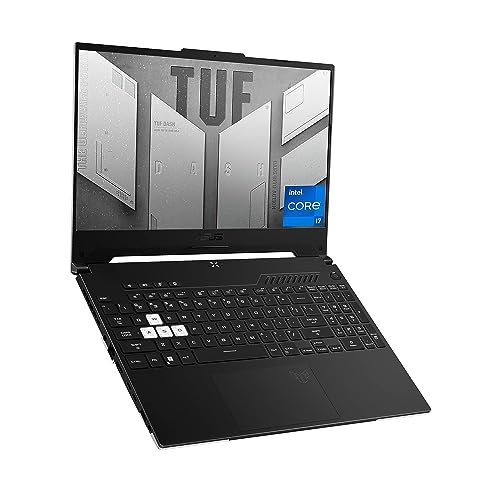
The TUF Dash 15 approaches battery life from the portability side: a slim chassis you will genuinely take out of the house, a Core i7-12650H whose integrated graphics cover everyday computing, and an RTX 3060 that only wakes when a game asks for it. Owners of this design have long treated it as the gaming laptop for people with commutes, and that reputation is built on exactly the behaviour this guide rewards — quiet, undemanding light use, then proper gaming once plugged in at home. Thunderbolt 4 adds a subtle endurance benefit too, since a single dock cable at your desk makes the plugged-in transition effortless, encouraging the healthy charge habits that preserve a battery.
Set expectations by its generation. The RTX 3060 platform is older than the 50-series machines here, and its unplugged gaming headroom is correspondingly smaller, so treat battery gaming as a light-title activity. For mixed days — documents in the morning, video at lunch, games at home — the Dash’s balance of weight, screen and efficiency remains persuasive, especially at the prices leftover stock often carries. Keep its 144Hz panel stepped down during desktop hours and it will repay you in the currency this guide counts.
Dash owners get their best unplugged results from a habit specific to Intel machines of this era: letting the system settle after waking. Background updates and indexing in the first minutes after opening the lid can make early battery estimates look grim and tempt owners into pessimism the hardware does not deserve. Give it ten minutes of real work before judging the day’s runtime, keep the updater scheduled for plugged-in evenings, and the Dash settles into the steady, commuter-grade endurance its owners describe. It is a machine whose battery reputation improves the longer you live with it, which is rarer than it should be.
- Display: 15.6-inch FHD, 144Hz as listed
- Processor: Intel Core i7-12650H as listed
- Graphics: GeForce RTX 3060
- Memory: 16GB DDR5
- Storage: 512GB SSD
- Connectivity: Thunderbolt 4 as listed
Strengths
- Slim, discreet design encourages actually carrying it
- Integrated graphics handle a full light working day
- Thunderbolt 4 docking simplifies desk charging routines
Trade-offs
- Older GPU generation limits unplugged gaming ambitions
- 512GB storage fills fast for a games-plus-work machine
- Battery is mid-pack rather than class-leading
Best for: commuters and students with mixed work-and-play days who value a discreet, carryable machine
Not suited for: endurance maximalists, who should look to the Legion above for the strongest claim

Alienware 16 Aurora — Big-chassis steady endurance
The Aurora line is Alienware’s calmer branch — less theatrical than the flagship models, aimed at buyers who want the brand’s build and cooling without the light show — and its 16-inch chassis gives it the one endurance asset no settings menu can fake: physical room for a substantial battery. Paired with a Core 7 240H platform that handles light work on integrated graphics and an RTX 5050 that stays in reserve, the Aurora is built for long, steady unplugged stretches of writing, browsing and video rather than short spectacular ones.
Its 120Hz WQXGA panel is a sensible middle path for this guide: smoother than a basic 60Hz screen, less punishing on the battery than the 165Hz and 180Hz panels elsewhere in the list, and sharp enough that text work — the actual content of most unplugged hours — looks crisp. Wi-Fi 7 support future-proofs the machine for the networks spreading through campuses and offices. The trade is obvious and honest: this is a large, desk-leaning laptop, and its endurance serves people moving between rooms and buildings more than people living out of a backpack.
Aurora owners should think of the big chassis as permission to stop rationing the enjoyable things. A brighter screen for a film on the sofa, the 120Hz panel left on for a relaxed browsing evening, a video call at full quality — the larger battery absorbs these small luxuries that smaller machines make you count. That is a legitimate form of endurance too: not the maximum hours under laboratory discipline, but the hours you actually spend without thinking about the icon in the corner. For home-based workers who move between desk, table and sofa, that freedom may be worth more than an extra theoretical hour in a backpack scenario they never live.
- Display: WQXGA, 120Hz as listed
- Processor: Intel Core 7 240H as listed
- Graphics: RTX 5050 as listed
- Memory: 16GB DDR5 RAM as listed
- Storage: 1TB SSD as listed
- Connectivity: Wi-Fi 7 as listed
Strengths
- Large chassis accommodates a substantial battery
- 120Hz panel balances smoothness against power draw
- Understated design suits professional environments
Trade-offs
- Size and weight limit true portability
- RTX 5050 is the entry tier of its generation
- 16GB memory is adequate rather than generous
Best for: home-and-office movers who work in several rooms and want endurance without a tiny screen
Not suited for: daily backpack carriers, for whom the G14 or Dash will feel far kinder

Acer Nitro V 16S AI — Value 16-inch with modern platform
The Nitro V 16S AI represents the value end of modern efficiency: a Ryzen 7 260 processor whose integrated graphics are genuinely capable, an RTX 5060 for plugged-in play, and a generous 32GB memory configuration in the verified listing that keeps a heavy browser-and-documents workload fluid without constant storage swapping. Acer’s Nitro tuning leans gaming-first, so out of the box this machine favours performance over frugality — but the platform underneath is modern, and an owner who selects the eco profile, steps the 180Hz panel down for desktop work and caps brightness will find respectable unplugged manners hiding inside a budget gaming shell.
That 180Hz figure deserves emphasis because it is this pick’s biggest endurance trap. Left at full refresh during a day of writing, the panel alone can cost you hours you expected to have; managed properly, it becomes a plugged-in luxury rather than an unplugged tax. The 16-inch IPS screen is forgiving in bright rooms where OLED owners are fighting reflections, which suits library and café work. Judged as a lot of modern laptop for the money that can be taught good battery habits, the Nitro V 16S earns its place.
The 16S has a party piece for the classroom and the site office alike: it wakes, works and sleeps like a modern ultrabook when its performance profile is left behind, because the Ryzen platform underneath the gaming branding is the same silicon family found in respected business laptops. Colleagues who see only the Nitro badge expect a noisy toy; what they get in a meeting is a quiet, big-screen machine that outlasts their own laptops. Keep the gaming profile for the desk at home, and this pick leads the double life this entire cluster of guides keeps returning to, at a price that leaves room for the backpack and the mouse.
- Display: 16-inch WUXGA IPS, 180Hz as listed
- Processor: AMD Ryzen 7 260 as listed
- Graphics: RTX 5060 laptop GPU as listed
- Memory: 32GB class as listed
- Panel: IPS, suited to mixed lighting
Strengths
- Modern Ryzen platform with strong integrated graphics
- 32GB memory configuration suits heavy multitasking days
- IPS screen handles bright workspaces well
Trade-offs
- 180Hz panel punishes runtime if left unmanaged
- Gaming-first default tuning needs eco adjustments
- Value-line build and speakers are unremarkable
Best for: budget-conscious buyers who will spend ten minutes setting up an eco profile for workdays
Not suited for: set-and-forget owners who never touch power settings, and will blame the battery instead

Acer Nitro V (Core i5, RTX 4050) — Affordable efficiency starter
There is an endurance argument for modest hardware that premium roundups rarely make: a Core i5-13420H and an RTX 4050 ask less of a battery than flagship silicon does, and for the light workloads that fill an unplugged day — documents, tabs, video, calls — this Nitro V delivers the same experience as machines costing far more, simply because those workloads never needed the extra power. As the affordable entry to this guide, it lets a student or casual player buy genuine gaming capability for the evening and perfectly adequate all-day manners for the daytime, without paying for performance they will only use plugged in anyway.
The compromises sit where the price says they should. The listed 8GB of memory is tight for heavy multitasking and will age fastest of any figure in this guide, the 165Hz panel needs the same refresh-rate discipline as its Nitro sibling, and the RTX 4050 is an entry gaming card whose ambitions should stay at 1080p with DLSS helping. None of that undermines the battery case; if anything, a machine bought cheaply and used lightly is the one most likely to be replaced before its battery wear ever becomes the story.
The little Nitro’s endurance has one more dimension students appreciate: replacement and repair economics. Value-line machines from major brands have batteries that are findable and affordable years later, so a pack that fades in year three is a modest service job rather than a crisis. That matters for a guide about battery life more than it first appears — the true endurance of a laptop is not only the hours it holds when new, but how gracefully and cheaply it can be restored when time takes its toll. Bought cheaply, maintained simply, this Nitro can be kept honest for a very long time.
- Display: 15.6-inch FHD IPS, 165Hz as listed
- Processor: Intel Core i5-13420H as listed
- Graphics: RTX 4050 laptop GPU as listed
- Memory: 8GB DDR5 as listed
- Storage: 512GB class as listed
Strengths
- Modest platform draws little power in light use
- Lowest-cost route into this shortlist
- Full HD IPS screen suits everyday work well
Trade-offs
- 8GB of memory limits heavy multitasking
- Entry-tier GPU caps gaming ambitions at 1080p
- 165Hz panel needs managing for best runtime
Best for: students and casual players whose unplugged hours are light and whose budget is firm
Not suited for: power multitaskers running dozens of tabs and apps through a working day
How Can You Tell a Gaming Laptops Real Endurance Before You Buy?
Look for the battery capacity in watt-hours on the manufacturer’s specification page for the exact configuration, because that figure — not the marketing headline — is the fuel tank everything else draws from. Within the same chassis size, a meaningfully larger watt-hour figure is the most reliable predictor of a longer unplugged day for light work. Cross-check it against the platform: a large battery behind an efficient modern processor compounds, while a large battery behind a thirsty older platform merely compensates.
Read owner reports with a workload filter. A reviewer who loops video at moderate brightness is describing your lecture-day experience; a reviewer who games unplugged is describing a scenario this guide recommends against for any machine. Weight the first kind of report heavily and the second barely at all. Also note whether reports mention refresh-rate behaviour, since a machine that automatically drops its panel to 60Hz on battery is quietly giving you hours that a fixed-high-refresh rival cannot match without manual fiddling.
Treat any single hour figure — ours included, which is why we avoid them — as a scenario result, not a property of the machine. Brightness, refresh rate, workload and even ambient temperature move runtime by large margins. The durable truths are comparative: efficient platform plus big battery plus disciplined settings beats the opposite combination, every time, in every chassis. Buy the combination, then set the settings.
How Do You Read a Battery Claim Without Being Fooled by It?
Manufacturers test endurance under conditions chosen to flatter: video playback at modest brightness, radios managed, sometimes with the screen dimmer than any office worker would tolerate. The resulting figure is not a lie, but it is a best-case portrait, and the gap between it and a mixed working day of browsers, calls and documents can be wide. This is why the Legion’s listing claim in this guide is reported as a claim — credited, welcomed, and not converted into hours we never measured. Treat every endurance statement you meet, from any brand, with that same respectful scepticism.
The watt-hour capacity remains the least gameable number in the whole conversation, because physics does not accept marketing instructions. Find it on the manufacturer’s specification page for your exact configuration, compare it within the same size class, and you have the closest thing to ground truth available before purchase. A machine with a meaningfully larger pack and an efficient platform will outlast its rivals in your hands too, even if neither matches its laboratory portrait. Everything else — claims, reviews, forum anecdotes — is commentary on that single physical fact.
Your own first week is the final authority. Note the battery percentage at the start and end of two ordinary working days, with your real applications and your real brightness, and you will know your machine’s honest number better than any review can tell you. If those days fall short of your needs, the settings discipline in this guide is the first remedy and a return within the window is the second. Endurance is personal because workloads are personal; measure yours rather than inheriting someone else’s.
What Role Does the Charger Play in a Long-Lived Setup?
The supplied gaming charger is a performance component, not an accessory: it delivers the wattage the machine needs to game at full speed while charging, and substituting a weaker adapter can quietly cap both. Keep it, label it, and if you buy a second charger for another room, match its specification rather than its connector shape. For travel, several machines in this class can sip from compact USB-C adapters during light work — a genuine convenience — but that adapter is a top-up tool for documents and video, never a gaming supply, and confusing the two roles produces mysterious throttling that owners misdiagnose for months.
Cable habits decide charger lifespan. Gaming bricks die at the strain relief where the cable exits, killed by tight coils and bags that crush the bend. Loop cables loosely, let the brick breathe rather than burying it under bedding or paper — it runs warm by design — and keep it off the floor where chairs roll. These are thirty-second habits that protect the one component whose failure strands the entire machine, and they matter doubly for endurance-focused owners whose laptops travel between sockets all day.
Finally, treat public charging with mild suspicion. Airport and café sockets are fine; unknown borrowed adapters of the wrong specification are a slower, stranger risk, delivering odd voltages and confused handshakes. A small power bank rated for laptop charging can bridge a lecture, but the honest hierarchy is your own adapter first, a reputable spare second, and improvisation last. Battery life, in the end, is a system — pack, platform, settings and charger — and the owners who manage all four are the ones still praising their machine’s stamina in year three.
How Does Battery Health Change Across Years of Ownership?
Every lithium pack loses capacity with time and use, and gaming laptops accelerate the process with heat: long plugged-in sessions at full power keep cells warm and fully charged, the two conditions they age fastest under. The countermeasures are built into most of these machines for owners who look — charge limits for desk-bound weeks, performance profiles that keep fans ahead of temperatures, and the simple discipline of hard surfaces. Expect a well-kept pack to feel nearly new after year one, noticeably shorter after year three, and plan a replacement into the economics of any machine you intend to keep for a degree or a job’s full term.
Calibration confusion causes needless panic along the way. A battery gauge is an estimate maintained by software, and it can drift until a full charge cycle reminds it of the pack’s true size; a machine that suddenly reports odd percentages is usually misinformed rather than dying. Check the manufacturer’s health report before concluding anything, because it reads the pack’s own design-versus-current capacity figures, which is the only decline metric that matters. A pack reporting healthy capacity with a confused gauge needs a calibration cycle, not a purchase.
When replacement day does come, buy the genuine or reputable part, match the model number exactly, and treat a swollen battery — a lifting trackpad, a rocking base — as an immediate stop-using signal rather than a quirk. That last warning is the only dramatic sentence in this guide, and it is earned: a swelling pack is the one battery symptom that outranks every deadline and every stream. Everything else about endurance is optimisation; that one is safety, and it brooks no scheduling.
Which of These Machines Suits Which Kind of Unplugged Day?
Picture the library day first: six hours of reading, writing and research with no socket in reach. That day belongs to the Legion and the G14, whose platforms were chosen for exactly this discipline, and it punishes any machine left at full refresh and brightness regardless of badge. The settings ritual — refresh down, brightness honest, eco profile on — is worth more on that day than the difference between any two picks in this guide, which is why we repeat it until it becomes reflex.
Now the travel day: trains, terminals, a client site, work snatched in forty-minute portions between movements. Here the G14’s size joins its efficiency as the deciding virtue, because the best battery is the one in the laptop you actually brought. The Dash serves the same day for owners who need a larger screen, provided its charger finds the occasional café socket. Travel rewards the machine that disappears into a bag and reappears ready, and both picks understand the assignment.
Finally, the home day: desk to sofa to kitchen table, sockets everywhere but cables nowhere you want them. This is the Aurora’s and the Nitros’ natural habitat, where a big battery buys freedom of movement rather than survival, and where nobody should be counting percentages at all. Matching the machine to your real day — not the most extreme day you can imagine — is the whole art of buying for battery life, and it is why this guide describes days rather than declaring a single champion.
What Does a Realistic Unplugged Gaming Session Look Like on These Machines?
Set the scene honestly: a train with no socket at your seat, an hour to spend, and a gaming laptop in your bag. The session that works is built from the library’s lighter half — the indie roguelike, the older strategy title, the esports match at reduced settings with a frame cap matched to a stepped-down panel. Configured that way, every machine in this guide delivers a genuinely enjoyable hour, the battery gauge descends at a pace you can plan around, and you arrive with enough charge left for the phone-tethering, ticket-showing, message-answering duties of an actual journey. That is unplugged gaming as a pleasure rather than a stunt, and it is available to any owner willing to choose the game to fit the power budget instead of demanding the budget fit the game.
The session that fails is equally predictable: the newest flagship release, settings untouched from the desk, panel at full refresh and brightness, charger in another bag. The fans announce the experiment to the whole carriage, the frame rate sags as firmware protects the pack, and the battery percentage falls like a countdown in a film. Owners then blame the machine in reviews that future buyers misread as endurance verdicts, when the true verdict is about workload selection. This guide has tried to be precise about that distinction throughout, because it is the difference between a category that disappoints everyone and a category that delights the informed.
Prepare the lighter library before you need it. Keep two or three proven unplugged titles installed permanently — games you have already tested on battery and know behave well — rather than improvising a download over station Wi-Fi with a departure approaching. Note the settings that worked, because rediscovering them under time pressure is how the bad session starts. Cloud saves make this library portable across machines, so the preparation survives your next laptop too. It is a small act of curation that converts battery gaming from a gamble into a routine, and routines are what travel days are made of.
Mind the heat etiquette of shared spaces while you play. A gaming laptop working hard on a train table warms its surroundings and airs its fans at neighbours who did not buy a ticket to your session. The lighter library solves this too — modest loads are quiet loads — and a pair of earbuds completes the courtesy. None of this is rules for their own sake; it is the recognition that a portable gaming machine is used among people, and the machines in this guide that sip rather than gulp are, in public, simply better-mannered objects.
When the journey ends, charge with intention. A battery that carried you through a travel day deserves a full, calm recharge from its own adapter rather than a series of frantic sips, and the habit of plugging in on arrival — hotel, office, home — is what keeps the next unplugged day available. Endurance, practised this way, stops being a specification you once read and becomes a rhythm you live inside: light library ready, settings known, charger ritual kept. The machines above were chosen because they reward that rhythm. The rhythm itself is yours to build.
A Note on Chargers Left in Bags and Batteries Left at Full
The most common endurance failure we have not yet named is embarrassingly domestic: the laptop is fine, the battery is fine, and the charger is in another building. Owners of every machine in this guide solve this the same unglamorous way — a second, specification-matched adapter that lives permanently in the bag or the office drawer, bought once and forgotten until the day it saves a working day entire. It costs less than the regret it prevents, and it converts battery life from a daily negotiation into a background fact, because a machine that can always be topped up is a machine whose gauge you stop watching. Pair it with the habit of plugging in whenever you sit down somewhere for an hour — library, meeting room, café — not from anxiety but from rhythm, the way you hang a coat on a hook without deciding to. Endurance champions are rarely the people with the largest batteries. They are the people whose chargers are where their lives happen, whose settings were chosen once and well, and whose laptops therefore spend their unplugged hours doing work instead of auditioning for a rescue.
How Do the Six Picks Compare Side by Side?
| Pick | Screen | Graphics | Strongest suit |
|---|---|---|---|
| Lenovo Legion 15.3″ | 15.3″ WQXGA 165Hz | RTX 5060 | Listing-stated long battery life |
| ASUS ROG Zephyrus G14 | 14″ 3K OLED 120Hz | RTX 5080 | Compact travel endurance |
| ASUS TUF Dash 15 (2022) | 15.6″ FHD 144Hz | RTX 3060 | Slim commuter balance |
| Alienware 16 Aurora | WQXGA 120Hz | RTX 5050 | Large-battery steadiness |
| Acer Nitro V 16S AI | 16″ WUXGA 180Hz | RTX 5060 | Value with a modern platform |
| Acer Nitro V (i5, RTX 4050) | 15.6″ FHD 165Hz | RTX 4050 | Affordable light-use efficiency |
The comparison that matters here is not the graphics column — it is the story each row tells about where its endurance comes from. The Legion claims it in its listing and backs it with an efficient platform. The G14 earns it through processor efficiency and small size. The Aurora earns it through battery capacity in a big chassis. The Nitros earn it through modest appetites and owner discipline. Different mechanisms, similar destination: a working day of light use with gaming reserved for the wall socket.
If your days are mostly plugged in with occasional moves, almost any row serves you and price should decide. If your days are genuinely mobile — libraries, trains, site visits — weight the Legion and G14 rows heavily, because their endurance does not depend on you remembering a settings checklist. And whichever row you choose, the first evening’s setup — refresh rate, eco profile, GPU switching — is worth more runtime than any difference between adjacent rows in this table.
What Battery Mistakes Do Gaming Laptop Buyers Keep Making?
Judging a gaming laptop’s battery by gaming tests is the foundational error. Every machine in this category disappoints when gaming unplugged, because the workload demands more power than a battery should deliver. Buyers who reject a model for lasting ninety minutes in a flagship game, then choose a rival that lasts a hundred, have optimised for a scenario neither machine is built for — while ignoring the light-work endurance that will shape three years of actual ownership.
Leaving the panel at maximum refresh and brightness all day is the silent runtime killer. Owners blame batteries for what is actually a settings habit, and the fix costs thirty seconds: step the refresh down for desktop work, set brightness for the room you are in rather than the sunniest room imaginable, and let the manufacturer’s eco profile do its job. The picks above repeatedly flag this because it outweighs most hardware differences in this guide.
Expecting USB-C charging to replace the gaming brick leads to confusion and slow charging disappointment. Some machines here can sip from USB-C for light work and travel, which is genuinely useful, but full performance and fast charging still belong to the supplied adapter. Read your model’s charging specification rather than assuming, and pack the right adapter for the day you are actually having.
Finally, ignoring battery care until capacity fades is a slow own goal. Heat is the enemy: gaming for hours on a bed, vents blocked, cooks cells as surely as it throttles frames. Use hard surfaces, keep charge limits enabled if your model offers a setting that caps charging for desk-bound use, and your battery will still be serving you when the machine is otherwise ready for retirement.
Final Recommendation
For most readers the Legion at the top of this list is the answer with the least explaining to do: its listing states the endurance claim outright, its Ryzen platform is built for efficient light work, and its memory and screen suit the study-and-office hours that dominate an unplugged day. Travellers should look one row down, where the Zephyrus G14 turns the same trick in a 14-inch package with flagship gaming waiting at the destination. Desk-and-sofa movers get their version of the answer from the Aurora’s big-chassis steadiness.
The two Nitros and the TUF Dash prove the point of the whole guide from the value end: endurance is a platform and a habit more than a price tier, and a modest machine with its refresh rate managed will outlast a flagship left on maximum everything. Whatever you buy, spend the first evening on the settings — that half hour is the highest-value battery upgrade available at any price.
If you take one sentence from this guide to the checkout, take this: buy the Legion if your laptop must earn its keep through a full day of lectures and library hours before it plays, because it is the rare gaming machine whose own listing dares to promise exactly that.
Frequently Asked Questions
Can a gaming laptop really last a full working day?
For light work, yes — the better machines here are built for it. Documents, browsing, video and calls run on efficient integrated graphics and can stretch across a study or office day with sensible brightness and refresh settings. The same machines gaming unplugged will drain in a small fraction of that time, which is why this guide separates the two scenarios so firmly.
Why do manufacturers rarely print battery hours for gaming laptops?
Because the honest number depends entirely on workload, and the range is enormous — the same machine can last a working day on documents or a couple of hours in a game. Responsible listings either avoid a single figure or describe endurance qualitatively, as the Legion’s listing does here. Treat any source quoting one precise hour count for every gaming laptop with suspicion.
Does a bigger screen always mean worse battery life?
Not automatically. Larger chassis hold larger batteries, which can offset the bigger panel’s draw, as the Alienware Aurora illustrates. What reliably hurts runtime is high refresh rate left on during desktop work and high brightness, whatever the screen size. A disciplined 16-inch machine will outlast an unmanaged 14-inch one.
Should I use battery saver and eco modes on a gaming laptop?
For light work, absolutely. Eco profiles bundle the choices that matter — integrated graphics, capped clocks, reduced refresh behaviour — into one switch, and the performance they surrender is performance that documents and browsing never needed. Switch back to a performance profile when you plug in to game, and the machine lives both of its lives properly.
How can I slow down battery wear over the years?
Keep the machine cool during heavy use, avoid baking it on soft surfaces, and use a charge-limit setting if your model offers one for long desk-bound periods. Avoid habitual deep discharges through unplugged gaming. Batteries are consumables and will lose capacity eventually, but heat and deep cycling decide whether that takes two years or five.
Is the RTX 3060 TUF Dash too old to be a good battery pick?
Its platform is older, so its light-work efficiency trails the newest Ryzen machines here, but the design brief — slim, integrated graphics for the day, discrete power for the evening — remains sound, and leftover-stock pricing can make it the value answer. Judge it as a balanced commuter machine at a fair price rather than as an endurance champion.
Related Guides
Endurance is one lens; the neighbouring guides use others. Best Gaming Touchscreen Laptops starts from the display, Best College and Gaming Laptops from the semester budget, and Best Gaming Laptops for Live Streaming on Twitch from the second job these machines do on camera.