What's inside
- Key Takeaways
- Quick Picks
- How We Chose These Picks
- Comparison
- What Does Living With 2GB of RAM Actually Feel Like?
- Android Go Explained: The Software That Makes 2GB Survivable
- How Do You Choose Among the Best 2GB RAM Android Phones Below 200?
- Six Buyers Who Should — and Should Not — Sign for 2GB
- Which Apps Still Behave on 2GB — and Which Have Left?
- How Do You Set Up a 2GB Phone So It Survives Its Brief?
- The Honest Ledger: What a Year on Each Tier Costs You
- Moving Your Life Onto a Budget Phone Without Losing It
- Privacy and Security Habits for the Cheapest Phones
- Refurbished Budget Phones: When the Arithmetic Works
- Reading a Budget Listing Without Being Fooled
- Prepaid Plans and the True Monthly Cost of Cheap
- The Middle Ground Nobody Searched For: 3GB and 4GB Phones
- Accessories on a Budget: Protecting the Phone That Protects the Wallet
- Second Lives: What Budget Phones Become
- Battery, Updates and the Three-Year Truth at This Price
- Carrier and Network Notes for the Budget Frame
- New Budget Phone or Used Flagship: Which Serves the Frame Better?
- A Word for the Second-Hand Drawer: Keeping a Spare Phone Ready
- For Parents: The First-Phone Brief, Done Properly
- Common Mistakes
- Final Recommendation
- Frequently Asked Questions
- Related Guides
As an Amazon Associate I earn from qualifying purchases. This post may contain affiliate links at no extra cost to you.
widgetverdict.com is reader-supported. When you buy through links on our site, we may earn an affiliate commission.
This guide begins with the sentence its keyword deserves: the best 2gb ram android phones below 200 are, in 2026, a compromise you should choose knowingly or not at all. Two gigabytes of RAM was adequate in 2016; a decade of heavier apps, heavier websites and heavier Android itself has turned it into the minimum at which a phone functions rather than the level at which it pleases. This article therefore does two honest jobs. It reviews the genuine 2GB devices that still serve narrow, legitimate needs — a backup handset, a child’s first phone, a calls-and-messages lifeline — and it shows the verified budget models in the same under-200 frame that step past 2GB and transform the experience, because most readers searching this phrase actually need a cheap phone that works, not a specification they read somewhere.
On sourcing: the linked models resolve to verified listings, each matched to the exact model in its review, while two genuine 2GB handsets are discussed in prose because no listing matched them confidently. The “below 200” in the keyword is a budget frame for the whole guide, not a price tag attached to any single product — street prices move, variants differ, and you should check price on Amazon for the configuration you choose rather than trusting any round number, including ours.
A promise about tone before we proceed: nothing in this guide will pretend a 2GB phone is a hidden gem, and nothing will mock the reader who needs one. Budgets are facts, not character flaws, and the most respectful thing a review can do at this price is tell the truth in both directions — where the cheap phone genuinely suffices, and where it will cost its owner time, patience and eventually a second purchase. Every section below keeps that double promise.
Who is this guide really for? Three readers, mainly. The bargain hunter whose second phone lives in a glovebox. The parent pricing a first device whose loss would sting least. And the minimalist who wants calls, messages, maps and music with the app diet enforced by hardware. If you are a fourth reader — someone replacing a main phone for daily work, banking, photography and social apps — read the honesty sections twice, because they exist to redirect you toward the stronger budget picks before a false economy costs you twice.
Key Takeaways
- True 2GB phones in 2026 run Android Go or heavily trimmed software, and they feel it daily.
- The Moto E13 and Galaxy A03 Core represent the genuine 2GB class — adequate for calls, messages and light apps.
- Verified budget picks like the Galaxy A15 5G and Moto G Power exceed 2GB and are the wiser spend for most readers.
- Redmi 15C 4G and TCL 50 XL 5G stretch the same budget frame toward bigger screens and batteries.
- Storage, update support and a fresh battery matter more at this price than any single specification.
- Buy 2GB only for a defined narrow job; buy past it for a phone you will live on.
Quick Picks
| Pick | Badge | Why it earns its slot |
|---|---|---|
| Motorola Moto E13 | True 2GB pick | Android Go discipline in a tidy body; described in prose, no verified listing this round. |
| Samsung Galaxy A03 Core | True 2GB Samsung | The Galaxy name at the 2GB tier, for the lightest of duties; prose-only here. |
| Samsung Galaxy A15 5G | Best sensible budget buy | More memory, a fine screen and long update support inside the same budget frame. |
| Motorola Moto G Power 5G (2024) | Best battery in budget | Two-day stamina and clean software for readers done with 2GB compromises. |
| Xiaomi Redmi 15C 4G | Best big-screen value | A large display and generous hardware for media on a strict budget. |
| TCL 50 XL 5G | Best display size per dollar | A 6.78-inch 120Hz screen bringing 5G to the bottom of the market. |
How We Chose These Picks
Honesty governed the selection before performance did. The two prose-only picks are real 2GB devices, included because a guide answering this keyword must show the reader the actual article — what it costs in speed, what it still does well — rather than quietly substituting other phones and hoping nobody notices. They carry no links because our verification round found no listing we could match to them confidently, and this site does not attach guesses to product names.
The four linked picks were chosen as the budget frame’s honest alternatives: models verified in the site’s pool on 25 November 2026, positioned at the affordable end of their ranges, and each exceeding 2GB of memory — a fact stated openly because it is precisely why they are recommended to most readers. Their judging criteria were the ones that decide budget ownership: screen quality for reading, battery endurance, software cleanliness, update commitments and the maker’s support footprint.
We excluded two tempting categories. Carrier-locked ultra-cheap phones were left out because their true cost hides in plan obligations, and no-name marketplace handsets were excluded because a budget phone without a support path is the most expensive kind there is. What remains is a short, defensible list split between the literal answer and the wise one.
Motorola Moto E13 — True 2GB pick
Here is the genuine article: a phone built around 2GB of memory, running Android’s Go edition, whose apps arrive in lighter “Go” versions designed to sip rather than gulp. The Moto E13 wears that brief handsomely — a clean, modern body, a display perfectly adequate for messages and maps, and Motorola’s restrained software with the Go optimisations doing quiet work underneath. Calls are clear, WhatsApp behaves, email syncs, and a day of light use fits inside its battery without pleading.
Now the honesty this pick demands. Switch between a browser, a social app and the camera and the phone will reload each behind you, because 2GB cannot hold them all resident. Modern games beyond the casual tier stutter or refuse. Websites built for flagship browsers render slowly and sometimes simplify themselves in protest. None of this is a defect in the E13’s manufacture; it is the physics of the specification in 2026, and any review pretending otherwise is selling you something.
Within its true brief, though, the E13 has real virtues. As a backup phone, a festival phone, a first phone for a young teenager or a dedicated handset for an elderly relative who calls and messages and little else, its limitations become a kind of supervision: the app diet is enforced, the distractions are few, and the loss or breakage of the device is an inconvenience rather than a financial event. Motorola’s build quality at this tier exceeds the no-name alternatives crowding the same shelf.
We could not verify a listing for the E13 confidently in this round, so it stands here in prose — recommended by name for the narrow jobs above, with the advice to confirm the memory configuration on any listing you find, because variants with more RAM circulate under similar names and are, frankly, the better purchase when the price gap is small.
- Memory: 2GB in the Go configuration discussed
- Software: Android Go edition with lightweight apps
- Role: backup, first phone, minimal-duty handset
- Strength of brief: calls, messages, maps, light browsing
- Status here: prose-only — verify configuration when buying
Strengths
- Android Go tuning extracts the most from 2GB
- Motorola build and software restraint lead the tier
- Ideal dimensions for a backup or first phone
Trade-offs
- Apps reload constantly under multitasking
- Gaming beyond casual titles is unrealistic
- Heavy websites strain its browser patience
Glovebox duty deserves a specific endorsement: a charged E13 with a prepaid SIM is the phone that rescues the day your flagship meets a pavement, a river or a thief. It holds the accounts, receives the codes, navigates home. Owners who buy it for that drawer, rather than for a pocket they live in, report the highest satisfaction in the entire 2GB class.
Best for: backup duty, first phones and deliberately minimal use. Not suited for: anyone’s main handset in 2026, whatever the saving.
Samsung Galaxy A03 Core — True 2GB Samsung
Samsung’s presence at the 2GB tier matters because it brings the ecosystem’s manners to the bottom of the market: a familiar interface for anyone upgrading within the family, a large-for-its-class display that flatters messages and video calls, and a battery sized for the light duties the phone will actually perform. The A03 Core was designed as an entry point — for first-time smartphone owners, for emerging-market buyers, for the second-SIM drawer — and it performs that role with a dignity the anonymous tier rarely manages.
The same physics from the E13 review applies without discount. Two gigabytes in a modern Samsung interface means patient app launches, reloads when you multitask, and a camera best reserved for daylight documentation rather than family treasures. Samsung’s software, richer than Motorola’s Go approach, asks more of the hardware, so owners should keep the home screen lean and the installed-app count honest. Treated as a communications appliance, it satisfies; treated as a small computer, it negotiates.
Its strongest argument is household logistics. A grandparent already fluent in a Galaxy’s layout loses nothing moving here; a parent can hand it down with the family’s accounts and habits intact; support, cases and familiarity are all easier than with an unknown brand at the same price. That continuity is worth real money to the families who buy this phone, and it explains the model’s long commercial life.
Like the E13, the A03 Core appears in prose because no listing verified confidently in this round. When shopping, confirm the exact model and memory — Samsung’s A-series naming layers several generations and configurations — and weigh any small step up to a 4GB sibling as seriously as the honesty sections of this guide urge.
- Memory: 2GB configuration discussed
- Software: Samsung’s entry-level Android interface
- Display: large for the class, suited to calls and messages
- Role: first smartphone, family hand-me-down, light duty
- Status here: prose-only — verify exact model when buying
Strengths
- Samsung familiarity eases family hand-me-downs
- Generous display for its price tier
- Battery matched well to light-duty life
Trade-offs
- Richer software presses harder on 2GB
- Camera is a daylight documentarian only
- Multitasking patience is required daily
Church groups, clubs and care networks quietly standardise on phones like the A03 Core for their contact-tree handsets, because the interface is the one their members already know from family Galaxies. Familiarity is an accessibility feature, and at this tier it can matter more than any processor — a truth the specification-focused coverage of this category consistently misses.
Best for: Samsung households needing the lightest-duty handset. Not suited for: app-heavy users or anyone expecting flagship manners.

Samsung Galaxy A15 5G — Best sensible budget buy
Meet the phone this guide exists to point most readers toward. The Galaxy A15 5G stays inside the same broad budget frame as the keyword, keeps Samsung’s familiar software and support, connects to 5G — and steps past the 2GB ceiling that defines the prose picks above, which changes everything about daily life with it. Apps stay resident, the browser holds its pages, the camera opens when the moment does rather than after it. This is what the extra memory buys, rendered as a hundred small mercies a day.
The supporting cast is unusually strong for the money. The display is a bright AMOLED that embarrasses the LCDs around it, the battery is sized for full days with margin, and Samsung’s update commitment for the A-series stretches years beyond what budget buyers once expected — a phone bought cheaply that stays secure and current is the actual definition of value. The main camera handles family photography with a competence the 2GB tier cannot approach.
Compromises live where budget compromises should: the body is plastic, charging is unhurried, and performance, while entirely adequate, will not thrill gamers. None of these touch the phone’s core brief. As the default recommendation for a main handset under the guide’s budget frame — for students, for parents, for anyone whose phone is their computer — the A15 5G is the answer the keyword was probably looking for all along.
Buyers torn between this and a literal 2GB device should run one test in their heads: picture your three most-used apps open across a morning. The A15 holds them; the 2GB phones reload them. Price that difference honestly and the decision makes itself.
- Memory: exceeds the 2GB class — see listing configuration
- Network: 5G, unlocked US A-series in this listing
- Display: AMOLED, bright for the budget tier
- Support: multi-year Samsung update commitment
- Role: main handset on a strict budget
Strengths
- Everyday fluidity the 2GB picks cannot offer
- Screen and updates lead the budget class
- Samsung support and accessory depth
Trade-offs
- Plastic build and leisurely charging
- Gaming performance is adequate, not exciting
- Sits at the top of the budget frame
Students on grants and tight semesters form the A15’s natural constituency: it runs the learning platform, the banking app, the transit app and the camera without the reload shuffle, and its update promise covers a whole degree. A phone that survives the course without a mid-degree replacement is the real scholarship here.
Best for: anyone buying a main phone inside the budget frame. Not suited for: buyers whose brief is genuinely backup-only and minimal.

Motorola Moto G Power 5G (2024) — Best battery in budget
The Moto G Power line built its reputation on a single promise — the battery will not be the reason your day ends early — and the 2024 5G model keeps it inside this guide’s budget frame. Its large cell, efficient hardware and Motorola’s clean software combine into the kind of two-day stamina that changes behaviour: you stop carrying a charger, stop rationing the camera, stop watching the percentage during navigation. Like the A15, it carries memory well past the 2GB tier, and the difference from the prose picks is felt within the first hour of app-hopping.
Motorola’s software restraint is the second virtue. The interface stays close to stock Android, the pre-installed clutter is minimal by budget standards, and the gestures — chop for the torch, twist for the camera — remain genuinely useful years after rivals copied them. The display is large and smooth-scrolling, the build feels sturdier than its price suggests, and the US-focused configuration in this listing means carrier compatibility is a shorter conversation than with the guide’s international models.
Camera performance is honest mid-tier work: pleasing daylight shots, serviceable evenings, no flagship miracles. Update support is shorter than Samsung’s marathon, the trade Motorola makes at this price. For the reader whose priorities run battery, cleanliness and value in that order, the G Power is the budget frame’s endurance champion and the furthest point in this guide from the 2GB experience — which is, for most buyers, the recommendation.
Delivery drivers, field workers and anyone whose workplace lacks spare sockets will understand this phone instantly. It is the budget handset as dependable tool, and its stamina quietly outperforms phones costing far more.
- Memory: 8GB in the listed US configuration
- Battery: large cell tuned for two-day duty
- Software: near-stock Android, minimal clutter
- Network: 5G, unlocked, made for US
- Role: main handset for battery-first buyers
Strengths
- Endurance that rewires your charging habits
- Clean software ages gracefully on budget hardware
- US configuration simplifies carrier life
Trade-offs
- Update window shorter than Samsung’s
- Cameras are competent rather than delightful
- Size and weight follow the big battery
Festival crews and multi-day hikers adopt the G Power for the same arithmetic as delivery drivers: three days of maps, messages and photographs between charges turns the phone from a liability to be managed into a tool that simply attends. In a guide that began with rationing, that abundance is the point of stepping up.
Best for: battery-first buyers and workers far from sockets. Not suited for: photography-led shoppers or update maximalists.

Xiaomi Redmi 15C 4G — Best big-screen value
Xiaomi’s Redmi line exists to embarrass specification sheets at a price, and the 15C continues the tradition inside the budget frame: a large display for video and reading, a generous battery, and memory comfortably beyond the 2GB conversation, wrapped in a design that looks a class above its station. For the media-first budget buyer — the commuter whose phone is a television, the student whose phone is a library — the Redmi’s screen-per-dollar argument is the strongest in this guide.
Xiaomi’s software is the dividing line. Its interface is feature-rich and customisable, and it asks more of the user than Motorola’s restraint or Samsung’s familiarity: settings live in Xiaomi’s geography, and the pre-installed extras need a ten-minute tidy on day one. Owners who enjoy configuring a phone get a playground; owners who want silence get homework. Performance for everyday apps and casual gaming is entirely respectable once the tidy is done.
Network honesty is essential with this pick: the listing is a GSM-unlocked 4G model, which suits T-Mobile-family carriers and excludes CDMA-rooted setups, and there is no 5G aboard. Buyers on compatible networks gain remarkable hardware value; buyers elsewhere should take the A15 or the Moto instead. Redmi’s update support at this tier is adequate rather than generous, priced into the bargain with open eyes.
As the guide’s value maximalist, the 15C suits the reader who knows their carrier, enjoys a big screen and would rather spend the saving on a case, a charger and a year of storage than on specifications they will never invoke.
- Memory: beyond the 2GB class — confirm listing configuration
- Network: 4G GSM unlocked — carrier check essential
- Display: large panel for media-first use
- Software: Xiaomi interface, feature-rich, needs a tidy
- Role: media and reading on the strictest budget
Strengths
- Screen and hardware generosity lead the frame
- Design looks above its price class
- Strong battery for long media days
Trade-offs
- No 5G and GSM-only network fit
- Software needs an initial clear-out
- Support depth trails Samsung in the US
Readers who consume long-form video courses will feel the Redmi’s screen advantage within one lecture: subtitles stay legible, split notes fit beside the frame, and the battery treats a study day as a light workout. It is the budget frame’s seminar room, provided your carrier waves it through the door.
Best for: GSM-carrier media lovers who enjoy configuring their phone. Not suited for: Verizon households or set-and-forget buyers.
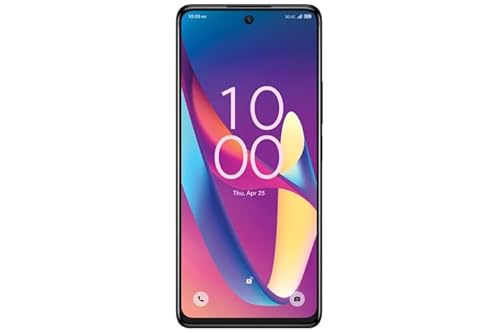
TCL 50 XL 5G — Best display size per dollar
TCL makes televisions, and its budget phones keep betraying the fact in the best way: the 50 XL’s 6.78-inch display runs at a smooth 120Hz, a specification pairing — size plus refresh — that the rest of this budget frame rarely attempts. Scrolling feels fluid, video fills a genuinely large canvas, and the phone brings 5G along, which positions it as the future-facing value pick for readers whose networks support it. Memory, once again, sits beyond the 2GB tier whose name brought you here, and the daily experience is correspondingly calmer.
TCL’s software layer is lighter than Xiaomi’s and its hardware priorities are legible: screen first, battery second — the cell is sized for the panel it feeds — and cameras that handle daylight documentation without pretending to more. The build is plastic and proud of it, the speakers serve video adequately, and the whole package reads as a media appliance that also makes calls, which for its intended buyer is the correct hierarchy.
Support and updates are the budget-tier taxes: TCL’s commitment is shorter than Samsung’s, and its accessory ecosystem is thinner, so buy the case with the phone. Carrier fit for this US-market model is friendlier than the Redmi’s, though a band check remains cheap insurance. For the reader who wants the biggest, smoothest screen the budget frame holds, with 5G included and no interest in the 2GB experiment, the 50 XL closes this guide as its spectacle pick.
Older readers in particular should audition this phone: text at generous sizes on a large, fluid panel is a quality-of-life feature no specification table captures, and the 50 XL delivers it at the frame’s friendliest reach.
- Display: 6.78-inch, 120Hz refresh
- Network: 5G in this US-market model
- Memory: beyond the 2GB class — confirm listing configuration
- Battery: sized for the large panel
- Role: big-screen media on a budget
Strengths
- Largest, smoothest display in the budget frame
- 5G included where rivals cut it
- Generous text size suits ageing eyes
Trade-offs
- Update commitment trails Samsung’s
- Cameras are documentation-grade
- Accessory shelves run thin
Grandparents video-calling grandchildren are the 50 XL’s happiest demographic in owner reports: faces arrive large, text stays readable without squinting, and the fluid screen makes the whole device feel more expensive than the frame allowed. A budget phone that flatters its user daily earns a loyalty no benchmark measures.
Best for: media-first and older readers wanting maximum screen per dollar. Not suited for: compact-phone fans or long-update hunters.
Comparison
| Phone | Memory class | Network | Honest role |
|---|---|---|---|
| Motorola Moto E13 (prose-only) | 2GB, Android Go | 4G | Backup and first-phone duty |
| Samsung Galaxy A03 Core (prose-only) | 2GB | 4G | Lightest Samsung duty |
| Samsung Galaxy A15 5G | Above 2GB | 5G | Sensible main handset |
| Motorola Moto G Power 5G (2024) | 8GB listed | 5G | Battery-first main handset |
| Xiaomi Redmi 15C 4G | Above 2GB | 4G GSM | Big-screen value, GSM only |
| TCL 50 XL 5G | Above 2GB | 5G | Largest display per dollar |
What Does Living With 2GB of RAM Actually Feel Like?
It feels like a phone with a short memory for your intentions. You read an article, answer a message, return — and the article reloads from the top. You photograph a receipt, open the banking app to file it, return — and the camera has forgotten the session. Android Go’s lighter apps soften each incident without curing the condition, because the constraint is physical: modern apps and web pages simply occupy more room than 2GB offers. Owners adapt with rituals — one app at a time, tabs closed religiously, downloads instead of streams — and for the backup and first-phone briefs, the rituals are acceptable rent. For a main phone, they are a daily tax on attention that the small saving rarely justifies by month two.
Android Go Explained: The Software That Makes 2GB Survivable
Android Go is Google’s trimmed operating system for exactly this hardware class: a leaner system image, Go editions of Maps, Gmail, YouTube and Assistant that store less and load faster, and data-saving defaults throughout. It is genuinely clever engineering, and the Moto E13 shows its best case. Its limits are equally real — some mainstream apps decline to install or run in reduced modes, features arrive later, and the broader app ecosystem increasingly designs for 4GB as its floor. Buy a Go phone for what Go does today, not for what the full Android world promises tomorrow, and the purchase stays honest.
How Do You Choose Among the Best 2GB RAM Android Phones Below 200?
Answer three questions in writing. First, the job: if the phone’s duties fit on an index card — calls, messages, one map app, a code generator — 2GB serves. Second, the term: a six-month bridge tolerates compromises that a three-year main phone cannot. Third, the user: a patient minimalist thrives where a busy parent juggling school apps, banking and photography will mutiny by Friday. If any answer leans heavy, the step-up picks in this guide — all inside the same budget frame — are not an upsell but the actual product you were shopping for, and buying the 2GB phone anyway is the expensive decision wearing a cheap costume.
Six Buyers Who Should — and Should Not — Sign for 2GB
The glovebox rescuer should sign without hesitation: a charged E13 in the drawer has saved more holidays than any flagship feature.
The first-phone parent should sign with the brief written down, as the parents’ section above describes, and review it each term.
The minimalist should sign happily — the hardware enforces the digital diet that apps keep promising and breaking.
The gig driver should not sign at all: navigation, the work app and messages in constant rotation is precisely the multitasking pattern 2GB fails, and the Moto G Power exists for this exact working day.
The student should not sign either, whatever the saving whispers: the learning platform, banking and social life of a degree will mutiny against 2GB by the second month, and the A15 costs the same frame.
The travelling grandparent should sign only the Samsung-shaped version, with family nearby to configure it — familiarity and a light brief together make the A03 Core a kind travelling companion rather than a puzzle.
Which Apps Still Behave on 2GB — and Which Have Left?
The honour roll is longer than cynics expect. Messaging in its mainstream forms runs respectably, especially in Lite and Go editions. Maps navigate capably, with route downloads advised before rural drives. Music and podcast apps stream happily, since audio asks little of memory. Email, weather, banking’s core functions and two-factor generators all perform their duties. Video calling works in one-to-one form, which covers the family use case that matters most.
The departures are equally definite. Heavy social feeds scroll with reloads and pauses that train users out of the habit — arguably a feature, though rarely the intended one. Modern games beyond casual puzzles decline the invitation. Full desktop-class websites in a browser become exercises in patience, and group video calls with effects belong to stronger hardware. A buyer whose week lives on the honour roll can live on 2GB; a buyer whose week lives on the departures list has their answer, and it is the step-up table above.
How Do You Set Up a 2GB Phone So It Survives Its Brief?
Setup decides whether a 2GB phone feels lean or broken, so spend the first evening like a quartermaster. Install only the apps on the job card — messages, maps, mail, music, the code generator — and choose Go or Lite editions wherever they exist. Turn off auto-playing feeds, set photos to back up over Wi-Fi and clear promptly, and keep the home screen to one page of essentials so the launcher itself stays light. Disable or uninstall every pre-installed extra the system allows, restrict background data for anything that does not need to chatter, and schedule updates for overnight charging hours. Finally, teach the rituals with the phone: close tabs, finish one app before opening the next, restart weekly. Owners who run this discipline report a calm little appliance; owners who load a 2GB phone like a flagship report a cautionary tale, and both are describing the same hardware.
The Honest Ledger: What a Year on Each Tier Costs You
Price the year, not the day. The true 2GB route costs the least money and the most patience: an hour of small reloads and waits, compounded weekly, plus the discipline tax of managing apps like a quartermaster. The step-up route costs the frame’s ceiling once and then mostly disappears from your attention, which is what main phones are for. The false economy hides in the middle path taken wrongly — the 2GB phone bought as a main handset and replaced in month four, which costs both prices and both setups. Every recommendation in this guide reduces to avoiding that third path: commit to the narrow brief completely, or commit to the step up completely, and the budget frame will have served you honestly either way.
Moving Your Life Onto a Budget Phone Without Losing It
Migration at this tier has one trap the flagship guides never mention: backup discipline. Before the old phone is wiped or handed down, confirm the photo library’s cloud upload has genuinely finished — budget Wi-Fi sessions and half-completed syncs are where family photographs quietly vanish — and export the authenticator codes and banking enrolments deliberately, since several financial apps treat a new device as a security event requiring the old one alive beside it. Move the SIM last, after accounts verify on the new handset over Wi-Fi, and keep the old phone charged in a drawer for a fortnight as the appeals court for any missing contact, message thread or two-factor enrolment. That fortnight costs nothing and has rescued more migrations than any cable.
Privacy and Security Habits for the Cheapest Phones
A budget phone holds the same banking codes and family photographs as a flagship, so its security habits should match even when its support window is shorter. Keep the system and the browser updated on schedule, install apps only from the official store, and prefer the browser’s web versions of services whose apps demand suspicious permissions. On a true 2GB device with a finite update runway, retire banking to a newer household device when support ends and let the old phone finish its life on music, maps and messages — a graceful demotion that keeps its usefulness and sheds its risk in the same motion. Cheap should never mean careless; it should mean deliberate.
Refurbished Budget Phones: When the Arithmetic Works
Refurbished units blur this guide’s categories in a useful way: a professionally refurbished step-up model can land at a true-2GB phone’s price with a warranty attached, and for main-phone buyers that is often the frame’s smartest single purchase. The conditions are discipline — buy from refurbishers who grade honestly, state battery health and accept returns, and prefer the makers’ own refurbished channels where they exist. Avoid marketplace “refurbished” labels without a named refurbisher behind them; at the budget tier, the word alone guarantees nothing. A refurbished A15-class phone with a stated battery and a return window beats a new anonymous handset on every rail this guide measures, and it keeps a good device in service — the outcome the Fairphone philosophy, elsewhere on this site, exists to promote.
Reading a Budget Listing Without Being Fooled
Budget listings reward slow readers. The model name is the beginning, not the answer: confirm the memory and storage in the configuration selector, because the headline price often belongs to the smallest variant and the photograph to the largest. Check the network type in the title itself — GSM, unlocked, carrier-specific — and match it against your provider before the price seduces you. Read the condition language on renewed units with the same care as the radio-muff and flagship guides on this site advise, and confirm what the box contains, since budget phones increasingly ship without chargers. Finally, search the listing for the update policy or the model’s launch year; a mysteriously cheap “new” phone is sometimes a three-year-old model wearing a fresh listing, with its support runway already half spent. Five minutes of this reading is the highest-paid work in the entire purchase.
Prepaid Plans and the True Monthly Cost of Cheap
The budget frame governs the handset, but the plan decides the year’s arithmetic, and unlocked phones from this guide pair naturally with prepaid plans that undercut contract pricing for light users — precisely the 2GB audience. A backup phone can live on the smallest data allowance or even a pay-as-you-go arrangement, woken monthly to stay active and charged. A child’s first phone on a family prepaid plan keeps the whole experiment inside a predictable envelope. Buyers stepping up to the A15 or G Power should still run the plan comparison before assuming the flagship-carrier deal is generous; at this end of the market, the handset saving and the plan saving compound into the real figure, and it is frequently larger than the phone itself cost.
The Middle Ground Nobody Searched For: 3GB and 4GB Phones
Between the literal keyword and the step-up picks sits the market’s quiet sweet spot, worth naming for readers whose listings offer it: the same budget models in 4GB configurations. Four gigabytes does not make a phone fast, but it restores the basic courtesy of apps staying open, and it is the threshold at which full Android — not the Go edition — becomes a reasonable citizen. When a listing presents the 2GB and 4GB variants of one model inside the same frame, the 4GB version is almost always the correct answer for any main-phone purpose, and the price difference is usually the smallest money in the entire purchase. The 2GB variant keeps its narrow, honourable briefs; everything else belongs to the middle ground or above.
Accessories on a Budget: Protecting the Phone That Protects the Wallet
A cheap phone deserves the same case logic as a flagship, because its owner’s replacement budget is the tighter one. Buy the fitted case and a screen protector in the same order — budget models’ accessory shelves empty fastest — and choose a charger from a reputable tier rather than the drawer of anonymous bricks, since a budget battery deserves the same electrical manners as any other. For the glovebox E13, add a long cable and a quarterly calendar reminder to charge it; a backup phone found flat is a story, not a rescue. For a child’s first phone, a distinctive case colour prevents the schoolyard mix-ups that identical black slabs invite. None of this spending is glamorous, and all of it protects the frame’s economics better than any extended warranty sold at this tier.
Second Lives: What Budget Phones Become
Every phone in this guide will eventually retire from its first job, and the budget tier retires unusually gracefully. A retired step-up pick becomes the household’s media remote, kitchen recipe screen or dedicated music player. A retired 2GB phone becomes a single-purpose instrument — a bedside clock with alarms and weather, a car-navigation spare, a child’s audiobook player — roles where its narrowness reads as focus. Planning that second life at purchase time, even loosely, stretches the frame’s value across half a decade and keeps one more device out of the drawer of forgotten electronics. It is the fitting final argument for buying the named, supported models here over the anonymous tier: a phone with a maker, a manual and a community can always find its next job.
Battery, Updates and the Three-Year Truth at This Price
Budget phones age along three rails, and buyers should inspect all of them. The battery rail favours the light-duty picks more than expected: a 2GB phone sipping through calls and messages can serve for days, and even the step-up models’ larger cells degrade gently under shallow daily cycles — the Moto G Power’s whole identity rests on this rail. The update rail separates the guide sharply: Samsung’s commitment keeps the A15 secure for years, Motorola and TCL support their models respectably and more briefly, Xiaomi’s budget cadence is adequate, and the true 2GB devices receive the lightest attention of all — one more reason their briefs should be narrow and their stored data modest. The storage rail is the owner’s own responsibility, as the mistakes section notes: budget phones kept below two-thirds full stay noticeably sprightlier in year two.
Read together, the rails explain the guide’s shape. A narrow-brief phone needs only the battery rail. A main phone needs all three, and within this budget frame only the step-up picks — led by the A15 — stand on all of them at once.
Carrier and Network Notes for the Budget Frame
Cheap phones attract expensive mistakes at the network layer. The Redmi 15C’s GSM-only listing is the standing example: a superb value on compatible networks and an elegant paperweight on the wrong one, so the band check precedes the celebration. US-market models — the A15, Moto G Power and TCL in their listed forms — simplify the question without eliminating it, since prepaid brands and regional carriers still deserve a compatibility confirmation. Unlocked buying preserves your freedom to move networks when a better plan appears, a freedom worth more at the budget tier, where plan-hopping is the savvy household’s annual ritual. Locked carrier bargains were excluded from this guide for exactly that reason: their discount is a loan, repaid in inflexibility.
New Budget Phone or Used Flagship: Which Serves the Frame Better?
The used-flagship argument tempts every budget shopper: last generation’s hero, this generation’s bargain. Its strengths are real — cameras, screens and processors from a higher class — and so are its taxes: an ageing battery at an unknown fraction of its youth, a shorter remaining update runway, and no warranty worth the name. The new budget picks in this guide counter with fresh batteries, full support windows and the A15’s years of updates. For a main phone kept three years, the new budget model usually wins the arithmetic; for a photography-led buyer with a trusted refurbisher and a one-year horizon, the used flagship argues back. Either route beats the third option — a new 2GB phone asked to do a flagship’s job — which this guide has spent its length respectfully discouraging.
A Word for the Second-Hand Drawer: Keeping a Spare Phone Ready
A spare phone only earns its drawer if it wakes up ready, so treat readiness as a small standing routine. Charge it monthly — a battery left flat for a year may never forgive you — run its updates during that same session, and confirm the SIM arrangement still matches your household’s accounts, since a backup that cannot receive the bank’s code is a paperweight wearing a screen. Keep its cable with it, its PIN written somewhere the family can find under stress, and its job card taped inside the drawer. Five minutes a month is the entire premium on this insurance policy, and the day it pays out — the dropped flagship, the lost handbag, the flooded pocket — it pays out completely, in the currency of a working phone in your hand within the hour, connected, signed in and ready to navigate you home again tonight safely, with your messages, your codes and your contacts intact, which is the entire reason the drawer, the routine and this unglamorous little phone exist in a well-run household at all.
For Parents: The First-Phone Brief, Done Properly
A first phone succeeds when its brief is written before its box is opened. Agree the app list as a family — calls, messages, maps, the school platform, one camera — and let the hardware enforce what willpower should not have to: this is the 2GB tier’s finest modern role, with the E13 and A03 Core as its instruments. Set up location sharing, content controls and a charging station outside the bedroom on day one, while novelty makes rules feel like features. Review the arrangement each school term; when the brief genuinely grows — a photography hobby, a team app, a transit pass — the step-up picks are waiting, and the 2GB phone retires to the family drawer as the backup it was always destined to be. Handled this way, the cheapest phone in this guide becomes a considered stage in a child’s digital life rather than a compromise apologised for.
Common Mistakes
Buying 2GB as a main phone to save a small sum leads the list, because the saving evaporates the first time frustration triggers a second purchase. Second, shoppers read “below 200” as a promise about every configuration, when storage and memory variants move prices within the frame — check the exact listing. Third, buyers ignore storage entirely: a 2GB phone with nearly full storage slows further, so budget models need their photo and app hygiene managed from day one. Fourth, parents hand a child a 2GB phone loaded with flagship expectations and games it cannot run, manufacturing a disappointment that a five-minute brief-setting would prevent. Fifth, gift buyers choose the anonymous tier over the named brands here, discovering at the first fault that support was the product.
A sixth error is subtler: assuming the frame’s ceiling must be spent. A backup brief genuinely served by the E13 does not improve with the difference spent on specifications it will never invoke — the honest guide cuts both ways, and the reader whose job card is truly short should pocket the saving with this article’s blessing rather than its warning.
Final Recommendation
Let the job decide. For a backup handset, a first phone or a deliberately minimal companion, the true 2GB picks — the Moto E13 for its Go discipline, the Galaxy A03 Core for Samsung households — do honest work, bought with open eyes. For anything resembling a main phone, spend the same budget frame on the step up: the Galaxy A15 5G as the default, the Moto G Power when battery rules, the Redmi 15C for GSM media value, the TCL 50 XL for the biggest screen. The cheapest phone is the one you buy once, and in 2026 that phone almost never has 2GB of RAM. Buy the narrow tool for the narrow job without a whisper of shame — and buy the step up for everything else without a moment of doubt.
Frequently Asked Questions
Can a 2GB phone run WhatsApp and video calls?
Yes — messaging and one-to-one video calls sit squarely on the 2GB honour roll described in this guide, especially in Lite configurations. Keep other apps closed during calls, hold the phone reasonably still for the camera’s sake, and the family call works. Group calls with effects are where the ceiling appears.
Should I buy a 2GB phone or save longer for more?
If the phone is a main handset, the step up inside this same budget frame — not a longer save — is usually the answer, since the A15 and its peers already sit below the frame’s ceiling. Save longer only when a specific mid-range feature, like a much better camera, is the real goal.
Is 2GB of RAM enough in 2026?
For calls, messages, light browsing, maps and music — yes, with Android Go’s help and a patient’s habits. For multitasking, modern social apps, photography workflows or gaming — no, and the gap widens every year as apps grow. The honest unit of measure is your app list, not the calendar.
What is Android Go, and should I insist on it at 2GB?
It is Google’s lightweight Android edition with slimmed-down apps, designed for exactly this memory class. At 2GB you should insist on it or on an equivalently trimmed interface; full-fat Android on 2GB is the combination that generates this category’s worst owner stories.
Why do some picks here have more than 2GB?
Because most readers searching this phrase need a phone under a budget, not a memory ceiling, and the verified budget models that serve them best exceed 2GB. This guide shows the true 2GB devices honestly, then recommends the step up openly rather than disguising it — the labelling in every review states which class each phone belongs to.
Can I expand storage with a memory card?
Several budget models still accept microSD cards, and for photo and music libraries that slot is genuine value at this tier. Apps, however, live best on internal storage, and a card does not relieve a full system partition — so treat expansion as a library annex, not a cure for a phone bought too small.
How much storage should a budget phone have?
Enough for your photos, apps and two years of updates, with headroom: storage pressure slows budget phones more than any other neglect. Prefer the larger storage variant inside the frame when the step is small, enable cloud photo backup on day one, and treat a nearly full phone as a maintenance task, not a personality trait.
Will a 2GB phone work for an elderly relative?
Often, yes — this is one of its best briefs. Calls, messages, video chats with family and a simple home screen suit the A03 Core and E13 well, especially with a relative configuring large text, favourite contacts and automatic updates in advance. Add a demanding app habit to the picture and the step-up picks become the kinder gift.
Related Guides
Closing counsel, offered plainly: write your phone’s job on a card before you buy it, and let the card — not the discount, not the salesperson, not this guide’s enthusiasm for any single model — make the final call. Readers who shop that way at this price almost never regret the handset that arrives, because the handset was chosen against a written brief rather than a passing bargain, and it spends its life being measured against that brief instead of against a flagship it never claimed to be, which is the closest thing to a guarantee this end of the market can honestly offer any buyer.
Budget phones still deserve a proper kit around them. Continue with our car charger roundup for keeping a budget handset alive on the road, our accessories shortlist that costs less than the phone it serves and our all-screen roundup for the day the budget grows.


