What's inside
- Key Takeaways
- Quick Picks
- How We Chose These Picks
- Comparison Table
- Single-sided or dual-sided — what belongs on the back of your card?
- How do you take delivery of a card printer bundle without surprises?
- What does a card programme cost after the printer — and who should own it?
- Common Mistakes When Buying a PVC Card Printer
- Final Recommendation
- Frequently Asked Questions
- Related Guides
As an Amazon Associate I earn from qualifying purchases. This post may contain affiliate links at no extra cost to you.
widgetverdict.com is reader-supported. When you buy through links on our site, we may earn an affiliate commission.
The best PVC card printers are bought against a single question first: does the card need a back? Everything in this guide hangs off that fork. Two of the six picks print on one side only — both are Fargo DTC1250e machines, one sold as a complete package with beginner software, one as the bare printer. Four print on both sides: the Fargo DTC4250e and DTC4500e in package and kit form, and the Magicard 300 and 600 as dual-sided bundles. An organisation that prints a photo and a name on the front and nothing behind it should buy single-sided and save the difference; an organisation whose backs carry barcodes, rules, magnetic-stripe-era data layouts or a second design should buy dual-sided once, because a card flipped by hand through a single-sided printer is a card printed twice, handled twice and misaligned with feeling.
All six machines print by dye sublimation with thermal transfer, the technology named outright in the bare DTC1250e’s title — colour laid onto PVC card stock in passes, with a transfer finish that makes the card feel like a card rather than a printout. That matters because the products of these machines are carried in wallets, swiped, tapped against doors in the imagination of their holders, and judged against the bank cards they sit beside. A PVC ID card is a small manufactured object, and these are small manufacturing machines; the guide treats them that way.
The bundle question runs alongside the sidedness question, because five of these six listings are packages, bundles or kits rather than bare printers. Their titles promise supplies and software in varying words — a complete supplies package and Beginner Edition card production software on the DTC1250e package; a supplies package with card imaging software on the DTC4250e; a supplies kit on the DTC4500e; supplies bundles on both Magicards. This guide reports those promises exactly as titled and does not enumerate contents the titles leave unlisted: a “supplies package” is what the seller says it is, and the day-one check in the how-to section exists to confirm that the box matches the words before the first class of students or cohort of staff arrives.
The cast by role, then. The DTC1250e package is the starter system for schools and small organisations issuing their first badges. The bare DTC1250e is the same single-sided engine for buyers who already own software and supplies. The DTC4250e package steps up to dual-sided printing with imaging software for growing programmes. The DTC4500e kit is the heavy end of the Fargo ladder here. And the two Magicards offer the dual-sided alternative from the other established maker in this market, as bundles graded 300 and 600 for programmes of different ambition.
Read the reviews in ladder order if you are new to the category, because the ladder is the lesson: each rung exists because the one below it taught a programme something — that the back matters, that volume is real, that standardisation is worth money. Experienced buyers can jump straight to their rung; the comparison table after the reviews compresses the whole argument into six rows for them. Either way, keep a physical card in mind throughout — ideally one of yours, with its photograph, its data and its second side honestly imagined.
Key Takeaways
- Single-sided versus dual-sided is the purchase: two picks print one side, four print both, and the titles say which in plain words.
- Five of the six listings are bundles, packages or kits — their titles promise supplies and, on the Fargos, card software; only the bare DTC1250e is the printer alone.
- The DTC1250e package names its software tier: Beginner Edition card production software, aimed at school IDs, corporate access cards and business badges per its title.
- Every pick is a dye-sublimation/thermal-transfer PVC printer — the technology the bare DTC1250e title names for the family.
- Two makers divide the guide: Fargo’s DTC ladder (1250e, 4250e, 4500e) and Magicard’s graded pair (300, 600).
Quick Picks
| Pick | Badge | Why it earns its place |
|---|---|---|
| Fargo DTC1250e Starter Package (2ID) | Best starter system | The single-sided printer as a complete package with supplies and Beginner Edition software for first badge programmes. |
| Fargo DTC1250e Single Sided ID Card Printer | Best bare printer | The same single-sided engine alone — dye sublimation/thermal transfer, colour, tabletop, USB — for buyers already equipped. |
| Fargo DTC4250e Dual-Side ID Card Printer Package | Best dual-sided package | Dual-side printing with a supplies package and card imaging software, for programmes that have outgrown one side. |
| Fargo DTC4500e Dual Side Card Printer Kit | Heaviest Fargo kit here | The top DTC rung in this guide, dual-sided, sold as a printer and supplies kit for established programmes. |
| Magicard 300 Dual Sided Bundle | Best Magicard starter bundle | Dual-sided printing in a supplies bundle — the alternative maker’s entry for growing ID programmes. |
| Magicard 600 Dual Sided Bundle | Top Magicard bundle here | The higher-graded Magicard bundle, dual-sided, for programmes standardising on the maker’s upper tier. |
How We Chose These Picks
Sidedness governed the shape of the set. A PVC card guide that listed six dual-sided machines would abandon the schools and small firms whose cards are honestly one-sided, and one that listed six single-sided machines would abandon every programme whose card backs work for a living. The two-and-four split mirrors the market’s own centre of gravity: single-sided as the entry, dual-sided as the standard an organisation grows into and then stays with.
The second principle was bundle honesty. In this category the listing is rarely just a printer, and the words package, bundle and kit carry real weight in the purchase — they decide whether the box that arrives can print a card on day one. So the reviews treat each bundle’s title as its manifest: what the title names, the review repeats; what the title leaves generic — “supplies”, unnamed and uncounted — the review leaves generic too, and assigns the enumeration to the buyer’s day-one inventory against the listing. Anything firmer would be invention wearing a helpful face.
Maker depth came third. Fargo’s DTC line and Magicard’s numbered line are the two established families in desktop card printing, with the documentation, software ecosystems and supply chains that organisations lean on for years. A card programme is not a purchase but a commitment — cards are reissued, staff change, designs evolve — and the printer at its centre should come from a maker whose product line reads like a ladder the programme can climb, as Fargo’s 1250e-to-4500e sequence here literally does.
Finally, no performance figures were admitted that the titles do not carry. These six listings state no print speeds, no resolutions and no card-per-hour rates, so the reviews contain none. Card printers are compared in this guide on sidedness, bundle shape, software naming and maker — the facts in evidence — with the throughput questions directed to the manufacturers’ documentation, where they are answered properly for each model.
A word on why the guide tolerates two near-identical listings — the packaged and bare DTC1250e — when its other guides cut duplicates. In this category the packaging is a product decision, not a marketing one: the same engine is the right purchase in both forms, for different desks, and collapsing them into one review would hide the very choice a first programme most needs to see clearly. Where the bundle is the story, the bundle gets the review.

Fargo DTC1250e Single-Sided Badge Printer Package — Best starter system
This listing, sold under the 2ID name in its title, is the only pick that describes a complete first day: the Fargo DTC1250e single-sided badge printer, a complete supplies package, and Beginner Edition card production software. The title then names the intended graduates of that first day — school IDs, corporate access cards and business badges. Read as a whole, it is less a printer listing than a programme in a box, aimed at the organisation that has been issuing paper cards, laminated cards or no cards, and wants to arrive at proper PVC credentials without assembling the parts from three catalogues and a prayer.
The access-card phrase in the title is worth a careful, limited reading. The package names corporate access cards among its intended products — the card as an access credential is the use case — while the mechanics of any particular door system live in that system’s documentation, not in a printer listing. Buyers whose badges must open specific doors should confirm the credential technology with their access provider and the printer’s documentation together; buyers whose badges identify people at doors staffed by humans need no such detour, and for them the title’s promise is complete as written.
The software tier deserves attention, because it is the one bundle element any title in this guide actually specifies. “Beginner Edition” is a promise about the learning curve: the design-and-issue workflow pitched at a first-time administrator — a school secretary, an office manager, a facilities lead — rather than a badge bureau professional. Programmes should take the hint in both directions. If your card design is a photo, a name, a role and a logo, a beginner tier is not a limitation but a correct fit. If your programme already dreams of databases, encoding and multi-site issuance, the title is telling you, kindly and in advance, to start further up the ladder.
Single-sided is the machine’s honest boundary. The cards this package produces carry their whole message on one face — which describes, in truth, most school IDs and visitor-grade badges ever issued. The back of such a card is a blank that nobody reads. Organisations whose backs must work — return-if-found text, emergency numbers, a barcode — should not buy this package and flip cards by hand; the dual-sided packages below exist precisely for them, and the price of hand-flipping is paid in staff time and crooked second passes forever.
Volume honesty completes the starter picture. A package like this is built for the issuance rhythm of a school term or a small firm’s hiring — cohorts, not crowds. The administrator printing a class set across a morning is its home scene; the administrator printing a thousand cards against a conference deadline is shopping further up the ladder, and the ladder’s existence in the same family is the reassurance that starting here strands nothing.
As a starter system, its real product is confidence: one box, one software tier matched to a beginner, supplies included per the title, and a first batch of badges by Friday. Programmes that succeed at this scale tend to standardise — the same printer at the second site, the same software on the second desk — and a package this clearly aimed is easy to standardise on. Buyers should still run the day-one inventory from the how-to section, because a package is a promise, and promises are checked, not assumed. Those ready to compare the current bundle can check price on Amazon.
Schools should hear one specific reassurance from this review: the September problem is the design problem, not the printing problem. A class list changes, a photograph is retaken, a name is spelled the way the register spells it — the beginner-tier workflow exists for exactly that churn, and a package built around it respects the reality that the person issuing the cards is also doing four other jobs. Equipment that understands its operator’s week is the equipment still in service in year three.
- Sidedness: Single-sided, per title
- Bundle contents named in title: Complete supplies package
- Software named in title: Beginner Edition card production software
- Uses named in title: School IDs, corporate access cards, business badges
- Printer: Fargo DTC1250e
- Seller name in title: 2ID
Strengths
- The only complete starter system here — printer, supplies and software in one titled package.
- The software tier is specified, letting a first programme judge the fit honestly.
- Its intended uses are named, so a school or small firm can recognise itself in the title.
Trade-offs
- Single-sided printing caps the card design at one working face.
- A beginner software tier may be outgrown by programmes adding databases or encoding.
- Bundle contents beyond the title’s words need a day-one inventory to confirm.
Best for: schools and small organisations issuing their first PVC badges with a named person in charge. Not suited for: programmes whose card backs carry barcodes, rules or return information.

Fargo DTC1250e Single Sided ID Card Printer — Best bare printer
The bare DTC1250e’s title is the most technical in this guide, and it rewards a slow read: single sided desktop dye sublimation/thermal transfer printer, colour, tabletop, card print, USB. That is the machine with nothing around it — no package, no software tier, no supplies promise — and it exists for the buyer who already has the surroundings. The second site of a programme standardised on the package above. The replacement for a printer that died while its ribbons and software lived on. The organisation whose card software is already chosen and licensed. For those buyers, a bundle is a tax on things they own; this listing is the engine alone, honestly described.
The technology line is the family’s credential, stated here in full: dye sublimation with thermal transfer. Dye sublimation is what lays the colour image into the card’s surface — the photograph that must look like the person — and the transfer process gives the finished card its manufactured feel. When a title in this category names its print technology, it is speaking to buyers who know that PVC cards are not printed like paper, and that the words are a specification rather than a garnish. Colour and single-sided need no gloss; USB and tabletop place the machine on a desk, attached to one computer, which is where single-workstation issuance lives.
Notice what a bare-printer buyer must already possess, because the listing’s economy depends on it: card design and issuance software, a stock of blank PVC cards, and the ribbons this print technology consumes. None of those appear in this title, and the review will not dress that absence up as anything else. A first-time programme reading this listing beside the package above is looking at the difference between buying a system and buying a component — both legitimate, for different desks, and the guide’s ordering puts the system first because most readers of a “best” guide are starting, not replacing.
There is also a fleet logic to the bare unit. Programmes standardise on a printer model the way fleets standardise on a van: every site the same machine, every administrator the same routine, every storeroom the same consumables. The bare DTC1250e is how a standardised estate grows — one more identical station, without re-buying the software and starter supplies each time. Judged as a component in that system, its plain title is a virtue: it promises a printer, and a printer is what the estate needs.
One caution for the component buyer: confirm the ribbon and card stock your programme already holds are the ones this model consumes, from Fargo’s documentation, before the estate grows by one. Standardisation fails quietly when a replacement unit turns out to want a different consumable than the storeroom stocks. The check takes minutes; the mismatch takes a term to forgive.
- Sidedness: Single sided, per title
- Technology in title: Dye sublimation / thermal transfer
- Output: Colour, per title
- Form: Desktop, tabletop
- Connection named in title: USB
- Bundle: None — printer only, per title
Strengths
- The full technology is stated in the title — the most specification-literate listing here.
- No bundle tax for programmes that already own software and supplies.
- The natural growth unit for estates standardised on the DTC1250e.
Trade-offs
- Software, cards and ribbons are all separate purchases for a new programme.
- Single-sided, like its packaged sibling — the back of the card stays blank.
- USB ties issuance to one workstation at a time.
Best for: established programmes adding or replacing a DTC1250e station with software and supplies in hand. Not suited for: a first-time badge programme starting from an empty desk.

Fargo DTC4250e Dual-Side ID Card Printer Package — Best dual-sided package
The DTC4250e package is where this guide’s centre of gravity sits: a dual-side Fargo printer, a supplies package, and card imaging software — the listing adds the number 52100, the package’s own identifier, a small signal that this is a defined kit in a seller’s catalogue rather than an improvisation. Dual-side is the headline, and it changes the card from a portrait with a name into a document with two working faces. Front: the person. Back: the barcode, the rules, the return address, the emergency line — the information organisations actually run on. Programmes discover the need for a back at the moment they design their second card; this package is bought by the ones who discovered it before purchasing.
The software naming steps up with the machine. Where the starter package says Beginner Edition, this title says card imaging software without a tier adjective — a quieter, more professional phrasing aimed at an administrator who is past their first design. This guide does not invent feature lists for either tier; the honest reading is about audience. A programme whose cards are designed once and issued for years fits either; a programme iterating designs, adding data and issuing at volume should be reading the 4250e’s package as its starting point and confirming the software’s scope in the seller’s documentation.
Against its single-sided siblings, the dual-sided mechanism also buys a workflow: the card is finished in one pass, handled once, aligned by the machine rather than by an operator flipping stock. Anyone who has watched a well-meaning administrator hand-flip two hundred cards through a single-sided printer — and watched the second side’s registration wander — understands that dual-sided is not a luxury feature but a labour decision. The supplies package in the title completes the same argument: the box aims to start a working programme, not a shopping list.
Who should step past it? Programmes whose volumes or durability demands point at the 4500e kit below, and programmes for whom even this is more than the card design needs — the honest one-sided school among them. The 4250e package is the guide’s answer to the most common mature question in this category: we issue real cards, both sides work, set us up properly. Its title, package and software answer in one breath.
There is a design dividend to dual-sided that deserves naming, because it is the one programmes mention a year later: the front gets better. When the rules, codes and small print move to the back, the front of the card can breathe — a larger photograph, a clearer name, white space that makes the credential readable at a door’s distance. Cards are read in a second, by people holding doors and trays; a front designed for that second is a security feature as much as an aesthetic one, and it is bought with the second side.
- Sidedness: Dual-side, per title
- In the package per title: Supplies package
- Software named in title: Card imaging software
- Package identifier in title: 52100
- Printer: Fargo DTC4250e
- Print technology: Dye sublimation family (see the DTC1250e title for the family’s stated technology)
Strengths
- Dual-sided printing in one pass — the card’s back becomes a working surface.
- A defined package with imaging software, aimed past the beginner tier.
- The balanced centre of the Fargo ladder for most established programmes.
Trade-offs
- Programmes with genuinely one-sided cards pay for a mechanism they will not use.
- Supply contents are titled generically — the day-one inventory still applies.
- Software scope beyond its name is a documentation question for the seller.
Best for: organisations whose card backs carry data and whose issuance is a routine, not an event. Not suited for: a small programme whose cards are a photo, a name and nothing else.
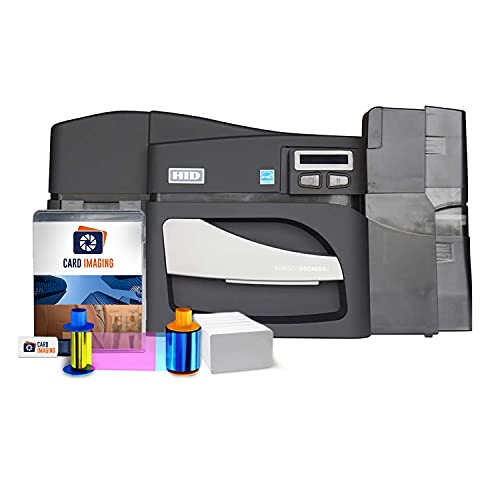
Fargo DTC4500e Dual Side Card Printer Kit — Heaviest Fargo kit here
The DTC4500e kit is the top of this guide’s Fargo ladder: a dual side card printer with a supplies kit, listed under the Card Imaging seller name with the kit number 55100 in its title. Model numbers in a family like DTC are a ladder the maker built deliberately — 1250e, 4250e, 4500e — and a buyer reading the ladder should understand the top rung’s audience: the programme that has outgrown the middle. More cards, more often, issued by more hands, with less tolerance for the printer being the bottleneck or the problem. The kit form matters at that scale: a defined bundle, numbered like the 4250e’s package, that an organisation can reorder and replicate across sites without renegotiating its contents each time.
The title is otherwise spare — dual side, printer, supplies kit — and this review respects the spareness rather than decorating it with invented capacities. What can be said from the ladder itself is structural: Fargo positions the 4500e above the 4250e, and programmes choose between them on the maker’s documentation for volume, durability and options, not on adjectives. A buyer at this rung is, by definition, a buyer with a programme spec — issuance counts, card types, a design with two working faces — and the correct procedure is to set that spec against Fargo’s own model documentation for both machines, then buy the one whose documented brief contains it.
The kit’s supplies, like every bundle here, are titled generically, and the day-one inventory matters more at this scale, not less: a programme issuing at volume cannot discover a missing consumable in week two. Treat the kit number as the anchor — photograph it, record it, reorder by it — because defined kits are how organisations keep a multi-year programme consistent when the person who set it up has changed jobs.
Positioned plainly: this is the pick for the programme that has already succeeded. The school district standardising across sites, the company whose badge is now an access credential with a working back, the bureau issuing for several clients. First programmes should start lower on the ladder and climb with evidence; programmes arriving here with evidence will find the top rung is exactly where their volume said it would be.
The multi-site case deserves a final paragraph, because it is where kits prove their clerical worth. A district or company rolling one card design across six sites needs the same printer, the same kit and the same software decision at every desk — otherwise the design drifts, the consumables fork, and the helpdesk inherits six dialects of the same programme. A numbered kit bought six times is a standard; six improvisations are a future audit. The DTC4500e’s listing, numbered and spare, is written for the standard.
- Sidedness: Dual side, per title
- Kit contents as titled: Supplies kit
- Kit identifier in title: 55100
- Seller name in title: Card Imaging
- Printer: Fargo DTC4500e
- Position: Top of the DTC ladder in this guide
Strengths
- The ladder’s top rung for programmes that have outgrown the middle models.
- A numbered kit makes reordering and multi-site replication a clerical act.
- Dual-sided as standard at the tier where card backs always work.
Trade-offs
- First programmes will pay for headroom they cannot yet use.
- The spare title leaves volume questions to the maker’s documentation — homework required.
- Kit contents beyond the title’s words need confirming against the listing.
Best for: established, higher-volume programmes standardising issuance across people or sites. Not suited for: a first badge programme still designing its very first card.
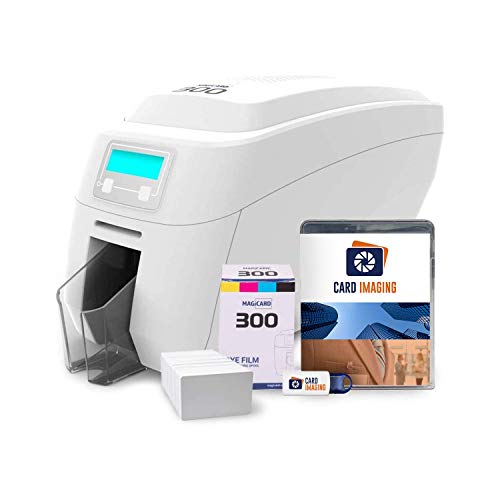
Magicard 300 Dual Sided ID Card Printer Bundle — Best Magicard starter bundle
The Magicard 300 bundle opens the alternative maker’s case: a dual sided ID card printer with a supplies bundle, model code 3300-0021 in the title. Magicard is the other long-established name in desktop card printing, and its presence in this guide is not tokenism — programmes choose between the Fargo and Magicard ecosystems the way they choose between any two mature platforms, on software feel, supply chains, local support and the ladder each offers. The 300 is the lower of the two Magicard rungs here, the entry to that ecosystem for a programme that knows it needs both sides of the card from the start.
Dual-sided as the starting point is the bundle’s argument. Where the Fargo ladder lets a programme begin single-sided and climb, this listing assumes the climb is unnecessary: the card’s back works from day one. For organisations whose first card design already includes the barcode, the terms or the second language on the reverse, beginning dual-sided is not extravagance but accuracy — and a bundle that includes supplies, per its title, aims to make that beginning a single purchase.
The title’s spareness matches the DTC4500e’s: printer, sidedness, bundle, code. No software is named here, which a careful buyer should register — the Fargo packages name their software, this bundle does not — and assign to the pre-purchase checklist: what design-and-issue software will drive this printer in your office, and is it in the box, in the building, or in the budget? The question is not a criticism of the bundle; it is the standard question this guide asks of every listing whose title leaves a component unnamed.
As the ecosystem alternative, the 300 rewards buyers who do their comparing at the system level: the design software’s feel in the administrator’s hands, the availability of the maker’s consumables from their usual suppliers, the next rung’s appeal if volume grows. On title facts it stands level with the Fargo dual-sided packages; the choice between ecosystems is made in those surrounding details, and it is a legitimate, durable basis for a decision.
Consider the administrator’s hands for a moment, because ecosystem choices are finally made there. The person who designs the cards will spend more hours in the software than in front of the printer, and their fluency decides the programme’s daily cost more than any hardware figure. A trial of the design workflow — even an afternoon with documentation and sample files — is worth more to the decision than another comparison table, this one included. Buy the system your administrator will still be fluent in at the third reissue.
- Sidedness: Dual sided, per title
- Bundle as titled: Supplies bundle
- Listing code: 3300-0021
- Printer: Magicard 300
- Software: Not named in the listing title — verify with the manufacturer documentation
- Position: Entry dual-sided Magicard in this guide
Strengths
- Dual-sided from the first card — no hand-flipping stage in the programme’s life.
- A supplies bundle aimed at a working start in the alternative ecosystem.
- The lower rung of a two-rung ladder gives the programme somewhere to grow.
Trade-offs
- No software is named in the title, so that component needs explicit confirming.
- One-sided programmes pay for the second side’s mechanism unnecessarily.
- Ecosystem comparisons require documentation homework the title cannot do for you.
Best for: programmes starting dual-sided by design, choosing the Magicard ecosystem deliberately. The software question stays open on this listing, because its title never names the edition a bundle ships with.

Magicard 600 Dual Sided ID Card Printer Bundle — Top Magicard bundle here
The Magicard 600 bundle closes the guide as the upper rung of its ladder: dual sided ID card printer, supplies bundle, model code 3652-5021. Everything said about its sibling’s ecosystem applies, raised a tier — this is the bundle for the programme that has compared the two Magicard rungs in the maker’s documentation and chosen the higher one for its documented brief, whether that brief is volume, card features or the simple desire to standardise once at a level the next five years will not embarrass.
Dual-sided is again the assumption, and at this tier it should be: a programme buying the top bundle of an ecosystem has a card design with two working faces and an issuance routine that runs weekly or daily. The bundle form — supplies included per the title — serves the same standardisation logic as the numbered Fargo kits: a defined purchase that can be repeated at the second site and reordered by code when the programme’s administrator changes. Organisations do not buy printers at this level; they adopt platforms, and the bundle is the adoption paperwork.
The title, like its sibling’s, names no software, and the same pre-purchase question applies with the same answer: confirm the design-and-issue software story from the seller’s documentation before the box arrives. At this tier the question usually resolves into an ecosystem decision the organisation has already half-made — which is precisely why it must be made explicitly, on paper, rather than discovered at installation.
Between this and the DTC4500e kit, the guide offers no crown, because the titles offer no comparable figures to crown with — the honest contest between the two top bundles is fought in the makers’ documentation, in software trials, and in the supply quotes an organisation should gather for both. What the titles do establish is parity of posture: dual-sided, bundled, top-of-ladder, from the two makers who define the category. A programme that chooses either on documented fit has chosen well; a programme that chooses on a coin flip has at least chosen a ladder worth climbing. Buyers at this tier can check price on Amazon for both bundles as the final clerical step of a decision made on evidence.
Longevity planning closes the case for the top rung. Card programmes measure their platforms in years — designs persist, holders accumulate, reissues compound — and the cost of migrating ecosystems mid-programme dwarfs the difference between rungs at purchase. A programme that can see its five-year shape should buy the platform tier that shape needs now, while the choosing is cheap. That, more than any single specification, is what the 600 bundle is for.
- Sidedness: Dual sided, per title
- What the bundle names: Supplies
- Listing code: 3652-5021
- Printer: Magicard 600
- Software: Not named in the listing title — verify with the manufacturer documentation
- Position: Top of the Magicard pair in this guide
Strengths
- The upper Magicard rung for programmes standardising at a durable level.
- Dual-sided and bundled — the adoption-in-a-box posture top tiers need.
- A defined model code anchors reordering across a multi-year programme.
Trade-offs
- Software is unnamed in the title — the ecosystem’s key question needs documentation.
- Programmes still growing into dual-sided volume may find the 300 rung sufficient.
- Top-tier bundles reward a documented decision; impulse buyers should start lower.
Best for: established programmes adopting the Magicard platform at its upper tier for the long term. Not suited for: a first programme that has not yet printed its first hundred cards.
Comparison Table
| Printer | Sides | Sold as | Software in title | Ladder position |
|---|---|---|---|---|
| Fargo DTC1250e Package | Single | Complete package | Beginner Edition | Fargo entry |
| Fargo DTC1250e (bare) | Single | Printer only | — | Fargo entry |
| Fargo DTC4250e Package | Dual | Package 52100 | Card imaging software | Fargo middle |
| Fargo DTC4500e Kit | Dual | Kit 55100 | — | Fargo top here |
| Magicard 300 Bundle | Dual | Bundle 3300-0021 | — | Magicard entry |
| Magicard 600 Bundle | Dual | Bundle 3652-5021 | — | Magicard top here |
Single-sided or dual-sided — what belongs on the back of your card?
Design the back before you price the printer. Take the card your organisation actually needs and list what the reverse must carry: a barcode or code for door or library systems; the “if found, please return” line with an address; emergency or safeguarding contacts for a school; the rules of the credential in small print; a second design for the bilingual workplace; the sponsor or department mark that does not fit the front. If the list is empty after honest effort, you are a single-sided programme, and the DTC1250e in either form is your correct, economical answer.
If the list has even one load-bearing item, buy dual-sided and never look back. The economics are not subtle: a dual-sided printer finishes the card in one pass, while a single-sided printer plus a human flipping stock spends staff time on every card forever, introduces a second alignment to get wrong, and produces a back that looks like an afterthought because it is one. Programmes routinely discover the back’s importance in their second year; buying for it in the first is the cheapest foresight in this category.
There is a middle temptation — print the backs in bulk, in advance, and the fronts on demand — and mature programmes do use it: a common back, identical for every holder, can indeed be pre-printed in batches. But notice that the workflow still runs every card through the printer twice across its life, and the saving depends on the back never changing. Rules change, phone numbers change, designs refresh. Dual-sided printing keeps the whole card in one file and one pass, which is why, above starter scale, it is this guide’s default assumption.
One more constituency for the back deserves a hearing: the future. Card programmes accrete requirements the way buildings accrete signage — a safeguarding line this year, a new door system the next, a sponsor the year after. A dual-sided printer holds spare capacity for that future in the form of a second face already paid for. Buying it is not spending on a guess; it is declining to re-buy the printer when the guess comes true, as it usually does.
How do you take delivery of a card printer bundle without surprises?
Inventory the box against the title, line by line, on the day it arrives. The listings in this guide promise, in their various words, printers, supplies packages, bundles, kits and — on two Fargo packages — named software. Photograph the title you bought from, open the box with it on screen, and tick off what the words claimed against what the foam contains. Bundles are assembled by sellers, and a defined kit number — 52100, 55100, the Magicard codes — is your anchor: quote it in any conversation about a shortage, while the purchase is young.
Confirm the software story next, before the first design session. Which software, which tier, whose licence, on which computer? The DTC1250e package names a Beginner Edition; the DTC4250e names card imaging software; the other listings leave the question to you. Whatever the answer, establish it on paper during the first week, because card programmes outlive the memory of whoever unboxed the printer, and the second administrator inherits the documentation, not the day.
Print the test set before the first real cohort: five cards, front and back, held against the design on screen and against the light. Check the photograph’s honesty, the text’s legibility at arm’s length, the back’s alignment, and the card’s feel beside a bank card. Every programme discovers one design flaw in its test set — a margin, a contrast, a spelling — and the test set is where flaws are free.
Finally, record the programme’s facts in one page that lives with the printer: model and kit numbers, software and licence, consumable types, supplier, and the reorder point for cards and ribbons. That page is the difference between a programme and a person — programmes survive staff changes, and card programmes always face staff changes eventually.
Store the spares like the programme depends on them, because it does: a box of blank cards and the current ribbon, sealed, dry and counted, with the reorder point set at the level of your largest single issuance day. Card stock is not perishable in any hurry, and the cost of holding a buffer is trivial against the cost of a cohort waiting for credentials while a delivery is in transit. Programmes are embarrassed by logistics far more often than by hardware.
What does a card programme cost after the printer — and who should own it?
The printer is the visible purchase; the programme is the recurring one. Cards and ribbons flow through it in proportion to your churn — new joiners, lost cards, damaged cards, redesigns — and that flow, not the hardware, is the budget line that repeats. Estimate it honestly from your own turnover before choosing a tier: a school reissues a class a year, a gym replaces cards monthly, a secure site treats every loss as an event. The same printer is cheap in one building and busy in another, and the tier you need follows the flow, not the headcount.
Ownership is the other after-purchase question, and programmes fail without it. Somebody must own the design file, the data, the consumable reorder point and the test-set habit — a named administrator, with a deputy, both recorded on the one-page programme record the how-to section describes. Card systems drift when they belong to everyone; they run for years when they belong to someone. Choose the owner with the same care as the printer, because in the long run the owner is the system — and give that owner this guide’s delivery checklist as their first act, so the programme starts documented rather than remembered, and stays that way for good, across every reissue and redesign the programme will ever need in its whole working life ahead of it, everywhere it serves.
Finally, plan the redesign. Every card design ages — logos refresh, safeguarding lines change, a merger renames the organisation — and a programme with its design file, fonts and data in order treats a redesign as an afternoon. A programme without them treats it as archaeology. The printer you buy today will print at least two designs in its life; buy and organise for the second one from the start.
Security deserves its sentence in any honest account of card programmes, pitched at the level these desktop machines serve. A PVC badge is an identity claim, and its value to the organisation depends on the stock, the design file and the waste being controlled: blank cards counted, misprints destroyed, the design file held by the programme’s owner. None of that is the printer’s doing — all of it is the programme’s — and a buyer thinking at programme level, as this guide has argued throughout, will build those habits with the first box of blanks.
Common Mistakes When Buying a PVC Card Printer
Buying single-sided to save money, then hand-flipping for years, is the category’s signature false economy — and the easiest to avoid, because the back-design exercise in this guide takes ten minutes and settles the question with evidence. Organisations that skip the exercise are not saving the difference between the models; they are spending it slowly, in staff time, while believing they saved it once.
Treating a bundle’s word “supplies” as a specification is the second. Supplies is a category, not a count. The titles here use it honestly and generically, and the buyer’s job — inventory on day one, questions while the purchase is young — is the completion of the contract. Programmes that skip the inventory discover their assumptions in front of the first cohort.
There is a timing version of the same mistake: ordering the printer against a fixed date — the first day of term, the office move, the conference — with no slack for the inventory, the software questions or the test set. Card programmes have hard birthdays, and the listings here can all meet one, provided the box is opened the week it arrives rather than the night before it is needed. Slack is a feature; buy it with the calendar, since it cannot be bought with money later.
Forgetting the software is the third. A card printer without its design-and-issue software is a very specialised paperweight, and two listings in this guide name software while four leave it open. The open ones are not worse; they are unfinished sentences the buyer must complete before purchase, not after installation.
The fourth mistake is designing the card on screen and never in the hand. PVC is a physical medium — photographs darken, fine print shrinks, colours shift against the card stock’s white. The test set exists because every first design is wrong in one physical way, and the programmes that print it early fix the flaw for the price of five cards instead of five hundred.
Fifth: letting the data be an afterthought. A card programme is a small database wearing a printer — names, photographs, roles, expiry dates — and the programmes that suffer treat the spreadsheet as a chore to be assembled the night before issuance. Build the data habit with the first cohort: one source file, one naming convention, photographs taken against the same wall. The printer will faithfully print whatever chaos it is fed; the discipline is upstream of it.
Final Recommendation
First programmes should start with the DTC1250e package if their cards are honestly one-sided — it is the only complete, software-specified starter system here — and with the DTC4250e package the moment the back of the card has work to do. Estates standardising across sites climb to the DTC4500e kit. Programmes choosing the Magicard ecosystem begin dual-sided with the 300 bundle and adopt the 600 when their documented volume says so. And replacement buyers with software and supplies in hand should take the bare DTC1250e and spend nothing on a second bundle. The card’s back, honestly designed, makes the first decision; the programme’s age makes the second.
And whichever rung you land on, keep the test-set habit and the one-page programme record from the delivery section. Card printers reward organisations that treat issuance as a system; the six listings here are six ways of buying into one, and the system — more than the model — is what your cardholders will actually meet.
Frequently Asked Questions
What is a PVC card printer actually printing on?
Blank PVC cards — the same plastic family as bank and membership cards. These six machines print onto that stock by dye sublimation with thermal transfer, the technology the bare DTC1250e’s title names, producing a finished card rather than a label to stick on one.
Can a single-sided printer print the back by flipping the card?
Physically, yes — and operationally, it is the false economy this guide warns against. Every card is handled twice, alignment wanders, and staff time accumulates forever. If the back carries anything that matters, a dual-sided model finishes the card in one pass.
What software do these printers need?
Card design and issuance software, which two listings here name — the Beginner Edition in the DTC1250e package and the card imaging software in the DTC4250e package. Where a title names none, confirm the software story with the seller before purchase; the printer alone cannot design a card.
What is the difference between the DTC1250e package and the bare DTC1250e?
The printer is the same single-sided model. The packaged listing adds the supplies and the Beginner Edition software its title names; the bare listing is the printer only, with USB connection stated, for buyers who already own the surroundings.
Can these printers make cards for a whole school or company?
That is the use the titles themselves describe — school IDs and corporate access cards are named in the starter package’s listing, and the ladder above it exists for larger programmes. The practical question is never whether the category serves institutions, but which rung matches your cohort size and issuance rhythm, which your own numbers answer. Bring those numbers — cohort size, reissue rate, sites — to the maker’s documentation for the two rungs you are choosing between, and the choice usually makes itself in one sitting, without drama.
Do these printers laminate or encode cards?
Their titles do not say, and this guide does not guess. Lamination and encoding are option-level features in this category, specified in each maker’s model documentation. If your programme needs either — encoded access credentials, for instance — put the requirement in writing against the exact model before purchase, because it is the kind of need that must be settled by documentation, not discovered at installation.
How many cards can these printers produce?
Their titles state no speeds or capacities, and this guide invents none. Throughput figures live in each maker’s model documentation — read them there, set them against your cohort sizes and issuance calendar, and let your own arithmetic, not a headline rate, size the purchase.
Fargo or Magicard — how should an organisation choose?
At the ecosystem level: the design software’s fit with your administrator, consumable availability from your suppliers, and the ladder each maker offers your programme’s future. The titles establish parity of posture — dual-sided bundles at the top of both lines — so the documented details, not the badge, should decide.
Related Guides
Sellers who print their own product visuals as well as credentials will want the printers for vinyl sticker printing guide next. For the rooms where those credentials are presented, the affordable outdoor projectors roundup covers display on a budget, and training facilities building simulation spaces should read the short throw projectors for golf simulators comparison.
Related guides
- Best 3.0 Qualcomm Quick Chargers: QC 3.0 Adapters That Still Earn Their Outlet
- Best Time Machine Compatible Hard Drives: Mac-Ready and Reformatted Picks
- Best 3D Mechanical Engineering Laptops: Certified Workstations for CAD and Simulation
- Best Tattoo Printers: Thermal Stencil Machines for Clean, Lasting Transfers

[…] formalising their identity documents should continue to the PVC card printer guide, while sellers who decorate what they ship will find the printers for vinyl sticker printing […]