What's inside
- Key Takeaways
- Quick Picks
- How We Chose These Picks
- What Does “Supports VPN” Actually Mean on a Router?
- Which of the Six Picks Fits Your Network?
- How Do These Six Divide on Ports, Protocols and Roles?
- What Should You Check Before Routing Your Whole Home Through a VPN?
- How Do You Set Up a Router VPN Without Locking Yourself Out?
- What Mistakes Do People Make When Buying a VPN Router?
- What Does a Router VPN Actually Protect — and What Does It Leave Alone?
- How Much Router Does a Tunnel Actually Need?
- How Do You Keep a Router VPN Healthy Year After Year?
- Final Recommendation
- Frequently Asked Questions
- Related Guides
As an Amazon Associate I earn from qualifying purchases. This post may contain affiliate links at no extra cost to you.
widgetverdict.com is reader-supported. When you buy through links on our site, we may earn an affiliate commission.
Where to buy: all six routers in this shortlist carry checked Amazon listings, and each name in the Quick Picks table links straight to the listing whose title we verified, so the model on the page is the model described here.
People searching for the best routers that support vpn usually want one of two quite different things, and confusing them is how money gets wasted. The first job is client duty: the router itself connects outward to a commercial VPN provider, so every phone, television and laptop in the house travels through that tunnel without each device running its own app. The second job is server duty: the router accepts an encrypted connection coming in from outside, so you can reach your own files, cameras and desktop while sitting in an airport or a client’s office. A router can be excellent at one job and mediocre at the other, because the two directions stress different parts of the firmware and the processor.
That processor point deserves emphasis before any product names appear. Encrypting traffic is arithmetic, and arithmetic takes CPU cycles. When a router terminates a VPN tunnel, its processor — not its Wi-Fi radios — sets the ceiling on how fast the tunnel runs. A router with dazzling wireless headline speeds can still crawl through a tunnel if its chip is modest, and a plain wired box with no radios at all can be the fastest VPN endpoint in the building. Protocol choice matters for the same reason: WireGuard was designed to do this arithmetic leanly, with a small codebase and modern cryptography, while OpenVPN carries a heavier per-packet cost on the same hardware. Neither is “better” in the abstract; WireGuard usually wins on speed per CPU cycle, OpenVPN usually wins on compatibility with older provider setups and corporate endpoints.
This shortlist deliberately mixes shapes. There are full wireless routers that replace your current box outright, a pair of wired gateways that sit in front of whatever wireless system you already own, and one small dedicated security gateway whose entire purpose is tunnel work. Read the picks by role first and by brand second, and the right answer for your house will usually announce itself.
Key Takeaways
- Decide whether you need a VPN client, a VPN server, or both running at once — the six picks split sharply along that line.
- Tunnel speed is set by the router’s processor and protocol, not by the Wi-Fi class printed on the box.
- WireGuard generally extracts more speed from modest hardware than OpenVPN does on identical chips.
- Wired gateways such as the ER605 and Brume 2 add VPN duty to an existing network without replacing your wireless system.
- Whole-home client mode routes every device through the provider, including the smart television that has no VPN app of its own.
- Split tunnelling — sending only chosen devices or sites through the tunnel — is the feature that separates pleasant setups from frustrating ones.
Quick Picks
| Pick | Badge | Why it earns its place |
|---|---|---|
| pcWRT PW-AX1800 WiFi 6 Dual-Band Router with VPN | Protocol-complete wireless pick | OpenVPN, WireGuard and IPsec in both client and server roles, plus VLAN support for separating tunnelled and direct traffic. |
| GL.iNet GL-BE9300 Flint 3 Tri-Band Wi-Fi 7 Router | Wi-Fi 7 VPN flagship | Tri-band Wi-Fi 7 with a 6 GHz band and five 2.5G ports under a firmware line built around VPN use from the start. |
| Cudy AX3000 5-Port GbE Wi-Fi 6 Router WR3000S | OpenWrt-ready value route | AX3000 wireless, five gigabit ports and both VPN server and client roles at the modest end of this list’s pricing tier. |
| TP-Link ER605 Wired Gigabit VPN Router | Wired multi-WAN gateway | No radios at all — a business gateway with up to three WAN ports, load balancing and Omada SDN management. |
| Omada ER706W Gigabit AX3000 WiFi 6 VPN Router | Wireless Omada gateway | AX3000 Wi-Fi 6 built into an Omada-managed VPN router, with USB 3.0 for storage or an LTE backup dongle. |
| GL.iNet GL-MT2500A Brume 2 Wired VPN Security Gateway | Dedicated tunnel box | Runs a VPN server and a VPN client simultaneously behind a 2.5G WAN port, and asks for no wireless duties at all. |
How We Chose These Picks
The first filter was documentary, not reputational: the listing title for each pick had to state its VPN capability in plain words — client, server, a named protocol, or some honest combination — because a router whose own listing will not commit to the feature is a poor foundation for a guide about that feature. Models whose titles stayed silent on VPN were left out of this particular list entirely rather than carried on assumptions about their firmware menus.
The second filter was role coverage. A useful shortlist for this keyword has to serve the renter who wants the whole flat behind a provider tunnel, the homeworker who needs to dial back into a home office, and the small business that wants two sites joined. So the six places were allocated deliberately: three wireless routers that can front a home network, two gateways from TP-Link’s Omada world, and one single-purpose GL.iNet box. Any six wireless routers would have been easier to assemble and less honest about how VPN duty is actually deployed.
Third, we weighed the wired port map, because tunnel endpoints collect wired devices. A NAS, a desktop and a work laptop are exactly the machines people tunnel, and they deserve real Ethernet rather than a congested radio band. Finally, we favoured firmware ecosystems with a track record of maintaining their VPN features — GL.iNet’s OpenWrt-based interface, TP-Link’s Omada controller story, Cudy’s OpenWrt-ready positioning — over one-off firmware that treats the tunnel as a checkbox buried three menus deep.
Geography deserves a sentence of its own before the products take over. A tunnel endpoint is a place: your traffic surfaces wherever the server sits, with that place’s streaming catalogues, search results and latency. Households usually keep two or three favourite endpoints — one near home for speed, one abroad for the services that need it — and a good router makes switching between them a ten-second job rather than a reconfiguration ritual. When you evaluate the picks below, hold that picture in mind: you are not buying a speed figure, you are buying the daily experience of choosing where your house appears to be, and how gracefully the box handles the days the tunnel misbehaves.
What Does “Supports VPN” Actually Mean on a Router?
The phrase hides at least four distinct capabilities, and product pages rarely separate them. Passthrough is the weakest: the router merely lets VPN traffic from your devices cross it without interference, which nearly every router does and which deserves no badge. Client mode is the household favourite — the router holds one account with a provider and pushes some or all local traffic through it. Server mode reverses the direction, letting you connect home from elsewhere. Site-to-site mode joins two networks so devices on both sides see each other, which is business territory and the natural home of IPsec.
Protocol vocabulary matters as much as role vocabulary. OpenVPN is the veteran: widely supported by commercial providers, tolerant of awkward networks, and comparatively heavy on the processor. WireGuard is the modern design: a fraction of the code, quick handshakes that survive network changes gracefully, and typically the fastest tunnel a given chip can produce. IPsec remains the language of corporate gateways and site-to-site links. PPTP and L2TP still appear in menus, but PPTP’s cryptography is considered broken and it should not carry anything you care about; treat its presence as a legacy courtesy, not a feature.
One more distinction saves real grief: a kill switch. If the tunnel drops at three in the morning, does the router pause traffic until the tunnel returns, or quietly fall back to your bare connection? For people whose whole reason for buying is that nothing should leak outside the tunnel, that behaviour is the product. Check for it by name in the maker’s documentation for whichever pick you choose, because listings almost never mention it.
Which of the Six Picks Fits Your Network?
The detailed sections below follow the Quick Picks order. Read the wired gateways even if you came in shopping for a wireless router: for many homes the cheapest correct answer is a small tunnel box in front of the wireless system that already works.
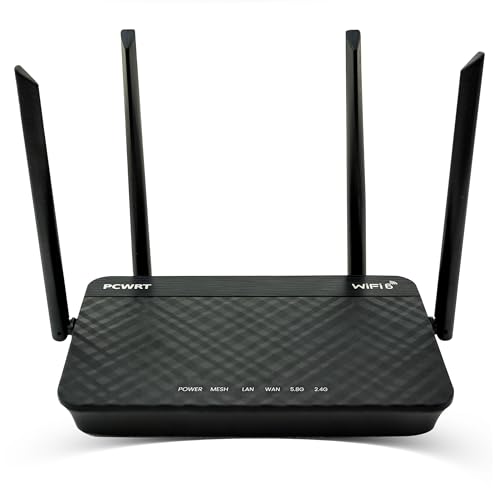
pcWRT PW-AX1800 WiFi 6 Dual-Band Router with VPN — Protocol-complete wireless pick
Most consumer routers offer one VPN protocol and hope you will not ask about the others. The PW-AX1800’s listing names three — OpenVPN, WireGuard and IPsec — and states both directions, client and server, which makes it the most complete protocol citizen among the wireless picks here. For a household that wants the living-room devices behind a commercial provider this month and a dial-home server for a work laptop next month, that breadth removes the usual second purchase.
The pcWRT firmware angle is the quieter selling point. The listing pairs the VPN support with VLAN capability, parental controls and ad blocking, and VLANs are genuinely useful in a tunnelled home: put the streaming boxes on a segment that exits through the provider, keep the work laptop on a segment that reaches the home server, and let the two policies coexist instead of fighting over one global switch. Naming ExpressVPN and SurfShark in the title signals where the maker expects the client mode to be used, though the OpenVPN and WireGuard support is not tied to those two providers.
Ownership is where the pcWRT quietly differs from bigger-name rivals. Its firmware comes from a small maker whose entire pitch is control — VLANs, access policies, per-device rules — rather than a glossy app funneling you toward a subscription. Households burned by routers that hid tunnel settings behind a phone app, or paywalled features that used to be free, will recognise the appeal immediately. The trade is real, though: when something misbehaves at midnight, you are reading pcWRT’s own documentation and a modest user community, not a giant forum. For the technically comfortable buyer this guide is written for, that exchange — depth of control for size of crowd — is usually worth making.
- Wireless: Wi-Fi 6, dual-band AX1800 class
- VPN: OpenVPN, WireGuard and IPsec, client and server (per listing title)
- Segmentation: VLAN support stated in the listing title
- Extras in title: parental controls, ad blocking
- Wired: gigabit Ethernet
Strengths
- Three named protocols in both roles is rare at this tier and removes guesswork about provider compatibility.
- VLAN support lets tunnelled and untunnelled devices follow different rules on one box.
- Ad blocking and parental controls ride along without a subscription pitch in the title.
Trade-offs
- AX1800 wireless is a generation behind the Wi-Fi 7 picks for raw local throughput.
- pcWRT’s interface is a smaller ecosystem than the big brands’, so community help is thinner.
- Gigabit ports cap wired transfers below what the 2.5G-equipped picks can move locally.
Best for: a household that wants one wireless router fluent in every mainstream tunnel protocol, with VLANs to keep policies tidy.
Not suited for: a home whose wired backbone already runs at 2.5G and would be held back by gigabit ports.

GL.iNet GL-BE9300 Flint 3 Tri-Band Wi-Fi 7 Router — Wi-Fi 7 VPN flagship
GL.iNet built its name on travel routers whose firmware treated VPN setup as the main event rather than an advanced-tab afterthought, and the Flint 3 is that philosophy scaled to a full home flagship. The listing calls it a VPN router outright, wraps it in tri-band Wi-Fi 7 with a 6 GHz band, and gives it five 2.5G ports — a wired map that suits the way tunnelled homes actually look, with a NAS, a desktop and a streaming box all wanting honest Ethernet.
The 9 Gbps wireless figure in the title is an aggregate across bands, as such figures always are, and it is not the number that governs your tunnel; the processor does that, and GL.iNet’s higher-end hardware is specified with VPN duty in mind in a way bargain routers are not. Where the Flint 3 earns its flagship label for this keyword is the combination: modern radios for local traffic, multi-gig ports for the wired core, and a maker’s firmware culture in which WireGuard and OpenVPN configuration, kill-switch behaviour and per-device routing policies are first-class settings rather than hidden toggles.
There is also a longevity argument for buying the flagship when the tunnel is the point. VPN endpoints age differently from ordinary routers: provider protocols evolve, WireGuard tooling improves, and firmware updates decide whether a five-year-old box still speaks the current language. GL.iNet’s business is VPN-centric hardware across its whole catalogue, from pocket travel units to this flagship, so its update incentives point the right way. A generalist brand can quietly retire a router’s tunnel features in a late firmware revision; a maker whose reputation is tunnels cannot. That does not guarantee any specific support horizon, but as a bet about where a company’s attention lives, it is a rational one.
- Wireless: tri-band Wi-Fi 7 with 6 GHz, up to 9 Gbps aggregate (per listing title)
- VPN: positioned as a VPN router in the listing title; GL.iNet firmware centres WireGuard and OpenVPN tooling
- Wired: five 2.5G ports
- Stated uses in title: 8K streaming, low-latency gaming, video calls
Strengths
- The deepest wired map of any wireless pick here — five 2.5G ports swallow a wired core without a switch.
- A 6 GHz band gives local devices a clean lane that never competes with tunnelled 5 GHz traffic.
- GL.iNet’s firmware reputation for VPN ergonomics is the strongest in this shortlist.
Trade-offs
- Flagship hardware is wasted if your internet plan and devices are all gigabit-era.
- Tri-band Wi-Fi 7 only pays off once client devices with 6 GHz radios actually arrive in your home.
- Buyers wanting an Omada-style central controller story should look at the TP-Link picks instead.
Best for: a multi-gig home that wants its fastest wireless router and its VPN endpoint to be the same box.
Not suited for: a small flat on a modest broadband plan, where the Cudy below delivers the required roles for far less hardware.

Cudy AX3000 5-Port GbE Wi-Fi 6 Router WR3000S — OpenWrt-ready value route
Cudy’s WR3000S states its VPN position in the plainest terms on this page: “VPN Server & Client”, both directions, no decoding required. Around that promise sits an AX3000 Wi-Fi 6 radio package — 2402 Mbps on 5 GHz plus 574 Mbps on 2.4 GHz in the title’s own figures — five gigabit Ethernet ports, and an OpenWrt-ready platform that will please anyone who prefers their router’s software lineage open and inspectable.
The coverage and capacity figures in the title — 1,400 square feet, 200 devices — describe the wireless side, and they are sized for apartments and modest houses rather than sprawling homes. For this keyword, though, the interesting question is how the Cudy behaves as a tunnel endpoint for a normal household: a provider client for the television and tablets, a server for reaching home files on trips. Its cloud control and app management lower the friction of changing tunnel settings from your phone, and Cudy Mesh support means a second unit can extend coverage later without replacing the VPN endpoint you have already configured.
Expectations should be set by role rather than by hope. The WR3000S is the pick for a household whose tunnel carries streaming, browsing and the odd work session — the ordinary traffic of an ordinary home — and whose broadband plan sits well within gigabit territory. It is not the pick for a house where three people tunnel into three employers while a NAS syncs off-site; that workload belongs to the Flint 3’s processor tier or to a dedicated gateway. Judged on the job it is actually priced and specced for, the Cudy’s clarity is refreshing: the title tells you the radios, the ports and both VPN directions, and the router’s task is simply to be true to that paragraph.
- Wireless: Wi-Fi 6 AX3000 (2402 + 574 Mbps per listing title)
- VPN: server and client both stated in the listing title
- Platform: OpenWrt-ready, cloud control and app management
- Wired: five gigabit Ethernet ports
- Stated coverage: 1,400 sq. ft., up to 200 devices
Strengths
- Both VPN directions are promised in the title itself, at the gentlest hardware tier on this list.
- Five gigabit ports is generous for a value router and covers the usual wired trio plus a spare.
- OpenWrt-ready positioning suits owners who may outgrow stock firmware.
Trade-offs
- Gigabit ports and Wi-Fi 6 radios trail the Flint 3 for local multi-gig transfers.
- Coverage claims fit flats and small houses; large homes will lean on the mesh option.
- The processor tier means heavy multi-user tunnel loads should be expectations-managed.
Best for: an apartment or small house that wants genuine client-and-server VPN duty without buying flagship radios.
Not suited for: a large multi-gig household, which will feel both the port ceiling and the wireless ceiling.

TP-Link ER605 Wired Gigabit VPN Router — Wired multi-WAN gateway
The ER605 has no Wi-Fi at all, and that is precisely its argument. It is a business gateway from TP-Link’s Omada line: up to three WAN Ethernet ports plus a USB WAN option, load balancing across connections, an SPI firewall, and central management through Omada SDN. Households with two broadband lines — or a small office that cannot afford for one line’s failure to end the working day — put a box like this at the edge and let their existing wireless system carry on behind it.
As a VPN purchase, the ER605 belongs to the site-to-site and dial-in tradition rather than the streaming-provider tradition. Its natural jobs are joining a home office to a main office, accepting encrypted connections from staff, and keeping those policies under the same controller as the rest of an Omada network. If your plan is to route a television through a consumer provider’s app-style setup, the wireless picks above speak that language more fluently; if your plan involves two sites, two WANs and rules that must survive a reboot, this plain metal box is the grown-up in the room.
Consider also what the ER605 does to a home network’s architecture. Separating the edge from the wireless layer means each can be upgraded on its own schedule: replace access points when Wi-Fi standards move, keep the gateway and its tunnel policies untouched, or swap the gateway when a faster line arrives and leave the radios alone. Homes that have rebuilt their entire VPN setup because a combined router died will appreciate that decoupling. The cost is a shelf with two boxes and two power supplies instead of one, plus the need to think — once, carefully — about which device hands out addresses and which one merely passes traffic.
- Wireless: none — wired gateway only
- WAN: up to 3 Ethernet WAN ports plus 1 USB WAN (per listing title)
- VPN: wired gigabit VPN router per listing title; Omada SDN integrated
- Firewall: SPI firewall stated in the title
- Extras in title: load balancing, lightning protection
Strengths
- Multiple WAN ports with load balancing solve reliability problems no wireless router here addresses.
- Omada SDN management keeps gateway, switches and access points under one controller.
- No radios means no wireless compromises — it does one job at the network edge.
Trade-offs
- You must already own, or separately buy, the wireless system that serves your devices.
- Its VPN heritage is business-style; consumer provider setup is less hand-held than GL.iNet’s.
- Gigabit ports throughout cap the edge at gigabit even on faster local backbones.
Best for: a home office or small business with two internet lines, or an Omada network that needs a proper edge gateway.
Not suited for: a first-router purchase for a flat, since there is no Wi-Fi in the box at all.

Omada ER706W Gigabit AX3000 WiFi 6 VPN Router — Wireless Omada gateway
Think of the ER706W as the ER605’s sibling that went to wireless school. It keeps the Omada SDN management story and the VPN router brief, then adds AX3000 Wi-Fi 6 radios so a small office, café or large home can run edge and wireless from one managed device. The title also promises Omada Mesh support, so coverage can grow with compatible Omada hardware rather than a rip-and-replace.
The USB 3.0 port is the detail worth pausing on: the listing says it supports USB storage and LTE backup via a dongle. LTE backup is a VPN-relevant feature that rarely gets discussed — when the main line dies, a gateway that fails over to cellular keeps site-to-site tunnels and dial-in access alive, which is the difference between an outage and an inconvenience for a business. For a home user the same trick keeps a homeworker’s tunnel standing through a broadband fault, provided the dongle and data plan are in place.
The ER706W also makes sense as the single-box answer for premises that outgrow consumer gear without needing an enterprise rack: a dental practice, a small warehouse office, a short-term rental property whose owner manages it remotely through a tunnel. In those settings the Omada controller is not overhead but the point — one login shows the gateway, its tunnels and its wireless clients, and a configuration change propagates without a site visit. Domestic buyers should simply be honest about whether they will ever open that controller; if the answer is no, the same money buys a friendlier wireless pick elsewhere in this list.
- Wireless: Wi-Fi 6 AX3000
- VPN: gigabit VPN router per listing title, under Omada SDN management
- USB: USB 3.0 for storage and LTE backup with an LTE dongle
- Mesh: supports Omada Mesh per listing title
- Setup: positioned for easy set-up in the title
Strengths
- Combines managed-gateway VPN duty with real Wi-Fi 6 in a single Omada device.
- LTE backup via USB dongle keeps tunnels alive through a main-line outage.
- Omada Mesh gives a growth path that stays inside one management system.
Trade-offs
- The Omada controller model is more machinery than a simple home network needs.
- AX3000 radios are a step behind the Wi-Fi 7 flagship for local wireless speed.
- LTE failover requires a separate dongle and data plan that the box does not include.
Best for: a small business or serious home office that wants managed VPN, wireless and failover in one Omada unit.
Not suited for: a casual household that would never open a controller interface and simply wants a provider tunnel on the TV.

GL.iNet GL-MT2500A Brume 2 Wired VPN Security Gateway — Dedicated tunnel box
The Brume 2 is the specialist’s answer: a small wired security gateway with a 2.5G WAN port whose listing makes one capability claim stand out from everything else on this page — it can run a VPN server and a VPN client on the same device at the same time. That simultaneity is rarer than it sounds. It means the box can hold a provider tunnel for outbound traffic while also accepting your own inbound connection when you are away, two jobs most routers force you to choose between or hack around.
Deployment is the pleasure here. The Brume 2 drops in behind or beside an existing router — including an ISP router you are not allowed to replace — and takes over tunnel duty without disturbing a wireless setup that already works. GL.iNet pitches it at site-to-site links and remote work, and that framing is honest: this is infrastructure, not a lifestyle gadget. For renters, for homes with a mesh system nobody wants to reconfigure, and for anyone who has ever said “the Wi-Fi is fine, I just need the VPN handled”, this little gateway is frequently the correct entire answer.
Its smallness cuts both ways in a useful direction: because the Brume 2 does nothing else, its failure modes are few and its setup surface is narrow. There are no radios to misconfigure, no mesh to babysit, no band steering to argue with — just WAN, LAN and the tunnels between. Pair it with the provider router a landlord or ISP insists on and the arrangement stays legitimate; place it at a relative’s house and you gain a dial-in point to help them with their network from your own desk. Specialists rarely win beauty contests, but they tend to still be working, unremarked, years after generalists have been replaced.
- Wireless: none — wired security gateway
- WAN: 2.5G port stated in the listing title
- VPN: server and client simultaneously, per the listing title
- Stated uses in title: site-to-site and remote work
Strengths
- Simultaneous server-plus-client operation is the standout capability in this whole shortlist.
- Adds VPN duty to any existing network without touching a working wireless setup.
- A 2.5G WAN port keeps the gateway from bottlenecking faster broadband plans.
Trade-offs
- It routes and tunnels only — every wireless device still depends on your other hardware.
- Households wanting one box total should choose a wireless pick instead.
- Its talents are wasted on anyone who needs neither dial-home access nor a provider tunnel.
Best for: adding serious, two-direction VPN duty to a network whose Wi-Fi you are already happy with.
Not suited for: a bare new home with no router yet, where a gateway alone leaves every device unserved.
How Do These Six Divide on Ports, Protocols and Roles?
| Pick | Form | Wireless | VPN position from its title | Wired highlight |
|---|---|---|---|---|
| pcWRT PW-AX1800 | Wireless router | Wi-Fi 6 dual-band | OpenVPN, WireGuard, IPsec — client and server | Gigabit Ethernet, VLAN support |
| GL.iNet Flint 3 | Wireless router | Wi-Fi 7 tri-band with 6 GHz | Sold as a VPN router | Five 2.5G ports |
| Cudy WR3000S | Wireless router | Wi-Fi 6 AX3000 | VPN server and client | Five gigabit ports |
| TP-Link ER605 | Wired gateway | None | Wired gigabit VPN router | Up to 3 WAN ports plus USB WAN |
| Omada ER706W | Wireless gateway | Wi-Fi 6 AX3000 | VPN router with Omada Mesh | USB 3.0 for storage or LTE backup |
| GL.iNet Brume 2 | Wired gateway | None | Server and client at the same time | 2.5G WAN |
Read down the VPN column and the shortlist’s shape becomes clear: the wireless routers compete on how gracefully they run a household tunnel, while the gateways compete on how seriously they treat the network edge. Nobody here is a passthrough-only pretender, which was the point of the documentary filter described earlier. The port column is where future-proofing lives — the Flint 3’s five 2.5G jacks and the Brume 2’s 2.5G WAN will still look sensible after your next broadband upgrade, while the gigabit picks are honest matches for gigabit-era homes.
What Should You Check Before Routing Your Whole Home Through a VPN?
Start with your provider account, because the router becomes one device on it. Most consumer VPN subscriptions count simultaneous connections, and a router tunnel typically counts as one — a genuine bargain for a house full of gadgets — but confirm how your provider treats router connections before assuming. You will also need the provider’s configuration files or WireGuard keys; every pick here expects you to bring those credentials, since no router ships with a subscription included.
Next, decide your routing policy in plain language before you touch a menu. All traffic through the tunnel is simplest and most private, but it can break local services: printers vanish, streaming apps complain, and a work laptop may lose its path to the office server it reaches directly today. Per-device policy — television and tablets tunnelled, work machines direct — is the arrangement most households settle into, and it is why VLAN support on the pcWRT and per-device rules in GL.iNet firmware matter more than another hundred megabits of radio speed.
Then think about the server direction if you plan to use it. A home VPN server needs your connection to accept inbound sessions, which works cleanly with a public IP address and gets awkward behind carrier-grade NAT, where the address you appear to have is shared. A dynamic DNS name solves the “my home IP changed” problem but not the CGNAT problem; if your provider uses CGNAT, ask them about a public address before building plans on dial-home access. Finally, keep the ISP router question in view: several picks here, the Brume 2 above all, exist precisely because many homes cannot or should not replace the box the provider installed.
How Do You Set Up a Router VPN Without Locking Yourself Out?
Work wired, work local, and change one thing at a time. Connect a laptop to the router by cable, log into the administration interface, and update the firmware before configuring anything — VPN features are among the most frequently patched parts of router software, and starting current avoids debugging bugs that were fixed months ago. Save a backup of the working configuration while the network is still in its boring, functional state; that file is your undo button.
Add the client tunnel second, using the configuration your provider supplies, and test it with a single device before applying any whole-home policy. Check three things from that device: that its apparent location matches the tunnel endpoint, that ordinary browsing feels normal, and that the tunnel reconnects after you reboot the router. Only then widen the policy to more devices, in groups, testing local essentials — printer, NAS, work laptop — after each widening. If the router offers a kill switch and your purpose demands one, enable it now, while the setup is fresh in your mind.
Set up the server direction last and test it from genuinely outside — a phone on cellular with Wi-Fi off is the honest test, not another device on your own network. Create separate credentials for each person or device that will dial in, so a lost laptop means revoking one key rather than rebuilding the whole arrangement. Write down what you configured, in words, somewhere you will find it in two years; future-you, staring at a settings page at midnight, will be grateful.
What Mistakes Do People Make When Buying a VPN Router?
The classic error is buying for the Wi-Fi headline and discovering the tunnel ceiling later. Wireless class describes local radio speed between your devices and the router; it says nothing about how quickly the processor can encrypt traffic bound for the internet. A household that tunnels everything should shop processor-and-firmware first and radios second, which is why a wired gateway with no radios at all can be the fastest VPN purchase on this page.
The second error is assuming “supports VPN” means the direction you need. Passthrough, client, server and site-to-site are different products wearing one label, and returns departments see the consequences weekly. Read for the exact role in the title or the maker’s documentation — every pick here was chosen because its listing commits to its roles in words.
Third comes the forgotten fallback: nobody asks what happens when the tunnel drops until it drops during a work call. Know your pick’s behaviour, set the kill switch if your use requires it, and test the failure on purpose once. Fourth, people tunnel the whole house and then blame the router when the printer disappears; policy design is part of the purchase, not an afterthought. Finally, buyers overlook the inbound side — a server behind CGNAT or a double-NAT stack of two routers will not accept connections no matter how good the VPN software is, so verify your connection type before counting on dial-home access.
What Does a Router VPN Actually Protect — and What Does It Leave Alone?
Honesty about limits makes the rest of this guide worth trusting. A client tunnel to a commercial provider encrypts traffic between your router and the provider’s endpoint and presents your household to the internet from that endpoint’s address. Your internet provider sees a tunnel rather than your destinations; websites see the provider’s address rather than your home one. That is a real and useful change in who can observe what, and for households on networks they do not control or trust, it is the core of the purchase.
It is not invisibility. The VPN provider itself becomes the party positioned to see your traffic’s destinations, which is why provider choice is a trust decision and not merely a speed decision. Websites can still recognise logged-in accounts, browser fingerprints and cookies exactly as before. Malware does not care about your tunnel. And the server direction has its own plain boundary: dialling home gets you to your network securely, but it does nothing to harden the devices on that network — a neglected NAS with a weak password is a neglected NAS with a weak password, merely reachable through nicer cryptography. Keep the firmware updated, keep device passwords respectable, and let the tunnel do the one job it is actually for.
There is a household-diplomacy limit too. Routing every device through another country can make banking apps suspicious, local streaming catalogues confusing and a partner’s work software unreachable. None of that argues against buying a VPN router; it argues for buying one whose per-device and per-destination policies are easy to shape, because the setup that survives is the one nobody in the house is quietly working around. The picks here were favoured partly on that evidence — the depth of their routing controls, stated in their listings and firmware documentation, over the shine of their radios.
How Much Router Does a Tunnel Actually Need?
Work backwards from the traffic, not forwards from the marketing. List what will actually cross the tunnel in a normal week. For many homes that list is unglamorous: a television streaming in the evening, two phones browsing, a tablet on video calls, and one laptop doing office work. That load is well inside what a sensibly specced Wi-Fi 6 router can encrypt without drama, and it explains why the Cudy and the pcWRT — neither of them flagships — are legitimate answers rather than compromises. The households that genuinely need the Flint 3’s tier are the ones stacking tunnels: multiple remote workers, an off-site backup crawling through the night, a media server serving family in another city.
Protocol choice can substitute for hardware more often than buyers expect. A modest processor running WireGuard will frequently outrun a stronger processor stuck with a heavier protocol configuration, because the arithmetic per packet is simply smaller. If your provider offers both, the leaner protocol effectively upgrades your router for free; if your employer dictates the protocol, as corporate IT often does, then the hardware has to carry the full cost and the processor tier becomes a first-order decision. This is also why printed tunnel-speed claims deserve scepticism: they are measured under one protocol, one packet size and one lab’s patience, and your mileage will differ in every direction.
Heat and placement belong in the same calculation. A router encrypting at full tilt for hours is a small computer working hard, and small computers wedged behind televisions or sealed in media cabinets throttle and age early. Give the tunnel endpoint air. It sounds like housekeeping rather than buying advice, but a surprising share of “my VPN router got slower over the year” stories end at a dust-clogged vent rather than a failing chip. Wired gateways have an easier life here — a shelf in a hallway cupboard with the other network gear suits the ER605 and Brume 2 perfectly.
Finally, budget a little of the purchase for the unglamorous companions: a spare Ethernet cable of the right category for your fastest port, a small UPS if the gateway guards a business, and the time — an unhurried hour — to set policies up properly. The router is the visible expense, but the hour of configuration is what the next three years of quiet, unremarkable tunnel service are actually made of.
How Do You Keep a Router VPN Healthy Year After Year?
Treat the tunnel like a lock rather than a decoration: its value depends on small, regular attention. Firmware first — router VPN code is security code, and the makers represented here all publish updates that close real holes; a quarterly check, or automatic updates where the platform offers them, is the entire maintenance burden for most homes. While you are in the interface, glance at the client list. A server that accepts connections should have a short, known roster of keys and accounts; anything you do not recognise gets revoked on the spot, and anything belonging to a laptop sold last year gets revoked out of tidiness.
Rotate the arrangement when life changes. A housemate leaves, a work laptop is replaced, a provider subscription lapses and a new one begins — each is a five-minute configuration event if you wrote down the original setup, and a weekend of archaeology if you did not. Re-test the kill switch after major firmware updates, because defaults occasionally reset in ways the release notes describe only in passing. And once a year, re-run the honest outside test for the server: phone on cellular, Wi-Fi off, connect home. Tunnels fail quietly more often than loudly, and the day you discover a dead dial-home setup should be a maintenance day, not the day you are standing in an airport needing a file.
None of this requires expertise so much as calendar discipline, which is precisely why it belongs in a buying guide: the routers above differ in how gracefully they support this rhythm. Clear client lists, readable logs, sane backup-and-restore of configurations — these unglamorous interface qualities decide whether year three of ownership feels like year one or like archaeology. Buy the router whose management pages you can imagine opening willingly four times a year, and the tunnel will take care of the rest.
Final Recommendation
For most households, the pcWRT PW-AX1800 is the safest single purchase: three protocols, both directions, VLANs for tidy policies, and no guessing about what its firmware intends. Homes with multi-gig wiring and Wi-Fi 7 ambitions should step up to the Flint 3, whose port map and maker pedigree justify the flagship tier, while flats and smaller houses can take the Cudy WR3000S and its plainly stated client-and-server support with confidence. The ER605 and ER706W answer to businesses and Omada households — multi-WAN reliability in the first, managed wireless with LTE failover in the second — and the Brume 2 remains the connoisseur’s move, adding simultaneous server and client duty to a network you already like. If you are also weighing one maker’s ecosystem in depth, our companion shortlist of best asus vpn routers examines that firmware family on its own terms, and gamers who want tunnel features tuned for play should read the best gaming routers with vpn roundup before deciding. Choose by role, verify the direction, and the router you buy will still be the right one when the novelty wears off and the tunnel simply becomes how your house connects.
Frequently Asked Questions
Will a VPN router slow down my whole connection?
Some slowdown is inherent: encryption costs processor time, and the tunnel’s path to a distant endpoint adds distance. How much you feel depends on the router’s chip, the protocol — WireGuard is leaner on the same hardware — and how fast your broadband is relative to the tunnel ceiling. On a modest plan with a capable router the difference can be barely noticeable; on a gigabit plan with a weak processor it can be dramatic, which is why this guide keeps returning to the processor rather than the radio class.
Can one router run a VPN client and server at the same time?
Yes, but it is a specific capability rather than a default. The Brume 2’s listing states it outright, and it is the pick here designed around that simultaneity — holding a provider tunnel outbound while accepting your own connection inbound. On other routers, check the maker’s documentation for your exact model before assuming both roles can be active together rather than merely both present in the menus.
Does a router VPN replace the apps on my phone and laptop?
At home, largely yes: devices on a tunnelled network are covered without individual apps, which is the main attraction for televisions and other app-less gadgets. Away from home, those same devices are outside the router’s protection unless they run their own app or dial into your home server. Most people end up with both layers — router coverage at home, an app for the phone on the road — and a single provider account usually spans the two.
What is the difference between WireGuard and OpenVPN on a router?
WireGuard is the newer, leaner design: a small codebase, fast handshakes that recover quickly when networks change, and typically higher tunnel speeds from the same processor. OpenVPN is the established workhorse: broader support among providers and corporate systems, and more configuration flexibility, at a higher processing cost. Neither is insecure when set up properly; the practical question is which your provider supports best and how much speed your router’s chip can give it.
Should the VPN router replace my ISP router or sit behind it?
Either arrangement can be right. Replacing the ISP box gives the cleanest single-device network and suits the wireless picks here, provided your provider allows it and the connection type cooperates. Sitting behind it — ideally with the ISP unit in bridge mode, or with the gateway picks like the Brume 2 simply attached — preserves a working setup and side-steps landlord or provider restrictions. The one arrangement to avoid is two routers both doing full routing with a tunnel in the middle: double NAT complicates the server direction and makes troubleshooting miserable.
Do I still need a VPN subscription with a VPN router?
For client duty, yes: the router is the vehicle, the subscription is the destination. The router holds your provider account’s configuration and credentials, and the provider’s servers are what your traffic emerges from. Server duty is different — when you dial into your own home, you are your own provider, and no subscription is involved at all. Several households buy a router from this list for the free second job and add the subscription later, once they know which provider’s applications and policies suit them.
Can I tunnel only some devices and leave others direct?
That is split tunnelling by device, and it is the arrangement most mixed households land on. Routers handle it through per-device routing policies, and the pcWRT adds VLANs so whole segments can follow different exit rules. Design the policy around services rather than gadgets: tunnel the devices that need the provider’s location or protection, keep latency-sensitive or local-network-dependent machines direct, and test the printer before declaring victory.
Related Guides
Travellers solve a smaller version of this same problem — one room, one untrusted network, every device behind a tunnel — and the hardware built for it has matured into a category of its own. Our guide to best portable vpn routers covers the pocket-sized end of the VPN world, where the GL.iNet names from this page reappear in miniature and the trade-offs shift from port counts to power supplies and hotel captive portals.
One habit worth forming whichever guide you read next: keep a short note of your own network’s facts — provider, connection type, whether your address is public or shared, which devices must stay direct — on paper near the router. Every shortlist, including this one, can only narrow the field to machines that honestly do the job; that little card of facts is what turns a shortlist into a decision, and it will still be useful when the next upgrade conversation starts in a few years’ time.
Related guide: Best Flashed Vpn Routers
Related guides
- Best 3.0 Qualcomm Quick Chargers: QC 3.0 Adapters That Still Earn Their Outlet
- Best Time Machine Compatible Hard Drives: Mac-Ready and Reformatted Picks
- Best 3D Mechanical Engineering Laptops: Certified Workstations for CAD and Simulation
- Best Tattoo Printers: Thermal Stencil Machines for Clean, Lasting Transfers


