What's inside
- Key Takeaways
- Quick Picks
- How Did We Decide Which Cases Belong in This Band?
- What Actually Changes When a Case Reaches This Price Ledge?
- How Do the Six Cases Compare Side by Side?
- Which Mistakes Do Buyers Make Inside a Narrow Price Band?
- How Should You Set Up Airflow Once the Case Arrives?
- What Should You Inspect First When Comparing Cases in This Window?
- How Much Do Included Fans Really Save You?
- Which Dimensions Deserve a Tape Measure Before You Order?
- How Do You Keep a Mesh Case Clean Without Losing Your Mind?
- What Does Living With Each Style of Case Actually Feel Like?
- Which Front Connections Will You Still Care About in Five Years?
- How Should the Money Be Split Between Case and Cooling Extras?
- Three Typical Builds, Three Different Winners
- What About Noise, Really?
- Final Recommendation
- Frequently Asked Questions
- Related Guides
As an Amazon Associate I earn from qualifying purchases. This post may contain affiliate links at no extra cost to you.
widgetverdict.com is reader-supported. When you buy through links on our site, we may earn an affiliate commission.
Where to buy: each case in this shortlist links straight to its Amazon listing, and street prices drift week to week, so treat the listings as the live check on whether a given model still sits inside the band on the day you order.
Narrow price bands sound like a marketing invention until you have actually built inside cases on either side of one. The best 80 to 90 dollar pc cases occupy a ledge where the sheet steel stops flexing when you lift the chassis by one corner, where the side panels slide on rails instead of bending into place, and where a manufacturer can afford to include fans that you would not immediately replace. Drop noticeably below the ledge and something structural usually gives: a front panel sealed behind acrylic, a power supply shroud that traps heat, or mounting holes stamped slightly out of true so a radiator never quite sits flat. Climb above it and the extra money mostly buys decoration, larger glass, or a brand badge rather than a fundamentally sounder box.
That is why this guide treats the band itself as the subject. Six cases that regularly trade in or near the $80 to $90 window are compared here not as a generic countdown but as six different answers to the same question: if the case budget is fixed at this ledge, which compromises remain, and which ones disappear? One answer is a compact micro-ATX box with four fans already fitted. Another is a full-size mesh tower that spends its money on moving air instead of lighting controllers. A third bets that a small mesh cube on the desk beats a tower under it. Prices move with promotions, so a model may sit a little above the band one month and inside it the next; the engineering does not change with the promotion, and it is the engineering this guide judges.
Key Takeaways
- The $80 to $90 ledge is where panel fit, steel rigidity and included fans all become respectable at the same time.
- Count the fans in the box before judging value, because a bare chassis plus a separate fan pack can quietly leave the band.
- Mesh fronts dominate this price window for a reason: at this budget there is no spare money for elaborate ducting tricks.
- Micro-ATX cases in the band often feel a class above ATX cases at the same money, since the material is spread over a smaller frame.
- Check graphics card length and cooler height against your exact parts list before ordering, especially in the compact picks.
- A case bought on this ledge should survive at least one full platform change, so spare screws, filters and standard fittings matter.
Quick Picks
| Pick | Badge | Why it earns its place |
|---|---|---|
| MONTECH AIR 100 ARGB | Best compact value | Four fitted fans and a swivelling glass door make this small box feel finished rather than trimmed down. |
| Zalman S4 | Quiet minimalist pick | A restrained tower for builders who would rather have clean lines and two fans than a light show. |
| MONTECH X3 Mesh | Most fans included | Six fixed-lighting fans behind mesh deliver the fullest cooling kit in the band without extra purchases. |
| NZXT H5 Flow | Cleanest build experience | Perforated panels and tidy cable channels make assembly feel planned instead of improvised. |
| Fractal Design Pop Air RGB | Most character | A colourful front, a hidden storage drawer and honest airflow give a family PC some personality. |
| ASUS Prime AP201 (Mesh) | Best desk footprint | Wrap-around mesh in a 33-litre frame cools long graphics cards while taking up remarkably little desk. |
How Did We Decide Which Cases Belong in This Band?
The first filter was arithmetic honesty. A case only qualifies if its ordinary street price, outside of brief clearance events, lives in or immediately beside the $80 to $90 window, because a guide built on one weekend’s coupon helps nobody a month later. Models that technically dip into the band for a few days each quarter were left out in favour of cases a reader can realistically buy at this money on an ordinary Tuesday. The second filter was structural: each pick had to show the ledge’s signature traits, meaning panels that align without force, at least two included fans or a mesh design that makes two fans sufficient, dust filtering somewhere sensible, and enough cable space behind the tray that the side panel closes without leaning on it.
Beyond those gates, the judging weighted what owners live with after build day. A case is opened again for every upgrade, every deep clean and every storage addition, so tool-free panels, captive screws and reachable filters scored heavily. So did boring virtues like standard fan sizes, because a case built around one proprietary fan becomes a problem the first time that fan’s bearing starts to tick. Looks were considered last and only as a tiebreaker, which is why this list contains both a walnut-adjacent minimalist tower and a case with a storage drawer: at equal engineering, personality is a legitimate reason to choose, but it never outranked rigidity or airflow in the scoring.
What Actually Changes When a Case Reaches This Price Ledge?
Builders coming from cheaper enclosures notice the difference in their hands before they notice it on a spec sheet. The steel gauge rises just enough that a side panel no longer oil-cans when you press its centre. Edges arrive rolled or deburred, so routing a cable through a cut-out stops being a blood sport. Rubber grommets appear in the routing holes, the power supply gets a filtered intake that slides out for cleaning, and the front panel connectors feel soldered rather than glued. None of these details photographs well, which is exactly why budget marketing ignores them, yet together they decide whether a rebuild three years from now feels like maintenance or like archaeology.
Thermally, the ledge is where manufacturers stop apologising. Front panels become mesh or perforated steel instead of sealed slabs with decorative slits. Fan counts climb from one token exhaust to two, three or four matched units, and the mounts accept standard sizes so the curve of each fan can be tuned in the BIOS rather than accepted. Radiator support becomes real rather than theoretical: a 240mm unit at the top or front fits without stealing the drive cage or pinching its tubes against the memory slots. A build assembled on this ledge typically runs its graphics card several degrees cooler than the same parts in a sealed budget box, and it does so at lower fan speeds, which the person sitting beside it appreciates every single evening.
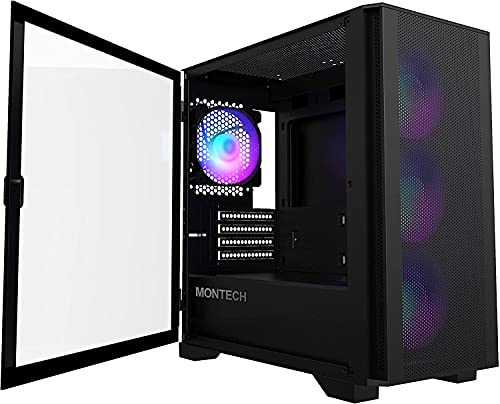
MONTECH AIR 100 ARGB — Best compact value
Shrinking a case usually exposes every cost cut, because there is less material to hide behind. The AIR 100 dodges that trap by concentrating its budget on the things a small build touches daily. Four ARGB fans come fitted, three behind a fine mesh front and one at the rear, so the cooling story is complete the moment the box is opened; nothing needs adding before a mid-range graphics card can breathe. The tempered glass side panel swings on a hinge and latches shut, which sounds like a luxury flourish until the third time you open the case to swap a drive and realise you have not hunted for a single screw. In a compact chassis, that hinge also means the panel never rests against a wall or slides off a desk edge while both your hands are inside the machine.
Inside, the layout respects the limits of micro-ATX rather than pretending they do not exist. Graphics cards up to around 330mm fit, which covers the overwhelming majority of two-fan and most three-fan designs a sensible budget build would use, and tower coolers up to roughly 161mm clear the glass, leaving room for the popular mid-height air coolers that dominate sensible builds. Cable space is tight but honestly arranged, with the basement swallowing the power supply and its slack so the main chamber stays presentable. The mesh front doubles as its own filter layer, and the whole front assembly can be pulled for a proper wash rather than a hopeful wipe. For a first build, a student machine, or a living-room PC that must earn its place visually, this is the band’s most complete small answer.
- Form factor: Micro-ATX mini tower, Mini-ITX also supported
- Included fans: 4 ARGB fans with a lighting controller
- Graphics card clearance: up to about 330mm
- CPU cooler clearance: up to about 161mm
- Side panel: hinged tempered glass that swivels open
- Front panel: fine mesh with dust filtering
Strengths
- Nothing to add on day one: four fans, controller and mesh front are all in the box.
- The hinged glass door makes small-case maintenance genuinely pleasant instead of fiddly.
- Proportions suit a desk corner or media unit where a full tower would dominate.
Trade-offs
- Long flagship graphics cards and the tallest air coolers simply do not fit.
- Rear cable room is snug, so a non-modular power supply demands patience.
- ARGB lighting is preset-driven rather than a full software ecosystem.
Best for: compact builds that still want a complete, good-looking cooling setup out of the box.
Not suited for: anyone planning an oversized graphics card or a dual-radiator custom loop.

Zalman S4 — Quiet minimalist pick
Zalman has sold sensible cases for decades, and the S4 reads like a product from a company that has watched lighting fashions come and go without blinking. Its front is a clean, largely closed face with discreet intake paths, its side is a full tinted acrylic panel, and two 120mm fans are included to establish a basic front-to-back current of air. Nothing about the S4 shouts. That restraint is precisely its appeal for an office build, a shared family room, or a bedroom machine whose owner has outgrown the disco phase of PC ownership. The tinted panel mutes component lighting into a soft glow, and the closed front keeps fan noise from projecting straight at the person sitting opposite.
Building inside it is a conventional, well-rehearsed experience. A mid-tower frame accepts ATX boards, graphics cards up to roughly 315mm and a 240mm radiator, which describes the great majority of mainstream builds without strain. The acrylic panel deserves one honest note: it is lighter than glass and will not shatter, but it scratches more easily and can flex if handled carelessly, so it rewards owners who clean it with a soft cloth rather than a paper towel. Treat it gently and the S4 returns the favour by being the calmest-looking case in this band, a tower that disappears into a room instead of auditioning for attention. In a price window full of mesh and light, choosing the quiet rectangle is a deliberate, defensible aesthetic position.
- Chassis class: full ATX mid tower
- Cooling supplied: a pair of 120mm fans
- Longest graphics card: roughly 315mm
- Radiator support: up to 240mm
- Side panel: full tinted acrylic
- Front connections: USB 3.0 and audio on the top panel
Strengths
- Understated styling suits offices, studies and shared living spaces.
- Closed front and tinted panel keep both noise and light levels civilised.
- Conventional layout makes a first ATX build straightforward to plan.
Trade-offs
- Acrylic marks more easily than tempered glass and needs gentle cleaning.
- Two included fans is the minimum credible count for a warm graphics card.
- Closed front limits intake compared with the mesh picks in this guide.
Best for: builders who want a composed, low-key tower for work and play in shared rooms.
Not suited for: high-wattage builds that need maximum front intake to stay quiet.

MONTECH X3 Mesh — Most fans included
Six fans. That is the X3 Mesh’s opening argument, and in this price band it is a strong one, because buying six decent fans separately would consume most of the case budget by itself. Three 140mm intakes sit behind the mesh front, joined by three 120mm units, all with fixed rainbow lighting that asks for no software, no headers beyond power, and no decisions. The result is a case whose cooling is emphatically sorted for a mid-range gaming build: air enters across the whole face of the machine, washes over the graphics card, and leaves through the rear and top without the dead zones that plague sealed designs. The swivelling tempered glass door repeats the AIR 100’s best trick at full ATX scale, opening wide for building and closing with a latch rather than a fistful of thumbscrews.
The compromises live in control rather than cooling. Fixed lighting means the colour pattern is the colour pattern; the fans are not PWM instruments to be sculpted with curves, so the X3 trades acoustic fine-tuning for simplicity and sheer volume of air. Graphics card clearance around 305mm also asks buyers of the longest triple-fan cards to measure first, a fair warning that applies to several cases in this band. Within those limits, though, the proposition is unusually honest: this is the pick for a builder whose parts run warm, whose room runs warmer, and who would rather over-provision airflow once than troubleshoot temperatures later. As a first gaming tower that will not need a fan shopping trip in its first year, it is difficult to argue against.
- Chassis class: ATX mid tower with mesh face
- Cooling supplied: six fixed-RGB fans, three being 140mm intakes
- Longest graphics card: roughly 305mm
- Radiator support: up to 240mm
- Side panel: swivelling tempered glass
- Front panel: full mesh with dust protection
Strengths
- Six fitted fans give this band’s most complete out-of-box airflow.
- Large 140mm intakes move generous air without spinning frantically.
- Zero lighting setup: power on and the case is finished.
Trade-offs
- Fixed lighting and limited fan control will frustrate habitual tweakers.
- Graphics card clearance is the tightest among the full-size picks here.
- Fan noise is managed by volume of air rather than by precision curves.
Best for: warm gaming builds that need maximum included airflow with zero setup.
Not suited for: silent-PC obsessives or owners of the very longest graphics cards.

NZXT H5 Flow — Cleanest build experience
NZXT’s contribution to this band is less about any single specification and more about how the hours of assembly feel. The H5 Flow wraps its compact ATX frame in perforated panels, so intake is not confined to one face; air seeps in across the front and side in a way that suits modern graphics cards drawing power low in the chassis. Two 120mm fans are included, and the interior is arranged around wide cable channels with proper covers, so a first-time builder following a video guide will find that the machine almost routes itself. When the side panel goes on, even a modest build looks deliberate, because the shroud, the channels and the perforations conspire to hide every untidy decision made along the way.
Cooling headroom is respectable rather than extreme: a 360mm radiator fits in the front, which covers large all-in-one liquid coolers, while the perforated design keeps air-cooled builds fed without drama. The honest limitation is the included fan count. Two fans establish airflow, but an owner pushing a hot graphics card will likely add one or two more, and that extra purchase should be mentally added to the band maths before comparing against the six-fan Montech above. Buy the H5 Flow for its composure, its finish and the way it flatters a tidy build, and budget for a fan or two if your parts run warm. Judged as a piece of industrial design that also happens to cool a computer, it is the most grown-up object in this price window.
- Form factor: compact ATX mid tower
- Included fans: 2 x 120mm
- Radiator support: up to 360mm at the front
- Panels: perforated steel for distributed intake
- Side panel: tempered glass
- Cable management: wide covered channels behind the tray
Strengths
- Perforations feed air from several faces, helping low-mounted graphics cards.
- Cable channels make neat results achievable for inexperienced builders.
- Finish and panel fit feel borrowed from a more expensive enclosure.
Trade-offs
- Only two fans included, so hot builds should plan one extra purchase.
- Compact frame leaves less elbow room for elaborate liquid cooling.
- Minimalist styling will read as plain to builders who want a statement piece.
Best for: tidy builders who value assembly experience and a calm, perforated design.
Not suited for: anyone expecting a complete multi-fan setup without spending more.

Fractal Design Pop Air RGB — Most character
Fractal built its reputation on sober Scandinavian boxes, which makes the Pop Air’s coloured mesh front and hidden storage drawer feel like the design team being allowed out for the day. The drawer is not a gimmick, or not only a gimmick: it swallows USB sticks, spare cables and the small tools that otherwise migrate across a desk. Behind the mesh, two RGB fans set the tone, and the case comes in colourways that let a build coordinate with a room rather than defaulting to black-box anonymity. Underneath the playfulness sits Fractal’s usual competence, with a straightforward ATX layout, a tempered glass panel on this version, and airflow that benefits directly from that open mesh face.
As a family or shared-household machine, the Pop Air solves a social problem other cases ignore: a gaming PC in a living room or a teenager’s build that parents also have to look at. It reads as cheerful furniture rather than esports equipment. Cooling is good rather than class-leading, and the included fan count again sits at the sensible minimum, so a very warm graphics card may justify one extra exhaust later. Storage provision is modern rather than generous, reflecting the era of NVMe drives. None of that undermines the core appeal. In a band where most cases are interchangeable black meshes, the Pop Air is the one visitors ask about, and it backs the conversation piece with entirely competent engineering.
- Form factor: ATX mid tower
- Included fans: 2 RGB fans behind a mesh front
- Side panel: tempered glass, clear tint
- Distinctive feature: concealed front storage drawer
- Colour options: several front colourways beyond plain black
- Layout: conventional ATX with a power supply shroud
Strengths
- Genuine personality in a price band dominated by anonymous black boxes.
- Mesh front keeps airflow honest despite the playful styling.
- The drawer quietly solves desk clutter that no other case addresses.
Trade-offs
- Two included fans is a starting point, not a finished cooling plan.
- Drive provision favours NVMe builds over stacks of spinning disks.
- Colourful fronts divide opinion; housemates should be consulted first.
Best for: family PCs, younger builders and anyone bored of identical black towers.
Not suited for: storage-heavy builds or buyers who want maximum fans included.
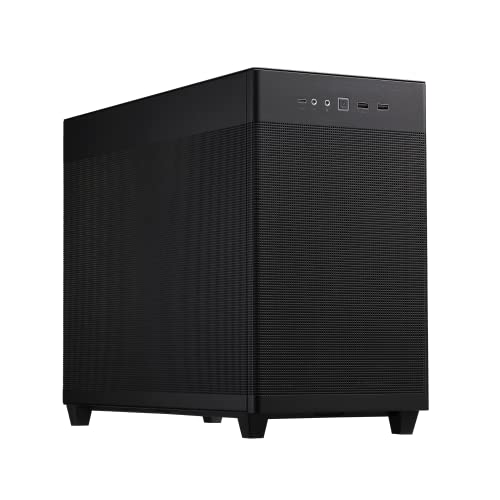
ASUS Prime AP201 (Mesh) — Best desk footprint
The AP201 approaches the band from the opposite direction to the towers above: instead of a big box with some mesh on it, ASUS built a mesh box and then made it just large enough for serious hardware. At roughly 33 litres, its panels are a quasi-filter mesh that wraps the sides, front and top, so the case breathes from nearly everywhere while still screening dust. Despite the footprint, it swallows graphics cards up to about 338mm and radiators up to 360mm, figures that embarrass plenty of full towers. A micro-ATX build inside an AP201 therefore gives up almost nothing in component choice while reclaiming a large patch of desk, which in a small flat or a shared study is a trade many builders should make more often.
Tool-free side panels pop off for access, and the interior layout keeps the power supply at the front, shortening the case’s depth. Two cautions belong in any honest account. First, a mesh-everywhere design offers little acoustic insulation, so coil whine and fan character are audible; quiet fans are worth choosing carefully. Second, the open panels show dust arriving, so the case rewards a monthly wipe rather than an annual excavation. Neither point diminishes what ASUS achieved here: the most space-efficient serious case in the band, and the natural pick when the desk, not the budget, is the binding constraint. It also travels well between rooms, being genuinely liftable with one hand once built, which no full tower in this guide can claim.
- Form factor: Micro-ATX, about 33 litres
- Graphics card support: up to about 338mm
- Radiator support: up to 360mm
- Panels: quasi-filter mesh on most faces, tool-free removal
- Power supply position: front-mounted to save depth
- Side panel: this mesh version prioritises airflow over a glass view
Strengths
- Remarkable component capacity for such a small footprint.
- Mesh on nearly every face keeps air paths short and direct.
- Tool-free panels make cleaning and upgrades quick rituals.
Trade-offs
- Open mesh offers little sound damping for noisy components.
- Dust is visible as it gathers and needs regular attention.
- Micro-ATX boards only; full ATX builders must look elsewhere.
Best for: small desks, flats and dorm rooms that still want full-power hardware.
Not suited for: silence-first builds or anyone committed to a full ATX board.
How Do the Six Cases Compare Side by Side?
| Case | Size class | Fans included | Defining strength | Watch out for |
|---|---|---|---|---|
| MONTECH AIR 100 ARGB | Micro-ATX | 4 | Finished compact package | Tight cable room |
| Zalman S4 | ATX mid tower | 2 | Calm, office-friendly looks | Acrylic care, modest intake |
| MONTECH X3 Mesh | ATX mid tower | 6 | Maximum airflow included | Fixed lighting, card length |
| NZXT H5 Flow | Compact ATX | 2 | Build experience and finish | Extra fans may be needed |
| Fractal Pop Air RGB | ATX mid tower | 2 | Colour and the storage drawer | Modern, modest drive bays |
| ASUS Prime AP201 | Micro-ATX small form | None specified | Capacity per litre | Little noise insulation |
Read the table as a map of priorities rather than a ranking. Every case here clears the structural bar for the band, so the deciding column is the one that matches your constraint: desk space points to the AP201 or AIR 100, raw included airflow points to the X3 Mesh, a shared room points to the S4 or Pop Air, and a builder who simply enjoys the assembly process will get the most pleasure from the H5 Flow. The worst outcome in this band is not picking the second-best case; it is picking a case whose one weakness is the exact thing your build stresses daily.
Which Mistakes Do Buyers Make Inside a Narrow Price Band?
The classic error is treating the band as a promise rather than a neighbourhood. Street prices breathe, so a case can drift a few dollars either side of the window between research and checkout; chasing the exact figure leads buyers to reject the right case over a rounding difference, or to grab a worse case mid-promotion and call it a bargain. Judge the engineering, then check the live listing. A second mistake is forgetting the fan ledger: a cheaper-feeling case with two fans can cost more in total than a six-fan rival once a fan pack, a splitter and an afternoon of fitting are added. Total the finished build, not the headline.
Third, buyers measure the graphics card and forget everything else. Cooler height, radiator thickness plus its fans, front-panel cable bend radius and even the depth of a modular power supply connector have all ended builds in this size class. The specifications in each pick above exist to be used with a tape measure before ordering, not after. Finally, many builders buy for the parts they own today and ignore the upgrade they already suspect is coming. A case on this ledge should last through a graphics card swap and a platform change; choosing the slightly roomier option when torn between two is rarely regretted.
How Should You Set Up Airflow Once the Case Arrives?
Begin before the motherboard goes in. Decide the air’s route on paper: in through the front or bottom, out through the rear and top, with slightly more intake than exhaust so dust is pushed out of the seams instead of being drawn through them. Fit the power supply with its fan facing its filtered intake, route the front-panel cables while the case is still empty and easy to tilt, and leave the graphics card’s power cables a gentle service loop rather than a hard bend at the connector. Small cases reward building in this order because access only ever decreases as parts accumulate.
After the first boot, spend ten minutes on fan curves in the BIOS. Set the case fans to follow the hotter of the processor and graphics card sensors where the board allows it, keep idle speeds low enough to be inaudible at your chair, and let the curve rise decisively rather than gradually through the temperatures your games actually produce. Then run a familiar game for half an hour and listen from your seat, not from beside the case. The goal is a machine that is quiet at the distance you live with it, not silent in a reviewer’s anechoic fantasy. One adjustment session at build time usually serves for the life of the machine.
What Should You Inspect First When Comparing Cases in This Window?
Start with the front panel, because it decides the thermal ceiling of everything behind it. A mesh face with a pore size fine enough to catch household dust gives a case two jobs in one part: unrestricted intake and first-line filtering. Perforated steel, as on the NZXT and ASUS picks, behaves similarly while feeling more rigid. A largely closed front, like the Zalman’s, is not automatically a failure, but it must show its working: intakes along the edges or underside, sized generously enough that the fans are not strangling against a decorative slab. If a product page hides the intake path entirely, assume the path is embarrassed for a reason and look at a rival whose maker is proud to show the holes.
Next, turn the case around in your mind and examine the rear quarter. Seven expansion slots is the ATX norm; what separates cases is the metal around them. Stamped slot covers that snap out and cannot be replaced leave gaps for dust once a card moves, while screwed covers can be refitted and keep the rear tidy across reconfigurations. Look for a power supply mount that slides the unit in from the back with a bracket, because bracket mounting turns a ten-minute wrestling match into a two-minute slide. Then check the basement: a full-length shroud hides cable slack and gives the build its finished look, but it should carry a cut-out or a removable section near the front so a thick radiator and its fans can still be fitted without removing the shroud entirely.
The motherboard tray tells a similar story of small mercies. Raised standoff bumps or pre-fitted brass standoffs save fiddly minutes. A processor cut-out large enough to swap a cooler backplate without removing the board is the difference between an upgrade and a rebuild. Cable holes belong where cables actually emerge: beside the board’s right edge for the main power lead, along the top for the processor power run, and low for front-panel and storage leads. Grommets are welcome but not essential; rolled edges on the holes matter more, because a grommet can be replaced while a sharp edge keeps eating cable sleeves for the life of the machine.
How Much Do Included Fans Really Save You?
Fan economics explain half the value differences inside this band. A single respectable 120mm fan bought separately, with quiet bearings and a standard connector, typically costs a noticeable fraction of the case’s own price; a pack of three costs more than the gap between a two-fan case and a six-fan case. That arithmetic is why the X3 Mesh and AIR 100 punch so hard here: their cooling is prepaid. It is also why the two-fan picks must justify themselves elsewhere, and in this guide they do, through finish, layout or character. When you compare any two cases, price the finished machine: chassis plus the fans your parts genuinely need, plus any splitter or hub required to run them, and only then decide which was cheaper.
Quality matters as much as quantity. A fan’s job is to move air at a speed your ears forgive, and sleeve-bearing bargains that rattle after a year are no bargain. The included fans in these six picks are standard-size units from established makers, which means a failure in year four is a five-minute swap rather than a support ticket about a proprietary part. Prefer cases whose fans connect with ordinary three-pin or four-pin headers over moulded proprietary plugs, and be wary of lighting ecosystems that lock every fan to one controller; if that controller dies, the whole choir goes silent at once. Simple, standard and replaceable wins the long game at this money.
Which Dimensions Deserve a Tape Measure Before You Order?
Graphics card length gets the headlines, but thickness causes just as many returns. Modern mid-range cards routinely occupy two and a half or three slots, and in compact cases that bulk can crowd the power supply shroud, choke the card’s own intake fans, or foul the front-panel connectors along the board’s lower edge. Measure the card’s height too, because tall cards plus stiff power cables have closed many side panels only under protest, and a glass panel under constant cable pressure is a crack waiting for a warm afternoon. The AP201 and AIR 100 reward careful measuring most, since their charm is precisely that nothing inside them is wasted space.
Processor coolers divide into two camps with different demands. Tower air coolers need height clearance from socket to side panel, and the figures in the pick lists above already account for ordinary board and socket offsets, so trust them within a few millimetres and no further. Liquid coolers need length, thickness and tube bend room all at once: a 360mm radiator at the front of a compact case may technically fit while leaving no graceful path for its tubes or for the graphics card behind it. When a build plan sits within ten millimetres of any published limit, treat the plan as unproven and choose the larger case. Cases are cheap to exchange before assembly and miserable to exchange after it.
How Do You Keep a Mesh Case Clean Without Losing Your Mind?
Mesh is honest about dust, which is a virtue disguised as a chore. The routine that works is short and monthly: power down, pull the front and power supply filters where they are removable, rinse or brush them away from the machine, and wipe mesh panels with a slightly damp microfibre cloth in the direction of the weave. A can of air, used in short bursts with fans held still by a fingertip, clears the radiator fins and the graphics card’s heatsink without spinning bearings into generators. Ten unhurried minutes a month keeps temperatures where they were on build day, and it is noticeably easier in cases whose panels come off without tools, which is one reason the AP201 and the hinged Montech doors scored well here.
Placement does half the cleaning work before it starts. A tower on a desk inhales a fraction of the dust of the same tower on carpet, and a machine should never sit with its intake pressed against a wall or a curtain. Leave a hand’s width behind the rear exhaust and a clear path in front of the intake, and keep the case out of the direct sunbeam that turns a black chassis into a radiator of the wrong kind. In homes with pets, a quick weekly pass over the front mesh with a handheld vacuum on its gentlest setting prevents the felt layer that otherwise forms and quietly raises temperatures month by month. None of this is glamorous, and all of it is cheaper than wondering why a once-cool build now sounds like a hairdryer.
What Does Living With Each Style of Case Actually Feel Like?
Owners describe the differences in domestic terms. The mesh gaming towers announce themselves: a soft wash of fan air, a glow through the front, a machine that feels awake. The minimalist tower fades into the furniture, noticed mainly when its absence of noise lets a room stay quiet during a film. The small mesh cube changes the geography of the desk, freeing the under-desk cave entirely and putting the machine’s ports within arm’s reach, which quietly changes habits: USB sticks get plugged into the PC instead of a hub, headphones live on a hook beside it, and the whole setup feels less like infrastructure and more like an appliance you chose. There is no universally right answer, only the answer that matches the room the computer will actually inhabit for the next several years.
It is worth simulating a bad day before choosing. Imagine the storage drive failing at midnight before a deadline, or a new graphics card arriving two centimetres longer than the old one. Which of these cases lets you open it in the dark, swap the part under lamplight, and close it again without a screw rolling under the desk? Hinged doors, tool-free panels and honest clearance figures are not review garnish; they are the features that decide whether that midnight goes badly or merely inconveniently. The band’s best cases were chosen with that midnight in mind, and it is a fair final test to apply to any rival you are considering instead.
Which Front Connections Will You Still Care About in Five Years?
Front-panel connections age faster than any other part of a case, so judge them by the devices you already own rather than the ones in advertisements. A USB-C port on the front is now close to essential: phones, controllers, headsets and portable drives have all moved to it, and reaching around the back of a tower to find the motherboard’s rear port loses its charm within a week. Two USB-A ports remain the practical minimum for a keyboard receiver and a flash drive to coexist. A combined audio jack suits headsets, while separate microphone and headphone sockets suit older separates; either is fine, but check which your headset expects before blaming the case for an adaptor you now need.
Buttons and indicators deserve a glance too. A power button with a definite click, placed where a knee or a cat cannot find it accidentally, prevents a special category of heartbreak. Drive activity lights have nearly vanished from modern cases, which most people celebrate and a few diagnosticians mourn. Reset buttons are similarly endangered; if your overclocking habits involve frequent hard resets, confirm one exists or accept the power supply switch as your tool. These are thirty-second checks on a product page, and they are exactly the details that separate a case you bond with from a case you tolerate for a decade.
How Should the Money Be Split Between Case and Cooling Extras?
A useful rule inside this window is to let the case carry the cooling plan rather than treating cooling as a later accessory. If a build’s parts total a modest wattage, a two-fan pick plus one added exhaust usually reaches thermal comfort, and the remaining money serves better elsewhere. If the parts are ambitious, beginning with a case whose fans are already fitted and numerous avoids the slow bleed of small purchases: a fan here, a splitter there, a hub when the headers run out. Each small purchase also adds a delivery wait and a panel-off session, so the true cost of finishing a bare case is measured partly in evenings. The six-fan Montech exists for builders who would rather spend those evenings gaming.
Thermal paste, cable ties and a right-angle adaptor or two are the extras genuinely worth ordering alongside any case in this guide. Everything else can wait for evidence. Build first, measure temperatures under your own games and workloads, and only then decide whether an extra fan earns its place. Many builds in these six cases need nothing at all, and discovering that after a week of use is far more satisfying than unboxing a fan pack bought out of anxiety. Restraint, applied in the right order, is a legitimate building skill, and this price band rewards it more than most.
Three Typical Builds, Three Different Winners
Consider a student building a first gaming machine for a rented room, with a mid-range graphics card, one NVMe drive and a desk shared with coursework. The AIR 100 fits that life: compact, complete, easy to carry home at term’s end, and forgiving of a beginner’s cable work behind its shroud. Consider instead a parent converting a corner of the lounge into a shared family station for homework, streaming and weekend games. The Pop Air’s colour and drawer soften the machine’s presence, its mesh keeps the shared hardware cool, and its standard layout means any future helper can find their way inside. The same budget, spent on the X3 Mesh, would cool better and charm less, which for that room is the wrong trade.
Finally, consider an enthusiast on a strict rebuild budget who already owns a capable 360mm liquid cooler and a long graphics card from a previous machine. The H5 Flow’s front radiator support and perforated panels respect those existing parts, while its cable channels flatter a builder who takes pride in the view through the glass. Notice what these scenarios share: the winner changes with the life around the machine, while the band stays constant. That is the real lesson of shopping inside a narrow window. The money is fixed, so the decision is never really about the money; it is about which set of strengths you will still be grateful for when the build is no longer new.
What About Noise, Really?
Noise is where specifications go to be vague, because no two rooms, ears or desks agree. Still, patterns hold. Larger fans turning slowly move the same air more quietly than smaller fans spinning hard, which quietly favours the X3 Mesh’s 140mm intakes and any case that lets you add big, slow fans later. Mesh panels leak sound in both directions, so a mesh case with gentle fans can be quieter overall than a sealed case whose fans must work harder; the sealed design only wins when its fans can also loaf. Desk placement amplifies everything through the surface, and a set of soft feet or a mat under the case is the cheapest acoustic upgrade in computing. Judge noise at your chair, in your room, during your games, and treat every decibel figure printed anywhere, including implied ones, as a rough rumour rather than a promise.
One more source deserves naming because owners misdiagnose it for months: vibration. A hard drive, a slightly unbalanced fan or a loose side panel can turn a whole chassis into a sounding board with a low hum that no fan curve will cure. The fixes are embarrassingly small: tighten the panel, reseat the drive on its rubber mounts, move the offending fan to a different header speed. Cases in this band generally provide the rubber mounting and panel fit needed to avoid the problem, which is another quiet dividend of the ledge. When a build hums, suspect contact before airflow, and you will solve it in minutes instead of shopping for replacements you never needed.
Returns and support form the least glamorous paragraph in this guide and may prove the most valuable. Cases are bulky, so a damaged panel or a fan dead on arrival is a logistics problem before it is a technical one. Buy from a listing with a painless returns path, photograph the box before opening it if the corners look crushed, and test every included fan with a quick power-on before the motherboard goes in, while swapping a fan is still a two-minute job. Keep the accessory box, spare screws and unused slot covers in the case’s own carton if you have storage space; the day you need one odd screw is always the day after you threw the bag away. These habits cost nothing and quietly separate experienced builders from hopeful ones.
Final Recommendation
If one case must be named for the typical reader of this guide, the MONTECH AIR 100 ARGB takes it: it is the most complete object in the band, with its cooling fitted, its glass hinged and its proportions suited to the desks most people actually own. The X3 Mesh is the better answer when heat is the enemy and the build is full-size, while the AP201 wins outright whenever floor or desk space is the scarcest resource in the room. Choose the H5 Flow if the build itself is the hobby, the Pop Air if the machine must charm a household, and the S4 if it must disappear into one. On this ledge, a well-chosen case stops being packaging for the computer and becomes the part of it you keep the longest — pick the one whose strengths match your days, and it will still be earning its money two builds from now.
Frequently Asked Questions
Is it worth stretching above this band for a first build?
Only for a specific feature you can name, such as a larger radiator or a particular front-panel connection. General quality stops improving quickly above the ledge, so an unnamed stretch usually buys decoration. Put the difference toward storage or memory instead.
Why do some picks include only two fans?
Two well-placed fans establish a working front-to-back path for mainstream parts, and manufacturers in this band sometimes spend the savings on panels and cable features instead. Warm graphics cards justify adding one exhaust or intake later, which is still cheaper than overbuying fans you may not need.
Does mesh really matter if my room is cool?
Yes, because the air inside the case is heated by your components, not by the room. A cool room lowers the starting point for every design, but a mesh front still lets fans move the required air at lower, quieter speeds than a sealed panel allows.
Can these cases handle a future graphics card upgrade?
Mostly, provided you respect the clearance figures listed for each pick. Measure any prospective card’s length and thickness in slots, and remember that power connectors now often exit the top or end of the card, adding to the space it truly needs.
Should I choose micro-ATX or ATX at this money?
Choose micro-ATX if you will never need the extra expansion slots, because the smaller cases in this band feel denser and better finished for the same money. Choose ATX if add-in cards, capture hardware or a future board change are realistic possibilities.
How long should a case in this band realistically last?
A decade is a fair expectation if the fans are standard sizes and the front connections still suit your devices. Cases outlive every other component, which is why this guide weighted standard fittings and reachable filters so heavily.
Related Guides
Keep researching with our companion coverage: best affordable PC cases for overall value, best affordable cool PC cases for airflow on a budget and best ATX full tower PC cases when size is no object.
Related guide: Best RGB PC Cases
Related guide: Best Retro Style Pc Cases