What's inside
- Key Takeaways
- Quick Picks
- How We Chose These Picks
- What Does “Small” Actually Buy You on the Road?
- Which of the Six Fits Your Bag and Your Trip?
- How Do the Six Compare on the Scales That Matter?
- What Should You Set Up Before the Trip, and What Can Wait?
- How Do You Get the Most From a Small Router in a Strange Room?
- What Mistakes Do Travellers Make When Buying Small?
- What About the Rest of the Kit — Cables, Banks and Cases?
- How Long Should a Travel Router Last, and When Is Small Too Small?
- Final Recommendation
- Frequently Asked Questions
- Related Guides
As an Amazon Associate I earn from qualifying purchases. This post may contain affiliate links at no extra cost to you.
widgetverdict.com is reader-supported. When you buy through links on our site, we may earn an affiliate commission.
Where to buy: the six travel routers below each link to the verified Amazon listing for that model; in a category where names repeat across generations, that link is the surest way to land on the exact unit described.
The best small travel routers are judged by a ruthless little test: do they earn their corner of the bag? A home router can be mediocre and still be forgiven, because it sits in a cupboard; a travel router competes for grams and cubic centimetres against shoes, chargers and the book you swear you will finish this trip. The six below pass that test in different ways — a 145-gram GL.iNet with three gigabit ports, two TP-Link units built around USB-C power and nano proportions, an ASUS that brings Wi-Fi 7 and phone tethering to the format, a second TP-Link wearing the new Roam name at Wi-Fi 7 class, and the tiny veteran that defined the category and still refuses to leave it.
Size is the headline, but power is the plot. Every experienced traveller has a story about the router that needed the one socket behind the bed, or the proprietary brick forgotten in another country. The modern travel router’s quiet revolution is USB-C: feed it from the same charger ecosystem as your phone and laptop, or from a power bank on a train, and the device stops being luggage and starts being infrastructure. This guide weighs power stories as heavily as radio classes, because in the field the second decides whether the first ever gets used.
It helps to know who travels with these and why, because the use cases cluster tightly. Consultants and trainers carry them to make client sites and classrooms behave. Families carry them so the children’s tablets join one familiar SSID in every rental. Journalists, aid workers and the merely cautious carry them because public networks are public. And a growing tribe of van and boat dwellers carry them as permanent infrastructure in homes that move. If you recognise yourself in any of those sentences, the category is not a gadget indulgence; it is the smallest piece of professional kit you will ever buy.
A note on scope before the products: this list is about smallness done well — pocket and palm formats for one traveller or a small group. The VPN-first treatment of the same shelf, where tunnels rather than grams lead the judging, lives in a companion guide; several models appear in both, viewed from opposite ends, because a good travel router is usually good for more than one reason.
Key Takeaways
- Judge travel routers by power story first: USB-C and power-bank feeding decide whether the router gets used at all.
- The Opal packs three gigabit ports and a full VPN firmware story into 145 grams.
- TP-Link’s two Roam models split the range — Wi-Fi 6 value with USB-C power, Wi-Fi 7 flagship with a 2.5G port.
- The TL-WR802N remains the nano floor of the category: bridge, extender, access point and client in a pocketable square.
- ASUS’s RT-BE58 Go is the premium traveller: Wi-Fi 7, captive-portal handling and 4G/5G phone tethering.
- The Mango, shared with the VPN-first guide, earns its second appearance here on size and simplicity alone.
Quick Picks
| Pick | Badge | Why it earns its place |
|---|---|---|
| GL.iNet GL-SFT1200 Opal Travel Router | 145 g all-rounder | AC1200 dual-band Wi-Fi, three gigabit ports and OpenWrt with OpenVPN and WireGuard at pocket weight. |
| TP-Link Roam 6 AX1500 Portable Travel Router TL-WR1502X | USB-C powered value | Wi-Fi 6 AX1500 with phone tethering, multi-mode operation and hotel/RV positioning in a compact body. |
| TP-Link N300 Wireless Portable Nano Travel Router TL-WR802N | The nano original | Bridge, extender, access point and client modes in the smallest format on this page. |
| ASUS RT-BE58 Go Travel Router WiFi 7 | Premium Wi-Fi 7 traveller | 3.6 Gbps Wi-Fi 7, secure public Wi-Fi positioning, phone tethering and USB-C power delivery. |
| Roam 7 BE3600 Wi-Fi 7 Portable Travel Router TL-WR3602BE | Wi-Fi 7 with VPN in title | BE3600 dual-band Wi-Fi 7, a 2.5G port, USB 3.0 and OpenVPN plus WireGuard named in the listing. |
| GL.iNet GL-MT300N-V2 Mango Portable Mini Travel Router | The pocket veteran | Two Ethernet ports and a full OpenWrt VPN story in the smallest, simplest package of the GL.iNet line. |
How We Chose These Picks
Smallness was measured in the ways travellers actually feel it: weight where the listing states it, format where the title describes it, and the power supply’s bulk counted as part of the product, because a light router with a heavy brick is a lie told in two parts. Models that were merely home routers with the antennas folded down did not qualify; every pick here was designed for the bag, with travel modes — repeating a venue network, sharing a wired drop, tethering a phone — in its title or its stated purpose.
The six places were then spread across the category’s real diversity. GL.iNet contributes the firmware-rich pair at opposite ends of its own history; TP-Link contributes three generations of thinking, from the nano veteran through the USB-C Roam 6 to the Wi-Fi 7 Roam 7; ASUS contributes the premium outlier whose tethering and portal features target the business traveller. A list of six near-identical pucks would have been easier to write and useless to read.
Finally, honesty about VPN was enforced per model rather than assumed per category. Two TP-Link veterans and the ASUS do not name VPN in their titles, and their sections say so — with the spec-box line this site’s rules require — while the models that do name it, the Opal, the Roam 7 and the Mango, carry that evidence in their sections. A small router is not automatically a VPN router, and this guide refuses to blur the difference for the sake of a tidy table.
What Does “Small” Actually Buy You on the Road?
Less than you think in the room, and everything in the transit. In a hotel room, a travel router of any size here does roughly the same work; the differences that matter are ports, power and firmware. In transit — the train table, the lounge corner, the overnight bus — the small ones come out of the bag and the merely compact ones stay in it. That is the honest dividing line in this category: devices light and simple enough to be deployed for a two-hour window, versus devices that need a destination to justify their setup. The Mango and the WR802N live on the first side of that line; the Roam 7 and the ASUS live on the second, and neither side is a criticism.
Smallness also changes failure. A tiny router fed from a power bank is a network that survives the room’s socket drought, the train’s dead outlet, the venue whose only power is a USB port on a television. Travellers who have watched a larger router sit useless for want of its brick understand that the power story is not a convenience feature — it is the product’s availability, expressed electrically. When you read the picks below, read the power sentences as carefully as the speed figures; your future self, in a strange room at midnight, is the audience for them.
Which of the Six Fits Your Bag and Your Trip?
The six sections after this one take the routers in turn. Where a model’s title is silent about VPN, the spec box records that silence in the form this site’s honesty rules require.

GL.iNet GL-SFT1200 Opal Travel Router — 145 g all-rounder
The Opal’s title reads like a dare: AC1200 dual-band Wi-Fi, three gigabit ports, OpenWrt with OpenVPN and WireGuard, more than thirty VPN services supported — in a pocket router weighing 145 grams. Three gigabit ports is the specification that separates it from most of this page, because it changes what a hotel room can be: venue Ethernet into one port, your laptop wired on the second, a colleague or a streaming stick on the third, and the whole desk running at wired pace while the venue’s air stays somebody else’s problem.
On the size-and-power ledger that governs this guide, the Opal’s 145 grams is its manifesto. That is power-bank-router territory, lighter than most phones’ charging kits, and it means the Opal can be the always-packed unit rather than the deliberately packed one. The VPN firmware is the maker’s full story rather than a travel edition — the same OpenWrt lineage, the same protocol pair — so the Opal refuses the usual small-router bargain in which portability is paid for with a dumbed-down brain.
Its ceiling is the AC1200 radio class, a Wi-Fi 5-era package that will not impress a spec-sheet shopper. In one room, serving one traveller’s devices at venue-network speeds, that ceiling is rarely the binding constraint; the venue is. Buy the Opal for the ports, the weight and the firmware, and let faster-radio rivals justify themselves against those three facts.
Serviced apartments are the Opal’s natural habitat, for a reason hotels obscure: stays measured in weeks reward a wired desk. The laptop docks to a port, the work calls stop depending on the building’s air, and the second port quietly serves the television the landlord provided. Travellers on assignment — the month-long project, the relocation scout, the slow sabbatical — often discover that the travel router they actually needed was a small home router with manners, and the Opal is the closest thing on this page to that description wearing a 145-gram coat.
- Wireless: AC1200 dual-band Wi-Fi
- VPN: OpenVPN and WireGuard named in the title; 30+ VPN services
- Wired: three gigabit ports
- Weight: 145 g per title
- Platform: OpenWrt
Strengths
- Three gigabit ports turn a hotel desk into a wired mini-network.
- At 145 g it is the always-in-the-bag choice rather than a packing decision.
- The full GL.iNet VPN firmware story, not a reduced travel edition.
Trade-offs
- AC1200 radios are a generation behind the Wi-Fi 6 and 7 picks here.
- Fast local wireless transfers between your own devices are not its party trick.
- Power users wanting a 2.5G port should look at the Roam 7 or the ASUS.
Best for: the wired-desk traveller who wants maximum ports and full VPN firmware at minimum weight.
Not suited for: a traveller whose own devices are all current-generation and who moves large files between them wirelessly.

TP-Link Roam 6 AX1500 Portable Travel Router TL-WR1502X — USB-C powered value
TP-Link’s Roam 6 leads its title with the two words this guide cares about most after “travel”: USB C Powered. The TL-WR1502X runs from the same power ecosystem as a modern phone — a laptop charger, a power bank, a seat-back port — which abolishes the proprietary-brick failure mode entirely. Around that power story sits an AX1500 Wi-Fi 6 package with internal antennas, multi-mode operation, phone Wi-Fi tethering, and positioning the title aims at hotels, RVs and travel generally.
Phone tethering deserves its sentence: when the venue network is unusable or absent, the Roam 6 can share a phone’s connection to your other devices, turning one mobile-data link into a small private network. That is the travel pattern of trains, rural rentals and conference venues whose Wi-Fi collapses under load, and it asks nothing of the venue at all. Multi-mode flexibility — the router, repeater and sharing behaviours TP-Link builds into this line — lets one small box adapt to whichever of those situations a trip produces.
Honesty requires the VPN note: this model’s title does not name VPN support, so the spec box below records that, and buyers for whom a router-level tunnel is the primary purpose should either verify the current firmware’s capabilities in TP-Link’s documentation or choose one of the picks here whose title makes the promise in words. As a small, USB-C-fed connectivity tool, the Roam 6 needs no borrowed glory; it is very good at the job its title actually describes.
RV travellers should give the Roam 6 a longer look than its hotel billing suggests. A van or caravan is a small metal room with a power system you control and connectivity you scavenge — campsite Wi-Fi one week, a phone’s data the next — and a USB-C-fed, multi-mode router is precisely the switchboard that life needs. It sips from the vehicle’s USB outlets, repeats the site network when there is one, and falls back to the phone when there is not, all without an inverter’s hum or a proprietary brick’s bulk. The title’s own RV mention is not decoration; it is a use case the design genuinely fits.
- Wireless: Wi-Fi 6 AX1500, internal antennas
- Power: USB-C powered, per title
- VPN: Not stated in the listing title — verify with the maker’s documentation
- Modes: multi-mode operation; phone Wi-Fi tether
- Stated venues in title: hotel, RV, travel approved positioning
Strengths
- USB-C power abolishes the forgotten-brick failure and enables power-bank running.
- Phone tethering gives the bubble a data source when venue networks fail.
- Wi-Fi 6 radios at a value position in this line-up.
Trade-offs
- VPN is not promised in the title — tunnel-first buyers must verify or look elsewhere here.
- AX1500 is the modest end of Wi-Fi 6 for local throughput.
- Internal antennas favour tidiness over fine placement adjustments.
Best for: the traveller whose first requirement is a router that powers from anything and shares any connection, phone included.
Not suited for: travellers who need VPN support guaranteed by the title itself; the Opal and Roam 7 make that promise explicitly.

TP-Link N300 Wireless Portable Nano Travel Router TL-WR802N — The nano original
The TL-WR802N is the category’s elder statesman, a nano square whose title lists its four trades plainly: Wi-Fi bridge, range extender, access point and client modes, “Mobile in Pocket”. It predates the current travel-router fashion and survives it, because the jobs in that list never went away. Turn a wired hotel drop into your own SSID (access point), join a venue network and re-serve it to your devices (client), stretch a weak signal (extender), or bridge two networks — the WR802N is a networking multitool that happens to fit in a pocket’s coin compartment.
N300 wireless is, by the standards of this page, archaeology: a single-band 2.4 GHz design from the era when that was simply what Wi-Fi meant. The honest consequence is a low ceiling — this is a router for email, documents, messages and patience, not for a family’s evening of streaming. But notice what the ceiling does not touch: the modes, the size, the price-class, and the sheer proven-ness of a design that has been solving the wired-drop problem for a decade of travellers. Many a consultant’s bag carries one as the spare that always works.
Its VPN position must be stated as plainly as the Roam 6’s: the title names no VPN, and the spec box says so. The WR802N is in this guide because “small travel router” is a broader church than “VPN router” — and because for the traveller whose need is a private SSID and a working bridge rather than a tunnel, it remains the smallest honest answer on the page.
There is a museum-piece temptation with a design this old, and it should be resisted: the WR802N is not a nostalgia purchase. It remains in production and in bags because the wired-drop problem never died — hotels, dorms, offices and older relatives’ houses still present a live Ethernet port and a hostile or absent wireless situation, and a nano box that converts one to the other in three minutes is a solution, not a souvenir. Judge it as you would a pocket screwdriver: not the tool for building the house, and exactly the tool that is there when the house needs one small thing fixed.
- Wireless: N300, 2.4 GHz class
- VPN: Not stated in the listing title — verify with the maker’s documentation
- Modes: bridge, range extender, access point, client
- Form: nano, pocketable per title
- Role: the multi-mode spare and wired-drop converter
Strengths
- Four modes in the smallest format here — a genuine networking multitool.
- A decade-proven answer to the wired hotel drop.
- Cheap enough in spirit to live permanently in the bag as the spare.
Trade-offs
- N300 speeds cap it at light-duty traffic by modern standards.
- No VPN promise in the title for tunnel-first buyers.
- Single-band design shares the crowded 2.4 GHz air with everyone.
Best for: the traveller who needs modes and minimal size — especially a private SSID from a wired drop — more than speed.
Not suited for: streaming-heavy trips or VPN-first buyers; both should climb to the Wi-Fi 6 picks.

ASUS RT-BE58 Go Travel Router WiFi 7 — Premium Wi-Fi 7 traveller
ASUS’s entry is the business traveller’s specification written as a title: Wi-Fi 7 dual-band at 3.6 Gbps, secure public Wi-Fi positioning, hotel captive-portal handling, 4G and 5G mobile tethering, custom SSIDs, one 2.5G port, and USB-C power delivery. Read that list slowly, because each item answers a named travel pain. The captive portal is the nightly ritual, handled as a designed feature. The phone tethering is the venue-network failure, answered with your own data. The USB-C PD is the power story, told in the modern dialect. The 2.5G port is the wired desk, kept fast.
The “Secure Public WiFi” phrase in the title is ASUS pointing at its firmware family’s protection story — the same lineage that produced Instant Guard in the home range, though this guide will not promise a specific feature name the travel model’s title does not use. On VPN specifically, the title says “Multi-Protocol” without naming VPN, so the spec box records the title’s silence in the required form, and the careful buyer will confirm the exact protocol menu in ASUS’s documentation. What needs no hedging is the positioning: this is the premium, current-generation travel router from a major maker, specced like it.
Choose it when the trip is work and the work is serious — client sites, conferences, long projects in serviced apartments — and when your phone plan can serve as the backup network the tethering feature imagines. Leisure travellers will find the same evenings covered for less elsewhere on this page; professionals billing by the day will find the BE58 Go’s completeness cheap at the price of one saved morning.
Custom SSIDs, a small phrase in the title, deserve more attention than they usually get. A consultant moving between client sites can broadcast a network name that matches the engagement rather than a personal one; a family can keep the children’s SSID constant across every hotel so the tablets join without a ceremony; a cautious traveller can avoid advertising anything identifiable in a crowded spectrum list. It is a minor feature with an outsized effect on how professional and how calm the travelling network feels, and its presence in the headline tells you ASUS designed this box by watching actual business travellers rather than by shrinking a home router.
- Wireless: Wi-Fi 7 dual-band, 3.6 Gbps class
- VPN: Not stated in the listing title — verify with the maker’s documentation
- Wired: one 2.5G port
- Power: USB-C power delivery
- Features in title: captive-portal handling, 4G/5G mobile tethering, custom SSIDs, secure public Wi-Fi positioning
Strengths
- The most complete business-travel feature list on this page.
- Phone tethering plus captive-portal handling answer the two commonest field failures.
- Wi-Fi 7 radios and a 2.5G port keep it current for years of trips.
Trade-offs
- Premium positioning in a category with capable cheaper answers.
- VPN specifics require the documentation errand its title declines to run for you.
- A single wired port rations the desk setup the Opal’s three ports indulge.
Best for: the professional traveller who wants the current-generation, tethering-capable, portal-proof flagship from a major maker.
Not suited for: the occasional leisure traveller, whose needs the Roam 6 covers with money left for the trip itself.

Roam 7 BE3600 Wi-Fi 7 Portable Travel Router TL-WR3602BE — Wi-Fi 7 with VPN in title
The Roam 7 is TP-Link’s flagship answer to the category’s new shape: BE3600 dual-band Wi-Fi 7, a 2.5G port, USB 3.0, multi-mode operation — and, stated in the title where the Roam 6 was silent, OpenVPN and WireGuard. That last pair transforms the buying conversation. A TP-Link loyalist who wants the tunnel promised in words no longer has to choose between the brand and the promise; the Roam 7’s title carries both, aimed explicitly at hotel, cruise, RV and plane use.
The title also carries an honesty worth applauding: “No 6 GHz Supported”, printed in the listing itself. Dual-band Wi-Fi 7 still brings MLO-era refinements to the bands it has, and the maker declining to let buyers assume a third band is the kind of title candour this guide exists to reward. In travel use the missing band matters least of anywhere — venue uplinks cap real speeds long before band arithmetic does — while the 2.5G port and USB 3.0 serve the wired desk and local sharing at full modern pace.
Against its Roam sibling, the 7 is the deliberate upgrade: current radios, the fast port, the stated VPN pair. Against the ASUS, it trades tethering headlines for VPN headlines — a neat summary of the two makers’ instincts, and a genuinely useful fork for buyers: choose by which failure you fear, the dead venue network or the untrusted one.
Cruise and RV travellers appear in this title too, and the Roam 7 suits those decks and sites for a structural reason: multi-mode operation with public Wi-Fi sharing is exactly the shipboard pattern, where one paid or permitted connection must serve a cabin’s worth of devices without each one negotiating the portal. Add the stated VPN pair and the cabin’s traffic stays private from the ship’s other passengers; add USB 3.0 and the evening’s photographs have somewhere fast to gather. It is the most venue-aware of the TP-Link trio, and its venue list is printed in its own title.
- Wireless: Wi-Fi 7 dual-band BE3600; no 6 GHz, per title
- VPN: the title names OpenVPN and WireGuard
- Wired: one 2.5G port; USB 3.0
- Modes: multi-mode operation; public Wi-Fi sharing
- Stated venues in title: hotel, cruise, RV, plane
Strengths
- Both mainstream VPN protocols promised in the title — the TP-Link tunnel answer.
- Wi-Fi 7 radios plus a 2.5G port make it the fastest TP-Link traveller here.
- The title’s candour about the absent 6 GHz band builds justified trust.
Trade-offs
- No 6 GHz band for the newest clients, as the title itself declares.
- Flagship-of-the-line pricing against the Roam 6’s value position.
- One fast port means the wired desk still rations its best lane.
Best for: the TP-Link traveller who wants Wi-Fi 7 pace and the VPN pair promised in the title.
Not suited for: a buyer set on 6 GHz wireless, who should look at home-class routers and accept the luggage.
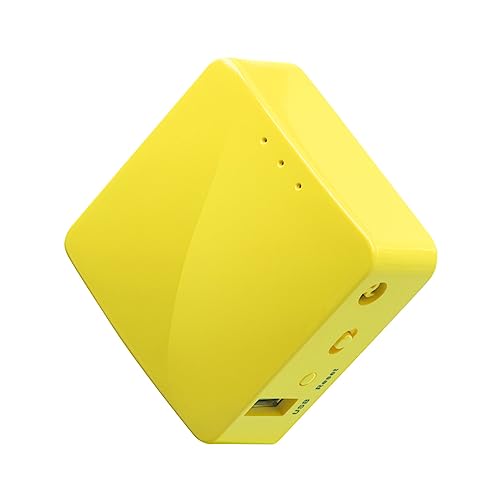
GL.iNet GL-MT300N-V2 Mango Portable Mini Travel Router — The pocket veteran
The Mango closes this list as it closed the VPN-first one, but the lens here is different: not the tunnel, but the object. Two Ethernet ports, a USB 2.0 port, OpenWrt inside, and a body so small that “pocket” in its title is a measurement rather than a metaphor. It is the router that lives in the bag the way a spare cable lives in the bag — not packed for a trip, but resident between trips, which is the highest state a piece of travel gear can achieve.
Power and simplicity are the Mango’s real specifications. It asks little electricity, offers a short setup through its admin panel, and presents the travelling world with the smallest possible target: one tiny box, one private SSID, everything you own behind it. In the size-first accounting of this guide, its dated wireless is a known and bounded cost — a single-band design for light duties — paid in exchange for a format no other pick here matches. Generations of travellers have made exactly that trade with open eyes, which is why the model remains in the maker’s catalogue and in guides like this one.
Buy it as the resident spare, the first travel router, or the light-duty main for trips whose workload is messages and documents. Its presence in two guides in this series is not an editorial shortcut; it is what a genuinely dual-natured product looks like — VPN-capable enough for the tunnel list, small enough for this one.
Gift-giving is an odd lens for a router guide, yet the Mango passes through it better than anything else here. It is the travel router you can hand to a parent, a student or a colleague with a fifteen-minute setup conversation and a reasonable expectation of success — the admin panel is plain, the job it does is explainable in two sentences, and the cost of the experiment failing is a small box in a drawer rather than a flagship’s regret. Whole categories of technology spread exactly this way, one unintimidating unit at a time, and the Mango’s decade in the catalogue is partly a story of being given.
- Wireless: compact single-band design
- VPN: OpenVPN and WireGuard named in the title
- Wired: two Ethernet ports
- USB: USB 2.0
- Platform: OpenWrt; setup via admin panel
Strengths
- The smallest complete travel router here — resident-in-the-bag size.
- Two Ethernet ports at a size where rivals offer one or none.
- Simple power and setup suit the lightest travelling style.
Trade-offs
- Wireless pace is the page’s floor; streaming rooms should climb the list.
- USB 2.0 limits its file-sharing side duties.
- No modern radio features for current-generation devices to enjoy.
Best for: the ultralight traveller and anyone equipping a permanent spare for the bag.
Not suited for: a family room’s evening entertainment, which needs the radios of the picks above it.
How Do the Six Compare on the Scales That Matter?
| Pick | Wireless | Power story | VPN position in its title | Defining trait |
|---|---|---|---|---|
| GL.iNet Opal | AC1200 dual-band | Lightweight at 145 g | Both protocols promised in title | Three gigabit ports |
| TP-Link Roam 6 | Wi-Fi 6 AX1500 | USB-C powered | Not stated — verify | Phone tethering, multi-mode |
| TP-Link TL-WR802N | N300 | Nano format | Not stated — verify | Four modes, smallest body |
| ASUS RT-BE58 Go | Wi-Fi 7, 3.6 Gbps | USB-C power delivery | Not stated — verify | Tethering plus portal handling |
| Roam 7 TL-WR3602BE | Wi-Fi 7 BE3600 | Travel format, USB 3.0 | Protocol pair stated in title | 2.5G port flagship |
| GL.iNet Mango | Single-band mini | Minimal draw, pocket size | Both protocols in the title | The resident spare |
The VPN column divides the table cleanly in two, and the division is information, not judgement. Three models promise the tunnel in their titles; three are connectivity tools whose buyers should verify tunnel capabilities in documentation if that feature matters to them. A traveller can rationally choose from either half — the WR802N has earned its place in a thousand bags without a tunnel — provided the choice is made with the column in view rather than discovered afterwards.
What Should You Set Up Before the Trip, and What Can Wait?
Before the trip: everything that involves a password, a portal or a provider. Configure the router at home on your own network — SSID named discreetly, admin password changed, modes understood, firmware current. If your model will tunnel, load the provider configuration and test the bubble end-to-end from a second device, including the unglamorous verification that your apparent location follows the tunnel. Rehearse the phone-tethering mode too if your pick offers it, because the first time you need the backup path should not be the first time you have seen its menu.
Pack as deliberately as you configure. The router, its cable, a short Ethernet lead, and — for USB-C models — confirmation that your existing charger ecosystem actually feeds it, tested at home rather than assumed. Put the router in the bag it will live in permanently, not the suitcase of the season; travel gear that migrates between bags gets forgotten in one of them. A photograph of the setup screens on your phone is the field manual you will actually consult.
One more pre-trip item belongs to households rather than individuals: tell the people travelling with you how the bubble works, in one sentence, before departure. “Join the network called this; everything else is automatic” is the whole briefing, and giving it at home prevents the airport scene in which a partner joins the venue SSID directly because it appeared first in the list. The router’s protections only cover devices that are actually aboard, and boarding is a social act as much as a technical one. A laminated card is overkill; a sentence is not.
What can wait: optimisation. Channel fiddling, per-device rules, the perfect placement — all of that belongs to the room, the evening, the real conditions. Travellers who try to pre-optimise at home waste the effort, because the variables that matter are the venue’s. Arrive with the fundamentals proven and the rest becomes a five-minute ritual rather than a research project.
How Do You Get the Most From a Small Router in a Strange Room?
Placement first, because it is free. The router wants height and centrality — a shelf or a windowsill beats the floor behind the suitcase — and proximity to wherever the venue’s signal enters, which in practice means the door side of the room for corridor access points, or the desk for the wired drop. If a wired port exists, use it: a cable frees your bubble from the room’s congested air entirely, and several picks here will share that wired feed to all your devices at once.
Power second. Run from mains when the room allows, and save the power bank for transit and socket deserts; if the only socket is badly placed, a longer USB-C cable — the kind already in your laptop kit — relocates the router to where the signal is, which is the cheapest performance upgrade in travel networking. Keep the venue network forgotten on your phone and laptop so your devices stop helpfully defecting to it, and verify the arrangement once, visually, before the first sensitive task: your SSID, your devices, your rules.
Security housekeeping in the room mirrors the home version, scaled to a trip. Change nothing on the venue’s side — that is not yours to administer — and keep your own side tight: the bubble’s password unique to this trip’s companions, the admin panel’s password the strong one you set at home, and a glance at the client list on the first evening to confirm the only devices aboard are yours. If a device you do not recognise appears, the password changes that minute, not after dinner. Small networks are easy to audit precisely because they are small; use the advantage.
Finally, be a good guest of the venue’s infrastructure. A travel router concentrates your devices into one polite client; do not defeat that courtesy with per-device workarounds, and if a venue’s terms ask guests not to run personal routers, comply and fall back to per-device protections. The bubble is a convenience built on other people’s networks, and it survives as a category by behaving well on them.
What Mistakes Do Travellers Make When Buying Small?
The first is buying smallness they do not need at the price of capability they do. A traveller whose trips are drive-to rentals with a desk and a week per stay gains nothing from nano proportions and loses ports, radios and headroom; the compact end of this list exists for the carry-on life, and misreading your own pattern is the commonest sizing error. The second mistake is the reverse — packing a flagship for a backpacking trip and leaving it in the hostel locker, where its specifications do nobody any good.
Third, buyers assume the category implies the tunnel. As the comparison table shows, half of this honest shortlist does not promise VPN in its title; travellers who need the tunnel must shop the column, not the category. Fourth, people forget the power half of the product — the router is light, the brick is not, and the trip discovers the difference. Fifth, they configure in the field: the sealed box at midnight, the portal expiring mid-setup, the provider password in an email they cannot reach without the connection they are trying to build. Every one of these stories ends the same way, with an unprotected first night and a vow about next time.
A sixth mistake is subtler and belongs to experienced travellers: treating every venue as identical. A boutique hotel’s fibre-backed network, a rural inn’s single ageing access point and a conference centre’s enterprise deployment are three different countries, and the router settings that flatter one — band choice, mode, tethering readiness — may hobble another. The multi-mode designs in this list exist because venues vary; the traveller’s skill is reading a new room’s connectivity in the first five minutes and choosing the mode to match, rather than forcing last week’s winning configuration onto this week’s different problem.
What About the Rest of the Kit — Cables, Banks and Cases?
A small router drags a small ecosystem behind it, and the ecosystem decides whether the system works. Budget a short Ethernet cable — flat ones pack best — because the wired drop is the travel router’s favourite food and venues never supply the lead. Budget a USB-C cable of honest length, since the difference between a router exiled behind the television and a router perched on the windowsill is usually eighteen inches of copper. And if your pattern includes trains or socket-poor rooms, budget the power bank as part of the router’s price, because a USB-fed router without a bank is a plan with a hole in it.
Storage matters more than travellers expect. A router that lives loose in a bag’s bottom arrives with its ports full of lint and its case scratched by keys; a router in a small hard case, cables coiled around it, arrives as infrastructure. The pocket models here reward that treatment disproportionately — they are small enough that the case, not the router, becomes the unit of packing, and a case is a thing you can grab in the dark of a taxi without thinking. Treat the kit as one object and it will behave like one object: present, complete, ready.
Finally, label your own cables. In a shared room or a team trip, five identical white leads breed a special kind of chaos, and the router’s lead is the one whose unplugging silences the room. A strip of tape and a pen at home prevent the conference-week incident in which a colleague “borrows” the bubble’s power supply for a phone and the afternoon’s network dies of kindness. Small systems survive on small disciplines.
How Long Should a Travel Router Last, and When Is Small Too Small?
Travel routers age on two clocks. The radio clock is the visible one — N300 gave way to AC1200, then to Wi-Fi 6 and 7 — and it tempts owners to upgrade on the industry’s rhythm. The firmware clock is the one that matters for any router carrying a tunnel or a household’s trust: a model whose maker still publishes updates is current in the way that counts, and a faster model abandoned by its maker is not. The veterans on this page survive precisely because their makers kept the second clock ticking; check update currency for your chosen model once a year and let that, not the radio headlines, schedule your replacement.
As for smallness, the floor is functional rather than physical. A travel router is too small when it sheds the port your pattern needs, the mode your venues require, or the power flexibility your trips depend on — and not one gram before. For the wired-desk traveller the Opal is the floor; for the phone-tethering traveller the Roam 6; for the ultralight, the Mango and the nano are not compromises but correct answers. The category’s health is visible in exactly this: six different floors for six different travellers, none of them pretending to be the others.
There is an environmental footnote worth a sentence in a category built on small electronics: the longest-lived travel router is the one already in your bag. A Mango or a WR802N that still receives updates and still does its job is a better purchase — for the planet and the wallet alike — than a faster replacement bought for a specification your venues cannot feed. Upgrade when the firmware clock stops or your pattern genuinely changes, and let the veterans above stand as evidence that in this category, longevity is a feature the makers actually deliver.
Final Recommendation
Start with the Opal if your trips involve a desk: three gigabit ports, full VPN firmware and 145 grams is the most complete small-router argument on this page. Start with the Roam 6 if power flexibility is your religion — USB-C feeding and phone tethering cover more field failures than any radio figure — and step up to the Roam 7 when you want that same brand with Wi-Fi 7 pace and the VPN pair promised in the title. The ASUS RT-BE58 Go is the professional’s flagship, priced and specced for people whose travel is billable. The WR802N and the Mango are the bag’s permanent residents: buy either as the spare, the starter, or the ultralight main, and expect it to outlast flashier purchases. When the trip’s connectivity comes from a phone plan rather than a venue at all, the natural next read is our guide to best routers with sim card slot, and the home-scale version of every idea here — the tunnel that covers the whole house without a ritual — is laid out in the best routers that support vpn umbrella roundup. Readers who like the ASUS approach at home scale will find its full range judged in best asus vpn routers. Measure your bag honestly, pack the router configured, and let the smallest box you own be the one that makes every strange room feel like your own network.
Frequently Asked Questions
Can a travel router really run from a power bank?
The USB-powered models here are designed for exactly that — the Roam 6 names USB-C power in its title and the ASUS takes USB-C power delivery — while the pocket GL.iNet units sip little enough to suit bank feeding as well. Endurance depends on the bank’s capacity and the router’s draw under load, so test the pairing at home for an evening before trusting it to a long train ride. The combination is the closest thing travel networking has to a guaranteed network: your power, your bubble, no venue required.
Do I still need the hotel’s Wi-Fi password for every device?
No — that is half the point. The router joins the venue network once, portal included, and your devices join only your SSID. One negotiation covers the whole kit, which is why the check-in ritual shrinks from per-device to once-per-stay. Share your SSID password with travelling companions the way you would share a house key: gladly with your people, and change it when the trip ends.
Which of these is best for streaming in a hotel room?
For one room’s streaming, the Wi-Fi 6 and 7 picks — Roam 6, Roam 7, the ASUS — have the radios to keep a television and a laptop happy simultaneously, provided the venue’s own connection is up to the task, which remains the true ceiling. The Opal’s wired ports make it the dark horse: a streaming stick on a gigabit port does not care about the room’s air at all. The nano and the Mango are for lighter evenings.
Why do some of these travel routers not promise VPN?
Because “travel router” names a format, not a feature set. Repeating a signal, sharing a wired drop, tethering a phone and bridging networks are travel jobs in themselves, and the WR802N has done them for a decade without a tunnel in its title. VPN is one travel job — the privacy job — and this guide marks clearly which models promise it in words. Buyers who need it should shop those rows; buyers who do not are not missing anything they came for.
What should I do if the venue network will not let my router join?
Work the ladder of fallbacks calmly. First, try the wired drop if the room has one — many portal systems treat wired guests more simply. Second, use the router’s phone-tethering or hotspot-repeating mode, which sidesteps the venue entirely. Third, check whether the venue requires registering a device’s MAC address through a helpdesk, a common arrangement in longer-stay residences. If all three fail, respect the venue’s rules, fall back to per-device protections for the night, and note the venue in your trip log — the next stay can be booked with the lesson in mind.
Does a travel router help on trains and planes, or only in hotels?
It helps wherever a shared network and a power source coexist, which includes most modern trains and lounges; onboard aircraft connectivity varies by airline and is sometimes restricted for personal networking gear, so check the carrier’s terms and expect the router’s best airborne use to be local — sharing files and media among your own devices — rather than internet duty. The Slate-class venue lists in this category name planes because the local bubble works at altitude even when the uplink is the airline’s own portal affair.
How do I choose between the two TP-Link Roam models?
By the failure you fear and the radios you carry. The Roam 6 is the value answer built around USB-C power and phone tethering — choose it when the venue network itself is the unreliable element and your phone is the backup plan. The Roam 7 is the performance answer — Wi-Fi 7, a 2.5G port, USB 3.0 and both VPN protocols in the title — choose it when the network is available but untrusted, and when your devices are current enough to enjoy the faster local wireless. They are less rivals than successive answers to two different trips.
Can a small travel router replace my home router?
For a small flat and light duties, some of these genuinely can — the Wi-Fi 7 models especially are real routers that happen to travel. The limits appear with size: many wired devices, large floor plans, heavy simultaneous loads. Think of it as a spectrum rather than a rule — the same unit can be a flat’s whole network and a house-dweller’s travel kit — and let your home’s device count, not the product’s label, decide which role yours plays.
Related Guides
Small is a means, not an end: the end is a network that behaves like yours wherever you wake up. The guides linked from the recommendation above extend that idea in the two directions travellers actually grow — toward mobile data when venues fail entirely, and toward the whole-home tunnel when the trip ends and the same habits come home with you.
One last encouragement for the undecided: the entry cost of this habit, at the Mango and WR802N end of the page, is closer to a nice lunch than to a technology purchase, and the first trip will teach you more about your own pattern than any guide can. Start small in both senses, configure it at the kitchen table, and let a season of journeys tell you whether your next router should be faster, port-richer or exactly the same again. Most travellers discover the little box they started with was the right one all along — and the ones who do upgrade arrive at the flagship rows of this guide knowing exactly which limitation they are paying to remove, which is the only honest way to arrive at a flagship.



[…] tested for hotel and airport duty. If your VPN problem is really a one-room, one-trip problem, the best small travel routers guide covers that scale directly, including where the ASUS travel model sits against its GL.iNet […]