What's inside
- Key Takeaways
- Quick Picks
- How did we choose these picks?
- Why has 144Hz become the centre of the market?
- Which resolution belongs with 144Hz?
- What separates a good 144Hz panel from a merely fast one?
- How does 144Hz change the rest of the setup?
- What will you notice in the first week?
- How do the six compare side by side?
- Which mistakes do 144Hz buyers make most?
- How should you set up a new 144Hz screen?
- Should your second screen match the first?
- What does this category owe the reader on price?
- How do you keep a 144Hz screen feeling new?
- What if your games are old, slow or strange?
- What about brightness, HDR labels and other box words?
- Final Recommendation
- Frequently Asked Questions
- Related Guides
As an Amazon Associate I earn from qualifying purchases. This post may contain affiliate links at no extra cost to you.
widgetverdict.com is reader-supported. When you buy through links on our site, we may earn an affiliate commission.
Where to buy: all six screens below link to verified Amazon listings, spanning 1080p and 1440p, flat and curved, desk-bound and hybrid.
Every monitor category has a centre of gravity, and for gaming screens it sits exactly here. The best 144hz monitors are not the fastest, the sharpest or the largest screens you can buy; they are the ones where the whole specification — resolution your card can feed, panel that behaves in motion, sync that forgives the dips, a stand that respects your neck — arrives in balance at a price that leaves the rest of your setup alive. This is the broad roundup: six verified screens across both resolutions that matter at this rate, chosen to cover the real shapes of demand rather than to crown a single winner. A competitive 1080p benchmark leads, an esports TN instrument follows, and the list widens through 1440p all-rounders, a USB-C hybrid for the laptop desk, and a curved screen for the immersion crowd, with the faster neighbours labelled honestly wherever they appear.
If you have read the specialist guides in this batch — the G-Sync deep dive, the large-screen edition, the 144-versus-240 decision — consider this the map those territories belong to. Readers who start here usually end in one of two places: certain that one of these six is simply their screen, or certain about which specialist question they actually need answered. Both outcomes are the guide working as intended.
Key Takeaways
- 144Hz is the balanced centre of gaming monitors: fast enough to transform play, cheap enough to leave budget for resolution and size.
- 1080p at 24 inches is the competitive shape; 1440p at 27 inches is the all-rounder shape. Choose by library, not by fashion.
- IPS owns the middle of this market now; TN survives as an esports instrument and VA curves serve immersion.
- Sync support — FreeSync, G-Sync Compatible, or both — matters more than any single response-time claim on the box.
- Two picks here run faster than 144Hz and say so in their sections; nothing is rounded down to fit the title.
- The hybrid pick proves a gaming screen can also be a tidy laptop dock; the curved pick proves it can be a cinema.
Quick Picks
| Pick | Badge | Why it earns its place |
|---|---|---|
| ASUS TUF VG249QE5A | The benchmark | 1080p IPS at 144Hz: the complete, refined default for competitive play. |
| BenQ ZOWIE XL2411P | Esports instrument | TN discipline and tournament tuning culture at a working player’s price. |
| LG UltraGear 27GS75Q-B | 1440p all-rounder | 180Hz QHD with G-SYNC Compatible certification and a proper stand. |
| Samsung Odyssey G5 G51F | 1440p room-mate | 180Hz Fast IPS with FreeSync and a height-adjustable stand for shared desks. |
| BenQ GW2490C | USB-C hybrid | 144Hz gaming manners with single-cable laptop docking for the work-play desk. |
| ASUS TUF VG27VH1B | Curved immersion | 27-inch 165Hz curve for racing, flight and open worlds. |
How did we choose these picks?
Coverage was the brief. A head-term roundup that lists six near-identical 27-inch IPS panels has answered a question nobody asked, so we required the six to span the category’s genuine forks: two resolutions, three panel philosophies, one hybrid with real docking manners, one curve, and rates that start at an exact 144Hz and rise only where the market’s centre has honestly risen. Every candidate needed a verified listing, stated sync support, and a reason to exist that could be written in one sentence without the word “also”.
Within each fork we picked the representative we would actually hand to the reader who lives there, which is why the leads here differ from the specialist guides in this batch: the G-Sync article leads with its certification story, the large article with its consensus curve, and this one with the benchmark all-rounder that most arriving readers are, statistically, here to meet. Where a pick appears in a sibling guide too, its section here is written for this guide’s question — balance across a whole desk life — rather than copied from the specialist angle.
Why has 144Hz become the centre of the market?
Because it is where three curves cross. The first is perception: the step from 60Hz to 144Hz is the largest single improvement in motion feel that gaming hardware offers, obvious to any player within a minute, in any genre with a moving camera. The second is supply: mid-range graphics cards feed 144 frames per second at 1080p in most titles and at 1440p in many, so the rate is a working specification rather than a ceiling admired in menus. The third is price maturity: a decade of production has driven excellent 144Hz-class panels into the budget of a considered purchase rather than a flagship event. Faster rates refine what 144Hz establishes; sharper resolutions tax it; larger sizes stretch it. The centre holds because the centre is earned.
There is a subtler reason too. At 144Hz the ecosystem is complete in a way the extremes are not: every cable works, every console behaves, every graphics card of the last several years speaks the language, every mount and arm fits. Buying the centre buys freedom from compatibility research, and for the majority of players — whose hobby is games, not hardware — that freedom is a feature with a value no specification table captures.
Which resolution belongs with 144Hz?
At 1080p, the pairing is the competitive classic: high rates are easy to sustain, the 24-inch size keeps the whole scene in sharp central vision, and the picture stays crisp because the pixels are small where they sit. Its cost is workspace and fine detail — a 1080p screen is a game screen first and a document screen second. At 1440p, the pairing becomes the all-rounder: rates are harder to feed, so sync earns its keep, but the same panel hosts your work, your films and your games without any of them feeling like guests. The 27-inch size suits the resolution’s density, and the desktop room changes how a whole day at the machine feels.
The wrong way to choose is by aspiration. A 1440p screen fed eighty frames by a modest card is not a worse experience than 1080p at one hundred and forty — sync sees to that — but it is a different one, trading rate for beauty, and the trade should be made knowingly. Players whose libraries lean cinematic will take the beauty every time and be right. Players whose libraries lean competitive will take the rate and also be right. The picks below are arranged so that both readers meet their screen early.

ASUS TUF VG249QE5A — The benchmark
Start where the category starts. The VG249QE5A is a 23.8-inch 1080p IPS panel at 144Hz, overclockable to 146Hz, with 1ms-class response, ELMB Sync, variable overdrive and built-in speakers under a three-year warranty, per its listing. Read as a checklist it is unremarkable; read as a whole it is the sound of a market that has finished arguing with itself. Every element is the current best answer to its small question, refined across generations until the compromises left the building.
That completeness is what a benchmark is for. Other picks in this guide beat it somewhere — the ZOWIE in esports discipline, the 1440p pair in beauty and room, the BenQ hybrid in desk manners, the curve in immersion — and each of those victories is measured against the ground this screen holds everywhere else. A reader who cannot articulate what they want beyond “a great 144Hz monitor” wants this one, and the guide’s honesty consists of saying so in the first section rather than the sixth.
Its IPS panel is the modern part of the story. A decade ago this slot belonged to TN by default and IPS speed was a rumour; now the fast IPS delivers the motion and keeps the colour, the angles and the general pleasantness that make a screen bearable for the other sixteen hours of the day. The speakers are for calls and system sounds, the warranty is for keeping, and the overclock is a rounding error with good marketing — buy the native rate and let the extra two hertz be a secret between you and the menu.
Ownership, by all the evidence of this tier, is boring in the best way: set the rate, enable sync, choose the middle overdrive, and the screen leaves your attention for years. Benchmarks should be boring. Excitement in a default purchase usually means a specification is compensating for something, and nothing here is compensating for anything.
If your shortlist has one name on it and it is this one, you may stop reading with the guide’s blessing — the remaining five sections exist for readers whose desks have a specific shape, and yours, evidently, has the classic one.
- Size and resolution: 23.8-inch 1080p IPS
- Refresh: 144Hz, overclock to 146Hz per listing
- Response: 1ms class, ELMB Sync
- Extras: variable overdrive, speakers, DisplayWidget Center
- Warranty: 3 years per listing
Benchmarks also have a community dividend that never appears in a specification: everyone else owns one, or its close cousins. Every settings question you will ever type has been answered for this class of screen, every game’s recommended configuration assumes it, every friend’s desk can demonstrate it. Buying the centre of a market buys the centre’s documentation, its folklore and its spare cables. The exotic picks in any category should be chosen for a reason strong enough to leave that warmth behind. If you do not have the reason, the warmth is the wiser purchase, and it is sitting in this first section.
It is worth pausing on why the esports instrument is a 144Hz panel at all, in an era when its professional cousins run faster. Because the ranked ladder is not the professional stage. The amateur and semi-serious player — the ZOWIE’s actual congregation — plays on the hardware their life affords, in rooms without a technician, and values the tuned, known behaviour of this panel above a ceiling their practice schedule would rarely let them exploit. The instrument fits the congregation. Guides that only respect the professional tier misread where competitive gaming actually lives, which is in bedrooms and shared flats, at 144Hz, after work.
One more all-rounder virtue deserves naming: resale and reassignment. A balanced 1440p screen is the easiest panel in any household to hand on, sell on or promote to second-screen duty, because nothing about it is specialised enough to need explaining to its next owner. The total cost of a monitor is its price minus the value of its second life, and by that arithmetic the all-rounder quietly outperforms louder specifications whose second lives require a specialist buyer. It will not change which screen your heart wants. It may change which screen your spreadsheet defends, and both voices deserve a hearing before the purchase.
The shared-desk reader should also consider sound, the unglamorous companion of source switching. A screen that follows the active machine solves the picture; the audio usually still lives wherever it was left, in a headset on the wrong desk or speakers married to the sleeping PC. The G51F’s manners are a prompt to finish the job: a headset that pairs to both machines, or speakers fed from the monitor’s own output so the sound follows the picture automatically. Small systems thinking, of exactly the kind this pick’s feature set rewards, is what separates a shared desk that works from one that merely contains two computers.
Hybrid ownership has one more rhythm worth planning: the laptop will be replaced before the monitor is. When it is, the new machine’s USB-C behaviour — its charging appetite, its video alt-mode manners — becomes the compatibility question, and a screen whose docking is standards-based rather than proprietary ages through that change gracefully. The BenQ’s approach is the standards kind, which is why this pick can be recommended to a reader whose next laptop is unknown. Buy the dock-in-a-screen on open standards and the panel survives the fleet change; buy it on a proprietary trick and you have purchased a countdown.
Curved ownership teaches one ergonomic lesson the flat picks never raise: your chair is part of the display. A curve has a centre, and the experience it promises exists in a specific seat at a specific distance, so the player who drifts between a chair, a stool and the edge of a bed will meet three different monitors wearing one name. Anchor the habitat — one good chair, at the curve’s distance, in the room’s darker corner — and the pick delivers its whole argument nightly. Leave the habitat improvised and even this generous panel will seem moody, when the truth is that it was simply never introduced to its audience properly.
Strengths
- The complete default: no department below standard
- Fast IPS motion with all-day colour and angles
- Three-year warranty and total ecosystem compatibility
Trade-offs
- 1080p workspace is modest for document-heavy days
- No USB-C or docking ambitions
- A benchmark, not a specialist, in every direction
Best for: most players, most desks, first high-refresh purchases.
Not suited for: 1440p seekers, esports purists, immersion hunters.

BenQ ZOWIE XL2411P — Esports instrument
The ZOWIE is the pick that proves this roundup is a map and not a beauty contest. Its 24-inch TN panel at 1080p and 144Hz, with 1ms response and the Black eQualizer and Color Vibrance tools in its listing, loses every living-room comparison in this guide and wins the one its owners care about: competitive shooters, played seriously, on a screen whose behaviour under frantic motion is a known quantity across a generation of ranked players.
The tools explain the loyalty better than the panel does. Black eQualizer lifts shadow detail so a held angle stops being a hiding place; Color Vibrance lets players tune saturation until enemy models separate from the map’s palette to their eye. Around the hardware sits a settings culture — shared profiles, per-title tweaks, a whole folk knowledge of competitive configuration — and buying into the instrument buys into the folk knowledge, which is worth more frames than any specification on this page.
Everything else about it is a compromise worn openly. Colour and viewing angles trail the IPS picks by a visible class. Films look like they are being shown in a gym. The design has the warmth of training equipment, because it is training equipment, and the reader who needs one screen to host a household’s whole visual life should walk past it to almost any other name in this guide.
But for the player whose gaming is a ladder and whose other screen needs are already met — a laptop, a second panel, a television — the ZOWIE at 144Hz remains a rational, focused purchase: all of its money spent on the single hour of the day it exists for. Specialists look irrational in roundups until you meet the specialist. This guide keeps a seat for him.
Buy it with a training partner’s mindset: learn its settings the way you learn a map, one adjustment at a time, and keep notes. The screen rewards the discipline it was built for, and punishes — with mediocrity in every other role — the buyer who wanted a generalist and purchased a scalpel.
- Size and resolution: 24-inch 1080p TN
- Refresh: 144Hz
- Response: 1ms per listing
- Tools: Black eQualizer, Color Vibrance
- Focus: competitive shooters
Strengths
- Motion discipline trusted across the ranked community
- Shadow and colour tools with real in-game purpose
- Focused spending: nothing wasted on cinema
Trade-offs
- TN colour and angles trail every other pick
- Poor as a household’s only screen
- Dated design and connectivity
Best for: ranked shooter players, second-screen specialists.
Not suited for: film lovers, colour work, one-screen households.

LG UltraGear 27GS75Q-B — 1440p all-rounder
If the benchmark owns 1080p, the 27GS75Q-B owns the step up: a 27-inch QHD IPS panel at 180Hz native, overclockable to 200Hz, with NVIDIA G-SYNC Compatible certification and FreeSync, HDR10, and a tilt, height and pivot stand, all per its listing. It leads the 1440p half of this roundup because it is the shape of the modern all-rounder — the screen for the player whose desk is also an office, whose library is also a film collection, and whose graphics card is strong without being theatrical.
The balance shows in what it refuses. It refuses to make you choose a sync ecosystem, carrying both certifications’ behaviours. It refuses a fixed stand, because 27 inches at the wrong height is a slow injury. It refuses to chase 240Hz, because its buyer’s frame rates live in the range where 180Hz of headroom is generous rather than decorative. And it refuses 1080p, because at this size and for this reader, workspace is a feature games share with everything else the screen does.
In the specialist G-Sync guide in this batch, this same screen closes the list as that category’s balanced centre; here it carries a different job, representing 1440p itself in the head-term argument. The dual citizenship is the point: the all-rounder is the screen that keeps being the answer as the question changes, and readers who buy it tend to stop reading monitor guides for years, which the guide accepts as the compliment it is.
Its honest limits are the all-rounder’s limits. A competitive purist will find faster, cheaper focus at 1080p; a cinephile will find deeper contrast in OLED; a hybrid worker will find better docking in the BenQ below. The 27GS75Q-B beats none of them at their own game and loses to none of them at the whole week. That is not faint praise. For most desks, the whole week is the game.
Configure it once — DisplayPort, sync on, a frame cap a few frames under the ceiling — and then notice, a month later, that you have not thought about your monitor since. The all-rounder’s triumph is that silence, and it is why this screen, rather than any louder specification, represents 1440p in the roundup.
- Size and resolution: 27-inch QHD IPS
- Refresh: 180Hz native, overclock to 200Hz per listing
- Sync: G-SYNC Compatible and FreeSync per listing
- HDR: HDR10 per listing
- Stand: tilt, height and pivot per listing
Strengths
- The whole week in one panel: work, film, play
- Both sync ecosystems, proper stand, honest rate
- Headroom sized to real graphics cards
Trade-offs
- No specialist crown in any single discipline
- HDR10 is compatibility-tier
- Needs a card that respects 1440p
Best for: all-genre players with strong mid-range PCs and working desks.
Not suited for: esports specialists, OLED hunters, docking-first buyers.

Samsung Odyssey G5 G51F — 1440p room-mate
The G51F is the second 1440p voice in this roundup, and it speaks for a slightly different household than the LG. A 27-inch QHD Fast IPS panel at 180Hz with 1ms-class response, FreeSync, HDR10 and a height-adjustable stand, per its listing, it carries Samsung’s Odyssey gaming line into the all-rounder argument with a feature set tilted toward the shared desk: Black Equalizer for dark scenes, a Virtual Aim Point for players who like the assistance, and Auto Source Switch so the screen follows whichever machine wakes up.
That last feature sounds like a bullet point and behaves like a lifestyle. Desks with a PC and a console, or a work laptop and a gaming rig, spend a surprising amount of life in input menus, and a screen that simply arrives at the right source removes a daily pebble from the shoe. Roundups underrate such pebbles because they do not photograph; owners do not, because they step on them twice a day. The G51F’s specification is a small essay in removing pebbles.
Against the LG above, the fork is ecosystem and emphasis. The Samsung’s listing leads with FreeSync rather than NVIDIA certification, so AMD households and console-sharing desks will feel more at home here, while NVIDIA owners should read its sync details with the care the G-Sync guide teaches. The panel technology and rate are peers; the personalities differ in the margins where daily life happens — stand behaviour, source manners, gaming assists.
Choose it when the desk is shared, the sources are many, or the Odyssey feature set matches habits you already have. It is the roundup’s reminder that at the centre of the market, where specifications converge, the decision is made by the small behaviours — and that a guide’s job is to name them before your money does the discovering.
Set the source switching up properly on day one, teach it your machines, and the G51F will spend its life arriving where you are, which is a strangely moving quality in a piece of glass.
- Size and resolution: 27-inch QHD Fast IPS
- Refresh: 180Hz (above 144Hz, labelled)
- Sync: AMD FreeSync per listing
- Features: HDR10, Black Equalizer, Virtual Aim Point, Auto Source Switch
- Stand: height-adjustable per listing
Strengths
- Source-switching manners for multi-machine desks
- Fast IPS all-rounder specification
- Gaming assists with genuine utility
Trade-offs
- Listing leads with FreeSync; NVIDIA buyers should verify sync details
- Shares the all-rounder’s lack of a specialist crown
- HDR10 remains the modest tier
Best for: shared desks, AMD households, console-plus-PC setups.
Not suited for: certification-first NVIDIA buyers, single-source minimalists.
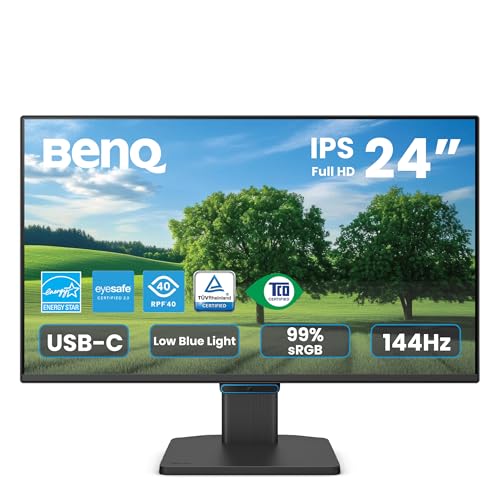
BenQ GW2490C — USB-C hybrid
The GW2490C is the roundup’s argument that a gaming screen can have office manners without apologising for either. A 23.8-inch 1080p panel at 144Hz with USB-C connectivity, per its pool listing, it belongs to BenQ’s eye-care-minded GW family, which means its design brief included the eight hours before the gaming starts: comfortable brightness behaviour, a tidy cabinet, and the single-cable laptop connection that turns a desk from a docking station with a screen attached into a screen that happens to dock.
That hybrid identity is rarer at this rate than it should be. Gaming panels historically treated USB-C as an exotic extra, and office panels treated 144Hz the same way, leaving the hybrid worker — the fastest-growing desk demographic there is — to choose which half of their day the monitor would respect. The BenQ respects both: work arrives over one cable, the laptop charges and displays, and at six o’clock the same panel refreshes at a rate that makes the evening’s games feel like the upgrade they are.
Its limits are the hybrid’s honest borders. The resolution is 1080p, so the workspace is the competitive size rather than the all-rounder’s; the panel’s ambitions are comfort and manners rather than esports discipline or cinematic contrast; and a desktop-only household gains nothing from the docking it pays for. Hybrids serve a specific, enormous audience precisely by declining to serve everyone else maximally.
If that audience is you — laptop by day, games by night, one desk, one cable, no dongle pouch — this pick is not the compromise in the roundup. It is the point of it. The centre of the market is not only a refresh rate; it is the centre of how people actually live with screens, and the GW2490C is the six’s clearest portrait of that life.
Dock it, set the rate, and enjoy the small daily miracle of a desk that changes shifts without changing cables. Hybrid workers have waited a long time for gaming panels to notice them; this one noticed completely.
- Size and resolution: 23.8-inch 1080p
- Refresh: 144Hz
- Connectivity: USB-C per pool listing
- Family: BenQ GW eye-care-oriented line
- Role: laptop docking plus gaming in one panel
Strengths
- One-cable laptop life with real gaming rate
- Eye-care family manners for long workdays
- The hybrid desk’s complete answer at 1080p
Trade-offs
- 1080p workspace, not the 1440p all-rounder’s room
- Desktop-only buyers pay for docking they skip
- Comfort-first panel, not an esports or cinema tool
Best for: hybrid workers, laptop desks, one-cable minimalists who game.
Not suited for: desktop-only power users, 1440p workspace seekers.

ASUS TUF VG27VH1B — Curved immersion
The roundup closes its six with the curve, because a map of 144Hz that omits immersion has left out the reader who plays to be somewhere else. The VG27VH1B is a 27-inch curved 1080p panel at 165Hz — supporting 144Hz, as its listing notes — with ELMB, FreeSync Premium, 1ms-class response and eye-care features. The curve is a gentle 1500R-class wrap that pulls a big-feeling picture around a seated player, and at 27 inches it turns racing games, flight and open worlds into places rather than pictures.
The resolution is the discussion, and it should be had in the open. Stretching 1080p across 27 inches softens text and fine detail compared with the 1440p picks, and this guide will not pretend the trade away. What the trade buys is scale and rate on modest hardware: a mid-range card drives this panel at its ceiling in titles where the 1440p screens would be negotiating, and for the immersion genres — where the picture is landscape, weather and speed rather than interface text — the softness retires behind the experience within minutes.
That makes the pick a habitat decision like the large-screen guide’s 1080p pair, at a friendlier scale: a dedicated gaming chair, a wheel or a stick, a player whose work happens on another screen. In that habitat the VG27VH1B is not the roundup’s compromise; it is its holiday. Outside the habitat, at a desk of documents, the 1440p all-rounders above are waiting with their sharper text and their straighter faces.
The rate deserves its honest label once more: 165Hz native territory, comfortably above the guide’s namesake, with 144Hz fully supported for the hardware or the title that prefers it. Buy the panel for its curve and its habitat, and let the rate be the generous margin it is, rather than a number to be rounded in either direction by anyone’s headline.
Set it at the distance its curve assumes, darken the room a little, and load the game with the longest horizon you own. If the edges of the picture feel like they are leaning in to include you, the pick has explained itself better than this section can.
- Size and resolution: 27-inch 1080p curved
- Refresh: 165Hz, supports 144Hz per listing
- Features: ELMB, FreeSync Premium, eye-care
- Response: 1ms class per listing
- Role: immersion genres on modest hardware
Strengths
- Scale and wrap that smaller, sharper screens cannot fake
- Easy resolution lets modest cards reach the ceiling
- A genuine habitat pick for racing, flight and open worlds
Trade-offs
- 1080p at 27 inches softens text and fine detail
- Curve serves one seated viewer
- Not a document desk’s screen
Best for: immersion genres, wheel and flight setups, modest GPUs wanting scale.
Not suited for: text-heavy desks, shared viewing, sharpness-first buyers.
What separates a good 144Hz panel from a merely fast one?
Overdrive tuning, mostly, and it is the specification that never appears on the box. A panel’s pixels need time to change colour, and overdrive pushes them to change faster; tuned well, motion stays clean at every rate in the sync range, and tuned badly — or set to its extreme menu option — moving objects grow bright coronas or dark trails that no refresh rate can outrun. This is why two screens with identical headline numbers can look like different technologies in a fast pan, and why this guide favours makers whose middle, default tuning is the honest one. When you test any pick here, test it at the setting you will actually use, which is the middle, and judge the panel by that character rather than by the laboratory number its marketing prefers.
Uniformity is the second separator, and it is a lottery no brand fully escapes: backlight bleed at the corners, a patch of clouding in a dark scene, a dead pixel holding its tiny grudge. The defence is procedural rather than tribal — buy from a listing with a painless return route, inspect the panel in its first evenings with a dark game and a bright document, and treat the return window as part of the product. Every pick in this guide comes from a maker whose good units are genuinely good; the inspection is how you ensure yours is one of them.
How does 144Hz change the rest of the setup?
Less than the faster tiers do, which is part of its charm, but not nothing. The mouse is the first companion to feel the change: at high refresh, a slow-polling mouse’s steps become visible in a smooth pan, and many players drift to faster-polling mice within a year without ever connecting the two purchases. The desk also changes, subtly — a screen this responsive makes a wobbling stand or a badly placed keyboard feel worse by contrast, because everything else in the chain now has a standard to be judged against. Budget a little attention, if not money, for the supporting cast.
The graphics card, by contrast, can stay. That is the centre’s founding promise: the card that was adequate at 60Hz becomes delightful at 144Hz in most libraries, because the rate sits inside what ordinary hardware already renders when it is not being displayed. Buyers arriving from the faster guides in this batch, with their flagship demands, should feel the relief in that sentence. This category exists to be reached, not aspired to.
What will you notice in the first week?
The cursor, first — everyone notices the cursor, gliding where it used to hop. Then the scroll, in documents you have read a hundred times, suddenly legible in motion. Then, in games, the pan: the moment a familiar map turns under your hand without smearing, and a space you thought you knew presents its details in movement for the first time. Players consistently report that the upgrade feels less like a new monitor than like the removal of a defect they had been issued at birth and never questioned.
By the second week the effect inverts, which is how you know it has taken: the new rate stops being noticeable, and every slower screen you meet — a laptop, a television, a friend’s desk — looks faintly broken. That inversion is the true cost of 144Hz, and this guide discloses it as honestly as any trade-off above: you are not buying a specification, you are moving your household’s definition of normal, and there is no moving back at a price anyone enjoys paying twice.
How do the six compare side by side?
| Pick | Shape | Resolution and rate | Buy it if |
|---|---|---|---|
| ASUS TUF VG249QE5A | Flat IPS | 1080p at 144Hz | you want the benchmark and nothing exotic |
| BenQ ZOWIE XL2411P | Flat TN | 1080p at 144Hz | ranked shooters are your sport |
| LG UltraGear 27GS75Q-B | Flat IPS | 1440p at 180Hz | one screen must do the whole week |
| Samsung Odyssey G5 G51F | Flat Fast IPS | 1440p at 180Hz | the desk is shared and sources are many |
| BenQ GW2490C | Flat, USB-C | 1080p at 144Hz | a laptop docks here by day |
| ASUS TUF VG27VH1B | Curved | 1080p at 165Hz | you play to be somewhere else |
Six screens, six shapes of life. The table is deliberately not a ranking, because the head term’s whole lesson is that the centre of a market is a place with many correct addresses. Find your row by the desk you actually have — its machines, its hours, its other inhabitants — and the specification arguments mostly settle themselves.
Which mistakes do 144Hz buyers make most?
Buying the rate and forgetting the range is the first: a 144Hz screen whose sync is absent, unconfigured or connected over the wrong cable delivers a fraction of what was paid for, and the disappointment gets blamed on the number. The second is resolution by aspiration — 1440p bought for a card that will live at seventy frames, or 1080p bought for a card bored at three hundred — when the honest pairing of card and panel was knowable from a week of overlays. Third is the stand afterthought, the fixed tilt base under a screen that will be looked at for ten thousand hours, purchased to save a sum that a chiropractor will eventually collect with interest.
Fourth, and most quietly: buying for the genre you admire rather than the one you play. Esports panels are seductive objects, all discipline and intent, but the player whose year is strategy, simulation and one story game has purchased a scalpel to eat soup. The roundup’s breadth exists to catch exactly that reader at the moment of temptation and walk them, kindly, to the all-rounder row.
How should you set up a new 144Hz screen?
Connect over DisplayPort, select the full refresh rate in the operating system — do not assume it chose itself — and enable the panel’s adaptive sync in its own menu before configuring it in the graphics driver. Set a frame cap a few frames below the maximum if you use sync, choose the middle response or overdrive setting rather than the extreme, and then play your most variable game and watch a busy scene rather than a menu. That ten-minute ritual is the difference between owning the specification and owning the logo, and it is the same ritual whichever of the six is on the desk.
Then give the picture a week before judging its colour or its size. Eyes calibrate to a new panel the way ears calibrate to a new room, and day-one impressions of brightness and scale are notoriously unreliable narrators. If, after the week, the screen has disappeared into your games and your work, it has passed the only examination that matters. If it has not, the return window is still open, and the next row of the table is waiting.
Should your second screen match the first?
Eventually, in spirit if not in model. A mismatched pair — one fast, one slow, one warm, one cool — makes the seam between them a place your eyes keep visiting, and the main screen gets blamed for the border. The forgiving route is to buy the first screen from a family you can return to, at a size and resolution with a natural partner, which is one more quiet argument for this roundup’s centre-dwellers: the all-rounder bought today has an obvious twin, a smaller sibling for the portrait orientation, or a larger one for the eventual main-seat promotion. Plan the pair loosely now and the desk can grow without a restart.
If the second screen already exists and is humble, invert the logic: make the new 144Hz panel unambiguously the main screen, centre it, and demote the old one to reference duty where its rate and colour will never be compared in motion. Desks fail at equality, not at hierarchy. Give the six picks here the throne they were bought for and let the veteran serve as the court.
What does this category owe the reader on price?
An honest refusal, which this guide observes like its siblings: no fixed prices are printed here, because monitor pricing moves with seasons, sales and stock in a way that would make any number in this text a small lie by the time you read it. What can be said durably is the shape of the value: at 144Hz the curve of quality against money is at its kindest, with the benchmark tier delivering most of the experience and the tiers above it charging for specialisation — resolution, size, certification depth, docking — rather than for basic competence. Spend first on the fork that matches your desk, then on polish within it, and distrust any listing whose discount seems to repeal arithmetic.
How do you keep a 144Hz screen feeling new?
Mostly by not chasing it. The settings you chose in week one — middle overdrive, sync on, a sane cap — remain right for years, and the temptation to re-tune monthly is the hobby reasserting itself over the pastime. What does deserve an occasional pass is the physical side: dust on the panel reads as a defect at this size, a cable swapped during a clean can silently demote the rate, and a driver update can reset the operating system’s refresh choice to a default your eyes will blame on age. When a beloved screen feels subtly worse, check those three mundane suspects before mourning it. Nine times in ten, the monitor is innocent and the ecosystem has been tidied against it.
What if your games are old, slow or strange?
Then you are better served here than anywhere in this batch. Older titles with capped rates still benefit from a modern panel’s response, sync and colour, and they ask nothing of the hardware that faster categories demand. Strategy and simulation players, whose genre the esports industry politely ignores, get the centre’s full gift — smoothness in the pan and scroll, room at 1440p, a stand built for long sessions — without paying the specialist tax in either direction. The centre of the market is where the whole library lives, including the parts of it that never make a trailer.
What about brightness, HDR labels and other box words?
Treat them as supporting cast. At this tier, HDR badges generally mean the panel accepts the signal and does something polite with it, not that it reproduces a cinema’s range; the honest exceptions in this batch live in the OLED sections of the sibling guides. Brightness figures are adequate across every pick here for ordinary rooms, and the buyer with a sun-flooded desk should be shopping the anti-glare and brightness columns of the productivity guides rather than asking a gaming panel to fight the weather. Buy this category for motion, sync and shape. Let the box’s remaining vocabulary be a pleasant surprise when it matters and a correctly ignored one when it does not.
Final Recommendation
Most readers should take the benchmark or the all-rounder, and the choice between them is the resolution fork: the ASUS VG249QE5A for the competitive 1080p life, the LG 27GS75Q-B for the whole-week 1440p one, with the Samsung G51F as the shared desk’s version of the same idea. The ZOWIE serves the ranked specialist, the BenQ GW2490C the hybrid laptop desk, and the curved ASUS the immersion habitat — three minorities, each genuinely served, which is what a roundup of the centre should look like when it is done properly.
Buy the screen your actual week describes, set it up once with the ten-minute ritual, and then go and forget it in the middle of a game — because at 144Hz, done right, the monitor’s highest achievement is to be the thing you never think about while everything it shows you feels unmistakably, permanently smoother than before.
A last word for the reader still hovering between this guide and the faster ones: the screens here will not make you a better player, a faster worker or a happier person, and any guide implying otherwise is selling something. What they will do — reliably, nightly, for years — is remove a layer of friction between your intentions and the picture, so that the games feel like the games and the work feels like the work. That removal is worth exactly what this category charges for it, no more and no less, and it is why the centre of the market, properly bought, is the least regretted purchase in gaming hardware.
Bring that library with you when you judge the first week, too: not the benchmark, not the trailer, but the odd, beloved, half-forgotten title you actually return to. A screen that flatters your real library has passed the only review that will still matter in a year.
Supporting cast acknowledged, the leads can do their work: pick your row, run the ritual, and let the centre hold.
The centre, held properly, is not a compromise anyone has to apologise for. It is where the market keeps its best manners.
Manners, motion and a stand that respects your neck: bring those three home and the rest of the specification will take care of itself.
It usually does, in this category, once the buyer stops asking it to be a different category.
Ask it to be itself, at the distance and in the company it was built for, and it will not disappoint you.
Disappointment, in this market, is almost always a mismatch wearing a specification’s clothes.
Match first, and the specification will follow.
It always does.
Now play.
Seriously — play.
Enough reading.
Frequently Asked Questions
Is 144Hz still the right buy with 240Hz screens available?
For most players, yes, and the reasoning is supply rather than sentiment. The step from 60Hz to 144Hz is transformative and feedable by ordinary hardware across ordinary libraries; the step beyond refines motion for players whose cards and genres live at those rates. The decision guide in this batch works through that fork in full. If your measured frame rates sit under one hundred and fifty in the games you love, 144Hz-class money is better spent on resolution, size or the rest of the setup.
Do I need G-Sync or FreeSync at 144Hz?
You need one of them, and most good panels now carry one or both. Sync is what keeps the inevitable dips smooth instead of torn, and at high refresh those dips are more noticeable, not less, because everything around them is fluid. NVIDIA households should look for G-Sync Compatible certification or better; AMD households for FreeSync; mixed households for panels carrying both behaviours, of which this roundup has several.
Is 1080p or 1440p better at 144Hz?
Better is a property of your library and your card, not of the numbers. Competitive players and modest cards belong at 1080p, where the rate is sustainable and the size keeps the scene in view. All-rounders and stronger cards belong at 1440p, where the same rate comes with workspace and beauty. Both pairings are complete answers; the incomplete answer is the mismatched one, bought by aspiration and regretted by overlay.
Can a console use a 144Hz monitor well?
Yes, within the console’s own limits. Current consoles target rates at or below the 120Hz class in performance modes, and a 144Hz panel displays those modes happily, usually with lower input lag than a television. The console will not use the panel’s full rate, so console-first buyers should weight resolution and HDMI behaviour; PC-first buyers sharing the screen with a console lose nothing by choosing any pick here.
What cable do I need for 144Hz?
DisplayPort is the safe, universal answer on PC at both resolutions in this guide, and the cable in the box is the right place to start. HDMI can carry 144Hz at these resolutions on modern versions of the standard and of your card’s ports, but it is the pairing most often quietly capped by an old cable or an old port. When a new screen seems stuck below its rate, the cable and the port are the first two suspects, ahead of the panel itself.
How long will a 144Hz monitor stay relevant?
Years, because its standards are the stable kind and its rate sits at the market’s centre rather than its frontier. A good pick here will outlive at least one graphics card, serve as a superb second screen after that, and hand down gracefully. Buy the stand, size and resolution you would choose for a seven-year companion, because that is the realistic shape of the relationship — the rate will not be the part that dates.
Related Guides
Go deeper with the specialist editions: best 144hz g sync monitors, best 144hz 240hz monitors, and best 165hz gaming monitors.
Related guides
- Best 14-Inch High-End Laptops: Flagships From Apple, Lenovo, ASUS and LG
- Best 15 Laptops Under $1000: Six 15-Inch Machines That Spend the Budget Honestly
- Best Battery NiMH Chargers: Six Units That Understand the Chemistry
- Best 3D Printers With Auto Leveling: Beds That Set Themselves, Ranked by How Much Else They Calibrate


