What's inside
- Key Takeaways
- Quick Picks
- How We Chose These Picks
- Comparison Table
- How Does the Reframe Workflow Actually Work, Step by Step?
- Why Do Reframed Clips Look Softer Than Normal Action Footage?
- How Do You Protect Bulging Lenses and Avoid the Stitch Seam?
- What Is It Like to Travel With a 360 Camera for a Whole Trip?
- How Do 360 Cameras Handle Audio, Wind and Conversation?
- Which Accessories Does a 360 Kit Genuinely Need?
- How Should You Archive Spherical Files So Future Editors Can Use Them?
- What Will You Actually Do With 360 Photos?
- How Do You Film People With a 360 Camera Without Making It Weird?
- When Should You Deliberately Not Use the 360 Mode?
- What Makes the Best 360 Degree Cameras Worth Learning to Reframe?
- Common Mistakes
- Final Recommendation
- Frequently Asked Questions
- Related Guides
As an Amazon Associate I earn from qualifying purchases. This post may contain affiliate links at no extra cost to you.
widgetverdict.com is reader-supported. When you buy through links on our site, we may earn an affiliate commission.
A quick note on how to shop this list: three of the six best 360 degree cameras below carry verified Amazon listings in our pool — the Insta360 X5, the GoPro MAX2 and the original GoPro MAX — so check price on Amazon for the bundle that fits your mounts and memory cards. The remaining three, including Insta360’s X4, are covered without links because our pool rules reserve links for verified listings only. With that housekeeping done, here is the honest promise of the best 360 degree cameras: they record everything around you, in every direction, all the time, and let you decide what the shot was about later. No other camera category makes that offer, and no other category charges you so much editing time for accepting it.
That bargain — total capture now, decisions later — is called reframing, and it changes who a camera is for. A conventional action camera rewards the operator who points correctly in the moment. A 360 camera rewards the editor who can find the moment afterwards: the pass you did not see, the expression behind you, the second angle hiding inside the same file. Skiers filming children, riders documenting traffic for evidence, realtors walking a property, travellers who refuse to choose between the view and their own face — these are the natural citizens of 360, and this guide is written for them.
It is also written honestly about the costs. A 360 file is two fisheye videos stitched into a sphere, which means the resolution printed on the box is spread across the entire surroundings; the framed 16:9 clip you export from it will always be softer than the same-priced conventional camera’s native shot. Stitching seams exist. Lenses bulge unprotected on both faces and scratch if you treat the camera like a normal action camera. Battery life shrinks. None of this is a reason to walk away — it is the price list for omniscience, and for the right shooter the trade is worth it every single outing.
The six picks divide into three generations of thinking. The X5 and MAX2 are the current flagships, pushing 8K spherical capture and replaceable lenses. The original MAX and the prose-only X4 are the previous wave, still capable and now sensibly priced in spirit. Ricoh’s Theta line and Kandao’s QooCam represent the stills-first and enthusiast branches of the family. Read the reframe workflow sections as carefully as the reviews: with 360 cameras, the software pipeline is half the product.
Key Takeaways
- 360 cameras trade per-frame sharpness for total coverage — you frame the shot in the edit, not on the mountain.
- The Insta360 X5 is the most complete package: 8K capture, replaceable lenses, three-hour battery claims and the strongest app.
- GoPro’s MAX2 answers with true 8K spherical video, 29MP 360 photos and lenses you can swap after a crash.
- The original GoPro MAX remains the budget door into the ecosystem, softer but proven.
- The Insta360 X4 (prose-only) is the value sweet spot of the previous generation.
- Budget editing time, not just money: every 360 outing creates homework a normal camera never does.
Quick Picks
| Pick | Badge | Why it made the cut |
|---|---|---|
| Insta360 X5 | Best overall 360 camera | 8K sphere, replaceable lenses, long battery, class-leading reframe app. |
| GoPro MAX2 | Best for GoPro loyalists | True 8K 360 video, 29MP photos, six microphones, easy lens swaps. |
| GoPro MAX | Best budget entry | The proven original at yesterday’s tier, with HERO mode for normal filming. |
| Insta360 X4 | Best previous-generation value — prose-only | 8K capture and the same app, one generation back. |
| Ricoh Theta X | Best for stills and property tours — prose-only | Big touchscreen and a stills-first workflow businesses already trust. |
| Kandao QooCam 3 Ultra | Best enthusiast alternative — prose-only | Large sensors and 8K ambition from the category’s independent maker. |
How We Chose These Picks
Selection started with the stitch. A 360 camera lives or dies on how invisibly its software joins two fisheye images, especially where a subject crosses the seam, so priority went to makers whose stitching has matured across several generations. Next came the reframe pipeline itself: how quickly can a normal human turn a spherical file into a watchable clip on a phone, and does the desktop software give keyframing control when the phone app runs out of ideas? Insta360 and GoPro dominate this guide because they dominate that unglamorous, decisive layer.
Lens survivability shaped the flagship tier. The defining accident of 360 ownership is a scratched bulging lens, and a scratch is permanent soft focus on everything that side of the camera ever sees. Replaceable lenses — headline features on both the X5 and the MAX2 per their verified listings — convert that catastrophe into a spare-part errand, which is why both flagships outrank technically interesting rivals with fixed glass. Battery endurance, waterproofing without a housing, and the quality of the invisible-selfie-stick effect completed the scoring.
We also weighed how each camera treats the owner who is not an editor at all. Some buyers — grandparents, property managers, team coaches — need the sphere captured reliably and the reframing done almost entirely by automation, or by a colleague later. App automation quality, one-tap exports and painless sharing therefore scored as first-class criteria alongside sensor size, because a camera whose output never escapes its memory card has failed regardless of its specifications. The flagships earned their positions partly here: their automatic tracking and suggested reframing turn a raw sphere into a presentable clip for an owner who will never learn what a keyframe is.
Finally, honesty about output resolution governed the prose. Marketing numbers for 360 cameras describe the whole sphere; the reviews below repeatedly translate those numbers into what your exported clip actually looks like. A camera was never punished for the physics of the format — every 360 camera shares them — but makers who help you forget the physics in their advertising were judged by reviewers who refused to forget it on your behalf.

Insta360 X5 — Best overall 360 camera
The X5 is the camera this category has been promising for a decade: an 8K sphere (the verified listing confirms waterproof 8K 360 capture) wrapped around larger sensors, genuine low-light ambition and — the feature owners will bless most often — lenses designed to be replaced by the user after the inevitable knock. Insta360’s triple AI chip design, named in the listing, feeds low-light processing that keeps evening city walks and indoor event footage recognisably cleaner than earlier generations managed, historically the format’s weakest hour.
The workflow is where the X5 pulls away from the field. Insta360’s phone app remains the fastest route from spherical file to posted clip: automatic subject tracking that follows a rider through the sphere, one-tap reframing suggestions, the invisible selfie stick effect that erases the pole from your ski footage as if a drone were following you. Battery life is quoted up to three hours in its endurance mode per the listing — a figure to treat as a best case, yet even discounted, it transforms a day of shooting from battery management into filming. The built-in wind guard keeps narration usable on a moving bike without accessories.
Criticisms are the format’s own, sharpened by price. The exported reframed clips, however good the 8K source, still will not match a dedicated 4K action camera for fine detail — buy the X5 for coverage, not for pixel-peeping. The body is a premium object that demands its case and lens guards; the replaceable lenses soften the risk, not remove it. And Insta360’s best desktop features keep nudging you toward its ecosystem habits. None of this dents the verdict for the shooter who wants the shot they did not know they were taking.
Consider, too, the single-lens mode that turns the X5 into a competent conventional action camera when 360 feels like overkill. Many owners discover this becomes their default for ordinary days, reserving the full sphere for the moments that justify it — which makes the X5 two cameras in a way its spec sheet understates. The waterproofing holds for surface swimming and rain without a dive case, and the flow-state stabilisation means the sphere stays level even when the camera rolls on a chest mount, saving the editor from seasick footage.
Travel shooters should also note how the X5 handles the ordinary in-between moments: hotel-room checks, café planning clips, the walk from the station. Because the sphere is always complete, a traveller can record a street scene once and extract both the landmark shot and their own reaction from the same file at the hotel that night. That doubling quietly halves the number of takes a trip demands, and it is the feature owners cite most when asked a year later why the camera still travels with them.
- Capture: 8K 360 video per the verified listing; single-lens action mode included
- Lenses: user-replaceable on both faces; lens guards recommended
- Battery: up to three hours claimed in endurance mode
- Build: waterproof body, built-in wind guard for audio
- Software: Insta360 app and Studio desktop editor with AI tracking
Strengths
- Replaceable lenses remove the category’s scariest ownership risk.
- Reframe app speed and subject tracking lead the entire field.
- Low-light processing makes evening 360 footage genuinely usable.
Trade-offs
- Reframed exports stay softer than a native 4K action camera’s clips.
- Premium body demands disciplined case and lens-guard habits.
- Three-hour battery figure is a best-case mode, not an all-day promise.
Best for: skiers, riders, travellers and creators who want every angle from one mounted camera. Not suited for: detail-obsessed filmmakers or anyone who hates editing after the outing.
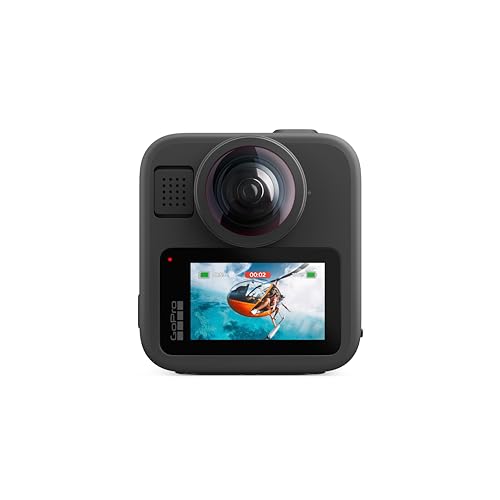
GoPro MAX2 — Best for GoPro loyalists
GoPro’s return to 360 was worth the wait because the MAX2 fixes the original’s two structural embarrassments at once: the sphere is now true 8K (per the verified listing), and the lenses are easy to replace when — not if — one meets a rock. Add 29MP 360 photos, six microphones for genuinely spatial audio, and HyperSmooth stabilisation applied to the sphere, and the MAX2 reads like a company that listened to six years of owner complaints and answered them in one product cycle.
The GoPro difference is integration. Footage flows into the same app and cloud habits HERO owners already live in, mounts interchange with the drawer of GoPro accessories most action shooters already own, and the traditional action-camera mode means the MAX2 can serve as your only camera on a trip — spherical when the moment is unrepeatable, conventional when it is not. Audio deserves its headline: six microphones capture directional sound that follows your reframe, so the exported clip’s audio perspective turns with the view in a way twin-microphone rivals cannot imitate.
Where the X5 still leads is software feel. GoPro’s reframe tools have closed much of the gap, but Insta360’s app remains a half-step quicker and cleverer at automated tracking edits, and the MAX2’s ecosystem of 360-specific accessories is younger. Battery endurance trails the X5’s best-case claims as well. For an existing GoPro household these are footnotes; for a newcomer choosing cold between the two flagships, the decision honestly comes down to which app’s editing style your thumb prefers, and both deserve a test drive with real footage before money moves.
The MAX2 also inherits GoPro’s mounting fingers and general ruggedness philosophy, which matters because 360 cameras live hard lives — they must be mounted high and exposed to capture their sphere, exactly where knocks happen. Twist-on lens replacement at the trailhead, rather than a factory repair, is the feature that will define this camera’s ownership story three winters from now.
Photo-led users get their own dividend. A 29MP spherical still is a genuine creative instrument — tiny-planet cityscapes, full-room records, group shots where nobody stands behind the camera — and the MAX2’s photo pipeline treats stills as citizens rather than frame grabs. Families in particular discover that the 360 group photo, reframed three ways at leisure, ends the era of the excluded photographer more completely than any timer or selfie stick ever did.
- Capture: spherical 8K video and 29MP 360 photos per the verified listing
- Lenses: easy user-replaceable lenses on both faces
- Audio: six-microphone spatial capture
- Modes: full 360 plus traditional single-lens action camera mode
- Stabilisation: HyperSmooth applied across the sphere
Strengths
- True 8K sphere with photos that finally reward stills shooters.
- Spatial audio follows the reframe — a genuine creative edge.
- Slots into existing GoPro mounts, apps and habits seamlessly.
Trade-offs
- Reframe app still trails Insta360’s for automated tracking edits.
- Battery endurance sits behind the X5’s endurance-mode claims.
- 360-specific accessory range is newer and thinner for now.
Best for: GoPro households adding 360, and creators who value spatial audio. Not suited for: buyers wanting the slickest phone-editing automation above all.

GoPro MAX — Best budget entry
The original MAX is the camera that taught a generation what reframing felt like, and its 5.6K30 sphere (per the verified listing) still teaches it at a friendlier tier than the flagships. Everything essential is present: the dual-lens sphere, HERO mode for ordinary wide-angle filming, 1080p live streaming (also in the listing), stabilisation, and the touchscreen interface that made 360 approachable before apps took over the workflow. As an entry ticket bought knowingly, it remains entirely defensible.
Knowingly is the operative word. The exported reframed clips from a 5.6K sphere are noticeably softer than the 8K flagships’ output, especially when you punch into a tight crop — the pass at the far side of the pitch will look like a memory rather than a recording. Lenses are fixed, so a scratch is a repair bill or a permanent blemish, and lens protectors become mandatory equipment rather than a suggestion. Battery life and low-light work belong to their era.
Yet the MAX has one advantage no spec sheet captures: six years of tutorials, community knowledge, second-hand supply and accessory compatibility. A learner can find an answer to any MAX question ever asked, and a cautious buyer can enter the format, discover whether the reframe workflow suits their temperament, and upgrade later having lost little. Many creative tools deserve exactly this kind of elder statesman — outgunned on paper, unbeaten as a teacher.
For property walkthroughs, family events and travel diaries — the uses where coverage matters and pixel scrutiny does not — the MAX’s output remains honestly sufficient, and its HERO mode means it can be the only camera in the bag on a weekend trip. Judge it as a doorway rather than a destination and it earns its place in this six.
Event shooters keep finding work for the MAX as well. Placed unobtrusively at the edge of a wedding dance floor, a school stage or a workshop bench, it records a complete sphere that the editor mines later for reactions no roving camera caught. Its live-streaming ability, modest as it is, also serves community events that need a simple immersive feed more than they need broadcast polish. Long after a flagship takes over the headline duties, a MAX tends to remain employed — the mark of a genuinely useful tool.
- Capture: spherical 5.6K30 video and 16.6MP 360 photos per the verified listing
- Modes: 360 capture plus HERO single-lens mode; 1080p live streaming
- Lenses: fixed — protector guards strongly advised
- Screen: touchscreen body control
- Stabilisation: Max HyperSmooth lineage
Strengths
- The proven, documented, affordable way into the GoPro 360 world.
- HERO mode covers ordinary filming without a second camera.
- Enormous second-hand and tutorial ecosystem surrounds it.
Trade-offs
- Reframed clips are visibly softer than 8K flagship exports.
- Fixed lenses make a scratch a serious financial event.
- Low-light and battery performance show their generation.
Best for: first-time 360 buyers and GoPro owners curious about reframing. Not suited for: professionals delivering client footage or low-light shooters.
Insta360 X4 — Best previous-generation value (prose-only)
The X4 sits in the classic one-generation-back sweet spot: 8K 360 capture, the same Insta360 app and reframe intelligence that make the X5 sing, removable lens guards as standard thinking, and a price position (in spirit — this guide quotes no prices) that undercuts the flagship it resembles. For the majority of reframed social clips, travel diaries and family archives, the X4’s exports and the X5’s are closer than their spec sheets suggest, because the delivery screen is a phone and the sphere was already generous at 8K.
What the newer model adds is refinement rather than revolution: replaceable lenses instead of guards alone, stronger low-light processing, longer battery claims. An X4 owner filming in daylight — on snow, on water, on the road — gives up surprisingly little. The accessory and tutorial ecosystem around the X4 is mature, cases and mounts abound, and the camera has the settled firmware of a product whose surprises are all known.
It is prose-only in this guide because our verified pool carries the X5, not the X4 — pool rules, not a judgement on the camera. The honest cautions mirror the MAX’s: lenses you cannot user-replace make guards and case discipline compulsory, and low-light footage is where the generational gap shows first. Bought at its natural discount against the X5, it is arguably the rational Insta360 purchase; bought at near-parity, the X5’s replaceable lenses argue back persuasively.
Newcomers should also weigh the X4’s role as a skills investment. The reframe craft you learn on it — keyframing, subject tracking, seam awareness — transfers intact to any future flagship, and the footage archive you build remains editable in the same software family. Few previous-generation products in any category retain this much of their successor’s essential experience.
Renters and borrowers shape another part of the X4’s story. Because it spent a full product cycle as the flagship recommendation, hire shops stock it, friends own it and trial weekends are easy to arrange. A weekend with a borrowed X4 answers the only question that really precedes a 360 purchase — do I enjoy reframing? — better than any review can, including this one. If the answer is yes, the X5’s refinements will feel earned rather than speculative when you upgrade.
- Capture: 8K 360 video with Insta360’s reframe app ecosystem
- Lenses: guarded but not user-replaceable
- Modes: 360 plus single-lens action capture
- Battery: strong for its generation, behind X5 endurance claims
- Software: same app family and AI tracking tools as the flagship
Strengths
- Most of the flagship experience at a previous-generation position.
- Same editing intelligence and app polish as the X5.
- Mature accessory, case and tutorial support everywhere.
Trade-offs
- Lens damage remains a repair event rather than a spare part.
- Evening footage shows the generational gap in noise handling.
- Value case collapses if priced too close to the X5.
Best for: value-minded creators who film mostly in daylight. Not suited for: night shooters or the accident-prone without lens discipline.
Ricoh Theta X — Best for stills and property tours (prose-only)
Every category has a pick that ignores the headline race and serves a profession instead. The Theta X is that pick: a slim, pocketable 360 camera with a large built-in touchscreen, a workflow tuned for stills, and a business ecosystem — property tours, construction documentation, insurance records — that adopted Ricoh’s line years before action brands noticed the market. Its 360 photos are its native language, and for a realtor producing a virtual tour the same afternoon, that specialisation beats any action camera’s video-first design.
The touchscreen deserves emphasis because it changes who can operate the camera. Staff who would never open a reframing app can frame, shoot and review a property sphere on the device itself, and the Theta’s shape — more like a slim remote than a camera — slips into a blazer pocket between appointments. GPS and business-oriented features serve documentation work where the deliverable is a trustworthy record rather than a cinematic clip.
Video is where the compromises live: the Theta line’s movie specifications trail the action flagships, stabilisation and ruggedness are not its arguments, and there is no waterproof action heritage to lean on. It appears prose-only here because our pool verified the action flagships; within its profession, though, the Theta X is not a compromise at all but the incumbent standard. Buy it for tours and documentation, and let the action cameras fight over the ski slopes.
There is a broader lesson in this pick for the whole guide: 360 is a capture philosophy, not a genre. The same spherical file that becomes a skier’s highlight reel becomes a surveyor’s evidence and a family’s living-room time capsule, and the best camera is the one whose software speaks your deliverable’s language fluently.
Documentation professionals add one more practical note: consistency across a fleet. A property firm issuing the same Theta model to every agent gets identical file behaviour, identical training and interchangeable accessories, which is worth more to an operations manager than any single specification. Consumer buyers rarely think in fleets, but the principle scales down — one camera whose habits you know deeply outperforms a drawer of theoretically superior strangers.
- Focus: 360 stills and business documentation workflows
- Screen: large built-in touchscreen for standalone operation
- Form: slim pocketable body, discreet in professional settings
- Video: present but secondary to the stills mission
- Ecosystem: established property-tour and enterprise support
Strengths
- Stills-first workflow that business users already trust.
- Big touchscreen makes it operable by non-specialist staff.
- Pocketable, professional appearance suits client-facing work.
Trade-offs
- Video specifications trail the action flagships clearly.
- Not built for impact, immersion or action mounting.
- Reframe-for-social tooling is not its design centre.
Best for: realtors, surveyors, documenters and stills-led 360 work. Not suited for: action sports or cinematic video projects.
Kandao QooCam 3 Ultra — Best enthusiast alternative (prose-only)
Kandao is the independent name in a category the giants would prefer to divide between themselves, and the QooCam 3 Ultra is its enthusiast manifesto: large sensors for a 360 camera, 8K-class spherical ambition, and a feature list aimed at shooters who read specifications the way sommeliers read labels. Its low-light and dynamic-range claims target exactly the territory where twin-fisheye cameras traditionally suffer, and technically minded owners speak of its image pipeline with genuine respect.
The trade for that ambition is ecosystem gravity. Insta360’s and GoPro’s apps, accessories, tutorials and resale markets form weather systems; Kandao’s is a smaller, drier climate. The reframe software is capable but less hand-holding, the mount and case selection thinner, and the community of fellow owners — your first troubleshooting resource — smaller in most countries. None of this frightens the enthusiast this camera is built for; all of it should give a first-time 360 buyer pause.
Prose-only status again reflects pool verification rather than merit. Treat the QooCam 3 Ultra as the connoisseur’s shortlist entry: the camera to audition if image quality per sphere is your religion and you are willing to be your own support department. For everyone else, the flagships’ software and lens economics remain the safer expression of the same spherical idea.
Its presence in this guide is also a health check on the category. A format with credible independents pushing sensor size and image quality is a format still being invented, and buyers benefit from that pressure regardless of which badge ultimately rides on their helmet.
There is a caveat about expectations that belongs in this review rather than the fine print. Independent flagships tend to reward owners who keep firmware current and read release notes, because their smaller teams ship meaningful improvements — and occasionally meaningful regressions — through updates. The enthusiast who finds that rhythm enjoyable gets a camera that visibly improves across its life; the owner who wants an appliance should honestly choose a giant’s product instead.
- Focus: enthusiast image quality with large-sensor design
- Capture: 8K-class 360 video ambitions
- Software: capable reframe tools, less automated than the giants’
- Ecosystem: smaller accessory and community footprint
- Build: premium enthusiast positioning
Strengths
- Sensor-led image quality agenda appeals to technical shooters.
- Pushes the whole category on dynamic range and low light.
- Full-featured capture for owners who dislike hand-holding.
Trade-offs
- App automation and tracking polish trail Insta360 and GoPro.
- Accessory and resale ecosystems are comparatively thin.
- Support community is smaller; self-reliance required.
Best for: technically confident enthusiasts chasing sphere image quality. Not suited for: first-time 360 buyers wanting the easiest workflow.
Comparison Table
| Camera | Sphere | Standout trait | Watch out for |
|---|---|---|---|
| Insta360 X5 | 8K | Replaceable lenses, app, battery claims | Premium handling discipline |
| GoPro MAX2 | 8K | 29MP photos, six-mic spatial audio | App automation a step behind |
| GoPro MAX | 5.6K | Proven entry point, HERO mode | Fixed lenses, softer exports |
| Insta360 X4 | 8K | Previous-generation value | No user lens replacement |
| Ricoh Theta X | Stills-led | Touchscreen, business workflow | Video is secondary |
| Kandao QooCam 3 Ultra | 8K-class | Large-sensor image agenda | Small ecosystem |
How Does the Reframe Workflow Actually Work, Step by Step?
Honesty about workflow begins with the file itself. On the camera you do almost nothing: mount it high, keep both lenses clean, press record and perform the activity, trusting the sphere. Back home, the file opens in the maker’s app as a navigable globe of video. Reframing means flying a virtual camera through that globe across time — setting keyframes that say “look at the skier here, swing to the valley there, tighten on the landing” — and the software interpolates smooth moves between your decisions. The invisible-selfie-stick shot, the tiny-planet flourish, the follow-cam illusion: all are exports of that single process.
Budget the time truthfully. A practised editor reframes a one-minute highlight in perhaps ten minutes on the phone app, faster with AI tracking doing the subject-following automatically. A beginner’s first evening will feel slower, and a long recording — a full descent, a whole ceremony — contains several such highlights hiding inside it, each needing discovery before it needs editing. This is the category’s real subscription: not money, but attention. Shooters who love the edit find 360 liberating; shooters who want to press record and be finished should buy a conventional camera and accept its narrower truth.
Two habits separate happy 360 owners from regretful ones. First, review footage the same day, while memory can tell the editor where inside the sphere the moment lives. Second, export reframed clips promptly and archive the spheres deliberately, because spherical files are large and an unlabelled folder of them becomes an attic nobody opens. The cameras in this guide all support this discipline; none can perform it for you.
Why Do Reframed Clips Look Softer Than Normal Action Footage?
Arithmetic, not deception. An 8K sphere spreads its pixels across 360 degrees horizontally and 180 vertically; the 16:9 window you export sees only a fraction of that sphere at any moment, so the effective resolution of the framed clip lands closer to HD or modest 4K depending on how tightly you crop. A conventional 4K action camera spends every one of its pixels inside its single frame, which is why its footage looks crisper side by side. The 360 camera is not worse — it is buying coverage with the same currency the conventional camera spends on detail.
Knowing this, skilled 360 shooters compose for the crop they intend: keep the subject reasonably close and central in the sphere, avoid extreme punch-ins, and let the format’s strengths — the impossible angle, the follow shot, the reveal — carry the clip instead of fine texture. Delivered to phones and social feeds, a well-reframed X5 or MAX2 clip looks entirely at home; projected huge in a cinema, the arithmetic shows. Match the tool to the screen and the softness debate mostly evaporates.
How Do You Protect Bulging Lenses and Avoid the Stitch Seam?
Handle a 360 camera like binoculars, not like a hockey puck. Both lenses protrude and both are always exposed, so the ownership rituals are: lens guards or caps whenever the camera is not recording, a hard case rather than a jacket pocket, a wrist loop or lanyard in exposed places, and never — this is the classic first-week disaster — setting the camera down resting on a lens. The flagship picks’ replaceable lenses forgive a failure of these rituals at spare-part cost; on fixed-lens models the same failure is a repair or a ruin, which is why the reviews weight replaceability so heavily.
The seam is the invisible line where the two fisheye images join, and it punishes whatever crosses it — a face, a hand, the subject’s board. Keep the important action facing a lens squarely rather than side-on to the camera, hold the selfie stick so the subject sits in one lens’s clean territory, and give close subjects a little distance, since stitching struggles most at arm’s length. With an hour of practice the seam becomes a composition instinct, like keeping fingers off a phone lens, and your footage quietly stops containing the glitches that mark a beginner’s reel.
What Is It Like to Travel With a 360 Camera for a Whole Trip?
Different from travelling with any other camera, in ways that only accumulate across days. The 360 shooter stops asking companions to repeat moments, stops choosing between filming the parade and watching it, and starts recording scenes whole — the café table with every face, the viewpoint with the crowd and the valley in one press. Companions relax noticeably once they understand no one is being framed out, and the photographer rejoins the holiday instead of directing it. That social dividend is the format’s least advertised and most felt advantage.
The frictions accumulate too. Every evening carries a small editorial debt: review the day’s spheres, mark the moments, export the obvious clips before the backlog becomes archaeology. Travellers who build this twenty-minute ritual into the trip — over dinner, on the train — return home with a finished story. Travellers who defer it return with a hard drive and a promise they will keep next month. Pack a card reader, a drive or generous cloud allowance, because a week of 8K spheres outgrows casual storage, and treat the camera’s lenses with the same care as your passport: both are small, exposed and trip-ending when damaged.
How Do 360 Cameras Handle Audio, Wind and Conversation?
Audio is the format’s quiet overachiever. A sphere of video paired with a single flat audio track feels subtly wrong once you have heard proper spatial capture, which is why the MAX2’s six microphones matter beyond their spec-sheet novelty: as your reframe turns toward a speaker, the sound field turns too, and the illusion of presence completes itself. Insta360 answers with strong wind-guard processing aimed at the moving shooter — the cyclist narrating a descent, the skier talking through a line — where intelligibility matters more than ambience.
Wind remains the universal enemy, and 360 cameras fight it with one hand tied: their microphones sit exposed on a body designed to be held into the weather on a stick. Foam covers help where they fit, the apps’ wind-reduction modes help more, and the oldest technique helps most — turn your body, shelter the camera, record the commentary in the lee of a wall or vehicle. For interviews and events, treat the camera’s audio as an excellent backup and record important voices on a dedicated microphone as well; professionals insure irreplaceable sound the way they insure irreplaceable moments, with a second recorder.
Which Accessories Does a 360 Kit Genuinely Need?
Four items earn their bag space universally. The maker’s selfie stick, whose alignment with the seam creates the invisible effect, is the first. Lens protection — guards, caps or a hard case with a lens cradle — is the second, and the least negotiable. A fast, capacious memory card with a spare is the third, because spheres are heavy files and a full card ends the experiment mid-scene. The fourth is a mini tripod or clamp, which turns the camera into an unattended witness for events, time-lapses and group shots where everyone, finally, gets to be in the picture.
Beyond that core, let your footage argue for purchases. Motorcycle riders add vibration-aware mounts; skiers add cold-weather battery discipline rather than gear; property shooters add a monopod with feet for one-person tours. The accessory catalogues of both flagship makers are deep enough to absorb any budget, and the discipline of buying against evidence — this clip failed for this reason — keeps the kit lean. A 360 camera is already two cameras in one body; its supporting kit should show the same restraint.
How Should You Archive Spherical Files So Future Editors Can Use Them?
An unedited sphere is a negative, not a photograph, and it deserves a negative’s respect. Keep the original files of any scene you might ever revisit — the wedding, the expedition, the child’s first descent — in two places, with folder names that carry the date and the event rather than the camera’s serial poetry. Alongside each sphere, save the reframed exports you made while memory was fresh; future editors, including future you, will thank present you for the map. Storage is the tax: an 8K sphere archive grows quickly, so review ruthlessly and delete the spheres of scenes that were never going to matter, while they are still obviously deletable.
Formats deserve a thought as well. The makers’ native files open best in their own software, which ties your archive to their continued support — another quiet argument for the two giants, whose software ecosystems are likeliest to outlive your camera. Exporting a high-quality equirectangular master of your most important spheres is a reasonable insurance policy for the deep archive, the digital equivalent of a print alongside the negative. None of this needs to be elaborate; it needs to exist, because the entire promise of 360 is that the future gets to re-decide what mattered, and that promise is void if the files are gone.
What Will You Actually Do With 360 Photos?
More than you expect, once the stills stop being an afterthought. A spherical photo is a place preserved whole: the workshop before renovation, the apartment before signing, the campsite at dawn with the mountains behind the tent as well as in front of it. Reframed flat, one sphere yields the wide establishing shot, the detail crop and the portrait-orientation version for a phone wallpaper — three deliverables from one shutter press. The MAX2’s 29MP stills and the Theta X’s stills-first design both take this seriously, and families discover that the spherical group portrait, where the photographer steps into the circle instead of standing outside it, becomes the image that gets printed.
There is also the simple pleasure of the tiny-planet and rabbit-hole projections, dismissed as gimmicks until your own street, your own summit and your own dog are the subjects. Gimmickry ages; geography does not. A decade of spherical stills becomes a navigable memory of every place you stood, and revisiting them in a headset — the use the industry keeps promising — is genuinely moving even today on a phone screen, turning the sphere back toward the moment you occupied its centre.
How Do You Film People With a 360 Camera Without Making It Weird?
A 360 camera records everyone, including the people who did not notice it, and that completeness carries etiquette. At events, tell the group the camera sees in every direction — most people find the honesty disarming and the results delightful, and the announcement prevents the particular embarrassment of someone relaxing behind what they assumed was the lens’s blind side. In public spaces, the camera’s small size invites discretion, but the standard you should hold is the one you would want applied to you: film scenes, not strangers’ private moments, and be ready to explain and delete when asked.
Technically, people are where the format shines socially. Nobody performs for a sphere the way they freeze for a pointed lens, so gatherings recorded in 360 keep their natural temperature — the toast, the laughter behind you, the child’s unposed reaction. Place the camera at the table’s centre or on a stand at conversational height, let it run through the unrepeatable minutes, and mine the sphere later for the frames a directed camera would have bullied out of existence. The best 360 footage of people rarely looks filmed at all, and that is precisely its value.
When Should You Deliberately Not Use the 360 Mode?
Knowing when to fold the sphere away marks the mature owner. Use single-lens mode when the shot is certain and detail matters — the product close-up, the interview, the sign you need to read later — because the conventional mode spends every pixel on the frame you chose. Skip recording altogether in genuinely low light where even the flagships’ processing will smear; a photograph or a memory serves the moment better than a noisy sphere. And resist the sphere for long, static, single-subject events — a lecture, a ceremony filmed from one seat — where a conventional camera on the subject produces a watchable record and a sphere produces an editing sentence.
These abstentions are not failures of the format but fluency in it. Every mature technology develops this grammar: the zoom you do not use, the filter left in the bag. A 360 camera in the hands of someone who knows when not to use it produces, paradoxically, the most convincing case for owning one.
What Makes the Best 360 Degree Cameras Worth Learning to Reframe?
Less time than the fear of it suggests, and the learning curve has a kind shape: the first clip teaches the mechanics, the fifth teaches taste. Hour one belongs to the app — importing a sphere, dragging the view, setting two keyframes, exporting something watchable. By the third outing, subject tracking stops feeling like magic and starts feeling like a colleague you supervise. The subtler skills arrive across a season: anticipating where the moment will be inside the sphere while you are still filming, holding the camera so the seam never crosses a face, recognising in the field which scenes deserve the sphere and which deserve a photograph.
The honest comparison is with learning any instrument of expression. A conventional camera also took you a season to use well; the difference is that its lessons were about the moment of capture, while 360 moves half the craft to the evening afterwards. Shooters who enjoy editing — who already linger over photo selections and holiday videos — typically find the curve pleasurable rather than steep, and the archive they build while learning remains fully re-editable as their taste improves, a generosity no conventional footage offers.
Common Mistakes
New owners make one mistake above all: filming everything in 360 because they can, then drowning in unedited spheres. The format rewards selectivity — record the descent, the ceremony, the one unrepeatable ride — not the whole afternoon. The second error is mounting the camera low or close to a body, where the sphere fills with sleeve and strap instead of scene; 360 cameras want height, distance and a clean horizon around them. Third comes lens neglect: a fingerprint or scratch on one fisheye poisons half of every frame, and beginners discover this in the edit, weeks later, across an entire trip’s archive.
A fourth mistake is judging the purchase by the box’s resolution number and then feeling cheated by export softness that was always arithmetic. Read the workflow sections of this guide again before buying, choose with the trade understood, and the format will delight rather than disappoint you.
Final Recommendation
Buy the Insta360 X5 if you are choosing one 360 camera today: its replaceable lenses, low-light progress, battery endurance and reframe software form the most complete expression of the format, and it asks the least forgiveness. GoPro households should take the MAX2 with equal confidence — the spatial audio and true 8K sphere are real advantages, and ecosystem loyalty is a legitimate feature. The original MAX and the X4 are the intelligent entries for the curious and the budget-led respectively, the Theta X owns its professional niche outright, and the QooCam rewards the enthusiast who values image quality over hand-holding.
A last word on sequencing the purchase. If you already own a capable conventional action camera, a 360 flagship complements rather than replaces it, and the pair covers nearly every moving-image situation a traveller or athlete meets. If you own nothing, the flagship 360s are the rare case where one body honestly can be the whole kit — sphere for the unrepeatable, single-lens mode for the everyday — provided you accept the editing commitment with open eyes. Buy once, learn the workflow deeply, and let the second camera, when it comes, be chosen by the gaps your own footage reveals.
Whichever sphere you choose, choose it for a named purpose — the ski season, the property business, the family archive — because a 360 camera bought for a purpose gets carried, mounted and edited, while one bought for a specification stays in its case. The mountain will provide the moments; your camera simply promises to have been looking in every direction when they happened.
And give the format one honest season before judging it. The first month’s footage will contain seams, soft crops and at least one lens you forgot to clean; the third month’s will contain shots your old camera could not have taken at any price, framed by an editor — you — who did not exist in month one. That arc, from gadget to instrument, is the real product being reviewed here.
Frequently Asked Questions
Can a 360 camera replace my regular action camera?
For many owners, yes, and the proportion grows the longer they own one — the flagships here all offer a single-lens mode that behaves like a competent conventional action camera, and the 360 mode then becomes a bonus rather than a burden. The honest caveat is detail: if your priority is the crispest possible native footage of a single framed view, a dedicated action camera still wins that specific contest. If your priority is never missing the moment, the sphere wins.
What does the invisible selfie stick effect actually do?
The camera’s two lenses cannot see the thin stick aligned between them, so software stitches the scene across that blind line and the pole vanishes from the footage. The result looks like a drone or a following cameraman filmed you. It works best with the maker’s own stick held straight along the seam line, and it remains the single most magical-looking trick in consumer video — the one that makes strangers stop scrolling and ask how the shot was made.
How large are 360 video files?
Large — larger than most newcomers budget for, and worth measuring against your own habits before a long trip. An 8K sphere is effectively two high-resolution video streams plus audio, and an active day produces an archive that needs a real storage plan. Owners adapt with the same rituals as the workflow section describes: same-day review, prompt reframing and export, deliberate archiving of the spheres worth keeping and ruthless deletion of the rest. Cloud features in the makers’ apps can soften, not abolish, this reality.
Are 360 cameras waterproof?
The action flagships in this guide are waterproof as bare bodies for surface use — rain, splashes, shallow swimming — per their verified listings, while the stills-led and enthusiast picks make no such promise and should be kept dry. Underwater, refraction at the twin domes can disturb the stitch, and serious diving calls for dedicated dive cases designed to restore the geometry. Read your specific model’s guidance before its first swim.
Do I need a powerful computer to edit 360 footage?
No — the phone apps from Insta360 and GoPro are genuinely the primary editors for most owners, handling reframing, tracking and export on a modern handset. Desktop software adds finer keyframing, batch work and integration with conventional editors, and it appreciates a capable machine, but it is an upgrade path rather than an entry requirement. Start on the phone, where the automation is strongest and the learning curve is kindest; graduate when your ambitions, not your anxieties, say so. Many owners never graduate at all, and their output suffers nothing for it — a sign of how completely the centre of gravity in this category has moved from the desk to the hand.
Which 360 camera is best for real estate tours?
The Ricoh Theta X is the specialist answer, with its stills-first workflow and large touchscreen built for exactly that trade. High-volume tour producers using the action flagships can also produce excellent walkthrough video, but for stills-based virtual tours delivered by ordinary staff on a schedule, the Theta’s design centre matches the job description most closely.
Related Guides
Keep exploring: our complete guide to the best 4k cameras, the best 4k cameras travel shooters actually pack, and the best 4k cinema cameras for serious video work.



[…] exploring: the best 360 degree cameras for shooters who reframe later, our full best 4k cameras roundup across every format, and the best 4k cameras travel shooters […]