What's inside
- Where to Buy
- Key Takeaways
- Quick Picks
- How We Chose These Picks
- Comparison
- How to Choose
- Why Does the Microphone Matter More Than the Camera?
- What Makes a Lecture Recording Worth Watching Twice?
- How Should a Lecturer Actually Behave With an Installed Camera?
- What Happens to Lecture Capture When the Room Goes Hybrid?
- Common Mistakes
- Final Recommendation
- Frequently Asked Questions
- Related Guides
As an Amazon Associate I earn from qualifying purchases. This post may contain affiliate links at no extra cost to you.
[SITE_DOMAIN] is reader-supported. When you buy through links on our site, we may earn an affiliate commission.
Where to Buy
Lecture capture is bought as a room system, so read the six listings as components rather than as cameras alone. The AVer PTZ310N keeps its title to a single line about NDI streaming, the Logitech PTZ Pro 2 is a USB conference-room camera, the TONGVEO Wireless PTZ builds a 5.8GHz receiver into its offer, the PTZOptics Move SE bundle adds a cleaning kit, HDMI cable, Ethernet cable and cable ties, the Tenveo 4K Conference PTZ leads with a wide 92-degree view, and the FoMaKo 4K 30X PTZ arrives in a bundle whose title names a companion model code. Check each page for mounts, controllers and cabling before costing the room.
Begin with a correction, because the search that brought you here rests on a misunderstanding worth clearing up in the first paragraph: there is no such product category as a dedicated lecture camera. Nobody manufactures a camera designed only for lectures, and the best video cameras for recording lectures are not camcorders at all. The right system is a fixed PTZ or tracking camera — ceiling- or wall-mounted at the back or side of the room, aimed once at the lectern and the board, connected to the room’s computer or network, and thereafter operated by nobody. Lectures are filmed by infrastructure, not by a camera operator standing at the back with a tripod, and every pick in this guide belongs to that infrastructure family.
The reason is the lecture itself. It happens on a timetable, in the same room, with the same geometry, fifty times a term. A camcorder demands a human for every one of those fifty sessions — to carry it, aim it, start it, stop it, offload it — and human-dependent systems fail on the wet Tuesday in week nine when the usual person is ill. A mounted PTZ camera with presets wakes with the room, frames the lectern at a button press or automatically, tracks the lecturer as they pace, and delivers the recording to the platform the students already use. Reliability across a semester, not image heroics on a single day, is the specification that matters here.
The six cameras below divide by connection philosophy. Some are network cameras speaking NDI for campus media systems; some are USB conference cameras that treat the room’s computer as the recorder; one removes cabling from the equation with a wireless receiver; and their zooms range from a wide 3x suited to seminar rooms to a 30x that can read the board from the back of a tiered hall. Titles are treated as the specification throughout: where a title is silent about tracking, resolution or mounting, the spec box says so rather than guessing.
Key Takeaways
- There is no dedicated lecture camera category — the correct tool is a fixed PTZ or tracking camera installed in the room.
- The AVer PTZ310N states 12x zoom and NDI live streaming in the briefest title in this guide.
- Logitech’s PTZ Pro 2 is the USB simplicity pick: an HD 1080p conference-room camera with no network configuration.
- TONGVEO’s wireless model states a built-in 5.8GHz receiver for cable-free setup and 1080p 60fps recording.
- The PTZOptics Move SE bundle states SDI, HDMI, USB and IP outputs with a 12x optical zoom, plus install accessories.
- Zoom divides the set by room size: 3x wide-angle for seminars, 12x for classrooms, 20x and 30x for halls.
Quick Picks
| Pick | Badge | Why it made the cut |
|---|---|---|
| AVer PTZ310N | Best network-streaming lecture camera | 12x NDI live streaming PTZ from an education-focused maker. |
| Logitech PTZ Pro 2 | Best USB simplicity | An HD 1080p USB camera for conference rooms that any room PC can run. |
| TONGVEO Wireless PTZ 20x | Best cable-free install | Built-in 5.8GHz receiver, auto-tracking and 1080p 60fps for rooms that cannot be wired. |
| PTZOptics Move SE 12x | Best output flexibility | SDI, HDMI, USB and IP from one 12x camera, bundled with install accessories. |
| Tenveo 4K Conference PTZ 3x | Best seminar-room wide view | 4K with AI tracking and a stated 92-degree wide angle for small rooms. |
| FoMaKo 4K 30X PTZ | Best large-hall reach | 4K, 30x zoom, NDI and AI tracking for tiered lecture theatres. |
How We Chose These Picks
Selection began with the room, not the camera. A lecture space dictates its own requirements — its depth sets the zoom, its wiring sets the connection, its timetable sets the reliability bar — so candidates were sorted first by the rooms they could honestly serve. A camera whose stated zoom suits a seminar table was not penalised for failing a 400-seat hall it was never aimed at; it was placed, and labelled, where it belongs.
Automation came second, because the entire premise of lecture capture is the absent operator. Titles stating AI auto-tracking earned detailed treatment; titles silent about tracking were presented as preset-and-remote cameras, which remain entirely workable where a lecturer or a timetabled system drives them. Nothing in this guide credits a camera with following a lecturer unless its title says it can.
Connection philosophy came third. Campus media teams think in networks and NDI; a department outfitting its own room thinks in USB and the PC already bolted under the desk; a listed building or a rented hall thinks in anything that avoids drilling holes. All three philosophies appear below, because the right answer is the one the building permits.
Finally, bundle honesty was applied as everywhere in this guide: accessories named in a title are discussed as part of the purchase, and specifications a title omits are marked as not stated, however likely they may seem. A university buying forty rooms of cameras cannot afford forty rooms of assumptions.
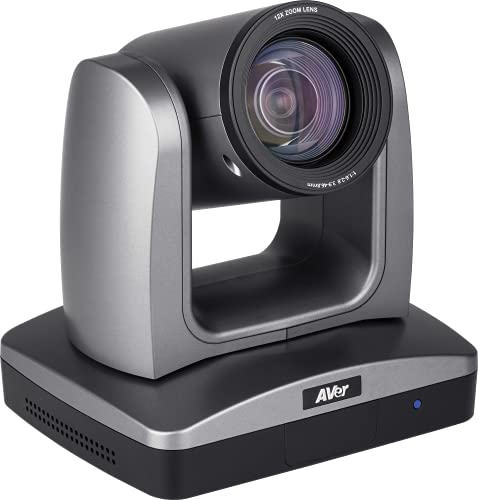
AVer PTZ310N — Best network-streaming lecture camera
AVer builds for education, and the PTZ310N’s title is the shortest in this guide: a 12X NDI live streaming PTZ camera. Brevity is not a flaw here — it is a positioning statement. This is a camera for institutions whose lecture capture runs over the network into a central system, where the camera’s job is to be a dependable NDI source at the back of the room, term after term. Twelve-times zoom is the classroom-correct figure: from a rear wall mount in a standard teaching room, it frames the lecturer at the board in a readable mid-shot and tightens further for the worked example on the whiteboard, which is the shot students actually pause and re-read.
NDI, the network video protocol named in the title, is what makes this a campus camera rather than a room camera. The picture travels over the building’s network cabling to wherever the institution’s switching, recording or streaming system lives — a media services office, a virtual server, the lecture capture platform itself. For a university standardising capture across dozens of rooms, that architecture beats forty individual USB computers on manageability alone: one workflow, centrally monitored, with cameras that can be checked, configured and updated without a ladder and a laptop in every room.
The restraint of the title also imposes this guide’s discipline. Tracking is not stated, so this camera is presented as a preset-and-control device: the lecturer recalls the board position, the lectern position and the wide position from a remote or a room panel, and the camera obeys. Many lecture styles — the board-heavy mathematics session, the slides-and-speaker seminar — need nothing more, and an institution should not pay a tracking premium for rooms where the lecturer stands, by pedagogical choice, in one place for an hour.
Buyers should verify the detailed specification — resolution class, tracking behaviour, mounting options — against AVer’s documentation, because the title declines to provide it and this guide declines to invent it. Institutions building network-based capture can check the AVer PTZ310N on Amazon as the starting point for that documentation trail.
- Zoom: 12X, per the listing title
- Network: NDI live streaming, per the listing title
- Type: PTZ camera, per the listing title
- Resolution: Not stated in the listing title — verify with the manufacturer documentation
- Auto-tracking: Not stated in the listing title — verify with the manufacturer documentation
- Power method: Not stated in the listing title — verify with the manufacturer documentation
Strengths
- NDI streaming suits centrally managed, multi-room campus capture.
- 12x zoom matches standard classroom depth honestly.
- Education-focused maker with an installed-base in teaching spaces.
Trade-offs
- Title states almost nothing — resolution and tracking need documentation.
- Network architecture is overkill for a single self-contained room.
- Preset operation assumes a lecturer or panel to drive it.
Best for: a university or school standardising NDI lecture capture across many classrooms.
Not suited for: a single seminar room wanting plug-and-play USB recording on its own PC.
The institutional logic deserves one more paragraph, because it explains this camera’s whole existence. Lecture capture fails organisationally more often than technically: rooms that each work differently, that each need a different person to coax them, decay one by one until half the estate records nothing. A plain, network-native camera that behaves identically in every room is the antidote, and its unglamorous title is almost a promise that it will not surprise the team managing it.
For the lecturer, the experience it offers is the correct one: walk in, recall the preset, teach. The camera’s invisibility in the teaching hour is the product; everything else is plumbing.

Logitech PTZ Pro 2 — Best USB simplicity
The PTZ Pro 2 is the elder of this set and its title is a model of plain speaking: a Logitech PTZ Pro 2 camera, USB, HD 1080p, a video camera for conference rooms. Everything a department needs to know is in that sentence. It plugs into the room’s computer by USB; it records in HD; it pans, tilts and zooms under remote control; and it was designed for the meeting-room world where the person running it has a lecture to give, not a broadcast to engineer. For a single department, a training company or a small college outfitting rooms one at a time, that simplicity is not a compromise — it is the feature that guarantees the system will still be used in year three.
USB architecture defines both its ease and its ceiling. The room PC becomes the recorder, the streamer and the archive: the same machine running the slides runs the camera, and platforms the institution already uses for meetings become its lecture platform. There is no network configuration, no media services ticket, no waiting for central IT. The ceiling is equally clear: the camera serves the room it is plugged into, its reach is that room’s USB cable, and a campus-wide estate of them is a fleet of individual arrangements rather than a managed system. Small deployments should embrace the ease; large ones should read the AVer and PTZOptics sections again.
HD 1080p deserves a defence in a 4K-titled guide, because lecture capture is not cinema. The information in a lecture is the board, the slides and the speaker’s face at conversational size, and 1080p renders all three legibly while keeping file sizes, upload times and storage bills proportionate across a semester of daily recordings. Institutions that record everything learn to love proportionate files. A department choosing between one 4K room and three 1080p rooms should usually choose the three rooms, because students are failed by the lecture that was never captured, not by the lecture captured in HD.
The conference-room heritage also means the supporting ecosystem — remotes, mounts, extension solutions, replacement parts — is deep and familiar to any IT supplier. A camera that every supplier stocks and every technician has met is a camera whose problems get solved quickly, and in teaching time, quickly is everything.
Departments wanting capture running this week rather than this semester can look at the Logitech PTZ Pro 2 on Amazon and plan the room PC it will partner with.
- Connection: USB, per the listing title
- Resolution: HD 1080P, per the listing title
- Setting: Conference rooms, per the listing title
- Type: PTZ camera, per the listing title
- Zoom range: Not stated in the listing title — verify with the manufacturer documentation
- Auto-tracking: Not stated in the listing title — verify with the manufacturer documentation
Strengths
- USB plug-and-play with the room PC — no network engineering.
- 1080p keeps a semester of recordings proportionate to store.
- Deep, familiar supply and support ecosystem.
Trade-offs
- Serves one room through one computer; not a managed network source.
- HD resolution concedes the board-detail headroom of 4K picks.
- Zoom and tracking are unstated in the title and need verifying.
Best for: a department or training provider equipping individual rooms quickly around an existing PC.
Not suited for: a campus estate needing central monitoring and network delivery.
There is a human factor in this camera’s favour that specification tables miss. Lecturers use systems they trust, and they trust systems that have never embarrassed them in front of two hundred students. A camera whose whole operation is a remote with a few presets, on a computer they already know, earns that trust in a way a sophisticated network installation — however superior on paper — sometimes never does. Adoption is a feature, and this is the adoption champion of the guide.
It is also the honest fallback recommendation: when an institution’s grand capture plan stalls in committee, a PTZ Pro 2 in the rooms that matter most beats another year of lectures recorded by nobody.

TONGVEO Wireless PTZ 20x — Best cable-free install
Every lecture-capture plan eventually meets a room where the cables cannot go: the listed hall with protected plaster, the rented space the institution does not own, the beautiful old theatre where the only route from camera to computer crosses a public walkway. The TONGVEO wireless model exists for those rooms. Its title states a wireless AI PTZ camera with 20x zoom and auto-tracking, a built-in 5.8GHz receiver for cable-free setup, and 1080p 60fps recording, aimed at church services, online classes and hybrid meetings. The receiver detail is the substance: the wireless link is part of the product’s design rather than an aftermarket dongle, which is what separates a cable-free system from a cable-free hope.
Auto-tracking, stated plainly here, completes the room’s autonomy. The camera follows the lecturer’s pacing — and lecturers do pace, from board to screen to the front row’s edge — without an operator, a remote, or the lecturer’s own attention. In a wireless room, that autonomy is doubled in value because the whole point of the installation was minimal human and physical infrastructure. Set the camera, set the tracking, and the room runs itself on the timetable.
The 20x zoom is generously sized for the rooms wireless serves: halls deep enough that a rear mount must still resolve the board, yet wired so reluctantly that only a wireless camera can sit there at all. Sixty frames per second at 1080p, as stated, gives motion a smoothness that suits demonstration-heavy teaching — the chemistry bench, the design studio crit, the physiotherapy practical — where a moving hand or instrument is the content, not a talking head.
Wireless honesty belongs in this section too. A radio link trades the certainty of copper for freedom of placement, and busy RF environments — a campus full of networks, a hall full of phones — deserve a site test before a term’s teaching depends on the connection. The title’s claim is a built-in receiver and cable-free setup; the institution’s job is to verify that its own room is a kind one. Test in the actual room, at the actual hour, with the actual audience’s devices present, and the technology will tell you the truth about itself.
Estates managers facing an unwirable room can check the TONGVEO Wireless PTZ on Amazon and plan that site test before committing the timetable.
- Connection: Wireless with built-in 5.8GHz receiver, per the listing title
- Zoom: 20X zoom, per the listing title
- Tracking: Auto-tracking, per the listing title
- Recording: 1080P 60fps, per the listing title
- Settings: Church services, online classes, hybrid meetings, per the listing title
- Wired outputs: Not stated in the listing title — verify with the manufacturer documentation
Strengths
- Built-in wireless receiver enables rooms cabling cannot reach.
- Stated auto-tracking runs the room without an operator.
- 20x zoom serves deep halls from a rear mount.
Trade-offs
- Wireless links need a site test in busy RF environments.
- 1080p resolution, not 4K, for board-detail headroom.
- Power still needs a local supply at the camera position.
Best for: historic, rented or otherwise unwirable lecture spaces needing tracked, operator-free capture.
Not suited for: a new-build room with network cabling already at the camera position.
There is also a speed argument. A wireless room can be capturing by Friday: mount, power, pair, preset, teach. Institutions facing a sudden requirement — a lecturer’s accessibility needs, a course moved online at short notice, a cohort split across sites — should weigh that speed heavily, because the perfect wired installation delivered next semester records none of this semester’s lectures.
Used with its eyes open, then, this is the problem-room solver of the set: not the default for every classroom, but the only honest answer for the rooms the defaults cannot enter.

PTZOptics Move SE 12x — Best output flexibility
The Move SE’s title reads like a connection panel, and for lecture capture that is high praise: an SDI, HDMI, USB and IP PTZ camera with 12x optical zoom, in gray, bundled with a lens cleaning kit, an HDMI cable, an Ethernet cable and colour wire ties. Four output philosophies in one body means this camera can join whatever system a room already has — the legacy SDI recorder, the HDMI capture box, the USB room PC, the IP network — and can migrate between them as the institution’s platform changes, without the camera being replaced. Lecture estates live for a decade; platforms live for three years; a camera that speaks every language survives every migration.
The bundle’s small print deserves the respect this guide gives all bundles. An Ethernet cable and colour wire ties are not glamorous, but they are the difference between a camera installed and a camera installed tidily — and tidy installation is reliability, because labelled, tied cabling is cabling that the next technician can understand and the cleaner cannot accidentally defeat. The cleaning kit acknowledges the truth that a camera above a classroom door gathers dust for years between services. Whoever specified this bundle has clearly installed cameras in real rooms.
Twelve-times optical zoom places it, like the AVer, in the standard classroom class: rear wall to board with a readable frame, lectern mid-shot without strain. The gray finish suits pale institutional walls and ceilings, disappearing against the surfaces lecture rooms actually have, rather than the black a theatre would prefer. Small things, correctly aimed at the actual environment.
What the title does not state, this guide does not claim: resolution class and tracking behaviour are left to PTZOptics’ documentation in the spec box below, and buyers standardising on tracked rooms should verify before ordering. What the title does state — the four-way outputs and the install-ready bundle — is enough to make this the flexibility pick of the guide on its own merits.
IT teams tired of replacing cameras at every platform change can see the PTZOptics Move SE bundle on Amazon and inventory the cables the box already includes.
- Zoom: 12x optical zoom, per the listing title
- Outputs: SDI, HDMI, USB, IP, per the listing title
- Bundle: Lens cleaning kit, HDMI cable, Ethernet cable, colour wire ties, per the listing title
- Model: PT12X-SE-GY-G3, per the listing title
- Colour: Gray, per the listing title
- Resolution: Not stated in the listing title — verify with the manufacturer documentation
Strengths
- Four output types survive any recording-platform migration.
- Install bundle includes the cables and ties a tidy fit-out needs.
- 12x zoom and gray finish match standard classrooms precisely.
Trade-offs
- Resolution and tracking are unstated in the title.
- Flexibility is wasted on a room that will only ever use one output.
- Bundle accessories assume a fresh install; retrofit rooms may duplicate them.
Best for: an institution whose capture platform may change before its cameras do.
Not suited for: a seminar room needing the widest possible built-in view rather than outputs.
Think of this camera as insurance against the institution’s own future decisions. Every AV manager has lived through the platform migration that orphaned a room of perfectly good cameras because they spoke the wrong protocol. A body fluent in SDI, HDMI, USB and IP cannot be orphaned by a software decision, and in budget meetings that argument — we will not have to buy these twice — is the most persuasive sentence in the room.
Its classroom sizing is equally deliberate. Not every room needs hall reach, and paying for unused zoom across forty classrooms buys nothing but a larger invoice.

Tenveo 4K Conference PTZ 3x — Best seminar-room wide view
Small rooms invert every assumption of the large hall, and the Tenveo conference model is this guide’s acknowledgement of that. Its title states a 4K AI auto-tracking PTZ conference camera with a 3x optical zoom and a 92-degree wide view angle, connecting by USB 3.0 and HDMI, for Zoom, Teams, OBS, live streaming, church worship, education and meetings. The numbers describe a seminar room exactly: the camera sits perhaps three metres from the furthest participant, a 92-degree view takes in the whole table and the board behind it, and a modest 3x zoom tightens to the speaker without the violent reframing a long lens would produce at that distance.
Wide-angle capture changes what a small-room recording is for. A seminar is a conversation, not a performance: the educational content lives in the exchange — the question from the corner, the tutor’s response, the diagram sketched mid-argument. A camera that frames the room rather than hunting faces preserves that exchange, and the stated AI tracking then serves the moments when one voice does take the floor, following the presenter while the wide shot remains one preset away. Tutorials, supervisions, lab briefings and hybrid seminars all live in this geometry.
The 4K resolution, stated plainly, earns its place differently here than in a hall. In a small room, 4K is cropping headroom: record the wide 92-degree frame, and the editor — or the platform’s own framing — can extract a tighter view of the speaker from the same recording without a second camera. For departments producing catch-up content from seminars they never intended to edit heavily, that single-camera flexibility is a genuine workflow gift.
USB 3.0 and HDMI keep the room’s architecture as simple as the Logitech’s: a computer the department already owns becomes the recorder and streamer, and the named platforms — Zoom, Teams, OBS — are precisely the ones hybrid teaching actually runs on. No network project, no media services involvement, no delay.
Departments outfitting tutorial and seminar spaces can check the Tenveo 4K Conference PTZ on Amazon and measure its stated view angle against their own smallest room.
- Resolution: 4K, per the listing title
- Zoom: 3X optical zoom, per the listing title
- View angle: 92-degree wide view angle, per the listing title
- Tracking: AI auto tracking, per the listing title
- Connections: USB 3.0 and HDMI, per the listing title
- Network streaming: Not stated in the listing title — verify with the manufacturer documentation
Strengths
- 92-degree view captures a whole seminar table in one frame.
- 4K recording gives cropping headroom from a single camera.
- USB and HDMI keep installation to an afternoon’s work.
Trade-offs
- 3x zoom cannot serve a deep lecture hall’s rear mount.
- Wide framing shows small faces; not a solo-speaker close-up tool.
- Network delivery is not stated for campus-scale systems.
Best for: seminar, tutorial and hybrid meeting rooms where the whole table is the content.
Not suited for: a tiered lecture theatre needing the board read from the back row’s wall.
The deeper point this pick makes is that lecture capture is not one problem. Institutions that buy a single camera model for every room discover that the seminar rooms quietly stop recording, because a hall camera in a small room produces surveillance footage of a conversation nobody can follow. Matching the camera to the room’s geometry — as this guide has arranged its picks — is what makes an estate of systems that lecturers actually switch on.
For a single small room bought alone, the Tenveo is also the fastest route in this guide from decision to a working hybrid seminar, and speed, in teaching, is a pedagogical feature.
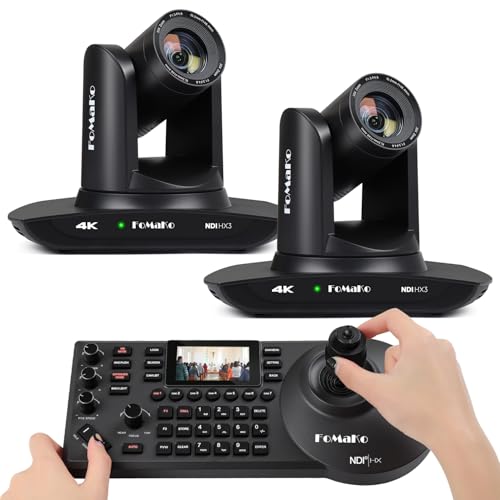
FoMaKo 4K 30X PTZ — Best large-hall reach
At the top of the room-size scale sits the tiered lecture theatre, and the FoMaKo’s title equips it accordingly: a 4K 30x PTZ camera with HDMI, NDI and AI auto-tracking on an SDI-capable platform, for church worship, education, conference and events, certified for NDI 6 and NDI HX3, in a bundle whose title carries the model codes K30NSx2 and KC608 Pro alongside BK30NS2. Thirty-times zoom is the hall figure. From a rear wall thirty metres from the stage, it resolves the lecturer’s expression; tightened on the board, it makes a worked derivation legible to a student watching at home — which is the entire academic point of capturing the lecture at all.
AI auto-tracking in a hall is a different discipline from tracking in a seminar room. The lecturer’s stage is wide, the pacing is theatrical, and the camera must follow without the seasick lag that makes tracked footage unwatchable. A stated current-generation tracking system, on a camera also stating NDI 6 and HX3 certification, is the combination a hall should ask for: the picture follows the teaching, and the network delivery is certified rather than promised. Certification matters in halls because halls are where an institution’s most-watched content — the flagship lectures, the open days, the graduations — is produced, and where a compatibility failure is most public.
The wired and network outputs named together — HDMI, SDI-class connection and NDI — let the hall serve its several audiences at once: the overflow room on a wired feed, the streaming platform on the network, the archive recorder wherever the media team keeps it. Large venues are multi-destination by nature, and a camera stating several roads out of the room saves the distribution hardware that single-output cameras quietly require.
Bundle codes in a title should always send a buyer to the listing page to confirm exactly what ships, and this guide follows its own rule: the codes are reported as printed, the contents are for the listing to confirm. What is clear without confirmation is the class of tool — the heaviest lecture-capture artillery in this guide, aimed at the rooms where capture matters most and distances are greatest.
Media teams equipping a flagship hall can see the FoMaKo 4K 30X PTZ on Amazon and verify the bundle’s exact contents against their rig plan.
- Resolution: 4K, per the listing title
- Zoom: 30X PTZ zoom, per the listing title
- Network: NDI, with NDI 6 and NDI HX3 certified, per the listing title
- Tracking: AI auto-tracking, per the listing title
- Outputs: HDMI with SDI PTZ platform stated, per the listing title
- Bundle codes: K30NSx2 plus KC608 Pro, BK30NS2, per the listing title — confirm contents on the listing
Strengths
- 30x zoom reads the board from a tiered hall’s rear wall.
- Certified NDI 6 and HX3 de-risk flagship-room streaming.
- Multiple stated outputs serve overflow, stream and archive together.
Trade-offs
- Hall-class capability is wasted spend in ordinary classrooms.
- Bundle composition needs confirming from the listing page.
- Installation at height in a theatre is a professional job, not a ladder task.
Best for: tiered lecture theatres and flagship halls streaming at institutional scale.
Not suited for: a twelve-seat seminar room, where its reach and cost are both stranded.
Graduation day explains this camera’s existence in one scene. The hall is full, the stream’s audience is ten times the hall, the speaker is small and far away, and there will be no second ceremony. A 30x certified network camera with tracking engaged is, in that moment, not an AV purchase but an institutional promise kept. Rooms that host such days should be equipped for them, and equipped before the week of the event rather than during it.
For ordinary teaching weeks, the same camera settles into the timetable and disappears — which, as this guide began by arguing, is what lecture cameras are for.
Comparison
| Camera | Zoom as titled | Connection philosophy | Room it serves |
|---|---|---|---|
| AVer PTZ310N | 12X | NDI network streaming | Standard classrooms, campus estates |
| Logitech PTZ Pro 2 | Not stated in the listing title | USB to room PC | Single rooms, quick deployments |
| TONGVEO Wireless | 20X | Built-in 5.8GHz wireless receiver | Unwirable halls and rented spaces |
| PTZOptics Move SE | 12x optical | SDI, HDMI, USB and IP | Rooms facing platform migrations |
| Tenveo Conference | 3X, 92-degree view | USB 3.0 and HDMI | Seminar and tutorial rooms |
| FoMaKo 4K 30X | 30X | NDI 6 and HX3 certified, HDMI | Tiered lecture theatres |
How to Choose
Walk the room with a tape measure and the timetable in hand. The distance from the only permissible mount to the board sets the zoom class; the building’s wiring sets the connection philosophy; the number of rooms sets the management model. Then ask who operates it in week nine — if the honest answer is nobody, tracking or a ruthlessly simple preset system moves to the top of the list, and sophistication that needs a human moves off it.
Budget beyond the camera for the mount, the cabling or receiver position, the recording platform and the microphone. Lecture audio is half the product: a board-perfect picture with room-echo sound is a recording students abandon by the second week.
Why Does the Microphone Matter More Than the Camera?
Because students forgive a soft picture and abandon unintelligible sound. A lecture is, in essence, a voice explaining things, sometimes with a board. If the voice arrives wrapped in the room’s echo, recorded by a microphone near the camera at the back, revision-week viewing becomes an endurance test and the capture programme gets blamed for an audio decision. The professional arrangement is a microphone near the lecturer — a lectern microphone, a lapel transmitter, a ceiling array where budgets allow — feeding the recording directly, with the camera’s own audio, if used at all, as a synchronisation reference.
This guide is about cameras, but it would be negligent not to insist that every camera budget above include its audio counterpart. The PTZ camera at the back of the room and the microphone at the front of it are one system, purchased as one decision. Institutions that grasp this produce recordings students describe as feeling like being there; institutions that buy cameras alone produce recordings students describe, accurately, as watching a lecture through a wall.
Test the pairing before term starts, in the room, with the heating running and the projector fan on — the acoustic truth of a teaching space includes its machinery. Record a colleague reading from the lectern and from the board, listen on the headphones students will effectively be using, and fix what you hear while fixing is still free.
What Makes a Lecture Recording Worth Watching Twice?
Legibility and pace. The board work must be readable at the size a student actually watches — often a laptop, sometimes a phone on a bus — which is an argument for the zoom classes this guide has matched to room sizes and, where the platform allows, for a second feed of slides or board content rather than a single wide shot of everything. The speaker must be framed closely enough that their emphasis and expression survive, because a lecturer reduced to a distant figure beside glowing slides teaches half as well on screen as in the room.
Reliability is the invisible third ingredient. Students build revision habits around recordings they trust to exist; a capture programme that misses one lecture in five trains its audience to stop relying on it, and the finest camera in this guide cannot repair that reputation once earned. This is the deepest reason the guide favours fixed, automated, boring systems over clever ones: in education, boring is a compliment, and the camera that records every lecture without being thought about is the best lecture camera ever installed.
Chaptering, captions and search belong to the platform rather than the camera, but the camera enables them by delivering a clean, consistent feed — the same framing, the same audio quality, the same start-of-lecture geometry — that such tools can process predictably. Consistency, again, is the specification underneath all the others.
How Should a Lecturer Actually Behave With an Installed Camera?
Nobody teaches lecturers to teach to a fixed camera, and a short orientation repays itself all term. The essentials fit on one slide. Know where the camera is and which preset frames what, so a glance at the board position happens before writing the derivation that matters. Repeat questions from the floor before answering them, because the room microphone heard the question and the recording’s audience did not. Announce what is being written while writing it, since the recording’s viewer cannot lean forward in their seat. And pause, briefly, at natural chapter boundaries, because recordings are navigated by students hunting a topic at midnight, and a lecturer who signposts aloud gives them a map.
None of that requires performance skills or a changed teaching style. It is the same courtesy a good lecturer already shows the back row, extended to the students who will meet the lecture through a screen — the commuter, the carer, the student whose illness kept them home in week six. Departments that spend twenty minutes on this orientation get visibly better recordings from identical hardware, which is the cheapest quality improvement in this entire guide.
There is a confidence dividend too. Lecturers who know the camera’s framing stop worrying about it, and the recording inherits that relaxation. The systems in this guide were chosen to disappear; a twenty-minute orientation is how the institution finishes the disappearing act.
What Happens to Lecture Capture When the Room Goes Hybrid?
Hybrid teaching — some students in the room, some remote, all in the same session — is where lecture capture and video conferencing merge, and the cameras in this guide were largely born in that merged world. The conference-bred picks, the Logitech and the Tenveo, treat the remote student as a meeting participant who must hear the room and be heard by it. The network picks treat the remote student as an audience for a produced feed. Both models work; they fail differently. The meeting model fails when the room’s audio lets the remote cohort hear the lecturer but not the questions. The produced model fails when the remote cohort becomes an audience that cannot interrupt, ask or be seen.
The practical answer for most teaching is layered: the camera system records and streams the lecture feed, while the room’s conferencing setup — which may be the same camera, in the USB picks’ case — carries the interaction. Institutions should decide, per room type, which layer leads. A lecture with five hundred remote viewers is a broadcast with questions by chat. A seminar with four remote participants is a meeting with a recording. Buying cameras before making that decision is how estates end up with beautiful feeds of seminars nobody remote could speak in.
Whichever layer leads, test it with a real remote participant before term, from a real home connection, because hybrid failures live in the gap between the room’s confidence and the student’s laptop. The cameras above all passed their makers’ hybrid intentions in their titles — the meeting platforms named, the streaming protocols stated — and the institution’s test is what turns intention into a timetable that works.
Common Mistakes
Buying a camcorder and a tripod for a timetabled room. The system works until the operator’s diary fails, which it will, in week nine, during the lecture the whole cohort needs. Fixed and automated beats portable and excellent, every semester.
Matching the camera to the wrong room size. A 3x seminar camera in a hall produces a wide shot of a distant stranger; a 30x hall camera in a seminar room produces surveillance of a conversation. Measure the throw before ordering, and order for the room the camera will actually live in.
Recording the room’s echo and calling it audio. A camera-position microphone captures the space, not the lecturer. Budget the lectern or lapel microphone with the camera, or accept recordings students will not watch.
Skipping the pre-term test. Record a full lecture-length session in the real room, with its projector, heating and audience noise, and watch the result at student size. Every failure found in the test week is free; the same failure found in revision week is a cohort’s complaint.
Forgetting consent and notice. Lecture capture involves students’ voices and images in Q and A moments; signage, policy and an opt-out arrangement are part of the installation, not paperwork to be caught up later.
Final Recommendation
Choose by room and by estate. A campus standardising capture should build on the AVer PTZ310N’s network model or the PTZOptics Move SE’s four-output flexibility, depending on whether the platform’s future is settled or not. A single department should start with the Logitech PTZ Pro 2 and be recording this week. The unwirable historic room belongs to the TONGVEO wireless model; the seminar estate belongs to the Tenveo’s wide view; and the flagship tiered theatre deserves the FoMaKo’s certified 30x reach. In every case, mount it, preset it, pair it with a proper microphone, and let the timetable run it.
Judge the result in week ten, not on installation day: a lecture capture system has succeeded when nobody — lecturer, student, technician — has thought about it for a month, and the recordings are simply there, every time, like the lights.
Frequently Asked Questions
Is there really no camera made specifically for lectures?
Correct — there is no dedicated lecture-camera category. What institutions call lecture cameras are PTZ and conference cameras installed permanently in teaching rooms, chosen for zoom, connection and automation. That is why this guide is built from fixed PTZ models rather than camcorders: the fixed system is what actually records lectures reliably.
How much zoom does a normal classroom need?
The 12x class represented by the AVer PTZ310N and the PTZOptics Move SE suits a standard classroom’s rear-wall-to-board distance. Seminar rooms need far less — the Tenveo manages with 3x and a wide view — while tiered halls justify 20x to 30x. Measure your own room’s throw before generalising from any of these figures.
Can one camera record both the lecturer and the board?
With presets, yes: a wide position for the room, a lectern position and a board position cover most teaching styles, recalled by the lecturer or switched by the platform. Tracking models add a following shot for lecturers who pace. Many institutions also feed slides separately into the recording, which the platform, not the camera, is responsible for combining.
USB or network — which architecture should a school choose?
USB suits single rooms and quick deployments, as the Logitech PTZ Pro 2 shows: the room PC does everything. Network and NDI suit estates, where central management, monitoring and platform delivery matter more than per-room simplicity. The PTZOptics Move SE hedges the decision by offering both, plus SDI and HDMI.
Does 4K matter for lecture recordings?
It matters most as cropping and board-detail headroom in large rooms, which is why the hall and seminar picks here state it. For standard classrooms, a well-framed 1080p recording serves students perfectly well and keeps storage proportionate. Legibility of the board at playback size is the test, not the badge on the camera.
What else must be budgeted besides the camera?
The mount and its installation, cabling or a verified wireless position, the recording platform, and — most neglected — a microphone near the lecturer. Also plan the pre-term test session. A camera alone is a component; the working system is what records the semester.
Keep a one-page room card beside the lectern for whichever camera is installed: which button recalls which framing, who to call when the picture is wrong, and what the red light means. Systems fail socially before they fail technically — a lecturer who cannot find the preset teaches to the wrong framing all term, and a room card costing one sheet of paper prevents the entire category of failure. Laminate it. Everything in a teaching room that is not laminated is, eventually, lost.
Review the estate once a year with the same cold eye used to choose it: which rooms recorded every session, which quietly stopped, and why. The answers are almost never about camera quality — they are about a moved mount, a replaced computer, a lecturer who never got the orientation. Fix those, and the cameras in this guide will do the rest for years, one unremarkable, perfectly recorded lecture at a time.
And when a lecturer reports, unprompted, that they forgot the camera was there — believe them, and write it in the annual review as the headline result. That sentence, from the person the whole apparatus exists to serve, is the only review score in this guide that no specification can argue with.
Storage planning closes the practical loop. A semester of daily lectures is a predictable mountain of files, and predictable is the operative word: multiply one session’s file size by the timetable, agree where the mountain lives and who may delete from it and when, and write that agreement down before the first recording rather than during the first storage crisis. Cameras do not run out of space; institutions do, usually in week eleven, and always at the moment a flagship lecture is being recorded.
Accessibility law and good manners point the same way here: recordings exist so that students who cannot be in the room — for reasons of health, work, caring or distance — receive the same teaching as those who can. Every choice in this guide, from microphone placement to framing discipline, either honours that purpose or quietly betrays it, which is why lecture capture deserves better than the institution’s leftover budget and leftover attention. Buy the room properly, once, and it will teach students who have not yet enrolled.
That is the standard to hold the purchase to — not the sharpest demo at the trade show, but the quietest week ten of term, with every session present and accounted for.
Choose the camera that your week-ten self will thank you for: present, framed, audible and forgotten by everyone in the room except the students watching from somewhere else entirely.
The timetable, after all, is the client — and it does not accept apologies, only recordings.
Install it once, test it honestly, and then let the teaching be the only drama the room produces.
One sentence for the budget meeting, to close: a room equipped properly once will record roughly five hundred lectures before anyone discusses it again, and the cost per lecture of doing it properly is smaller than the cost, in complaints and re-teaching, of a single term of doing it badly. Few purchases an institution makes amortise that visibly, or serve people it will never meet quite so directly.
Related Guides
Venues where the fixed camera follows a performer instead of a lecturer are covered in our PTZ camera guide for concerts. Weddings, conferences and ceremonies get the same treatment in the robotic camera guide for events.


