What's inside
- Key Takeaways
- Quick Picks
- How We Chose These Picks
- Comparison Table
- What Makes a Codec a Cinema Codec?
- Why Does Cooling Decide Which Camera Finishes the Shoot?
- How Should You Rig a Cinema Camera Without Building a Monster?
- What Does a Cinema Workflow Look Like From Card to Delivery?
- Which Lenses Turn These Bodies Into Cinema Systems?
- How Much Should the Whole Cinema Kit Budget Really Be?
- How Do You Expose for Cinema Without Guessing?
- What Should a First Cinema Shoot Day Teach You?
- How Do These Cameras Share a Set With Each Other?
- Why Do Frame Rates Matter Beyond Slow Motion?
- How Should You Maintain a Cinema Camera Across a Production Life?
- What Separates a Cinema Camera From a Video Camera in Daily Feel?
- How Do You Choose Between the Canon and Nikon Flagships for Cinema?
- What Role Does Stabilisation Play in Cinema Shooting?
- How Should You Test a Cinema Camera Before Committing a Production?
- Common Mistakes
- Final Recommendation
- Frequently Asked Questions
- Related Guides
As an Amazon Associate I earn from qualifying purchases. This post may contain affiliate links at no extra cost to you.
widgetverdict.com is reader-supported. When you buy through links on our site, we may earn an affiliate commission.
Where to buy: the five linked cameras below lead to their Amazon listings, so check price on Amazon once the workflow questions are answered. The hunt for the best 4k cinema cameras is not really a hunt for resolution — every serious camera now records 4K — but for the machinery around the image: codecs that survive colour grading, fans that survive the third hour, bodies that accept a rig without complaint, and files that flow into an edit without a conversion ritual. This guide judges its six cameras as cinema tools first and cameras second, which rearranges the usual rankings in instructive ways.
A cinema camera earns the name through behaviour under production conditions. It records long takes without thermal surrender, offers recording formats with genuine latitude for grading, exposes with tools like waveforms rather than guesswork, and mounts the matte boxes, follow focuses, handles and monitors that a working rig accumulates. It also fails gracefully: dual card slots, sensible file naming, timecode habits. None of that appears in a resolution figure, and all of it decides whether a shoot day ends in footage or in apologies.
One clarification before the picks, because the category invites confusion. Several of these bodies also appear in general camera guides wearing their stills reputations, and readers may wonder whether the cinema label is marketing paint. The test applied here is behavioural and repeatable: hand the camera a ten-hour production day with a colourist waiting at the end of it, and see which parts of the experience were designed for exactly that. Bodies that pass are cinema cameras in every sense that costs or saves money; the sections below show the working for each verdict, camera by camera.
The six below span the realistic cinema market for independent and professional work: Canon’s hybrid cinema flagship, Sony’s APS-C cinema specialist and its full-frame creator compact, Panasonic’s production-ready full frame, Nikon’s flagship hybrid, and Blackmagic’s Pocket Cinema 6K — included in prose, without a link, because our verified pool holds no listing for it, a fact stated openly rather than papered over with an invented shortcut. Each camera is examined through the cinema lens: codec, cooling, rigging and workflow, in that order.
Key Takeaways
- Cinema quality is decided by codec latitude, cooling endurance and rigging sense — not by the 4K badge every camera now wears proudly.
- Internal RAW or high-bitrate formats give graders real material to shape; heavily compressed formats give editors small files and thin choices.
- Active cooling is the dividing line between cameras that record a scene and cameras that record a whole working day.
- Blackmagic’s Pocket Cinema 6K is discussed without a link because no verified listing exists in our pool — never buy it through an unverified shortcut.
- Budget for the rig, media and batteries around the body; the body is often barely half the working cost.
- Test finalists on a weekend shoot with your own subjects and your own edit machine — workflow fit decides more than image quality at this level.
Quick Picks
| Pick | Badge | Why it earns a slot |
|---|---|---|
| Canon EOS R5 C | Hybrid cinema flagship | Cinema OS and internal RAW in a body that also shoots elite stills, with a fan for long takes. |
| Sony FX30 | APS-C cinema value | A true Cinema Line body with pro audio paths and endless rigging sense at a sane price. |
| Panasonic Lumix S5 IIX | Production workflow pick | ProRes-class recording, SSD workflows and open-gate flexibility for small crews. |
| Nikon Z8 | Internal RAW powerhouse | Nikon’s flagship hybrid with internal RAW video and a stacked sensor’s speed. |
| Sony ZV-E1 | Compact cinema-leaning | Full-frame low-light cinema look in a tiny body for gimbal and solo work. |
| Blackmagic Pocket Cinema Camera 6K | The RAW purist | BRAW and a filmmaker’s interface at a disruptive price — prose-only here, no verified listing. |
How We Chose These Picks
Price transparency shaped the presentation as much as the selection. Cinema bodies are routinely discussed as if the body were the purchase, so each pick below carries its hidden curriculum openly: the media appetite, the rigging expectations, the power plan. A reader who finishes a section should know not only whether the camera suits their productions but what the first year of owning it will actually ask of their budget and their shelves. Guides that skip that arithmetic produce owners who are surprised by their own equipment, and surprise is the one thing a production cannot insure against cheaply.
The cinema filter came before the camera filter. A model needed a credible claim on production work: recording formats with grading latitude, thermal behaviour suited to long takes, exposure tools beyond a histogram, and an ecosystem of lenses and accessories a working shooter can actually buy. Pure stills flagships with a video mode were judged by whether their video is a craft or a courtesy, and only the ones where it is a craft survived.
Workflow realism shaped the final six. Independent cinema runs on small crews and smaller budgets, so media costs, battery ecosystems and editing burden counted heavily: a camera whose files demand a render farm loses to one whose files open happily in a laptop editor, all else equal. The Blackmagic’s inclusion despite its absent listing reflects its genuine importance to this market; excluding the most-discussed budget cinema camera would have made the guide tidier and less honest, so it is covered in prose with its status labelled.

Canon EOS R5 C — Hybrid cinema flagship
Canon solved the hybrid problem by refusing to compromise either half: switch the R5 C off and on and it changes personality between a full stills camera and a dedicated cinema body running Canon’s Cinema OS, complete with the menus, tools and recording options of the company’s professional line. For cinema work that means internal RAW recording from its full-frame sensor, waveforms and false colour for exposure, and a fan that keeps the sensor cool through takes that would end the standard R5’s day.
The image rewards the machinery. Canon’s colour science remains the industry’s comfort food — skin tones that grade kindly, highlights that roll off rather than clip — and the RAW files give a colourist genuine latitude to shape a scene rather than rescue one. Recording beyond 4K up to 8K RAW exists for those who need it, while the 4K modes this guide cares about run cool, long and detailed, with high frame rates available for slow motion that holds up in the grade.
Rigging the R5 C is a pleasure of standards: RF lenses natively, decades of EF glass through Canon’s adapter, and a body shape that cages, handles and matte boxes accept without invention. The honest costs are media appetite — RAW eats cards and drives at a rate that must be budgeted — and a price that sits at the top of this guide, check price on Amazon and plan the whole kit. For a production that also needs flagship stills, nothing else here does both jobs at this level.
- Recording: internal RAW, Cinema OS tools, up to 8K RAW with strong 4K modes
- Cooling: built-in fan for sustained recording
- Sensor: full frame, RF mount with EF adaptation
- Role: hybrid flagship for stills-and-cinema productions
Strengths
- True cinema interface and internal RAW.
- Fan cooling ends the hybrid overheating story.
- Canon colour that grades kindly.
Trade-offs
- RAW media and storage costs are substantial.
- Top-tier price before rigging begins.
- No in-body stabilisation in cinema use.
Best for: productions and professionals who shoot cinema and stills at the highest level.
Not suited for: tight budgets or lightweight travel rigs.

Sony FX30 — APS-C cinema value
The FX30 is what happens when a cinema division designs down to a price instead of a stills division designing up to video. It carries Sony’s Cinema Line interface and colour pipeline, S-Cinetone for pleasing images straight from camera alongside the log profiles graders want, dual native ISO for clean shadows, and a body drilled with mounting points that treat rigging as a birthright rather than an accessory. Its APS-C sensor keeps lenses — including proper cinema glass — smaller and cheaper across the whole rig.
Audio, so often the hybrid’s shame, is a cinema strength here: the optional XLR handle brings professional inputs and physical controls, and even without it the body’s own connections cover monitored recording properly. Cooling is engineered for the long take, autofocus for the solo operator is Sony-grade, and the recording formats give 10-bit depth with high frame rates for the slow-motion grammar modern cinema uses constantly.
What the FX30 refuses to be is a stills camera of any ambition, and it has no viewfinder to pretend otherwise. Buyers whose productions are purely moving images will not miss either. In a guide organised by cinema behaviour, the FX30’s combination of price, codec, cooling, audio and rigging makes it the value benchmark against which the full-frame bodies must justify their premiums — and several of them struggle to.
- Recording: 10-bit cinema formats, S-Cinetone and log profiles
- Cooling: designed for sustained cinema takes
- Sensor: APS-C, E-mount, extensive rigging points
- Role: the cinema-first value standard
Strengths
- Genuine cinema design at an accessible price.
- Professional audio path with the XLR handle.
- Compact rigs and affordable lens options.
Trade-offs
- Stills capability is an afterthought.
- APS-C low-light ceiling below full frame.
- No viewfinder for bright exteriors.
Best for: filmmakers, music-video and commercial crews, serious students of cinema.
Not suited for: hybrid shooters who need real stills.

Panasonic Lumix S5 IIX — Production workflow pick
Panasonic aimed the S5 IIX at the unglamorous centre of production: the files. It records professional codecs including ProRes-class formats, writes directly to external SSDs over USB for instant handoff to an editor, and offers open-gate recording that captures the full sensor for productions reframing for several aspect ratios. Add fan cooling for unlimited-feeling takes and phase-detection autofocus, and the IIX becomes the camera small crews build schedules around.
Its cinema image is full-frame and honest: 10-bit recording with strong dynamic range, log profiles that grade without falling apart, and colours that sit naturally beside other cameras in a multi-body production. Rigging follows the L-Mount ecosystem shared with Leica and Sigma, which includes proper cinema glass, and the body’s monitor tools and timecode-friendly habits respect the way sets actually run.
Against the Canon and Nikon flagships, the IIX concedes internal RAW and some resolution theatre. What it returns is a workflow with the fewest conversions, transcodes and surprises between the set and the edit — a currency working filmmakers value above spec-sheet peaks. For narrative shorts, documentaries and commercial work delivered on deadlines, that trade is not a compromise; it is the point.
- Recording: ProRes-class codecs, SSD-over-USB, open gate
- Cooling: fan for long production days
- Sensor: full frame, L-Mount alliance lenses
- Role: small-crew production workhorse
Strengths
- Best file workflow in this guide.
- Open-gate flexibility for multi-format delivery.
- Fan cooling and modern autofocus.
Trade-offs
- No internal RAW recording.
- Less low-light reach than Sony’s video-tuned sensor.
- Black-box design language is love-it-or-not.
Best for: narrative, documentary and commercial crews who live in the edit.
Not suited for: RAW absolutists or stills-led hybrids.

Nikon Z8 — Internal RAW powerhouse
Nikon’s Z8 storms this category from the flagship-hybrid direction, carrying a stacked sensor whose speed serves cinema as faithfully as sport. Its headline for filmmakers is internal RAW video — Nikon’s own RAW format recorded inside the camera — alongside high-bitrate compressed options, giving graders the latitude that defines cinema work without an external recorder’s bulk and cables. Recording up to 8K exists; the 4K quality beneath it is the real story, oversampled and assured.
The body behaves like a professional tool because it is one: a deep grip that rigs and handholds equally well, serious weather sealing, exposure tools that respect the craft, and a lens mount fed by Nikon’s excellent Z glass plus one of the best adaptation stories in the business for legacy F-mount lenses. Cooling is passive yet effective for long 4K takes in most conditions, a notable engineering result in a sealed flagship body.
Costs and character need stating. The Z8 is priced as a flagship — check price on Amazon — and its menus carry a stills heritage that cinema purists must learn to navigate. Audio is hybrid-grade rather than cinema-grade, competent with external microphones and monitoring but without the FX30’s expansion path. Productions already invested in Nikon glass, or photographers crossing into serious cinema, will find it the most natural body in this guide.
- Recording: internal RAW video plus high-bitrate options, up to 8K
- Cooling: passive, effective for long 4K takes
- Sensor: full-frame stacked, Z mount with strong adaptation
- Role: flagship hybrid for Nikon-system cinema
Strengths
- Internal RAW without an external recorder.
- Stacked-sensor speed and flagship build.
- Superb lens ecosystem and adaptation.
Trade-offs
- Flagship price and media appetite.
- Audio path is hybrid-grade.
- Menus carry stills-first heritage.
Best for: Nikon-system professionals and hybrid flagship buyers entering cinema.
Not suited for: audio-led or budget-led productions.
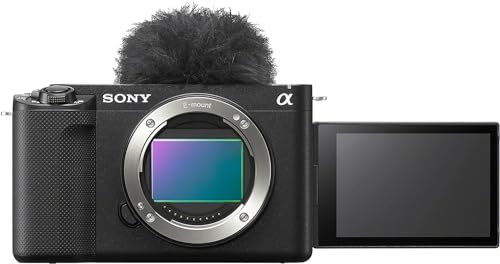
Sony ZV-E1 — Compact cinema-leaning
Cinema is not always a tripod and a crew; sometimes it is one person, a gimbal and a location that forbids fuss. The ZV-E1 serves that cinema. Its full-frame, video-tuned sensor produces the low-light, shallow-depth image audiences associate with far larger rigs, while the body stays small enough to live on a gimbal all day without punishing the operator’s arm. Sony’s subject-recognition autofocus performs the focus puller’s job with unsettling competence.
The cinema credentials are genuine if not exhaustive: 10-bit recording, log profiles for grading, and image quality that intercuts credibly with Sony’s larger cinema bodies — a real consideration for productions using it as a B-camera or crash camera. Its creator aids, like product showcase and framing assistance, sound like vlogging features and behave, on a small production, like a tireless assistant.
Heat is the boundary of its world. Long, maximum-quality takes in warm conditions are not its sport, and its single card slot and minimal controls mark it as a specialist rather than a production’s only camera. Judged as the compact second body or the solo operator’s cinematic eye, it is superb; judged as an A-camera for a wedding marathon, it is the wrong tool, and this guide would rather say so than sell it twice.
- Recording: 10-bit with log profiles, strong low light
- Cooling: passive, compact-body limits apply
- Sensor: full frame, video-tuned, E-mount
- Role: gimbal, B-camera and solo cinema
Strengths
- Cinema look from a tiny, gimbal-friendly body.
- Best low-light video here relative to size.
- Autofocus that replaces a focus puller.
Trade-offs
- Heat limits long premium-format takes.
- Single card slot.
- Minimal physical controls.
Best for: solo filmmakers, gimbal operators and B-camera duties.
Not suited for: sole camera on long, unrepeatable events.
Blackmagic Pocket Cinema Camera 6K — The RAW purist
No honest cinema guide can omit Blackmagic’s Pocket line, so it is here — in prose, without a purchase link, because our verified pool returned no listing for it and this site does not invent shortcuts to products it cannot verify. Readers who want one should buy it through Blackmagic’s authorised channels after checking the current model variant, and should treat any too-cheap listing elsewhere with the suspicion it deserves.
The camera’s argument is singular and powerful: Blackmagic RAW, recorded internally, in a body priced to embarrass the industry, operated through the most filmmaker-literate touchscreen interface in the business. BRAW’s partial debayering gives files that grade beautifully while editing more fluidly than rival RAW formats, and the camera ships within an ecosystem that includes DaVinci Resolve, the grading software many of its owners use free. The image-per-currency ratio remains, years after launch, genuinely disruptive.
The purist’s compromises are equally famous. Autofocus is basic to the point of philosophy — this is a manual-focus camera in spirit — battery life is measured in scenes rather than days, there is no in-body stabilisation, and the wide, slab-like body rigs awkwardly until caged. Owners accept all of it because the files are the point. As a tool for learning cinematography’s actual craft — lighting, blocking, manual focus, grading — it may be the best teacher in this entire guide, which is why its prose-only presence here is a recommendation with a paperwork warning attached.
- Recording: Blackmagic RAW internal, 6K sensor
- Cooling: passive, cinema-style body
- Sensor: Super 35 class, mount varies by variant
- Availability here: prose-only — no verified pool listing; buy via authorised dealers
Strengths
- BRAW image quality at a disruptive price.
- Filmmaker-first interface and Resolve ecosystem.
- Superb craft teacher for deliberate cinematography.
Trade-offs
- Autofocus is minimal; manual focus is the way.
- Short battery life and no stabilisation.
- No verified listing in our pool — no link provided.
Best for: cinematography students, RAW purists and controlled-set narrative work.
Not suited for: run-and-gun, events or autofocus-dependent shooting.
Comparison Table
| Pick | Recording highlight | Cooling | Link status |
|---|---|---|---|
| Canon EOS R5 C | Internal RAW, Cinema OS | Fan | Linked |
| Sony FX30 | 10-bit cinema formats | Cinema body design | Linked |
| Panasonic Lumix S5 IIX | ProRes-class, SSD recording | Fan | Linked |
| Nikon Z8 | Internal RAW video | Passive, sealed body | Linked |
| Sony ZV-E1 | 10-bit log, low-light tuned | Passive, compact limits | Linked |
| Blackmagic Pocket Cinema 6K | Blackmagic RAW | Passive | Prose-only |
What Makes a Codec a Cinema Codec?
Codec talk sounds like alphabet soup until it is translated into one question: how much of the scene survives to be graded? Cinema codecs spend data generously — high bitrates, 10-bit colour depth, gentle or mathematically careful compression — so that a colourist can push skies, rescue shadows and reshape contrast without the image tearing into blocks and bands. Consumer codecs spend data frugally, producing small, pretty files that resist being pushed. Both are engineering; only one is cinema engineering.
RAW recording is the generous extreme, saving something close to the sensor’s own data so that white balance, exposure nuance and colour remain negotiable in post. The R5 C, the Z8 and the prose-only Blackmagic offer versions of that bargain, priced in storage and processing. ProRes-class formats, the S5 IIX’s speciality, sit one step down: not RAW, but so lightly compressed and edit-friendly that many productions prefer them for speed. The FX30’s 10-bit formats occupy the efficient end honourably, with log profiles that grade well when exposed with discipline.
The practical test for a reader is their own pipeline. If your productions are graded by a colourist or graded seriously by you, codec latitude is worth real money. If your footage is lightly corrected and delivered, the efficient formats will look identical to your audience and kinder to your drives. Cinema is a chain of decisions, and the codec is simply the first one that cannot be unmade later.
Why Does Cooling Decide Which Camera Finishes the Shoot?
Heat is the tax on small bodies doing enormous computation, and cinema collects the tax at the worst moments: the third hour of the wedding, the long take that was finally perfect, the interview that found its rhythm at minute fifty. Cameras without a thermal plan protect themselves by stopping, and a stopped camera in production is not an inconvenience — it is a breach of contract with the day. That is why this guide treats fans and thermal design as cinema features on par with codecs.
The fan-cooled bodies here — R5 C and the S5 IIX — simply remove the question for 4K work, which is why productions insure themselves with them. The FX30’s cinema body manages heat by design intent, the Z8’s sealed flagship engineering copes impressively for a passive body, and the compact ZV-E1 honestly declares its limits. None of this is about specifications; it is about which camera the director trusts when the schedule slips and the room warms up.
Environment is the variable buyers forget to multiply. A camera that records forever in an air-conditioned studio may falter at an outdoor summer ceremony, and productions should test at their real temperatures, with their real settings, before the day that cannot be repeated. Cooling, like audio monitoring in our sister guide, is a discipline disguised as a feature.
How Should You Rig a Cinema Camera Without Building a Monster?
Rigging begins with a cage, which protects the body and multiplies mounting points, and it should end much sooner than enthusiasm suggests. Add a handle for low shots and carrying, a monitor when the production’s framing demands it, a matte box when filters earn their place, and power — a larger battery solution — when the day is long. Each addition must justify its weight in shots enabled, because a rig that exhausts the operator by lunch is a worse cinema tool than a bare camera that lasts until wrap.
The bodies here rig with different grace. The FX30 was born for cages and rails, with mounting points designed in. The R5 C and Z8 accept standard cinema accessories through their cages and mounts, their hybrid shapes a small tax. The S5 IIX sits happily in the same ecosystem. The ZV-E1 rigs minimally by design — its rig is a gimbal. And the Blackmagic, famously, becomes a different animal inside a cage, which its owners budget for from the start.
Audio and power cabling deserve rig-level thought. Route cables so they cannot snag, strain-relieve every connection, and keep the headphone and microphone paths as deliberate as the image path. A cinema rig is a small machine for not thinking about machinery during a take, and it is finished when the operator stops noticing it.
What Does a Cinema Workflow Look Like From Card to Delivery?
The shoot ends; the workflow’s opinion of your camera begins. Files from the S5 IIX’s SSD or ProRes recording drop into an editor and play, which is why deadline productions love it. RAW files from the Canon, Nikon or Blackmagic ask for more — more storage, more processing, more deliberate colour work — and repay it with images that can be shaped rather than merely shown. Neither path is virtuous in itself; the production’s schedule and colour ambitions choose between them.
Backup discipline is the workflow’s non-negotiable chapter. Cards are not storage; they are transport. Offload to two destinations before formatting anything, verify the copies, and only then return the card to the pool. Cinema files are large enough that this discipline needs drives budgeted alongside the camera — another reason the body’s price is only the beginning of a cinema purchase, and why this guide’s value judgements keep returning to total cost.
Colour pipeline decisions close the loop. Shooting log or RAW commits you to grading every frame; shooting a baked-in look like S-Cinetone commits you to getting it right on the day. Mixed productions standardise per project, not per camera bag. The cameras here all offer both doors; walking through the correct one for each production is a producer’s skill, and it is learnable in a single project.
Which Lenses Turn These Bodies Into Cinema Systems?
Cinema glass differs from stills glass in manners rather than magic: consistent size and gear positions across a set, long focus throws with hard stops, minimal breathing when focus moves, and housings built for follow-focus motors and daily handling. Every mount represented here — RF, E, L and Z — supports genuine cinema lens lines, and the APS-C FX30 additionally welcomes the extensive Super 35 glass ecosystem at prices that make a three-lens set plausible for independents.
Stills lenses remain the pragmatic majority choice, and modern ones focus smoothly enough for most narrative work, especially with the autofocus systems in the Sony, Canon and Nikon bodies doing quiet, reliable work. The honest hierarchy for a new cinema buyer is unglamorous: one versatile zoom that covers the working range, learned deeply, outperforms a cabinet of primes used shallowly. Add primes for the looks your productions actually repeat — the interview length, the low-light length — and let the rental house own the exotica.
Adaptation widens every option here. Canon’s EF back-catalogue, Nikon’s F-mount heritage and the universal PL mount through adapters mean a cinema lens investment can follow a shooter across bodies and brands. Buy glass like a producer, not a collector: it is the part of the kit most likely to still be working, and earning, a decade from now.
How Much Should the Whole Cinema Kit Budget Really Be?
First-time cinema buyers consistently under-budget by imagining the body is the purchase. A working kit around any camera here also needs lenses, media sized to the codec’s appetite, batteries or a power solution for a full day, a tripod that moves smoothly rather than merely stands, audio that respects the image, and storage that respects the footage. Tallied honestly, the body is often half to two-thirds of the working total, and RAW bodies push their share of the blame onto media and drives.
That arithmetic reframes the guide’s value order. The FX30’s lower body price compounds: cheaper media behaviour, affordable Super 35 glass, sensible power. The Blackmagic, bought through authorised channels, performs a similar trick for those who accept its manual discipline. The flagships earn their totals only when a production genuinely uses their stills, their RAW or their speed. Budget the kit, then choose the body that fits what remains — not the other way around.
Reserve a final line for the unphotogenic essentials: insurance for paid work, a backup body or rental credit for unrepeatable days, and the hard drives already mentioned. Cinema is a promise made to clients and collaborators; the budget is where the promise becomes credible.
How Do You Expose for Cinema Without Guessing?
Cinema exposure is a measurement discipline, and the tools on these bodies exist to replace hope with evidence. Waveform monitors show where every part of the image sits in brightness; false colour paints exposure values across the frame so skin can be placed deliberately; zebras warn where highlights approach the cliff. A shooter who learns one of these tools properly will expose log footage — deliberately flat, deliberately protective of highlights — with more confidence than a decade of histogram glancing provides.
Log and RAW change the exposure bargain in the shooter’s favour, within limits. Protect the highlights, because clipped skies and windows rarely forgive, and let the shadows fall where the codec’s depth can retrieve them. The dual-native-ISO designs in the Sony bodies widen the safe zone at night; the Panasonic and Canon log curves reward the same discipline. What none of them reward is carelessness multiplied by optimism: latitude is a margin, not a method.
Monitoring closes the loop. A calibrated external monitor or a trustworthy on-camera display, viewed out of direct sunlight, keeps the measured exposure honest to the eye. Productions that standardise their monitoring chain — same monitor, same brightness, same tools — produce footage whose consistency the grade will thank them for, episode after episode.
What Should a First Cinema Shoot Day Teach You?
Schedule the first day with a new cinema camera as a lesson disguised as a small production: one location, forgiving light, a subject who likes you. Shoot the codec you intend to live in, at the frame rates you will actually deliver, and record long enough to learn the camera’s thermal personality in your climate. Make the mistakes there — the mis-set white balance, the forgotten audio check, the card formatted in hope rather than in camera — where they cost an afternoon instead of a client.
Review the footage the same evening with production eyes. Scrub the grade to see what the codec forgives; listen to the audio on real speakers; note every moment the rig annoyed you and every moment it disappeared. That review converts a purchase into a working method faster than any tutorial, because the lessons are attached to your own footage and your own locations.
Then write the camera’s page in your production notebook: your exposure settings per situation, your audio levels, your media consumption per hour, your battery count per day. Cinema craft is substantially this — a notebook that turns one shoot’s experience into the next shoot’s calm — and the cameras in this guide all reward the notebook-keeper equally.
How Do These Cameras Share a Set With Each Other?
Multi-camera productions mix these bodies more often than brand loyalty admits, so intercutting deserves a direct answer. Colour science differs — Canon’s warmth, Sony’s precision, Panasonic’s neutrality, Nikon’s own rendering — and a colourist can unify them when each camera is shot in its log profile with matched white balance and exposure discipline. The unification is routine professional work, not heroics, provided nobody shoots a baked look on one body and log on another.
Roles follow strengths in the usual professional pattern. The R5 C or Z8 anchors as A-camera for their image and stills; the FX30 covers the reverse shot with cinema ergonomics; the S5 IIX locks the wide or the interview while its files simplify the edit; the ZV-E1 rides the gimbal or hides in the small place a full rig cannot go. The Blackmagic, on controlled sets, holds its own angle and grades in beautifully beside any of them.
Audio and timecode discipline, repeated from our sister guide because sets live or die by it: one camera owns the sound, every camera records scratch, and a clap or timecode ties the family together. Cinema is collaboration, and these cameras collaborate well when the humans set the rules first.
Why Do Frame Rates Matter Beyond Slow Motion?
The cinema frame rate conversation starts at 24 frames per second, the rate that carries a century of film grammar in its motion blur and cadence, and every body here honours it properly — which sounds basic until you meet cameras that fake it. Delivering narrative at 24, documentary at 25 or 30 by region and platform, and events at rates that suit their screens is the baseline craft; the cameras’ higher rates then serve the expressive tool of slow motion, where 4K at elevated frame rates on the Canon, Sony and Panasonic bodies holds genuine quality rather than a cropped apology.
Shutter discipline travels with frame rate. The traditional pairing — shutter near twice the frame rate — gives motion its familiar texture, and cinema bodies make that setting explicit rather than burying it in video-auto assumptions. Learn it once and your footage stops looking like news when you wanted it to look like film, a transformation cheaper than any lens in this guide.
High frame rates also tax everything downstream: light, media, heat and edit storage all multiply. Budget them as the special effect they are, deploy them where the story slows down on purpose, and the cameras here will deliver them without the thermal or quality collapses that expose lesser bodies.
How Should You Maintain a Cinema Camera Across a Production Life?
Cinema bodies work harder and travel rougher than stills cameras, and their maintenance is a production habit rather than an annual event. Sensor cleaning belongs on the schedule whenever the lens changes in dusty places, because a spot invisible in stills becomes a smudge that follows forty minutes of footage. Keep the blower in the kit bag, learn the camera’s cleaning mode, and check the sensor against a plain bright frame before important days rather than during them.
Fans and vents — the R5 C’s and S5 IIX’s pride — need the respect of clear airflow: do not bury a running camera in sound blankets without a plan, and keep vents free of the tape and labels that accumulate on sets. Firmware updates in the cinema world occasionally add recording formats and fix thermal behaviour, so the update habit pays production-grade dividends here; apply them between projects, never the night before one.
Finally, keep the production file: serial numbers, purchase records, service history and the settings notebook described earlier. A cinema camera is a capital asset in a small business, and its paperwork is part of its resale value and its insurance credibility. The cameras in this guide are built for years of sets; owners who document them tend to get those years.
What Separates a Cinema Camera From a Video Camera in Daily Feel?
Spend a day with both and the difference announces itself in small courtesies. The cinema body puts the waveform one button away, remembers your frame guides, names files like a production rather than a holiday, and keeps recording when the scene runs long. Its menus speak in codecs, timecode and shutter angle. None of these touches appears on a comparison chart, and together they decide whether the operator’s attention stays on the scene or leaks into the machinery.
The hybrid flagships here earn their cinema status by importing those courtesies — Canon most completely with its Cinema OS, Nikon and Panasonic substantially — while the FX30 and the Blackmagic were born with them. The ZV-E1 imports the image and the autofocus while leaving some courtesies behind, which is exactly its stated trade. Readers should test the feel where possible: rent or handle the finalists for a day, and notice which body’s courtesies match the way your productions already run.
That daily feel, multiplied across a hundred shoot days, is worth more than a specification won in a forum argument. Cinema is a long relationship with a tool, and this guide’s final advice in every category is the same: choose the tool whose company improves your work, then keep it long enough for the improvement to compound.
How Do You Choose Between the Canon and Nikon Flagships for Cinema?
The R5 C and Z8 invite direct comparison because they arrive at cinema from the same direction — flagship stills bodies with internal RAW — and the separation is one of philosophy. Canon built a second camera inside the first: the Cinema OS side of the R5 C thinks entirely in production terms, with the fan to sustain them. Nikon kept one unified flagship whose video depth is remarkable precisely because it refuses to treat video as a separate country. Shooters who live in menus will feel the difference within an hour.
Ecosystem gravity decides most real purchases. A production house holding RF glass, Canon colour pipelines and C-series habits will find the R5 C frictionless; a Nikon house with Z glass and F-mount heritage will find the Z8 inevitable. Both grade beautifully, both record long, and both will out-serve any production that chooses deliberately. The wrong reason to choose either is a forum’s resolution chart; the right reason is the glass on your shelf and the colour your clients already love.
If the shelf is empty and the choice is truly open, let the fan and the Cinema OS argue for Canon when cinema is the majority of the work, and let Nikon’s unified flagship argue for itself when stills still pay most of the bills. That is the honest fork, and this guide has now stated it from every angle it knows.
What Role Does Stabilisation Play in Cinema Shooting?
Stabilisation in cinema is a grammar question disguised as a feature. Locked tripod shots, deliberate gimbal moves and shoulder-held immediacy each tell the audience something different, and the cinema craft lies in choosing rather than defaulting. In-body stabilisation on the Panasonic and Nikon bodies smooths handheld work into that deliberate register; the FX30 leans on lens and rig solutions in the traditional cinema way; the R5 C expects the rig to do the work, as cinema cameras historically have.
The mistake is wanting every shot smooth. Documentary urgency, narrative tension and music-video energy all use movement’s texture deliberately, and a camera that irons everything flat removes a storytelling tool while pretending to add one. Learn each body’s stabilisation behaviour on test footage — its corners, its walking rhythm, its behaviour at your working focal lengths — and then deploy or disable it per scene, like the frame rate and the codec.
Gimbals deserve their sentence: the ZV-E1 exists for them, the FX30 balances happily on mid-size units, and the flagships demand larger, costlier support. A production whose signature is movement should choose the body its gimbal can carry all day, because a cinema camera’s best stabilisation feature is an operator who is not exhausted.
How Should You Test a Cinema Camera Before Committing a Production?
Rent or borrow the finalists for one weekend and shoot the same small scene on each: a face beside a window, a room with mixed lighting, a moving subject, and one long continuous take at your delivery settings. Grade the results yourself, in your own software, on your own machine, timing how the files behave. That weekend answers the questions no review can — whether the codec flatters your subjects, whether your computer forgives the files, whether the menus think the way you do.
Include the unglamorous tests. Run the long take until heat speaks. Fill a card at your working codec and time the offload. Rig the camera the way your production rigs, and time that too. Cinema purchases fail in these minutes and hours far more often than in image quality, which across this guide’s six is uniformly high enough that the deciding evidence lives in the workflow.
Bring the footage to the people who will live with it — your editor, your colourist, your second shooter — before the money moves. A camera is a production’s shared instrument, and the weekend test is the cheapest production meeting you will ever hold. Skip it, and the first real shoot becomes the test, at production prices.
Common Mistakes
Buying resolution theatre heads the list — paying for 8K headlines when the production delivers 4K and the codec beneath the headline is thin. The second mistake is ignoring heat until a stopped recording teaches the lesson at a client’s expense. Third comes under-budgeting media and storage for RAW appetites, discovered when the drives fill on day two. Each of these is a failure of the same muscle: imagining the brochure instead of the shoot day.
Rigging by shopping spree is the fourth error, producing a camera buried under accessories the production never needed, operated by someone too tired to frame well. Fifth, buyers neglect the audio chain on cinema bodies that reward it, filming beautiful images over careless sound. Sixth, and specific to this guide: chasing the Blackmagic through unverified listings because this page carries no link, instead of using authorised dealers as advised.
The last mistake is philosophical — treating cinema as a camera category rather than a set of behaviours. Codecs, cooling, rigging and workflow are behaviours. The six cameras here were chosen because they behave like cinema tools; the reader who adopts the behaviours will make cinema with any of them.
Final Recommendation
Choose the Sony FX30 for the purest cinema value on this page: real cinema design, cooling, audio and rigging at a price that leaves budget for the kit around it. Choose the Panasonic S5 IIX when your productions live on deadlines and in edit suites, and its file workflow will pay you back weekly. Choose the Canon R5 C when stills and cinema must share one flagship body without either apologising, and the Nikon Z8 when your world is already Nikon and internal RAW calls. The ZV-E1 is the compact second eye; the Blackmagic, bought properly through authorised channels, is the RAW teacher and purist’s bargain.
A note on the two Sonys, since readers often ask why a guide needs both. The FX30 and ZV-E1 share a mount and a maker and almost nothing else: one is a cinema body that happens to be affordable, the other a creator compact that happens to shoot cinema-grade images. Productions buy the first as a foundation and the second as a satellite, and solo shooters choose between foundation and freedom. Holding both in the list is not indecision; it is a map of two genuinely different working lives that happen to share a lens mount.
Every recommendation here assumes the discipline this guide keeps repeating: test the heat, budget the media, rig with restraint, monitor the sound. Cinema cameras do not make cinema; productions do, and these are the cameras that respect productions.
When the fan hums quietly through the long take, the codec holds the sky together in the grade, and the file opens in the edit exactly as promised — that is the moment a camera earns the word cinema, and every pick above was chosen to deliver it. Keep the notebook, mind the heat, and let the next production be the one where the equipment finally disappears.
Frequently Asked Questions
Do I need 8K for cinema work that delivers in 4K?
Rarely. Oversampled 4K from these cameras is excellent, and 8K mainly buys reframing room and media bills. Choose on codec, cooling and workflow; let resolution be the last tiebreaker. The productions that genuinely exploit 8K capture — heavy visual effects, aggressive reframing, future-proofed masters for archive clients — know who they are before they shop; everyone else is buying storage obligations dressed as ambition.
How do I keep two different camera brands looking consistent on one production?
Shoot every body in its flattest log profile, set white balance manually to the same value, expose by waveform rather than by eye, and record a colour chart at each lighting change. A colourist can then build one unifying look quickly. The discipline costs minutes on set and saves hours in the grade, which is the exchange rate cinema craft always offers.
What media should I budget for a full RAW workflow?
Plan from measured consumption, not hope: shoot a representative hour at your chosen RAW setting during the test weekend, multiply by your longest production day, then double it for backup. Cards fast enough for RAW and drives deep enough for the copies are part of the camera’s price in every honest budget this guide has ever seen.
Why is the Blackmagic camera not linked?
Our verified pool returned no listing for it, and this site links only to verified listings. It is covered in prose because it matters to this market; buy it through Blackmagic’s authorised dealers. That caution protects you as much as it protects this guide’s standards: cinema cameras attract counterfeit and grey-market listings like few other products, and the saving offered by an unverified seller is rarely worth the warranty, firmware and authenticity questions that follow the parcel home.
Which camera is best for a one-person documentary?
The FX30 for its audio path, autofocus and cinema ergonomics, or the S5 IIX if your edit workflow favours its recording formats and its SSD handoff. Either way, the solo documentarian’s decisive features are the unglamorous ones this guide repeats: monitored audio, cooling that ignores the schedule, and files the laptop at home can actually open at midnight.
Is internal RAW worth the storage cost?
When a colourist grades your work or your scenes carry extreme contrast, yes. For lightly corrected, deadline-driven work, the S5 IIX’s ProRes-class recording usually serves better. The deciding question is who touches the footage after the shoot: a RAW file is a gift to a colourist and a burden to a deadline, and most productions know which of those two people is waiting.
Can these cameras shoot stills as well as video?
The R5 C and Z8 are elite stills cameras. The S5 IIX is a strong hybrid. The FX30 and ZV-E1 treat stills as secondary, and the Blackmagic is a cinema tool first by design.
What is the first accessory to buy?
A cage and a proper power solution, then media sized to your codec. Rig stability and a full day’s power enable more cinema than any lens upgrade at the start.
How long will these cameras remain genuinely production-worthy?
Longer than their marketing cycles suggest. Cinema bodies age through their files, and files recorded in RAW, ProRes-class or deep 10-bit formats remain gradeable and deliverable for many years. Expect the flagships and the FX30 to anchor kits for five years or more, with batteries and media — not sensors — setting the maintenance rhythm.
Can a beginner start with a cinema camera, or should they start somewhere simpler?
A beginner with genuine cinema ambitions can start here and grow into the tool, particularly with the FX30 or the Blackmagic bought through authorised channels, both of which teach the craft’s real skills. A beginner unsure whether video is a hobby or a calling should start with a hybrid from our other guides and let the first year of shooting write the brief for the cinema purchase.
Related Guides
Continue with the 8K cameras and the small audience who genuinely needs them, the 1080p cameras with headphone and microphone jacks for monitored audio, and the 4/3 sensor cameras for compact, travel-friendly systems.


