What's inside
- Key Takeaways
- Quick Picks
- How Did We Choose Six From the Biggest Class in Computing?
- Why Is 24 Inches the Standard the World Settled On?
- 1080p, 1200p, or a Step Up: Which Resolution Serves Your Work?
- What About Dual 24-Inch Setups — the Class’s Destiny?
- How Does the 24-Inch Class Treat Eyes Over a Working Life?
- The Picks in Detail
- What About Laptops, Docks and the One-Cable Question?
- How Do the Six Compare as a Map of the Market?
- What About Colour, Brightness and the Showroom Lie?
- How Do You Set Up a 24-Inch Monitor Once, Properly?
- What About Buying for Someone Else — the Gift and the Fleet of One?
- What Should You Check in the First Fortnight?
- What Mistakes Do Head-Term Buyers Keep Making?
- What Does the Second Screen, the Arm and the Chair Have to Do With This Guide?
- Final Recommendation
- What About Sustainability and the Life After Your Desk?
- Frequently Asked Questions
- Related Guides
As an Amazon Associate I earn from qualifying purchases. This post may contain affiliate links at no extra cost to you.
widgetverdict.com is reader-supported. When you buy through links on our site, we may earn an affiliate commission.
Where to buy: all six monitors below are current verified Amazon listings spanning the whole 24-inch market, from a fleet office Dell to a 180Hz curved gaming AOC, so the desk you actually have is represented somewhere in the list.
The best 24 inch computer monitors is the broadest keyword in this entire series, and it deserves a guide that treats breadth as the brief rather than an inconvenience. Twenty-four inches is the size the computing world settled on — the standard issue of offices, the default of home desks, the screen in the spare room and the study and the student flat — and the market at this size is correspondingly enormous, stretching from sober business panels with five-year warranties to curved gaming screens that refresh eleven times before a film frame changes. A guide that averaged all of that into one recommendation would serve nobody.
So this one is organised as a map. Six monitors, six distinct answers: Dell’s UltraSharp U2424H as the premium all-rounder, Dell’s P2422H as the office professional, HP’s Series 5 Pro as the taller 16:10 alternative, Samsung’s curved S36GD as the gentle immersion pick, AOC’s C24G42E as the gaming curve, and Dell’s SE2425H as the calm value screen for households. Resolution is mostly 1080p, because at 24 inches that remains the honest standard — the HP’s extra vertical pixels and the guide’s frank discussion of when to step up to 1440p or 4K cover the exceptions. Find your desk in the map and the choice makes itself.
Key Takeaways
- 24 inches is computing’s standard size: every desk, arm, laptop and budget is designed around it.
- 1080p is the honest default at this size; the HP’s 1920×1200 adds vertical room, and higher resolutions are a deliberate step up, not a necessity.
- The list divides by life, not by league table — premium all-rounder, office professional, taller panel, two curves, one calm value screen.
- Stand quality and warranty culture separate the business picks from the household ones more than panel specifications do.
- Refresh runs from 75Hz to 180Hz across the list; match it to your evenings, not to the biggest number.
- Every pick is a current, verified model line, so a matching second screen will exist when the dual-monitor day arrives.
Quick Picks
| Pick | Badge | Why it earns its place |
|---|---|---|
| Dell UltraSharp U2424H | The premium all-rounder | 120Hz smoothness, wide colour and USB-C hubbing in Dell’s flagship 24-inch chassis. |
| Dell P2422H | The office professional | The fleet standard: IPS clarity, a proper stand, a USB hub and a warranty culture offices trust. |
| HP Series 5 Pro 24 WUXGA | The taller alternative | A 16:10, 1920×1200 panel at 100Hz for document workers who live vertically. |
| Samsung Essential S3 S36GD | The gentle curve | A 100Hz curved screen that wraps films and casual games without gaming-monitor theatre. |
| AOC C24G42E | The gaming curve | 180Hz on a curved VA panel for players who want speed and wrap at this size. |
| Dell SE2425H | The calm value screen | 75Hz VA contrast and ComfortView Plus for family desks that never game. |
How Did We Choose Six From the Biggest Class in Computing?
By representation rather than by ranking. The 24-inch market contains multitudes, and a useful guide samples its real neighbourhoods: the premium tier, the business fleet tier, the alternative-aspect tier, the curved entertainment tier, the gaming tier and the household value tier. Each pick had to be the strongest ambassador of its neighbourhood that we could verify — a current model, from a maker with a support record, with the panel and stand its audience actually needs. Models that were merely cheap, merely new or merely loud failed the ambassador test however photogenic their specifications.
Two disciplines ran underneath. First, honesty about resolution: this guide does not pretend 1080p is a failure at 24 inches, nor that it is the ceiling — it states where the standard serves and where the step-ups live, and includes the HP specifically so the vertical alternative is a product and not a footnote. Second, ownership realism: stands, hubs, warranties and model-line longevity were weighted as heavily as panels, because a head-term buyer is often buying for a household or a small office, where the monitor’s second five years matter as much as its first five minutes.
Why Is 24 Inches the Standard the World Settled On?
Because it is the largest size that fits every constraint at once. It fits the shallow desk and the dual-arm span; it fits the pixel density where 1080p reads cleanly and the price where fleets buy by the hundred; it fits the sightlines of an open-plan office and the box a courier can carry in one hand. Standards are rarely the best at anything — they are the best at everything simultaneously, and 24 inches earned its position the way the standard rail gauge did: by being the size around which an entire ecosystem of stands, arms, desks, laptops and habits organised itself.
That ecosystem is the practical argument for buying here even when a bigger screen tempts. Every accessory fits, every replacement is cheap and immediate, every second screen matches, and every future desk inherits the size without argument. Buyers with a specific hunger — cinema width, pixel density, competitive size — have guides in this series written for them. The reader whose hunger is simply a good screen for a normal life is standing in the right one now.
1080p, 1200p, or a Step Up: Which Resolution Serves Your Work?
Start with the standard and argue upward only with evidence. Full HD at 24 inches gives documents, browsing, video and most work a clean, mature picture that every device drives perfectly; for the majority of desks it is not the budget option but the correct one. The HP’s WUXGA variant — 1920×1200 in a 16:10 frame — adds vertical lines that document workers, coders and spreadsheet keepers feel in every scroll: more of the page, fewer keystrokes, the same width. It is the connoisseur’s tweak within the standard rather than a departure from it.
The genuine step-ups live outside this list’s centre, and the guide names them honestly: 1440p at 24 inches exists for density lovers in a small niche, and 4K at this size is a specialist’s instrument covered by its own guide in this series. Buyers whose work is pixel-level — print design, detailed photo editing — should shop those deliberately. Everyone else should notice that the money a step-up costs buys, at this size, a second standard screen instead, and that two good 24-inch panels have transformed more home offices than one exotic one ever has.
What About Dual 24-Inch Setups — the Class’s Destiny?
More 24-inch monitors end up as half of a pair than in any other role, so the guide should bless the arrangement with specifics. Two matched screens from this list — the Dells above all, built for it — give a working span that transforms research, writing, trading, development and study, at a combined price that undercuts most single premium panels. Buy matched models where the pair is planned: same panel, same bezel, same colour, no seam in the middle of your attention. Mount them on a dual arm or two singles, angle the pair in a shallow V around your chair, and set the join directly in front of you only if your work is truly symmetrical — most people live happier with one primary screen centred and the second angled as the auxiliary.
The sequencing matters for budgets: one good screen now and its twin later beats two cheap screens now, every time, because the twin must match and cheap lines vanish. That is the final reason this guide is built from established model lines — the P2422H you buy in spring will still be buyable, identically, in the autumn. A dual setup is a promise a monitor line makes to its owner, and the six names above are the ones whose promises this guide trusts.
How Does the 24-Inch Class Treat Eyes Over a Working Life?
Kindly, if the buyer cooperates. The size keeps text at a natural scale without magnification tricks, the class’s modern backlights are flicker-free as a rule, and low-blue-light tuning — Dell’s ComfortView, HP’s and Samsung’s equivalents — is standard furniture rather than a premium extra. What the class cannot do is repeal geometry: a screen at the wrong height or distance will tax a neck and a pair of eyes regardless of its panel, which is why this guide keeps returning to stands and setup with a persistence that may look obsessive in a shopping document. It is, in fact, the whole ballgame — the monitor you face for a decade should be chosen half for its picture and half for the posture it permits.
The Picks in Detail

Dell UltraSharp U2424H — The premium all-rounder
The UltraSharp line is Dell’s flagship, and the U2424H shows what the premium buys at 24 inches: an IPS Black-era panel philosophy with wide DCI-P3 colour coverage, a 120Hz refresh rate that makes even office work feel lubricated, and a USB-C hub that turns the monitor into the desk’s docking station. One cable from a laptop delivers picture, power and the peripherals gathered in the monitor’s ports, and the screen that remains is colour-honest enough for design work and smooth enough for evening games. It is the most complete single object in this guide.
The UltraSharp ownership layer justifies the badge further. The stand is the full ergonomic set, the bezels are thin enough for seamless dual setups, the warranty culture is the business flagship’s, and the model’s colour consistency unit-to-unit is the reason design-conscious offices standardise on it. None of that appears in a resolution line, and all of it is felt daily for the half-decade these screens serve. Premium at 24 inches is not about a bigger number; it is about the absence of small annoyances, purchased in advance.
Its honest limits are the class’s honest limits: it is a 1080p screen, and buyers chasing density should take its budget to the 4K guide instead. Its price also buys most of a second P2422H, which frames the real decision — one excellent screen now, or the fleet screen twice. For the single-screen professional desk, the U2424H is this guide’s summit: the monitor we would issue to someone whose work is their income and whose desk is their office.
Buy it as the anchor purchase of a serious desk, and let lesser components rotate around it for years. That is what flagships are for, and at 24 inches this is the flagship.
One more flagship trait is worth naming for dual-screen planners: UltraSharps are bought in matched pairs by design departments precisely because unit-to-unit colour consistency is a line value, so a second U2424H bought next year will sit beside this year’s without a visible seam in tone. That consistency is invisible in a single-screen review and decisive in a two-screen life. Buyers who suspect a pair is in their future should weigh it heavily — it is the difference between an upgrade and a restart.
- Panel: 24-inch IPS, 1920×1080, wide DCI-P3 colour coverage
- Refresh: 120Hz — unusually smooth for the professional class
- Hub: USB-C with power delivery and peripheral ports
- Stand: full height, tilt, swivel and pivot adjustment
- Class role: the premium summit of the size
Strengths
- The most complete 24-inch package here — panel, hub, stand, warranty
- 120Hz makes even documents feel premium
- Colour consistency suits design-adjacent professional work
Trade-offs
- Premium pricing approaches a second fleet monitor
- 1080p density is the ceiling — density seekers should shop 4K
- Hub features are wasted on a fixed desktop-only setup
Best for: professionals running a one-screen, laptop-led desk who want the best the standard size offers.
Not suited for: budget buyers, density specialists, or anyone planning an immediate dual-screen pair on a fixed sum.

Dell P2422H — The office professional
If the U2424H is the flagship, the P2422H is the fleet — the monitor that actually fills the world’s offices, and fills them for defensible reasons. A 24-inch IPS panel with accurate standard colour, a stand with the full ergonomic repertoire, a five-port USB hub for the keyboard-mouse-headset-dongle tangle of real work, and Dell’s business warranty machinery behind it. It refreshes at a calm 60Hz because its battlefield is the document, and on that battlefield it has no weakness a working day can find.
Its virtues are the institutional ones: it arrives consistent by the hundred, it survives being adjusted by generations of occupants, its menu can be locked down by an administrator, and a replacement in year four matches the original closely enough that a dual desk never notices the swap. Home buyers inherit all of that institutional testing free — the P2422H is what a screen looks like after a million office hours have filed their reports, and the reports were good.
Choose it with its one boundary understood: this is not a gaming or cinema screen, and its 60Hz, work-tuned character will not pretend otherwise. Evening films look perfectly fine; evening games look like office equipment hosting them. Buyers whose desk is ninety percent livelihood will never meet that boundary. Buyers whose desk is fifty percent play should take the hint the guide keeps giving and look at the faster picks — the P2422H’s excellence is specialised, and it is all the more excellent for admitting it.
For the home-office buyer who wants to make this decision once, correctly, and then think about literally anything else for five years, this is the most defensible purchase in the entire 24-inch market.
There is a buying-channel note that belongs to the P2422H alone: because fleets churn, this model circulates in the refurbished and off-lease market in large numbers, and a certified refurbished unit with warranty can be the single best value in this entire guide for a second screen or a spare-room desk. Buy the channel carefully — warranty in writing, seller accountable — and the fleet’s economies become the household’s. Few monitors reward channel literacy as reliably as the world’s default office screen.
- Panel: 24-inch IPS, 1920×1080, 99% sRGB-class colour
- Refresh: 60Hz, tuned for office work
- Hub: five USB ports for desk peripherals
- Stand: full ergonomic adjustment, fleet-grade build
- Class role: the professional standard
Strengths
- The most proven office monitor formula in the world
- USB hub and stand solve the daily desk, not just the picture
- Business warranty and model longevity de-risk the purchase
Trade-offs
- 60Hz concedes gaming and cinematic smoothness entirely
- No USB-C docking — the UltraSharp above owns that trick
- Design is institutional, deliberately unglamorous
Best for: home-office professionals and small businesses buying a screen to forget about for five years.
Not suited for: gamers, film-led desks, or laptop minimalists who need one-cable USB-C docking.

HP Series 5 Pro 24 WUXGA — The taller alternative
The HP’s difference is visible before it is switched on: a 16:10 frame in a class of 16:9 rectangles. That ratio delivers 1920×1200 — the same width as Full HD with an extra band of vertical pixels — and for the work most desks actually do, vertical is the valuable direction. Documents show more lines, code shows more functions, spreadsheets show more rows, and web pages scroll less, all day, every day. It is the quietest possible revolution in a monitor, and the people who have worked on 16:10 rarely volunteer to return.
HP builds the rest of the proposition to a professional standard that supports the panel’s pitch: a 100Hz refresh that keeps the taller screen feeling modern, full stand adjustment, anti-glare and flicker-free tuning for long sessions, and the Series 5 Pro line’s business manners. The 100Hz deserves emphasis — taller panels used to mean slower panels, and this one refuses the trade, so the document worker gains the lines without surrendering the smoothness the rest of the class now expects.
Its considerations are ecosystem ones. A 16:10 screen shows 16:9 video with slim bars, consoles and some media assume the wider ratio, and a dual setup mixing this with a 16:9 partner will never align its edges — the HP wants to be bought as a matched pair or a proud single. None of that dents its case for its reader: the professional whose day is a column of text and who has read this far nodding. For that desk, the standard ratio is the compromise, and this is the correction.
Buy it if your scroll wheel is the most worn control on your desk. The extra lines are the rare specification that pays out on the first morning and never stops.
The taller panel also has an unexpected second audience: readers of music, comics and long-form web material, for whom the portrait-leaning frame simply fits the content’s own shape. That is a lifestyle argument rather than a productivity one, and it is no weaker for it — a screen is looked at for pleasure more hours than most owners admit, and a ratio that flatters your reading is a daily dividend. The HP’s case, in other words, is not only about rows in a spreadsheet. It is about the shape of attention itself.
- Panel: 24-inch IPS, 1920×1200 (16:10 WUXGA)
- Refresh: 100Hz with full ergonomic stand
- Eye care: anti-glare surface, flicker-free operation
- Orientation: HP Series 5 Pro business line
- Class role: the vertical specialist
Strengths
- Extra vertical pixels pay out in every document, all day
- 100Hz keeps the taller panel feeling fully modern
- Professional build and eye care suit long working weeks
Trade-offs
- 16:9 video and consoles sit in slim letterbox bars
- Mixed-ratio dual setups align awkwardly
- Less choice of matching accessories than the 16:9 mainstream
Best for: writers, coders, analysts and document professionals whose work is a vertical column.
Not suited for: media-led desks, console players, or buyers planning a mixed dual-screen setup.

Samsung Essential S3 S36GD — The gentle curve
Samsung’s S36GD brings the curve to the mainstream desk and takes the drama out of it: a 24-inch curved VA panel at 1080p and 100Hz, in the Essential line’s calm design language, aimed at the buyer who wants a screen to wrap slightly around films, casual games and long browsing without announcing itself as gaming equipment. The 1800R curve at this size is gentle — a suggestion of wrap rather than a cockpit — and its effect is mostly felt as comfort: the screen’s edges sit at a more even distance, and the whole picture feels of a piece.
The VA panel underneath supplies the contrast that makes the curve worthwhile after dark, and the 100Hz refresh with a game mode keeps casual play smooth in a way the 60Hz office world never offers. Samsung adds its eye-care furniture — flicker reduction and an eye-saver mode — in keeping with the screen’s all-day, all-purpose brief. This is the monitor for the desk that does a bit of everything and dresses for none of it: homework at four, a film at eight, a game at ten, all on a screen that looks like furniture rather than a hobby.
Its boundaries are the mainstream’s own: the curve and VA angles ask for a roughly centred single viewer, competitive players should take the AOC below, and professionals should take either Dell. Within its brief, though, the S36GD is a genuinely likeable object — the screen a household buys when the household, not a hobby, is doing the choosing, and wants the choosing to feel like an upgrade rather than a specialisation.
There is a demographic truth inside its inclusion: most 24-inch monitors are bought exactly this way, by people who will never read a guide like this one. The S36GD is here so that if such a buyer lands on this page, the mainstream choice waiting for them is a good one.
A small practical grace deserves recording: the S36GD’s curve is shallow enough that it does not distort straight lines in documents or make a shared glance at the screen feel funhouse-strange, which is where deeper curves at this size can stumble. Samsung calibrated the wrap for a generalist, and the generalist is protected by that restraint in every non-gaming hour. It is a reminder that in the mainstream tier, the best engineering is often the engineering that knows when to stop.
- Panel: 24-inch curved VA (1800R), 1920×1080
- Refresh: 100Hz with game mode
- Eye care: flicker-free operation and eye-saver mode
- Design: Essential line, calm and borderless-leaning
- Class role: the mainstream entertainment all-rounder
Strengths
- Gentle curve and VA contrast make films the best here after the flagships
- 100Hz covers casual gaming without gaming-monitor styling
- Calm design passes every household committee
Trade-offs
- Curve and VA prefer one centred viewer
- Not fast or featured enough for competitive play
- Stand is simpler than the business picks’
Best for: households and mixed desks wanting one pleasant, curved, do-everything screen.
Not suited for: competitive gamers, colour professionals, or multi-viewer shared screens.
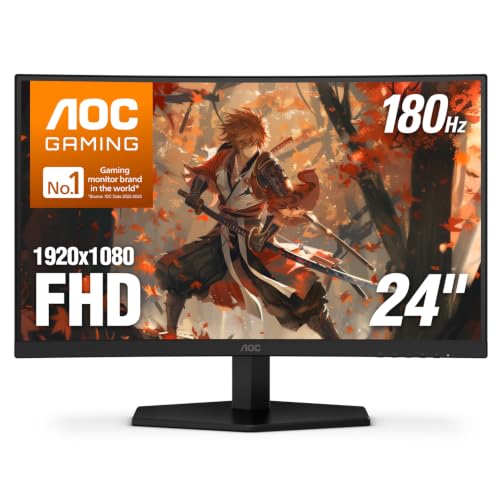
AOC C24G42E — The gaming curve
AOC’s C24G42E is the gaming answer at this size with the volume turned up: a curved 24-inch VA panel at 1080p running 180Hz, with the fast response claims and HDR support of its gaming line, for players who want both speed and wrap without leaving the standard size. The combination is rarer than it sounds — most fast 24-inch screens are flat esports panels, most curved ones are calm — and for the player whose catalogue is fast and dark, racing lines and night maps, the curved VA at 180Hz is a genuinely distinct instrument rather than a styling exercise.
AOC’s gaming line has built its name on delivering the specification sheet of bigger brands at sharper prices, and the C24G42E follows the family trade: the panel and the speed are the product, the stand and the finish are where the money was saved, and the menu carries the gaming furniture — crosshairs, shadow control, response modes — that its audience actually opens. HDR here is a garnish on the VA contrast rather than a headline, and judged that way it behaves honourably.
Set the expectation the VA curve always requires: dark transitions are the technology’s examination, and while 180Hz and modern overdrive have narrowed the gap enormously, the flat fast-IPS esports instruments remain the purist’s choice for competitive clarity. The AOC’s player is the one who wants immersion with their speed — the wrap, the contrast, the night scenes — and accepts the trade knowingly. For that player this is the most exciting screen in the guide, and it is not pretending to be anything else.
Buy it for the evenings and let the days cope — documents look perfectly fine on it, which is the most a gaming curve has ever needed to promise a mixed desk.
Ownership of the AOC has one more rhythm worth knowing: its gaming features reward a single evening of deliberate setup — response mode chosen, shadow control set for your main title, refresh verified in the operating system — after which the screen asks for nothing. Owners who skip that evening sometimes judge the monitor by a default mode that was never its best. The guide’s recurring sermon applies here in miniature: the first hour of configuration is part of the product, and this pick repays it more than most.
- Panel: 24-inch curved VA, 1920×1080
- Refresh: 180Hz with adaptive sync
- Response: fast-mode claims in the sub-millisecond class
- Extras: gaming overlays, shadow control, HDR support
- Class role: the speed-and-wrap gaming pick
Strengths
- 180Hz plus curve is a rare, genuinely distinct combination
- VA contrast flatters dark games and night scenes
- AOC delivers the sheet at sharper value than the big brands
Trade-offs
- VA dark transitions still trail fast-IPS esports panels
- Stand and finish are built to the price
- Curve divides opinion on shared and work-first desks
Best for: gamers who want immersion and speed together at the standard size, especially in dark and racing titles.
Not suited for: competitive purists chasing ultimate clarity, or work-first desks buying for documents.

Dell SE2425H — The calm value screen
The SE2425H closes the map at the neighbourhood where most household screens are actually bought: a 24-inch VA panel at 1080p and 75Hz, with a 3000:1-class contrast figure, ComfortView Plus low-blue-light tuning, and Dell’s household line pricing and support. Its specification is a lesson in spending where a family desk feels it — contrast for films, eye comfort for homework, a tilt stand and VESA mount for the arm the desk may gain — and not spending on refresh rates and gaming furniture the household will never open.
The VA panel’s deep contrast is the experience that sells it in the home: evening video gains a richness that budget IPS screens do not match, text sits clean on its anti-glare surface, and the 75Hz rate keeps everyday motion a step smoother than the 60Hz generation it replaces. Dell’s software touches — preset modes for the usual household content — are set-and-forget in the way family technology should be, and the whole product assumes, correctly, that its owner has better things to do than administer a monitor.
Its limits are printed on its face: 75Hz and VA response make it a casual-gaming screen at most, and its viewing angles prefer the family gathered roughly in front rather than spread wide. Neither matters to its brief. What matters is that it is the screen this guide is happiest to recommend blind — to the relative who asks which monitor to buy for the spare room, the student flat, the homework desk — because its virtues are the durable ones and its compromises are the invisible ones for its audience.
In a guide full of specialisation, the SE2425H is the reminder that the standard size became standard on the strength of screens exactly like this: adequate everywhere, excellent where it counts, and priced so the rest of the household budget survives.
Finally, the SE2425H is the pick most likely to be bought in a hurry — a screen failed, a school term starts Monday — and it is reassuring that haste harms it least. There is no wrong configuration to stumble into, no ecosystem to match, no special cable the box omits. It plugs in, it looks good, it asks nothing. In a category that rewards research, the existence of a pick that forgives its absence is a genuine public service, and Dell has been performing it for households for decades.
- Panel: 24-inch VA, 1920×1080, high native contrast
- Refresh: 75Hz with ComfortView Plus eye tuning
- Mounting: tilt stand plus VESA compatibility
- Orientation: Dell household line, preset content modes
- Class role: the value anchor of the size
Strengths
- Contrast-rich VA picture flatters films and evening use
- Eye comfort and simplicity suit family and homework desks
- Dell support at a household price is a rare pairing
Trade-offs
- 75Hz rules out anything beyond casual gaming
- Viewing angles prefer a centred audience
- No hub or height adjustment on the included stand
Best for: family desks, spare rooms, students and homework stations that need a good screen and no hobbies attached.
Not suited for: gamers, professionals needing a hub and ergonomics, or wide shared viewing.
What About Laptops, Docks and the One-Cable Question?
The modern 24-inch desk is usually a laptop’s desk, and the class divides cleanly on how gracefully it hosts one. The UltraSharp’s USB-C hub is the complete answer — one cable carrying picture, power and peripherals, the monitor as dock. The HP and the business Dell assume a dock or a hub nearby and reward it with ports. The household and gaming picks ask the laptop to bring its own adapters. None of these is a defect; they are the tiers of a real market. But the buyer whose daily ritual is arriving with a laptop should price the one-cable life honestly, because a dock bought separately to fix a screen’s omission costs roughly the difference between the tiers — the market has done this arithmetic even when the buyer has not.
There is a matching question for desktop owners: a fixed PC gains nothing from a hub it will never unplug, and its owner should let the panel and the stand argue instead. Features are only features in the life that touches them — the sermon of this entire series, preached one final time at the size where it matters most.
How Do the Six Compare as a Map of the Market?
| Monitor | Panel | Resolution | Refresh | Neighbourhood |
|---|---|---|---|---|
| Dell UltraSharp U2424H | IPS | 1920×1080 | 120Hz | Premium all-rounder |
| Dell P2422H | IPS | 1920×1080 | 60Hz | Office fleet standard |
| HP Series 5 Pro WUXGA | IPS | 1920×1200 | 100Hz | Taller document specialist |
| Samsung S36GD | VA curved | 1920×1080 | 100Hz | Mainstream entertainment |
| AOC C24G42E | VA curved | 1920×1080 | 180Hz | Gaming speed and wrap |
| Dell SE2425H | VA | 1920×1080 | 75Hz | Household value |
One pattern in the table is worth a second look: three of the six neighbourhoods belong to Dell, which is not favouritism but a measurement of the market — no other maker covers the size from flagship to fleet to household with the same continuity, and a head-term guide that pretended otherwise would be distorting the map to look balanced. HP, Samsung and AOC hold their neighbourhoods against that gravity on genuine merit, which is exactly why they are the ones standing here.
Use the map as a map: locate your desk’s neighbourhood first, and the specific street address follows. Readers who start from the refresh column buy the wrong monitor with impressive specifications; readers who start from the neighbourhood column buy the right one and forget the specifications within a month, which is what a good monitor is for.
What About Colour, Brightness and the Showroom Lie?
Every screen in a shop is lying to you in the same direction: brightness at maximum, colour in a vivid mode, a demo loop chosen to flatter. At home, in a normal room, the same screen should run at a fraction of that brightness in its standard mode — and will look, for the first evening, disappointingly calm. That calm is the truth the next five years will be lived in, and the picks here were chosen for how they behave in it: the IPS models’ honest colour, the VA models’ evening contrast, the flagships’ consistency. Judge any new screen on the third day, in your light, with your work on it. The showroom’s opinion is the one voice in this purchase with no stake in your satisfaction.
Brightness has a second, quieter dimension: uniformity. A panel that is even across its surface — no bright corners, no dull patches — disappears into work, while an uneven one nags at the edge of attention for years. It varies by unit as much as by model, which is why the fortnight checks elsewhere in this guide matter, and why the business lines’ consistency is a feature worth paying for rather than a statistic worth quoting.
How Do You Set Up a 24-Inch Monitor Once, Properly?
Give the screen its hour. Height first — top bezel near eye level, using the stand’s adjustment or a riser — then distance at an arm’s length, then a slight upward tilt. Set the operating system to the panel’s native resolution and its full refresh rate, because both occasionally default below the product you paid for. Match brightness to the room’s light rather than the showroom’s, choose the standard or sRGB picture mode as your home, and only then explore the gaming or movie modes as deliberate exceptions for deliberate occasions.
Finish with the cables and the future. Route the leads so the desk can be cleaned without unplugging the world, label the second input if a console or a partner’s laptop visits it, and note the VESA pattern somewhere you will find it when the monitor-arm day arrives. A 24-inch screen set up this way disappears into the work — which, for the standard size of the computing world, is the entire design intention honoured at last.
What About Buying for Someone Else — the Gift and the Fleet of One?
A remarkable share of this class is bought for another person: the parent whose screen is dying, the child starting secondary school, the partner whose home office is a kitchen table with ambitions. Gift-buying changes the correct answer. The recipient will not read this guide, will not calibrate anything, and will judge the screen by whether it works beautifully on the first evening and every unremarkable morning after. That profile points at the guide’s dependable centre — the P2422H for a worker, the SE2425H for a household, the Samsung for the entertainer — and away from every pick that rewards configuration. Set it up for them if you can; a gifted monitor installed at the right height with the right mode selected is a different and better gift than the same box left sealed.
The same logic governs the small-office buyer purchasing three or five at once: consistency and warranty outrank the last specification, because you are buying a fleet’s calm, not a single screen’s brilliance. The business lines exist for exactly this purchase, and their premium over household models is the price of never thinking about monitors again — a price most fleets, and most gift-givers, should pay gladly.
What Should You Check in the First Fortnight?
Panels are individuals even within a model line, so give a new screen its probation while returns are painless. Check a white screen and a dark screen for dead pixels and uniformity, confirm the running refresh rate matches the specification you bought, and work one full day at your real brightness in your real room before judging colour. Test the second input if a second machine will ever visit. A screen that passes the fortnight on those terms will, with overwhelming probability, serve its five-to-eight years without incident — and a screen that fails deserves the exchange, not a lifetime of your accommodation.
What Mistakes Do Head-Term Buyers Keep Making?
The broad keyword invites broad errors. The first is buying by the single loudest specification — the highest refresh, the longest feature list — for a desk whose life matches a different neighbourhood entirely, then living with a gaming screen’s stand at a document job or an office screen’s 60Hz at a gaming one. The second is ignoring the stand and the hub, the components a body interacts with daily, in favour of panel numbers it will never consciously perceive. The third is assuming the standard size means a commodity purchase where any unit will do, when the spread between the best and worst 24-inch monitors is as wide as in any class in computing.
A fifth mistake hides in the returns window: judging the screen in the first hour, at showroom brightness, in a dark room, and sending back a good panel for failing an examination no panel passes. Give the fortnight its chance, set the screen up as the setup section describes, and let the judgement happen under the conditions of the next five years rather than the first evening’s theatre. More good monitors are returned by haste than by defect.
The fourth mistake is future-blindness: buying the orphan model, the discontinued line, the brand with no local support, and discovering at the dual-monitor upgrade or the first fault that a standard size deserves a standard-bearer. Every pick in this guide was chosen partly for its afterlife — matching twins in production, parts and support that persist — because a head-term purchase is usually the first screen of several, and it should behave like the foundation it is.
What Does the Second Screen, the Arm and the Chair Have to Do With This Guide?
Everything except the shopping. A 24-inch monitor is the centre of a physical system, and the readers who get the most from any pick here are the ones who treat the purchase as the middle of a desk project rather than its entirety: the arm that returns the surface, the second screen that doubles the span, the chair that makes the posture the screen assumes a sustainable one. This guide has kept returning to stands and setup because the monitor’s picture is the part of that system you will stop noticing first — within a month it is simply how your work looks — while the ergonomics are the part your body keeps scoring daily for years.
Budget accordingly and in order: the right screen from the right neighbourhood, the height solved by stand or arm, the light of the room considered, and only then the luxuries. A household that follows that order with the humblest pick here will out-desk a household that buys the flagship and perches it on a shoebox. The standard size rewards standard wisdom, applied completely.
Final Recommendation
One closing observation from the whole of this series: the 24-inch guides were the hardest to write precisely because the class is the most honest — no gimmick rescues a weak entry here, and no single superlative crowns a winner. What remains is fit, and fit is a thing only the buyer can finally measure. The map is drawn; the territory is your desk.
Let the neighbourhood decide. The professional single-desk buyer takes the UltraSharp U2424H if the budget breathes, or the P2422H if it does not; the vertical worker takes the HP and its extra lines; the household entertainer takes the Samsung’s gentle curve; the gamer takes the AOC; and the family desk takes the SE2425H and spends the change on the chair. If a single name must stand for the keyword as a whole, it is the UltraSharp — the fullest expression of what the standard size can be when nothing is skimped. But the guide’s real verdict is the map itself: at 24 inches there is no best monitor, there is a best neighbourhood, and you have just been shown all six of them with their doors open.
What About Sustainability and the Life After Your Desk?
A word this series owes every class, and owes this one most, because its volumes are the largest: a 24-inch monitor is a decade-scale object, and its greenest feature is the one this guide has praised throughout — longevity in established lines. A screen that serves three owners across eight years, repairable and matchable and never orphaned by a vanished brand, is a better environmental purchase than a marginally more efficient screen replaced twice. When the day finally comes, the business models here hold resale and donation value precisely because offices still run them; pass the screen on working rather than recycling it tired, and the standard size completes its last service — being useful to someone whose budget is not yours.
Frequently Asked Questions
Is 24 inches big enough as a main screen?
For the majority of desks, demonstrably yes — it remains the world’s standard because it fits the space, the eyes and the budget of a normal working life. The buyers who outgrow it are those whose work is inherently wide or dense: video timelines, huge spreadsheets, multi-window trading or development setups. Even they often keep a 24-inch as the second screen, which tells you the size is a foundation rather than a phase.
Should I buy one 24-inch monitor or save for a larger one?
Buy the 24-inch if your desk and your work are standard-sized, and spend the difference on the stand, the chair or the second screen later. Save for larger only if a specific need — cinema, density, an ultrawide’s wrap — is already named in your life. A larger screen bought on spec becomes furniture you sit too close to; a standard screen bought on fit becomes invisible infrastructure, which is the higher achievement.
What is the difference between the business and household Dells here?
Layer, not picture. The UltraSharp and P-series carry the full ergonomic stands, the hubs, the longer and stronger warranty culture and the model consistency that fleets require; the SE household line trims those to a tilt stand and a simpler package while keeping a good panel and Dell’s support. A home buyer who values the layer should buy up the range with confidence; a home buyer who does not is not being sold a worse picture, just a plainer ownership.
Can a 24-inch monitor be a gaming monitor, honestly?
It is the original gaming size and remains the competitive standard’s neighbourhood — the AOC in this guide runs 180Hz, and the dedicated gaming class at this size reaches far higher. What 24 inches will not give a gamer is the cinematic wrap of the ultrawides or the sheer canvas of a 32-inch screen. For skill-based play, the size is not a compromise at all; for spectacle, shop the neighbouring guides.
Do I need a monitor arm at this size?
Not immediately, and eventually, yes, for most desks. The stands on the business picks here are good enough to postpone the purchase for years; the household and gaming picks’ simpler stands make the arm the best first upgrade when posture or desk space starts to argue. Every pick in this guide mounts to the standard VESA pattern, so the option stays open — buy the screen now, the arm when the desk asks for it.
What cables and connections should I expect to need?
One display cable in the box is the class norm — HDMI most often, DisplayPort on the gaming and business models — plus the power lead. A laptop desk planning the USB-C life should confirm the cable situation before ordering, since the one-cable promise needs the right lead, and a second machine visiting the screen wants its own cable left plugged into the spare input. None of this is expensive; all of it is cheaper bought in the same order than discovered on a Sunday evening with a half-built desk.
Is a curved or flat 24-inch screen better?
At this size the curve is a flavour, not a transformation. A gentle curve like the Samsung’s adds a touch of wrap for films and solo viewing; the AOC’s gaming curve pairs the wrap with speed. Flat panels suit shared viewing, precise layout work and dual setups, where two curves complicate the seam. Solo entertainment desks may lean curved with pleasure; everyone else should default to flat and spend the difference on the stand.
How long should a 24-inch monitor last?
Plan on five to eight years of service across its lives: main screen, second screen, household hand-me-down. Panels in this class do not date quickly — the resolution standard is stable, the connections age slowly — so the practical lifespan is set by the stand, the backlight and the maker’s support, all of which argues for the established lines this guide is built from. Bought well, it is among the longest-lived purchases in computing.
Choose this week rather than this quarter if the need is real: the standard size is not awaiting a revolution, its prices are a settled landscape rather than a falling one, and every month spent squinting at a dying screen is a month the right monitor would have quietly repaid. The perfect 24-inch purchase is the one that is on your desk, at the right height, doing its invisible work — and every pick above can be that purchase by Friday, humming quietly at the centre of a desk that finally feels finished, correctly sized, and ready for whatever the next working year asks of it, in work, in play, and in everything between.
Related Guides
Narrowing from the head term to a speciality now that the map has shown you which neighbourhood your desk belongs to? Follow the map into our guides to the best 24 25 inch 1080p monitors, the best 24 inch 4K monitors for desktops computers with webcam and the best 21 9 gaming monitors for the neighbouring territories in full detail.


