What's inside
- Key Takeaways
- Quick Picks
- How did we choose these picks?
- Why does everyone call 21.5 inches twenty-one?
- What is a week in the life of a portable screen?
- How do other monitor sizes play the naming game?
- How does a hybrid worker combine the fixed and the portable?
- How do the six picks compare side by side?
- What do the numbers on the box not tell you?
- Should your twenty-one-inch monitor be fixed or portable?
- How do you set up a screen from this class?
- Which accessories actually matter at this size?
- How do different readers find their pick in this guide?
- What mistakes do buyers make with this search?
- What should you verify in the first week, desk or portable?
- How long do screens from this class actually last?
- Final Recommendation
- What is the short checklist for the best 21 inch computer monitors?
- Frequently Asked Questions
- Related Guides
As an Amazon Associate I earn from qualifying purchases. This post may contain affiliate links at no extra cost to you.
widgetverdict.com is reader-supported. When you buy through links on our site, we may earn an affiliate commission.
Where to buy: three picks below carry verified Amazon links and three are described without one. Every heading states the screen’s true size, because the twenty-one-inch label conceals more variety than any other in the small-monitor world.
Here is the secret the best 21 inch computer monitors are built on: there is no twenty-one-inch panel. Search the catalogues of the panel makers and the diagonal simply does not exist as a standard product. What the world calls a 21-inch monitor is a 21.5-inch screen, rounded down by shoppers and search engines rather than up by manufacturers, and understanding that single fact turns a confusing search into a simple one.
This guide is written around that honesty. The core of the class is the 21.5-inch full HD panel, represented here by two verified picks with different temperaments. Around that core sits the class’s other citizen, the portable monitor, which many twenty-one-inch shoppers are actually imagining: a small, light screen that travels, props beside a laptop and asks for no desk of its own. One verified portable pick appears below, labelled at its true 17.3 inches, because pretending it measures twenty-one would help nobody measure a laptop bag.
Three further picks are described without links, covering the roles the wider 21-inch-labelled market fills: the frameless desk panel, the institutional workhorse and the ultra-budget starter screen. Together the six answer the three questions hidden inside this search: what size am I really buying, do I want it fixed or portable, and how much monitor does my money honestly get at this end of the market.
Key Takeaways
- A 21-inch monitor is a 21.5-inch panel; the class name rounds down.
- Full HD at 21.5 inches is the class’s real specification and its sweet spot.
- Portable screens answer the same search for travellers, at a smaller true size.
- Two verified desk picks anchor the guide; portables and roles complete it.
- Measure bags and alcoves by true diagonals, never by class names.
- The stand, not the label, decides whether a desk setup feels finished.
Quick Picks
| Pick | Badge | Why it earns its place |
|---|---|---|
| Acer KB220Q, a true 21.5-inch panel | Desk default | The class’s centre: full HD, 100Hz and inputs for every machine in the house. |
| Lenovo L22-4e, a true 21.5-inch panel | Workday calm | IPS steadiness and business backing for desks that host calls and colleagues. |
| ARZOPA A1M portable, a true 17.3-inch panel | Travelling companion | A kickstand portable for laptop workers whose desk changes daily. |
| The frameless 21.5-inch desk panel | Pairing favourite | The thin-bezel role for two-screen desks in small rooms. |
| The institutional 21.5-inch workhorse | Fleet choice | The adjustable, warranty-backed screen organisations standardise on. |
| The ultra-budget 21-inch-labelled starter | First screen | The simple, durable role for first desks and spare rooms. |
How did we choose these picks?
Truth in labelling governed everything. A pick could join this guide at any true size the twenty-one-inch search honestly encompasses, provided its heading printed that size without decoration. The 21.5-inch desk panels form the core because they are what the search overwhelmingly delivers; the portable earns its place because it is what a large minority of the searchers are picturing; and nothing at 22 inches or above was admitted, however good, because a buyer who wanted twenty-two has a guide of their own.
Within the desk core, temperament separated the two verified picks. The Acer represents the class’s value and versatility, the Lenovo its professional composure, and between them they cover the great majority of fixed-desk buyers. A third desk pick from the same two shelves would have added a link and subtracted information, so the remaining places went to roles and to the portable, where the genuine variety of this search lives.
The portable was judged by portable rules, which differ from desk rules in almost every particular. Weight, the kickstand’s honesty, a single-cable connection where possible, a case or cover, and brightness that survives a bright cafe mattered more than the refresh figures and input zoos that dominate desk reviews. A portable that wins desk criteria and loses travel criteria is a small monitor, not a companion, and this guide refuses to confuse the two.
As throughout this batch, links were restricted to the verified pool, matched model by model. The three prose picks carry the checks to run on any listing you find for their roles, because a role described honestly is more useful than a link offered carelessly.
Why does everyone call 21.5 inches twenty-one?
Rounding usually goes up in this industry, which makes this class the interesting exception. Shoppers searching for a small monitor type the round number below the panel they will receive, retailers organise their shelves by the search rather than by the glass, and over years the nickname hardened into a category. Nobody is deceived who reads a specification table; everybody is confused who shops by the nickname alone, which is why this guide prints true sizes in its headings and urges you to do the same in your notes.
The practical stakes are modest but real. A 21.5-inch cabinet is about a centimetre wider than a hypothetical true twenty-one would be, and that centimetre decides fits inside hutches, under cabinets and between the uprights of a fitted desk. It also decides nothing at all on an open desk, where the nickname can be used with a clear conscience. Know which situation is yours before deciding how much the truth matters.
There is a second naming tangle worth untying while we are here. Some listings headline the class as 22 inches for the identical panel, rounding up instead of down, so the same physical screen can appear in two searches wearing two sizes. The defence is always the specification table’s diagonal, stated in the maker’s own numbers, and a screenshot of that table at purchase time settles any later argument with a returns department.

Acer KB220Q — Desk default, true size 21.5 inches
Start with the screen most twenty-one-inch shoppers will, and should, take home. The KB220Q is the class’s complete sentence: full HD resolution, a 100Hz refresh with AdaptiveSync to steady it, colour coverage its maker states at 99 percent of sRGB, and an input pair, HDMI and VGA, that spans the machines of a real household. Nothing in the proposition requires an asterisk, which at this end of the market is a rarer achievement than it should be.
Its virtues are cumulative rather than dramatic. Text reads crisply at the distance a small desk imposes. Scrolling stays composed through a long document. An elderly desktop connects without an adapter, a modern laptop connects without a thought, and the cabinet’s VESA pattern waits patiently for the day an arm or a bracket enters the plan. Owners describe such screens as the one they stopped thinking about, and they mean it as the highest available praise.
The eye-comfort package suits the class’s actual life, which is long hours at close range. Flicker-reduced backlighting and a blue-light filter are easily mocked as brochure items until a screen is read for six hours in a dim room, at which point they become the difference between eyes that are tired because the day was long and eyes that are tired because the panel fought them.
The compromises sit in the stand, as they do throughout this class: tilt, yes; height, no. A riser or a modest arm completes the setup for most adults, and the mount pattern makes that completion a choice rather than a project. Buy the KB220Q as the desk’s foundation, price the height solution honestly, and the twenty-one-inch question is answered in its most durable form.
- True size: 21.5 inches
- Resolution: 1920 by 1080
- Refresh rate: 100Hz with AdaptiveSync
- Inputs: HDMI and VGA
- Mounting: VESA mountable
- Stand: tilt only
Strengths
- The complete, asterisk-free centre of the class.
- Welcomes new and legacy machines equally.
- Comfort tuning matched to close, long reading.
Trade-offs
- Height arrives via riser or arm, not the box.
- No speakers join the panel.
- Its styling aims at offices, not interiors.
Best for: the majority of fixed desks behind this search. Not suited for: travellers, or buyers needing adjustment from the included stand.

Lenovo L22-4e — Workday calm, true size 21.5 inches
If the Acer is the class’s centre, the Lenovo is its conscience: the same size, the same resolution, tuned for the days when the screen is a workplace rather than a possession. The L22-4e’s IPS panel holds its colour and contrast for the colleague standing beside you, the manager behind you and the trainee learning the job over your shoulder, which is to say for the actual social geometry of office work.
Lenovo quotes the panel at 100Hz and 99 percent of sRGB, figures that place it squarely in the class’s modern standard, and finishes the cabinet in a black that absorbs the eye instead of catching it. In a room where the screen shares attention with people, that restraint is a working feature. Nothing about the L22-4e will ever be the most interesting object on a desk, and its buyer will be grateful for that every single day.
Its response figure arrives on the flattering MPRT scale, and the honest translation is that motion is adequate for documents, calls and video, and uninteresting to gamers. Lenovo’s customers are not confused about this, and neither should this guide’s readers be. A screen that knows its brief this clearly is easier to own than a screen that promises every brief at once.
The business channel behind the panel completes the proposition: a tidy model name for procurement, support that answers organisations, and a design language shared with the laptops many offices already run. Choose the L22-4e when the desk is a post, the work is shared, and the monitor decision is one you would like to make exactly once.
- True size: 21.5 inches
- Resolution: 1920 by 1080
- Panel: IPS
- Refresh rate: 100Hz
- Colour: 99 percent sRGB quoted
- Stand: tilt, business plain
Strengths
- Viewing angles for supervised, shared work.
- Colour that agrees with the office fleet.
- A support story written for workplaces.
Trade-offs
- Motion figures flatter; games are not the brief.
- Stand adjustment stops at tilt.
- Warmth of design is not on the menu.
Best for: home offices with corporate discipline and shared desks. Not suited for: gaming evenings or design-led rooms.
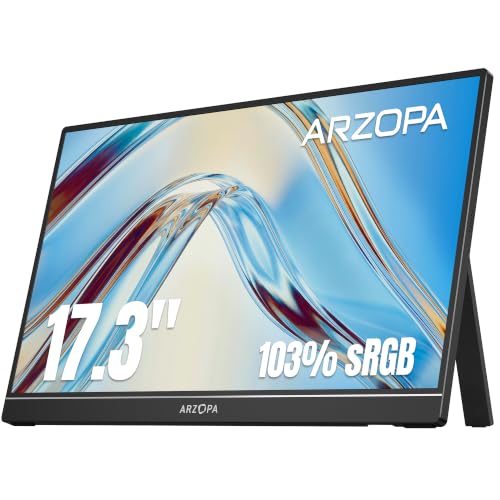
ARZOPA A1M portable — Travelling companion, true size 17.3 inches
Now for the pick that breaks the size pattern openly, and says so in its heading. The ARZOPA A1M is a 17.3-inch portable monitor, smaller than every desk panel in this guide, and it is here because a large share of twenty-one-inch searches are really searches for this: a screen light enough to travel, quick enough to deploy on a cafe table, and content to live in a laptop bag rather than on a desk of its own.
Judged as a portable, its specification reads well. Full HD on an IPS panel with colour coverage its maker states above the sRGB baseline, a built-in kickstand that removes the origami of cover-stands, and connections by USB-C and HDMI that cover laptops, phones and consoles. The kickstand deserves emphasis, because a portable’s stand is used a hundred times a year in a hundred improvised places, and a hinge that simply works outlasts every clever folding cover.
The compromises are the portable class’s own. Sound, where present in such designs, is a courtesy rather than a performance. Brightness is tuned for indoor improvisation, not for a sunlit terrace. And the screen is a companion, not a canvas: it holds the call, the reference and the second window beautifully, while the main work stays on the laptop it travelled with. Owners who accept that division of labour adore these devices; owners who expected a desk monitor in a bag return them, which is why this review is so explicit.
Size honesty cuts both ways here. At 17.3 inches the ARZOPA will disappoint anyone who truly needed a 21.5-inch desk panel, and delight anyone who needed a second screen that flies. Read your own search honestly, measure your laptop bag’s sleeve, and let the true diagonal, printed above without apology, make the decision it is qualified to make.
- True size: 17.3 inches, a portable, not a desk panel
- Resolution: 1920 by 1080
- Panel: IPS
- Inputs: USB-C and HDMI
- Stand: built-in kickstand
- Role: travel and hybrid second screen
Strengths
- Genuine portability with a stand that simply works.
- One-cable connection to modern laptops.
- Full HD clarity in a bag-friendly cabinet.
Trade-offs
- Smaller than the desk class by four inches.
- Sound and brightness are travelling compromises.
- A companion, never the main canvas.
Best for: hybrid workers, students and consultants whose desk changes daily. Not suited for: a fixed desk needing a full-size primary screen.
The frameless 21.5-inch desk panel — Pairing favourite
The fourth pick is a role the wider market fills elegantly: the frameless desk panel at this size, bought in pairs for compact dual-screen setups. It appears without a link because the verified pool’s frameless strength lies at neighbouring sizes, and this guide’s rule about true sizes applies to its own recommendations first. The role itself, though, belongs in any honest map of the twenty-one-inch search, because so many of its shoppers are planning a pair.
A pair of frameless 21.5-inch panels is the small room’s answer to the ultrawide: two full workspaces, independently angled, individually replaceable, spanning about a metre of desk. The frameless edge matters precisely at the seam, where two ordinary bezels would build a plastic cross in the middle of the owner’s attention. Writers, support workers and analysts who adopt the arrangement describe the same discovery, that windows stop being minimised when each has a home.
The checks for this role are specific. Confirm the side bezels are as slim as the top, since listings photograph the flattering edge. Buy both units in one order so the panels share a batch and a colour temperament. Confirm the stands or mounts align the pair’s top edges to the millimetre, because the eye forgives many things and a stepped horizon across two screens is not among them.
Singles buyers are not excluded from the role. One frameless panel on a small desk looks intentional in a way framed panels rarely manage, and it leaves the pairing path open for the day the desk’s ambitions grow. Buy it as the first of a pair even if the second is a year away, and buy the second from the same model line while it lasts.
- True size: 21.5 inches
- Resolution: 1920 by 1080
- Design: slim bezels, pairing intended
- Mounting: VESA expected
- Key checks: bezel honesty, matched batch, aligned tops
- Role: dual-screen desks in small rooms
Strengths
- The seam nearly disappears in a pair.
- Independent repair and replacement.
- Looks deliberate even as a single.
Trade-offs
- Rewards matched, patient buying only.
- Needs a metre of honest desk width.
- Cabling doubles with the panels.
Best for: dual-window workers in compact rooms. Not suited for: desks under a metre or single-window habits.
The institutional 21.5-inch workhorse — Fleet choice
Behind the retail shelves stands the fleet: the business-line panels at this size that organisations buy by the floor, specified for ergonomic stands, locked menus and replacement pipelines rather than for any picture statistic. This role is described without a link because it is sold through business channels, and it earns its place because a meaningful slice of twenty-one-inch buyers are equipping several desks, a classroom or a small office, where fleet logic beats retail logic outright.
The fleet panel’s panel is ordinary, and everything around it is not. Height, swivel and pivot adjustment arrive as standard, the mount pattern never changes between orders, and the warranty process assumes the buyer has forty units and no time. For a document professional, the pivot alone justifies the channel’s friction: a portrait screen at this size holds contracts and code with a grace that landscape cannot imitate.
Home buyers can access this role through business outlets and authorised resellers, and should verify two things when they do: that the business warranty honours a residential address, and that the stand in the photographs is the stand in the box, since fleet listings sometimes illustrate a family of models with one heroic image. Both checks take minutes and protect the entire point of the purchase.
Organisations should standardise without mercy. One model, one spare per floor, settings recorded, cables labelled. The fleet screen’s whole value proposition is the absence of variety, and a rollout that tolerates exceptions in the name of small savings will repay those savings in support time, with interest, for years.
- True size: 21.5 inches
- Resolution: 1920 by 1080
- Stand: height, swivel and pivot typical
- Mounting: VESA standard
- Channel: business outlets
- Key checks: warranty address, stand photographs
Strengths
- Ergonomics the retail class omits.
- Portrait becomes a one-handed gesture.
- Fleet consistency simplifies everything downstream.
Trade-offs
- Channels are built for organisations, not shoppers.
- Design is anonymous by intention.
- Unit pricing rarely leads the market.
Best for: multi-desk rollouts and document professionals. Not suited for: a single casual purchase wanting retail simplicity.
The ultra-budget starter screen — First screen
The final role is the class’s floor: the simple, inexpensive 21-inch-labelled panel that serves as a first screen, a spare-room screen, a child’s homework screen. It is described without a link because this tier’s listings change weekly and its impostors are legion, and a durable description of what to verify will outlast any link this guide could offer today.
The role’s virtues are real. A modern budget panel at this size, honestly specified, gives a first desk full HD, adequate brightness for a lit room and inputs enough for one machine, which is all a first desk has. For a teenager’s room, a grandparent’s email corner or a workshop’s reference post, that completeness at a modest tier is not a compromise but a correct allocation of a household’s money.
The tier’s trap has been named elsewhere in this batch and must be named here too: the sub-full-HD panel in full HD clothing, its resolution buried in the specification table’s small print while the headline trades on the size. Read that table. A starter screen at 1920 by 1080 will serve for years; the same money spent on a coarser grid buys a daily irritation that no other virtue can repay.
Set the rest of your expectations with equal clarity. The stand will tilt and no more, the menu will be plain, the maker’s name may be unfamiliar, and the correct response to all three is a calm first-week inspection: every input tested, a page of text read at working distance, dead pixels checked on plain screens of white and black. A budget panel that passes that week usually serves its full sentence without another word.
- Labelled size: 21 inches; true size usually 21.5
- Resolution: verify 1920 by 1080 in the table
- Stand: tilt only
- Inputs: one modern input minimum
- Key check: resolution in the specification table
- Role: first desks and spare rooms
Strengths
- Complete first-desk capability at the floor tier.
- Simple to set up, simple to replace.
- Cascades well to spare and utility roles.
Trade-offs
- The tier hides sub-full-HD impostors.
- Stand, menu and finish are all basic.
- Support networks can be thin.
Best for: first desks, grandparents’ corners and spare rooms. Not suited for: all-day professional reading at close range.
What is a week in the life of a portable screen?
Monday begins at a kitchen table, where the portable props beside a laptop so the week’s planning call can occupy one screen while the notes occupy the other, and the whole office folds into a bag when the school run calls. Tuesday moves to a client’s site, where the same screen becomes the presentation surface for a table of four, angled on its kickstand, driven by a single cable, and packed away before the parking ticket expires. Nothing in either day required a desk, a dock or a second thought, which is the portable’s entire thesis stated as a diary.
Wednesday is a train, and the honest entry is that the portable stays in the bag, because a folding table and a full HD companion are not always compatible and the laptop alone earns its keep on rails. Thursday is a library carrel, where the portable returns to glory, the reference material held open for six hours while the thesis grows on the main screen. Friday is a hot desk in a shared office, where the portable turns an anonymous surface into a two-screen workstation by ten past nine and surrenders it, wiped and cable-coiled, by five.
The diary exposes the portable’s real specification, which is not in any table: the number of improvised places where it can be deployed in under a minute, by a person carrying coffee. Kickstand honesty, cable simplicity and a cabinet that survives bag life decide that number. A portable that needs a level surface, a separate stand assembly and two cables will be left behind by week three, and a screen left behind is a screen that should never have been bought.
It also exposes who should not buy one. The worker whose diary reads desk, desk, desk in every entry gains nothing from the genre except smallness, and the desk picks above will serve that diary better in every paragraph. Portables are not a smaller kind of monitor; they are a different tool that happens to display things, and the twenty-one-inch search is where the two tools meet and must be told apart.
How do other monitor sizes play the naming game?
This class rounds down, but it is not the market’s only fiction, and a buyer educated here is educated everywhere. The 24-inch shelf is really 23.8, the 27-inch shelf is honest to a decimal, the 32-inch shelf hides 31.5, and televisions have run their own rounding conventions since before monitors existed. The pattern beneath the variety is that class names describe neighbourhoods, and specification tables describe houses, and only one of those documents should ever be used to measure a wall.
Manufacturers are not villains in this story. Panel production standardises on a handful of efficient diagonals, marketing needs names a shopper can say aloud, and the two needs meet in the class label. The maker’s own specification table almost always confesses the true figure, which is why this guide treats the table, not the headline, as the document of record and teaches the same habit in every article of this batch.
Retailers add a second layer, shelving the same panel under whichever class name the season’s searches favour, so a 21.5-inch screen may be filed as a 21-inch monitor in one store and a 22-inch in another. Comparison shopping across stores therefore demands the model number as the anchor, since the model is the one identifier that never rounds. Search by model, verify by table, and the naming game loses its power to confuse.
There is even a sense in which the nickname serves the buyer. A search for the round number gathers the whole neighbourhood onto one results page, where the true sizes can be compared side by side, which is how many readers arrived at this guide. The label is a fine net and a poor ruler; use it to gather, never to measure, and it will serve you as honestly as it served the industry.
How does a hybrid worker combine the fixed and the portable?
The arrangement that hybrid life converges on, after the experiments are forgotten, is a fixed panel at home, a portable in the bag, and a laptop that treats both as furniture it already knows. The home desk is set once, height, refresh and cables settled, and the portable inherits the laptop’s habits on the road so that no new ritual is learned in a client’s meeting room. Consistency between the two setups is the luxury the arrangement actually buys.
Window habits transfer when the screens are arranged alike. Reference on the secondary, work on the primary, calls wherever the camera lives: a worker who keeps that grammar in both places loses no time to reorientation when the office changes. The sizes differ, 21.5 at home and 17.3 away, and the grammar survives the difference, because it was never about the inches. It was about knowing, without looking, where things are.
The budget logic is equally convergent. A fixed panel and a portable together occupy the modest tiers of their respective classes, and the pair delivers a two-location, two-screen life that a single premium monitor cannot imitate at any price, because a premium monitor cannot be in a bag and on a desk at once. Hybrid workers are not buying two screens; they are buying the same desk in two places, and this class, in both its forms, is where that purchase is cheapest to make well.
How do the six picks compare side by side?
| Pick | True size | Linked? | Defining idea |
|---|---|---|---|
| Acer KB220Q | 21.5 inch | Yes | Desk default |
| Lenovo L22-4e | 21.5 inch | Yes | Workday calm |
| ARZOPA A1M portable | 17.3 inch | Yes | Travelling companion |
| Frameless desk panel | 21.5 inch | Prose | Pairing favourite |
| Institutional workhorse | 21.5 inch | Prose | Fleet choice |
| Ultra-budget starter | 21.5 inch typical | Prose | First screen |
The table is this guide’s argument in miniature: one search, three true sizes of answer, and a portable that belongs only to the buyers whose lives move. Everything else is character, and character is what the reviews above are for.
What do the numbers on the box not tell you?
They do not tell you how the menu feels at midnight when a setting must change in the dark, and in this class the menus range from friendly grids to archaeological expeditions. They do not tell you whether the stand’s tilt hinge is firm or merely hopeful, whether the power light can be dimmed or will glow at a bedroom desk all night, or whether the buttons sit where fingers can find them without tipping the panel. These are the specifications of ownership, and they are absent from every box in the class.
They also do not tell you how the screen behaves with your actual computer. An older laptop may drive the panel at a lower refresh than the box celebrates; a dock may reserve its best output for a port the panel lacks; an operating system may scale the picture in a way that flatters or fights your eyes. The first-week liturgy elsewhere in this guide exists because the meeting between a specific screen and a specific machine is an empirical event, not a deduction from two specification sheets.
None of this makes the numbers useless. It makes them a beginning, the filter that builds the shortlist, after which the buyer’s own desk, calendar and machines must cast the deciding votes. This guide has tried to conduct exactly that two-stage process in public: numbers first, honestly labelled, then life, in its diary entries, its reader paths and its checklists. A buyer who imitates the process will rarely need the returns label, in this class or any other.
Should your twenty-one-inch monitor be fixed or portable?
Answer with your calendar rather than your imagination. If your working week happens at one desk, the fixed panels win on every axis that matters daily: size, stability, inputs, price per inch of glass. A portable bought for a fixed life is a small screen with a travelling premium, and its kickstand will never love a permanent desk the way a proper stand or arm does.
If your week moves, between home, office, clients and campus, the portable’s virtues stop being conveniences and become the product itself. A second screen that is present at every desk beats a better screen that exists at one desk, for the work that hybrid life actually consists of: calls, references and documents in shifting combinations, in rooms nobody designed for you.
The hybrid answer deserves its sentence too. Many workers own both: a fixed 21.5-inch panel as the home base, a portable for the road, each bought honestly for its role. The two together still cost less than many single fashionable monitors, and the arrangement fails gracefully in both directions, the desk working without the portable, the bag working without the desk.
How do you set up a screen from this class?
Desk buyers should begin where this class always begins: height. Raise the panel until its upper third meets your seated eye line, tilt it gently toward you, and set the operating system’s refresh to the figure the box promised. Follow with brightness matched to the room’s ordinary light and a low-blue setting saved for the evening, and the screen is ninety percent configured in ten minutes.
Portable buyers should rehearse instead. Deploy the screen in the places it will actually live: the kitchen table, the train table if it fits, the client’s meeting room, the library carrel. Learn its cable’s reach, its kickstand’s favourite angles and its brightness in a bright room before the first working trip, because a portable’s setup is a performance given in public, and rehearsals are what make performances boring in the best way.
Both camps should finish with the same small administration: photograph the cable arrangement, note the settings that pleased you, store the stand or the case where the household keeps such things, and test every input you own in the first week. A screen from this class, desk or portable, should become invisible quickly, and invisibility is an achievement of setup, not of luck.
Which accessories actually matter at this size?
The riser is the accessory this class sells by implication, and the honest options are a purpose-made stand, a monitor arm, or the household’s traditional stack of large books, in descending order of adjustability and ascending order of charm. What matters is not the object’s pedigree but its height and its stability: the screen must reach the eye line computed for your chair, and it must not rock when the desk is bumped by a passing teenager or a docking cat.
The second accessory is the cable you did not know you needed. Desk panels in this class assume a source within a short lead’s reach, and the moment a tower lives on the floor or a laptop docks to the side, the included lead becomes a diagonal tension across the desk’s rear. Measure the true route, buy the length that travels it with slack, and the setup loses its one visible strain. Portable owners need the mirror-image accessory: a short, flexible lead that lives in the bag permanently, because the long one at home will be forgotten exactly once, on the worst morning.
A camera and a light complete the call-ready desk, and both are cheaper than the regret of skipping them. The camera belongs at the panel’s top centre, the light belongs in front of the face, and together they cost less than the difference between the two verified desk picks, which puts priorities in their proper order for anyone whose work is substantially meetings. Screens do not make calls good; rooms do, with the screen as an accomplice.
Everything else is optional in the true sense. Cable channels tidy, desk mats calm, headphone hooks declutter, and none of them rescue a wrong size, a wrong species or a coarse panel. Buy the screen right first, live with it for a month, and let the accessories that remain necessary announce themselves, because at that point they will be purchases with a job description rather than decorations with a receipt.
How do different readers find their pick in this guide?
The parent buying for a child’s first desk should read the two desk reviews and choose by temperament: the Acer for a household of mixed machines and enthusiasms, the Lenovo if the desk doubles as a parent’s orderly workstation after homework hours. Either will read kindly, fit the furniture and survive the cascade to a sibling, which is the whole specification a family actually needs.
The consultant, the auditor and the roving professional should begin at the portable and work backwards, testing its diary against their own week. If four of its five days resemble theirs, the decision is made, and the desk picks become the home-base chapter of the same purchase rather than rivals to it. If none of the days resemble theirs, they have learned something worth more than a monitor: that their work has a home, and it deserves a proper panel.
The small-office buyer should skip to the fleet role and the frameless pair, the two places where this guide’s advice turns organisational. Their questions are about standardisation, spares and stands that satisfy assessments, and the retail picks matter to them chiefly as evidence of what the class’s centre looks like when a single desk is the whole problem. Different readers, different doors into the same small building: that is what a tangled search term deserves from its guide.
What mistakes do buyers make with this search?
The founding mistake is trusting the label in either direction: assuming a true twenty-one inches and planning a fit that the 21.5-inch cabinet refuses, or assuming the search guarantees full HD and discovering the coarse grid after the return window closes. Both errors are prevented by the same ten seconds in the specification table, and this guide has now suggested those ten seconds often enough to make them a reflex.
The second mistake is buying a portable for a fixed desk, or a desk panel for a travelling life, because the photographs flattered the wrong virtue. Portables look sleek on desks in listings; desk panels look substantial in bags in nobody’s listing, because they do not fit in bags. Shop from your calendar, as the section above insists, and the category error disappears.
The third mistake is neglecting sound. Most desk picks in this class are silent, and the portable’s voice is a travelling courtesy. A desk that lives on calls needs a planned answer, headphones, a small speaker or the laptop’s own output deliberately chosen, rather than a discovery made during the first meeting of the first Monday.
The fourth mistake is discarding the future: the stand when mounting, the case when travelling, the receipt and the screenshot of the specification table when buying anything in this label-tangled class. This search, more than most, rewards the buyer who keeps the evidence.
What should you verify in the first week, desk or portable?
Desk buyers should run a fixed liturgy: every input connected in turn, a full page of text read at the true working distance, plain white and plain black screens inspected for dead pixels and uneven light, and the stand or riser tested against a full day of the household’s actual chairs. Finish by setting the refresh the box promised and photographing the rear of the desk before it returns to the wall, because the photograph will be consulted at the first cable question, which always arrives on a Sunday.
Portable buyers should run a travelling liturgy instead: deploy the screen in five real places, time none of them but notice all of them, and confirm the bag still closes with the screen, its cable and the laptop sharing the space they will share all year. Test the kickstand on a soft surface and a hard one, run the battery question to ground, since a portable that needs a wall socket at every stop is a different product from the one in the photographs, and check the picture in the brightest room you regularly work in.
Both liturgies share a purpose, which is to surface the mismatch while returns are still a formality. A screen that fails its first week honestly is a refund; the same screen failing its third month is a grievance. This class, with its tangled labels and its two species of product, rewards the inspecting buyer more than most, because its disappointments are nearly all visible in seven days to anyone who looks.
How long do screens from this class actually last?
The desk panels are among the longest-lived objects in a home office, routinely outlasting two or three computers, because their duties are gentle and their technology mature. Backlights fade slowly when brightness is matched to rooms rather than maximised, stands loosen only when they are worked daily by many hands, and the inputs that matter change slowly enough that a VGA-and-HDMI panel bought today will still welcome machines in a decade.
Portables live harder lives and should be bought with that physics admitted. Hinges and kickstands accumulate cycles, cables flex at their plugs, cabinets collect the scuffs of a hundred bags. None of this condemns the genre; it simply prices in a shorter first life and a greater value on the maker’s build honesty, the stand’s simplicity and a case that is actually used. A portable treated as luggage lasts like luggage, which is to say well enough, if it was built like luggage in the first place.
Both species cascade gracefully when their first life ends. The desk panel becomes the spare room’s screen, the workshop’s reference, the relative’s upgrade. The portable becomes the family spare, the presentation screen for the club or the small business, the second screen a student inherits. A class whose members retire into usefulness rather than into storage is a class worth buying carefully, and careful, in this guide’s vocabulary, has always meant the same few checks, run once, in writing.
Final Recommendation
Decide what your search was really asking. If it wanted a desk screen, it wanted 21.5 inches, and the Acer KB220Q is its most complete answer, with the Lenovo L22-4e waiting for desks that work in company and prefer their composure corporate. If it wanted a pair, a fleet or a first screen, the prose roles map those purchases with their checks attached. And if it wanted, underneath the size words, a screen that travels, the ARZOPA answers at its honest 17.3 inches and asks only that you measure your bag. Twenty-one was never a size; it was a question, and now it has its answers, each with its true diagonal showing.
What is the short checklist for the best 21 inch computer monitors?
Write down the true diagonal from the specification table, never from the headline. Decide fixed or portable from your calendar, in ink, before comparing any models. Insist on full HD in writing. List every machine the screen must welcome and match its inputs to that list. For a desk panel, price the height solution with the screen; for a portable, measure the bag and rehearse the deployment. Keep the receipt, the screenshot of the table and, where they exist, the stand and the case. Seven unglamorous lines, and together they disarm every disappointment this class has ever delivered, because every one of those disappointments was hiding inside one of them all along.
The checklist deserves one coda about evidence. Photograph the specification table on the day of purchase, keep the order confirmation with it, and store both where the household keeps guarantees. This class’s labels are tangled enough that a future conversation with a seller may turn on what was promised, and the buyer who arrives with dated evidence ends such conversations quickly and well.
Keep the evidence, in short, the way you would for any purchase whose description required translation. The class rewards the documented buyer at every stage: at the shelf, where the table corrects the headline; at the desk, where the settings note survives the driver update; and at the warranty desk, where the screenshot ends the argument before it begins.
Frequently Asked Questions
Is a 21-inch monitor the same as a 21.5-inch monitor?
In practice, yes. The standard panel behind the twenty-one-inch label measures 21.5 inches diagonally, and the two searches deliver substantially the same products. Plan any fitted installation from the 21.5 figure and the cabinet’s stated width, and the naming will never surprise you.
Why does a 17.3-inch portable appear in a 21-inch guide?
Because many shoppers behind this search want a small, movable screen rather than a specific diagonal, and the portable is that search’s honest fulfilment for travelling workers. It is labelled at its true size in its heading, its table row and its review, so no buyer can mistake it for a desk panel.
Can a portable monitor replace a desk monitor entirely?
For a worker whose life is genuinely mobile, it can, with the understanding that size, sound and stability are travelling compromises. For a fixed desk, a desk panel is larger, steadier and better value in every particular. The calendar, not the catalogue, should decide.
What resolution should I insist on in this class?
Full HD, 1920 by 1080, verified in the specification table of any listing you buy from. At 21.5 inches it is the density the class was built around, and anything coarser at this size is legacy stock wearing a modern label.
Which pick suits a student in halls?
The ARZOPA if the student’s life moves between library, home and campus, the Acer if one desk hosts the whole degree. Both leave budget for the chair and the lamp, which a student’s back and eyes will rank above any further monitor specification.
How can I tell if a listing’s size claim is honest?
Find the diagonal in the specification table and the cabinet width in the dimensions, and check that the two agree with each other. Makers state true sizes in their tables even when headlines round them, and a screenshot of that table at purchase protects you if a seller’s headline promised otherwise.
Carry one habit out of this guide and let it be the tape measure’s revenge on the label: whenever a screen’s size is spoken, ask which size is meant, the class, the claim or the glass. Ask it here and the twenty-one-inch puzzle dissolves; ask it everywhere and you will never again plan a room, a bag or a bracket around a number that was only ever a nickname.
And when the screen is chosen, the bag measured or the alcove fitted, the refresh set and the cables finally behaving, allow yourself the small ceremony this class has earned a million times over: sit down, open the work, and notice, somewhere around the second hour, that you have stopped noticing the monitor at all. That is the twenty-one-inch class keeping its oldest promise.
Bring the tape measure to the shop, literal or digital, and let it speak first in every conversation about this class. Sellers respect it, listings cannot argue with it, and the screen it approves will still be fitting, in every sense, long after the label that misled everyone else has been forgotten.
Related Guides
Readers who settle on the desk core should continue to our dedicated 21.5-inch monitor guide for the size in depth, compare the step up in the 22-inch monitor roundup, or browse the whole span at once in our 21 to 23-inch range guide.


