What's inside
- Key Takeaways
- Quick Picks
- How Did We Divide Pocket Hotspots From Fixed Cellular Routers?
- Pocket Hotspot or Fixed SIM Router: Which Species Do You Need?
- How Does the Data Actually Get Paid For?
- Why Is Your Own Hotspot Safer Than the Hotel’s Wi-Fi?
- How Much Data Does a Travel Day Actually Burn?
- What Does a 10-Hour Battery Claim Mean on the Road?
- The Six Picks: Four for the Bag, Two for the Building
- When a Cellular Router Is the Only Broadband a Building Can Get
- All Six at a Glance: Bag Versus Building
- How Do You Set Up a Cellular Failover for a Home or Small Business?
- What Happens When There Is No Signal at All?
- Where Do Buyers Go Wrong With Hotspot Routers?
- Final Recommendation
- Frequently Asked Questions
- Related Guides
As an Amazon Associate I earn from qualifying purchases. This post may contain affiliate links at no extra cost to you.
widgetverdict.com is reader-supported. When you buy through links on our site, we may earn an affiliate commission.
Where to buy: these six products reach Amazon through quite different sales models — some are unlocked hardware waiting for your own SIM, one arrives with a starter allowance of data already attached — so the listing page is where you confirm what is in the box and what, if anything, is bundled with it.
The phrase hotspot router hides two different species of device, and the search for the best hotspot routers goes better once they are separated. In one group are pocket hotspots: battery-powered pucks that sip from a mobile network and rebroadcast it as Wi-Fi for the devices in your bag, built for travel days, road trips and working from wherever the week puts you. In the other group are fixed cellular routers: mains-powered boxes with SIM slots and Ethernet ports that sit in a home, a shop or a site cabin and use the mobile network as the building’s whole internet connection, or as the backup that keeps it alive when the fixed line fails. Four of the six picks below are pocket devices; two — the Cudy LT500 and the Hitron D60 — are fixed routers, and the guide keeps the groups visibly separate because buying one species for the other’s job is the classic disappointment in this category.
The second thing to understand before the picks is that the hardware is only half the purchase. Every device here needs data from somewhere: a SIM you supply, an eSIM profile, or — in the RoamWiFi’s case — a starter allowance bundled with the device, listed in its title as US 1GB of data for 30 days, after which you buy further data to keep it running. That model is neither good nor bad; it is simply a different shape of cost, convenience bought in exchange for paying the device maker’s data prices later. Unlocked SIM devices invert the trade: more shopping around, cheaper data, your choice of carrier. This guide states each pick’s model plainly so the comparison is honest, and it quotes coverage, speeds, battery figures and device counts exactly as the manufacturers’ titles state them, and from nowhere else.
Who shops here at all? The traveller who refuses hotel Wi-Fi, the family whose caravan or boat has no fixed line, the rural household beyond the reach of decent wired broadband, the small business that cannot afford for its card machines to die with the broadband, and the remote worker building a failover for the day the fibre goes down. Those are five different briefs wearing one search term, and the six picks below are mapped to them as honestly as their titles allow.
Key Takeaways
- Pocket hotspots and fixed SIM routers are different species: four picks travel in a bag, while the Cudy LT500 and Hitron D60 are mains-powered routers for buildings.
- The RoamWiFi runs on bundled data — its title lists US 1GB for 30 days to start, with further data bought afterwards; SIM devices instead take a carrier plan you choose.
- The NETGEAR Nighthawk M7 is the flagship pocket pick: 5G, Wi-Fi 7, eSIM, a 10-hour battery and 140 countries per its title.
- Fixed cellular routers earn their place as whole-home connections or failover — the Hitron D60 even lists dual failover across Nano SIM and eSIM.
- Device counts in titles range from 10 to 32; count your travelling or household devices against the pick, not against the marketing.
- Battery hours in titles describe the pocket group only — the fixed routers expect a wall socket and give Ethernet ports in exchange.
Quick Picks
| Pick | Badge | Why it earns its place |
|---|---|---|
| NETGEAR Nighthawk M7 5G Mobile Hotspot | Flagship pocket hotspot | 5G with eSIM and Wi-Fi 7 up to 3.6 Gbps, 32 devices, 140 countries and a 10-hour battery per its title. |
| Cudy 4G AC1200 Router with SIM Slot (LT500) | Fixed 4G home router | A dual-band Wi-Fi 5 router with a Nano SIM slot, four ports and VPN server and client support for buildings. |
| Hitron D60 5G Cellular Router | Fixed 5G with failover | An AX3000 Wi-Fi 6 router with Nano SIM and eSIM for dual failover, certified with three US carriers per its title. |
| RoamWiFi Mobile Hotspot Pocket WiFi | No-SIM traveller | Pocket Wi-Fi with no SIM card needed, a US 1GB/30-day starter allowance in its title, 10 devices and 170+ countries. |
| VELATEMOR 4G LTE Portable Hotspot | SIM freedom, small price class | An unlocked pocket hotspot with its own SIM slot, a 10-hour battery claim and USB-C charging. |
| 4G LTE Mobile WiFi Hotspot Unlocked (Nano-SIM) | The high-count pocket option | An unlocked Nano-SIM pocket router whose title claims up to 26 devices for camping and road trips. |
How Did We Divide Pocket Hotspots From Fixed Cellular Routers?
By asking where the device sleeps at night. If the answer is a jacket pocket or a glovebox, it was judged as a travel tool: battery life, device count, how its data is supplied, and how many countries its title claims. If the answer is a shelf beside the door, it was judged as infrastructure: Ethernet ports, Wi-Fi class for the rooms it must cover, failover behaviour, and whether it can carry a household or a small business when the fixed line is absent or dead. Two picks — the Cudy and the Hitron — clearly live on the shelf. Four live in the bag. Any ranking that ignored that split would mislead both audiences, so this guide presents one list with the groups labelled rather than two lists pretending the term means one thing.
The evidence rule matches the rest of this batch: everything specific — speeds, battery hours, country counts, device counts, carrier names — comes from the pool’s listing titles and is attributed to them. Where a title leaves a figure unstated that a buyer might want — the generic hotspot’s battery capacity is the standing example — the spec lists below record the gap openly rather than borrowing a number from a sibling product. Data models are described from the titles too: bundled starter data for the RoamWiFi, SIM slots for the unlocked devices, eSIM where a title names it.
Pocket Hotspot or Fixed SIM Router: Which Species Do You Need?
Start with the building test. If there is a building — a home beyond wired broadband’s reach, a shop, a rental property, a site office — whose occupants expect internet to simply exist in every room, you need the fixed species: a router with real antennas, Ethernet for the devices that matter, and no battery to nurse. The Cudy LT500 serves that brief on 4G with Wi-Fi 5 dual-band and four ports; the Hitron D60 serves it on 5G with Wi-Fi 6 and mesh capability per its title. Both also moonlight as failover: keep the fixed line as primary, and the cellular router becomes the understudy that steps in during an outage, a role the D60’s dual failover language addresses directly.
If there is no building — if the internet needs to exist in a train carriage, a festival field, a rental car, a client’s office for one afternoon — the pocket species is the only honest answer, and the questions change. How many hours does the battery last against your longest day? How many devices travel with you? And whose data will it burn: your own SIM in an unlocked device, an eSIM profile in the M7, or the maker’s bundled data in the RoamWiFi? Answer those three and the pocket group sorts itself, which is the work of the pick sections below.
How Does the Data Actually Get Paid For?
Three models appear in this guide, and confusing them is expensive. The unlocked-SIM model — the Cudy, the VELATEMOR, the generic hotspot, and the Hitron on its Nano SIM side — means you bring a carrier plan: a data SIM, a tablet plan, whatever your market sells, with the freedom to shop, swap and abandon. The eSIM model, in the M7 and the D60, writes the carrier profile onto the device digitally; convenient, increasingly normal, and still your plan to choose where the device allows it. The bundled model is the RoamWiFi’s: no SIM card needed per its title, a US 1GB/30-day allowance to start you off, 170+ countries claimed, and further data purchased through the maker’s ecosystem when the starter runs dry.
A fourth, quieter consideration is what happens at the border. An unlocked device crosses into a new country as an empty radio until you feed it a local SIM or a roaming arrangement, which can mean an airport queue at exactly the tired moment you least want one. An eSIM device can be provisioned from the departure lounge. The bundled RoamWiFi simply wakes up already fed. None of these is decisive alone, but frequent border-crossers learn to price the first hour of every trip, and the data model you choose is what that hour costs — in money, in queueing, or in the small stress of a phone at low battery searching for a signal it has not been given yet.
Neither model is a trap, but they suit different temperaments.
The bundled device is the one you can hand to a parent or a colleague with zero setup and know it will work off the shelf in another country; you pay for that certainty in the maker’s data pricing over time. The unlocked device rewards the traveller who enjoys optimising — local SIMs, carrier deals, a drawer of options — and punishes nobody except the person who forgets to arrange data before the trip. Decide which temperament is yours before the hardware seduces you, because the device is a two-year companion to its data model, not a one-off purchase.
Why Is Your Own Hotspot Safer Than the Hotel’s Wi-Fi?
The security argument for carrying a hotspot is often overstated and still, at its core, sound. A hotel or café network is a shared room full of strangers’ devices, run by an operator whose patching habits you cannot inspect, sometimes imitated outright by a lookalike network name broadcast from a laptop two tables away. Your own hotspot collapses that exposure: your devices talk to a network you control, with your password, and the only shared segment is the cellular link itself. Add a VPN on top — the pattern our remote-work guide builds around travel routers — and the work laptop’s traffic is wrapped before it crosses even that.
Calibrate the claim honestly. A personal hotspot does not make a compromised device safe, does not replace an employer’s security software, and does not matter much for the traveller whose entire digital life is restaurant reviews. It matters for the person whose laptop carries client files, banking sessions and work credentials through a dozen unfamiliar networks a month — which is why the M7’s title bothers to name enhanced security at all, and why the fixed Cudy’s VPN server and client support earns its mention for buildings. Security in this category is a direction, not a destination: your own network is a step in the right direction, taken every trip, almost without effort once the puck is in the bag.
How Much Data Does a Travel Day Actually Burn?
Data budgeting is where hotspot purchases succeed or quietly fail, so put rough shapes on a day. Messaging, maps and email are sips — a busy day of navigation and correspondence rarely troubles a gigabyte. Video is the flood: an hour of streamed video at phone quality can consume what a day of maps does not, and a laptop joining in with cloud sync, photo uploads and an operating-system update can out-drink the whole family’s phones combined. The RoamWiFi’s bundled US 1GB starter makes sense read against that scale: it is arrival data, the allowance that gets you from the airport to the hotel with maps and messages alive, not the budget for a week of evening streaming.
The discipline that keeps any of these devices affordable is to treat the hotspot as a utility, not an all-you-can-eat invitation. Set laptops to metered-connection mode so their background appetites pause, let phones update on hotel or café Wi-Fi when a trustworthy one exists, and keep the hotspot for the hours when it is the only or the safest option. Travellers who adopt that rhythm find a modest data plan stretches astonishingly far; travellers who let every device behave as though it were at home discover the plan’s edge by the second evening, whatever device they bought. The hardware sections below therefore judge data models by how gracefully they fit that rhythm — top-up simplicity for the bundled model, plan freedom for the unlocked ones.
What Does a 10-Hour Battery Claim Mean on the Road?
Two picks in this guide claim 10 hours — the Nighthawk M7 and the VELATEMOR — and the figure deserves translation. Battery hours in hotspot titles are measured under friendly conditions: a strong cellular signal, a modest number of connected devices, screens off. Reality taxes all three. A weak signal makes the radio work harder and shortens the day; a crowd of devices shortens it further; cold weather on a camping trip shaves what is left. Plan around a working assumption of a solid day rather than a heroic one, and treat anything beyond as a gift.
The practical habits matter more than the chemistry. A pocket hotspot sipped at by a power bank during lunch never dies during the afternoon’s work; a puck left broadcasting in a bag all day, serving devices nobody is using, arrives at the evening empty. Switch the hotspot off when the group is out of range of it — on the trail, in the museum — and its hours stretch across the parts of the day that matter. This is also where the species split reasserts itself: the fixed routers ask nothing of batteries because they ask everything of a wall socket, and a building that needs continuity through a power cut should be shopping for a small UPS to sit beside its Cudy or Hitron, not for a bigger puck.
The Six Picks: Four for the Bag, Two for the Building

NETGEAR Nighthawk M7 5G Mobile Hotspot — The flagship puck
The Nighthawk M7 is what the pocket hotspot grew up to be: a 5G device with eSIM, Wi-Fi 7 rated in its title at up to 3.6 Gbps, support for 32 devices, a 140-country reach, enhanced security and a 10-hour battery, unlocked and listed for AT&T, T-Mobile and Verizon. Read that specification as a working tool rather than a gadget. Thirty-two devices is a small team’s worth — the crew at a pop-up site, the family whose rental house Wi-Fi cannot be trusted, the exhibitor whose stand needs its own network. Wi-Fi 7 in a hotspot is not about one fast laptop; it is about a dozen devices sharing a 5G feed without the puck becoming the bottleneck, and eSIM removes the airport SIM hunt from the itinerary entirely.
Consider who actually fills those 32 seats, because the scenario is more ordinary than it sounds: a training team running a two-day session in a venue whose guest Wi-Fi requires a per-device voucher dance; a film crew’s production office in a location building; a family of five in a rental whose provided router reaches one room. In each case the M7’s proposition is that one well-made puck, fed by a strong 5G signal, is a network — not a compromise tethered to someone’s phone, with that phone’s battery and data plan as the casualties. The phone stays a phone; the hotspot does the hotspotting. That separation of duties is the flagship’s real product.
The honest constraints are the species’ own.
Ten hours of battery is a working day, not a weekend, so multi-day field use still orbits power banks and USB charging. A 5G feed is only as good as the local 5G, and the M7 cannot manufacture coverage in a valley that has none. And a flagship puck costs flagship money against pocket rivals in this very guide — the premium buys the radio generations, the device count and NETGEAR’s security pitch, which frequent travellers will amortise quickly and occasional ones may not. For the professional whose connectivity is billable, it is the obvious head of this list.
- Group: pocket hotspot (battery-powered)
- Cellular: 5G, unlocked; AT&T, T-Mobile and Verizon named in the title
- Wi-Fi: Wi-Fi 7, up to 3.6 Gbps per the title
- Battery and reach: 10-hour battery; 140 countries; 32 devices — all per the title
- SIM model: eSIM named in the title (model MH7150)
Strengths
- 5G plus Wi-Fi 7 gives a dozen-plus devices a feed with genuine headroom.
- eSIM removes physical SIM swapping across the 140 countries claimed.
- Enhanced security is a named feature, suiting work laptops on the road.
Trade-offs
- A 10-hour battery covers a day, not an off-grid weekend.
- Its performance ceiling is set by local 5G coverage wherever you land.
- Flagship positioning makes it overkill for the twice-a-year traveller.
Best for: professionals and teams who travel constantly and run many devices off one feed. Not suited for: a fixed home needing Ethernet ports and room-filling antennas — that brief belongs to the Cudy and Hitron further down, since the M7 has no building to live in.
The Nighthawk M7 listing details the eSIM setup for the carriers it names.
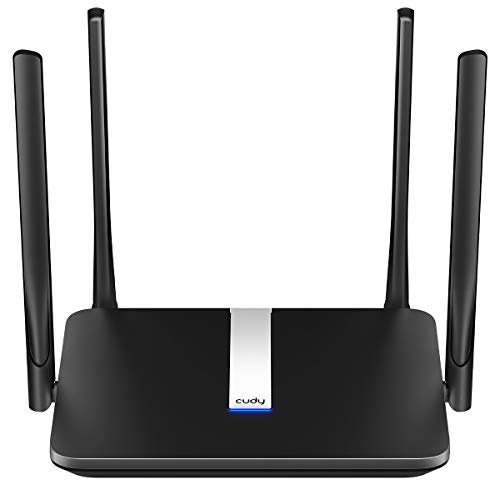
Cudy 4G AC1200 Router with SIM Slot (LT500) — The building’s 4G router
The Cudy LT500 is the fixed species in its straightforward form: a 4G router with a Nano SIM slot, dual-band Wi-Fi 5 at 867+300 Mbps per its title, four 100M ports, multiple VPN server and client support, and app plus cloud control. Its habitat is the property the fixed networks forgot — the rural house, the farm office, the small shop at the end of a failing copper line — where a 4G signal exists and a building needs ordinary internet: Wi-Fi in the rooms, Ethernet for the till or the desktop, and a router that behaves like a router rather than a phone accessory. The VPN server and client support in the title is a meaningful extra at this tier, letting a small site link to another or be reached securely from outside.
There is a small-business pattern worth picturing, because the LT500 fits it precisely: a café or workshop whose card terminal and booking system ride on a temperamental wired line keeps the Cudy on the shelf with a data SIM inside, doing nothing for months. The day the wired line dies mid-service, the business’s essential traffic has somewhere to go, and the four ports plus VPN support mean the till and the back-office machine can be moved onto cellular without a rewire of anyone’s habits. Insurance that requires no daily attention is the easiest kind to keep paying for, and a fixed 4G router at this class is exactly that shape of insurance.
Judge it inside its generation.
Wi-Fi 5 and 100M ports date the design: the ports cap wired devices at the same class of ceiling discussed elsewhere in this batch, and busy modern households will find AC1200 airtime finite. But the LT500’s brief is not a busy modern household chasing speed records; it is connectivity where the alternative is worse or nothing, and 4G delivered at these rates transforms a property that previously rationed its internet. Cloud and app control suit owners who manage a second property from a distance. As a failover for a small business whose main line is usually fine, it is equally rational: cheap insurance that sits quietly until the day it earns everything.
- Group: fixed cellular router (mains-powered, for buildings)
- Cellular: 4G LTE with Nano SIM slot
- Wi-Fi: Wi-Fi 5 dual-band, 867+300 Mbps per the title
- Ports: 4 × 100M ports, per the title — the wired ceiling to plan around
- Extras: multiple VPN server and client support; app and cloud control
Strengths
- Real router behaviour — ports, VPN roles, remote control — for properties without fixed broadband.
- Nano SIM freedom lets you choose and change the data carrier.
- App plus cloud control suits a property managed from somewhere else.
Trade-offs
- 100M ports cap every wired device below gigabit.
- Wi-Fi 5 airtime suits a modest household, not a device-packed one.
- 4G speeds depend entirely on the local signal at the building.
Best for: a rural home, small shop or site office needing whole-building internet from a 4G SIM. Not suited for: travel — with no battery and a building’s antenna expectations, the LT500 stays on its shelf while the pocket picks do the moving.
The Cudy LT500 listing shows the port and antenna layout for fixed installation.
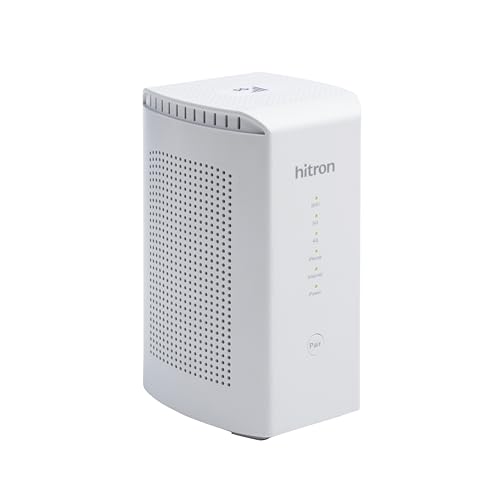
Hitron D60 5G Cellular Router — Fixed 5G with a failover story
Keep the D60 visually separate in your mind from the pocket pucks: it is a fixed 5G cellular router, an AX3000 Wi-Fi 6 device with mesh Wi-Fi capability, certified per its title with T-Mobile, AT&T and US Cellular, and carrying both a Nano SIM slot and eSIM — the pairing its title describes as dual failover capability. That phrase is the product’s thesis. A home or small business can run on one cellular path and fail over to the other, or pair the cellular connection against a wired service, so that a single carrier’s bad afternoon stops being an outage. For a household that works from home beyond the fibre map, or a business whose payment systems ride on connectivity, failover is not a luxury feature; it is the difference between an inconvenience and a closed sign.
The Wi-Fi 6 AX3000 class and mesh capability place it a full generation above the Cudy as a building’s network: enough for a family’s devices across real rooms, extensible if the property is large. Carrier certification named in the title matters practically — a certified device is the one the carrier’s support will discuss rather than dismiss. What the D60 is not is portable in any pocket sense, and its 5G dependence means the building’s local 5G quality is destiny: survey the signal at the property before committing, ideally at the router’s intended shelf, since indoor 5G varies by the metre.
- Group: fixed cellular router (mains-powered, for buildings) — not a pocket hotspot
- Cellular: 5G; certified with T-Mobile, AT&T and US Cellular per the title
- SIM model: Nano SIM plus eSIM, described in the title as dual failover capability
- Wi-Fi: Wi-Fi 6, AX3000 class, with mesh Wi-Fi capability
- Model: D60 5G, per the title
Strengths
- Dual SIM-path failover directly answers the single-carrier outage problem.
- Wi-Fi 6 with mesh capability covers a real building, not just a desk.
- Named carrier certification smooths activation and support conversations.
Trade-offs
- Fixed installation only; it will never ride in a jacket pocket.
- The building’s indoor 5G signal quality decides its ceiling.
- Failover across two cellular paths can mean two data plans to maintain.
Best for: a home or small business beyond good wired broadband that cannot afford connectivity gaps. Not suited for: travellers — the D60 is furniture-grade infrastructure, and the pocket picks below exist precisely because it cannot come along.
The Hitron D60 listing explains the dual failover arrangement in its own terms.

RoamWiFi Mobile Hotspot Pocket WiFi — The no-SIM, starter-data traveller
The RoamWiFi sells the removal of friction. Its title promises portable Wi-Fi with no SIM card needed, 4G LTE, a US 1GB data allowance for 30 days bundled in, 10 devices, more than 170 countries, and no contract. Understand the model exactly as titled: the device arrives able to connect, with a modest starter allowance — 1GB is orientation data, enough for maps, messages and email while you settle — and when it is used up, you buy further data through RoamWiFi’s own ecosystem to keep travelling. You are purchasing a service relationship with a device attached, and for the right traveller that is a feature: no carrier shops, no SIM trays, no local-language negotiations, just a puck that works in the next country too.
Who is it right for? The occasional international traveller whose alternative is airport chaos and roaming shock; the family that wants one simple internet answer for a two-week trip; the colleague you would never hand a settings menu to. There is also the gift-and-loan pattern, easy to overlook: a RoamWiFi can be posted to a relative, lent to a teenager on a school trip, or kept in a drawer for visiting family, and it works for each of them without transferring anyone’s carrier account or teaching anyone a settings page. Devices that travel between people, rather than belonging to one person’s carefully maintained setup, are a real category of travel gear, and the bundled model is the only one in this guide that serves it without friction. Who should pause? Heavy users, for whom 1GB is an afternoon and the maker’s ongoing data prices become the real cost of the device; and anyone travelling mainly at home, where an unlocked SIM puck on a domestic plan is the cheaper long-term shape. Ten devices is a family-sized ceiling, honestly stated. Judge the RoamWiFi as the convenience pick of this guide, priced in data rather than in hardware sophistication.
- Group: pocket hotspot (battery-powered)
- Cellular: 4G LTE, no SIM card needed per the title
- Data model: US 1GB data for 30 days bundled per the title; further data bought through the maker afterwards — plan heavy use around that
- Devices and reach: 10 devices; 170+ countries; no contract — all per the title
- Battery: the listing title does not state a battery-life figure for this model, so treat endurance as unverified and check the listing if a long day off-grid is planned
Strengths
- Works out of the box in a new country with zero carrier shopping.
- No contract and no SIM handling suit occasional, simple travel.
- A 170+ country claim is the widest reach figure in this guide.
Trade-offs
- The 1GB starter allowance is orientation-sized; ongoing data is the real expense.
- Ten devices caps a family plus a work laptop more quickly than expected.
- You are bound to the maker’s data ecosystem for the device’s life.
Best for: occasional international travellers who value a working connection over an optimised one. Not suited for: heavy daily data users — the bundled model means your ongoing data spend, not the hardware, becomes the bill that matters.
The RoamWiFi listing sets out the current data options beyond the starter allowance.

VELATEMOR 4G LTE Portable Hotspot — Your SIM, your rules, small puck
The VELATEMOR is the unlocked counterpoint to the RoamWiFi: a portable 4G LTE hotspot with a SIM card slot, no contract, a 300 Mbps figure in its title, a battery rated at 10 hours (2,100 mAh, USB-C charging) and connections for 10 devices. The proposition is control. Bring the SIM that suits the trip — a domestic data plan at home, a local SIM abroad, a carrier deal you already have — and the puck is merely the radio that shares it. For travellers who already think in carriers and coverage maps, that is the natural shape of the product, and USB-C charging means it drinks from the same cable as everything else in a modern bag.
The limits are the tier’s own. Ten devices and 4G LTE place it as a personal or couple’s device rather than a team hub; the 300 Mbps in the title is a class figure, and real 4G at a destination will decide what you actually see. A 2,100 mAh battery delivering a claimed 10 hours implies frugal radios — fine for messaging, maps and documents, less heroic under all-day video. And an unheralded brand asks the usual questions about app polish and longevity. None of that dents the core offer: unlocked, pocketable, honest about its numbers, and free of any data ecosystem but your own.
- Group: pocket hotspot (battery-powered)
- Cellular: 4G LTE, unlocked, with SIM card slot; no contract
- Title speed figure: 300 Mbps class, as stated in the title
- Battery: 10-hour claim with 2,100 mAh capacity and USB-C charging, per the title
- Devices: connects 10 devices, per the title
Strengths
- Unlocked SIM freedom keeps data costs in your hands entirely.
- USB-C charging matches the rest of a modern travel kit.
- A 10-hour battery claim covers a full travel day.
Trade-offs
- Ten devices is a personal ceiling, not a group one.
- 4G performance at the destination, not the title figure, sets real speeds.
- Brand support and app quality are less proven than NETGEAR’s.
Best for: a solo traveller or couple with a preferred carrier or a local-SIM habit. Not suited for: a work crew sharing one connection — the 10-device ceiling and personal-scale battery make the M7 the honest recommendation there.
Confirm your SIM’s size against the VELATEMOR listing before the trip, not at the airport.

4G LTE Mobile WiFi Hotspot Unlocked (Nano-SIM) — The crowd-sized pocket router
The generic entry in this group earns its place on one title claim the others do not make: connect up to 26 devices. This unlocked portable cellular router takes a Nano-SIM, describes itself as a mobile internet modem and hotspot device, and aims its title squarely at camping, road trips and remote hotspot duty. Twenty-six devices is a scout troop, a site cabin’s worth of phones, a family reunion in a rented house — the scenarios where the 10-device pucks run out of seats. If your travelling group is genuinely that large, the seat count is not a vanity figure; it is the whole purchase.
Picturing the group scenario clarifies why the seat count leads: a volunteer crew at a weekend event, a sports team’s parents and players in a rented hall, a works outing where the venue’s Wi-Fi is a rumour. In each case the alternative to a high-seat puck is a daisy chain of phone hotspots, each draining its owner and each capped lower. One Nano-SIM in one puck, carried by whoever organises the trip, replaces that tangle with a single password on a whiteboard. The organiser’s data plan becomes the group’s utility bill — which is exactly why the unlocked model suits this pick: the organiser can choose a plan sized for the event rather than inheriting a maker’s pricing.
Everything else about this pick demands the buyer’s own diligence, because the title is terse.
It states no battery capacity, no speed class and no country count, and this guide will not invent them: check the listing for endurance and band details before trusting it with a long off-grid day, and confirm its bands suit your carrier and destinations. The generic branding also means support is a question to weigh — for a device bought to serve a crowd on a specific trip, that may be an acceptable trade; for a two-year daily companion, less so. Within its stated claim, though, it fills a real gap in this list: group-sized pocket connectivity on your own Nano-SIM.
- Group: pocket hotspot (battery-powered)
- Cellular: 4G LTE, unlocked, Nano-SIM slot
- Devices: up to 26 devices, per the title — the largest pocket count in this guide
- Stated uses in the title: camping, road trips and remote hotspot work
- Battery and speed figures: the listing title states neither a battery capacity nor a speed class for this model — verify both on the listing before planning a long day around it
Strengths
- A 26-device ceiling serves groups the 10-device pucks cannot seat.
- Unlocked Nano-SIM keeps the data plan your own choice.
- Its title aims at exactly the camping and road-trip briefs it suits.
Trade-offs
- Battery and speed details are absent from the title and must be verified.
- Generic branding means support depth is an open question.
- Twenty-six devices share one 4G feed — seats are not the same as speed per seat.
Best for: group travel — camps, crews and big family trips — on your own data SIM. Battery endurance stays unproven on this one — the title promises 26 connected devices yet prints no hour figure, unlike the stated 10-hour claims elsewhere here.
The generic hotspot listing is where its battery and band details must be confirmed.
When a Cellular Router Is the Only Broadband a Building Can Get
Step back from travel for a moment, because the fixed half of this guide serves a quieter, larger story: the properties the wired networks never reached well. For a rural household, a farm, a workshop at the end of a lane, the choice is often not between cellular and fibre but between cellular and a copper line so degraded it barely deserves the name broadband. In that contest, a fixed cellular router with proper antennas — placed high, aimed by trial at the serving mast, sometimes paired with the household’s patience through one evening of repositioning — delivers a transformation out of proportion to its specification sheet. Video calls become possible; a child’s homework stops being a negotiation; a small business at the property can take card payments without dread.
The two fixed picks divide that story by generation and ambition. The Cudy LT500 is the pragmatic instrument: 4G, Wi-Fi 5, four ports, VPN support for the site-to-site trick, app and cloud control for the owner who lives elsewhere part of the year. The Hitron D60 is the commitment: 5G where the signal allows, Wi-Fi 6 for the house’s devices, mesh capability for larger properties, and the dual failover arrangement for households whose income now depends on the connection staying up. Both ask the same preliminary of the buyer — survey the signal at the property first, on the carriers available, at the shelf where the router will live. A weekend of testing with borrowed phones on different networks is the cheapest research in this entire category, and it decides which of these two boxes, if either, deserves the shelf.
All Six at a Glance: Bag Versus Building
| Pick | Group | Cellular | Data model | Title’s headline number |
|---|---|---|---|---|
| NETGEAR Nighthawk M7 | 5G | eSIM, unlocked | 32 devices, 140 countries, 10 hr battery | |
| Cudy LT500 | Fixed | 4G | Your Nano SIM | 867+300 Mbps Wi-Fi 5, four ports |
| Hitron D60 | Fixed | 5G | Nano SIM + eSIM failover | AX3000 Wi-Fi 6, three carriers certified |
| RoamWiFi | 4G | Bundled: US 1GB/30 days to start | 170+ countries, 10 devices | |
| VELATEMOR | 4G | Your SIM, unlocked | 10 hr battery, 10 devices | |
| Generic Nano-SIM hotspot | 4G | Your Nano SIM, unlocked | Up to 26 devices |
The data-model column is the one with a running cost attached, so read it as carefully as the hardware columns. Hardware is bought once; a data model is rented forever, and the cheapest puck with the wrong model outspends the flagship within a season of heavy travel. The group column, meanwhile, is the one with a lifestyle attached — it decides whether the device lives in a drawer of travel gear or on a shelf of household infrastructure, and confusing the two is how good devices end up blamed for jobs they never auditioned for.
How Do You Set Up a Cellular Failover for a Home or Small Business?
Begin by deciding what failover must protect, because “everything” is rarely the honest answer. The card machine, the work laptop and the tills need continuity; the smart television can wait for the engineer. With the protected list written down, place the cellular router — the Hitron D60 is this guide’s purpose-built candidate, with its Nano SIM and eSIM described as dual failover — where its signal is strongest, which usually means high and near a window on the side of the building facing the mast, not in the cupboard where the old router lived. Signal at the shelf is destiny for the fixed species.
Then test the failure, not the brochure. With everything running, pull the main line and watch what the protected devices do: do they reconnect within a tolerable pause, do calls drop or survive, does the payment terminal find its way back? Rehearse at a quiet hour, fix what the rehearsal exposes, and repeat it after any change of plan or provider. A failover that has never been rehearsed is a hope with an antenna — the same lesson the home-VPN section of our remote-work guide teaches, applied to buildings instead of laptops. Keep a written note of the rehearsal’s results beside the router: which devices recovered on their own, which needed a nudge, and how long the whole switch took. On the real outage day, that note is the difference between a procedure and an improvisation, and it takes four lines to write while the memory is fresh.
What Happens When There Is No Signal at All?
Every device in this guide shares one absolute limit: no cellular coverage, no internet, and no specification in any title changes that. Dead zones are rarer than they were, but they persist in valleys, in thick-walled basements, on stretches of rail line and in the interiors of large metal buildings — sometimes, awkwardly, in exactly the rural properties the fixed species serves. The mature response is to survey before you commit: coverage maps flatter reality, while a phone on the intended carrier, held at the intended shelf or campsite, tells the truth in an afternoon. For fixed installations, an external antenna position — higher, nearer a window, on the mast-facing side — can rescue a marginal property, which is one more reason the fixed routers’ placement earns the attention the failover section gives it.
Coverage also fluctuates across a week in ways one afternoon’s test conceals. A mast serving a village comfortably on Tuesday morning may labour on Friday evening, when every household streams at once. Repeat borrowed-handset checks on separate days, including one busy evening, and make the final reading in the room where the router will actually live.
For travellers, the dead zone argues for redundancy of a humbler kind: download the maps, the documents and the evening’s entertainment while coverage is good, and let the hotspot be a convenience rather than a single point of failure for the whole trip. The travellers who suffer least from dead zones are the ones whose plans assumed one would appear. No puck in this list — not even the flagship — repeals geography, and a guide that pretended otherwise would be selling the same optimism as the coverage maps.
Where Do Buyers Go Wrong With Hotspot Routers?
Buying a pocket puck as a home router. A battery device with a 10-device ceiling cannot be a building’s internet. The fixed species exists — the Cudy and the Hitron — because buildings need ports, antennas and mains power.
Misreading bundled data as free data. The RoamWiFi’s US 1GB/30-day starter is an orientation allowance. Heavy users should price the maker’s ongoing data before falling for the hardware’s simplicity.
Counting devices by people. A family of four travels with nine connected things. Match the pick’s title count — 10, 26 or 32 — against devices, not heads.
Assuming 5G on the map means 5G at the shelf. Indoor cellular signal varies by the metre. Survey the exact spot, ideally with a phone on the same carrier, before installing a fixed cellular router around it.
Forgetting the SIM size. Nano SIM is the common thread in this guide’s fixed and generic picks, but a drawer full of older, larger SIMs helps nobody at setup time. Check what your plan issues before the device arrives.
Final Recommendation
Split your decision by species first. For a building, the Hitron D60 is the modern answer — 5G, Wi-Fi 6, certified carriers and a failover story written into its title — while the Cudy LT500 serves the 4G-only property or the small business buying quiet insurance. Whichever fixed box you choose, spend the first weekend on placement and a failover rehearsal rather than on admiration: cellular infrastructure earns its keep on the bad day, and the bad day does not schedule itself around your convenience. The same patience applied to a pocket pick — one trip run deliberately, with data habits set to metered and the battery’s real behaviour observed — turns a gadget into a known tool before the journey that actually depends on it. For the bag, the Nighthawk M7 is the flagship professionals will not outgrow, the RoamWiFi is the convenience pick whose bundled-data model suits occasional international trips, the VELATEMOR hands data control to the traveller with a SIM habit, and the generic Nano-SIM puck seats the crowd. The thread connecting all six: in this category you are never only buying a radio — you are choosing a data relationship and a place for the device to live. Choose those two things honestly, and the hardware choice makes itself.
Frequently Asked Questions
Can a pocket hotspot replace home broadband?
For one light user in a small space, sometimes; for a household, no. Pocket devices carry battery limits, device ceilings of 10 to 32 and no Ethernet for the devices that anchor a home. A building that needs cellular internet should use the fixed species — the Hitron D60 or Cudy LT500 — which are designed to be a property’s router rather than a traveller’s companion.
How does the RoamWiFi work without a SIM card?
Per its title, it needs no SIM card because the data comes through the maker’s own service: a US 1GB allowance for 30 days is bundled to start, usable across the 170+ countries claimed, and further data is bought through RoamWiFi when the starter runs out. The convenience is real; so is the ongoing relationship — your data spend flows through the maker for the device’s life.
What is dual failover on the Hitron D60?
The title describes the D60’s Nano SIM and eSIM as providing dual failover capability: two cellular identity paths in one fixed router, so the connection can fall back from one to the other if a carrier path fails. For a home business, that is the difference between an automatic stumble and a full outage — provided both paths carry active data arrangements.
How many devices can a travel hotspot really handle?
Only as many as its title claims and your data allows: 10 for the RoamWiFi and VELATEMOR, up to 26 for the generic Nano-SIM puck, 32 for the Nighthawk M7. Remember that seats share one cellular feed — twenty-six devices on 4G divide the same stream — so group travel should plan per-person expectations accordingly.
Is an unlocked hotspot always better than a bundled-data one?
Not always. Unlocked wins on data price and carrier freedom; bundled wins on arriving in a new country with a connection that simply works, no shopping or setup. Frequent, confident travellers extract more from unlocked devices like the VELATEMOR; occasional travellers often get better value from the RoamWiFi’s certainty, even at the maker’s data prices. The honest way to compare is across a year of your actual travel: price the trips you really take under both models — your own plans in an unlocked puck against the maker’s data in a bundled one — and let that arithmetic, rather than the hardware shelf, settle the argument.
Do I need a separate data plan for a SIM hotspot?
Yes — an unlocked device like the VELATEMOR or the generic Nano-SIM puck is a radio waiting for a plan, and the SIM you insert brings the data with it. That separation is the model’s virtue: shop carriers, use a plan you already have where its terms allow, or buy local data at the destination. The RoamWiFi is the exception in this guide, bundling its starter data and selling more through its own service instead.
How can I tell whether a SIM or device is locked before travelling?
Start by separating two different restrictions that travellers often blur together. A locked device refuses other carriers’ SIMs entirely, whatever plan you buy, whereas an unlocked device may still be limited by the plan itself — some tariffs exclude router use or throttle tethered traffic once a threshold passes. Test the exact combination at home before departure: insert the intended SIM, let every travelling device join, and browse long enough for any plan restriction to reveal itself. If the pairing misbehaves on your own doorstep, it will not improve at a foreign airport, and changing either the SIM or the plan is still cheap at that stage.
Related Guides
Once the trip kit is sorted, the home network awaits in the best routers to handle bufferbloat, the best WiFi 6E mesh routers and the best routers for multifloor homes.


