What's inside
- Where to Buy
- Key Takeaways
- Quick Picks
- How We Chose These Picks
- Comparison
- How to Choose a 27-Inch Curved Monitor
- Is 1080p or QHD the Right Grid for a 27-Inch Curve?
- How Much Refresh Rate Can Your Graphics Card Really Feed?
- Why Do Some Titles Print Two Different Refresh Rates?
- How Should You Set Up a 27-Inch Curved Gaming Desk?
- What Happens When a Curved Gaming Monitor Becomes the Family Screen?
- Should You Wall-Mount a 27-Inch Curved Monitor?
- Common Mistakes When Buying a 27-Inch Curved Monitor
- Final Recommendation
- Frequently Asked Questions
- Related Guides
As an Amazon Associate I earn from qualifying purchases. This post may contain affiliate links at no extra cost to you.
widgetverdict.com is reader-supported. When you buy through links on our site, we may earn an affiliate commission.
Where to Buy
Each of the six screens below links to its own Amazon listing. The SANSUI 27-inch 240Hz leads on speed, so open its page to see the current price on Amazon. QHD shoppers should pull up the LG UltraGear 27GS60QC-B listing, and anyone comparing raw frame rates will want the AOC C27G4H2 page beside it. The Sceptre Prime Gaming and the Sceptre 100Hz cover the four-input desk and the value desk respectively — Amazon shows today’s figure for both. The SANSUI 27-inch 160Hz closes the list; verify its price on the listing before deciding how much the faster SANSUI models are worth to you.
The best 27 inch curved monitors occupy the sweet spot where a bend stops being a showroom trick and becomes ordinary desk furniture. At this size a curved panel is close enough that the arc genuinely wraps the edges of your vision, yet small enough to share a desk with a laptop, a lamp and a life. Six screens made this guide, and they divide into two honest camps: five Full HD gaming panels chasing refresh rate, and one QHD LG that trades some speed for a finer picture and the tightest curve in the group.
Refresh rate is the loud number in this category, so read the titles the way this guide read them. Two SANSUI models print layered figures — 240Hz with up to 280Hz on one, 160Hz alongside 144Hz on the other — and layered figures describe ceilings reached under particular settings, not the rate waiting at first switch-on. The AOC prints a clean 200Hz, the LG a clean 180Hz, the two Sceptres 180Hz and 100Hz. Every review below repeats its title’s wording exactly, because the difference between a ceiling and a default is the difference between a specification and an advertisement.
Panel honesty matters here too. Curved 27-inch gaming screens are a VA heartland, yet only the AOC prints VA in its title; the others stay silent, and their spec boxes say so. Nobody should order from this page believing they have bought an IPS panel. Readers who need IPS confirmed in writing will find the three titles that actually claim it gathered in the curved IPS guide linked at the end, presented separately from the VA flagships people cross-shop against them.
Key Takeaways
- The LG UltraGear 27GS60QC-B is the only QHD pick: 2560 x 1440 at 180Hz on a very tight 1000R curve.
- The fastest title belongs to the SANSUI 240Hz model, which also prints an up-to-280Hz ceiling — read it as a ceiling, not a default.
- Five of six picks bend at 1500R; the AOC’s title never states a radius, and its spec box records that silence.
- Only the Sceptre 100Hz model and the Sceptre Prime carry built-in speakers claims across the whole group — check each title, because the SANSUIs and the LG do not mention audio.
- The AOC C27G4H2 is the console-ready pick: HDMI 2.0, an earphone output, VESA mounting and a stated 3-year warranty.
Quick Picks
| Pick | Badge | Why it earns a place |
|---|---|---|
| SANSUI 27 Inch Curved 240Hz Gaming Monitor | Highest ceiling | 240Hz with an up-to-280Hz figure, 130% sRGB and a 4000:1 contrast claim at 1080p. |
| LG UltraGear 27GS60QC-B | The QHD outlier | 2560 x 1440, 180Hz and a 1000R curve with certified AdaptiveSync. |
| AOC C27G4H2 27 Inch Curved Gaming Monitor | Console-ready VA | 200Hz, a stated VA panel, 0.3ms claim, VESA mount and a 3-year warranty. |
| Sceptre Curved 27-inch Prime Gaming Monitor | Four inputs, full speed | 180Hz printed beside both DisplayPort x2 and HDMI x2, plus built-in speakers. |
| Sceptre Curved 27-inch Gaming Monitor 100Hz | Complete value package | 1080p, 98% sRGB, VGA for older machines, VESA wall mount and speakers. |
| SANSUI 27 Inch Curved 160Hz Gaming Monitor | Calmer SANSUI | 160Hz with FPS/RTS modes, 4000:1 contrast and 110% sRGB at 1080p. |
How We Chose These Picks
Twenty-seven inches is the most contested size in curved monitors, so the first filter was duplication: this guide refused to list the same screen twice in different hats. What survived is a spread of genuinely different propositions — two SANSUIs separated by a real speed gap, two Sceptres separated by inputs and intent, an AOC aimed at console desks, and an LG that rejects the group’s Full HD consensus entirely. A buyer reading all six reviews should finish able to name which trade they personally accept.
Title verification did the heavy work after that. Each candidate’s listing title was read as a contract: figures printed there are quoted, figures absent there are recorded as absent. That rule produced this guide’s most useful sentences. The AOC’s unstated curve radius, the Sceptre Prime’s unstated resolution, the near-total silence on speakers across the SANSUI line — none of these are secrets, they are simply facts that marketing layouts prefer you not to notice, and a buying guide earns its keep by noticing them in print.
Refresh rate was weighed against feedability. A 240Hz or 280Hz ceiling is a promise made to a graphics card, and the guide favoured screens whose rates a plausible machine can reach at the panel’s native resolution. That is why Full HD dominates here without apology: at 1080p, mid-range hardware holds very high frame rates in competitive titles, and a rate you can feed beats a finer grid you cannot. The LG is the deliberate exception, present for readers whose games are prettier and slower and whose workdays are made of text.
A last principle governed the badges: no pick was allowed to win on a number its title hedges. Where a title layers two rates, the badge and the review discuss both and name the lower as the working figure. Where a title prints one clean number, the review takes it at face value. Readers deserve to know which kind of claim they are standing on before they stand on it with money.

SANSUI 27 Inch Curved 240Hz Gaming Monitor — Highest ceiling
SANSUI’s flagship 27-inch curve writes its ambition in two numbers: 240Hz as the headline rate, and up to 280Hz as the ceiling the title also prints. Treat those as a staircase rather than a contradiction — the panel is a 240Hz screen with headroom under the right settings — and the supporting figures in the title back the ambition up. The grid is FHD 1080P, the bend is 1500R, response is quoted as MPRT 1ms, and the colour and contrast claims are the strongest in this guide’s Full HD camp: 130% sRGB coverage and a 4000:1 contrast ratio, with HDR and FreeSync both named.
Those supporting figures matter because speed alone ages badly. A 4000:1 contrast claim, if the panel honours it, gives dark game scenes the depth that fast VA screens sometimes flatten, and the wide sRGB percentage keeps streamed content and everyday media looking saturated rather than washed. Low Blue Light appears in the title for the hours between matches. The stand is metal, a small but real upgrade in a class where plastic feet wobble through every desk bump, and the inputs are the expected HDMI and DisplayPort pair.
Who it suits is precise: the competitive player whose rig can actually hold frame rates in the mid-two-hundreds at 1080p, playing titles where motion clarity is a competitive input rather than a visual luxury. That player will feel the difference between this screen and the 160Hz SANSUI below within one session. A player on older hardware will not, because the card becomes the ceiling long before the panel does — and for that buyer the calmer SANSUI further down this page is the same brand’s own confession.
Two listing-page checks belong with this model. The title does not mention speakers, so audio arrangements are yours to make, and it does not name a VESA pattern, so arm buyers should confirm mounting before ordering. Neither silence is unusual at this tier; both are cheaper to discover now than at unboxing, when the screen is on the desk and the match is in an hour.
- Size and resolution: 27 inches, FHD 1080P
- Curve radius: 1500R
- Refresh rate: 240Hz, up to 280Hz (per listing title)
- Response: MPRT 1ms
- Colour and contrast: 130% sRGB, 4000:1
- Sync and HDR: FreeSync, HDR
- Inputs and stand: HDMI, DP ports, metal stand
- Panel type: Not stated in the listing title — verify with the manufacturer documentation
Strengths
- The highest refresh ceiling of any 27-inch pick here.
- 130% sRGB and 4000:1 contrast claims lead the Full HD group.
- A metal stand steadies a screen built for fast mouse work.
Trade-offs
- The 280Hz figure is an up-to ceiling, not the headline rate.
- Feeding 240Hz at 1080p still demands a capable graphics card.
- Speakers are not mentioned in the listing title.
Best for: competitive players with hardware that holds very high frame rates at 1080p. Not suited for: a quiet mixed-use desk that needs built-in audio, because this title claims no speakers at all.
Daily life with a flagship-rate screen has a texture worth describing. Menus and lobbies render at whatever the card gives them, and the panel simply waits, unbothered, for the match to load; once play starts, pans across a map stop smearing into suggestions of terrain and stay legible as terrain. That legibility is the actual product. Players describe it as smoothness, but what they are buying is information — the target that stayed readable mid-turn, the doorway that resolved a half-second earlier. A screen like this one does not make anyone faster; it stops the display from being the reason they were slow to see.

LG UltraGear 27GS60QC-B — The QHD outlier
Every other screen in this guide accepts Full HD as the price of speed. The LG UltraGear 27GS60QC-B declines the bargain. Its panel runs 2560 x 1440 — roughly seventy percent more pixels than 1080p — at 180Hz with a 1ms claim and HDR10, wrapped in a 1000R curve that is the tightest bend in this entire line-up. That radius deserves respect: 1000R at 27 inches wraps hard, filling peripheral vision in racing and flight titles, and it will show spreadsheet lines their most pronounced bow of any pick here. Gamers will call it immersion; accountants should test it with their own files during the return window.
The supporting specification is unusually adult for a gaming line. VESA Certified AdaptiveSync is named alongside AMD FreeSync, Dynamic Action Sync appears in the title, and the inputs are HDMI and DisplayPort with a tilt stand. The QHD grid transforms the workday half of this screen’s life: text at 27 inches becomes genuinely fine, two windows sit side by side without the squinting that 1080p imposes, and photo work stops being an exercise in zooming. No other pick in this guide can make that paragraph true.
The exchange rate is feedability. Driving 2560 x 1440 at high frame rates asks substantially more of a graphics card than 1080p does, and owners of modest hardware will watch their rates settle far below the 180Hz ceiling in demanding titles — still smooth, still prettier, but not the number on the box. Buyers should choose this LG for the picture they will look at all day and treat the refresh ceiling as headroom their next graphics card can grow into.
Suits the hybrid desk best: work that is text, evenings that are games with scenery. It is the only pick here a writer, coder or analyst can choose without accepting a coarse grid as the toll, and the only one whose curve asks a real question in return. Answer the 1000R question honestly — sit centred, play fast games, forgive a bowed spreadsheet rule — and this is the most complete 27-inch curved monitor in the guide.
- Size and resolution: 27 inches, QHD 2560 x 1440
- Curve radius: 1000R
- Refresh rate: 180Hz
- Response: 1ms
- HDR: HDR10
- Sync: AMD FreeSync, VESA Certified AdaptiveSync, Dynamic Action Sync
- Inputs and stand: HDMI, DisplayPort, tilt stand
- Panel type: Not stated in the listing title — verify with the manufacturer documentation
Strengths
- QHD resolution makes text and detail visibly finer than every rival here.
- The 1000R curve delivers the strongest wrap in the group.
- Certified AdaptiveSync is named outright in the title.
Trade-offs
- QHD at high rates demands a stronger graphics card than 1080p.
- The tight bend bows straight lines more than any other pick.
- Tilt is the only stand adjustment named in the title.
Best for: players who also read and write at the same desk all day. Not suited for: a spreadsheet auditor whose work is long straight rules, because the 1000R bend will bow them more than any other screen here.
Ownership of the LG asks one habit change: sit where the curve expects you. A 1000R panel is drawn for a viewer at roughly a metre, centred, and it rewards that discipline with a field that feels larger than 27 inches — the corners arrive in peripheral vision instead of demanding glances. Drift off-centre, share the screen, or perch it beside a bed, and the geometry starts arguing back. Desks that can guarantee the seat get the best version of this monitor; desks that cannot should take the hint the radius is giving and choose from the gentler 1500R group, where position is a preference rather than a requirement.

AOC C27G4H2 27 Inch Curved Gaming Monitor — Console-ready VA
AOC’s C27G4H2 is the pick that tells you the most about itself. Its title states the panel type — VA, printed plainly, the only title in this guide that does — along with FHD resolution at 1920×1080, a 200Hz refresh rate, a 0.3ms response claim and HDR support. Around those numbers sits a feature set aimed squarely at the console-and-PC desk: Adaptive-Sync, DisplayPort 1.4, HDMI 2.0, an earphone output for headsets, VESA mounting, an explicit Console Ready label and a 3-year warranty, the longest commitment any manufacturer makes on this page.
The console readiness is more than a sticker. HDMI 2.0 is the port generation that lets current consoles feed high-refresh 1080p to a monitor, and the earphone output solves the nightly problem of console audio without a receiver or a soundbar. A screen that accepts a PC on DisplayPort and a console on HDMI, then hands the sound to whatever headset is charged, is a screen designed by people who have watched how gaming desks actually accumulate hardware.
One silence must be printed in the open: the title never states a curve radius. The monitor is curved — it sits in this guide on that basis — but the tightness of its bend is a listing-page fact, not a title fact, and the spec box below records it with the standard wording. Buyers for whom the difference between 1000R, 1500R and 1800R is a deciding argument should confirm the figure against the C27G4H2 model code before ordering, and should weigh how much the rest of this unusually complete title compensates for the one number it withholds.
Suits the two-machine gaming desk best, and the buyer who keeps hardware long enough for a 3-year warranty to mean something. The 200Hz rate sits in the group’s honest middle — faster than the Sceptres’ mainstream figures, short of the SANSUI flagship’s ceiling — and the VA panel’s stated identity removes the guesswork that shadows its rivals. For shoppers tired of decoding titles, this review is the shortest argument in the guide: AOC printed nearly everything, and what it printed is good.
- Size and resolution: 27 inches, FHD 1920×1080
- Panel type: VA (stated in the listing title)
- Refresh rate: 200Hz
- Response: 0.3ms (per listing title)
- Sync and HDR: Adaptive-Sync, HDR
- Inputs: DP 1.4, HDMI 2.0, earphone out
- Mounting: VESA mount
- Warranty: 3-year warranty
- Curve radius: Not stated in the listing title — verify with the manufacturer documentation
Strengths
- The panel type is stated outright — VA, no guessing.
- HDMI 2.0 plus earphone out make console hookup genuinely simple.
- A stated 3-year warranty outlasts every rival’s printed commitment.
Trade-offs
- The title prints no curve radius.
- 200Hz trails the flagship SANSUI’s ceiling for pure speed hunters.
- Speakers are not mentioned in the listing title.
Best for: a desk where a console and a PC share one screen every evening. Not suited for: a buyer who ranks screens by curve radius first, since this title leaves its radius for the listing page to confirm.
Warranty length is a personality test for manufacturers, and AOC’s three years say the company expects this panel to be kept. That expectation aligns with how console desks evolve: the screen stays while consoles, headsets and PCs rotate around it. A buyer planning that kind of tenure should also appreciate the earphone output’s quiet mercy at midnight, the VESA mount’s freedom to float the panel over a crowded desk, and a title complete enough that the purchase needs no archaeology later. When a support question arises in year two, the model code and the printed specification are all in one place — the listing that sold it.

Sceptre Curved 27-inch Prime Gaming Monitor — Four inputs, full speed
The Sceptre Prime’s title makes a promise most gaming monitors quietly avoid: 180Hz, printed twice, once beside DisplayPort x2 and once beside HDMI x2. Four video inputs, all fast. That symmetry dismantles the usual compromise in which the console or the laptop gets the slow port, and it turns this screen into the natural hub of a crowded desk — desktop on one DisplayPort, console on one HDMI, work laptop or streaming stick on the remainder, switched from the panel’s own menu with no cable ever leaving its socket.
Around the inputs, the specification is gaming-standard and honestly labelled: a 1500R curve, a 1ms claim, built-in speakers, and a Machine Black finish in the C275B-FW180T series, dated 2027 in the title — Sceptre’s model-year labelling runs ahead of the calendar, and the series code is again the string to match at checkout, because this brand’s 27-inch curved family contains several near-identical names with meaningfully different port counts.
The title’s silence is the review’s duty to report. Resolution is not printed for this model, and neither is any sync technology, colour figure or panel type. A disciplined buyer therefore treats the Prime as a fast, input-rich curved screen whose panel particulars live on the listing page, and confirms three facts there before ordering: native resolution, sync support, and stand adjustment. If those answers satisfy, the combination on offer — full speed on every input family, speakers included — is genuinely scarce at this tier of the market.
Suits the multi-device room: the bedroom or small flat where one screen serves the PC, the console, the laptop and the stick, and where built-in speakers spare the shelf a soundbar. Shared-screen households should note the 1500R bend is a centred-seat geometry, and text workers should weigh the unstated resolution carefully — the LG above prints its grid in the title, and for a reading-heavy desk that printed certainty may be worth more than four fast ports.
- Size: 27 inches, curved
- Curve radius: 1500R
- Refresh rate: 180Hz via DisplayPort x2 and HDMI x2
- Response: 1ms (per listing title)
- Audio: built-in speakers
- Series: C275B-FW180T, Machine Black
- Resolution: Not stated in the listing title — verify with the manufacturer documentation
- Panel type: Not stated in the listing title — verify with the manufacturer documentation
Strengths
- Full 180Hz is claimed on HDMI as well as DisplayPort.
- Four inputs end cable-swapping on multi-device desks.
- Speakers are built in, keeping a compact setup compact.
Trade-offs
- Resolution is not stated in the listing title.
- Sync technology goes unnamed in the title.
- The strong 1500R bend suits a centred seat, not shared viewing.
Best for: one screen wired to a PC, a console and a laptop at the same time. Not suited for: a buyer who needs the native resolution confirmed in the title before purchase, because Sceptre leaves that figure to the listing page.
Think of the Prime as infrastructure rather than a panel. Rooms accumulate screens’ worth of devices faster than they accumulate screens, and the bottleneck is rarely picture quality — it is sockets, switching and the nightly archaeology of which cable went where. Four fast inputs dissolve that bottleneck for years at a time, which is a different kind of longevity from a warranty: the monitor stays because removing it would inconvenience everything plugged into it. Buyers who recognise their room in that description should weight the port count as heavily as any figure in this guide, and buyers with a single PC and no console ambitions can safely let the simpler titles fight for their money instead.
Sceptre Curved 27-inch Gaming Monitor 100Hz — Complete value package
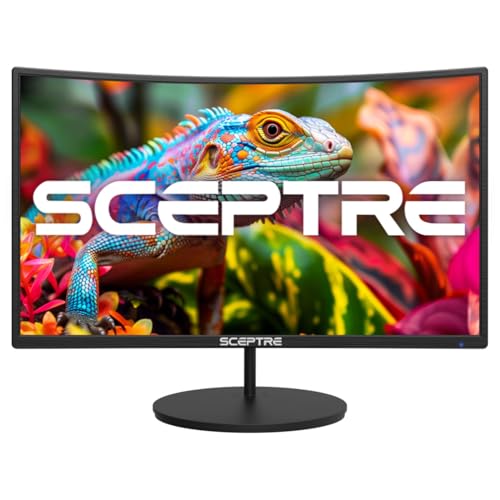
Not every 27-inch curve is bought for a frame rate, and this Sceptre is the guide’s reminder. Its title promises 100Hz at 1080p on an R1500 bend with 98% sRGB coverage — a calm, complete specification — and then adds the practical furniture of a household screen: two HDMI inputs, a VGA port for the machine that refuses to retire, built-in speakers, and VESA wall mounting confirmed in print. It is the only pick here that can be lifted onto an arm or a wall bracket on the title’s own authority, which on a small desk returns the stand’s entire footprint to the keyboard.
The 100Hz figure deserves defence rather than apology. The step from a 60Hz office panel to 100Hz is the single most felt upgrade in everyday computing — scrolling smooths, windows stop smearing, casual games gain a fluidity their players notice within the hour — and it asks nothing heroic of the computer driving it. Owners of ordinary laptops and ageing desktops will actually receive the rate printed on this box, which is more than the flagship ceilings above can promise every buyer.
The series code is C275W-1920RN, labelled 2026 in the title, and it is close kin to the C275W in our wider curved-monitors guide — same family name, different model year and specification, which is precisely why the full code matters at checkout. Sceptre’s catalogue rewards readers and punishes skimmers, and this is the pick where the punishment would sting most, because its whole appeal is the exact completeness of this particular variant.
Suits the mixed household desk best: schoolwork and spreadsheets by day, streaming and lighter games by night, an old PC kept in service through the VGA socket, and a wall mount waiting if the desk shrinks. Competitive players should keep scrolling toward the SANSUIs — 100Hz is a comfort rate, not a competitive one — but buyers whose evenings are films and whose mornings are documents will find this the most honestly matched screen in the guide.
- Size and resolution: 27 inches, 1080p
- Curve radius: R1500
- Refresh rate: 100Hz
- Colour: 98% sRGB
- Inputs: HDMI x2, VGA
- Mounting and audio: VESA wall mount, built-in speakers
- Series: C275W-1920RN, Machine Black
- Panel type: Not stated in the listing title — verify with the manufacturer documentation
Strengths
- VESA wall mounting is confirmed in the title itself.
- HDMI x2 plus VGA covers three generations of hardware at once.
- 100Hz is a rate ordinary computers can genuinely deliver.
Trade-offs
- 100Hz is a comfort ceiling, not a competitive one.
- 1080p at 27 inches stays coarse for fine text at close range.
- The title names no sync technology.
Best for: a family or study desk that mixes documents, streaming and light gaming. Not suited for: competitive players, for whom 100Hz leaves the SANSUI and AOC rates on the table.
There is a household negotiation embedded in this specification, and it is worth naming. A screen with speakers, a VGA socket and a wall mount can be explained to anyone sharing the budget: it serves the old computer, it needs no extra purchases, it can leave the desk entirely if space gets tight. Gaming flagships cannot make that speech. For buyers whose monitor must justify itself to a family rather than to a frame counter, the 100Hz Sceptre’s completeness is not a compromise position — it is the strongest argument in the room, and its gentle demands on the computer mean the whole household’s hardware can drive it at its best.

SANSUI 27 Inch Curved 160Hz Gaming Monitor — Calmer SANSUI
The second SANSUI in this guide is the first one’s wiser sibling. Its title layers 160Hz over a 144Hz figure — read the pair as a ceiling and a standard rate — on the same 1500R curve and FHD 1080P grid, and then spends its remaining words on the qualities a long ownership actually feels: a 4000:1 contrast ratio, 110% sRGB coverage, HDR, FreeSync, MPRT 1ms response, low blue light, and FPS/RTS picture modes tuned for the two genres its buyers most likely play. The metal-stand seriousness of the flagship is absent from this title, but the panel’s own numbers remain substantial.
Positioned honestly, this is the rate most 1080p gaming rigs can feed all evening. A mid-range graphics card that would wheeze at 240Hz holds 144Hz to 160Hz in competitive titles without turning settings into a negotiation, and the difference between a ceiling you reach nightly and one you visit in menus is the difference between a specification and a souvenir. Buyers cross-shopping the two SANSUIs should price their own hardware before pricing the screens: the flagship’s extra hertz are real only where a card exists to mint them.
The supporting cast is complete for the tier. HDMI and DP ports cover PC and console, the FPS/RTS modes give the two big competitive genres a preset each, and low blue light acknowledges that gaming desks double as homework desks more often than either industry admits. The title names no speakers and no VESA pattern, so both join the listing-page checklist, and the spec box keeps those silences in view.
Suits the mainstream gaming desk best — the player whose machine is good rather than flagship, whose genres are shooters and strategy, and whose budget would rather fund the next graphics card than a refresh ceiling it cannot use. In a guide full of ceilings, this SANSUI is the pick that respects the floor, and a great many readers will be happier on it than on the faster screen they were about to buy.
- Size and resolution: 27 inches, FHD 1080P
- Curve radius: 1500R
- Refresh rate: 160Hz / 144Hz (per listing title)
- Response: MPRT 1ms
- Colour and contrast: 110% sRGB, 4000:1
- Sync and modes: FreeSync, HDR, FPS/RTS modes
- Inputs: HDMI, DP ports
- Panel type: Not stated in the listing title — verify with the manufacturer documentation
Strengths
- A rate mainstream graphics cards can actually sustain at 1080p.
- 4000:1 contrast and 110% sRGB claims are strong for the tier.
- FPS and RTS presets speak to the genres its buyers play.
Trade-offs
- The dual 160Hz/144Hz wording needs a careful read.
- Speakers are not mentioned in the listing title.
- Mounting is not mentioned in the listing title.
Best for: mainstream gaming rigs that play shooters and strategy titles nightly. Not suited for: a desk that needs confirmed wall mounting or built-in audio from the title alone, since this listing states neither.
Second-desk futures favour this SANSUI as well. When a faster screen eventually takes the main position, a 160Hz curved panel with strong contrast claims becomes a luxurious second monitor — the one that holds the race, the stream or the second account — and its undemanding resolution means even an older machine can drive it well in that role. Purchases that retire gracefully are worth a premium in planning if not in price, and the mainstream SANSUI’s balance of rate, contrast and restraint gives it more graceful retirements available than a ceiling-chasing flagship whose whole identity was a number the next generation will double.
Comparison
| Pick | Resolution | Curve | Refresh | Notable from title |
|---|---|---|---|---|
| SANSUI 240Hz | FHD 1080P | 1500R | 240Hz, up to 280Hz | 130% sRGB, 4000:1, metal stand |
| LG UltraGear 27GS60QC-B | 2560 x 1440 | 1000R | 180Hz | HDR10, certified AdaptiveSync, tilt stand |
| AOC C27G4H2 | 1920×1080 | Not stated in the listing title | 200Hz | VA panel, HDMI 2.0, 3-year warranty |
| Sceptre Prime Gaming | Not stated in the listing title | 1500R | 180Hz | DP x2 + HDMI x2, speakers |
| Sceptre 100Hz | 1080p | R1500 | 100Hz | VESA wall mount, VGA, speakers |
| SANSUI 160Hz | FHD 1080P | 1500R | 160Hz / 144Hz | FPS/RTS modes, 4000:1, 110% sRGB |
The table’s shape tells the category’s story: one QHD island in a Full HD sea, one radius missing entirely, one resolution missing entirely, and refresh figures that climb from a calm 100Hz to a layered 280Hz ceiling. None of those gaps is a defect in the guide; they are the market, transcribed. A comparison that invented the missing figures would read more smoothly and deserve less trust.
Choose by the column that matches your longest hours. Text workers live in the resolution column and have exactly one candidate. Competitive players live in the refresh column and should audit their graphics card before admiring it. Everyone else lives in the notable column — inputs, mounts, speakers, warranty — where the Sceptres and the AOC quietly win their buyers.
How to Choose a 27-Inch Curved Monitor
Begin with the grid, because at 27 inches the resolution decision is the one you will see every day. Full HD is the gaming default for a reason — it lets ordinary hardware run fast — and it is adequate for video, browsing and casual documents. It is not adequate for a desk where small text is the job. Readers in that position have one pick in this guide, the QHD LG, and should treat its premium as the cost of their eyesight’s working conditions rather than a luxury tax.
Next, audit the machine that will feed the screen. List the frame rates your graphics card actually holds in the games you play, at 1080p, with your settings. That number — not the number you hope a future upgrade reaches — is your refresh budget. Screens above it waste money on a ceiling; screens below it waste the card. The two SANSUIs exist on either side of the mainstream line, and the AOC and Sceptre Prime occupy the productive middle where most rigs honestly live.
Then count the things that plug in. A console in the house argues for the AOC’s HDMI 2.0 and earphone output, or the Sceptre Prime’s twin fast HDMI ports. An older PC argues for the Sceptre 100Hz model’s VGA socket. A wall or arm argues for confirmed VESA, which only the AOC and the value Sceptre state in their titles. A desk without speakers argues for the two Sceptres that include them. The right 27-inch curve is usually decided by this inventory, not by the headline rate.
Finish with the seat test. All six panels assume a centred viewer, and the LG’s 1000R bend assumes it most extremely. If the screen will be read from a bed, a sofa or a second chair, discount the tight curves and favour the gentler geometry and the wider tolerance of the 1500R group. Buy for the chair you actually sit in, at the distance your desk actually allows, and the category’s many numbers settle into one obvious answer.
One question outranks the inventory for buyers replacing a beloved old screen: what did the old one do that you would miss? A decade-old 27-inch flat panel often had speakers, a height-adjustable stand and a thicket of ports that modern gaming lines have quietly thinned. Lay its feature list beside the six titles here and the gaps announce themselves — this is how buyers end up delighted by a faster screen that cannot play a sound or reach the shelf their laptop sits on. Replacement purchases fail on nostalgia for features nobody wrote down; write them down.
Is 1080p or QHD the Right Grid for a 27-Inch Curve?
Pixel density is the whole argument. At 27 inches, 1080p spreads its pixels widely enough that text edges show a visible grain at desk distance; QHD packs roughly seventy percent more pixels into the same glass and the grain disappears. For games, the trade reverses: the coarser grid is dramatically easier to drive at high frame rates, and motion clarity — the thing competitive players actually buy — depends on frames, not fineness. Neither grid is better; they are answers to different questions asked by the same size of screen.
The middle path some buyers attempt deserves a warning. Running a QHD panel at 1080p to gain frame rate produces a softer picture than a native 1080p panel shows, because the scaling is uneven. Choose the grid you will actually run. Players should buy Full HD without embarrassment and spend the savings on the card; readers should buy the LG’s QHD without apology and accept frame rates their card can honestly mint at that resolution.
How Much Refresh Rate Can Your Graphics Card Really Feed?
Work it out from your own library rather than from benchmarks of games you do not own. Load your most-played title, set 1080p and your usual quality, and watch the frame counter across a busy scene rather than a menu. That sustained figure is your ceiling in practice. Cards from the last few years commonly hold competitive titles somewhere between 144Hz and 240Hz territory at this resolution, while cinematic titles sit far lower on every card — which is why a screen bought for a mixed library should be sized to the competitive games and forgiven by the cinematic ones.
Remember the chain has other links. The cable must carry the rate, the port on the card must offer it, and the operating system’s display settings must be told to use it — gaming monitors are routinely discovered running at 60Hz months after purchase because one link in that chain kept the default. After setup, open the panel’s own menu and confirm the reported rate matches the one you set. That thirty-second check is the cheapest performance upgrade in this entire guide.
Why Do Some Titles Print Two Different Refresh Rates?
Because two different things are being described. One figure is the panel’s standard rate over its main connection; the other is a ceiling reached through overclocking, a specific port, or a reduced setting — the SANSUI flagship’s 240Hz with up to 280Hz, and its sibling’s 160Hz alongside 144Hz, are this guide’s two examples. Manufacturers print both because both are technically available, and the larger number photographs better.
The buyer’s rule is simple: budget for the lower figure and treat the higher as a bonus your settings may unlock. Reviews in this guide follow the same rule, discussing the ceiling as a ceiling. If a listing page clarifies the conditions for the top figure — a particular port, a menu setting, a resolution step-down — weigh whether those conditions match how you will actually use the screen before letting the big number influence the decision.
How Should You Set Up a 27-Inch Curved Gaming Desk?
Distance first: at 27 inches, an arm’s length is the natural seat, close enough for the arc to wrap and far enough for the whole panel to sit inside one glance. Centre the screen on your chair rather than on the desk, because desks are rarely symmetrical and chairs always are. Height follows — the middle of the glass at or a touch below eye level — and tilt should face the panel squarely at your eyes, since a curved surface aimed at your chest wastes the geometry you paid for.
Light the room for the screen you bought. An arc gathers reflections from a wider fan of angles than flat glass, so a lamp or window behind the chair can streak across it; move strong sources behind the panel or to its side, and check the result at the hour you actually play, because evening light through a west window has ended more setups than any specification. Then do the unglamorous verification: set the refresh rate in the operating system, confirm it in the panel’s menu, plug the console into the port the title brags about, and route cables with enough slack that the tilt never tugs a connector loose mid-match.
What Happens When a Curved Gaming Monitor Becomes the Family Screen?
It happens constantly, and the picks divide by how gracefully they accept the demotion. The centred-seat geometry that flatters a player flatters nobody else: a film watched by two people gives one of them the picture and the other a commentary on it. Households where the gaming screen doubles for shared viewing should favour the gentler 1500R models, keep the panel at a distance where two chairs can both see acceptably, and accept that the arrangement is a compromise neither audience would choose alone.
The features that survive the transition are the domestic ones — speakers, a VGA socket for the inherited PC, a wall mount that frees the desk for homework. That is the deep reason the value Sceptre earns its place in a gaming guide: it is the pick most likely to still be serving the house, in some room, five years after the flagship rates on this page have been doubled by successors. Gaming purchases are usually judged on their first month; family purchases are judged on their fiftieth, and a screen that can pass both judgements is rarer than a fast one.
Should You Wall-Mount a 27-Inch Curved Monitor?
Mounting is the cheapest desk upgrade in this category, and the titles divide sharply on whether they permit it in writing. The AOC states a VESA mount and the value Sceptre states a VESA wall mount; the other four titles say nothing, which means their buyers confirm the pattern and the weight rating on the listing page before an arm enters the cart. A curved panel also sits prouder of the wall than a flat one, its arc holding the edges forward — allow for that depth when the desk is shallow and the mount is fixed rather than articulated.
The case for mounting at this size is footprint, not drama. A 27-inch stand occupies a surprising share of a small desk, exactly where the keyboard and the notebook want to be, and floating the panel returns all of it while letting height be set by your chair rather than by a moulded plastic foot. The case against is flexibility: a mounted screen stops travelling between rooms, and households that reconfigure often should keep the stand. Either way, decide before ordering, because the arm, the pattern and the panel are one purchase wearing three boxes.
Common Mistakes When Buying a 27-Inch Curved Monitor
Buying a ceiling your card cannot reach. A 280Hz figure fed by a card that holds 120 frames is decoration. Audit your own frame rates first and let them set the budget.
Choosing Full HD for a text desk. The grain at 27 inches is not a nitpick; it is eight hours a day of it. Readers should start from the QHD pick and work backwards.
Trusting a familiar model name. Sceptre and SANSUI both sell families of similar 27-inch curves whose ports and rates differ by variant. The series code — C275B-FW180T, C275W-1920RN — is the product; the headline name is the family.
Forgetting audio until the first evening. Four of these six titles claim no speakers. If the desk has no other sound, the two Sceptres that include speakers save a second purchase and a second cable.
Skipping the mount check. Only two titles here confirm VESA mounting. Arm buyers who assume it discover the omission with the screen already on the desk and the arm already out of its box.
Final Recommendation
Most gaming desks should start at the AOC C27G4H2 and argue outward: it states its panel, its ports serve both PC and console, its rate is honestly high, and its warranty outlasts the field. Players with flagship hardware and a single genre should step up to the SANSUI 240Hz model; players with mainstream hardware should step sideways to its 160Hz sibling and keep the change for the next card. The Sceptre Prime owns the multi-device desk, the Sceptre 100Hz owns the household desk, and the LG UltraGear stands alone for anyone whose 27 inches must hold both a game library and a working life of text.
Keep one discipline from this guide and the purchase will age well: believe the lower of any two numbers a title prints, confirm the figures a title omits, and let your own graphics card — measured in your own games — set the ceiling you pay for, because a 27-inch curve chosen that way stops being a specification gamble and becomes what it should have been all along, the screen your desk was describing.
A closing thought on timing: this size class refreshes its line-up constantly, and last season’s flagship rate becomes this season’s mid-range specification with metronome regularity. That rhythm argues for buying the screen your current machine and current desk describe, at the moment they describe it, rather than waiting for a ceiling to fall in price — the ceiling will fall, and be replaced by a higher one, forever. The six screens above were chosen to be right for a desk that exists, which is the only kind of right a monitor can be.
Frequently Asked Questions
Is 27 inches too big for 1080p?
For gaming and video, no — motion and content hide the grain, and the high frame rates 1080p allows are the point of these panels. For sustained reading, the grain is real, and the QHD LG in this guide exists for exactly that reader. Distance softens the verdict: a 27-inch Full HD screen viewed from a metre is far more comfortable than the same screen at half that range.
What is the difference between 1000R and 1500R at this size?
Radius, measured in millimetres: the 1000R LG bends noticeably harder than the 1500R group, wrapping further into peripheral vision and bowing straight lines more in return. Players who sit close and centred tend to love it; people who share the screen or audit spreadsheets tend to prefer the calmer 1500R geometry that five of these six picks use.
Can these monitors run a console at high refresh?
The AOC is built for the question, with HDMI 2.0 and a Console Ready label, and the Sceptre Prime claims 180Hz over its HDMI ports as well as DisplayPort. Actual rates depend on the console and the game, and ultrawide-style bars are not an issue here since all six panels are 16:9. Check the title of the specific model, as this guide does, rather than assuming HDMI is capped.
Do I need FreeSync or AdaptiveSync on a curved gaming monitor?
If your games’ frame rates wander — and outside esports titles, they do — sync technology removes the tearing that wandering causes, and it is worth having. Five titles here name FreeSync or AdaptiveSync in some form; the Sceptre 100Hz model’s title names neither, which its spec box records. Match the sync family to your graphics card’s maker where a title gives you the choice.
Why do two Sceptre models share such similar names?
Because Sceptre sells a family, not a product: the C275W-1920RN and C275B-FW180T series differ in ports, rates and model years while sharing a headline name. The same caution applies across this category. Order by the full series code on the listing, and re-read the title of the exact variant in the cart before paying.
How long does it take to stop noticing the curve?
For gaming, usually within the first session — the content is rendered in perspective and the bend reads as depth. For desktop work, most people report two or three days before the geometry fades from attention, with spreadsheet lines the last thing to stop drawing the eye. Keep the packaging through the first week of real use; the adaptation question answers itself in days, and it is far better answered while returning the screen is still a simple errand.
Are curved 27-inch monitors good for photo editing?
For casual editing and family archives, the colour figures printed here — up to 130% sRGB on the flagship SANSUI — are ample, and the curve does not distort colour, only geometry. For work where straight lines and exact framing are the deliverable, a curved screen is the wrong tool regardless of its gamut, and the honest recommendation is a flat panel from a different guide. Match the tool to the deliverable, not to the desk’s other habits.
Related Guides
This size class is one branch of a larger decision. Readers still choosing a shape should step back to the full field in the best 34 inch curved monitors for wide-window work and play, where the same brands stretch their panels into ultrawide. Those whose budget reaches for finer glass will find the sharper end of the market in the best 4k curved computer monitors, including the dual-4K flagship class. And buyers who came here hunting a panel technology rather than a size should read the best curved ips monitors, with the IPS-titled picks separated from the VA flagships, before assuming any curved screen is the kind they pictured.