What's inside
- Where to Buy
- Key Takeaways
- Quick Picks
- How We Chose These Picks
- Comparison
- How to Choose an Xbox Series X Monitor
- Does HDMI 2.1 Actually Change Anything on a Desk Monitor?
- Should You Pick 27 Inches or 32 Inches for Console Play at a Desk?
- What Should You Check in the Console Settings After the Screen Arrives?
- Common Mistakes When Buying an Xbox Monitor
- Final Recommendation
- Frequently Asked Questions
- Related Guides
As an Amazon Associate I earn from qualifying purchases. This post may contain affiliate links at no extra cost to you.
widgetverdict.com is reader-supported. When you buy through links on our site, we may earn an affiliate commission.
Where to Buy
Six screens sit below, each sold on Amazon with its name tied to its own listing. Start with the Samsung Odyssey G7 G70D 32-inch if a 32-inch IPS panel is the shape you had in mind, and check price on Amazon from that page before comparing it with anything else. The LG UltraGear 32GX870A is the OLED flagship here, so open its listing to confirm the live figure rather than trusting a screenshot from a forum. A second LG, the LG UltraGear 32-inch 4K, gives you another route to a big panel, and its Amazon page is where today’s cost lives. Smaller desks should look at the LG UltraGear 27G810A and the ASUS TUF VG27UQ1A, each with its own listing and its own current number to verify there. The Samsung Odyssey G7 G70F 27-inch rounds out the set, and its product page carries the model code LS27FG706ENXZA to match at checkout.
Choosing among the best xbox series x monitors starts with a confession about the console itself: the Series X can output a 4K signal at up to 120Hz, yet very few games hold both targets at once, and a monitor earns its place by handling the trade-offs gracefully rather than by printing the largest number on its box. Some titles in this line-up state HDMI 2.1 outright, others stay silent about the port version while still naming the refresh rate and the resolution, and that silence matters because the cable standard is part of how a high frame rate reaches the screen. This guide therefore treats every claim as a title claim. Where a listing names HDMI 2.1, the review says so. Where it does not, the spec box records the gap in plain words and the prose refuses to upgrade the panel on the manufacturer’s behalf.
A second distinction runs through all six reviews and deserves naming before any of them. A screen described as supporting 4K is not automatically a native 4K panel, and none of these six needs that particular ambiguity, because each title here does state 4K or 4K UHD in its own wording. The real sorting work is elsewhere: panel type, refresh ceiling, response figure, sync technology and stand movement, all of which vary more between these six than their shared resolution class suggests. An OLED at 240Hz and an IPS panel at 144Hz both wear the same 4K badge while asking completely different things of your desk, your room light and your patience with settings menus.
Room and seating finish the framing. A console monitor usually lives closer than a television and farther than a laptop, often on the same desk that holds a work computer during the day. That dual life explains why stand adjustment keeps appearing in these titles and why it keeps mattering in the verdicts. A screen that tilts but cannot rise will sit wrong for somebody in almost every household, and a screen shared between a desk chair and a lower gaming chair needs height travel more than it needs another picture mode. Keep your own chair heights in mind while reading, because the correct pick changes with them.
Key Takeaways
- Two titles state HDMI 2.1 explicitly: the LG 32GX870A and the LG 32-inch 4K. The other four titles leave the HDMI version unstated, so the spec boxes say exactly that.
- Refresh ceilings run from 144Hz on the two mainstream 32-inch and 27-inch panels up to 240Hz on the LG OLED, with dual-mode screens adding a lower-resolution, higher-rate option.
- Only one pick is OLED: the LG 32GX870A, which also carries the fastest response figure in the group at 0.03ms.
- Two picks offer a dual mode that trades resolution for speed: the LG 27G810A pairs 4K UHD at 180Hz with FHD at 360Hz, and the Samsung G70F describes a 4K and FHD dual mode at 180Hz.
- Stand range separates the line-up sharply, from the fully articulated LG stands down to titles that promise only an adjustable or ergonomic stand without naming each movement.
Quick Picks
| Pick | Badge | Why it earns a place |
|---|---|---|
| Samsung Odyssey G7 G70D 32-inch | Big IPS all-rounder | 4K UHD IPS at 144Hz and 1ms GtG, with smart features and an adjustable stand. |
| LG UltraGear 32GX870A | OLED flagship | 4K UHD OLED at 240Hz with 0.03ms response, HDMI 2.1 and a full-motion stand. |
| LG UltraGear 32-inch 4K | HDMI 2.1 at 32 inches | 3840×2160 at 144Hz with HDMI 2.1, DisplayHDR 400 and a headphone output with DTS HP:X. |
| LG UltraGear 27G810A | Dual-mode speed | 4K UHD at 180Hz or FHD at 360Hz from one 27-inch IPS panel. |
| ASUS TUF VG27UQ1A | Console-named pick | 4K at 160Hz with ELMB Sync and a title that names PS5 and Xbox directly. |
| Samsung Odyssey G7 G70F 27-inch | Compact dual mode | Fast IPS with a 4K and FHD dual mode at 180Hz in a 27-inch frame. |
How We Chose These Picks
The first filter was the resolution class itself, applied strictly through listing titles. A Series X monitor guide that quietly includes downscaling panels would waste everybody’s time, so each survivor had to state 4K or 4K UHD in its own title. That single rule removed a long tail of excellent 1440p gaming screens, which belong in a different conversation about performance modes, and it kept the argument here focused on the question Series X owners actually ask when they sit close to a desk screen: which native-class 4K panel suits the way I play.
Refresh rate came second, but with a ceiling on its authority. Every pick clears 120Hz on paper, ranging from 144Hz to 240Hz, yet the guide refuses to rank them by that column alone. A 240Hz panel fed by a console that rarely sustains such rates in 4K titles is a future-proofing purchase, not a present-tense transformation, and the reviews say so where it applies. Response figures were read with similar care: GtG numbers and plain millisecond claims are not interchangeable currencies, so each review repeats the figure in the form its own title prints it.
Sync technology formed the third pass. Titles here name G-Sync compatibility, FreeSync Premium or FreeSync Premium Pro in various combinations, and those names are reported exactly as printed rather than harmonised into a generic variable-refresh claim. Console players sometimes assume sync branding is a PC-only concern, but the practical point for a mixed desk is simpler: a screen that serves both a Series X and a gaming computer should speak the refresh language of both machines, and the titles that name both families make that dual life easier to plan.
Finally, the set was balanced by size and panel character so the guide would not collapse into six versions of one screen. Two 32-inch IPS-class panels anchor the mainstream, one OLED occupies the flagship seat, two 27-inch models chase speed through dual modes, and one ASUS panel carries the console audience in its title outright. A reader who finishes the reviews should be able to name not just a winner but the reason the other five exist, because each occupies a distinct point on the size, speed and panel map.

Samsung Odyssey G7 G70D 32-inch — Big IPS all-rounder
Samsung’s G70D opens the guide because it describes the screen most Series X owners picture when they start shopping: 32 inches of 4K UHD on an IPS panel, refreshing at 144Hz with a 1ms GtG response figure. Nothing in that sentence is exotic, and that is the appeal. A panel of this size at a normal desk distance fills the view the way a television across a room does, while the pixel count keeps menus, maps and interface text crisp when a game pauses and the screen becomes reading material. The Odyssey branding promises gaming intent, yet the specification reads like a general-purpose display that happens to be quick.
The title adds two features that change daily life more than another ten hertz would. It calls this a Smart Gaming Monitor, which signals Samsung’s smart platform living inside the screen, useful for a desk that doubles as a streaming corner without waking a computer. It also names a Black Equalizer, a control aimed at lifting shadow detail in dark scenes. Horror games, night driving and dim interiors are where such a control earns its keep, though it should be treated as seasoning rather than a picture mode to leave maxed, since aggressive shadow lifting flattens the contrast that makes those scenes tense in the first place.
Sync support covers both camps in the title’s own words: G-Sync Compatible and AMD FreeSync Premium are both printed. For a Series X desk that also hosts a PC, that pairing removes a whole category of doubt about variable refresh behaviour across machines. The stand is described as adjustable without the title enumerating tilt, height, swivel or pivot individually, so the spec box below mirrors that wording honestly instead of borrowing the movement list from the LG reviews further down. Buyers who need a specific movement, pivot especially, should confirm it on the listing page against the model code LS32DG702ENXZA.
Who it suits is the player whose monitor is also the room’s second television and the household’s spare work screen. The size flatters cinematic games and split attention alike, the IPS panel keeps colours consistent when a second person watches from the side of the desk, and the smart features forgive evenings when the console stays off. Its ceiling is equally clear: competitive players chasing the highest rates will read the 144Hz figure as a compromise, and anyone determined to confirm an HDMI 2.1 badge in writing will notice this title never prints one.
- Size and resolution: 32 inches, 4K UHD
- Panel type: IPS
- Refresh rate: 144Hz
- Response time: 1ms (GtG)
- Sync: G-Sync Compatible, AMD FreeSync Premium
- Features: Smart Gaming Monitor, Black Equalizer
- Stand: adjustable stand
- HDMI version: Not stated in the listing title — verify with the manufacturer documentation
- Model code: LS32DG702ENXZA
Strengths
- 32-inch 4K IPS canvas suits both cinematic games and daytime desk work.
- Both G-Sync Compatible and FreeSync Premium are named in the title.
- Smart features let the screen stream without a console or computer awake.
Trade-offs
- 144Hz is the ceiling, below the dual-mode and OLED picks here.
- The HDMI version is not stated in the listing title.
- Stand movements are not itemised in the listing title.
Best for: a 32-inch desk where one IPS screen must serve console play, streaming and ordinary computer work in rotation. Not suited for: a stand that must pivot to portrait orientation, because this listing title never confirms a pivot movement.
Setup advice for this Samsung centres on restraint. Begin with the Black Equalizer at a modest setting and raise it only in a game whose shadows genuinely swallow detail, because the control is easy to abuse and hard to notice once abused. Check the refresh configuration in the console’s display settings after the first connection rather than assuming the highest mode engaged automatically, and repeat that check after any cable swap. Owners who treat the smart platform as a bonus rather than the main event tend to be happiest with screens of this type: the panel is the purchase, the apps are the garnish, and judged as a panel it asks very little forgiveness.
LG UltraGear 32GX870A — OLED flagship
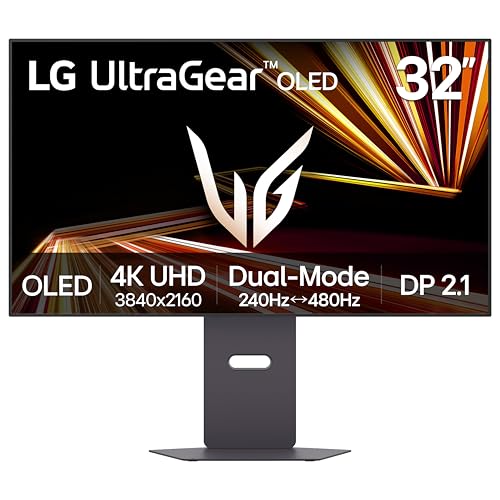
The 32GX870A is the screen this guide would hand to a player who asked for the strongest specification and accepted the flagship tier as the price of admission. Its title assembles the full modern sentence: a 32-inch UltraGear OLED panel, 4K UHD at 3840×2160, a 240Hz refresh rate and a 0.03ms response figure that belongs to a different world from the 1ms claims around it. OLED brings per-pixel light control to that specification, which in practice means dark scenes hold their depth at desk distance and bright highlights sit beside true darkness instead of beside a grey approximation of it.
Connectivity is stated with unusual completeness. HDMI 2.1 appears in the title outright, alongside DisplayPort, so neither the console nor a high-end computer needs an apology or an adapter story. HDR is named as Display HDR TrueBlack400, a badge written for emissive panels, and sync support spans AMD FreeSync Premium Pro and NVIDIA G-SYNC. A Series X owner may never use the PC-facing half of that list, yet the completeness matters for resale and for the mixed desk: this is a screen that can follow its owner from console-first gaming to computer-first gaming without becoming the bottleneck in either room.
The stand specification is equally thorough, listing tilt, height, swivel and pivot movements by name. On a 32-inch panel that range is not decoration. Height travel lets the screen sit correctly for both an upright desk chair and a reclined gaming seat, swivel serves the quick turn toward a second person, and pivot exists for the minority who genuinely rotate a screen for documents or vertical video. A flagship that skimped on its stand would undermine its own panel every day; this one does not, at least on the evidence its title provides.
Judgement should still keep the console’s limits in view. A 240Hz ceiling at 4K is headroom the Series X will seldom use in its native resolution modes, so the purchase case rests on OLED picture quality, response behaviour and dual-machine life rather than on frame rates the console cannot currently feed. Players who mostly enjoy performance-mode titles at lower internal resolutions will feel the responsiveness, while players devoted to fidelity modes will mostly feel the contrast. Either way the panel delivers something visible, which is more than can be said for refresh headroom alone.
- Size and resolution: 32 inches, 4K UHD 3840×2160
- Panel type: OLED
- Refresh rate: 240Hz
- Response time: 0.03ms
- HDR: Display HDR TrueBlack400
- Sync: AMD FreeSync Premium Pro, NVIDIA G-SYNC
- Inputs: HDMI 2.1, DisplayPort
- Stand: tilt, height, swivel, pivot
- Model code: 32GX870A-B
Strengths
- OLED contrast and 0.03ms response set the picture ceiling of this guide.
- HDMI 2.1 and DisplayPort are both stated in the title.
- All four stand movements are named in the title.
Trade-offs
- 240Hz at 4K exceeds what the console typically feeds it.
- It occupies the flagship tier of this line-up by specification.
- A 32-inch screen still demands real desk width and depth.
Best for: a player building one premium screen to serve a Series X now and a gaming computer later, at a desk with room for 32 inches. Not suited for: a desk narrower than the panel plus its stand footprint, because no picture quality compensates for a screen that crowds the keyboard into the user’s lap.
Ownership habits matter with an OLED flagship. Vary the content, let the panel’s own maintenance routines run as the manufacturer intends, and avoid leaving a static interface parked at full brightness for entire working days if the screen doubles as an office display. None of that requires anxiety; it requires the same mild discipline any owner gives a good tool. Set the console output deliberately, confirm the HDMI 2.1 connection is the one actually in use when two cables are attached, and judge the screen first on a dark game scene in a dim room, since that is the examination its panel technology was built to pass.

LG UltraGear 32-inch 4K — HDMI 2.1 at 32 inches
LG’s other 32-inch entry makes its argument through completeness at a mainstream refresh rate. The title states 4K UHD at 3840×2160, 144Hz, a 1ms response figure, VESA DisplayHDR 400, and both G-SYNC and AMD FreeSync Premium. Crucially for console buyers who read specifications literally, HDMI 2.1 is printed in the title alongside DisplayPort, so the port version that shoppers hunt for is a matter of record rather than a matter of hope. For a buyer whose checklist begins with that one line, this screen answers faster than any other 32-inch pick in the guide.
An unusual audio detail separates it from its siblings. The title names a 4-pole headphone output with DTS HP:X, which aims spatial audio processing at a headset plugged straight into the monitor. Console players who game at a desk often route audio awkwardly through controllers or computers, so a monitor-side headphone path with its own processing is a practical convenience rather than a novelty. It also hints at the intended seat: one player, close to the glass, headset on, in the arrangement where a 32-inch 4K panel performs its best work.
The stand lists tilt, height and pivot movements. Swivel is the missing word, and the spec box preserves that absence instead of rounding the list up to a full set. In daily terms the omission is minor for a centred desk and noticeable for a screen that must turn toward a sofa or a second chair, so shared-room players should weigh it honestly. Pivot, by contrast, is present, which gives this panel a second life in document-heavy work that the purely tilt-and-height screens cannot match without a mount.
Compared with the Samsung G70D at the same size and rate, the LG trades smart-platform features and an IPS claim in the title for an explicit HDMI 2.1 line, an HDR badge and the headphone output. Neither trade is irrational; they describe different desks. The Samsung suits a screen that must entertain without a console, while this LG suits a screen whose owner reads port specifications before picture modes and plugs a headset into the display itself. Panel type, notably, is not stated in this title, so the spec box records that silence and the review makes no claim about it.
- Size and resolution: 32 inches, 4K UHD 3840×2160
- Refresh rate: 144Hz
- Response time: 1ms
- HDR: VESA DisplayHDR 400
- Sync: G-SYNC, AMD FreeSync Premium
- Inputs: HDMI 2.1, DisplayPort
- Audio: 4-pole headphone output, DTS HP:X
- Stand: tilt, height, pivot
- Panel type: Not stated in the listing title — verify with the manufacturer documentation
Strengths
- HDMI 2.1 is confirmed in the title at 32 inches and 144Hz.
- The DTS HP:X headphone output serves desk players directly.
- Height and pivot adjustment support both gaming and document work.
Trade-offs
- Swivel is not listed among the stand movements in the title.
- Panel type is not stated in the listing title.
- 144Hz matches the mainstream here rather than leading it.
Best for: a specification-first buyer who wants HDMI 2.1 confirmed in writing on a 32-inch 4K screen with a headset output at the desk. Not suited for: a screen that must swivel daily toward a second seat, because swivel never appears in this title’s stand list.
Practical setup begins with the audio path. Try the monitor’s headphone output before building a more complicated route through controllers and splitters, since a shorter chain usually means fewer volume mismatches and one less device to charge or configure. Then verify the console is negotiating the display mode you expect, because a 144Hz-capable panel can only show what the source agrees to send. Finally, use the pivot once even if documents are not your habit; owners regularly discover a use for a vertical screen only after the hardware makes it effortless, and this is one of the few picks here that offers the option without a separate arm.

LG UltraGear 27G810A — Dual-mode speed
The 27G810A exists for players who refuse to choose permanently between sharpness and speed. Its title describes a 27-inch IPS panel with a dual mode: 4K UHD at 180Hz for fidelity, or FHD at 360Hz when frame rate becomes the entire point. That second figure deserves a calm reading in a console guide. A Series X will not feed 360Hz, so for pure console use the FHD mode is largely a promise aimed at a PC that may join the desk later. Judged as a console screen alone, the honest headline is 4K at 180Hz on a 27-inch IPS panel, which is already a strong specification without borrowing the larger number’s glamour.
At 27 inches, 4K produces the densest pixel grid among the mainstream picks here, and text, heads-up displays and distant detail all benefit when the viewer sits at ordinary desk distance. The smaller canvas also fits desks that a 32-inch panel would dominate, and it suits players who prefer the whole scene inside a single glance rather than at the edge of peripheral vision. Shooter players in particular often choose this size deliberately, not as a budget concession but as a field-of-view decision, and this panel lets them make that choice without surrendering resolution.
The supporting specification is complete in the ways that matter. G-Sync and FreeSync Premium are both named, DisplayHDR 400 is listed, and the inputs are HDMI and DisplayPort — with a version silence on the HDMI side that the spec box records plainly. The stand is the fullest in the guide alongside the OLED flagship: tilt, swivel, height and pivot all appear in the title. A 27-inch screen with that movement range adapts to shared desks, standing converters and odd room layouts more gracefully than its size suggests.
Who should buy it depends on the second machine question. A console-only player gets an excellent 27-inch 4K screen and pays for a dual-mode talent that stays dormant. A player with a gaming PC beside the console gets two monitors in one chassis, switching personalities with the content. A player planning a PC purchase within the screen’s life sits between those cases and should decide how much a future capability is worth today. The guide’s sympathy lies with the dual-machine desk, where this LG’s split personality stops being a specification curiosity and becomes the reason it was chosen.
- Size and resolution: 27 inches, 4K UHD
- Panel type: IPS
- Dual mode: 4K UHD 180Hz / FHD 360Hz
- Response time: 1ms
- HDR: DisplayHDR 400
- Sync: G-Sync, FreeSync Premium
- Inputs: HDMI, DisplayPort
- Stand: tilt, swivel, height, pivot
- HDMI version: Not stated in the listing title — verify with the manufacturer documentation
- Model code: 27G810A-B
Strengths
- Dual mode gives one panel a fidelity setting and a speed setting.
- 4K at 27 inches yields the sharpest mainstream picture here.
- The stand offers all four movements named in the title.
Trade-offs
- The 360Hz FHD mode serves PC play, not the console’s output.
- The HDMI version is not stated in the listing title.
- 27 inches feels small to players raised on television-scale screens.
Best for: a mixed console and PC desk at 27 inches, where the dual mode will genuinely be used in both of its personalities. Not suited for: a viewing distance beyond a metre, where a 27-inch panel’s fine pixel grid stops paying for itself and a 32-inch screen reads more comfortably.
Configure the two modes as separate habits rather than a single compromise. Leave the console on the 4K mode permanently unless a specific title persuades you otherwise, and reserve the FHD high-rate mode for the computer and the games that reward it. Switching modes per game on the console side invites settings drift, where a screen spends months in the wrong personality because nobody remembers changing it. Label the inputs in the on-screen menu if the monitor allows it, set the stand height for your primary chair rather than the taller one you use occasionally, and this compact panel will feel deliberately chosen rather than merely smaller.

ASUS TUF VG27UQ1A — Console-named pick
ASUS does something in this title that no other manufacturer in the guide attempts: it names the audience. The VG27UQ1A is described as a 27-inch 4K gaming monitor at 160Hz, built for PS5 and Xbox in the title’s own closing words. That naming does not change the panel’s physics, but it signals where ASUS aimed the tuning and the feature set, and it spares console buyers the usual translation work of guessing whether a PC-first screen considers them a priority or an afterthought. In a category full of translated specifications, a title that speaks to console owners directly earns a measure of trust before the numbers begin.
The numbers themselves are competitive. A 160Hz ceiling sits between the 144Hz mainstream and the 180Hz dual-mode screens, response is stated at 1ms, and colour coverage is printed as 95% DCI-P3, the only gamut figure among the Xbox picks. ELMB Sync appears as a named feature, pairing ASUS’s motion-blur reduction approach with variable refresh use, and FreeSync Premium covers the sync side in the title, which also carries G-SYNC in the product line name. DisplayWidget Center is listed as well, pointing to software-side control of monitor settings from the computer, a convenience for the mixed desk rather than the console alone.
Silences deserve the same care as claims. The title does not state an HDMI version, does not itemise stand movements, and does not name an HDR badge, so the spec box below marks each of those as unstated instead of filling them from the wider TUF family. That restraint matters because TUF models resemble one another closely while differing in exactly these details. The model code VG27UQ1A is the string to match on the listing page, and any feature a buyer considers essential should be confirmed against that code rather than against a review of a neighbouring model.
The fit is a console-first desk that also values colour. The 95% DCI-P3 figure, taken as the title prints it, suggests a wide-gamut panel that will flatter colourful games and hold its own when the same screen handles photo or video work during the day. At 27 inches the pixel density supports that second life, since text and editing interfaces stay sharp at desk distance. Players who need a fully itemised stand or a printed HDMI version should treat those confirmations as pre-purchase homework; players who want the console acknowledged in the product’s own name have exactly one candidate in this guide.
- Size and resolution: 27 inches, 4K
- Refresh rate: 160Hz
- Response time: 1ms
- Colour: 95% DCI-P3
- Features: ELMB Sync, DisplayWidget Center
- Sync: FreeSync Premium (G-SYNC in the product line name)
- Audience stated in title: for PS5 and Xbox
- HDMI version: Not stated in the listing title — verify with the manufacturer documentation
- HDR badge: Not stated in the listing title — verify with the manufacturer documentation
- Stand movements: Not stated in the listing title — verify with the manufacturer documentation
Strengths
- The title names PS5 and Xbox, a rare direct address to console buyers.
- 95% DCI-P3 is the only colour gamut figure in this guide.
- 160Hz and ELMB Sync give motion handling a clear emphasis.
Trade-offs
- HDMI version, HDR badge and stand movements go unstated.
- DisplayWidget Center serves the PC side of a mixed desk.
- 27 inches is the compact end of this line-up.
Best for: a console-first 27-inch desk whose owner also edits photos or video on the same screen and values the stated DCI-P3 coverage. Not suited for: a purchase contract that must cite a printed HDR badge, because this title never names one.
First-week advice for the ASUS is to explore its named features one at a time. Try ELMB Sync in a fast game and in a slow one, since blur reduction earns its place in motion and can feel unnecessary in a strategy title. Set the colour behaviour deliberately if the screen shares duty with editing work, because a wide-gamut panel rewards owners who decide which mode serves which task instead of drifting between defaults. And because the title leaves several details unstated, spend ten minutes on the listing page before ordering with the model code in hand, confirming the stand and port details your particular desk cannot live without.

Samsung Odyssey G7 G70F 27-inch — Compact dual mode
Samsung’s second Odyssey in this guide shrinks the formula to 27 inches and adds a dual-mode twist. The title describes a Fast IPS panel with a 4K and FHD dual mode at a 180Hz refresh rate, G-Sync compatibility and AMD FreeSync Premium, finished with an ergonomic stand. Read carefully, that wording promises flexibility without itemising which rate belongs to which resolution in the way the LG 27G810A does, so this review reports the dual mode in Samsung’s own terms and resists the temptation to assign the numbers more precisely than the title assigns them.
The practical appeal is a smaller Samsung for desks where the 32-inch G70D cannot fit or would sit too close. Twenty-seven inches at a dual-mode specification suits the player who alternates between fidelity-oriented console sessions and faster, lighter titles, and who may add a computer later. Fast IPS as a panel description signals where Samsung aimed the tuning: response behaviour and motion clarity on an IPS foundation, with the viewing generosity that makes a desk screen shareable with a second viewer on a nearby seat.
Sync coverage again spans both naming families, NVIDIA G-Sync Compatible on one side and AMD FreeSync Premium on the other, which suits the mixed desk this screen will likely serve. The stand is called ergonomic without its movements being itemised in the title, a pattern shared with its larger sibling, and the spec box reflects that wording exactly. The model code LS27FG706ENXZA distinguishes this G70F from the G70D above and from earlier Odyssey generations whose specifications differ in ways a similar name conceals.
Choosing between this Samsung and the LG 27G810A is the closest decision in the guide. Both are 27-inch dual-mode screens at 180Hz with both sync families named. The LG itemises its stand fully, states DisplayHDR 400 and assigns its dual-mode figures explicitly; the Samsung offers its own panel tuning and the Odyssey design language in a title that stays comparatively terse. Buyers who decide by confirmed specification will lean LG; buyers who have owned and liked Samsung’s gaming screens, or who prefer this model’s particular presentation, have a defensible reason to lean the other way. The guide’s duty is to make the information asymmetry visible, not to pretend it away.
- Size: 27 inches
- Panel type: Fast IPS
- Dual mode: 4K / FHD dual mode
- Refresh rate: 180Hz
- Sync: NVIDIA G-Sync Compatible, AMD FreeSync Premium
- Stand: ergonomic stand
- Model code: LS27FG706ENXZA
- Numeric resolution: Not stated in the listing title — verify with the manufacturer documentation
- HDR badge: Not stated in the listing title — verify with the manufacturer documentation
- Stand movements: Not stated in the listing title — verify with the manufacturer documentation
Strengths
- Dual mode and 180Hz bring flagship flexibility to 27 inches.
- Both G-Sync Compatible and FreeSync Premium are named.
- Fast IPS tuning suits motion-heavy games at desk distance.
Trade-offs
- The title does not assign rates to each dual-mode resolution.
- No HDR badge is named in the listing title.
- Stand movements are not itemised in the listing title.
Best for: a Samsung-loyal player with a 27-inch desk who wants dual-mode flexibility and both sync families in one panel. Not suited for: a purchase that must be justified line by line from the title alone, because this listing leaves its dual-mode figures and HDR status unitemised.
Because this title is terse, the listing page matters more here than for any other pick. Before ordering, confirm the dual-mode behaviour, the HDR position and the stand range against the model code, and write down which input you intend to use for the console so the first setup is deliberate. Once the screen is home, resist judging it during the first evening’s defaults; spend the setup time on height, distance and the console’s own display configuration, then evaluate it on a familiar game whose look you know well. A compact dual-mode screen rewards that patience by disappearing into the routine, which is the highest compliment a desk monitor can earn.
Comparison
| Pick | Size / Resolution | Panel | Refresh | Notable from title |
|---|---|---|---|---|
| Samsung Odyssey G7 G70D | 32″ / 4K UHD | IPS | 144Hz | Smart features, Black Equalizer, 1ms GtG |
| LG UltraGear 32GX870A | 32″ / 3840×2160 | OLED | 240Hz | HDMI 2.1, TrueBlack400, 0.03ms |
| LG UltraGear 32-inch 4K | 32″ / 3840×2160 | Not stated in the listing title | 144Hz | HDMI 2.1, DisplayHDR 400, DTS HP:X output |
| LG UltraGear 27G810A | 27″ / 4K UHD | IPS | 180Hz, FHD 360Hz dual mode | DisplayHDR 400, full-motion stand |
| ASUS TUF VG27UQ1A | 27″ / 4K | Not stated in the listing title | 160Hz | ELMB Sync, 95% DCI-P3, named for PS5 and Xbox |
| Samsung Odyssey G7 G70F | 27″ / 4K FHD dual mode | Fast IPS | 180Hz | G-Sync Compatible, FreeSync Premium |
The table divides along three honest axes. Size separates the two 32-inch generalists and the OLED flagship from the three 27-inch specialists. Panel separates the single OLED from the IPS-named screens and the two titles that decline to name a panel at all. Refresh separates the 144Hz pair from the faster 27-inch group and the 240Hz flagship. A buyer who knows their position on those three axes can shorten the guide to two candidates in under a minute, which is what a comparison table is for.
Notice also what the table cannot show: how each screen behaves in the games you actually own, at the internal resolutions those games actually render. Specifications describe ceilings and capabilities, while a library of titles describes a life. The wisest use of this table is as a filter, removing the screens whose size, panel or stand cannot suit your desk, then letting your own favourite game arbitrate between the survivors during the return window.
How to Choose an Xbox Series X Monitor
Begin with the distance between your eyes and the glass, and let that distance nominate the size. At a typical desk reach, 27 inches keeps the entire scene in one glance and rewards competitive play, while 32 inches fills more of the visual field and flatters cinematic titles. Neither is the correct answer in the abstract. Measure your desk depth, sit in your actual chair, and imagine a frame at each size before reading another specification, because a screen that sits at the wrong distance makes every later virtue harder to enjoy.
Next, decide what you believe about refresh rate. The console’s 120Hz output is the meaningful threshold for this generation, and every pick here clears it on paper. Above that line, higher ceilings buy headroom for PC play, smoother system interfaces in the modes that support them, and insurance against a future console revision. They do not multiply the frame rate of the games in your library. Spend on the ceiling if the mixed desk or the future-proofing argument genuinely applies to you; otherwise let the 144Hz screens compete on panel, size and stand, where their differences are visible every day.
Ports deserve a literal reading. Two titles here state HDMI 2.1 in so many words, and four do not state a version at all. An unstated version is not proof of an older port, but it is a reason to verify on the listing page before money moves, particularly if a specific high-refresh 4K mode is the centrepiece of your plan. While you are verifying, count the inputs your desk truly needs: console, computer, perhaps a streaming stick or a second console, plus a headphone path if you play with a headset at the desk.
Finish with the stand and the second seat. Height adjustment matters more than any picture mode for a screen used eight hours a day, pivot matters to a minority and swivel matters to shared rooms. Read each title’s stand wording as a promise with edges: a fully itemised list is a commitment, a single word like adjustable or ergonomic is a summary that needs confirming. The screen will outlive the console generation it was bought for, so choose the physical object you can live with longest, not merely the specification that photographs best.
Sound belongs in that final inventory too, even though few monitor titles discuss it honestly. A desk player with a headset needs a reliable audio path and a volume control within reach, while a player who games aloud needs either monitor speakers or a separate solution planned before the screen arrives. None of the six titles here makes speakers a headline claim, so assume the headset route or budget the soundbar, and let that small decision happen on paper rather than during the first evening’s setup.
Does HDMI 2.1 Actually Change Anything on a Desk Monitor?
For the modes console players care about most, the port version decides which combinations of resolution and refresh the cable can carry, and 4K at high refresh is precisely the combination that strains older standards. That is why two titles in this guide print HDMI 2.1 as a headline feature and why buyers hunt for the phrase. A screen and console that both support the standard can negotiate their richest shared mode without workarounds, while a lesser connection may still deliver an excellent picture at a reduced pairing of resolution and rate.
Perspective matters as much as bandwidth. Many beloved games target 60 frames per second or render internally below 4K even in their fidelity modes, and for those titles the port version changes little that a player can see. The benefit concentrates in performance modes, in the growing set of games offering 120Hz options, and in the dashboard smoothness that makes a system feel responsive. A buyer whose library is mostly cinematic single-player games should weigh panel quality first; a buyer who lives in competitive performance modes should weigh the port and the refresh ceiling together.
The verification habit is simple and worth forming. Find the phrase in the listing title if it is there, as it is for the two LG 32-inch models. If it is absent, treat the listing page and the model code as the authority and confirm before ordering rather than after unboxing. Cable quality belongs to the same habit: a certified cable of sensible length removes an entire category of flicker and negotiation failures that owners routinely misdiagnose as panel faults.
Should You Pick 27 Inches or 32 Inches for Console Play at a Desk?
The 27-inch case rests on density and discipline. Four thousand lines of resolution across a smaller canvas produce the sharpest text and the cleanest distant detail in this guide, and the whole picture sits within a glance, which competitive players value more than immersion. A 27-inch screen also leaves desk surface for speakers, a second monitor or simply air, and it can migrate later to a side position in a dual-screen setup without overwhelming the arrangement.
The 32-inch case rests on presence. At the same desk distance the larger panel occupies more of the visual field, game worlds feel closer to television scale while menus remain desk-sharp, and a second viewer can share the picture from the side of the chair. The cost is literal space and a greater need for stand height control, since a larger screen placed too low or too high punishes posture across a long session. Rooms that double as cinemas for one will prefer 32; rooms optimised for ranked ladders will prefer 27.
A tiebreaker hides in your library. Turn-based games, racers with cockpit views and open-world exploration all reward the bigger canvas, while shooters and fighting games reward the smaller, denser one. Count your last ten played titles before choosing, because the catalogue you own is a better oracle than the genre you aspire to. Either size, bought deliberately, will feel correct within a week; either size bought by default can nag for years.
What Should You Check in the Console Settings After the Screen Arrives?
Open the console’s display settings before opening a game, and confirm the resolution and refresh pairing the system has negotiated with the new panel. Automatic handshakes occasionally settle on a conservative mode, particularly after a cable change, and a screen can spend its first month underperforming because nobody inspected a menu. Note the settings you confirm, so a later change is visible as a change rather than a mystery.
HDR calibration comes second, using the console’s own calibration screens in the room light you actually play in. A panel’s HDR badge, whether DisplayHDR 400 or TrueBlack400 in these titles, describes a capability that still depends on the source being told where the screen’s limits sit. Ten patient minutes with the calibration patterns will do more for dark scenes than any picture preset, and the result holds across every game that respects the system-level settings.
Finally, test the social details while the return window is open. Plug in your headset by the route you intend to use nightly, whether that is the LG 32-inch model’s monitor output or a controller connection. Sit in your second chair if the screen will ever be watched from one. Run a familiar game at your usual hour, with your usual lighting, and let the screen be judged by the life it will actually lead rather than by a showroom loop of highlights.
Common Mistakes When Buying an Xbox Monitor
Treating a refresh ceiling as a guaranteed game experience. A 240Hz panel cannot invent frames the console does not render. Match expectations to your library’s performance modes, not to the largest number in a title.
Assuming an HDMI version a title never prints. Four of these six titles leave the version unstated. Verify it on the listing page against the model code when a specific mode matters to you.
Confusing 4K support language with a native panel. Support can describe signal acceptance rather than the grid on the glass. Every pick here states 4K in its title, and buyers comparing outside this guide should demand the same clarity.
Ignoring stand movements until the screen is on the desk. Titles range from fully itemised stands to a single word. A screen at the wrong height will be resented daily and forgiven never.
Buying 32 inches for a shallow desk. The larger canvas needs distance to compose itself. On a shallow desk the 27-inch picks will look sharper and feel calmer.
Final Recommendation
Most Series X desks should start with the two 32-inch generalists and choose by temperament: the Samsung G70D for smart features, an IPS panel stated in its title and an all-round 144Hz specification, or the LG 32-inch 4K for an explicit HDMI 2.1 line and that unusual headphone output. The LG 32GX870A stands above both for buyers who want OLED contrast and are honest that its refresh ceiling is headroom rather than a console feature today. At 27 inches, the LG 27G810A serves the mixed desk best, the ASUS VG27UQ1A serves the console-first desk that also edits, and the Samsung G70F serves the Samsung loyalist who wants dual-mode flexibility in a compact frame.
Whichever of the six lands on your desk, judge it on the second weekend rather than the first evening, in your own chair and your own light, with the game you know best — because a monitor bought for a console generation should disappear into the ritual of playing, and the screen that does that for you is the right one even if a louder specification sits one row away in the table.
Frequently Asked Questions
Do I need HDMI 2.1 for a Series X monitor?
It matters most when you want the richest pairing of 4K resolution and high refresh the console offers. Two picks here state HDMI 2.1 in their titles. The other four leave the version unstated, which calls for a listing-page check rather than an assumption in either direction.
Is 144Hz wasted on a console?
No, though the benefit is uneven. The console’s high-refresh modes and general responsiveness make a 120Hz-class panel worthwhile, and ceilings above that mainly serve mixed desks with a PC attached. Buy the ceiling for the machines you own or firmly plan to own.
Why choose OLED for console gaming?
Per-pixel light control gives dark scenes a depth that backlit panels approximate, and the LG OLED here pairs that with a 0.03ms response figure. The trade is flagship positioning and the ordinary care an emissive panel asks of its owner.
What does dual mode actually do?
It lets one panel present two personalities: a high-resolution mode and a lower-resolution, higher-refresh mode. The LG 27G810A states 4K UHD at 180Hz or FHD at 360Hz. On a console the high-resolution mode is the everyday setting; the speed mode chiefly awaits a PC.
Can one of these monitors replace my television?
The 32-inch Samsung G70D comes closest, since its title names smart features that stream without another device. Even so, a desk monitor serves one or two close viewers, while a television serves a room, so the replacement works best in a bedroom or studio layout.
Which pick is best for competitive shooters?
At console output levels, the 27-inch models with the highest usable rates and full stand adjustment — the LG 27G810A above all — suit competitive desks, because the whole scene stays in one glance and the panel can be placed precisely.
Related Guides
Console play is only one of the lives a desk screen leads, and the neighbouring guides follow the others. Racers building a dedicated rig should continue to our roundup of the best sim racing monitors, where ultrawide curvature takes over. Readers whose monitor must earn its keep during working hours will find their version of the argument in the best programmers monitors, chosen for text clarity and long sessions. And anyone cutting footage between gaming sessions should finish with the best 2k monitors for video editing, where colour accuracy outranks frame rate.
Related guides
- Best 3.0 Qualcomm Quick Chargers: QC 3.0 Adapters That Still Earn Their Outlet
- Best Time Machine Compatible Hard Drives: Mac-Ready and Reformatted Picks
- Best 3D Mechanical Engineering Laptops: Certified Workstations for CAD and Simulation
- Best Tattoo Printers: Thermal Stencil Machines for Clean, Lasting Transfers


