What's inside
- Where to Buy
- Key Takeaways
- Quick Picks
- How We Chose These Picks
- Comparison
- How to Choose a Mini Laptop
- Is a Mini Laptop Big Enough for Real Schoolwork?
- Chromebook or Windows at 11 Inches: Which Ages Better?
- What Can a 4GB Mini Laptop Actually Do All Day?
- What Should Travel With a Mini Laptop?
- Common Mistakes When Buying an Affordable Mini Laptop
- Final Recommendation
- Frequently Asked Questions
- Related Guides
As an Amazon Associate I earn from qualifying purchases. This post may contain affiliate links at no extra cost to you.
[SITE_DOMAIN] is reader-supported. When you buy through links on our site, we may earn an affiliate commission.
Where to Buy
All six mini laptops below link to their own Amazon listings, and at this size the storage figure in each title deserves a slow read. The 11-inch 2-in-1 Convertible Laptop leads the set as the lone full Windows machine with a terabyte-class drive, so check price on Amazon for the exact configuration its title describes. The ASUS Vivobook Go 11.6 listing shows today’s figure for the Windows alternative in Star Black, while the Samsung Chromebook 4 page carries the live price for the long-running school favourite, model XE310XBA-K01US. The ASUS Chromebook CR11 listing details the ruggedised build, the HP Chromebook 11 page shows the current figure for the 2020-model MediaTek machine, and the Acer Chromebook 311 listing closes the set — see its Amazon page for the 2025 build and the accessory bundle its title names.
The best affordable mini laptops occupy the strangest corner of the laptop market: machines with screens of 11 to 11.6 inches, bought not as smaller versions of real laptops but as answers to specific lives — a pupil’s school day, a traveller’s carry-on, a field worker’s bag, a household’s second screen that happens to have a keyboard. Shoppers who arrive here expecting a shrunken ultrabook will misread every review on this page. These are not compromises on the way to a bigger machine. They are a distinct class with its own logic, and the logic starts with what an 11-inch screen is for.
The class, as it currently stands, must be described honestly: it is mostly Chromebooks. Four of the six picks here run Chrome OS — from Samsung, ASUS, HP and Acer — because Google’s platform is what made the 11.6-inch school-and-travel laptop a mass category, and because a browser-shaped workload is what these small screens serve best. The two Windows machines are the exceptions that frame the rule: an unbranded 11-inch convertible with a folding touchscreen and a terabyte-class drive, and an ASUS Vivobook Go running Windows 11 Home in S Mode. A buyer who needs installed Windows software has two doors in this guide; a buyer who lives in a browser has four, and cheaper ones.
The second honesty concerns capacity. Four gigabytes of memory appears in five of the six titles, and storage runs from 32GB of eMMC to the convertible’s terabyte claim. Those numbers would be disqualifying in a main-laptop guide and are normal here, because the mini class assumes a cloud-shaped life: files in Drive, work in web applications, media streamed rather than stored. The reviews judge each machine inside that assumption and say plainly where the assumption breaks, because a mini laptop bought for a local, heavy workload is the category’s one reliable disappointment.
Key Takeaways
- Four of the six picks are Chromebooks; the mini class is a Chrome OS category with two Windows exceptions, and the guide treats that as its defining fact.
- The 11-inch 2-in-1 convertible is the specification outlier: an N95 processor, 8GB of memory, a terabyte-class SSD, a folding FHD touchscreen and Windows 11 Pro.
- The ASUS Vivobook Go 11.6 is the Windows alternative, with an FHD display, a Celeron N4020, 128GB of storage and a year of Microsoft 365 in its title.
- Storage on the Chromebooks runs from 32GB eMMC (Samsung, HP) to 64GB eMMC (ASUS CR11, Acer 311) — a cloud-first class by design.
- The ASUS Chromebook CR11 is the durability pick, with a ruggedised build, antimicrobial guard and spill-resistant keyboard stated in its title.
- The HP Chromebook 11 is a 2020 model on a MediaTek processor; its age is stated in its own title and priced into its role here.
Quick Picks
| Pick | Badge | Why it earns a place |
|---|---|---|
| 11-inch 2-in-1 Convertible Laptop | Windows convertible | An N95 chip, 8GB of memory, a terabyte-class SSD and a 360-degree FHD touch screen on Windows 11 Pro. |
| ASUS Vivobook Go 11.6 | Windows in S Mode | An 11.6-inch FHD display, Celeron N4020, 128GB of storage and a year of Microsoft 365. |
| Samsung Chromebook 4 | School standard | Chrome OS on an 11.6-inch HD screen with a Celeron N4000, 32GB eMMC and Gigabit Wi-Fi. |
| ASUS Chromebook CR11 | Ruggedised pick | An N100 processor, 64GB eMMC, antimicrobial guard and a spill-resistant keyboard. |
| HP Chromebook 11 | MediaTek veteran | An 11.6-inch HD Chromebook on an MT8183 with 32GB eMMC, a stated 2020 model. |
| Acer Chromebook 311 | 2025 refresh | An N4500 processor, 64GB eMMC, an 8-plus-hour battery claim and an accessory bundle. |
How We Chose These Picks
The class was defined by the screen: 11 to 11.6 inches as stated in the title, in a clamshell or convertible laptop format. Tablets with detachable keyboards were excluded, because their software and accessory worlds are different conversations. Within the class, the six were chosen to make its real structure visible — the Chromebook majority in its four main flavours (school standard, ruggedised, veteran, refreshed) and the two Windows machines that serve the buyers Chrome OS cannot.
One candidate was removed before writing and should be accounted for. A Dell Chromebook 3100 listing surfaced during research with renewed status, and it was excluded entirely rather than reviewed with a caveat, because this guide does not recommend renewed machines inside a new-buyer’s shortlist. It is not a pick, it is not a runner-up, and it appears nowhere below. Buyers who encounter it elsewhere should read its listing’s condition wording with the care this guide applied.
Verification ran through the titles, as always on this site. Every figure below — the Samsung’s Gigabit Wi-Fi, the CR11’s spill-resistant keyboard, the Acer’s 8-plus-hour battery claim, the HP’s 2020 model year — is printed in its pick’s own title, and the gaps are recorded with the standard not-stated wording. Small laptops attract vague listings more than most categories, and two otherwise plausible candidates were cut because their titles would not state a storage figure at all.
A word on expectations, placed here rather than in a review where it might sound like an apology. No machine in this guide is a household’s main computer for heavy work, and none was chosen as one. They are second machines, school machines, travel machines and starter machines. Judged by those briefs, several of them are excellent. Judged by a brief they never claimed, all of them would fail — which is why the briefs are stated before the reviews begin.

11-inch 2-in-1 Convertible Laptop — Windows convertible
The specification outlier of this guide arrives without a famous badge, and its title compensates with numbers. An 11-inch convertible with an FHD IPS touchscreen that flips 360 degrees, an N95 processor the title clocks at 3.4GHz, 8GB of memory, a terabyte-class SSD stated as 1T, a backlit keyboard, face recognition, USB-C and Windows 11 Pro, aimed at students and travel. On paper, that is not a mini laptop’s specification at all — it is a small ultrabook’s, folded into the class’s smallest frame, and it makes this machine the answer for the buyer who wants the size without the Chromebook.
The folding screen changes what 11 inches can do. In laptop posture it is a compact Windows machine for documents and browsing. In tent posture it is a video-call and film screen that stands on a tray table or a kitchen counter without a case or a prop. In tablet posture it is a reading device with a real file system underneath. The other five picks in this guide are clamshells, and none of them can follow this machine through those postures — for the traveller who presents, watches and reads from one small device, the hinge is the feature the rest of the page is missing.
Capacity is the second surprise. Eight gigabytes doubles the memory of every other pick here, and a terabyte-class SSD is in a different universe from the Chromebooks’ 32 to 64GB of eMMC — this machine can hold a local life: documents, photographs, media, installed programs. Windows 11 Pro, stated in the title, completes a specification that reads like a checklist written by someone who had read the Chromebook reviews and declined each of their compromises in turn.
The cautions are about provenance and physics rather than specification. The listing carries no major manufacturer’s name, so buyers should weigh the support and warranty route on the listing itself with more care than they would give a Samsung or an ASUS, and should confirm the exact configuration — the title’s storage wording in particular — digit for digit at checkout. And an N95, for all its numbers, is an efficiency-class processor: it runs Windows and everyday applications capably, and it is not a heavy-work chip. The keyboard at 11 inches will also be compact, and touch-typists should expect an adjustment period.
It suits the Windows-loyal traveller, the student whose course installs real software, the field worker who needs a folding screen in a small bag, and the household that wants one mini machine with no platform asterisks. In a guide dominated by Chromebooks, this convertible is the door marked Windows, and it is a better door than the class usually provides.
- Processor: N95, 3.4GHz
- Memory: 8GB RAM
- Storage: 1T SSD (per listing title)
- Display: 11-inch FHD IPS Touchscreen, 360-degree flip
- Keyboard: Backlit Keyboard
- Security: Face Recognition
- Ports named: USB-C
- Operating system: Windows 11 Pro
- Manufacturer brand: Not stated in the listing title — verify with the manufacturer documentation
Strengths
- A terabyte-class SSD and 8GB of memory dwarf the class’s Chromebook norms.
- The 360-degree folding touchscreen serves laptop, tent and tablet postures.
- Windows 11 Pro with face recognition and a backlit keyboard at 11 inches.
Trade-offs
- No major manufacturer is named in the title, so support routes need checking.
- The N95 is an efficiency-class processor, not a heavy-work chip.
- An 11-inch keyboard is compact for full-time touch-typing.
Best for: a Windows traveller or student who wants mini size with real storage and a folding screen. Not suited for: a buyer who needs a major brand’s service network behind the purchase, because no manufacturer is named in this listing’s title.
Every category has one listing that reads like a rebuttal to the category, and this is the mini class’s. It does not prove the Chromebooks wrong — they serve their brief at prices of attention this machine does not attempt — but it proves the size itself was never the limitation. The limitations were choices, and this machine chose differently.

ASUS Vivobook Go 11.6 — Windows in S Mode
The Vivobook Go is the branded Windows door in this guide, and it opens onto a smaller room than the convertible’s. An 11.6-inch FHD display — the sharpest resolution class among the clamshells here — runs on an Intel Celeron N4020 with 4GB of memory and 128GB of storage, under Windows 11 Home in S Mode, in Star Black, with a year of Microsoft 365 named in the title. That is a deliberately modest specification, and its purpose is precise: a real Windows laptop, from a major maker, at the size and simplicity of a Chromebook.
S Mode is the phrase in the title that decides who should buy this machine, so it deserves a plain explanation. Windows in S Mode installs applications only from Microsoft’s own store, which keeps the machine fast, secure and simple, and walls it off from the wider world of downloaded Windows programs. For a pupil, a light home user or a managed household machine, that wall is a feature — it is most of why Chromebooks are calm to own, recreated inside Windows. For a buyer who needs one specific traditional program, the wall is the whole story, and they should read the convertible review above or confirm the current terms for leaving S Mode on the listing before ordering.
Within its brief, the specification is coherent. The FHD panel out-resolves the HD screens of every Chromebook here, which matters for text at 11.6 inches, where pixels are close to the eye. The 128GB of storage quadruples the leanest Chromebooks and gives Windows, its updates and a household’s documents room to coexist without a cloud plan as a necessity. The year of Microsoft 365 aligns the machine with the office-document life it was built for — homework, letters, budgets, the family spreadsheet.
The Celeron N4020 and 4GB of memory set the ceiling honestly. This is a one-or-two-things-at-a-time computer: a document and a browser, a call and a page of notes. It will not multitask like the convertible, and it was never priced in attention as if it would. Buyers who understand that rhythm get the Windows world’s familiarity — its printers, its file habits, its software names — in the class’s most portable branded form.
It suits the Windows household that wants a small second machine, the pupil whose school is Microsoft-shaped rather than Google-shaped, and the traveller who needs genuine Windows for one or two light tasks and nothing more. Between this and the convertible, the choice is posture and capacity: the ASUS offers a famous name and a calm, walled Windows; the unbranded machine offers a hinge, double the memory and eight times the storage. Both are honest answers to different questions.
- Processor: Intel Celeron N4020
- Memory: 4GB RAM
- Storage: 128GB Storage
- Display: 11.6-inch FHD
- Colour: Star Black
- Included: 1 Year Microsoft 365
- Operating system: Windows 11 Home in S Mode
- Touchscreen: Not stated in the listing title — verify with the manufacturer documentation
Strengths
- An FHD display out-resolves every Chromebook screen in this guide.
- 128GB of storage quadruples the leanest picks here.
- A year of Microsoft 365 matches the machine’s document-centred brief.
Trade-offs
- S Mode restricts installations to the Microsoft Store by design.
- 4GB of memory and a Celeron cap the machine at light, sequential work.
- No folding hinge or stated touchscreen, where the convertible offers both.
Best for: a Microsoft-shaped household or pupil who wants a small, simple, genuine Windows laptop. Not suited for: a user who must install a traditional downloaded Windows program on day one, because S Mode’s store-only rule is the machine’s defining boundary.
The Vivobook Go’s quiet achievement is normality. It asks its owner to learn nothing new — no new platform, no new file system, no new office suite — and in a category full of platform arguments, a small machine that simply continues a household’s existing habits has a value the specification table cannot show.
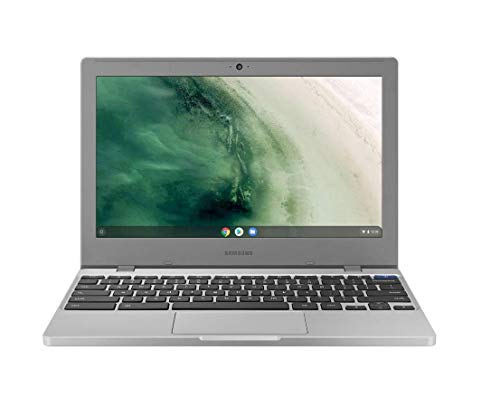
Samsung Chromebook 4 — School standard
The Samsung Chromebook 4 is the machine the mini class was built around: an 11.6-inch HD Chromebook on an Intel Celeron N4000 with 4GB of memory and 32GB of eMMC storage, Gigabit Wi-Fi, model XE310XBA-K01US, running Chrome OS. It has been the default answer for schools and budget buyers for years, and its title reads like the class’s template — every other Chromebook in this guide is a variation on the formula this one states plainly.
The formula deserves respect rather than condescension. Chrome OS on modest hardware delivers the school-and-browsing day without friction: the machine wakes fast, updates itself, resists the malware ecology of the wider internet, and hands a pupil or a grandparent a desktop that is ready before the kettle is. Gigabit Wi-Fi, named in the title, is a more practical feature than it sounds — on a machine whose entire life is network-shaped, the wireless standard is the engine, and Samsung specified a good one.
The boundaries are the class’s boundaries, stated once here for all four Chromebooks and then noted per machine. Thirty-two gigabytes of eMMC is not storage in the laptop sense; it is a local landing strip for an operating system whose files live in the cloud. Four gigabytes of memory keeps tab counts honest. The HD resolution is adequate at 11.6 inches and unremarkable beyond it. A buyer whose life fits inside a browser — school platforms, webmail, documents in Drive, streaming in the evening — will hit none of these walls. A buyer with installed-software needs or a local media library should already be reading the Windows reviews above.
Longevity is this pick’s quiet argument. A long-running model with a known code, XE310XBA-K01US, means cases, chargers and school IT familiarity are everywhere, and Chrome OS’s update model has historically kept machines of this class useful for years beyond their hardware’s fashion. The Chromebook 4 is not the newest design in this guide — the Acer below is a 2025 refresh — and it does not pretend otherwise. It is the standard, and standards earn their place by being known quantities.
It suits the pupil, the school-issuing household buying its own equivalent, the grandparent, the spare-machine buyer and anyone whose second computer should be the simplest object in the house. In a guide of variations, this is the theme: buy it when the job is the browser and the virtue you want is that there is nothing left to configure.
- Processor: Intel Celeron N4000
- Memory: 4GB RAM
- Storage: 32GB eMMC
- Display: 11.6-inch HD
- Wireless: Gigabit Wi-Fi
- Model: XE310XBA-K01US
- Operating system: Chrome OS
- Battery life: Not stated in the listing title — verify with the manufacturer documentation
Strengths
- The class’s proven standard, with a known model code and deep accessory support.
- Gigabit Wi-Fi suits a machine whose whole life is online.
- Chrome OS keeps updates and security automatic for its owner.
Trade-offs
- 32GB of eMMC assumes a fully cloud-shaped life.
- An HD display, where the Windows picks here offer FHD.
- The design is a long-running model rather than a current refresh.
Best for: a pupil, grandparent or second-machine buyer who wants the simplest small laptop that exists. Not suited for: a local media collector, because 32GB of eMMC cannot hold a library — it is a landing strip for a cloud life, not a warehouse.
If the mini class has a centre of gravity, it is this machine. Every other pick on the page is best understood as a deliberate departure from the Chromebook 4’s formula — tougher, newer, sharper, Windows — and a buyer who understands the formula understands the category.

ASUS Chromebook CR11 — Ruggedised pick
The CR11 is the Chromebook built for the way small laptops are actually treated. ASUS labels it ruggedised in the title and then specifies what that means: an antimicrobial guard on the surfaces hands touch, a spill-resistant keyboard for the juice-box and coffee incidents of real life, in Mineral Grey, model CR1104CGA-AS44. Underneath the armour sits a current specification for the class — an Intel N100 processor, 4GB of memory and 64GB of eMMC storage behind an 11.6-inch display on Chrome OS.
The N100 deserves its sentence, because it quietly makes this the strongest Chromebook processor in the guide. Intel’s N-series is the current entry line, a step beyond the Celeron N4000 and N4500 in the Samsung and Acer below, and in a class where every chip is modest, the newest modest chip is the one that keeps a browser full of school platforms feeling responsive in year three. Paired with double the Samsung’s storage, the CR11’s specification is the Chromebook formula with its two most common ceilings raised.
The durability features are aimed with unusual precision. Spill resistance addresses the single most common way school and kitchen laptops die. An antimicrobial guard addresses the way shared and young users’ machines actually live. A ruggedised build addresses the bag, the drop and the playground. None of these features appears in a benchmark, and all of them will matter more to the CR11’s real owners than any figure in its spec box — which is exactly why ASUS prints them in the title and why this guide leads the review with them.
Who it suits is therefore the clearest brief on this page: the young pupil whose laptop travels in a school bag and works on a kitchen table, the school buying its own fleet’s worth one household at a time, the field or workshop user whose small machine lives among hazards. The buyer it does not especially serve is the gentle adult user, who would be paying — in attention, at least — for armour against accidents their life does not contain, and who might prefer the Acer’s newer consumer polish or the Samsung’s standard simplicity.
Chrome OS’s boundaries apply here as everywhere in the Chromebook camp: browser-shaped work, cloud-shaped storage, no installed Windows software. Inside those boundaries, the CR11 is the pick this guide would hand to a parent with the words: this is the one designed for your child’s actual day, rather than for the day in the advertisement.
- Processor: Intel Processor N100
- Memory: 4GB RAM
- Storage: 64GB eMMC
- Display: 11.6-inch
- Durability: Ruggedized build, Antimicrobial Guard, Spill-Resistant Keyboard
- Colour: Mineral Grey
- Model: CR1104CGA-AS44
- Operating system: Chrome OS (Chromebook)
Strengths
- Spill-resistant keyboard and ruggedised build target real school-day hazards.
- The N100 is the newest Chromebook processor in this guide.
- 64GB of eMMC doubles the leanest Chromebooks’ storage.
Trade-offs
- 4GB of memory keeps heavy tab sessions in check, as across the class.
- The armour serves hazardous lives; gentle users pay for protection they may never need.
- Display resolution is not specified in the listing title.
Best for: a young pupil, a school-shaped household or a field user whose laptop lives among spills and drops. Not suited for: a desktop-software user, because Chrome OS cannot install Windows programs whatever the chassis can survive.
There is a maturity in a product that designs for the accident rather than the showcase. The CR11’s title is the most honest piece of marketing in this guide — it promises survival, in specifics, and survival is what its owners will actually test.

HP Chromebook 11 — MediaTek veteran
HP’s Chromebook 11 arrives with its age printed in its own title: a 2020 model, 11a-na0010nr, built around a MediaTek MT8183 processor with 4GB of memory and 32GB of eMMC storage behind an 11.6-inch HD display on Chrome OS. This guide includes it neither as a novelty nor as a warning, but as what it is — the veteran of the class, a machine whose value case rests on the Chromebook formula’s durability and on a processor choice that differs from every Intel pick on the page.
The MediaTek chip is the review’s real subject. MediaTek’s Chromebook processors come from the phone-and-tablet world, and their character is efficiency: quiet, cool, undemanding running for the browser workload, with none of the heat or fan behaviour of a struggling chip. For the HP’s intended life — browsing, school platforms, video, documents in the cloud — that character is well matched, and owners of machines in this line have historically praised exactly the calm that the specification implies. What the MT8183 is not is a sprinter, and a buyer stacking it against the CR11’s newer N100 should expect the ASUS to feel fresher under a pile of tabs.
The 2020 model year cuts in two directions, and the review should hold both. Against the HP: it is the oldest design in this guide, its HD screen and 32GB of storage are the class’s floor, and buyers should confirm the remaining Chrome OS update horizon for this model on the listing before purchasing, because a Chromebook’s useful life is bounded by its update window in a way a Windows laptop’s is not. For the HP: a long-running model is a known quantity, with a deep accessory and support trail, and the Chromebook formula has aged gracefully precisely because the platform carries the experience more than the hardware does.
It suits the lightest of the light lives in this guide: the spare machine by the sofa, the grandparent’s email-and-news laptop, the child’s supervised browsing device, the traveller who wants a laptop whose loss would be an annoyance rather than a disaster. It does not suit a pupil who needs a machine to survive five school years from today, because the update-horizon question belongs at the front of that purchase, nor any buyer whose workload has begun to grow teeth.
Judged fairly, the HP Chromebook 11 is the class’s reminder that old and useless are different words. Its formula still works. Its buyer simply has to be the one whose horizon matches the machine’s — a shorter, lighter, calmer brief than the CR11’s or the Acer’s, and a legitimate one.
- Processor: MediaTek MT8183
- Memory: 4GB RAM
- Storage: 32GB eMMC
- Display: 11.6-inch HD
- Model: 11a-na0010nr, 2020 model
- Operating system: Chrome OS
- Update end date: Not stated in the listing title — verify with the manufacturer documentation
Strengths
- A MediaTek platform built for cool, quiet, efficient browser work.
- A long-running model with a known code and deep accessory support.
- The Chromebook formula in its simplest, calmest form.
Trade-offs
- A stated 2020 model — the oldest design in this guide.
- Buyers must verify the remaining Chrome OS update horizon before purchase.
- 32GB of eMMC and an HD screen are the class’s floor figures.
Best for: a spare-machine household, a grandparent, or a supervised child’s browsing laptop for a light, defined life. Not suited for: a pupil starting a five-year school career today, because a 2020 model’s remaining update window must be verified and may not cover the full term.
The veteran’s presence also disciplines the rest of the guide. When a 2020 Chromebook still earns a review slot, the message is that this class ages slowly — and that the newer picks’ advantages, while real, are measured in freshness and headroom rather than in a different kind of usefulness.

Acer Chromebook 311 — 2025 refresh
The Acer Chromebook 311 closes the reviews as the class’s current consumer model: a 2025 flagship in its own title’s wording, slim and light by its listing’s description, with an 11.6-inch HD display, a dual-core Intel N4500 the title clocks up to 2.80GHz, 4GB of memory, 64GB of eMMC storage, Wi-Fi 5, a webcam, an 8-plus-hour battery claim and a Hubxcel accessory bundle, running Chrome OS. Where the Samsung is the standard and the HP is the veteran, the Acer is the refresh — the formula with its date and its storage both moved forward.
The 64GB of storage is the figure that matters most in daily life. It doubles the Samsung and HP machines’ eMMC, and in a cloud-shaped life that doubling is the difference between a machine that occasionally asks its owner to tidy the downloads folder and one that never raises the subject. School platforms cache, offline documents accumulate, a trip’s worth of media downloads for a flight — 64GB absorbs the class’s real habits where 32GB merely tolerates them. Buyers choosing among the Chromebooks on specification alone will find this the strongest single argument on the page after the CR11’s processor.
The battery claim deserves the guide’s standard handling. Eight-plus hours, printed in the title, describes a school day or a travel day with room to spare, and it is a claim rather than a measurement — a video-call-heavy day will spend it faster than a reading day will. Even discounted, it is the only battery figure any Chromebook title in this guide offers, and a buyer comparing the four will notice that Acer chose to print one. The webcam, likewise stated, serves the class’s call-heavy life without an accessory.
Wi-Fi 5 is the one specification where the refresh steps sideways: the Samsung’s Gigabit Wi-Fi wording describes the older machine’s networking more grandly, and a buyer in a house with a current router should read both titles closely rather than assume the newer laptop wins every column. The N4500 sits between the Samsung’s N4000 and the CR11’s N100 in the class’s small hierarchy of chips — a competent, current-enough processor for the browser workload, neither the floor nor the ceiling.
It suits the pupil starting now, the traveller who wants a current model with a day’s battery claim, and the household replacing an ageing Chromebook with its modern equivalent. With the accessory bundle in the box, it is also the most complete single-order purchase among the Chromebooks here. The class’s formula has not changed; the Acer is simply its freshest expression, and for most Chromebook buyers in this guide, freshest plus double storage is the right place to land.
- Processor: Dual-Core Intel N4500, up to 2.80GHz
- Memory: 4GB RAM
- Storage: 64GB eMMC
- Display: 11.6-inch HD
- Wireless: Wi-Fi 5
- Battery claim: 8+ hours battery (per listing title)
- Included: Hubxcel Accessory bundle (per listing title)
- Operating system: Chrome OS
Strengths
- 64GB of eMMC doubles the storage of the Samsung and HP picks.
- A stated 8-plus-hour battery claim, the only one among these Chromebooks.
- A 2025 model with an accessory bundle included in the listing.
Trade-offs
- Wi-Fi 5, where the older Samsung claims Gigabit Wi-Fi in its title.
- 4GB of memory, the class standard and its ceiling alike.
- An HD display, where the Windows picks in this guide offer FHD.
Best for: a pupil starting now or a traveller who wants the freshest Chromebook formula with double storage. Not suited for: a heavy multitasker, because 4GB of memory caps the number of tabs and applications that stay open together, as it does across this class.
The Acer ends the reviews on the class’s healthiest note: the formula is alive, current and still improving in the small ways — storage, battery candour, bundled completeness — that its owners actually feel. Mini laptops are a mature category, and maturity, in this corner of the market, is a compliment.
Comparison
| Pick | Processor | Memory / Storage | Display | Operating system |
|---|---|---|---|---|
| 11-inch 2-in-1 Convertible | N95 | 8GB / 1T SSD | 11-inch FHD IPS Touch, 360-degree flip | Windows 11 Pro |
| ASUS Vivobook Go 11.6 | Intel Celeron N4020 | 4GB / 128GB | 11.6-inch FHD | Windows 11 Home in S Mode |
| Samsung Chromebook 4 | Intel Celeron N4000 | 4GB / 32GB eMMC | 11.6-inch HD | Chrome OS |
| ASUS Chromebook CR11 | Intel N100 | 4GB / 64GB eMMC | 11.6-inch | Chrome OS |
| HP Chromebook 11 | MediaTek MT8183 | 4GB / 32GB eMMC | 11.6-inch HD | Chrome OS |
| Acer Chromebook 311 | Intel N4500 | 4GB / 64GB eMMC | 11.6-inch HD | Chrome OS |
The operating system column is the table’s whole argument in one glance: four Chrome OS machines, two Windows machines, and a class that has effectively chosen its platform. Within the Chromebook four, the differences are refinements — the CR11’s newer chip and armour, the Acer’s storage and freshness, the Samsung’s standard-bearing simplicity, the HP’s MediaTek calm and its age. Between the camps, the difference is a worldview about where files and applications live, and no benchmark settles it.
The storage column draws the second map. The convertible’s terabyte claim and the Vivobook’s 128GB belong to the local-file world; the Chromebooks’ 32 and 64GB belong to the cloud world, and the two 64GB machines hold a genuine daily-life advantage over the two 32GB ones. A buyer who reads only two columns of this table — operating system and storage — will make a better decision than a buyer who reads only the processor column, which in this class is the least informative column of the five.
One more column hides in plain sight: the year. The Acer is a 2025 model, the HP a stated 2020 model, and the CR11’s current processor marks its design as recent even where its title prints no year. In most laptop categories the year is a vanity detail; in this one it is a lifespan figure, because the Chromebook update clock starts at manufacture. A buyer comparing two otherwise equal Chromebooks in this table should let the year break the tie, every time, and should treat any mini-laptop listing that hides its model year as a question the seller has declined to answer.
How to Choose a Mini Laptop
Choose the platform first, and choose it by software rather than by price. If the machine’s life is a browser — school platforms, webmail, streaming, documents in the cloud — Chrome OS is the class’s native answer, simpler to own and harder to break. If one essential program installs on Windows, the conversation narrows to two machines: the convertible, for capacity and a hinge, or the Vivobook Go, for a major brand and a walled, simple Windows in S Mode. No other specification in this guide matters until that fork is taken, because the wrong platform makes every other virtue irrelevant.
Second, interrogate the horizon. A mini laptop bought for a pupil should be matched to the years it must serve, and Chromebooks carry an update horizon that Windows machines do not impose in the same way. A current model like the Acer, or a recent design like the CR11, starts that clock at its longest. The HP’s 2020 model year is not a defect for a two-year spare-machine brief, and it is the wrong answer for a five-year school career. Match the machine’s remaining years to the job’s years, in writing, before comparing anything else.
Storage third, with the cloud assumption made explicit. Thirty-two gigabytes is workable only for a genuinely cloud-shaped life — Drive for files, streaming for media, nothing large installed. Sixty-four gigabytes forgives the offline habits real life includes. The Windows machines change the question entirely: 128GB is a small local life, and the convertible’s terabyte claim is a whole one. Buyers who have never once thought about where their files live should assume they need the forgiving option, because the unforgiving one announces itself monthly.
Finish with the physical audit, which at this size is unusually decisive. An 11-inch keyboard is a compact keyboard, and an adult who touch-types for a living should test one or accept an adjustment period. A spill-resistant keyboard matters if the machine’s owner is under twelve. A folding hinge matters if the machine must present or play films on a tray table. And a bag check matters most of all: the entire point of the class is that the laptop disappears into a bag and a day, so the bag it must disappear into should be named before the order, not discovered after it.
Is a Mini Laptop Big Enough for Real Schoolwork?
For the schoolwork schools actually assign in the Chromebook era — platform-based lessons, browser research, documents, presentations, video calls — yes, and the class exists because the answer is yes. An 11.6-inch screen shows a document and a reference side by side in the split view these platforms provide, the keyboards are full-width enough for a pupil’s hands, and the machines are light enough that the laptop is present for the homework rather than left in a locker as a burden. The four Chromebooks in this guide are, between them, the standard equipment of a generation of classrooms.
The honest limits appear at the edges of the curriculum. A course that installs desktop software — a specific statistics package, a design application, an exam tool — leaves the Chromebook camp entirely, which is why the two Windows machines are in this guide. Long-form writing on an 11-inch keyboard is an adjustment for older students with adult hands. And a pupil whose work involves local media — editing the school film on the machine itself — will meet the storage and memory ceilings that the class’s cloud design assumes away. Read the course’s actual requirements, not its prospectus, and the platform question answers itself before the shopping starts.
Chromebook or Windows at 11 Inches: Which Ages Better?
They age along different clocks, and a buyer should know which clock they are purchasing. A Chromebook’s life is governed by its update horizon: while updates flow, the machine stays secure, current and effectively ageless in daily feel, because the platform is light and the browser carries the experience. When the horizon ends, the machine’s usefulness narrows quickly, which is why this guide presses the model-year question for the HP and rewards the Acer’s freshness.
A Windows mini ages by accumulation instead. No single horizon ends it, but updates, applications and habits grow heavier across the years, and a 4GB machine like the Vivobook Go will feel its specification sooner than it feels its age. The convertible’s 8GB and terabyte are, in this light, an ageing strategy as much as a specification: headroom is what a Windows machine spends its later years consuming. Neither clock is kinder in the abstract. A defined two-to-four-year school brief suits the Chromebook’s clock perfectly. An open-ended second-machine life, with software that must install, suits the Windows clock — provided the headroom was bought at the start.
What Can a 4GB Mini Laptop Actually Do All Day?
More than its reputation, provided the day is shaped the way the class intends. A realistic 4GB day on the Chromebooks here: a school platform and a document open together, a browser’s worth of research tabs in the single digits, a video call in the morning, streaming in the evening, music underneath most of it. The machines in this guide were specified by companies that sell them by the fleet to institutions, and the specification reflects a genuine working day — for pupils, for light home users, for travellers whose heavy work lives on another machine.
The day a 4GB machine cannot do is equally describable: dozens of tabs held open as a filing system, several heavy web applications running at once, a local photo library being sorted, a large document and a call and a screen-share competing for the same small pool. Owners feel that day as lag and reloading, not as a crash — the class fails politely. The buyer’s task is simply to recognise which day is theirs. Households are often surprised to discover that the light day is genuinely their day, especially for a second machine, and that the heavy day belongs to a desk laptop they already own. Buy the mini for the day it will actually live, and 4GB stops being a warning and becomes a description.
What Should Travel With a Mini Laptop?
The class’s smallness invites a particular packing discipline, because a mini laptop’s accessories can quietly outweigh its advantage. The charger is the first audit: these are modest machines with modest power needs, and the traveller who confirms a compact charger — rather than carrying a full-size brick out of habit — protects the entire point of the purchase. A sleeve is the second item, and at this size it is close to mandatory, because an 11-inch screen in a crowded bag meets books, bottles and chargers with very little chassis to protect it. The CR11’s ruggedised build is the exception that proves the rule; the other five picks should travel dressed.
The third item is a decision rather than an object: what stays home. A mini laptop earns its place by being the machine that goes, which means its owner should resist loading it with the archive, the photo library and the five-year document history that belong to the home computer or the cloud. Keep the mini’s storage for the trip’s own files — the downloads for the flight, the documents for the week, the photographs not yet backed up — and the class’s small drives stop being a limitation and become a filing system. Owners who observe that one rule report the strangest thing about mini laptops: they feel less cluttered than the big machines, not less capable, because everything on them is current, chosen and findable.
Common Mistakes When Buying an Affordable Mini Laptop
Buying a Chromebook for an installed-software job. One required desktop program outweighs every advantage in the Chromebook camp. Check the course or employer’s actual requirements first.
Ignoring the model year on a Chromebook. The HP’s title states 2020 for a reason. A Chromebook’s update horizon is its lifespan, and a five-year brief needs a current model’s clock.
Treating 32GB as laptop storage. It is a landing strip for a cloud life. Buyers with local files belong on the 64GB Chromebooks, the Vivobook’s 128GB, or the convertible’s terabyte.
Assuming all mini keyboards suit adult hands. Eleven inches is compact by definition. Full-time touch-typists should test the exact size or plan an adjustment period.
Overlooking condition wording in the wider market. This class attracts renewed and refurbished listings; one Dell Chromebook candidate was excluded from this guide for exactly that reason. Read the condition line of any listing as carefully as its specification.
Final Recommendation
For most buyers in this class, the decision is a platform decision wearing a size costume. Browser-shaped lives should start with the Acer Chromebook 311 for its freshness and double storage, choose the ASUS Chromebook CR11 when the owner is young or the environment is hazardous, and consider the Samsung Chromebook 4 as the proven standard and the HP Chromebook 11 as the calm veteran for a shorter, lighter brief. Windows-shaped lives should choose between the convertible’s capacity and hinge and the Vivobook Go’s branded, walled simplicity, by whether the software must merely run or must roam free.
A mini laptop succeeds by disappearing — into a school bag, a carry-on, a kitchen’s spare chair — and the right one of these six will vanish into its owner’s day so completely that the only time anyone thinks about it is the day it is not there.
Buyers still hesitating between the camps should perform the simplest experiment this guide can offer: list the last ten things you did on a laptop, and mark each one as browser or installed. If the browser marks reach eight, the Chromebook camp is not a compromise at all — it is your actual computing life, available at the class’s simplest prices of attention, and the only remaining choice is freshness, armour or storage among the four. If the installed marks include even one item you cannot surrender, the experiment has done its work in the other direction, and the convertible and the Vivobook are waiting with two different kinds of Windows. The mini class rewards that ten-line honesty more reliably than any benchmark, because at this size the machine is not the centre of a computing life. It is a tool chosen to fit one — and a tool that fits disappears, which is the highest praise a small laptop can earn.
Frequently Asked Questions
Can a mini laptop run Microsoft Office?
The Chromebooks run the web versions of Microsoft’s office tools in the browser, which covers everyday documents for most school and home use. The Vivobook Go includes a year of Microsoft 365 in its title and runs Windows in S Mode; the convertible runs full Windows 11 Pro for installed applications.
Why are most mini laptops Chromebooks?
Because the class was built by education and travel buyers whose work lives in a browser, and Chrome OS is designed exactly for that life — light on hardware, automatic in updates, simple to manage in fleets. The two Windows picks in this guide serve the buyers whose software cannot live in a browser.
Is 32GB of storage enough?
Only for a genuinely cloud-shaped life: files in Drive, media streamed, nothing large stored locally. Buyers with offline habits should choose a 64GB Chromebook at minimum. The storage column of the comparison table is the most practical page of this guide for that decision.
How long will a Chromebook stay supported?
Each model has its own update horizon set by its maker and platform, and it is not printed in these titles — which is why the guide directs buyers to verify it on the listing, above all for the HP’s stated 2020 model. A current model like the Acer starts with the longest runway.
Can an adult type comfortably on an 11-inch laptop?
Many do, after an adjustment period, for the document-and-email rhythm these machines are bought for. Writers who produce thousands of words daily should test the exact size in person if possible, or treat the mini as a second machine beside a full-size keyboard at home.
Related Guides
The mini decision usually ends by reopening the two questions it postponed — discs and viewfinders. Households whose small laptop must still handle a shelf of DVDs should continue to the best affordable laptops with dvd drive, where the external-drive bundles that replaced built-in optical drives are laid out honestly. Travellers pairing a mini laptop with a lighter camera bag should start with the best beginner bridge cameras, the one-lens class built for people who carry less, and then compare the best bridge cameras with viewfinder, for shooters who prefer an eye-level window to a screen before settling the kit.


