What's inside
- Key Takeaways
- Quick Picks
- How We Chose These Picks
- Where Does Each 14-Inch Option Win and Lose?
- Why Are There So Few 14-Inch Gaming Laptops?
- What Performance Should You Expect From a Small Chassis?
- Is a 14-Inch Screen Big Enough for Gaming?
- How Do You Travel Well With a Small Gaming Laptop?
- What Mistakes Do Buyers of Small Gaming Laptops Make?
- Final Recommendation
- What Is Life Actually Like at Fourteen Inches?
- How Does Each Machine Suit a Different Kind of Traveller?
- What Should You Know About Heat in a Chassis This Small?
- Docking the Small Machine: Home Base Strategies
- The Economics of Small: Why the Premium Exists
- Caring for a Small, Expensive, Hard-Working Machine
- How to Verify a Prose-Only Pick Before Buying One
- What Games Flatter a Fourteen-Inch Machine Most?
- Battery Life, Realistically, for the Travelling Player
- The Case for Stepping Up a Size — Stated Fairly
- Accessories That Earn Their Place in a Small Bag
- What the First Month With a Blade 14 Feels Like
- Reading the Class’s Future Without a Crystal Ball
- Small Screens and Long Sessions: Comfort Notes
- A Checklist for the Day You Buy
- Why Owners Rarely Leave This Class
- One More Honest Note on Availability
- The Small Machine as an Only Computer
- What to Do While You Decide
- Fourteen Inches and the Question of Enough
- A Short Defence of Paying for Build Quality
- Frequently Asked Questions
- Related Guides
As an Amazon Associate I earn from qualifying purchases. This post may contain affiliate links at no extra cost to you.
widgetverdict.com is reader-supported. When you buy through links on our site, we may earn an affiliate commission.
Honesty first, because this category demands it: the best 14 gaming laptops form one of the smallest clubs in the industry. Most manufacturers simply do not build true gaming machines at this size, because stuffing a hot graphics card into a 14-inch chassis is an engineering argument that bigger laptops win easily. What remains is a handful of exceptional machines — and in the current verified listings available to us, one family dominates so completely that this guide gives its two newest members the linked picks and treats the rest of the class as the prose-only context they currently are.
That family is Razer’s Blade 14. The 2025 generation pairs RTX 5060 or RTX 5070 graphics with a 3K OLED screen inside an aluminium unibody that feels borrowed from a premium ultrabook, and it is effectively the default answer for anyone who wants real gaming power in a machine that disappears into a tote bag. Around it orbit the names you will meet in forums — ASUS’s Zephyrus G14 above all — machines that are admired, recommended and, at the time of writing, not available to us as verified listings, so they appear here without links and with their availability caveats stated plainly.
Read this guide as a map of a small country, drawn accurately rather than padded to look bigger. If your heart is set on 14 inches, these six entries are the landscape; if the landscape feels too small, the final sections explain when stepping to 15 or 16 inches is the smarter pilgrimage.
Key Takeaways
- The 14-inch gaming class is genuinely tiny: Razer’s Blade 14 is the only current line we could verify with confidence, in RTX 5070 and RTX 5060 forms.
- Both Blades share the same slim aluminium unibody and 3K OLED screen; the choice between them is graphics headroom, not design.
- The Zephyrus G14 remains the class’s beloved alternative in reputation, but treat any listing you find with extra care and verify its exact generation.
- Small gaming laptops trade sustained wattage for portability — expect excellent, not maximal, performance from every machine here.
- If you mostly game at one desk, a 15.6-inch or 16-inch laptop buys more performance per pound; 14 inches is for people who truly travel.
Quick Picks
| Pick | Badge | Why it earns a place |
|---|---|---|
| Razer Blade 14 RTX 5070 (2025) | The flagship of small | Razer squeezes an RTX 5070 and a 3K OLED into a 14-inch aluminium sliver. |
| Razer Blade 14 RTX 5060 (2025) | The sensible Blade | Same unibody and OLED, friendlier positioning, still seriously quick. |
| ASUS ROG Zephyrus G14 | The beloved alternative | ASUS’s G14 defined this class for many buyers and remains the name to hunt. |
| Lenovo Legion Slim 5 14-inch | The rare OLED Legion | Lenovo’s limited-run 14-inch Legion charms those who can still find one. |
| MSI Stealth 14 Studio | The studio crossover | MSI aimed its small machine at creators who game after hours. |
| Razer Blade 14 (earlier generation) | The used-market route | Earlier Blades deliver the unibody experience to patient second-hand hunters. |
How We Chose These Picks
The first filter was existence. A 14-inch gaming laptop must carry a genuinely discrete, gaming-grade GPU in a chassis designed around it — not a thin-and-light with a token graphics chip. That single test eliminates most of what search results suggest and leaves the small field you see here. The second filter was verifiability: linked picks require a listing we could confirm through our pool process, which the two current Blades passed and the rest of the class, at this moment, did not.
Rather than invent links or pad the table with machines we could not verify, we kept the admired alternatives as prose-only entries with their situations explained — discontinued, limited-run, previous-generation, or simply not confirmed in this round of checks. That honesty is the guide’s spine: a small class, accurately described, serves you better than a long list assembled from wishful thinking.
Within the class, ranking weighs the things small machines struggle with: cooling honesty under sustained load, screen quality (small panels are viewed closely, so flaws show), keyboard usability in a narrower deck, and battery behaviour for the travel days that justify the size in the first place.

Razer Blade 14 RTX 5070 (2025) — The flagship of small
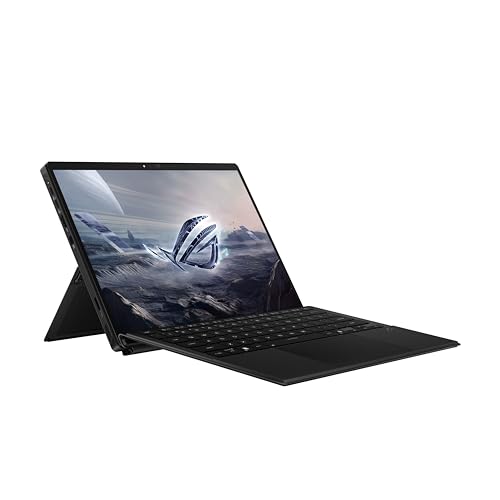
Begin with the improbability of the thing: an RTX 5070, a Ryzen AI processor and a 3K OLED display inside an aluminium shell that slides into bags designed for office ultrabooks. The Blade 14’s unibody is machined rather than assembled-feeling, the hinge is a single confident motion, and the screen — high-resolution, OLED-rich, fast — is the best panel ever fitted to a laptop this size by a wide margin. Games do not merely run on it; they look expensive on it.
Performance respects physics while defying expectations. The 5070 here cannot draw the power it would in a thick 16-inch chassis, so it performs like a very strong 5060-class machine with extra headroom — which is to say, superbly at the panel’s native resolution in most titles with upscaling, and beautifully at 1080p-equivalent settings everywhere. Fans are audible under load because the laws of thermodynamics hold in California too, but the pitch is controlled and the deck stays civilised.
The ownership proposition is the point: this is the gaming laptop for people whose lives happen in airports, client offices and small flats, and who refuse to let those lives demote their hobby. Its price reflects flagship positioning, its battery behaves respectably when the GPU sleeps, and its presence in a meeting is indistinguishable from a premium work machine. If the class has a king, you are reading about it.
Key specifications
- Graphics: RTX 5070
- Processor class: AMD Ryzen AI processor
- Display: 14-inch 3K OLED display with OLED panel with very fast response
- Memory: 32GB of memory in many listings
- Storage: 1TB SSD as commonly sold
- Chassis: a CNC aluminium unibody barely thicker than an ultrabook
Strengths
- RTX 5070 performance in an ultrabook-sized shell
- 3K OLED screen of exceptional quality
- Machined aluminium build that travels beautifully
Trade-offs
- GPU runs at small-chassis wattage, not desktop-replacement levels
- Premium pricing for the class
- Fans are noticeable during demanding play
Best for: travelling players who want flagship feel and OLED beauty in the smallest credible gaming chassis
Not suited for: desk-bound players, who would get more performance from a larger machine at similar money

Razer Blade 14 RTX 5060 (2025) — The sensible Blade
Everything that makes the flagship desirable survives in its sibling: the same unibody, the same 3K OLED, the same keyboard and the same travel manners. The RTX 5060 inside gives back some headroom in the heaviest scenes and keeps the rest of the experience intact, which makes this the Blade that most buyers should actually purchase. At the panel’s native resolution you will lean on upscaling a little more often; in exchange, the machine runs a touch cooler and the budget breathes easier.
It is worth pausing on how complete the package feels. Small gaming laptops historically amputate something — the webcam, the ports, the battery, the speakers. This Blade keeps the full complement in credible form, so it works as an only computer: classes, documents, video calls, photo libraries and a game library, all carried in one slim object. Razer’s software restraint helps; the machine feels like a product, not a platform for upsells.
Choose it over the 5070 if your catalogue is esports, indies and mainstream AAA rather than a ray-tracing showcase tour, or if the saving funds the travel that justifies a 14-inch machine in the first place. The sensible Blade is still, by the standards of this small class, a superb one.
Key specifications
- Graphics: RTX 5060
- Processor class: AMD Ryzen AI processor
- Display: 14-inch 3K OLED display with OLED panel with very fast response
- Memory: 16GB or 32GB of memory depending on listing
- Storage: 1TB SSD in most listings
- Chassis: the same slim aluminium unibody as its stronger sibling
Strengths
- Same OLED and unibody as the flagship
- RTX 5060 covers the mainstream catalogue handsomely
- Complete only-computer package for travel life
Trade-offs
- Less headroom in the heaviest ray-traced scenes
- Still premium-priced against larger laptops
- Small chassis limits upgrade ambitions
Best for: mobile professionals and students who game seriously and travel constantly
Not suited for: players chasing maximum performance per pound regardless of size
ASUS ROG Zephyrus G14 — The beloved alternative
No name in this class carries more goodwill than the Zephyrus G14. Generation after generation, ASUS’s small flagship has been the machine reviewers reach for when explaining that portability and power can coexist: a compact aluminium body, an excellent OLED screen in recent versions, speakers that shame most gaming laptops, and a personality — the slash-lit lid, the compact charger — that owners genuinely bond with. In pure reputation, it is the Blade’s only equal.
So why does it stand here without a link? Because our verification process for this guide did not return a listing we could confirm with the confidence we demand before sending you to a product page, and a guide that links hopefully is a guide that wastes your evenings. The G14 absolutely belongs on your personal shortlist if you find it through a retailer you trust — simply verify the generation, the GPU and the panel with unusual care, because several years of G14s share a name and differ enormously.
Treat this entry as a signpost rather than a shortcut. The machine is real, admired and worth hunting; the hunt itself is yours to conduct with the checklist this guide provides, and a careful buyer will be rewarded with one of the finest small laptops ever made.
Key specifications
- Graphics: RTX 5060 or RTX 5070 class graphics in recent generations
- Processor class: AMD Ryzen processor
- Display: 14-inch OLED display with OLED high-refresh panel
- Memory: 16GB or 32GB of memory depending on configuration
- Storage: 1TB SSD in many configurations
- Chassis: a compact aluminium body with a slash lighting lid on some versions
Strengths
- Legendary balance of size, screen and sound
- Owner community and review coverage are deep
- Recent generations carry lovely OLED panels
Trade-offs
- No listing we could verify for this guide — buy only after careful checks
- Multiple generations share the name with very different specifications
- Availability fluctuates sharply between regions
Best for: patient buyers who find a clearly specified unit from a retailer they trust
Not suited for: anyone needing a guaranteed in-stock purchase this week
Lenovo Legion Slim 5 14-inch — The rare OLED Legion
Lenovo’s experiment in small was a good one: a 14.5-inch Legion with an OLED screen, RTX 4060-class graphics and the brand’s trademark keyboard, sold for a limited period and then gone. Those who bought one tend to keep it and praise it, because it applied Legion’s cooling seriousness to a size the line has since abandoned in favour of larger machines. It remains the answer to a trivia question — did Lenovo ever make a small OLED gaming laptop? — and a genuinely desirable used or remaining-stock find.
Like the G14, it appears here without a link because we could not verify a current listing to our standard. Its limited run means surviving examples surface irregularly, often at prices that reflect scarcity more than specification. If one appears from a reputable source at a sane figure, the checklist is the usual one, sharpened: confirm the OLED panel, the exact GPU, and the battery’s health, since a hard-used ex-display unit is a different proposition from a cherished private sale.
We include it partly for completeness and partly as a market signal. Buyers clearly want small, serious gaming laptops; manufacturers clearly find them hard to build profitably. The Legion Slim’s brief life is the class’s economics written in a single product.
Key specifications
- Graphics: RTX 4060 class graphics in the generation most often listed
- Processor class: AMD Ryzen processor
- Display: 14.5-inch OLED display with OLED high-refresh panel
- Memory: 16GB DDR5 as typically sold
- Storage: 512GB SSD as typically sold
- Chassis: a slim Legion shell that was sold for a limited run
Strengths
- Legion cooling and keyboard in a compact OLED design
- Desirable specification for its size and era
- Strong owner satisfaction among those who found one
Trade-offs
- Limited production run makes examples scarce
- Scarcity pricing can exceed the specification’s worth
- No listing verified for this guide
Best for: Lenovo loyalists and used-market hunters who spot a fairly priced example
Not suited for: buyers who need guaranteed availability and a fresh warranty
MSI Stealth 14 Studio — The studio crossover
MSI aimed the Stealth 14 Studio at a slightly different citizen: the creator who games, rather than the gamer who creates. Its design language is office-first, its marketing spoke of studios and workflows, and its specification — RTX 40-series graphics in most listings, a fast 14-inch panel, a chassis that would not startle a client — matched that pitch. As a gaming machine it is honest mid-pack power in a discreet suit, which for some buyers is precisely the brief.
It joins the prose-only ranks here because our checks did not confirm a listing for this round, and because the Stealth name has covered several configurations whose differences matter. Anyone hunting one should pin down the exact GPU and panel before money moves, and should value the machine for its discretion and balance rather than expecting it to outrun the Blades it shares this page with.
Its presence completes the class’s map: Razer builds the flagship, ASUS builds the icon, Lenovo built the limited experiment, and MSI built the crossover. Four philosophies, one very small shelf — which is the truest sentence anyone can write about 14-inch gaming.
Key specifications
- Graphics: RTX 40-series graphics in most listings
- Processor class: Intel Core processor
- Display: 14-inch display with high-refresh panel
- Memory: 16GB in most retail listings
- Storage: 1TB SSD in the common configuration
- Chassis: a work-leaning shell from MSI’s Studio line
Strengths
- Discreet, creator-leaning design suits offices
- Balanced specification for work and play
- Compact footprint with a fast panel
Trade-offs
- Configurations under the Stealth name vary widely
- Gaming performance trails the current Blades
- No listing verified for this guide
Best for: creators who want gaming ability hidden inside a work-first machine
Not suited for: anyone whose priority is peak power regardless of portability
Razer Blade 14 (earlier generation) — The used-market route
The final entry is a strategy rather than a product: earlier Blade 14 generations, bought used or refurbished with care, deliver the unibody-and-OLED-adjacent experience to buyers whose budgets exclude the current models. The Blade formula has been consistent for years — aluminium shell, strong screens, Ryzen processors, RTX graphics a generation or two behind — so a well-kept example still feels modern in the hand and plays a vast catalogue beautifully at 1080p.
Used buying demands its own discipline, which this guide will state once, clearly. Batteries age: ask about cycle counts and expect reduced unplugged life. Screens differ by year: confirm whether the example is OLED or LCD before valuing it. Warranties shrink or vanish: price that risk honestly rather than pretending a private sale equals a retail purchase. And meet the machine running a game, not asleep on a doorstep, whenever geography allows.
We list no link and invent no listing, because the used market cannot be verified the way our pool requires. But as a route into this class it is legitimate, well-trodden, and — for the careful — the difference between admiring the Blade 14 and owning one.
Key specifications
- Graphics: previous-generation RTX graphics
- Processor class: AMD Ryzen processor
- Display: 14-inch display with high-refresh panel
- Memory: 16GB fitted as standard
- Storage: 1TB SSD, frequently the listed fit
- Chassis: the same aluminium unibody formula as the current model
Strengths
- Flagship build and design at used-market money
- Huge catalogue plays well at 1080p on older RTX chips
- Consistent design makes research and parts easier
Trade-offs
- Battery wear is the rule, not the exception
- Panel type and specification vary by year
- Warranty protection is limited or absent
Best for: careful second-hand buyers who inspect before they pay
Not suited for: buyers who need a full warranty and a return window
Where Does Each 14-Inch Option Win and Lose?
Read the availability column in your head as you scan: two of these machines can be bought new with confidence today, and four are hunts of varying difficulty. The table compares them as machines; the prose above grades them as purchases.
| Model | Graphics | Screen | Standout point |
|---|---|---|---|
| Razer Blade 14 RTX 5070 (2025) | RTX 5070 | 14-inch 3K OLED display | Flagship power, smallest shell |
| Razer Blade 14 RTX 5060 (2025) | RTX 5060 | 14-inch 3K OLED display | The balanced Blade to buy |
| ASUS ROG Zephyrus G14 | RTX 5060 or RTX 5070 class graphics in recent generations | 14-inch OLED display | Iconic alternative — verify carefully |
| Lenovo Legion Slim 5 14-inch | RTX 4060 class graphics in the generation most often listed | 14.5-inch OLED display | Scarce OLED Legion experiment |
| MSI Stealth 14 Studio | RTX 40-series graphics in most listings | 14-inch display | Creator-leaning crossover |
| Razer Blade 14 (earlier generation) | previous-generation RTX graphics | 14-inch display | Used route into the unibody life |
Why Are There So Few 14-Inch Gaming Laptops?
Physics and accounting conspire. A gaming GPU under load produces heat that must leave through fans and fins; halving the chassis volume far more than halves the cooling options, so engineers either cap the GPU’s power — angering benchmark readers — or accept noise and heat that anger everyone else. Meanwhile the buyers who pay premiums for smallness usually buy ultrabooks, leaving gaming’s smallest class with flagship costs and niche volumes. Razer persists because small flagships are its identity; ASUS persists because the G14 became a franchise; the rest of the industry mostly watches.
The consequence for you is liberating: research is short. The class has a default (the Blade), an icon (the G14), and a penumbra of scarce or used alternatives. Anyone who tells you there are twenty great 14-inch gaming laptops is selling something.
What Performance Should You Expect From a Small Chassis?
Expect the GPU’s name to overpromise by roughly one tier of sustained behaviour. A 5070 in a Blade performs like a strong 5060 in a big chassis; a 5060 like a strong 5050-plus. That is not a scandal — it is the published price of portability, and at 14-inch screen sizes, with resolutions handled by upscaling, the lived experience remains excellent. Esports titles saturate the panel; cinematic titles run at high settings with intelligent compromises; only benchmark screenshots reveal the wattage ceiling.
Thermals shape the experience more than averages suggest. Small machines reach their fan curves quickly, so choose your performance profile deliberately: the quieter modes sacrifice little in most games and transform the machine’s manners in shared rooms.
Is a 14-Inch Screen Big Enough for Gaming?
At laptop distances, a sharp 14-inch panel is more immersive than its diagonal suggests, particularly an OLED with true blacks. Competitive players sometimes prefer the smaller canvas — the whole scene sits within a glance. Where size genuinely bites is split-screen work, sprawling strategy interfaces and side-by-side documents; if those dominate your days, the honest answer may be a 16-inch machine or a 14-inch laptop plus a desk monitor, a pairing the Blades handle gracefully.
How Do You Travel Well With a Small Gaming Laptop?
The ritual begins with power: these machines game on their chargers, so pack the brick where you can reach it, and consider a compact USB-C charger for light-duty days if your model sips from one — check the manual rather than assuming. A padded sleeve earns its millimetres daily; small laptops die from corners and zips more than from drops.
In transit, favour the integrated graphics for films and documents to stretch the battery, keep the performance profile honest, and let the machine sleep rather than roast in a bag. On arrival, the small gaming laptop’s superpower asserts itself: any hotel desk, kitchen table or borrowed corner becomes a battlestation in ninety seconds.
What Mistakes Do Buyers of Small Gaming Laptops Make?
The first is buying the size for a life they do not lead — paying the small-machine premium, accepting its wattage ceiling, and then never taking it anywhere. The second is assuming a famous name guarantees a current listing’s specification; this class recycles names across years more than most. The third is neglecting the screen variant, since the same model may ship with panels of very different quality across generations.
The fourth mistake is subtler: expecting desktop-replacement thermals and then reviewing the machine harshly for being a laptop. Judge small gaming machines against their mission — power that travels — and the good ones are miraculous. Judge them against a tower PC and everything is a disappointment, including your purchasing decision.
Final Recommendation
Buy the Blade 14 that matches your catalogue: the RTX 5070 for flagship headroom and the longest useful life, the RTX 5060 for the same design and screen with a cooler, calmer brief. They are the class’s verified present tense. Keep the Zephyrus G14 on your personal watchlist if you shop widely and verify carefully, treat the Legion Slim and Stealth 14 as opportunistic finds rather than plans, and consider an earlier Blade if the used market is your natural habitat.
Above all, buy the size for the life you actually live. A 14-inch gaming laptop owned by a traveller is one of the great modern conveniences; the same machine bought by a desk-bound player is an expensive lesson in self-knowledge.
What Is Life Actually Like at Fourteen Inches?
Owners of small gaming laptops describe a particular freedom that spec sheets cannot convey: the machine is simply always there. It fits the café table beside a coffee rather than annexing it. It opens on a train tray without negotiating with the seat in front. It goes home in a tote that also holds a paperback and a charger, and because it is always there, the hobby happens in the margins of life — a race between meetings, a dungeon run in a hotel, a strategy turn while dinner cooks — instead of waiting for a scheduled evening at a desk.
The Blade twins embody that freedom best because they were designed as laptops that game rather than gaming rigs that shrink. Their keyboards fill the narrower deck intelligently, their trackpads remain genuinely usable, and their screens reward the closer viewing distance that small machines invite. OLED at forty centimetres is a different drug from OLED across a desk: pixel density and contrast conspire to make the image feel printed rather than displayed.
There are frictions, and honesty requires naming them. Ports cluster tightly, so a forest of dongles can sprout from a docked Blade. The charger, though compact by gaming standards, still dwarfs an ultrabook’s. And the knowledge that a larger machine would be faster for the same money never fully leaves a benchmark-literate owner. Small-machine people make their peace with that arithmetic early, usually somewhere around the third time the laptop goes somewhere a 16-incher would have been left behind.
How Does Each Machine Suit a Different Kind of Traveller?
The RTX 5070 Blade is the consultant’s and the creative’s instrument: the person whose laptop is opened in front of clients by day and expected to render a ray-traced city by night. Its headroom is professional insurance — the game you buy next year, the project file that grows teeth — carried in the slimmest possible insurance policy.
The RTX 5060 Blade suits the student and the hybrid worker whose travel is weekly rather than constant, and whose games are the social catalogue: the shooters, racers and co-operative titles where the group actually gathers. It leaves budget for the bag, the mouse and the external drive that real mobile life accumulates.
The G14, when found well, suits the enthusiast who values character — the speakers, the design flourishes, the community knowledge — and who enjoys the hunt itself. The Legion Slim suits the Lenovo loyalist who pounces rather than plans. The Stealth 14 suits the office-first buyer whose gaming is a private hobby kept politely out of sight. The earlier Blade suits the pragmatist with a screwdriver and an eye for a cherished used example. Six entries, six temperaments, one small shelf.
What Should You Know About Heat in a Chassis This Small?
Small gaming laptops run their cooling closer to the edge by design, which changes how you should treat them rather than whether you should buy them. Give the intakes air: a hard surface, a slight rear lift, a room that is not stifling. Use the manufacturer’s quieter profiles for the games that allow them — many titles leave GPU headroom unused at this screen size, and trading that surplus for silence is the small-machine owner’s favourite bargain.
Expect the deck to warm under sustained load and the fans to be present in the room’s soundscape. What you should not accept is erratic behaviour — fans that surge and die in cycles, or performance that collapses after twenty minutes — because modern small machines, the Blades included, are engineered to find a level and hold it. A unit that cannot hold its level is a faulty unit, not a small laptop being a small laptop, and the return window exists for exactly that discovery.
Docking the Small Machine: Home Base Strategies
The most satisfying 14-inch setups treat the laptop as a heart that commutes. At home, a single USB-C cable can wake a monitor, keyboard, mouse and wired network, turning the little machine into a desktop that happens to leave. The Blades thrive in this arrangement because their own screens become excellent secondary displays rather than going dark, and their cooling does not object to the lid being open beside a larger panel.
Resolution discipline keeps the illusion complete. Drive the external monitor at a level the GPU enjoys — 1440p for most games on the 5070, a step lower or upscaled on the 5060 — and reserve native-resolution heroics for the laptop’s own OLED, where pixel density forgives everything. Competitive players often reverse the arrangement, gaming on the laptop panel for its response and using the big screen for everything else, which tells you how far small panels have come.
Cable quality matters more than cable price: a certified USB-C lead rated for display and power ends the flicker-and-dropout folklore that haunts cheap hubs. Buy one good cable and one good hub, and the small machine’s home life becomes indistinguishable from a desktop’s, minus the tower humming under the desk.
The Economics of Small: Why the Premium Exists
Newcomers to this class often ask why less laptop costs more money, and the answer is manufacturing honesty. Machining an aluminium unibody costs more than moulding plastic. Engineering cooling that fits a sliver costs more than cooling that fits a brick. OLED panels in unusual sizes cost more than commodity LCDs. The Blade’s price is not a tax on fashion; it is the bill for making gaming hardware behave like a premium ultrabook, itemised.
Whether the bill is worth paying depends on a single variable: how often the machine leaves the building. Daily travellers amortise the premium across hundreds of journeys and call it cheap. Desk-bound owners amortise it across none and call it vanity. The G14’s enduring popularity proves how many buyers live the first life; the thinness of the class proves how many manufacturers doubt them. Both things are true, and your calendar, not a review, knows which person you are.
Caring for a Small, Expensive, Hard-Working Machine
Small flagships reward gentle administration. Keep the OLED’s panel-care features enabled and let the screen sleep on battery; the machine’s beauty is its panel, and the panel’s longevity is partly in your hands. Clean the fan intakes more often than you would on a big laptop, because smaller apertures clog sooner and the cooling has less margin to spare. Update Razer’s software and NVIDIA’s drivers on a calm monthly rhythm rather than in a panic before a launch weekend.
Physically, the unibody forgives much but remembers corners. A sleeve is not an accessory but a component. And because these machines hold value unusually well, the box and charger kept safely translate into real money when the next generation tempts you — the small class’s owners upgrade within the class, generation after generation, which is the surest sign the concept works.
How to Verify a Prose-Only Pick Before Buying One
Because half this guide is deliberately unlinkable, it owes you a field kit for hunting those machines safely. Begin with the generation: the G14 alone spans years of designs sharing a name, so identify the exact model year and GPU from the manufacturer’s own specification page, not the seller’s headline. Continue with the panel — OLED or LCD, resolution, refresh — because small laptops are bought for their screens and the variants differ wildly.
Then interrogate the seller like a friendly auditor. Original charger included? Battery cycle count or health report available? Any hinge play, dead pixels, or fan noise beyond the ordinary? For used examples, a video of the machine running a demanding game for ten minutes is worth more than a gallery of beauty shots. For remaining retail stock, confirm the warranty is the manufacturer’s and starts with you, not with a warehouse.
Finally, price the find against the verified present tense. A G14 priced like a new Blade must justify itself in specification, not nostalgia; a Legion Slim priced like a budget laptop deserves a fast, careful pounce. The Blades’ listings are the market’s anchor — use them as one.
What Games Flatter a Fourteen-Inch Machine Most?
Some genres feel designed for the format. Racing and action titles at close range on OLED are visceral in a way that survives the wattage ceiling, because motion clarity and contrast carry the experience. Narrative adventures, with their dusk palettes and firelight, flatter the panel’s blacks. Esports titles saturate the refresh rate and ask nothing the chassis cannot give for hours.
Vast strategy and simulation games are the honest strain — not for performance, which is adequate, but for interface scale. Text shrinks, maps crowd, and the player leans in. Owners who live in those genres either dock to a monitor at home or accept the lean as the format’s toll. Knowing your library’s centre of gravity is the final specification to check, and it is the one no listing page will print for you.
Battery Life, Realistically, for the Travelling Player
Plan around a working day of light tasks rather than a day of play. The Blades are engineered to behave like premium ultrabooks when the GPU sleeps — documents, browsing, video and calls across a long stretch — and that duality is their core achievement. The moment a game wakes the discrete graphics, the clock starts in earnest: expect a short session, at reduced settings, best treated as a bridge between sockets.
Travellers stretch the bridge with habits: brightness matched to the room rather than the showroom, refresh rate lowered for office work, background updaters paused on metered connections. None of this is special pleading for the class; it is the standard etiquette of any powerful small machine, and owners who adopt it stop thinking about the battery altogether — which is the definition of enough.
The Case for Stepping Up a Size — Stated Fairly
A guide to small laptops should make the opposition’s argument honestly, because some readers need to hear it from a friend. A 15.6-inch or 16-inch machine at Blade money carries a GPU running at fuller wattage, a larger and often equally lovely screen, quieter cooling, more ports, and easier upgrades. It will age more slowly, cost less per frame, and annoy shared rooms less. If your laptop’s journeys are between rooms rather than between cities, that machine is simply the better purchase, and no amount of unibody charm changes the arithmetic.
The 14-inch class exists for the other life: the one measured in flights, commutes, small desks and borrowed corners. Its premium buys presence — the machine being where the life is — and presence compounds daily in a way benchmarks cannot express. Read the two paragraphs again and notice which one describes your calendar. That recognition, more than any specification in this guide, is the buying decision.
Accessories That Earn Their Place in a Small Bag
Small-machine owners curate ruthlessly, and the survivors share a trait: each removes a friction the format creates. A compact multi-port hub replaces the dongle tangle. A slim mouse that travels flat respects the bag’s geometry. A short, certified USB-C cable handles docking and emergency charging duties without becoming a nest. A sleeve with a rigid corner guards the unibody’s one vanity — its finish.
What does not survive curation is equally instructive: full-size headsets that annex the bag, cooling pads that duplicate the desk the owner does not have, and spare chargers for rooms the traveller never revisits. The small laptop teaches minimalism by example, and most owners report, slightly surprised, that the lesson spreads to the rest of the luggage.
What the First Month With a Blade 14 Feels Like
Week one is astonishment at the object itself — the density of it, the way the OLED makes even the desktop feel curated, the discovery that your bag has not noticed the upgrade from the old ultrabook. Games you know well look newly lit. Colleagues ask what it is, and the answer surprises them, which never stops being a little enjoyable.
Week two is calibration. You learn the fan profiles by ear, discover which titles prefer the quieter mode, and set the panel’s sleep behaviour to match your habits. The charger finds its permanent home; the travel charger, if you bought one, finds the bag. A rhythm forms: work mode and play mode, two personalities in one sliver of aluminium, switched in seconds.
By week four the machine has stopped being a purchase and become infrastructure — the thing through which work, friendship and play all route. That is the small flagship’s real product, and it is why owners defend the class so warmly in forums: they are not defending a specification, they are defending a way their days fit together.
Reading the Class’s Future Without a Crystal Ball
The forces that shrank this class have not reversed: cooling remains physics, and the mass market still buys size with its gaming money. Yet the forces that sustain it are strengthening — hybrid work, smaller living spaces, OLED panels spreading downward in price, and efficient GPU generations that make small wattage budgets go further than they did three years ago. Each new RTX generation flatters small chassis disproportionately, because efficiency is the currency they are poorest in.
Expect the class to remain small, excellent and dominated by the same few names — which makes buying into it simpler, not riskier. The Blade you buy today competes against a short list tomorrow, holds its value against that short list, and will be understood by every future buyer who searches for it. In a market addicted to churn, that stability is its own feature.
Small Screens and Long Sessions: Comfort Notes
Fourteen inches at laptop distance fills the visual field more generously than newcomers expect, but posture deserves a sentence of respect. Raise the machine on a book or a slim stand during long home sessions, keep brightness matched to the room to spare your eyes the contrast strain, and let the OLED’s deep blacks do their evening magic rather than fighting them with maximum brightness at midnight. Owners who game for hours on small panels report that the panel is rarely the limit — the chair is.
Text scaling is the quiet setting that transforms small-laptop life. A notch of Windows scaling makes documents and strategy interfaces legible without surrendering the sharpness the 3K panel exists to provide, and per-app overrides let games render exactly as they should. Ten minutes spent here in week one repays itself every day of the machine’s life.
A Checklist for the Day You Buy
Confirm the GPU and its generation, the panel type and resolution, the memory and storage of the exact listing, and the charger wattage in the box. Screenshot the specification. On arrival, run the updates, inspect the OLED against grey and black test screens at low brightness, play your heaviest game for half an hour inside the return window, and listen — really listen — to whether the cooling settles into a level you can live with. Small machines ask to be judged by living-with, and the first days are when living-with is cheapest to change.
Why Owners Rarely Leave This Class
Talk to people on their second or third small gaming laptop and a pattern emerges: the size stops being a specification and becomes an identity. They plan trips around a bag the machine fits, choose cafés by tables it suits, and measure every new announcement first by its dimensions. Larger laptops, however fast, read to them as furniture — admired, perhaps, but not theirs.
That loyalty is the market’s clearest verdict on the class’s compromises. The wattage ceiling is real, the premium is real, and neither matters to the converted, because the machine’s presence in their daily geography is worth more than the frames surrendered. If the descriptions in this guide have been quietly describing your life, you are probably already converted and merely shopping for confirmation. The Blade twins are honoured to provide it.
One More Honest Note on Availability
Listings in this class move faster than in any other category of this guide’s wider project, because the audience is small, motivated and watching the same few models. A verified pick today is a fact about today; if a Blade configuration sells through, its sibling is the rational next click rather than a stranger’s marketplace listing at a heroic markup. Patience and verification — the two virtues this entire guide has been quietly teaching — are worth more at fourteen inches than anywhere else in gaming laptops.
The Small Machine as an Only Computer
Most 14-inch gaming buyers are not adding a toy to a desktop fleet; they are choosing the one computer that must do everything, and the class should be judged by that standard. The Blades pass it completely — study, office work, creative hobbies, family administration and a serious game library in a single slim object that never needs to apologise in any of those rooms. The G14 passes it too, which is precisely why its legend endures beyond its listing status.
Judged that way, the premium reframes itself. You are not paying extra for a smaller gaming laptop; you are paying for the consolidation of two machines into one, and retiring the compromises of both. Few purchases in technology genuinely simplify a life. A great 14-inch gaming laptop, matched to a travelling owner, is one of them.
What to Do While You Decide
If the choice between the two Blades is paralysing you, borrow the decision from your library: list the five games you will actually play this year, honestly, and ask which GPU they need at the settings you will actually choose. For most real libraries the answer is the 5060, and the money saved becomes the bag, the mouse and the first year of games. If your list is a ray-tracing showcase and your horizon is five years, the 5070 has already answered for you.
And if neither feels reachable today, the prose-only half of this guide is not a consolation prize but a treasure map — provided you hunt with the verification discipline it describes. The class rewards the careful at every price point, which may be the most useful sentence in this entire article.
Fourteen Inches and the Question of Enough
Every category of technology has a point where more stops meaning better, and for the travelling player this class sits exactly on it. Enough screen to lose yourself, enough power to play the present, enough battery to work the day, enough machine to carry without thinking — and not one gram of excess beyond enough. The Blades are what enough looks like when engineers are allowed to polish it, and the scarcity of rivals is what enough costs when accountants review it.
If you take one idea from this guide, take that: buy for enough, precisely defined by your own life, rather than for maximum, defined by someone else’s chart. It is the philosophy that built this small, excellent class, and it will serve you in every category that follows it.
A Short Defence of Paying for Build Quality
Sceptics call the unibody a luxury until they have carried a flexing plastic chassis through a year of airports, feeling it creak at every lift and watching its corners polish themselves shiny against bag zips. Build quality in a travelling machine is not vanity; it is the difference between a tool that ages into character and one that ages into apology. The Blades’ machined shells, the G14’s tight assembly, even the Legion experiment’s solidity — these are durability features wearing nice clothes, and frequent travellers are right to pay for them without embarrassment.
Frequently Asked Questions
Are there really only a couple of new 14-inch gaming laptops worth buying?
At the time of writing, the verified field is genuinely that small. Razer’s Blade 14 line is the dependable new purchase; ASUS’s G14 is the admired alternative whose listings need individual verification. Anyone promising a long list is usually padding it with ultrabooks carrying token graphics.
Blade 14 with RTX 5070 or RTX 5060 — which is the smarter buy?
The 5060 for most people: identical design and screen, ample performance for the panel, calmer thermals. The 5070 earns its premium for players of demanding ray-traced games who keep machines for many years.
Can a 14-inch gaming laptop replace a desktop?
For travellers and small-space living, yes in practice — especially docked to a monitor at home. For maximum performance per pound or silent operation under load, a desktop remains untouchable. The Blade replaces desktops for people whose lives move, not for people whose benchmarks rule.
How is battery life on small gaming laptops?
Respectable for work and media when the discrete GPU sleeps — the Blades are designed as real laptops first in this mode. Gaming unplugged remains a short, compromised affair on every machine in this class.
Is the Zephyrus G14 a mistake to buy without a link here?
Not at all — it is a mistake to buy it carelessly. Verify the exact generation, GPU, panel and seller, and it may be the finest purchase in this guide. Our prose-only treatment reflects our verification process, not the machine’s quality.
Related Guides
Small machines travel with big questions, and the guides below answer the neighbouring ones — what the larger sizes offer, and how OLED changes the picture at every diagonal. best 15.6-inch gaming laptops for most players best gaming laptops for frequent travellers best OLED gaming laptops in every size.
There is a photograph every small-laptop owner eventually takes: the machine open on a train table or a café ledge, a great game running, the world going past the window. No benchmark captures it and no bigger laptop can star in it. Buy the machine that puts you in that photograph, and the class’s small print — wattage, scarcity, premium — resolves itself into a footnote.
So the class is small, the default is clear, and the decision is really about the life the machine will join. Measure that life honestly — its journeys, its rooms, its games — and the right fourteen inches will be obvious, whether it arrives with a verified link today or after a patient, careful hunt.
And when in doubt between the two Blades, remember that buyer’s remorse in this class almost never comes from the GPU. It comes from buying a size your life did not want. You have already solved that problem by being here — the rest is merely choosing how much headroom to carry.
Pack light, verify carefully, and let the little machine surprise you — it has been surprising sceptics for years, and it is very good at it.
The next move is yours: open the listings, run the checklist, and claim the small machine your calendar has been asking for.
Fourteen inches, chosen well, is not the small option. For the right life, it is the only option.
Safe travels, and very good hunting to you.
Small is a discipline, not a compromise — choose the little machine that fits your travelling life, and it will feel less like a laptop and more like a superpower with a keyboard.
[…] gaming laptop catalogue with these companion guides: best gaming laptops for students on a budget best 15.6-inch gaming laptops compared best affordable gaming laptops worth […]