What's inside
- Key Takeaways
- Quick Picks
- How We Chose These Picks
- Why Do Cooler Master Fans Keep Getting Bigger?
- Which Cooler Master Case Fits Under Your Desk, and Which One Becomes the Desk?
- How Did One Brand End Up With Such Different Cases?
- The Six Cooler Master Cases in Detail
- How Do the Six Cooler Master Cases Compare on Paper?
- How Do You Keep a High-Airflow Cooler Master Quiet?
- How Should You Match a Cooler Master Case to a Motherboard and Cooler?
- What Goes Wrong When People Buy Cooler Master Cases?
- What Are These Cases Like to Service Two Years Later?
- How Much Do Looks Actually Matter in This Range?
- Which Owner Temperament Matches Which Case?
- What Should You Decide Before Comparing Prices Across the Range?
- Final Recommendation
- Frequently Asked Questions
- Related Guides
As an Amazon Associate I earn from qualifying purchases. This post may contain affiliate links at no extra cost to you.
widgetverdict.com is reader-supported. When you buy through links on our site, we may earn an affiliate commission.
Where to buy: Cooler Master’s range spans two decades of designs still on sale at once, so each pick below links to the specific current listing named in its section — a HAF from the big-fan era and a QUBE from the customisable era are both Cooler Master, and almost nothing else about them is shared.
Anyone hunting for the best pc cases cooler master sells quickly discovers the brand is really several case-makers under one logo. There is the HAF lineage, built around enormous fans moving air slowly and quietly. There is the TD line, chasing airflow through sculpted mesh and bundled ARGB fans. There are the small, cheap, honest boxes like the N200 and Elite 301 Lite that exist to hold a sensible PC without ceremony. And lately there is the QUBE experiment, which treats the case itself as something to rearrange. A single ranking would flatten all of that, so this guide reads the six as answers to six different questions.
The organising idea is fan philosophy, because it explains nearly every other difference. Cooler Master’s signature move — fans of 180mm, 200mm and even 220mm — trades fan count for fan diameter: fewer, larger impellers pushing serious air at speeds low enough to stay hushed. The smaller cases abandon that move entirely and compete on footprint and price of entry. Judge each pick by whether its philosophy matches your room, your noise tolerance and your graphics card, and the right one identifies itself quickly.
Key Takeaways
- Cooler Master’s identity is the oversized fan: the HAF 500 pairs dual 220mm fans with a 180mm unit, and the HAF 700 runs dual 200mm SickleFlow ARGB fans.
- The HAF 500 is the workstation-flavoured pick, with 430mm graphics card support, 360mm AIO support and room the listing ties to multi-GPU and AI workstation builds.
- The TD500 Mesh is the mainstream gaming answer: polygonal mesh, four CF120 ARGB fans included and 360mm radiator support.
- The Elite 301 Lite squeezes a 365mm GPU allowance and 280mm AIO support into a micro-ATX minimalist shell with a Type-C port.
- The N200 is the veteran mini tower — fully meshed front, mATX and Mini-ITX support, no glass theatre.
- The QUBE 540 is the tinkerers’ case: movable I/O panel, multi-mount PSU options and a beige finish that signals its customisable intent.
Quick Picks
| Pick | Badge | Why it earns its place |
|---|---|---|
| Cooler Master HAF 500 | Big fans, workstation room | Dual 220mm plus 180mm fans, 430mm GPU support and dedicated GPU airflow in an ATX HAF shell. |
| Cooler Master Elite 301 Lite | Small shell, long cards | Micro-ATX minimalist case that still allows 365mm graphics cards and a 280mm AIO, with tempered glass and Type-C. |
| Cooler Master TD500 Mesh | The mesh gaming standard | Polygonal mesh front, four CF120 ARGB fans included, tempered glass and 360mm radiator support. |
| Cooler Master HAF 700 | The E-ATX airflow flagship | Dual 200mm SickleFlow ARGB fans, mesh front and a five-port USB front panel in a full-size HAF body. |
| Cooler Master N200 | The no-nonsense mini tower | Fully meshed front panel and mATX/Mini-ITX support in a compact case that predates the glass era and outlasted it. |
| Cooler Master QUBE 540 | The rearrangeable one | Movable I/O panel, multi-mount PSU and 415mm GPU support in a beige ATX case built to be reconfigured. |
How We Chose These Picks
We required current verified listings and then deliberately sampled across Cooler Master’s eras and sizes rather than crowning one line: two HAF big-fan cases, the TD500 Mesh as the gaming mainstream, two compact budget-friendly boxes, and the QUBE as the customisable outlier. Specifications come only from each listing title — fan diameters, GPU length allowances, radiator ceilings, port counts — because Cooler Master reuses family names across generations and a borrowed spec is a wrong spec.
Brand contrast sharpened the selection. Set beside the Best NZXT PC Cases guide, where the story is chambers and control hubs, Cooler Master’s story is mechanical: fan diameter, mesh area and physical room. Neither philosophy is superior; they suit different owners. We favoured picks that commit fully to one philosophy over those hedging between several, which is why the unapologetic N200 survives in a guide that also contains the QUBE 540.
Noise thinking ran through every judgement. Large fans earn their place only if their size is used for slowness, so we weighed the HAF models as acoustic instruments as much as airflow ones. Equally, the small cases were judged on whether their compromises land where budget builders can live with them — a minimalist shell that still swallows a long graphics card is a very different product from one that saves money by shrinking the GPU bay.
A word about what this guide deliberately leaves out. Cooler Master also sells sealed, silence-oriented cases and a long tail of regional variants, and none of them appear here: the six were chosen to represent the philosophies a buyer is actually choosing between in the current catalogue — big-fan airflow, open-mesh gaming, compact value, proven utility and reconfigurability. A buyer whose priority is acoustic damping above all should treat this as one chapter of the search, and the neighbouring guides linked throughout cover the brands and styles that compete for that different brief.
Why Do Cooler Master Fans Keep Getting Bigger?
The physics is simple and the HAF line is built on it. Doubling a fan’s diameter does far more than double the air it can move at a given speed, so a 200mm or 220mm fan at a lazy rotational pace can match the airflow of smaller fans spinning hard — and hard-spinning small fans are where case noise lives. Big fans also produce a lower-pitched sound that rooms and ears tolerate better than a high whine. The HAF 500’s pairing of dual 220mm fans with a 180mm unit, and the HAF 700’s dual 200mm SickleFlow fans, are this argument made in steel and plastic.
The costs are equally physical. Huge fans dictate a wide, tall case; they limit radiator mounting flexibility, since few radiators are built for 200mm-class mounts; and they make the case’s character inseparable from its front panel. Cooler Master accepts those costs inside the HAF family and avoids them everywhere else — the TD500 Mesh uses conventional 120mm-class ARGB fans behind its polygonal mesh, and the compact cases use single 120mm fans and mesh area instead of diameter. The brand is not indecisive; it is running both strategies for two different kinds of owner, and this guide keeps them clearly labelled.
Which Cooler Master Case Fits Under Your Desk, and Which One Becomes the Desk?
Footprint divides the six into two camps. The N200 mini tower and the Elite 301 Lite are furniture-friendly: they slide under desks, onto shelves and into the small rooms where most PCs actually live. The HAF 700, an E-ATX flagship, is closer to a piece of furniture itself, and the HAF 500 and TD500 Mesh sit in the normal ATX middle. Buyers drawn to display builds should read the Best PC Cases with Dual Glass Sides guide before assuming a Cooler Master is the natural showcase choice — most of these six show a single glass side and put their energy into mesh instead.
The useful question is where the machine will be seen from. A case under a desk needs its front panel and ports reachable and its airflow unblocked by furniture; a case on a desk needs to justify the visual space it takes. The QUBE 540 makes that negotiation explicit with its movable I/O panel — the ports go where your setup needs them — while the HAF 700 justifies its desk presence with a five-port front panel and the theatre of two enormous lit fans behind mesh.
How Did One Brand End Up With Such Different Cases?
Cooler Master is one of the oldest names in PC enclosures, and its catalogue behaves like an archaeological record: successful designs are rarely killed, so eras accumulate. The N200 represents the era when a case was judged on mesh, mounts and price. The HAF line preserves the big-fan era central insight and keeps refining it. The TD500 Mesh is the current gaming consensus — mesh, glass, bundled ARGB — executed by a company that has watched several consensuses come and go. The QUBE is the brand testing whether the next era is about reconfigurability.
For buyers, that accumulation is mostly good news. It means the range contains proven designs at maturity prices alongside current fashion, and it means choosing within the brand is really choosing an era whose priorities match your own. It also explains the specification gaps a careful reader will notice in this guide: older listings simply quote fewer numbers, because they were written when buyers asked fewer questions. We have preserved those silences in the spec boxes rather than filling them from other models, and we recommend treating any buying decision that hinges on an unstated figure as a prompt to check the manufacturer documentation for that exact model.
The accumulation has one more consequence worth knowing: accessories, panels and community knowledge differ wildly between lines. A HAF owner inherits years of forum wisdom about big-fan curves; a QUBE owner is nearer the frontier, with a newer design and a smaller crowd. Neither is a problem, but they are different ownership experiences, and first-time builders in particular should value the depth of help that surrounds the mature designs.
The Six Cooler Master Cases in Detail

Cooler Master HAF 500 — Big fans, workstation room
The listing calls it the HAF II 500, and the specification reads like the HAF creed updated: dual 220mm fans joined by a 180mm fan, support for 430mm graphics cards, 360mm AIO support, ATX motherboards, and a stated orientation toward AI workstation builds with dedicated GPU airflow. This is a case designed around feeding graphics cards — plural in intent — with slow, enormous volumes of air.
That makes its audience specific. A rendering, simulation or local AI build concentrates heat in the GPU for hours, and case airflow stops being a comfort feature and becomes a performance one, since a starved card throttles quietly and bills you in render time. The HAF 500’s fan array and card room address exactly that failure mode. A conventional gaming build with one mid-range card will find it pleasant but oversized, like buying a van to carry one passenger.
Ownership centres on the dedicated GPU airflow idea the listing calls out. Long, hot cards in workstation-style builds often starve in cases that treat the GPU as an afterthought to CPU cooling; here the big-fan array is arranged with the card’s appetite in mind, and multi-card configurations — the listing speaks of support for four dual-slot GPUs — get the physical room that renders smaller ATX cases irrelevant. For a single modest card, that generosity is wasted space. For a machine that earns money rendering, training or simulating, wasted space is the one thing it does not contain.
Check your cooling plan against its AIO ceiling before committing: 360mm support suits the great majority of workstation CPUs, and the stock fan array already covers case airflow so thoroughly that many builds need nothing more. The HAF 500 buyer is really purchasing calm — thermal and acoustic headroom that keeps a hard-working machine off its owner’s mind.
There is also an endurance case specific to workstation builds. A machine bought to earn money stays in service through several GPU generations, and a case with 430mm of card room and a fan array this generous simply never becomes the reason an upgrade is postponed. The HAF 500’s buyer is purchasing absence of future problems, which is unglamorous and, over a five-year working life, extremely valuable.
- Form factor: ATX mid-tower (HAF line)
- Included fans: dual 220mm + 180mm
- Graphics card support: up to 430mm
- AIO support: up to 360mm
- Orientation: dedicated GPU airflow, AI workstation builds
Strengths
- Oversized fan array moves workstation-grade air at low, quiet speeds
- 430mm card clearance and multi-GPU room suit render and AI builds
- 360mm AIO support covers high-end CPU cooling without case strain
Trade-offs
- Far more case than a single mid-range GPU can justify
- Big-fan format limits radiator-mount variety compared with 120mm-standardised cases
- Workstation flavour means a plainer presentation than glass showcase rivals
Best for: a GPU-heavy workstation or AI build that runs hot for hours and needs calm, abundant airflow
Not suited for: a compact desk setup, or a single modest graphics card in a quiet gaming corner
If your build feeds serious graphics cards, check the HAF 500 listing on Amazon to confirm the fan configuration shown there.

Cooler Master Elite 301 Lite — Small shell, long cards
The Elite 301 Lite is a micro-ATX minimalist case with one genuinely surprising number: 365mm of graphics card clearance, with the listing naming compatibility with cards in the RTX 5080 and RX 9070 XT class. Around that number sit tempered glass, a 280mm AIO ceiling, a Type-C port, an intake grill front and a single included 120mm fan — a specification that spends its budget on the things a small gaming build cannot upgrade around.
Most small cases force a choice between size and card; this one declines the choice, which is why it leads the compact camp in this guide. A builder in a small room can plan a serious GPU now or later without re-casing the machine, and the 280mm AIO support covers the CPU cooling that such cards usually accompany. The single stock fan is the visible economy, and it is the right one: one added fan during the build completes the airflow story for a fraction of what a case swap would cost.
The Elite 301 Lite’s honesty shows in what the listing does not claim: one 120mm fan is included, and the case expects its mesh intakes and your chosen cooler to do the rest. That is the correct budget trade — money spent on GPU clearance and a Type-C port outlasts money spent on bundled fans a builder would replace anyway. It also makes the case a natural first home for a system that will migrate: the board and card it holds today fit the mid-towers of tomorrow, and the case itself passes down gracefully to a second, lighter build.
Measure the graphics card you actually want, not the one you own: 365mm of clearance covers the long cards named in the listing and leaves the micro-ATX format’s desk-friendly size intact. That single number is the Elite 301 Lite’s argument, and it is a strong one for small-room gaming.
Thermals in a case this size reward one small discipline: route cables as if the case were glass on both sides, because in a compact interior every stray lead sits in an airflow path. The Elite’s minimalist interior makes that easy to do well, and a builder who spends the extra ten minutes will own a small case that runs like a bigger one. It is the rare budget enclosure where care, rather than money, is the main upgrade.
- Form factor: micro-ATX
- Graphics card clearance: up to 365mm
- AIO support: up to 280mm
- Front I/O: includes Type-C
- Included fan: 1 x 120mm; tempered glass side
Strengths
- 365mm GPU allowance in a micro-ATX shell removes the classic small-case compromise
- Type-C front port keeps a budget case current with modern boards and devices
- Tempered glass and minimalist styling suit a build that will be seen
Trade-offs
- One included fan means an extra fan purchase belongs in the build budget
- 280mm AIO ceiling excludes the largest radiators
- Minimalist shell offers less cable-hiding theatre than dual-chamber designs
Best for: a small-room gaming build that wants a long, powerful graphics card without a full-size tower
Not suited for: a multi-radiator liquid build, or a storage-heavy system needing many drive bays
Small-room builders can check the Elite 301 Lite listing on Amazon to verify the card clearance against their chosen GPU.

Cooler Master TD500 Mesh — The mesh gaming standard
The TD500 Mesh is Cooler Master’s mainstream gaming answer, and its listing is correspondingly complete: a polygonal mesh front panel, four CF120 ARGB fans included, tempered glass, 360mm radiator support, and stated compatibility with the RTX 5090 and RX 9070 XT class of graphics cards. Where the HAF models argue for diameter, the TD500 argues for openness — a front that barely resists the air its four fans pull through it.
That openness makes it the easiest Cooler Master to recommend to a first-time gaming builder. The fans are fitted, the lighting is present, the radiator ceiling is generous and the card compatibility is spelled out in the listing itself. Nothing needs to be added on day one and nothing obvious will block the next upgrade. Its individuality is the mesh sculpture on the front, which is either the reason you buy it or the reason you keep scrolling — the hardware underneath gives nobody a reason to hesitate.
Living with the TD500 Mesh means living with its face. The polygonal mesh is distinctive at ten paces, and owners tend to fall into camps — it reads as purposeful gaming hardware or as decoration they tire of. Decide which camp you are in before ordering, because a case front is the one part of a PC you cannot ignore. Mechanically, the mesh’s openness is its virtue: intake air arrives with minimal resistance, the four ARGB fans work against little restriction, and dust management becomes a simple matter of cleaning an accessible front rather than dismantling panels.
The TD500 Mesh also suits builders who light their systems through the fans themselves: four ARGB units included means the lighting story is finished at purchase, with no hub decisions and no second order. In a guide full of philosophies, this is the convenience philosophy, executed completely.
Consider the TD500 as the guide’s control case — the one against which the others’ specialisations become visible. It has no giant fans, no movable panels, no workstation brief and no decade-old pedigree; it simply executes the current mainstream gaming formula completely, with the fans fitted and the mesh open. Builders who find its polygonal face appealing need no further argument, and builders who do not can use it as the baseline spec to beat when choosing any alternative.
- Form factor: ATX mid-tower
- Front: polygonal mesh panel
- Included fans: 4 x CF120 ARGB
- Radiator support: up to 360mm
- Side panel: tempered glass
Strengths
- Four ARGB fans included — cooling and lighting finished out of the box
- Open mesh front lets the fan array work against minimal resistance
- 360mm radiator support and flagship-class GPU compatibility give real upgrade headroom
Trade-offs
- Polygonal mesh styling divides opinion and cannot be changed later
- Open mesh passes fan sound more freely than a damped front panel
- ARGB-through-fans lighting ties the look to the included fan set
Best for: a gaming build that wants fitted ARGB cooling, mesh airflow and nothing left to buy on day one
Not suited for: a quiet-office workstation brief, or a builder who prefers a flat, understated front panel
Gaming builders can check the TD500 Mesh listing on Amazon to confirm the four-fan configuration.

Cooler Master HAF 700 — The E-ATX airflow flagship
The HAF 700 is the flagship expression of the big-fan idea: an E-ATX high-airflow case with a mesh front, dual 200mm SickleFlow ARGB fans described as customisable, one USB 3.2 Gen 2 Type-C port and four USB 3.2 Gen 1 ports. Everything about it is scaled for a machine that anchors a desk rather than visits one — big board, big fans, big front panel, big presence.
Its appeal is the combination of airflow theatre and workstation practicality. Two 200mm lit fans behind mesh give the front of the machine a slow, deliberate visual pulse unlike anything a trio of 120mm fans produces, while the port array serves creators who genuinely plug things in all day. E-ATX support opens the door to the largest boards and the builds that need them. Buyers without those needs are looking at a magnificent solution to problems they do not have, and the HAF 500 or TD500 will serve them better at a size their room will thank them for.
The front panel deserves its own paragraph because it reveals the HAF 700’s intended owner. One USB 3.2 Gen 2 Type-C port plus four USB 3.2 Gen 1 ports is creator-grade connectivity — card readers, drives, interfaces and dongles all living at the front of the machine instead of on a hub behind it. Combined with E-ATX room, the picture is a workstation that games, or a gaming rig built like a workstation, owned by someone whose desk accumulates peripherals the way workshops accumulate tools.
Plan its home before it arrives. An E-ATX HAF is a two-hand carry and a permanent placement; measure the desk run, the floor space and the cable reach to your peripherals. Owners who do that homework describe the case as effortless. Owners who skip it describe a very large object in the middle of the room.
The HAF 700 also reframes what flagship money buys in a case. Not exotic materials or a famous designer, but diameter, ports and room: two very large fans, five front USB connections and an E-ATX chamber. Those are working specifications, felt daily by an owner whose machine is a tool with a hobby attached, and they explain why the HAF flagship keeps its following among builders who have owned smaller, prettier cases and moved on.
- Form factor: E-ATX high-airflow
- Included fans: dual 200mm SickleFlow ARGB
- Front I/O: 1 x USB 3.2 Gen 2 Type-C, 4 x USB 3.2 Gen 1
- Front panel: mesh
- Model: H700-IGNN-S00
Strengths
- Dual 200mm fans deliver flagship airflow at low acoustic cost
- Five front USB ports including Gen 2 Type-C suit peripheral-heavy creator desks
- E-ATX room accommodates the largest boards and builds
Trade-offs
- Very large footprint demands a permanent, measured home
- Big-fan format narrows radiator mounting choices
- Flagship scale is wasted on mainstream single-GPU systems
Best for: a flagship E-ATX build or creator workstation that wants huge, quiet airflow and rich front connectivity
Not suited for: a small desk, a portable system, or a build that will never grow past mid-range parts
If the flagship fits your desk, check the HAF 700 listing on Amazon for the current configuration and finish.

Cooler Master N200 — The no-nonsense mini tower
The N200 is a mini tower with a fully meshed front panel and support for mATX and Mini-ITX boards, and it has been those things, unchanged in spirit, for a very long time. There is no glass, no lighting and no suffix puzzle. It is the case equivalent of a good plain toolbox: the specification is short because the job is clear — hold a sensible computer, feed it air through an honest mesh front, and stay out of the way for a decade.
That clarity keeps it in this guide against far newer competition. For an office machine, a family PC, a home server or a first build assembled with a young builder, the N200’s compromises are all in the right places: money went to mesh and structure rather than presentation. It will not flatter a flagship graphics card or host a lighting show, and it does not pretend otherwise. In a market addicted to reinvention, a case that solved its brief years ago and simply continues is a genuinely useful option.
The N200’s longevity is itself a specification. A mini tower that remains on sale while entire case fashions have risen and fallen is one whose tooling, panel fit and interior layout were right the first time. Parts support, community knowledge and sheer familiarity surround it. For a family PC, an office fleet or a home server that will be serviced by whoever is nearest, that maturity is worth more than any single modern feature — the case will never be the interesting problem in the room, and for its intended jobs that is the highest praise available.
Budget the savings deliberately. The N200’s low-key nature frees money for the parts that decide how the machine feels — storage, memory, a better GPU — and its mesh front means the included cooling approach scales with a simple fan addition if a later upgrade runs warm. It is the rare budget case that does not punish ambition later.
One more constituency swears by the N200: builders assembling machines for other people. Parents, small offices and community groups end up with PCs whose cases must be serviceable by strangers, and a standard mini tower with a mesh front is the closest thing the industry has to a universal default. Choosing it is an act of consideration for whoever opens the machine in three years’ time.
- Form factor: mini tower
- Boards: mATX and Mini-ITX
- Front panel: fully meshed
- Lighting: none
- Character: long-running value design
Strengths
- Fully meshed front gives even modest fans an easy airflow path
- Supports both mATX and Mini-ITX boards for flexible budget builds
- Proven, familiar design that any builder or technician can service
Trade-offs
- No tempered glass or lighting — presentation is not part of the brief
- Compact interior limits the largest cards and coolers
- Dated styling beside the current mesh-and-glass generation
Best for: an office, family or home-server build that values function, price and familiarity over display
Not suited for: a showcase gaming build, or components chosen for their looks
Practical builders can check the N200 listing on Amazon to confirm current availability of this long-running model.
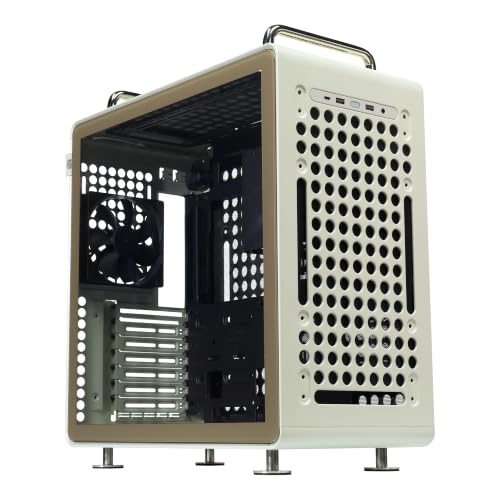
Cooler Master QUBE 540 — The rearrangeable one
The QUBE 540 is Cooler Master’s argument that a case can be a platform: an ATX mid-tower in beige with high airflow and tempered glass, 415mm graphics card support, 360mm AIO support, a customisable movable I/O panel and a multi-mount power supply arrangement. The specifications that matter most are the ones about rearrangement — this case expects its owner to have opinions about where ports and components should live, and to change those opinions over time.
That makes it the most personal case in this guide and the hardest to recommend blindly. A desk that evolves — monitors added, arms moved, peripherals rotating — genuinely benefits from I/O that relocates instead of stranding cables. A builder who treats setup as an ongoing hobby will use the PSU mounting options too. A builder who wants the case decided for them should buy the TD500 Mesh and never think about any of this again. The QUBE is not better; it is for a different temperament, and Cooler Master deserves credit for serving that temperament at a mainstream size rather than in a boutique oddity.
The QUBE’s beige finish is a signal worth reading correctly. It marks the case as an object meant to be seen and personalised rather than a black box meant to disappear — the same intent as the movable I/O and multi-mount PSU. Owners who enjoy reconfiguring a setup as their desk evolves will find those features used repeatedly; owners who build once and never reopen a case will have paid for flexibility that stays in the box. Neither outcome reflects on the case. It reflects on whether the buyer’s hobby is the computer or merely its output.
Start the QUBE build by deciding the I/O panel position with the desk fully assembled — monitor arms, speakers and all — because that placement is the feature. Builders who treat the first build as a draft, and expect to rearrange, will extract the case’s full value within the first month.
The QUBE also quietly solves a problem its headline features overshadow: at 415mm of GPU support and a 360mm AIO ceiling, it never forces the customisation-minded owner to compromise the build inside the rearrangeable shell. Plenty of concept cases ask for that compromise. This one does not, which is why it earns a place in a performance guide rather than a design exhibition.
- Form factor: ATX mid-tower
- Colour: beige
- Graphics card support: up to 415mm
- AIO support: up to 360mm
- Signature features: movable I/O panel, PSU multi-mount
Strengths
- Movable I/O panel lets the ports follow the desk setup instead of dictating it
- 415mm GPU support and 360mm AIO ceiling keep performance options fully open
- Beige finish and glass give it a distinctive, personal presence
Trade-offs
- Customisation features only pay off for owners who actually rearrange their setups
- Beige is a commitment — it will not blend into every room
- High-airflow openness shares the mesh family’s dust and noise openness
Best for: a tinkerer whose desk setup evolves, in a build that still needs long-card and AIO room
Not suited for: a set-and-forget build, or a room where a beige case would clash permanently
Tinkerers can check the QUBE 540 listing on Amazon to look over the movable I/O arrangement before ordering.
How Do the Six Cooler Master Cases Compare on Paper?
| Case | Format | Fans included | GPU allowance | AIO ceiling |
|---|---|---|---|---|
| HAF 500 | ATX | 2 x 220mm + 180mm | 430mm | 360mm |
| Elite 301 Lite | Micro-ATX | 1 x 120mm | 365mm | 280mm |
| TD500 Mesh | ATX | 4 x CF120 ARGB | Flagship-class stated | 360mm |
| HAF 700 | E-ATX | 2 x 200mm ARGB | Not stated in the listing title | Not stated in the listing title |
| N200 | Mini tower | Not stated in the listing title | Not stated in the listing title | Not stated in the listing title |
| QUBE 540 | ATX | Not stated in the listing title | 415mm | 360mm |
The table exposes the brand’s spread honestly: the same logo covers a 220mm-fan workstation case and a mesh mini tower whose listing does not even quote a fan. Buyers whose real interest is light rather than airflow should continue to the Best RGB PC Cases roundup, where the TD500’s bundled ARGB approach can be weighed against cases built around lighting first.
How Do You Keep a High-Airflow Cooler Master Quiet?
Start by using the size you bought. On the HAF models, resist the instinct to set fan curves by habit from smaller cases: the big impellers reach useful airflow at speeds that feel wrong to fingers trained on 120mm fans, so set the curve lower, verify temperatures under a real sustained load, and only then adjust. A curve tuned by temperature rather than by ear alone usually lands a full step quieter than the owner expected.
On the mesh-fronted smaller cases, placement does the work instead. Keep the front intake a hand’s breadth from walls and desk panels, since a starved mesh front makes even good fans labour audibly. Add the second fan to the Elite 301 Lite before considering any other acoustic measure — balanced intake and exhaust at moderate speed beats a single fan at high speed in both temperature and tone. Finally, treat dust as a noise issue: a clogged mesh front raises fan speeds all by itself, so a monthly wipe of the intake is an acoustic upgrade disguised as housekeeping.
How Should You Match a Cooler Master Case to a Motherboard and Cooler?
Board size is the first gate and the six split cleanly across it: E-ATX belongs to the HAF 700, full ATX to the HAF 500, TD500 Mesh and QUBE 540, and the compact pair — Elite 301 Lite in micro-ATX and the N200 across mATX and Mini-ITX — for smaller boards. Buying a case one size above the board is harmless and often wise for cooling; buying one size below is a return shipment. Cooler matching follows the radiator ceilings quoted in each section, with the 280mm cap of the Elite 301 Lite the only one that excludes a class of AIO a mainstream builder might plausibly want.
Air-cooling builders should think in terms of the fan array they are joining. In the HAF cases, a large tower cooler works with the big case fans slow, broad airflow rather than against it, and the combination is famously calm under sustained load. In the TD500 and the compact cases, cooler choice interacts with the mesh front: the easier the intake breathes, the less any individual component fan has to work. Across all six, the recurring theme of this guide holds — Cooler Master enclosures reward builders who treat airflow as a system with a philosophy, and merely tolerate those who treat it as an afterthought.
What Goes Wrong When People Buy Cooler Master Cases?
The recurring error is buying the family name instead of the model: a HAF 700 and an N200 share a logo and almost nothing else, and expectations set by one will be disappointed by the other. The second error is ignoring the fan-format consequence — choosing a 200mm-class HAF and then planning a radiator layout designed around 120mm standards. Third, small-case buyers still measure graphics cards by hope; the Elite 301 Lite publishes a generous 365mm, but the card, its power connectors and its cable bend all have to fit, not just the shroud length.
Finally, QUBE buyers occasionally skip the very step the case exists for: fixing the I/O panel position before the build, while the desk is bare. The feature is at its best when the whole setup is arranged around it once, thoughtfully, rather than discovered as an afterthought behind a finished desk.
What Are These Cases Like to Service Two Years Later?
Servicing is where the eras in this catalogue separate most honestly. The N200 can be opened, cleaned and upgraded by anyone who has ever seen the inside of a PC; its layout is the industry default, and no manual is required. The HAF models reward their owners with space — big chambers, big panels, room to work around big cards — and their fan sizes mean replacements are a deliberate order rather than a drawer rummage, a small price attached to the big-fan philosophy. The TD500 Mesh sits in the modern mainstream, where every part and every answer is easy to find.
The QUBE asks the most of its owner over time and offers the most in return: its rearrangement features only stay useful if the owner actually revisits them as the desk changes, and its newer design means a thinner layer of community experience to draw on. The Elite 301 Lite, serviced in year two, usually reveals its one planned economy — the single stock fan — long since corrected by an owner who added the second fan during an upgrade, at which point the case stops feeling budget at all.
Across the six, dust remains the common maintenance story, because every design here breathes openly by intention. Mesh fronts and perforated intakes are honest engineering, and their cost is a cleaning rhythm: fronts wiped, intakes cleared, interiors blown out on a schedule set by the room rather than the calendar. Owners who accept that rhythm describe these cases as effortless for years. Owners who wanted a sealed box should have bought one — and the fact that Cooler Master also sells quieter, more closed designs underlines the point of this guide: within one brand, the philosophies are distinct, and choosing between them deliberately is the whole task.
How Much Do Looks Actually Matter in This Range?
More than airflow purists admit, and less than showcase marketing claims. A case is the only component visible every minute the machine runs, so its front panel becomes part of the room. The TD500 polygonal mesh, the QUBE beige shell, the HAF 700 slow-turning lit fans and the N200 plain mesh are four genuinely different visual statements, and none of them can be altered later with a settings change. The practical advice is to judge the front of each case as furniture first and hardware second: if a front would irritate you on a shelf, it will irritate you more on a desk, at eye level, for years.
Conversely, looks are the one quality that does not degrade. Fan bearings age, ports date, radiator standards shift, but a case whose appearance suits its room keeps pleasing its owner on the thousandth day as on the first. That is a legitimate reason the QUBE and TD500 exist beside the sober N200, and it is why this guide refuses to treat presentation as a frivolous column in the table. Buy the philosophy you agree with, in the face you want to live with.
Which Owner Temperament Matches Which Case?
Strip away the specifications and the six divide by temperament with unusual neatness. The HAF 500 belongs to the owner who measures a PC by output per hour and regards the case as plant equipment. The HAF 700 belongs to the same temperament at flagship scale, with a desk that doubles as a studio. The TD500 Mesh belongs to the gamer who wants the current formula complete and finished, with no projects left over. The Elite 301 Lite belongs to the optimiser — the builder who enjoys extracting full-size performance from a small, inexpensive shell and regards the one added fan as a satisfying detail rather than a flaw.
The N200 belongs to the steward: the person who builds machines for a household, an office or a community and values the fact that anyone can service what they assembled. The QUBE 540 belongs to the rearranger, whose desk is a work in progress and whose case should be one too. Naming your own temperament honestly is worth more than any single specification in this guide, because every case here is competent at its job — the failures happen when a case is bought for a temperament its owner does not have.
That is also the answer to the question this brand always provokes: how can one maker sell such different boxes? Because PC owners are different in kind, not just in budget, and Cooler Master has simply refused to pretend otherwise. The catalogue looks untidy from the outside. From the inside of any one build, it looks like a company that had your exact desk in mind.
What Should You Decide Before Comparing Prices Across the Range?
Three decisions, made in order, prevent nearly every bad purchase in this guide. First, the board: its size eliminates half the range immediately, and no amount of admiration for a case changes whether an E-ATX board fits a micro-ATX shell. Second, the graphics card, present and planned: its length, checked against the published allowances — 430mm, 415mm, 365mm — converts vague worry into a number. Third, the cooling route: air, a single AIO up to the stated ceiling, or a big-fan array doing the work alone. A buyer who arrives at the listings with those three answers finds the range has usually narrowed itself to one or two cases, and the final choice can be made on temperament and looks with a clear conscience.
Notice what is not on that list: fan counts in isolation, glass area, and the opinions of owners whose desks resemble yours in no way at all. Those are tie-breakers, not gates. The gates are physical, and Cooler Master, to its credit, publishes the numbers that operate them in the listings themselves — one more reason this guide has insisted on quoting specifications from titles rather than from memory of earlier models wearing similar names.
Final Recommendation
For most gaming builders the TD500 Mesh is the Cooler Master to buy: fitted ARGB fans, open mesh, generous radiator and card room, and nothing left to solve. Choose the HAF 500 when the graphics card works for a living, the HAF 700 when the build is a flagship with a peripheral-heavy desk, and the Elite 301 Lite when the room is small but the card is not. The N200 remains the correct answer for a machine nobody needs to look at, and the QUBE 540 for the owner who rearranges everything twice a year.
Cooler Master’s six here share no single virtue except the oldest one in the catalogue: each was designed for a specific desk, and it shows.
Frequently Asked Questions
Are bigger case fans really quieter?
At equal airflow, generally yes. A 200mm or 220mm fan moves the required air at lower rotational speed than a 120mm fan, and lower speed with a larger impeller produces a lower, less intrusive sound. That is the entire design premise of the HAF 500 and HAF 700 in this guide.
Can the Elite 301 Lite really hold a high-end graphics card?
The listing states 365mm of graphics card clearance and names compatibility with cards in the RTX 5080 and RX 9070 XT class. As with any compact case, confirm your specific card’s length and power-connector clearance before ordering.
What is the difference between the HAF 500 and HAF 700?
Scale and intent. The HAF 500 is an ATX workstation-flavoured case with dual 220mm plus 180mm fans and 430mm card support. The HAF 700 is an E-ATX flagship with dual 200mm ARGB fans and a much richer front port panel. Both pursue big-fan airflow; the 700 is the larger, more connected flagship.
Does the TD500 Mesh include its ARGB fans?
Yes — the listing states four CF120 ARGB fans are included, behind the polygonal mesh front, with tempered glass on the side and 360mm radiator support. It is the most complete out-of-box gaming package in this guide.
Is the N200 too old to buy?
Its design is long-running rather than obsolete for its job: a fully meshed front, mATX and Mini-ITX support and a compact mini-tower format still match office, family and home-server needs precisely. Buy it for function, not for features.
What does the QUBE 540’s movable I/O panel actually help with?
It lets the front ports be positioned to suit the desk — near a monitor arm, away from a speaker, on the side you actually reach. For setups that change over time, that flexibility prevents the slow cable compromises that accumulate around fixed port panels.
Which Cooler Master case is best for a quiet room?
The HAF models, used as designed. Their oversized fans reach working airflow at low speeds, so a HAF 500 or HAF 700 with a deliberately gentle fan curve is the quietest route in this guide — provided the desk can host the size. Among the smaller cases, the TD500 Mesh with its four fans sharing the work at moderate speed is the calmer choice.
Do these cases include enough fans, or should I budget for more?
The TD500 Mesh’s four ARGB fans and the HAF models’ big arrays are complete for most builds. The Elite 301 Lite ships with one 120mm fan, so budget for at least one addition; the N200’s mesh front makes a modest fan setup effective, and one extra fan is a sensible planned purchase there too.
One final observation from across the six: Cooler Master cases tend to be kept. The brand sells to builders who reuse enclosures through several internal generations, and the designs here — even the fashionable TD500 and the experimental QUBE — are built with that reuse in mind, with standard mounts and honest materials rather than novelty fittings. When the range is read that way, the buying question changes from which case is best this year to which case you would still choose in five years, with a different board, a longer card and a desk arranged differently. Answer that, and you have answered everything this guide set out to ask.
And if the decision still feels open, run the desk test: photograph the space the machine will occupy, then picture each candidate in it at true scale. The HAF 700 will either look inevitable or impossible; the N200 will disappear; the QUBE will start a conversation. Cases are bought with specifications and lived with as objects, and the photograph test is the one moment in the process where the second truth gets its vote.
Related Guides
Continue the comparison with the neighbouring brand and style guides: Best NZXT PC Cases, Best RGB PC Cases, and Best PC Cases with Dual Glass Sides.


