What's inside
- Where to Buy
- Key Takeaways
- Quick Picks
- How We Chose These Picks
- Comparison
- How to Choose a Tattoo Transfer Printer
- Portable Thermal Printer or Desk Copier: Which Fits Your Studio?
- How Do You Get a Transfer That Survives the Whole Session?
- Why Does Stencil Paper Choice Matter as Much as the Machine?
- How Does a Convention Day Change What You Need?
- What Should an Apprentice Learn Before Trusting a Stencil?
- What Are the Common Mistakes When Buying a Transfer Printer?
- How Should a Studio Test a New Transfer Machine in Its First Week?
- Final Recommendation
- Frequently Asked Questions
- Related Guides
As an Amazon Associate I earn from qualifying purchases. This post may contain affiliate links at no extra cost to you.
widgetverdict.com is reader-supported. When you buy through links on our site, we may earn an affiliate commission.
Where to Buy
Six transfer machines are reviewed below, split between pocketable Bluetooth units and desk-bound copiers, and each linked name below leads to that machine’s page on Amazon. The Phomemo M08F Tattoo Stencil Printer is the portable most beginners meet first, while the YIRIGUI 2-in-1 Tattoo Stencil Printer adds document printing to the same wireless idea. Studios that still work from paper originals should look at the Sacnahe Tattoo Transfer Stencil Machine and the CORIEOSD Tattoo Stencil Machine, both shipped with twenty sheets of stencil paper. The Itari Tattoo Stencil Printer targets beginners who want a studio-shaped workflow, and the ATOMUS Tattoo Transfer Machine 116F closes the list as the traditional copier in its updated form.
Ask a room of tattooers how a design reaches the skin and the best tattoo transfer printers are the quiet first half of every answer. Before any needle is unwrapped, the artwork must become a stencil: a reversed copy of the design carried on transfer paper, pressed against prepared skin, leaving a faithful outline that guides the whole session. A weak transfer means freehand rescue work mid-tattoo; a crisp one means the artist can spend the appointment tattooing instead of reconstructing. The machines in this guide exist to produce that stencil reliably, and they divide into two families with genuinely different working lives.
The first family is the portable thermal printer: battery-era, Bluetooth-fed, driven from the phone or tablet where modern artwork is drawn. The Phomemo M08F, the YIRIGUI 2-in-1 and the Itari live here — they take a digital file and print it onto stencil paper wherever the artist happens to be, studio, convention floor or guest spot. The second family is the thermal copier: a desk machine with a feed slot, descended from the photocopier, which takes an existing paper drawing and reproduces it as a stencil. The Sacnahe, the CORIEOSD and the ATOMUS 116F live here, and their natural habitat is the studio where designs still begin as pencil and paper. Neither family tattoos anything; both feed the same skin-transfer moment, and choosing between them is really choosing how your artwork is born.
One boundary before the reviews: a stencil printer’s output is a guide, not a guarantee. Transfer quality also depends on stencil paper, on the application fluid, on skin preparation and on the artist’s patience during those thirty seconds when the paper meets the body. The machines below are judged on what a listing title can honestly support — connection type, included paper, portability, stated purpose — and every claim about paper compatibility stops where the titles stop, because guessing at consumable compatibility is how studios end up with a drawer of paper a machine refuses to feed.
Key Takeaways
- Two families share this guide: Bluetooth thermal printers fed from phones (Phomemo, YIRIGUI, Itari) and desk copiers fed with paper originals (Sacnahe, CORIEOSD, ATOMUS).
- The Phomemo M08F ships with 10 sheets of tattoo paper and a smart app with large image cutting for oversize designs.
- The YIRIGUI is the only dual-purpose pick — stencil printer and document printer in one wireless body.
- The Sacnahe states plainly that it is not wireless; its 20 included stencil sheets and copier workflow are the point.
- The CORIEOSD also includes 20 sheets of thermal stencil paper and follows the same copier pattern.
- The ATOMUS 116F’s title is nearly bare, so its review verifies little beyond the model and its updated-version status.
Quick Picks
| Pick | Badge | Why it earns a place |
|---|---|---|
| Phomemo M08F Tattoo Stencil Printer | Portable Beginner Pick | Bluetooth thermal printing, a smart app, large image cutting and 10 sheets of tattoo paper included. |
| YIRIGUI 2-in-1 Tattoo Stencil Printer | Stencil Plus Documents | A 2026 wireless thermal unit promising HD fast transfer that also prints ordinary documents. |
| Sacnahe Tattoo Transfer Stencil Machine | Copier With Paper Included | A thermal copier kit with 20 stencil sheets — and, stated in its title, no wireless at all. |
| CORIEOSD Tattoo Stencil Machine | Second Copier Route | A transfer stencil machine bundled with 20 sheets of thermal tattoo stencil paper. |
| Itari Tattoo Stencil Printer | Studio-Beginner Portable | Wireless Bluetooth printing for beginners, positioned for professional studio use with 10 transfer sheets. |
| ATOMUS Tattoo Transfer Machine 116F | Traditional Copier, Updated | The 116F transfer copier in its update version, for paper-original studio workflows. |
How We Chose These Picks
Workflow came before specifications, because transfer printers are bought into a way of working. Studios drawing on tablets need the Bluetooth family; studios drawing on paper need copiers; artists who travel need the machine that fits the kit bag rather than the one that owns a desk. The six picks were arranged so each of those working lives gets at least one serious candidate, and so the contrast between families stays visible in every review instead of being averaged away.
Included paper counted as real evidence. A bundle that names its sheet count — ten sheets with the Phomemo and the Itari, twenty with the Sacnahe and the CORIEOSD — tells a buyer the machine can be tested the day it arrives and hints at which paper the maker expects it to eat. Connection claims counted the same way: Bluetooth and phone compatibility are stated outright for the three portables, while the Sacnahe’s title does the reader a favour by stating its absence of wireless in parentheses, a small honesty this guide wishes more listings practised. Where a title went quiet — the ATOMUS above all — the review records the quiet instead of filling it with plausible invention.
Longevity evidence was weighed where it exists. A model designation that has persisted through updated versions — the ATOMUS 116F is this guide’s example — signals a design the market has stress-tested, while a dated newcomer like the YIRIGUI’s 2026 model trades that history for current wireless engineering. Neither signal wins automatically; they simply answer different buyer anxieties, and the reviews name which anxiety each pick soothes.
What did not count: promises about skin results. No printer in this guide can make a transfer last longer on a moving shoulder or rescue a design drawn at the wrong scale, and no title here claims otherwise. The reviews therefore stay with the machine’s half of the bargain — feed reliability, connection stability, the paper in the box, the shape of the working day each design creates — and leave the artist’s half to the artist.

Phomemo M08F Tattoo Stencil Printer — Portable Beginner Pick
The M08F is the machine that carried stencil printing out of the studio cupboard and into the kit bag. Its title describes a Bluetooth, wireless, thermal portable printer with a smart app, large image cutting, ten sheets of tattoo paper in the box, and compatibility across phone, tablet and PC, aimed at tattoo beginners and finished in black and green. Unpack that list and you have the modern apprentice’s workflow in one line: draw on the tablet, send from the app, print the stencil, apply, tattoo. No desk, no cable, no intermediary computer mediating between the drawing hand and the printed sheet.
Large image cutting is the feature with real artistic consequence. Back pieces, thigh wraps and any design larger than a single sheet must be divided, printed in sections and rejoined on the skin with the joins invisible. Software that handles that division deliberately — rather than leaving the artist to slice files by eye in a drawing program — removes one of the fiddliest steps between a big design and a confident start. Beginners feel the benefit first on modest work, where the app’s guidance substitutes for experience, but the tiling function is what lets the same small machine stay relevant as the work grows.
Ten included sheets is a starting ration, honestly sized: enough to learn the machine’s feed behaviour, waste a few on scale experiments, and still have clean paper for the first real clients. Thermal printing means no ink, no cartridges and nothing liquid to spill in a bag — the consumable is the paper itself, and keeping a spare pack in the kit is the whole supply strategy. The M08F’s limits are the portable family’s limits: it lives on digital artwork, so a pencil original must be photographed or scanned before it can become a stencil, and heavy daily volume belongs to desk machines built for a queue.
- Print method: Thermal, no ink cartridges
- Connection: Bluetooth wireless, smart app control
- Compatibility: Phone, tablet and PC, per the title
- Included paper: 10 sheets of tattoo paper
- Special feature: Large image cutting for oversize designs
- Colour: Black and green finish
Strengths
- Phone-to-stencil workflow matches how artwork is actually drawn now.
- Large image cutting handles designs bigger than one sheet.
- Ten starter sheets make same-day testing possible out of the box.
Trade-offs
- Paper originals must be digitised before they can be printed.
- Ten sheets is a learning supply, not a working studio’s stock.
- Battery-era portables reward gentle handling over studio punishment.
Best for: apprentices and travelling artists whose designs live on a phone or tablet and who print stencils away from a fixed desk. Not suited for: a paper-original studio workflow — with no copier feed slot, every pencil drawing must be scanned or photographed before printing.
Beginners setting up their first portable station can open the M08F’s Amazon listing to check the current price and see which app features the present version describes.
One habit separates M08F owners who love the machine from those who fight it: test every new design at final size on cheap paper first. Scale errors are invisible on a tablet screen — a design that looked palm-sized arrives forearm-sized, or the reverse — and the stencil is the last cheap moment to catch them. Print, hold the sheet against the body area, judge, adjust. Artists who build that thirty-second ritual into their preparation find the little thermal printer disappears from their worries entirely, which is the highest praise any tool in a studio earns.

YIRIGUI 2-in-1 Tattoo Stencil Printer — Stencil Plus Documents
The YIRIGUI’s proposition is written into its name: a 2026 two-in-one tattoo stencil and document printer, wireless over Bluetooth, thermal, promising HD fast transfer, in a portable body the title aims at tattoo artists and shops as well as travel, home and office use. That second job — ordinary documents — is more considered than it first appears. A small studio prints consent forms, aftercare sheets, price lists and appointment cards every week, and a single thermal unit that handles both the paperwork and the stencils is one less machine competing for the same shelf and the same socket.
HD fast transfer is the title’s performance claim, and it deserves a careful reading rather than either blind faith or dismissal. Transfer quality in thermal printing is a chain — file resolution, app handling, printhead condition, paper quality — and a machine advertising high-definition transfer is claiming its link in that chain is strong. Fine linework is where the claim will be tested: script lettering, mandala geometry and dotwork guides punish soft reproduction, and the first week’s test prints on your own designs will tell you more than any adjective. Print your most demanding line piece first, not your easiest, and let that sheet decide the machine’s place in the studio.
Portability across the title’s locations — shop, travel, home, office — implies the guest-spot life: an artist with regular chairs in two cities, or conventions through the season, carrying one unit that covers stencils and paperwork in both places. The black finish keeps it visually at home among studio equipment. What the two-in-one concept asks in return is prioritisation discipline: a machine shared between documents and stencils will eventually be wanted for both at the same moment, and the stencil — with a client already in the chair — must win that argument by house rule, not by negotiation.
- Print method: Thermal, wireless Bluetooth
- Dual role: Tattoo stencil printer and document printer
- Transfer claim: HD fast transfer, per the title
- Model year positioning: 2026 new model
- Aimed at: Artists and shops, travel, home and office
- Included stencil paper: Not stated in the listing title — verify with the manufacturer documentation
Strengths
- One unit covers studio paperwork and stencils alike.
- HD fast transfer claim targets fine linework reproduction.
- Portable shape suits guest spots and convention travel.
Trade-offs
- No included paper is named, so stock must be ordered separately.
- Shared duty means stencil jobs need priority rules at busy moments.
- The HD claim needs testing against your own finest designs.
Best for: a small studio or travelling artist who wants one Bluetooth thermal unit for stencils, consent forms and aftercare sheets. Not suited for: paper-original copying — like the other portables here, it prints digital files and offers no copier feed for pencil drawings.
Shop owners weighing the dual-role idea can look at the YIRIGUI’s Amazon page to see the present price and confirm the current feature list.
Studios adopting a two-in-one should decide its stencil paper policy on day one. Document work forgives almost any thermal paper; stencil work does not forgive paper the transfer process dislikes. Keep the stencil stock physically separate, labelled, and treated as the machine’s primary consumable, with document paper stored as the secondary supply. That small stores discipline prevents the classic two-in-one failure — a stencil printed on the wrong paper because the right box was empty — and keeps the machine’s versatility an asset rather than a trap.
Sacnahe Tattoo Transfer Stencil Machine — Copier With Paper Included
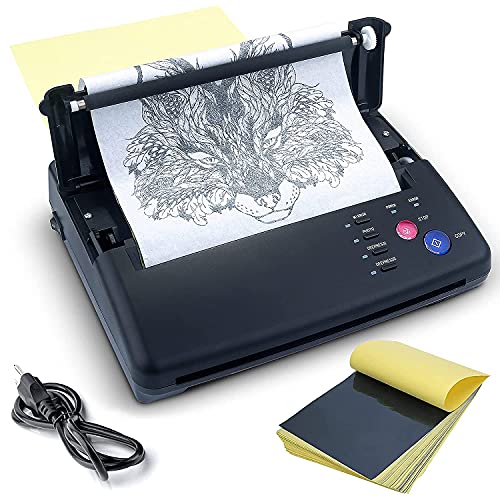
Cross to the other family. The Sacnahe is a tattoo transfer stencil machine in the copier tradition: a thermal copier printer sold as a kit with twenty sheets of tattoo stencil transfer paper, finished in black — and carrying, in parentheses at the end of its title, the most useful disclaimer in this guide: not wireless. That parenthesis tells a paper-based studio everything about fit. This machine does not want your phone. It wants the drawing itself, fed through the copier, reproduced onto stencil paper by heat, in the workflow tattooing used for decades before Bluetooth arrived.
That workflow has virtues the portables cannot imitate. A pencil original goes in as paper and comes out as a stencil with no photographing, no scanning, no screen interpretation of grey pencil tones — the copier reads the sheet directly. For artists whose design process is inseparable from paper — sketchbook first, always — the copier removes a translation step that can soften exactly the lines the artist drew most deliberately. Twenty included sheets make the kit testable on arrival, and the copier’s desk-bound nature becomes a kind of reliability: it lives in one place, plugged in, aligned with the studio’s drawing table, doing one job.
The costs are equally plain. No wireless means no digital files — a design drawn on a tablet must be printed as an ordinary sheet first, then copied, adding a generation the Bluetooth machines skip. The machine travels badly compared with the portables; conventions and guest spots mean either hauling it or leaving the workflow at home. And like all thermal copiers, its copy quality follows the original: a faint, smudged pencil sketch copies faintly and smudgily, so the discipline of drawing bold, copier-friendly originals is part of the purchase whether the buyer planned it or not.
- Print method: Thermal copier printer
- Workflow: Copies paper originals onto stencil paper
- Included paper: 20 sheets of tattoo stencil transfer paper
- Connection: Not wireless — stated explicitly in the title
- Colour: Black
- Battery operation: Not stated in the listing title — verify with the manufacturer documentation
Strengths
- Direct paper-to-stencil copying preserves hand-drawn linework.
- Twenty sheets included make the kit workable from day one.
- The not-wireless honesty lets buyers judge fit without surprises.
Trade-offs
- Digital artwork needs an ordinary print before it can be copied.
- Desk-bound design travels poorly to conventions and guest spots.
- Copy quality faithfully reproduces a weak original’s weaknesses.
Best for: a studio whose designs begin as pencil on paper and whose stencil station never leaves the building. Not suited for: phone-and-tablet artists — the absence of wireless is total, so every digital design takes a detour through a separate ordinary printer.
Paper-first studios can visit the Sacnahe listing on Amazon to check today’s price and the kit’s current contents before committing the drawing table to it.
Copier owners develop one skill the Bluetooth generation sometimes skips: drawing for reproduction. Lines weighted for the copier, shading indicated rather than rendered in faint graphite, lettering sized generously — these habits make originals that transfer cleanly and read clearly on skin hours later. If your sketchbook style already runs bold, the Sacnahe will feel like it was built around your hand. If your style runs delicate, budget a learning period of test copies before the first client stencil, and let the machine teach you its contrast preferences on paper you can afford to waste.

CORIEOSD Tattoo Stencil Machine — Second Copier Route
The CORIEOSD occupies the same copier territory as the Sacnahe, and its title says so in a rush of keywords: a tattoo transfer stencil machine with twenty thermal tattoo kit sheets — copier printer, tattoo transfer stencil paper, stencil printer machine for tattoos, black version. Beneath the repetition sits the same honest proposition: feed a paper design, receive a stencil, with twenty sheets of thermal stencil paper included to begin. Two copiers in one guide is deliberate, because this category’s buyers often choose between near-identical machines on kit details, seller support and which listing reads more clearly — and here the comparison is instructive.
Against the Sacnahe, the CORIEOSD’s title neither claims nor denies wireless; it simply never mentions connection at all. Read that the way this guide reads every silence: as unknown until verified, not as a hidden feature waiting to delight you. A buyer who needs Bluetooth should buy a machine that prints the word on its title — three portables above do exactly that. A buyer choosing the CORIEOSD should be choosing it as a copier, for a paper workflow, and confirming any connection question on the listing before ordering rather than after unboxing.
Within the copier role, the included twenty sheets matter as much here as they did for its rival: the machine arrives ready to be tested against your own drawing style, your own line weights, your own transfer fluid and skin routine. That first session of test copies is where a copier earns or loses the studio’s trust, and a kit that forces you to order paper separately delays the verdict by days. The black version designation hints at colour variants elsewhere in the seller’s range — irrelevant to stencil quality, relevant only to buyers furnishing a studio to a colour scheme, who exist and are entitled.
- Print method: Thermal copier printer
- Workflow: Paper original to stencil, studio desk use
- Included paper: 20 sheets of thermal tattoo stencil paper
- Colour: Black version
- Connection type: Not stated in the listing title — verify with the manufacturer documentation
- Included transfer accessories beyond paper: Not stated in the listing title — verify with the manufacturer documentation
Strengths
- Twenty included sheets allow immediate testing on your own artwork.
- Copier workflow suits sketchbook-first studios and artists.
- Kit format gathers machine and starter paper in one order.
Trade-offs
- Connection goes unmentioned — no wireless assumption is safe.
- The keyword-stuffed title gives few verifiable specifications.
- Desk copier format shares the family’s poor portability.
Best for: a paper-workflow studio wanting a copier kit with starter paper included and no dependence on apps or phones. Not suited for: artists who need confirmed Bluetooth — the title never mentions any connection, so digital-first buyers belong with the three portables above.
Studios comparing the two copier kits can pull up the CORIEOSD’s Amazon page to look at the current price and the seller’s fuller description.
Choosing between near-identical copiers comes down to the unglamorous evidence: how the seller answers a pre-sale question, how clearly the listing describes replacement paper, and whether the first twenty sheets feed without complaint. Run that test the week the machine arrives, while returns are painless, rather than discovering a feed quirk on the morning of a booked back piece. Copiers are simple machines with long lives, and a studio that verifies its unit early usually keeps it for years — the category’s whole appeal is that nothing about it needs upgrading.

Itari Tattoo Stencil Printer — Studio-Beginner Portable
The Itari’s title speaks to two audiences in one breath: a tattoo stencil printer for beginners, wireless and Bluetooth, portable, compatible with phone, tablet and PC, supplied with ten transfer sheets — and positioned, in the same sentence, for the professional tattoo studio, with a nod to use alongside the tattoo gun. That pairing is less contradictory than it sounds. The beginner it imagines is not a hobbyist at a kitchen table; it is the apprentice inside a working studio, learning the trade’s preparation rituals on equipment shaped like the equipment the mentors use. A portable Bluetooth unit is exactly that shape in a modern shop.
Ten sheets again marks the starter ration, and the compatibility list — phone, tablet, PC — covers the three places apprentice artwork actually lives: the phone photo of a sketch, the tablet drawing, the studio computer’s archive of flash. Wireless connection means the studio’s station can sit wherever the preparation bench is, rather than tethering the stencil step to whichever desk owns a cable. For a shop running several chairs, a portable that can be carried to the station being set up, rather than a copier every design must walk to, changes the rhythm of busy mornings.
What should a beginner’s mentor check? That the apprentice learns the whole transfer, not just the printing. A portable makes the print step nearly effortless, which is precisely why supervision should linger on the steps around it: sizing the design to the body, reversing awareness, skin preparation, application patience, and judging whether a placed stencil is honest enough to tattoo from. The Itari handles its step well by its title’s account; the studio’s teaching must handle the rest, and a beginner who masters the full chain on this machine will transfer those habits to any equipment the trade later hands them.
- Print method: Thermal stencil printing
- Connection: Wireless Bluetooth
- Compatibility: Phone, tablet and PC, per the title
- Included paper: 10 transfer sheets
- Audience per title: Beginners, within professional studio use
- App name or features: Not stated in the listing title — verify with the manufacturer documentation
Strengths
- Studio-shaped portable workflow sized for apprentice learning.
- Three-device compatibility covers sketch photos and tablet art alike.
- Ten included sheets support supervised practice from arrival.
Trade-offs
- App capabilities go undescribed in the title — tiling is unconfirmed.
- Ten sheets vanish quickly under a practice regime.
- Digital-only input, like every portable here, excludes direct copying.
Best for: an apprentice in a working studio whose artwork moves between phone, tablet and shop computer. Not suited for: very large designs needing confirmed tiling software — the title names no large-image feature, unlike the Phomemo’s stated cutting function.
Mentors equipping an apprentice station can examine the Itari listing on Amazon for today’s price and the current bundle description.
Studios get the best from a beginner portable by assigning it a home: one bench, one paper drawer, one named person responsible for stock. Portables drift in busy shops — borrowed to another station, left in a drawer, discovered with an empty paper supply mid-preparation. A stencil printer’s value is realised in the ten minutes before a session, and those minutes go smoothly only when the machine, its paper and its charger are exactly where the last person left them, which is to say where the studio agreed they live.
ATOMUS Tattoo Transfer Machine 116F — Traditional Copier, Updated
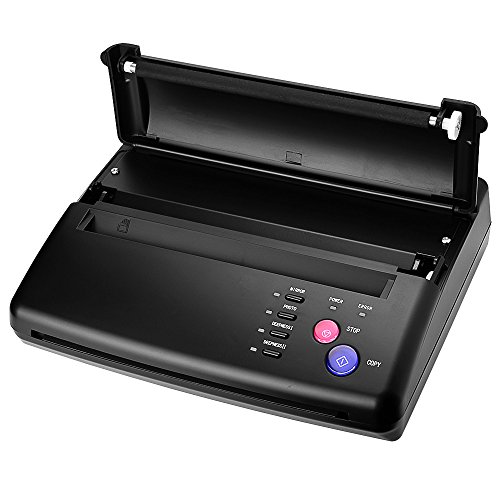
The briefest title in this guide belongs to one of its most established shapes. The ATOMUS listing offers a tattoo transfer machine printer, a tattoo transfer stencil machine copier, model 116F, update version — and then stops. No paper count, no connection claims, no dimensions. The 116F designation itself carries the information for buyers who know the category: the number belongs to a long-running family of thermal copier designs that studios have bought, in successive versions, for years, and an “update version” listing is selling continuity — the known copier, revised — rather than novelty.
Continuity is a genuine virtue in a stencil station. A copier design that has survived multiple versions has had its feed path, its heat behaviour and its failure modes discovered by thousands of studios before yours, and the accumulated knowledge — which paper it likes, how it treats faint originals, how its copies hold through a long session — circulates in the trade in a way no new model’s knowledge can. Artists who learned on a 116F-style machine can walk into a guest studio on another continent and find the workflow familiar. That installed base of habit is worth money to a working shop, and it is the honest core of this pick.
The discipline, as with KIT-style listings elsewhere in these guides, is verification. A title this short leaves paper inclusion, exact copy area and every accessory question to the listing page and the seller. Buyers should confirm whether stencil paper is included at all — the title does not say — and price the machine as a bare unit until the listing proves otherwise. None of that diminishes the 116F’s role; it simply means the purchase is made on the model’s reputation and the seller’s detail, in that order, and a buyer new to copiers who wants everything stated up front will be happier starting with the Sacnahe or CORIEOSD kits above.
- Print method: Thermal transfer copier
- Model: 116F, update version
- Workflow: Paper original to stencil, desk-based
- Included stencil paper: Not stated in the listing title — verify with the manufacturer documentation
- Connection type: Not stated in the listing title — verify with the manufacturer documentation
- Copy width and speed: Not stated in the listing title — verify with the manufacturer documentation
Strengths
- A long-running copier design with deep trade familiarity.
- Updated version of a known model rather than an experiment.
- Traditional workflow needs no apps, accounts or devices.
Trade-offs
- The title verifies almost nothing beyond model and format.
- Included paper cannot be assumed — budget for stock separately.
- Newcomers get less guidance here than from the kit listings.
Best for: an experienced studio replacing or matching a 116F-style copier its artists already know by hand. Not suited for: a first-time buyer wanting a complete, fully specified kit in the title — paper inclusion and every detail here must be confirmed on the listing page.
Studios running the 116F pattern can open its Amazon listing to confirm the present version’s contents and check the price against the kit copiers.
There is a maintenance truth shared by every thermal copier in this guide, and the ATOMUS’s long production run illustrates it best: these machines age through their consumable contact points. The glass, the rollers, the feed path — kept clean, they copy crisply for years; neglected, they streak in ways owners misdiagnose as electronic failure. A studio that wipes down its copier on the same rota as its other equipment will still be making clean stencils when trendier devices have been replaced twice. Buy the 116F for that kind of life and it will not disappoint; buy it expecting novelty and you have misunderstood the listing’s whole appeal.
Comparison
| Pick | Family | Input route | Paper in the box |
|---|---|---|---|
| Phomemo M08F | Portable thermal | Bluetooth from phone, tablet, PC | 10 sheets |
| YIRIGUI 2-in-1 | Portable thermal | Wireless Bluetooth, files and documents | Not stated in the listing title |
| Sacnahe Copier | Desk copier | Paper originals, not wireless | 20 sheets |
| CORIEOSD Machine | Desk copier | Paper originals | 20 sheets |
| Itari Printer | Portable thermal | Wireless Bluetooth from phone, tablet, PC | 10 sheets |
| ATOMUS 116F | Desk copier | Paper originals | Not stated in the listing title |
Notice what the table cannot show: the software and seller layer. Two portables with identical hardware claims can feel entirely different in the hand because one maker’s app tiles a large design gracefully and the other’s fights you, and two copiers can separate on nothing more than how honestly their sellers describe replacement paper. That layer is why this guide keeps sending you back to the listings themselves — the table organises the decision, but the final evidence lives in the current listing text, the seller’s answers and your first week of test prints.
Read the table by input route first, because that column decides your daily life. Artists whose designs are born digital should be shopping the three portables and comparing their software stories; artists whose designs are born on paper should be shopping the copiers and comparing their kits. The paper-in-the-box column is the tiebreaker, not the headline: it tells you which machines can prove themselves on arrival day and which need a separate stock order before the first honest test can happen.
How to Choose a Tattoo Transfer Printer
Start at the sketchbook — or the tablet. Trace your last ten designs back to their birth: if eight began as digital files, your transfer printer should speak Bluetooth, and the choice narrows to the Phomemo’s app and tiling, the YIRIGUI’s document double-duty, or the Itari’s studio-beginner shape. If eight began as pencil lines, a copier belongs on your bench, and the choice narrows to which kit’s included paper and seller detail you trust. Mixed studios — and most real studios are mixed — should count honestly rather than aspirationally, then buy for the majority workflow and accept a workaround for the minority.
Consider also who else touches the machine. A stencil printer in a multi-artist studio is shared infrastructure: its paper drawer, its settings and its quirks belong to everyone, and the model that survives shared life best is usually the one whose operation a new hire can learn in one demonstration. Solo artists can indulge a fussier favourite; shops should weight simplicity and the clarity of the listing’s own documentation, because the machine will be operated at 9 a.m. by somebody who did not choose it, with a client already waiting.
Size the machine to the work’s geography next. Guest spots, conventions and house calls reward the portables’ bag-friendly format; a fixed stencil station rewards the copier’s plugged-in permanence. Then interrogate the unglamorous consumable question: which stencil paper does this machine expect, what does a working month of it cost, and can you get it quickly when a Friday runs long? A transfer printer is a paper-delivery system at heart, and the studios that choose well are the ones that priced the paper before they priced the machine.
Portable Thermal Printer or Desk Copier: Which Fits Your Studio?
The portable’s case is freedom of location and a direct line from drawing device to stencil. Its weakness is dependence: on charge, on an app staying updated, on a phone behaving during a client’s preparation window. The copier’s case is independence and directness — paper in, stencil out, no intermediary technology to update, pair or troubleshoot. Its weakness is place: the workflow lives where the machine lives, and digital artwork must take a paper detour to reach it.
Volume tilts the answer too. A studio producing stencils all day, every day, wears a copier’s feed path the way it was designed to be worn, while a portable asked to run a convention queue will do it but will feel like a favour being asked repeatedly. Conversely, a single artist producing three stencils a day gains nothing from a desk machine’s stamina and everything from a portable’s convenience. Match the machine’s stamina to your stencil count, not to your ambitions, and either family will feel correctly chosen within a week.
How Do You Get a Transfer That Survives the Whole Session?
The printer supplies only the first third of a durable stencil. The second third is application: skin cleaned and prepared properly, transfer medium used at the right thickness, the sheet applied in one confident motion and given its full setting time before the paper lifts. Rushing that minute is the most expensive habit in tattooing, because a stencil that ghosts at hour two cannot be reapplied over worked skin. The final third is working discipline — wiping away from remaining lines rather than across them, checking the stencil’s faint sections before tattooing into them, and knowing which lines to secure first while the guide is freshest.
Paper freshness feeds into durability as well. A sheet printed from stock that has sat open in a steamy studio for a season may look identical to a fresh sheet and behave entirely differently on skin — weaker release, patchier lines, a stencil that surrenders early. Studios that rotate stock, keep the working pack sealed between uses and date their opened packs rarely meet this failure; studios that treat stencil paper as immortal stationery meet it monthly and blame the machine each time.
Machine habits support all three thirds. Print stencils at the darkness your transfer routine actually needs — a pale print demands heroic application, an over-dark one can smear into a blur by mid-session. Keep one known-good test design, print it whenever paper stock or machine behaviour changes, and compare against the last good sheet; drift announces itself in test prints long before it ambushes a client. And store stencil paper flat and dry: paper that has curled or absorbed studio humidity feeds badly and transfers worse, whatever machine carries it.
Why Does Stencil Paper Choice Matter as Much as the Machine?
Because the paper is the medium the design actually travels in. Thermal stencil paper carries the pigment layer that heat releases and skin receives; paper that mismatches a machine’s heat behaviour produces transfers that are faint, blotchy or stubbornly incomplete, and the machine gets blamed for the paper’s sins. This is why the kits in this guide that name their included sheets carry evidentiary weight — the maker has declared a pairing — and why experienced studios, once they find a paper their machine loves, buy it in depth and resist experimenting mid-season.
Paper also decides what happens after printing. Some sheets hold a design crisply for a long, slow piece; others are happiest on smaller work applied promptly. Artists learn their paper’s temperament the way they learn a machine’s: by testing on practice skin and forearms that volunteer, not on paying clients. When you change machines, retest the paper. When you change paper, retest the machine. The pairing is the product; the two halves merely arrive in separate boxes.
How Does a Convention Day Change What You Need?
Guest spots and conventions rewrite the stencil brief. The studio’s copier, however beloved, is bolted to its bench by habit and by mains cable; the artist on the road needs the machine that shares a bag with the power supplies and fits the corner of a borrowed station. That is the portables’ home ground — artwork already lives on the travelling tablet, the printer wakes, pairs and produces the day’s stencils between setup and the first appointment, and paperwork for walk-in clients can ride the same unit when the machine doubles as a document printer, as the YIRIGUI proposes.
Road work also punishes fragile supply chains. There is no studio stockroom at a convention: the paper you brought is the paper that exists, and a design reprint eats the margin you packed for mistakes. Experienced travellers print the next day’s confirmed stencils the evening before, keep the machine for corrections and additions, and carry paper at one and a half times the expected need. They also carry the boring accessories — charging cable, spare paper, cleaning supplies for the printhead — because a thermal printer’s failures on the road are almost never electronic; they are the small logistics nobody packed.
What Should an Apprentice Learn Before Trusting a Stencil?
Judgement, in a specific order. First, scale: holding the printed sheet against the actual body part and recognising when a design’s size flatters or fights the anatomy it will live on. Second, placement: how a stencil reads when the client stands naturally rather than posed, since skin moves and a design aligned to a stretched pose distorts in repose. Third, honesty: the willingness to wipe a stencil off and reapply it when the placement is wrong, however long the print took, because tattooing from a badly placed guide converts a two-minute correction into a permanent apology.
The machine’s part in that education is consistency. An apprentice learning on a portable like the Itari or the M08F can isolate the human variables because the printed sheet arrives the same way each time; an apprentice learning on a copier learns the additional craft of drawing originals the copier respects. Either route produces the same professional if the studio insists on the full chain — draw, size, print, place, judge, and only then tattoo. Studios that let the printer’s ease shorten that chain graduate fast printers and slow tattooers, which is the wrong way around.
What Are the Common Mistakes When Buying a Transfer Printer?
Buying against your artwork’s birthplace leads the list: a tablet artist with a desk copier now prints every design twice, and a pencil artist with a Bluetooth portable now photographs every sketch and fights greyscale interpretation. Both machines work; both workflows ache daily. A second error is treating included paper as a footnote — discovering on a booked morning that the machine arrived bare, or that its starter sheets ran out during the learning week, with replacements days away.
Overlooking the application half is the third: a fine printer feeding poor transfer routine produces the same ghosted stencils as a poor printer would, and the studio upgrades hardware when it should have upgraded preparation. Fourth comes assuming unstated features — wireless on a copier whose title never promised it, tiling on a portable whose app was never described. The titles in this guide were read literally for a reason. Finally, neglecting paper storage: stencil stock left in a humid studio corner degrades quietly, and its failures look exactly like machine failures until somebody opens a fresh pack and the problem walks away.
How Should a Studio Test a New Transfer Machine in Its First Week?
Feed it your hardest honest work, in ascending order of consequence. Begin with practice: your finest linework design, your boldest traditional piece and one large design that tests tiling or copying across the sheet, all printed and applied to practice surfaces or willing forearms, none of them near a paying client. Judge the transfers an hour in, not at application — a stencil’s real quality is what survives the first wipes of a working session, and a machine whose prints fade early has told you its truth cheaply.
Then graduate deliberately: a small client piece with a forgiving design, a medium piece, and only then the machine’s first flagship stencil. Along the way, record the pairings that work — which paper, which darkness setting, which application routine — in the studio’s own notes, because the second artist to use the machine should inherit the first artist’s learning instead of repeating it. A week spent this way converts a purchase into a station; a week skipped converts the first difficult client into the test bench, which is unfair to everyone in the chair.
One last consideration belongs to studios furnishing a second station. Matching the new station’s machine to the first station’s machine — same family, ideally same model — halves the training, unifies the paper stock and means a failure at one bench can be covered by the other while parts or answers are chased. Variety feels like progress when a studio expands; uniformity is what actually pays, in stencils that behave identically whichever chair the client sits in.
Final Recommendation
Let your sketchbook vote. Digital-first artists should take the Phomemo M08F for its app and large-image cutting, the Itari for an apprentice’s studio station, or the YIRIGUI when one wireless unit must also carry the shop’s paperwork. Paper-first studios should take the Sacnahe for its explicit, paper-included copier kit, the CORIEOSD as the alternative kit route, or the ATOMUS 116F when the crew’s hands already know that copier family. Whichever name wins, order paper in depth the same day — and may your next stencil still be reading clearly when the last line of the session goes in.
Frequently Asked Questions
Do these printers tattoo the skin directly?
No. Every machine here prints or copies a design onto transfer paper, which is then applied to skin as a temporary guide. The tattooing itself is done afterwards with a tattoo machine. A transfer printer never touches skin and puts no ink into it.
Which picks work from a phone?
The three portables state it directly: the Phomemo M08F, the YIRIGUI 2-in-1 and the Itari all list wireless Bluetooth connection with phone compatibility. The copiers work from paper originals instead — the Sacnahe’s title explicitly says it is not wireless.
How much stencil paper should I keep in stock?
More than the included starter supply, which is ten sheets with the Phomemo and Itari and twenty with the Sacnahe and CORIEOSD kits. Working studios reorder when a pack opens, not when it empties, and they retest whenever a new paper batch or brand enters the building.
Can a copier handle a design drawn on a tablet?
Only by detour: print the design as an ordinary paper sheet on a standard printer, then feed that sheet through the copier. Bluetooth portables skip the detour entirely, which is why digital-first studios usually choose them.
What does large image cutting actually do?
It divides an oversize design into sections the printer can output on separate sheets, so the parts can be aligned and joined during application. The Phomemo M08F names the feature in its title; it matters for back pieces and other work larger than a single sheet.
Do thermal stencil printers need ink or toner?
None of the six machines here uses ink cartridges or toner. Thermal printing works through heat: the printhead or copier element activates the pigment carried in the stencil paper itself, which is why paper choice and paper condition matter so much in this category, and why the running cost of any of these machines is essentially the cost of the sheets it consumes.
Why does the ATOMUS listing say so little?
Its title gives the model (116F), the copier format and updated-version status, and very little else. Buyers should treat paper inclusion and all specifications as unconfirmed until the listing page states them — the pick rests on the model’s long-running design, not on title detail.
Related Guides
Related speciality printing continues in the best dot matrix printers for impact machines still earning their keep, in the best heat transfer craft printers for fabric projects, and in the best printers for heat transfers for t-shirts for garment work at home and small-studio scale.


