What's inside
- Key Takeaways
- Quick Picks
- How Did We Handle a Keyword Whose Premise Is Half Myth?
- What Is the Difference Between a VPN Client Router and a VPN Server Router?
- Why Does GL.iNet Appear Four Times in a Six-Product Guide?
- Which of the Six Should Live at Home, and Which in the Suitcase?
- OpenVPN or WireGuard: Which Protocol Should Your Router Speak?
- What Does a VPN Router Not Protect You From?
- How Do the Travel Picks Handle the Captive Portal Problem?
- Tunnel Directions and Hardware Shapes: the Six Compared Plainly
- How Should You Set Up a VPN Router Before the Trip, Not During It?
- What Mistakes Do Buyers Make Chasing the Word Flashed?
- When Is a Genuinely Pre-Flashed Unit Still the Right Purchase?
- How Much Speed Should You Expect Through the Tunnel?
- Final Recommendation
- Frequently Asked Questions
- Related Guides
As an Amazon Associate I earn from qualifying purchases. This post may contain affiliate links at no extra cost to you.
widgetverdict.com is reader-supported. When you buy through links on our site, we may earn an affiliate commission.
Where to buy: follow the Amazon listing attached to each model below, and read its title with a sceptic’s eye before paying — in this category the gap between what a headline implies and what a title actually promises is wider than anywhere else in networking.
Honesty first, because this keyword demands it. Shoppers searching for the best flashed vpn routers usually picture a router that a specialist has bought, stripped of its factory firmware, re-flashed with community firmware such as OpenWrt or DD-WRT, and sold ready to run a VPN. That pre-flashed market exists, but it is a niche of small resellers, and none of the six listings in this guide is one of those units. Read their titles carefully and a different, more useful picture emerges: five are routers with VPN client and server support built in by their manufacturers — four of them from GL.iNet, whose travel routers run an OpenWrt-based system from the factory — and one, the Capri CP-EL128, is a preconfigured VPN system sold as a server plus travel routers. In short, every unit below arrives running manufacturer-supplied firmware rather than a reseller’s aftermarket flash.
That is not a bait and switch; for most buyers it is better news than the flashed unit they imagined. A manufacturer-supported VPN router receives firmware updates from the company that built it, carries a warranty that flashing would typically void, and presents its VPN settings in an interface designed for the purpose rather than inherited from a community build. What the classic flashed router offered — OpenVPN and WireGuard clients, whole-network tunnelling, freedom from a provider’s locked firmware — the GL.iNet picks deliver from the factory, because GL.iNet builds on OpenWrt openly and says so in its titles.
So this guide is organised around the job rather than the label. If you want every device in a home or a hotel room to exit through a VPN without installing an app on each, you want a router with a proper VPN client. If you want to reach your home network from abroad — your files, your cameras, your home IP address — you want a VPN server, ideally left running at home. The six picks divide along exactly that line, and each review states plainly which side of it the product stands on, and what its title does and does not claim.
Key Takeaways
- None of these six is a third-party-flashed unit; five offer manufacturer-built VPN client or server support, and the Capri is a preconfigured server-and-travel-router system.
- GL.iNet dominates the list because its routers run OpenWrt-based firmware from the factory, with VPN support stated in their titles.
- The Flint 3 is the home-base pick — a tri-band Wi-Fi 7 router with five 2.5G ports — while the Beryl AX, Slate AX and Slate 7 are travel machines.
- The TP-Link Archer AX55 is the mainstream alternative, naming VPN clients and server support in its title alongside EasyMesh.
- Client versus server is the decision that matters: a client sends your traffic out through a VPN service; a server lets you tunnel back into your own home.
Quick Picks
| Pick | Badge | Why it earns its place |
|---|---|---|
| GL.iNet Flint 3 (GL-BE9300) WiFi 7 Router | Home-base VPN flagship | Tri-band Wi-Fi 7 with 6GHz, five 2.5G ports and VPN routing for the whole household. |
| GL.iNet Beryl AX (GL-MT3000) Travel Router | Travel VPN benchmark | Wi-Fi 6 travel router with a 2.5G WAN port, OpenWrt and VPN support stated in its title. |
| GL.iNet Slate AX (GL-AXT1800) Travel Router | Pocket VPN with headroom | Wi-Fi 6 up to 1800 Mbps with VPN support and capacity for up to 120 devices, per its title. |
| TP-Link AX3000 WiFi 6 Router with VPN | Mainstream client-and-server pick | The Archer AX55 names VPN clients and server in its title, with EasyMesh and HomeShield around them. |
| GL.iNet Slate 7 (GL-BE3600) Travel Router | Touchscreen travel Wi-Fi 7 | A Wi-Fi 7 travel router whose touchscreen toggles VPN or AdGuard, with 2.5G connectivity. |
| Capri CP-EL128 Preconfigured VPN Travel Router | Home-IP system in a box | A preconfigured package — a server plus two travel routers — built to keep your home IP wherever you go. |
How Did We Handle a Keyword Whose Premise Is Half Myth?
By auditing titles instead of repeating the myth. For every candidate we asked three questions of its listing title. Does it claim to be flashed with third-party firmware? None did, and so none is described that way anywhere below. Does it state VPN capability, and of what kind — client, server, or the OpenWrt foundation that makes adding VPN functions natural? The GL.iNet titles answer with varying explicitness, the TP-Link answers precisely, and the Capri answers by describing a configured system rather than a protocol list. And does the hardware suit the VPN job — enough processor and port speed that tunnelling does not become the network’s bottleneck? Where a title leaves that open, the spec box records the silence.
We also refused two easy shortcuts. The first was padding the list with ordinary routers whose VPN support is a settings-menu rumour; if the title does not state it, the product is not in this guide. The second was treating “OpenWrt-based” and “flashed” as synonyms. GL.iNet’s factory firmware descends from OpenWrt and keeps much of its flexibility, but it arrives installed, supported and warrantied by the manufacturer — a materially different purchase from a unit an intermediary has modified, and buyers deserve the distinction stated rather than blurred.
The result is a guide that answers the intent behind the keyword — a router that puts your traffic inside a VPN without a fight — while declining to counterfeit the keyword’s literal premise. If your heart is set on a genuinely pre-flashed unit from a specialist reseller, buy it with eyes open about warranty and update support, and treat this guide as the mainstream alternative against which to compare it.
What Is the Difference Between a VPN Client Router and a VPN Server Router?
A client router connects outward. You give it the credentials of a VPN service, it builds a tunnel to that service, and every device behind the router — the laptop, the television, the phone that cannot run the service’s app — emerges onto the internet from the service’s exit point. This is the travel use case and the whole-home privacy use case, and it is what the GL.iNet travel picks are built around: join the hotel network, raise the tunnel once on the router, and every device you own inherits the protection without individual setup.
A server router listens inward. It sits at home, accepts an incoming tunnel from you abroad, and lets your laptop behave as if it were on the home network — reaching the file store, appearing to services as your home IP address, and keeping the connection encrypted across whatever café network you are actually using. The Capri system is engineered entirely around this direction, bundling the home server with the travel routers that connect back to it. The Archer AX55’s title is the tidy one here, stating VPN clients and server in the same breath, which is why it suits the reader who wants both directions from one mainstream box.
Many buyers need both at different moments, and the mature way to think about it is by location rather than by device: something at home must listen, something with you must call. A single router that does both can serve a simple setup; a household that travels for months while the home network must stay reachable will end up with dedicated hardware at each end, which is precisely the shape of the Capri package and of a Flint 3 at home paired with a Beryl AX in the suitcase.
Why Does GL.iNet Appear Four Times in a Six-Product Guide?
Because the category, honestly surveyed, is GL.iNet’s home ground. The company builds routers — travel routers above all — on OpenWrt from the factory, prints VPN in its titles, and designs its interfaces around the tunnel-up, tunnel-down workflow that other brands treat as an advanced settings page. The Flint, Beryl, Slate lineage is a deliberate ladder: a home flagship, then progressively more portable machines sharing a philosophy, so a traveller can learn one interface at home and meet it again in a hotel room.
Concentration carries a risk worth stating: a one-brand ecosystem is a bet on that brand’s update cadence and longevity. The counterweights in this guide are the TP-Link, whose mainstream scale brings its own support gravity, and the Capri, whose preconfigured approach serves buyers who want the outcome without learning any vendor’s interface at all. Readers who manage networks for work as well as travel may also appreciate the segmentation-first thinking in best business class routers, where VPN is one duty among several rather than the headline.
Which of the Six Should Live at Home, and Which in the Suitcase?

GL.iNet Flint 3 (GL-BE9300) WiFi 7 Router — The VPN home base
The Flint 3 is the stay-at-home anchor of the GL.iNet ladder: a tri-band Wi-Fi 7 router with the 6GHz band, a 9 Gbps aggregate wireless class, five 2.5G ports and VPN routing as a headline function rather than a buried menu. Its natural job is to be the household’s permanent tunnel endpoint — either dialling out to a VPN service so every device at home inherits the tunnel, or anchoring the home end that a travel router calls back to. The port count matters here in a way travel models never face: a home base accumulates a network drive, a desktop, a television and a mesh node, and five multi-gig ports absorb them without a switch.
Its Wi-Fi 7 specification is not decoration for that job. A household tunnelled through one exit point concentrates its traffic, and the 6GHz band gives the home’s newest devices a fast local lane to the router so the tunnel, not the living-room air, is the only bottleneck in the chain. The honest caveat is that the title’s VPN claim is a headline rather than a protocol list — it does not itemise which VPN protocols or how many simultaneous tunnels the firmware supports — so a buyer with a specific protocol requirement should confirm it in GL.iNet’s documentation before ordering. For the mainstream protocols this class is built around, the Flint 3 is the most capable home foundation in the guide.
- Wireless: tri-band Wi-Fi 7 with 6GHz, 9 Gbps aggregate class
- Wired: five 2.5G ports
- Role: home VPN router, per the manufacturer’s title
- Firmware family: GL.iNet’s OpenWrt-based system
- Stated uses in title: 8K streaming, low-latency gaming, video calls
- Itemised VPN protocol list: the listing title headlines VPN without enumerating protocols — verify your required protocol in GL.iNet’s documentation
Strengths
- A permanent home tunnel endpoint with the ports and radios to serve a whole household through it.
- Wi-Fi 7 with 6GHz keeps local traffic fast enough that the tunnel is the only ceiling.
- Shares GL.iNet’s interface philosophy with the travel picks, so one learning curve covers home and road.
Trade-offs
- Its talents are wasted in a suitcase — this is fixed home hardware, priced and sized as such.
- Protocol specifics require a documentation check the title does not spare you.
- Households wanting a mainstream brand’s support channels may prefer the TP-Link’s world.
Best for: a home that wants one permanent, capable tunnel endpoint at the centre of its network.
Not suited for: a traveller seeking pocket hardware, or anyone whose required VPN protocol is exotic enough to need written confirmation first.
Home-base builders should examine the Flint 3 listing on Amazon, then confirm their protocol on the maker’s pages.

GL.iNet Beryl AX (GL-MT3000) Travel Router — The travel standard
If one product defines the modern travel router, it is the Beryl AX. The title is a model of the genre: Wi-Fi 6 dual-band at 574 Mbps on 2.4GHz and 2402 Mbps on 5GHz, a 2.5G WAN port, a gigabit LAN port, USB 3.0, VPN and OpenWrt named outright. In practice that means a pocket box that can join a hotel network — by cable where the room offers one, at multi-gig speed — rebroadcast a private network for your devices, and raise a VPN tunnel over the whole arrangement before your laptop has finished booting. Every device behind it is protected at once, including the ones, like e-readers and handheld consoles, that cannot run VPN software of their own.
The Beryl’s maturity is its deeper strength. It sits in the middle of GL.iNet’s travel ladder with the kinks of earlier generations worked out, and its combination of a fast WAN port and current Wi-Fi 6 radios means it will not be the slowest link in a good hotel or a modern rental. Its limits are the travel limits: it is a one-room network, not a house system, and its throughput, while strong for its class, is not the Flint’s. Travellers who work from rentals for weeks at a time sometimes buy two — one as a spare, one permanently packed — which tells you more about the product’s role than any specification can.
- Wireless: Wi-Fi 6 dual-band, 574 Mbps (2.4GHz) plus 2402 Mbps (5GHz)
- WAN: one 2.5G port; LAN: gigabit
- USB: USB 3.0 port stated
- System: OpenWrt-based, with VPN support named in the title
- Role: travel router for hotel, rental and conference networks
- Power supply details: the listing title does not describe the adapter — check the listing if your travel kit is built around a specific charger standard
Strengths
- The 2.5G WAN port means fast wired hotel and rental connections are never wasted.
- OpenWrt foundations with VPN in the title — the flashed-router brief, answered from the factory.
- Protects devices that cannot run VPN apps by tunnelling the whole room at once.
Trade-offs
- One room is its kingdom; multi-room homes need the Flint or a mesh system instead.
- Wi-Fi 6 rather than 7 — the Slate 7 below is the newer-generation traveller.
- Its VPN speeds depend on the service and protocol chosen, as with every pick here.
Best for: a frequent traveller who wants one trusted box between their devices and every unfamiliar network.
Not suited for: a fixed household seeking a whole-home router, or a buyer needing Wi-Fi 7 specifically.
Road warriors can view the Beryl AX on Amazon — it is the pick against which the rest of this category is measured.
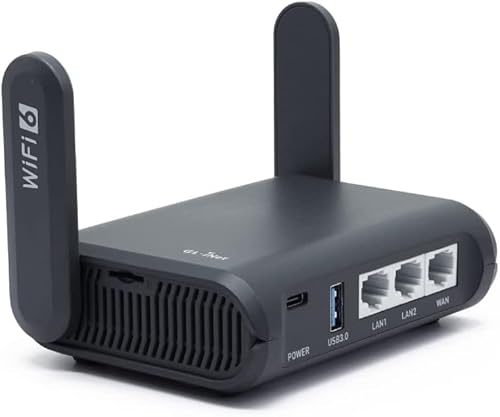
GL.iNet Slate AX (GL-AXT1800) Travel Router — The pocket all-rounder
The Slate AX describes itself as pocket-sized, and its title pairs that portability with substance: dual-band Wi-Fi 6 up to 1800 Mbps, MU-MIMO and OFDMA for handling many devices gracefully, VPN support, and a stated capacity of up to 120 devices connected simultaneously. That device figure is the tell for its intended scenes — not a solo traveller with a phone, but a small team at a conference table, a family in a rental with every tablet and console awake, or a presenter whose demo kit all needs to live behind one tunnel on a venue network nobody trusts.
Against its Beryl sibling, the Slate AX trades the headline WAN speed for a slightly older, slightly softer specification at what is usually a gentler tier, while keeping the essential GL.iNet formula intact: OpenWrt foundations, VPN as a first-class citizen, pocket format. Buyers choosing between them should ask where the box will work hardest — tethered to fast wired connections in modern hotels, where the Beryl’s 2.5G WAN earns its keep, or serving crowds of devices in venues, where the Slate’s stated device capacity and OFDMA manners matter more. Either way, the family’s shared interface means the second purchase, if it comes, requires no relearning.
- Wireless: Wi-Fi 6 dual-band, up to 1800 Mbps
- Capacity: up to 120 devices simultaneously, per the title
- Technologies: MU-MIMO and OFDMA stated
- System: GL.iNet travel platform with VPN support
- Format: pocket-sized travel router
- WAN port speed: the listing title does not headline a WAN figure — confirm port speeds on the listing if wired venue connections are your main use
Strengths
- A stated 120-device capacity suits teams, families and demo kits behind one tunnel.
- OFDMA and MU-MIMO keep many small devices orderly on shared air.
- Pocket format with the family’s full VPN workflow, not a cut-down edition.
Trade-offs
- Its 1800 Mbps class sits below the Beryl AX’s radio specification.
- Fast-WAN shoppers must verify port speeds the title leaves unstated.
- Like all travel picks, it is a room-scale network, not a home system.
Best for: a travelling team or family whose many devices must share one tunnelled connection.
Not suited for: a solo traveller who would rather have the fastest WAN port in the smallest box.
Group travellers should look over the Slate AX listing on Amazon with their device count in mind.

TP-Link AX3000 WiFi 6 Router with VPN — The mainstream both-ways router
The Archer AX55 earns its place by saying the quiet part in its title: VPN clients and server, plural directions, on a mainstream AX3000 Wi-Fi 6 home router with EasyMesh expansion, HomeShield services, OFDMA, MU-MIMO and USB 3.0. For the buyer who wants a recognisable brand, a router that is simply the home’s router first — with VPN as a well-supported feature rather than the product’s entire personality — this is the natural pick. Set it as a client and the household’s traffic exits through your chosen service; enable its server and you can call home from a laptop abroad.
The contrast with the GL.iNet picks is philosophical. TP-Link builds for the median household, so its interface emphasises guided setup and its ecosystem emphasises mesh expansion and the HomeShield layer, while GL.iNet builds for the enthusiast-traveller and exposes more of the OpenWrt machinery. Neither philosophy is wrong; they suit different owners. The AX55’s honest limits are that it is a home router in size and intent — it will not travel in a pocket — and that its VPN throughput and protocol menu, like the Flint’s, must be confirmed in documentation by buyers with specific requirements. For the dual-direction, one-box, big-brand brief, nothing else in this six competes directly.
- Model: TP-Link Archer AX55
- Wireless: AX3000 Wi-Fi 6 dual-band, OFDMA and MU-MIMO
- VPN: clients and server both stated in the title
- Expansion: EasyMesh compatible
- Services: HomeShield included in the title’s feature list
- USB: USB 3.0 port stated
Strengths
- Both VPN directions named in the title — the clearest claim in this guide.
- Mainstream platform with mesh expansion for homes that outgrow one box.
- A full-size home router’s radios and ports, not a travel compromise.
Trade-offs
- Fixed home hardware — the suitcase picks are all GL.iNet or Capri shaped.
- Its enthusiast depth stops where GL.iNet’s OpenWrt openness begins.
- HomeShield’s fuller features follow TP-Link’s service terms, which buyers should read.
Best for: a household wanting one mainstream router that can both dial out to a service and be dialled into from abroad.
Not suited for: a traveller needing pocket hardware, or an OpenWrt tinkerer wanting the machinery exposed.
Mainstream buyers can check the Archer AX55 on Amazon, where its VPN menu is described in the maker’s own words.

GL.iNet Slate 7 (GL-BE3600) Travel Router — The touchscreen traveller
The Slate 7 is the travel line’s new generation, and its title leads with an interface idea rather than a speed: a touchscreen that toggles VPN or AdGuard directly on the device. Anyone who has talked a tired travel companion through a router admin page by phone-light will understand the appeal instantly — the tunnel becomes a physical switch on the box, visible at a glance, operable without a laptop. Around that screen sits a Wi-Fi 7 travel router with 2.5G connectivity, in a mini format the title pitches at hotels, cruises, RVs, business trips and even plane connectivity.
Wi-Fi 7 in a travel box deserves one honest paragraph. The newest radios help most where the upstream is good — a modern rental with fast fibre, a conference centre with current infrastructure — and least where the venue’s own network is the bottleneck, which describes many hotels. What the Slate 7 buys the traveller is therefore currency: compatibility with the networks now being installed, and a longer useful life than the Wi-Fi 6 picks. What it cannot buy is a faster cruise-ship connection than the ship provides. Choose it as the forward-looking traveller, and keep the Beryl in mind as the proven one; GL.iNet sells both because both arguments are sound.
- Wireless: Wi-Fi 7 travel router
- Interface: touchscreen toggling VPN or AdGuard, per the title
- Connectivity: 2.5G stated in the title
- Format: mini travel size for hotel, cruise, RV and trip use
- System: GL.iNet’s OpenWrt-based travel platform
- Screen dimensions: the title calls the display a 1-inch mini size — read it as a status and toggle surface, not a configuration screen
Strengths
- A physical VPN toggle removes the admin-page ritual from every arrival.
- Wi-Fi 7 radios future-proof the travel kit against newly upgraded venues.
- AdGuard on the same switch gives the room’s devices a cleaner, quieter network.
Trade-offs
- Venue networks, not the router, set most travel speed ceilings.
- The screen is a convenience, not a substitute for the full interface when configuring deeply.
- Newest-generation pricing applies, against the Beryl’s mature value.
Best for: a frequent traveller who values the tunnel being one touch away, every single arrival.
Not suited for: travellers whose venues are uniformly slow, where Wi-Fi 7 has nothing to work with.
Travellers who live in admin pages least happily should see the Slate 7 listing on Amazon and picture the touchscreen at midnight in a strange hotel.
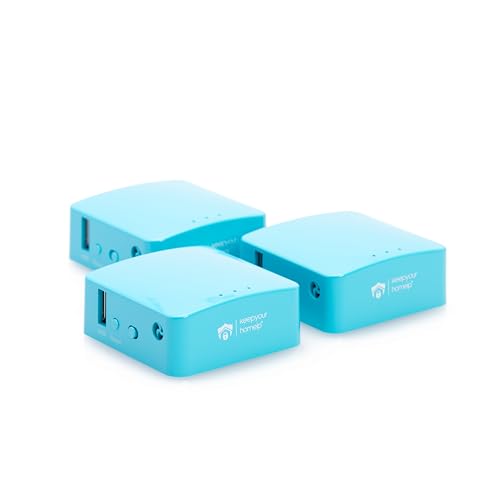
Capri CP-EL128 Preconfigured VPN Travel Router — Your home address, anywhere
The Capri entry is the guide’s genuine outlier, and the closest thing here to the preconfigured spirit of the keyword — though note the precision: it is sold preconfigured as a VPN system, not flashed with third-party firmware. The package pairs a server with two travel routers, and its title states the purpose in plain terms: secure home network access from anywhere, keeping your home IP wherever you are, with private, full VPN control. The buyer is not purchasing a router and a project; they are purchasing an outcome — arrive anywhere, connect through the travel unit, and appear to the world as if sitting at home.
That outcome serves specific lives: the long-stay traveller whose home services expect a home address, the remote worker whose employer systems are tied to a household connection, the expatriate keeping a digital foot in the home country. Two travel routers in the bundle is a thoughtful touch — one can live in the suitcase and one at the regular destination. The caveats are about dependence and detail: a preconfigured system leans on its maker’s configuration model and support, and the title does not itemise protocols, speeds or the server hardware’s specification, so committed buyers should extract those answers from the listing and the maker before purchase. Within its niche, however, nothing else in this six is even attempting the same job.
- Package: one VPN server plus two travel routers, per the title
- Purpose: secure home network access from anywhere; keep your home IP wherever you are
- Control: private, full VPN control claimed in the title
- Configuration: sold preconfigured as a system
- Protocol and throughput itemisation: the listing title does not enumerate them — obtain specifics from the maker before committing
- Firmware note: preconfigured by its maker; not a third-party-flashed unit
Strengths
- The only pick selling the complete home-IP outcome rather than a router and instructions.
- Two travel units cover the suitcase and the regular destination at once.
- Preconfiguration removes the server-setup project that stops most home-VPN plans.
Trade-offs
- Its specification detail lives outside the title, demanding homework before purchase.
- A configured system ties you to its maker’s model and support in a way open platforms do not.
- Buyers wanting a general-purpose router get a specialist instrument instead.
Best for: a long-stay traveller or remote worker whose digital life must keep a home address.
Not suited for: a hobbyist who wants to choose every protocol and setting personally.
Home-anchored travellers should study the Capri CP-EL128 listing on Amazon and put the protocol questions to the maker directly.
OpenVPN or WireGuard: Which Protocol Should Your Router Speak?
Two protocol names dominate this category, and the choice between them shapes daily experience more than any radio specification in this guide. OpenVPN is the veteran: configurable, battle-tested, supported by effectively every VPN service and every router platform in this list’s class, and comparatively heavy in processing terms. On a home flagship that weight is invisible; on a pocket travel router pushing a fast connection, it can become the ceiling that decides your tunnel speed.
WireGuard is the modern challenger: a leaner design that typically delivers higher tunnel speeds on the same hardware, reconnects almost instantly when networks change — the hotel lift, the train tunnel, the café door closing — and treats roaming between connections as a normal event rather than a failure. For travel routers, whose entire lives are spent joining and leaving networks, that temperament is worth real money. Its relative youth means an occasional service or platform still treats it as the second option, though that gap narrows yearly.
The practical rule for buyers of these six picks runs as follows. Confirm your chosen service or home setup supports your preferred protocol on your chosen router by reading the maker’s documentation, because titles in this category headline VPN support without itemising protocol menus. Where both are offered, run WireGuard for travel and speed, keep OpenVPN configured as the compatibility fallback, and test both at home. The traveller who discovers a protocol gap from a hotel room has only themselves to bill for the lesson.
What Does a VPN Router Not Protect You From?
A tunnel encrypts the road between your router and the exit point. It does not make the devices at either end honest, and the gap between those two statements is where most disappointment in this category is born. A tunnel will not rescue a laptop already carrying malware, will not stop a service you log into from knowing who logged in, and will not make a careless download safe. The hotel network’s other guests are locked out of your traffic — that much the tunnel genuinely delivers — but your own accounts, cookies and habits travel with you through it.
It also does not anonymise by magic. Your VPN service, or your own home server, sees the traffic the local network no longer can; trust has been moved, not abolished. That is why the client-versus-server decision carries a privacy dimension alongside the practical one: tunnelling home means your home connection is the exit, with your own address attached, which is exactly what Capri buyers want and exactly what privacy-seeking service subscribers are paying to avoid. Same technology, opposite intent, and the guide’s insistence on choosing a direction first is what keeps a buyer from purchasing the wrong one.
Finally, a VPN router does not excuse stale firmware. The router is now the guardian of every device behind it, which makes its own update discipline the household’s front door lock. The manufacturer-supported picks in this guide hold their greatest advantage over genuinely flashed units right here: updates arrive from the maker, on a cadence, without the owner needing to follow a community forum to learn that their firmware has a known hole in it.
How Do the Travel Picks Handle the Captive Portal Problem?
Every hotel traveller knows the ritual: join the network, wait for the sign-in page, enter a room number, wonder why the page never arrives. A travel router complicates that ritual in a specific way — the portal wants to authenticate the device that joined, and the device that joined is the router, while the laptop asking for the page sits behind it. The mature travel platforms in this guide are designed around this dance: the router joins, presents the portal to the first device that browses, completes the venue’s sign-in once, and then shares that authenticated connection with everything else in the room.
Venues differ in how gracefully they allow it. Some portals re-authenticate daily, some tie access to a single device registration, and a minority of networks actively resist router-style sharing. This is unglamorous territory, and it is precisely where the GL.iNet travel line’s years of specialisation show — the workflow exists because the product category exists to solve it. The rehearsal advice from the setup section applies with full force: complete one full portal routine somewhere forgiving before the trip that matters depends on it.
Carry the fallback without embarrassment. A phone hotspot covers the venue that refuses, a wired room port where offered often bypasses the portal entirely — which is where the Beryl AX’s fast WAN port quietly earns its place — and the Slate 7’s touchscreen at least makes the router’s connection state visible at a glance while you negotiate. Travel networking rewards the prepared pessimist.
Tunnel Directions and Hardware Shapes: the Six Compared Plainly
| Pick | Lives | VPN character | Standout hardware note |
|---|---|---|---|
| GL.iNet Flint 3 | At home | Home VPN router — client and home-anchor roles | Tri-band Wi-Fi 7, five 2.5G ports |
| GL.iNet Beryl AX | In the suitcase | Travel client over OpenWrt | 2.5G WAN, Wi-Fi 6 radios |
| GL.iNet Slate AX | In the suitcase | Travel client for many devices | Up to 120 devices stated |
| TP-Link Archer AX55 | At home | VPN clients and server, both titled | AX3000 with EasyMesh |
| GL.iNet Slate 7 | In the suitcase | Touchscreen-toggled VPN | Wi-Fi 7 travel format, 2.5G |
| Capri CP-EL128 | Both ends | Preconfigured server plus travel routers | System sold as a package |
The table exposes the guide’s skeleton: three suitcase clients from one maker, two home anchors of opposite philosophies, and one system that refuses the client-server split by selling both ends together. It also shows why ranking these six into a single ladder would be a category error — the Beryl cannot do the Flint’s job and the Flint cannot do the Beryl’s. Choose your end of the tunnel first. Readers whose tunnelling is really about reaching a gaming rig or a low-latency home setup may enjoy the contrast with best gaming routers asus, where VPN support rides along on machines built for an entirely different priority.
How Should You Set Up a VPN Router Before the Trip, Not During It?
Configure everything at home, on your own network, with time to spare. Install the VPN service’s credentials or the server connection profile, raise the tunnel, and verify with a device behind the router that the outside world sees the tunnel’s exit address rather than your home one. Then test the failure mode deliberately: kill the tunnel and confirm whether traffic stops or leaks, because a router that silently falls back to the open network when its VPN drops is a decoration. Look for the kill-switch or strict-routing setting your platform offers and decide your policy before a hotel network makes the decision for you.
Rehearse the arrival routine once in a low-stakes setting — a café near home is ideal. Join the venue network, handle its sign-in page through the router, raise the tunnel, and confirm every travelling device inherits it. Note the steps in the order they actually worked, because venue sign-in pages interacting with router modes are the one genuinely fiddly part of travel routing, and the middle of a long travel day is a poor classroom. Pack the router’s power supply with the router, label it, and keep a phone hotspot plan in mind as the understudy for the venue whose network defeats every attempt.
One further travel habit separates smooth trips from support-forum posts: update and configure the router in the week before departure, never on departure morning. Firmware updates occasionally rearrange menus or reset a setting the release notes mention and the traveller does not, and a router that behaved perfectly for six months deserves a few evenings of ordinary home use after any major change before it is trusted with a work trip. The same caution applies to changing VPN services, swapping protocols or adding a second travel router to the kit. Travel kit, like expedition kit, should be boring by the time it is packed: tested, labelled, and paired with the charger it will actually use, with its admin password recorded in the password manager rather than in a notebook in a different bag.
What Mistakes Do Buyers Make Chasing the Word Flashed?
The founding mistake is buying the label instead of the capability — paying a premium for a reseller-flashed unit whose warranty died on the workbench, when a factory OpenWrt-based router would have run the same tunnel with support intact. The second mistake is direction confusion: purchasing a client-only travel router to reach a home file store, or a home server setup when the actual need was appearing in another country for streaming. The third is ignoring the arithmetic of speed — a VPN tunnel is bounded by the slower of your connection and the service’s, and by the router’s processor when encryption gets heavy, so a gigabit line behind a pocket router will not deliver gigabit through the tunnel.
A fourth mistake is forgetting the home end’s upload speed. Reaching back to a home server means your home connection’s upstream is your ceiling abroad, and on many home plans upstream is a modest fraction of the headline figure. Test it before the long trip, not from a hotel in another hemisphere. Finally, treat any seller who will not state, in writing, what firmware a unit runs and who supports it as a seller answering your question. The wired foundations underneath all of this — the home gateway the tunnel anchors to — get their own examination in best gigabit wired routers.
When Is a Genuinely Pre-Flashed Unit Still the Right Purchase?
Fairness requires the question, because this guide has spent its length steering readers toward factory-supported alternatives. A specialist pre-flashed unit earns its place in narrow circumstances: when a specific community-firmware feature is the entire requirement and no manufacturer platform offers it; when the buyer is technically confident enough to treat firmware maintenance as a hobby rather than a chore; or when an organisation’s own policy names a particular open firmware build. In those cases the flashed unit is not a compromise but a specification, and the buyer should purchase it from a reseller who states the firmware version, the update path and the warranty position in writing.
Notice what those circumstances share: an informed buyer with a named reason. The shoppers this guide protects are the others — the far larger group who typed the keyword because they want their traffic tunnelled, not because they have a position on firmware provenance. For them the flashed label was a means mistaken for an end, and the six picks here deliver the end with warranties intact. If you finish this guide and still want the flashed unit, you will at least buy it as the narrow tool it is, with the maintenance commitment priced in.
There is also a middle path worth knowing: several of the OpenWrt-based picks in this guide tolerate advanced configuration well beyond their friendly interfaces, because their foundations are open in a way locked-down consumer firmware is not. The enthusiast who wants room to grow may find the factory platform grows with them further than expected — far enough, in many households, that the workbench flashing project never becomes necessary at all.
How Much Speed Should You Expect Through the Tunnel?
Set expectations with arithmetic rather than hope. Your tunnelled speed is the smallest of four numbers: the local connection where you sit, the exit connection at the far end, the VPN service’s capacity if you use one, and the rate at which your router’s processor can encrypt. At home on the Flint 3 or the Archer AX55, the router is rarely the smallest number. In a hotel, the venue’s connection almost always is. On the road home to your own server, the forgotten number is your home broadband’s upload speed, which on many plans is a small fraction of the advertised download figure and becomes your personal ceiling for everything you pull from home.
Protocol choice moves the router’s own number meaningfully, which is why the WireGuard conversation earlier in this guide is practical rather than theological: on pocket hardware, the leaner protocol can be the difference between a tunnel that keeps up with a good hotel connection and one that visibly trails it. None of this argues against tunnelling — the speeds modern picks achieve are ample for work, calls and streaming — but it does argue for testing your exact combination before a trip on which money or employment depends. Measure at home, measure at the café, and let evidence set the itinerary’s ambitions.
Final Recommendation
Buy the direction before the device. Travellers who need every gadget tunnelled on unfamiliar networks should take the Beryl AX as the proven standard, the Slate 7 as its Wi-Fi 7 successor with the friendliest interface in the category, or the Slate AX when the travelling party is really a small crowd. Households anchoring a permanent tunnel take the Flint 3 for capability or the Archer AX55 for mainstream comfort with both directions titled. And the reader whose actual dream is the home address that follows them around the world should look hardest at the Capri, the one package here selling that outcome whole. The best flashed vpn routers question, answered honestly, resolves to this: the flashing was never the point — a supported router that raises your tunnel every time, without drama, is the product the keyword was always looking for.
Households running both ends of the tunnel should also think about what happens when the home end reboots — a power cut, an update, a cleaner unplugging the wrong brick. Servers that return gracefully, routers that reconnect their tunnels automatically, and a home contact who can be talked through pressing one button are the unglamorous components of a system that survives a season of travel. Test the home end’s recovery once, deliberately, on a quiet weekend: pull its power, restore it, and time how long before the tunnel is reachable again. Whatever that number is, it is your real system’s behaviour, and knowing it in advance converts a mid-trip crisis into a known wait.
Frequently Asked Questions
Is any router in this guide actually flashed with DD-WRT or similar?
No, and the guide says so deliberately. None of the six titles claims third-party flashing. The GL.iNet picks run the maker’s OpenWrt-based firmware from the factory, the TP-Link runs TP-Link’s system with VPN clients and server built in, and the Capri is preconfigured by its maker as a VPN system. Each delivers the tunnel without the warranty and support complications of a reseller-modified unit.
Will a VPN router slow my connection down?
Some cost is unavoidable — encryption takes processing, and the tunnel path is longer than the direct one — but the size of the cost depends on the router’s headroom, the protocol in use and the service at the far end. Modern protocols on capable hardware, like the home picks here, keep the penalty modest on typical home lines. A pocket travel router on a fast connection will show the largest gap, which is physics rather than defect.
Can one travel router protect all my devices at once?
Yes — that is the travel router’s founding purpose. Devices join the router’s private network and inherit its tunnel, including devices like e-readers, handheld consoles and work laptops you are not permitted to modify. It is also why the Slate AX’s stated 120-device capacity matters for teams: the protection is collective, not per-device.
Do I still need a VPN service subscription?
For the client direction, usually yes: the router is the vehicle, the service provides the exit servers around the world, unless you are tunnelling back to your own home server instead. For the server direction — reaching your own home — the two ends are both yours and no service is required. Many travellers run both: a service for general use and their home server for home things.
What should I check about a hotel network before relying on it?
Whether its sign-in page cooperates with a router at all, and what its terms say about connecting one. Most hotel and rental networks work with the travel picks here, but captive portals vary, which is why the guide recommends rehearsing the routine at a local café first. Keep a phone hotspot as the fallback for the rare venue that refuses.
Is the Capri’s home-IP approach the same as a VPN service?
No. A commercial service exits your traffic in a city of your choosing from its own server fleet. The Capri system exits your traffic at your own home, through the bundled server, so services see your actual household address. That distinction is the entire product: it serves people who need their real home presence, not a borrowed one.
One closing distinction for the comparison shopper: read any rival listing in this category for the same three silences this guide flagged in its own picks. A title that says VPN without saying client or server is asking you to guess the direction. A title that says OpenWrt without saying whether the maker or a reseller installed it is asking you to guess who supports it. And a title that quotes wireless speeds while the product’s real work is encryption is answering a question the category never asked. The six products above were chosen because their titles, read strictly, still leave a coherent and purchasable product standing — which is a higher bar in this corner of the catalogue than it sounds.
Families deserve a sentence of their own here, because the travelling parent is this category’s quiet power user. One travel router tunnelling the whole rental apartment means the children’s tablets, the baby monitor that insists on an app, and both parents’ laptops share one protected connection, set up once by the adult who drew the short straw. The Slate AX’s device capacity and the GL.iNet line’s room-at-a-time simplicity were designed for hotel desks, but they may serve their highest purpose in a holiday let at midnight, when nobody in the building wants a lecture on firmware and everybody wants the streaming service from home to simply work. That, in the end, is the outcome every pick in this guide is really selling.
Keep the travel router’s own little checklist taped inside the laptop bag until the routine is muscle memory: join venue, clear the portal, raise the tunnel, verify the exit, then connect the rest. Five steps, in that order, every arrival — the travellers who skip the verification step are the ones who discover at checkout that a week of traffic ran outside the tunnel they paid for.
Related Guides
Three neighbouring reads, depending on which end of the tunnel you are building: segmentation and remote management for work in best business class routers, routers where VPN is a supporting feature rather than the plot in best gaming routers asus, and the wired core a home server anchors to in best gigabit wired routers.


