What's inside
- Where to Buy
- Key Takeaways
- Quick Picks
- How We Chose These Picks
- Comparison Table
- How to Choose a Projector for Filmmaking
- Does a Filmmaker Need Native 4K?
- Which HDR Format Should a Filmmaker Prioritise?
- How Important Is Lens Shift in a Screening Room?
- Common Mistakes Filmmakers Make When Choosing a Projector
- Final Recommendation
- Frequently Asked Questions
- Related Guides
As an Amazon Associate I earn from qualifying purchases. This post may contain affiliate links at no extra cost to you.
[SITE_DOMAIN] is reader-supported. When you buy through links on our site, we may earn an affiliate commission.
Where to Buy
A filmmaker’s projector is a judgement instrument, so confirm the exact model variant on each page before anything else. BenQ’s W2720i listing is where to verify the AI Cinema Mode and Android TV wording match the unit being sold. The HT2060 page deserves a careful read of its lens shift and 1.3x zoom claims, since those decide where the machine can live in a cutting room. Epson’s Pro Cinema LS9000 title is deliberately brief, so its listing carries the burden of confirming brightness and lens details. Optoma’s UHZ68 page is the place to check the Dolby Vision claim against your source chain. The LS11000 listing should be read for its motorised lens wording before a dedicated room is designed around it. XGIMI’s Horizon 20 Pro page is where to confirm the licensed Netflix wording inside its Google TV platform.
Directors, editors, colourists and the film societies who love them share a peculiar requirement: the screen must not lie. The best projectors for filmmakers are judged by a stricter court than brightness or convenience — by whether skin tones stay honest, whether shadow detail survives, whether a grade made in the suite resembles the grade an audience sees, and whether the machine can show a film the way its maker framed it. Six projectors are gathered here under that harsher light, from a 1080p LED machine with a colourist’s specification to a triple-laser flagship that treats the living room like a small cinema.
Colour language dominates these titles in a way it dominates no other projector category. DCI-P3 percentages appear. Rec.709 is named like a credential. Dolby Vision and HDR10+ compete as rival promises about how highlights should roll off. A filmmaker reading these claims should translate each one into a question about their own pipeline: which space do you grade in, which format do your deliverables use, and which of these machines speaks that language natively rather than translating on the fly?
Resolution needs the same translation. Native 4K, pixel-shifted 4K and honest 1080p all appear in this wider market, and the titles here state their claims in their own dialects — 4K here, 4K PRO-UHD there, plain 1080p on the BenQ HT2060, whose case rests on colour and motion rather than pixel count. A cutting room showing work-in-progress at moderate screen sizes may gain more from the 1080p machine’s colour discipline than from a 4K machine’s resolution worn over weaker colour. The reviews keep that trade visible instead of ranking pixels first by reflex.
Placement tools matter to filmmakers for an unglamorous reason: projection rooms are borrowed from life. The spare room, the studio corner, the society’s hired hall — none was designed around a lens. Lens shift, optical zoom and honest keystone decide whether the image can be squared without tilting the machine into geometry compromises that soften the very detail the filmmaker came to judge. Where a title claims those tools, the review credits them as creative equipment, not setup trivia.
Sound appears in these titles too, and filmmakers should treat onboard audio as a monitoring convenience rather than a mix position. A projector speaker can confirm that dialogue is present and roughly balanced; it cannot tell an editor how a mix will behave in a cinema or a living room. The picks that name Atmos speakers or capable built-in audio earn convenience points in the reviews, while the verdicts keep steering serious sound judgement toward the room’s own system.
Key Takeaways
- BenQ’s W2720i states 95 percent of DCI-P3 with HDR10 and HLG, the widest colour claim among the smart picks here.
- The HT2060 is the honest 1080p entry, arguing from DCI-P3 and Rec.709 colour, an 8.3ms figure at 120Hz and vertical lens shift.
- Optoma’s UHZ68 states 4,500 lumens with Dolby Vision, the brightest filmmaker claim in this group.
- Epson’s LS11000 returns as the dedicated-room reference, with motorised lens work and a stated 1.2 million to one dynamic contrast.
- XGIMI’s Horizon 20 Pro states 4,100 ISO lumens from an RGB triple laser, with IMAX Enhanced and Dolby Vision both named.
- Epson’s Pro Cinema LS9000 states only 4K and laser in its title, so its finer claims must be confirmed on the listing.
Quick Picks
| Pick | Badge | Why it is here |
|---|---|---|
| BenQ W2720i | The Colour-First Smart Theatre | 4K with a stated 95 percent DCI-P3, AI Cinema Mode and Android TV at 2,500 lumens. |
| BenQ HT2060 | The 1080p Colourist | LED light, DCI-P3 and Rec.709 colour, lens shift and an 8.3ms figure at 120Hz. |
| Epson Pro Cinema LS9000 | The Sparse Flagship | A Pro Cinema 4K laser whose brief title leaves the detail work to its listing. |
| Optoma UHZ68 | The Bright Dolby Vision Laser | 4K UHD laser light at a stated 4,500 lumens with Dolby Vision named. |
| Epson Home Cinema LS11000 | The Dedicated Room Reference | 4K PRO-UHD laser, HDR10+, motorised lens and a stated high dynamic contrast. |
| XGIMI Horizon 20 Pro | The Triple Laser All-Rounder | RGB triple laser at a stated 4,100 ISO lumens, Google TV, IMAX Enhanced and 1ms lag. |
How We Chose These Picks
Filmmaker duty was defined by evidence a director or editor can act on: a colour claim printed in the title, an HDR format named rather than implied, a light source stated, and placement tools that let the machine be squared honestly in a real room. Picks were not required to state everything — the LS9000 states almost nothing — but whatever a title did state was treated as the whole of its public case, and the reviews grade the strength of that case as rigorously as the machine behind it.
Colour claims were sorted by specificity. A stated percentage of DCI-P3 is a measurable promise; a named Rec.709 mode is a workflow promise; the phrase wide colour gamut without a figure is a mood. All three appear in the wider market, and the two BenQ titles here were credited for printing the specific kinds. Buyers grading in P3 for festival deliverables and buyers finishing in Rec.709 for broadcast will find their respective machines by reading those lines literally.
HDR formats were treated as pipeline decisions. Dolby Vision, HDR10+ and HDR10 are not interchangeable labels; a filmmaker whose masters exist in one format should favour the projector that names it, because tone mapping is where projectors most visibly editorialize. Two titles here name Dolby Vision, one names HDR10+, one names HDR10 with HLG, and the reviews keep those allegiances separate rather than dissolving them into a generic HDR tick.
Motion and gaming figures were credited where printed — an 8.3ms claim at 120Hz, a 1ms input lag claim, a 120Hz figure inside a cinema title — because filmmakers increasingly screen interactive work, games-as-cinema and high-frame-rate experiments. A title silent on lag was not penalised for cinema duty, where the figure barely matters, but the silence is recorded for readers whose work crosses over.

BenQ W2720i — The Colour-First Smart Theatre
BenQ built the W2720i around a sentence a colourist would write: 4K, a stated 95 percent of the DCI-P3 gamut, HDR10 and HLG, and an AI Cinema Mode, wrapped in a smart projector with Android TV and a Dolby Atmos speaker at a stated 2,500 lumens. For the filmmaker whose work lives on streaming platforms and festival DCP-adjacent screenings, P3 coverage is the native tongue of modern colour, and a machine that prints its percentage invites verification rather than faith. That invitation is the most professional gesture in this guide.
AI Cinema Mode deserves a filmmaker’s scepticism and a fair hearing in equal measure. Automated picture adjustment can rescue a badly flagged stream, and it can also second-guess a grade that was deliberate. The professional reading is that such a mode is a tool with an off switch: useful for casual screenings of other people’s content, disabled when the work on screen is your own and every tone was placed by hand. A projector that offers intelligence is welcome; a projector that insists on it would not be, and nothing in the title suggests insistence.
Android TV inside the machine simplifies the screening-room logistics that surround actual filmmaking: festival screeners, reference films, a collaborator’s link, all reachable without a laptop ceremony. Dolby Atmos from a built-in speaker should be read as presence and rough placement rather than as a mix stage, yet for dialogue intelligibility during a rough-cut review it is genuinely useful, and it frees small rooms from a soundbar negotiation.
Brightness at a stated 2,500 lumens calibrates the room: a darkened studio, a blackout-curtained living room, a society screening after sunset. This is not the machine for a bright loft at noon, and its colour-first budget explains why — output was spent on gamut rather than on raw lumens. Filmmakers, who control their rooms as a matter of professional habit, will find that trade correctly ordered.
The three-year warranty printed in the title is a quieter professional signal. A machine used to judge work that other people are paying for should come with a maker’s commitment measured in years, and BenQ prints one. Combined with the colour claim, the W2720i presents the most complete filmmaker’s brief among the smart projectors here: specific where specificity matters, convenient where convenience is harmless.
- Resolution claim: 4K, per title
- Colour: 95 percent of DCI-P3 stated
- HDR: HDR10 and HLG stated
- Brightness figure in the title: 2,500 lumens
- Platform: Android TV stated
- Sound: Dolby Atmos speaker stated
- Warranty: three years stated
Strengths
- A stated 95 percent DCI-P3 figure gives colourists a claim they can verify.
- Android TV puts screeners and reference films one remote away.
- A three-year warranty is printed in the title itself.
Trade-offs
- A stated 2,500 lumens needs a properly darkened room to show the colour at its best.
- AI picture modes must be disabled when judging a deliberate grade.
- Built-in Atmos audio is a monitoring convenience, not a mix position.
Best for: filmmakers screening streaming-era work and rough cuts in a darkened studio or living room.
Not suited for: a bright loft screening at midday, where 2,500 lumens cannot hold the colour this machine was bought for.
Of the six, this BenQ argues most like a colleague in the grade suite: it leads with the gamut, names its formats, and treats smart features as staff rather than as the headline.
Screeners deserve a sentence in any modern filmmaker’s calculation. Work now circulates as links and files long before it circulates as prints, and a smart projector shortens the distance between receiving a collaborator’s cut and seeing it at a size where judgements are possible. The W2720i’s platform turns that distance into a remote press, which is why busy directors increasingly treat the screening machine as part of their communications equipment rather than their furniture.

BenQ HT2060 — The 1080p Colourist
Every guide needs a pick that tests the reader’s priorities, and the HT2060 is this one’s: a 1080p projector in a 4K conversation, armed with an LED light source, DCI-P3 and Rec.709 colour claims, an 8.3ms figure at 120Hz, vertical lens shift, 2D keystone, a 1.3x zoom, S/PDIF output, HDMI 2.0, twin 5W speakers and 3D support. Read that title slowly and a philosophy emerges — that a film is made of colour, motion and placement long before it is made of pixel count, and that a cutting room of moderate size may be served better by all three than by resolution alone.
The dual colour claim is the heart of it. Rec.709 is the broadcast and legacy streaming space in which an enormous share of finished work still lives; DCI-P3 is the cinema space toward which new work travels. A machine that names both is addressing filmmakers whose catalogue spans the two, and whose projector must not flatter one at the expense of the other. Editors reviewing archive material in the morning and a P3 feature in the afternoon are this BenQ’s exact constituency.
Placement tools at this level are a gift rarely found outside dedicated theatre models. Vertical lens shift lets the machine sit level on a shelf and place its image optically, without the keystone softness that digital correction imposes on fine detail — and fine detail is what a filmmaker is projecting. The 1.3x zoom widens the shelf positions that work, and 2D keystone remains available for the rooms where even shift cannot square things.
Motion figures and audio plumbing complete a working editor’s specification. An 8.3ms claim at 120Hz speaks to smooth pans and to interactive work; S/PDIF gives the room a clean digital path to real speakers or a soundbar, which is where film sound should be judged; twin 5W speakers cover the quick check when the room system is off. Even 3D support, unfashionable as it is, serves the archivists and enthusiasts who still screen it.
The LED light source suits the cutting room’s rhythm: instant readiness for a ten-minute review, no lamp anxiety across a long edit, consistent colour across the months a production spends in post. What the title does not state is a brightness figure, and a buyer should pull that number from the listing and weigh it against their screen size with care, because a colourist’s machine in an over-large room is a talent wasted.
- Resolution: 1080p, stated plainly in the title
- Light source: LED
- Colour: DCI-P3 and Rec.709 wide gamut stated
- Motion: 8.3ms at 120Hz stated
- Placement tools: vertical lens shift, 2D keystone and 1.3x zoom stated
- Audio: S/PDIF, HDMI 2.0 and built-in 5W twin speakers stated
- Brightness: Not stated in the listing title — verify with the manufacturer documentation
Strengths
- Named Rec.709 and DCI-P3 colour serves both broadcast and cinema pipelines.
- Vertical lens shift squares the image optically, sparing fine detail.
- S/PDIF output feeds a real sound system for honest mix checks.
Trade-offs
- 1080p resolution is the ceiling, whatever the colour talents around it.
- No brightness figure is printed in the title, so room matching needs the listing.
- Large screens will expose the resolution gap against the 4K picks.
Best for: editors and film societies screening at moderate sizes, where colour fidelity outranks pixel count.
Not suited for: a large dedicated cinema screen, where 1080p resolution rather than colour becomes the visible limit.
Call the HT2060 the guide’s argument that a film is not a spreadsheet of pixels. Filmmakers who have watched a beautiful grade die on a colour-blind 4K machine will understand the argument immediately.
There is a subtler virtue in an unglamorous specification: consistency across a long session. A double bill, a festival programme reviewed in one sitting, a colourist’s afternoon of comparisons — these ask a projector to hold its character for hours without drift or fatigue colouring the judgements made at the end of the day. LED light’s steadiness across such sessions is the quality its owners mention most, long after the specification that sold the machine has been forgotten.

Epson Pro Cinema LS9000 — The Sparse Flagship
Epson’s Pro Cinema LS9000 arrives with the shortest title in this guide: a brand, a professional line name, a model, 4K and laser. Nothing else. No brightness, no contrast ratio, no HDR format, no lens description. A filmmaker can read that brevity two ways — as the confidence of a professional channel that expects its buyers to work through dealers and documentation, or as a listing that simply has not done the work of describing its machine. Both readings agree on the buyer’s next step: nothing about this projector should be assumed, and everything about it should be confirmed.
What the few words do establish is not nothing. Pro Cinema is Epson’s dedicated home cinema line, sold for installation in controlled rooms rather than for living room convenience, and the LS naming places the unit in the company’s laser family. A filmmaker building a permanent screening room — the kind with a fixed screen, treated walls and a rack of sources — is precisely the buyer that line exists for, and the absence of smart-platform language in the title fits a machine designed to be fed by professional sources.
Laser light in a screening room carries a colour argument as well as a maintenance one. A room used to judge grades needs its projector to look the same in month twelve as it did at calibration, and a light source that holds its output and spectral character across years protects the calibration a colourist paid for. That reasoning is general to laser designs rather than specific to this unit’s unstated figures, and the review offers it as context for the line, not as a measured claim about this model.
The professional channel cuts both ways for support. Dealer-sold cinema projectors often come with installation expertise, calibration services and a relationship a filmmaker can call when a screening matters. They also mean the listing page is the beginning of a conversation rather than the end of one. A buyer comfortable in that channel may find the LS9000 the most serious machine in this guide; a buyer who wants every figure in writing before money moves should extract those figures during the conversation and compare them against the stated claims of the LS11000 below.
Until then, the honest summary is a silhouette: professional line, 4K, laser, installation intent. Silhouettes can be exactly right — many great cinema machines have worn them — but a silhouette is purchased on trust in the maker and the channel, and this guide’s discipline is to say so rather than to upholster the gaps with borrowed numbers.
- Line: Epson Pro Cinema, per title
- Resolution claim: 4K, per title
- Light source: laser
- Brightness: Not stated in the listing title — verify with the manufacturer documentation
- HDR format: Not stated in the listing title — verify with the manufacturer documentation
Strengths
- A dedicated Pro Cinema line signals installation intent rather than living room compromise.
- Laser light protects a paid calibration across years of screenings.
- Professional channel sales can bundle installation and calibration expertise.
Trade-offs
- The title states no brightness, so no room can be matched to it from the listing alone.
- No HDR format is named, leaving a filmmaker’s pipeline question unanswered in print.
- Lens and placement tools are undocumented in the title, complicating room design.
Best for: a filmmaker building a permanent screening room through a dealer who will document and calibrate the installation.
Not suited for: orders placed without a documentation step, since the title supplies neither a brightness figure nor an HDR format.
Treat the LS9000 as an appointment rather than a purchase: the machine may be superb, but its case will be made in documentation and demonstration, not in its title.
Buyers coming from Epson’s home cinema range should note what the Pro Cinema badge historically asks of its owner: a darker room, a fixed installation, and sources worthy of the panel. A filmmaker who rents, moves or screens in a shared space should weigh whether that contract fits their next three years, because the finest screening machine in this guide is only finest inside the room it imagines.
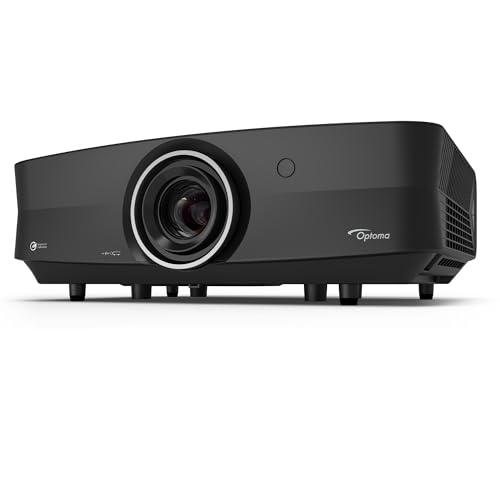
Optoma UHZ68 — The Bright Dolby Vision Laser
Optoma’s UHZ68 makes the loudest entrance in this guide: 4K UHD, a stated 4,500 lumens, Dolby Vision, laser light, and a self-description as a premium ultra high-bright home theatre projector. Filmmakers should parse that combination carefully, because it solves a problem the colour-first picks cannot — the screening room that is not a cave. Studios with windows, loft spaces, film societies in hired halls with imperfect blackout: these are real filmmaking environments, and a projector that can hold a Dolby Vision image against ambient light serves work that would otherwise wait for darkness.
Dolby Vision is the format claim that matters here. A filmmaker whose masters, references or streaming deliverables live in Dolby Vision needs tone mapping that honours that metadata rather than approximating it from a static curve. Optoma printing the format in the title — alongside the brightness to make it visible in imperfect rooms — describes a machine aimed at the premium streaming era’s actual pipeline, where a director’s final check often happens on exactly such a display chain.
Brightness at a stated 4,500 lumens also buys screen size, and screen size buys the communal experience filmmaking runs on. A rough cut shown to twenty collaborators, a society screening that fills a hall, a test audience recruited from friends: at those scales, the dimmer colour specialists in this guide would be asking the room to darken beyond what the room can do. The UHZ68’s specification is what a screening looks like when it leaves the suite and meets the public.
Restraint is required about what the title does not say. No colour gamut percentage is printed, so a colourist should not assume P3 coverage figures that the W2720i states outright; no lens tools are named, so placement flexibility must be confirmed on the listing; no platform is mentioned, so sources are the buyer’s department. The UHZ68’s case is brightness plus format, made loudly, and a buyer whose needs match that case will not miss the rest. A buyer whose needs are gamut-first should compare the BenQ’s printed percentage before deciding.
Laser light completes the working profile: a screening machine that starts instantly for a ten-minute check and holds its output across a festival season of daily use. For a filmmaker whose projector is a tool of the trade rather than a piece of furniture, that readiness is a professional feature, and it is the trait most likely to be undervalued by readers comparing only the glamorous figures.
- Resolution claim: 4K UHD, per title
- Brightness figure in the title: 4,500 lumens
- HDR: Dolby Vision stated
- Light source: laser
- Colour gamut percentage: Not stated in the listing title — verify with the manufacturer documentation
Strengths
- A stated 4,500 lumens holds screenings in rooms that cannot fully darken.
- Dolby Vision is named, matching the premium streaming pipeline directly.
- Laser readiness suits a working screening schedule of daily checks.
Trade-offs
- No gamut percentage is printed, so colourists must verify coverage on the listing.
- Placement tools go unnamed in the title, leaving room design partly undocumented.
- Brightness this high is wasted on a small, fully darkened cutting room.
Best for: filmmakers screening Dolby Vision work to groups in imperfectly darkened spaces.
Not suited for: a colourist whose first requirement is a printed P3 percentage, which this title does not provide.
Where the BenQ whispers in percentages, the Optoma speaks in lumens and formats — and a great many real screenings need exactly that volume.
Test screenings change the social physics of a production. A cut that plays acceptably on a monitor can die on a big screen, and a joke that seemed broad can land perfectly at scale. A filmmaker who screens for small audiences before locking a cut is buying information that no suite session provides, and a bright projector is what makes those screenings possible outside a cinema’s walls and schedule.

Epson Home Cinema LS11000 — The Dedicated Room Reference
For the filmmaker who has a room — a real one, with a fixed screen, controlled light and seating that does not move — the LS11000 remains the reference against which this guide’s other claims are measured. Its title assembles the dedicated-room specification in full: 4K PRO-UHD through pixel shifting, laser light behind a 3-chip 3LCD engine, HDR10+, a stated 2,500 lumens of colour and white brightness, dynamic contrast quoted at 1.2 million to one, motorised lens shift and focus, and a 120Hz figure for the high-frame-rate experiments modern filmmakers increasingly screen.
Motorised lens work is a filmmaker’s feature in a way brochures understate. A screening room’s projector lives out of reach, and the difference between a perfectly squared, perfectly focused image and an almost-right one is the difference between judging a film and judging a projection. Adjusting focus and position from the seat, in fine increments, while a test frame fills the screen, is how a room gets tuned to the standard its owner intended — and how it gets returned there after a mount is knocked or a screen is changed.
HDR10+ allegiance should be noted by pipeline. A filmmaker whose deliverables and disc library lean on HDR10+ will find its dynamic metadata honoured here, while Dolby Vision work will be handled as the machine’s more general HDR path rather than in its named format. That is not a flaw; it is a fork, and the UHZ68 above stands on the other branch of it. Directors should simply know which branch their catalogue lives on before choosing between the two.
The stated dynamic contrast figure explains the room this Epson expects. Laser dimming can chase deep blacks scene by scene, but only a treated room lets an audience see the chase; in a white-walled living room the advantage evaporates into ambient reflection. The LS11000 is therefore best understood as the final component of a room project — screen, walls, seating, then this — and buyers mid-project should time its purchase for when the room can honour it.
Pixel shifting deserves its honest sentence: the image is 4K-class rather than native 4K, constructed by a fast-shifting panel, and at cinema seating distances with film content the distinction is far smaller than the contrast and lens advantages the same budget bought. Filmmakers screening test charts at arm’s length may care; filmmakers screening films will mostly see the room’s discipline rewarded.
- Resolution claim: 4K PRO-UHD, pixel-shifted, per title
- Technology: 3-chip 3LCD
- Light source: laser
- Brightness figure in the title: 2,500 lumens of colour and white brightness
- Contrast: 1.2 million to one dynamic stated
- HDR: HDR10+ stated
- Lens: motorised shift and focus stated
- Refresh: 120Hz stated
Strengths
- Motorised lens calibration from the seat keeps a screening room perfectly tuned.
- A stated high dynamic contrast rewards treated, darkened rooms.
- HDR10+ is named for filmmakers whose pipeline uses that format.
Trade-offs
- Pixel-shifted 4K rather than a native 4K panel construction.
- Dolby Vision is not the named format in its title.
- Its talents are wasted in bright, casual rooms that cannot honour the contrast.
Best for: a dedicated screening room with a fixed screen, treated walls and an HDR10+ leaning library.
Not suited for: a bright multi-purpose loft, where ambient light erases the contrast advantage its buyer paid for.
Rooms like the one this Epson imagines are where films go to be taken seriously, and the machine’s specification reads like the room’s own manifesto.
Longevity of the platform deserves the same scrutiny as longevity of the light. A dedicated room’s sources will be replaced several times across the projector’s life, which is why the LS11000’s silence on smart features reads as a design decision rather than an omission: nothing inside the machine can be orphaned by an app store. Filmmakers furnishing a room for a decade should weigh that emptiness as a feature.

XGIMI Horizon 20 Pro — The Triple Laser All-Rounder
XGIMI’s Horizon 20 Pro closes the guide with the most crowded title of the six: 4K from an RGB triple laser, a stated 4,100 ISO lumens, Google TV with licensed Netflix, optical zoom and lens shift, IMAX Enhanced, Dolby Vision, a stated 20,000:1 contrast and a 1ms input lag claim. Where the other picks specialise — colour, brightness, the dedicated room — this one accumulates, and its constituency is the filmmaker whose screening life refuses to specialise: features at night, a collaborator’s game-adjacent interactive piece at the weekend, a streaming premiere the moment it drops.
RGB triple laser is the technology headline a colour-minded reader should unpack. Rather than deriving colour through a wheel or phosphor stage, a triple laser design generates red, green and blue light directly, which is the architecture associated with very wide colour reach. The title does not print a gamut percentage, so this review credits the architecture and its implications without converting them into a figure — a filmmaker comparing against the W2720i’s stated 95 percent of DCI-P3 should ask XGIMI’s documentation for the equivalent number.
Placement tools at this level — optical zoom and lens shift on a machine with a full smart platform — collapse the distance between lifestyle projector and screening instrument. The Horizon can be squared optically in a real room, then behave like a television for the other twenty-two hours of the day. For filmmakers in rented spaces, where a dedicated room is a future plan rather than a present address, that dual citizenship is not a compromise but the entire point.
IMAX Enhanced and Dolby Vision together cover the premium streaming and disc conversation thoroughly, and the stated 4,100 ISO lumens — quoted in the ISO dialect, which readers should not blend carelessly with the plain-lumen figures elsewhere in this guide — promise a picture that survives living room light. The 1ms lag claim, meanwhile, belongs to the interactive screening world: game-based films, installations and playtests, where response is part of the work being judged.
The accumulation strategy has one honest cost: a machine that does everything invites comparison against specialists at their specialisms, and loses some of those comparisons — the dedicated Epson’s lens motorisation, the BenQ’s printed gamut figure. What it wins is the calendar. A filmmaker whose screenings, streams and experiments all happen in one room, on one machine, will use the Horizon’s breadth weekly and its deficits rarely.
- Resolution claim: 4K, per title
- Light source: RGB triple laser
- Brightness figure in the title: 4,100 ISO lumens
- Formats: IMAX Enhanced and Dolby Vision stated
- Contrast: 20,000:1 stated
- Placement tools: optical zoom and lens shift stated
- Platform: Google TV with licensed Netflix stated
- Input lag claim: 1ms stated
Strengths
- RGB triple laser architecture promises very wide colour reach.
- Optical zoom and lens shift give a smart projector proper placement manners.
- Dolby Vision and IMAX Enhanced cover the premium format conversation.
Trade-offs
- No gamut percentage is printed, so colourists must verify coverage in documentation.
- ISO lumens are a different dialect from the plain figures elsewhere in this guide.
- No motorised lens work, so a ceiling installation is adjusted by hand.
Best for: filmmakers in multi-use rooms mixing features, streaming premieres and interactive work on one machine.
Not suited for: a treated cinema room, where the LS11000’s motorised lens and contrast discipline serve better.
The Horizon is the pick for a filmmaking life that happens in a living room and refuses to apologise for it — breadth, honestly labelled, is its specialism.
A note on subtitles, because filmmakers forget them until an international cut arrives: legibility of text over bright scenes is a contrast and sharpness test hiding in plain sight, and festival work lives or dies by it. Any finalist in this guide should be auditioned with subtitled material in the buyer’s own language pair before the order, since a machine that renders dialogue beautifully and captions poorly has failed half the film.
Comparison Table
| Pick | Headline facts from its listing title | Filmmaking brief |
|---|---|---|
| BenQ W2720i | 4K, 95 percent DCI-P3, HDR10/HLG, Android TV, 2,500 lumens | Colour-first smart screenings |
| BenQ HT2060 | 1080p LED, DCI-P3 and Rec.709, lens shift, 8.3ms at 120Hz | Cutting room colour at moderate sizes |
| Epson Pro Cinema LS9000 | 4K laser, Pro Cinema line; further figures not printed in the title | Dealer-installed screening rooms |
| Optoma UHZ68 | 4K UHD laser, 4,500 lumens, Dolby Vision | Group screenings in imperfect darkness |
| Epson Home Cinema LS11000 | 4K PRO-UHD laser, HDR10+, motorised lens, 120Hz | Dedicated treated rooms |
| XGIMI Horizon 20 Pro | 4K RGB triple laser, 4,100 ISO lumens, Dolby Vision, IMAX Enhanced | Multi-use rooms and interactive work |
Notice how the table refuses to crown a single winner on specification volume. Each row leads with a different virtue — a gamut figure, a colour pedigree at 1080p, a professional silhouette, raw brightness with a format, a lens system, an accumulation of formats — because filmmaking itself is several professions sharing one word.
How to Choose a Projector for Filmmaking
Start with your pipeline, written down. The colour space you finish in, the HDR format your deliverables carry, the size of screen your room allows, and the darkness your room can achieve: those four facts eliminate most of this guide before taste gets a vote. A P3 colourist in a dark suite is choosing between the W2720i’s printed percentage and the Horizon’s architecture; an HDR10+ devotee with a treated room is reading the LS11000’s review twice; a Dolby Vision director screening to groups is already looking at the UHZ68.
Decide next whether the room is a destination or a compromise. Destination rooms reward motorised lenses, fixed screens and contrast discipline. Compromise rooms — rented, shared, multi-use — reward optical zoom, lens shift and platforms that make screenings effortless to start. Buying a destination projector for a compromise room is the most expensive category error in this guide, and it is made by talented people every season.
Then weigh the catalogue you actually screen. Archive and broadcast work flatters the HT2060’s Rec.709 honesty at moderate sizes; new streaming work flatters the Dolby Vision machines; festival-bound features flatter the widest colour claims. A filmmaker’s projector is a lens pointed backward at their own body of work, and it should be chosen for the films that exist, not the ones vaguely intended.
Sound planning belongs in the same conversation, early enough to matter. Decide where dialogue will be judged — the room’s speakers, a soundbar, or a monitoring setup fed by S/PDIF or a receiver — and confirm the chosen projector’s audio path serves that decision. Two titles here print their audio arrangements in detail; the others leave the path to the listing, and a filmmaker who discovers an awkward path after installation will forgive the machine slowly.
Finally, plan the calibration. However the machine is chosen, its first evening should include a test chart, a known reference film and the disabling of every automated picture feature that editorialises. The projector that survives that evening with its dignity intact — showing your reference exactly as you remember grading it — is the projector that was actually bought, whatever the order confirmation said.
Does a Filmmaker Need Native 4K?
Need depends on what the screen is for. Judging framing, focus pulls and fine texture at large sizes rewards every pixel a panel can honestly produce, and a filmmaker whose room runs a very large screen should weight resolution heavily. Judging colour, contrast and performance — the larger share of most reviews — is governed by gamut, tone mapping and the room’s darkness, which is why a disciplined 1080p machine like the HT2060 can out-serve a careless 4K one in a cutting room of moderate size.
Pixel-shifted designs complicate the question productively. The LS11000’s 4K PRO-UHD image is built by rapid shifting rather than by a native panel, and with film content at cinema distances the practical gap narrows to the point where its contrast and lens advantages dominate the comparison. The honest rule is to match the resolution claim to the screen size and seating distance first, and to let colour and contrast arbitrate whatever tie remains.
Which HDR Format Should a Filmmaker Prioritise?
The one your masters are in. Dolby Vision and HDR10+ both carry dynamic metadata that guides tone mapping scene by scene, and a projector that names your format will follow that guidance; a projector that does not will fall back to its own interpretation of a static curve. Directors finishing for premium streaming will usually find Dolby Vision named on the Optoma and the XGIMI; disc-centred and HDR10+ pipelines will find their format on the Epson LS11000.
Frame rates add a third axis that festival filmmakers increasingly meet: high-frame-rate experiments, sports-adjacent documentary work and game-engine cinema all ask a projector to keep up with motion beyond the traditional feature pace. The 120Hz figures printed on the LS11000 and implied by the HT2060’s 8.3ms claim are the titles’ answers, and a director whose work experiments with rate should audition motion with their own material rather than with a trailer.
HDR10 and HLG, named on the W2720i, cover the broadcast and general streaming world respectably, and for filmmakers whose work lives there, format breadth matters less than the gamut figure printed beside it. What should be avoided is choosing by format fashion: the correct allegiance is a fact about your catalogue, discoverable in an afternoon, and it outranks every other preference in this section.
How Important Is Lens Shift in a Screening Room?
More important than its position in brochures suggests. Digital keystone correction squares an image by discarding and resampling pixels, which is a quiet tax on exactly the fine detail a filmmaker projects in order to judge. Optical lens shift squares the image by moving light, at no cost to the picture. A room where the projector cannot sit dead centre — which is most rooms that were not built for projection — should treat shift as creative equipment.
Motorisation extends the argument across time. The LS11000’s powered shift and focus let a room be re-tuned from the seat after any disturbance, while manual shift on the BenQ and XGIMI picks achieves the same geometry with a ladder and patience. Either is vastly preferable to a fixed machine corrected digitally, and buyers comparing a shift-less bargain against these should price the softness they are accepting.
Common Mistakes Filmmakers Make When Choosing a Projector
Judging a projector by a showroom’s content is the founding error. Retail loops are mastered to flatter brightness and saturation in lit spaces; a filmmaker’s own reference scenes — a night exterior, a skin tone under practical light, a subtitle over a bright frame — reveal in ninety seconds what a demo reel conceals for a month. Always screen your own material before committing, and screen it in light conditions resembling your room.
Leaving automated picture features enabled while reviewing work runs a close second. AI modes, dynamic enhancers and motion smoothing all editorialize, each in its own direction, and a grade judged through them is a grade judged through a stranger’s taste. The professional habit is a preset, built once, with every such feature off, and used for all work screenings without exception.
Buying brightness for a room that needed darkness is the expensive version of the same confusion. No lumen figure in this guide can defeat a white wall and an uncovered window at noon; the money spent climbing from a colour specialist to a brightness flagship would have bought blackout, paint and a screen, with change. Filmmakers control their rooms professionally in every other respect, and the projector budget should reflect that discipline.
Forgetting the sound chain completes the set. A projector’s built-in speaker is a confidence monitor; a film’s mix deserves the room’s real system, connected by a deliberate path — S/PDIF on the HT2060, a receiver in a dedicated room — and checked with dialogue-heavy material before guests arrive. Picture people neglect audio professionally at their peril, because audiences forgive soft focus sooner than unintelligible words.
Final Recommendation
Colour-first filmmakers working in darkened rooms should begin with the W2720i and its printed 95 percent of DCI-P3, unless their screen is modest and their catalogue broadcast-heavy, in which case the HT2060’s Rec.709 honesty at 1080p is the connoisseur’s bargain. Dedicated rooms belong to the LS11000, dealer-built rooms deserve an LS9000 conversation, Dolby Vision group screenings point at the UHZ68’s brightness, and the Horizon 20 Pro serves the filmmaker whose one room must do everything.
Whichever machine is chosen, its first duty is a reference screening: a film you know frame by frame, in your room, with automation disabled. A projector that shows you that film truthfully has earned its place in the pipeline; one that improves it, brightens it or smooths it has told you, in the clearest terms available, that it works for a different master.
Festival strategy adds one more consideration that home viewers never face: the gap between the screening room and the cinema. No projector in this guide is a DCP cinema machine, and a filmmaker preparing a festival premiere should treat home projection as a rehearsal space — for pacing, for subtitle legibility, for the emotional weather of a cut — rather than as a simulation of the premiere itself. Used that way, honestly and often, any of these six will improve a film before the world sees it.
Frequently Asked Questions
Is a 1080p projector really enough for a filmmaker?
At moderate screen sizes in a cutting room, yes — provided its colour is disciplined. The HT2060’s case rests on named DCI-P3 and Rec.709 colour, lens shift and an LED light source, and many review tasks judge colour and performance long before they judge pixel count.
What does a stated DCI-P3 percentage actually promise?
It promises the share of the cinema colour gamut the maker claims the projector can reproduce, and unlike a vague wide-gamut phrase it can be checked against measurements and documentation. The W2720i prints 95 percent; the Horizon 20 Pro’s triple laser architecture implies wide reach without printing a figure.
Should I disable AI picture modes when screening my own work?
Yes. Automated modes adjust the image according to their own judgement, which is precisely what a filmmaker reviewing a grade cannot allow. Build one clean preset for work screenings and reserve the intelligent modes for casual viewing of other people’s content.
Dolby Vision or HDR10+ — does the choice matter?
It matters in proportion to your catalogue. A projector renders dynamic metadata most faithfully in the format it names, so directors should inventory their masters and disc libraries first and let that inventory, not fashion, pick the allegiance.
Can a smart projector be trusted in a screening room?
Yes, with one discipline: separate the platform from the picture. Use the built-in system for access and convenience, but judge work through a calibrated preset with automated features disabled, fed where possible from a known source. The W2720i and the Horizon 20 Pro both reward that separation; the mistake is letting a streaming app’s defaults become the room’s picture standard.
How large a screen can these projectors serve?
Screen size is brightness divided by ambition: the stated 4,500-lumen Optoma serves the largest rooms here, the 2,500-lumen picks serve darkened rooms at moderate sizes, and the HT2060’s unstated figure must be confirmed on its listing before a room is planned around it.
One habit ties the owners of all six machines together, whatever their budgets: a logbook. Note the calibration settings, the preset built for work, the lamp-free hours accumulating, the evening a reference film looked wrong and why. Screening rooms drift — screens age, rooms get repainted, sources change — and the filmmaker with a logbook restores the room’s standard in an hour, while the one relying on memory rebuilds it from folklore every season.
Keep the reference film sacred. Every screening room should own one title its owner knows to the frame, kept in the same format and never lent, because that film is the room’s tuning fork.
Related Guides
Filmmaking projection continues naturally into our SXRD projector guide, where Sony’s native 4K cinema panels make their own colour argument, and our laser phosphor projector guide, covering the light engine behind much of the installation world.


