What's inside
- Key Takeaways
- Quick Picks
- What Makes a PC Case Genuinely Affordable?
- Which Affordable Cases Give You the Most for Your Money?
- How Do the Six Compare at a Glance?
- How Should You Compare Affordable Cases Before Buying?
- What Hidden Costs Catch Buyers of Cheap Cases?
- How Do You Build in an Affordable Case Without Fighting It?
- Which Affordable Case Suits Which Kind of Builder?
- What Are the Most Common Mistakes When Buying an Affordable Case?
- How Long Should an Affordable Case Last?
- What Should You Know About Building With Glass, Acrylic and Mesh?
- How Does an Affordable Case Affect Noise and Everyday Comfort?
- When Should You Replace an Affordable Case Instead of Upgrading Inside It?
- How Do You Keep an Affordable Case Feeling New?
- What Role Does the Case Play in a Build’s Resale and Hand-Me-Down Value?
- Does Where You Buy an Affordable Case Matter?
- Final Recommendation
- Frequently Asked Questions
- Related Guides
As an Amazon Associate I earn from qualifying purchases. This post may contain affiliate links at no extra cost to you.
widgetverdict.com is reader-supported. When you buy through links on our site, we may earn an affiliate commission.
Where to buy: Each case reviewed here links to its Amazon listing, where you can confirm which fan and panel configuration is currently shipping before you spend anything.
The best affordable pc cases are not the cheapest boxes on the shelf, and they are not yesterday’s premium towers at a discount either. They are the cases where every part of the price does visible work: fans already installed, panels that fit properly, enough room for the graphics card you actually own, and build quality that survives being opened twenty times over the machine’s life. Affordable, judged properly, is a total-cost idea. A case that saves a little money today and then demands a fan pack, a replacement panel and an early upgrade has not saved you anything at all.
This guide therefore ranks six cases by value in the round — what arrives in the box, how well it is made, how easily it builds, and how long it will stay relevant as your components change. Cooling matters here too, because a case that throttles your hardware wastes the money you spent on that hardware, but it shares the stage with size, finish, connectivity and plain everyday usability. Whether you are building a first gaming PC, a family computer or a tidy work machine, one of these six should fit both the desk and the budget without asking for apologies later.
Key Takeaways
- Judge an affordable case by total cost: fans, filters and features you would otherwise buy separately belong in the calculation.
- Four of these six picks include three or more fans, which is where most of the hidden value at this level lives.
- The Montech Air 100 ARGB is our value benchmark — a complete, well-finished micro-ATX case with nothing left to buy.
- Check graphics card and cooler clearances before price; the wrong size makes any case expensive.
- Steel thickness, panel fit and cable space are the quality tells that separate a bargain from a false economy.
- Every pick here uses standard parts and layouts, so future upgrades never require replacing the case itself.
Quick Picks
| Pick | Badge | Why it earns its place |
|---|---|---|
| Montech Air 100 ARGB | Best overall value | Four fans, a lighting controller and a mesh front in a small, finished package. |
| Corsair 4000D RGB Airflow | Premium feel, sensible money | Three quality RGB fans and a lighting controller from a flagship-grade design. |
| ASUS Prime AP201 (Mesh) | Best small-case value | A 33-litre micro-ATX box that still swallows long cards and big radiators. |
| NZXT H5 Flow | Best compact ATX value | Perforated airflow design and an unusually tidy build experience. |
| Zalman S4 | Lowest-cost credible case | A complete ATX home for a build at the smallest sensible outlay. |
| Lian Li LANCOOL 217 | Best step-up value | Five PWM fans, real wood trim and back-connect support for a little more. |
What Makes a PC Case Genuinely Affordable?
We began with the shelf price and then immediately distrusted it. The honest figure is the price of a finished, working build: case, plus any fans the case should have included, plus any adapter or hub its design quietly requires, plus the value of your own hours if the thing fights you during assembly. By that measure several famous budget cases fall apart — two fans short of a working airflow path, or a glass front that needs an aftermarket mesh swap before temperatures behave. Every pick in this guide is complete as shipped, or honest about the one small addition a keen builder might choose.
Quality was the second test, judged by hand rather than by brochure. Thin, flexing steel, panels that seat differently every time, sharp tray edges and wobbly feet are the fingerprints of a case built to a price rather than to a standard, and they predict rattles, stripped screws and a machine you dread opening. We favoured cases with rigid frames, clean panel gaps, rubber grommets or sensible cable channels, and screws that feel like they will survive years of upgrades. None of that shows in a product photo, and all of it decides whether an affordable case is a bargain or a loan you repay in frustration.
The third test was time. A valuable case outlives at least one full rebuild of the parts inside it, which means standard motherboard sizes, graphics card clearance with headroom to spare, radiator mounts where current coolers expect them, and front connectivity that will not embarrass the machine in three years — USB-C included wherever the price allows. Score the six picks below against those three tests and the ranking explains itself.
Which Affordable Cases Give You the Most for Your Money?
Ordered by overall value rather than by any single virtue, the six reviews that follow cover a deliberate spread: a micro-ATX all-rounder, a big-brand airflow tower in white, a tiny case with grown-up clearances, a compact ATX design piece, the lowest-cost case we can recommend with a straight face, and a step-up model for builders whose budget stretches a little further. Read for the trade-offs as much as the strengths — value lives in the match between a case and your build, not in a universal winner.
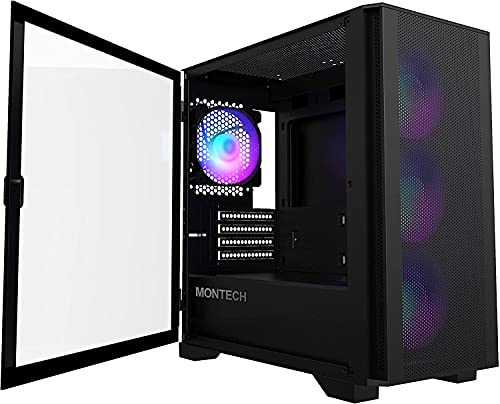
Montech Air 100 ARGB — Best overall value
The Air 100 ARGB tops this guide because it understands the assignment completely. It is a micro-ATX case with a mesh front, four ARGB fans already installed, a lighting controller in the box, dust filters where they matter and a swivelling tempered glass door — a list that reads like the options page of a case costing far more. Nothing essential is missing, nothing requires a second order, and the finished machine looks and cools like a build that cost noticeably more than it did. That completeness, at this size and price class, is the definition of value.
The fundamentals back the feature list. Graphics cards up to roughly 330mm fit, which covers the overwhelming majority of cards a micro-ATX build would ever host, and air coolers up to about 161mm tall are welcome, so the popular tower coolers of the moment drop straight in. The small interior exchanges air quickly through the mesh front, so temperatures stay honest, and the swing-out glass door makes the inevitable dust-out or memory upgrade a two-minute job rather than a panel-juggling exercise on the floor.
Its boundaries are simply those of its format. Micro-ATX means fewer expansion slots and no E-ATX adventures; very long flagship cards are out; elaborate liquid loops are out. The included fans are good rather than great, and a silent-PC obsessive will eventually replace them. But measured as a complete purchase — the money spent against everything received — nothing else in this guide, and little anywhere else, matches it. This is the case we would hand a first-time builder with a fixed budget and no desire to shop twice.
- Form factor: micro-ATX
- Included fans: four ARGB with controller
- Graphics card clearance: up to about 330mm
- Cooler clearance: up to about 161mm
- Side panel: swivelling tempered glass door
Strengths
- Complete package: fans, controller, filters and mesh front included.
- Swivel door makes maintenance and upgrades genuinely easy.
- Small footprint suits desks, shelves and shared rooms.
Trade-offs
- Micro-ATX format limits expansion and the longest cards.
- Stock fans are decent rather than premium.
- No room for large radiators or elaborate loops.
Best for: first builds and small, complete gaming or family PCs. Not suited for: flagship-length cards or builders planning heavy expansion.

Corsair 4000D RGB Airflow — Premium feel, sensible money
The 4000D RGB Airflow is what happens when a flagship design is priced for the mainstream. Corsair’s 4000-series frame is one of the most respected mid-tower designs of recent years — rigid steel, clean panel fit, a cable routing system with proper channels and covers — and this version adds three AF120 RGB Elite fans plus a Lighting Node PRO controller, so the lighting ecosystem works from a single purchase. In the white finish especially, the finished build looks like it cost a class above what the receipt says.
Value here is partly about what you avoid. You avoid the cheap-case rattles, because the frame is stiff. You avoid the cable spaghetti tax, because the routing channels and velcro ties are genuinely well placed. And you avoid the lighting tax, because three quality fans and their controller bought separately would consume much of the price gap between this case and a bare-bones rival. The airflow front panel keeps temperatures respectable, the interior takes long graphics cards and tall coolers, and the whole machine feels engineered rather than assembled from compromises.
Where does the money show its limits? The fan set is three rather than four, so an extra exhaust is a reasonable small addition, and Corsair’s lighting lives inside its own software world, which suits some builders and irritates others. Front connectivity is solid rather than class-leading. None of that changes the central judgement: if your budget reaches this far, the 4000D RGB Airflow returns more of it in quality and completeness than any other big-brand case we can name.
- Form factor: ATX mid-tower
- Included fans: three AF120 RGB Elite with Lighting Node PRO
- Front panel: airflow design
- Cable management: routed channels with covers
- Finish: white (as listed)
Strengths
- Flagship-grade frame quality and panel fit.
- Quality RGB fans and controller included in the price.
- Excellent cable routing makes a tidy build the default.
Trade-offs
- Three fans fitted; a fourth exhaust is a sensible extra.
- Lighting control ties you to Corsair’s software.
- Costs more than the purely functional picks here.
Best for: builders who want one purchase that feels premium throughout. Not suited for: the tightest budgets or fans of motherboard-controlled lighting only.
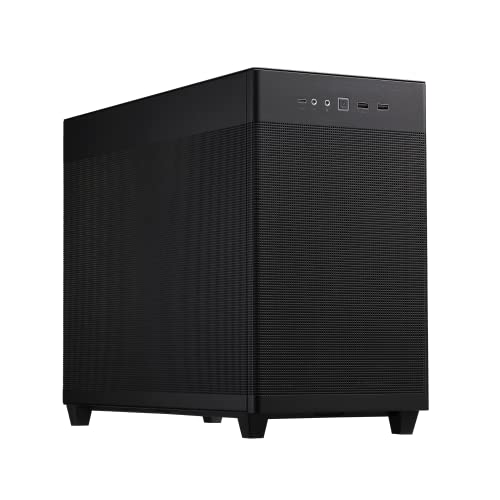
ASUS Prime AP201 (Mesh) — Best small-case value
The AP201 performs a trick that should not be possible at its size: a 33-litre micro-ATX case that accepts graphics cards up to about 338mm and radiators up to 360mm. ASUS achieved it by wrapping the chassis in quasi-filter mesh panels on nearly every side, so the case breathes through its whole skin, and by laying out the interior with a discipline that wastes almost no volume. For a builder who wants a small machine without small-machine compromises, the value proposition is unique in this guide.
The mesh version is the one to buy for most people. It needs no fan theatrics to stay cool — the panels themselves are the airflow system — and the tool-free side panels make the case a pleasure to open, which you will do more often in a compact build. Build quality feels unmistakably ASUS: panels align, edges are finished, and the whole object has the dense, considered feel of a product designed by people who expected it to be examined closely. As a home for a powerful but compact gaming or creator PC, it punches absurdly far above its footprint.
Honesty requires noting what the AP201 asks in return. It includes minimal fan hardware compared with the Montech picks, so budget a fan or two if your build runs hot, and the compact interior rewards planning — component order during assembly matters. The mesh-everywhere design also means the interior is visible and audible in a way a damped case is not, so cable tidiness is on display whether you planned it or not. Accept those terms and the AP201 is the smartest small-case money in this guide.
- Form factor: micro-ATX, about 33 litres
- Graphics card clearance: up to about 338mm
- Radiator support: up to 360mm
- Panels: quasi-filter mesh, tool-free removal
- Cooling style: whole-case mesh breathing
Strengths
- Remarkable clearances for such a small case.
- Mesh panels give effortless, quiet-friendly airflow.
- Tool-free panels and excellent finish throughout.
Trade-offs
- Few fans included; hot builds should add one or two.
- Compact interior demands a planned build order.
- Mesh design shows cables and passes some noise.
Best for: powerful compact builds on desks where space is precious. Not suited for: builders who want every fan included or a sealed, damped enclosure.

NZXT H5 Flow — Best compact ATX value
The H5 Flow earns its place by making a full ATX build feel smaller, tidier and easier than it has any right to. NZXT’s perforated panels give the case a distinctive fine-dotted look while feeding components air from the front and below, and the interior is a model of clarity: wide cable channels, clean cut-outs and a layout that seems to anticipate where your hands want things to be. For a builder who values the experience of building as well as the result, that polish is worth real money — and here it arrives at an affordable-case price.
Performance keeps pace with the presentation. Two 120mm fans are included and the front mounts a radiator up to 360mm, so both air and liquid routes are open. The perforated lower section deserves special mention: it delivers cool air directly beneath the graphics card, where modern cards draw their breath, and in practice this compact case keeps a gaming build’s temperatures in the same conversation as larger towers. The tempered glass panel shows the result off without sealing the front, which is the correct way around for a case with cooling ambitions.
The value caveats are modest but real. Two fans is a starting point rather than a finish — most gaming builds will benefit from one added exhaust — and the compact shell means flagship-length cards and thick radiator stacks need measuring before money moves. The minimalist styling also divides opinion; it is either the cleanest case on this page or the plainest, depending on your taste. As a complete package of design, buildability and cooling at this price, though, the H5 Flow returns excellent value.
- Form factor: compact ATX mid-tower
- Included fans: two 120mm
- Radiator support: up to 360mm at the front
- Panels: perforated intake, tempered glass side
- Interior: wide, tidy cable channels
Strengths
- Perforated design cools a compact case properly.
- Exceptionally pleasant, tidy build experience.
- Direct air supply beneath the graphics card.
Trade-offs
- Two included fans is a starting point for gaming builds.
- Compact shell needs clearance checks for big parts.
- Minimalist looks will not thrill everyone.
Best for: tidy builders who want ATX in a smaller, smarter box. Not suited for: maximum-length cards or buyers wanting four fans included.

Zalman S4 — Lowest-cost credible case
Every value guide needs a floor, and the Zalman S4 is ours: the least expensive case here that we can recommend without a paragraph of warnings. It is a compact ATX mid-tower with two 120mm fans included, support for graphics cards up to about 315mm and radiators up to 240mm, a full tinted acrylic side panel and USB 3.0 on the front. A mainstream gaming or home build fits inside it completely, works properly, and leaves the maximum possible budget for the components that decide performance.
What does the low price cost you? Mostly refinement. The acrylic panel shows the build but scratches more easily than glass and flexes in a way glass never does. Cable management is a space behind the tray rather than a designed system, so a tidy result takes patience. Airflow is adequate for mainstream parts rather than generous — this is a case for sensible components, not for a flagship card asked to boost forever in a warm room. The fans are basic, the steel is thin in the way of all cases at this level, and the whole experience reminds you regularly that money was saved.
And yet the S4 keeps its promises, which is more than many ultra-cheap cases manage. It fits standard parts, cools them acceptably, includes its fans, and does not pretend to be what it is not. For a first PC, a child’s gaming build, a spare machine or any build where the budget battle is being fought over the graphics card instead, the S4 is the rational floor: spend here only what a case requires, and not a coin more.
- Form factor: compact ATX mid-tower
- Included fans: two 120mm
- Graphics card clearance: up to about 315mm
- Radiator support: up to 240mm
- Side panel: tinted acrylic, full view
Strengths
- Lowest sensible price for a complete ATX build.
- Fans included and mainstream clearances covered.
- Frees budget for the components that set performance.
Trade-offs
- Acrylic panel scratches and flexes more than glass.
- Airflow suits mainstream parts, not flagship heat.
- Cable management is basic and rewards patience.
Best for: strict budgets, first PCs and sensible mainstream builds. Not suited for: hot flagship hardware or builders who open their case weekly.
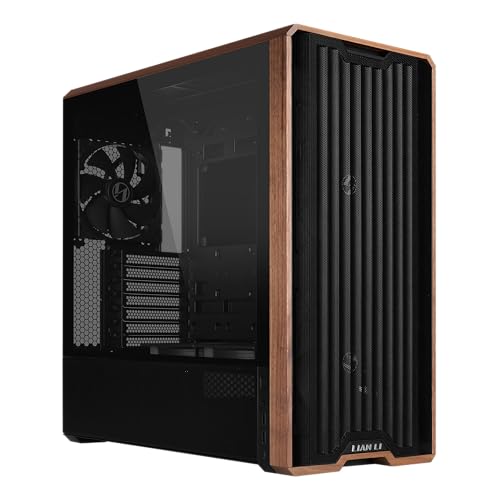
Lian Li LANCOOL 217 — Best step-up value
The LANCOOL 217 is the pick for buyers whose budget stretches a little past the entry level and who want that stretch to buy years rather than decoration. It arrives with five PWM fans — two huge 170mm front units, two 120mm and a 140mm — a specification that would cost a meaningful sum as an aftermarket bundle, wrapped in a case trimmed with genuine walnut wood panels that give it a warmth no plastic RGB tower can imitate. Add support for back-connect motherboards, whose cables hide behind the tray entirely, and the 217 reads less like an affordable case and more like a discounted flagship.
The value argument is longevity. Big slow fans cool quietly and age gracefully; the back-connect readiness means the case welcomes the motherboard standard that is clearly gathering momentum; the flexible power supply mounting and generous clearances mean component changes do not turn into case changes. Lian Li’s build quality — panel fit, frame rigidity, the small tolerances — is the kind that makes a case feel current long after its styling dates. Spread over the two or three builds this case will likely host, the step-up price dissolves into very little per year.
It is not the pick for everyone in this guide. It costs the most here, its size is substantial, and the wood aesthetic — handsome as it is — commits your desk to a particular look. Builders who will never use back-connect boards are paying for readiness they may not need. But as value measured across years rather than at the checkout, the 217 makes the strongest case on this page for spending a little more exactly once.
- Form factor: ATX mid-tower
- Included fans: five PWM (two 170mm front)
- Trim: genuine walnut wood panels
- Motherboard support: back-connect ready
- Power supply mounting: flexible positions
Strengths
- Five quality PWM fans included, led by two 170mm units.
- Back-connect support future-proofs the purchase.
- Wood trim and build quality feel a class above.
Trade-offs
- The highest price in this guide.
- Substantial footprint for smaller rooms.
- Wood styling is a commitment, not a neutral choice.
Best for: builders planning to keep one case through several upgrades. Not suited for: minimum budgets or anyone who changes case styling often.
How Do the Six Compare at a Glance?
| Case | Size | Fans included | Max GPU length | Value character |
|---|---|---|---|---|
| Montech Air 100 ARGB | Micro-ATX | 4 ARGB + controller | ~330mm | Most complete small package |
| Corsair 4000D RGB Airflow | ATX mid-tower | 3 RGB Elite + controller | Long cards supported | Premium quality, fair price |
| ASUS Prime AP201 (Mesh) | Micro-ATX, 33L | Minimal | ~338mm | Tiny case, grown-up clearances |
| NZXT H5 Flow | Compact ATX | 2 | Mid-length cards | Design and buildability |
| Zalman S4 | Compact ATX | 2 | ~315mm | Lowest credible spend |
| Lian Li LANCOOL 217 | ATX mid-tower | 5 PWM | Long cards supported | Years of service per coin |
How Should You Compare Affordable Cases Before Buying?
Build a true shopping list before you compare anything. Write down the case, then add everything the finished build will need that the case does not include: fans to complete the airflow path, a hub if the fan count exceeds your motherboard headers, perhaps a USB-C adapter if the front panel lacks one and your board provides the header. Many a headline bargain dissolves at this step, and several picks in this guide — the Air 100 with its four fans and controller, the LANCOOL 217 with five PWM fans — win their rankings precisely because their second column is empty.
Measure your parts next, with a tape rather than optimism. Graphics card length is the famous one, but check the card’s height and the side clearance its power connector needs, the height of your air cooler against the case’s stated limit, and the thickness of any radiator plus its fans against the mount you intend to use. Manufacturers quote clearances generously and cables bend reluctantly; leave yourself a centimetre of grace everywhere and the build will reward you.
Then interrogate the quality signals that listings do reveal. Look for steel described by thickness or by reviewer consensus rather than by adjectives; look at close photographs of panel seams and rear brackets; check whether the feet are rubber or hard plastic, whether drive trays are metal or bendy plastic, whether the accessory box includes velcro ties or only a hopeful handful of zip ties. Individually these are trivia. Together they form the most reliable portrait available of how a case will feel on its twentieth opening — and the twentieth opening is where affordable cases either justify themselves or get replaced.
What Hidden Costs Catch Buyers of Cheap Cases?
The fan tax is the classic ambush: a case priced keenly because it ships with one fan, in a market where a decent fan costs a noticeable fraction of the case itself. Two added fans later, the bargain costs what the complete case cost — except the complete case also had better steel. The second ambush is the panel tax: a cracked acrylic side or a warped door on a case with no spare-parts support turns a small accident into a full replacement, which is why brands with real support channels earn quiet points in a value ranking.
There is also a time tax, and it is not trivial. A case with poor cable space can add an hour to a build and subtract from the result’s cooling, because cables parked in the airflow path are a performance cost paid daily. A case with badly placed standoffs or sharp edges taxes every upgrade for the machine’s whole life. Builders who enjoy the process forgive this; builders who open a case twice a year to fix problems do not. When we rank the H5 Flow and the 4000D highly despite fan counts of two and three, it is partly because their interiors refund your time at every interaction.
Finally there is the upgrade tax, the most expensive of all. A case bought a size too small, or without radiator support, or limited to yesterday’s motherboard formats, converts your next component upgrade into a case purchase as well — plus a full rebuild, plus the old case to dispose of. The defence is boring and total: buy for the build after this one. That is the entire philosophy behind the LANCOOL 217’s presence here, and behind the generous clearances we demanded from every pick.
How Do You Build in an Affordable Case Without Fighting It?
Sequence is the whole secret. Fit the power supply and route its cables loosely first, while the case is empty and your hands have room. Install the processor, cooler and memory on the motherboard outside the case, where nothing obstructs the mounting pressure. Lower the board in, connect the front-panel leads while you can still see the header row, and only then add the graphics card, whose length will otherwise block half the interior. In compact cases like the AP201 and the Air 100, this order is not a preference; it is the difference between a calm hour and a dismantling.
Manage cables as you go rather than at the end. Affordable cases give you less slack space than premium ones, so the discipline matters more, not less: run each cable by its final route the first time, use the tie points provided, and keep the channel between the front intakes and the graphics card completely empty. A build that looks tidy through the glass is satisfying, but the real prize is thermal — unobstructed air is the cooling you already paid for, delivered.
Before the side panel goes on, do the cheap checks that expensive regret is made of. Spin every fan by hand to confirm nothing fouls a blade. Confirm the front-panel leads sit on the right pins while the diagram is still easy to reach. Boot the machine open, watch all fans start, and listen for the rattle that means a loose cable or a panel under tension. Ten minutes here saves the particular misery of diagnosing a finished, closed, cabled machine — and in an affordable case with tighter spaces, it saves it more often.
Which Affordable Case Suits Which Kind of Builder?
The first-time builder with a fixed total budget should start at the Air 100 ARGB and only move if its micro-ATX limits bite: it is the pick least likely to generate a second shopping trip, and its door makes the inevitable early mistakes easy to undo. The builder who wants the machine to look and feel like a premium product — the one who will keep it on the desk and glance at it daily — should take the 4000D RGB Airflow, whose quality is visible every time the light catches the panel seams.
The space-constrained builder has two good answers with different personalities. The AP201 is the engineer’s choice: maximum capability per litre, mesh everywhere, no decoration. The H5 Flow is the designer’s: a full ATX board in a compact, calm object that happens to cool well. Choosing between them is choosing whether your desk wants a tool or a piece of furniture, and both answers are respectable.
The strictest budgets belong to the Zalman S4, which protects the component budget at the cost of refinement — the right trade when the alternative is a weaker graphics card. And the patient builder, the one who keeps a case for a decade and resents waste, belongs to the LANCOOL 217: the most expensive pick here and, across the years it will serve, very possibly the cheapest. Value was never one number. It is the match between a case, a budget and a temperament, and this guide’s six picks cover the honest combinations.
What Are the Most Common Mistakes When Buying an Affordable Case?
The most expensive mistake is buying the case last and sizing it by whatever money remains, then discovering the graphics card fits with two millimetres to spare and the cooler does not fit at all. The case is the one component that physically contains all the others; choose it early, with measurements in hand. The second mistake is its mirror image — buying a cavernous case for a modest build, then paying for the emptiness in desk space, cable reach and a machine that looks unfinished through its own window.
Buyers also chronically undervalue the included fans and overvalue the lighting. A case with four good fans and no glow will serve better than a case with a light show and one exhaust, every single evening, for years. And they forget the front panel ports: a case is the part of the PC you touch daily, and a missing USB-C port or an awkward power button is a small tax collected forever. Affordable should mean considered, not merely cheap — the picks above were chosen so that none of those taxes apply.
How Long Should an Affordable Case Last?
Think in builds, not years. A well-chosen case should host at least two full sets of components — the machine you build today and the machine that replaces its heart in three or four years — and the six picks here were filtered with exactly that horizon in mind. The obstacles to a second build are predictable: a new motherboard format the tray cannot accept, a graphics card generation that grows past the clearance, a cooling fashion the mounts cannot serve. Standard ATX and micro-ATX trays, the generous card lengths in the LANCOOL 217 and 4000D, and the radiator support in the AP201 and H5 Flow are all defences against those specific failures.
The slower enemy is wear. Hinges fatigue, clips snap, fan bearings dry out, and painted steel shows every year it has lived under a desk. This is where the quality gap between a bargain and a false economy quietly widens: the 4000D’s frame and the AP201’s panels are built to be removed and refitted dozens of times, while the thinnest cases in the wider market begin to feel loose within a couple of upgrades. The Zalman S4, our floor pick, is honest here — it will serve a build faithfully, but we would not plan a decade around its acrylic panel and light steel.
There is also an aesthetic half-life to consider, and it is a legitimate part of value. A case is the only component you look at every day, and a design you tire of is a case you will replace early regardless of its condition. The LANCOOL 217’s wood and the H5 Flow’s restraint age slowly because they were never chasing a trend; aggressive gaming styling dates at the speed of fashion. Choosing a look you can live with for two builds is not vanity — it is the cheapest longevity feature on the list.
Judge a purchase this way and the arithmetic of this guide rearranges itself. The most expensive pick, spread across two builds and perhaps eight years, costs less per year than the cheapest pick replaced once. Affordable was never about the smallest number on the receipt. It is about the smallest number of times you have to buy a case at all.
What Should You Know About Building With Glass, Acrylic and Mesh?
Panel materials shape an affordable build more than their prices suggest, and each of the three in this guide carries a distinct bargain. Tempered glass, used by the Air 100, H5 Flow and XT-class designs across the market, is the premium-feeling option: rigid, scratch-resistant, optically clear, and heavy enough to make a case feel substantial. Its costs are weight and fragility — glass survives years of careful handling and one bad moment on a tiled floor ends it — plus a sealed side that contributes nothing to airflow, which is fine when the front is mesh and a problem when it is not.
Acrylic, the Zalman S4’s panel, is glass’s lighter, cheaper cousin. It flexes, it scratches if you clean it with the wrong cloth, and it can bow slightly on large spans — but it is also nearly unbreakable in normal handling, noticeably lighter for a machine that gets carried, and perfectly clear when new. For a first build, a child’s PC or a machine that travels to friends’ houses, acrylic’s forgiveness can be worth more than glass’s elegance. Just clean it with a microfibre cloth and expect to accept its patina gracefully.
Mesh is the functional material, and the AP201 builds an entire philosophy from it: panels that filter dust while passing air, turning the case’s whole surface into its ventilation system. The trade is visibility and a degree of noise — a mesh case neither displays its interior like glass nor muffles it like a damped solid panel. What it returns is thermal ease, the one currency that never devalues. When you choose among these six picks, you are really choosing which of these three bargains matches your room, your habits and your tolerance for care — and there is no wrong answer, only mismatched ones.
How Does an Affordable Case Affect Noise and Everyday Comfort?
A case is an acoustic instrument whether its maker intended it or not. Its fans set the volume floor, its panels decide how much of that sound reaches the room, and its structure determines whether vibration becomes a hum you feel through the desk. Affordable cases rarely include the heavy damping of silent-PC flagships, so their comfort comes from a different route: not needing to spin fans hard in the first place. Open fronts — mesh in the Air 100 and AP201, perforation in the H5 Flow, airflow panels in the 4000D — are comfort features precisely because they let fans loaf.
Placement completes what design begins. A case on a hard floor beneath a desk is muffled by distance and furniture; the same case on the desk beside your monitor is closer, clearer and more present, which argues for the larger, slower fans of the LANCOOL 217 in desk-top setups. Rubber feet and a rigid frame matter more than buyers expect, because a lightweight case on a hollow desk can turn a hard drive’s or fan’s vibration into a resonating drone that no fan curve can fix. The stiffer picks here — Corsair, ASUS, Lian Li — earn part of their price exactly in this unglamorous territory.
Comfort also includes the small physical interactions: a power button that feels deliberate, front ports at an angle your hand finds without looking, a side panel that opens without a wrestling match when you need to reach a drive. These details decide whether a machine feels like an appliance you enjoy or a box you tolerate, and across five years of daily contact they are worth more than any single specification. It is why this guide weighs build experience alongside temperatures — value you can feel is still value.
When Should You Replace an Affordable Case Instead of Upgrading Inside It?
Sometimes the honest advice is that the case, not the components, is the bottleneck, and recognising that moment saves money that upgrades would waste. The clearest signal is thermal: if removing the side panel drops your graphics card’s temperature dramatically, the case is strangling the build, and a new graphics card installed in the same box will be strangled in turn. The second signal is dimensional — when the parts you want no longer fit, in length, height or radiator terms, the case has ended its service no matter how fond of it you are.
The third signal is mechanical. Stripped threads, cracked clips, a door that no longer seats, fans that rattle in their mounts: a case in this condition taxes every interaction and risks worse, because a panel that vibrates loose or a mount that fails mid-move can take components with it. And the fourth signal is standards drift — a front panel without the ports your devices now expect, or a tray that cannot take the motherboard format your next platform uses. Any one of these is a legitimate reason to retire a case with thanks.
Notice, though, how long the six picks here postpone that moment. Standard formats, headroom in every clearance, replaceable standard fans, panels built for repeated removal — these are the properties that keep a case off the replacement list while the components inside it cycle twice over. That postponement, compounded, is the entire economic argument of this guide. Buy the case that makes replacement feel unnecessary, and affordable stops being a compromise you manage and becomes simply how the machine was always going to be.
How Do You Keep an Affordable Case Feeling New?
Maintenance is where affordable cases are won and lost, because the difference between a five-year case and a two-year case is rarely the purchase — it is the care. Start with dust, the universal solvent of good intentions. Filters exist on the intakes of every pick here for a reason, and they work only while they are clean enough to pass air: a filter you rinse every month or two preserves the cooling you bought, while a neglected one quietly converts a mesh case into a sealed one. The Air 100’s swivel door and the AP201’s tool-free panels exist to make this chore so easy that it actually happens.
Fans deserve the same rhythm. Once or twice a year, with the machine off and unplugged, hold each fan’s blades still and clear the dust that mats on heatsinks and fan frames; a fan that starts its life quiet can grow a rattle purely from an unbalanced cake of dust on one blade. Listen while you work — a bearing beginning to grind announces itself months before it fails, and a single standard fan is among the cheapest replacements in all of PC building. Cases built around standard fan sizes, as all six here are, make that replacement a five-minute errand rather than a research project.
Protect the surfaces too, in proportion to their material. Glass wants a soft cloth and no drama; the S4’s acrylic wants a microfibre and a light touch, because its scratches are forever; painted steel wants nothing more aggressive than a damp cloth and a dry finish. Feet and filters and screws all reward the same principle: small attentions, regularly. An affordable case maintained this way does not merely survive — it stays the case you would choose again, which is the only definition of value that survives contact with real ownership.
What Role Does the Case Play in a Build’s Resale and Hand-Me-Down Value?
A PC’s second life — sold, gifted to a sibling, demoted to the living room — is decided disproportionately by its case. Components date at different speeds, but the case is the machine’s face and its structural promise: a clean, rigid, standard-format case tells a buyer or a younger brother that the machine was cared for and can be upgraded, while a rattling box with a cracked panel announces the opposite before the specifications are even read. Builders who think ahead treat the case as the part of the build that carries its reputation.
This is another arena where the step-up picks quietly earn their money. The 4000D and LANCOOL 217 present like premium products years later; the AP201’s dense, clever design reads as a deliberate object rather than a container; even the Air 100’s complete, tidy package survives handover intact because nothing about it feels provisional. The S4 serves honestly here too, as the case of a machine given away whole — a complete, working PC in a box that asked little and delivers exactly what it promised.
Keep the accessory box, the spare screws and the manual, whichever pick you choose. A case handed on with its full kit is worth measurably more in goodwill than the same case missing its brackets, and it costs you one drawer of discipline. Value, in the end, is a story a build tells about how it was treated — and the case is the cover of that story.
Does Where You Buy an Affordable Case Matter?
It matters more than the small price differences suggest. Cases are large, light and panelled — exactly the profile that shipping treats worst — so the retailer’s returns policy is part of the product you are buying. A case that arrives with a bent corner or a cracked panel is not a bargain at any discount if returning it costs you a week and a argument; every pick in this guide links to its Amazon listing partly because painless replacement of a damaged unit is a genuine component of value at this end of the market.
Buy the exact configuration, too. Case lines splinter into variants — mesh or glass fronts, fan bundles that differ by region, colours with different stock — and the listing is where you confirm that the version in the headline is the version in the basket. Check the fan count in the specification rather than the photograph, confirm the panel material, and glance at whether the manufacturer’s own store or a third-party seller fulfils the order, because warranty conversations are shorter with the former. Ten careful seconds at the listing prevent the most common affordable-case disappointment of all: the right case, in the wrong variant, discovered on build day.
One last word on timing: case prices drift with seasons and stock, and the same model can wear several prices across a single month. Because every pick here was chosen on completeness and construction rather than on a momentary discount, the ranking survives that drift — a case that is good value at its ordinary price does not become a bad one when a rival is briefly cheaper, nor a great one when its own price dips. Buy when your build is ready, buy the variant you actually specced, and let the arithmetic of years, not the arithmetic of a sale weekend, make the decision.
Final Recommendation
For most people, the Montech Air 100 ARGB is the affordable case to buy: complete, compact, well finished and finished — nothing left to purchase, nothing left to forgive. Stretch a little and the Corsair 4000D RGB Airflow buys flagship manners; shrink the desk and the AP201 or H5 Flow keep full capability in less space; cut the budget to the bone and the Zalman S4 still houses a proper PC; plan in years and the LANCOOL 217 repays its step-up price one upgrade at a time. Choose by the life the machine will actually live, and any of the six will prove that affordable, done properly, is not a compromise at all.
Frequently Asked Questions
How much should a good affordable case include?
At minimum: two fans in a sensible intake-and-exhaust arrangement, dust filters on the intakes, room for your graphics card with clearance to spare, and cable space behind the motherboard tray. Four of the six picks here exceed that baseline with three to five fans, which is why they rank as value rather than merely cheap.
Is a micro-ATX case a false economy?
No — for most builders it is the smartest economy available. Micro-ATX boards cost less, the cases are smaller, and picks like the Air 100 and AP201 surrender nothing that a mainstream build uses. It only becomes a false economy if your plans genuinely include multiple expansion cards or the very longest graphics cards.
Should I pay extra for a big-brand case?
Pay for what the brand demonstrably adds: the 4000D’s frame quality and support network, ASUS’s finish in the AP201, Lian Li’s fans and tolerances in the 217. A badge alone adds nothing, and several lesser-known makers — Montech in this guide — out-deliver famous names at the same money. Judge the object, not the logo.
Does an affordable case limit my future upgrades?
Only if you buy at the edge of its clearances. Every pick here accepts current mainstream cards and coolers, and the larger picks accept flagship hardware and big radiators. The rule is to buy for the next build as well as this one: one size class of headroom is the cheapest future-proofing in PC building.
Are included fans ever good enough to keep?
Yes — the fans in the LANCOOL 217 and the 4000D RGB Airflow are quality units you would happily buy separately, and the bundles in the Montech cases are perfectly serviceable. The fans worth replacing on sight belong to cases below this guide’s floor, which is one reason the floor exists.
What is the one check I must not skip?
Graphics card length against the case’s stated clearance, including room for the power connector to bend. It is the most common affordable-build failure, it is entirely preventable with a tape measure, and no other specification — not fans, not panels, not price — matters if the card does not fit.
Related Guides
More case guidance from our team: best pc cases under a tight budget, best micro atx pc cases and best white pc cases.


