What's inside
- Key Takeaways
- Quick Picks
- How Did We Judge Furniture That Has to Survive a Timetable?
- Why Do Training Tables Flip and Nest?
- How Many Learners Fit Along Each Length?
- Where Do the Cables and Chargers Actually Go?
- How Do You Run a Room That Reconfigures Twice a Day?
- What Separates a Training Table From a Student Desk?
- How Do These Training Tables Compare When the Room Fills Up?
- How Do You Specify a Whole Room Without Regretting It in September?
- What Mistakes Do Schools Make When Buying Classroom Computer Desks?
- How Does the Room Survive Examination Season and the School Play?
- Final Recommendation
- Frequently Asked Questions
- Related Guides
As an Amazon Associate I earn from qualifying purchases. This post may contain affiliate links at no extra cost to you.
widgetverdict.com is reader-supported. When you buy through links on our site, we may earn an affiliate commission.
Where to buy: Amazon sells all six products in this roundup, but the first thing to understand is what a classroom computer desk actually is in today’s market. It is rarely the little fixed student desk with a laminated top that the phrase brings to mind. The products schools and training centres actually buy are training tables: long tops on flip or folding frames that nest together for storage, roll between rooms, and turn a hall into a computer classroom in the morning and back into a hall by lunch. Five of the six picks below are that kind of furniture. The sixth is a mobile teacher’s desk, which plays the opposite role — it is the one fixed point the room’s flexibility revolves around.
So the best classroom computer desks are judged by a timetable, not by a photograph. How fast does the room change over? How many laptops, tablets or desktop stations must a top hold, shoulder to shoulder, with elbows and power bricks accounted for? What happens to the tables at half term, during examinations, when the hall is needed for the school play? A training table that nests to a fraction of its footprint is worth more to a school than a marginally prettier table that must be stacked by two caretakers and a prayer. This guide reads all six picks through that operational lens, and it is frank about the one specification classroom buyers ask for most — cable and power management — because most of these titles do not claim it, and pretending otherwise would send buyers to the wrong checkout.
The buyers here are also more various than the keyword suggests. There are IT coordinators furnishing a new lab, training managers equipping a room that hosts outsiders, homeschool parents building a two-child classroom at a kitchen’s scale, and church-hall committees buying furniture that three different groups will use each week. The picks divide along exactly those lines: institutional nesting tables at the long end, a compact mobile seminar table and an adjustable activity table in the middle, and the teacher’s desk holding the front of the room. Read for your institution’s timetable first and its taste second; in this category, the timetable always wins.
Key Takeaways
- The category is training tables, not fixed student desks: four of the six picks flip their tops and nest for storage.
- Length runs from 42 inches (Regency Kobe mobile seminar table) to 72 inches (two picks), seating one to three learners per top.
- The BizChair is the only title here that names a modesty panel — cable and power management are otherwise unclaimed and must be planned separately.
- The Amazon Basics entry is the adjustable-height exception, sized and styled for younger learners and home classrooms.
- The 47-inch rolling teacher desk is the storage anchor: drawers for files and equipment, privacy panels, and wheels to move the whole post.
Quick Picks
| Pick | Badge | Why it earns its place |
|---|---|---|
| Regency Kobe 72×30 Flip-Top Training Table | The full-length nesting table | Seventy-two by thirty inches of grey training top that flips and nests when the room changes jobs. |
| Regency Kobe 60×30 Flip-Top Training Table | The mid-length nester | The same flip-top nesting design at sixty inches, for rooms that turn over with less wall to spare. |
| BizChair 72×24 Nesting Flip Training Table | The commercial-grade build | A heavy-duty 72 x 24 flip table with Y-legs, a modesty panel and a one-inch walnut top on black steel. |
| Regency Kobe 42×24 Mobile Training Table | The compact seminar table | A 42 x 24 mobile T-base table in cherry for seminar corners, offices and one-to-one teaching. |
| Amazon Basics Classroom Activity Table | The adjustable activity table | An adjustable-height 47 x 29 rectangular table for classrooms and home learning, grey with a black edge. |
| 47in Mobile Rolling Teacher Desk with Privacy Panels | The teacher’s command post | A 47-inch rolling desk with file drawers, three storage drawers and privacy panels, in white. |
How Did We Judge Furniture That Has to Survive a Timetable?
By changeover first. A classroom computer desk earns its keep in the ten minutes between lessons, when thirty laptops are being collected, the next class is at the door, and the room may need to be a different room by Friday. Flip mechanisms, nesting geometry and casters decide those ten minutes, so they outrank finish and even comfort in the judging here. A table whose top flips with one person’s hands and nests against its siblings in a fraction of the floor space is operationally a different product from a fixed table of identical dimensions, and the reviews score them that way.
Second, by the honesty of the titles about what a training table is not. These are tops and frames. With one exception — the BizChair’s stated modesty panel — no title here claims cable trays, built-in power or charging, and a computer classroom runs on power. The guide therefore treats power as the buyer’s separate design problem throughout: where the strips go, how the leads reach them, how the nesting still works with the term’s cabling in place. A review that let readers assume built-in power would be sending them to set up a lab with no sockets in it, and the spec boxes below flag the absence wherever a buyer might otherwise presume it.
Third, by fit for the institution’s actual learners. A 30-inch-deep top gives a laptop and a workbook their own territories; a 24-inch-deep top makes them share. Seventy-two inches seats three children or two adults with laptops; sixty seats two adults civilly; forty-two is a one-person station or a teacher’s satellite. And because classrooms are bought by the dozen, consistency matters — a table line offered in two lengths, as the Regency Kobe is here, lets an institution furnish two room sizes from one design, one spare-parts drawer and one set of instructions. Schools replacing a room’s furniture one table at a time, as budgets allow, should also note the neighbour categories: our Best Non-Wobbly Standing Desks guide covers the staff-room end of the building, where teachers’ own desks are increasingly height-adjustable.
Why Do Training Tables Flip and Nest?
Because rooms are expensive and lessons are short. A flip-top table rotates its surface vertical, which does two things at once: it lets the table roll through doorways and into lifts like a trolley rather than a sail, and it lets a row of tables nest — frames interleaving, tops parallel — into a storage footprint a fraction of the teaching footprint. A hall that teaches computing to thirty in the morning can host examinations at noon, a parents’ evening at six and a wedding on Saturday, and the difference between those lives is twenty minutes of flipping and rolling, not a furniture van.
Nesting is also a storage-density argument. Institutions measure cupboard space the way airlines measure baggage: a set of fixed tables stored for the summer consumes a room; a nested set consumes a wall. For schools whose storage is a corridor’s end and a caretaker’s patience, the nested footprint is not a convenience but the difference between owning training tables and not owning them. The mechanism’s cost is mechanical: hinges and latches that must be operated thousands of times by hundreds of hands, including hands in a hurry. A flip mechanism that feels flimsy in the showroom will feel worse in October, which is why the commercial-grade language in the BizChair’s title — heavy-duty, steel frame — addresses the right anxiety.
There is a teaching argument too, quieter than the storage one. A room that can re-form can teach differently: rows for the test, clusters for the project, a horseshoe for the discussion, singles for the assessment. Fixed student desks freeze a pedagogy in place along with the furniture. Flip-top tables unfreeze it, and teachers who have worked in both kinds of room rarely volunteer to go back. The furniture is not the lesson, but it is the lesson’s stage directions, and stages that move get more kinds of play.
How Many Learners Fit Along Each Length?
The honest unit is not the learner but the workstation: a laptop is about fifteen inches wide, its user’s elbows claim ten more on each side during real work, and a workbook or tablet beside the machine asks for twelve. A working place at a computer therefore wants roughly twenty-four to thirty inches of top, and the lengths divide accordingly. Seventy-two inches hosts three younger learners or two adults with full workstations and a shared middle. Sixty inches hosts two adults civilly or three children snugly. Forty-seven inches — the activity table and the teacher desk — is one adult workstation with room to spread, or two small children sharing an activity. Forty-two inches is one person’s station, full stop.
Depth divides the room the same way. The 30-inch-deep Regency tables let a laptop sit at a reading distance with a workbook open in front of the keyboard — the posture of actual schoolwork, where the book and the screen are used together. The 24-inch-deep tables — the BizChair and the compact Kobe — put the screen closer and the book beside rather than before, which suits laptop-only lessons, assessments and seminar discussion better than book-and-screen study. Neither depth is wrong; each is a lesson plan wearing a dimension. Buyers equipping a room for mixed lessons should weight depth more heavily than another six inches of length.
Rows have a third arithmetic: the room’s. Tables in rows need aisles a teacher can walk while carrying a stack of laptops, and the flipped, nested storage needs its wall. A room plan drawn with tables but without aisles and a nesting wall is a plan for a photograph, not a timetable. Measure the room for the class in session and for the changeover at once — the furniture must fit both events, and the changeover is the one that happens twice a day.
Where Do the Cables and Chargers Actually Go?
Into a plan the buyer makes, because — the BizChair’s modesty panel aside — these tables do not bring one. The modesty panel itself deserves a precise reading: it is a privacy and tidiness panel below the top’s rear edge, hiding knees and the worst of the cable drop from the room’s view. It is not a cable tray and not a power source, and the BizChair’s review below credits it for what it is. Every other pick here offers a bare frame, which means the institution designs the power: floor boxes if the room is being built, a strip per table run if it is not, and leads dressed along frames so that flipping a top does not garrote a charger.
The nesting question complicates cabling in a way buyers discover in week one: tables that flip and roll cannot carry permanent per-table wiring gracefully. The workable patterns are two. Either power lives in the floor or wall and each setup is a fresh, five-minute plug-in ritual — acceptable when changeovers are daily and staffed — or the tables mostly stay in formation, cabled semi-permanently, and the flipping is reserved for the term’s big reconfigurations. Institutions should choose the pattern before choosing the tables, because it decides whether caster quality or cable patience matters more.
Chargers are the third element, and the teacher’s desk is their natural home. A bank of laptop chargers lives where the teacher sits — in this roundup, the rolling desk with the drawers — because charging is a custody system as much as an electrical one: devices are signed out, returned, counted. The drawers and privacy panels on that desk are not decoration in a computer classroom; they are the room’s safe. Buyers planning a lab should budget the charging furniture with the same seriousness as the learner tables, and our Best Standing Desks with Storage guide shows how the office world solves the same custody problem when the room is a staff office instead.
How Do You Run a Room That Reconfigures Twice a Day?
With a drill, not a hope. The changeover becomes a taught routine: laptops closed and carried to the charging point first, chairs stacked or pushed in second, tops flipped third, tables rolled to their wall in a set order — longest first if the nesting interleaves better that way, and every institution discovers its order in the first week and should write it on the store-room door. Timed once, practised twice, the routine drops from twenty chaotic minutes to six boring ones, and boring is the goal: a changeover that needs the teacher’s full attention is a changeover that steals a lesson a week across a term.
Assign the furniture its addresses. A nesting wall marked with tape, a parking order for the tables, the teacher’s desk’s home corner by the room’s power and the board — rooms that reconfigure well are rooms where everything has a drawn place to be in both formations. The mobile picks help: the compact Kobe’s T-base rolls like a trolley, the teacher’s desk moves to wherever the lesson’s front happens to be, and even the activity table’s adjustability lets one room serve the six-year-olds at nine and the eleven-year-olds at eleven without a furniture swap.
Care is the routine’s quiet half. Flip mechanisms want a termly check — a latch that has loosened announces itself at the worst moment, mid-changeover, under load — and casters in schools ingest a diet of hair, string and playground grit that wants clearing at the same interval. None of this is skilled work; all of it is scheduled work, and the institutions whose training tables still flip crisply in year five are the ones that put the ten-minute check in the caretaker’s calendar rather than in someone’s memory. The same discipline, applied to staff furniture, is covered from the portability side in our Best Pneumatic Sit-Stand Desks guide, where rolling sit-stand carts serve as the classroom’s other mobile workstations.
What Separates a Training Table From a Student Desk?
Intention. The traditional student desk is a personal territory: one learner, one fixed place, storage for that learner’s books, a surface sized for paper. The training table is a shared instrument: a surface sized for equipment, seating whoever the timetable sends, storing nothing and belonging to the room rather than to a child. The computer classroom belongs to the second idea, because its equipment is shared, its groups change by the lesson, and its surfaces must serve a laptop at ten and an examination’s silence at noon.
The Amazon Basics activity table is the bridge between the ideas, which is why it earns its place here. It is a personal-scale table — 47 by 29 inches — with adjustable height, sold for school and home: the homeschool room, the homework station, the younger child’s classroom corner where the learners are the same every day and the table is theirs. Institutions buying for rotating classes should not mistake it for a training table; families building a learning corner should not mistake the training tables for furniture a six-year-old can love. The category contains both ideas because “classroom” contains both rooms — the institution’s hall and the household’s corner — and this guide has kept them distinct on purpose.
One practical consequence follows for anyone buying second-hand or inheriting a room. Training tables age by their mechanisms, not their tops: a flipped thousand times, a latch is either still crisp or quietly treacherous, and the test takes five seconds per table — flip it, lock it, lean on the far edge. Student desks age by their surfaces instead. An institution offered a departing school’s furniture should run the mechanism test on every table before agreeing, because a nested set with three tired latches is not a bargain; it is a maintenance subscription acquired by accident. The same five seconds, applied to a new delivery, is the cheapest quality control in this entire category — far cheaper than discovering the weak latch in week three, under a row of laptops, in front of thirty witnesses with phones.

Regency Kobe 72×30 Flip-Top Training Table — The full-length nesting table
The 72×30 Kobe is the roundup’s reference training table: six feet of grey top, thirty inches deep, on a flip-top nesting frame. The dimensions are the argument. Seventy-two inches hosts three younger learners with laptops or two adults with full workstations, and the thirty-inch depth is the one that lets a workbook lie open in front of a keyboard — the book-and-screen posture that most actual lessons use. Institutions furnishing a flagship computer room, where the tables will mostly live in formation and flip for the term’s big changes, should start their shortlist here and justify moving away from it.
The flip-and-nest mechanism is the table’s second life. Flipped, the top stands vertical and the table rolls as a trolley; nested, a class set interleaves along a wall in a fraction of the teaching footprint. Grey is a deliberate institutional colour: it hides the decade’s scuffs, sits quietly under any room’s palette, and photographs like nothing at all, which in a school is a compliment. The Regency line’s presence at two lengths in this roundup also matters practically — a school can furnish the big lab with this table and the smaller seminar room with its 60-inch sibling, and every caretaker instruction, spare latch and hard-won habit transfers between the rooms unchanged.
The silences in the title are the ones this guide has flagged throughout: no cable management is claimed, no power is built in, and no load figure is published, so a row of these tables is a power design the institution supplies and a capacity to verify in the manufacturer’s documentation before a desktop — rather than laptop — lab is committed to them. Desktop towers on training tables are a real configuration in older labs, and their weight belongs in that verification. For laptop and tablet teaching, the 72×30 is the complete, conventional, correct answer — the table the category is named after.
- Top: 72 x 30 inches, grey
- Mechanism: flip-top, nesting
- Seating: three younger learners or two adult workstations
- Cable management: the title claims none — plan power separately
- Family: institutional training table
Strengths
- Thirty-inch depth fits the workbook-in-front-of-keyboard posture of real lessons.
- Flip-and-nest storage turns a hall back into a hall in minutes.
- Shares a design language with the 60-inch Kobe for multi-room consistency.
Trade-offs
- No cable or power provision is claimed in the title.
- Seventy-two inches needs its nesting wall measured before ordering a set.
- Desktop-tower loads need the capacity confirmed in the documentation.
Best for: a school furnishing a main computer lab that must also surrender its hall to other uses.
Not suited for: a small seminar room where six feet of top would crowd the discussion it hosts.
Check the Regency Kobe 72×30 on Amazon if your room’s timetable, not its photograph, is doing the choosing.

Regency Kobe 60×30 Flip-Top Training Table — The mid-length nester
The 60×30 Kobe is the same design at five feet instead of six, and the foot it surrenders is worth a room’s worth of thought. Sixty inches seats two adults with laptops and workbooks in genuine comfort, or three children at the snug end of reasonable, and the thirty-inch depth keeps the book-and-screen posture its bigger sibling offers. What the shorter length buys is manoeuvrability: a five-foot table flips, rolls and nests in rooms where the six-foot version’s turning circle becomes a negotiation with door frames and whiteboards.
For many institutions this is the better default. Computer rooms are rarely the grand hall; they are the converted classroom, the library’s annex, the training suite in a rented office — rooms where a wall of nested six-foot tables would consume the teaching floor’s margin. A set of 60-inch tables nests shorter, turns easier, and still hosts the two-workstation formation that adult training actually uses. Corporate training buyers in particular should note the fit: adult learners arrive with laptops, notebooks and coffee, and two such learners per five-foot table is the density that keeps a trainer’s room feeling professional rather than packed.
The shared caveats apply in full: the title claims no cable management and publishes no capacity, so power is the buyer’s design and heavier loads are a documentation check. The grey finish and the flip mechanism match the 72-inch table’s, which is the point — this is not a lesser table but the same institutional instrument at the length most rooms can actually turn around. Buyers furnishing one room only should measure the room’s turning space and nesting wall first and let those two numbers choose between the Kobe siblings; buyers furnishing several rooms should probably buy both lengths and let each room have its own.
- Top: 60 x 30 inches, grey
- Mechanism: flip-top, nesting
- Seating: two adult workstations or three children
- Cable management: absent from the listing title, so verify it against the manufacturer’s documentation — plan power separately
- Family: institutional training table
Strengths
- The full 30-inch teaching depth at a length smaller rooms can turn.
- Two-adult density suits corporate training as well as schools.
- Identical design language to the 72-inch version for mixed estates.
Trade-offs
- Three adults per table is beyond it — plan two.
- Power and cabling remain the buyer’s separate design problem.
- No load figure is published in the title.
Best for: a training suite or converted classroom whose walls are closer than a hall’s.
Not suited for: a three-adult-per-table formation where the 72-inch length is the honest fit.
See the Regency Kobe 60×30 on Amazon if five feet is the length your room can flip without a three-point turn.

BizChair 72×24 Nesting Flip Training Table — The commercial-grade build
BizChair’s table is the roundup’s heavy-duty entry, and its title reads like a specification rather than a slogan: commercial grade, heavy-duty, nesting flip, Y-legs, a modesty panel, a one-inch-thick walnut top, a black steel frame. Each phrase answers an institutional anxiety. Commercial grade speaks to procurement. Heavy-duty and the steel frame speak to the decade of student use. The one-inch top speaks to the wobble and drum-skin flex that thin training tops develop. And the modesty panel — unique in this roundup — speaks to the room’s appearance from the front, hiding knees and the cable drop behind a finished face.
The dimensions cut the other way from the Regency pair: the same 72-inch length, but 24 inches deep instead of 30. That six-inch difference rearranges the lesson. A 24-inch depth is a laptop’s depth — screen, keyboard, a notebook beside rather than before — which suits assessments, laptop-only classes, seminar discussion and training where the material is on the screen rather than in a book. It also suits the room: shallower tables leave wider aisles, and a hall set with 24-inch tops seats its class with more circulation around it. Institutions should choose this depth deliberately, knowing which lessons it serves.
The walnut top on black steel is the warmest look in the roundup, closer to a boardroom than a classroom, and training providers hosting paying clients will feel that difference in the room’s perceived price. The caveats are the category’s standard ones plus the depth decision itself: no power or cable tray is claimed — the modesty panel is a visual finish, not a cable system — and buyers whose lessons run book-and-screen should take the Regency depth instead. For laptop-first rooms that must look grown-up and survive commercial use, this is the most completely argued table here.
- Top: 72 x 24 inches, one inch thick, walnut
- Frame: black steel, Y-legs
- Panel: modesty panel fitted, per the title
- Grade: commercial, heavy-duty
- Cable tray or power: not claimed in the title — check the maker’s documentation
Strengths
- The only modesty panel here — a finished face to the room.
- One-inch top and steel frame answer the durability question directly.
- Walnut finish suits client-facing training rooms.
Trade-offs
- 24-inch depth crowds book-and-screen lessons.
- The modesty panel is not cable management — power is still separate.
- Warm walnut will not match every institutional palette.
Best for: a commercial training room teaching laptop-first lessons to paying adults.
Not suited for: a book-and-screen school lab where thirty inches of depth is the lesson’s requirement.
Look at the BizChair nesting table on Amazon if your training room must survive commercial use and look like it charges for the day.

Regency Kobe 42×24 Mobile Training Table — The compact seminar table
The smallest Kobe abandons the flip-and-nest formula for a different virtue: it is a mobile T-base seminar table, 42 by 24 inches, in cherry. The T-base is the point — a central pedestal footprint that leaves the floor around it clear, lets chairs pull in from any side, and rolls like a trolley between positions. At 42 inches this is one person’s complete station: a laptop, a notebook, a coffee, and the elbow room of a grown-up. Seminar rooms, one-to-one tutoring corners, breakout spaces and the teacher’s satellite desk in a lab are its natural postings.
Cherry is doing deliberate work in the title. Against the institutional grey of its siblings, the cherry finish aims the table at rooms that host adults in discussion — the seminar, the interview, the small meeting — where furniture that looks like a classroom would set the wrong tone before anyone sits down. A set of these around a room’s edge gives a training provider flexible single stations that can be pulled into pairs, rows or a horseshoe in minutes, without the flip mechanism’s ceremony; the T-base’s small footprint is what makes that informality possible.
What it does not do is nest, and buyers should be clear-eyed about the trade: a set of T-base tables stores at full footprint, scattered or stacked by improvisation, where the flip-top Kobes collapse to a wall. It is also one workstation per table — a class of thirty needs thirty of them, with thirty power drops to plan, and the title claims no cable provision for any of it. As a flexible single station for seminar-style teaching, though, it is the roundup’s most graceful object, and institutions with both kinds of room will end up owning both kinds of table.
- Top: 42 x 24 inches, cherry
- Base: mobile T-base
- Seating: one workstation
- Mechanism: mobile, not flip-top — storage is at full footprint
- Stated role: training seminar table
Strengths
- T-base leaves the floor clear and chairs free on every side.
- Rolls into pairs, rows or a horseshoe without ceremony.
- Cherry finish suits adult seminar and meeting rooms.
Trade-offs
- Does not nest — a set stores at full footprint.
- One learner per table multiplies the power planning.
- Too small for book-and-screen work at adult scale.
Best for: a seminar or tutoring space built from flexible single stations.
Not suited for: a thirty-seat lab that needs nesting storage and shared tops.
Check the Regency Kobe 42×24 on Amazon if your teaching happens one conversation at a time.

Amazon Basics Classroom Activity Table — The adjustable activity table
This is the roundup’s bridge to the other meaning of classroom: not the institution’s hall but the learner’s own table. The Amazon Basics activity table is a rectangular 47 by 29 inch top — with a stated height of 30 inches and adjustable height in the design — in a grey top with a black edge, sold for school and home alike. Adjustability is its distinguishing act: a table whose height can follow a growing child, or serve the six-year-olds this term and the taller class next, answers the personal classroom’s oldest problem, which is that children refuse to stay the size the furniture assumed.
The dimensions place it precisely. Forty-seven inches is a generous one-child workstation or a two-child activity surface; twenty-nine inches of depth holds the book-and-tablet sprawl of real homework. The grey-and-black palette is the school’s own — it hides pencil, glue and the archaeology of art lessons with equal mercy — and the whole object reads as equipment rather than furniture, which in a classroom corner or a homeschool room is exactly right. It is also, not incidentally, the natural homework station for a family kitchen, where its adjustability lets it serve the child at four and the same child, considerably taller, at seven.
Buyers should hold its category clearly: this is not a training table. It does not flip or nest, it is one table for a settled place, and a rotating class of thirty would no more use it than they would use thirty armchairs. The title also leaves its height range’s exact span to the documentation — “adjustable” and the 30-inch figure are what the listing states — so a buyer matching it to a specific child’s chair should confirm the range there. Within its own idea of a classroom, though, it is the most honestly sized and sensibly featured pick in this guide.
- Top: 47 x 29 inches, grey with black edge
- Height: adjustable; 30 inches stated in the title
- Stated settings: school and home
- Exact height range: the title does not give the span — the maker’s documentation does
- Family: activity table, not a nesting training table
Strengths
- Adjustable height follows a growing child’s school years.
- Generous depth for book-and-tablet homework sprawl.
- School palette hides the evidence of art lessons.
Trade-offs
- No flip or nesting — it is a settled-place table.
- The exact adjustment span is not stated in the title.
- One table serves one corner, not a rotating class.
Best for: a homeschool or homework corner that must fit the same child for years.
Not suited for: an institution furnishing a rotating computer lab by the dozen.
See the Amazon Basics activity table on Amazon if the classroom you are furnishing has a surname and a kitchen.
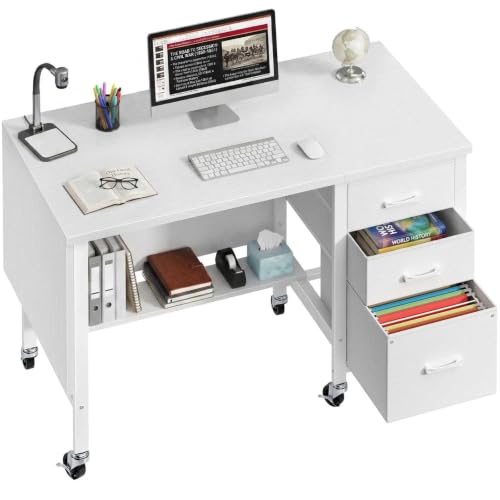
47in Mobile Rolling Teacher Desk with Privacy Panels — The teacher’s command post
Every flexible room needs one object that is not flexible, and this is it: a 47-inch teacher’s desk on wheels, in white, with file drawers, three storage drawers and privacy panels. The drawers are the headline. A computer classroom runs on custody — laptops signed out, chargers counted, assessments locked away, the confiscated phone in its temporary prison — and custody needs lockable-looking, closeable, organised volume at the front of the room. This desk is the only pick in the roundup that offers storage at all, and it offers the full taxonomy: file drawers for the paperwork, storage drawers for the equipment, panels for the privacy a teacher’s screen and marking require.
The wheels complicate the “fixed point” idea productively. The teacher’s desk can hold the room’s traditional front on Monday, roll to the side for the group-work lesson on Wednesday, and turn its privacy panels to face the class during the test on Friday. Forty-seven inches is a one-teacher span — laptop, marking pile, the register, the coffee in its traditional peril — and the white finish keeps the front of the room visually light against a wall of grey training tables. In home-office duty, which the title also claims, the same object is a compact workstation with more drawers than desks three times its price in style categories bother to include.
The honest notes: the title does not state drawer dimensions, so the laptop-custody plan should check whether the drawers take the room’s actual devices or only their chargers and paperwork — a distinction the manufacturer’s documentation will settle. Nor does it claim cable management for the teacher’s own setup. But as the anchor purchase of a computer classroom — the place the room’s valuables, records and authority sit — this desk completes the roundup’s system: the training tables flex, the teacher’s desk holds.
- Top: 47 inches, white
- Storage: file drawers plus three storage drawers
- Panels: privacy panels fitted
- Mobility: rolling, on wheels
- Drawer dimensions: not published in the title; confirm them in the maker’s documentation
Strengths
- The roundup’s only real storage — the classroom’s custody system.
- Privacy panels suit marking, tests and a teacher’s screen.
- Rolls to wherever the lesson’s front happens to be.
Trade-offs
- Drawer sizes are unstated — device storage needs confirming.
- Forty-seven inches is one teacher’s span, not a shared staff desk.
- White shows a classroom’s daily evidence quickly.
Best for: a teacher whose room runs on signed-out laptops and locked-away assessments.
Not suited for: a staff room needing a wide shared desk for two teachers at once.
View the rolling teacher desk on Amazon if the front of your classroom needs drawers more than it needs another table.
How Do These Training Tables Compare When the Room Fills Up?
| Pick | Top | Changeover trick | Storage | Defining trait |
|---|---|---|---|---|
| Regency Kobe 72×30 | 72 x 30 in | Flip-top, nesting | None | Full-depth flagship lab table |
| Regency Kobe 60×30 | 60 x 30 in | Flip-top, nesting | None | The same design, room-friendlier length |
| BizChair 72×24 | 72 x 24 in, 1 in thick | Nesting flip, Y-legs | Modesty panel | Commercial-grade, client-facing |
| Regency Kobe 42×24 | 42 x 24 in | Mobile T-base | None | Flexible single seminar station |
| Amazon Basics Activity | 47 x 29 in | Adjustable height | None | The growing child’s own table |
| Rolling Teacher Desk | 47 in | Rolling | File and storage drawers | The room’s anchor and safe |
Read the grid as a system rather than a contest. A complete computer classroom usually buys from two rows of it at once: the nesting tables for the learners and the rolling desk for the teacher, with the activity table belonging to a different building — the home — altogether. The Kobe pair split by room size, the BizChair by clientele, the little Kobe by teaching style. The comparison that matters is not which table wins, but which combination your timetable is asking for.
How Do You Specify a Whole Room Without Regretting It in September?
Write the room’s biography before its shopping list. List the room’s lives across a single week — the lessons, the club, the evening class, the exam morning — and the furniture must serve the busiest version, not the average one. Then count the learners at the room’s true maximum, not its enrolment hope, and buy tops for that number with the workstation arithmetic from the sizing section: twenty-four to thirty inches per computer user, aisles a teacher can walk with arms full, and a nesting wall with the flipped set’s footprint taped out on the floor before the order is signed. Institutions that tape the floor buy once; institutions that estimate buy twice, and the second purchase never matches the first.
Specify the unglamorous lines with the same care as the tables: the power design, the charging home, the teacher’s desk, the spare latch and caster budget, the caretaker’s termly ten minutes. A room’s furniture order that contains only learner tables is a half-order, and the missing half returns as a term of improvisations — chargers in carrier bags, cables across aisles, the teacher marking on a windowsill. The products in this roundup are good instruments, but an institution is buying a system, and systems are specified whole or not at all.
Finally, phase the purchase if the budget demands it, but phase it inside one design language. Half a room of Kobe tables this year and the matching half next year is a plan; half a room of one depth and a bargain row of another is a compromise the learners will sit inside daily. The manufacturers’ lines exist in families for exactly this reason, and the modest discipline of staying within one is the cheapest quality an institution can buy.
What Mistakes Do Schools Make When Buying Classroom Computer Desks?
The first is buying for the photograph of the room rather than for its Tuesday. A lab arranged for the prospectus — fixed rows, no aisles, no nesting wall, no charging plan — meets its first changeover like a wall. Buy for the changeover, the storage and the power, and the photograph will take care of itself; rooms that work tend to look like it.
The second is assuming power is included. It bears repeating because it is the costliest assumption in the category: these tables, one modesty panel aside, bring no cable management and no sockets, and a thirty-laptop room needs a designed answer — floor boxes, wall runs, per-table strips and a charging home — budgeted alongside the furniture. The schools that discover this after delivery discover it with an electrician’s emergency rate attached.
The third is mixing depths and heights across a room bought in stages. A 24-inch-deep table in a row of 30-inch tables strands its learners six inches from the lesson, and a top at a different height breaks the row’s sightlines and the teacher’s patience. Buy the room as a system, in one design language where possible — the Kobe pair exists precisely to let two room sizes stay one system — and keep a record of what was bought, because year three’s top-up order will need it.
The fourth is forgetting the teacher. Budgets furnish thirty learner places and leave the room’s authority figure perched on a spare student table with the chargers in a carrier bag. The teacher’s desk — drawers, panels, a span of their own — is not an indulgence in a computer classroom; it is the room’s safe, office and control point, and it should be in the first order, not the apology order.
How Does the Room Survive Examination Season and the School Play?
Twice a year, the computer classroom’s flexibility stops being a convenience and becomes the institution’s alibi. Examination season wants the same room in its sternest formation: single rows, maximum spacing, sightlines a invigilator can sweep, and a silence that loose casters and wobbling tops would sabotage. The flip-top tables earn their keep here in an unexpected way — a room that can be completely emptied can also be completely re-formed, spaced to the examination board’s geometry rather than to the ghost of last term’s clusters. The teacher’s desk becomes the invigilator’s post, its drawers holding the sealed papers, and its privacy panels suddenly the most examination-appropriate object in the building.
The school play wants the opposite: the room gone. Every table flipped, nested and rolled to its wall; every chair stacked; the hall returned to a hall with a stage’s worth of floor. This is the changeover the nesting footprint was bought for, and it is worth timing once, in a rehearsal of its own, before the evening it matters — institutions discover their nesting order under no pressure or under all of it, and the choice is theirs in October rather than December.
Between those poles sits the ordinary term’s quieter demand: the room must forgive. It must forgive the spilt water bottle near the laptops, the chair dragged sideways by a leaving class, the table borrowed by the department next door and returned to the wrong wall. Furniture specified for the photograph forgives nothing; furniture specified for the timetable — commercial frames, nesting storage, a teacher’s desk with drawers for the term’s accumulating custody — forgives almost everything, because it was bought for the room’s real biography. That, in the end, is the argument of this entire guide: in a classroom, the furniture’s first subject is time, and the tables that respect it are the ones still being flipped, nested and taught at when their cheaper contemporaries have been skipped.
Final Recommendation
Furnish the system, not the table. For a school or college lab, the Regency Kobe 72×30 is the default learner table — full teaching depth, flip-and-nest storage, a design language that extends to the 60×30 for smaller rooms — and the 47-inch rolling teacher desk is its necessary partner at the front. Commercial trainers hosting adults should weigh the BizChair’s commercial build and modesty panel, accepting its shallower, laptop-first depth as the deliberate trade it is. Seminar-style teaching belongs on the little T-base Kobe, and the home classroom belongs to the Amazon Basics activity table, whose adjustability will outlast three heights of child. Buy the power plan in the same breath as the furniture, mark the nesting wall before the first delivery, and the room you have bought will still be changing shape gracefully — lesson to lesson, term to term — when the laptops it was furnished for have been replaced twice over. That durability, more than any single specification in this guide, is what a classroom is actually buying.
Frequently Asked Questions
How many students fit at a 72-inch training table?
Three younger learners with laptops, or two grown-up workstations — laptop, notebook and elbow room each. The deciding unit is the workstation, not the person: roughly twenty-four to thirty inches of top per computer user. A 60-inch table hosts two adults; a 42-inch table is one person’s station.
Do these tables have built-in power or cable management?
With one partial exception, no. The BizChair includes a modesty panel, which tidies the view but is not a cable tray or a power source; the other titles claim neither. Plan power separately — floor or wall outlets, per-table strips, and a charging station at the teacher’s desk — and budget it with the furniture.
What is the difference between flip-top and nesting?
The flip is the motion — the top rotates vertical — and nesting is what the motion enables: flipped tables roll together and interleave, frames inside frames, so a class set stores along a wall in a fraction of its teaching footprint. A table can flip without nesting well, so the pairing of the two words in a title is the storage claim to look for.
Are training tables suitable for desktop computers, not just laptops?
They are used that way in many labs, but the titles here publish no load capacities, and a desktop tower plus monitor per place is a substantially heavier census than laptops. Confirm the capacity for the specific model in the manufacturer’s documentation before committing a desktop lab to any of them, and plan the cable runs for machines that will not move daily.
Which pick suits a homeschool room?
The Amazon Basics activity table. Its adjustable height follows a growing child, its 47 x 29 top holds a real homework sprawl, and it is designed to live in one settled corner — the opposite of the training tables’ institutional flexibility, and exactly what a home classroom needs. The rolling teacher desk is its natural partner for a parent teaching more than one child.
How should tables be stored over the summer?
Flipped and nested along their marked wall, mechanisms checked and casters cleared before the room is locked up, and — for the T-base and activity tables that do not nest — grouped in their room’s corner rather than scattered through corridors. A ten-minute termly check of latches and wheels is the whole maintenance liturgy; institutions that schedule it keep their tables flipping crisply for years.
Related Guides
Furnishing a classroom is rarely a single purchase, and the order in which the pieces arrive matters: tables first, the teacher’s desk with them, and the power plan drawn before either is unboxed.
The staff side of the building has its own furniture questions — standing desks that stay steady, desks that store, and the rolling pneumatic carts that serve as a classroom’s spare workstations — and the three guides below take each of them in turn.
Keep reading: Best Non-Wobbly Standing Desks · Best Standing Desks with Storage · Best Pneumatic Sit-Stand Desks


