What's inside
- Key Takeaways
- Quick Picks
- How Did We Find the Cheapest Cases That Still Work?
- Which Cheapest Cases Are Actually Worth Buying?
- How Do the Cheapest Cases Compare?
- What Can You Safely Cut — and What Must You Never Cut?
- How Do You Build the Cheapest PC Without Regretting the Case?
- What Are the Most Common Mistakes When Buying the Cheapest Case?
- Should You Buy a Used Case Instead of a Cheap New One?
- How Cheap Is Too Cheap? Reading the Warning Signs
- Where Does the Money Go in a Cheap Case — and Where Does It Not?
- How Do You Cool a Cheap Case Properly?
- What Is It Actually Like to Live With the Cheapest Case?
- How Do You Spot a Cheap Case That Will Age Well?
- Which Cheapest Case Fits Which Build?
- What Should a Cheap Case Teach You About the Rest of the Build?
- When Is the Cheapest Case the Wrong Saving?
- How Do Sales and Seasons Change What “Cheapest” Means?
- What Is the Cheapest Way to Make a Cheap Case Better Later?
- Final Recommendation
- Frequently Asked Questions
- Related Guides
As an Amazon Associate I earn from qualifying purchases. This post may contain affiliate links at no extra cost to you.
widgetverdict.com is reader-supported. When you buy through links on our site, we may earn an affiliate commission.
Where to buy: Linked picks go to their Amazon listings; at this end of the market prices move weekly, so the listing — not this page — is where the final number lives.
There is a floor below which a PC case stops being a bargain and becomes a debt, and the best and cheapest pc cases are the ones that sit exactly on that floor and not a millimetre under it. Go too cheap and the case takes its revenge in instalments: a fan you have to buy anyway, a panel that cracks, threads that strip during the first upgrade, airflow so poor that the graphics card you saved for spends its life throttling. The art of the cheapest build is knowing which corners the factory may cut on your behalf — decoration, silence, ceremony — and which it may not: fit, fans, and room for real components.
This guide hunts the genuine floor. Six cases, each the cheapest honest answer to a slightly different question: the cheapest ATX case we would build in ourselves, the cheapest case with its airflow already finished, the cheapest small case that wants for nothing, and three prose-only staples of the ultra-budget world that have housed a generation of first PCs. If your total budget is a hard wall and every coin wrestled from the case goes to the graphics card, start here — but read the trade-offs with both eyes open, because at this level the trade-offs are the product.
Key Takeaways
- The cheapest case that works is the one needing no extra purchases: count fans before you celebrate a low price.
- The Zalman S4 is our floor for a full ATX build — complete, standard and honest about its compromises.
- The Montech X3 Mesh undercuts rivals on total cost because its six fans are already in the box.
- Never save money on fit: a case that cannot take your card or cooler is the most expensive case of all.
- Acrylic panels, thin steel and basic cable space are the acceptable cuts at this level; missing fans are not.
- Every pick here uses standard parts, so a cheap case today does not block a better build tomorrow.
Quick Picks
| Pick | Badge | Why it earns its place |
|---|---|---|
| Zalman S4 | Cheapest ATX we’d build in | Two fans included and real clearances at the lowest sensible outlay. |
| Montech X3 Mesh | Cheapest finished airflow | Six fans in the box means the cooling budget is zero afterwards. |
| Montech Air 100 ARGB | Cheapest complete small case | Four fans, controller and mesh front — nothing left to buy. |
| Rosewill FBM-X2 | Ultra-budget staple | A micro-ATX case that has housed first PCs for years at minimal cost. |
| DIYPC Silence-BK | Cheapest quiet-leaning case | Foam-lined panels and included fans for a calmer budget machine. |
| Cooler Master MasterBox Q300L | Cheapest flexible compact | Magnetic dust filters and a movable front panel in a tiny footprint. |
How Did We Find the Cheapest Cases That Still Work?
We set three non-negotiables and let price do the rest. First, the case must fit a real build without tricks: a mainstream graphics card at full length, a tower cooler of ordinary height, standard power supplies and boards. Second, it must cool that build as shipped, or within one inexpensive fan of doing so — a case that needs a fan multipack to survive a gaming session has simply hidden its price in a second basket. Third, it must be built to ordinary standards of safety and sanity: no razor edges waiting for a knuckle, no threads that surrender on the second use, no panels that arrive pre-warped.
Everything else was negotiable, and at this level plenty gets negotiated away. Sound damping goes. Thick steel goes. Tool-free everything goes. Front USB-C mostly goes. What replaces them is the discipline of the designs below: each spends its small budget on the load-bearing parts of the experience — the frame, the fans, the clearances — and saves on the ceremony. That is the only kind of cheap worth buying, and it is rarer than the price tags suggest, because the market’s bottom shelf is crowded with cases that cut the load-bearing parts first.
A word on how we handled prices: we do not print them, because at this level they change too fast to print honestly, and because “cheapest” is a relationship, not a number. The ranking below reflects the total cost of a finished build — case plus the fans and fixes each design demands — at the time of writing. If a sale moves one pick past another this week, the reasoning still holds: buy the complete case, not the incomplete one with the louder discount.
Which Cheapest Cases Are Actually Worth Buying?
Three linked picks lead, because their value can be verified at a listing today: the S4 for the lowest ATX spend, the X3 Mesh for the lowest finished-airflow spend, and the Air 100 for buyers who want small and complete. Three prose-only veterans follow — the Rosewill, the DIYPC and the Q300L — cases whose prices and availability wander too much for a link to serve you, but whose designs have earned their place in the budget canon. Together they mark the true floor of the market: below these, you are no longer saving money, only postponing spending it.

Zalman S4 — Cheapest ATX we’d build in
The S4 is what the floor looks like when it is drawn by engineers instead of accountants. Two 120mm fans are in the box. Graphics cards up to about 315mm fit — enough for the dual-fan cards that dominate sensible builds. A 240mm radiator mounts if your plans lean liquid, the front carries USB 3.0, and a full tinted acrylic panel shows the build. Assembled, it is a complete, working, presentable gaming PC whose case cost the least it plausibly could without the build becoming a cautionary tale. That is a genuine achievement, and Zalman deserves the credit plainly.
Now the bill for those savings, itemised honestly. The acrylic panel flexes and will gather fine scratches if you clean it carelessly. The steel is thin, the cable management is a cavity rather than a system, and the airflow — adequate for mainstream parts — has no reserve for a flagship card in a hot room. The fans are basic units that move air and ask nothing, and under a heavy gaming load the machine will be audible in the way of all honest cheap builds. Nothing on that list is a surprise, and nothing on it is a betrayal: the S4 tells you exactly what it is.
Who should buy it? The builder whose budget wall is real — the student, the parent building a child’s first gaming PC, the gamer who would rather have the next graphics card tier up than a thicker case. For them the S4 is not a compromise but a strategy: the minimum viable home, bought once, with the savings spent where frames are made. If your build’s parts are mainstream and your expectations are adult, this is the cheapest case in the world that deserves your components.
- Form factor: compact ATX mid-tower
- Included fans: two 120mm
- Graphics card clearance: up to about 315mm
- Radiator support: up to 240mm
- Side panel: tinted acrylic
Strengths
- Lowest price at which an ATX build stays respectable.
- Fans included and clearances cover mainstream parts.
- Lets the budget flow to the graphics card instead.
Trade-offs
- Acrylic panel scratches and flexes.
- Airflow has no reserve for flagship heat.
- Thin steel and basic cable space throughout.
Best for: hard budget walls and first gaming PCs. Not suited for: hot high-end hardware or builders who open the case monthly.

Montech X3 Mesh — Cheapest finished airflow
The X3 Mesh plays a different cheap game: instead of the lowest sticker, it offers the lowest finished cost for a cooled build, by including six fans — three 140mm intakes behind a real mesh front, three exhausts — in a market where a single decent fan can cost a fifth of a cheap case. Add up what rivals charge once their missing fans are bought, and the X3 quietly undercuts nearly all of them while cooling better out of the box. For a gaming-first build in a room where the machine can be heard living its life, it is the sharpest arithmetic in this guide.
The case around the fans is better than the price rehearses. The swivelling tempered glass door is a feature lifted from dearer designs, dust filters are fitted, graphics cards up to about 305mm and a 240mm radiator are welcome, and the mesh front is the genuine article — open area, not decoration. A builder can assemble a complete, cool, good-looking machine in this case without a single additional purchase, which at this end of the market is close to a magic trick.
The catch is control, or rather its absence. The fans are fixed-RGB and fixed-speed: they glow in their rainbow pattern and spin at their set pace whether the machine is gaming or idling at midnight, and no software will talk them out of either habit. Noise-sensitive rooms, light sleepers and anyone who works beside the machine should weigh that sentence heavily. But if the PC lives in a gaming corner and the budget is the boss, the X3 Mesh is the cheapest complete answer we know.
- Form factor: ATX mid-tower
- Included fans: six fixed-RGB (three 140mm intake)
- Graphics card clearance: up to about 305mm
- Radiator support: up to 240mm
- Side panel: swivelling tempered glass
Strengths
- Six fans included ends the cooling budget at zero.
- True mesh front and a complete airflow path.
- Swivel glass door is generous at this price.
Trade-offs
- Fixed-speed fans cannot be quietened.
- Lighting pattern cannot be changed.
- Card clearance is the tightest of the linked picks.
Best for: gaming builds on the strictest total budget. Not suited for: quiet rooms or builders who want fan control.
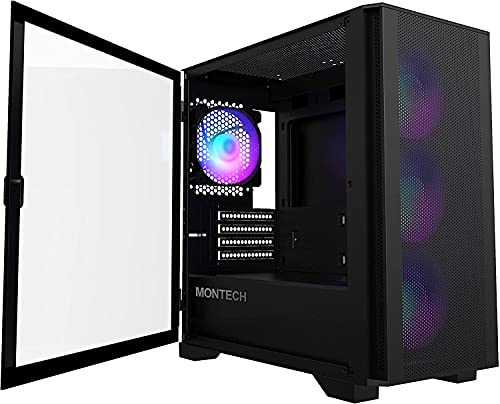
Montech Air 100 ARGB — Cheapest complete small case
The Air 100 is the pick for buyers who read the first two reviews and thought: smaller, and finished properly. It costs a little more than the rock-bottom pair, and returns the difference so completely that it earns its place in a cheapest guide on total-cost grounds alone — four ARGB fans fitted, a lighting controller included, a mesh front, dust filters, and a swivelling glass door, in a micro-ATX case that asks for nothing else. The cheapest case is the one you buy once; by that measure this may be the cheapest case on the page.
Its competence is not a small-case asterisk. Cards up to roughly 330mm and coolers up to about 161mm cover the mainstream completely, the small volume turns air over quickly so temperatures behave, and the door makes the case the easiest here to clean and upgrade — a real economy over years, because the machine you maintain is the machine that lasts. As a first build, a family PC or a compact gaming box, it is the recommendation we make when the budget is tight but the buyer refuses to feel cheap.
The boundaries remain format boundaries: micro-ATX expansion limits, no flagship-length cards, no big radiators. The fans are good rather than silent-specialist. And in a cheapest guide it must be said that it is not the cheapest sticker here — the S4 undercuts it. What it undercuts everyone on is regret. If the budget can stretch the small distance, the Air 100 is where the stretching stops being necessary.
- Form factor: micro-ATX
- Included fans: four ARGB with controller
- Graphics card clearance: up to about 330mm
- Cooler clearance: up to about 161mm
- Side panel: swivelling tempered glass door
Strengths
- Nothing left to buy — the complete cheap package.
- Mesh front and four fans cool a small case properly.
- Door design makes ownership easy for years.
Trade-offs
- Not the lowest sticker price in this guide.
- Micro-ATX limits expansion and card length.
- Fans are decent rather than premium.
Best for: tight budgets that still want a finished, complete build. Not suited for: the absolute minimum spend or flagship hardware.
Rosewill FBM-X2 — Ultra-budget staple
The FBM-X2 is the cockroach of budget computing — meant entirely as praise. This plain micro-ATX case has survived years of price wars by being exactly what a minimal build needs and nothing else: a steel box, a fan included, room for mainstream parts, and a price that routinely undercuts everything with a brand name. It has housed countless first PCs, office machines and hand-me-down gaming rigs, and its very plainness is the point: when the budget’s last coins are being counted, the FBM-X2 is what a case looks like with every gram of ceremony removed.
Set expectations with care and it will not disappoint them. The steel is thin, the interior is a single open chamber in the old style, cable management is a euphemism, and airflow serves modest hardware rather than ambitious hardware. One fan is a starting point — a second inexpensive fan transforms its manners, and even with that addition the total remains at the floor of the market. Builders have been performing exactly that small upgrade for years, which tells you the formula works.
Buy it for the machine whose budget is measured in coins, whose parts are modest, and whose owner values the fact of the PC over the experience of the case. Skip it for anything hot, anything showcased, anything you plan to open often. The FBM-X2 is not a case you love. It is a case you respect, the way you respect a bus that always arrives.
- Form factor: micro-ATX
- Included fans: typically one — plan a second
- Interior: single open chamber, classic layout
- Character: minimum viable case
- Best use: modest parts, minimal budgets
Strengths
- Routinely among the cheapest real cases anywhere.
- Steel construction and standard fittings throughout.
- A proven design that countless builds rely on.
Trade-offs
- One fan is a starting point, not a cooling system.
- Thin steel and no cable management to speak of.
- Airflow suits modest hardware only.
Best for: minimum-budget office and first PCs. Not suited for: gaming hardware with real heat output.
DIYPC Silence-BK — Cheapest quiet-leaning case
Cheap cases are supposed to be loud, and the Silence-BK is the budget market’s long-running argument that they need not be. DIYPC lined this ATX tower’s panels with sound-dampening foam, fitted a fan controller, and included multiple fans, producing a machine that idles and works at a murmur for money that usually buys a drum. For the budget builder whose PC shares a bedroom, a dorm or a studio corner, that single virtue can outweigh every other line in this guide — a cheap case you cannot hear is worth more than a cheaper one you cannot ignore.
The rest of the design follows the budget rulebook faithfully: steel construction, a restrained black exterior with no window in the classic version, and clearances aimed at mainstream components. The damping foam is the real thing rather than a token sheet, and the fan controller — a luxury at this level — lets you trade airflow for hush manually as the evening’s work changes from gaming to writing. It is a case designed around a room, not a benchmark chart.
Its compromises are the mirror of its virtue. Sealed, damped cases cool by sufficiency rather than abundance, so hot hardware in a warm room will find its ceiling; the styling is anonymous; and DIYPC’s distribution means availability and pricing wander, which is why it sits in the prose-only half of this guide. When you find it at its customary budget level, though, it remains the cheapest route we know to a quiet room.
- Form factor: ATX mid-tower
- Panels: steel with sound-dampening foam
- Extras: fan controller included
- Character: quiet on a budget
- Best use: bedrooms, dorms, shared spaces
Strengths
- Damped panels deliver unusual quiet for the money.
- Fan controller included — rare at this level.
- Restrained looks suit shared rooms.
Trade-offs
- Sealed design caps cooling for hot hardware.
- Availability and pricing vary by region.
- Anonymous styling throughout.
Best for: budget builds in quiet rooms. Not suited for: flagship heat or buyers who want a window.
Cooler Master MasterBox Q300L — Cheapest flexible compact
The Q300L earns its place in the budget canon by spending its small budget on ideas instead of materials. Its magnetic dust filters — removable in a second, washable, refitted without clips or screws — are a genuinely better solution than dearer cases manage, and its front panel can be repositioned on different sides of the chassis, letting the same small case sit in orientations other designs cannot. For a compact build in an awkward space, those two tricks are worth more than thicker steel.
The rest is honest budget engineering: a compact micro-ATX frame, an acrylic side panel, perforated panels that breathe respectably, and room for mainstream components arranged with more imagination than the price suggests. It has become a default recommendation for small cheap builds precisely because its compromises are the painless kind — you notice the filters’ cleverness every cleaning day, and the thin panels only when you go looking for them.
Its limits are size and ceremony. Expansion is micro-ATX, long cards need measuring, the acrylic wants gentle cleaning, and the case’s lightness — a virtue for moving — means it lacks the planted feel of the steel-heavy designs. None of that has stopped it housing a small nation’s worth of first gaming PCs. As the cheapest flexible case we can recommend, the Q300L closes this list on the category’s happiest note: cheap, done cleverly.
- Form factor: micro-ATX compact
- Filters: magnetic, removable dust filters
- Front panel: repositionable I/O
- Side panel: acrylic
- Character: clever ideas, minimal materials
Strengths
- Magnetic filters make cleaning effortless.
- Flexible layout suits awkward spaces.
- Perforated panels breathe respectably.
Trade-offs
- Compact size limits cards and expansion.
- Acrylic panel needs gentle handling.
- Light build lacks a planted, premium feel.
Best for: small, cheap builds in tight spaces. Not suited for: long cards or builders wanting steel-heavy construction.
How Do the Cheapest Cases Compare?
| Case | Size | Fans included | Max GPU length | Cheap character |
|---|---|---|---|---|
| Zalman S4 | Compact ATX | 2 | ~315mm | Lowest ATX floor |
| Montech X3 Mesh | ATX mid-tower | 6 fixed-RGB | ~305mm | Cooling already paid for |
| Montech Air 100 ARGB | Micro-ATX | 4 + controller | ~330mm | Complete small package |
| Rosewill FBM-X2 | Micro-ATX | 1 (add one) | Modest cards | Absolute minimum |
| DIYPC Silence-BK | ATX mid-tower | Multiple + controller | Mainstream cards | Quiet on a budget |
| Cooler Master Q300L | Micro-ATX | 1 (add one) | Mid-length cards | Clever and compact |
What Can You Safely Cut — and What Must You Never Cut?
Cut decoration without a second thought. Lighting, tempered glass, branded cable covers and sculpted fascias are pure ceremony, and the cheapest cases in this guide prove a machine loses nothing mechanical when they go. Cut silence next, if the room allows it: damping foam and thick steel are comforts, and a gaming corner does not need them. Cut size last and carefully — a smaller case is cheaper and often better, right up to the millimetre where your components stop fitting.
Never cut fit. A case that cannot swallow your graphics card, your cooler and your power supply with room for cables to bend is not cheap at any price, because its cost includes a replacement. Never cut the fans to zero: a case with no included fan and no budget line for one is an oven with a power button. And never cut the basics of electrical and physical sanity — a frame that flexes onto components, edges that open knuckles, standoffs that strip as you build. Those are not savings. They are the market’s way of selling you the same case twice.
How Do You Build the Cheapest PC Without Regretting the Case?
Plan the whole budget on one page before ordering anything, with the case as a line among equals rather than the remainder after the exciting parts. The classic failure is arithmetic by enthusiasm: card, processor and board consume the money, the case inherits the coins, and the build spends years in a box that punishes every upgrade. Decide the case budget first — the picks here define its honest range — and defend it against the graphics card’s lobbying. The card will forgive you; it would rather breathe in a decent case than throttle in a tin.
Then assemble with the patience cheap cases reward. Their cable space is tighter, their panels less forgiving, their screws smaller — and none of that matters if you route cables as you go, start every screw by hand, and test-boot before the panels close. A cheap case built carefully feels like a mid-range case. A mid-range case built carelessly feels like a cheap one. At this end of the market, the builder is the biggest component of all.
What Are the Most Common Mistakes When Buying the Cheapest Case?
The champion mistake is buying below the floor: the unbranded box with no included fan, mystery clearances and a returns policy written in fog. It photographs like the S4 and behaves like a debt. The second mistake is forgetting the second basket — fans, a hub, an adapter — until the “cheap” case costs what the complete one did. Count the finished build, always. The third is sizing by hope: assuming the card will fit because the case looks big in pictures, and meeting the truth on build day with a tape measure and a sinking feeling.
The subtler mistake is buying cheap against your own future. A case is the one component with no performance expiry date, and the builder who will upgrade twice in five years should let that fact argue for the Air 100’s completeness over the FBM-X2’s minimum. Cheap is a strategy, not a reflex: it means spending the least that fully works, for the life the machine will actually live. Every pick in this guide was chosen to make that definition hold.
Should You Buy a Used Case Instead of a Cheap New One?
Sometimes, and the case is the safest component in the entire build to buy used, because it has no firmware, no wear-prone electronics and no hidden performance state. A quality used mid-tower — the kind of case that cost real money three years ago — can outclass every pick in this guide for the same outlay, provided you inspect it like an adult: all panels present and seating, fans spinning or honestly absent, front ports working, screws and standoffs in a bag rather than in the void, and no smell of a previous life you do not want to inherit.
The used market’s traps are completeness and hygiene. Missing drive trays, proprietary rails and the one special bracket a design needs are worth real money to replace, so a “complete with accessories” listing beats a cheaper bare shell almost every time. Clean what you buy — filters washed, interior blown out, fans wiped — before components go in. And if inspection is impossible, buy new from this page instead: the floor of the new market, as the six picks prove, is low enough that gambling is optional.
How Cheap Is Too Cheap? Reading the Warning Signs
Learn the tells and you can scan a listing in seconds. No included fan is the loudest tell. Clearances described in adjectives rather than millimetres is the second. A specification that hides its steel thickness, its panel material and its maximum cooler height is a specification with something to be quiet about. Photographs that show only three-quarter glamour angles and never the interior, the rear or the cable side complete the portrait: the case is being sold as a picture, because the object would not survive description.
Set against those tells, the six picks here read like a checklist of their opposites — fans counted, millimetres printed, materials named, interiors photographed. That is not a coincidence; it is the filter this guide applied to a market whose bottom shelf is genuinely dangerous to your components and your wallet alike. The cheapest case worth buying announces exactly what it is. The cheapest case worth avoiding announces only what it looks like.
Where Does the Money Go in a Cheap Case — and Where Does It Not?
Understanding a cheap case means understanding its bill of materials, because the price has to come from somewhere and the honest makers show you where. The steel is thinner, so the frame material costs less and the shipping weight drops. The panels are stamped in simpler shapes with fewer folds, so tooling and finishing cost less. The accessory box shrinks to screws and a speaker. The fans are sleeve-bearing units bought by the hundred thousand. None of this is sinister — it is simply the arithmetic of a product whose entire purpose is to cost less, and the picks in this guide are the ones whose arithmetic stays honest.
The dishonest version cuts in different places. It cuts the quality control, so panels arrive warped and holes arrive misaligned, and the buyer’s evening becomes the factory’s inspection department. It cuts the standoffs’ threading, the power button’s switch, the front ports’ soldering — the small parts whose failure converts a case into e-waste. And it cuts the truth from the specification, quoting clearances that exist only if cables are not attached to the components being measured. When you stand two cheap cases side by side, this is the difference you are actually shopping for: not features, but which factory’s cuts you are volunteering to live with.
There is a third category of saving that deserves naming, because the good picks use it and the bad ones cannot: design intelligence. The Q300L’s magnetic filters cost little and work brilliantly. The X3 Mesh’s fan bundle is cheap because fans bought by the container are cheap, and Montech chose to pass that economy to the buyer instead of pocketing it as margin on a bare case. The S4’s conventional layout costs nothing to engineer at all, its design long since amortised. Cheap, done well, is often just smart, done early.
How Do You Cool a Cheap Case Properly?
Cheap cases cool by sufficiency, and sufficiency is a system, not a fan count. The minimum viable arrangement is one intake low at the front and one exhaust high at the rear, moving air across the components in a single legible sweep. The S4 ships in roughly that configuration; the FBM-X2 and Q300L reach it with one added fan; the Air 100 and X3 Mesh exceed it out of the box. Everything beyond that arrangement is refinement — welcome, but not the difference between a working machine and a throttling one.
Placement beats quantity at this level because cheap fans move modest air and cannot waste any of it. Keep the intake’s path to the graphics card empty of cable bundles. Fit the exhaust where heat collects, at the rear top, rather than where a mount happens to be free. If the case has a top mount and a hot processor, a top-rear exhaust is the second fan to add, because it clears the air the processor cooler has just heated before that air drifts down across the card. And set the motherboard’s fan control to respond early: cheap fans are quietest when they never need to sprint, and a gentle early ramp keeps a budget machine civilised.
Respect the room, too. A cheap case under a desk on carpet, its intakes breathing dust and its exhaust warming the wall behind it, will run hotter than the same case on a hard surface with a hand’s width of clearance — a difference larger than any fan you could buy for it. The cheapest cooling upgrade in this entire guide is a metre of floor space and a duster, and it outperforms half the accessories in the catalogue.
What Is It Actually Like to Live With the Cheapest Case?
Ownership has a texture that specifications never capture, so here it is plainly. The panels come off with more flex and more noise than a premium case’s. The power button feels like what it is. You will hear the machine under load, and you will hear it a little more each year as the fans age, because sleeve bearings keep their counsel for a few years rather than a decade. Cleaning takes slightly longer because the filters, where they exist at all, are simpler. Upgrades take slightly longer because the cable space is tighter and the screws are smaller. That is the whole texture: not misery, just a thin, constant reminder that money was saved.
Set against it is the texture of the alternative — the same money spent on the case instead of the components. A slower graphics card does not remind you it was a compromise with a rattle or a stiff panel. It reminds you in every game, at every setting you lower, for the entire life of the build. Experienced budget builders know this exchange rate by heart, which is why the floor exists where it does: the case’s compromises are ambient and occasional, while the components’ compromises are constant and central. Cheap out on the box, within the floor’s protection, and spend on the silicon — that is the whole strategy, and the six picks are its proof.
The exception proves the rule in the other direction. If the machine will be opened monthly, carried weekly or heard nightly by a light sleeper, the texture stops being ambient and becomes the experience, and the right move is the small step up to completeness — the Air 100’s door and controller, the Silence-BK’s damping. Cheapest is a property of a match between a case and a life, not of a case alone, and this guide’s spread of six exists because lives differ.
How Do You Spot a Cheap Case That Will Age Well?
Look first at the parts that move or bear load. Hinges and latches on doors, the threads in standoffs, the power button’s travel, the feet’s rubber — these are where cheap cases keep their diaries, and the picks here were chosen partly because their moving parts feel like they intend to keep moving. A fan that spins freely and silently by hand in the shop is a fan whose bearing was worth its cents; one that grinds or wobbles on the shelf will not improve in your home.
Look second at replaceability. Standard fan sizes, standard screws, a front-port board that is a separate part rather than a soldered afterthought — these determine whether a five-year-old case gets a five-minute repair or a funeral. Every pick in this guide scores well here, because the budget brands that survive, survive by being serviceable; it is the disposable designs that vanish from catalogues within a season. A cheap case you can repair is an asset. A cheap case you cannot is a rental.
Look last at the community’s memory. The FBM-X2, the Q300L and the S4 have been bought, built in, complained about and bought again for years, and that long public record is worth more than any launch review — it means the failure modes are known, priced in and survivable. New cheap cases arrive monthly with brighter promises. The floor of this market is not where the promises are; it is where the evidence is.
Which Cheapest Case Fits Which Build?
For the classic first gaming PC — a mainstream card, a mid-range processor, a budget with a hard edge — the argument is between the S4 and the X3 Mesh, and it is really an argument about noise. The Zalman is the cheaper, calmer starting point whose two fans serve sensible parts; the Montech costs a little more and arrives with its airflow finished, louder and prouder. Pick the S4 for a bedroom, the X3 for a gaming corner, and either way keep the change for the graphics card, where it will be felt in every session.
For the small build — the dorm machine, the living-room PC, the second computer — the Air 100 and the Q300L divide the honours. The Montech is the complete purchase, fans and controller and door all present; the Cooler Master is the cleverer object, smaller in spirit, with filters that make its maintenance the easiest here. The FBM-X2 waits beneath both for the build whose budget has truly reached the floor, and it has never once been ashamed of that position.
For the quiet build on a budget there is one answer, the Silence-BK, and for the office or family machine that must simply exist and work, the answer is whichever of these six your retailer stocks cheapest this week — at the floor, availability is a legitimate feature. The through-line is that cheapest was never one case. It is a family of floors, one under each kind of build, and this guide’s job was to make sure none of them has a hole in it.
What Should a Cheap Case Teach You About the Rest of the Build?
Building at the floor teaches the most transferable lesson in PC building: that every component category has a floor, and the floors are all drawn the same way. A power supply has one, below which efficiency claims and protection circuits become fiction. Memory has one, storage has one, motherboards have one. The builder who learns to find the case’s floor — complete, standard, honest — has learned the method for the whole machine, and will never again pay the two taxes that punish beginners: the tax of buying below the floor and replacing, and the tax of buying far above it for ceremony.
There is a confidence dividend too. A builder who has assembled a working, cool, presentable PC at the floor knows exactly which parts of a premium case are worth money later — the door, the damping, the cable system — because they have lived without each one and can price its absence precisely. The cheapest case, chosen well, is not the opposite of the premium case. It is the education that makes the premium case, when its day comes, a purchase rather than a guess.
When Is the Cheapest Case the Wrong Saving?
Three situations should talk you out of the floor. The first is heat: a flagship graphics card and a high-wattage processor in a warm room will spend their lives at the ceiling of a cheap case’s cooling, and the performance they lose there costs more than the case saved. The second is time: a machine opened constantly for drives, cards and experiments will tax thin panels and small screws until the tax exceeds the saving, and the builder who tinkers should buy the case that enjoys being opened. The third is ears: a cheap case in a recording space or a light sleeper’s bedroom is a false economy measured in ruined takes and ruined nights.
Notice that all three exceptions are about the life around the machine, not the machine itself. The floor picks are mechanically sound; the question is always whether your room, your hardware and your habits ask more of a case than the floor provides. Answer honestly and the cheapest case is either the smartest purchase in the build or a saving you correctly declined — and knowing which is the entire skill this guide has been trying to teach.
How Do Sales and Seasons Change What “Cheapest” Means?
Case prices breathe. A model that sits at the top of this guide’s floor in spring can dip below its rivals during a sale season, and a perennial budget champion can drift upward when stock thins. The ranking here was built to survive that breathing, because it rests on completeness — fans included, clearances printed, materials named — rather than on any week’s arithmetic. When two picks cross in price, buy the one whose design suits your build; the difference between the S4 and the X3 Mesh was never really the money, and a sale does not make a fixed-speed fan quiet or a small case large.
The one seasonal rule worth keeping is to distrust the spectacular discount on the unknown case. Established budget models discount modestly because their margins were honest to begin with; a case slashed to a fraction of its supposed price is usually confessing what its price always should have been, and the confession rarely mentions the missing fan, the mystery steel or the returns policy. The floor in this guide is low enough. Shop within it, at whatever the season does to the numbers, and the numbers will take care of themselves.
What Is the Cheapest Way to Make a Cheap Case Better Later?
One fan, bought when the first hot week arrives and placed by the rules in the cooling section above, is the classic first upgrade — and for the one-fan picks it was always part of the plan. The second upgrade is a packet of velcro ties and twenty minutes: rerouting the cables out of the airflow path buys cooling that no accessory can match at the price, which is to say free. The third is a set of rubber fan mounts or a strip of foam tape under a buzzing panel, curing the noises that make a cheap case feel cheaper than it is.
Beyond those, stop. A cheap case upgraded fan by fan, panel by panel, becomes the most expensive case you own — the mid-range case you could have bought, purchased in instalments without ever enjoying it whole. The floor strategy works because it is a strategy: buy the complete-enough case, spend on the silicon, and let the case be the quiet background of the build’s life. When the day comes to replace it, replace it properly, with everything this one taught you about what your building actually needs.
A final encouragement, because the cheapest end of any market attracts a particular snobbery it does not deserve: some of the most loved PCs ever built live in cases from this page’s neighbourhood. The machine that got a student through university, the family computer that ran a decade of homework and holidays, the first gaming rig assembled on a kitchen table with a parent reading the manual aloud — these are disproportionately cheap-case machines, because cheap cases are the ones people actually buy when the budget is real and the need is now. The floor this guide defends is not a lesser place to build. For most builders, most of the time, it is simply where building happens — and the six cases above are there to make sure it happens well.
One practical habit separates builders who stay at the floor happily from those who fall through it: keep the box and the receipt until the build has survived its first month. Cheap cases are the most likely components to arrive with a bent corner or a dead front port, precisely because their packaging shares their budget, and the makers in this guide — Zalman, Montech, Cooler Master, Rosewill, DIYPC — all honour straightforward replacements when the evidence is in hand. A month of probation, then recycle the cardboard with a clear conscience: the case has either proven itself by then or already been swapped for its twin.
And if the budget loosens mid-build — a returned item elsewhere, a gift, a sale on the card you wanted — resist the urge to promote the case first. Promote the components, in the order the machine will feel them: card, then processor, then memory and storage. The case’s turn comes last because its compromises are the gentlest in the whole build, and the floor picks were chosen so that a build can grow richer around them for years without the box ever becoming the embarrassment of the specification. That is the deepest sense in which these are the best cheap cases: they let the rest of the machine be as good as it can be.
Final Recommendation
If the budget wall is absolute, buy the Zalman S4 and spend the savings on silicon — it is the cheapest complete home a real build can have. If cooling is the worry, the X3 Mesh finishes the airflow argument in the box; if the machine must be small and complete, the Air 100 ARGB is the cheapest case here that wants for nothing. The Rosewill, DIYPC and Q300L remain the honourable veterans of the floor for the builds they suit. Respect the floor, count the finished cost, measure the card — and the cheapest case stops being a risk and becomes what it should be: the smartest line in the whole budget.
Frequently Asked Questions
What is the cheapest PC case I should actually buy?
The cheapest case that fits your components, includes at least one or two fans, and comes from a maker who prints real clearances — in this guide, the Zalman S4 for ATX builds. Anything cheaper trades away fit, fans or basic construction, and those trades always cost more later than they save today.
Is it worth adding a fan to a cheap case?
Usually, yes — it is the highest-value upgrade in budget building. A case shipped with one fan, like the FBM-X2 or Q300L, becomes a properly cooled machine with a single added exhaust or intake, and the total still undercuts most mid-range cases. Buy the fan with the case, not after the first overheated evening.
Can a cheap case damage my components?
A merely cheap case, no — the picks here protect components fine. A below-the-floor case can contribute to harm through chronic overheating, flexing frames that stress connectors, or sharp edges meeting cables. That is why this guide’s floor exists: below it, the savings stop being savings.
Should a cheap build use micro-ATX to save money?
Often, yes. Micro-ATX boards and cases both cost less, and for a build with one graphics card and no exotic expansion, nothing is lost. The Air 100 and Q300L in this guide exist because the format is the budget builder’s friend — just confirm your card’s length against the smaller case’s clearance.
Why don’t you print the prices?
Because at this end of the market they change weekly and differ by region, and a printed price would be wrong before it was useful. The ranking here is by total finished cost — case plus whatever each design still needs — which stays true even as individual prices drift. The listing linked from each pick carries today’s number.
Can a cheap case last through an upgrade?
Yes, if you bought at the floor rather than below it. Standard formats, honest clearances and replaceable fans mean the S4, X3 Mesh and Air 100 can all host a second generation of components. The cases that cannot are the ones that were too small, too sealed or too fragile on day one.
Related Guides
More ways to stretch a build budget: best pc cases for airflow, best micro atx pc cases and best affordable pc cases.


