What's inside
- Key Takeaways
- Quick Picks
- How Did We Choose These Picks?
- What Do the Four ASUS Case Lines Actually Stand For?
- What Is It Like to Live With an ASUS Case for Years?
- Where Does the Money Go as You Climb the ASUS Range?
- How Should You Source the Prose-Only Flagships Carefully?
- How Do the Six Compare Side by Side?
- What Build Order Suits Each ASUS Architecture?
- Which ASUS Line Fits the Way You Actually Build?
- What Mistakes Do ASUS Case Buyers Keep Making?
- How Should You Plan Cooling in an ASUS Case?
- Which ASUS Case Suits a Small Room or a Student Budget of Space?
- What Happens When Your Build Outgrows the Case?
- Final Recommendation
- Frequently Asked Questions
- Related Guides
As an Amazon Associate I earn from qualifying purchases. This post may contain affiliate links at no extra cost to you.
widgetverdict.com is reader-supported. When you buy through links on our site, we may earn an affiliate commission.
Where to buy: the two ASUS Prime AP201 variants below carry verified Amazon links — the all-mesh original and its tempered glass sibling — while the ROG and TUF flagships and the ProArt workstation case are covered in prose, because our pool holds no verified listing for them and we will not guess at one.
Brand loyalty gets mocked in PC building, usually by people who are loyal to a different brand, but the search for the best asus pc cases has a more practical root than fandom. A case is the one component you touch every day, the one whose screws, panels and cable channels you will curse or bless for a decade, and builders who have had a good decade with ASUS motherboards and graphics cards reasonably ask whether the same company builds the box with the same care. The answer, across a range that runs from a 33-litre compact to a flagship ROG showcase, is mostly yes — with the interesting wrinkle that ASUS splits its case personality four ways, and picking the wrong personality is the only real way to buy the wrong ASUS case.
Those four personalities structure this guide. Prime is the pragmatic line, and its AP201 is the case most ASUS buyers should actually purchase — so it appears twice here, in the mesh and glass forms that suit different desks. ROG is the theatrical flagship division, represented by the Hyperion and the Strix Helios. TUF Gaming splits the difference with the dual-chamber GT502, a builder’s case with genuine engineering under the gaming styling. And ProArt, ASUS’s creator line, contributes the PA602, a wood-accented workstation tower that treats ventilation and dust as professional concerns. Six cases, four temperaments, one badge.
Key Takeaways
- ASUS cases divide into four lines — Prime, ROG, TUF Gaming and ProArt — and choosing the line matters more than choosing within it.
- The Prime AP201 is the range’s sweet spot: two linked variants here, mesh for cooling ease and glass for display builds.
- ROG flagships sell scale, glass and presence; buy them for the showcase, not for value.
- The TUF GT502’s dual-chamber layout is a functional design, separating hot components into their own airflow zones.
- ProArt’s PA602 is the professional’s pick, with dust warnings and wood detailing aimed at studios rather than gaming dens.
- Only the AP201 pair carries verified links in this guide; the flagships are prose-only picks to source carefully by exact model name.
Quick Picks
| Pick | Badge | Why it earns its place |
|---|---|---|
| ASUS Prime AP201 (Mesh) | Best ASUS case for most builders | A 33-litre Micro-ATX case wrapped in quasi-filter mesh that somehow still swallows a 360mm radiator and long graphics cards. |
| ASUS Prime AP201 (Tempered Glass) | Best compact ASUS showcase | The same clever AP201 skeleton with a glass display side and a solid front face for desks that are seen. |
| ASUS ROG Hyperion GR701 | Best ASUS flagship | A full-tower statement piece with hinged glass, enormous radiator support and a price that announces itself. |
| ASUS TUF Gaming GT502 | Best ASUS dual-chamber case | Two airflow zones, a panoramic view of the build, and carrying handles that admit how heavy finished builds get. |
| ASUS ProArt PA602 | Best ASUS workstation case | Wood-accented creator tower with dust detection, generous front fans and a demeanour suited to client-facing studios. |
| ASUS ROG Strix Helios | Best ASUS aluminium showpiece | A brushed-aluminium and glass flagship from the previous generation that still turns heads and carries like luggage, by design. |
How Did We Choose These Picks?
The rule for this guide was strict in a way brand roundups often are not: every pick had to be a case we would defend on engineering grounds to a buyer who had never heard of ASUS. Brand halo earned a case a hearing, not a place. That filter kept the range honest — the AP201 survives it easily, the flagships survive it on build quality and layout while conceding value, and a number of forgettable ASUS boxes from past seasons did not survive it at all.
Link discipline followed the pool, as always. The AP201 in both its mesh and tempered glass forms is verified and linked; the ROG, TUF and ProArt flagships are covered as prose-only picks, with exact model names and the distinguishing details a buyer needs to source the right case — and to avoid the similarly named variants, bundles and previous-generation listings that crowd marketplaces for popular flagship hardware.
Within the six, we weighted the qualities that separate a case you admire in photographs from one you admire in year three: panel mechanisms, filter access, cable space measured against real builds rather than marketing renders, and fan and radiator support that survives contact with the components people actually buy. ASUS’s own specifications were treated as claims to be reasoned about, not scripture, particularly on clearance figures where a radiator’s thickness quietly eats the headline number.
What Do the Four ASUS Case Lines Actually Stand For?
Prime is ASUS’s engineering-without-theatre line, and the AP201 is its thesis statement: no lighting agenda, no sculpted plastic, just a small box whose surfaces all breathe and whose interior accepts hardware that has no business fitting in 33 litres. Prime buyers are typically builders who spec a machine the way they would spec a tool — by what it does — and the line’s restraint is why the AP201 keeps appearing in compact-build recommendations far beyond ASUS loyalists.
ROG, Republic of Gamers, is the flagship division and prices like it. ROG cases are designed as the visual centre of a high-end build: glass, aluminium, lighting integration with the wider ROG ecosystem, and internal volume generous enough that the building experience itself feels ceremonial. The honest way to read ROG pricing is that you are buying the case as furniture and stage set, with engineering to match; the dishonest way is to pretend the thermal performance alone justifies it. Both ROG picks here are excellent objects. Neither pretends to be a bargain.
TUF Gaming sits between the two in both price and temperament, and the GT502 is more interesting than its mid-line badge suggests. The dual-chamber layout — main components in front of the glass, power supply and drives in a separate ventilated zone behind — is a real architectural decision with real thermal consequences, and TUF’s military-adjacent styling is kept just restrained enough to live in a grown-up room. ProArt, finally, is ASUS courting creators who bill clients: quiet manners, wood and metal materials, and features like a dust filter indicator that treat the case as studio equipment with a maintenance schedule.
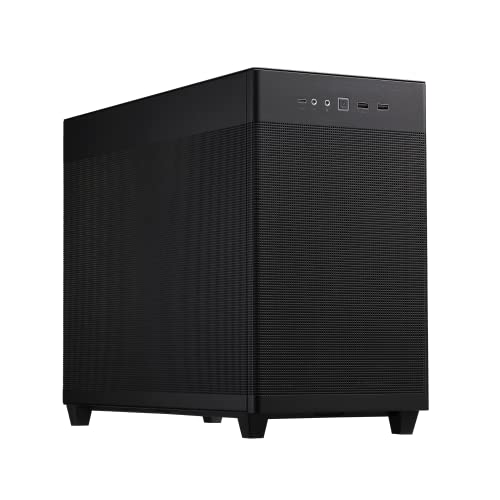
ASUS Prime AP201 (Mesh) — Best ASUS case for most builders
Begin with the mesh itself, because it is the idea the whole case hangs on. The AP201’s panels are perforated with a dense pattern of small holes that ASUS calls a quasi-filter mesh: the perforations are fine enough to act as a first line of dust defence while passing air across nearly the entire surface of the case. Front, sides, top — the box breathes through its skin rather than through a designated vent, and that changes the thermal character completely. There is no single intake to obstruct, no wrong side to push against a wall, and no fan position that the panel design vetoes.
Into this 33-litre volume ASUS has packed support that reads like a misprint until you build in it: radiators up to 360mm, graphics cards up to 338mm long, and tower air coolers of respectable height, all inside a Micro-ATX footprint that sits on a desk without annexing it. The trick is layout discipline — the power supply mounts at the front of the case, freeing the floor for the graphics card and its airflow, and cable routing is channelled so the small volume does not fill with spaghetti. First-time small-case builders should still plan the build order, but the AP201 forgives more than most cases its size.
Ownership details seal the recommendation. The side panels remove without tools, which in a compact case is the difference between a two-minute filter check and a postponed one. The mesh wipes clean. The styling — a small, dark, logo-quiet box — fits a work desk, a living room shelf and a student’s bedroom with equal ease, and there is no lighting to date it or to keep anyone awake. If the whole ASUS range had to be represented by one case in an argument about whether the company understands case design, this is the case ASUS would send.
- Form factor: Micro-ATX, roughly 33 litres
- Panels: quasi-filter mesh on the main surfaces
- Radiator support: up to 360mm
- Graphics card clearance: up to 338mm long
- Access: tool-free side panels
Strengths
- Mesh-everywhere design makes fan placement forgiving and cooling easy at this size.
- Radiator and card support embarrass mid-towers with twice the volume.
- Tool-free panels and wipe-clean mesh suit owners who actually maintain their machines.
Trade-offs
- Micro-ATX only — ATX motherboard owners must look at the bigger picks in this guide.
- The perforated skin shows the interior’s shadows, so cable chaos is hinted at even in mesh form.
- Front-mounted power supply limits some exotic layout ideas builders bring from larger cases.
Best for: compact-build buyers who want ASUS’s smartest case design at its most accessible.
Not suited for: ATX builds, or anyone who wants their case to make a visual statement at three paces.

ASUS Prime AP201 (Tempered Glass) — Best compact ASUS showcase
Sibling rivalry is the right frame for the glass AP201, because every buying decision about it is really a comparison with the mesh original above. The skeleton is shared — the same 33 litres, the same radiator and graphics card allowances, the same tool-free access, the same front-mounted power supply layout — and the difference is skin. In place of the full mesh wrap you get a tempered glass side panel that turns the build into a display, paired with a clean solid front face. The case stops breathing through its display side and leans harder on its top, base and rear paths, which remain perforated and generous.
That trade deserves honest arithmetic rather than vibes. A glass panel cannot pass air, so a glass AP201 build should be planned the way a closed-front build is planned anywhere: feed the graphics card from the floor, exhaust through the roof, and do not leave the fan layout to the defaults in your head from a mesh build. Do that, and the thermal cost of the glass is modest for the mainstream and enthusiast-mainstream hardware this case is sized for. Skip that planning and the glass version will run warmer and louder than its mesh twin wearing identical parts — not because the case is flawed, but because you asked one face of the box to be a window and then billed it for ventilation anyway.
What you receive for the trade is presence. A tidy AP201 build behind glass — cables routed through the case’s channels, a good-looking cooler, components chosen with a colour story in mind — looks like a deliberate object on a desk in a way the mesh version, for all its virtues, does not attempt. For a machine that lives in a shared or client-visible space, or simply for a builder who enjoys seeing the thing they assembled, the glass AP201 is the compact ASUS to buy, with the mesh twin as the standing recommendation for everyone who values the last few degrees over the view.
- Form factor: Micro-ATX, roughly 33 litres
- Side panel on this variant: tempered glass; front face solid
- Radiator support: up to 360mm
- Graphics card clearance: up to 338mm long
- Ventilation: perforated top, base and rear surfaces
Strengths
- Keeps the AP201’s remarkable internal allowances while adding a proper display side.
- Solid front and glass side give it a composed, desk-friendly face from every working angle.
- Shares the mesh version’s tool-free access and compact footprint.
Trade-offs
- Needs deliberate floor-to-roof fan planning that the mesh version forgives you for skipping.
- Glass shows dust settling inside a small case sooner than owners expect.
- Lighting and component colours become a design decision whether you wanted one or not.
Best for: desk builders who want their compact ASUS build visible and composed.
Not suited for: set-and-forget builders, who should buy the mesh twin and enjoy its easier breathing.
ASUS ROG Hyperion GR701 — Best ASUS flagship
The Hyperion is what happens when a case division is told that cost is a secondary consideration and presence is the brief. It is a full tower of glass, aluminium alloy and sheer dimension, with hinged glass side panels that swing open like the doors of something considerably more expensive than a computer, an interior lit and channelled for showcase builds, and support for radiators and hardware configurations that most builders will never approach. There is an integrated carrying handle arrangement worked into the top, less because anyone commutes with a machine this size than because moving it at all is a two-handed event the designers chose to dignify.
Underneath the theatre, the engineering is real. The Hyperion’s internal layout gives graphics cards their own cooling consideration, the cable management is the most elaborate ASUS offers — covers, channels and a general expectation that the build will be photographed — and the front panel’s angled slats feed genuinely large fans. A flagship build with a flagship card and a heavily overclocked processor is the workload this case was drawn around, and it handles that workload with the calm of a machine that has volume to spare in every direction.
Buying advice for the Hyperion is mostly about honesty. It is covered here in prose because our pool holds no verified listing for it, and at this level listings fragment into regional variants and bundle configurations that deserve a careful read before money moves. Buy it because you want the flagship object and the build experience it stages, having measured the space it will occupy and accepted that its cost could fund an entire sensible computer elsewhere in this guide. Buyers who do that are, by every account the case has earned, delighted. Buyers who stretch for it expecting proportional performance are the ones who end up bitter, and the gap is in the expectation, not the case.
- Form factor: full tower, E-ATX support
- Panels: hinged tempered glass sides, aluminium alloy frame elements
- Cooling: support for very large radiators and multiple fan arrays
- Character: flagship showcase design with integrated carry handles
- Availability note: prose-only pick — verify exact GR701 configuration when sourcing
Strengths
- Build quality and panel mechanisms operate at a level compact cases cannot approach.
- Volume and radiator support future-proof it against several hardware generations.
- Cable management theatre makes showcase builds genuinely achievable for patient builders.
Trade-offs
- Cost is flagship in every sense, including against entire computers in this same guide.
- Size and built weight demand a permanent home and a planned moving day.
- Its visual drama commits the whole room’s desk setup to matching its energy.
Best for: flagship builders who want ASUS’s ultimate showcase and will use its volume.
Not suited for: value calculations of any kind, small rooms, or anyone who moves house often.
ASUS TUF Gaming GT502 — Best ASUS dual-chamber case
The GT502’s party trick is architectural. Most towers are one room; this is a duplex. The main chamber, wrapped in panoramic tempered glass across front and side, holds the motherboard, graphics card and cooling that you want to look at. Behind it sits a second chamber, separately ventilated, for the power supply, drives and the cable mass that showcase builds usually hide in shame. The two zones have their own airflow stories, which means the hot, pretty components are not breathing the power supply’s exhaust and the cable spaghetti has a room of its own to be spaghetti in.
In practice the layout changes the build experience more than any temperature chart captures. Routing cables stops being a fight because there is somewhere for them to go; the main chamber stays sparse almost by default, which flatters the glass and the components equally. The case accepts large radiators in the main chamber, and its width — dual-chamber cases are always wide — gives tower coolers and thick cards room that slimmer towers ration. Woven carrying straps on top, rated for serious weight, acknowledge the consequence: a finished GT502 build is a heavy object, and ASUS would rather you carry it properly.
The TUF styling will divide the room and the case knows it. There are angles, branding and a certain tactical confidence to the design, kept — just — on the tasteful side of gaming furniture. In a bedroom battlestation it looks entirely at home; in a minimalist studio it will be the loudest object present. Judge that with your room in mind, and judge the width with your desk in hand: measure the footprint before the panoramic glass seduces you, because dual-chamber cases surprise everyone exactly once, on delivery day.
- Form factor: ATX mid-tower, dual-chamber layout
- Panels: panoramic tempered glass front and side
- Layout: separate ventilated chamber for power supply, drives and cables
- Carrying: woven handles rated for a fully built system
- Availability note: prose-only pick — confirm GT502 model name exactly when sourcing
Strengths
- Dual chambers give the cleanest cable story of any case in this guide.
- Separate airflow zones keep showcase components breathing their own cool air.
- Panoramic glass shows a build from two angles at once, which tidy builders earn.
Trade-offs
- Width is the price of the second chamber, and small desks will feel it.
- TUF’s tactical styling is a commitment guests will have opinions about.
- Finished weight makes the carry straps a necessity rather than a flourish.
Best for: builders who love the panoramic showcase look and hate cable management in equal measure.
Not suited for: narrow desks, understated rooms, or anyone chasing the smallest possible footprint.
ASUS ProArt PA602 — Best ASUS workstation case
The PA602 is the ASUS case that walks into a professional studio and behaves like it belongs there. Its front is a tall grille accented with a genuine wood element — a material choice that signals creator furniture rather than gaming gear — and behind that grille sit large front fans sized for quiet throughput. The design language everywhere else follows the same brief: straight lines, dark finishes, and details aimed at people whose computer is a billable tool, including a front I/O selection that treats fast storage and connectivity as working necessities.
Two features reveal how seriously the professional brief was taken. The first is a dust warning system: an infrared sensor watches the front filter and lights an indicator when the filter needs cleaning, which sounds like a gimmick until you have watched a render workstation slowly cook itself behind a clogged filter its owner forgot existed. Maintenance prompted by the machine beats maintenance remembered by a busy human. The second is sheer accommodation — E-ATX boards, long cards, large radiators — packaged without the visual volume of the ROG flagships, so a fully loaded workstation can sit in a client-facing room without explaining itself.
Cooling manners match the setting. The big front fans move air slowly and quietly, the layout favours sustained loads over benchmark sprints, and the whole machine is tuned for the eight-hour render queue rather than the five-minute stress test. Creators choosing between the PA602 and the Hyperion are choosing between two kinds of seriousness: the ProArt disappears into professional work, while the ROG celebrates the machine itself. Know which room, and which clients, you are buying for.
- Form factor: full-size tower, E-ATX support
- Front: tall grille with wood accent, large pre-installed fans
- Maintenance: infrared dust filter indicator on the front
- Character: creator-focused I/O and understated studio styling
- Availability note: prose-only pick — verify PA602 configuration when sourcing
Strengths
- Dust detection turns workstation maintenance from memory into a prompted habit.
- Large slow fans suit sustained professional loads and quiet rooms.
- Studio-appropriate styling carries flagship hardware without gaming theatre.
Trade-offs
- Creator pricing applies; this is professional equipment, not a budget tower.
- Full-size dimensions still demand real floor or desk space.
- Buyers wanting visible flair will find its restraint reads as plain.
Best for: creators and studios running long, heavy workloads in rooms clients see.
Not suited for: budget builds or gamers who want their case to perform visually.
ASUS ROG Strix Helios — Best ASUS aluminium showpiece
The Helios is the previous flagship generation’s answer to the same brief the Hyperion now holds, and it remains in this guide because its design idea — a frame of brushed aluminium carrying three tempered glass panels — has aged better than most gaming styling of its era. The aluminium is not a wrap or an accent; it is the structure, with an integrated handle formed into the frame itself, and the whole case has the heft and finish of machined equipment rather than folded sheet. Builders who prefer metal’s cold permanence to the Hyperion’s newer drama still choose the Helios deliberately, and they are not wrong.
Inside, the layout is a conventional flagship tower executed generously: room for E-ATX boards, long cards, large radiators and the kind of custom cooling loops that need a case to meet them halfway. The front glass panel is the thermal talking point, as it was on release — the design feeds its front fans through side intakes, and a Helios build rewards the same floor-and-exhaust attention this guide gives every closed-front machine. Configured thoughtfully, it runs flagship hardware respectably; configured carelessly, the glass front will be blamed for what the fan layout did.
As a prose-only pick, the Helios demands the most careful sourcing in this guide. It has existed in multiple editions and bundles across its life, including versions packaged with other components, and marketplace listings blur them enthusiastically. Buy the exact model, from a listing that names the edition, and inspect the glass and aluminium on arrival with the scepticism a premium used-or-new-old-stock purchase deserves. The reward for that care is a case whose materials feel a class above its successor’s in the hand, whatever the spec sheets say.
- Form factor: full tower, E-ATX support
- Frame: brushed aluminium with integrated carry handle
- Panels: tempered glass front and sides
- Cooling: large radiator support; front fans fed by side intakes
- Availability note: prose-only pick — editions vary; verify the exact listing carefully
Strengths
- Aluminium frame construction feels genuinely premium and ages gracefully.
- Generous interior accepts flagship hardware and custom cooling loops.
- Integrated handle is structural, not decorative, and moving day proves it.
Trade-offs
- Glass front requires deliberate fan planning for heavy sustained loads.
- Edition and bundle confusion makes careful sourcing essential.
- It is heavy in the way metal objects are heavy; plan its home accordingly.
Best for: builders who value machined aluminium and flagship room over newest-generation features.
Not suited for: impulse buyers, or anyone unwilling to verify exactly which Helios a listing describes.
What Is It Like to Live With an ASUS Case for Years?
Case reviews obsess over build day because build day is photogenic, but ownership is a longer and quieter relationship. The AP201’s daily texture is maintenance without ceremony: panels that lift away in your hands, mesh that a vacuum brush restores in a pass, a footprint that lets you reach the rear ports without moving furniture. Compact cases from lesser lines turn a simple drive swap into a partial rebuild; the AP201 turns it into a pause. That difference, multiplied across years of small interventions, is why this little case accumulates the kind of loyalty that looks irrational in a spec comparison.
The flagships age differently — through their mechanisms. Hinges, latches, glass mounts and aluminium frames either stay true or develop the small rattles and misalignments that cheapen an expensive object, and the Hyperion and Helios were built with the tolerances to stay true. Their risk is not mechanical but circumstantial: a flagship case commits you to its scale through house moves, desk changes and hardware generations, and the owners who thrive with them are the ones whose living situation is as settled as their taste. Buy a flagship the way you would buy a piano, with a room already in mind.
Software is the ownership layer ASUS loyalists actually feel. Lighting and fan control through ASUS’s ecosystem means one suite arguing with itself less often than a tower assembled from five brands’ utilities, and for ROG builds with ASUS boards and cards the integration is genuinely seamless — one profile, one update cadence, one place where a problem can live. Skeptics are right that this is a soft benefit. Owners are right that soft benefits, experienced daily, are the ones that decide whether a machine feels composed or assembled. Both can be true; your tolerance for software sprawl decides which truth is yours.
Support and parts form the final layer, and here the big-brand reality cuts both ways. ASUS’s scale means replacement panels, filters and accessories for popular models remain findable years later in a way boutique case parts often do not — an AP201 owner in year five is not hunting a dead company’s orphaned filter. The same scale means support moves at corporate pace when something does go wrong. For a component with no electronics beyond fans and front I/O, the practical exposure is small, and a pre-purchase inspection of panels and glass remains the simplest safeguard available. That sentence is about inspection, not fear: look the case over on arrival, whatever the badge.
Where Does the Money Go as You Climb the ASUS Range?
Reading the range as a ladder clarifies what each step buys, because ASUS prices the climb in recognisable currencies. The AP201 buys engineering efficiency: money spent on layout intelligence and panel manufacture, nothing spent on spectacle. The GT502 buys architecture — a second chamber is literally more case, more glass, more structure — plus the width that architecture demands. The PA602 buys professional features: the dust sensing, the large quiet fans, the creator I/O, the materials that let it sit in a studio. The ROG flagships buy presence and permanence: aluminium, hinged glass, mechanism quality and volume far beyond need, which is precisely their point.
None of those currencies is counterfeit, and none is compulsory. The buyer’s error is never choosing one; it is paying for a currency they will not spend — flagship presence for a machine that lives under a desk, dual chambers for a builder who loves cable craft, professional features for a hobbyist whose filter discipline was never the problem. Read your own habits before the ladder, and the right rung tends to announce itself. The AP201’s position at the ladder’s base is why it leads this guide: its currency, efficiency, is the one every builder spends.
How Should You Source the Prose-Only Flagships Carefully?
Four of this guide’s six picks carry no link here, and that is a deliberate protection rather than an omission. Flagship cases fragment across regional model codes, special editions, retailer bundles and previous-generation stock wearing current-generation photographs. Sourcing them yourself, with the model names in this guide — ROG Hyperion GR701, TUF Gaming GT502, ProArt PA602, ROG Strix Helios — and a few minutes of care, is safer than any shortcut.
Work through a short ritual. Confirm the full model name on the listing, not the family name alone; ASUS reuses family names across generations the way car makers reuse a badge. Read the panel and dimension lines in the specifications rather than the marketing summary, because width on the GT502 and height on the Hyperion are the numbers that decide whether the case fits your life. Check what the box contains — glass editions, fan bundles and accessory kits vary — and photograph the unboxing of any flagship, since glass travels badly and evidence travels well.
Finally, buy flagships from sellers whose returns process you have actually read. A case is the bulkiest return in PC building, and the difference between a painless exchange and a freight negotiation is decided entirely by that policy page. None of this caution is ASUS-specific; it is the standard discipline for large, fragile, premium objects bought online, and it is the reason this guide links only where verification was possible and describes carefully everywhere else.
How Do the Six Compare Side by Side?
| Case | Line | Size | Defining idea | Choose it if… |
|---|---|---|---|---|
| Prime AP201 Mesh | Prime | Micro-ATX compact | Mesh skin, huge hardware allowances | You want the smartest ASUS case per litre and per pound spent. |
| Prime AP201 Glass | Prime | Micro-ATX compact | Display side, solid front | Your compact build lives on a desk where it will be looked at. |
| ROG Hyperion GR701 | ROG | Full tower | Flagship showcase scale | The build is an event and the case is its stage. |
| TUF Gaming GT502 | TUF Gaming | ATX, wide | Dual chambers, panoramic glass | Cable chaos has ruined your last build’s looks. |
| ProArt PA602 | ProArt | Full-size tower | Studio manners, dust sensing | The machine earns money in a room clients visit. |
| ROG Strix Helios | ROG | Full tower | Brushed aluminium frame | You buy materials first and model years second. |
What Build Order Suits Each ASUS Architecture?
Compact cases reward sequence. In either AP201, fit the power supply and route its cables first, while the front of the case is empty and your hands can reach everything; seat the motherboard with its processor power cable already threaded; and mount the graphics card last, after the floor fans, because the card closes the space above them. Builders who follow that order describe the AP201 as roomy.
The GT502 asks for a different discipline: build the rear chamber as its own project. Power supply, drives and the full cable plan belong there, routed and tied before the main chamber receives a single component, so that the showcase side can be assembled in a space that is already clean. Resist the temptation to thread one more cable through later “just to test” — in a dual-chamber case, temporary cables have a way of becoming load-bearing mess. The glass rewards the patient and exhibits the improviser.
Full towers forgive sequence and punish complacency instead. Everything fits in any order, which is how flagship builds end up with a radiator mounted where the tubes cannot gracefully reach and a cable run crossing the one photograph angle that mattered. Walk the build in your head once — component order, tube or cable routes, the final photograph you intend to take — and the Hyperion, PA602 and Helios will repay the rehearsal with the composed result their designers staged. In a flagship, planning is not a workaround for tight space; it is the craft the space exists to display.
Which ASUS Line Fits the Way You Actually Build?
Answer three questions and the range sorts itself. First, where does the machine live? A desk in view argues for glass — the AP201 glass or the GT502’s panorama. Under a desk or in a working studio, mesh and ProArt restraint serve better and ask less of your cleaning schedule. Second, how hot is the hardware, honestly, across a whole evening rather than a benchmark minute? Compact cases here are capable, but sustained flagship loads are what full towers exist for, and no badge changes that arithmetic.
Storage habits vote too, quietly. Builders who hoard drives — media libraries, local backups, a decade of photographs on spinning disks — need bays and airflow for them, which pushes toward the PA602 or Define-class towers and away from compact cases that treat storage as an NVMe stick and a prayer. Count your drives before the case, not after; the AP201’s elegance assumes a storage life that lives on the motherboard and in one or two drives, and a buyer with six disks of archives will feel that assumption on build day.
Third, how long will you keep the case? ASUS’s flagships justify themselves across two or three builds, where their panel mechanisms, volume and materials repay the outlay in instalments of daily satisfaction. A case bought for one build and a house move in eighteen months should be an AP201, which is light enough to carry under one arm and good enough that the move, not the case, is the only thing you will complain about.
There is a fourth question loyalists forget to ask: do you already own ASUS components whose lighting or software you use? Ecosystem integration is a genuine convenience — one control suite for the board, card and case lighting — and it is the most defensible reason to prefer an ASUS case over an equally good rival. It is a tiebreaker, though, not a foundation. Buy the case that fits the room, the hardware and the decade; let the badge agree with a decision already made on merits, and it will feel like loyalty. Reverse the order and it will eventually feel like a tax.
What Mistakes Do ASUS Case Buyers Keep Making?
The AP201’s two faces cause the most returns in this guide’s range: mesh and glass share a model name, a box design language and a hundred marketplace photographs, and buyers receive the twin they did not intend with metronomic regularity. The fix is boring and total — read the panel description in the listing title itself, not the gallery, and check the box on arrival before a single screw turns.
Flagship buyers make the opposite error: they measure the desk but not the journey. A Hyperion or Helios must travel through doorways, up stairs and onto its surface, and its boxed dimensions are the ones that matter on delivery day. Measure the route, recruit the second pair of hands in advance, and the flagship experience starts with triumph instead of a hallway negotiation.
The third mistake is treating radiator support figures as promises about your specific radiator. Headline support assumes typical thickness; a thick radiator plus fans consumes clearance the headline spent on something else, in every brand’s towers and emphatically in compact ones. In the AP201 especially, plan the cooling stack — radiator position, fan direction, tube route — on paper before ordering parts, because 33 litres rewards a plan and punishes improvisation with a second parts order.
How Should You Plan Cooling in an ASUS Case?
Match the plan to the architecture you bought. The mesh AP201 wants a simple, generous scheme: intake through the base and front-facing surfaces, exhaust at the rear and top, and no anxiety about which panel breathes, because they all do. The glass AP201 wants the closed-front discipline described earlier in this guide’s family of advice — floor feeds the card, roof clears the heat — with fan curves set for steadiness rather than silence at idle.
The dual-chamber GT502 wants its zones respected. Keep the main chamber’s airflow travelling one legible direction and let the rear chamber mind its own business; the design’s benefit evaporates if cables are stuffed through every grommet until the two zones become one warm room again. The big towers — Hyperion, PA602, Helios — want restraint of a different kind: their volume tempts builders to fill every fan mount, and a dozen fans at cross purposes move less air than six in agreement. Decide the path, fit what the path needs, and leave the spare mounts empty without guilt.
Whatever the case, verify under your own sustained load for a good half hour before declaring the build finished. ASUS’s cases span too many architectures for a universal temperature promise to mean anything; your room, your hardware and your fan curves are the test bench that counts. Adjust one variable at a time, keep notes like the professional the ProArt line assumes you are, and stop when the machine is quiet at the temperatures you are comfortable living with — not when a chart on the internet approves.
Which ASUS Case Suits a Small Room or a Student Budget of Space?
Space, not money, is the constraint nobody puts in their parts list, and it decides more case purchases than any benchmark. In a small room the AP201’s virtues compound: it sits on a desk or a shelf rather than colonising the floor, its mesh version can be serviced without tools in the space it already occupies, and when the room changes — a move across town, a semester abroad, a first flat after the shared house — it travels in one hand with the monitor under the other arm. A student who builds into an AP201 owns a machine whose case never once becomes the reason a plan is hard.
The mid-towers demand a different negotiation. The GT502’s width is its tax: on a narrow desk it consumes the space a second monitor wanted, and under a desk it crowds the chair’s turning circle. Measure with the case’s real width, imagine the chair, the knees and the winter radiator sharing the same floor, and let that mental picture vote. The full towers simplify the question by answering it — they need a permanent station, and a buyer whose housing is temporary should hear that as a postponement, not a prohibition. The Hyperion bought in five years, into a settled room, will be enjoyed more than the Hyperion bought now and moved four times.
There is also the household dimension. A case in a shared room is a visual and acoustic neighbour: the AP201’s dark quiet and the PA602’s studio manners are good neighbours, while a lit flagship is a neighbour with a personality. None of that is a reason to deny yourself the build you want; it is a reason to choose the version of it — glass AP201 rather than panoramic GT502, say — that your actual rooms, rather than your aspirational ones, can welcome home.
What Happens When Your Build Outgrows the Case?
Every builder eventually meets the component that does not fit, and the ASUS range handles that moment with unusual grace because its ladder has clear rungs. The AP201 owner whose ambitions grow moves to the GT502 or PA602 and keeps the brand’s panel logic, front I/O habits and build feel; the habits transfer even when the hardware does not. The honest ceiling of the AP201 is motherboard format and exotic cooling, not quality — most owners who leave it leave for size, and leave fondly.
Future-proofing deserves its usual scepticism in both directions. A full tower bought for imaginary hardware usually houses ordinary hardware at extraordinary volume for its whole life, while a compact case bought for real hardware occasionally meets a card two centimetres too long. The mature position is to size for the build you have priced, plus one plausible upgrade you can name — a longer card, a bigger radiator — and to treat anything beyond that as speculation you are paying rent on. On that rule the AP201 covers most builders’ named upgrades, and the towers exist for the builders whose named upgrade is genuinely large.
Final Recommendation
Most readers should buy the mesh AP201 and stop shopping: it is the ASUS case that owners of every brand end up recommending, because its mesh skin, absurd hardware allowances and tool-free manners solve the compact case problem about as completely as it can be solved. Take the glass twin instead when the build will live on display, and step beyond Prime only with a reason you can say out loud — the GT502 for a panoramic dual-chamber showcase, the PA602 for a studio that bills by the render, the Hyperion for the flagship ceremony, the Helios for aluminium that will outlast trends. ASUS builds a case for each of those builders, and the badge on the front matters far less than the fact that, chosen this way, the right personality is the one doing the work.
A closing observation on the range as a whole, because it explains the recommendations better than any single review can. ASUS’s case division is at its best when it designs from a brief — the compact tool, the studio instrument, the dual-chamber showcase — and merely good when it designs from a badge. Every pick in this guide is a brief-led case, which is why a list restricted to one brand can still read as a list of distinct machines rather than six variations of one. Choose the brief that matches your build, and the badge will have earned its place on the front.
Frequently Asked Questions
Is the AP201 big enough for a serious gaming build?
Yes, within Micro-ATX limits. Its 338mm graphics card allowance and 360mm radiator support cover the overwhelming majority of gaming hardware, including long flagship-class cards. The constraints are motherboard size and build planning, not cooling capacity — the mesh version in particular breathes as well as cases twice its volume.
Mesh or glass AP201 — which should I choose?
Mesh if the case lives under a desk, runs hot hardware, or belongs to a builder who wants the easiest cooling story. Glass if the build sits on a desk as a display and you are willing to plan floor intake and roof exhaust deliberately. Same skeleton, different priorities; neither is the wrong case.
Are ROG cases worth their flagship pricing?
As objects and build experiences, they compete honestly at their level — materials, mechanisms and volume are all genuinely flagship. As performance per unit of currency, no case at that level is, and ROG does not pretend otherwise. Buy one the way you would buy beautiful furniture: for a decade of daily satisfaction, not for a benchmark.
What makes the GT502’s dual chamber worth its width?
Separation. The power supply, drives and cable mass live in their own ventilated zone, so the showcase chamber stays sparse and breathes independently. If your builds historically end with a cable bundle you hide and resent, the GT502’s extra width buys the cleanest interior in this guide.
Why is the ProArt PA602 in a gaming-heavy brand’s lineup?
Because ASUS sells to creators as seriously as to gamers, and the PA602 is built to that brief: quiet large fans for sustained loads, a dust filter that reports itself, studio styling with a wood accent. For a workstation in a client-facing room it is the most considered case ASUS makes.
Do ASUS cases work with other brands’ components?
Completely. A case is a standardised home: ATX and Micro-ATX boards, standard power supplies, standard fan sizes and radiator mounts from every maker fit ASUS cases the way they fit any quality chassis. The ecosystem conveniences — lighting sync and unified control — are bonuses when your board and card also wear the badge, never requirements. Mixed-brand builds are the norm inside these cases, not the exception.
How long should a good ASUS case last?
Plan on two to three builds, which for most people means the better part of a decade. The parts that age are front connectivity and fan bearings, both serviceable; the frame, panels and mechanisms on the picks in this guide are built to outlast the electronics they will house. The AP201’s simplicity gives it the longest plausible life of all — there is very little in it that can become obsolete.
Which ASUS case should a first-time builder pick?
The mesh AP201. It forgives fan placement, opens without tools, fits on any desk and teaches good compact-build habits without punishing beginner mistakes the way a flagship’s scale or a glass panel’s demands can. Graduate to the big towers on your second build, with opinions earned from the first.
Can I move an existing build into an ASUS case easily?
Usually yes, and the AP201 is the friendliest destination for it: standard mounts, tool-free panels and a layout that accepts components in a forgiving order make it a realistic single-evening transplant for a Micro-ATX system. Moving into a flagship is equally possible but worth treating as a rebuild rather than a transplant — clean the components, replace tired thermal paste, plan the cable story — because the glass will exhibit whatever you carry across, including the old build’s shortcuts.
Related Guides
Keep exploring with our companion roundups: best airflow closed pc cases, best 100 pc cases and best compact micro-atx cases for builders comparing beyond a single brand’s range before they commit to a chassis for the next several years of upgrades, rebuilds and quiet everyday use at their desk.


