What's inside
- Key Takeaways
- Quick Picks
- How Did We Choose These G-DRIVE Drives?
- Where Did G-DRIVE Come From, and Who Makes It Now?
- Desktop G-DRIVE or ArmorATD — Which Family Is Yours?
- How Does a G-DRIVE Fit a Real Creative Workflow?
- What Should Mac and Windows Users Each Know Before Ordering?
- How Do You Keep a G-DRIVE System Honest Over Years?
- How Do You Set Up a Two-Drive G-DRIVE System on Day One?
- What Happens When a G-DRIVE Reaches the End of Its Service?
- Where Does Each G-DRIVE Sit Between the Desk and the Road?
- What Mistakes Do G-DRIVE Buyers Keep Making?
- Why Pay the G-DRIVE Premium Over an Ordinary External Drive?
- Final Recommendation
- Frequently Asked Questions
- Related Guides
As an Amazon Associate I earn from qualifying purchases. This post may contain affiliate links at no extra cost to you.
widgetverdict.com is reader-supported. When you buy through links on our site, we may earn an affiliate commission.
Where to buy: the name of any drive below — in the Quick Picks table or at its full review — takes you to its Amazon listing; the one homework item is the brand history in the next section, because the badge on these enclosures has changed owners without changing its meaning.
Shoppers hunting for the best hard drives g drive veterans remember are looking for a name that no longer quite exists — and still does. G-DRIVE began as the flagship line of G-Technology, the storage maker that built its reputation in film and photography studios, where its aluminium enclosures sat beside editing suites as a kind of professional furniture. G-Technology passed into Western Digital’s orbit years ago, and the line now lives as part of SanDisk Professional, Western Digital’s brand for working creators. The current drives wear the SanDisk Professional name with G-DRIVE kept as the product line — same design language, same creative-professional brief, new parent on the box. One pick in this roundup, the silver 6TB desktop model, still wears the original G-Technology branding outright, a survivor of the earlier era in the same table as its descendants.
The six picks divide the way the line itself divides. Four are desktop drives: mains-powered, built around enterprise-class mechanisms at the top of the range, sized 8TB to 18TB plus a 12TB model whose terse title states its capacity and spindle speed and little else. Two are ArmorATD portables — ruggedised, bus-powered drives in 4TB and 6TB, built to be dropped in a camera bag and rained on at a location shoot. Confusing the two families is the one real buying error available here, because they answer opposite questions: the desktop asks where the archive lives, the ArmorATD asks how the footage gets home.
Every specification below comes from the pick’s own listing title, and the titles in this line vary from dossier to haiku — the 18TB flagship states its mechanism class, interface and speeds; the 12TB model states almost nothing beyond capacity and RPM. The reviews report each title’s facts and mark its silences, because with a line in brand transition, yesterday’s assumptions are the enemy.
Key Takeaways
- G-DRIVE is now a SanDisk Professional line; it began as G-Technology’s flagship, and one pick here still carries the original G-Technology badge.
- Four picks are desktop drives with their own power supplies — the 18TB and 8TB models state enterprise-class Ultrastar mechanisms inside, at 7200RPM, over USB-C.
- Two picks are ArmorATD portables: rugged, bus-powered, 4TB and 6TB, built for location work rather than the archive shelf.
- The 12TB desktop model’s title states only capacity and 7200RPM, so its review treats interface and mechanism questions as product-page homework.
- Desktop and portable G-DRIVEs are partners, not rivals: the creative workflow is ArmorATD in the field, desktop on the desk, and a copy discipline between them.
- Two titles state “Mac Ready” explicitly; Windows users should plan on a reformat, which the guide sections cover.
- The premium question is answered honestly inside: the line earns its price where duty matches its stated specification, and the reviews name the desks where it does not.
Quick Picks
| Pick | Badge | Why it earns its seat |
|---|---|---|
| Sandisk Professional 12Tb G Drive Desktop HDD | Twelve-Terabyte Desktop, Plainly Stated | A 12TB desktop G-DRIVE at 7200RPM whose short title leaves the rest to the product page. |
| SanDisk Professional 18TB G-Drive Enterprise-Class External | The Enterprise-Class Flagship | 18TB with a 7200RPM Ultrastar HDD inside, USB-C at 10Gbps on USB 3.2 Gen 2, Mac Ready. |
| SanDisk Professional 8TB G-Drive Enterprise-Class External | Enterprise-Class at 8TB | The same flagship specification — Ultrastar inside, 7200RPM, USB-C 10Gbps — at the middle capacity. |
| SanDisk Professional 4TB G-Drive ArmorATD – Rugged, Durable | The Location Drive | A rugged, durable portable at 4TB over USB-C, built to travel in the camera bag. |
| SanDisk Professional 6TB G-Drive ArmorATD – Rugged | Location Drive, Larger | The ArmorATD formula at 6TB for longer shoots and bigger cards. |
| G-Technology 6TB G-DRIVE Desktop HDD | The Original Badge | A silver 6TB G-Technology desktop drive on USB 3.0, from the line’s founding era. |
How Did We Choose These G-DRIVE Drives?
The choosing followed the line’s own architecture rather than a spec-sheet ladder. A G-DRIVE roundup that mixed desktops and portables into one ranking would mislead both audiences, so the table was built as two families with a bridge: the current SanDisk Professional desktops at three capacities, the ArmorATD portables at two, and the G-Technology original as the line’s living history. Every drive a creative professional might mean by “a G-DRIVE” is represented in its correct role.
Specification discipline mattered doubly here because the titles diverge so sharply. The enterprise-class desktops state their mechanism class, spindle speed, interface and data-rate ceiling; the 12TB desktop states capacity and spindle speed only; the ArmorATD pair state ruggedness, portability and connector generation without capacity-class claims beyond their sizes. Each review works strictly from its own title. In particular, no Ultrastar claim has been extended to the 12TB model, whose title does not make one, and no interface speed has been assigned to drives whose titles omit it.
Finally, the guide treats the brand question as a buying question, not trivia. A line in transition invites grey-market confusion — old stock, old badges, listings written against superseded names — and the history section exists so a reader can tell a current SanDisk Professional drive from a G-Technology-era one and value each correctly.
Where Did G-DRIVE Come From, and Who Makes It Now?
G-Technology built its name in the studios of the 2000s and 2010s by selling storage the way audio companies sell monitors: as professional instruments, in machined aluminium, at capacities and prices aimed at people whose footage was worth money. The G-DRIVE desktop became the line’s signature — the silver enclosure on the editor’s desk — and the brand’s world was unapologetically creative: film sets, photography studios, music production.
The corporate path since then is the standard consolidation story. G-Technology was absorbed into the HGST and then Western Digital family, and Western Digital eventually organised its creator-facing storage under the SanDisk Professional banner — SanDisk being another of its brands. The G-DRIVE name survived the reorganisation as the product line, because the name carried the equity. So a current drive is a SanDisk Professional G-DRIVE: SanDisk Professional is the brand, G-DRIVE is the model family, and G-Technology is the ancestor whose design language the aluminium enclosures still speak.
For buyers, the practical consequences are three. Support and warranty now run through the SanDisk Professional and Western Digital apparatus, whatever badge a listing’s photograph shows. Current production wears the new branding, so a G-Technology-badged drive — like this roundup’s silver 6TB pick — is earlier stock or an earlier production run, to be valued with its age in mind and its terms checked on the page. And the line’s professional positioning survived intact: the enterprise-class mechanisms in the flagship desktops are the current expression of the same studio-first brief the original G-DRIVEs were built to.
Desktop G-DRIVE or ArmorATD — Which Family Is Yours?
The desktop family is the archive and the working library. These drives are mains-powered residents: they sit beside the editing machine, hold the project history and the media vault, and serve the desk for years. The flagship pair state the formula at its fullest — an enterprise-class Ultrastar mechanism inside, 7200RPM, USB-C at the faster stated rate — which is a workstation specification, aimed at sustained transfers and an always-attached life. A desktop G-DRIVE is bought by the desk, for the desk, and its success is measured in uneventful years.
The ArmorATD family is the expedition. Rugged and durable are its title’s own words; it is a portable hard drive in an armoured enclosure, bus-powered over USB-C, sized for the camera bag and the location laptop. Its jobs are the day’s ingest — cards emptied at lunch so they can shoot again in the afternoon — the travelling copy of the project, and the drive that comes home in a pocket while the camera bodies ride in checked cases. Six terabytes in the larger one is a long shoot’s worth of cards; four in the smaller is a working week’s.
The professional pattern uses both, in sequence, and this guide recommends thinking of them as one system with a power cable at one end and a padded case at the other. Budget conversations inside a studio often frame the two families as alternatives competing for one allocation, and that framing is the seed of most storage losses the industry records: the desk drive bought without the traveller leaves footage riding home on camera cards, and the traveller bought without the desk leaves a season’s work living in a bag. The families are complements priced like rivals, and the honest budget buys the pair in the order the risk demands, even if the second half waits a season. The ArmorATD gathers; the desktop keeps; and between them runs the copy discipline the workflow section describes. A buyer choosing only one should choose by where their data is most at risk: footage that has not yet reached the desk argues ArmorATD first, while an archive with no proper home argues desktop first. For the wider shelf these drives join, Best 2 TB External Hard Disk Drives covers the smaller capacities, and Best External 6 Tb Hard Drives the rung the ArmorATD’s larger model occupies.
How Does a G-DRIVE Fit a Real Creative Workflow?
Picture the working week the line was designed around. On location, cards come out of cameras at every break and empty into the ArmorATD through the laptop; by wrap, the day’s shoot exists on the cards’ originals, the laptop and the armoured drive — and the drive rides home in a different bag from the laptop, because a copy in the same bag is a copy in the same accident. At the desk, the ArmorATD’s contents land on the desktop G-DRIVE, which holds the project’s living library and the studio’s archive behind it. Only when the footage exists in both places do the cards get formatted for the next day.
The desktop’s enterprise-class mechanism earns its keep inside that rhythm. Ingest is a sustained write of hundreds of gigabytes; project work is sustained reading and writing against large files for hours; the archive is expected to spin up daily for years. That duty profile — not the badge — is what the flagship specification is for, and it is why this guide resists recommending the desktop flagships as mere backup boxes for office documents. They will do it beautifully and wastefully, like hiring a concert hall for a phone call.
One refinement separates the studios that lose footage from the ones that merely fear losing it: the checksum habit at ingest. Copying a card is a claim; verifying it is evidence. The location laptop’s ingest tool — whatever the studio standardises on — should compare what landed against what left the card before the card is formatted, because a corrupted copy discovered at the desk, after the cards have been wiped for tomorrow, is a loss dressed as a procedure. The drives in this roundup are fast enough, in their stated classes, that verification costs minutes. The shoots that skip it are saving the cheapest minutes of the production day.
Smaller creative operations scale the same pattern down rather than abandoning it. A wedding photographer might run one ArmorATD and the 8TB desktop; a solo videographer, the 6TB ArmorATD and the 12TB desktop; a studio, the 18TB flagship with ArmorATDs per camera team. The sizes change, the sequence does not: gather in armour, keep on the desk, and never let a day’s work exist in exactly one place overnight.
What Should Mac and Windows Users Each Know Before Ordering?
The flagship desktops’ titles say “Mac Ready”, and the phrase deserves translation. It means the drive arrives formatted and specced for a Mac desk — the ecosystem this line was born in — and a Mac buyer can treat it as plug-in furniture. A Windows buyer can use the same hardware perfectly well after reformatting the drive to a Windows-native filesystem, a ten-minute job that should be done before the first real data lands, not discovered as an errand afterward. Neither fact is a defect; they are the ordinary geography of a Mac-first professional line, stated so both audiences order with open eyes.
The ArmorATD titles make no such claim either way, naming USB-C and the USB generation only. A portable that must be readable by whatever machine a location offers — the producer’s Mac, the venue’s Windows box — is the classic case for the exFAT format, readable and writable by both worlds. Decide the portable’s format by its itinerary, and write the decision on its case label alongside its name, because a drive that arrives at a strange desk in the wrong format costs a shoot its lunch break.
One more cross-platform note belongs to the desktop pair’s stated interface. USB-C at USB 3.2 Gen 2 rates, as the flagship titles specify, is the modern desk’s native tongue on both platforms; older machines reach it through the usual adapters at whatever speed their ports allow. The G-Technology original’s USB 3.0 is the previous generation’s tongue — universally understood, a step slower in ceiling, and no obstacle at all to the archive duties that drive is bought for.
How Do You Keep a G-DRIVE System Honest Over Years?
The same disciplines as any serious storage, wearing this line’s particular clothes. The desktop drive gets a fixed, ventilated place, its power brick labelled, and a surge-protected socket, because a studio archive is worth the small ceremony. The ArmorATD gets its own discipline: it is rugged, not invulnerable, and the armour exists for the accidents of travel — the dropped bag, the rained-on location — not as a licence to treat the drive as luggage’s hardest object. A drive that has taken a serious fall gets its contents copied off and its health checked before it is trusted with another day’s only ingest.
Verification closes the loop. The workflow’s promise — footage exists twice before cards are formatted — is only as good as the spot checks that prove the copies open. Build the check into the ingest itself rather than bolting it on afterwards: the same software pass that copies the card can compare it, and a studio that treats verification as a separate, optional ceremony will skip it on exactly the tired evening when a failing cable has quietly truncated a folder. Habits that ride inside the routine survive; habits that wait for spare time do not, and a decade of client work is too high a stake to rest on spare time. Open files from both drives at ingest’s end; run a full comparison on the project’s milestones; and once a season, restore something real from the desktop archive to prove the vault reads as well as it writes. Creative archives fail quietly and are discovered loudly, usually by a client asking for an old project. The owners who rehearse are the ones who answer that call calmly. Drives holding genuinely sensitive client work may also belong behind the protections surveyed in Best Encrypted External Hard Drives With Cloud Backup.
How Do You Set Up a Two-Drive G-DRIVE System on Day One?
Begin with names, because a G-DRIVE system fails administratively long before it fails mechanically. Each drive gets a name that states its role and year — DESK-VAULT, LOCATION-1 — written on a label on the enclosure and set as the volume name inside, so the physical and digital identities match when the drive appears on a strange machine’s screen. The ArmorATD’s label also carries its format decision from the platform section, since a travelling drive meets more foreign desks than any other hardware the studio owns.
Then run the workflow once, deliberately, before it matters. Ingest a real card to the ArmorATD, copy the folder to the desktop drive, open files from both, and time nothing — the rehearsal is about sequence, not speed. Studios discover their workflow’s gaps in rehearsal: the cable that is too short for the location laptop’s port side, the folder convention nobody agreed on, the checksum step everyone assumed someone else performed. A shoot day is the wrong classroom for those lessons, and an hour at the desk is the cheapest tuition in the building.
Close day one with the paperwork a professional line deserves. Record serial numbers, purchase dates and warranty terms in the studio’s register; photograph the desk setup for the insurance file while everything is new and tidy; and schedule the verification rhythm — milestone comparisons, the seasonal restore — into the same calendar that holds the shoots. The drives will outlast several cameras. The register is how the studio remembers what its future self will need to know about them.
What Happens When a G-DRIVE Reaches the End of Its Service?
Desktop archives retire in one of two ways: planned, at a capacity or age milestone the owner chose calmly, or unplanned, at the first symptom from the failure vocabulary — new noises, stalls, a drive that drops off the bus. The planned path is the professional one this line’s audience should default to. When the flagship’s replacement is ordered, the old drive’s contents migrate in stages with verification, the old drive then serves a probationary month as the second copy, and only afterwards is it wiped and demoted to cold storage of replaceable material or recycled.
The ArmorATD’s retirement is governed by its travel history more than its hours. An armoured drive that has taken real falls, or whose enclosure shows the seasons, should be demoted before its mechanism makes the decision — to desk-bound overflow duty, where its remaining life is gentle and its contents are never a day’s only ingest. The armour’s honesty is that it reports its service in its scars; owners should read them.
Disposal has a creative industry’s extra clause: client work. A retired drive that held client footage, unreleased material or personal data leaves the studio wiped with a proper secure erase of the whole device — the flash of a quick format is not enough for hardware changing hands — or it does not leave at all, and joins the small shelf of drives destroyed rather than sold. The line’s professional heritage cuts both ways: the clients whose work made these drives worth buying are owed the discipline at the drives’ end as well as at their beginning.

Sandisk Professional 12Tb G Drive Desktop HDD — Twelve-Terabyte Desktop, Plainly Stated
The 12TB desktop G-DRIVE is the roundup’s exercise in reading a short title honestly. It states: SanDisk Professional branding, 12TB capacity, desktop HDD format, 7200RPM. It does not state an interface generation, a mechanism class or a readiness claim, and this review will not lend it the flagship pair’s Ultrastar and USB-C credentials, however likely family resemblance makes them seem. What is bought here, on the evidence of the title, is a current-brand desktop G-DRIVE at the middle-large capacity with a desktop-class spindle speed.
That capacity is itself a considered rung. Twelve terabytes holds a serious creative library — years of stills, a videographer’s recent projects with the deep archive elsewhere — and for the desk whose count lands between the 8TB and 18TB flagships, this is the fit that leaves neither a ceiling pressing down nor a flagship premium unspent. The 7200RPM figure matters for the working-library role: a desktop mechanism at that spindle speed is built for the sustained, daily work of an attached archive rather than cold storage alone.
The buyer’s homework is explicit and short: the product page must answer the interface question and any mechanism or warranty questions the title leaves open, and the answers should be compared against the flagship pair’s stated specification before the order is placed. A reader who does that one check owns a well-aimed rung of the ladder. A reader who skips it is buying a badge and a capacity and hoping the rest of the family resemblance is real — a hope this guide declines to underwrite.
- Capacity: 12TB
- Form factor: desktop external hard drive (mains-powered class)
- Spindle speed: 7200RPM, per the listing title
- Brand: SanDisk Professional G-DRIVE line
- Interface and mechanism class: the listing title states neither, so verify both on the product page before ordering
- Platform readiness: no Mac or Windows claim is made in the listing title
Strengths
- A 12TB rung between the roundup’s 8TB and 18TB desktop flagships.
- 7200RPM spindle suits an attached working library, not just cold storage.
- Current SanDisk Professional branding and support apparatus.
Trade-offs
- The terse title makes the product page a required read for interface and mechanism facts.
- No enterprise-class mechanism is claimed, unlike the flagship pair.
- No platform readiness is stated, so formatting plans start from zero.
Best for: a creative desk whose counted library lands between the 8TB and 18TB rungs, bought after one product-page check. Not suited for: an order that must have mechanism class and interface confirmed by the listing itself — the flagship pair states both.

SanDisk Professional 18TB G-Drive Enterprise-Class External — The Enterprise-Class Flagship
The 18TB flagship states the fullest specification in the roundup: an enterprise-class external desktop hard drive with a 7200RPM Ultrastar HDD inside, USB-C at 10Gbps on USB 3.2 Gen 2, Mac Ready, model SDPHF1A-018T-NBAAD. Each clause earns its place. Ultrastar is Western Digital’s enterprise mechanism line, and naming it tells the buyer the enclosure is furniture around a data-centre-class mechanism — the duty rating a studio archive actually uses. The interface figure tells the same story in the other direction: the connection will not be the bottleneck the mechanism has to apologise for.
Eighteen terabytes at that duty class is a studio’s central vault in one enclosure: the project archive, the media library, the client history, with headroom measured in years of shoots. It is bought against the alternative of a small RAID or a shelf of lesser drives, and its argument is simplicity — one enclosure, one mechanism to monitor, one power brick — at a scale where the second-copy discipline must be supplied by the owner’s system, since no single enclosure, however enterprise its mechanism, is a backup of itself.
A word about scale economics inside a studio belongs here. Eighteen terabytes in one enclosure concentrates the archive’s fate in one mechanism, and the enterprise rating is precisely the mitigation the flagship offers for that concentration — a mechanism built for continuous duty, in a line whose maker supports it as infrastructure. The mitigation is real but partial, and the studio that buys this drive should hear the guide’s refrain one final time in its professional register: the flagship is the vault, the ArmorATD rotation and the off-site copy are the insurance, and a studio that can afford the first can afford the second.
The Mac Ready framing continues the line’s heritage, with the Windows reformat note from the platform section applying in full. Buyers on either platform should note what the title’s completeness implies about the product’s station: this is the current flagship expression of a professional line, priced and specced accordingly, and its natural home is a desk where storage downtime costs money. Home users with a film collection will find it magnificent and excessive in equal measure; the 8TB sibling below exists precisely for them.
- Capacity: 18TB
- Form factor: enterprise-class external desktop hard drive
- Mechanism: 7200RPM Ultrastar HDD inside, per the listing title
- Interface: USB-C (10Gbps), USB 3.2 Gen 2
- Model: SDPHF1A-018T-NBAAD
- Platform note in title: Mac Ready
Strengths
- An enterprise-class Ultrastar mechanism at the roundup’s largest desktop capacity.
- The fullest stated specification of any pick: mechanism, spindle, interface and rate.
- A single-enclosure studio vault with years of headroom.
Trade-offs
- Flagship station is wasted on a documents-and-films household shelf.
- Concentration still applies: 18TB in one enclosure demands the second-copy system.
- Windows desks should budget the reformat before first use.
Best for: a photography or video studio’s central archive on a Mac-first desk. Not suited for: a home media shelf, where the 8TB sibling carries the same specification at household scale.
SanDisk Professional 8TB G-Drive Enterprise-Class External — Enterprise-Class at 8TB
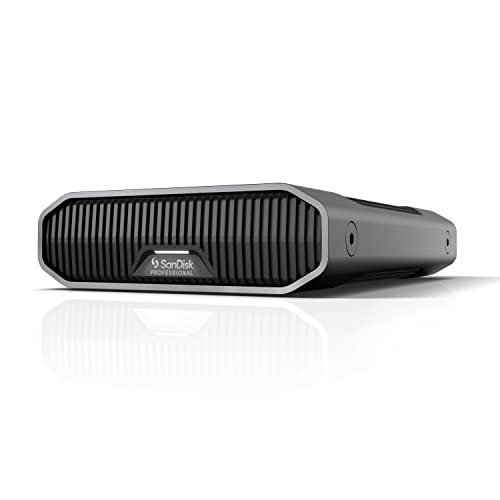
The 8TB model is the flagship specification at the working photographer’s size: the same enterprise-class desktop formula — 7200RPM Ultrastar HDD inside, USB-C at 10Gbps on USB 3.2 Gen 2, Mac Ready, model SDPHF1A-008T-NBAAD — at eight terabytes. Nothing in its title suggests a lesser mechanism or a cut corner; the difference from the 18TB is capacity alone, which makes the choice between them the purest capacity decision in this roundup.
Eight terabytes fits the professional whose archive is deep but not oceanic: a wedding and portrait photographer’s recent years with the deep history rotated elsewhere, a solo videographer’s living library, a small studio’s shared project drive. The enterprise mechanism matters at this size as much as at the flagship’s, because the duty is identical — daily attachment, sustained ingests, a working library read for hours — only the library is smaller. Buying the duty class correctly and the capacity honestly is exactly the discipline this guide keeps recommending, and this pick is its clearest example.
There is a desk-ergonomics footnote that working photographers will recognise. An 8TB vault at the centre of a daily practice becomes the machine the whole desk organises around — the light table’s digital heir — and its enclosure will be touched, nudged and re-cabled more in a year than a cold archive drive is in a decade. The desktop family’s build brief, born in studios where enclosures were furniture, suits that tactile life: a drive that lives in the open should feel like it belongs there, and the line’s aluminium heritage is a functional virtue in a way a spec sheet cannot quite say.
Growth is the one argument to weigh before settling. A desk adding terabytes a year will meet this drive’s ceiling sooner than the flagship’s, and the migration upward is the familiar afternoon of copying plus a demotion for this drive to second-vault duty — a graceful path, but a path. Count the archive, project three years, and if the line crosses eight, buy the flagship once. If it settles comfortably under, this is the professional specification without the professional surplus.
- Capacity: 8TB
- Form factor: enterprise-class external desktop hard drive
- Mechanism: 7200RPM Ultrastar HDD inside, per the listing title
- Interface: USB-C (10Gbps), USB 3.2 Gen 2
- Model: SDPHF1A-008T-NBAAD
- Platform note in title: Mac Ready
Strengths
- The flagship’s full stated specification at a working professional’s capacity.
- Enterprise mechanism matched to daily ingest and editing duty.
- Modern USB-C connection at the faster stated generation.
Trade-offs
- Fast-growing archives will meet its ceiling years before the flagship’s.
- Still a single enclosure; the second-copy discipline is unchanged.
- Mac-first formatting asks a small errand of Windows buyers.
Best for: a working photographer or solo videographer whose archive fits the rung with headroom. Not suited for: a studio archive already counting past eight terabytes — step straight to the flagship.
SanDisk Professional 4TB G-Drive ArmorATD – Rugged, Durable — The Location Drive
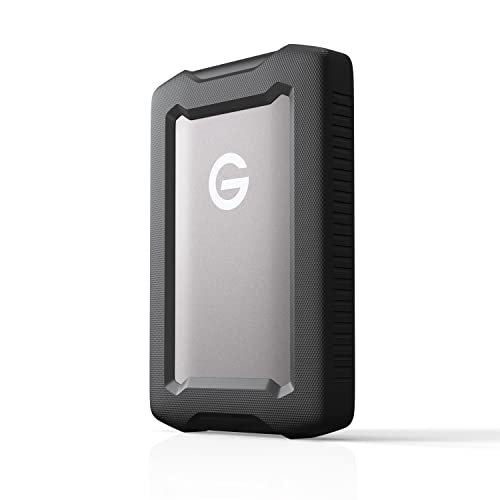
The ArmorATD changes the subject from the desk to the road: a rugged, durable portable external hard drive at 4TB, USB-C on USB 3.2 Gen 1, model SDPH81G-004T-GBA1D. Every word of its title is about the journey rather than the archive. It is bus-powered, so the location kit gains no brick; it is armoured, so the camera bag’s ordinary violence — the drop to tarmac, the rain shower crossing the car park, the crush of gear — is within its design brief rather than beyond it.
Four terabytes is the working week’s ingest size: days of stills cards, a documentary day’s footage with room to spare, the travelling copy of the current project plus the laptop’s overflow. It is also, not coincidentally, about the size at which a portable stops being a shuttle and starts being a library in its own right — small enough to insure by duplication, large enough that its loss would genuinely hurt, which is precisely the combination the copy discipline exists for. Its role in the workflow section’s pattern is the gatherer — the drive that empties cards at lunch and rides home in a different bag from the laptop — and for that role its virtues rank in an order spec sheets invert: the armour first, the single-cable manners second, the capacity third.
The honesty paragraph is short and important. Rugged is a rating of resilience, not a promise of immortality; no title figure for drop height or water resistance is stated here, so buyers whose work is genuinely extreme should read the product page’s ratings and still treat the drive as the second copy, never the only one. An armoured drive that is also the sole holder of a day’s shoot is a risk wearing good boots. Paired with the card originals until the desk copy lands, it is exactly what a location kit needs.
- Capacity: 4TB
- Form factor: rugged portable external hard drive
- Interface: USB-C, USB 3.2 Gen 1
- Model: SDPH81G-004T-GBA1D
- Design notes in title: rugged, durable portable enclosure
- Power: portable class — bus-powered over its USB connection, with no mains supply in the picture
Strengths
- Armour and portability for the ingest-and-travel role the desktop family cannot play.
- Single-cable bus power keeps the location kit light.
- 4TB swallows a working week’s cards without triage.
Trade-offs
- Rugged is resilience, not immunity; it must still be the second copy, not the only one.
- Its title states no specific drop or water ratings — verify them on the product page for extreme work.
- USB generation is a step behind the desktop flagships’ stated rate.
Best for: a photographer or small crew emptying cards on location and carrying the day’s work home safely. Not suited for: the studio archive itself — that seat belongs to the desktop family with its own power and enterprise mechanisms.

SanDisk Professional 6TB G-Drive ArmorATD – Rugged — Location Drive, Larger
The 6TB ArmorATD is the same expedition formula at half again the capacity: rugged, durable, portable, USB-C on USB 3.2 Gen 1, model SDPHE1G-006T-GBAND. The extra two terabytes buy duration — the multi-week shoot, the documentary that cannot courier drives home, the wedding season’s rolling backup that lives in the kit bag from May to September. Where the 4TB is a week’s gatherer, the 6TB is a season’s.
The larger size subtly changes the drive’s second job. At 6TB an ArmorATD also serves as the travelling vault: the copy of the project archive that goes on the road so the desk’s library can be browsed, culled and even edited from a hotel room, while the desktop original stays home. That dual role — ingest target by day, portable archive by night — is where the bigger portable earns its place in a kit that already owns the smaller one, rather than merely replacing it.
A packing note from the road deserves recording, because armoured drives die of courtesy as often as of violence. The ArmorATD should ride in its own padded compartment, cable detached, never loose in the bottom of a bag where lenses and bodies settle onto it, and never in the checked case that also holds the only other copy of anything. Crews develop rituals around drives the way they do around lenses — a pocket it always returns to, a case that is always its own — and the ritual, repeated until it is boring, is the real armour the product’s name points at.
Its cautions mirror its sibling’s, with one addition of scale. The more a single portable holds, the more the second-copy discipline matters: six terabytes of a season’s work in one armoured enclosure is a fortune in a small box, and the workflow’s rule — nothing exists in one place overnight — applies with proportional force. Buy it for the long shoot, pair it with the desk, and let its armour be the last line of defence rather than the only one.
- Capacity: 6TB
- Form factor: rugged portable external hard drive
- Interface: USB-C, USB 3.2 Gen 1
- Model: SDPHE1G-006T-GBAND
- Design notes in title: rugged, durable portable enclosure
- Power: portable class — bus-powered over its USB connection
Strengths
- The expedition formula at a season-sized capacity.
- Doubles as a travelling archive for road editing and culling.
- Same single-cable manners as its smaller sibling.
Trade-offs
- Concentrates a season’s work in one enclosure; the copy discipline must scale with it.
- Specific ruggedness ratings live on the product page, not in the title.
- Overcapacity for day-shoot kits that the 4TB serves completely.
Best for: long shoots, documentary travel and kits that carry a portable archive alongside the ingest role. Not suited for: a day-rate kit whose cards total a fraction of this — the 4TB sibling is the proportionate gatherer.

G-Technology 6TB G-DRIVE Desktop HDD — The Original Badge
The final pick is the ancestor in the room: a G-Technology 6TB G-DRIVE desktop external hard drive in silver, on USB 3.0, described by its title as compact and high-performance, model 0G03674-1. This is the founding era’s product — the aluminium desktop drive that made the line’s reputation in editing suites — still listed under its original branding while its descendants wear SanDisk Professional. Its presence in the roundup is partly history and partly a genuine option, and the review will keep those two threads separate.
As history, it explains the others: the enclosure language, the creative-professional brief, the desktop-as-furniture idea all begin here, and a reader who has followed the brand section will recognise the silver case as the original sentence the current flagships are still speaking. There are desks in working studios where a drive of this exact vintage has outlasted three computers, which is neither a promise about this listing nor a reason to skip the arrival testing — it is simply the reputation the badge was built on, stated so the buyer understands what the name meant before it changed hands. As an option, it is a 6TB desktop drive on the previous interface generation — a perfectly serviceable archive or second-vault seat for a desk whose work does not press on transfer ceilings, bought with the understanding that it is earlier stock from a superseded branding era.
That understanding carries the homework. Age and channel time matter for a mechanical drive, so test it thoroughly on arrival and confirm the warranty and support terms as they stand for this listing, under its current seller and the brand’s present apparatus. Buyers who want the line’s current production, its stated enterprise mechanisms and its modern interface should buy the SanDisk Professional desktops above. Buyers who find this original at the right terms, for a secondary seat, own a piece of the line’s history that still does an honest day’s work.
- Capacity: 6TB
- Form factor: desktop external hard drive
- Interface: USB 3.0
- Colour: silver
- Model: 0G03674-1
- Brand: G-Technology — the line’s original branding, predating the SanDisk Professional era
Strengths
- The original G-DRIVE desktop formula in its signature silver enclosure.
- A serviceable 6TB archive or second-vault seat for undemanding desks.
- USB 3.0’s universal compatibility with older machines.
Trade-offs
- Earlier-era stock: age argues for thorough testing and a terms check on arrival.
- Previous interface generation beside the flagships’ stated USB-C rates.
- No enterprise mechanism or modern readiness claims are made in its title.
Best for: a secondary archive seat, or the loyalist who wants the original badge on the desk at the right terms. Not suited for: a studio’s primary vault in current production — that seat is the SanDisk Professional flagships’ by design.
Where Does Each G-DRIVE Sit Between the Desk and the Road?
| Pick | Family | Capacity | Stated highlights |
|---|---|---|---|
| SanDisk Professional G-Drive 18TB | Desktop | 18TB | Ultrastar inside, 7200RPM, USB-C 10Gbps, Mac Ready |
| Sandisk Professional G Drive 12TB | Desktop | 12TB | 7200RPM; interface not stated in title |
| SanDisk Professional G-Drive 8TB | Desktop | 8TB | Ultrastar inside, 7200RPM, USB-C 10Gbps, Mac Ready |
| G-Technology G-DRIVE 6TB | Desktop | 6TB | Silver, USB 3.0, original branding |
| SanDisk Professional ArmorATD 6TB | Portable | 6TB | Rugged, USB-C, USB 3.2 Gen 1 |
| SanDisk Professional ArmorATD 4TB | Portable | 4TB | Rugged, USB-C, USB 3.2 Gen 1 |
The table’s shape is the line’s shape: four residents, two travellers, one brand history binding them. Choose the resident by the archive’s counted size and the traveller by the shoot’s counted cards, and the system assembles itself.
What Mistakes Do G-DRIVE Buyers Keep Making?
Buying the portable as the archive is the first: an ArmorATD is built to travel, and an archive that travels is an archive at risk, however good its armour. The second is the reverse error — a desktop flagship bought for location ingest, brick and all, in a kit bag. The third is brand confusion in a transition era: assuming a G-Technology-badged listing is current production, or a SanDisk Professional one is a different product entirely, when the history section’s family tree explains both.
The fourth is lending the flagship’s specification to its terser sibling — the 12TB review refuses that loan, and buyers should too. The fifth is formatting the day’s ingest drive for one platform and discovering the other’s machine at the venue. And the sixth is letting the workflow’s copy discipline slip because the drives feel professional: cards formatted after a single copy, the armoured drive riding home in the same bag as the laptop, the archive verified never. The line’s professional heritage is real, but it describes the hardware’s construction, not a substitute for the owner’s habits.
Why Pay the G-DRIVE Premium Over an Ordinary External Drive?
The question deserves a straight answer, because on capacity alone the arithmetic can look unkind: ordinary desktop drives reach the same terabytes, and portable drives of the same size crowd every marketplace. What the line’s premium buys, where it buys anything, is specification and intention. At the flagship end it buys a stated enterprise-class mechanism — a duty rating written into the title rather than hoped for — inside an enclosure designed for a working desk’s decade. In the ArmorATD it buys an enclosure engineered for travel as its primary brief, from a line whose support apparatus understands location work. And across the family it buys the coherence of a system: desktop and portable designed as partners, from one maker, with one support door to knock on.
Where the premium buys nothing, this guide has already said so in the reviews. A documents household gains no earthly benefit from an Ultrastar mechanism’s duty rating; the archive that spins up monthly does not need a workstation’s specification; and a buyer whose real requirement is a cheap second copy should buy exactly that, from any honest maker, and spend the difference on the off-site rotation. The G-DRIVE line’s professional focus is a filter, not a compliment — it tells the non-professional reader, politely, that the line was not built with their desk in mind.
The middle reader is the one this roundup most serves: the serious amateur, the semi-professional, the small studio whose work is becoming their living. For that reader the premium is neither worship nor waste; it is the price of hardware whose stated specification matches the duty their work is growing into, bought a size ahead of the library and a discipline ahead of the accident. Judged that way — duty first, badge last — the line either earns its place on a given desk or honestly does not, and both answers are respectable outcomes of the same arithmetic.
Final Recommendation
Build the system the line was designed for. The desk gets a SanDisk Professional desktop sized by the counted archive: the 18TB flagship for the studio vault, the 8TB for the working professional’s library, the 12TB for the desk between them — with its product-page homework done. The road gets an ArmorATD sized by the shoot: 4TB for the week, 6TB for the season. The G-Technology original takes a secondary seat where its era and terms suit. Then run the sequence the workflow section describes — gather in armour, keep on the desk, verify at milestones — and the badge’s long studio history becomes something better than nostalgia: a working method, still earning its place on the desk. Buy the names for what they verifiably are — a professional line, a stated mechanism class, an armoured traveller — and hold the titles to their own words, and a G-DRIVE purchase made in 2026 rests on the same ground the line was founded on: storage treated as part of the craft, not as an afterthought to it.
Frequently Asked Questions
Is G-DRIVE still made by G-Technology?
G-Technology is the line’s origin, not its current letterhead. The G-DRIVE family now sits under SanDisk Professional, part of Western Digital, and current drives wear that branding with G-DRIVE as the product line. The silver pick in this roundup still carries the original G-Technology name because it comes from that earlier era of the line.
Are the desktop G-DRIVEs and the ArmorATD interchangeable?
No — they are partners with opposite designs. The desktops are mains-powered residents holding the archive; the ArmorATDs are bus-powered portables built to travel and ingest. Each can pinch-hit in the other’s role for an afternoon, and each is a poor permanent substitute.
What does “Ultrastar inside” mean on the flagship desktops?
It names the mechanism: Ultrastar is Western Digital’s enterprise hard drive line, and the flagship titles state a 7200RPM Ultrastar HDD inside the enclosure. In buying terms it is a duty-class claim — the enclosure wraps a data-centre-grade mechanism — which suits an archive that spins daily for years.
Will a Mac Ready drive work with my Windows PC?
Yes, after a reformat to a Windows-native filesystem. The hardware is platform-agnostic; the arrival formatting follows the line’s Mac heritage. Do the reformat before the first real data lands, and the drive serves a Windows desk without further ceremony.
How rugged is the ArmorATD, exactly?
Its titles claim rugged and durable construction without stating figures, so exact drop or water ratings belong to the product page. Treat the armour as protection against the ordinary violence of travel — drops, weather, crushing kit — and keep the second-copy discipline regardless; armour reduces risk, it does not repeal it.
Should I buy the G-Technology model or a current SanDisk Professional one?
For a primary vault, the current production: the SanDisk Professional desktops state modern interfaces and enterprise mechanisms and sit squarely in the present support apparatus. The G-Technology original suits a secondary seat bought knowingly — tested on arrival, terms checked — where its era is priced into the decision.
Can I daisy-chain my whole desk from one G-DRIVE?
No — these are single-connection USB drives, and each takes its own port or a place on a hub. Desks that have standardised on a docking station should treat the desktop G-DRIVE as the dock’s most honoured guest: a direct, short cable run, since the vault is the device whose transfers are largest and whose connection should be the most boring one in the building. Let keyboards and card readers share the hub’s far ports; the archive gets the clean path.
My G-DRIVE is several years old and still silent. Should I replace it anyway?
Silence is good news, not a guarantee, and the replacement section’s answer is to let planning rather than panic decide. If the drive’s contents are fully covered by the second-copy system, an ageing but healthy vault can serve until symptoms or a capacity milestone retire it. If it has quietly become the only copy of anything — the commonest way archives drift into danger — the correct purchase is not a replacement but the missing second copy, bought this week, while the silent drive is still there to be copied from.
Related Guides
- Best 2 TB External Hard Disk Drives
- Best External 6 Tb Hard Drives
- Best Encrypted External Hard Drives With Cloud Backup