What's inside
- Key Takeaways
- Quick Picks
- How Did We Pick These RGB Headsets?
- What Does RGB Actually Add to a Headset?
- Is Wired or Wireless Better for a Lit Headset?
- Each of the Six RGB Headsets, Examined Closely
- Which RGB Headset Earns Its Glow? A Side-by-Side Reading
- Where Do RGB Headset Buyers Usually Go Wrong?
- How Should You Set Up an RGB Headset for Streaming?
- How Do You Coordinate a Lit Headset With the Rest of a Desk?
- What Should Parents and Shared Households Know About RGB Headsets?
- How Long Should an RGB Headset Last, and What Wears Out First?
- Final Recommendation
- Frequently Asked Questions
- Related Guides
As an Amazon Associate I earn from qualifying purchases. This post may contain affiliate links at no extra cost to you.
widgetverdict.com is reader-supported. When you buy through links on our site, we may earn an affiliate commission.
An RGB headset is a small act of faith: you pay for light you will never see while wearing it. That paradox is exactly why shopping for the best rgb headsets rewards clear thinking. The glow is for your stream, your desk, your teammates across the room — your own experience is decided by drivers, microphones and connections, the same unglamorous virtues as any headset. So this guide judges the light honestly, as a feature for an audience, and judges everything else as if the lights were off. Six headsets survived that double standard: three wireless or premium-leaning models from Logitech, Razer and Corsair, and three wired models from Razer, EKSA and FIFINE that put lighting within reach of a strict budget and a single USB port.
Where to buy: Amazon carries all six, and the linked names in this guide point at the precise listings whose titles supplied every specification quoted here. RGB headsets attract sloppy marketplace listings more than most categories, because a photograph of a glowing headset sells almost any model. Read the title of what lands in your cart. If it does not name the lighting system the section below describes, you are looking at a different or lesser variant wearing the same hero image.
Key Takeaways
- RGB on a headset serves your audience and your desk, not your ears; buy the sound and microphone first, the light second.
- Lighting depth varies enormously here, from FIFINE’s 11 named RGB modes to headsets whose titles promise RGB without detailing modes at all.
- Two picks are wireless with 2.4GHz plus Bluetooth; four are wired USB designs that draw their light power from the cable and never need charging.
- USB connections dominate this category because they carry both audio data and lighting control in one plug; only the wireless pair escapes the desk.
- Microphone claims range from Logitech’s Blue VO!CE processing to FIFINE’s active noise canceling mic, and voice quality differs more between these six than game audio does.
- Software ecosystems decide how much of the lighting you can actually choreograph, and console players get a fraction of what PC players unlock.
Quick Picks
| Pick | Badge | Why it is here |
|---|---|---|
| Logitech G733 Lightspeed Headset | Best wireless all-rounder | Lightspeed wireless, a suspension headband and Blue VO!CE microphone processing in Logitech’s friendliest shape. |
| Razer Barracuda X Chroma Wireless Headset | Best battery among RGB picks | Chroma lighting on a dual-mode wireless frame claiming 70 hours, the endurance figure of this guide. |
| Corsair HS80 RGB USB Wired PC Gaming Headset | Best wired microphone | A broadcast quality mic claim, Dolby Audio 7.1 and memory foam in a PC-focused USB design. |
| Razer Kraken V3 X Wired Headset | Best lightweight wired | Chroma RGB on Razer’s light wired frame, with TriForce 40mm drivers and a cardioid microphone. |
| EKSA E1000 USB PC Gaming Headset with Mic | Best simple plug-and-play | RGB light, 7.1 surround and a noise cancelling microphone claim across PC, consoles and call center duty. |
| FIFINE H13BP Wired USB Gaming Headset for PC, PS4/5, Mac | Best lighting modes per headset | Eleven RGB modes, three EQ modes and a game/chat balance control on 50mm drivers. |
How Did We Pick These RGB Headsets?
Eligibility required the letters RGB, or a named lighting system, in the listing title itself. That rule sounds pedantic until you browse the category: plenty of headsets glow in photographs while their titles describe single-color LEDs, unspecified lighting, or nothing at all. Every pick below states its lighting in words a buyer can hold the seller to. Razer’s Chroma appears twice, on the Barracuda X Chroma and the Kraken V3 X, and Chroma is a genuine ecosystem claim, meaning per-device effects and synchronization through Razer’s software. FIFINE states 11 modes outright. EKSA states RGB light plainly. Logitech’s G733 and Corsair’s HS80 carry their lighting reputations in their model names and titles, the G733 through the LIGHTSYNC family it belongs to and the HS80 through the RGB in its own name.
Beyond the light, we balanced the shelf the way RGB buyers actually shop. There is a wireless tier for players whose desks are also stages, a wired PC tier for players who want software control and broadcast-leaning microphones, and an accessible wired tier where lighting arrives without a flagship price posture. Platform honesty was enforced throughout: the HS80 RGB USB is a PC headset by its own title, the EKSA reaches toward consoles and call centers, and the FIFINE names PC, PS4/5 and Mac. A pick that glows beautifully but cannot connect to your machine is a lamp, and we graded accordingly.
One more filter deserves naming. We excluded headsets whose lighting exists only as a fixed rainbow that cannot be dimmed or switched off, where the title gave no indication of control, because a headset you cannot darken is a headset that will eventually annoy you during a film, a late call or a shared room at night. Control matters as much as color.
What Does RGB Actually Add to a Headset?
Start with the honest inventory. RGB lighting adds visibility: of you, on camera, to an audience that reads your setup as part of your identity. It adds cohesion when it synchronizes with a keyboard, mouse and case fans into one scheme. It adds small functional signals in some ecosystems, where lighting reacts to game events or notifications, though those integrations live in PC software and vary by title. And it adds nothing whatsoever to frequency response, microphone clarity or comfort. A buyer who understands that division will shop this category happily. A buyer who expects the light to improve the sound will feel cheated by physics.
The costs are equally concrete. On wireless headsets, lighting consumes battery, which is why the Barracuda X Chroma’s 70-hour claim deserves respect: sustaining an illuminated frame across that endurance figure requires either a generous battery or disciplined lighting efficiency, and real-world hours will fall as brightness rises. On wired headsets, lighting costs nothing in battery but adds software dependence; the prettiest effects live behind each brand’s PC application, and a headset used mostly on console will show you its default cycle and little more. There is also a social cost to budget: an RGB headset in a work call or a shared living room performs whether you asked it to or not, so the ability to dim or disable the light from a control you can reach is a feature worth confirming for your exact model.
Notice, too, where the light physically sits. Earcup logos and rings read well on camera because they face outward at head height. Lighting buried under a headband or aimed at your desk is decoration for photographs rather than for an audience. When you compare product images, ask the simple question: from the angle a webcam sees, what actually glows? The six picks here put their light on the earcups, which is where an audience can appreciate it.
Is Wired or Wireless Better for a Lit Headset?
Wired USB is the natural home of RGB, and four of these six picks live there for good reasons. A USB cable delivers steady power, so lighting brightness never trades against battery anxiety, and the same cable carries the data channel that software uses to choreograph effects. The HS80 RGB USB, Kraken V3 X, EKSA E1000 and FIFINE H13BP all exploit that arrangement. Their shared limitation is geography: your glowing headset exists within cable radius of one machine, and on consoles the software layer that makes RGB interesting is largely absent.
Wireless RGB, represented by the G733 and the Barracuda X Chroma, is a deliberate extravagance that makes sense for streamers and desk minimalists. Lightspeed and 2.4GHz connections keep game audio responsive, Bluetooth on the Razer extends the headset to a phone, and the light show survives the walk to the kitchen between matches. The discipline required is charging, and the failure mode is specific: a dead wireless RGB headset during a stream is not merely silent, it is visibly dark, which is the one moment its owner most wanted it lit. If your audience sees your headset, keep a charging ritual or a wired backup within reach.
Latency and lighting interact in one more subtle way. Software-reactive effects, where the headset flashes with game events, depend on the PC processing and sending those cues, which works over both USB and proprietary wireless dongles. Bluetooth, by contrast, is a listening connection here rather than a performance one on the dual-mode Razer. Play over the dongle, glow over the dongle, and let Bluetooth handle music and calls.
Each of the Six RGB Headsets, Examined Closely
Order below follows the Quick Picks table, not a podium. The right RGB headset is the one whose light, microphone and connection all match the same life.

Logitech G733 Lightspeed Headset — Best wireless all-rounder
The G733 is the friendly face of wireless RGB. Its design language is soft where rivals are aggressive: rounded cups, a suspension headband that floats the weight across a fabric strap, and lighting arranged as earcup zones meant to be seen on camera. The suspension headband deserves emphasis because it changes long-session comfort mechanically rather than cosmetically. Instead of a padded rigid band pressing through one contact strip, the strap distributes pressure and self-adjusts to head shape, which is why the G733 is so often the recommendation for players who find conventional headbands fatiguing. In black, as listed here, the lighting carries the personality that the colorway declines to.
Lightspeed is Logitech’s proprietary wireless, the connection the title leads with, and it is the correct way to use this headset for gaming: low delay, stable, dongle-based. Platform support in the title covers PC, PS5, PS4 and Switch. Blue VO!CE is the microphone story, and it is a processing story rather than a hardware one. Blue VO!CE applies real-time filters through Logitech’s software to clean and shape your transmitted voice, which flatters streamers and meeting-heavy players on PC. Be aware that this processing lives in the PC software layer; console use keeps the microphone but not the full filter suite. PRO-G audio drivers are Logitech’s named driver family, tuned for clarity in the ranges where game cues live.
The G733’s lighting, part of Logitech’s LIGHTSYNC approach, is designed for synchronization across a Logitech desk and for per-zone effects configured on PC. It is also, in the scheme of this guide, tasteful lighting: visible, colorful, but integrated into the cup shape rather than bolted on. Buyers who want their headset to be the loudest object in the room should look at the FIFINE’s mode count or the Razer Chroma pair. Buyers who want a wireless headset that glows with restraint and disappears in comfort for hours will find the G733 the most livable product here.
- Connection: Lightspeed wireless, per the listing title
- Microphone: detachable-style boom with Blue VO!CE processing through Logitech software on PC
- Drivers: PRO-G audio, Logitech’s named driver line
- Platforms named in the title: PC, PS5, PS4, Switch
- Battery figure: the listing title quoted for this guide does not state an hour count, so verify endurance on Logitech’s own specification page before comparing it against the 70-hour claim elsewhere in this guide
Strengths
- Suspension headband delivers the most forgiving long-session fit of any pick here.
- Blue VO!CE processing gives PC streamers software-shaped voice quality without extra hardware.
- Lightspeed wireless keeps the light show and the low-delay audio on one stable connection.
Trade-offs
- Microphone processing and lighting choreography depend on Logitech’s PC software, so console players get a reduced feature set.
- No Bluetooth is named in the title, limiting phone pairing compared with the Barracuda X Chroma.
- The soft, rounded styling may read too gentle for players building an aggressive battlestation aesthetic.
Best for: a PC streamer wanting wireless freedom, camera-friendly light and a headband that forgives marathon sessions.
Not suited for: a player requiring Bluetooth phone pairing from the same headset, since the title names Lightspeed only.

Razer Barracuda X Chroma Wireless Headset — Best battery among RGB picks
The Barracuda X Chroma answers the obvious objection to wireless RGB, which is endurance, with the largest number in this guide: a 70-hour battery claim in its title. Razer took the Barracuda’s travel-friendly dual-mode design and added Chroma lighting to the cups, producing the rare lit headset that can plausibly be charged weekly rather than nightly. The connections are 2.4GHz wireless for play and Bluetooth 5.3 for everything else, across PC, Mac, PS5, Switch 2 and smartphone according to the title. That platform list is the broadest here, and the explicit Switch 2 mention marks this as a current-generation listing rather than a stale one.
The HyperClear microphone and 40mm drivers place it in familiar Barracuda territory: competent, clear, tuned for the breadth of games and calls rather than for one extreme. What the Chroma version adds over its plainer sibling is identity. On a desk of black peripherals it becomes the glowing accent; on camera it gives a streamer Razer’s full Chroma synchronization with keyboards, mice and ambient strips in the same ecosystem. The lighting is the reason to choose this variant, and the battery is the reason the choice is defensible.
Honesty requires two notes. First, 70 hours is a claim under the brand’s test conditions, and Chroma brightness is the variable most likely to tax it; a buyer who runs the lighting at full intensity nightly should expect a shorter interval between charges and still be pleased relative to most wireless RGB rivals. Second, the Barracuda frame prioritizes light weight and portability over the plush, sealed feel of dedicated desk headsets. Players who want maximum passive isolation from a noisy household may prefer the memory foam seal of the wired HS80 at the desk and keep this Razer for its versatility.
- Battery: 70-hour claim stated in the listing title
- Connections: 2.4GHz wireless plus Bluetooth 5.3
- Drivers: 40mm, per the title
- Microphone: HyperClear, Razer’s voice-focused line
- Platforms named in the title: PC, Mac, PS5, Switch 2, smartphone
Strengths
- 70-hour battery claim makes RGB ownership practical for players who hate nightly charging.
- Dual wireless modes plus the widest platform list here cover desk, console and phone in one headset.
- Chroma synchronization unifies it with an existing Razer lighting ecosystem instantly.
Trade-offs
- Lighting brightness will pull real endurance below the headline claim, as with all lit wireless designs.
- Lightweight travel-oriented frame seals less firmly than the plush wired desk headsets in this guide.
- Chroma control lives in Razer’s PC software, so console-only owners see default effects rather than choreography.
Best for: a multi-platform player inside Razer’s ecosystem who wants the glow without a charging habit.
Not suited for: a desk-bound player in a loud household needing the firmest passive earcup seal above wireless convenience.
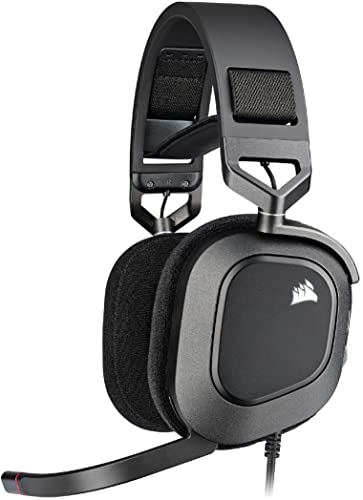
Corsair HS80 RGB USB Wired PC Gaming Headset — Best wired microphone
The HS80 RGB USB makes its priorities plain in its title: PC gaming, wired USB, and a microphone described as broadcast quality and clear. That microphone is the reason this headset anchors the wired tier. Corsair built the HS80 line around voice capture that streamers and meeting-heavy professionals could use as their primary microphone, and the USB version keeps that focus while adding RGB in the model name and Dolby Audio 7.1 as its spatial system. Memory foam earpads and on-ear controls complete a specification that reads like a desk professional’s checklist rather than a toy’s.
Dolby Audio 7.1 over USB is a PC arrangement through and through. The headset is titled for PC, and buyers should take that literally: this is not the pick for a PlayStation couch or a Switch dock, whatever an adapter promises. Within its intended habitat it is superbly matched. USB carries the audio, the Dolby processing runs in the PC environment, the RGB is configured through Corsair’s software world, and the on-ear controls keep volume and mute at your fingertips without a software detour mid-game. Plug-and-play is the title’s own phrase, and for once the phrase undersells slightly, because the headset rewards the ten minutes spent configuring it on PC rather than merely working when plugged in.
The wired cable is the deliberate trade. You give up the room, and in exchange your lighting never dims for a battery, your microphone never drops for a radio hiccup, and your headset is ready at 2 a.m. exactly as it was at 2 p.m. For streamers whose chair is their studio, that exchange is not a compromise at all. It is the professional choice, and the HS80’s broadcast-leaning microphone is the strongest single-voice argument in this entire guide.
- Connection: wired USB, plug-and-play per the title
- Microphone: described in the title as clear and broadcast quality
- Audio processing named in the title: Dolby Audio 7.1
- Cushions: memory foam earpads; controls on the earcup
- Platform scope in the title: PC gaming specifically, with no console platforms named
Strengths
- Broadcast-leaning microphone makes it the strongest pick for streamers and voice-led work.
- Dolby Audio 7.1 plus Corsair’s PC software gives the deepest wired spatial setup here.
- Memory foam pads and on-ear controls suit long, seated, microphone-heavy days.
Trade-offs
- PC-only by its title; console players should choose a different pick rather than adapt this one.
- The cable permanently defines your range, with no wireless or Bluetooth alternative in the same product.
- RGB configuration depends on Corsair’s software, adding setup time before the first session.
Best for: a PC streamer or remote professional whose voice is their livelihood and whose desk is their studio.
Not suited for: a console player expecting one headset to serve a PlayStation or Switch, since the title scopes it to PC.

Razer Kraken V3 X Wired Headset — Best lightweight wired
The Kraken V3 X is Razer’s argument that RGB belongs on a headset you can forget you are wearing. Lightweight is the first adjective in its title, and the Kraken frame pursues that goal with a slim headband and modest clamp that suit smaller heads and glasses wearers particularly well. Chroma RGB lighting is named outright, which places this wired USB headset inside Razer’s synchronization ecosystem at the accessible end of the line. For a player assembling their first coordinated Razer desk, this is the natural headset component: it glows in step with a Chroma keyboard and mouse without demanding flagship money or flagship weight.
The audio specification pairs TriForce 40mm drivers with a claimed 7.1 surround sound mode. TriForce is Razer’s driver architecture that separates the tuning of bass, midrange and treble portions of the driver, aiming for clarity across all three rather than a single boomy signature. In practice the V3 X sounds clean and game-focused, with footsteps and dialogue easy to follow. The HyperClear cardioid microphone continues the theme of doing the social basics properly: your voice forward, the room behind you suppressed, callouts intelligible at normal speaking volume.
USB connection defines both its reach and its limits. On PC it is fully at home, with Chroma control and surround processing available through Razer’s software. The title does not present it as a console-first product, and buyers should not assume the software features follow the headset to a PlayStation even where basic audio might work. Judge it as a PC headset with a famous lighting ecosystem, a genuinely light frame, and a microphone that respects your teammates, and it is easy to recommend. Judge it as a universal device and you will be disappointed by your own expectations rather than by the product.
- Drivers: TriForce 40mm, per the listing title
- Microphone: HyperClear cardioid
- Connection: wired USB
- Lighting: Chroma RGB, named in the title
- Surround: 7.1 surround sound as a stated feature in the title
Strengths
- Featherweight frame is the kindest here to glasses wearers and smaller heads.
- Chroma membership synchronizes it with a Razer desk at an accessible tier of the line.
- TriForce tuning keeps game cues clean across bass, mids and treble simultaneously.
Trade-offs
- USB and Razer software tie its best features to PC use.
- Light clamp and build feel less substantial than the HS80’s desk-professional construction.
- No wireless option in this model; movement means managing a cable across the desk.
Best for: a PC player building a first Chroma-synchronized desk who values a light frame over heft.
Not suited for: a console-first household expecting full lighting and surround features away from a PC.

EKSA E1000 USB PC Gaming Headset with Mic — Best simple plug-and-play
The EKSA E1000 is the populist of this guide. Its title reads like a search query answered in full: USB PC gaming headset, 7.1 surround sound, microphone with noise cancelling, RGB light, wired, suitable for PS4, PS5 console, laptop and even call center work. That breadth is the product’s identity. EKSA sells the E1000 as the one headset a household or a small office can plug into almost anything with a USB port and get light, surround processing and a serviceable microphone without software deliberation. For buyers who find brand ecosystems more burden than benefit, that simplicity is a feature with real value.
The RGB light here is exactly what the title calls it: light. Do not expect Chroma-style synchronization, per-zone choreography or an application suite. Expect a glowing headset that looks alive on a desk and in a video window, controlled simply, and priced by its posture in the market as an accessible tool. The noise cancelling microphone claim refers to reducing ambient sound in your transmitted voice, the standard meaning in this category, and the call center mention in the title tells you EKSA expects this microphone to work for a living, not only for play.
Longevity expectations should be set with the same honesty. The E1000’s appeal is breadth and accessibility, and its construction reflects that positioning rather than the HS80’s professional brief. Treated as a hardworking, replaceable, glow-equipped utility headset for a shared family PC or a work-from-home corner, it is well judged. Treated as a five-year heirloom, it will feel its tier. Many buyers are better served by exactly this honesty: buy the tool that matches the job, and let the lighting be the pleasure it is rather than a promise it never made.
- Connection: wired USB
- Surround: 7.1 surround sound as stated in the title
- Microphone: noise cancelling, per the title’s description
- Lighting: RGB light, stated plainly without a mode count in the title
- Uses named in the title: PS4, PS5 console, laptop and call center alongside PC
Strengths
- Broadest stated use range here, spanning gaming consoles, laptops and call center work.
- Delivers RGB, surround processing and a noise cancelling mic claim in one simple USB plug.
- No ecosystem lock-in; it works as a tool rather than as a citizen of one brand’s software.
Trade-offs
- Lighting is present but not choreographable to Chroma or LIGHTSYNC standards.
- Construction reflects its accessible positioning rather than professional-tier materials.
- Surround and microphone processing are claims to test in your own setup, without a major software suite behind them.
Best for: a household or home worker needing one glowing USB headset that serves games and calls alike.
Not suited for: a lighting enthusiast expecting synchronized, per-zone effects across a whole desk of peripherals.

FIFINE H13BP Wired USB Gaming Headset for PC, PS4/5, Mac — Best lighting modes per headset
FIFINE came to headsets from microphones, and the H13BP shows a lighting maximalist’s hand. Eleven modes of RGB is the most specific lighting claim in this guide, a number that tells you the light is not an afterthought but a headline feature with variety to cycle through: steady schemes, breathing cycles and reactive patterns for players who treat their desk as a light instrument. Three EQ modes sit alongside the lighting modes, and a game/chat balance control addresses a practical streaming and team-play need, letting you favor voices or game audio from the headset rather than diving into a settings menu mid-match.
The drivers are the largest named in this guide at 50mm, and the microphone carries an active noise canceling description, consistent with FIFINE’s microphone heritage. The platform list covers PC, PS4/5 and Mac over wired USB, a spread that makes it the most console-welcoming of the wired tier here while keeping Mac users, so often an afterthought in gaming audio, explicitly included. Ergonomic earpads are the stated comfort feature, aimed at the long sessions its lighting modes seem designed to accompany.
Set expectations around the software layer. FIFINE’s proposition is hardware-forward: modes on the device, balance on the device, EQ on the device. Buyers who want a deep PC application with per-game profiles should look toward Razer, Logitech or Corsair. Buyers who want to unbox a headset, plug in one USB cable, and immediately have eleven lighting personalities and a voice that benefits from a microphone company’s instincts will find the H13BP the most entertaining dollar-for-feature object in this guide, and a genuinely sensible one for PlayStation players who want in on the RGB shelf.
- Drivers: large 50mm, the biggest figure named in this guide
- Lighting: 11 modes RGB, the most detailed lighting claim here
- Sound modes: 3 EQ modes plus game/chat balance control
- Microphone: active noise canceling, per the title
- Platforms named in the title: PC, PS4/5, Mac over wired USB
Strengths
- Eleven RGB modes give it more lighting variety than any rival in this guide.
- Game/chat balance on the headset solves a nightly team-play annoyance without menus.
- Mac is named in the title, rare honesty in a category that often forgets Mac players.
Trade-offs
- Hardware-based modes replace, rather than match, the deep software ecosystems of the big three brands.
- Wired USB only; no wireless path for couch or travel use.
- Feature density means more controls to learn before the headset feels automatic.
Best for: a PC or PlayStation player who wants maximum lighting variety and on-headset controls in one cable.
Not suited for: a minimal-setup player who prefers two buttons and no modes to a rich control surface.
Which RGB Headset Earns Its Glow? A Side-by-Side Reading
| Headset | Connection | Lighting claim | Microphone claim | Platforms in title |
|---|---|---|---|---|
| Logitech G733 | Lightspeed wireless | Earcup zones, Logitech lighting family | Blue VO!CE processing | PC, PS5, PS4, Switch |
| Razer Barracuda X Chroma | 2.4GHz plus Bluetooth 5.3 | Chroma RGB | HyperClear | PC, Mac, PS5, Switch 2, smartphone |
| Corsair HS80 RGB USB | Wired USB | RGB in model name | Broadcast quality | PC |
| Razer Kraken V3 X | Wired USB | Chroma RGB | HyperClear cardioid | PC focus |
| EKSA E1000 | Wired USB | RGB light | Noise cancelling | PC, PS4, PS5, laptop, call center |
| FIFINE H13BP | Wired USB | 11 modes RGB | Active noise canceling | PC, PS4/5, Mac |
The table exposes the category’s real fault line, which is not light versus no light but ecosystem versus appliance. The Razer pair, the Logitech and the Corsair all promise that your headset’s glow belongs to a larger coordinated system, configured on PC. The EKSA and FIFINE promise that the headset itself contains its lighting personality, ready the moment it is plugged in. Neither philosophy is superior in the abstract. Ecosystem light rewards a single-brand desk and a PC at its center. Appliance light rewards mixed desks, consoles and anyone who has ever resented installing software to change a color.
Where Do RGB Headset Buyers Usually Go Wrong?
The commonest error is buying the light for a platform that cannot conduct it. A Chroma or LIGHTSYNC headset used only on a console will cycle its default pattern forever, and its owner will conclude that RGB is a gimmick when the truth is narrower: the choreography lives on PC. Match the ecosystem to the machine you actually game on. The second error is forgetting the off switch. Shared bedrooms, partners asleep, film nights and early-morning calls all arrive eventually, and a headset whose lighting cannot be dimmed or killed quickly becomes a small domestic negotiation. Confirm the control path for darkness before you buy, not during the negotiation.
The third error is microphone neglect. Buyers compare lighting modes and driver sizes, then discover their teammates hear a thin, distant voice. In this guide the microphone claims are unusually varied — Blue VO!CE processing, broadcast quality positioning, active noise canceling, HyperClear tuning — and they matter more to your daily experience than any lighting mode after the first week. Record a test message on your actual platform during the return window. The fourth error is battery optimism with wireless RGB: running full brightness nightly and expecting the headline endurance figure, which was earned under gentler conditions. Treat claimed hours as a ceiling, keep the charging cable at the desk, and the disappointment never happens.
Readers assembling a fully lit setup may also want our comparisons of Best RGB CPU Air Coolers and Best RGB PC Cases, and the desk itself is covered in Best RGB Desks, so the headset becomes one voice in a coordinated room rather than a soloist.
How Should You Set Up an RGB Headset for Streaming?
Begin with the camera, not the software. Position your webcam, then sit in frame and check which parts of the headset actually appear: earcup lighting at head height reads clearly, while light aimed downward or hidden behind your head might as well not exist for your audience. Choose a lighting scheme that contrasts with your background rather than matching it; a cyan headset against a cyan wall disappears, while the same headset against a warm background becomes the frame’s accent. Set brightness one notch below your instinct, because webcams exaggerate point light sources and a glowing earcup can bloom into a white blob at full intensity.
Then set the voice chain, in this order: microphone position first, with the boom near the corner of your mouth rather than in front of it; input gain second, loud enough that you never shout; processing third, whether that is Blue VO!CE filters, Corsair’s configuration or FIFINE’s on-device modes. Test with a recording at your real speaking volume in your real room. Finally, rehearse the failure: know how to mute from the earcup, how to kill the lights without opening software, and where the charging cable or wired backup lives. A stream survives technical hiccups gracefully when the host has rehearsed them, and an RGB headset adds exactly two hiccups, darkness and silence, both preventable in thirty seconds of preparation.
How Do You Coordinate a Lit Headset With the Rest of a Desk?
A headset is the only RGB component you wear, which gives it a special role in a coordinated setup: it is the piece that moves. Keyboards, cases and light strips hold still for photographs, while the headset turns with your head, catches light at changing angles, and appears in video rather than only in stills. Coordinate it last, after the static pieces have settled on a scheme, because it is the easiest component to adjust and the hardest to judge from a desk photograph alone. Sit in your chair, wear the headset, and look at the room’s reflection of your setup the way a visitor or a webcam sees it. That view, not the view from above your keyboard, is the one your lighting design actually lives in.
Color discipline helps more than synchronization technology. Pick one dominant hue and one accent for the whole desk, then let the headset carry the accent, because a moving accent draws the eye pleasantly while a moving dominant color overwhelms a small room or a video frame. All the ecosystem picks here can hold a static color indefinitely, and a static accent is almost always classier than a rainbow cycle once the first week’s novelty passes. Reserve animated effects for deliberate moments: stream starting screens, celebrations, a reactive flash on a game event. A desk that performs constantly eventually performs for no one, because everyone in the room, including you, stops seeing it.
Brightness matching is the unglamorous detail that separates a designed desk from a pile of glowing objects. Case fans, keyboard backlighting and headset cups all default to different intensities, and the brightest object wins every photograph whether it deserves to or not. Set the headset one step below the keyboard, since it sits closest to any camera, and check the balance in a photo taken from your usual audience angle. Ten minutes of this calibration does more for a setup’s appearance than any additional lighting mode, and it costs nothing, which is why so few product pages mention it.
What Should Parents and Shared Households Know About RGB Headsets?
In a shared home, an RGB headset is rarely a private object. It migrates between siblings, between a desk and a sofa, between gaming and a parent’s evening call, and its lighting follows it into every room. That mobility argues for the appliance-style picks in this guide, the EKSA and the FIFINE, whose personalities live on the device and need no account, no software installation and no brand ecosystem membership to function in a second household member’s hands. A Chroma or LIGHTSYNC headset handed to a sibling whose PC lacks the software still works, but its lighting reverts to defaults and its configuration becomes a small mystery the original owner must solve repeatedly.
Durability expectations should follow the same shared-use logic. A headset that will be adjusted to three different head sizes daily, carried by one earcup, and occasionally dropped from a sofa arm needs a frame that tolerates handling more than it needs delicate lighting jewelry. The wired picks remove battery aging from the household equation entirely, which is a genuine long-term virtue in a family context: a five-year-old USB headset that still lights and plays is a better family asset than a wireless one whose battery faded in year three. Keep the cable managed, because in shared spaces the cable is where headsets die, usually under a chair wheel or inside a vacuum cleaner’s path.
Finally, agree on the house rules for glow. A lit headset in a family film night, a video call with grandparents, or a bedroom after lights-out is a social object, and the off switch is a courtesy feature as much as a technical one. Every pick here can be darkened, through software or on-device controls, and teaching every household user where that control lives takes one minute and prevents a year of minor friction. The households that love their RGB gear longest are the ones that treated darkness as a first-class feature from the first day.
How Long Should an RGB Headset Last, and What Wears Out First?
The lighting itself is rarely the failure point. LEDs are long-lived components, and the glow in a five-year-old headset usually still works on the day something else gives up. What wears is everything around the light: earcup cushions compress and their coverings crack, headband padding flattens, microphone booms loosen at their pivots, and cables fray where they bend at the plug. On wireless models the battery is the true lifespan clock, declining gradually until the interval between charges becomes an annoyance, at which point the headset still functions beautifully while tethered or freshly charged. Knowing this order of failure changes how you shop. Favor the pick whose cushions are described as replaceable or whose construction you can inspect, keep cushions clean because skin oil is their main solvent, and store any headset on a stand that supports the headband rather than hanging it by one cup, which twists the frame a fraction every day.
Software support is the second lifespan clock, and it ticks silently. Ecosystem headsets depend on brand applications for their lighting personalities, and those applications evolve with operating systems. The major ecosystems represented here, from Logitech, Razer and Corsair, have long track records of maintaining their platforms, which is one rational reason to pay for a name in this category. The appliance-style picks sidestep the question entirely: their modes live in hardware, immune to any company’s software roadmap. A buyer planning a five-year desk should weigh that immunity honestly against the ecosystem’s richer choreography, because a headset whose light you can no longer configure is still a headset, but it is no longer the product you bought.
There is also a resale and hand-me-down logic worth one paragraph. RGB headsets photograph beautifully, which makes them unusually easy to pass on or sell when you upgrade, provided the cushions are fresh and the lighting works in every zone. Keep the original dongle with a wireless model religiously; a Lightspeed or 2.4GHz headset separated from its receiver loses its best connection and much of its value in a single careless drawer cleanout. Tape the dongle into the box the day you unbox, store the box, and your future self, or your younger sibling, inherits a complete product instead of a glowing paperweight.
Final Recommendation
Choose the G733 if you want wireless light with the kindest headband, the Barracuda X Chroma if battery anxiety has killed your enthusiasm for glowing gear before, and the HS80 RGB USB if your voice earns money and your desk never moves. The Kraken V3 X is the light frame for a first Razer desk, the EKSA is the honest utility pick, and the FIFINE is the maximalist’s delight with its eleven modes. Buy the microphone and the connection your life requires, let the light be the pleasure layered on top, and your RGB headset will still make you smile when you catch its reflection a year from now — which, for a feature you cannot even see while wearing it, is precisely the point.
Frequently Asked Questions
Does RGB lighting drain a wireless headset battery quickly?
It is a real and variable cost. Lighting draws power continuously, and brightness is the main lever you control. The Barracuda X Chroma’s 70-hour claim shows what a large battery budget can do, but any lit wireless headset will last longer with its lighting dimmed or off. If endurance matters more than glow on a given day, lower the brightness rather than abandoning the feature entirely, and keep the charging cable where the headset lives.
Can I turn the lights off completely?
On the ecosystem headsets here, lighting control including switching off is handled through the brand’s PC software, and the on-device models expose their modes through their own controls. The practical advice is to learn the off path during your first setup session, before a sleeping partner or a dark film makes it urgent. A headset you cannot darken will eventually be unplugged at exactly the wrong moment.
Do RGB features work on PlayStation and Switch?
Basic audio generally works where the title names the console, but lighting choreography, surround configuration and microphone processing are PC software features on the ecosystem models. The FIFINE H13BP is the exception in spirit, carrying its 11 modes and EQ on the hardware across PC, PS4/5 and Mac. Set console expectations at attractive default lighting and solid audio, and let PC be where the full light show lives.
Is USB better than 3.5mm for an RGB headset?
For lighting, yes, decisively. USB carries power and data together, which is why every wired pick in this guide is a USB design: the cable feeds the light and the software conversation that controls it. A 3.5mm analog plug carries audio only, so a lit headset on 3.5mm would need a second power source. For pure audio on unlit headsets 3.5mm remains wonderfully universal, but RGB is a USB-native idea.
Which of these has the best microphone?
It depends on your meaning of best. The HS80 RGB USB positions its microphone as broadcast quality and is the streamer-first choice. The G733’s Blue VO!CE processing shapes voice most aggressively in software on PC. The FIFINE’s active noise canceling mic suits noisy rooms, and Razer’s HyperClear capsules are proven team-chat tools. Record yourself on each candidate’s platform class if you can, because microphone rankings reverse easily between a quiet studio and a loud kitchen-adjacent desk.
Will an RGB headset look unprofessional on work calls?
It can, and the remedy is control rather than a second headset. Dim or disable the lighting, and most of these designs read as ordinary black headsets on a webcam, the FIFINE and EKSA included once darkened. The exception is any call where your employer’s culture is formal enough that gaming hardware itself is the issue; in that case the lighting was never the real problem, and a plain headset for work remains a sane separate purchase.
Do RGB headsets need special software to work at all?
No. Every pick here produces audio and microphone function when connected, with no software beyond what the platform itself requires. Software enters the picture for refinement: lighting choreography, surround configuration, EQ profiles and microphone processing on the ecosystem models. The FIFINE and EKSA carry much of that refinement on the hardware itself, which is their quiet advantage. Think of software as the difference between a headset that works and a headset that is tuned, and decide how much tuning your routine honestly involves before weighting it in the purchase.
Can I use one of these headsets with a phone?
The Barracuda X Chroma is the clear answer, since its title names smartphone use and Bluetooth 5.3 explicitly. The wired USB picks can sometimes reach a phone through an adapter, but that is an improvisation rather than a designed use, and lighting behavior over such a chain is unpredictable. If phone listening is a daily habit rather than an occasional stunt, choose the dual-mode wireless pick and keep the wired models at the desks they were built for.
Is RGB worth it if nobody streams in my household?
It can be, for a simpler reason than broadcasting: a lit desk is pleasant to sit at. The headset is part of your room’s furniture whenever it rests on its stand, and many owners enjoy the coordinated glow purely as interior decoration, the way others enjoy a lamp with a warm bulb. Judge the premium you are paying for light against that furniture value, be honest that it buys no sound, and the purchase stays rational either way. Plenty of satisfied RGB owners have never streamed a minute in their lives. What they bought, knowingly, was a desk that greets them. There are worse reasons to choose one headset over another with identical drivers, and the owners who admit the decoration motive upfront are consistently happier than the ones who invent a technical justification and then feel obliged to defend it. Decoration admitted is decoration enjoyed; decoration disguised as engineering curdles into buyer’s remorse the first time a plainer headset sounds identical in a blind test, which it often will, because the drivers never knew about the lights at all. Buy the glow as glow, and it will never disappoint you; ask it to be fidelity, and it must.


