What's inside
- Key Takeaways
- Quick Picks
- How We Chose These Picks
- What Does This Budget Actually Buy in the Current Generation?
- Where Do Budget Routers Still Cut Corners?
- How Should You Spend Inside the Bracket — One Box, Mesh, or Headroom?
- How Long Should a Router at This Level Honestly Last?
- What Should the First Week With a New Budget Router Look Like?
- Which Households Does This Bracket Serve Best — and Which Should Spend Past It?
- How Do You Swap a Provider’s Router for One of These Without Losing a Weekend?
- The Six Budget Contenders, Taken One at a Time
- Under the Budget Line: How the Six Compare
- What Buying Mistakes Waste a Budget Fastest?
- Final Recommendation
- Frequently Asked Questions
- Related Guides
As an Amazon Associate I earn from qualifying purchases. This post may contain affiliate links at no extra cost to you.
widgetverdict.com is reader-supported. When you buy through links on our site, we may earn an affiliate commission.
Where to buy: you will not find a single product price anywhere in this guide, and that is deliberate. Prices in this bracket drift weekly, so each pick below links to its verified Amazon listing where the current figure lives; what this page controls is the harder part — which routers genuinely belong under the 100 dollars line as a class, and which of them will still feel like bargains a year after the receipt fades.
The best routers under 100 dollars used to be a apology category: last generation’s wireless, corners cut where buyers would not look, a wired port or two quietly downgraded. That era has ended in a way that still surprises people. This list of six contains a Wi-Fi 7 router with multi-gigabit ports, a three-unit mesh system, a five-stream Wi-Fi 6 NETGEAR, and an ASUS with subscription-free security and a built-in VPN — hardware that would have headlined a premium guide not long ago, now competing inside a two-digit budget.
Abundance creates a new problem, though: the traps moved. When every box in the bracket looks generous, the compromises hide in the second paragraph of the title — a set of Ethernet ports running at a tenth of gigabit speed, a wireless class name doing optimistic arithmetic, a mesh pack whose coverage figure assumes a palace of glass. This guide reads those second paragraphs aloud. Every specification below comes from the listing titles in our pool, quoted rather than polished, so the arithmetic you plan around is the arithmetic the maker printed.
It is worth pausing on how strange that abundance is. A decade ago this shelf meant accepting the previous wireless generation as the price of admission; today the admission price buys the current one, and the generation before that competes at the shelf’s floor. Buyers arriving with old expectations — that budget means slow, that mesh means premium, that security means subscription — should update all three before shopping, because the titles below refute each in print.
One framing note before the picks: a budget is a ceiling, not a target. Two of the six picks serve households that should spend well under the line and keep the change; two more justify standing close to it. The recommendation at the end sorts households rather than products, because at this level the wrong router is rarely a bad router — it is a good router bought for a home it does not fit.
Key Takeaways
- This bracket now includes Wi-Fi 7 and a three-pack mesh system — the budget tier is not the slow tier anymore.
- Read port speeds before wireless classes: one pick’s four Ethernet ports are 100 Mbps parts.
- Coverage figures and stream counts are title claims; this guide quotes them as printed and plans by the conservative reading.
- Mesh changes the maths: three coordinated units beat one loud box in most real floor plans.
- Security without a subscription (ASUS) and a built-in VPN are features that used to cost far more than this bracket.
Quick Picks
| Pick | Badge | Why it earns its place |
|---|---|---|
| TP-Link Archer A54 | Lowest rung, honestly built | AC1200 with EasyMesh, guest Wi-Fi and parental controls — and 100 Mbps ports we flag in the open. |
| TP-Link Archer A6 | Gigabit all through | AC1200 with MU-MIMO, four antennas, gigabit wiring and OneMesh growth. |
| TP-Link Deco S4 (3-Pack) | Mesh for the whole floor | Three mesh units covering up to 5,500 sq.ft. as titled, replacing router and extender in one system. |
| ASUS RT-AX1800S WiFi 6 Router | Security without subscription | Wi-Fi 6 ASUS with lifetime-style security framing, built-in VPN and AiMesh compatibility. |
| NETGEAR Nighthawk RAX41 WiFi 6 Router | Five-stream headroom | An AX3600 Nighthawk rated up to 3.45Gbps in its title — the speed pick of the six. |
| TP-Link Archer BE230 | Wi-Fi 7, already here | A BE3600 Wi-Fi 7 router with 2.5G ports, USB 3.0 and MLO inside a budget bracket. |
How We Chose These Picks
The bracket itself was the first filter: each model had to be a router whose natural home is the under-100-dollars shelf, as that shelf is understood by the makers competing on it — not a premium unit caught in a one-day sale. Within the bracket we sorted by the shape of the household rather than by spec-sheet rank, because six routers this capable differ mainly in whom they serve: the flat, the family house, the wired desk, the mesh-shaped floor plan.
The second filter was title honesty. We quoted each listing’s own claims and then interrogated them: does the port list match the wireless ambition, does the coverage figure describe one unit or a system, does the class name agree with the speed printed beside it? Two picks carry visible caveats that this guide states in their headings’ neighbourhood rather than burying — one model’s Fast Ethernet ports, one mesh system’s title calling itself AC1900 while the wider Deco S4 line is usually discussed a class lower; we print what the title prints and advise planning by the conservative reading.
Finally, we refused the false economy test. A budget router that must be replaced in eighteen months because a home outgrew it is the most expensive kind. Picks earned their places partly on growth paths — mesh ecosystems named in their titles, extendable systems, VPN and security features that postpone the next purchase — because the cheapest router is the one bought once.
What Does This Budget Actually Buy in the Current Generation?
Start with the headline: a wireless standard that was a flagship talking point very recently. The Archer BE230’s title describes a dual-band BE3600 Wi-Fi 7 router with MLO — multi-link operation, the Wi-Fi 7 feature that lets devices use both bands as one coordinated path — alongside two 2.5G ports and three gigabit ports, a USB 3.0 socket and a quad-core processor. Finding that inventory inside this bracket would have been implausible a short time ago; its presence now resets what a budget buyer should demand as the negotiation baseline.
Below that peak, the bracket’s middle has thickened. Wi-Fi 6 in five-stream form (the RAX41) and extendable form (the ASUS) covers households that stream and game simultaneously, while the mesh three-pack reframes the whole question for larger homes: instead of one router shouting from a hallway, three units whisper from three rooms, and the title’s coverage figure — up to 5,500 sq.ft. — describes a system rather than a shout. Buyers torn between a strong single box and a modest mesh should read our dedicated guide to Best Mesh Wifi 6 Routers after this one, because the floor plan, not the budget, should arbitrate.
What the budget no longer buys is an excuse. At this level a buyer can insist on gigabit wired ports, current security thinking, guest networking and parental controls as a bundle — several titles here name all of them — and treat anything missing as a deliberate trade to be priced, not a fate to be accepted. The picks that ask you to accept a missing piece say which piece and why it might not matter to you; that candour, at this money, is the real luxury.
Where Do Budget Routers Still Cut Corners?
The oldest hiding place is the wired port. The Archer A54’s title states four 10/100 Mbps Fast Ethernet ports in the same breath as its AC1200 wireless — a pairing that caps any cabled device at a tenth of gigabit and would strangle a fast fibre plan’s wired side while the Wi-Fi feels fine. Port downgrades survive because most buyers test wirelessly on day one and discover the ceiling months later, at a desk, with a NAS. Read the port line of any budget title before the wireless line; this guide does, and flags what it finds.
The second hiding place is arithmetic. A class name like AX3600 or BE3600 sums theoretical maxima across bands under laboratory courtesies; no single device drinks the whole number, and the honest use of these figures is comparison within a generation, not expectation-setting. The RAX41’s title, to its credit, pairs its class with an “up to 3.45Gbps” line that roughly agrees with itself; titles elsewhere in the wider market are not always so consistent, and where our own pool’s titles wobble, the analysis says so.
The third corner is the quiet subscription. Security suites, parental controls and cloud features increasingly rent themselves back to the buyer monthly, which can double a cheap router’s true cost across its life. That is why the ASUS pick’s “Subscription-Free Network Security” phrasing matters out of proportion to its four words, and why buyers should interrogate every attractive feature in a budget title with one question: is this included, or merely introduced?
How Should You Spend Inside the Bracket — One Box, Mesh, or Headroom?
Let the floor plan vote first. A flat or small house with the router sensibly central is one-box territory: the A6, the ASUS or the RAX41 will cover it, and the money saved against mesh buys the cables and the patience to place the box well. A long, L-shaped or two-storey home votes mesh almost regardless of budget feelings, because no single unit at any price negotiates with stairwells and chimney breasts as gracefully as three coordinated units do; the Deco S4 pack exists in this guide for exactly that geometry.
Let the wired desk vote second. A household whose serious work happens at one desk — a PC, a console, perhaps a storage box — should weight gigabit and multi-gig ports heavily, which pushes toward the A6 at the modest end and the BE230 at the ambitious end, and rules the A54’s Fast Ethernet out of that particular job whatever its other virtues. A household that is wireless to the last gadget can safely demote ports to a footnote and spend its attention on coverage and class.
Let the calendar vote last. A buyer expecting a faster internet plan, a move to a bigger home, or a gaming habit to deepen within the router’s life should buy the headroom now — the Wi-Fi 7 pick or the five-stream NETGEAR — because replacing a router early is the one outcome this bracket punishes most. Our guide to Best Affordable Gaming Routers continues that headroom argument for players specifically, while the rest of this page serves the general household.
How Long Should a Router at This Level Honestly Last?
Plan on the rhythm of wireless generations rather than the rhythm of failure. Routers rarely die; they are outpaced — by a faster plan the ports cannot carry, by devices speaking a standard the radios cannot, by a home that grew rooms or people. A budget router bought with its generation’s headroom in mind, like the Wi-Fi 7 and five-stream picks here, can reasonably serve through the next plan upgrade and the next laptop cycle. One bought at the exact shape of today’s needs, like the AC1200 pair, serves beautifully until the first of those changes arrives, and then becomes the household’s spare, extender or hand-me-down — which is why this guide keeps noting access point modes and mesh second careers. A router with a dignified retirement is worth more than its receipt suggests.
Security support sets the other clock. A router is the one device in the home that faces the internet all day, and its maker’s willingness to keep its firmware current is a lifespan figure no spec sheet prints. The mainstream ecosystems on this page — TP-Link, ASUS, NETGEAR — carry the update habits a multi-year life needs, and the subscription-free security framing of the ASUS pick is partly a promise about that attention. When a maker stops updating a model, the honest move is to retire it from the front line regardless of how well it still streams; budget discipline includes knowing when the cheap thing has become the risky thing.
There is also a household-accounting way to view the bracket. Spread across a four-year life, the difference between the floor of this list and its ceiling is a trivial monthly figure — which argues for buying the headroom when the signs point that way, and against false thrift that saves a small sum once and pays it back in an early replacement. The picks are ordered so that each step up buys a named thing: gigabit wiring, mesh geometry, included security, simultaneous streams, a new wireless generation. Climb only the steps your household will actually stand on.
What Should the First Week With a New Budget Router Look Like?
Day one is placement and passwords, in that order, and both deserve more care than the setup flow’s cheerfulness suggests. Place the router where the home’s life is, not where the line enters: central, raised, unburied. Set the network name and wireless password, then set the separate administrator password, then run the update check while the household has nothing to lose from a reboot. Test the three rooms that matter with real tasks — a call from the desk, a stream at the television, a download in the far bedroom — and write down what you observe, because memory edits these results by the weekend.
The rest of the week is observation, and it is where budget routers are truly judged. Watch the evening pile-up: does the call survive the console’s update, does the mesh hand a phone from unit to unit as you walk the hallway, does the wired desk see the plan’s full speed at the port you chose? Each pick in this guide has a first-week test implied by its design — the A54’s is a wireless evening on a modest plan, the BE230’s is a wired speed check and a Wi-Fi 7 device’s behaviour, the Deco’s is a walk through the whole house without a dropout to narrate.
Keep the box and the receipt until the week ends, and keep the old router until it ends well. The household that can roll back in five minutes experiments calmly; the one that recycled everything on day one lives nervously. If the week passes quietly — and with any of these six, in the right home, it should — the old router becomes the spare, the box becomes recycling, and the budget purchase completes its transformation into furniture: present, working, and no longer thought about, which is the highest praise this category offers.
Which Households Does This Bracket Serve Best — and Which Should Spend Past It?
The bracket’s natural citizens are flats, first homes, student houses, rentals and spare-room offices: households whose networks are wide rather than deep, whose plans sit in the broad middle, and whose device counts climb steadily but not extravagantly. For them, every pick here is a complete answer to a real question, and the choice among the six is taste and geometry rather than adequacy. A landlord equipping a furnished rental, a graduate in a first flat, a family whose provider router just gave up — this shelf was built for those Saturdays.
The households that should look past the line are equally identifiable. A home running a business’s livelihood through its connection, with a server, a storage array and staff depending on uptime, is buying insurance as much as bandwidth, and insurance lives further up the market. A large multi-storey house with a serious smart-home census may find even the mesh pack here a starting point rather than a destination. And a competitive player whose ranking depends on shaving latency will eventually want hardware built around that obsession alone. None of that diminishes this bracket; it defines it. The under-100-dollars shelf is where the great majority of homes should shop, and the six names below are its current honour roll — the minority with sterner needs will know themselves from the descriptions above.
How Do You Swap a Provider’s Router for One of These Without Losing a Weekend?
Most households in this bracket are replacing a box the internet provider lent them, and the swap has a choreography worth rehearsing. First, learn what the provider’s box actually is in your home: a modem and router combined, or a modem feeding a separate router. If it is combined, your new router will sit behind it — which works best when the provider box can be put into a bridge or passthrough mode, or at minimum when you accept its Wi-Fi being switched off so the two networks do not compete in the same air. Ten minutes reading the provider’s help pages for your exact box saves the double-router confusion that haunts so many upgrades.
Second, steal your own settings before anything is unplugged. Photograph the old setup’s pages or write down the essentials: the network name and password you intend to keep — keeping them identical lets every device in the house rejoin the new router silently — plus any port forwards or reservations the household depends on. Then cable in the order of patience: provider box settled and online first, new router second, and the new router’s own setup flow third, with its update check run before the household is invited back.
Third, keep the provider’s box in a cupboard for a fortnight rather than returning it in triumph on day two. If the new arrangement misbehaves, the rollback is five minutes and the diagnosis clean; if it behaves, the box goes back with the confidence of evidence. Budget buyers, of all people, should protect the purchase this way — the bracket’s savings evaporate if a bad weekend forces a panic purchase at whatever the nearest shop charges.
The Six Budget Contenders, Taken One at a Time

TP-Link Archer A54 — Lowest rung, honestly built
The Archer A54 is the pick this guide most enjoys defending, because its title hides nothing. TP-Link describes an AC1200 dual-band router with four 10/100 Mbps Fast Ethernet ports, EasyMesh compatibility, guest Wi-Fi support, access point mode, IPv6 and parental controls. Every word of that is printed where a buyer can read it, including the ports — and the ports are where this analysis must begin, because they define the household this router can serve.
Four Fast Ethernet ports cap wired devices at 100 Mbps. On an internet plan at or below that speed, in a home where the wired ports feed a television box and a printer rather than a battlestation, the ceiling is theoretical. The wireless side — AC1200 dual band — is the real product, and it is a respectable one for a flat: streaming, calls, browsing and a modest smart-home tail, with EasyMesh offering a same-ecosystem extender path if a corner sulks.
Student houses and first rentals give this pick a particular constituency worth naming. Those homes share a profile — a modest plan, a handful of laptops and phones, one television, a landlord’s walls you cannot drill and a budget with louder priorities — and the A54 answers that profile point for point, including the guest network that a house-share’s visitors make a weekly necessity rather than a luxury. It is also light, small and uncomplaining about being moved, which in rental life is a specification too.
The everyday features punch above the rung: guest Wi-Fi and parental controls are named outright, access point mode promises a second career extending a future network, and IPv6 is present rather than promised. Buy the A54 as what it is — the honest floor of the bracket, for wireless-first homes on modest plans — and it will not disappoint. Buy it to wire a fast desk and the disappointment was printed on the box.
- Wireless class in listing title: AC1200, dual band
- Wired ports in title: 4 x 10/100 Mbps Fast Ethernet Ports — the defining condition
- Mesh named in title: EasyMesh Compatible
- Everyday features in title: Guest WiFi, Parental Controls
- Modes and protocol in title: Access Point Mode, IPv6
Strengths
- Complete everyday feature set at the bracket’s floor
- EasyMesh gives a budget-priced growth path
- Access point mode guarantees a second career
Trade-offs
- 100 Mbps ports cap wired devices and fast plans
- AC1200 is the bracket’s modest wireless class
- Wi-Fi 5 generation among Wi-Fi 6 and 7 rivals
Best for: a wireless-first flat on a modest internet plan.
Not suited for: a wired desk setup — the ports settle that argument in advance.
Check the A54’s listing if your home matches its honest shape; it is the rare budget box whose limits are a feature of its description, not a surprise in its manual.

TP-Link Archer A6 — Gigabit all through
If the A54 is the bracket’s floor, the Archer A6 is its sensible ground floor: the same AC1200 dual-band class, but built on gigabit wiring, with MU-MIMO, four antennas, OneMesh and access point mode, and long-range coverage claimed in the title. That single word — gigabit — changes the household this router fits. The wired desk is back on the table: a PC, a console and a storage box can each drink at full gigabit while the Wi-Fi carries the rest of the home.
MU-MIMO earns its keep in the evening pile-up, letting the router talk with several devices in parallel rather than queuing them; the technology has its own comparison literature, and our guide to Best MU-MIMO WiFi Routers for Homes Where Everything Connects at Once is where to read implementations against each other once the A6 has shown you why the feature matters. Four antennas and the long-range claim address the other classic budget complaint, reach — though, as ever, placement in the home will do more than any antenna count.
Notice, too, what the A6 represents historically: the shape of the sensible default before the standards moved. For years, an AC1200 gigabit router with MU-MIMO was the answer given to nearly every household question, and the A6 is that answer in its mature, refined form — nothing experimental, nothing missing that its class promises, every behaviour documented by a small army of existing owners. Buyers who value the known over the new are not settling when they choose it; they are buying the most debugged router experience in the bracket.
OneMesh, TP-Link’s other mesh ecosystem, is the growth story here: a compatible extender joins the network under one name when a dead zone outlasts your patience. Note the ecosystem discipline — OneMesh and EasyMesh are different TP-Link systems, and the A6 belongs to the former. Buyers already owning extenders should check which family their shelf belongs to before assuming compatibility; within its own family, the A6’s path is clean.
- Wireless class in listing title: AC1200 Gigabit, dual band
- Multi-device feature in title: MU-MIMO
- Antennas in title: 4 x Antennas
- Mesh named in title: OneMesh, plus AP Mode
- Coverage claim in title: Long Range Coverage
Strengths
- Gigabit wiring removes the A54’s ceiling entirely
- MU-MIMO suits device-heavy evenings
- OneMesh offers an extender path inside one ecosystem
Trade-offs
- Same AC1200 wireless class as the cheaper A54
- Wi-Fi 5 in a bracket that now reaches Wi-Fi 7
- OneMesh and EasyMesh are separate families — check your shelf
Best for: a mixed home with a wired desk and wireless everything else.
Not suited for: a future-proofing buyer — Wi-Fi 6 and 7 sit further up this same list.
The A6 is the pick for shoppers who read port lines first; start with its listing and the rest of the decision is about appetite, not traps.
TP-Link Deco S4 (3-Pack) — Mesh for the whole floor
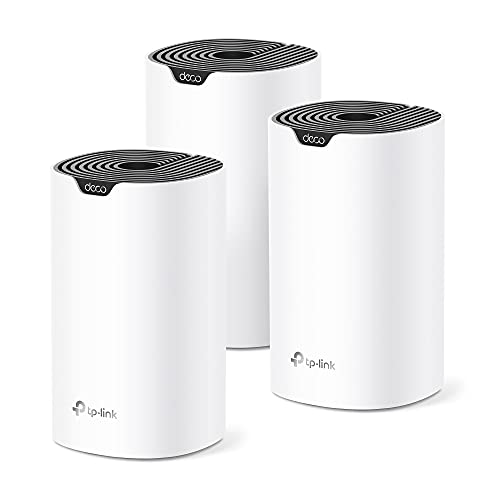
The Deco S4 pack argues that the budget question is not which router, but how many. Its title describes a mesh AC1900 Wi-Fi system in a 3-pack, covering up to 5,500 sq.ft., replacing both Wi-Fi router and extender, with gigabit ports and Alexa compatibility. Three coordinated units change the physics of a home network: instead of one signal decaying through walls, devices hand themselves between nearby units, and the far bedroom stops being a negotiation.
One act of title honesty is required here, in the spirit this guide has kept throughout. The listing calls the system AC1900; the Deco S4 is widely documented elsewhere as an AC1200-class system, and the discrepancy is the maker’s listing to explain, not ours to smooth over. Plan by the conservative reading — treat the pack as a strong AC1200-class mesh — and judge it on what mesh actually delivers: coverage, roaming and consistency, none of which depend on the contested digit.
Placement discipline is the pack’s one real demand, and it is worth describing honestly. Three units want to be spread through the home in honest sight of each other’s signal — one near the modem, one mid-home, one toward the far rooms — not lined up in the hallway like soldiers and not hidden inside furniture. The app-guided placement help in mesh ecosystems exists because this spacing is the whole craft; households that give the pack twenty thoughtful minutes at installation are repaid with the absence of every coverage conversation they used to have monthly.
Gigabit ports on the units matter more than mesh marketing suggests, because a unit wired to a desk or a television behaves as a local gigabit hub while also serving its room wirelessly. Alexa compatibility will please voice households and bore the rest. The real purchase is the geometry: three units placed at third-points of a home, each in honest range of the next, produce the most forgiving network in this guide for the homes that need forgiveness — long, split-level, thick-walled, or simply large.
- System in listing title: Mesh Wi-Fi System, Deco S4 (3-Pack)
- Class as titled: AC1900 — see the analysis for the conservative reading
- Coverage in title: Up to 5,500 Sq.ft.
- Role stated in title: Replaces WiFi Router and Extender
- Wired ports in title: Gigabit Ports
- Voice assistant in title: Works with Alexa
Strengths
- Three units solve floor plans no single box can
- One network name across the whole home, with roaming handled by the system
- Gigabit ports on units double as room-level wired hubs
Trade-offs
- Title’s class claim deserves the conservative reading given above
- Three units need three sensibly placed power sockets
- Mesh management is app-centred, with the settings depth that implies
Best for: a long, split-level or thick-walled home tired of dead corners.
Not suited for: a compact flat — one good box serves it for less fuss.
If your floor plan is the problem, the Deco S4 pack is the budget’s answer to geometry; measure your home’s awkwardness, not its square footage alone, before deciding.

ASUS RT-AX1800S WiFi 6 Router — Security without subscription
The ASUS RT-AX1800S leads with a phrase this bracket rarely affords: “Subscription-Free Network Security.” Its title describes a dual-band Wi-Fi 6 extendable router with parental controls, a built-in VPN, AiMesh compatibility, and gaming and streaming positioning. In a market quietly converting router features into monthly rent, an ASUS box that bundles its security outright is making an argument about total cost that outlives any single receipt — across a four-year life, the absence of a subscription can outweigh small differences in wireless class.
The built-in VPN deserves its sentence too. A router-level VPN can carry the whole household’s traffic or serve as the endpoint a remote worker connects back to, and at this budget it is a feature with no rival on this page except the Wi-Fi 7 pick. AiMesh compatibility gives the unit the ecosystem exit this guide keeps valuing: alone today, a node in a larger ASUS mesh tomorrow, after the household’s ambitions grow.
Parents should pause on the parental control line in this title, because router-level controls are the version of that feature that actually survives contact with children. Controls on the router govern every device that joins the network — the console, the borrowed tablet, the television — rather than the one phone an app was installed on, and they cannot be uninstalled by their subject. In a budget guide, the ASUS is where that household governance comes bundled with the security story, and for many families that bundle, not the wireless class, is the deciding paragraph.
AX1800 is the entry Wi-Fi 6 class, and honesty requires placing it: the RAX41 streams wider and the BE230 speaks a newer language. The ASUS case is not peak speed but completeness — current standard, security without rent, VPN included, mesh path open, parental controls named. For a family household that games and streams without needing to win benchmark arguments, completeness at this level is the adult purchase.
- Wireless class in listing title: Dual Band Wi-Fi 6, AX1800 by model name
- Security in title: Subscription-Free Network Security
- VPN in title: Built-in VPN
- Mesh named in title: AiMesh Compatible, Extendable Router
- Family features in title: Parental Control
- Positioning in title: Gaming & Streaming, Smart Home
Strengths
- Security features without a monthly toll
- Built-in VPN at a budget position
- AiMesh path keeps the unit useful as the network grows
Trade-offs
- AX1800 is the entry Wi-Fi 6 class
- Two rivals on this page out-spec its wireless
- AiMesh growth means buying ASUS again later
Best for: a family that wants security and VPN handled by the router, once, without rent.
Not suited for: a benchmark hunter — the speed crown in this bracket sits elsewhere.
Price the ASUS across its whole life when you view its listing; the subscription it refuses to charge is part of the product.

NETGEAR Nighthawk RAX41 WiFi 6 Router — Five-stream headroom
The RAX41’s title is the shortest of the six — “Netgear Nighthawk WiFi 6 Router 5-Stream AX3600 Dual-Band (up to 3.45Gbps) – RAX41” — and this guide honours that brevity by building its case on exactly what is printed: a five-stream Wi-Fi 6 Nighthawk in the AX3600 class. Streams are the currency of simultaneous conversation; five of them, split across two bands, describe a router built for the pile-up — several streams, a game, calls — rather than for a single device’s heroics.
That makes the RAX41 the speed pick of this bracket in the only sense that matters at home: aggregate capacity under mixed load. A household whose evenings stack a 4K stream against a competitive game against a cloud backup will feel the difference between this and an AX1800 box not in a speed test run alone at dawn, but at 8 p.m. when everyone is home. The Nighthawk line’s app ecosystem carries the management, in the mainstream app-guided style.
NETGEAR’s Nighthawk badge carries a lineage this pick trades on legitimately: the line built its name on routers for households that game and stream hard, and the RAX41 is that lineage translated into Wi-Fi 6 at a budget address. Buyers graduating from an older Nighthawk will find the app, the vocabulary and the management habits familiar, which is its own saving — a household’s accumulated router knowledge is an asset, and staying in the family compounds it.
The thin title cuts the other way for homework: port counts, coverage figures and feature lists are not stated in it, and this guide will not invent them. A buyer shortlisting the RAX41 should spend two minutes on NETGEAR’s own page for the wired inventory before ordering — the wireless case is made by the title, the wired case must be confirmed off it. That small diligence aside, the proposition is clean: the most simultaneous capacity in the bracket, from the bracket’s most gaming-flavoured brand.
- Wireless class in listing title: Wi-Fi 6, 5-Stream AX3600, Dual-Band
- Speed line in title: up to 3.45Gbps
- Brand line: NETGEAR Nighthawk RAX41
- Ports and coverage: the listing title is silent here, so confirm them on NETGEAR’s product page before ordering
Strengths
- Widest simultaneous capacity in the bracket
- Title’s class and speed line agree with each other
- Nighthawk ecosystem and app management
Trade-offs
- Title omits ports and features — homework required
- No mesh ecosystem named in the title
- Capacity is wasted on a quiet two-device home
Best for: a crowded household stacking streams, games and calls at 8 p.m.
Not suited for: a light-use home paying for headroom it will never load.
If your evenings are the pile-up described above, the RAX41’s listing is where this bracket’s sensible money goes — after the two-minute port check its title asks of you.

TP-Link Archer BE230 — Wi-Fi 7, already here
The Archer BE230 is the pick that makes this guide’s introduction sound understated. Its title describes a dual-band BE3600 Wi-Fi 7 router, four-stream, with two 2.5G ports and three 1G ports, USB 3.0, a 2.0 GHz quad-core processor and four antennas, plus VPN support, EasyMesh, HomeShield and MLO, and a Private IoT network feature. Read that inventory again and remember the bracket it competes in: multi-gigabit wired ports and the newest wireless standard, inside a budget that used to mean leftovers.
MLO is the Wi-Fi 7 idea worth understanding, because it is the one that changes feel rather than figures: a compatible device can send across both bands as a coordinated whole, smoothing the handoffs and congestion that make older networks feel moody under load. The 2.5G ports matter today for a faster-than-gigabit internet plan or a quick NAS, and tomorrow for whatever the household adds; USB 3.0 opens the router-as-server tricks — shared storage, principally — that budget boxes usually skip.
There is a second, quieter argument for this pick: the Private IoT network named in the title. Cheap smart bulbs, plugs and cameras are the least trustworthy citizens of a home network, and a router that can seat them at their own table — separate from the laptops and the storage — is practising a hygiene that used to require enthusiast hardware and a free weekend. Finding that instinct in a budget TP-Link says something about where the whole market’s conscience is heading, and households accumulating gadgets should weigh it beyond its four words in the title.
HomeShield, TP-Link’s security and parental suite named in the title, deserves the subscription question this guide taught earlier: parts of that ecosystem are tiered, so a buyer should check which elements are included and which are the paid tier before valuing them. Even discounting HomeShield entirely, the hardware case stands alone. The BE230 is the future-proofing pick — the one bought so that the next plan upgrade, the next console, the next standard of laptop all meet a router that was already waiting for them.
- Wireless class in listing title: Dual-Band BE3600 Wi-Fi 7, 4-Stream
- Wired ports in title: 2×2.5G + 3×1G Ports
- USB in title: USB 3.0
- Processor in title: 2.0 GHz Quad Core
- Wi-Fi 7 feature in title: MLO
- Extras in title: VPN, EasyMesh, HomeShield, Private IOT
Strengths
- Wi-Fi 7 with MLO inside a budget bracket
- Two 2.5G ports ready for faster plans and storage
- USB 3.0 and a quad-core processor, flagship habits at this level
Trade-offs
- Wi-Fi 7 benefits need Wi-Fi 7 devices to fully appear
- HomeShield’s tiers need checking before you value them
- Over-specified for a small, quiet, wireless-only home
Best for: a buyer who keeps routers for years and wants the next standards already handled.
Not suited for: a minimal household that will never own a Wi-Fi 7 device or a fast plan.
End your browsing with the BE230’s listing if longevity is the brief — it is the pick most likely to make this entire guide feel dated, in the best way.
Under the Budget Line: How the Six Compare
| Pick | Wireless per title | Wired per title | The household it fits |
|---|---|---|---|
| TP-Link Archer A54 | AC1200 dual band | 4 x 10/100 Mbps | Wireless-first flat, modest plan |
| TP-Link Archer A6 | AC1200 with MU-MIMO | Gigabit | Mixed home with a wired desk |
| TP-Link Deco S4 (3-Pack) | Mesh system, class as titled | Gigabit ports on units | Long or thick-walled homes |
| ASUS RT-AX1800S WiFi 6 Router | Wi-Fi 6 AX1800 | Not detailed in title | Families wanting security and VPN included |
| NETGEAR Nighthawk RAX41 WiFi 6 Router | Wi-Fi 6, 5-stream AX3600 | Not detailed in title | Crowded, simultaneous households |
| TP-Link Archer BE230 | Wi-Fi 7 BE3600, MLO | 2×2.5G + 3×1G, USB 3.0 | Long-keepers and fast plans |
What Buying Mistakes Waste a Budget Fastest?
The classic is buying the wireless class and never reading the port line — the A54’s Fast Ethernet is printed in its title precisely so that no buyer needs to learn about it from a slow NAS. Second is buying a single powerful box for a floor plan that needed three modest ones; routers cannot shout through brick, and the returns process is a poor substitute for the mesh decision made calmly here. Third is paying for streams and standards your devices cannot use: a home of Wi-Fi 5 laptops gains little from Wi-Fi 7 heroics today, however fairly priced.
There is a subtler waste, too: buying for the speed test instead of the evening. A router that posts a heroic number to one laptop at dawn and buckles when the household arrives home has optimised the wrong ceremony. Every figure in these titles is a ceiling measured alone; the household’s truth is simultaneous, contested and unglamorous, and the picks with streams, MU-MIMO and mesh coordination are priced by how they handle the contest, not the ceremony. Judge your shortlist at 8 p.m. in your imagination, with everyone’s devices awake, and the ranking rearranges itself honestly.
Fourth is ignoring the subscription tail. A cheap box whose security, parental controls or cloud features rent monthly can cost more across three years than the premium router it undercut; the ASUS pick’s subscription-free stance exists in this guide as the standing reminder to ask. Fifth, and most human, is replacing a router during a provider outage — diagnosing a line fault as a hardware failure and spending the budget on a box that changes nothing. Confirm the fault is the router’s before the budget is.
Final Recommendation
Sort your household, then take the matching name. Wireless-first and modest: the A54, bought with open eyes about its ports. A wired desk in the mix: the A6. A floor plan that defeats single boxes: the Deco S4 pack, judged as the mesh it is rather than by its title’s contested class. A family wanting security and VPN settled without rent: the ASUS. An evening pile-up of streams and games: the RAX41. A keeper for the next standards and a faster plan: the BE230, this bracket’s glimpse of the future at a two-digit address. The line under 100 dollars has never contained this much honest hardware; the only way to lose is to buy the right router for somebody else’s house.
A closing word about the bracket itself, since it is the real subject of the search that brought you here. A round budget line is a discipline, not a law of nature: if your household sits exactly between two picks, the one that answers your floor plan and your calendar is the right side of the line to land on. What this guide asks is only that the decision be made from the titles’ own evidence — ports, classes, systems, subscriptions — rather than from the loudest number on the box. Read that way, the six routers above stop being a price category and become what they actually are: six different answers to the question of what a home network is for.
Frequently Asked Questions
Why are there no prices in a guide about a price bracket?
Because the bracket is the topic and the figures are weather. Prices in this tier move with sales and stock, so each pick links to its listing where the current number lives; what this page guarantees is the classification — these are the models competing under the line — and the analysis of what each one trades away. Check the listing at the moment of purchase and hold the analysis steady while you do.
Is Wi-Fi 7 worth it at this level, or a gimmick?
Worth it for keepers, premature for minimalists. The BE230’s MLO and 2.5G ports pay off as Wi-Fi 7 devices and faster plans arrive across the router’s life, which is exactly the horizon a budget keeper should buy for. A household replacing routers often, or owning nothing newer than Wi-Fi 5, will feel the RAX41’s streams or the ASUS’s completeness sooner than the BE230’s future.
Can a three-pack mesh really belong in this bracket?
The Deco S4 pack competes on this shelf, yes — mesh pricing fell as the technology matured, and a three-unit system at a budget total is now a normal sight. Judge it as a system: its per-unit wireless class is modest, its coverage and roaming are the product, and its title’s class figure should be read conservatively, as this guide’s analysis explains.
Which pick suits gaming in a shared house?
The RAX41 for simultaneous load — five streams feeding a game, a stream and calls at once — and the BE230 for a wired gaming desk that can use its 2.5G ports and low-latency Wi-Fi 7 behaviour as devices catch up. The ASUS’s gaming positioning and VPN make it the third name for players who also want household security handled by the same box.
What is the one specification to check before ordering any of these?
The Ethernet port speeds, in the title, character by character. It is the specification budget routers most quietly downgrade, the one wireless testing on day one will never reveal, and the one that decides whether a fast internet plan reaches your wired devices whole. This guide flags the one pick where the downgrade lives; make the check a habit for every router you ever shortlist.
My internet plan is gigabit — can a router in this bracket do it justice?
The wired side can, on the picks with gigabit or better ports: the A6, the Deco units, and emphatically the BE230 with its 2.5G pair. The A54 cannot — its Fast Ethernet ports cap wired devices well below the plan — which is why its analysis is written for modest plans. Wirelessly, no router delivers a full gigabit to a single ordinary device in real rooms; judge by whether the household’s combined evening load stays comfortable, which the RAX41 and BE230 are built to ensure.
Should I wait for prices to drop further on Wi-Fi 7 models?
The BE230’s presence in this bracket is itself the drop that buyers were waiting for — the newest standard competing at a two-digit shelf. Waiting buys marginal savings against the cost of living another year on a router your household has outgrown. If your current box still serves honestly, patience is free; if it is the daily complaint, the bracket has already done its falling.
Is a cheap router safe enough to face the internet?
Safety at this level is about maintenance more than price. The mainstream makers on this page ship routers with current security defaults, automatic or app-prompted updates, and — in the ASUS case — a named security suite without subscription. The unsafe router is the abandoned one: any brand, any price, left for years without updates. Choose a pick whose maker’s update habits you trust, leave the prompts enabled, and a budget box is a perfectly respectable front door.
One strong router or the mesh pack — how do I decide in five minutes?
Walk your home and count the walls between where the router must sit and where you most need it. One or two ordinary walls: a strong single box from this list, placed centrally. Three or more, a stairwell, or a chimney breast in the way: the mesh pack, because geometry outranks power. If the answer is genuinely borderline, buy the single box whose title names a mesh ecosystem — the A54’s EasyMesh, the A6’s OneMesh, the ASUS’s AiMesh — and let a later extender settle the argument with evidence.
Related Guides
Players weighing the headroom argument further should continue with Best Affordable Gaming Routers, households leaning toward a system rather than a box will find the deeper mesh comparison in Best Mesh Wifi 6 Routers, and readers curious about the multi-device technology behind two picks here can finish with Best MU-MIMO WiFi Routers for Homes Where Everything Connects at Once.


