What's inside
- Key Takeaways
- Quick Picks
- How We Chose These Picks
- Why Do Smart Gadgets Need Their Own Network?
- The Six Picks, Reviewed in Detail
- Comparison Table
- How Do You Fence a Smart Home Without Breaking It?
- Reading a Security Report Without Panicking or Shrugging
- Buying Gadgets That Deserve Your Network
- What the Suites Actually Watch: A Plain-Language Tour
- Guest Networks, VLANs and IoT SSIDs: Choosing Your Fence Style
- The Gadgets That Deserve Extra Suspicion
- Rentals, Guests and Other People’s Gadgets
- Routers Age Too: Knowing When the Guard Needs Replacing
- The Smart Home at Night: What Your Network Does While You Sleep
- Common Mistakes
- FAQ
- Final Recommendation
- Related Guides
As an Amazon Associate I earn from qualifying purchases. This post may contain affiliate links at no extra cost to you.
widgetverdict.com is reader-supported. When you buy through links on our site, we may earn an affiliate commission.
Where to buy: the ASUS RT-AX5400 heads this list with a verified listing at Amazon, and every linked pick below leads to its own product page the same way.
The smart home has a security problem with a specific shape: dozens of small, cheap, rarely updated devices, each holding a permanent pass to your network. The best wifi routers that secure iot treat that problem at the only point where all those gadgets meet — the router itself. A camera, a bulb and a doorbell may each be too simple to defend themselves, but the router sees every packet they send, can fence them onto their own segment, can watch for the one that suddenly starts talking to a stranger’s server at 3 a.m., and can cut it off without touching the laptop your work depends on. That is the capability this guide ranks.
Six machines, three philosophies. The ASUS trio builds on subscription-free network security named outright in their listings, with the RT-BE59 and RT-BE9700 carrying the idea onto WiFi 7. The TP-Link BE400 answers with a feature whose name deserves applause for honesty — Private IoT, a dedicated network for smart gadgets, stated in its title. The NETGEAR RAX43 brings a security-featured WiFi 6 platform from the Nighthawk line, and the SonicWall TZ80 is a different species entirely: a next-generation firewall appliance, included because some homes — and many home offices — now hold enough connected machinery to justify a professional gatekeeper.
What should you actually do with a security-capable router once it arrives? Three things, in order. Put every smart gadget on its own network or segment, away from computers and phones. Turn on the security suite and read its first report rather than its marketing page. And keep the firmware updating itself, because the threat lists these suites consult are only as good as their latest refresh. The reviews below judge each pick by how gracefully it supports that routine.
Key Takeaways
- Segmentation is the core defence: gadgets belong on their own network, away from laptops and phones.
- Subscription-free security, named in the ASUS listings, removes the renewal cliff where protection quietly lapses.
- The TP-Link BE400 states a Private IoT network in its title — the clearest IoT-specific feature claim here.
- The SonicWall TZ80 is a firewall appliance, not a WiFi router; it guards a network that other hardware broadcasts.
- A security suite you never open is decoration — reporting quality decides whether protection survives month two.
Quick Picks
| Pick | Badge | Why it earns its place |
|---|---|---|
| ASUS RT-AX5400 Dual Band WiFi 6 Router | Lifetime security lead | Lifetime internet security included, Instant Guard, AiMesh and built-in VPN on WiFi 6. |
| TP-Link Archer BE400 BE6500 WiFi 7 Router | Private IoT network | WiFi 7 with a stated Private IoT feature, HomeShield, dual 2.5Gbps ports and 90-device capacity. |
| NETGEAR Nighthawk RAX43 WiFi 6 Router | Security-featured Nighthawk | AX4200 five-stream WiFi 6 with security features headline-listed, covering 2,500 sq. ft. and 25 devices. |
| SonicWall TZ80 Firewall Appliance | Professional gatekeeper | A 750 Mbps next-generation firewall for SOHO, branch and IoT networks, with three-year services. |
| ASUS RT-BE59 WiFi 7 Router | WiFi 7 security value | Subscription-free network security on a 5 Gbps WiFi 7 platform with dual 2.5G ports. |
| ASUS RT-BE9700 WiFi 7 Router | Tri-band security flagship | 9.7 Gbps tri-band WiFi 7, four 2.5G ports, dual WAN and subscription-free security. |
How We Chose These Picks
The first requirement was a security claim we could point to in the pick’s own listing. Lifetime or subscription-free security on the ASUS models, a named Private IoT network and HomeShield on the TP-Link, security features in the Nighthawk’s title, and an entire firewall appliance from SonicWall — each pick’s protective intent is stated by its maker, not inferred by us. Routers whose security story lived only in a downloadable app of uncertain future were set aside.
Segmentation tools came second. The practical defence for smart gadgets is separation, so we favoured platforms that make a dedicated IoT or guest-style network easy to create and permanent to run. The BE400’s Private IoT is the most explicit implementation here; the ASUS AiMesh platforms approach the same goal through their network controls, and the TZ80 enforces separation with the full rigour of a firewall’s rule set — the strongest fencing in the guide, bought with the steepest setup effort.
Third, we weighed the network the security must protect. Device counts in the listings range from the RAX43’s stated 25 devices to the BE400’s 90 — a spread that maps directly onto smart-home size. A flat with a doorbell and two bulbs lives comfortably inside the smaller figure; a house with cameras, sensors, speakers and appliances in every room should shop by the bigger numbers and by tri-band headroom, which is where the RT-BE9700 earns its flagship slot.
Finally, honesty about species. The TZ80 contains no WiFi radio and we say so wherever it appears. It earns its place because the question behind this category — how do I keep my connected gadgets from endangering everything else — is sometimes best answered at the gateway, with access points or a router in access-point mode providing the wireless layer in front of it. Excluding the strongest defensive tool in the building because it lacks antennas would serve taxonomy, not readers.
Why Do Smart Gadgets Need Their Own Network?
Consider what a smart gadget is, from a security perspective: a small computer, built to a price, running software its maker may update for a year or never, holding your WiFi password and a permanent connection. Individually, most are harmless. Collectively — thirty of them, from nine brands, three of which no longer exist — they form the softest surface in your home’s digital defences. A compromised bulb cannot read your email by itself, but it can stand inside your network, next to the NAS and the work laptop, and be used as a foothold or a nuisance.
A separate IoT network changes the geometry. Gadgets can reach the internet services they need and be reached by your phone’s app, but they cannot wander the LAN, browse the file shares or probe the computers. If one is compromised, the damage is fenced into a paddock of other bulbs. This is the single highest-value configuration change in home networking, it costs nothing beyond setup time, and every pick in this guide supports some version of it.
The second layer is watchfulness. Security suites compare gadget behaviour against known-bad destinations and patterns, and flag the camera that suddenly uploads at odd hours. Neither layer is magic, and this guide will not pretend a router makes cheap gadgets trustworthy. Together, fencing plus watching converts an unmanaged swarm into a supervised one — which is the realistic goal, and the standard these six picks were judged against.
The Six Picks, Reviewed in Detail

ASUS RT-AX5400 Dual Band WiFi 6 Router — lifetime security, plainly stated
The RT-AX5400 makes the strongest sentence in this guide its headline: lifetime internet security included. Not a trial, not a first year — the listing commits to the security suite for the life of the product, and in a category where protection lapses silently at renewal time, that permanence is the feature. Around it sits a complete ASUS platform: dual-band WiFi 6, Instant Guard for safer connections away from home, advanced parental controls, built-in VPN, and AiMesh compatibility for expansion, with gaming, streaming and smart home use all named.
For the IoT question specifically, this is the router for a home that wants the supervised-swarm model without new-platform pricing. The security suite watches the gadgets; the network controls fence them; AiMesh means a dead spot gets a node rather than a repeal of the rules. Parental controls ride along on the same platform, which matters in homes where the children’s devices and the smart devices multiply together. It is a WiFi 6 machine in a guide that also contains WiFi 7 — a deliberate value position, reviewed as such.
Strengths
- Lifetime internet security included — the protection cannot lapse at a renewal prompt.
- AiMesh expansion and built-in VPN round out a complete, mature platform.
- Instant Guard and parental controls extend the same protective logic beyond the gadgets.
Trade-offs
- WiFi 6 dual-band: no 6 GHz radio and less headroom than the WiFi 7 picks below.
- The listing states no device-count or coverage figure, so large smart homes should verify capacity.
- Port speeds are not enumerated in the title — check the bench before planning wired backhaul.
Spec snapshot: Dual Band WiFi 6 Extendable Router · Lifetime Internet Security Included · Instant Guard · Advanced Parental Controls · Built-in VPN · AiMesh Compatible · Gaming & Streaming · Smart Home. Anything the title leaves unstated, such as the wired port layout, should be confirmed in ASUS’s documentation.
Best for: a smart home wanting permanent, fee-free router security on a proven WiFi 6 platform. Not suited for: a buyer seeking a 6 GHz band, because this dual-band design has none. Read the security suite description carefully on the RT-AX5400 listing — the lifetime term is the reason it leads.

TP-Link Archer BE400 BE6500 WiFi 7 Router — the Private IoT network
Every guide in this category talks about segmenting gadgets; the BE400 is the pick whose listing names the feature outright: Private IoT, listed among its headline capabilities alongside HomeShield. That is a dedicated network for smart devices, offered as a designed feature rather than a workaround assembled from guest-network settings, and it makes the BE400 the most direct answer to this article’s title. Around it: dual-band WiFi 7 at BE6500 class, dual 2.5Gbps ports, USB 3.0, coverage up to 2,400 square feet, capacity for 90 devices and a quad-core processor.
The 90-device figure deserves attention, because smart homes fail by accumulation. Nobody buys forty gadgets at once; they arrive one delivery at a time until the network holds more IoT than computers. A router that states its device capacity in the same breath as its IoT network understands the assignment. HomeShield adds TP-Link’s security layer over the top, and the dual 2.5G ports let a fast broadband line and a wired NAS both run at multi-gig while the gadgets murmur away on their fenced network.
Strengths
- Private IoT stated in the listing — a purpose-built gadget network, not a hack.
- Capacity for 90 devices and coverage to 2,400 sq. ft. sized for real smart homes.
- WiFi 7 platform with dual 2.5Gbps ports and a quad-core processor.
Trade-offs
- Dual-band WiFi 7 — no 6 GHz radio, unlike the tri-band RT-BE9700 below.
- HomeShield’s deeper tiers follow TP-Link’s service terms; read what the suite includes over time.
- USB 3.0 sharing is a convenience, not a security feature — disable it if unused.
Spec snapshot: BE6500 Dual-Band WiFi 7 Router (BE400) · Dual 2.5Gbps Ports · USB 3.0 · Covers up to 2,400 sq. ft. · 90 Devices · Quad-Core CPU · HomeShield · Private IoT. The title does not detail the IoT network’s rule set — TP-Link’s documentation describes its configuration.
Best for: a gadget-dense home that wants the IoT fence as a named, supported feature. Not suited for: a shopper seeking a tri-band platform with a 6 GHz radio, since the BE400 is dual-band. Study the Private IoT description on the BE400 page and count your own gadgets before deciding.

NETGEAR Nighthawk RAX43 WiFi 6 Router — the security-featured all-rounder
The RAX43’s listing leads with two words most router titles bury: security features. This is a five-stream dual-band gigabit router at AX4200, up to 4.2 Gbps, covering up to 2,500 square feet and 25 devices — a mainstream Nighthawk specification, presented with its protective layer up front. For a home whose smart collection is modest — a doorbell, a thermostat, a speaker or three, a camera — that 25-device envelope is honest sizing, and the Nighthawk platform’s maturity is the quiet argument: years of firmware refinement behind the app and the setup routine.
Where does it sit against the ASUS pair? The RT-AX5400 counters with lifetime security explicitly included; the RAX43’s listing states security features without the lifetime word, and buyers for whom the subscription question is decisive should read NETGEAR’s current terms with care. What the RAX43 offers in exchange is the Nighthawk balance of wireless performance and approachable management — the router for households wanting protection as part of a strong general platform rather than as the platform’s entire identity.
Strengths
- Security features headline-listed on a proven five-stream WiFi 6 platform.
- Stated coverage of 2,500 sq. ft. and 25 devices suits the typical modest smart home.
- Gigabit wired bench and Nighthawk management maturity.
Trade-offs
- 25-device stated capacity is the smallest envelope here — gadget collectors should size up.
- The listing does not promise lifetime or subscription-free security terms.
- WiFi 6 dual-band again: capable, but not the newest radio generation.
Spec snapshot: Nighthawk WiFi 6 Router (RAX43) · Security Features · 5-Stream Dual-Band Gigabit Router · AX4200 (Up to 4.2 Gbps) · Covers up to 2,500 sq.ft. and 25 Devices. The exact composition of the security features is a listing-detail question — NETGEAR’s page and documentation carry it.
Best for: a modest smart home wanting a balanced Nighthawk with protection up front. Not suited for: a customer seeking a stated 90-device capacity, because this platform is rated for 25. Compare the security terms on the RAX43 listing against the ASUS lifetime promise before choosing.

SonicWall TZ80 Firewall Appliance — the professional gatekeeper
Time for the species change, stated as plainly as we can make it: the TZ80 has no WiFi. It is a next-generation firewall appliance — 750 Mbps of firewall and threat prevention throughput, five ports (four 1GbE and one SFP), running SonicOS, sold with a three-year advanced security services bundle, and positioned by SonicWall itself for SOHO, branch and IoT networks. That last phrase is why it is here. When the connected estate includes a home business, a workshop of networked machinery, or a rental property’s worth of gadgets, the defence stops being a router feature and becomes a firewall’s profession.
The architecture is gateway-first: the TZ80 sits at the internet edge enforcing policy with a rigour consumer suites do not attempt, while a router in access-point mode or dedicated access points — your existing WiFi, potentially — broadcast in front of it. IoT segmentation under a firewall is not a toggle but a rule set: gadgets fenced by policy, inspected by a threat engine, logged properly. The 750 Mbps inspection figure is the honest constraint to plan around; it is threat-prevention throughput, the number that matters, and homes on faster lines with heavy inspection needs should size accordingly.
Strengths
- True next-generation firewall inspection — the deepest defence in this guide.
- Positioned by its maker for IoT networks, with policy-grade segmentation.
- Three-year advanced services bundle keeps threat intelligence current.
Trade-offs
- No WiFi radios at all — separate wireless hardware is mandatory, not optional.
- 750 Mbps threat-prevention throughput caps inspected traffic on faster lines.
- SonicOS administration rewards a technically confident owner; it is not an app-guided setup.
Spec snapshot: TZ80 750 Mbps Firewall, Secure Upgrade Adv 3-Yr + CSE · SOHO NGFW · 5 ports (4x1GbE, 1x SFP) · 750 Mbps firewall & threat prevention · SonicOS · SOHO, branch & IoT NGFW. Wireless specifications do not exist for this appliance — pair it with access points chosen separately.
Best for: a home business or gadget-heavy property needing firewall-grade IoT policy. Not suited for: a purchaser seeking a single box that also broadcasts WiFi, because the TZ80 is wired-only. Read the services bundle terms on the TZ80 listing as carefully as the hardware figures.
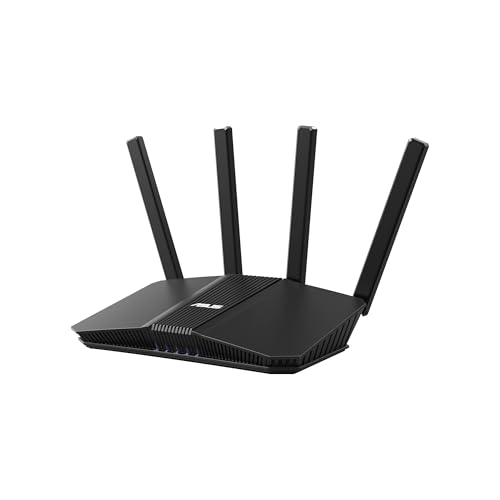
ASUS RT-BE59 WiFi 7 Router — subscription-free security, newer radios
The RT-BE59 takes the RT-AX5400’s philosophy — security without a subscription — and rebuilds it on WiFi 7. The listing describes a dual-band router at 5 Gbps with mesh and VPN compatibility, subscription-free network security, parental controls included, two 2.5G ports and three 1G ports. That port bench is worth pausing on: dual 2.5G gives a fast line and a multi-gig wired device simultaneous room, which suits the home whose security centre is also its performance centre.
For the IoT brief, the pitch is continuity. A household fencing its gadgets under an ASUS security suite and now wants WiFi 7 speeds for its phones and laptops can step to this platform without relearning its protective model. Mesh compatibility means the fence extends with nodes rather than ending at the edge of one unit’s range — important, because a gadget that cannot reach the secure network reliably is a gadget someone will reconnect to the main one in frustration.
Strengths
- Subscription-free network security on a current WiFi 7 platform.
- Dual 2.5G ports plus three 1G ports — a genuinely useful wired bench.
- Mesh and VPN compatibility, with parental controls included alongside.
Trade-offs
- Dual-band: the 6 GHz radio lives in the tri-band RT-BE9700 below, not here.
- The listing states no coverage or device-count figure for sizing a large smart home.
- Security described as subscription-free rather than the AX5400’s lifetime wording — read the exact terms.
Spec snapshot: WiFi 7 Router · Dual-Band · 5 Gbps · 2.5G · Mesh + VPN Compatible · Subscription Free Network Security · Parental Controls Included · 2.5G Port x2 · 1G Port x3 · VPN support. Details past the title, such as the security suite’s reporting depth, belong to a review of ASUS’s documentation.
Best for: a smart home stepping up to WiFi 7 while keeping fee-free security. Not suited for: a reader seeking a dedicated 6 GHz band, since this design is dual-band. Compare its port bench on the RT-BE59 page with the flagship below.

ASUS RT-BE9700 WiFi 7 Router — the tri-band security flagship
The RT-BE9700 is where this guide’s two threads — wireless headroom and protective depth — meet at full strength. Tri-band WiFi 7 with the 6 GHz band, a stated 9.7 Gbps class, dual WAN, mesh capability, coverage up to 2,500 square feet, subscription-free network security, parental controls, four 2.5G ports and VPN support: the listing reads like the RT-BE59’s, with every dial turned. The name even carries an x2 notation in its title, a reminder to check the exact listing configuration when ordering.
The tri-band layout is the IoT feature in disguise. Three radios mean the gadget swarm, the family’s everyday devices and the demanding 6 GHz clients can be spread across separate airspace, so a fence is also a traffic plan. Four 2.5G ports wire the hubs, bridges and NAS units that smart homes accumulate, and dual WAN keeps a security-conscious household — cameras uploading, alarms reporting — connected through a line failure. For the largest, busiest connected homes in this guide’s audience, this is the platform with nothing left to apologise for.
Strengths
- Tri-band WiFi 7 with 6 GHz — the fullest wireless platform in this guide.
- Four 2.5G ports and dual WAN serve a hub-heavy, always-on smart home.
- Subscription-free security and parental controls on the flagship tier.
Trade-offs
- Coverage is stated at 2,500 sq. ft. — larger homes will still plan mesh nodes.
- Most current gadgets cannot use WiFi 7 or 6 GHz; they benefit from the fencing, not the speed.
- The x2 notation in the product name makes careful listing-checking essential at order time.
Spec snapshot: WiFi 7 Router – Tri-Band (6GHz) · 9.7 Gbps · x2 WAN · Mesh · Coverage up to 2,500 Sq. Ft. · Subscription Free Network Security · Parental Controls Included · 2.5G Port x4 · VPN support. The title’s x2 element and full configuration details should be verified on the listing and in ASUS documentation.
Best for: a large, busy smart home wanting flagship wireless under fee-free security. Not suited for: a user seeking the simplest possible platform, because dual WAN and tri-band management add real menus. Verify the exact configuration on the RT-BE9700 listing before it goes in the basket.
Comparison Table
| Pick | Wireless / role | Security headline | Standout trait |
|---|---|---|---|
| ASUS RT-AX5400 | WiFi 6 dual-band | Lifetime internet security included | Instant Guard, AiMesh, built-in VPN |
| TP-Link Archer BE400 | WiFi 7 dual-band | Private IoT network, HomeShield | 90 devices, dual 2.5Gbps ports |
| NETGEAR Nighthawk RAX43 | WiFi 6 five-stream | Security features headline-listed | 2,500 sq. ft., 25 devices |
| SonicWall TZ80 | Firewall appliance, no WiFi | NGFW threat prevention, 750 Mbps | Policy-grade IoT segmentation |
| ASUS RT-BE59 | WiFi 7 dual-band | Subscription-free security | Dual 2.5G ports, 5 Gbps class |
| ASUS RT-BE9700 | WiFi 7 tri-band, 6 GHz | Subscription-free security | 9.7 Gbps, four 2.5G ports, dual WAN |
How Do You Fence a Smart Home Without Breaking It?
Move gadgets in groups, not all at once. Start with the devices you trust least and use least interactively — bulbs, plugs, sensors — and place them on the IoT network first, testing each room’s lighting scenes and automations before continuing. Cameras and doorbells go next, with a day’s observation of their recordings and alerts. Voice assistants and streaming sticks, which interact with phones and accounts most deeply, move last and most carefully. Our companion guides on Best Routers With QoS and Best WiFi Routers With Parental Controls cover the neighbouring arts of prioritising traffic and fencing children’s devices, and the three disciplines — segment, prioritise, supervise — compound.
Expect one honest friction: some gadget ecosystems assume every device shares one flat network, and a speaker may sulk when its phone is on another segment. The mature platforms handle the phone-to-gadget conversation across the fence by design; where a specific device refuses, the pragmatic answer is to move that one device, note it, and keep the fence for the other twenty-nine. A fence with one documented gate beats a fence abandoned entirely.
And keep the inventory. A simple list — device, network, purchase year — turns the annual question of what is even on this network from archaeology into arithmetic. When a brand exits the market or a gadget stops receiving updates, the list tells you which fence-post to watch, and the thinking in Best MU-MIMO WiFi Routers for Homes Where Everything Connects at Once will help when the swarm’s traffic, not just its security, needs planning.
Reading a Security Report Without Panicking or Shrugging
The first report from a new security suite usually contains a surprise: a device flagged for contacting a suspicious destination, a camera talking to a server in a country you did not expect, a plug whose traffic pattern looks nothing like switching a lamp on and off. Learning to read these reports calmly is a skill this guide would like to hand you along with the hardware. Start from the knowledge that most flags are explanations waiting to be found. Gadgets phone home to their makers’ clouds, and those clouds live in data centres scattered across continents; a camera uploading motion clips to its service will look, to a quick glance, like a camera leaking footage to a stranger.
The productive routine is triage. For each flag, ask three questions: do I recognise the device, do I recognise the service it is talking to, and does the timing match its job? A doorbell active at 3 a.m. during a storm is probably a doorbell watching rain. A smart plug exchanging data at high volume around the clock matches no plausible account of its duties, and that is the flag worth acting on — isolate the device on the router, check for a firmware update, and if the behaviour persists, retire it. The fence you built makes that isolation a thirty-second task instead of a network-wide emergency, which is the entire point of having built it.
Over months, the reports teach you your own home’s normal. You learn which gadgets are chatty, which are silent, and which brand’s cloud habits you dislike enough to avoid at replacement time. That knowledge compounds: the second time you build an IoT network — a parent’s house, a rental, a workshop — you will choose devices and placements with a fluency that no product review can give you. The router’s report is not just an alarm system. It is the textbook the smart home never shipped with.
Buying Gadgets That Deserve Your Network
A router can fence and watch, but the cheapest security upgrade in the smart home is choosing gadgets that arrive with better habits. A few buying heuristics, earned from the collective experience this category now has: prefer brands that publish a security update policy, even a modest one, over brands whose support pages are silent on the subject. Prefer devices that work locally where local control exists, so a dead cloud service does not orphan your hardware. Treat the very cheapest no-name gadget in any category as a device that will live on the IoT fence for its entire life — because it will — and be pleasantly surprised if it earns more trust.
Also consider the account layer, which sits above the network layer this guide has concentrated on. Every gadget ecosystem wants an account; those accounts deserve unique passwords and two-factor sign-in where offered, because the most realistic attack on a smart home is not a cinematic hack through a light bulb but a reused password tried against a camera account. The router guards the roads; the accounts guard the doors. A household doing both, and fencing its gadgets between them, has a security posture stronger than most small businesses — assembled entirely from consumer parts and an hour of deliberate setup.
Finally, plan the exit for each gadget at purchase time. Devices will be replaced, brands will fold, and a camera whose maker vanished should be retired rather than left running on fumes. The inventory list recommended earlier in this guide earns its keep here: it tells you what you own, how old it is, and which fence it lives behind, so the annual tidy-up of the smart home is a review rather than an excavation.
What the Suites Actually Watch: A Plain-Language Tour
Security suites are usually sold with fog, so let us describe their working parts plainly, because knowing what the machinery does tells you how much to trust it. The first part is the destination reputation list: a continuously updated register of internet addresses known to serve malware, phishing or command channels for compromised devices. When a gadget tries to contact a listed address, the router blocks the conversation and logs it. This is simple, fast and genuinely effective against the most common fate of a compromised gadget — being recruited into somebody else’s botnet — and it is the layer doing quiet work on the ASUS and TP-Link platforms in this guide every hour of the day.
The second part is behaviour watching. A bulb has a rhythm: brief check-ins, small packets, long silences. A bulb that suddenly sustains heavy uploads at odd hours has departed from its rhythm, and behaviour-aware suites — the AI-powered language in the Gryphon-adjacent world and the smarter tiers of the platforms here gesture at this — can flag the departure. Behaviour watching produces the interesting reports and the occasional false alarm in equal measure, which is why the triage routine earlier in this guide matters: the suite notices, the human judges.
The third part is vulnerability shielding for devices that cannot be patched. When a known flaw is discovered in a popular camera or plug, a good suite can block the specific traffic pattern that exploits it, standing guard in front of a device whose maker will never fix the hole. This is perhaps the most honest service a router can offer the smart home, because it acknowledges the truth about cheap gadgets — many will never be updated — and protects them anyway, from the one position in the network that sees everything they do. When you compare the picks, the question to ask of each suite is not how many features it lists but how these three parts are implemented and kept current.
Guest Networks, VLANs and IoT SSIDs: Choosing Your Fence Style
There are three common ways to build the fence, and the picks in this guide span all of them. The simplest is the guest network used as a gadget corral: quick to enable on almost any router, isolated from the main LAN by default on most platforms, and perfectly adequate for a modest collection. Its limits are granularity — guests and gadgets share one pen, and the network often carries settings meant for visitors, like session timeouts, that suit gadgets poorly. The dedicated IoT network, the BE400’s Private IoT being this guide’s named example, is the same idea designed properly: a permanent segment built for devices that join once and stay for years, with the phone-to-gadget conversation handled intentionally.
The third style, VLANs with firewall rules, is the firewall and business-platform approach — the TZ80’s native language, and available in various depths on the ASUS platforms. It offers the finest control: the camera segment may reach its cloud and nothing else, the plugs may be reachable from the phone segment but may initiate nothing, the work laptop lives behind an additional wall. The cost is configuration effort and the need to understand what you built when it needs changing in two years’ time. Choose the fence style by the size of the swarm and the confidence of the fence-keeper, and do not apologise for choosing the simple one: a guest-network corral that exists beats a VLAN architecture that was planned elaborately and never finished.
Whichever style you build, give the fenced network a name that will make sense to the next person who administers the house, and write down which devices belong there. Fences fail socially more often than technically — a family member, defeated by a gadget that will not pair, moves it to the main network and forgets to mention it. A clear name, a short inventory and a household agreement that new gadgets start life on the fence will keep the architecture intact long after setup day.
The Gadgets That Deserve Extra Suspicion
Not all IoT is equally risky, and a household’s limited attention should be spent where the risk concentrates. Cameras and doorbells sit at the top of the list: they see and hear the home, they are internet-facing by design, and their footage is exactly what a stranger would want. They belong on the fence, behind the suite’s watchfulness, with accounts protected by unique passwords — no exceptions for the cute one in the nursery. Voice assistants come next, not because they are badly built — the major platforms are comparatively well maintained — but because they are microphones with purchasing power, and their accounts deserve the same rigour as a banking login.
The long tail deserves a cooler assessment. Bulbs, plugs and sensors are the devices most often dramatised and, individually, the least capable of harm: their risk is collective, as footholds and botnet recruits, which is precisely the risk the fence and the destination lists neutralise without any per-device anxiety. The white goods arriving with WiFi — washers, ovens, refrigerators — occupy a middle position: reputable makers, infrequent updates, and no convincing reason to live anywhere but the IoT segment, where their chatter can be watched and their reach limited to their own cloud.
Then there is the category that should simply not join the main network under any circumstances: the bargain gadget with no brand you can name, no update mechanism you can find, and a companion app asking for permissions unrelated to its job. The fence was invented for these. Some households will decide, on reflection, that a device which cannot state who made it has no place in the home at all — a defensible position that this guide quietly endorses while acknowledging the fence exists for the ones already bought.
Rentals, Guests and Other People’s Gadgets
The smart home’s population is not all yours. A rental property’s tenants inherit the landlord’s cameras and locks; a landlord inherits the tenants’ streaming sticks and consoles. House guests arrive with phones that have lived on a hundred networks. A cleaner’s robot vacuum, a grandparent’s tablet, the smart television in the holiday let — the modern network is a small commons, and the segmentation habits in this guide are what keep a commons civil. Guests on the guest network, gadgets on the IoT fence, and the owner’s own devices behind both: the architecture does not care whose name is on the deed, only which segment a device has earned.
Rental situations deserve one specific discipline: change the keys at every change of occupancy. Router admin password, WiFi passwords, gadget accounts — a tenancy change is the natural audit point, and the picks in this guide make those rotations a settings-page task rather than a locksmith’s visit. Landlords providing connected amenities should also decide, in writing, which devices are theirs to manage and which are the tenant’s to fence; ambiguity about a camera’s ownership has ended tenancies worse than any deposit dispute.
The same courtesy extends in miniature to the ordinary household. When a teenager’s friend stays for the summer, when a relative moves in during a renovation, the network absorbs new devices and new habits. A router whose segments and suites are already organised absorbs them gracefully — a profile here, a fence assignment there — while a flat, unmanaged network absorbs them by dilution, becoming a little less known with every arrival. Security, in the end, is mostly the discipline of knowing what is on your own network, and the six picks here were chosen to make that knowledge easy to keep.
Routers Age Too: Knowing When the Guard Needs Replacing
A security router has a lifespan defined less by its hardware than by its maker’s attention. The radios will broadcast for a decade; the threat lists, firmware patches and suite features that constitute its protective value depend on updates that eventually slow and stop. The honest way to hold this category is as a service with a hardware component: you are buying the years during which the platform is actively maintained, and the listings that state their security terms plainly — lifetime inclusion on the RT-AX5400, subscription-free language on its WiFi 7 siblings, the TZ80’s three-year services bundle — are telling you the shape of that maintenance in advance. Read them as calendars, not adjectives.
The replacement signals are worth knowing before they arrive. Firmware updates for your model become rare, then cease. The suite’s reports reference threat categories that feel a generation old. A newly purchased gadget generation starts exposing the platform’s age — new wireless standards it cannot speak, device counts it strains under, as the BE400’s stated 90-device envelope and the RAX43’s 25 remind us that capacity is also a form of ageing. None of these is an emergency; together they mark the season to plan a successor, ideally while the old guard still works well enough to make the migration calm.
When that season comes, the work you did at setup pays its final dividend. The inventory list, the named segments, the documented fence — a household keeping them can rebuild its defences on a new platform in an evening, because the design was never trapped inside the old router’s menus. This is the deepest argument for treating IoT security as an architecture rather than a product: products retire, but a household knowing its own network carries the knowledge to whatever replaces them, and each successive guard starts from wisdom instead of from scratch.
The Smart Home at Night: What Your Network Does While You Sleep
There is an hour when the smart home reveals its true population: three in the morning, when the humans are asleep and the gadgets hold their conferences. Cameras upload the night’s motion clips. The thermostat reports its readings. A dozen devices check for updates, renew their connections, and exchange the small talk of their clouds. The router’s logs from that hour are the most honest census of the connected home ever taken, and the security suites in this guide are, among other things, instruments for reading it. A household glancing at the night traffic once in a while knows its own network the way a gardener knows a garden — by its habits in the dark.
The night is also when the fence proves its design. A gadget that behaves impeccably all day and misbehaves at 3 a.m. is a known pattern in compromised devices, whose owners schedule their mischief for the hours nobody watches. Behaviour-aware suites watch precisely then. This is not a reason for alarm — it is a reason the architecture works while you sleep, which is the entire premise of buying a guard rather than relying on vigilance. The six picks differ in how elaborately they keep the night watch, from the suites’ automated pattern-spotting to the TZ80’s logged and inspected rigour, but all of them keep it better than an unguarded router, which keeps no watch at all and remembers nothing by morning.
Let the night census inform the annual tidy-up recommended throughout this guide. Devices that appear in the logs but not in your memory of the house are the ones to hunt down — the forgotten plug behind the sofa, the previous tenant’s camera, the gadget a guest paired and left behind. A network with no mysteries at 3 a.m. is a network whose owner can describe it completely, and that description, kept current, is what security actually consists of in a home.
Common Mistakes
The most common mistake is buying the security router and never building the fence: gadgets left on the main network beside the laptops, suite installed, job imagined done. The second is the opposite excess — fencing so aggressively, with no testing rhythm, that automations break for a week and the whole scheme is switched off in frustration. Move in groups, test as you go.
Third, forgetting the router’s own hygiene: a default admin password on the very device meant to guard the home undoes the entire exercise, and firmware left un-updated slowly blinds the security suite. Fourth, treating the guest network as the IoT network without checking its client-isolation behaviour — guests and gadgets have different needs. Fifth, ignoring the reports. The suite’s weekly summary is where a misbehaving gadget announces itself; a defence nobody reads is a fence nobody patrols.
FAQ
Will putting gadgets on their own network break my automations? Most mainstream platforms route the phone-to-gadget conversation across segments by design, and the group-by-group migration in this guide exists to catch the exceptions calmly. The odd stubborn device can live on the main network as a documented exception while the rest stay fenced.
Do I need a firewall appliance like the TZ80 for a normal home? For most homes, no — the router suites here cover the realistic threat. The TZ80 earns its place for home businesses, workshops and properties where the connected estate carries obligations beyond a family’s gadgets.
What does subscription-free security actually spare me? The renewal cliff: the moment a paid suite lapses and protection quietly stops while the router keeps routing. The ASUS picks state their fee-free terms in their listings, which is why they anchor this guide.
How many devices can these routers really handle? By their listings: the BE400 states 90 devices, the RAX43 states 25, and the RT-BE9700 states coverage rather than a count. Count your gadgets honestly — including the ones in drawers still paired — and size with headroom.
Should cameras live on the IoT network too? Yes — cameras are exactly the class of device the fence exists for: always on, internet-facing, rarely updated. Place them on the IoT segment, confirm remote viewing works through the platform’s cross-segment handling, and let the security suite watch their traffic patterns.
Final Recommendation
Most smart homes should start with the ASUS RT-AX5400: lifetime security, a complete platform, and no renewal cliff. Gadget-dense homes that want the fence as a designed feature should take the TP-Link BE400 and its Private IoT network; homes stepping to WiFi 7 choose between the RT-BE59’s value and the RT-BE9700’s tri-band flagship room; the RAX43 serves the modest collection with Nighthawk polish; and the SonicWall TZ80 stands ready for the property whose gadgets have become infrastructure. Whichever you choose, build the fence in groups, read the first report, and the best wifi routers that secure iot will turn a swarm of small, trusting gadgets into a supervised neighbourhood — which is all good security ever really is.
A closing word on proportion. The goal of all this fencing and watching is not a fortress mentality — it is a home where connected conveniences can be enjoyed without a background hum of unease, and where the network’s owner understands, roughly and accurately, what is connected and how it behaves. Every pick in this guide can deliver that state of affairs with an evening of setup and a few minutes of attention each month. That is a remarkably good bargain for the layer of modern life that now runs your lights, your locks, your heating and your doorbell.
If you take one action beyond buying from this list, let it be the inventory. Walk the house on the evening the new router goes in, phone in hand, and list every connected thing you find — the obvious screens, then the plugs, sensors, appliances and forgotten experiments behind furniture. Assign each to its segment as you go. That single list, kept current, is worth more than any individual feature compared in this guide, because every other protective measure in these pages assumes you know what you are protecting. Households that know their own network can use any of these six picks well; households that do not will be surprised by any of them. Start with knowledge, fence with the router, watch with the suite — in that order — and the smart home becomes what it was always supposed to be: convenient, comprehensible and yours.
Expect the setup evening to teach you something mildly uncomfortable: the true size of your connected household. Most families underestimate their gadget count by half until the router’s device list reads it back to them, line by line — the television, the stick inside the television, the speaker in every room, the plugs behind furniture, the watch, the toothbrush with an app. That moment of recognition is not a failure of the household; it is the beginning of actually owning the network rather than merely inhabiting it. Every pick in this guide will show you that list. What you do with the knowledge — the fence, the watch, the occasional retirement of a device that has outlived its maker’s support — is the substance of home network security, and it begins, as most worthwhile household projects do, with an honest count of what is actually there.
Finally, keep the whole endeavour in proportion to its purpose. The point of a secured smart home is not to win an argument with the internet; it is to enjoy the conveniences — the lights that answer, the door that reports, the heating that learns — with the quiet confidence that the household understands what it has connected and has arranged those connections sensibly. An evening of fencing, a glance at the reports each month, an annual tidy of the inventory: that modest rhythm, sustained, puts a home ahead of most networks on its street. Perfection is not on offer at any price in this category, and the guides that promise it are selling fog. What these six machines offer is supervision, separation and warning — the three honest ingredients of safety — and for a house full of small, trusting, talkative gadgets, that is enough.
Related Guides
- Best Routers With QoS
- Best WiFi Routers With Parental Controls
- Best MU-MIMO WiFi Routers for Homes Where Everything Connects at Once


