What's inside
As an Amazon Associate I earn from qualifying purchases. This post may contain affiliate links at no extra cost to you.
widgetverdict.com is reader-supported. When you buy through links on our site, we may earn an affiliate commission.
Where to buy: all six appliances below link to their Amazon listings, beginning with the FortiGate-40F firewall appliance — and with security hardware, read the listing’s licence terms as carefully as the hardware specification, because several of these boxes are sold as appliances whose protection services are licensed separately.
Every office network has a front door, and the best small business WiFi firewall routers are the locks, guards and guest-book at that door in a single box. A consumer router forwards traffic and hopes; a firewall appliance inspects it — deciding which connections may start, which services face the internet, which staff laptops can reach the accounts server and which guest phones can reach nothing but the web. Two of the six picks here add Wi-Fi radios of their own, making them genuinely one-box answers for a small office. The other four are wired security appliances that assume access points behind them, and this guide keeps that distinction in front of you throughout, because buying a firewall without wireless for an office that expected wireless is the most expensive misunderstanding in this category.
The second distinction is licensing, and it matters more than any port count. A firewall’s hardware is a one-time purchase; its threat intelligence — the updated knowledge of which sites, files and patterns are hostile — is a subscription that lapses. The six titles below handle that bargain differently: one states plainly that no subscription is included, one bundles a three-year security suite, one includes a year of a named security pack, and two describe themselves as hardware only. Each section below reads its own title’s terms out loud, because the true cost of a firewall is the cost of keeping it current, and an unlicensed firewall quietly decays into an expensive router.
Throughput figures get the same treatment. Two titles print a 4 Gbps figure, and both are quoted in their sections as the titles print them — as firewall throughput under the vendor’s test conditions. What those numbers mean for an office is simpler than the marketing suggests: the appliance will not be the bottleneck on any broadband line a small business is likely to buy, and the honest differentiators lie elsewhere — in port counts, in PoE for phones and cameras, in VPN support for the staff who work from home, and in how the box is managed on the ordinary Tuesday when something needs changing.
Key Takeaways
- Only two picks have Wi-Fi in the title: the FortiWiFi 30G (Wi-Fi 6) and the WatchGuard Firebox T125-W (Wi-Fi 7). The other four are wired appliances that need separate access points for wireless.
- Licensing splits the field: WatchGuard bundles a 3-year Basic Security Suite, Zyxel includes a 1-year Gold Security Pack, while the FortiGate-40F states no subscription and the Sophos is described as hardware only.
- The D-Link Guardian 600 is the connectivity outlier: multi-WAN failover, an SPI firewall and eight 2.5GbE PoE+ LAN ports that can power phones, cameras and access points directly.
- Zyxel prints the fullest security vocabulary — IPSec and SSL VPN, IPS, anti-malware, UTM — and a 25-user sizing in its title.
- Sophos brings a nine-port 2.5 GE estate plus an SFP slot, SD-WAN and cloud-based management for offices standardising on a managed security platform.
Quick Picks
| Pick | Badge | Why it earns its place |
|---|---|---|
| FortiGate-40F Firewall Appliance | Fortinet gateway, hardware first | Five gigabit Ethernet ports and the FortiGate platform, sold honestly as appliance only with no subscription included. |
| Fortinet FortiWiFi 30G NGFW | One box, Wi-Fi included | A next-generation firewall with Wi-Fi 6 built in, four GE ports and a stated 4 Gbps throughput — the small office’s single purchase. |
| WatchGuard Firebox T125-W Firewall (Wi-Fi 7) | Licence bundled, Wi-Fi 7 | Wi-Fi 7 wireless, one 2.5Gb and four 1Gb ports, and a three-year Basic Security Suite in the box’s terms. |
| D-Link Guardian 600 PoE Business Router | Failover and PoE powerhouse | Multi-WAN failover, SPI firewall, VPN and eight 2.5GbE PoE+ ports to run the office’s wired devices. |
| Zyxel USG FLEX 100H Firewall Router | Fullest printed security suite | Eight gigabit ports, 4 Gbps SPI throughput, IPSec/SSL VPN, IPS and anti-malware, sized for 25 users, fanless. |
| Sophos XGS 118 Network Security Appliance | Port-rich platform pick | Nine high-speed 2.5 GE ports and an SFP slot, with SD-WAN steering and cloud-based management, sold as hardware for the Sophos platform. |
How Were These Firewall Routers Chosen?
By reading the six titles as contracts, because that is what a firewall purchase is. The first pass sorted the field by the question small offices actually ask: does wireless come in the box? Two titles answer yes with a Wi-Fi generation printed; four describe wired appliances, and rather than treating that as a deficiency we treated it as architecture — a wired firewall plus separate access points is how larger and more serious offices are built, and the guide says which offices those are. The second pass read the licence terms in each title word by word, because the difference between a bundled three-year suite and an appliance with no subscription is the difference between a finished purchase and the first instalment of one.
The third pass weighed the wired estate each box can carry. Port counts are printed for all six, and they divide the field cleanly: five-port and four-port boxes for the compact office, eight-port boxes for the office wiring its phones and cameras directly, and the Sophos’s nine 2.5-gigabit ports plus SFP for the office whose internal network is already multi-gig. PoE appears in exactly one title — the D-Link’s eight PoE+ LAN ports — and that single feature reorganises an installation, removing a switch or a nest of injectors from the rack. VPN language was credited only where printed: the D-Link and Zyxel titles name it, the Zyxel in the most detail.
Finally, we considered who administers the box after the installer leaves. Cloud-based management is printed in the Sophos title; the Fortinet and WatchGuard names carry their own management ecosystems; a fanless design in the Zyxel title speaks to the office where the rack is a cupboard and noise is a complaint. None of these judgements required inventing a specification — the titles, read carefully, contain the whole argument. Where a title stays silent about something an office will ask — wireless in the wired boxes, subscription terms where unstated — the sections below record the silence instead of decorating it.
One more consideration ran underneath the whole selection: time. A firewall is the longest-lived purchase in a small network, outlasting the access points behind it and usually the broadband contract in front of it. That longevity argues for buying the architecture and the licence structure the office can honour for years, over the specification that wins a single afternoon’s comparison — a bias the individual sections apply openly, favouring stated terms, stated sizings and stated port estates over vaguer promises of power.
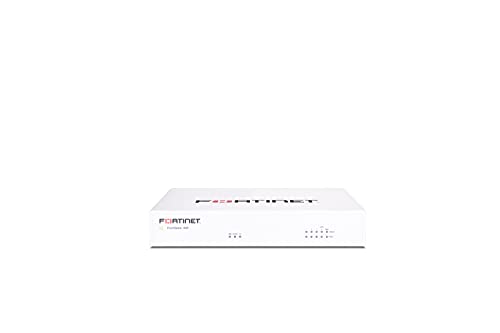
FortiGate-40F Firewall Appliance — Fortinet Gateway, Hardware First
The FortiGate-40F is the entry point to Fortinet’s firewall platform in a box sized for a small business: five gigabit Ethernet RJ45 ports, and a title that performs an unusual act of honesty — it states, in parentheses, that this is the appliance only, with no subscription included. Read that as the product’s whole philosophy. You are buying the FortiGate hardware and its firewalling foundation; the subscription services that feed it current threat intelligence are a separate, ongoing purchase, and Fortinet’s title declines to let you discover that later. A business that understands the bargain gets a platform with enormous depth behind it. A business that wanted the finished cost on one invoice should keep reading this guide.
Five gigabit ports is a compact estate: one for the internet connection, the rest for the office’s internal segments — staff workstations, a server or NAS, a guest network feed, a bank of access points on a switch. Offices larger than that will place a switch behind it, which is normal practice and no criticism. The title prints no throughput figure and no wireless, and this guide records both silences as facts of the listing: the 40F as titled is a wired appliance, and its performance envelope should be confirmed in Fortinet’s own documentation against the office’s connection speed and inspection ambitions before it is specified.
- Ports: 5x Gigabit Ethernet RJ45
- Positioning: firewall appliance for small businesses, per the title
- Licensing: appliance only — no subscription included, stated in the title
- Wireless: no Wi-Fi radio is claimed in this listing; treat it as a wired appliance
- Throughput: the figure does not appear in this listing title — Fortinet’s 40F documentation is the place to confirm it
- Model: FG-40F
The buyer this suits is deliberate: an office, or its IT provider, that already speaks Fortinet, wants the platform’s policy depth at the small-business tier, and budgets subscriptions as the operating cost they are. That buyer gets consistency with the wider FortiGate world — the same policy logic the larger appliances run — in a five-port box. The buyer it does not suit is the one reading a firewall as a finished appliance like a printer; the title itself warns that buyer, in writing, which is more courtesy than most listings extend.
There is also a staffing angle worth naming. Fortinet skills are common among managed service providers, which means a small business buying this box is buying into a labour market — when the office’s usual technician is on holiday, another can be found who knows the platform. Obscure hardware strands its owners; mainstream platforms come with a bench. For many small offices that consideration, invisible in any specification table, is the one that decides how a bad Tuesday afternoon goes.
Installation day deserves a word too, because the 40F’s five ports impose a small design decision that rewards forethought. With one port spoken for by the internet line, the remaining four invite the office to declare its segments on paper first — staff, servers, guests, devices — and to keep one port’s worth of discipline in reserve for the thing nobody planned, which in practice is the card-payment terminal or the new phone system arriving with its own network demands. Offices that sketch that map before the engineer arrives get a firewall policy that reads like their business. Offices that improvise get a policy that reads like the order cables were plugged in, and they live inside that improvisation for years.
Strengths
- The Fortinet platform at a small-business size and port count.
- Licence terms stated honestly in the title itself.
- Five gigabit ports cover a compact office’s segments directly.
Trade-offs
- No subscription is included; protection services are a separate ongoing cost.
- No wireless is claimed — access points are a further purchase.
- No throughput figure is printed in the listing title.
Best for: an office standardising on Fortinet with its subscription costs budgeted as running costs. Not suited for: a buyer seeking a single invoice that finishes the purchase — the title states the subscription sits outside this box.
Because the appliance is only half the bargain, read the FortiGate-40F’s current listing alongside Fortinet’s subscription options before the office commits to the platform.
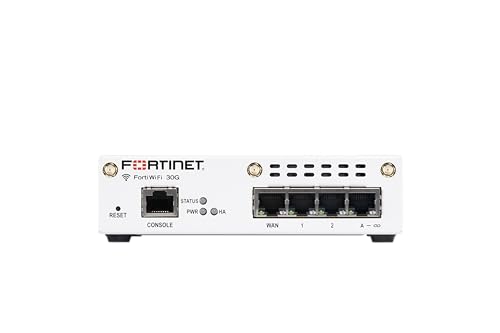
Fortinet FortiWiFi 30G NGFW — One Box, Wi-Fi Included
The FortiWiFi 30G answers the question the 40F declines: what if the firewall and the wireless could be the same purchase? Its title describes a next-generation firewall with Wi-Fi 6 built in, four GE ports, and a stated 4 Gbps throughput — the 4 Gbps figure printed as firewall throughput in the title’s own terms. For the genuinely small office — a professional practice, a boutique agency, a clinic’s front office — that is the entire network edge in one unit: the broadband line enters it, the staff wireless leaves it, the wired desk or two plug into it, and the security policy governing all of them is written in one place.
That consolidation is the product’s argument and its limit in the same breath. One box means one configuration, one firmware to keep current, one device to reboot and one throat to choke when something misbehaves — a real mercy for an office without IT staff. It also means the wireless lives where the box lives, and firewall placement is dictated by the broadband entry point, which is rarely the centre of the office. A single integrated radio serving a long or divided floor plan will leave the far rooms thin; the title’s Wi-Fi 6 is a capable radio, but it is one radio, in the comms cupboard, behind the door the line installer chose.
- Wireless: Wi-Fi 6 built in, per the title
- Class: NGFW — next-generation firewall
- Ports: 4x GE
- Throughput: 4 Gbps firewall throughput, as printed in the title
- Licensing: the subscription terms do not appear in this listing title — confirm them on the listing before purchase
- Model: FWF-30G-A
Sized honestly, the 30G is the under-twenty-desk answer: an office that fits around its four wired ports with a switch’s help, whose wireless demand is one open floor, and whose owner wants Fortinet’s NGFW inspection without commissioning a separate wireless system. The stated throughput, read as the vendor’s firewall figure, leaves generous headroom over any connection such an office is likely to run. Larger or oddly shaped offices should take the same platform thinking and split it — a wired FortiGate with access points placed where people sit — rather than asking one cupboard-bound radio to be everywhere.
The licencing silence deserves the same discipline as the 40F’s honesty: the 30G’s title does not state its subscription terms, so the buyer should establish them on the listing and in Fortinet’s materials before treating the purchase as complete. Integrated convenience does not repeal the subscription economics of modern firewalls; it merely packages them in a smaller box.
Consider the daily experience the 30G is really selling. The office’s wireless and its security are one policy: the guest network the clients join is separated by the same box that inspects the staff traffic, the home worker’s VPN lands on the same console the owner already checks, and a firmware update is one event rather than a coordinated campaign across a firewall and a separate wireless system. For the practice manager who is also the IT department — the actual buyer of this class of product — that unity is not a compromise but the feature. The offices that outgrow it will know precisely when: the day a second room needs a second radio, the estate splits into the wired pattern and the 30G’s lesson has still been worth learning.
Strengths
- Firewall and Wi-Fi 6 in one unit — the whole edge in a single purchase.
- A stated 4 Gbps firewall throughput gives small offices ample headroom.
- Four GE ports cover the wired core of a compact office.
Trade-offs
- One radio, placed where the broadband enters, not where people sit.
- Subscription terms are not stated in the listing title.
- Four ports will want a switch behind them as the office grows.
Best for: a compact office wanting Fortinet inspection and its wireless from the same box. Not suited for: a long or divided floor plan seeking even coverage from a single radio positioned by the line entry.
Small offices buy these once and lean on them for years, so check the FortiWiFi 30G’s current listing and pin down its subscription terms before it becomes the office’s front door.

WatchGuard Firebox T125-W Firewall (Wi-Fi 7) — Licence Bundled, Wi-Fi 7
WatchGuard’s T125-W is the pick that tries to end the licensing conversation before it starts: the title bundles the firewall with a three-year Basic Security Suite, and adds Wi-Fi 7 wireless, one 2.5Gb port and four 1Gb ports, positioned for high-speed remote office security. Each element of that sentence answers a known small-business objection. The bundled suite answers the subscription ambush — three years of the security services are inside this purchase’s terms. Wi-Fi 7 answers the wireless question with the current generation. The 2.5-gigabit port answers the fast-broadband question, giving the internet connection a port that will not cap it.
The remote-office positioning is precise and worth respecting. This is a box for the branch, the satellite practice, the second site that must be secured to head-office standards without head-office staff — a context where a bundled licence and an integrated current-generation radio remove two site-visit problems at once. Four gigabit ports behind the faster WAN port suit the branch’s shape: a small switch’s worth of wired devices, phones and a printer, with wireless covering the room. As with the FortiWiFi, the radio lives where the box lives, so the branch should be a space one radio can honestly serve.
- Wireless: Wi-Fi 7, per the title
- Licensing: 3-year Basic Security Suite bundled, per the title
- Ports: 1x 2.5Gb + 4x 1Gb
- Positioning: high-speed remote office security
- Throughput: no headline throughput figure is printed in this listing title — WatchGuard’s T125-W documentation carries it
- Model references: WGT126000 + WGT1260073
Against the FortiWiFi 30G, the comparison is instructive: a newer wireless generation, a faster WAN port, and licence terms printed as a bundle rather than left to be discovered. Against the wired appliances in this guide, it trades port count and PoE for completeness in one box. The office it suits knows its own shape — compact, possibly remote, wanting the security services settled for three years at the moment of purchase. The discipline it still requires is calendrical: three bundled years end, and the renewal belongs in the diary on the day the box is racked, not in a panic in year four.
WatchGuard’s heritage in the small and mid-sized market shows in that bundling instinct — the firm has always sold to organisations whose security is run by a person with other jobs. The T125-W reads like a product designed by people who have taken the support calls from those organisations: the questions buyers forget to ask are answered in the title, in advance.
The branch-office scenario rewards one more layer of thought. A branch secured by a T125-W is a branch whose security posture can be cloned: the same box, the same bundled suite, the same port layout at the second site and the fifth, which converts each new location from a design project into a delivery. Head office gains a fleet of identical front doors rather than a museum of whatever each local installer preferred. That fleet logic is the same argument the access point platforms make in larger networks, applied at the scale of the satellite office — and the Wi-Fi 7 radio means the clone does not arrive already dated, which matters when the fleet’s replacement cycle is measured in many years.
Strengths
- Three years of the Basic Security Suite are bundled in the terms.
- Wi-Fi 7 is the current wireless generation, integrated in the box.
- A 2.5Gb WAN-class port keeps fast broadband lines uncapped.
Trade-offs
- Four 1Gb LAN ports is a branch-sized wired estate, not a headquarters.
- The bundled suite is the Basic tier; heavier inspection needs may outgrow it.
- Integrated wireless still radiates from wherever the box is installed.
Best for: a branch or compact office wanting firewall, current Wi-Fi and three years of services settled in one purchase. Not suited for: a multi-room headquarters seeking distributed wireless — one integrated radio cannot be in every room, whatever its generation.
Branch rollouts live or die on identical boxes, so verify the Firebox T125-W’s current listing and confirm the bundled suite’s term matches your renewal calendar.

D-Link Guardian 600 PoE Business Router — Failover and PoE Powerhouse
The Guardian 600 is the pragmatist of this field. D-Link’s title calls it a premium business router rather than a firewall appliance, then lists the features a working office actually feels: multi-WAN failover, an SPI firewall, VPN, and eight 2.5GbE PoE+ LAN ports. Take those in order. Multi-WAN failover means a second internet connection stands behind the first, so a broadband outage becomes a pause rather than a closed office — the single most valuable continuity feature a small business can buy. The SPI firewall is stateful packet inspection, the foundational firewall discipline of tracking connections and admitting only what belongs. VPN covers the remote worker and the second site.
The eight PoE+ ports are the installation story. At 2.5-gigabit speed with power on the same cable, they can run the office’s access points, desk phones and cameras directly from this one unit — no separate PoE switch, no injectors, one device powering and policing the wired estate. Eight ports at that specification is generous for the class, and it reframes the Guardian’s role: less a security appliance competing on inspection vocabulary, more the office’s network core, with continuity and power distribution as its headline virtues. Offices whose threat model is dominated by the connection dropping, rather than by advanced intrusion, will recognise their own priorities in that ordering.
- WAN: multi-WAN failover stated in the title
- Firewall: SPI firewall stated in the title
- Ports: 8x 2.5GbE PoE+ LAN
- VPN: stated in the title
- Wireless: none built in — wireless arrives via the access points its PoE ports can power
- Model: DBR-600-P
The honest boundary is vocabulary. Where the Zyxel title prints IPS, anti-malware and UTM, the D-Link title prints none of that deeper inspection language — so this guide credits the Guardian with the firewall it names (SPI) and no more. An office whose compliance regime demands named intrusion prevention should look at the Zyxel or the platform appliances. An office whose lived experience of network failure is the broadband line, the dead switch and the unplugged injector will find the Guardian aimed at its actual history. Both readings are respectable; the title gives you the evidence to choose between them.
There is a cabling-cabinet elegance to the design worth appreciating. One box terminating two internet lines, feeding eight powered ports, and holding the VPN door is a rack a small office can understand at a glance — and understandability is a security property, because the network a business manager can picture is the network that gets its firmware updated and its odd light investigated.
The failover feature deserves a rehearsal rather than a hope. Offices buy multi-WAN and then never test it, discovering during the first real outage that the second line was misconfigured in a way no status light mentioned. The Guardian’s buyer should schedule the drill at installation: pull the primary line, watch the card machine and the phones survive, time the changeover, and write the result in the office’s continuity notes. A failover that has been witnessed is a business asset an insurer can be told about; a failover that exists only in a feature list is a rumour. The same drill, honestly, belongs to every continuity claim in this guide — the D-Link simply makes the promise most explicitly, so it earns the advice most directly.
Strengths
- Multi-WAN failover protects the office against its commonest outage.
- Eight 2.5GbE PoE+ ports power access points, phones and cameras directly.
- VPN and an SPI firewall cover the small-business security baseline in the title.
Trade-offs
- No deeper inspection vocabulary — IPS, anti-malware — is printed in the title.
- No integrated wireless; access points are a separate, if powered, purchase.
- Its premium-router framing suits continuity-first offices more than compliance-first ones.
Best for: an office whose priority is staying online — two lines, powered ports, one comprehensible core. Not suited for: compliance regimes that require named intrusion-prevention and anti-malware services in the listing — this title’s security claim stops at its SPI firewall.
Continuity hardware earns its keep on the worst day of the year, so look over the Guardian 600’s current listing and count the office’s powered devices against its eight ports before ordering.

Zyxel USG FLEX 100H Firewall Router — Fullest Printed Security Suite
Zyxel’s title is the densest security document in this guide: a firewall sized for 25 users, with a one-year Gold Security Pack included, eight gigabit ports, 4 Gbps SPI throughput, a fanless design, an RJ-45 console port, IPSec and SSL VPN, IPS, anti-malware and UTM, TAA compliant. Almost every clause earns analysis. The 25-user sizing is a rare act of plain speaking — the vendor telling you the office size the box is built for. The Gold Security Pack’s included year sets the licensing clock openly. IPS is intrusion prevention; anti-malware and the UTM label complete the unified-threat-management claim; and the two VPN flavours serve two different populations — IPSec for site-to-site links, SSL for the individual working from home.
The 4 Gbps figure is printed specifically as SPI throughput, which is a more modest and more honest claim than an unqualified number: it describes the firewall’s stateful inspection rate, the work every connection requires. Fanless operation places the box in the office itself rather than exiling it to a server room — silent security for the practice, studio or shop floor where the network cupboard is within earshot of customers. The console port is the professional’s tell: when everything else fails, a cable and a terminal still talk to the box. TAA compliance matters to the narrow but real set of organisations whose procurement rules require it, and is irrelevant to everyone else.
- Sizing: 25 users, per the title
- Licensing: 1-year Gold Security Pack included
- Ports: 8x gigabit; RJ-45 console port
- Throughput: 4 Gbps SPI throughput, as printed in the title
- Security: IPSec/SSL VPN, IPS, anti-malware, UTM — all stated in the title
- Design: fanless; TAA compliant
The office this suits is the guide’s clearest portrait: roughly twenty-five people, a compliance or insurance conversation that uses words like intrusion prevention, staff who VPN in from home, and no appetite for a separate wireless decision to be bundled badly — the 100H is wired, and its eight ports will feed the access points the office chooses separately. Its limits are the mirror of its clarity: outgrow twenty-five users and the sizing statement itself tells you to move up the range, and the included security year ends on a date the buyer should circle now. Within its stated envelope, though, no title in this guide makes a more complete or more checkable promise.
Zyxel’s long presence in the small-business channel also means the surrounding knowledge — configuration examples, provider familiarity, replacement availability — is deep. Like the Fortinet bench argument, that matters on the bad Tuesday. Unlike the platform picks, the 100H makes its case primarily on the printed page, which is the most portable kind of persuasion there is.
The fanless detail repays a second look, because it changes where security can physically live. A fanless firewall can sit in the consulting room’s cupboard, the studio’s shelving, the shop’s back office — places with people in them, where a whirring appliance would be unplugged by Friday. Silent operation is therefore not a comfort feature but an deployment feature: it widens the set of rooms the network’s front door can occupy, including rooms where the broadband line actually enters. Combined with the console port — the recovery path when the network itself is the thing that is broken — the 100H reads as a box designed by people who have installed security in buildings that were never designed for it.
Strengths
- The fullest security vocabulary printed in any title here — VPN both ways, IPS, anti-malware, UTM.
- Honest sizing (25 users) and SPI-specific throughput in the title.
- Fanless, eight ports, console access — built for real small offices.
Trade-offs
- The included Gold Security Pack runs one year; renewals follow.
- Wireless is a separate purchase — this box feeds access points rather than replacing them.
- The 25-user sizing is a ceiling as well as a description.
Best for: an office near the stated 25-user size that wants its security services named, printed and included for the first year. Not suited for: a buyer seeking integrated wireless in the same chassis — this is a wired firewall, and its title makes no other claim.
Named features invite verification, so read the USG FLEX 100H’s current listing and match its user sizing against your own headcount before it goes in the cupboard.

Sophos XGS 118 Network Security Appliance — Port-Rich Platform Pick
The Sophos XGS 118 is the most infrastructure-minded title of the six: a Gen2 network security appliance with nine 2.5 GE ports plus one SFP, business firewall and advanced security positioning, SD-WAN, and cloud-based management — described, finally, as hardware only. Begin with the ports, because nine multi-gig ports plus a fibre-capable SFP slot is a wired estate beyond every other pick here: multiple internet lines, segmented internal networks, a server segment, a guest segment, and uplinks that do not strangle a fast internal network. The SFP slot in particular speaks to buildings with fibre runs between cabinets, or to the office planning them.
SD-WAN is the second headline: the discipline of steering traffic across multiple connections by policy — the video calls on the clean line, the bulk backups on the cheap one, everything failing over when a line dies. Paired with cloud-based management, it sketches the buyer precisely: an organisation, or its provider, running security as a platform across one site or several, administering from a console rather than a cupboard. And the title’s closing words — hardware only — apply the same honesty as the FortiGate’s parenthesis: the Sophos platform’s services and licensing stand apart from this appliance purchase, and the buyer should price them together from the start.
- Ports: 9x 2.5 GE + 1 SFP
- WAN: SD-WAN stated in the title
- Management: cloud-based management stated in the title
- Licensing: hardware only, per the title — services are a separate consideration
- Wireless: absent from the title’s claims; plan access points behind it
- Model: XGS 118 (Gen2), XG118Z00ZZPCUS
The office this suits has outgrown the one-box stage: multi-gig internal traffic, more than one connection to orchestrate, a provider or IT lead who manages through the cloud console, and a Sophos-standardised estate into which this appliance slots as a citizen. It is the wrong purchase for the office hoping the box alone is the security programme — the title says so itself — and oversized for the five-desk practice whose whole network would rattle around in nine ports. Platform picks reward platform buyers; the XGS 118 is unapologetically one.
There is a growth argument embedded in the port count worth surfacing. Offices rarely shrink their networks; the guest segment, the camera segment, the second line and the server all arrive one year at a time. An appliance bought with ports to spare absorbs that growth as configuration rather than replacement — the same estate logic the school access points in larger networks follow, and the reason the connectivity layer behind a firewall, covered in our Best Small Business Network Routers for Continuity, VPN and Control guide, deserves planning rather than improvisation.
Cloud-based management cuts the other way as well, and the honest section should say so: administering the front door through a vendor’s cloud means the office’s security operations inherit the vendor’s availability and account hygiene. Multi-factor discipline on the management account becomes as important as any rule on the box — a lesson the whole platform class shares, and one a provider-run office should hear from its provider unprompted. None of that diminishes the XGS 118’s fit for its buyer; it defines the buyer’s responsibilities, which is what separates a platform adoption from an appliance purchase in the first place.
Strengths
- The largest wired estate in this guide: nine 2.5 GE ports and an SFP slot.
- SD-WAN steering with cloud administration suits multi-connection, provider-run offices.
- The Gen2 appliance sits inside a mature security platform.
Trade-offs
- Hardware only: the platform’s services are a separate, ongoing cost.
- Access points are still needed to complete the picture; the title claims no radio.
- Oversized for the smallest offices, in ports and in platform alike.
Best for: a growing or multi-connection office standardising on Sophos, managed through the cloud console. Not suited for: the finished-purchase expectation — the title’s own closing words describe hardware alone.
Platform purchases deserve a full-cost view, so check the XGS 118’s current listing together with Sophos’s service options before the estate decision is made.
Comparison Table
| Pick | Wi-Fi in the box | Ports | Licence terms in title | Printed throughput | Standout feature |
|---|---|---|---|---|---|
| FortiGate-40F | None claimed | 5x Gigabit RJ45 | No subscription included | Not printed | Fortinet platform entry |
| FortiWiFi 30G | Wi-Fi 6 | 4x GE | Not stated in title | 4 Gbps firewall | NGFW plus wireless, one box |
| WatchGuard T125-W | Wi-Fi 7 | 1x 2.5Gb + 4x 1Gb | 3-year Basic Security Suite | Not printed | Bundled licence term |
| D-Link Guardian 600 | None claimed | 8x 2.5GbE PoE+ LAN | Not stated in title | Not printed | Multi-WAN failover + PoE |
| Zyxel USG FLEX 100H | None claimed | 8x Gigabit + console | 1-year Gold Security Pack | 4 Gbps SPI | Full UTM vocabulary, 25 users |
| Sophos XGS 118 | None claimed | 9x 2.5 GE + 1 SFP | Hardware only | Not printed | SD-WAN, cloud management |
One Box or Firewall Plus Access Points: Which Architecture?
The integrated picks — FortiWiFi 30G and WatchGuard T125-W — collapse the decision for offices that fit their shape: one floor, a modest headcount, no IT cupboard politics. Their wireless generations (Wi-Fi 6 and Wi-Fi 7 respectively) are current enough that the radio will not be the reason for the next replacement, and their policies live in one place. The wired picks ask more and give more: the firewall sits where the lines enter, access points sit where people sit, and each layer can be replaced without disturbing the other. Offices expecting to grow, to add a second site, or to segment staff, guest and device networks with real rigour should start wired — the streaming and media traffic that even small offices now push around behaves better on a network built in layers, a point our Best Routers for Streaming TV guide makes from the home side.
Whichever architecture is chosen, the licence question must be answered in writing before purchase: what is included, for how long, and what the renewal costs. The titles here model every possibility — bundled years, an honest nothing, and silence — and the silence is the dangerous one, because it lets a budget assume the best. Treat an unstated licence term as a question to close on the listing and with the vendor, never as an implied inclusion.
Placement follows the same logic. An integrated box radiates from the comms point, so its office should be arranged — or its expectations set — around that fact; a wired box frees the access points to sit above the desks they serve, at the price of cable runs and a switch. Neither consideration appears in a specification table, yet between them they decide whether the staff experience the new network as faster or merely as newer. Walk the floor plan with the shortlist in hand before ordering: mark where the line enters, where people sit, where the far corner’s signal must reach, and let those three marks arbitrate between the one-box and layered designs more honestly than any headline figure can.
Also decide the failure plan while the network is still theoretical. A second broadband line into the D-Link’s failover, or SD-WAN steering on the Sophos, converts the commonest office disaster into a non-event; a single line into any box leaves the business one digger away from closure. Cellular backup is the other half of that plan, and the dedicated options are compared in our Best Hotspot Routers for Small Business roundup.
Reading the Licence Line Before the Port Count
If this guide has a single sermon, it is that the licence line of a firewall listing deserves reading before the specification table. The six titles demonstrate the full grammar of the industry. Bundled time — WatchGuard’s three years, Zyxel’s one year — converts an unknown future cost into a dated diary entry, and the difference between one year and three is a real economic difference that belongs in the comparison alongside ports. Declared absence — Fortinet’s no-subscription parenthesis, Sophos’s hardware-only closing — is the second-best outcome: the buyer knows the shape of the commitment and can price the whole platform before signing anything. Silence is the only genuinely dangerous state, because a silent title lets every reader project their preferred assumption onto the purchase, and the assumption is usually wrong in the vendor’s favour.
The practical procedure is short. Before ordering, write down three numbers for the chosen box: the appliance cost, the service cost across the years you intend to hold it, and the renewal date the bundle or first subscription creates. If the listing cannot supply the second number, the vendor’s own materials must, and a seller unwilling to state it plainly is telling you something about the relationship on offer. None of this is an argument against subscriptions — current threat intelligence is genuinely a service, produced by people who track a moving adversary, and it cannot honestly be sold once. It is an argument for buying the service with your eyes open, at the same table as the hardware, rather than meeting it later as a surprise with an expiry warning attached.
There is a second-order effect worth one paragraph. Offices that budget security as a subscription tend to keep it; offices that bought it as an afterthought let it lapse at the first tight quarter, and the lapsed firewall is worse than a planned plain router precisely because everyone believes protection exists. The picks in this guide that bundle their first term are, in that light, doing their buyers a behavioural favour: the renewal conversation happens once, at a planned moment, with the value of the service already experienced. Choose the structure your business will actually honour.
Common Mistakes
Buying the appliance and discovering the subscription. Two titles in this guide state their hardware-only or no-subscription terms openly, and the others bundle or stay silent. The mistake is not the subscription model — it is failing to budget it. An expired security licence leaves a firewall forwarding traffic with stale intelligence, which is worse than knowing you run a plain router.
Expecting wireless from a wired box. Four of these six titles claim no Wi-Fi at all. Offices that unbox a wired appliance on a Friday and discover the staff wireless was an assumption spend the weekend buying emergency access points. Read the title’s wireless claim — or its absence — before the order.
Judging by the biggest throughput number. A 4 Gbps figure describes the vendor’s test bench, not your Tuesday. Port counts, PoE, VPN flavours and licence terms will shape the office’s experience daily; the headline throughput almost never will, on any connection a small business can buy.
Forgetting the renewal date. Bundled terms — three years, one year — feel permanent at purchase and expire on an ordinary weekday. Put the renewal in the business calendar the day the box is installed, with the budget attached.
One flat network for staff, guests and gadgets. The point of a business firewall is segmentation: guests reach the internet, staff reach the server, the printer reaches nothing it should not. A firewall configured as a single flat pass-through has been bought and not used.
FAQ
Does a small business really need a firewall appliance rather than a good router? If the business holds client data, takes payments, or lets staff work remotely, the appliance’s inspection, VPN and segmentation are doing work a consumer router does not attempt. The titles in this guide show the difference in vocabulary: VPN flavours, intrusion prevention, failover and licence-backed intelligence are not router features.
What happens when the security subscription lapses? The box keeps routing and its built-in firewall rules keep working, but the subscription-fed services — current threat intelligence, updated filtering — stop refreshing. The appliance does not die; it ages, quickly, in exactly the dimension it was bought for. Renewal budgeting is part of the purchase.
Which pick gives an office Wi-Fi without extra hardware? Two: the FortiWiFi 30G with Wi-Fi 6 and the WatchGuard T125-W with Wi-Fi 7. Both place the radio in the firewall itself, which suits compact single-floor offices; larger spaces should pair a wired pick with access points.
Why does the D-Link have PoE when the others do not mention it? Because its design centres on running the office’s wired devices — access points, phones, cameras — directly from its eight powered ports, removing a separate PoE switch. The other titles simply do not claim PoE; if powered ports matter, confirm them in the manufacturer’s documentation rather than assuming.
How should an office choose between Fortinet, WatchGuard, Zyxel and Sophos? By the ecosystem around the box: the provider who will manage it, the licence structure the budget prefers, and the features the title prints. All four platforms are credible; the differentiators in this guide — bundled years, user sizing, port estates, SD-WAN — are the ones an office will actually live with.
What should be connected to the firewall first? Sketch the segments before touching a cable: the internet line, the staff network, the guest network, and the devices — servers, card terminals, cameras — that deserve their own segment. The port counts in this guide then become a plan rather than a puzzle: compact boxes serve the sketch directly, and the eight- and nine-port picks absorb it with room for the segment nobody has thought of yet. The sketch, kept with the office’s records, is also what the next technician will thank you for.
Is a second internet line worth it for a small office? For an office that trades, takes bookings or processes payments online, the arithmetic is usually settled by a single remembered outage. The D-Link’s multi-WAN failover and the Sophos’s SD-WAN are the two titles here that build the second line into the product’s purpose; the others can sit behind separate failover arrangements. Either way, test the changeover at installation — an untested failover is a hope, not a control.
Final Recommendation
Before the matching, one procedural recommendation that outranks every pick: have the chosen box’s policy written by whoever will maintain it, and keep a printed copy of the segment plan, the licence dates and the failover test result in the office’s own records. Firewalls fail socially more often than electronically — the configuration nobody documented, the renewal nobody owned, the password in a departed employee’s notebook. The hardware choices below are all defensible; the ownership habits around them are what the office will actually live with, and they cost nothing but an hour at installation.
Match the box to the office’s honest shape. The compact office that wants everything in one purchase takes the FortiWiFi 30G, or the WatchGuard T125-W where Wi-Fi 7 and a three-year bundled suite settle more questions at once. The office that runs on continuity takes the D-Link Guardian 600 and its failover-plus-PoE core. The office that must name its protections takes the Zyxel USG FLEX 100H and its printed UTM vocabulary. And the office building a platform takes the FortiGate-40F or the Sophos XGS 118, eyes open about subscriptions, for the ecosystems behind them. A front door is not a place for optimism — choose the lock whose terms you have read to the last line.
Related Guides
The firewall guards one edge of a wider office network, and these guides cover the rest of it: Best Routers for Streaming TV for the traffic the meeting-room screen generates, Best Hotspot Routers for Small Business for the cellular backup behind the failover plan, and Best Small Business Network Routers for Continuity, VPN and Control for the routing layer in full.


