What's inside
As an Amazon Associate I earn from qualifying purchases. This post may contain affiliate links at no extra cost to you.
widgetverdict.com is reader-supported. When you buy through links on our site, we may earn an affiliate commission.
Where to buy: our six picks for the best WiFi routers for schools link to their Amazon listings, starting with the Cudy AP3000 ceiling access point, and every linked pick points at the exact model its section discusses — check the listing title against the model named here before a purchase order goes out.
A school network fails in a very specific way: not at nine in the morning when the office staff log in, but at five past, when thirty Chromebooks in one classroom all wake at once and a second class next door does the same. The best WiFi routers for schools are therefore rarely routers in the home sense at all. Four of the six picks here are ceiling-mounted access points built for managed fleets — powered over Ethernet, assigned to rooms, and administered from a controller or cloud dashboard rather than a phone app on somebody’s desk. The remaining two are self-contained mesh kits, included for the small sites — a two-building primary, a tutoring centre, a nursery — where a managed fleet would be more infrastructure than the building needs.
That split shapes everything in this guide. Access points assume a wired backbone: Ethernet runs to ceilings, a PoE switch in a locked cabinet, and somebody — an IT lead, a managed provider, a caretaker with training — who owns the configuration. Mesh kits assume the opposite: no structured cabling, a broadband line in one corner, and coverage improvised from there. Neither answer is wrong; they are answers to different buildings. What unites the six is the school’s real workload — dense client counts in small rooms, separate networks for pupils, staff and visitors, and hardware that must survive being ignored for terms at a time.
One honesty note before the picks. Several of these listing titles are generous with numbers and several are terse to the point of silence, and this guide treats both kinds the same way: a capability is credited only when the title prints it. Where a title leaves a figure unprinted — a client ceiling, a wireless class — the spec box in that pick’s section says so plainly and points to the manufacturer’s own documentation, because a school buying forty units cannot afford to discover a missing feature after the ceiling tiles go back up.
Key Takeaways
- Four picks are ceiling access points (Cudy, HPE Instant On, TP-Link Omada, Ubiquiti UniFi) built for managed, PoE-powered fleets; two are complete mesh kits (NETGEAR Orbi 370, DBIT) for sites without structured cabling.
- Client capacity is the school metric that matters: the Cudy title claims 150+ clients and the DBIT kit claims 150 devices, while the Orbi 370 states 70 devices — read those ceilings against classroom density, not whole-school headcount.
- Every access point here is PoE-fed and none of the four includes its power adapter in the title’s terms, so switch or injector budget belongs in the project cost from day one.
- Multi-SSID support, stated outright in the Cudy title, is the mechanism that separates pupil, staff and guest traffic; the managed platforms carry that separation as part of their design brief.
- Mesh kits trade administrative depth for speed of deployment — the right trade for a small site, the wrong one for a campus.
Quick Picks
| Pick | Badge | Why it earns its place |
|---|---|---|
| Cudy AP3000 AX3000 Ceiling Mount Access Point | Densest classroom ceiling | AX3000 Wi-Fi 6 with a stated 150+ client capacity, multi-SSID and a 2.5GbE PoE input — the most school-shaped specification on this page. |
| HPE Networking Instant On AP22 Access Point | Managed without the ceremony | A 2×2 Wi-Fi 6 indoor access point from HPE’s small-business line, with Smart Mesh support for rooms the cable cannot reach. |
| TP-Link Omada EAP653 AX3000 Access Point | Controller ecosystem pick | AX3000 Wi-Fi 6 with mesh, roaming and WPA3 named in the title, Omada-managed, and a five-year warranty behind it. |
| Ubiquiti UniFi U6 Enterprise Access Point | The UniFi estate choice | The enterprise tier of the UniFi access point line, for schools already running UniFi switching and its controller. |
| NETGEAR Orbi 370 WiFi 7 Mesh System (3-Pack) | Whole-site kit, no cabling | A Wi-Fi 7 router plus two satellites covering up to 6,000 square feet for up to 70 devices — a small site’s network in one box. |
| DBIT AX1800 Mesh System | Budget mesh, big claims | Wi-Fi 6 mesh across three units claiming up to 6,500 square feet and 150 devices, with six gigabit Ethernet ports in total. |
How Were These Picks Chosen for School Buildings?
By starting from the timetable rather than the speed test. A classroom access point spends its life doing one hard thing — holding dozens of simultaneous, bursty connections in a small space — and several easy things badly if it is the wrong tool. So the first filter was client handling: titles that state a client or device ceiling earned their place on evidence, and the figures are quoted in each section so a school can compare them against its own class sizes. The second filter was power and placement. Ceiling mounting with PoE is the professional pattern for a reason — one cable carries data and power, the radio sits above the clutter of desks and bodies, and there is no adapter at child height to be unplugged by a cleaner or a curious pupil.
The third filter was administration. A school does not have a network engineer per corridor; it has one dashboard, or it has chaos. The four access points each belong to a managed platform — Omada, UniFi, Instant On, and Cudy’s own multi-SSID management — because a fleet of radios that must be configured one at a time, in ceilings, during holidays, is a fleet that will quietly drift out of date. The mesh kits were judged by the opposite standard: how completely they remove administration from a small site that has none to spare.
Finally, we kept the two honest silences in view. Two of the access point titles decline to print a client figure at all, and one declines to print nearly everything. Those picks remain here because their platforms are genuinely used in schools, but their sections mark the gaps rather than filling them with brochure language from elsewhere. A school standardising on a platform for five years is buying the ecosystem as much as the radio, and the ecosystem case is made openly in each section, separated from the printed specification.
We also weighed the building services nobody puts in a headline. Ceiling units live above tiles that get lifted twice a decade, in corridors that double as fire routes, in halls that become exam rooms — hardware that demands attention will not get it, so passive virtues count: power drawn through the data cable rather than from a socket a cleaner needs, a radio that returns to service by itself after a power cut, a configuration held centrally so a replacement unit inherits it rather than reinventing it. And we weighed the human layer — whether the platform’s management view can be understood by the person a school actually has, be that a trust IT team with a controller or a business manager with an app and a termly visit from a technician. A specification can be perfect and still fail that test.

Cudy AP3000 AX3000 Ceiling Mount Access Point — Densest Classroom Ceiling
Cudy’s AP3000 is the pick whose listing title reads most like a school tender response. It is a dual-band Wi-Fi 6 ceiling mount access point in the AX3000 class — 2402 plus 574 Mbps across its two bands — with a stated coverage of 1,400 square feet and, the figure that matters most here, a stated capacity of more than 150 clients. One classroom of thirty devices barely troubles that ceiling; a hall running an assembly, an exam session and the staff laptops at once is the scenario it is sized for. Multi-SSID support is printed in the title, which is the technical basis for the separation every school needs: one network name for pupils, one for staff, one for visitors, each with its own rules.
The wired side is equally deliberate. A single 2.5GbE port accepts PoE in, and the title lists three power routes — 802.3at, passive PoE, and DC — which gives an installer options across different switch estates. The same title is blunt about the consequence: no adapter is included. Budget the PoE switch or injectors as part of this purchase, because the access point on its own is a radio waiting for power. The 2.5-gigabit uplink also matters more than it first appears: an AX3000 radio serving a dense room can push more traffic than a gigabit ceiling port returns, and the faster uplink keeps the cable from becoming the bottleneck the bell creates.
- Wireless: AX3000 dual-band Wi-Fi 6, stated as 2402 + 574 Mbps
- Stated capacity: 150+ clients; stated coverage 1,400 sq. ft.
- Uplink: 1x 2.5GbE port, PoE in
- Power: 802.3at, passive PoE or DC; no adapter included
- Networks: Multi-SSID support stated in the title
- Mounting: ceiling mount
Who it suits is a school rolling out room-by-room coverage on a wired backbone — one unit per classroom or shared between two small ones — with a named person or provider managing the fleet. The multi-SSID story also makes it the natural pick where pupil devices and staff devices must never share a network, which in practice means almost everywhere. Its limits are the limits of its category: it is not a router, it does not create a network by itself, and a building without Ethernet to the ceilings cannot use it as drawn.
Deployment rhythm matters with a unit like this. Because the specification is printed rather than promised, a school can pilot honestly: two units in the two worst classrooms, a week of lesson-time observation, then a decision grounded in the building’s own behaviour. The 150-client ceiling also changes the maths in shared spaces — a library or hall that would need two lesser radios can sometimes be served by one AP3000, which simplifies both the cabling plan and the channel plan. And because the power routes include ordinary DC as well as both PoE flavours, a phased rollout can begin on injectors in one corridor and graduate to a PoE switch later without replacing the radios themselves. Few picks in this guide let a school start small and stay coherent; this one does, provided the person configuring the SSIDs writes the network names and rules down somewhere the next person can find them.
Strengths
- The 150+ client figure is printed in the title, not implied.
- Multi-SSID support is stated outright, matching the pupil/staff/guest split.
- A 2.5GbE PoE uplink keeps dense-room traffic off a gigabit ceiling.
Trade-offs
- No power adapter is included, so PoE infrastructure is a real added cost.
- It is an access point only — routing and internet gateway duties live elsewhere.
- 1,400 sq. ft. per unit means large halls need several units and a plan.
Best for: classroom-by-classroom rollouts on a PoE backbone where client density is the governing problem. Not suited for: a building with no ceiling Ethernet runs and no plan to install them, since this unit has no mesh fallback printed in its title.
Price moves with school-year buying cycles, so check the current AP3000 listing before building a per-classroom quote around it.

HPE Networking Instant On AP22 Access Point — Managed Without the Ceremony
The AP22 comes from HPE’s Instant On line, which exists for organisations too large for home gear and too small for an IT department — a description that fits a great many schools precisely. The title describes a 2×2 Wi-Fi 6 indoor access point, dual-band, positioned on long range and security, with Smart Mesh support. That last feature earns it a distinct role in a school estate: most rooms should be wired, but every school has the one room the cable never reached — the portacabin classroom, the library annexe, the sports hall office — and a mesh-capable access point can join the same managed network from there without a separate system to administer.
The title is quieter than Cudy’s about numbers. It prints no client ceiling and no coverage figure, and this guide does not invent either; HPE’s own AP22 documentation is where a school should confirm the figures against its class sizes before standardising. What the title does establish is the shape of the product: an indoor, ceiling-or-wall access point in the 2×2 Wi-Fi 6 class from a vendor whose support organisation is a known quantity to school procurement. The title also states that the power source is not included, so — as with the Cudy — the PoE switch or adapter is part of the real purchase.
- Wireless: 2×2 Wi-Fi 6, dual-band
- Positioning: long range, secure, per the listing title
- Mesh: Smart Mesh support stated in the title
- Client capacity: the listing title leaves the client ceiling unprinted — confirm it in HPE’s AP22 documentation
- Power: power source not included
- Model: US model R4W01A
The honest framing for the AP22 is platform trust over paper specification. A school choosing it is choosing HPE’s management app and support structure, accepting a title that proves less on the page in exchange for a vendor relationship that answers the phone. For a single-site school whose network is run by a business manager and a visiting technician, that can be the right exchange. For a multi-academy trust comparing radios on throughput per ceiling, the Cudy and Omada titles simply present more evidence per unit.
There is a second, quieter argument for the Instant On shape in a school context: staff turnover. School networks outlive the people who install them, and a platform administered through a guided app — with the configuration visible at a glance rather than buried in a controller’s advanced pages — is one a successor can inherit without a handover project. The Smart Mesh support plays into the same virtue, because the awkward rooms in a school are rarely awkward forever; the portacabin gets replaced, the annexe gets rewired, and a radio that began life meshed can be cabled later and keep its place in the same managed network. What the AP22 asks in return is trust in the platform’s published documentation for the numbers its title omits, and a school should do that reading before the first order rather than after the first corridor is live.
Strengths
- Smart Mesh support covers the rooms structured cabling never reached.
- HPE’s Instant On line is built and supported for small organisations.
- Wi-Fi 6 in a 2×2 indoor unit matches ordinary classroom loads.
Trade-offs
- No client or coverage figure is printed in the listing title.
- Power source is not included; PoE or an adapter is a separate line item.
- A 2×2 radio is a class below the AX3000 units for the densest rooms.
Best for: a school that values a supported, app-managed platform and has a few unwired rooms to absorb by mesh. Not suited for: a buyer seeking a printed client ceiling in the listing itself — the title offers none, so the evidence has to come from HPE’s documentation first.
Institutional pricing shifts between terms, so look at the AP22’s current listing when the quote for the summer works is being assembled.

TP-Link Omada EAP653 AX3000 Access Point — Controller Ecosystem Pick
The EAP653 is TP-Link’s AX3000 ceiling access point inside the Omada business platform, and its title is the most administratively literate of the four: Wi-Fi 6 dual band, mesh, roaming, WPA3, PoE powered, Omada managed. Roaming is the word a school should linger on. Pupils and staff move — a teacher’s laptop travels from classroom to staffroom to hall — and a managed system that hands connections between access points cleanly, under one configuration, is the difference between a network and a pile of radios. Omada management means the fleet is configured as a fleet: SSIDs, policies and updates pushed from a controller rather than typed into thirty ceilings one at a time.
The title names the PoE injectors it pairs with — the PoE160S and PoE4824G — and states that no DC adapter is included, which at least makes the power conversation explicit on the page. It also carries a five-year warranty, a term that aligns with how schools actually hold hardware: bought in a summer, expected to still be on the ceiling several cohorts later. WPA3 is printed, which matters for the staff network in particular, and the mesh capability gives the same platform an answer for the annexe problem described in the AP22’s section — wired where possible, meshed where necessary, one dashboard either way.
- Wireless: AX3000 Wi-Fi 6, dual band
- Platform: Omada managed; mesh and roaming stated in the title
- Security: WPA3 stated in the title
- Power: PoE powered (named injectors PoE160S, PoE4824G); no DC adapter included
- Warranty: five years, per the listing title
- Client ceiling: not a figure TP-Link prints in this title; the EAP653 datasheet is the place to verify it before a bulk order
Set against the Cudy, the EAP653 trades a printed client figure for a deeper management story and a longer warranty. Neither trade is irrational; they suit different buyers. A school with an IT provider who already speaks Omada will get more from this unit’s ecosystem than from a rival’s bigger number, while a school comparing bare specifications on a spreadsheet will find the Cudy title more forthcoming. What the EAP653 unambiguously offers is a coherent growth path: start with the rooms that hurt most, add units under the same controller, and never re-platform mid-estate.
The roaming claim deserves one more layer of attention, because it is where managed systems quietly earn their keep across a school day. A pupil tablet carried from a classroom to the library should not cling to a fading signal from two rooms away while a strong radio sits overhead; controller-coordinated roaming exists to make that handover a decision the system takes, not a stubbornness the client suffers. Multiply that by every corridor transition in a timetable and the difference between a fleet and a set of independent radios stops being abstract. The EAP653’s title also pairs its mesh capability with that roaming story, so the unwired annexe joins the same conversation rather than forming a separate, forgotten network with a password known only to one departed technician.
Strengths
- Roaming and mesh are both stated, under one Omada configuration.
- WPA3 is printed in the title for the staff-facing networks.
- A five-year warranty matches school hardware lifecycles.
Trade-offs
- No DC adapter is included, and the client ceiling is not printed.
- The value is ecosystem-deep; a single standalone unit uses little of it.
- Omada management is one more platform for a small site to learn.
Best for: a school or trust building a managed fleet under one controller, growing room by room. Not suited for: a one-room site seeking a single self-contained box — the platform this unit belongs to is the product, and a lone unit leaves most of it unbought.
Because estates buy these in multiples, verify the EAP653’s current listing and its per-unit terms before multiplying it across a floor plan.
Ubiquiti UniFi U6 Enterprise Access Point — The UniFi Estate Choice
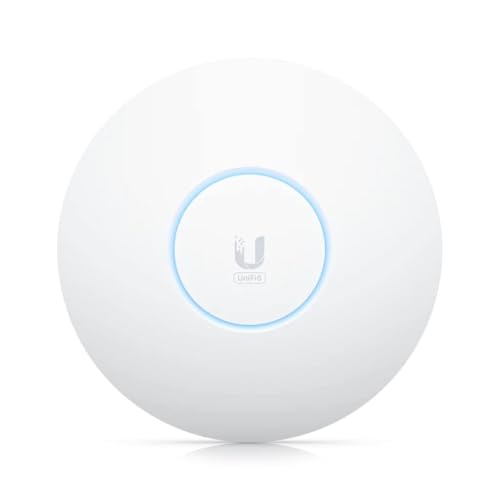
The U6 Enterprise’s listing title is the tersest on this page: a name, a platform tier, a region, and the note that the PoE adapter is not included. It prints no wireless class figure, no client ceiling, no coverage area. This guide will not fill those blanks from other sources, because the discipline of this roundup is that the title is the evidence — and in this case the title is making a different argument. It is saying that the buyer already knows what UniFi is. The U6 Enterprise is the enterprise tier of Ubiquiti’s UniFi access point line, and its real specification is the platform around it: the UniFi controller, the UniFi switches beneath it, and the single administrative view across all of them that has made the ecosystem a default in schools with any IT maturity at all.
That framing decides who should buy it. A school already running UniFi switching and a controller gains an access point that slots into an existing estate, inherits its network definitions, and is managed in the same place as everything else — the marginal cost of adoption is one ceiling unit, not a new platform. A school with no UniFi anywhere gains none of that and is left holding a title that proves almost nothing on paper; for that buyer, the Cudy or Omada sections above present their evidence far more completely. Neither judgement is a criticism of the hardware. It is a recognition that enterprise-tier access points are bought as citizens of a system.
- Platform: UniFi, enterprise tier access point
- Region: US model
- Power: PoE adapter not included
- Wireless class: unprinted in this listing — Ubiquiti’s own U6 Enterprise datasheet carries the radio specification
- Client ceiling: absent from the title as well; verify the figure in Ubiquiti’s published documentation
- Coverage: no area number appears in the title, so plan spacing from the manufacturer’s guidance instead
The practical advice follows from the framing. If your school is a UniFi site, this is the ceiling unit your controller is waiting for, and the documentation check is a formality against your existing design. If your school is not, treat this pick as a prompt to decide the platform question first — controller, switches, management habits — and let the access point follow that decision rather than precede it. Buying the enterprise tier of an ecosystem you do not run is how schools end up with one excellent radio administered through a laptop balanced on a step ladder.
There is also a procurement reality to name. Schools buy through frameworks, resellers and trust-wide agreements, and UniFi hardware moves through those channels with well-understood availability — a failed unit in November can be replaced from the same line without redesigning anything. That replaceability is part of what an enterprise tier actually sells, and it never appears in a listing title. The corollary is that a school should verify this exact unit against its controller version and switch estate in Ubiquiti’s documentation before ordering, because platform citizenship cuts both ways: the unit expects the estate to be current enough to adopt it. Treat that check as the price of admission, and the U6 Enterprise becomes the least surprising purchase in this guide for the schools it fits.
Strengths
- Enterprise tier of the UniFi line, for estates already on that platform.
- Joins an existing UniFi controller and switching estate without re-platforming.
- Ubiquiti’s school installed base means deep community knowledge.
Trade-offs
- The listing title prints almost no specification to evaluate.
- PoE adapter is not included, as with every access point here.
- Outside a UniFi estate, the platform premium buys little.
Best for: a school already invested in UniFi switching and control, extending coverage at the enterprise tier. Not suited for: a buyer seeking a self-evidencing standalone purchase — this title asks you to bring the platform knowledge with you.
Estate pricing varies by reseller channel, so confirm the U6 Enterprise’s current listing against your controller’s compatibility list before ordering a corridor’s worth.

NETGEAR Orbi 370 WiFi 7 Mesh System (3-Pack) — Whole-Site Kit, No Cabling
The Orbi 370 changes the subject. It is not an access point at all but a complete mesh system — a router plus two satellite extenders in one box — running Wi-Fi 7, dual-band, with coverage stated at up to 6,000 square feet, speeds up to 5 Gbps, capacity for 70 devices, and a 2.5-gigabit port. For the right school-shaped problem, that is a genuinely complete answer: a small nursery in a converted house, a tutoring centre in leased rooms where the landlord forbids new cabling, an admin block that needs decent wireless this week rather than after a summer of building works. Unbox, place three units, and the site has a network.
The 70-device ceiling is the number to interrogate. Seventy devices is a staff team, an office, a classroom set of tablets with room to spare — and it is not a 900-pupil school. The Orbi’s honest territory is the small site, and inside that territory its virtues are real: Wi-Fi 7 is the current generation, the 2.5-gig port keeps a fast broadband line unthrottled, and security features are named in the title. What it does not offer is the managed-fleet depth of the access points — no printed multi-SSID story of the Cudy’s kind, no controller platform — because it was designed for a building that is somebody’s workplace, not a campus.
- Wireless: Wi-Fi 7 mesh, dual-band, up to 5 Gbps
- Coverage: up to 6,000 sq. ft. across router plus two satellites
- Stated capacity: 70 devices
- Ports: 2.5 Gig port stated in the title
- Security: security features stated in the title
- Model: RBE373, three-pack
Placement logic differs from the access points too. Satellites want mains sockets and sensible spacing rather than ceiling tiles and cable runs, which makes the Orbi redeployable — when the tutoring centre moves buildings, its network moves in a box. That portability, unglamorous as it sounds, is a real institutional virtue for leased and temporary sites. The corresponding weakness is permanence: a growing school will outgrow a 70-device ceiling and a three-node shape, and will then be buying the managed system it deferred.
Think of the Orbi’s school in concrete terms and the fit sharpens. A Montessori nursery in a Victorian house: twelve staff, a tablet per room, card payments in the office, parents at the gate on the guest network. An independent tutoring centre above a shop: evening classes, a dozen laptops, no permission to drill a single hole. A sixth-form study centre in a leased annexe: forty students, bring-your-own laptops, one fast line coming into the front room. Each of these is a real educational site, each is badly served by a platform built for a campus, and each is exactly the Orbi’s shape — three units, one afternoon, no works order. The Wi-Fi 7 radio and the 2.5-gig port mean the kit will not embarrass a fast connection, and when the lease ends the whole network leaves in the same box it arrived in.
Strengths
- A complete network — router and two satellites — with no cabling project.
- Wi-Fi 7 with a 2.5-gig port keeps fast connections unthrottled.
- Portable between leased and temporary sites.
Trade-offs
- The stated 70-device ceiling rules out whole-school duty.
- No managed-fleet platform or printed multi-SSID story.
- Three nodes is the whole shape; growth means a different system.
Best for: a small site — nursery, tutoring centre, admin block — needing a complete network without building works. Not suited for: a main school building seeking per-classroom density, where the stated device ceiling is spent by the second classroom.
Small sites buy once and rely for years, so check the Orbi 370 kit’s current listing and confirm the three-pack contents match the floor plan before committing.
DBIT AX1800 Mesh System — Budget Mesh, Big Claims
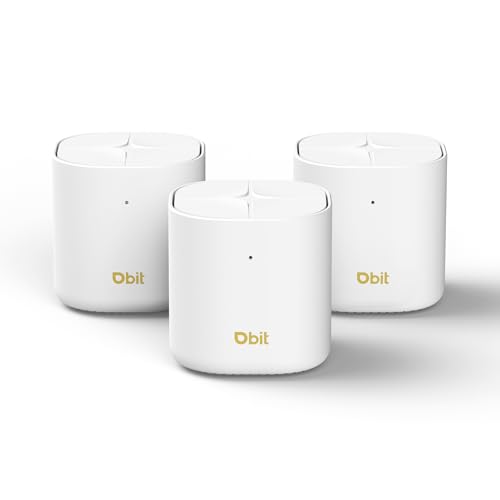
The DBIT system is the second mesh kit, and its title argues in the opposite direction from the Orbi’s: where NETGEAR prints 70 devices, DBIT claims up to 150 devices and up to 6,500 square feet of dual-band Wi-Fi 6 coverage across a three-pack, with six gigabit Ethernet ports spread across the three units. On paper that is the more school-tempting kit — the device ceiling of the Cudy access point with the deployment simplicity of mesh. The word to hold onto is claims. DBIT is not a name with NETGEAR’s institutional weight behind it, and a school should read its figures as a vendor’s best case to be tested in the building, not as a planning constant.
Used with that caution, the kit has a plausible school role: the overflow building, the after-school club block, the temporary classrooms during a rebuild — places where coverage is needed, budgets are thin, and the consequence of a node underperforming is inconvenience rather than a failed exam session. The six gigabit ports across three units give wired options for a staff desk or a printer in each zone, which small sites genuinely use. Wi-Fi 6 rather than 7 places it a generation behind the Orbi, which matters less in its overflow role than the coverage and device claims do.
- Wireless: AX1800 Wi-Fi 6 mesh, dual-band
- Coverage: up to 6,500 sq. ft. claimed in the title
- Stated capacity: 150 devices claimed in the title
- Ports: six gigabit Ethernet ports in total across the three units
- Configuration: three-pack, replaces router and extender
- Model: D-MAX5
The buying discipline for this pick is piloting. One kit, one building, one term of honest observation against its claims — device counts at the after-school peak, coverage in the far classroom — before any wider commitment. Schools are practised at exactly this kind of staged adoption, and the DBIT’s paper value makes the pilot worth running. What it should not be is the untested standard for a whole estate, because the support structure behind a lesser-known brand is itself part of the specification a school depends on when something fails in October.
The pilot discipline is worth spelling out, because it converts this pick’s weakness into a procedure. Put the kit in the building with the worst existing coverage and the least critical timetable — the after-school block, the temporary classrooms — and judge it on three observations across a term: whether the far room holds a class set of devices at the evening peak, whether the wired ports keep the staff desk and printer off the wireless entirely, and whether the system recovers from a power cut without a site visit. A kit that passes those tests has earned a second purchase on evidence. A kit that fails them has cost one building’s inconvenience rather than an estate’s budget, and the school still owns the lesson. That asymmetry — cheap to test, expensive to assume — is the correct way to hold every oversized claim in a listing title.
Strengths
- The largest claimed device count and coverage among the mesh kits here.
- Six wired ports spread across the kit — gigabit Ethernet on each unit — serve desks and printers.
- Three-pack mesh deploys with no cabling project at all.
Trade-offs
- Headline figures are a lesser-known brand’s claims, to be piloted before trust.
- Wi-Fi 6, a generation behind the Orbi 370’s Wi-Fi 7.
- No managed platform story for multi-building administration.
Best for: overflow and temporary buildings where a low-cost mesh kit can prove itself in service. Not suited for: an untested whole-estate standard — pilot it in one building for a term before the claims earn a wider rollout.
Pilot quantities make the arithmetic friendly, so review the DBIT kit’s current listing and order a single three-pack for the trial building first.
Comparison Table
| Pick | Type | Wireless | Stated capacity | Power / uplink | Management |
|---|---|---|---|---|---|
| Cudy AP3000 | Ceiling access point | AX3000 Wi-Fi 6 | 150+ clients | 2.5GbE PoE in; adapter not included | Multi-SSID |
| HPE Instant On AP22 | Indoor access point | 2×2 Wi-Fi 6 | Not printed in title | Power source not included | Instant On; Smart Mesh |
| TP-Link Omada EAP653 | Ceiling access point | AX3000 Wi-Fi 6 | Not printed in title | PoE powered; no DC adapter | Omada managed |
| Ubiquiti UniFi U6 Enterprise | Ceiling AP | Not printed in title | Not printed in title | PoE adapter not included | UniFi platform |
| NETGEAR Orbi 370 | Mesh system, 3-pack | Wi-Fi 7 dual-band | 70 devices | 2.5 Gig port | Standalone system |
| DBIT AX1800 | Mesh system, 3-pack | Wi-Fi 6 dual-band | 150 devices claimed | Six gigabit ports total | Standalone system |
Access Point Fleet or Mesh Kit: Which Shape Fits Your Building?
The deciding question is cabling, and it is a question about the building rather than the technology. If Ethernet can be run to ceilings — during a refurbishment, through accessible voids, in a building the school owns — a managed access point fleet is the professional answer, and it stays the answer for a decade: radios placed where radios work best, powered from a locked cabinet, administered as one system. The Cudy, AP22, EAP653 and U6 Enterprise are four flavours of that answer, differentiated by platform and by how much specification their titles are willing to print. Schools planning that route should also think about the wired layer behind the radios — the switches and firewalling covered in our Best Small Business WiFi Firewall Routers guide apply the same discipline at office scale.
If cabling cannot be run — leased rooms, listed buildings, temporary blocks, a landlord’s refusal — mesh is not a compromise but the correct tool, and the choice narrows to the Orbi’s supported polish against the DBIT’s bigger claims. Either way, count devices honestly before choosing: a class set of tablets, staff laptops, phones, the office printer, the door system and the visitor network add up faster than intuition suggests, and the stated ceilings in the comparison table are the planning numbers. Schools should also reserve thought for what the network carries beyond lessons — a hall streaming an assembly leans on the same principles as the home setups in our Best Routers for Streaming TV roundup, scaled up and made reliable.
One more axis separates the shapes: who administers it. A fleet assumes a named owner — an IT lead, a provider on contract — and rewards that owner with control. A kit assumes nobody, and rewards that absence with simplicity. Mismatches in either direction are the failures schools remember: the powerful platform nobody configures, or the friendly kit straining under a whole school’s Monday morning.
Planning Coverage Room by Room
Whatever shape is chosen, plan by rooms rather than by square footage alone. Manufacturers’ coverage figures describe open space; schools are made of brick partitions, fire doors, metal shelving and thirty bodies per room, each absorbing signal. The working method is one access point per classroom for the dense teaching spaces — or a unit shared between two small adjacent rooms where construction is light — with corridors, halls and libraries surveyed as their own cases. The Cudy’s printed 1,400 square feet per unit is a starting estimate for that arithmetic, not a substitute for walking the building.
Then design the networks, not just the coverage. Pupil, staff and guest SSIDs with different rules are the minimum separation; the Cudy prints multi-SSID support outright, and the managed platforms build the same separation into their design. Keep the administrative network — the one the office systems live on — off the pupil path entirely. And think about the peak, not the average: the network that matters is the one at five past nine on the first day of term, when every device in the building associates at once and the timetable assumes it worked. Latency under that kind of load is its own discipline, and our Best Routers to Handle Bufferbloat guide explains the queueing behaviour behind it.
Surveying is the step schools skip and later wish they had not. A borrowed access point on a stand, moved room to room for a day, teaches more about a building’s brick, foil-backed insulation and metal racking than any floor-plan estimate. Note the rooms where the signal dies — they are rarely the rooms intuition picks — and note the neighbouring school’s networks crowding the same airspace, because in dense areas the channel plan is a negotiation with the building next door. The summer install then follows the survey rather than improvising around it, and the September peak becomes a confirmation instead of a discovery.
Term-Time Realities: Filtering, Updates and the Summer Window
School wireless lives on a calendar no office network recognises. Almost all change happens in the summer window, when ceilings can be opened and mistakes are cheap; almost all consequences land in September, when they are not. That rhythm should shape the purchase. A platform chosen in haste in August will be configured in a rush, documented nowhere, and inherited by whoever holds the role in January. The managed picks in this guide — Omada, UniFi, Instant On — differ in how gracefully they tolerate that rhythm: what matters is whether the configuration lives in one exportable, reviewable place, so the summer’s decisions can be inspected before term starts rather than discovered during it.
Filtering and safeguarding ride on top of the wireless layer, and the access point’s job in that stack is narrower than vendors sometimes imply. The radio provides the separated networks; the filtering itself usually lives at the gateway or in a cloud service the traffic passes through. This is why the multi-SSID and platform-separation story matters more than any single radio feature: a pupil network that can be routed through the school’s filtering, while the staff network follows its own policy, is an architecture the access points here can support. A flat network from a kit, by contrast, forces one policy on everybody — acceptable in a nursery, unacceptable in a secondary school.
Updates deserve a term-time policy of their own. Fleet platforms can push firmware to every ceiling at once, which is either a blessing or an outage depending on when it happens; the disciplined pattern is updates in the holidays, tested on one corridor first, with the previous version kept in reach. The mesh kits invert the risk — they tend to update themselves on their own schedule, which suits a small site with nobody to ask, and should be understood as part of what a small site is accepting. Either way, the question to ask of any pick in this guide is not whether it updates, but who decides when.
Finally, plan for the failure nobody schedules: the unit that dies in November. Access point fleets absorb this gracefully when the school holds one spare of the standardised model — swap the ceiling unit, adopt it into the controller, and the room never learns anything happened. A mesh kit absorbs it as a coverage hole until a replacement node arrives. That difference, mundane as it sounds, is worth real money in a school where a classroom without wireless is a classroom replanning its lessons, and it belongs in the total cost comparison alongside the headline prices nobody in this guide is quoting.
Common Mistakes
Buying access points and forgetting the power. All four access points here arrive without their power source in the box, by their titles’ own admission. A rollout budgeted to the last ceiling unit, with no line for the PoE switch or injectors, stalls in the cabinet — order the power with the radios.
Counting pupils instead of devices. The ceiling that matters is simultaneous connections: pupil devices, staff devices, phones, printers, door controllers, the visitor network. A school of 600 might present 900 connections at the morning peak. Compare that number, not the roll, against the stated capacities.
One powerful unit in the middle of the building. A single central radio serving a whole school through brick and bodies is the classic false economy of school wireless. Density is solved by more radios at lower power, placed in the rooms — which is precisely what the access point shape exists to do.
Skipping the network separation. Pupils, staff and guests on one flat network is a safeguarding and security failure waiting for its occasion. If a pick’s title does not evidence multi-SSID or platform-level separation, confirm the capability in the manufacturer’s documentation before it goes on a ceiling.
Standardising on a title’s biggest number. Coverage and client claims are best cases measured in friendly conditions. Pilot in one corridor, measure at the real peak, then multiply — especially with a lesser-known brand’s figures.
FAQ
How many access points does a typical primary school need? As a planning start, one per classroom for teaching spaces, with halls and libraries surveyed separately — a twelve-classroom school usually lands between twelve and eighteen units once offices and shared spaces are counted. The exact number follows construction and class density, not floor area alone.
Can a mesh kit run a whole school? A small one, sometimes — the Orbi 370’s stated ceiling is 70 devices, which a nursery or tutoring centre may never reach. A mainstream school passes that count before the second classroom logs on, which is why the managed access points lead this guide.
Why do none of the access points include power? Because professional installs power them over the Ethernet cable from a central switch — one cable, no adapters in ceilings. It is a deliberate design, but it means the PoE switch or injectors belong in the project budget from the first quote.
Do pupils and staff really need separate networks? Yes. Separation limits what a compromised or curious pupil device can reach, lets safeguarding filters apply differently to each group, and keeps the office systems off the classroom path. Multi-SSID support and the managed platforms exist to make that separation routine.
What should a school check before standardising on the UniFi or Omada pick? The manufacturer’s own documentation for the figures the listing titles leave unprinted — wireless class, client ceilings, coverage — plus compatibility with the switches and controller the school already runs. Platform fit first, radio second.
Is Wi-Fi 7 worth choosing for a school today? For a managed fleet, the current access point generation matters less than client density handling and platform fit, since most pupil devices in service are Wi-Fi 5 or 6 clients anyway. The Orbi 370’s Wi-Fi 7 earns its place differently — as a small site’s one purchase for many years, where buying the current generation defers the next replacement. Judge the generation by the replacement cycle it serves, not by the badge.
Final Recommendation
One last discipline before the order goes in: write the decision down as a room list, not a product list. Name each space, the unit assigned to it, the network names it will broadcast and the person who owns the configuration — then let the product choice fall out of that document. Schools that buy this way discover their gaps on paper, in the holidays, where gaps are cheap. Schools that buy by headline discover them in September, in front of a class. The six picks above cover both honest routes to the same destination: a fleet that treats the morning peak as routine, or a kit that gives a small site a complete network by Friday.
For a school with cable in its ceilings and a named person to run the system, start with the Cudy AP3000 where density rules, or the Omada EAP653 where an existing Omada estate makes the platform the prize; choose the AP22 for supported simplicity with mesh reach into unwired rooms, and the U6 Enterprise when the building already speaks UniFi. For the small or temporary site, the Orbi 370 is the complete, portable answer inside its 70-device ceiling, and the DBIT kit is the pilot-first budget alternative. When the last ceiling tile clicks back into place and the first bell sends thirty laptops hunting for the network at once, the right system is the one that treats that moment as ordinary.
Related Guides
The wireless layer sits inside a wider school network, and these guides cover its neighbours: Best Small Business WiFi Firewall Routers for the gateway discipline behind the access points, Best Routers for Streaming TV for the hall and classroom streaming end, and Best Routers to Handle Bufferbloat for keeping latency civilised when every class comes online at once.


