What's inside
As an Amazon Associate I earn from qualifying purchases. This post may contain affiliate links at no extra cost to you.
widgetverdict.com is reader-supported. When you buy through links on our site, we may earn an affiliate commission.
Where to buy: the six best wireless routers for hotels below each link to their Amazon listing, starting with the Roam 6 AX1500 portable Wi-Fi 6 travel router — every one of them is a travel router by design, so read the sections for the hotel job each is actually shaped to do.
Hotel Wi-Fi lives two separate lives, and honesty about that is where this guide begins. One life is the property’s own infrastructure — the access points in the corridors, the network the front desk runs — and no product in this guide pretends to be that; a hotel building its guest network belongs with the managed access point class covered in our schools and business roundups. The other life is the one lived inside the room: the guest who needs their own trusted network behind the hotel’s captive portal, the staff member or contractor living on-site for a month, the small guesthouse or serviced apartment whose owner needs a simple, repeatable way to give each unit clean, private Wi-Fi. The best wireless routers for hotels, in the sense the products themselves claim, are travel routers — and five of these six titles say so in nearly those words, with hotel approval printed on the box.
What a travel router does in a hotel room is quietly transformative. It joins the property’s Wi-Fi or wired port once — portal page, room number, the whole ceremony — and then rebroadcasts a private network of your own, to which your phone, laptop, tablet and streaming stick all connect as if they were at home. Every device shares the one hotel login. The VPN support printed across these titles then wraps that private network in encryption the hotel’s other guests cannot share. For the business traveller, the long-stay guest, the crew member in month three of a posting, that is the difference between borrowing a network and owning one.
The six picks divide by generation and by ambition. Two are Wi-Fi 6 and Wi-Fi 7 flagships from TP-Link’s Roam line and GL.iNet’s Slate line, built for travellers whose hotel room is an office. Two are GL.iNet’s established mid-range — the Opal and the Beryl AX — balancing ports, VPN and size. One is TP-Link’s larger Roam 6 AX3000, and one is the tiny Mango, the veteran pocket router that trades speed for near-invisibility in a washbag. Every specification below comes from the listing titles; where a title leaves a detail unprinted, the spec box says so in this guide’s own words.
The guide is written for three readers at once, and it labels its advice accordingly: the guest passing through, the professional living in, and the small host equipping rooms for others. Their budgets, their patience and their definitions of a good evening differ, and the sections keep the three separate rather than averaging them into a traveller who does not exist. Find your reader in the headings, and the right pick will usually be standing in the same paragraph, with its luggage already packed and its VPN already configured.
Key Takeaways
- All six picks are travel routers — the in-room, guest-side answer — and five titles claim hotel suitability outright; property-wide guest infrastructure is a different product class, signposted in the guide.
- VPN is the category’s common tongue: OpenVPN and WireGuard are printed in the Roam 6 AX1500, Opal, Beryl AX, Roam 6 AX3000 and Mango titles, because a private tunnel is the point of carrying your own network.
- The TP-Link Roam 6 AX3000 and GL.iNet Slate 7 top the range — AX3000 Wi-Fi 6 with multi-gig positioning, and Wi-Fi 7 with a touchscreen and 2.5G respectively.
- Public Wi-Fi sharing and phone tethering recur across the TP-Link titles — the features that turn a hotel’s single login or a phone’s data into the room’s network.
- The GL.iNet Mango is the minimal end: two Ethernet ports, USB 2.0, OpenWrt — a router that disappears into luggage and asks almost nothing.
Quick Picks
| Pick | Badge | Why it earns its place |
|---|---|---|
| Roam 6 AX1500 Travel Router | Wi-Fi 6 all-rounder | Portable Wi-Fi 6 with USB-C 3.0, public Wi-Fi sharing, phone tethering and hotel approval printed in the title. |
| GL.iNet GL-SFT1200 Opal Travel Router, AC1200 Dual-Band Wi-Fi | The 145-gram workhorse | AC1200 dual-band, three gigabit ports, OpenWrt with OpenVPN and WireGuard across 30+ VPN services. |
| GL.iNet GL-BE3600 Slate 7 Wi-Fi 7 Travel Router Touchscreen | Touchscreen flagship | Wi-Fi 7 with a touchscreen that toggles VPN or AdGuard, 2.5G, in a one-inch mini format for hotel duty. |
| GL.iNet GL-MT3000 Beryl AX Wi-Fi 6 Travel Router, 2.5G WAN | Fast WAN, full-size power | Wi-Fi 6 at 574 plus 2402 Mbps, a 2.5G WAN port, gigabit LAN and USB 3.0 under OpenWrt. |
| TP-Link Roam 6 AX3000 Travel Router (TL-WR3002X) | Multi-gig room hub | Dual-band Wi-Fi 6 in the AX3000 class, public network sharing, hotel and cruise approval, phone tethering, USB 3.0. |
| GL.iNet GL-MT300N-V2 (Mango) Portable Mini Travel Wireless | The invisible spare | A mini pocket VPN router with two Ethernet ports and USB 2.0, built for public networks and hotel stays, OpenWrt throughout. |
How Were These Hotel Routers Chosen?
By checking each title against the actual jobs a hotel stay creates. Job one is the captive portal: the browser ceremony that admits one device and grudgingly tolerates the rest. A travel router’s defining talent is performing that ceremony once and sheltering every other device behind it, so titles claiming public Wi-Fi sharing and hotel approval — printed on both TP-Link Roam models — were credited as addressing the category’s central errand. Job two is privacy on a shared network, which is why VPN support was treated as a first-class specification: OpenVPN and WireGuard appear in title after title here, and the sections credit them where printed and note their absence where not.
Job three is the room as workplace. The long-stay guest and the travelling professional need wired options for the laptop or the call, USB for storage or a modem, and wireless class that does not embarrass a video call — so ports and classes were read as workplace specifications: the Opal’s three gigabit ports, the Beryl AX’s 2.5G WAN, the Slate 7’s touchscreen toggles that switch VPN or AdGuard without opening a laptop lid. Job four is luggage: weight and size are printed for the Opal (145g) and implied by format for the rest, and a router that cannot justify its grams against a phone’s hotspot does not travel.
Finally, the guide kept the category’s boundary in plain sight. These are room-scale devices for guests, staff and small properties — a serviced apartment, a guesthouse annexe, a crew floor — not corridor infrastructure for a two-hundred-room hotel. That larger job belongs to the managed access point class, and the guide says so rather than letting a travel router be bought for it in error. Within the honest boundary, though, these six are the complete modern field: three makers’ philosophies, three wireless generations, and sizes from flagship to invisible.
We also screened for the failure mode unique to this category: abandonment. Travel routers are bought enthusiastically and carried twice, then left in a drawer because the setup felt like homework or the bag had no obvious place for them. The picks that survive in real luggage share a trait the titles hint at — a defined physical personality, from the Mango’s invisibility to the Slate’s one-inch flagship — and a setup that can be completed once, at home, and then merely repeated. A router whose tenth hotel is as easy as its first is the only kind worth recommending, so the sections weigh that repeatability alongside every radio figure.

Roam 6 AX1500 Travel Router — Wi-Fi 6 All-Rounder
TP-Link’s Roam 6 AX1500 states its whole brief in one title: a portable Wi-Fi 6 travel router, dual-band, with USB-C 3.0, easy public Wi-Fi sharing, hotel, RV and travel approval, phone Wi-Fi tethering, multi-mode operation in one unit, and OpenVPN with WireGuard. Read that as the category’s checklist completed at the AX1500 class. Public Wi-Fi sharing is the portal talent — join the hotel’s network once, rebroadcast your own. Phone tethering is the escape hatch — when the property’s Wi-Fi disappoints, the room’s network can ride the phone’s data instead. Multi-mode means the same unit can serve as router, extender or access point as the trip demands.
The hotel approval line deserves its plain reading: the maker is stating the device is designed and sanctioned for exactly this environment, which matters in properties whose networks are fussy about what joins them. USB-C 3.0 covers power and peripherals in the modern traveller’s cabling language — one charger standard for the phone and the router alike is a luggage virtue that never appears in speed tables. The AX1500 class is the honest middle of Wi-Fi 6: more than a hotel room’s devices can ask of a borrowed connection, since the property’s own uplink, not the room’s radio, is the real ceiling on any stay.
- Wireless: AX1500 Wi-Fi 6, dual-band
- Hotel use: hotel, RV and travel approved, per the title
- Sharing: easy public Wi-Fi sharing; phone Wi-Fi tether
- Modes: multi-mode in one unit
- VPN: OpenVPN and WireGuard stated in the title
- Ports: USB-C 3.0 stated; the wired Ethernet estate is not itemised in this listing title — TP-Link’s documentation for the TL-WR1512X carries it
Who it suits is the regular hotel guest who wants the modern standard without flagship bulk: the consultant on a two-night rhythm, the family whose children’s tablets all need the room’s one login, the traveller whose streaming stick refuses hotel portals entirely and can live happily on the Roam’s private network instead. Who should look further is the traveller building a genuine room office with wired peripherals — the Opal’s printed gigabit estate and the Beryl’s fast WAN serve that desk better — and the ultralight packer, for whom the Mango exists.
TP-Link’s presence in this category matters for a mundane reason: support and familiarity. A router that misbehaves in a hotel room at midnight will be troubleshot by a tired owner, and a mainstream maker’s setup flow and documentation are the ones most likely to be searchable from the bed. The Roam 6’s specification is competitive; its ownership is calm, and in travel equipment calm is a specification.
One scenario deserves a paragraph of its own, because it converts more sceptics than any specification: the family room on the first night. The property’s portal admits the parent’s phone after three attempts; the children’s tablets, the streaming stick and the second phone are still strangers to the network, and the per-device charges are doing quiet arithmetic in the background. The Roam performs its one ceremony, its own network appears with the family’s usual name, and every device they brought joins it the way it joins the network at home — because as far as the devices know, it is home. That first-night transformation, from negotiation to normality, is the entire category’s promise, and this pick’s title itemises every component of it.
Strengths
- The category checklist in one title — sharing, tethering, VPN, hotel approval.
- Wi-Fi 6 class matched honestly to hotel uplinks.
- USB-C power keeps the travel cabling to one standard.
Trade-offs
- The wired port estate is not itemised in the listing title.
- AX1500 is the middle class; heavier room offices have faster picks below.
- Dual-band only — no third band, as travel format dictates.
Best for: the regular hotel guest who wants one login to shelter every device they carry. Not suited for: the printed-port-estate requirement — this title leaves the Ethernet details to the documentation, and the port-forward picks sit below.
Travel kit is bought against an itinerary, so check the Roam 6 AX1500’s current listing before the next booking’s confirmation email arrives.

GL.iNet GL-SFT1200 Opal Travel Router, AC1200 Dual-Band Wi-Fi — The 145-Gram Workhorse
The Opal is GL.iNet’s established answer, and its title balances the travel equation differently: AC1200 dual-band Wi-Fi, three gigabit ports, OpenWrt with OpenVPN and WireGuard, compatibility with more than thirty VPN services, in a pocket format weighing 145 grams. The three gigabit ports are the headline for the working traveller — a wired laptop for the call that cannot wobble, a wired second device, and a spare — an estate no pocket rival in this guide prints. The VPN breadth is the second headline: thirty-plus services means the traveller’s existing subscription, whichever it is, almost certainly has a home on this router, and the whole room’s devices inherit the tunnel without each running its own client.
AC1200 is Wi-Fi 5 class, and the section will not dress it otherwise; the defence is the category’s arithmetic. Behind a hotel’s shared uplink, AC1200 dual-band is seldom the constraint, and the Opal spends its budget on ports, firmware and weight instead of radio class. OpenWrt is the connoisseur’s line in the title: an open, configurable firmware that technical travellers can shape precisely — and that the rest can simply use as delivered, since GL.iNet’s own interface rides on top of it. The 145-gram figure is the luggage argument in one number: this router weighs less than the charger brick it replaces in the bag’s accounting.
- Wireless: AC1200 dual-band Wi-Fi
- Ports: 3 gigabit ports
- Firmware: OpenWrt, with OpenVPN and WireGuard
- VPN breadth: 30+ VPN services, per the title
- Weight: 145g pocket format
- Hotel claim: the title frames it as a travel router; hotel duty is the category’s shared brief rather than a word in this title
The fit is the working traveller whose room is an office and whose bag is a budget: the ports for the desk, the VPN breadth for the firm’s subscription, the grams for the carry-on. Who should pass is the traveller whose priority is wireless class itself — the Wi-Fi 6 and 7 picks in this guide are a generation or two ahead — and the traveller who wants the property-facing talents (tethering, printed hotel approval) that the TP-Link titles advertise and this one does not itemise. The Opal’s silence on those points is treated here as exactly that: unitemised, to be confirmed in GL.iNet’s materials if they are decisive.
Longevity is the Opal’s quiet credential. It has been the default recommendation in travel-router conversations for years, which means its behaviour in real hotels — portals, odd networks, foreign power — is the most thoroughly field-reported in this guide. A traveller buying certainty about everything except raw class is buying this pick’s actual product.
The Opal also rewards a word about failure manners. Travel routers fail in hotel rooms, at night, in front of an audience of one tired person; the useful question is how the device behaves on its bad evening. A mainstream-of-its-niche product with years of identical units in the field answers that question with documentation, reset rituals that are written down everywhere, and a replacement that can be in a bag within a day almost anywhere. None of that is in the title either, but the title’s vintage — a model designation the market has carried for years — is the clue, and experienced travellers have learned to read it.
Strengths
- Three gigabit ports — a real wired desk from a pocket device.
- Thirty-plus VPN services covered, under OpenWrt.
- 145 grams: the weight argument settles itself.
Trade-offs
- AC1200 Wi-Fi 5 class, behind the guide’s newer radios.
- Hotel approval and tethering are not itemised in the title.
- OpenWrt’s depth is wasted on travellers who never open it.
Best for: the working traveller who wires the laptop, tunnels everything, and counts grams. Not suited for: the newest-wireless-generation priority — this design spends its budget on ports and firmware instead.
Workhorse pricing shifts with the seasons, so review the Opal’s current listing while the travel kit is being rebuilt.

GL.iNet GL-BE3600 Slate 7 Wi-Fi 7 Travel Router Touchscreen — Touchscreen Flagship
The Slate 7 is what happens when a travel router stops apologising: Wi-Fi 7, a touchscreen that toggles VPN or AdGuard, 2.5G connectivity, and a one-inch mini format whose title names its habitats — hotel, cruise, RV, business trip, plane. The touchscreen is the idea to linger on. Every other router in this guide is configured through a phone or laptop browser; the Slate 7 puts the two controls a traveller actually touches — the VPN, on or off; the ad-blocking, on or off — on the device’s face. In a hotel room, at midnight, with the laptop asleep, that physicality is a genuine interface advance rather than a garnish.
Wi-Fi 7 in a travel format is partly futures trading — hotel uplinks will not trouble it for years — and partly the simple pleasure of the room’s own network being the fastest thing in the building. The 2.5G port future-proofs the wired side for the serviced apartments and premium properties whose in-room Ethernet is genuinely fast. AdGuard’s presence on the toggle names the pick’s second talent: network-level filtering for the whole room’s devices, which on hotel networks doubles as hygiene. The one-inch mini claim keeps the flagship honest about its category — this is still luggage, not furniture.
- Wireless: Wi-Fi 7 travel router
- Interface: touchscreen toggles for VPN or AdGuard
- Ports: 2.5G stated in the title
- Format: 1-inch mini size, per the title
- Habitats: hotel, cruise, RV, business trip, plane — per the title
- VPN detail: the toggle is printed; the protocol list is not itemised in this listing title — GL.iNet’s Slate 7 materials carry it
Who it suits is the traveller who lives in hotels enough to amortise a flagship: the consultant on a hundred nights a year, the crew member whose room is a semi-permanent office, the traveller whose employer’s security policy makes the VPN non-negotiable and who will bless the toggle nightly. Who should hesitate is the occasional guest, for whom the Opal or Roam delivers the same private network at a plainer specification, and the traveller who never touches settings — the touchscreen’s value is realised only by hands that use it.
There is a small-property angle worth surfacing: a boutique hotel or serviced apartment equipping premium rooms could do worse than a device whose guest-facing controls are this legible, though the guide’s standing caution applies — room-scale hospitality is this product’s honest ceiling, and corridor infrastructure is another class entirely, of the kind our Best WiFi Routers for Schools roundup covers for institutions.
The AdGuard half of the toggle deserves its own sentence of appreciation, because it addresses the hotel network’s least-discussed tax: the sheer noise of a shared connection, where every device in the room is negotiating with trackers and ad servers through a strained uplink. Filtering that noise at the router, for every device at once, is both a privacy measure and a performance one — the room’s limited borrowed bandwidth stops being spent on the internet’s least welcome traffic. Travellers who have watched a hotel connection feel faster with filtering on will understand that the toggle is not a gimmick but the second half of the product.
Strengths
- A touchscreen that puts VPN and filtering controls on the device itself.
- Wi-Fi 7 plus 2.5G — the fastest printed specification in this guide.
- Flagship capability in a genuinely mini travel format.
Trade-offs
- Hotel uplinks will underuse its wireless class for years.
- The VPN protocol list is not itemised in the listing title.
- Flagship ambition is wasted on the twice-a-year traveller.
Best for: the high-frequency traveller whose hotel room is a workplace and whose VPN is non-negotiable. Not suited for: the occasional guest seeking the simplest private network — the plainer picks below deliver it without the flagship’s apparatus.
Flagships in travel kit sell in waves, so check the Slate 7’s current listing before the heavy travel quarter begins.

GL.iNet GL-MT3000 Beryl AX Wi-Fi 6 Travel Router, 2.5G WAN — Fast WAN, Full-Size Power
The Beryl AX is GL.iNet’s Wi-Fi 6 travel router specified like a small home router that happens to travel: dual-band Wi-Fi 6 printed as 574 Mbps on 2.4GHz plus 2402 Mbps on 5GHz, a 2.5G WAN port, gigabit LAN, USB 3.0, and OpenWrt with VPN. The WAN figure is the differentiator to understand. A travel router’s WAN port is its mouth — the wired connection to the property’s network where one is offered — and a 2.5G mouth means the Beryl can drink from the fastest in-room Ethernet a premium property or serviced apartment provides, then serve the room at Wi-Fi 6 speeds. Travellers who have watched a lesser router cap a good wired connection will recognise the point instantly.
The printed band split is the honest Wi-Fi 6 signature: the 5GHz band carries the room’s real work at the 2402 figure’s class, while 2.4GHz handles the long-reach, low-demand devices. USB 3.0 opens the usual travel utilities — shared storage for the room, a modem path — and OpenWrt with VPN repeats the maker’s house formula: open firmware, the tunnel built in, the room’s devices sheltered behind the traveller’s own network name and password. Against its own siblings, the Beryl AX is the power user’s middle: faster and more capable than the Opal in every radio dimension, less theatrical than the Slate 7, and content to be configured through a browser like a grown-up router.
- Wireless: Wi-Fi 6 dual-band, 574 + 2402 Mbps as printed
- WAN: 2.5G WAN port
- LAN: gigabit LAN
- USB: USB 3.0
- Firmware: OpenWrt, VPN per the title
- Hotel claim: framed as a travel router in the title; the room-scale brief is the category’s shared ground
Its traveller is the one who plugs in: the serviced-apartment resident, the long-stay professional whose property offers real wired internet, the remote worker whose calls justify a wired laptop behind a gigabit LAN port while the room’s other devices ride the Wi-Fi 6. Who should look elsewhere is the pure-portal traveller whose hotels are wireless-only and whose bag has no room for capability they will not use — the Roam 6 AX1500’s printed sharing and tethering talents address that trip more directly — and the minimalist, for whom the Mango’s near-invisibility is the entire argument.
The Beryl also makes the guide’s clearest case for buying the router above the trip’s minimum. Hotel stays have a way of extending — the project runs long, the posting becomes a residence — and a travel router with home-router bones absorbs that extension without a second purchase. Equipment that can grow from a weekend to a season is worth its small premium in grams and complexity, and the Beryl’s title is the receipt.
A word about the 5GHz figure’s real hotel meaning, since numbers in this category are so often misread. The property’s uplink will cap the room’s internet long before the Beryl’s radio is troubled; the 2402-class band earns its keep inside the room — the laptop-to-drive backup that does not touch the internet, the screen mirroring that stays local, the call that shares the air with both. Travellers who judge a travel router by a speed test against the hotel’s connection are measuring the hotel, not the router; the Beryl’s specification is written for the traffic that never leaves the room, and there is more of that traffic, on a working trip, than the itinerary suggests.
Strengths
- A 2.5G WAN port that respects fast in-room wired connections.
- Full Wi-Fi 6 band figures printed, with gigabit LAN behind them.
- OpenWrt and VPN in the maker’s proven travel formula.
Trade-offs
- Wireless-only hotels leave its fast WAN unemployed.
- No touchscreen or printed tethering talent to match its siblings’ tricks.
- More router than a two-night, one-device trip can justify.
Best for: the long-stay or serviced-apartment traveller who plugs into the room’s wired connection. Not suited for: portal-only hotels and a short device list — the sharing-first picks spend their design on that trip instead.
Long stays reward capable kit, so look at the Beryl AX’s current listing before the next extended booking is confirmed.

TP-Link Roam 6 AX3000 Travel Router (TL-WR3002X) — Multi-Gig Room Hub
The second TP-Link is the bigger sibling: the Roam 6 AX3000, a dual-band Wi-Fi 6 travel router in the AX3000 class with multi-gig portable positioning, OpenVPN and WireGuard, public network sharing, hotel and cruise approval, phone tethering, USB 3.0 and multi-mode operation. Where the AX1500 model is the category checklist, this is the checklist at twice the wireless class with the same property-facing talents intact — sharing for the portal, tethering for the disappointing connection, approval for the hotel and the cruise ship alike. The cruise mention is worth pausing on: ship networks are the most login-jealous environments in travel, sold per device, and a router that shelters a cabin’s devices behind one connection is worth its luggage space on that voyage alone.
AX3000 in a hotel room is headroom the property’s uplink will rarely test, and the section should say so — the value of the class here is the room’s internal traffic: the laptop backing up to the travel drive, the tablet streaming from the laptop, the call holding while both happen. Multi-gig positioning extends the same logic to the wired side for properties whose in-room ports are fast. USB 3.0 and multi-mode complete a specification that reads like the AX1500’s, grown: same philosophy, more room in every dimension except the bag, where it remains a portable unit by design.
- Wireless: AX3000 dual-band Wi-Fi 6
- Positioning: multi-gig portable, per the title
- Sharing: public network sharing; phone tethering
- Approval: hotel and cruise approved, per the title
- VPN: OpenVPN and WireGuard stated in the title
- USB: USB 3.0; multi-mode operation
Its audience is the traveller whose room is a small headquarters — two people, several screens, a streaming habit, a cruise on the calendar — and the small-property host equipping a premium room or a serviced unit, where one robust unit per room is the whole design. The small-property case deserves its sentence: for a guesthouse or an aparthotel, a fleet of identical room units, each giving its guests a private network behind the property’s connection, is a coherent and supportable pattern — provided the property’s own backbone is sound, which is the infrastructure layer this guide keeps pointing at and which our Best Small Business WiFi Firewall Routers roundup addresses for the office side of a small property’s operation.
Against the Beryl AX, the comparison is philosophy: TP-Link’s sharing-and-approval polish against GL.iNet’s OpenWrt openness and printed band figures. Both are Wi-Fi 6 room hubs of real capability; the traveller’s allegiance to a firmware world, more than any single figure, is the honest tiebreaker, and this guide declines to fake a more technical one.
The cruise case generalises into a principle worth carrying to every shared-network environment: wherever connectivity is rationed per device — ships, some conference venues, long-distance trains moving into paid tiers — a sharing router converts the ration from a per-device tax into a per-room arrangement, subject always to the venue’s own terms. That conversion is the economic heart of this pick’s title, and it explains why the approval language matters: a device the venue’s model anticipates is a device whose trick is a feature, and the Roam’s title prints the anticipation for the two hardest venues in travel.
Strengths
- AX3000 class with the full sharing, tethering and approval checklist.
- Hotel and cruise approval printed — the two hardest login environments.
- Multi-gig positioning serves fast in-room wired connections.
Trade-offs
- Hotel uplinks seldom let the AX3000 class stretch.
- Band-by-band figures are not printed in the listing title.
- The largest capability here is surplus on a simple one-device trip.
Best for: the two-person, many-screen travelling party, and the small property equipping premium rooms one unit at a time. Not suited for: the solo minimalist traveller — the Mango below carries the same idea at a fraction of the size and ambition.
Cruise and hotel seasons book out early, and so does the kit for them, so verify the Roam 6 AX3000’s current listing while the itinerary is still flexible.
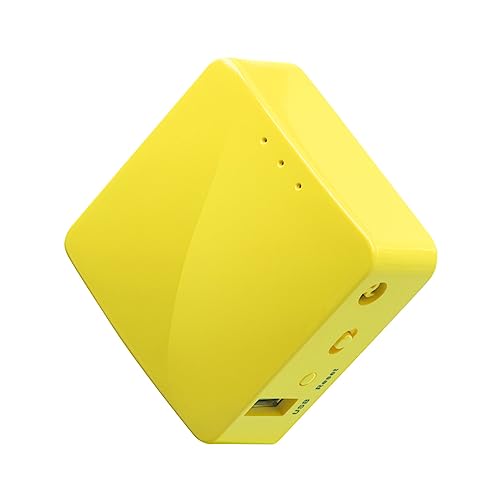
GL.iNet GL-MT300N-V2 (Mango) Portable Mini Travel Wireless — The Invisible Spare
The Mango is the elder of this guide and the smallest idea in it: a portable mini travel wireless router — a pocket VPN Wi-Fi router with two Ethernet ports, USB 2.0, OpenWrt, and OpenVPN and WireGuard for public and hotel Wi-Fi, set up through an admin panel. No wireless class is printed in its title, and by the standards of the Wi-Fi 7 flagship three sections above, the Mango is a device from another era. Its defence is that the era’s problem has not changed: a hotel portal, a shared network, a traveller who wants their own name and password between their devices and the room’s other guests. The Mango solves exactly that, at a size and weight that make the decision to carry it nearly free.
Two Ethernet ports in a mini router is the detail that keeps it employable: the laptop can be wired even here, and the unit can sit between a property’s wired port and the room. USB 2.0 is the older standard, adequate for the modem-and-storage duties travel asks of it. OpenWrt on a device this small remains a small marvel — the same open firmware philosophy as its bigger siblings, with the VPN pair printed in the title — and the admin-panel setup line in the title is the maker’s promise that none of that depth is compulsory for the traveller who simply wants the private network working before dinner.
- Role: portable mini travel VPN router
- Ports: 2x Ethernet ports
- USB: USB 2.0
- Firmware: OpenWrt, with OpenVPN and WireGuard aimed at public and hotel networks
- Wireless class: the class figure is not printed in this listing title — GL.iNet’s Mango documentation carries the radio specification
- Setup: via admin panel, per the title
It suits, above all, the traveller for whom the router is insurance rather than equipment: the bag’s permanent resident, forgotten until the night the hotel network is hostile, the portal is per-device, or the video call matters. It is also the honest second router — the spare that lives in the other bag, the unit lent to a colleague, the one given to the teenager on the family trip so the main router’s settings survive the holiday. Who should not buy it as their only router is the traveller whose room is a workplace: the Opal’s ports, the Beryl’s WAN and the Slate’s interface all exist because the Mango’s minimalism has a ceiling, and a month-long posting will find it.
There is a sustainability footnote in the Mango’s favour that this guide notes without preaching: the longest-serving device is the one never replaced, and a simple router that still does its one job perfectly, years after purchase, is a better traveller than a flagship on its third owner. Longevity is a specification too; it just never gets printed in a title.
The Mango’s relationship with its owner is also the simplest in the guide, and simplicity compounds. There is no app ecosystem to migrate, no account to maintain, no generation of firmware features to keep current with — the admin panel does its work, the VPN pair does theirs, and the device returns to the bag. Travellers burned by a smart gadget that demanded ongoing attention will recognise the Mango’s model as a deliberate virtue: equipment that asks nothing between trips is equipment that is always, uncomplainingly, ready for the next one. In a guide of flagships and hubs, that readiness is the smallest pick’s complete and sufficient argument.
Strengths
- Near-invisible in luggage; the carry decision makes itself.
- Two Ethernet ports and the full OpenWrt VPN pair, even at this size.
- Years of field service make its hotel behaviour a known quantity.
Trade-offs
- Wireless class is unprinted and, by design, modest.
- USB 2.0 is the older standard.
- A workplace month will find its ceiling; it is insurance, not infrastructure.
Best for: the traveller who carries a private network as insurance and forgets it until the night it saves the trip. Not suited for: a room-office brief — one mini unit cannot be a desk, and the port-carrying picks above exist for that job.
Insurance is bought before the trip, not during it, so check the Mango’s current listing and let it take up its small residence in the bag.
Comparison Table
| Pick | Wireless | VPN in title | Wired estate | Hotel claim in title | Signature |
|---|---|---|---|---|---|
| Roam 6 AX1500 | Wi-Fi 6 AX1500 | OpenVPN, WireGuard | USB-C 3.0; Ethernet not itemised | Hotel/RV approved | Sharing + tethering |
| GL.iNet Opal | AC1200 Wi-Fi 5 | OpenVPN, WireGuard, 30+ services | 3x gigabit | Travel framing | 145g with real ports |
| GL.iNet Slate 7 | Wi-Fi 7 | Toggle printed; protocols not itemised | 2.5G | Hotel named among habitats | Touchscreen controls |
| GL.iNet Beryl AX | Wi-Fi 6, 574 + 2402 | VPN stated | 2.5G WAN, gigabit LAN, USB 3.0 | Travel framing | Fast wired mouth |
| Roam 6 AX3000 | Wi-Fi 6 AX3000 | OpenVPN, WireGuard | USB 3.0; multi-gig positioning | Hotel/cruise approved | Room-hub class |
| GL.iNet Mango | Not printed in title | OpenVPN, WireGuard | 2x Ethernet, USB 2.0 | Hotel Wi-Fi named | Mini spare |
Guest, Staff or Small Property: Which Hotel Job Is Yours?
The guest’s job is privacy and convenience: one portal login, every device sheltered, the VPN on. Any pick here performs it, and the choice among them is luggage and ambition. The long-stay staff member’s job is a workplace: wired stability for calls, a network that persists for a month, equipment that survives being lived with — the Opal, Beryl and Slate 7 territory. The small property’s job is repeatability: the same unit in every room, a pattern the front desk can reset and explain, guests inheriting a private network without inheriting each other’s — the Roam models’ approval-and-sharing design speaks to it most directly, with the property’s own backbone, sized by the principles in our Best Outdoor Wireless Routers guide’s coverage thinking for the awkward buildings, doing the heavy lifting behind them.
What none of these jobs is, to say it once more with feeling, is the corridor network of a large hotel. That is access points, controllers and a maintenance contract — the class this guide’s sibling roundups cover for schools and businesses. A property speccing that layer should buy that layer; a property speccing the in-room layer will find these six, honestly bounded, entirely sufficient.
The three jobs also buy on different clocks, which is worth a sentence of planning honesty. The guest buys once and carries for years, so durability and firmware support argue loudest. The staff resident buys for a posting, so capability per month of use is the arithmetic. The small property buys a fleet, so per-unit simplicity, identical setup and the ability to swap a failed unit from a shelf spare without a technician’s visit outweigh any single room’s performance. A guesthouse that standardises on one model from this guide and holds two spares has understood its job better than a larger property with a corridor of mismatched equipment and no spares at all.
The Captive Portal, Explained for Travellers
The portal is the page that demands a room number and a surname before the internet exists. It identifies devices individually, which is why the phone connects and the laptop sulks, and why the streaming stick — which has no browser worth the name — often cannot connect at all. A travel router dissolves the problem by being the only device the portal ever meets: it performs the ceremony once, in a browser, and then runs a private network behind itself whose members the portal never sees. The stick joins the router’s network and streams; the laptop joins and works; the phone joins and saves its own data. Every pick in this guide exists to perform some version of that trick, and the titles that print public Wi-Fi sharing are naming it outright.
Two courtesies govern the trick’s use. The first is honesty with the property’s terms: a router that shares one paid connection among a room’s own devices is the category’s accepted purpose — several titles print hotel approval as a feature — while reselling or extending access beyond the room is a different act, and not this guide’s advice. The second is security hygiene: the private network still deserves a real password of the traveller’s own, because the portal’s weakness was never a reason to make the room’s network the corridor’s playground.
There is a third, quieter benefit the portal trick produces: consistency. Devices that believe they are home behave like it — the laptop finds the travel drive, the phone backs up on schedule, the streaming service resumes the series where the sofa left it. Travel frays routines enough without the network joining in, and the traveller who lands, plugs in one small box, and watches every device settle into its familiar posture has bought something no speed figure describes: the first evening of the trip, back.
Setting Up Before You Check In
Every pick in this guide rewards ten minutes at home that it will punish you for skipping in the room. Configure the router on your own network first: set its network name to the one your devices already trust, set a real password, sign into the VPN service and prove the tunnel connects, and update the firmware while the connection is fast and the chair is comfortable. The traveller who does this arrives with a device that needs one new trick — joining the property’s network — instead of six. The traveller who does not will learn the admin panel’s geography at midnight, on hotel Wi-Fi, which is the one classroom this guide exists to cancel.
Pack for the wired possibilities too. A short Ethernet cable unlocks the in-room port that many properties still provide and that every port-carrying pick here can exploit; a small multi-port charger keeps the router, phone and laptop on one socket in rooms that ration them. And note the room’s wired port before unpacking anything else — properties hide them behind desks and televisions, and the traveller who finds the port first can choose the router’s mode deliberately rather than discovering, on the third evening, that the fast connection was behind the minibar all along.
Finally, rehearse the departure. The router leaves with you; the hotel’s login should not follow it home in any form that matters, and the room’s next guest deserves a network unburdened by your stay. A factory-fresh habit — checking the bag for the router and its cable as part of the room sweep — closes the loop. Travel equipment earns its keep in both directions: it makes the room yours while you are there, and it is gone, completely, when you are not.
Common Mistakes
Buying a travel router to fix a hotel’s infrastructure. These devices govern a room, not a building. A property whose corridors are dead zones needs access points and a backbone, and no pocket router in this guide will substitute.
Judging by wireless class alone. Behind a hotel uplink, the portal talents — sharing, tethering, VPN — decide the stay. An AX3000 that cannot tame the portal loses to an AC1200 that can, every night of the trip.
Forgetting the devices that cannot do portals. Streaming sticks, e-readers and consoles are the usual casualties of hotel login pages. They are also the strongest argument for carrying any pick here — they join the router’s network as if they were home.
Leaving the VPN unconfigured until arrival. Set the tunnel up at home, on a known network, with the subscription tested. The hotel room at midnight, on a hostile network, is the worst classroom for a first configuration.
Packing the router and not the cables. The wired talents in this guide — the Opal’s ports, the Beryl’s WAN — need an Ethernet cable in the bag. It weighs almost nothing and is forgotten almost always.
FAQ
How does a travel router help with hotel Wi-Fi, exactly? It joins the hotel’s network once — portal ceremony included — and rebroadcasts a private network of your own. Your other devices join that network instead, sharing the single hotel login, keeping your usual device names and connections, and gaining the option of a VPN tunnel over the property’s shared air.
Can these routers run a whole hotel’s guest Wi-Fi? No — and the guide has kept that boundary explicit. They are room-scale devices for guests, long-stay staff and small properties equipping individual units. A hotel’s corridor-wide guest network is managed access point territory, a different class covered in this site’s institutional roundups.
Which pick is best for a cruise? The Roam 6 AX3000 names cruise approval in its title alongside hotel approval, with the sharing features that per-device ship pricing makes valuable. The Slate 7 also names cruise among its habitats. Either shelters a cabin’s devices behind one connection, subject to the ship’s own terms.
Do I need a VPN subscription to use the VPN features? For the usual model, yes — the router is the client, the subscription is the service, and the Opal’s title quantifies the breadth at thirty-plus compatible services. Set the account up before travel; the router’s job is to extend the tunnel to the whole room once it exists.
What should a small guesthouse buy for its rooms? A repeatable room unit — the Roam models’ sharing and approval design fits the pattern best — one per room, behind a sound property connection. The guesthouse’s backbone and internet service remain the property’s own project; these routers are the room-level finish, not the foundation.
Is a travel router worth it for a single night? For one night with one phone, the phone’s own connection is usually enough. The router earns its luggage when the stay involves several devices, a streaming stick, a working day, or a per-device charge — which is to say, on most real trips. Travellers unsure of their pattern should start at the guide’s simple end and let their own itineraries argue them upward.
Final Recommendation
One question sorts the whole guide: how many nights a year does your work or your life spend in other people’s rooms? Answer it honestly — not the aspirational itinerary, the real one — and the field divides itself. A handful of nights asks for simplicity or insurance; a season of nights asks for a workplace; a life of nights justifies the flagship. Every pick here is the right answer at its own count.
Match the router to the traveller, not the trip. The regular guest takes the Roam 6 AX1500 and its complete checklist, or the Opal where wired ports and VPN breadth matter more than radio class. The professional resident takes the Beryl AX for its fast wired mouth, or the Slate 7 where a hundred nights a year justify the flagship’s touchscreen ease. The travelling party and the small property take the Roam 6 AX3000, and everyone, whatever else they carry, can find grams for the Mango’s insurance. A hotel room is a borrowed room; the right one of these makes its network feel like the one you left at home — and the trip gets quieter from the first evening, in every sense that matters.
Related Guides
Hotel connectivity touches the wider network world, and these guides cover its neighbours: Best WiFi Routers for Schools for the institutional access point class, Best Small Business WiFi Firewall Routers for the small property’s office edge, and Best Outdoor Wireless Routers for coverage thinking across difficult buildings and grounds.


