What's inside
As an Amazon Associate I earn from qualifying purchases. This post may contain affiliate links at no extra cost to you.
widgetverdict.com is reader-supported. When you buy through links on our site, we may earn an affiliate commission.
Where to buy: all six devices below link to their Amazon listings, starting with the NETGEAR Nighthawk cable modem router combo with voice — and in this category the first check is role, not price: confirm whether the device replaces your modem, sits behind your router, or connects your existing phones, because the six picks do three different jobs.
Voice is the least forgiving traffic a network carries. A web page can wait a second; a syllable cannot. The best routers for use with VoIP are therefore not a single kind of device, and this guide is organised around the honest map of a VoIP chain. At one end sit two cable modem routers with voice built in — the internet connection, the Wi-Fi and the telephone lines all live in one box, made for a cable provider’s own voice service. Behind them sit four gateways and adapters from Grandstream and FLYINGVOICE: devices whose job is to connect ordinary telephones — the desk phone, the fax machine, the cordless base station — to a VoIP service, with a NAT router built into each of them. Same shelf in the shop, different links in the chain, and confusing them is the category’s classic purchasing error.
Read the roles plainly. If your cable company sells you a voice plan and you want one box on the shelf, the first two picks are your shortlist, and the check that matters is the provider named in their titles. If you already have internet service and a VoIP provider, and what you lack is a way to plug your existing phones into it, the four gateways are your shortlist, and the check that matters is the port count: FXS ports are where telephones plug in, and the picks here offer one, four and eight. The fourth pick adds FXO ports, which connect outward to traditional landlines — a hybrid role explained in its section. Every capability in this guide is credited only as its listing title prints it; where a title is terse — and Grandstream’s are terse — the section says what the title does and does not establish.
One restraint governs the whole page. Call quality features — QoS, SIP handling and their relatives — are discussed only where a title supports the conversation, because a gateway’s printed title is a parts list, not a promise about your busiest hour. What the titles do establish is concrete and checkable: phone lines supported, telephony ports, modem standards, Wi-Fi speeds, fax protocol support. Those are the facts a VoIP purchase should be built on, and they are the facts the sections below are built on too.
A note on audience before the picks. This guide serves two readers who rarely meet: the household untangling a cable bundle, and the office migrating a telephone fleet. Their sections are labelled by role rather than jargon, and each reader can safely skim the other’s half — the chain map in the middle of the guide is where the two halves shake hands.
Key Takeaways
- Two different jobs share this guide: modem-router-voice combos (NETGEAR C7100V, ARRIS SVG2482AC) for cable voice plans, and VoIP gateways/ATAs (FLYINGVOICE, three Grandstream HT models) that plug existing phones into a VoIP service.
- Both modem combos name Xfinity cable and voice plans in their titles — provider fit is the first and hardest filter for those two picks.
- FXS port count is the gateway sizing number: 1 port on the FLYINGVOICE FWR8101, 4 FXS on the Grandstream HT814, 8 FXS on the HT818, and the HT841 mixes 4 FXO with 1 FXS for hybrid setups.
- The FWR8101 is the only pick with Wi-Fi of its own — 2.4GHz 300Mbps, with AP and repeater modes — and the only one whose title names fax support, via the T.38 protocol.
- Every Grandstream pick carries a built-in NAT router, per their titles; the HT818’s is specified as gigabit.
Quick Picks
| Pick | Badge | Why it earns its place |
|---|---|---|
| NETGEAR Nighthawk Cable Modem WiFi Router Combo with Voice | One box for cable voice | Modem, AC1900 Wi-Fi router and two phone lines in a single unit, built for Xfinity cable and voice plans up to 600Mbps. |
| ARRIS SURFboard SVG2482AC Modem Router with Voice | The faster cable gateway | DOCSIS 3.0 modem with AC2350 Wi-Fi, four gigabit ports and two telephony ports, for Xfinity internet and voice up to 800 Mbps. |
| FLYINGVOICE FWR8101 | Single phone, wireless ATA | One FXS port with 2.4GHz Wi-Fi, AP and repeater modes, and T.38 fax support — the home office’s VoIP adapter. |
| Grandstream HT814 | Four phones, small office | A 4-FXS VoIP gateway with HD voice positioning, a built-in NAT router and 2-SIP profile support in the title. |
| Grandstream HT818 8-Port FXS Gateway | Eight phones, gigabit router | An 8-port FXS gateway with a gigabit NAT router — the multi-line office’s analogue-to-VoIP bridge. |
| Grandstream HT841 VoIP Gateway with NAT Router | The hybrid bridge | 4 FXO ports for landline connections plus 1 FXS, with dual gigabit PoE-capable ports and a NAT router. |
How Were These VoIP Picks Chosen?
By mapping the chain before judging the links. A VoIP setup fails at its joints — the modem that the provider will not provision, the adapter with one port too few, the fax machine nobody mentioned — so the selection began by assigning each device its role and refusing to compare across roles. The two modem combos compete with each other on speed tier, port estate and Wi-Fi class, all printed in their titles. The four gateways compete on the analogue estate they can absorb: how many telephones, of what kind, with what outward connections. Features were credited strictly from titles — the FWR8101’s fax protocol and Wi-Fi modes because they are printed, the Grandstream units’ NAT routers because they are printed — and nothing was inferred from a brand’s wider catalogue.
Provider fit was treated as a hard gate for the combos, because a cable voice modem is a provisioned device, not a generic one: both titles name Xfinity, so both sections address Xfinity households and warn everyone else plainly. For the gateways, the equivalent gate is the VoIP service itself — these devices assume a SIP-based provider or PBX exists on the other side of them, and the sections keep that assumption visible, since a gateway without a service is a bridge to nothing. The FWR8101’s title names its habitats outright — PBX, SMB, remote work, business travel — and the guide takes the hint.
Finally, terseness was handled as data. Grandstream’s titles are parts lists, and parts lists are what installers actually buy from: port types, port counts, router presence. Where a title declines to state a detail a buyer will ask about — a Wi-Fi radio on the gateways, encryption particulars beyond the HT814’s printed AES — the spec boxes record the silence in this guide’s own phrasing and direct the reader to the manufacturer’s documentation, which for this class of hardware is detailed and public.
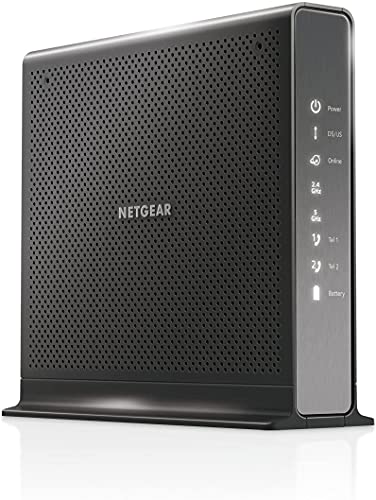
NETGEAR Nighthawk Cable Modem WiFi Router Combo with Voice — One Box for Cable Voice
The C7100V collapses the whole chain into one chassis: a cable modem, an AC1900 Wi-Fi router and voice support for two phone lines, built — per its title — for Xfinity cable and voice plans up to 600Mbps, on DOCSIS 3.0. For the household or small office on that provider, the appeal is subtraction. No separate modem to rent, no router behind it, no voice adapter behind that: the cable line enters one box, and Wi-Fi plus two telephone lines leave it. The two phone lines matter more than they appear to — a home line and an office line, or a voice line and a fax line, run from the same unit without a second device.
The role clarity cuts both ways, and this guide states it as plainly as the title states the provider: this is a device for Xfinity cable and voice customers. Its voice function serves the provider’s own voice plans, not an independent VoIP service of your choosing; a household with a third-party SIP provider and a drawer of analogue phones belongs in the gateway sections below. The 600Mbps plan ceiling in the title is the second honest boundary — households on faster cable tiers should be reading the ARRIS section, whose title reaches 800 Mbps, or confirming their tier against the modem’s rating before purchase. DOCSIS 3.0, printed in the title, is the established cable standard these combos share; neither pick in this guide claims the newer generation, and neither section pretends otherwise.
- Role: cable modem + Wi-Fi router + voice, one box
- Provider: Xfinity cable and voice plans, per the title
- Plan speed: up to 600Mbps, per the title
- Voice: 2 phone lines supported
- Wireless: AC1900 Wi-Fi
- Modem: DOCSIS 3.0
The ownership experience is the product’s real argument. One firmware, one set of status lights, one device for the provider’s support line to recognise — when the connection or the dial tone falters, there is exactly one suspect, and it is a mainstream NETGEAR the provider’s systems know. Households that have mediated between a modem maker and a router maker on a support call will price that unity correctly. The corresponding cost is the usual combo cost: the layers cannot be upgraded separately, so the box is replaced as a unit when any layer ages out.
Placement follows modem logic, not router logic — the box lives where the cable line enters, and its AC1900 Wi-Fi radiates from there. In a compact home or office that is no hardship; in a long house it is the familiar combo compromise, accepted knowingly in exchange for the single-box estate.
The two-line detail deserves one practical expansion, because it is where combo voice quietly outperforms improvised alternatives. Two lines from one provisioned box means the household’s number and the business’s number share a dial tone’s reliability without sharing a device budget — the home office’s classic arrangement, delivered by the provider’s own infrastructure rather than by an adapter’s registration. For the freelancer whose office line is their livelihood and whose provider is the one named in the title, that is not a compromise architecture; it is the intended one, and its simplicity is the feature the rental-modem alternative never quite matches.
Strengths
- Modem, router and two voice lines in one provisioned unit.
- Removes modem rental and two inter-device joints from the chain.
- Named provider fit makes the compatibility check a one-line reading.
Trade-offs
- Voice serves the named provider’s plans, not independent VoIP services.
- The stated plan ceiling is 600Mbps; faster tiers outgrow it.
- Combo layers upgrade together or not at all.
Best for: an Xfinity household or small office wanting its internet, Wi-Fi and two phone lines from a single box. Not suited for: a subscriber of a different cable provider, or a user of an independent VoIP service — the title names its provider, and the voice side belongs to that provider’s plans.
Provisioned hardware rewards a final compatibility glance, so confirm the C7100V’s current listing against your exact Xfinity plan before the rental modem goes back.

ARRIS SURFboard SVG2482AC Modem Router with Voice — The Faster Cable Gateway
The SVG2482AC is the same one-box idea at a higher tier: a DOCSIS 3.0 cable modem with an AC2350 Wi-Fi router, four 1 Gbps ports, and two telephony ports for digital voice, built for Comcast Xfinity internet and voice at up to 800 Mbps. Every printed figure steps up from the NETGEAR — a faster plan ceiling, a higher Wi-Fi class, and a wired estate of four gigabit ports that the C7100V’s title does not itemise. ARRIS’s SURFboard line is cable-modem aristocracy; this is its voice-era flagship shape, and the title reads like it.
The four gigabit ports deserve emphasis because they change the combo’s living pattern. A wired office corner — desktop, printer, a storage box — can hang directly off the gateway, and the television can take the wired streaming path this guide’s sibling roundups keep recommending, all without a switch. The two telephony ports carry the same two-line voice story as the NETGEAR: the provider’s digital voice, delivered to ordinary telephones plugged into the gateway. As with its rival, the role boundary is printed in the title — Xfinity internet and voice — and households outside that provider, or loyal to an independent VoIP service, should read on to the gateways.
- Role: cable modem + Wi-Fi router + voice gateway
- Provider: Comcast Xfinity internet and voice, per the title
- Plan speed: up to 800 Mbps, per the title
- Voice: two telephony ports for digital voice
- Ports: four 1 Gbps ports
- Wireless: AC2350 Wi-Fi; modem DOCSIS 3.0
Between the two combos, the decision procedure is refreshingly short. Check the plan tier first: the household above the NETGEAR’s stated ceiling has its answer. Then count wired devices: the ARRIS’s four gigabit ports serve a wired corner natively. Then consider the makers — both are mainstream, both are known to the provider’s provisioning systems, and the honest differences are the printed ones. What neither combo offers is a path to a different provider or an independent voice service; they are excellent answers to a specific question, and this guide’s gateway sections exist for everyone asking a different one.
One ownership note mirrors the NETGEAR’s: a single box means a single point of failure, and a household whose phone line is its lifeline should hold that thought plainly. The mitigation is the provider relationship itself — a provisioned gateway is the device the cable company’s support is organised around — but the household that wants its voice to survive its router’s bad day is describing a separated architecture, and should build one from the sections below.
ARRIS’s presence in this guide carries a channel reality worth a sentence: SURFboard gateways are the devices cable households most often already know, stocked everywhere cable service is sold, and supported by a documentation trail a decade deep. A buyer choosing between the two combos on maker familiarity is not being shallow — provisioning day is smoother with the device the local technicians have activated five hundred times, and the SVG2482AC’s printed advantages in tier and ports mean that familiarity does not have to be bought with a specification compromise.
Strengths
- The higher printed tier of the two combos: 800 Mbps plans, AC2350 Wi-Fi.
- Four gigabit ports wire the office corner without a switch.
- Two telephony ports carry the provider’s digital voice to ordinary phones.
Trade-offs
- Provider-bound voice, like its rival: Xfinity plans are the audience.
- DOCSIS 3.0 — the established standard, not the newest cable generation.
- One box remains one point of failure for internet and voice together.
Best for: an Xfinity household on a faster tier with wired devices to serve and two voice lines to run. Not suited for: a home seeking to keep an independent VoIP provider — this gateway’s telephony ports serve the cable voice plan named in its title.
Tier arithmetic settles this pick quickly, so check the SVG2482AC’s current listing against your plan’s speed before ordering.

FLYINGVOICE FWR8101 — Single Phone, Wireless ATA
The FWR8101 changes the subject from providers to adapters. It is an analogue telephone adapter with one FXS port — one ordinary telephone plugs into it — plus 2.4GHz 300Mbps Wi-Fi, access point and repeater modes, and support for the T.38 fax protocol, aimed by its title at PBX environments, small businesses, remote work and business travel. This is the device for the single most common VoIP errand: one existing phone, or one fax machine, that must join a VoIP service while everything else about the setup stays as it is.
The Wi-Fi is what makes this ATA unusual. Most adapters are wired-only citizens of a network rack; the FWR8101 can join the network wirelessly and can even serve as an access point or repeater, which places it in the remote worker’s reality — the desk in the spare room, the site office, the hotel-adjacent work trip its title mentions — where the router is not within cable reach of the telephone. The T.38 support is the second specialist feature: T.38 is the protocol that carries fax reliably over IP networks, and its presence in the title makes this the only pick in the guide that speaks to the fax machine’s survival in a VoIP migration. Offices that still fax — legal, medical, property — should underline that line.
- Role: analogue telephone adapter (ATA) with Wi-Fi
- Telephony: 1 FXS port
- Fax: T.38 fax protocol supported, per the title
- Wireless: 2.4GHz 300Mbps Wi-Fi; AP and repeater modes
- Audiences: PBX, SMB, remote work, business travel, per the title
- Service: assumes a VoIP service or PBX on the other side — the adapter is the bridge, not the provider
Sizing is the section’s honest limit: one FXS port is one telephone. The home office with a single desk phone, or the branch with one fax line to preserve, is perfectly served; the office counting phones on two hands belongs in the Grandstream sections. The wireless class is similarly single-purpose — 2.4GHz at 300Mbps is there to carry the adapter and light duties, not to be the office’s Wi-Fi, and the repeater mode is a convenience for the corner the phone lives in rather than a coverage strategy.
FLYINGVOICE is a specialist VoIP hardware name rather than a household one, which cuts the usual way: the product is aimed at people who know what an FXS port is, and its title speaks that language fluently. Buyers new to VoIP should note the assumption the whole gateway class makes — a service or PBX must exist for the adapter to register with — and should confirm their provider supports bring-your-own-device setups before ordering any pick in these four sections.
The travel angle in the title is more than garnish. A consultant who carries a desk phone’s habits between client sites, or a small firm equipping a temporary project office, can drop the FWR8101 into a bag and rebuild the same telephone endpoint anywhere there is Wi-Fi — the number, the handset behaviour and the fax capability travelling together. That portability is unique in this guide: the Grandstream units are rack citizens, the combos are provider furniture, and this small adapter is the only pick that treats the telephone as luggage. For the growing class of businesses whose office is wherever the contract is, that is a considered answer, not a novelty.
Strengths
- The only wireless ATA here — the phone need not live beside the router.
- T.38 fax support is printed, unique among these six titles.
- AP and repeater modes stretch its usefulness in awkward rooms.
Trade-offs
- One FXS port serves exactly one telephone or fax machine.
- 2.4GHz-only Wi-Fi at a modest class.
- Requires an existing VoIP service or PBX to register with.
Best for: the single desk phone or fax machine that must join a VoIP service, especially away from the router. Not suited for: an office counting its telephones in multiples — one port is the whole estate, and the multi-port gateways below exist for that census.
Single-line errands deserve single-purpose tools, so look over the FWR8101’s current listing and confirm your provider’s bring-your-own-device terms alongside it.

Grandstream HT814 — Four Phones, Small Office
Grandstream’s HT814 is the small office’s gateway in its classic form, and its title is a parts list of the classic kind: an AES-equipped, 4-FXS, office HD NAT router and 2-SIP VoIP gateway. Unpack it in order. Four FXS ports connect up to four analogue telephones — desk phones, a cordless base, the meeting room’s handset — to VoIP service. The NAT router is built in, so the gateway can also serve as the small network’s routing heart rather than merely a passenger on it. The 2-SIP element speaks to service profiles — the office’s main provider and a second account, or two lines of identity — and AES in the title is the encryption standard the device advertises for its traffic. HD positioning promises the wideband audio that makes VoIP calls sound like the present rather than the past, when the phones and service support it.
The role is precise: the HT814 sits between an internet connection and an office’s existing analogue phones, translating between the two worlds. It is not a modem — the office’s internet arrives by whatever means it already arrives — and it is not a phone system by itself; the VoIP service or PBX it registers with provides the lines, the numbers and the call routing. What the HT814 provides is the physical hospitality: four sockets that let a small office keep the telephones it already owns and understands, on a service that costs and behaves like the present.
- Role: VoIP gateway with built-in NAT router
- Telephony: 4 FXS ports
- Service profiles: 2-SIP, per the title
- Security: AES stated in the title
- Audio: HD positioning, per the title’s office HD designation
- Wireless: no Wi-Fi radio is claimed in this listing title — this is a wired gateway
Four ports is the sizing that fits the classic small office — reception, the manager’s desk, the back office, the shared handset — and the built-in router means the smallest installations can run phone and a modest data network through the one unit. Larger or more data-serious offices will place it behind their main router as a pure gateway, which the design also accommodates; the NAT router’s presence is an option, not an obligation. The title’s terseness about port speeds and further particulars sends the careful buyer to Grandstream’s documentation, which for this long-running line is thorough.
Grandstream’s HT series has been the default answer to this exact errand for years, and that installed base is a practical asset: configuration knowledge for these gateways is abundant, and VoIP providers’ setup guides routinely speak Grandstream fluently. An office migrating its phones is buying a well-documented path as much as a device.
The 2-SIP detail rewards a moment’s planning thought, because it shapes how the office presents itself to the world. Two service profiles can mean the main number and the secondary line, the local presence and the head-office extension range, or the trading name and the legacy name during a rebrand — arrangements a single-profile adapter cannot express. An office that knows its telephony will wear two identities, even briefly, should count that printed figure as a genuine differentiator rather than a spec-sheet ornament, and should raise it with the service provider while the numbers are being assigned, not after.
Strengths
- Four FXS ports match the classic small office’s telephone census.
- A built-in NAT router lets the smallest setups run through one unit.
- 2-SIP profiles and AES are printed in the title, not assumed.
Trade-offs
- Terse title: port speeds and finer details live in the documentation.
- No wireless — a wired citizen of the network by design.
- Four ports is a ceiling; growing offices should size up now.
Best for: a small office moving up to four existing telephones onto a VoIP service. Not suited for: a buyer seeking a modem or an all-in-one internet device — this gateway assumes the internet connection already exists and gives it telephones, not the other way round.
Office migrations run on checklists, so verify the HT814’s current listing and count the office’s handsets one final time before it joins the rack.

Grandstream HT818 8-Port FXS Gateway — Eight Phones, Gigabit Router
The HT818 doubles the HT814’s proposition and speeds up its router: a powerful 8-port FXS gateway with a gigabit NAT router, in Grandstream’s own title phrasing. Eight FXS ports absorb the telephone census of a serious small office or a small institution — the dental practice with a handset in every surgery, the guesthouse whose rooms keep their phones, the workshop whose office, counter, warehouse and manager all need a line. The gigabit specification on the built-in router matters at this scale: a gateway routing for eight phones and the office around them should not be the slow joint in the network, and Grandstream’s title says it is not.
The role is the HT814’s role at twice the census — the bridge between an existing internet connection and VoIP service on one side, and a fleet of analogue telephones on the other. The word powerful in the title is the vendor’s adjective and this guide lets it stand as positioning rather than evidence; the evidence is the port count and the router speed, both printed, both checkable. Eight analogue lines also imply a wiring reality worth naming: those telephones reach the gateway over the building’s phone cabling or fresh runs, so the HT818 belongs in the comms corner where that cabling converges — a neatness the wireless FWR8101 was designed to escape, at one port’s scale.
- Role: VoIP gateway with built-in NAT router
- Telephony: 8 FXS ports
- Router: gigabit NAT router, per the title
- Wireless: the title claims no radio — plan it as a wired unit
- Service: registers with the office’s VoIP service or PBX, which the gateway itself does not provide
- Model: HT818
Who it suits is the organisation whose analogue estate is an asset rather than an embarrassment: phones in walls and rooms that would cost real money to replace with IP handsets, staff who know them, a service migration that should change the bill and the flexibility without changing a single handset. The HT818 makes that migration a gateway purchase instead of a telephone replacement programme. Who should pause is the office building new — with no analogue fleet to preserve, native IP phones skip the translation layer entirely, and the gateway’s virtues go unspent.
As with the HT814, the title is a parts list and the documentation is the manual; an eight-line deployment deserves the fuller reading, particularly around how the office’s service provisions multiple lines. But the parts list itself — eight ports, gigabit routing — is the most complete sentence any gateway title in this guide manages, and it is complete in the two dimensions that decide the purchase.
Institutional buyers will recognise a further virtue in the eight-line shape: spares and symmetry. An estate of identical handsets behind one gateway model means one configuration pattern to document, one spare unit on the shelf that can absorb any failure, and a migration that can be rehearsed on a single port before the other seven follow. That rehearsability is the difference between a switch-over weekend that is a formality and one that is a gamble, and it is available only at the fleet end of this guide — a point in the HT818’s favour that no specification table records.
Strengths
- Eight FXS ports — the largest analogue estate in this guide.
- A gigabit NAT router is specified, not merely present.
- Preserves an entire installed fleet of telephones through a VoIP migration.
Trade-offs
- Value depends on owning analogue phones worth preserving.
- Eight lines mean real cabling converging on one comms corner.
- The title leaves service-provisioning details to the documentation.
Best for: a multi-line office or small institution migrating a fleet of existing telephones to VoIP. Not suited for: a green-field office with no analogue phones — with no fleet to bridge, the translation layer this gateway provides has nothing to translate.
Fleet migrations deserve a port-by-port plan, so check the HT818’s current listing and map each of the office’s handsets to a port before the switch-over weekend.
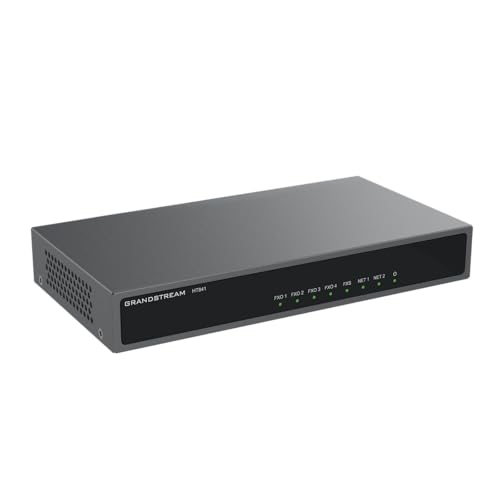
Grandstream HT841 VoIP Gateway with NAT Router — The Hybrid Bridge
The HT841 is the guide’s most specialised device, and its title rewards careful reading: a VoIP gateway with 4 FXO ports, 1 FXS port, two gigabit Ethernet ports with PoE, and a NAT router. The FXO ports are the new letter in this guide’s alphabet. Where FXS ports serve telephones, FXO ports connect to telephone lines — the traditional landlines arriving from the street. Four FXO ports let an organisation keep up to four conventional lines inside a VoIP system: the published number that must keep working, the legacy lines a contract or a lift phone depends on, the gradual migration where VoIP grows around the old lines instead of replacing them overnight. The single FXS port serves one local telephone on the same unit.
This is gateway as diplomacy. Most real organisations do not migrate telephony in a clean break; they straddle — new service for most calls, old lines for the numbers printed on a decade of stationery, the alarm or the lift on its dedicated copper. The HT841 is built for the straddle, with the built-in NAT router and dual gigabit PoE-capable ports giving it a serious network position while it brokers between the two telephony worlds. The PoE note in the title speaks to installation flexibility — power arriving over the network cable — in the comms corners where these devices live.
- Role: VoIP gateway with NAT router, hybrid analogue-line bridge
- Telephony outward: 4 FXO ports for traditional landline connections
- Telephony inward: 1 FXS port for a local telephone
- Ports: 2 GigE with PoE, per the title
- Wireless: no radio is claimed in the title — a wired gateway
- Model: HT841
The audience is correspondingly specific: the business whose telephony is a negotiation between eras, and the installer who serves it. A pure-VoIP office with no landlines to preserve has no use for FXO ports and should spend its money on FXS capacity — the HT814 or HT818. A home user has wandered into the wrong section entirely. But the organisation mid-migration, or permanently hybrid by regulation or habit, will recognise the HT841 as the device that lets the old numbers and the new service share one system — and that recognition is the whole review.
Because hybrid setups are configuration-rich, the documentation discipline matters doubly here: the title establishes the port estate, and Grandstream’s materials govern how lines are mapped and routed. Plan the mapping on paper — which landline, which behaviour, which fallback — before the device is racked, because a hybrid gateway configured by improvisation becomes the office’s most confusing citizen.
The fallback question is the hybrid’s soul, and it deserves stating as a design principle: when the internet service falters, the FXO-connected lines are the office’s analogue lifeboat, and when a landline fails, the VoIP side covers. A gateway that brokers both directions of failure is a continuity device wearing a telephony costume — which is why this pick, the most specialised in the guide, may be the most valuable to the specific organisation it fits. Continuity planning elsewhere in the business rarely gets a device this precisely shaped; telephony’s version of it is sitting in this section.
Strengths
- Four FXO ports keep traditional landlines alive inside a VoIP system.
- Dual gigabit PoE-capable ports give it a serious network position.
- The only hybrid bridge in this guide — built for gradual migrations.
Trade-offs
- Only one FXS port; local telephone capacity is minimal by design.
- Pure-VoIP offices pay for FXO hardware they will never wire.
- Hybrid routing rewards a written plan, not improvisation.
Best for: an organisation straddling eras — VoIP service growing around landlines that must keep ringing. Not suited for: a buyer seeking multi-phone FXS capacity; with a single FXS port, this gateway’s local telephone story is deliberately small.
Hybrid kit is bought against a line inventory, so review the HT841’s current listing with your existing landlines counted and named before it joins the system.
Comparison Table
| Pick | Role in the chain | Phone connections | Internet side | Wireless | Signature feature |
|---|---|---|---|---|---|
| NETGEAR C7100V | Modem + router + voice | 2 phone lines | DOCSIS 3.0 modem built in | AC1900 | Xfinity voice in one box |
| ARRIS SVG2482AC | Modem + router + voice | 2 telephony ports | DOCSIS 3.0 modem built in | AC2350 | Four gigabit ports, 800 Mbps tier |
| FLYINGVOICE FWR8101 | ATA behind any connection | 1 FXS | Joins existing network, incl. Wi-Fi | 2.4GHz 300Mbps | T.38 fax support |
| Grandstream HT814 | Gateway + NAT router | 4 FXS | Behind the existing connection | None claimed | 2-SIP profiles, AES |
| Grandstream HT818 | Gateway + NAT router | 8 FXS | Uses the existing connection | Not claimed | Gigabit router, eight lines |
| Grandstream HT841 | Hybrid gateway + NAT router | 4 FXO + 1 FXS | Behind existing broadband | None in title | Landline bridging, PoE ports |
Which Link of the VoIP Chain Are You Buying?
Draw the chain before spending anything. The call’s path runs: the street’s connection, the modem or line that terminates it, the router that runs the local network, the service that provides numbers and routing, and the telephones themselves. The two combos in this guide buy the first three links and borrow the fourth from the cable provider. The four gateways buy the last link — the telephones’ citizenship — and assume the rest exists. A purchase goes wrong when it buys a link the buyer already owns, or skips the one they lack; the office that orders a gateway while its real gap is a provisionable modem has spent money to stand still.
The service question deserves its own emphasis, because it is the gateways’ silent assumption. Grandstream and FLYINGVOICE hardware registers with something — a VoIP provider, a hosted PBX, the office’s own system — and that something is chosen separately, with its own per-line arithmetic. Offices planning the migration should choose the service first and the gateway second, confirming bring-your-own-device support in writing; the gateway sections’ advice assumes that order. Businesses that would rather the telephony arrive as one managed service — phones in guest rooms, lines at the front desk — will find the neighbouring problem covered in our Best Wireless Routers for Hotels guide, where connectivity is bought as hospitality infrastructure.
There is a budget shape to the chain that rewards the same drawing exercise. The combo concentrates cost into one device and one provider relationship; the gateway architecture spreads it — a service subscription, a gateway per telephone cluster, the handsets already owned written off as free. Neither shape is cheaper in the abstract, but they fail differently at renewal time: the combo’s household renegotiates with one counterparty, the gateway’s office can move its service while its hardware stays on the wall. Organisations that value that exit should notice it now, while the architecture is still a sketch, because the port counts in this guide are quietly decisions about future negotiating power as much as about telephones.
And keep the wired network honest behind whichever link you buy. Voice flows are small but impatient, and they share the office’s connection with everything else the business does; the router layer’s continuity and capacity thinking in our Best WiFi Routers for Schools roundup — written for classrooms, applicable to any dense workplace — is the same discipline at a different scale. Small flows, zero patience: that is the whole engineering brief.
Keeping Calls Clear on a Busy Network
The titles in this guide are parts lists, and parts lists cannot promise call quality — but the buyer can stack the conditions in quality’s favour with decisions that cost little. Wire the gateway where wiring is possible; the FWR8101’s wireless talent is for the phone that cannot be wired, not a default. Give the telephony corner a calm segment of the network where the office’s bulk traffic — backups, updates, the meeting-room stream — does not queue ahead of syllables. And size the internet connection for the busy hour with the calls included in the arithmetic, not as an afterthought: a dozen simultaneous calls is a modest flow, but it is a flow that must never wait.
The human layer matters as much. A migration that keeps the same handsets, the same extensions and the same habits — the HT818’s entire proposition — succeeds socially where a rip-and-replace fails, because staff judge the new system by whether Tuesday felt normal. Plan the switch for a quiet day, keep the old arrangement reachable for a week, and let the gateway’s boring reliability make the argument. The dedicated phone-system end of this world is covered in our Best Wireless Routers for VoIP Phones guide, for offices ready to retire the analogue fleet rather than bridge it.
Power deserves a closing word in this section, because telephony carries an expectation data never makes: the phone should work when the lights do not. Traditional lines carried their own power; VoIP devices drink from the mains like everything else. The HT841’s PoE-capable ports hint at the professional answer — telephony powered from a central, backed-up network point — and any office whose phones are lifelines should ask the question of its whole chain, modem to handset, and consider which links deserve a battery behind them. It is the one specification no title in this guide prints, and the one an emergency will ask about first.
Migration Week: Moving the Phones Without Losing the Dial Tone
Every pick in the gateway half of this guide will be installed during some version of the same week, and the week’s choreography decides whether the office remembers the migration as a triumph or a grievance. The pattern that works is boring by design. The service is chosen and the numbers are arranged first, with the gateway configured and registered against a single test telephone while the old system still carries the office. Call quality is judged on real conversations at the busy hour, not on a Sunday test call. The fax machine, if the business has one, sends and receives its full routine through the new path before it is declared migrated. Only then do the remaining handsets move, port by port, with the old arrangement still reachable.
The combos rehearse differently but rhyme: provisioning is the provider’s ceremony, so the household’s job is scheduling — activation when support lines are open, the old rental equipment kept until the dial tone is proven, the Wi-Fi name and password carried over so the household’s devices never notice the change of box. In both architectures the principle is identical: the new path proves itself under supervision before the old path is allowed to leave. Telephony is the one service an organisation cannot be without for an afternoon while it troubleshoots, and the migration plan should be written as if that were literally true — because for the customer calling at that moment, it is.
Document the result either way. The gateway’s port map, the service’s account details, the combo’s provisioning particulars — a single page in the office’s records converts the next decade’s telephone questions from archaeology into administration. The devices in this guide will outlast the memory of whoever installed them; the page is how the installation survives its installer.
Common Mistakes
Buying a combo for the wrong provider. Both modem combos name Xfinity in their titles. A different provider’s household gains a modem it cannot provision and a voice function it cannot use. Provider first, product second.
Confusing FXS with FXO. FXS ports take telephones; FXO ports take telephone lines. An office that orders the HT841 expecting eight handsets, or the HT818 expecting landline bridging, has bought the mirror image of its need. Read the letters.
Forgetting the service. Gateways and ATAs register with a VoIP service or PBX that is chosen and paid for separately. The hardware is the bridge; the service is the far shore. Confirm bring-your-own-device support before the hardware arrives.
Undercounting the phones. The cordless base in the kitchen, the fax in the office, the handset in the warehouse — the census that matters includes every device with a dial tone, counted on a walk around the building, not from memory at a desk.
Retiring the fax by accident. Fax over VoIP needs the right protocol support — T.38, printed in exactly one title here. Offices that still fax should treat that line of the FWR8101’s title as the migration’s critical detail.
FAQ
What is the difference between the modem combos and the gateways? The combos terminate the cable connection and include the provider’s voice service in one box — modem, router and phone lines together. The gateways assume an internet connection and a VoIP service already exist, and their job is connecting ordinary telephones to that service. Different links, different purchases.
Can I keep my existing phones when I move to VoIP? That is precisely what the FXS gateways exist for. Count your handsets, choose the port count that covers them — one, four or eight in this guide — and the phones stay while the service behind them changes.
What are FXO ports for? Connecting traditional landlines into a VoIP system. The HT841’s four FXO ports let an organisation keep its conventional lines — the published number, the legacy services — working alongside its VoIP service during a gradual or permanent hybrid arrangement.
Will these devices work with any VoIP provider? They are built for SIP-based services and PBX systems, and the FWR8101’s title names PBX and SMB use outright. Providers differ in their device policies, so confirm bring-your-own-device support with your chosen service before ordering — the check takes one message and prevents the classic stranded gateway.
Does the fax machine survive a VoIP migration? It can, with the right support: the FWR8101’s title prints T.38, the protocol designed to carry fax over IP networks. Offices that rely on fax should make that printed line a hard requirement and test the machine’s full send-and-receive routine during the migration week, not after it.
Can a gateway also be the office’s router? The Grandstream picks carry built-in NAT routers by their titles — the HT818’s specified as gigabit — so the smallest offices can run their telephones and a modest data network through the one unit. Larger offices usually place the gateway behind their main router as a pure telephony device; both arrangements are legitimate, and the choice belongs to the network’s size, not to the gateway’s pride.
Final Recommendation
Start, as every section has urged, with the census and the chain: walk the building, count every device that rings or faxes, name the provider and the service, and write the chain on one page. The right purchase will be legible in that page before any listing is opened — which is the surest sign the homework, rather than the marketing, is doing the choosing.
Buy the link you are missing, and no other. The Xfinity household that wants one box takes the C7100V at its tier, or the SVG2482AC for the faster plan and the fuller port estate. The office with a VoIP service chosen counts its telephones and takes the gateway that matches the census — the FWR8101 for the single phone or the fax that must survive, the HT814 for the classic four-desk office, the HT818 for the eight-line fleet — and the organisation straddling two telephony eras takes the HT841 and its landline diplomacy. Voice forgives nothing, but it rewards the buyer who reads the chain before spending on it: every device in this guide is the right answer, addressed to a different question. Choose the question your building is actually asking, and the dial tone will take care of itself for years.
Related Guides
VoIP hardware sits inside a workplace’s wider network, and these guides cover its neighbours: Best Wireless Routers for Hotels for guest-facing telephony and coverage, Best WiFi Routers for Schools for dense workplace networks at institutional scale, and Best Wireless Routers for VoIP Phones for the dedicated phone-system end of the migration.


